Home › Photo & Video

 US
US
USen-US BRpt-BR
 MXes-MX
 CLes-MX
 ARes-MX
 COes-MX
 PEes-MX
 ECes-MX
 GTes-MX
 CRes-MX
 UYen-GB
 PAes-MX
 SVes-MX
 BOes-MX
 MUen-GB
 NGen-GB
 DZen-GB
 HNes-MX
 KEen-GB
 TNen-GB
 PYes-MX
 GHen-GB
 DOes-MX
 NIes-MX
 AOen-GB
 MAen-GB
 MZen-GB
 TZen-GB
 VEes-MX
 BBen-GB
 BFen-GB
 BJen-GB
 BWen-GB
 CDen-GB
 CIfr-FR
 CMfr-FR
 GAfr-FR
 GMen-GB
 JMen-GB
 MGen-GB
 NAen-GB
 RWen-GB
 SCen-GB
 SNen-GB
 TTen-GB
 UGen-GB
 ZMen-GB
 ZWen-GB
 AGNot Available
 AINot Available
 BSNot Available
 BZNot Available
 CGNot Available
 CVNot Available
 DMNot Available
 GDNot Available
 GWNot Available
 GYNot Available
 KNNot Available
 KYNot Available
 LCNot Available
 LRNot Available
 LYNot Available
 MLNot Available
 MSNot Available
 MWNot Available
 NENot Available
 SLNot Available
 SRNot Available
 STNot Available
 SZNot Available
 TCNot Available
 TDNot Available
 VCNot Available
 VGNot Available
48 of 75 storefronts
Content in en-US
Content in en-US
Information
Apple ID489191124
Bundle IDjp.co.sony.playmemoriesmobile
SellerSeller
Min iOS17.7
Min macOS14.7
Device familiesiphone, ipad
Released2012-01-09
Copyright© 2012 - 2026 Sony Corporation
Privacy policyLink ↗
Preview 2 platforms
iPhone 4 images


iPad 3 images


What’s New Version 7.8.3
- compatible with iOS26.
Description
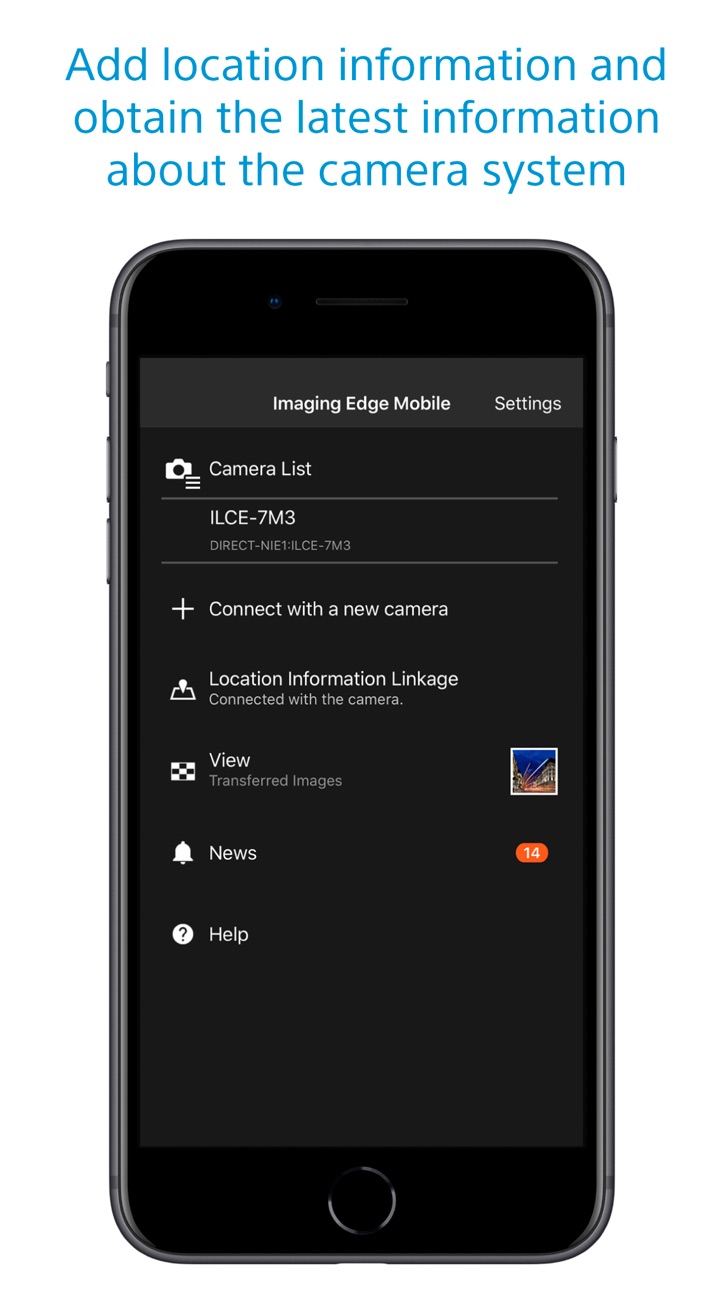
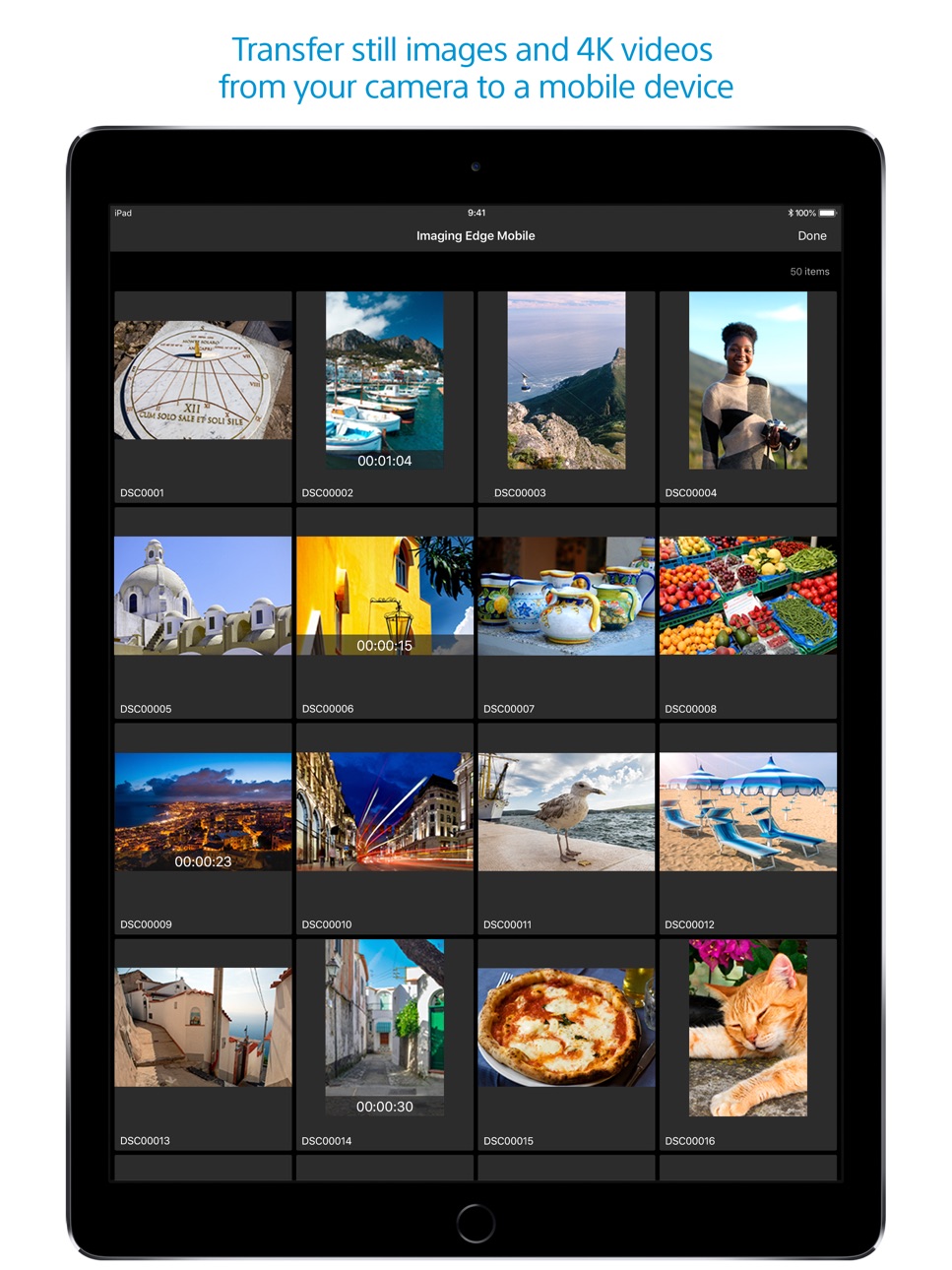
Imaging Edge Mobile allows images/videos to be transferred to a smartphone/tablet, enables remote shooting, and provides location information to images captured by a camera.
■ Transfer images from a camera to a smartphone
- You can transfer images/videos.
- The selection and transfer of images after shooting are no longer needed as the automatic background transfer function allows images to be transferred to a smartphone as they are captured. *1
- High bit rate video files including 4K can be transferred. *2
- You can view and transfer images in your camera from your smartphone even when the camera is turned off. *2
- After transferring, you can immediately share your high quality images on social networks or through email.
*1 See here for supported cameras. Files are imported in 2MP size when using this function.
https://www.sony.net/dics/iem12/
*2 See here for supported cameras. Availability of video transfer and playback varies depending on smartphone in use.
https://www.sony.net/dics/iem12/
■ Remote shooting of a camera using a smartphone
- You can capture photos/videos remotely while checking the live view of a camera on a smartphone. *3
This is convenient for capturing night views or water flowing scenes which need long-exposure, or macro shooting in which you need to avoid to directly touch the camera.
*3 Models that support PlayMemories Camera Apps can use this feature by installing "Smart Remote Control" (in-camera app) on your camera in advance.
http://www.sony.net/pmca/
■ Record location information
- With cameras that have a location information linkage function, the location information acquired by the smartphone can be added to the captured image in your camera.
For supported models and detailed operation methods, see the support page below.
https://www.sony.net/dics/iem12/
- Even with cameras that do not have a location information linkage function, it is possible to add location information acquired by your smartphone to the photos saved on your smartphone during remote shooting.
■Save and Apply Settings
- You can save up to 20 camera settings in Imaging Edge Mobile.
You can also apply a saved setting to a camera. *4
*4 See here for supported cameras. Save and Apply Settings are supported only for cameras with the same model name.
https://www.sony.net/dics/iem12/
■ Notes
- Supported operating systems: iOS17.7-26.2
- This app is not guaranteed to work with all smartphones/tablets.
- Features/Functions available for this app vary depending on the camera you are using.
- For supported models and information on features/functions, see the support page below.
https://sony.net/iem/
Accessibility
ipadiphonemacrealityDevicetvoswatch
Version history 25 versions
Build 882502217v7.8.32026-03-10 03:03:21
- compatible with iOS26.
Build 878453333v7.8.22025-10-06 09:15:16
For iOS26/iPadOS26:
Fixed an issue which video transfer from some Sony camera models cannot complete.
Build 864950946v7.8.12024-04-11 03:36:41
- Fixed an issue where the message "Please turn on Bluetooth" was displayed even though iPhone's Bluetooth was on.
- Fixed an issue where images could not be transferred from the camera even if there was free space on the iPhone's storage.
- Improved the issue where the app would terminate abnormally in rare cases.
Build 860925771v7.8.02023-10-31 02:09:16
- Now available on iOS17.
Build 858480541v7.7.52023-07-18 03:06:11
- Fixed an issue when Location Information Linkage may not work correctly on iOS/iPadOS 16.4 or later.
Build 857483738v7.7.42023-06-02 03:03:37
- Fixed an issue where remote shooting and image transfer were not possible with some cameras.
Build 857183576v7.7.32023-05-23 03:14:03
- Fixed an issue where Location Information Linkage with the camera.
- Other fixes and stability improvements.
Build 854924912v7.7.22023-02-22 02:04:46
The design of the app icon has changed.
Build 852595010v7.7.12022-10-14 01:01:49
- Adds support for iOS16.
- Adds support for the ILME-FX30. camera.
Build 849846574v7.7.02022-07-14 03:48:01
Supports ILME-FX3 System Software Update Ver. 2.00.
- Stores the initial pairing of the app with your camera so that you can transfer images or perform remote shooting by simply operating the app when you start it subsequently.
- Supports remote shooting in a new log shooting mode, such as Cine EI mode.
- Supports remote shooting in flexible exposure mode.
Build 844707573v7.6.02021-11-09 01:41:48
- compatible with iOS15.
- compatible with ILCE-7M4.
- Once the app is paired with the camera, you can transfer images and take remote shots by simply using the app from the next start-up. (For ILCE-7M4 only)
Build 841385689v7.5.22021-04-20 02:03:01
Improved connectivity with the camera in some Wi-Fi environments.
Build 840418042v7.5.12021-02-16 01:43:41
Fixed the issue that images are not displayed or selected from the app when many images are stored in the memory card on the camera side.
Build 840018830v7.5.02021-01-27 02:07:13
Improved performance for displaying images when using "Select from Smartphone".
Added support for ILCE-1.
- Added support for RAW image transfer.
- The app can now maintain Wi-Fi connection between the camera and the smartphone after transferring images selected on the camera.
- You can now toggle between image transferring and remote shooting while maintaining Wi-Fi connection between the camera and the smartphone.
- You can now use touch control to display a focus frame during remote shooting.
Build 836814123v7.4.02020-07-29 03:17:44
- Now supports ILCE-7SM3.
- Now supports Touch Focus (for MF) and Touch Tracking (for AF) while shooting movies.
- Now supports HEIF images (iOS13 and later).
- HEIF images shot with the "HLG Still Image" option may not display correctly.
- The screen for connecting a camera is now easier to understand.
- You can now improve connectivity with a camera by allowing location access.
Build 835054245v7.3.32020-03-12 05:20:16
- Fixed the issue that remote shooting or image transfer could not be started when connecting to the camera via Wi-Fi from the iPhone settings before launching the application.
- When the smartphone and camera cannot connect via Wi-Fi, a report can be sent to the developer in the dialog displayed by the app.
- Added FAQ of support page in "Help/FAQ(Wi-Fi connection)" of application.
Build 834392752v7.3.22020-02-12 04:06:19
- The app crashes when launching the app or during image transfer.
- Image sending and remote shooting are not possible even though the iPhone/iPad is connected to the camera via Wi-Fi.
- The connected camera is not saved in the camera list.
Build 834133520v7.3.12019-12-28 16:13:01
- Fixed an issue where a network error occurs after starting the app in some languages and the app cannot be used.
- To connect to the camera for the second time or later, activate the Wi-Fi function on the camera and then select the camera from the "Camera List" of this application.
- You can sign in to see the latest information about your camera on My Page.
Build 833778856v7.3.02019-12-18 04:39:37
- Operations for the second and subsequent connections to a camera have been simplified.
- You can sign in using your Sony account to see the latest information about your camera on My Page.
Build 833204363v7.2.32019-10-24 00:04:33
7.2.3:
- Fixed an issue where remote shooting and image transmission cannot be used on iOS13 in certain regions.
7.2.2:
- Fixed an issue where remote shooting and image transmission cannot be used on iOS13.
7.2.1:
- Fixed an issue where multiple empty 'Imaging Edge Mobile' albums were created in some rare cases.
* Empty albums can be deleted from “To delete empty ‘Imaging Edge Mobile’ albums” in the Help/Instruction Manual of App
Build 832982173v7.2.22019-10-07 01:16:10
7.2.2:
- Fixed an issue where remote shooting and image transmission cannot be used on iOS13.
7.2.1:
- Fixed an issue where multiple empty 'Imaging Edge Mobile' albums were created in some rare cases.
* Empty albums can be deleted from “To delete empty ‘Imaging Edge Mobile’ albums” in the Help/Instruction Manual of App
Build 832625297v7.2.12019-09-10 02:57:45
Fixed an issue where multiple empty 'Imaging Edge Mobile' albums were created in some rare cases.
* Empty albums can be deleted from “To delete empty ‘Imaging Edge Mobile’ albums” in the Help/Instruction Manual of App
Build 831341091v7.2.02019-07-16 00:34:09
・Images can now be displayed in their original aspect ratio on the image gallery.
・Supported multi-camera control with 6 or more cameras using DSC-RX0M2 via an access point.
Build 830284950v7.1.02019-03-25 05:56:15
・PlayMemories Mobile has been renewed Imaging Edge Mobile.
・You can continue using existing features/functions with Imaging Edge Mobile.
・Support image/video transfers and remote shooting.
Build 828786846v6.3.02018-10-16 01:33:27
6.3.0:
- Now compatible with iOS 12.0
- On iOS 11 or later, this application can read the NFC tag or QR code of the camera and connect to it via Wi-Fi.
No pricing data captured yet — comparisons appear once the app has paid storefronts or in-app purchases.
Availability 48 of 75 storefronts
| Region | Language | Price | Ratings | Avg | Version |
|---|---|---|---|---|---|
| US | en-US | Free | 6.6k | 1.7 | 7.8.3 |
| BR | pt-BR | Free | 316 | 1.7 | 7.8.3 |
| MX | es-MX | Free | 316 | 1.9 | 7.8.3 |
| CL | es-MX | Free | 198 | 1.7 | 7.8.3 |
| AR | es-MX | Free | 113 | 1.9 | 7.8.3 |
| CO | es-MX | Free | 94 | 1.8 | 7.8.3 |
| PE | es-MX | Free | 48 | 1.9 | 7.8.3 |
| EC | es-MX | Free | 32 | 2.0 | 7.8.3 |
| GT | es-MX | Free | 14 | 2.4 | 7.8.3 |
| CR | es-MX | Free | 12 | 2.3 | 7.8.3 |
| UY | en-GB | Free | 11 | 1.8 | 7.8.3 |
| PA | es-MX | Free | 10 | 3.0 | 7.8.3 |
| SV | es-MX | Free | 9 | 2.9 | 7.8.3 |
| BO | es-MX | Free | 7 | 1.7 | 7.8.3 |
| MU | en-GB | Free | 7 | 1.9 | 7.8.3 |
| NG | en-GB | Free | 6 | 3.8 | 7.8.3 |
| DZ | en-GB | Free | 5 | 4.8 | 7.8.3 |
| HN | es-MX | Free | 5 | 4.2 | 7.8.3 |
| KE | en-GB | Free | 5 | 2.6 | 7.8.3 |
| TN | en-GB | Free | 5 | 4.2 | 7.8.3 |
| PY | es-MX | Free | 4 | 2.0 | 7.8.3 |
| GH | en-GB | Free | 3 | 3.3 | 7.8.3 |
| DO | es-MX | Free | 2 | 4.5 | 7.8.3 |
| NI | es-MX | Free | 2 | 3.0 | 7.8.3 |
| AO | en-GB | Free | 1 | 5.0 | 7.8.3 |
| MA | en-GB | Free | 1 | 5.0 | 7.8.3 |
| MZ | en-GB | Free | 1 | 3.0 | 7.8.3 |
| TZ | en-GB | Free | 1 | 5.0 | 7.8.3 |
| VE | es-MX | Free | 1 | 5.0 | 7.8.3 |
| BB | en-GB | Free | 0 | — | 7.8.3 |
| BF | en-GB | Free | 0 | — | 7.8.3 |
| BJ | en-GB | Free | 0 | — | 7.8.3 |
| BW | en-GB | Free | 0 | — | 7.8.3 |
| CD | en-GB | Free | 0 | — | 7.8.3 |
| CI | fr-FR | Free | 0 | — | 7.8.3 |
| CM | fr-FR | Free | 0 | — | 7.8.3 |
| GA | fr-FR | Free | 0 | — | 7.8.3 |
| GM | en-GB | Free | 0 | — | 7.8.3 |
| JM | en-GB | Free | 0 | — | 7.8.3 |
| MG | en-GB | Free | 0 | — | 7.8.3 |
| NA | en-GB | Free | 0 | — | 7.8.3 |
| RW | en-GB | Free | 0 | — | 7.8.3 |
| SC | en-GB | Free | 0 | — | 7.8.3 |
| SN | en-GB | Free | 0 | — | 7.8.3 |
| TT | en-GB | Free | 0 | — | 7.8.3 |
| UG | en-GB | Free | 0 | — | 7.8.3 |
| ZM | en-GB | Free | 0 | — | 7.8.3 |
| ZW | en-GB | Free | 0 | — | 7.8.3 |
Not available in: AG, AI, BS, BZ, CG, CV, DM, GD, GW, GY, KN, KY, LC, LR, LY, ML, MS, MW, NE, SL, SR, ST, SZ, TC, TD, VC, VG
Reviews 30 reviews · US
★★★★★
Better than nothing
I wish there were more transfer options like instead of max 2MB we could select whatever max we want. Also an option for transferring/converting raw files to phone with size options. They transfer tiny images only if you try to transfer a raw image. Otherwise I have to shoot in both raw+jpeg for every shot just to have the option of transferring to phone.
Christinky142026-05-01
★★★★★
Dumbest App Ever.
I downloaded this app in hopes of getting the memories off my camera without having to use a computer, this app clearly states that with the help from “Imaging Edge mobile” I’d be able to complete my mission.
This app is 100% unreliable, doesn’t make any sense and is probably the worst clickbait I’ve seen. Do not download for which this app is wasting your time, my time by stating false information in order to use us all for rates and their own enrichment.
By taking one minute to rate this app 1/5 stars, we’ll be one step closer to putting an end to this scam.
ThenLeslieLopez2026-04-20
★★★★★
Almost perfect
I’m actually quite impressed with the application, I haven’t really come across any glaring issues and am quite glad they still support my camera (a6000). There are two points I wish they’d work on. 1, adherence to iOS design language, unfortunately its base design language isn’t very good and could use with a polish. 2, permissions, it shouldn’t need FULL permission to just write to my phone’s library. No other app that writes to my photos needs that level of permissions it’s an invasion of privacy. Besides that it works well, makes it convenient to export quick shots for social sites.
TheInsipidJonyIve2026-03-24
★★★★★
Great camera. Horrible app
This app is absolutely abysmal. It rarely connects on the first try. I often have to reset the network settings and start over. It disconnects whenever it feels like it. You cannot switch between apps while using it, or it will disconnect. It’s basically useless to use as a remote to take a photo, because there’s no way to focus that I can find. When it is actually connected, it does transfer photos to your phone very quickly. But, it is so clunky, often shuts off mid-transfer, and frequently won’t connect at all. You can do better Sony. Huge disappointment.
shayzoo2025-10-02
★★★★★
It works
I’m here to rightsize the 1.7 star rating I’m seeing.
Listen, can the app look and function better? Yes. Does it sometimes lose connection in the middle of a download? Unfortunately. Is it clunky tech? For sure.
But, it does the job it’s meant to do. I get photos on my phone in an instant! It’s reliable and a great technology to have. I’m happy with it.
Nic.xx2025-08-03
★★★★★
Frustrating App
When the app works, it is easy to use. When it doesn’t work, which is most times, there is little to no guidance on how to fix it. On a rare occasion, it works if you reinstall and reset everything up, but most times it connects to the camera but won’t transfer images to a smartphone. I keep having to resort to using my desktop to connect. This is very annoying when on vacation and wanting to manage images but can’t because-shocker-I don’t bring my desktop computer with me every where I go.
Krysce2025-06-06
★★★★★
Just terrible
I’ve deleted the app and will work without it. A basic problem is that if the app is open, leaving the app deletes all information previously entered. So, if I need to go to my password keeper to find the password, upon returning it’s lost my name and email address previously entered. I tried to set up an account. I entered my email. I left the app to get the password. Upon returning, it told me that that email already had an account - but I hadn’t established a password, and it wouldn’t let me in. Given the other negative reviews, I’m giving up. I’ll transfer to the phone using an SD ca
cCanoeDave2025-05-15
★★★★★
Should be 0/5
> This app has proven to be exceptionally frustrating to use. I've experienced constant disconnections, and the autofocus seems unreliable, almost as if it disengages during operation.
> For users intending to capture self-portraits with family, I would strongly advise against relying on this app. Despite various focus settings, it consistently fails to track faces. Its operation is confusing and irritating. A workaround for capturing a single shot might involve disabling autofocus, manually focusing on a family member, and then stepping into the frame. However, even this is unreliable, as the
sacrimonious2025-05-12
★★★★★
Not sure about the 1/5 ⭐️
So I just recently got a Sony ZV-1 and I didn’t want to deal with having to plug it into my computer and then taking it from my computer and putting it onto my phone. So I looked up the app and I downloaded this app even though it’s has a 1.6 out of 5 stars. So I followed the instructions and successfully imported 25 images from the camera over to my phone in like 45 seconds tops. I genuinely think this app is a 5/5 stars
soupdaboss2025-04-28
★★★★★
Would be fine… but
The app seems simple and fine. 2 major issues: 1 the tyrant of default settings opts you into the marketing and personalized ad options without giving users the presented option like every other app in the App Store.
I will not give it full access to my photo library, and the application greatly dislikes this. To the point there is an unusable element of a pop-up guiding me how to change this setting and give it full access to my photos. For what!? What could Sony possibly need this for? I’ll sooner delete the app and use another method of control than give it full access. This feature should
BroHanzo2024-12-13
★★★★★
Almost unusable
I love Sony. I love their TVs. I love their cameras. I’ve owned many of the years. But this app is almost unusable. I spent a lot of money on a decent Sony RX100 VII (an older but excellent travel camera). All I want to do is send photos from the camera to my iPhone; took 15 minutes to get synced and working and then takes almost 60 seconds per photo. Then I figured I’d just hook it up to the iPhone for GPS location services on the photos. Again, almost 15 minutes of turning settings on and off, both in the app, on the phone, and in the camera. It appears to work as GPS now, but you can’t clos
DrivingHappy2024-11-07
★★★★★
Best Alternative For Sony’s Terminated Website
I love this app! It downloaded my photos from my Sony Camera super duper fast, easy, and amazing quality. This app saved my day because I was having a hard time downloading my photos because Sony terminated their website were you can do so, and I was having a hard time finding an app that doesn’t charge money, is fast, and really good quality. This app did all the above and I am so incredibly excited to share my photos.
Sijdndkdks2024-10-20
★★★★★
Barely functionally-passable
Hey Sony, love you guys, but this app should do a few things consistently and quickly and it does a lot of nothing quite inconsistently and slowly.
I do want to write a more comprehensive review soon, because I genuinely want to stay with Sony and see this camera-to-mobile ecosystem succeed, but right now I don’t have a ton of time and have been putting off saying anything already.
For me, a main goal on a daily basis is to quickly offload some travel photos to my iPhone for sharing. I’m shooting on the A7C.
Some issues: connection to/from smartphone to camera are always finicky and slow. I
Yomommmaobama2024-07-16
★★★★★
Constantly won’t connect
Very disappointing. The app constantly crashes and it takes me 10+ attempts to transfer the pictures from my camera to my phone; even though I always do it at home where I am connected to fast internet.
4+ years ago, the app the Sony cameras connected with worked perfectly. Now with my 6400 camera and this newer app, it crashes and it is such a frustrating experience.
Next time I buy a camera, I will be looking for other options unless Sony fixes all these issues.
Canoe20202024-06-12
★★★★★
Sad excuse for an app
I don’t normally leave reviews but this app infuriates me to know end. Sony. Huge company right, expensive cameras that are often worth the price one might argue. But the app behind some insanely key features is frustrating beyond belief, crashes often if not all the time, breaks with each update, and now no longer connects to the camera which I spent so much money on. As per usual with Sony products, the help pages don’t fix anything, and the problem you run into seems to be some isolated issue which nobody else has ever run into. The other reviews on this app tell me such is not the case. So
chilledesp2024-05-15
★★★★★
Unreliable complex software not ready for resease
I have attempted to use this software package for several years now to download pictures from my a6400 to my iPhone with varying success. Never reliable, IEM usually crashes 2-3 times every time I download images from my camera. I send Sony’s canned crash report with every crash. Tonight, it took at least 8 attempts to download pictures which included 3 camera power cycles and 2 iPhone power cycles to download pictures and 2 IEM reinstalls to recover pictures from my camera. There is no excuse whatsoever for a major vendor such as Sony to pander such lousy and unreliable software.
EdLewis22024-05-14
★★★★★
Remove Pop-ups
Upon each launch the app continues to request access to my photo library. Every single time I return to the app, the pop-up alert happens. I only use the app for remote control & monitoring at a distance, the app does not need library access for these functions, so it's pretty annoying that it so forcefully wants access to my library.
Ask for permission once during onboarding, then leave the user alone & don't show the request ever again.
aaplsauce2024-03-21
★★★★★
Garbage.
Well,
This application went from "usable" (playmemories days) to bearable (imaging edge) to- I literally can't get it to work. This used to be ridiculously simple to use- just connect to the smart phone wifi network and start selecting photos.
Now I'm presented with a series of unanswerable questions since my model (cybershot) is no longer even listed. To make matters worse, they made me scroll through a multi-page privacy statement which I'm sure means they will be reusing my photos for AI recreation or whatever. Finally they forced me to take a freaking survey! How I shoot
storksj2024-03-14
★★★★★
Awful
I never write app reviews, but wow, Sony has produced the worst app in the photo industry by far. I have about a 10% chance of my brand new camera making a successful connection and downloading my photos any time I try to use it.
Spending thousands of dollars on Sony camera equipment and getting this piece of garbage as my interface is absolutely unacceptable. I would not recommend buying Sony products until this app is completely redone. I will be shopping Canon for my next camera purchase ONLY because of this horrible app that I need to use in my workflow.
Applecore1012023-12-25
★★★★★
Wants Full Access to Photo Library
I was excited to find a potential option for a monitor to my Sony a6400; however, in the process of setup the app wants access to my entire photo library to do so. Unacceptable. Sony should find a monitor alternative that doesn’t require customer who have already spent hundreds or even $1K+ on a Sony camera (and lens) set up, that doesn’t require giving up something so precious as one’s entire photo collection. I’m opting to buy an actual separate monitor instead. This really has me thinking if I’ll buy Sony equipment in the future.
JustWantToPressOk2023-11-22
★★★★★
Hilariously, after seeing all the 1-star reviews....
... Sony changes the logo. Fixes nothing else. Typical! Do the nimrods who wrote this garbage app truly believe that, now I've finally mastered its little quirks and gotten it more or less working, I'm going to tamper with it to change the ICON?! What is wrong with these people? UPDATE You blithering idiots actually interrupted my shooting session TO FORCE ME TO SIGN YOUR PRIVACY POLICY!!!! You've already got enough ways to make me miss shots -- WiFi that doesn't connect, or drops the connection, waiting for your slow download before I can take the next shot, etc. -- but you had to invent a ne
Basic functionality2023-10-30
★★★★★
Can’t automatically overlay date/time
I bought a $700 camcorder so that I could capture my life through video while also being able to have the date and time in the corner so I’d be able to tell in the future when exactly the event was happening. However, when importing the videos it does not automatically show the date and time. What’s the point of the camcorder then? I can just do the same thing with an iPhone! If I’m paying $700 for the camcorder then I should at least also be able to transfer the date and time when I import my videos! What’s the point of only being able to see the date and time on the cam itself if no one else
daveps_________2023-10-09
★★★★★
Works. Needs Updates.
I only downloaded this to transfer photos from my Sony ZB-E10 to my phone via the built-in Wi-Fi feature. It works, but there is no thumbnail image in my iPhone Photos app. So I don’t know what photos were imported until I import them into Lightroom, which has a thumbnail. My Photos app just shows a gray box. If they could update that, I would give five stars.
JonnyYuma2023-10-04
★★★★★
Imaging Edge killed my iPhone display
Horrible app! Looks like it was designed by some high school kids and never went through beta-testing. Even basic functions don’t work. The app is a shame for one of the biggest consumer electronics companies in the world. If this were a free app for a $50 point and shoot, I wouldn’t complain. What’s shocking, though, is that Sony recommends this app to be used with their professional grade camera systems, costing thousands of dollars. Worse still, the app can DAMAGE your equipment. When I used the app to transfer a 30 min 4K video to my iPhone from a Sony a6600, the display of the iPhone got
Highly doubtful2023-09-21
★★★★★
Torture to use
This is the worst app on my phone. Photo transfer fails at least half the time and takes forever even when it works. They updated the UI recently to make you confirm the photo size you’re sending every single time, even though you already chose it in settings and can’t change it in the dialog. This happens about halfway through the extremely long connection process, so you can’t just start it and walk away. You just have to stand there like an idiot ignoring your family, waiting to click “okay” on a dialog, only to have it fail to send the photo after taking minutes to send 90% of it.
Jonthanon2023-08-11
★★★★★
Fix connection issues please!
I want to love my new camera, but the fact that the app that is meant to work with it so that I can shoot remotely never connects to my iPhone right, is a bummer. I used to shoot canon & the mobile app always connected instantly, & now this IEM app causes a lot of frustration because it connects initially, then kicks me off & I struggle to eventually get it to reconnect… but I do not think it should be this difficult. I’d love to be able to easily shoot remotely & upload photos directly to my phone, so please fix this since I shoot remotely & transfer to my phone a lot, & it’s really slowed do
surrr_uhh2023-08-06
★★★★★
Works
I’m using a A6300 and transferring jpeg Files works fine. I love that it has the option to download original file but the problem is when you go to transfer it anywhere it resizes the image lol. At least if you are trying to send someone a reference quickly you can. Hopefully they fix all the bugs but all in all it gets an image to a phone quick. Good luck out there!
AkamatsuZantetsu2023-08-05
★★★★★
Well it’s better than the abomination of fujifilm remote app
Will say I have less trouble connecting with my a7s3 and a7m3 cameras with the app compared to the abomination app Fuji remote app.
It seems like a lot of these companies are having a lot of troubleshooting issues with connectivity between devices compared to cheap knock Wi-Fi broadcasting IP devices I’ve used before. Not sure what’s going on here.
Though the app works most of the time to share images, after it fails 2-3 attempts.
Compared to fujifilm it just loses signal and connectivity all the time. So I’m not what’s going on here.
Anyways, I'm sure in the future it’ll smooth out bet
AdudenameEric2023-07-04
★★★★★
Barely works and works badly
Network connectivity of Sony cameras is terrible and this app is a great example. Wi-Fi connection to my phone from my camera involves minimum 6 button pushes every time and drops as soon as the files transfer if not before. 70% of the time the network connection fails without transferring a picture. When it does work it usually takes multiple minutes to transfer a single picture. No way to transfer files to the cloud storage I use. It’s absurd how bad this app is and it’s been bad for years with no improvement.
I should be able to transfer my photos from an A9 to my phone with max 1 bu
SJBEHRS2023-06-30
★★★★★
Sony is beyond disappointing
The fact that Sony is a technology company and produces such terrible mobile apps is extremely disappointing. They build terrific cameras, yet they produce a mobile app that doesn’t work. This app has been buggy since it was released. I will no longer buy Sony camera equipment until they release a usable mobile companion app to go along their cameras. I have owned a ton of Sony cameras including the A1.
I recently purchased a Nikon Z8, and to my surprise the Nikon mobile app works seamlessly and effortlessly. When I need to download a picture or remote the camera, it’s not a big ordeal like
Network-D2023-06-25
Change log 28 changes · US
✎
releaseNotes updated
- compatible with iOS26.
✎
description updated
Imaging Edge Mobile allows images/videos to be transferred to a smartphone/tablet, enables remote shooting, and provides location information to images captured
✎
name updated
Sony | Imaging Edge Mobile
◆
Version 7.8.3 released
- compatible with iOS26.
◆
Version 7.8.2 released
For iOS26/iPadOS26:
Fixed an issue which video transfer from some Sony camera models cannot complete.
◆
Version 7.8.1 released
- Fixed an issue where the message "Please turn on Bluetooth" was displayed even though iPhone's Bluetooth was on.
- Fixed an issue where images could not be transferred from the camera even if there was free space on the iPhone's storage.
◆
Version 7.8.0 released
- Now available on iOS17.
◆
Version 7.7.5 released
- Fixed an issue when Location Information Linkage may not work correctly on iOS/iPadOS 16.4 or later.
◆
Version 7.7.4 released
- Fixed an issue where remote shooting and image transfer were not possible with some cameras.
◆
Version 7.7.3 released
- Fixed an issue where Location Information Linkage with the camera.
- Other fixes and stability improvements.
◆
Version 7.7.2 released
The design of the app icon has changed.
◆
Version 7.7.1 released
- Adds support for iOS16.
- Adds support for the ILME-FX30. camera.
◆
Version 7.7.0 released
Supports ILME-FX3 System Software Update Ver. 2.00.
- Stores the initial pairing of the app with your camera so that you can transfer images or perform remote shooting by simply operating the app when you start it subsequently.
- Suppor
◆
Version 7.6.0 released
- compatible with iOS15.
- compatible with ILCE-7M4.
- Once the app is paired with the camera, you can transfer images and take remote shots by simply using the app from the next start-up. (For ILCE-7M4 only)
◆
Version 7.5.2 released
Improved connectivity with the camera in some Wi-Fi environments.
◆
Version 7.5.1 released
Fixed the issue that images are not displayed or selected from the app when many images are stored in the memory card on the camera side.
◆
Version 7.5.0 released
Improved performance for displaying images when using "Select from Smartphone".
Added support for ILCE-1.
- Added support for RAW image transfer.
- The app can now maintain Wi-Fi connection between the camera and the smartphone afte
◆
Version 7.4.0 released
- Now supports ILCE-7SM3.
- Now supports Touch Focus (for MF) and Touch Tracking (for AF) while shooting movies.
- Now supports HEIF images (iOS13 and later).
- HEIF images shot with the "HLG Still Image" option may not display cor
◆
Version 7.3.3 released
- Fixed the issue that remote shooting or image transfer could not be started when connecting to the camera via Wi-Fi from the iPhone settings before launching the application.
- When the smartphone and camera cannot connect via Wi-Fi, a r
◆
Version 7.3.2 released
- The app crashes when launching the app or during image transfer.
- Image sending and remote shooting are not possible even though the iPhone/iPad is connected to the camera via Wi-Fi.
- The connected camera is not saved in the camera li
◆
Version 7.3.1 released
- Fixed an issue where a network error occurs after starting the app in some languages and the app cannot be used.
- To connect to the camera for the second time or later, activate the Wi-Fi function on the camera and then select the camer
◆
Version 7.3.0 released
- Operations for the second and subsequent connections to a camera have been simplified.
- You can sign in using your Sony account to see the latest information about your camera on My Page.
◆
Version 7.2.3 released
7.2.3:
- Fixed an issue where remote shooting and image transmission cannot be used on iOS13 in certain regions.
7.2.2:
- Fixed an issue where remote shooting and image transmission cannot be used on iOS13.
7.2.1:
- Fixed an issue where m
◆
Version 7.2.2 released
7.2.2:
- Fixed an issue where remote shooting and image transmission cannot be used on iOS13.
7.2.1:
- Fixed an issue where multiple empty 'Imaging Edge Mobile' albums were created in some rare cases.
* Empty albums can be deleted from “To
◆
Version 7.2.1 released
Fixed an issue where multiple empty 'Imaging Edge Mobile' albums were created in some rare cases.
* Empty albums can be deleted from “To delete empty ‘Imaging Edge Mobile’ albums” in the Help/Instruction Manual of App
◆
Version 7.2.0 released
・Images can now be displayed in their original aspect ratio on the image gallery.
・Supported multi-camera control with 6 or more cameras using DSC-RX0M2 via an access point.
◆
Version 7.1.0 released
・PlayMemories Mobile has been renewed Imaging Edge Mobile.
・You can continue using existing features/functions with Imaging Edge Mobile.
・Support image/video transfers and remote shooting.
◆
Version 6.3.0 released
6.3.0:
- Now compatible with iOS 12.0
- On iOS 11 or later, this application can read the NFC tag or QR code of the camera and connect to it via Wi-Fi.