Home › Photo & Video

 BB
BB
 USen-US
 BRpt-BR
 MXes-MX
 CLes-MX
 ARes-MX
 COes-MX
 PEes-MX
 ECes-MX
 GTes-MX
 CRes-MX
 UYen-GB
 PAes-MX
 SVes-MX
 BOes-MX
 MUen-GB
 NGen-GB
 DZen-GB
 HNes-MX
 KEen-GB
 TNen-GB
 PYes-MX
 GHen-GB
 DOes-MX
 NIes-MX
 AOen-GB
 MAen-GB
 MZen-GB
 TZen-GB
 VEes-MXBBen-GB
 BFen-GB
 BJen-GB
 BWen-GB
 CDen-GB
 CIfr-FR
 CMfr-FR
 GAfr-FR
 GMen-GB
 JMen-GB
 MGen-GB
 NAen-GB
 RWen-GB
 SCen-GB
 SNen-GB
 TTen-GB
 UGen-GB
 ZMen-GB
 ZWen-GB
 AGNot Available
 AINot Available
 BSNot Available
 BZNot Available
 CGNot Available
 CVNot Available
 DMNot Available
 GDNot Available
 GWNot Available
 GYNot Available
 KNNot Available
 KYNot Available
 LCNot Available
 LRNot Available
 LYNot Available
 MLNot Available
 MSNot Available
 MWNot Available
 NENot Available
 SLNot Available
 SRNot Available
 STNot Available
 SZNot Available
 TCNot Available
 TDNot Available
 VCNot Available
 VGNot Available
48 of 75 storefronts
Content in en-US
Content in en-US
Information
Apple ID489191124
Bundle IDjp.co.sony.playmemoriesmobile
SellerSeller
Min iOS17.7
Min macOS14.7
Device familiesiphone, ipad
Released2012-01-09
Copyright© 2012 - 2026 Sony Corporation
Privacy policyLink ↗
Preview 2 platforms
iPhone 4 images


iPad 3 images


What’s New Version 7.8.3
- compatible with iOS26.
Description
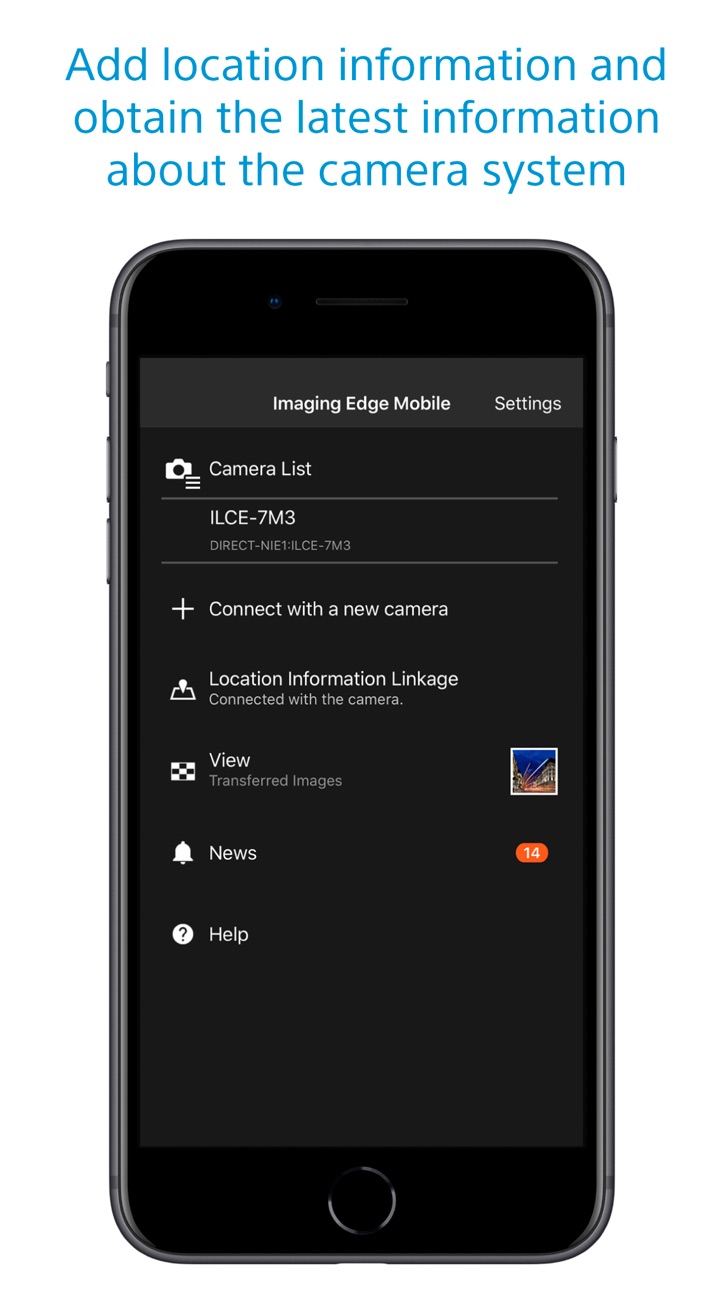
Imaging Edge Mobile allows images/videos to be transferred to a smartphone/tablet, enables remote shooting, and provides location information to images captured by a camera.
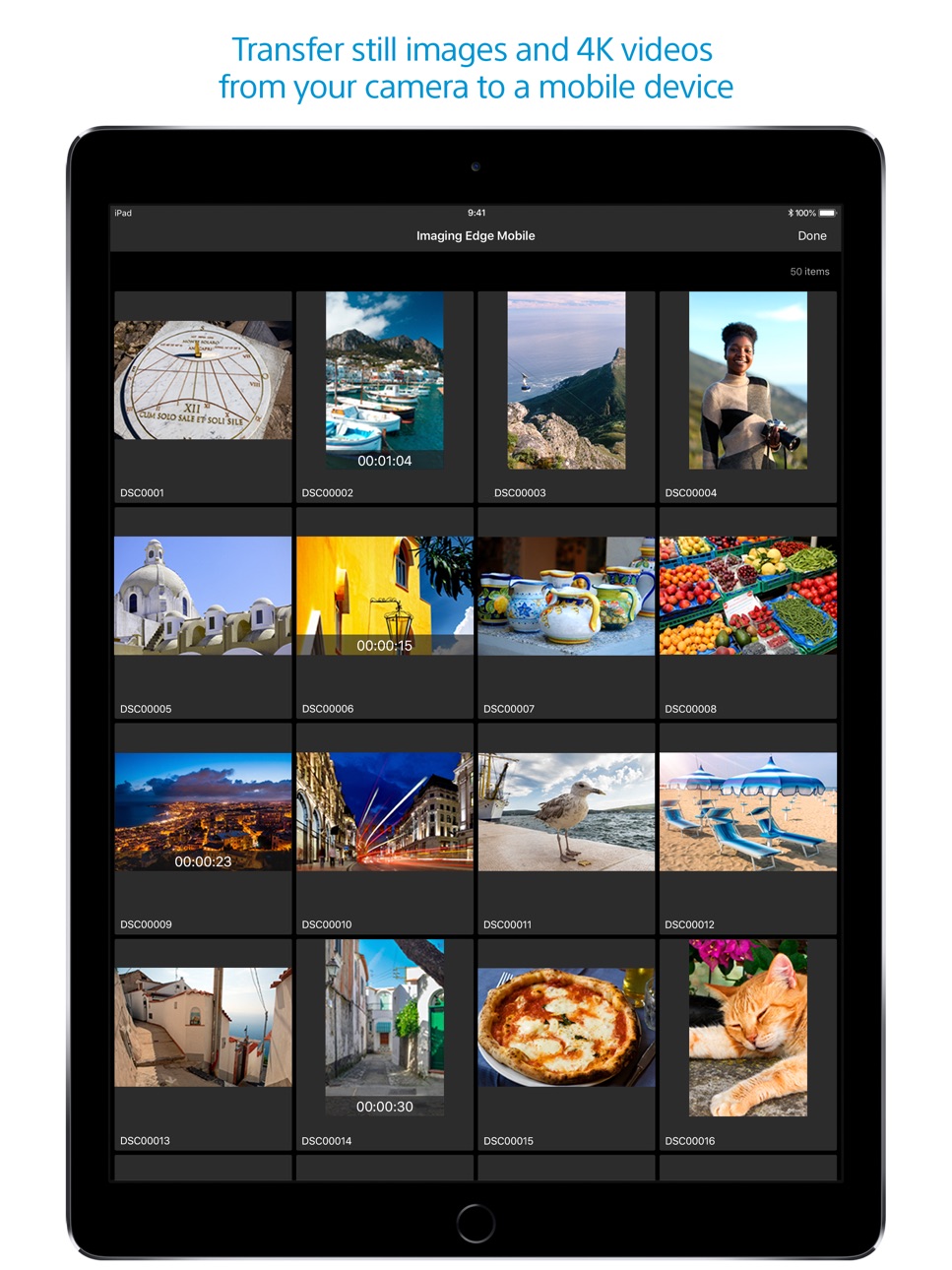
■ Transfer images from a camera to a smartphone
- You can transfer images/videos.
- The selection and transfer of images after shooting are no longer needed as the automatic background transfer function allows images to be transferred to a smartphone as they are captured. *1
- High bit rate video files including 4K can be transferred. *2
- You can view and transfer images in your camera from your smartphone even when the camera is turned off. *2
- After transferring, you can immediately share your high quality images on social networks or through email.
*1 See here for supported cameras. Files are imported in 2MP size when using this function.
https://www.sony.net/dics/iem12/
*2 See here for supported cameras. Availability of video transfer and playback varies depending on smartphone in use.
https://www.sony.net/dics/iem12/
■ Remote shooting of a camera using a smartphone
- You can capture photos/videos remotely while checking the live view of a camera on a smartphone. *3
This is convenient for capturing night views or water flowing scenes which need long-exposure, or macro shooting in which you need to avoid to directly touch the camera.
*3 Models that support PlayMemories Camera Apps can use this feature by installing "Smart Remote Control" (in-camera app) on your camera in advance.
http://www.sony.net/pmca/
■ Record location information
- With cameras that have a location information linkage function, the location information acquired by the smartphone can be added to the captured image in your camera.
For supported models and detailed operation methods, see the support page below.
https://www.sony.net/dics/iem12/
- Even with cameras that do not have a location information linkage function, it is possible to add location information acquired by your smartphone to the photos saved on your smartphone during remote shooting.
■Save and Apply Settings
- You can save up to 20 camera settings in Imaging Edge Mobile.
You can also apply a saved setting to a camera. *4
*4 See here for supported cameras. Save and Apply Settings are supported only for cameras with the same model name.
https://www.sony.net/dics/iem12/
■ Notes
- Supported operating systems: iOS17.7-26.2
- This app is not guaranteed to work with all smartphones/tablets.
- Features/Functions available for this app vary depending on the camera you are using.
- For supported models and information on features/functions, see the support page below.
https://sony.net/iem/
Accessibility
ipadiphonemacrealityDevicetvoswatch
Version history 25 versions
Build 882502217v7.8.32026-03-10 03:03:21
- compatible with iOS26.
Build 878453333v7.8.22025-10-06 09:15:16
For iOS26/iPadOS26:
Fixed an issue which video transfer from some Sony camera models cannot complete.
Build 864950946v7.8.12024-04-11 03:36:41
- Fixed an issue where the message "Please turn on Bluetooth" was displayed even though iPhone's Bluetooth was on.
- Fixed an issue where images could not be transferred from the camera even if there was free space on the iPhone's storage.
- Improved the issue where the app would terminate abnormally in rare cases.
Build 860925771v7.8.02023-10-31 02:09:16
- Now available on iOS17.
Build 858480541v7.7.52023-07-18 03:06:11
- Fixed an issue when Location Information Linkage may not work correctly on iOS/iPadOS 16.4 or later.
Build 857483738v7.7.42023-06-02 03:03:37
- Fixed an issue where remote shooting and image transfer were not possible with some cameras.
Build 857183576v7.7.32023-05-23 03:14:03
- Fixed an issue where Location Information Linkage with the camera.
- Other fixes and stability improvements.
Build 854924912v7.7.22023-02-22 02:04:46
The design of the app icon has changed.
Build 852595010v7.7.12022-10-14 01:01:49
- Adds support for iOS16.
- Adds support for the ILME-FX30. camera.
Build 849846574v7.7.02022-07-14 03:48:01
Supports ILME-FX3 System Software Update Ver. 2.00.
- Stores the initial pairing of the app with your camera so that you can transfer images or perform remote shooting by simply operating the app when you start it subsequently.
- Supports remote shooting in a new log shooting mode, such as Cine EI mode.
- Supports remote shooting in flexible exposure mode.
Build 844707573v7.6.02021-11-09 01:41:48
- compatible with iOS15.
- compatible with ILCE-7M4.
- Once the app is paired with the camera, you can transfer images and take remote shots by simply using the app from the next start-up. (For ILCE-7M4 only)
Build 841385689v7.5.22021-04-20 02:03:01
Improved connectivity with the camera in some Wi-Fi environments.
Build 840418042v7.5.12021-02-16 01:43:41
Fixed the issue that images are not displayed or selected from the app when many images are stored in the memory card on the camera side.
Build 840018830v7.5.02021-01-27 02:07:13
Improved performance for displaying images when using "Select from Smartphone".
Added support for ILCE-1.
- Added support for RAW image transfer.
- The app can now maintain Wi-Fi connection between the camera and the smartphone after transferring images selected on the camera.
- You can now toggle between image transferring and remote shooting while maintaining Wi-Fi connection between the camera and the smartphone.
- You can now use touch control to display a focus frame during remote shooting.
Build 836814123v7.4.02020-07-29 03:17:44
- Now supports ILCE-7SM3.
- Now supports Touch Focus (for MF) and Touch Tracking (for AF) while shooting movies.
- Now supports HEIF images (iOS13 and later).
- HEIF images shot with the "HLG Still Image" option may not display correctly.
- The screen for connecting a camera is now easier to understand.
- You can now improve connectivity with a camera by allowing location access.
Build 835054245v7.3.32020-03-12 05:20:16
- Fixed the issue that remote shooting or image transfer could not be started when connecting to the camera via Wi-Fi from the iPhone settings before launching the application.
- When the smartphone and camera cannot connect via Wi-Fi, a report can be sent to the developer in the dialog displayed by the app.
- Added FAQ of support page in "Help/FAQ(Wi-Fi connection)" of application.
Build 834392752v7.3.22020-02-12 04:06:19
- The app crashes when launching the app or during image transfer.
- Image sending and remote shooting are not possible even though the iPhone/iPad is connected to the camera via Wi-Fi.
- The connected camera is not saved in the camera list.
Build 834133520v7.3.12019-12-28 16:13:01
- Fixed an issue where a network error occurs after starting the app in some languages and the app cannot be used.
- To connect to the camera for the second time or later, activate the Wi-Fi function on the camera and then select the camera from the "Camera List" of this application.
- You can sign in to see the latest information about your camera on My Page.
Build 833778856v7.3.02019-12-18 04:39:37
- Operations for the second and subsequent connections to a camera have been simplified.
- You can sign in using your Sony account to see the latest information about your camera on My Page.
Build 833204363v7.2.32019-10-24 00:04:33
7.2.3:
- Fixed an issue where remote shooting and image transmission cannot be used on iOS13 in certain regions.
7.2.2:
- Fixed an issue where remote shooting and image transmission cannot be used on iOS13.
7.2.1:
- Fixed an issue where multiple empty 'Imaging Edge Mobile' albums were created in some rare cases.
* Empty albums can be deleted from “To delete empty ‘Imaging Edge Mobile’ albums” in the Help/Instruction Manual of App
Build 832982173v7.2.22019-10-07 01:16:10
7.2.2:
- Fixed an issue where remote shooting and image transmission cannot be used on iOS13.
7.2.1:
- Fixed an issue where multiple empty 'Imaging Edge Mobile' albums were created in some rare cases.
* Empty albums can be deleted from “To delete empty ‘Imaging Edge Mobile’ albums” in the Help/Instruction Manual of App
Build 832625297v7.2.12019-09-10 02:57:45
Fixed an issue where multiple empty 'Imaging Edge Mobile' albums were created in some rare cases.
* Empty albums can be deleted from “To delete empty ‘Imaging Edge Mobile’ albums” in the Help/Instruction Manual of App
Build 831341091v7.2.02019-07-16 00:34:09
・Images can now be displayed in their original aspect ratio on the image gallery.
・Supported multi-camera control with 6 or more cameras using DSC-RX0M2 via an access point.
Build 830284950v7.1.02019-03-25 05:56:15
・PlayMemories Mobile has been renewed Imaging Edge Mobile.
・You can continue using existing features/functions with Imaging Edge Mobile.
・Support image/video transfers and remote shooting.
Build 828786846v6.3.02018-10-16 01:33:27
6.3.0:
- Now compatible with iOS 12.0
- On iOS 11 or later, this application can read the NFC tag or QR code of the camera and connect to it via Wi-Fi.
No pricing data captured yet — comparisons appear once the app has paid storefronts or in-app purchases.
Availability 48 of 75 storefronts
| Region | Language | Price | Ratings | Avg | Version |
|---|---|---|---|---|---|
| US | en-US | Free | 6.6k | 1.7 | 7.8.3 |
| BR | pt-BR | Free | 316 | 1.7 | 7.8.3 |
| MX | es-MX | Free | 316 | 1.9 | 7.8.3 |
| CL | es-MX | Free | 198 | 1.7 | 7.8.3 |
| AR | es-MX | Free | 113 | 1.9 | 7.8.3 |
| CO | es-MX | Free | 94 | 1.8 | 7.8.3 |
| PE | es-MX | Free | 48 | 1.9 | 7.8.3 |
| EC | es-MX | Free | 32 | 2.0 | 7.8.3 |
| GT | es-MX | Free | 14 | 2.4 | 7.8.3 |
| CR | es-MX | Free | 12 | 2.3 | 7.8.3 |
| UY | en-GB | Free | 11 | 1.8 | 7.8.3 |
| PA | es-MX | Free | 10 | 3.0 | 7.8.3 |
| SV | es-MX | Free | 9 | 2.9 | 7.8.3 |
| BO | es-MX | Free | 7 | 1.7 | 7.8.3 |
| MU | en-GB | Free | 7 | 1.9 | 7.8.3 |
| NG | en-GB | Free | 6 | 3.8 | 7.8.3 |
| DZ | en-GB | Free | 5 | 4.8 | 7.8.3 |
| HN | es-MX | Free | 5 | 4.2 | 7.8.3 |
| KE | en-GB | Free | 5 | 2.6 | 7.8.3 |
| TN | en-GB | Free | 5 | 4.2 | 7.8.3 |
| PY | es-MX | Free | 4 | 2.0 | 7.8.3 |
| GH | en-GB | Free | 3 | 3.3 | 7.8.3 |
| DO | es-MX | Free | 2 | 4.5 | 7.8.3 |
| NI | es-MX | Free | 2 | 3.0 | 7.8.3 |
| AO | en-GB | Free | 1 | 5.0 | 7.8.3 |
| MA | en-GB | Free | 1 | 5.0 | 7.8.3 |
| MZ | en-GB | Free | 1 | 3.0 | 7.8.3 |
| TZ | en-GB | Free | 1 | 5.0 | 7.8.3 |
| VE | es-MX | Free | 1 | 5.0 | 7.8.3 |
| BB | en-GB | Free | 0 | — | 7.8.3 |
| BF | en-GB | Free | 0 | — | 7.8.3 |
| BJ | en-GB | Free | 0 | — | 7.8.3 |
| BW | en-GB | Free | 0 | — | 7.8.3 |
| CD | en-GB | Free | 0 | — | 7.8.3 |
| CI | fr-FR | Free | 0 | — | 7.8.3 |
| CM | fr-FR | Free | 0 | — | 7.8.3 |
| GA | fr-FR | Free | 0 | — | 7.8.3 |
| GM | en-GB | Free | 0 | — | 7.8.3 |
| JM | en-GB | Free | 0 | — | 7.8.3 |
| MG | en-GB | Free | 0 | — | 7.8.3 |
| NA | en-GB | Free | 0 | — | 7.8.3 |
| RW | en-GB | Free | 0 | — | 7.8.3 |
| SC | en-GB | Free | 0 | — | 7.8.3 |
| SN | en-GB | Free | 0 | — | 7.8.3 |
| TT | en-GB | Free | 0 | — | 7.8.3 |
| UG | en-GB | Free | 0 | — | 7.8.3 |
| ZM | en-GB | Free | 0 | — | 7.8.3 |
| ZW | en-GB | Free | 0 | — | 7.8.3 |
Not available in: AG, AI, BS, BZ, CG, CV, DM, GD, GW, GY, KN, KY, LC, LR, LY, ML, MS, MW, NE, SL, SR, ST, SZ, TC, TD, VC, VG
Change log 28 changes · BB
✎
releaseNotes updated
- compatible with iOS26.
✎
description updated
Imaging Edge Mobile allows images/videos to be transferred to a smartphone/tablet, enables remote shooting, and provides location information to images captured
✎
name updated
Sony | Imaging Edge Mobile
◆
Version 7.8.3 released
- compatible with iOS26.
◆
Version 7.8.2 released
For iOS26/iPadOS26:
Fixed an issue which video transfer from some Sony camera models cannot complete.
◆
Version 7.8.1 released
- Fixed an issue where the message "Please turn on Bluetooth" was displayed even though iPhone's Bluetooth was on.
- Fixed an issue where images could not be transferred from the camera even if there was free space on the iPhone's storage.
◆
Version 7.8.0 released
- Now available on iOS17.
◆
Version 7.7.5 released
- Fixed an issue when Location Information Linkage may not work correctly on iOS/iPadOS 16.4 or later.
◆
Version 7.7.4 released
- Fixed an issue where remote shooting and image transfer were not possible with some cameras.
◆
Version 7.7.3 released
- Fixed an issue where Location Information Linkage with the camera.
- Other fixes and stability improvements.
◆
Version 7.7.2 released
The design of the app icon has changed.
◆
Version 7.7.1 released
- Adds support for iOS16.
- Adds support for the ILME-FX30. camera.
◆
Version 7.7.0 released
Supports ILME-FX3 System Software Update Ver. 2.00.
- Stores the initial pairing of the app with your camera so that you can transfer images or perform remote shooting by simply operating the app when you start it subsequently.
- Suppor
◆
Version 7.6.0 released
- compatible with iOS15.
- compatible with ILCE-7M4.
- Once the app is paired with the camera, you can transfer images and take remote shots by simply using the app from the next start-up. (For ILCE-7M4 only)
◆
Version 7.5.2 released
Improved connectivity with the camera in some Wi-Fi environments.
◆
Version 7.5.1 released
Fixed the issue that images are not displayed or selected from the app when many images are stored in the memory card on the camera side.
◆
Version 7.5.0 released
Improved performance for displaying images when using "Select from Smartphone".
Added support for ILCE-1.
- Added support for RAW image transfer.
- The app can now maintain Wi-Fi connection between the camera and the smartphone afte
◆
Version 7.4.0 released
- Now supports ILCE-7SM3.
- Now supports Touch Focus (for MF) and Touch Tracking (for AF) while shooting movies.
- Now supports HEIF images (iOS13 and later).
- HEIF images shot with the "HLG Still Image" option may not display cor
◆
Version 7.3.3 released
- Fixed the issue that remote shooting or image transfer could not be started when connecting to the camera via Wi-Fi from the iPhone settings before launching the application.
- When the smartphone and camera cannot connect via Wi-Fi, a r
◆
Version 7.3.2 released
- The app crashes when launching the app or during image transfer.
- Image sending and remote shooting are not possible even though the iPhone/iPad is connected to the camera via Wi-Fi.
- The connected camera is not saved in the camera li
◆
Version 7.3.1 released
- Fixed an issue where a network error occurs after starting the app in some languages and the app cannot be used.
- To connect to the camera for the second time or later, activate the Wi-Fi function on the camera and then select the camer
◆
Version 7.3.0 released
- Operations for the second and subsequent connections to a camera have been simplified.
- You can sign in using your Sony account to see the latest information about your camera on My Page.
◆
Version 7.2.3 released
7.2.3:
- Fixed an issue where remote shooting and image transmission cannot be used on iOS13 in certain regions.
7.2.2:
- Fixed an issue where remote shooting and image transmission cannot be used on iOS13.
7.2.1:
- Fixed an issue where m
◆
Version 7.2.2 released
7.2.2:
- Fixed an issue where remote shooting and image transmission cannot be used on iOS13.
7.2.1:
- Fixed an issue where multiple empty 'Imaging Edge Mobile' albums were created in some rare cases.
* Empty albums can be deleted from “To
◆
Version 7.2.1 released
Fixed an issue where multiple empty 'Imaging Edge Mobile' albums were created in some rare cases.
* Empty albums can be deleted from “To delete empty ‘Imaging Edge Mobile’ albums” in the Help/Instruction Manual of App
◆
Version 7.2.0 released
・Images can now be displayed in their original aspect ratio on the image gallery.
・Supported multi-camera control with 6 or more cameras using DSC-RX0M2 via an access point.
◆
Version 7.1.0 released
・PlayMemories Mobile has been renewed Imaging Edge Mobile.
・You can continue using existing features/functions with Imaging Edge Mobile.
・Support image/video transfers and remote shooting.
◆
Version 6.3.0 released
6.3.0:
- Now compatible with iOS 12.0
- On iOS 11 or later, this application can read the NFC tag or QR code of the camera and connect to it via Wi-Fi.