Home › Photo & Video

 US
US
USen-US GBen-GB
 DEde-DE
 RUru
RUru CAen-CA
 FRfr-FR
 ITit
ITit INen-GB
 AUen-AU
 JPja
JPja ESes-ES
 PLen-GB
 UAen-GB
 CNzh-Hans-CN
 BRpt-BR
 VNen-GB
 MXes-MX
 NLnl
NLnl KRko
KRko TRen-GB
 CHde-CH
 IDen-GB
 COes-MX
 UZen-GB
 TWzh-Hant-TW
 THen-GB
 SEsv
SEsv KZen-GB
 CZen-GB
 ATde-DE
 CLes-MX
 BEen-GB
 MYen-GB
 NOen-GB
 PHen-GB
 ROen-GB
 NZen-AU
 PTpt-PT
 ILen-GB
 DKen-GB
 ARes-MX
 AEen-GB
 ZAen-GB
 HUen-GB
 HKzh-Hant-HK
 FIen-GB
 PEes-MX
 SAen-GB
 GRen-GB
 SKen-GB
 BGen-GB
 SGen-GB
 BYen-GB
 PKen-GB
 IEen-GB
 HRen-GB
 AMen-GB
 ECes-MX
 LTen-GB
 EGen-GB
 KGen-GB
 NGen-GB
 LVen-GB
 SIen-GB
 EEen-GB
 AZen-GB
 DOes-MX
 GTes-MX
 CRes-MX
 MDen-GB
 RSen-GB
 LKen-GB
 GHen-GB
 ALen-GB
 TJen-GB
 NPen-GB
 QAen-GB
 GEen-GB
 MNen-GB
 BOes-MX
 DZen-GB
 MAen-GB
 KWen-GB
 KEen-GB
 LBen-GB
 ISen-GB
 PAes-MX
 KHen-GB
 UYen-GB
 TNen-GB
 VEes-MX
 CYen-GB
 LUen-GB
 HNes-MX
 JOen-GB
 MTen-GB
 MKen-GB
 TZen-GB
 OMen-GB
 IQen-GB
 SVes-MX
 PYes-MX
 BAen-GB
 BHen-GB
 UGen-GB
 MOzh-Hant-HK
 AOen-GB
 MUen-GB
 SNen-GB
 TTen-GB
 JMen-GB
 TMen-GB
 XKen-GB
 NIes-MX
 MVen-GB
 CIfr-FR
 LAen-GB
 ZWen-GB
 MEen-GB
 FJen-GB
 MZen-GB
 MMen-GB
 NAen-GB
 RWen-GB
 BNen-GB
 BWen-GB
 GYen-GB
 BTen-GB
 CDen-GB
 AFen-GB
 BJen-GB
 CGen-GB
 MGen-GB
 SLen-GB
 BBen-GB
 GDen-GB
 YEen-GB
 ZMen-GB
 BSen-GB
 CMfr-FR
 GAfr-FR
 MWen-GB
 BFen-GB
 CVen-GB
 GMen-GB
 LRen-GB
 LYen-GB
 SRen-GB
 AIen-GB
 KYen-GB
 LCen-GB
 MLen-GB
 NEen-GB
 BMen-GB
 MRen-GB
 PGen-GB
 SCen-GB
 SZen-GB
 VGen-GB
 GWen-GB
 KNen-GB
 STen-GB
 TDen-GB
 VUen-GB
 AGen-GB
 BZen-GB
 DMen-GB
 FMen-GB
 MSen-GB
 NRen-GB
 PWen-GB
 SBen-GB
 TCen-GB
 TOen-GB
 VCen-GB
175 of 175 storefronts
Content in en-US
Content in en-US
Information
Preview 3 platforms
iPhone 7 images
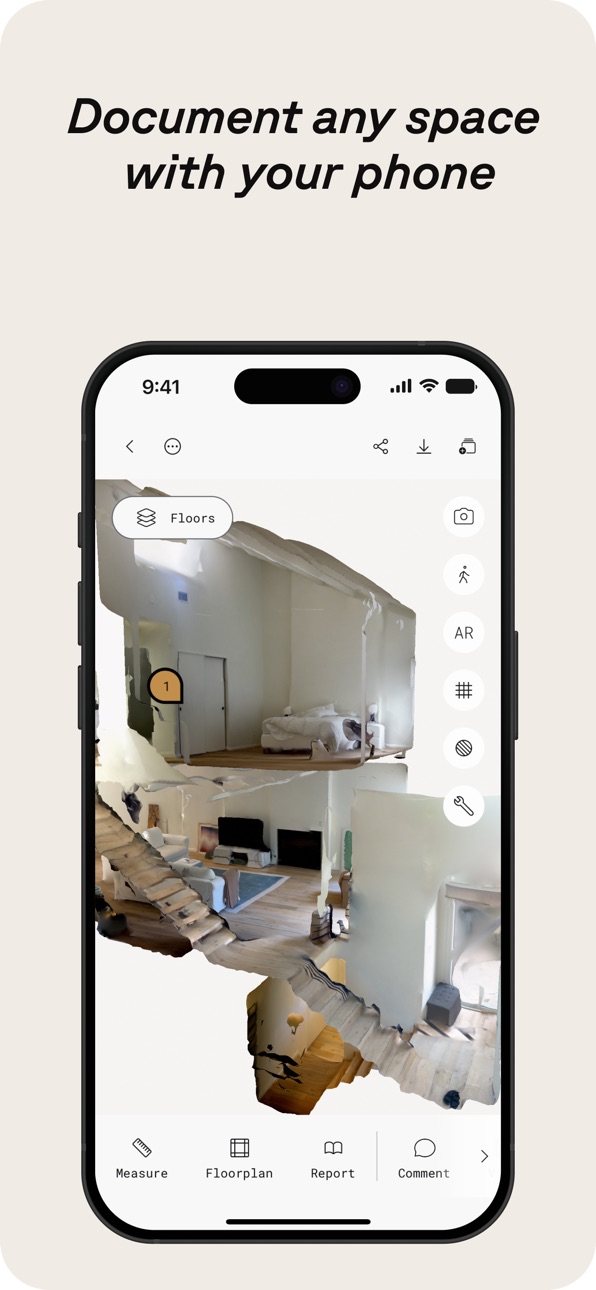


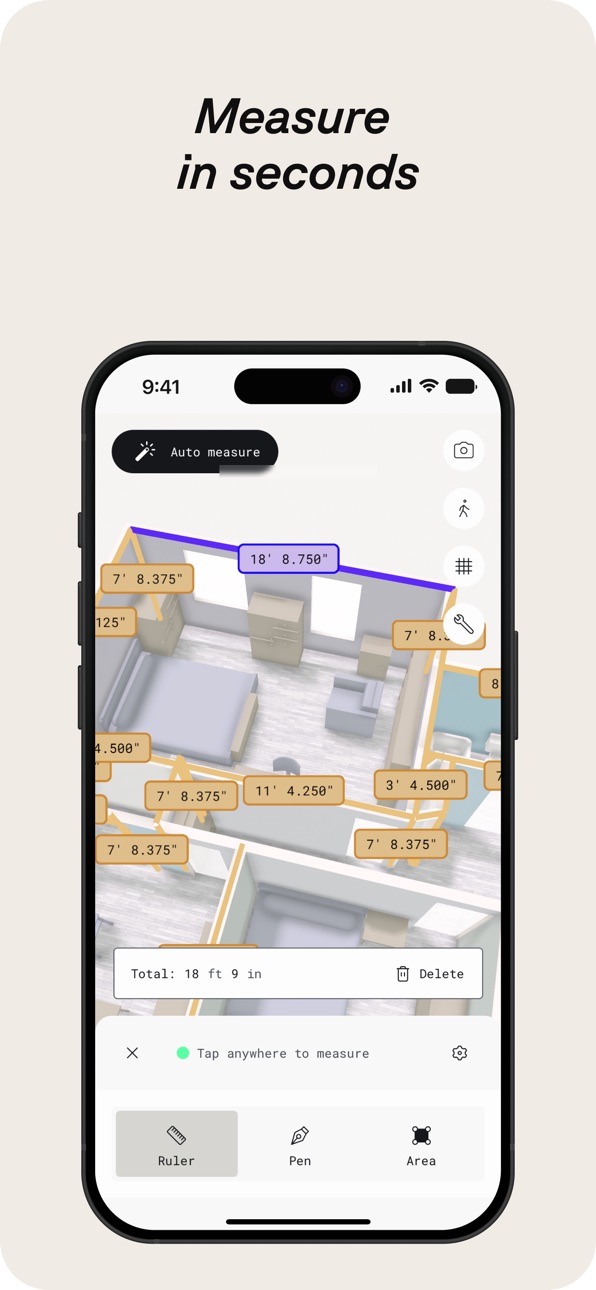

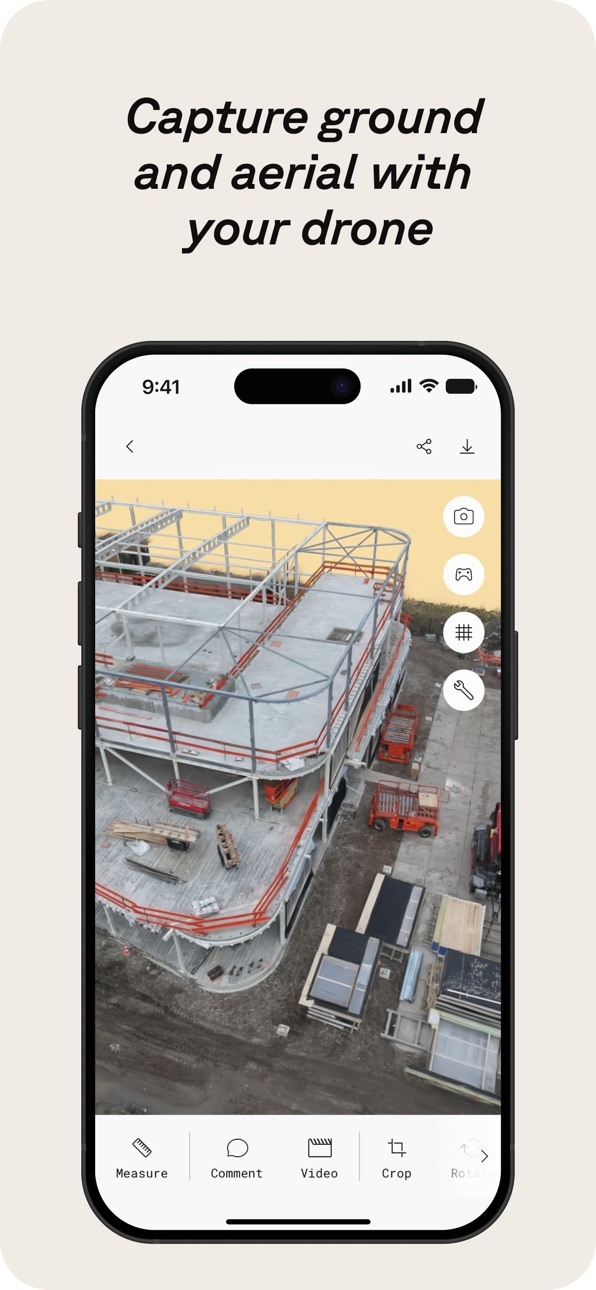

iPad 10 images


Apple Vision Pro 7 images


What’s New Version 6.0.12
Fixed the alignment between the mesh and floorplan layers, resolved a handful of minor issues, and improved overall performance
Description
Polycam is the leading 3D scanning platform for iPhone and iPad, blending professional-grade capabilities with a user-friendly interface. Effortlessly create high-quality 3D models from photos, generate precise LiDAR scans, and capture immersive 360° images—all on your device. Edit directly on your iPhone or iPad and export in formats compatible with industry-standard software. Seamlessly share your work and connect with a global community of creators.
Polycam offers a suite of features for 3D scanning and editing:
● Effortlessly Create High-Quality 3D Models: Convert everyday photos into stunning 3D models with photogrammetry and Gaussian splats, perfect for capturing intricate objects and scenes. These 3D models can be exported to various computer graphics applications, including Blender and SketchUp, making them ideal for professional workflows. (Works on all iPhones and iPads)
● Top-Rated LiDAR 3D Scanner: Experience Polycam's top-rated LiDAR scanning for rapid, accurate captures of space. Use Polycam to create detailed 3D scans that are ready to be edited or imported into other design software like Blender or SketchUp. (Requires an iPhone or iPad with LiDAR)
● Revolutionize Capturing Interior Spaces with Room Mode: Instantly generate detailed, highly accurate 3D models of rooms and interiors using LiDAR, perfect for architects, designers, and real estate professionals. Overlay models with additional scans for immersive, real-time room planner views that enhance design visualization and documentation, seamlessly integrating into your workflow. (Requires an iPhone or iPad with LiDAR)
● Immerse Yourself in 360° Experiences: Transform your iPhone into a full-fledged 360° camera. Create immersive panoramic experiences, share them with a link, or export them as equirectangular images. Polycam's AI technology seamlessly fills unseen areas for complete virtual environments. (Works on iPhone 11 and later)
● Edit and measure with precision: Crop, rotate, rescale, measure, and more with powerful on-device tools that allow you to fine-tune your 3D models, enhancing every detail before export.
Make Polycam a Key Part of Your 3D Workflow with Polycam Pro:
● Seamless Export Options: Export detailed 3D models (.obj, .dae, .fbx, .stl) and color point clouds (.dxf, .ply) directly into your favorite 3D software like Blender and SketchUp, enhancing your design and visualization process.
● Precision Floor Plans and Blueprints: Instantly generate 2D floor plans and scale-accurate blueprints from your 3D room scans, ready to integrate into architectural and design workflows .Export floor plans in formats compatible with popular software like AutoCAD, SketchUp, and Adobe Illustrator.
● Unlimited Photogrammetry and Gaussian Splats: Capture and process as many high-quality 3D models as you need, without limits, ensuring every detail is captured for your projects.
Share, collaborate, and elevate your workflow:
● Effortless Sharing: Share 3D captures instantly with simple links for professional feedback and collaboration.
● Streamlined Teamwork: Use shared libraries to collaborate efficiently on projects, enhancing workflow.
● Join the Community: Connect with creators, designers, and 3D enthusiasts on Polycam Explore. Discover inspiring work and elevate your own projects.
Included Free: Polycam Web Access
Access Polycam’s web platform to edit, enhance, and share your models from your computer. Use your existing login for seamless integration into your workflow.
● Enhanced Editing: Work on your phone’s captures from your computer with advanced editing tools, AI texture generation, and cloud syncing.
● Professional Collaboration: Collaborate with shared libraries and easily export models to 3D software.
Experience the full power of Polycam on both your iOS device and your computer and take your 3D projects to the next level!
Privacy Policy: https://poly.cam/privacy_policy.pdf
Terms of Use: https://poly.cam/terms_and_conditions.pdf
In-App Purchases US pricing
Polycam Pro Subscription
Monthly · Monthly$26.99
Yearly · Yearly 7-day free trial$199.99
Polycam Basic · Monthly$29.99
Polycam Basic Yearly · Yearly 7-day free trial$149.99
Capabilities
In-App Purchases
Accessibility
ipadiphonemacrealityDevicetvoswatch
Version history 25 versions
Build 887691714v6.0.122026-07-01 19:29:29
Fixed the alignment between the mesh and floorplan layers, resolved a handful of minor issues, and improved overall performance
Build 887503390v6.0.112026-06-29 00:09:17
Nothing major this time around—just a round of improvements behind the scenes. We've enhanced texture rendering, addressed minor bugs, and made performance optimizations for a smoother experience
Build 887291812v6.0.102026-06-24 17:04:27
* Fixed crashes found in floor plan editor
* Improved room segmenting algorithm performance
* Added the ability for users to Remesh if they are unable to open a capture
* Performance improvements
Build 886886171v6.0.92026-06-22 00:02:02
* Improved room segmentation accuracy
* Better performance and reliability when syncing large Space captures
* Fixed Floorplan thumbnail issues
* General bug fixes and performance improvements across the App
Build 886846520v6.0.82026-06-11 21:05:25
* Fixed the Edit button on iPad for Space Mode and Floorplan captures when using the Floorplan Editor tool.
* Performance improvements.
Build 886749300v6.0.62026-06-10 01:50:08
*Fixed an issue with object captures hanging on exit
*Fixed an issue with draft object images causing lag while loading
*Fixed more crashes on floor plans
*Fixed other minor issues and performance improvements
Build 886792543v6.0.72026-06-10 21:01:01
* Fixed walkthrough mode for non-LiDAR Space Mode scans
* Performance improvements
Build 886445945v6.0.52026-06-03 14:10:31
* Improved performance around Space Mode and Floorplan captures
* Fixed Video and Color tools
* Minor bug fixes and performance improvements
Build 886172637v6.0.42026-05-27 15:07:08
* Fixed an issue with the capture ratings
* Fixed issues with clipping planes
* Fixed an issue where esx modals were stacking on top of each other
* Added a cancel plan button for subscriptions
* Bug fixes and performance improvements
Build 885886014v6.0.32026-05-20 18:51:11
* Improved Cloud Space reconstruction stability and meshing reliability
* Updated in-app purchases with StoreKit 2
* Adjusted access to Roof Report for Business plans
* Bug fixes and performance improvements
Build 885643871v6.0.22026-05-14 16:35:57
* Improved performance for syncing and uploading captures
* Improved uploads for older clients
* Minor bug fixes and performance improvements
Build 885299515v6.0.12026-05-05 23:20:50
* Improved background upload processing for object captures
* Fixed an issue where users were getting logged out after updating the app
* Minor bug fixes and performance improvements
Build 885095647v6.0.02026-04-30 18:57:32
* Improved upload + sync stability
* Fixed onboarding CTA issue (iPhone SE)
* Resolved 3D view freeze when switching apps
* Fixed crop/reset mismatch
* Improved walkthrough navigation + keyframe interaction
* Minor bug fixes and performance improvements
Build 884861470v5.2.152026-04-23 21:58:01
* Improved performance for syncing and uploading Space Mode captures
* Fixed issue with 360 draft view
* Fixed issue with saving when exiting the floor plan editor after updates
* Updated capture badge design
* Minor bug fixes and performance improvements
Build 884459838v5.2.142026-04-18 20:58:33
• Sign-in experience updates
• Walkthrough/orbit improvements
• Bug fixes and performance improvements
Build 884282874v5.2.132026-04-09 12:19:15
* Improved the performance of Walkthrough mode and fixed crashes that may occur while switching space mode layers
* Fixed workspace not returning correct captures list
* Minor bug fixes and performance improvements
Build 883939753v5.2.122026-04-01 22:44:06
• Improved sharing experience for captures
• Fixed space mode loading issues
• Better sync and upload performance
• Bug fixes and performance improvements
Build 883552580v5.2.112026-03-20 00:16:41
* Fixed the issue where private captures would not display for Enterprise users
* Improved Gaussian Splat performance by resolving an issue where capture would not display
* Updated and fixed Roomplan related flows
* Minor bug fixes and performance improvements
Build 883509723v5.2.102026-03-18 20:37:10
* Improved Gaussian Splat performance by resolving an issue where capture would not display
* Updated and fixed Roomplan related flows
* Minor bug fixes and performance improvements
Build 883237334v5.2.92026-03-11 23:35:15
- Fixed issues with capture syncing
- Fixed numerical keyboard issues
- Minor bug fixes
- Performance improvements
Build 882998370v5.2.82026-03-04 15:02:17
• Improved measurement consistency across the app.
• Rescale tool now supports decimal input and improved precision.
• Unit preferences now stay consistent between Viewer and Editor.
• Added clearer subscription and billing updates, including card expiry warnings and upgrade discounts where applicable.
• Fixed font display issues and improved overall stability.
Build 882653267v5.2.72026-02-23 14:39:37
- Fixed crashes
- Improved performance
Build 882378808v5.2.62026-02-19 17:00:16
* Updated and fixed the design for the crop, infill/360, and reset tools
* Updated the design for the Publishing Overview screen
* Minor bug fixes and performance improvements
Build 882343655v5.2.52026-02-11 03:01:09
- Minor bug fixes
- Performance improvements
Build 882156911v5.2.42026-02-06 20:42:25
- Fixed an issue with capture ratings
- Minor bug fixes
- Performance improvements
Price history by region
Currency
Show
Columns
Search
Availability 175 of 175 storefronts
| Region | Language | Price | Ratings | Avg | Version |
|---|---|---|---|---|---|
| US | en-US | Free | 42.6k | 4.7 | 6.0.12 |
| GB | en-GB | Free | 8.3k | 4.6 | 6.0.12 |
| DE | de-DE | Free | 8.1k | 4.5 | 6.0.12 |
| RU | ru | Free | 6.4k | 4.6 | 6.0.12 |
| CA | en-CA | Free | 5.1k | 4.6 | 6.0.12 |
| FR | fr-FR | Free | 4.4k | 4.6 | 6.0.12 |
| IT | it | Free | 4.3k | 4.7 | 6.0.12 |
| IN | en-GB | Free | 3.7k | 4.6 | 6.0.12 |
| AU | en-AU | Free | 3.2k | 4.6 | 6.0.12 |
| JP | ja | Free | 3.0k | 4.6 | 6.0.12 |
| ES | es-ES | Free | 2.7k | 4.6 | 6.0.12 |
| PL | en-GB | Free | 2.4k | 4.7 | 6.0.12 |
| UA | en-GB | Free | 2.4k | 4.8 | 6.0.12 |
| CN | zh-Hans-CN | Free | 2.1k | 4.4 | 6.0.12 |
| BR | pt-BR | Free | 2.1k | 4.8 | 6.0.12 |
| VN | en-GB | Free | 2.0k | 4.8 | 6.0.12 |
| MX | es-MX | Free | 2.0k | 4.8 | 6.0.12 |
| NL | nl | Free | 1.8k | 4.6 | 6.0.12 |
| KR | ko | Free | 1.7k | 4.8 | 6.0.12 |
| TR | en-GB | Free | 1.7k | 4.6 | 6.0.12 |
| CH | de-CH | Free | 1.6k | 4.6 | 6.0.12 |
| ID | en-GB | Free | 1.5k | 4.8 | 6.0.12 |
| CO | es-MX | Free | 1.4k | 4.8 | 6.0.12 |
| UZ | en-GB | Free | 1.3k | 4.8 | 6.0.12 |
| TW | zh-Hant-TW | Free | 1.3k | 4.8 | 6.0.12 |
| TH | en-GB | Free | 1.2k | 4.8 | 6.0.12 |
| SE | sv | Free | 1.1k | 4.6 | 6.0.12 |
| KZ | en-GB | Free | 1.1k | 4.8 | 6.0.12 |
| CZ | en-GB | Free | 944 | 4.7 | 6.0.12 |
| AT | de-DE | Free | 903 | 4.6 | 6.0.12 |
| CL | es-MX | Free | 854 | 4.8 | 6.0.12 |
| BE | en-GB | Free | 829 | 4.6 | 6.0.12 |
| MY | en-GB | Free | 828 | 4.8 | 6.0.12 |
| NO | en-GB | Free | 798 | 4.6 | 6.0.12 |
| PH | en-GB | Free | 767 | 4.8 | 6.0.12 |
| RO | en-GB | Free | 728 | 4.8 | 6.0.12 |
| NZ | en-AU | Free | 693 | 4.6 | 6.0.12 |
| PT | pt-PT | Free | 687 | 4.7 | 6.0.12 |
| IL | en-GB | Free | 669 | 4.6 | 6.0.12 |
| DK | en-GB | Free | 638 | 4.5 | 6.0.12 |
| AR | es-MX | Free | 628 | 4.7 | 6.0.12 |
| AE | en-GB | Free | 619 | 4.7 | 6.0.12 |
| ZA | en-GB | Free | 591 | 4.7 | 6.0.12 |
| HU | en-GB | Free | 562 | 4.7 | 6.0.12 |
| HK | zh-Hant-HK | Free | 561 | 4.6 | 6.0.12 |
| FI | en-GB | Free | 484 | 4.5 | 6.0.12 |
| PE | es-MX | Free | 459 | 4.7 | 6.0.12 |
| SA | en-GB | Free | 439 | 4.6 | 6.0.12 |
| GR | en-GB | Free | 437 | 4.8 | 6.0.12 |
| SK | en-GB | Free | 399 | 4.8 | 6.0.12 |
| BG | en-GB | Free | 363 | 4.8 | 6.0.12 |
| SG | en-GB | Free | 358 | 4.7 | 6.0.12 |
| BY | en-GB | Free | 326 | 4.7 | 6.0.12 |
| PK | en-GB | Free | 309 | 4.6 | 6.0.12 |
| IE | en-GB | Free | 306 | 4.6 | 6.0.12 |
| HR | en-GB | Free | 305 | 4.8 | 6.0.12 |
| AM | en-GB | Free | 304 | 4.8 | 6.0.12 |
| EC | es-MX | Free | 288 | 4.8 | 6.0.12 |
| LT | en-GB | Free | 265 | 4.8 | 6.0.12 |
| EG | en-GB | Free | 257 | 4.7 | 6.0.12 |
| KG | en-GB | Free | 255 | 4.8 | 6.0.12 |
| NG | en-GB | Free | 255 | 4.5 | 6.0.12 |
| LV | en-GB | Free | 253 | 4.7 | 6.0.12 |
| SI | en-GB | Free | 226 | 4.7 | 6.0.12 |
| EE | en-GB | Free | 221 | 4.8 | 6.0.12 |
| AZ | en-GB | Free | 217 | 4.8 | 6.0.12 |
| DO | es-MX | Free | 203 | 4.7 | 6.0.12 |
| GT | es-MX | Free | 181 | 4.8 | 6.0.12 |
| CR | es-MX | Free | 174 | 4.7 | 6.0.12 |
| MD | en-GB | Free | 171 | 4.9 | 6.0.12 |
| RS | en-GB | Free | 166 | 4.7 | 6.0.12 |
| LK | en-GB | Free | 161 | 4.6 | 6.0.12 |
| GH | en-GB | Free | 145 | 4.5 | 6.0.12 |
| AL | en-GB | Free | 141 | 4.8 | 6.0.12 |
| TJ | en-GB | Free | 141 | 4.8 | 6.0.12 |
| NP | en-GB | Free | 139 | 4.5 | 6.0.12 |
| QA | en-GB | Free | 139 | 4.5 | 6.0.12 |
| GE | en-GB | Free | 136 | 4.8 | 6.0.12 |
| MN | en-GB | Free | 129 | 4.8 | 6.0.12 |
| BO | es-MX | Free | 121 | 4.7 | 6.0.12 |
| DZ | en-GB | Free | 121 | 4.6 | 6.0.12 |
| MA | en-GB | Free | 116 | 4.6 | 6.0.12 |
| KW | en-GB | Free | 114 | 4.7 | 6.0.12 |
| KE | en-GB | Free | 109 | 4.8 | 6.0.12 |
| LB | en-GB | Free | 101 | 4.6 | 6.0.12 |
| IS | en-GB | Free | 100 | 4.5 | 6.0.12 |
| PA | es-MX | Free | 99 | 4.7 | 6.0.12 |
| KH | en-GB | Free | 97 | 4.6 | 6.0.12 |
| UY | en-GB | Free | 93 | 4.6 | 6.0.12 |
| TN | en-GB | Free | 86 | 4.8 | 6.0.12 |
| VE | es-MX | Free | 84 | 4.8 | 6.0.12 |
| CY | en-GB | Free | 82 | 4.8 | 6.0.12 |
| LU | en-GB | Free | 82 | 4.5 | 6.0.12 |
| HN | es-MX | Free | 76 | 5.0 | 6.0.12 |
| JO | en-GB | Free | 75 | 4.8 | 6.0.12 |
| MT | en-GB | Free | 70 | 4.9 | 6.0.12 |
| MK | en-GB | Free | 69 | 4.8 | 6.0.12 |
| TZ | en-GB | Free | 68 | 4.9 | 6.0.12 |
| OM | en-GB | Free | 65 | 4.4 | 6.0.12 |
| IQ | en-GB | Free | 62 | 4.6 | 6.0.12 |
| SV | es-MX | Free | 60 | 4.8 | 6.0.12 |
| PY | es-MX | Free | 59 | 4.9 | 6.0.12 |
| BA | en-GB | Free | 44 | 4.4 | 6.0.12 |
| BH | en-GB | Free | 43 | 4.2 | 6.0.12 |
| UG | en-GB | Free | 38 | 4.8 | 6.0.12 |
| MO | zh-Hant-HK | Free | 35 | 4.8 | 6.0.12 |
| AO | en-GB | Free | 31 | 4.5 | 6.0.12 |
| MU | en-GB | Free | 30 | 4.7 | 6.0.12 |
| SN | en-GB | Free | 28 | 4.6 | 6.0.12 |
| TT | en-GB | Free | 28 | 4.8 | 6.0.12 |
| JM | en-GB | Free | 25 | 4.8 | 6.0.12 |
| TM | en-GB | Free | 24 | 5.0 | 6.0.12 |
| XK | en-GB | Free | 24 | 4.7 | 6.0.12 |
| NI | es-MX | Free | 22 | 4.6 | 6.0.12 |
| MV | en-GB | Free | 21 | 4.9 | 6.0.12 |
| CI | fr-FR | Free | 17 | 4.4 | 6.0.12 |
| LA | en-GB | Free | 17 | 4.9 | 6.0.12 |
| ZW | en-GB | Free | 15 | 4.8 | 6.0.12 |
| ME | en-GB | Free | 14 | 5.0 | 6.0.12 |
| FJ | en-GB | Free | 11 | 4.5 | 6.0.12 |
| MZ | en-GB | Free | 11 | 4.5 | 6.0.12 |
| MM | en-GB | Free | 10 | 4.1 | 6.0.12 |
| NA | en-GB | Free | 10 | 4.8 | 6.0.12 |
| RW | en-GB | Free | 10 | 4.5 | 6.0.12 |
| BN | en-GB | Free | 9 | 4.9 | 6.0.12 |
| BW | en-GB | Free | 9 | 4.9 | 6.0.12 |
| GY | en-GB | Free | 9 | 4.7 | 6.0.12 |
| BT | en-GB | Free | 8 | 4.1 | 6.0.12 |
| CD | en-GB | Free | 8 | 4.5 | 6.0.12 |
| AF | en-GB | Free | 7 | 5.0 | 6.0.12 |
| BJ | en-GB | Free | 7 | 4.6 | 6.0.12 |
| CG | en-GB | Free | 7 | 5.0 | 6.0.12 |
| MG | en-GB | Free | 7 | 4.4 | 6.0.12 |
| SL | en-GB | Free | 7 | 4.1 | 6.0.12 |
| BB | en-GB | Free | 6 | 4.8 | 6.0.12 |
| GD | en-GB | Free | 6 | 4.8 | 6.0.12 |
| YE | en-GB | Free | 6 | 4.8 | 6.0.12 |
| ZM | en-GB | Free | 6 | 4.3 | 6.0.12 |
| BS | en-GB | Free | 5 | 5.0 | 6.0.12 |
| CM | fr-FR | Free | 5 | 3.4 | 6.0.12 |
| GA | fr-FR | Free | 5 | 3.4 | 6.0.12 |
| MW | en-GB | Free | 5 | 4.8 | 6.0.12 |
| BF | en-GB | Free | 4 | 3.8 | 6.0.12 |
| CV | en-GB | Free | 4 | 5.0 | 6.0.12 |
| GM | en-GB | Free | 4 | 4.8 | 6.0.12 |
| LR | en-GB | Free | 4 | 5.0 | 6.0.12 |
| LY | en-GB | Free | 4 | 4.8 | 6.0.12 |
| SR | en-GB | Free | 4 | 5.0 | 6.0.12 |
| AI | en-GB | Free | 3 | 5.0 | 6.0.12 |
| KY | en-GB | Free | 3 | 5.0 | 6.0.12 |
| LC | en-GB | Free | 3 | 4.7 | 6.0.12 |
| ML | en-GB | Free | 3 | 4.3 | 6.0.12 |
| NE | en-GB | Free | 3 | 5.0 | 6.0.12 |
| BM | en-GB | Free | 2 | 5.0 | 6.0.12 |
| MR | en-GB | Free | 2 | 5.0 | 6.0.12 |
| PG | en-GB | Free | 2 | 4.5 | 6.0.12 |
| SC | en-GB | Free | 2 | 5.0 | 6.0.12 |
| SZ | en-GB | Free | 2 | 5.0 | 6.0.12 |
| VG | en-GB | Free | 2 | 5.0 | 6.0.12 |
| GW | en-GB | Free | 1 | 4.0 | 6.0.12 |
| KN | en-GB | Free | 1 | 5.0 | 6.0.12 |
| ST | en-GB | Free | 1 | 4.0 | 6.0.12 |
| TD | en-GB | Free | 1 | 1.0 | 6.0.12 |
| VU | en-GB | Free | 1 | 5.0 | 6.0.12 |
| AG | en-GB | Free | 0 | — | 6.0.12 |
| BZ | en-GB | Free | 0 | — | 6.0.12 |
| DM | en-GB | Free | 0 | — | 6.0.12 |
| FM | en-GB | Free | 0 | — | 6.0.12 |
| MS | en-GB | Free | 0 | — | 6.0.12 |
| NR | en-GB | Free | 0 | — | 6.0.12 |
| PW | en-GB | Free | 0 | — | 6.0.12 |
| SB | en-GB | Free | 0 | — | 6.0.12 |
| TC | en-GB | Free | 0 | — | 6.0.12 |
| TO | en-GB | Free | 0 | — | 6.0.12 |
| VC | en-GB | Free | 0 | — | 6.0.12 |
Reviews 30 reviews · US
★★★★★
BE CAREFUL WITH FREE TRIAL
If you’re trying Polycam with the free trial just make sure you cancel it before it ends. Seriously double check it because this still haunts me to this day. I got curious about the app and started the free trial. I used the app for maybe not even 10 minutes and realized it just wasnt for me. I thought I canceled it. Maybe I didnt. Maybe it didnt go through. I honestly still dont know. A week later I got charged for the yearly subscription. I immediately went to Apple and canceled the subscription and requested a refund. Denied. Tried again. Denied again. Appealed it. Denied again. Then I
Asbyl00032026-05-28
★★★★★
Very solid results for some things
For basic surfaces and basic detail, this is useful but I found it unpredictable as scans become more complex - scanning a clubhouse pergola didn’t work in any usable way - yes it’s complex - the slats and open framework complicate things but nothing I tried generated a useful model - I spent 2 hours trying things - mapping rooms inside - no issues. Basic object scan is fine. Windows and reflections are a significant problem - I really like the idea and the basic annual fee is reasonable but it seems it will depend a lot on what you want to scan
MDVolle2026-05-21
★★★★★
The World in the Palm of your Hand
If you have ever had the desire to hold a room or a building in the palm of your hand, this might be the best way to live that out. Pretty expensive if you subscribe for just hobby use, but there are ways to earn free captures (like writing this review.) Give it a shot and you might be hooked!
_da_ni_el_2026-04-30
★★★★★
Poly Scam
This app initially offered nearly the full program for free as a trial period. Followed by a reasonably priced subscription. However, recently, I’ve discovered that my subscription no longer works, which was fine as I was willing to pay a bit more to continue using the app. Once I purchased that subscription I attempted to open previously, scanned items to pull the measurements from it only to find that I needed to pay more to access those scans with the detailed measurements. This app is an absolute scam and does not provide near the professional quality of the price It’s demanding. This app
HomeRenov2026-04-19
★★★★★
A great app that could have been
I’ve been a paying member for a couple of years and something has happened in the last 12 months or so that has made polycam useless. Most of my scans are stopped and distorted by the app at a point in which I cannot recover and simply have to start over. The days of the phenomenal app that was well worth their yearly fee are long gone, even capturing a small 1000sf place is too much for the app. Oh, and I’ve tried it on my iPhone and iPad and same issues
josems402026-04-15
★★★★★
Helpful for Contractors
This app works great for us when we need a floorplan and don’t have one or to be able to look at the scan from my office later and still get measurements off the scan without having to return to the job site. I still need to learn more about the app so I can use it to the fullest for what I need.
Electrical Contracting2026-04-07
★★★★★
Used to be great
I used to recommend this app to all my friends, and I even subscribed to the paid subscription, because I felt it was worth it even though I only used it a day or two per month. But now, they’ve moved many important features behind a paywall that’s TEN TIMES what I used to pay. I’d love to generate a floor plan for my apartment, just for fun and to try out furniture arrangements, but now that costs $400/year!
I really hope Polycam reconsiders this decision, and reintroduces ways for amateur users to try out features that pro users need to pay for. For example, allowing you to have one or two
Agnes Nutter, Witch2026-04-06
★★★★★
Easy way to lose $200
I tested this app about a year ago and re-downloaded it today to see if any new features had been added. I was immediately added to the “free trial” without the app asking for approval (or if it was, it was well-hidden - a dark pattern that is even more nefarious).
This would have cost me $200 if I didn’t cancel within a week. The only way I noticed is a nondescript, average looking Apple email notifying me in abnormally small font that whispered “you accepted the offer for one free week.”
No, I didn’t. I’ve been an iPhone user since day 1 and I’ve never seen such scammy behavior. Be caref
Josh’s Shorts2026-04-04
★★★★★
Stay Far Away. Predatory Paywall and a Broken App
Basic features you’d expect from any app that makes floor plans, like labeling rooms with names, are locked behind a subscription that can run up to $400/year. That alone is a red flag, but the problems don’t stop there.
The iPad app is poorly optimized and doesn’t fit the screen properly. Trying to manage your subscription within the app will crash it outright, forcing you to go online instead…even then the website may freeze on you anyway.
Most critically: I cancelled during the free trial and was charged $400 regardless. A company that can’t get billing right (or doesn’t care to) is not one
Franz Lutz2026-03-11
★★★★★
Poor quality photogrammetry
Polycam limits frame data to six megapixels and gives you now exposure to Photos settings for object capture photogrammetry mode. This means if you use Polycam to capture an image sequence for a model reconstruction, you have no choice but to throw out 75% of the data from your phone sensor. Any app that charges a premium, but doesn’t allow you to actually set a quality and forces you to upload and process low resolution images is not a professional tool. it’s an incredibly easy to use and accessible platform. Perfect for beginners or hobbies but the limitations outweigh the convenience factor
msvrdv2026-02-01
★★★★★
Hook, line, and sinker! TOTAL BAIT AND SWITCH!!
I have had Polycam for nearly a year and recently they changed their software tiers in order to extract as much money as possible out of everyone! They have stated that people like myself who were already subscribed would be grandfathered in with the old plan details, but that was total BS as they have turned all standards features, like interior wall dimensions, into “premium” offerings that will cost you an additional $250 PER YEAR!! It is completely ridiculous and companies like this will suffer the backlash from people who just are done with their stupid games! AVOID THIS SOFTWARE!!
RBI_19772026-01-22
★★★★★
Don’t bother unless you want to buy “BIZ” subscription
Don’t bother wasting your money on this unless you wanna buy the “BIZ” subscription. They give you like a glimpse of every feature that would be useful and then say “sorry unless you upgrade to the next tier of payment you can’t use this”, so it’s pretty useless for the most part unless you want to do the absolute basics which is cool for about 20 minutes until you realize that’s all you can do.
Wads123452026-01-22
★★★★★
Lidar? Liar is more like it!
Downloaded and started to use the app. It scanned fine but then you find out you cannot do anything without the UPGRADE in your face. So, I upgraded with the special and it said that worked but unlocked nothing in the app. Then I upgraded again to Pro, they took the money but again, unlocked nothing in the app. I attempted to contact their customer support but their form doesn’t work. When I finally tricked it to get it to submit, I got a kickback email from zendesk saying they cannot process it. What a disaster of an APP! I’d give it 0 stars if possible. I want my money back!
'69 SS2026-01-20
★★★★★
Disappointing Scans & Zero Refund Support
I really wanted to like this app, but the scans are mediocre at best. They look nothing like the examples advertised and struggled with accuracy and texture quality. After realizing it wasn’t going to work for my needs, I canceled and reached out right away for a refund. Their response was basically: “We don’t do refunds under any circumstances.”
Terrible customer support and a completely rigid refund policy. Just be aware before you pay — once they have your money, that’s it. Definitely not worth the price for what you get.
Scottaneous2026-01-17
★★★★★
Not good for detail
I tried this app on some smaller parts about the size of my hand. It does produce a 3-D model scan, but in my experience, the surface profile was real rough and bumpy when the part surface was not. Also, I found that the dimensional scaling was very coarse. I could not adjust anything finer than 1 inch increments. Furthermore, I exceeded the free trial. And they automatically charged me the annual subscription fee not a monthly fee, which I think is BS. Reached out to their customer service and they’ve promptly ignored me. Wouldn’t recommend this program for anybody trying to get a decent prod
BillW3332026-01-16
★★★★★
Misleading and Low Quality for Expensive Cost
I was looking into this application for designing a floor plan on a commercial building. I am working on leasing up. I signed up for the seven day free trial to test the app and noticed several flaws and features that are not available at the base level that are essential to using the application, such as dimensions, floor plan details, many other components of the app that seem to come with the membership that are only provided once you upgrade to the higher subscription. I didn’t have an issue with this until I went to upgrade my membership and noticed the price as significantly gone up. I a
Mbarbacc2026-01-10
★★★★★
By Far the Best Lidar Multi-Room Plan Scanner by One-Time
By far the best! Because it can scan an entire house and all its rooms in one go. It measures very well. When I checked it with one of Bosch's professional laser meters, there was only a 1-2 cm difference between them. It's great that it can scan multiple rooms at once and detect what it's scanning (especially electrical appliances) and mark them in different colors. However, the paid Basic plan is terrible! The Basic plan doesn't even provide a printout, so you don't know what areas are marked on the plan or what the measurements are. May God fix this! At least give us this! As a licensed val
Orignon Inc.2026-01-05
★★★★★
Better than expected
Fantastic app, does exactly what it says and does it well. Scans are easy and accurate enough for modelling work. I use this to scan objects, then import the scan into a modeling program to design 3d printable mounts and parts off the scans. It’s accurate enough to model right off the geometry, and the free version is more than enough for simple scan/design work.
llllllIllllllllll2025-12-21
★★★★★
Amazing (if you pay) photogrammetry app
The lidar mapping mode is super fast and effective. For SLAM that runs on a phone/tablet, it is pretty amazing. And I really appreciate that they provide an open source format for the output to feed into other software like nerfstudio.
The photogrammetry mode is magical, BUT it is really unfortunate that it’s paywalled now.
The app is still good but it feels like all the recent updates have been degrading the app quality and experience.
Jjdang9862025-12-13
★★★★★
Used to be it
This used to be a good app where you can scan things and process locally without paying a subscription fee and export to a couple common 3D formats. Now the app has all that functionality stripped out in favor of cloud processing and putting everything behind yet another subscription service.
I kept the app on my device for years now in case I need the occasional scan. Now after numerous updates with a bit of time, the app changed and is no longer suitable for my needs.
IForgotMyUsername2025-12-05
★★★★★
I got Pro thinking I would have access to measurements
Maybe my mistake but I’m a kitchen designer and I purchased this because the lady I worked with said it was good. I watched the videos and everything they highlight you pretty much can’t do unless you have the business or enterprise account. The Pro allows you to scan, but not well enough for accuracy when designing kitchens, but I always take my own measurements. My year subscription will be up soon. And I’ll look into other Apps before thinking of renewing.
neendg72025-11-05
★★★★★
Upselling and breaking issues
ABSOLUTELY AVOID THIS SCAMMY PRODUCT
This app is cool and useful on the surface but has all kinds of technical issues if you try to do anything serious with it.
- Fails to complete processing on some scans
- Repeatedly refuses to upload data without notification or error
- Occasionally simply delete scans
Then they have the audacity to require an additional subscription to simply play back your original capture and image.
Even for the features I have in the Pro plan they bounce you to their upselling website if you click on the tools in some contexts. I will update my review if these turn o
fireteller2025-10-28
★★★★★
Paid for pro and they took away with my work docs…..
I wish I could give them a higher score because had this not happened I was going to leave a different review. Not a 5 star but can be a decent app once they figure their stuff out. But I purchased
my galaxy when I had it not knowing needed lidar which i switched back to iPhone after phone was stolen and has to go through difficult process to transfer app to iPhone. Oh, then you decided to try the business because for some reason, pro doesn’t really do anything.A it’s kind of useless. You can’t save your measurements. No, that’s for Business. Another $400 mind you post 200 and there’s a lot
Honest Mike?2025-09-15
★★★★★
Want it to be better
I have used this app for several years and the updates have always been pretty awesome until recently. Everything glitches scans stop working mid scan or the app will close itself and not produce a floor plan. All of this after upgrading to the higher version and the Polycam deleted hundreds of my scans with no answers or ability to remedy the situation. This app is so close to being the best tool out there if they could get a few things figured out.
elreyharry2025-09-11
★★★★★
Terrible UI
The UI is very confusing. There’s no feedback about the fact that your camera doesn’t have LIDAR support even though you have the latest iPhone. Even worse they push you to buy the pro plan knowing that you can use those features. And don’t get me started on ai (not polycams but Google). I asked Google if my iPhone could support polycam and it was like yeahhh of course dude, blah blah. That’s a lie. God I hate this peak tech squeeze. Gone are great product that help us, and now we’re stuck with companies squeezing us for profit, sucking up our resources only to do a worse job than before. Clow
Hhh65hh2025-09-03
★★★★★
Sude from Polycam is your lady for easy-going service!!!
Sude has been amazing to work with! She really helped me and saved me so much time and money. I’ve learned a lot from her, and her communication is outstanding—always clear, fast, and professional. I truly appreciate her support and would highly recommend everyone to reach out to her when contacting the company. Thank you, Sude!
Mr Slate 22025-08-21
★★★★★
Polycam 3D Scanner
Polycam is a powerful and easy-to-use 3D scanning app that turns your phone or tablet into a portable LiDAR scanner. It captures detailed 3D models and textures with great accuracy, whether you’re scanning rooms, objects, or outdoor spaces. The interface is simple, exports are fast, and it works well for both quick captures and professional-grade projects. Its only drawback is that some advanced export formats require a paid plan.
davidrobillard2025-08-10
★★★★★
I feel like this is optimized for newer phones
Paid plan offered little benefit on an iPhone 13 Pro Max (First gen LiDAR), I wish I would’ve known this when I signed up for the expensive yearly plan. For consumer(non-business) use it’s a hefty price to pay, and there was truly only one function that worked well enough to show off. This is not a product that should even be a consumer based subscription, as for object modeling would be the only thing I can imagine it would be useful for consumers and it doesn’t do that well. I gave it a 2 star because I imagine it works better for better phones.
andiqkzjeozs2025-08-06
★★★★★
Worthless
After spending half a day trying to scan a simple object I can tell you this app is not worth your time. Most of the time the app either stalls during the up load. Once I got a good image of the walls in the background and no object. The few times it actually created an image they looked good but when you down load the 3D file the model you get is completely worthless. I cannot complain about the price because they do offer a free trial but my time is worth something and worth more than the results this app can deliver.
4 for 32025-08-06
★★★★★
Works
I’m using the free version. There are a LOT less features but still usable to turn into files with a little finessing that you can edit yourself. I’m disappointed that it runs out of captures and forces you to promote or publish material to receive more. There doesn’t seem to be a monthly allowance which would be nice. Also, the “pro” version is pretty pricey and in this economy, it’s not an option for me.
Joneil33333332025-07-31
Change log 29 changes · US
✎
releaseNotes updated
Fixed the alignment between the mesh and floorplan layers, resolved a handful of minor issues, and improved overall performance
✎
description updated
Polycam is the leading 3D scanning platform for iPhone and iPad, blending professional-grade capabilities with a user-friendly interface. Effortlessly create hi
✎
subtitle updated
LiDAR for Measurement & CAD
✎
name updated
Polycam 3D Scans & Floor Plans
◆
Version 6.0.12 released
Fixed the alignment between the mesh and floorplan layers, resolved a handful of minor issues, and improved overall performance
◆
Version 6.0.11 released
Nothing major this time around—just a round of improvements behind the scenes. We've enhanced texture rendering, addressed minor bugs, and made performance optimizations for a smoother experience
◆
Version 6.0.10 released
* Fixed crashes found in floor plan editor
* Improved room segmenting algorithm performance
* Added the ability for users to Remesh if they are unable to open a capture
* Performance improvements
◆
Version 6.0.9 released
* Improved room segmentation accuracy
* Better performance and reliability when syncing large Space captures
* Fixed Floorplan thumbnail issues
* General bug fixes and performance improvements across the App
◆
Version 6.0.8 released
* Fixed the Edit button on iPad for Space Mode and Floorplan captures when using the Floorplan Editor tool.
* Performance improvements.
◆
Version 6.0.7 released
* Fixed walkthrough mode for non-LiDAR Space Mode scans
* Performance improvements
◆
Version 6.0.6 released
*Fixed an issue with object captures hanging on exit
*Fixed an issue with draft object images causing lag while loading
*Fixed more crashes on floor plans
*Fixed other minor issues and performance improvements
◆
Version 6.0.5 released
* Improved performance around Space Mode and Floorplan captures
* Fixed Video and Color tools
* Minor bug fixes and performance improvements
◆
Version 6.0.4 released
* Fixed an issue with the capture ratings
* Fixed issues with clipping planes
* Fixed an issue where esx modals were stacking on top of each other
* Added a cancel plan button for subscriptions
* Bug fixes and performance improvements
◆
Version 6.0.3 released
* Improved Cloud Space reconstruction stability and meshing reliability
* Updated in-app purchases with StoreKit 2
* Adjusted access to Roof Report for Business plans
* Bug fixes and performance improvements
◆
Version 6.0.2 released
* Improved performance for syncing and uploading captures
* Improved uploads for older clients
* Minor bug fixes and performance improvements
◆
Version 6.0.1 released
* Improved background upload processing for object captures
* Fixed an issue where users were getting logged out after updating the app
* Minor bug fixes and performance improvements
◆
Version 6.0.0 released
* Improved upload + sync stability
* Fixed onboarding CTA issue (iPhone SE)
* Resolved 3D view freeze when switching apps
* Fixed crop/reset mismatch
* Improved walkthrough navigation + keyframe interaction
* Minor bug fixes and performance
◆
Version 5.2.15 released
* Improved performance for syncing and uploading Space Mode captures
* Fixed issue with 360 draft view
* Fixed issue with saving when exiting the floor plan editor after updates
* Updated capture badge design
* Minor bug fixes and performan
◆
Version 5.2.14 released
• Sign-in experience updates
• Walkthrough/orbit improvements
• Bug fixes and performance improvements
◆
Version 5.2.13 released
* Improved the performance of Walkthrough mode and fixed crashes that may occur while switching space mode layers
* Fixed workspace not returning correct captures list
* Minor bug fixes and performance improvements
◆
Version 5.2.12 released
• Improved sharing experience for captures
• Fixed space mode loading issues
• Better sync and upload performance
• Bug fixes and performance improvements
◆
Version 5.2.11 released
* Fixed the issue where private captures would not display for Enterprise users
* Improved Gaussian Splat performance by resolving an issue where capture would not display
* Updated and fixed Roomplan related flows
* Minor bug fixes and per
◆
Version 5.2.10 released
* Improved Gaussian Splat performance by resolving an issue where capture would not display
* Updated and fixed Roomplan related flows
* Minor bug fixes and performance improvements
◆
Version 5.2.9 released
- Fixed issues with capture syncing
- Fixed numerical keyboard issues
- Minor bug fixes
- Performance improvements
◆
Version 5.2.8 released
• Improved measurement consistency across the app.
• Rescale tool now supports decimal input and improved precision.
• Unit preferences now stay consistent between Viewer and Editor.
• Added clearer subscription and billing updates, includi
◆
Version 5.2.7 released
- Fixed crashes
- Improved performance
◆
Version 5.2.6 released
* Updated and fixed the design for the crop, infill/360, and reset tools
* Updated the design for the Publishing Overview screen
* Minor bug fixes and performance improvements
◆
Version 5.2.5 released
- Minor bug fixes
- Performance improvements
◆
Version 5.2.4 released
- Fixed an issue with capture ratings
- Minor bug fixes
- Performance improvements