Home › Photo & Video

 CM
CM
 USen-US
 GBen-GB
 DEde-DE
 RUru
RUru CAen-CA
 FRfr-FR
 ITit
ITit INen-GB
 AUen-AU
 JPja
JPja ESes-ES
 PLen-GB
 UAen-GB
 CNzh-Hans-CN
 BRpt-BR
 VNen-GB
 MXes-MX
 NLnl
NLnl KRko
KRko TRen-GB
 CHde-CH
 IDen-GB
 COes-MX
 UZen-GB
 TWzh-Hant-TW
 THen-GB
 SEsv
SEsv KZen-GB
 CZen-GB
 ATde-DE
 CLes-MX
 BEen-GB
 MYen-GB
 NOen-GB
 PHen-GB
 ROen-GB
 NZen-AU
 PTpt-PT
 ILen-GB
 DKen-GB
 ARes-MX
 AEen-GB
 ZAen-GB
 HUen-GB
 HKzh-Hant-HK
 FIen-GB
 PEes-MX
 SAen-GB
 GRen-GB
 SKen-GB
 BGen-GB
 SGen-GB
 BYen-GB
 PKen-GB
 IEen-GB
 HRen-GB
 AMen-GB
 ECes-MX
 LTen-GB
 EGen-GB
 KGen-GB
 NGen-GB
 LVen-GB
 SIen-GB
 EEen-GB
 AZen-GB
 DOes-MX
 GTes-MX
 CRes-MX
 MDen-GB
 RSen-GB
 LKen-GB
 GHen-GB
 ALen-GB
 TJen-GB
 NPen-GB
 QAen-GB
 GEen-GB
 MNen-GB
 BOes-MX
 DZen-GB
 MAen-GB
 KWen-GB
 KEen-GB
 LBen-GB
 ISen-GB
 PAes-MX
 KHen-GB
 UYen-GB
 TNen-GB
 VEes-MX
 CYen-GB
 LUen-GB
 HNes-MX
 JOen-GB
 MTen-GB
 MKen-GB
 TZen-GB
 OMen-GB
 IQen-GB
 SVes-MX
 PYes-MX
 BAen-GB
 BHen-GB
 UGen-GB
 MOzh-Hant-HK
 AOen-GB
 MUen-GB
 SNen-GB
 TTen-GB
 JMen-GB
 TMen-GB
 XKen-GB
 NIes-MX
 MVen-GB
 CIfr-FR
 LAen-GB
 ZWen-GB
 MEen-GB
 FJen-GB
 MZen-GB
 MMen-GB
 NAen-GB
 RWen-GB
 BNen-GB
 BWen-GB
 GYen-GB
 BTen-GB
 CDen-GB
 AFen-GB
 BJen-GB
 CGen-GB
 MGen-GB
 SLen-GB
 BBen-GB
 GDen-GB
 YEen-GB
 ZMen-GB
 BSen-GBCMfr-FR
 GAfr-FR
 MWen-GB
 BFen-GB
 CVen-GB
 GMen-GB
 LRen-GB
 LYen-GB
 SRen-GB
 AIen-GB
 KYen-GB
 LCen-GB
 MLen-GB
 NEen-GB
 BMen-GB
 MRen-GB
 PGen-GB
 SCen-GB
 SZen-GB
 VGen-GB
 GWen-GB
 KNen-GB
 STen-GB
 TDen-GB
 VUen-GB
 AGen-GB
 BZen-GB
 DMen-GB
 FMen-GB
 MSen-GB
 NRen-GB
 PWen-GB
 SBen-GB
 TCen-GB
 TOen-GB
 VCen-GB
175 of 175 storefronts
Content in fr-FR
Content in fr-FR
Information
Preview 3 platforms
iPhone 7 images




iPad 10 images


Apple Vision Pro 7 images


What’s New Version 6.0.12
Fixed the alignment between the mesh and floorplan layers, resolved a handful of minor issues, and improved overall performance
Description
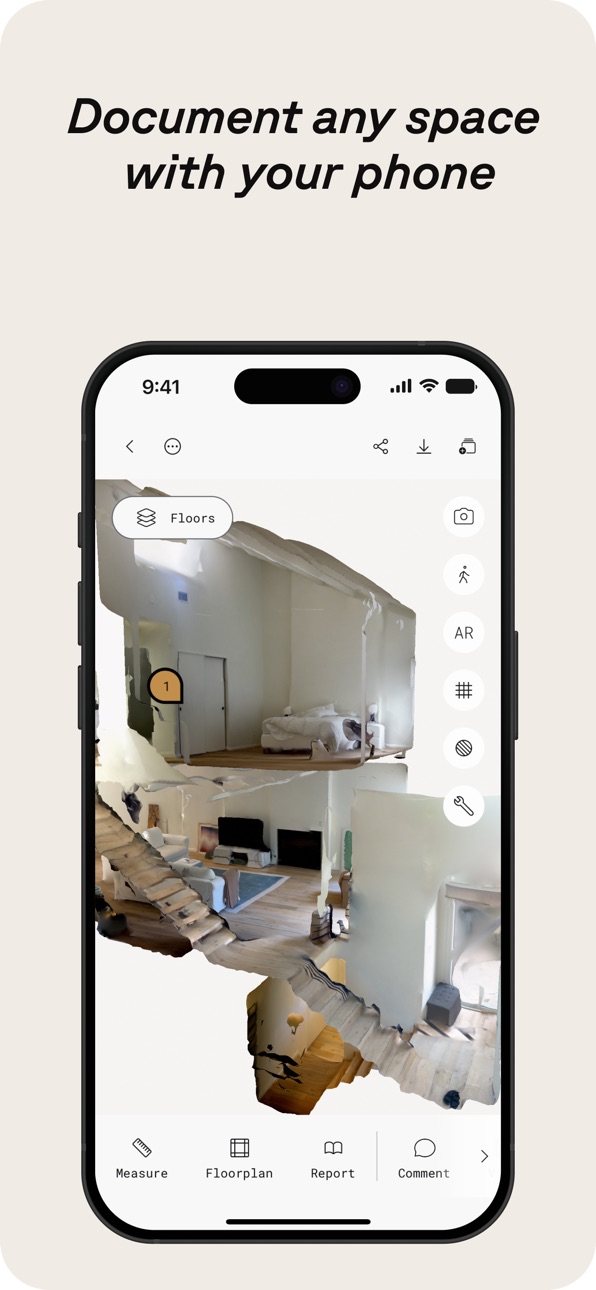
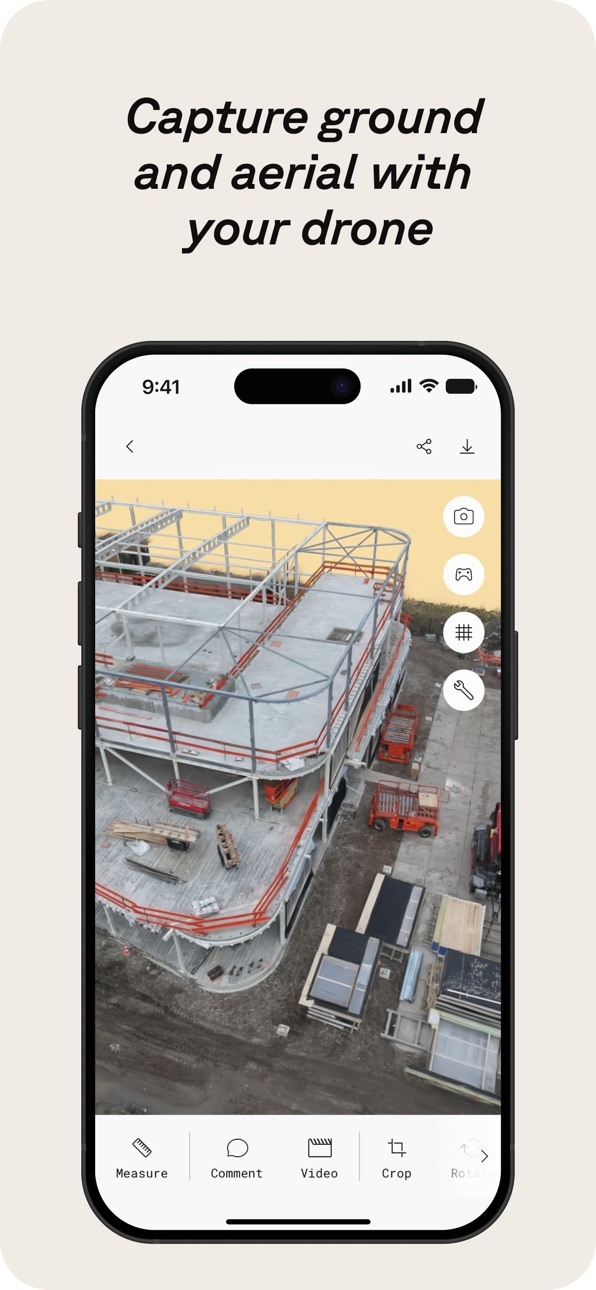
Polycam est la plateforme de numérisation 3D de référence pour iPhone et iPad, alliant des fonctionnalités de niveau professionnel à une interface conviviale. Créez sans effort des modèles 3D de haute qualité à partir de photos, générez des scans LiDAR précis et capturez des images 360° immersives — le tout sur votre appareil. Modifiez directement sur votre iPhone ou iPad et exportez dans des formats compatibles avec les logiciels standard du secteur. Partagez votre travail en toute simplicité et connectez-vous à une communauté mondiale de créateurs.
Polycam propose une suite de fonctionnalités pour la capture et l’édition 3D :
Créez facilement des modèles 3D de haute qualité : Convertissez des photos du quotidien en superbes modèles 3D grâce à la photogrammétrie et aux splats gaussiens, parfaits pour capturer des objets et des scènes complexes. Ces modèles 3D peuvent être exportés vers diverses applications d’infographie, dont Blender et SketchUp, idéales pour les workflows professionnels. (Fonctionne sur tous les iPhone et iPad)
Scanner 3D LiDAR plébiscité : Découvrez le scanning LiDAR de Polycam, reconnu pour des captures rapides et précises des espaces. Utilisez Polycam pour créer des scans 3D détaillés prêts à être modifiés ou importés dans d’autres logiciels de conception comme Blender ou SketchUp. (Nécessite un iPhone ou un iPad avec LiDAR)
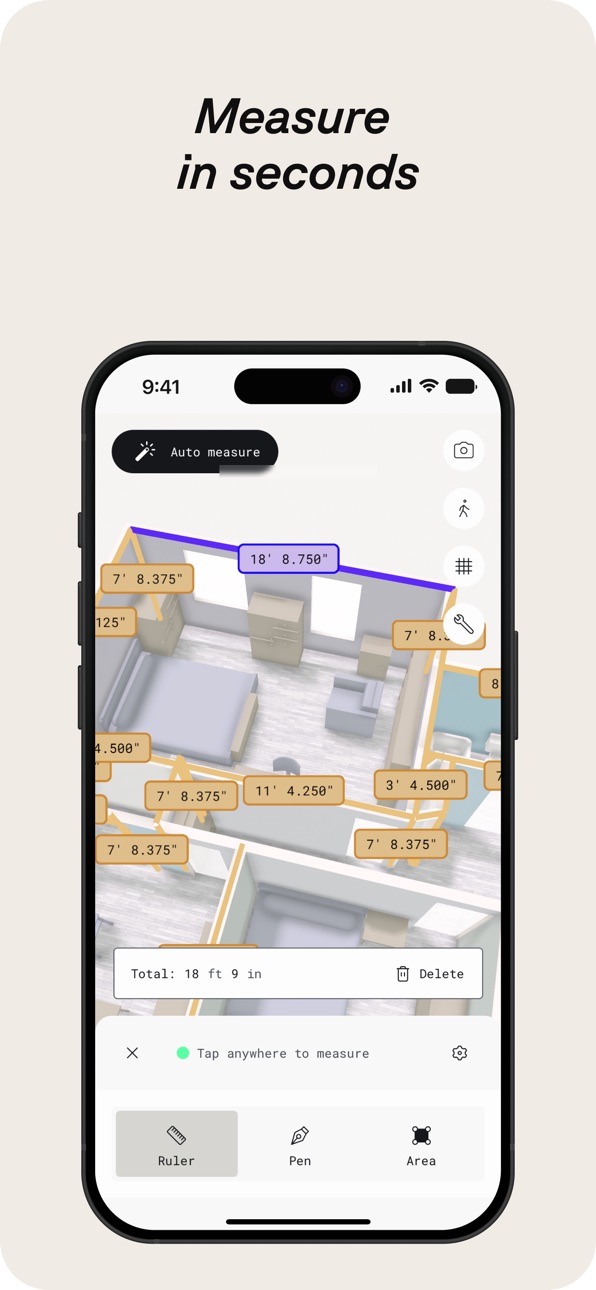
Révolutionnez la capture des espaces intérieurs avec le Mode Pièce : Générez instantanément des modèles 3D détaillés et très précis de pièces et d’intérieurs grâce au LiDAR, idéal pour les architectes, designers et professionnels de l’immobilier. Superposez des modèles avec des scans supplémentaires pour des vues immersives de planification de pièces en temps réel qui améliorent la visualisation et la documentation, en s’intégrant parfaitement à votre flux de travail. (Nécessite un iPhone ou un iPad avec LiDAR)
Plongez dans des expériences à 360° : Transformez votre iPhone en véritable caméra 360°. Créez des expériences panoramiques immersives, partagez-les via un lien ou exportez-les en images équirectangulaires. La technologie IA de Polycam comble automatiquement les zones non visibles pour des environnements virtuels complets. (Fonctionne sur iPhone 11 et modèles ultérieurs)
Faites de Polycam un élément clé de votre flux 3D avec Polycam Pro :
Options d’exportation fluides : Exportez des modèles 3D détaillés (.obj, .dae, .fbx, .stl) et des nuages de points colorés (.dxf, .ply) directement vers vos logiciels 3D préférés comme Blender et SketchUp, pour enrichir vos processus de conception et de visualisation.
Plans d’étage et plans à l’échelle précis : Générez instantanément des plans d’étage 2D et des plans à l’échelle précis à partir de vos scans 3D de pièces, prêts à être intégrés dans les workflows d’architecture et de design. Exportez les plans dans des formats compatibles avec les logiciels populaires tels qu’AutoCAD, SketchUp et Adobe Illustrator.
Photogrammétrie et splats gaussiens illimités : Capturez et traitez autant de modèles 3D de haute qualité que nécessaire, sans limites, afin de préserver chaque détail pour vos projets.
Partagez, collaborez et faites évoluer votre flux de travail :
Partage simplifié : Partagez instantanément des captures 3D via des liens simples pour obtenir des retours professionnels et collaborer.
Collaboration optimisée : Utilisez des bibliothèques partagées pour collaborer efficacement sur des projets et optimiser votre flux de travail.
Rejoignez la communauté : Connectez-vous avec des créateurs, des designers et des passionnés de 3D sur Polycam Explore. Découvrez des projets inspirants et hissez les vôtres à un niveau supérieur.
Accédez à la plateforme web de Polycam pour modifier, améliorer et partager vos modèles depuis votre ordinateur. Utilisez vos identifiants existants pour une intégration fluide dans votre flux de travail.
In-App Purchases CM pricing
Polycam Pro Subscription
Monthly · Monthly—
Yearly · Yearly—
Capabilities
In-App Purchases
Accessibility
ipadiphonemacrealityDevicetvoswatch
Version history 25 versions
Build 887691714v6.0.122026-07-01 19:29:29
Fixed the alignment between the mesh and floorplan layers, resolved a handful of minor issues, and improved overall performance
Build 887503390v6.0.112026-06-29 00:09:17
Nothing major this time around—just a round of improvements behind the scenes. We've enhanced texture rendering, addressed minor bugs, and made performance optimizations for a smoother experience
Build 887291812v6.0.102026-06-24 17:04:27
* Fixed crashes found in floor plan editor
* Improved room segmenting algorithm performance
* Added the ability for users to Remesh if they are unable to open a capture
* Performance improvements
Build 886886171v6.0.92026-06-22 00:02:02
* Improved room segmentation accuracy
* Better performance and reliability when syncing large Space captures
* Fixed Floorplan thumbnail issues
* General bug fixes and performance improvements across the App
Build 886846520v6.0.82026-06-11 21:05:25
* Fixed the Edit button on iPad for Space Mode and Floorplan captures when using the Floorplan Editor tool.
* Performance improvements.
Build 886749300v6.0.62026-06-10 01:50:08
*Fixed an issue with object captures hanging on exit
*Fixed an issue with draft object images causing lag while loading
*Fixed more crashes on floor plans
*Fixed other minor issues and performance improvements
Build 886792543v6.0.72026-06-10 21:01:01
* Fixed walkthrough mode for non-LiDAR Space Mode scans
* Performance improvements
Build 886445945v6.0.52026-06-03 14:10:31
* Improved performance around Space Mode and Floorplan captures
* Fixed Video and Color tools
* Minor bug fixes and performance improvements
Build 886172637v6.0.42026-05-27 15:07:08
* Fixed an issue with the capture ratings
* Fixed issues with clipping planes
* Fixed an issue where esx modals were stacking on top of each other
* Added a cancel plan button for subscriptions
* Bug fixes and performance improvements
Build 885886014v6.0.32026-05-20 18:51:11
* Improved Cloud Space reconstruction stability and meshing reliability
* Updated in-app purchases with StoreKit 2
* Adjusted access to Roof Report for Business plans
* Bug fixes and performance improvements
Build 885643871v6.0.22026-05-14 16:35:57
* Improved performance for syncing and uploading captures
* Improved uploads for older clients
* Minor bug fixes and performance improvements
Build 885299515v6.0.12026-05-05 23:20:50
* Improved background upload processing for object captures
* Fixed an issue where users were getting logged out after updating the app
* Minor bug fixes and performance improvements
Build 885095647v6.0.02026-04-30 18:57:32
* Improved upload + sync stability
* Fixed onboarding CTA issue (iPhone SE)
* Resolved 3D view freeze when switching apps
* Fixed crop/reset mismatch
* Improved walkthrough navigation + keyframe interaction
* Minor bug fixes and performance improvements
Build 884861470v5.2.152026-04-23 21:58:01
* Improved performance for syncing and uploading Space Mode captures
* Fixed issue with 360 draft view
* Fixed issue with saving when exiting the floor plan editor after updates
* Updated capture badge design
* Minor bug fixes and performance improvements
Build 884459838v5.2.142026-04-18 20:58:33
• Sign-in experience updates
• Walkthrough/orbit improvements
• Bug fixes and performance improvements
Build 884282874v5.2.132026-04-09 12:19:15
* Improved the performance of Walkthrough mode and fixed crashes that may occur while switching space mode layers
* Fixed workspace not returning correct captures list
* Minor bug fixes and performance improvements
Build 883939753v5.2.122026-04-01 22:44:06
• Improved sharing experience for captures
• Fixed space mode loading issues
• Better sync and upload performance
• Bug fixes and performance improvements
Build 883552580v5.2.112026-03-20 00:16:41
* Fixed the issue where private captures would not display for Enterprise users
* Improved Gaussian Splat performance by resolving an issue where capture would not display
* Updated and fixed Roomplan related flows
* Minor bug fixes and performance improvements
Build 883509723v5.2.102026-03-18 20:37:10
* Improved Gaussian Splat performance by resolving an issue where capture would not display
* Updated and fixed Roomplan related flows
* Minor bug fixes and performance improvements
Build 883237334v5.2.92026-03-11 23:35:15
- Fixed issues with capture syncing
- Fixed numerical keyboard issues
- Minor bug fixes
- Performance improvements
Build 882998370v5.2.82026-03-04 15:02:17
• Improved measurement consistency across the app.
• Rescale tool now supports decimal input and improved precision.
• Unit preferences now stay consistent between Viewer and Editor.
• Added clearer subscription and billing updates, including card expiry warnings and upgrade discounts where applicable.
• Fixed font display issues and improved overall stability.
Build 882653267v5.2.72026-02-23 14:39:37
- Fixed crashes
- Improved performance
Build 882378808v5.2.62026-02-19 17:00:16
* Updated and fixed the design for the crop, infill/360, and reset tools
* Updated the design for the Publishing Overview screen
* Minor bug fixes and performance improvements
Build 882343655v5.2.52026-02-11 03:01:09
- Minor bug fixes
- Performance improvements
Build 882156911v5.2.42026-02-06 20:42:25
- Fixed an issue with capture ratings
- Minor bug fixes
- Performance improvements
Price history by region
Currency
Show
Columns
Search
Availability 175 of 175 storefronts
| Region | Language | Price | Ratings | Avg | Version |
|---|---|---|---|---|---|
| US | en-US | Free | 42.6k | 4.7 | 6.0.12 |
| GB | en-GB | Free | 8.3k | 4.6 | 6.0.12 |
| DE | de-DE | Free | 8.1k | 4.5 | 6.0.12 |
| RU | ru | Free | 6.4k | 4.6 | 6.0.12 |
| CA | en-CA | Free | 5.1k | 4.6 | 6.0.12 |
| FR | fr-FR | Free | 4.4k | 4.6 | 6.0.12 |
| IT | it | Free | 4.3k | 4.7 | 6.0.12 |
| IN | en-GB | Free | 3.7k | 4.6 | 6.0.12 |
| AU | en-AU | Free | 3.2k | 4.6 | 6.0.12 |
| JP | ja | Free | 3.0k | 4.6 | 6.0.12 |
| ES | es-ES | Free | 2.7k | 4.6 | 6.0.12 |
| PL | en-GB | Free | 2.4k | 4.7 | 6.0.12 |
| UA | en-GB | Free | 2.4k | 4.8 | 6.0.12 |
| CN | zh-Hans-CN | Free | 2.1k | 4.4 | 6.0.12 |
| BR | pt-BR | Free | 2.1k | 4.8 | 6.0.12 |
| VN | en-GB | Free | 2.0k | 4.8 | 6.0.12 |
| MX | es-MX | Free | 2.0k | 4.8 | 6.0.12 |
| NL | nl | Free | 1.8k | 4.6 | 6.0.12 |
| KR | ko | Free | 1.7k | 4.8 | 6.0.12 |
| TR | en-GB | Free | 1.7k | 4.6 | 6.0.12 |
| CH | de-CH | Free | 1.6k | 4.6 | 6.0.12 |
| ID | en-GB | Free | 1.5k | 4.8 | 6.0.12 |
| CO | es-MX | Free | 1.4k | 4.8 | 6.0.12 |
| UZ | en-GB | Free | 1.3k | 4.8 | 6.0.12 |
| TW | zh-Hant-TW | Free | 1.3k | 4.8 | 6.0.12 |
| TH | en-GB | Free | 1.2k | 4.8 | 6.0.12 |
| SE | sv | Free | 1.1k | 4.6 | 6.0.12 |
| KZ | en-GB | Free | 1.1k | 4.8 | 6.0.12 |
| CZ | en-GB | Free | 944 | 4.7 | 6.0.12 |
| AT | de-DE | Free | 903 | 4.6 | 6.0.12 |
| CL | es-MX | Free | 854 | 4.8 | 6.0.12 |
| BE | en-GB | Free | 829 | 4.6 | 6.0.12 |
| MY | en-GB | Free | 828 | 4.8 | 6.0.12 |
| NO | en-GB | Free | 798 | 4.6 | 6.0.12 |
| PH | en-GB | Free | 767 | 4.8 | 6.0.12 |
| RO | en-GB | Free | 728 | 4.8 | 6.0.12 |
| NZ | en-AU | Free | 693 | 4.6 | 6.0.12 |
| PT | pt-PT | Free | 687 | 4.7 | 6.0.12 |
| IL | en-GB | Free | 669 | 4.6 | 6.0.12 |
| DK | en-GB | Free | 638 | 4.5 | 6.0.12 |
| AR | es-MX | Free | 628 | 4.7 | 6.0.12 |
| AE | en-GB | Free | 619 | 4.7 | 6.0.12 |
| ZA | en-GB | Free | 591 | 4.7 | 6.0.12 |
| HU | en-GB | Free | 562 | 4.7 | 6.0.12 |
| HK | zh-Hant-HK | Free | 561 | 4.6 | 6.0.12 |
| FI | en-GB | Free | 484 | 4.5 | 6.0.12 |
| PE | es-MX | Free | 459 | 4.7 | 6.0.12 |
| SA | en-GB | Free | 439 | 4.6 | 6.0.12 |
| GR | en-GB | Free | 437 | 4.8 | 6.0.12 |
| SK | en-GB | Free | 399 | 4.8 | 6.0.12 |
| BG | en-GB | Free | 363 | 4.8 | 6.0.12 |
| SG | en-GB | Free | 358 | 4.7 | 6.0.12 |
| BY | en-GB | Free | 326 | 4.7 | 6.0.12 |
| PK | en-GB | Free | 309 | 4.6 | 6.0.12 |
| IE | en-GB | Free | 306 | 4.6 | 6.0.12 |
| HR | en-GB | Free | 305 | 4.8 | 6.0.12 |
| AM | en-GB | Free | 304 | 4.8 | 6.0.12 |
| EC | es-MX | Free | 288 | 4.8 | 6.0.12 |
| LT | en-GB | Free | 265 | 4.8 | 6.0.12 |
| EG | en-GB | Free | 257 | 4.7 | 6.0.12 |
| KG | en-GB | Free | 255 | 4.8 | 6.0.12 |
| NG | en-GB | Free | 255 | 4.5 | 6.0.12 |
| LV | en-GB | Free | 253 | 4.7 | 6.0.12 |
| SI | en-GB | Free | 226 | 4.7 | 6.0.12 |
| EE | en-GB | Free | 221 | 4.8 | 6.0.12 |
| AZ | en-GB | Free | 217 | 4.8 | 6.0.12 |
| DO | es-MX | Free | 203 | 4.7 | 6.0.12 |
| GT | es-MX | Free | 181 | 4.8 | 6.0.12 |
| CR | es-MX | Free | 174 | 4.7 | 6.0.12 |
| MD | en-GB | Free | 171 | 4.9 | 6.0.12 |
| RS | en-GB | Free | 166 | 4.7 | 6.0.12 |
| LK | en-GB | Free | 161 | 4.6 | 6.0.12 |
| GH | en-GB | Free | 145 | 4.5 | 6.0.12 |
| AL | en-GB | Free | 141 | 4.8 | 6.0.12 |
| TJ | en-GB | Free | 141 | 4.8 | 6.0.12 |
| NP | en-GB | Free | 139 | 4.5 | 6.0.12 |
| QA | en-GB | Free | 139 | 4.5 | 6.0.12 |
| GE | en-GB | Free | 136 | 4.8 | 6.0.12 |
| MN | en-GB | Free | 129 | 4.8 | 6.0.12 |
| BO | es-MX | Free | 121 | 4.7 | 6.0.12 |
| DZ | en-GB | Free | 121 | 4.6 | 6.0.12 |
| MA | en-GB | Free | 116 | 4.6 | 6.0.12 |
| KW | en-GB | Free | 114 | 4.7 | 6.0.12 |
| KE | en-GB | Free | 109 | 4.8 | 6.0.12 |
| LB | en-GB | Free | 101 | 4.6 | 6.0.12 |
| IS | en-GB | Free | 100 | 4.5 | 6.0.12 |
| PA | es-MX | Free | 99 | 4.7 | 6.0.12 |
| KH | en-GB | Free | 97 | 4.6 | 6.0.12 |
| UY | en-GB | Free | 93 | 4.6 | 6.0.12 |
| TN | en-GB | Free | 86 | 4.8 | 6.0.12 |
| VE | es-MX | Free | 84 | 4.8 | 6.0.12 |
| CY | en-GB | Free | 82 | 4.8 | 6.0.12 |
| LU | en-GB | Free | 82 | 4.5 | 6.0.12 |
| HN | es-MX | Free | 76 | 5.0 | 6.0.12 |
| JO | en-GB | Free | 75 | 4.8 | 6.0.12 |
| MT | en-GB | Free | 70 | 4.9 | 6.0.12 |
| MK | en-GB | Free | 69 | 4.8 | 6.0.12 |
| TZ | en-GB | Free | 68 | 4.9 | 6.0.12 |
| OM | en-GB | Free | 65 | 4.4 | 6.0.12 |
| IQ | en-GB | Free | 62 | 4.6 | 6.0.12 |
| SV | es-MX | Free | 60 | 4.8 | 6.0.12 |
| PY | es-MX | Free | 59 | 4.9 | 6.0.12 |
| BA | en-GB | Free | 44 | 4.4 | 6.0.12 |
| BH | en-GB | Free | 43 | 4.2 | 6.0.12 |
| UG | en-GB | Free | 38 | 4.8 | 6.0.12 |
| MO | zh-Hant-HK | Free | 35 | 4.8 | 6.0.12 |
| AO | en-GB | Free | 31 | 4.5 | 6.0.12 |
| MU | en-GB | Free | 30 | 4.7 | 6.0.12 |
| SN | en-GB | Free | 28 | 4.6 | 6.0.12 |
| TT | en-GB | Free | 28 | 4.8 | 6.0.12 |
| JM | en-GB | Free | 25 | 4.8 | 6.0.12 |
| TM | en-GB | Free | 24 | 5.0 | 6.0.12 |
| XK | en-GB | Free | 24 | 4.7 | 6.0.12 |
| NI | es-MX | Free | 22 | 4.6 | 6.0.12 |
| MV | en-GB | Free | 21 | 4.9 | 6.0.12 |
| CI | fr-FR | Free | 17 | 4.4 | 6.0.12 |
| LA | en-GB | Free | 17 | 4.9 | 6.0.12 |
| ZW | en-GB | Free | 15 | 4.8 | 6.0.12 |
| ME | en-GB | Free | 14 | 5.0 | 6.0.12 |
| FJ | en-GB | Free | 11 | 4.5 | 6.0.12 |
| MZ | en-GB | Free | 11 | 4.5 | 6.0.12 |
| MM | en-GB | Free | 10 | 4.1 | 6.0.12 |
| NA | en-GB | Free | 10 | 4.8 | 6.0.12 |
| RW | en-GB | Free | 10 | 4.5 | 6.0.12 |
| BN | en-GB | Free | 9 | 4.9 | 6.0.12 |
| BW | en-GB | Free | 9 | 4.9 | 6.0.12 |
| GY | en-GB | Free | 9 | 4.7 | 6.0.12 |
| BT | en-GB | Free | 8 | 4.1 | 6.0.12 |
| CD | en-GB | Free | 8 | 4.5 | 6.0.12 |
| AF | en-GB | Free | 7 | 5.0 | 6.0.12 |
| BJ | en-GB | Free | 7 | 4.6 | 6.0.12 |
| CG | en-GB | Free | 7 | 5.0 | 6.0.12 |
| MG | en-GB | Free | 7 | 4.4 | 6.0.12 |
| SL | en-GB | Free | 7 | 4.1 | 6.0.12 |
| BB | en-GB | Free | 6 | 4.8 | 6.0.12 |
| GD | en-GB | Free | 6 | 4.8 | 6.0.12 |
| YE | en-GB | Free | 6 | 4.8 | 6.0.12 |
| ZM | en-GB | Free | 6 | 4.3 | 6.0.12 |
| BS | en-GB | Free | 5 | 5.0 | 6.0.12 |
| CM | fr-FR | Free | 5 | 3.4 | 6.0.12 |
| GA | fr-FR | Free | 5 | 3.4 | 6.0.12 |
| MW | en-GB | Free | 5 | 4.8 | 6.0.12 |
| BF | en-GB | Free | 4 | 3.8 | 6.0.12 |
| CV | en-GB | Free | 4 | 5.0 | 6.0.12 |
| GM | en-GB | Free | 4 | 4.8 | 6.0.12 |
| LR | en-GB | Free | 4 | 5.0 | 6.0.12 |
| LY | en-GB | Free | 4 | 4.8 | 6.0.12 |
| SR | en-GB | Free | 4 | 5.0 | 6.0.12 |
| AI | en-GB | Free | 3 | 5.0 | 6.0.12 |
| KY | en-GB | Free | 3 | 5.0 | 6.0.12 |
| LC | en-GB | Free | 3 | 4.7 | 6.0.12 |
| ML | en-GB | Free | 3 | 4.3 | 6.0.12 |
| NE | en-GB | Free | 3 | 5.0 | 6.0.12 |
| BM | en-GB | Free | 2 | 5.0 | 6.0.12 |
| MR | en-GB | Free | 2 | 5.0 | 6.0.12 |
| PG | en-GB | Free | 2 | 4.5 | 6.0.12 |
| SC | en-GB | Free | 2 | 5.0 | 6.0.12 |
| SZ | en-GB | Free | 2 | 5.0 | 6.0.12 |
| VG | en-GB | Free | 2 | 5.0 | 6.0.12 |
| GW | en-GB | Free | 1 | 4.0 | 6.0.12 |
| KN | en-GB | Free | 1 | 5.0 | 6.0.12 |
| ST | en-GB | Free | 1 | 4.0 | 6.0.12 |
| TD | en-GB | Free | 1 | 1.0 | 6.0.12 |
| VU | en-GB | Free | 1 | 5.0 | 6.0.12 |
| AG | en-GB | Free | 0 | — | 6.0.12 |
| BZ | en-GB | Free | 0 | — | 6.0.12 |
| DM | en-GB | Free | 0 | — | 6.0.12 |
| FM | en-GB | Free | 0 | — | 6.0.12 |
| MS | en-GB | Free | 0 | — | 6.0.12 |
| NR | en-GB | Free | 0 | — | 6.0.12 |
| PW | en-GB | Free | 0 | — | 6.0.12 |
| SB | en-GB | Free | 0 | — | 6.0.12 |
| TC | en-GB | Free | 0 | — | 6.0.12 |
| TO | en-GB | Free | 0 | — | 6.0.12 |
| VC | en-GB | Free | 0 | — | 6.0.12 |
Change log 29 changes · CM
✎
releaseNotes updated
Fixed the alignment between the mesh and floorplan layers, resolved a handful of minor issues, and improved overall performance
✎
description updated
Polycam is the leading 3D scanning platform for iPhone and iPad, blending professional-grade capabilities with a user-friendly interface. Effortlessly create hi
✎
subtitle updated
LiDAR for Measurement & CAD
✎
name updated
Polycam 3D Scans & Floor Plans
◆
Version 6.0.12 released
Fixed the alignment between the mesh and floorplan layers, resolved a handful of minor issues, and improved overall performance
◆
Version 6.0.11 released
Nothing major this time around—just a round of improvements behind the scenes. We've enhanced texture rendering, addressed minor bugs, and made performance optimizations for a smoother experience
◆
Version 6.0.10 released
* Fixed crashes found in floor plan editor
* Improved room segmenting algorithm performance
* Added the ability for users to Remesh if they are unable to open a capture
* Performance improvements
◆
Version 6.0.9 released
* Improved room segmentation accuracy
* Better performance and reliability when syncing large Space captures
* Fixed Floorplan thumbnail issues
* General bug fixes and performance improvements across the App
◆
Version 6.0.8 released
* Fixed the Edit button on iPad for Space Mode and Floorplan captures when using the Floorplan Editor tool.
* Performance improvements.
◆
Version 6.0.7 released
* Fixed walkthrough mode for non-LiDAR Space Mode scans
* Performance improvements
◆
Version 6.0.6 released
*Fixed an issue with object captures hanging on exit
*Fixed an issue with draft object images causing lag while loading
*Fixed more crashes on floor plans
*Fixed other minor issues and performance improvements
◆
Version 6.0.5 released
* Improved performance around Space Mode and Floorplan captures
* Fixed Video and Color tools
* Minor bug fixes and performance improvements
◆
Version 6.0.4 released
* Fixed an issue with the capture ratings
* Fixed issues with clipping planes
* Fixed an issue where esx modals were stacking on top of each other
* Added a cancel plan button for subscriptions
* Bug fixes and performance improvements
◆
Version 6.0.3 released
* Improved Cloud Space reconstruction stability and meshing reliability
* Updated in-app purchases with StoreKit 2
* Adjusted access to Roof Report for Business plans
* Bug fixes and performance improvements
◆
Version 6.0.2 released
* Improved performance for syncing and uploading captures
* Improved uploads for older clients
* Minor bug fixes and performance improvements
◆
Version 6.0.1 released
* Improved background upload processing for object captures
* Fixed an issue where users were getting logged out after updating the app
* Minor bug fixes and performance improvements
◆
Version 6.0.0 released
* Improved upload + sync stability
* Fixed onboarding CTA issue (iPhone SE)
* Resolved 3D view freeze when switching apps
* Fixed crop/reset mismatch
* Improved walkthrough navigation + keyframe interaction
* Minor bug fixes and performance
◆
Version 5.2.15 released
* Improved performance for syncing and uploading Space Mode captures
* Fixed issue with 360 draft view
* Fixed issue with saving when exiting the floor plan editor after updates
* Updated capture badge design
* Minor bug fixes and performan
◆
Version 5.2.14 released
• Sign-in experience updates
• Walkthrough/orbit improvements
• Bug fixes and performance improvements
◆
Version 5.2.13 released
* Improved the performance of Walkthrough mode and fixed crashes that may occur while switching space mode layers
* Fixed workspace not returning correct captures list
* Minor bug fixes and performance improvements
◆
Version 5.2.12 released
• Improved sharing experience for captures
• Fixed space mode loading issues
• Better sync and upload performance
• Bug fixes and performance improvements
◆
Version 5.2.11 released
* Fixed the issue where private captures would not display for Enterprise users
* Improved Gaussian Splat performance by resolving an issue where capture would not display
* Updated and fixed Roomplan related flows
* Minor bug fixes and per
◆
Version 5.2.10 released
* Improved Gaussian Splat performance by resolving an issue where capture would not display
* Updated and fixed Roomplan related flows
* Minor bug fixes and performance improvements
◆
Version 5.2.9 released
- Fixed issues with capture syncing
- Fixed numerical keyboard issues
- Minor bug fixes
- Performance improvements
◆
Version 5.2.8 released
• Improved measurement consistency across the app.
• Rescale tool now supports decimal input and improved precision.
• Unit preferences now stay consistent between Viewer and Editor.
• Added clearer subscription and billing updates, includi
◆
Version 5.2.7 released
- Fixed crashes
- Improved performance
◆
Version 5.2.6 released
* Updated and fixed the design for the crop, infill/360, and reset tools
* Updated the design for the Publishing Overview screen
* Minor bug fixes and performance improvements
◆
Version 5.2.5 released
- Minor bug fixes
- Performance improvements
◆
Version 5.2.4 released
- Fixed an issue with capture ratings
- Minor bug fixes
- Performance improvements