Home › Business

 US
US
USen-US FRfr-FR
 CAen-CA
 DEde-DE
 GBen-GB
 ITit
ITit AUen-AU
 BRpt-BR
 CHde-CH
 MXes-MX
 ESes-ES
 NLnl
NLnl VNen-GB
 CLes-MX
 BEen-GB
 ATde-DE
 INen-GB
 SEsv
SEsv NOen-GB
 NZen-AU
 THen-GB
 ZAen-GB
 IEen-GB
 COes-MX
 ILen-GB
 DKen-GB
 PLen-GB
 CNzh-Hans-CN
 SKen-GB
 SGen-GB
 JPja
JPja ARes-MX
 PTpt-PT
 SAen-GB
 GRen-GB
 TRen-GB
 HKzh-Hant-HK
 CZen-GB
 PHen-GB
 MYen-GB
 RUru
RUru TWzh-Hant-TW
 ROen-GB
 HUen-GB
 AEen-GB
 IDen-GB
 UAen-GB
 HRen-GB
 KRko
KRko LUen-GB
 PEes-MX
 FIen-GB
 SIen-GB
 CRes-MX
 ECes-MX
 EGen-GB
 BGen-GB
 KWen-GB
 GTes-MX
 LTen-GB
 VEes-MX
 PKen-GB
 KZen-GB
 UYen-GB
 PAes-MX
 GHen-GB
 EEen-GB
 QAen-GB
 KEen-GB
 LVen-GB
 LBen-GB
 KHen-GB
 MTen-GB
 MAen-GB
 SNen-GB
 HNes-MX
 RSen-GB
 ALen-GB
 CYen-GB
 LKen-GB
 JOen-GB
 DZen-GB
 SVes-MX
 TZen-GB
 AOen-GB
 ISen-GB
 OMen-GB
 BOes-MX
 NPen-GB
 BHen-GB
 UGen-GB
 MDen-GB
 BYen-GB
 CIfr-FR
 NAen-GB
 UZen-GB
 MNen-GB
 IQen-GB
 NIes-MX
 MOzh-Hant-HK
 AZen-GB
 PYes-MX
 MKen-GB
 AMen-GB
 MUen-GB
 CDen-GB
 MZen-GB
 CMfr-FR
 GEen-GB
 BWen-GB
 BJen-GB
 BNen-GB
 BFen-GB
 KGen-GB
 CGen-GB
 BAen-GB
 XKen-GB
 ZMen-GB
 MLen-GB
 MGen-GB
 MMen-GB
 GYen-GB
 RWen-GB
 MRen-GB
 LAen-GB
 MEen-GB
 BTen-GB
 KYen-GB
 FJen-GB
 MWen-GB
 SLen-GB
 GMen-GB
 MVen-GB
 AFen-GB
 TDen-GB
 CVen-GB
 LRen-GB
 TJen-GB
 AGen-GB
 YEen-GB
 GAfr-FR
 PGen-GB
 BMen-GB
 TCen-GB
 SZen-GB
 TOen-GB
 NEen-GB
 DMen-GB
 VCen-GB
 SRen-GB
 VGen-GB
 AIen-GB
 SCen-GB
 VUen-GB
 PWen-GB
 TMen-GB
 FMen-GB
 MSen-GB
 SBen-GB
 NRen-GB
160 of 160 storefronts
Content in en-US
Content in en-US
Information
Preview 2 platforms
iPhone 8 images




iPad 8 images



What’s New Version 8.12.1
FIXES
Fixed a bug where moving a page to another document could cause the app to crash.
Description
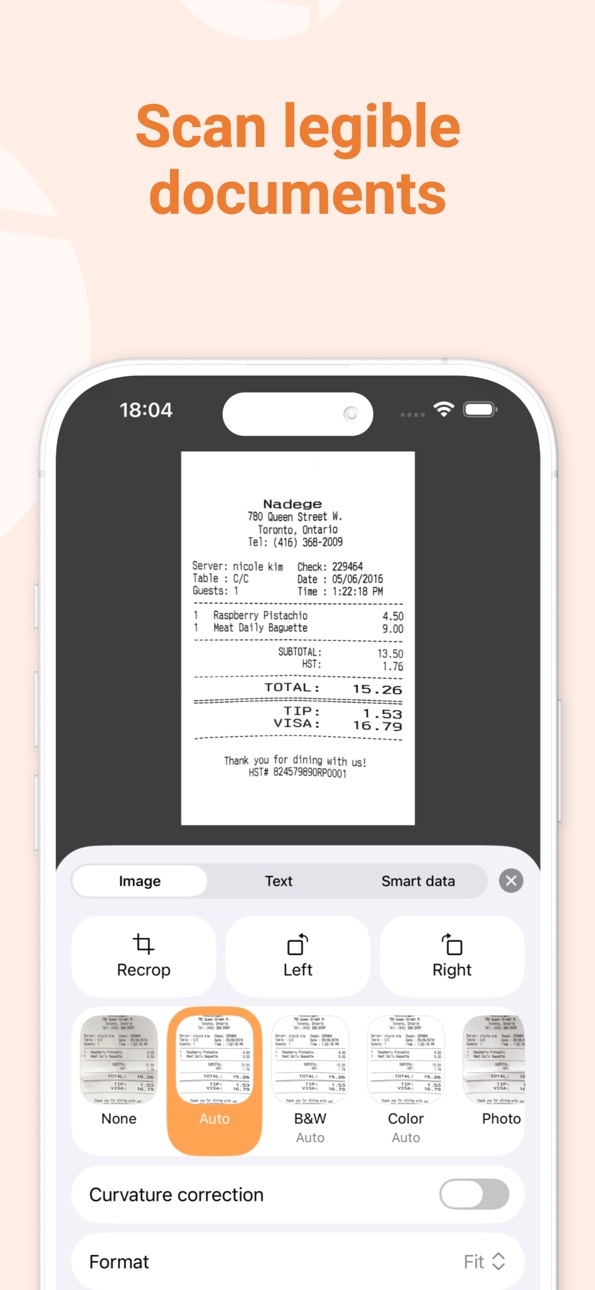
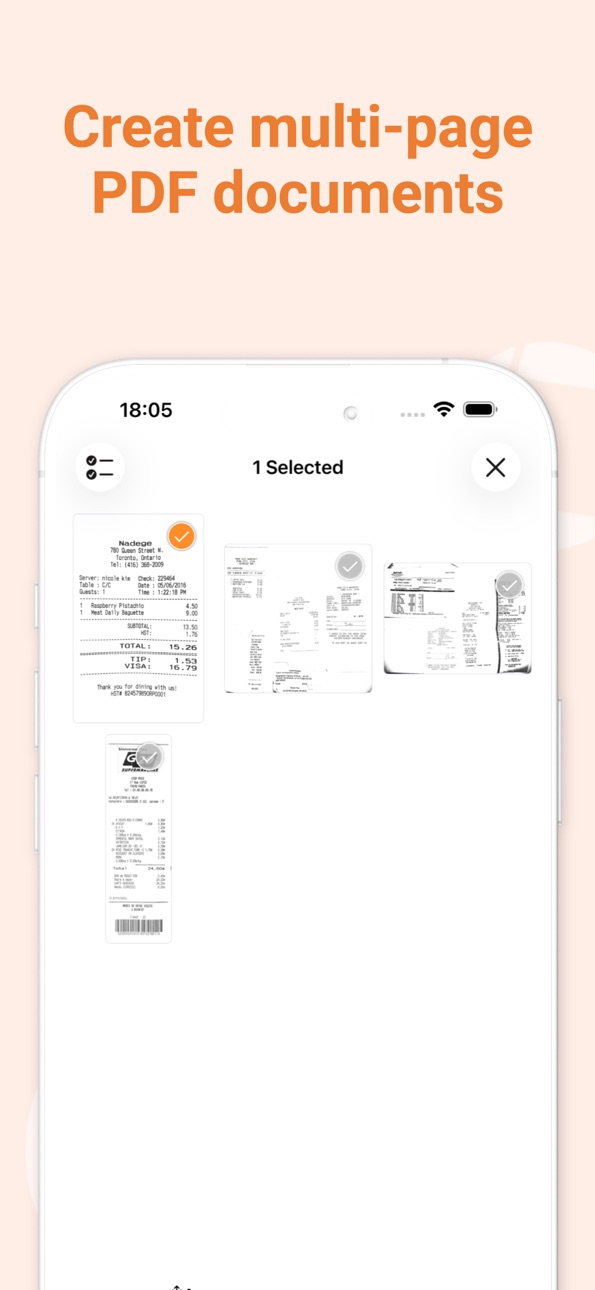
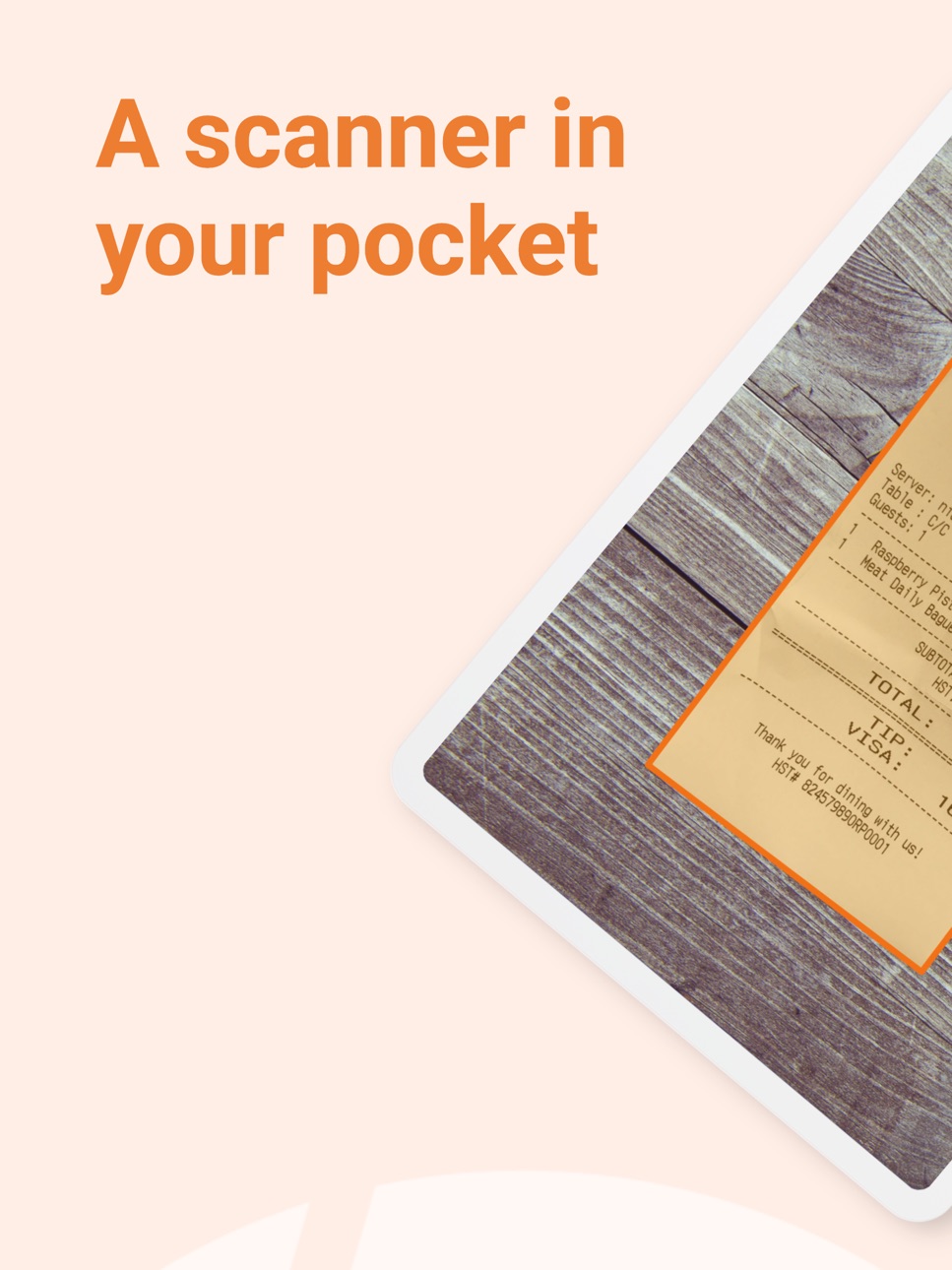
Genius Scan is a document scanner app in your pocket. Quickly scan your paper documents on the go and export them as multi-page PDF files.
*** Apple App of the Week *** 20+ million users *** 1000s of small businesses ***
Place any document in front of your device’s camera: our scanner app automatically recognizes the paper against the background, crops it, and cleans up the result. You obtain a crisp, legible scan. Batch scanning lets you scan dozens of pages in a matter of seconds. Powerful tools help you organize, share, or archive your documents.
“Next time you plan to hit the road, don’t forget to download Genius Scan to make life easier for yourself and your accounting department.” - AppPicker.com
“Camera apps aren’t designed for close-up text scanning, but Genius Scan is.” - The Guardian
== KEY FEATURES ==
Smart Scanning:
- Document detection & background removal
- Distortion correction
- Shadow removal and defect cleanup
- Filters (black & white, whiteboard, photo)
- Batch scanning
PDF Creation & Editing:
- Document merging & splitting
- Multiple page PDF creation
- Photos and PDF import
Security & Privacy:
- On-device document processing
+ Face ID locking
+ PDF password encryption
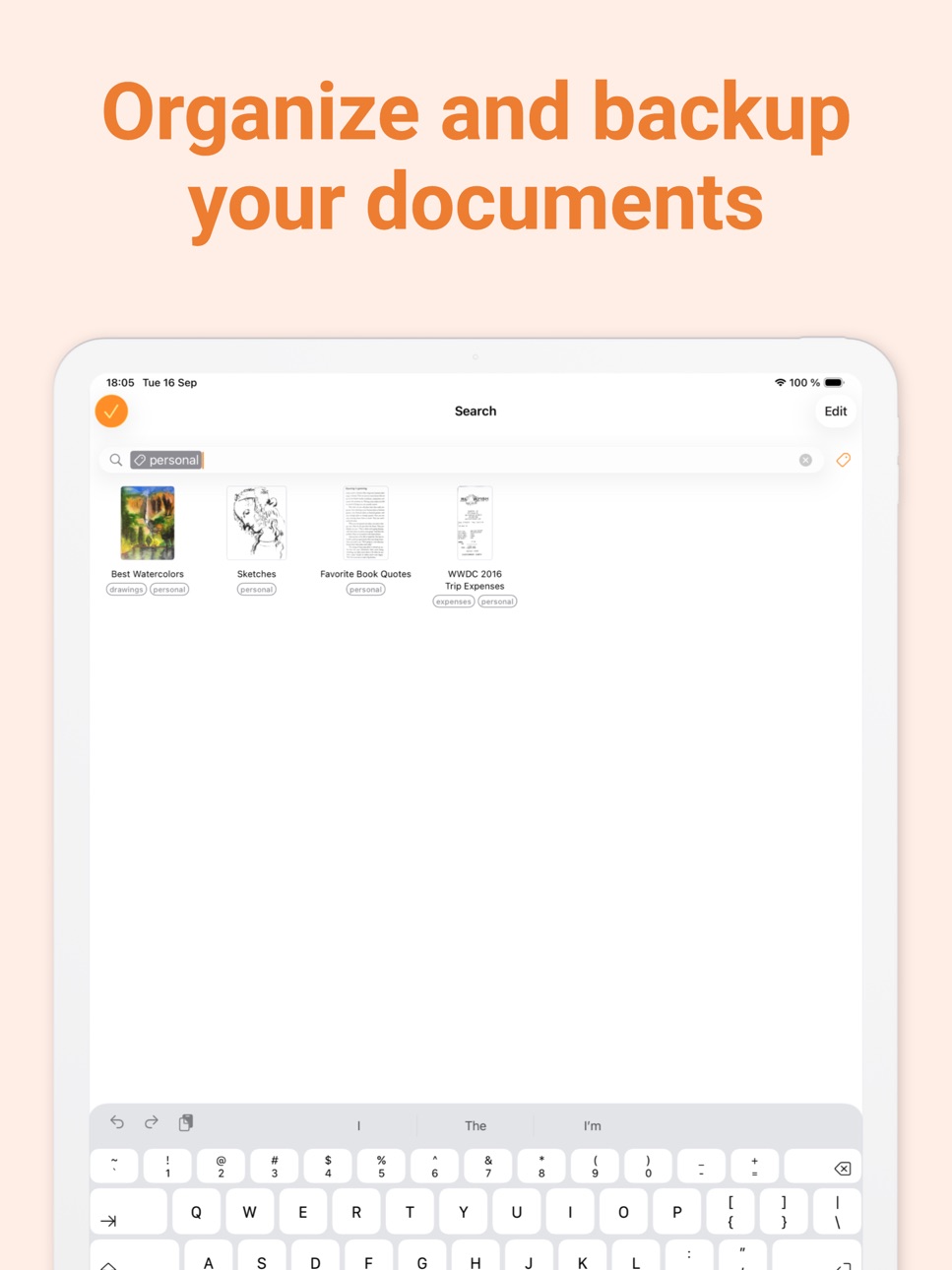
Document Organization:
- Document tagging
- Metadata and content search
+ Smart document renaming (custom templates, …)
+ Backup and multi-device sync with Genius Cloud (separate subscription)
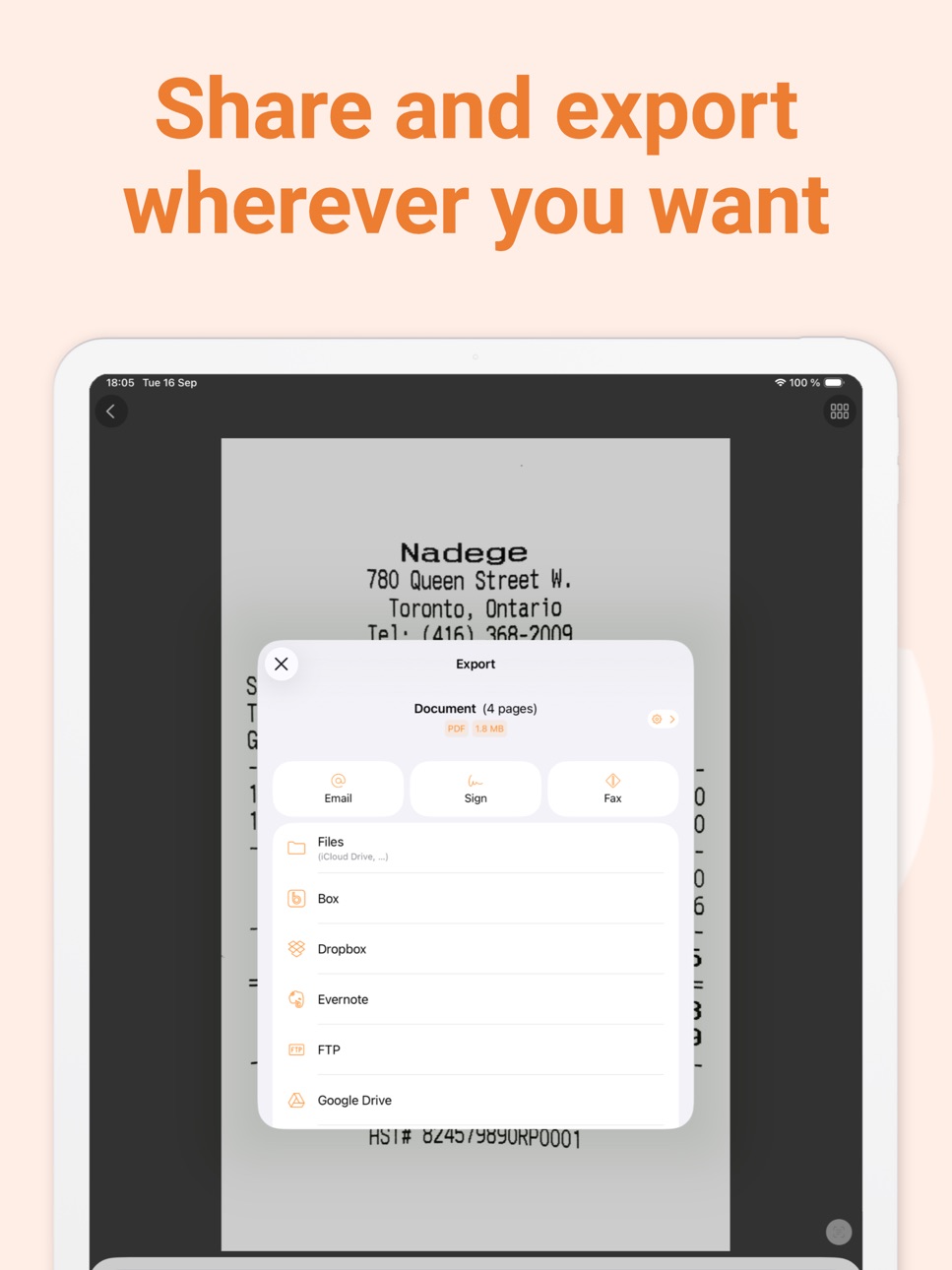
Export:
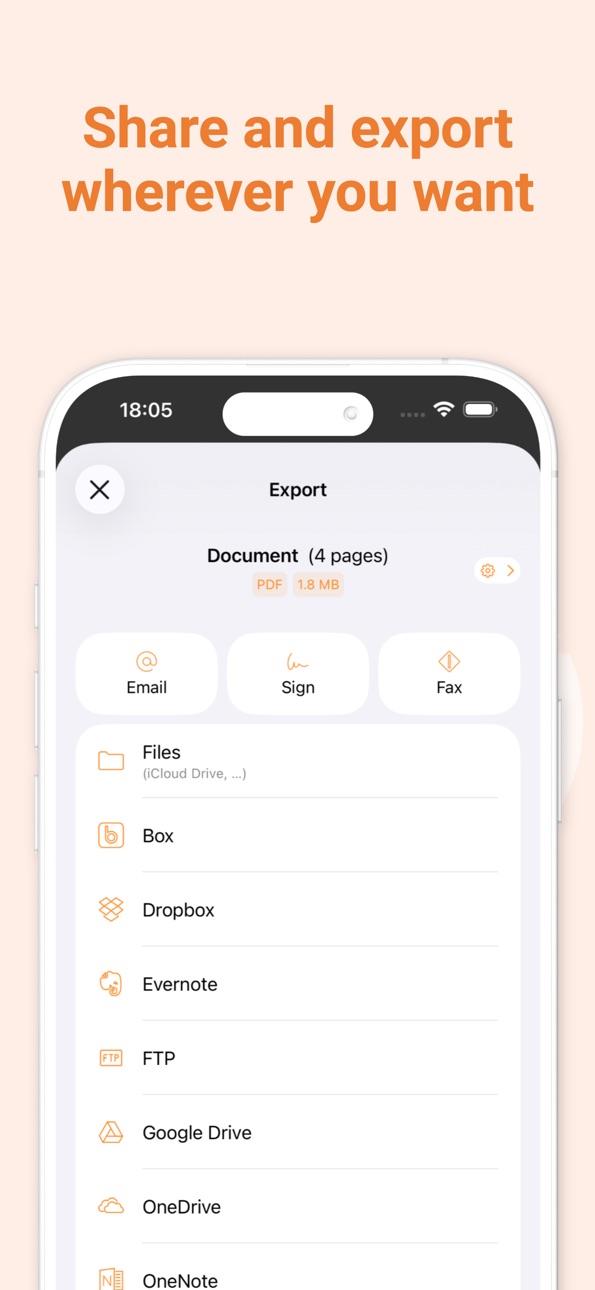
- Email
+ Box, Dropbox, Evernote, Expensify, Google Drive, iCloud Drive, OneDrive, OneNote, FTP, SugarSync, WebDAV.
+ Any WebDAV compatible service such as Citrix ShareFile, NextCloud, ownCloud, Synology, Yandex.
+ Automatic background auto-export
OCR (Text Recognition):
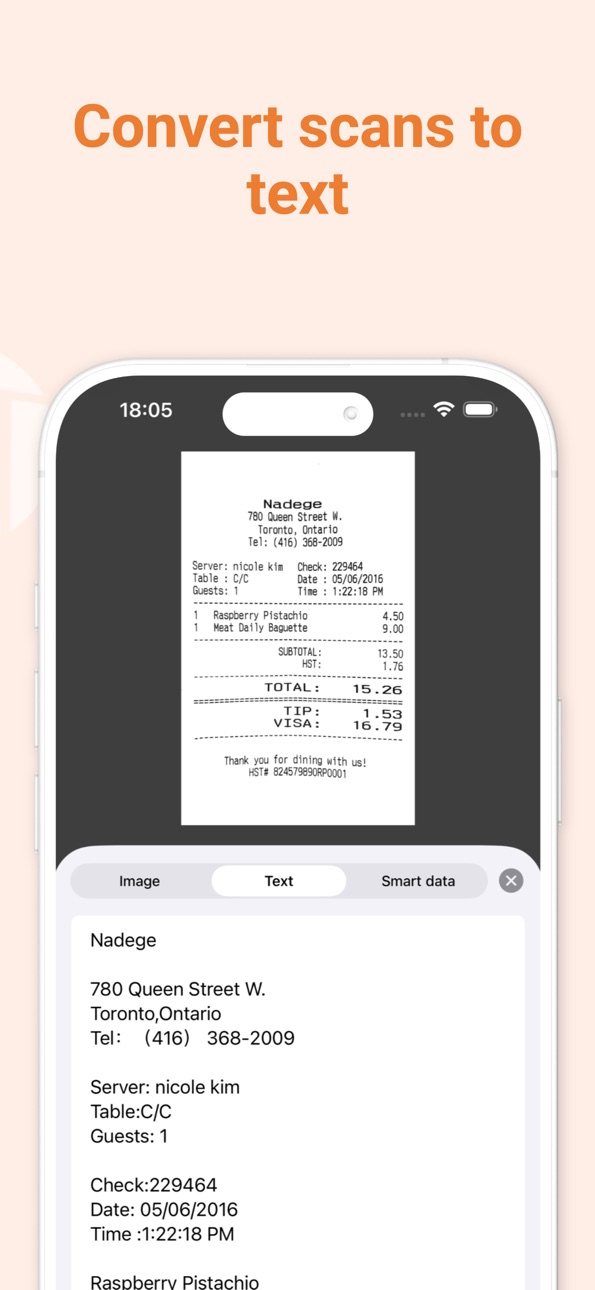
+ Text extraction
+ Searchable PDF creation
+ Business card scanning & contact creation
The features denoted with [+] are available as part of a premium plan.
== ABOUT US ==
It’s in the heart of Paris, France that The Grizzly Labs develops Genius Scan. We take pride in crafting apps that help millions of users throughout the world and hold ourselves to the highest standards in terms of quality and privacy. Get in touch with us @thegrizzlylabs if you have any questions.
== PRICING & LEGAL ==
Genius Scan is free to use for as long as you want.
Should you choose to, you can subscribe to the Genius Scan Plus plan for more features. You can subscribe to Genius Cloud for backup & synchronization. In that case, Genius Scan’s store displays the duration and price of each subscription, updated at the time of purchase. Payment will be charged to iTunes account when the order is confirmed. Subscriptions automatically renew unless auto-renew is turned off no later than 24 hours before the end of the current period. Manage subscriptions, disable auto-renewal in the iTunes account settings.
Download the best free mobile scanner and scan your documents in a snap.
https://www.thegrizzlylabs.com/genius-scan/cloud/terms
In-App Purchases US pricing
Subscriptions Subscription
Genius Scan Ultra · Monthly$4.99
Genius Scan Ultra · Yearly$39.99
Genius Scan Plus · Monthly$0.99
Genius Scan Plus · Yearly$11.99
Ultra Subscription
Genius Scan Ultra · Yearly$39.99
Genius Scan Ultra · Yearly$49.99
Capabilities
In-App Purchases
Accessibility
developerUrlipadiphonemacrealityDevicetvoswatch
Version history 25 versions
Build 886841859v8.12.12026-06-12 06:10:55
FIXES
Fixed a bug where moving a page to another document could cause the app to crash.
Build 886524698v8.122026-06-08 08:08:27
GENIUS CLOUD FIXES AND ENHANCEMENTS
- Genius Cloud account details now refresh automatically in settings, so email changes made outside the app appear without signing in again.
- Fixed an issue preventing the synchronization between Android and iOS of documents containing PNG images.
- Fixed an issue where active Ultra subscribers could briefly see a Genius Cloud backup reminder after a subscription renewal.
OTHER FIXES
- Renaming a folder from search results now updates the displayed name immediately.
- Navigating through a OneDrive account now shows a clearer message when Personal Vault is opened, since it requires extra access and cannot be used as a regular export folder.
Build 885525548v8.112026-05-12 09:04:51
SCANNING
- When cropping a scan manually, you can now adjust a whole document edge by dragging it.
- Curvature correction now better preserves page content instead of cropping useful parts of the document.
FIXED
- Fixed an issue where some PDF readers could add spaces between letters when selecting, searching, or indexing text in searchable PDFs.
- The flash control now only appears when the active camera supports flash.
Build 884492659v8.102026-04-20 08:41:12
SCANNING
- You can now enable curvature correction by default in the scanning settings.
MOBILE DEVICE MANAGEMENT
- Administrators can now disable Genius Renaming via MDM.
OTHER ENHANCEMENTS
- Creating a Genius Cloud account is now more guided, making setup easier and clearer.
FIXED
- Genius Renaming and other Genius Cloud requests now show clearer retryable network error messages.
- Auto-export now shows when a pending export is waiting for Wi-Fi instead of staying on a generic pending status while cellular export is disabled.
- Pending auto-export statuses in the document view now include contextual help about when auto-export starts and when it is waiting for Wi-Fi.
- Fixed a crash that could occur while navigating in the Photo Picker.
Build 883297342v8.92026-03-17 13:46:56
Genius Scan 8.9 improves day-to-day reliability and polish, with a focus on stability throughout the app and the style of several visual elements so the app feels even more refined.
IMPROVED
- For OneDrive Export Shortcuts, Genius Scan now shows a warning banner when opening the destination picker to explain that some folders may not appear because of Microsoft changes.
FIXED
- Fixed an issue where the toolbar could be disabled after previewing a page in the Page selection screen.
- Fully restored QR code detection in the camera screen.
- Fixed a bug that could repeatedly show the Subscription sheet after renewal for some users with monthly subscriptions.
- Prevented blurry thumbnail images that could occur in grid view in some cases.
Build 882237131v8.82026-02-09 16:02:03
NEW
We've redesigned the Genius Scan account settings view to make it easier to review your subscription plan and manage your account.
The settings also include a new Genius Cloud sync view with clearer sync status and a more guided setup.
Lastly, to help you preserve your scanned documents, Genius Scan will remind you from time to time if you have many documents and haven’t set up any automated backup (such as Genius Cloud or Auto-Export).
IMPROVED
- Export status is now always visible in the document toolbar so you know at a glance whether a document was exported or not.
- Better support for large text sizes across lists and settings.
FIXED
- Fixed a crash that could occur when deleting a Genius Cloud account.
- Multiple refinements to the sync reminder and onboarding flow.
Genius Scan now requires iOS 17 or later.
Build 881966664v8.7.12026-01-30 14:32:29
FIXES
- Fixed a bug where selected documents would end up unselected, preventing users from moving or merging multiple documents.
Build 881319760v8.72026-01-09 08:00:08
SCANNING
- Better handling of shadows when scanning documents. This results in more readable scans that highlight important information more clearly.
GENIUS CLOUD
- The Offloading feature in Genius Cloud is now opt-in when you log in to your Genius Cloud account. If you feel that your documents are taking up too much disk space, you can activate Offloading at any time. Genius Scan will then offload part of your data to the cloud so you can reclaim storage space on your device.
- The disk space report in Settings now more accurately reflects how much local space Genius Scan uses when Offloading is enabled.
MOBILE DEVICE MANAGMENT
- You can now disable Genius Cloud synchronization via MDM while keeping Genius Cloud accounts available. This makes it easier to enforce organization-wide policies without disrupting users’ access to their accounts.
FIXES
- This release addresses several of some remaining critical but rare crashes, further improving the overall stability of the app. Genius Scan is now more reliable, allowing you to continue working smoothly and without interruptions.
OTHER ENHANCEMENTS
- Banners in the document list now scroll naturally with your documents, use a refreshed color system, and feature new illustrations so important messages stand out more clearly.
Build 880805513v8.6.22025-12-19 09:12:31
We're always making changes and improvements to Genius Scan. Install this new update to get the latest new features and bug fixes.
Build 880452404v8.6.12025-12-09 10:54:00
We're always making changes and improvements to Genius Scan. Install this new update to get the latest new features and bug fixes.
Build 880338419v8.62025-12-04 21:54:35
In this new version of Genius Scan, we’re introducing a refreshed onboarding experience, a set of helpful enhancements, and multiple stability fixes — all designed to make scanning and sharing documents smoother and more reliable.
NEW ONBOARDING
New users will now see a redesigned onboarding that guides them through scanning their first document or importing images from the Photo Library, while also highlighting Genius Scan’s most powerful features.
ENHANCEMENTS
- Clearer feedback in lists and exports: the document export status badge has been refined so it’s much easier to see at a glance when an export has failed.
FIXES
- Restored the folder search scope on iOS 26, so you can once again limit search results to the current folder or extend them to all documents in the app.
- Creating an FTP Export Shortcut no longer causes the app to crash when a connection cannot be opened, and FTP streams that turn out to be NULL are now handled safely.
- Fixed an issue that could prevent exporting a newly created screenshot into Genius Scan on iOS 26.
- Fixed a bug that could prevent documents from being deleted when using Export Shortcuts, ensuring that all documents are correctly removed when an Export Shortcut includes a deletion rule.
- The "Hour" component in Document Name Templates now consistently uses two digits (for both 12‑hour and 24‑hour formats), helping keep documents neatly ordered by time and ensuring consistent document names when sharing them.
- Resolved a bug where starting a new scan could fail with "The camera is not available at the moment" if a previous scan session hadn’t been fully cleared.
- Fixed potential crashes and freezes during document capture.
- Prevented freezes that could occur while performing Text Recognition on older devices.
Build 879549670v8.52025-11-13 16:16:20
IMPROVEMENTS
- The Photo Picker now supports iCloud Shared Albums, making it easier to import documents from all your photo collections.
- We refined several areas of the user interface, including improved accessibility support when using larger font sizes.
FIXES
- The Crop button has been restored in the Photo Picker. Its removal previously caused some imported photos to be cropped automatically, even when it shouldn’t have been the case. With this update, you once again have precise control over how your photos are imported into Genius Scan.
- Fixed a crash that could occur during FTP uploads when the data stream failed to initialize.
Build 878647744v8.42025-10-15 08:44:15
IMPROVEMENTS
- Launch feels quicker thanks to some behind-the-scenes cleanup.
- Drag-and-drop now works more smoothly, since you can drop files straight onto documents without the interface hiccuping.
- Filter previews stay zippy even on large scans.
- Menus, alerts, and other screens behave more consistently on iOS 26.
- Empty states and the About screen feature refreshed illustrations that match the Liquid Glass design update.
FIXES
- Resolved a Genius Cloud sync issue that could temporarily block access to your documents.
- Eliminated navigation and search bar glitches when moving files or pages between folders.
- Made sure grid view cells adjust correctly after you resize the app window on iOS 26.
LOCALIZATION
- Refreshed translations across Arabic, Chinese (Simplified & Traditional), Danish, Dutch, French, German, Hebrew, Indonesian, Italian, Japanese, Korean, Portuguese (Brazil), Russian, Spanish, Swedish, Turkish, Ukrainian, and Vietnamese.
Build 878603770v8.3.12025-10-02 15:41:33
FIXES
- Fixed an issue where the camera viewport failed to display on certain devices running iOS 26, primarily affecting iPhone SE models.
- Fixed a bug that made it difficult to select between multiple document name templates on iOS 26 when scanning new documents.
Build 878140060v8.32025-09-22 09:04:07
IOS 26 AND LIQUID GLASS DESIGN UPDATE
We've refreshed Genius Scan with Apple's new Liquid Glass design language for iOS 26, bringing a modern and elegant look throughout the app.
DESIGN REFRESH
- New Liquid Glass app icon: A beautiful, modern icon that reflects iOS 26's aesthetic
- Updated scanning experience: Clearer visual feedback and improved UI elements make scanning smoother than ever
- Refreshed document views: Enhanced layouts and refined visual elements across document lists and grids
- Modernized search: Better usability with iOS 26's updated search interface patterns
- Consistent navigation: Updated screens throughout the app for a cohesive experience
IMPROVEMENTS
- Enhanced support for iPadOS 26's windowed mode
- Improved accessibility for scan flow controls
- Refined banner designs for better visual consistency
- Various UI fixes and optimizations for iOS 26
- We've made Genius Scan even smaller to download.
Build 877844991v8.2.42025-09-08 08:55:46
We're always making changes and improvements to Genius Scan. Install this new update to get the latest new features and bug fixes.
Build 876746788v8.2.32025-07-28 11:47:07
We're always making changes and improvements to Genius Scan. Install this new update to get the latest new features and bug fixes.
Build 876709897v8.2.22025-07-25 20:55:04
We're always making changes and improvements to Genius Scan. Install this new update to get the latest new features and bug fixes.
Build 876466937v8.2.12025-07-21 05:07:41
We're always making changes and improvements to Genius Scan. Install this new update to get the latest new features and bug fixes.
Build 876293947v8.22025-07-11 09:22:29
FIXES
- Resolved an issue where some document name templates such as "Day" and "Month" were always displayed in English, regardless of the user's locale. They now correctly reflect the selected language.
- Fixed a bug that prevented users from accessing SharePoint directories when using personal OneDrive accounts.
- Resolved an issue that, under specific circumstances, prevented users with expired subscriptions from recovering all of their offloaded documents.
Build 875584814v8.1.12025-06-15 10:23:49
We're always making changes and improvements to Genius Scan. Install this new update to get the latest new features and bug fixes.
Build 875495636v8.12025-06-12 07:54:12
ENHANCED KNOWLEDGE BASE
We’ve revamped our Knowledge Base to deliver a more streamlined and user-friendly experience. The updated design is faster, lighter, and easier to maintain, ensuring you always have access to the latest content.
NEW FEATURES
- A new banner now notifies you when you’re not using the latest version of Genius Scan, allowing you to quickly update and enjoy the newest features and improvements.
FIXES
- Resolved an issue where the document view toolbar would unexpectedly go fullscreen, preventing further actions.
IMPROVEMENTS
- Improved account synchronization by ensuring reconnection to the same Genius Cloud account after being logged out.
- Enhanced security by requiring password validation when updating your email in account preferences.
Build 875135773v8.0.12025-05-28 21:01:24
We're always making changes and improvements to Genius Scan. Install this new update to get the latest new features and bug fixes.
Build 874773973v8.02025-05-14 14:53:34
A BRAND-NEW VERSION OF GENIUS SCAN
Genius Scan 8 marks a major milestone, introducing powerful new features to help you edit and organize your scanned documents more efficiently than ever. Highlights of this update include Genius Renaming, a new grid view, and a redesigned toolbar on the Document screen. Let’s take a closer look:
GENIUS RENAMING
With a single tap, you can now rename a document with the new Genius Renaming feature. Genius Renaming uses the power of Artificial Intelligence to analyze your scans and suggest relevant names based on their content.
You can even configure Genius Renaming to automatically rename documents as soon as you scan or import them, saving you time and effort. Naturally, your privacy remains our top priority: Genius Renaming is entirely optional and requires your explicit consent to run.
GRID VIEW
Quickly browse your documents with the new grid view, offering a visual, space-efficient layout that makes it easier to locate your scans at a glance.
REDESIGNED DOCUMENT SCREEN TOOLBAR
The document screen now features a redesigned toolbar that brings all key actions—like renaming and tagging—under your thumb to help you power through your scanning chores faster.
OTHER IMPROVEMENTS
- No need to upgrade your phone: Genius Scan now supports iOS versions back to iOS 15, ensuring compatibility with a wide range of devices—a win for everyone and for the planet.
FIXES
- Fixed an issue where smart data (such as receipt details) was not preserved when moving a page to another document or merging documents.
Build 874088187v7.28.22025-04-17 06:56:27
We're always making changes and improvements to Genius Scan. Install this new update to get the latest new features and bug fixes.
Price history by region
Currency
Show
Columns
Search
Availability 160 of 160 storefronts
| Region | Language | Price | Ratings | Avg | Version |
|---|---|---|---|---|---|
| US | en-US | Free | 1.3M | 4.9 | 8.12.1 |
| FR | fr-FR | Free | 171.7k | 4.8 | 8.12.1 |
| CA | en-CA | Free | 130.3k | 4.8 | 8.12.1 |
| DE | de-DE | Free | 116.5k | 4.8 | 8.12.1 |
| GB | en-GB | Free | 99.2k | 4.8 | 8.12.1 |
| IT | it | Free | 78.8k | 4.8 | 8.12.1 |
| AU | en-AU | Free | 77.9k | 4.8 | 8.12.1 |
| BR | pt-BR | Free | 41.8k | 4.9 | 8.12.1 |
| CH | de-CH | Free | 41.5k | 4.8 | 8.12.1 |
| MX | es-MX | Free | 35.0k | 4.9 | 8.12.1 |
| ES | es-ES | Free | 29.4k | 4.8 | 8.12.1 |
| NL | nl | Free | 28.5k | 4.8 | 8.12.1 |
| VN | en-GB | Free | 28.3k | 4.8 | 8.12.1 |
| CL | es-MX | Free | 25.4k | 4.9 | 8.12.1 |
| BE | en-GB | Free | 20.7k | 4.8 | 8.12.1 |
| AT | de-DE | Free | 18.5k | 4.8 | 8.12.1 |
| IN | en-GB | Free | 18.0k | 4.8 | 8.12.1 |
| SE | sv | Free | 17.9k | 4.8 | 8.12.1 |
| NO | en-GB | Free | 17.2k | 4.7 | 8.12.1 |
| NZ | en-AU | Free | 16.2k | 4.8 | 8.12.1 |
| TH | en-GB | Free | 14.6k | 4.9 | 8.12.1 |
| ZA | en-GB | Free | 14.4k | 4.8 | 8.12.1 |
| IE | en-GB | Free | 14.3k | 4.8 | 8.12.1 |
| CO | es-MX | Free | 14.0k | 4.9 | 8.12.1 |
| IL | en-GB | Free | 12.8k | 4.7 | 8.12.1 |
| DK | en-GB | Free | 12.5k | 4.7 | 8.12.1 |
| PL | en-GB | Free | 11.9k | 4.9 | 8.12.1 |
| CN | zh-Hans-CN | Free | 11.5k | 4.9 | 8.12.1 |
| SK | en-GB | Free | 10.6k | 4.9 | 8.12.1 |
| SG | en-GB | Free | 10.3k | 4.8 | 8.12.1 |
| JP | ja | Free | 10.0k | 4.7 | 8.12.1 |
| AR | es-MX | Free | 9.8k | 4.9 | 8.12.1 |
| PT | pt-PT | Free | 9.1k | 4.8 | 8.12.1 |
| SA | en-GB | Free | 9.0k | 4.8 | 8.12.1 |
| GR | en-GB | Free | 8.0k | 4.8 | 8.12.1 |
| TR | en-GB | Free | 7.5k | 4.8 | 8.12.1 |
| HK | zh-Hant-HK | Free | 7.3k | 4.8 | 8.12.1 |
| CZ | en-GB | Free | 7.2k | 4.9 | 8.12.1 |
| PH | en-GB | Free | 6.5k | 4.8 | 8.12.1 |
| MY | en-GB | Free | 6.4k | 4.8 | 8.12.1 |
| RU | ru | Free | 6.1k | 4.9 | 8.12.1 |
| TW | zh-Hant-TW | Free | 5.8k | 4.9 | 8.12.1 |
| RO | en-GB | Free | 5.7k | 4.9 | 8.12.1 |
| HU | en-GB | Free | 5.6k | 4.9 | 8.12.1 |
| AE | en-GB | Free | 5.3k | 4.8 | 8.12.1 |
| ID | en-GB | Free | 4.9k | 4.9 | 8.12.1 |
| UA | en-GB | Free | 3.3k | 4.9 | 8.12.1 |
| HR | en-GB | Free | 3.1k | 4.9 | 8.12.1 |
| KR | ko | Free | 3.0k | 4.9 | 8.12.1 |
| LU | en-GB | Free | 2.2k | 4.7 | 8.12.1 |
| PE | es-MX | Free | 2.2k | 4.8 | 8.12.1 |
| FI | en-GB | Free | 2.0k | 4.7 | 8.12.1 |
| SI | en-GB | Free | 1.8k | 4.9 | 8.12.1 |
| CR | es-MX | Free | 1.7k | 4.9 | 8.12.1 |
| EC | es-MX | Free | 1.7k | 4.8 | 8.12.1 |
| EG | en-GB | Free | 1.7k | 4.8 | 8.12.1 |
| BG | en-GB | Free | 1.6k | 4.9 | 8.12.1 |
| KW | en-GB | Free | 1.6k | 4.7 | 8.12.1 |
| GT | es-MX | Free | 1.5k | 4.9 | 8.12.1 |
| LT | en-GB | Free | 1.5k | 4.9 | 8.12.1 |
| VE | es-MX | Free | 1.4k | 4.8 | 8.12.1 |
| PK | en-GB | Free | 1.3k | 4.7 | 8.12.1 |
| KZ | en-GB | Free | 1.2k | 4.9 | 8.12.1 |
| UY | en-GB | Free | 1.1k | 4.9 | 8.12.1 |
| PA | es-MX | Free | 984 | 4.9 | 8.12.1 |
| GH | en-GB | Free | 912 | 4.7 | 8.12.1 |
| EE | en-GB | Free | 894 | 4.9 | 8.12.1 |
| QA | en-GB | Free | 825 | 4.8 | 8.12.1 |
| KE | en-GB | Free | 808 | 4.8 | 8.12.1 |
| LV | en-GB | Free | 791 | 4.9 | 8.12.1 |
| LB | en-GB | Free | 718 | 4.8 | 8.12.1 |
| KH | en-GB | Free | 716 | 4.8 | 8.12.1 |
| MT | en-GB | Free | 682 | 4.9 | 8.12.1 |
| MA | en-GB | Free | 671 | 4.8 | 8.12.1 |
| SN | en-GB | Free | 667 | 4.5 | 8.12.1 |
| HN | es-MX | Free | 622 | 4.9 | 8.12.1 |
| RS | en-GB | Free | 586 | 4.9 | 8.12.1 |
| AL | en-GB | Free | 557 | 4.9 | 8.12.1 |
| CY | en-GB | Free | 553 | 4.8 | 8.12.1 |
| LK | en-GB | Free | 551 | 4.8 | 8.12.1 |
| JO | en-GB | Free | 540 | 4.8 | 8.12.1 |
| DZ | en-GB | Free | 533 | 4.6 | 8.12.1 |
| SV | es-MX | Free | 530 | 4.9 | 8.12.1 |
| TZ | en-GB | Free | 499 | 4.7 | 8.12.1 |
| AO | en-GB | Free | 440 | 4.5 | 8.12.1 |
| IS | en-GB | Free | 429 | 4.7 | 8.12.1 |
| OM | en-GB | Free | 394 | 4.7 | 8.12.1 |
| BO | es-MX | Free | 391 | 4.8 | 8.12.1 |
| NP | en-GB | Free | 380 | 4.6 | 8.12.1 |
| BH | en-GB | Free | 356 | 4.8 | 8.12.1 |
| UG | en-GB | Free | 350 | 4.7 | 8.12.1 |
| MD | en-GB | Free | 342 | 4.9 | 8.12.1 |
| BY | en-GB | Free | 300 | 4.9 | 8.12.1 |
| CI | fr-FR | Free | 298 | 4.6 | 8.12.1 |
| NA | en-GB | Free | 274 | 4.6 | 8.12.1 |
| UZ | en-GB | Free | 258 | 4.8 | 8.12.1 |
| MN | en-GB | Free | 249 | 4.8 | 8.12.1 |
| IQ | en-GB | Free | 242 | 4.7 | 8.12.1 |
| NI | es-MX | Free | 242 | 4.9 | 8.12.1 |
| MO | zh-Hant-HK | Free | 240 | 4.7 | 8.12.1 |
| AZ | en-GB | Free | 239 | 4.9 | 8.12.1 |
| PY | es-MX | Free | 236 | 4.9 | 8.12.1 |
| MK | en-GB | Free | 235 | 4.9 | 8.12.1 |
| AM | en-GB | Free | 234 | 5.0 | 8.12.1 |
| MU | en-GB | Free | 234 | 4.7 | 8.12.1 |
| CD | en-GB | Free | 222 | 4.3 | 8.12.1 |
| MZ | en-GB | Free | 209 | 4.7 | 8.12.1 |
| CM | fr-FR | Free | 195 | 4.5 | 8.12.1 |
| GE | en-GB | Free | 191 | 5.0 | 8.12.1 |
| BW | en-GB | Free | 171 | 4.6 | 8.12.1 |
| BJ | en-GB | Free | 154 | 4.4 | 8.12.1 |
| BN | en-GB | Free | 138 | 4.8 | 8.12.1 |
| BF | en-GB | Free | 135 | 4.6 | 8.12.1 |
| KG | en-GB | Free | 134 | 4.9 | 8.12.1 |
| CG | en-GB | Free | 128 | 4.3 | 8.12.1 |
| BA | en-GB | Free | 127 | 4.9 | 8.12.1 |
| XK | en-GB | Free | 118 | 5.0 | 8.12.1 |
| ZM | en-GB | Free | 114 | 4.6 | 8.12.1 |
| ML | en-GB | Free | 96 | 4.5 | 8.12.1 |
| MG | en-GB | Free | 89 | 4.5 | 8.12.1 |
| MM | en-GB | Free | 88 | 4.6 | 8.12.1 |
| GY | en-GB | Free | 82 | 4.9 | 8.12.1 |
| RW | en-GB | Free | 81 | 4.7 | 8.12.1 |
| MR | en-GB | Free | 80 | 4.3 | 8.12.1 |
| LA | en-GB | Free | 78 | 4.6 | 8.12.1 |
| ME | en-GB | Free | 70 | 4.9 | 8.12.1 |
| BT | en-GB | Free | 68 | 4.8 | 8.12.1 |
| KY | en-GB | Free | 63 | 4.9 | 8.12.1 |
| FJ | en-GB | Free | 61 | 4.6 | 8.12.1 |
| MW | en-GB | Free | 55 | 4.6 | 8.12.1 |
| SL | en-GB | Free | 54 | 4.6 | 8.12.1 |
| GM | en-GB | Free | 51 | 4.6 | 8.12.1 |
| MV | en-GB | Free | 50 | 4.7 | 8.12.1 |
| AF | en-GB | Free | 49 | 4.8 | 8.12.1 |
| TD | en-GB | Free | 44 | 4.5 | 8.12.1 |
| CV | en-GB | Free | 43 | 4.8 | 8.12.1 |
| LR | en-GB | Free | 42 | 4.4 | 8.12.1 |
| TJ | en-GB | Free | 42 | 4.7 | 8.12.1 |
| AG | en-GB | Free | 40 | 4.8 | 8.12.1 |
| YE | en-GB | Free | 39 | 4.7 | 8.12.1 |
| GA | fr-FR | Free | 37 | 4.2 | 8.12.1 |
| PG | en-GB | Free | 36 | 4.8 | 8.12.1 |
| BM | en-GB | Free | 32 | 4.8 | 8.12.1 |
| TC | en-GB | Free | 31 | 4.6 | 8.12.1 |
| SZ | en-GB | Free | 29 | 4.9 | 8.12.1 |
| TO | en-GB | Free | 27 | 4.6 | 8.12.1 |
| NE | en-GB | Free | 26 | 4.5 | 8.12.1 |
| DM | en-GB | Free | 23 | 5.0 | 8.12.1 |
| VC | en-GB | Free | 22 | 4.5 | 8.12.1 |
| SR | en-GB | Free | 18 | 4.6 | 8.12.1 |
| VG | en-GB | Free | 14 | 4.6 | 8.12.1 |
| AI | en-GB | Free | 13 | 4.8 | 8.12.1 |
| SC | en-GB | Free | 12 | 4.8 | 8.12.1 |
| VU | en-GB | Free | 12 | 4.8 | 8.12.1 |
| PW | en-GB | Free | 10 | 4.7 | 8.12.1 |
| TM | en-GB | Free | 9 | 4.6 | 8.12.1 |
| FM | en-GB | Free | 6 | 5.0 | 8.12.1 |
| MS | en-GB | Free | 3 | 4.3 | 8.12.1 |
| SB | en-GB | Free | 2 | 4.5 | 8.12.1 |
| NR | en-GB | Free | 0 | — | 8.12.1 |
Reviews 30 reviews · US
★★★★★
Incredibly Useful
I use this app to scan dozens of documents daily at work. I work in construction where it’s not practical to scan documents with a typical scanner setup. This app takes advantage of modern day phone cameras and 99% of the time you cannot tell the difference between a Genius scan and one completed with a standalone scanner. I don’t use the cloud features, so I’m not sure how worth it the paid subscription will be on an annual basis for me personally, but I feel that the team behind this deserves some payment and I was happy to pay it at least once! If the updates and features continue as they h
96ToyotaCamry2026-06-09
★★★★★
This is a no-brainer
I’ve had Genius Scan almost as long as I’ve had an iPhone (and I had the iPhone 3G!). It’s always been free, and it’s always been my go-to app for scanning, pdf conversion, and emailing documents. I’ve happily used the free version for well over a decade, and I’ve never had a single problem. I upgraded to the paid version today only for added peace of mind, because I have so many docs stored in the app and want to make sure they’re protected, but the free version is perfectly functional and has served my needs for a long time. I’ve recommended GS countless times to friends, family, and colleag
ATL law2026-04-23
★★★★★
Pay for itself and so worth it!
I’ve had this for 4+ years and love it. Very simple and with the additional tools is so easy. I’m even scanning old invoices to get rid of the paper. It easily helps you change the file name based on content, sets up folders got different receipts (invoices, receipts, important documents, etc). It as fast as a desktop scanner but so much less work post scan is required. And it allows you to scan multiple pages so they can be uploaded as one pdf file. My favorite means. God bless these guys!
BWKeyboardMan2026-04-13
★★★★★
Genius scan is a lifesaver
Being able to easily scan documents with my phone has been a priceless app. I use it all the time. Works well. I usually Air Drop scanned documents to my laptop Really appreciate this app!
Update: so many more uses. Legal documents, family photos, medical records. Fast and easy to use
I have upgraded to the ultra plan so all of my documents are backed up and transferred easily from my old phone to my new phone. This app has been pretty much seamless since I started using it many years ago!
Tmmmr2026-04-09
★★★★★
Quality Issues
I’ve used this app for years, but I think it’s time for a change. It scans well and the file system is good. But it takes way too much time to actually scan documents. The auto edit setting is not auto, nor can it be as far as I can tell. Curvature correction has to turned on individually for each page of each scan. It also cannot find the outline of a doc to crop even on a black background. If you scan a group of pages each one has to opened and edited. Also, the add scan button is on the far left bottom of the screen making it difficult to use with one hand. I’m sad to report all of this, bu
Xristosnika2026-04-03
★★★★★
BEST SCAN APP EVER!!
This is the best scanning app I’ve ever used on iPhone ever. You don’t even need to pay to get the main feature of scanning photos!! It auto crops and auto scans everything. All you have to do is take a pic! This app was really a lifesaver for me, I had important documents that were partially destroyed in a flood, and unable to be scanned with a printer scanner. But I was able to scan with them with this app, and it did a good job saving the most important parts of the document (even with water damage). Overall, this app is so excellent and I’m so glad they didn’t make the main feature of the
Eliam kdndbxj2026-04-01
★★★★★
Request for JPEG scans
The app is fantastic. I paid for the year and already have gotten the value out of the product in just two weeks.
I would like to be able to scan similar to how PDF works already, however with the ability to toggle JPEG/JPG in which saves each scan as individual images after finishing scanning as opposed to one large pdf with multiple pages. I am super close to 3D printing a stand to hold my phone so I can flip documents and have my phone scanning continuously. Amazing app! Will be 5 stars once I have my JPEG feature
msb.982026-01-17
★★★★★
Thank you Genius Scan for saving my grades (as a student)
I love Genius Scan. This is a MUST-HAVE app for any students out there. Not only is it easy to use and reliable, but it is FREE! The other PDF scanner apps all need you to pay money or there is a limit on exporting, which is student. Genius Scan is so generous, you can take unlimited scans with no export limit. I love you Genius Scan. Please continue making your app free-to-use for broke high school students like me. Also, bonus: As I am writing this, my math finals are tomorrow, but I lost the notes I took over the ENTIRE SEMESTER. But Genius Scan, my GOAT, always has my back of course. I had
LE70N2025-12-18
★★★★★
Most useful phone app ever
I’ve been using the app since 2019 when managing aging parent accounts and my own property management documents became too much. With genius scan I have said good bye to keeping and traveling with heavy documents and never having the right ones that I need. Everything is digital and right at my fingertips. The free app is amazing already and since I’m a power user now I’ve added fax and print support for convenience, which were reasonably priced.
I’ve turned on many friends to this app and they all wonder how they got along without it when they try it. Highly recommended.
Jazzyjim652025-11-25
★★★★★ · edited
Almost There
It's a great app, and it does pretty much everything I want it to do. The only problem I have is the auto-cropping feature. The auto-cropping feature at this point in time cannot be disabled. But I find it annoying to go back through my own pictures, which I've already cropped and sized, and then have to go back and fix them when I transport them over to the Genius Scan app. I shouldn't have to do that. I shouldn't have to waste my time fixing almost every single photo that I'm importing into the Genius Scan app. The auto-cropping feature should be optional.
DARKSHARK2025-10-15
★★★★★
ROCK SOLID SINCE DAY 1
This is a hidden gem to those who do not know about it. They have never let the application fall behind in functionality. It has always worked flawlessly in the capacity for which it was designed. This is one of the few applications that not only does what it claims, but does so consistently and with incredible ease. This is that application that everybody needs, but not everybody knows that they need it. There are so many different options for how the documents are formatted, as well as how they can be transferred. The quality is that of a really good stock application that never lags behind
Lady_Ward2025-09-16
★★★★★ · edited
What did you do.
I’d love to give this a 5 star review. Up until today I would’ve given it one. It used to scan your document, give a brief preview then go back to the scan page to continue to scan multiple documents. Today however, it scans a page then immediately goes to the edit/name page and you have to manually add pages from camera or files to continue scanning. Makes a 10 second process turn into a multiple minute process. Very frustrating when you have multiple scans to make as I do daily. Please fix this. Then I’ll give you the 5 stars.
Edit: Operator error!!! 🤣 I’m not the brightest crayon in the b
Moose_74822025-07-18
★★★★★ · edited
Latest version buggy after scan
Latest version freezes after exporting a scan, pretty consistently. I finish a scan, press the share button, choose to export to Files, a message, or email, and then after it shares things go wonky. It seems like it tries to drop me back at the scan details page but the scan disappears, all but 4 buttons and a close button disappear, and I am left on a white page with only those 4 buttons plus the close / x button. But none of the buttons do anything, and I am forced to force-close the app and restart it to do another scan. Maybe slow down on the new features and focus on stability for a while
Brian reviewed this2025-06-06
★★★★★
Need a powerhouse scanning app?
You found it. I have been using genius scan, genius fax, and genius sign for as long as they have been out. It’s been, I believe at least a decade. I have scanned and faxed when I have had to from home. I have submitted important papers to numerous businesses and courts with scan and fax app. I have never been letdown buy these apps, or the company that makes them. I am a loyal customer…. When something works so well, I will stay a customer for life. I can’t say that about to many businesses in my life.
Thank you!
Anthony
Iloveyou672025-04-25
★★★★★
The best scanner app for smartphones
This is the fifth device in the past 10 years I’ve installed Genius Scan on. It’s simply the best “free” app. You either have it set for auto scan or not. Meaning it takes a scan of the document when the app wants or you manually align it and press the scan button. I mainly use the second method as this app will scan 8-10 bad takes before you realize it. But the quality of the document is minimum 300dpi on average without setting it up. No clue what the subscription comes with but an IRS agent suggested I use it when dealing with them several years back as this is the app his office used on
Slutscan2025-04-23
★★★★★
Literally great scanner!
And utterly and completely free with no pesky in-app compulsory purchase!
I can’t speak for the subscription service but the free version is easy to use, has effective auto adjusting features and is fast and efficient.
However the true test of any product occurs when you have a problem and have to get help. After about 6 weeks of satisfying use, an “expired key” persistent error message popped up. I went to the Grizzly Labs website. Briefly explained the problem and attached a screen shot of the error message. I quickly received a reply with a polite admission of fault, a handsome apology
Fuzzball592025-04-07
★★★★★
This is how all iOS apps should work
I’ve been using the free version of Genius Scan for years, and couldn’t be happier. It’s easy to use, intuitive, the quality of the scans is great, and the editing software is nothing short of amazing. The only issue I’ve ever had occurred yesterday when I opened it and got an “expired key” prompt that froze the app. Being an old cynic, I assumed this was an attempt to get me to upgrade to the paid version. I couldn’t have been more wrong! I sent a message to customer support and they responded in less than 24 hours with an acknowledgement of the issue, an apology, and instructions for an easy
BobField442025-04-07
★★★★★
Genius Scan is clearly run by morons
I’m a professor at a selective university in the States and I have been using Genius Scan for many years, recommending it highly to my students, colleagues and friends, but no longer. Like most apps these days that started out by providing different versions according to willingness-to-pay criteria with free versions always coming with advertisements, Genius Scan not only effectively discontinued the menu of options, opting for pay-for-use only, but it did not inform current/loyal users that it was changing its “policy”. I can’t of a more irresponsible business practice than this. The app i
CZM Rios2025-04-06
★★★★★
What’s a license key???
It’s an amazing app and the auto-crop is almost perfect…the only reason that this is a 4-star review is because it won’t let me scan any documents anymore because of some “expired key”??? It says to check if my license key is valid, but I don’t even know what it means. All that aside. It’s still a really good PDF scanner which is why this isn’t a one-star review…I’m just gonna look up how to fix this…if the app could explain what this “license key” is, why it won’t let me scan anymore, and how to fix it, this would be a 5-star review.
William Afton23542025-04-06
★★★★★
Forget Everything Else, THIS is the Trucker's Holy Grail!
I'm a long-haul trucker, and if there's one thing I know, it's the value of efficiency. Out here on the road, time is money, and paperwork can be a nightmare. But Genius Scan? This app isn't just good, it's a freaking miracle.
I just snap a photo with my phone, and BOOM – crystal-clear, professional-looking scans. I'm talking delivery receipts, bills of lading, driver's logs, you name it. This app handles it all like a champ. The clarity is insane. Seriously, it's like having a high-end office scanner in your pocket. The automatic edge detection and perspective correction? Pure genius! Plus, t
Harry kaler2025-03-30
★★★★★
Constructive suggestion
It's a fabulous application, I've used it for years, but it's missing something, they need to add the option to download files to the PC more efficiently, right now I need to download a file and they are all together, they should facilitate the option so you can access it from the computer, with the same folders that are in the application and easily allow you to go directly to the folder you want and download it easily like a directory tree in Windows Explorer.
Albertico-cuba2025-03-30
★★★★★
Seriously this App Rocks!!
I just scanned over five years worth of Costco receipts over 100 crumpled paper receipts) in about 25 minutes. This thing is absolutely incredible. It goes so fast and is very easy to use. I couldn’t believe it. And it’s ability to turn a wrinkled piece of paper into a perfect looking scan is remarkable! Going to be scanning all my receipts from now on with this to stay more organized and be able to find things. And no more hearing from Costco do you have your receipt? I’ll probably upgrade to the paid plan just to get the OCR recognition also. But even without it, this thing is truly incredib
Desperately seeking coffee2025-02-17
★★★★★
Excellent for all types of scanning
I have used this app many times for scanning multiple pages quickly, and it does that very well, automatically detecting corners and quickly reading text for OCR. But, today on a wild guess, I tried scanning a business card, and found out that it had the added feature of automatically adding business cards to Contacts in iOS. I don’t know why this isn’t built into iOS itself, but I’m so glad that I had this app to enter this card accurately and easily into contacts. This app is my go-to for any scanning need that seems out of reach for iOS. Totally worth it.
daharrin2025-02-10
★★★★★
Best scanning app for iOS
I use scanning software on my iPhone in a professional capacity. It is critical to my business that I have a perfectly functioning scan software all the time. There are a lot of choices on the market for scanning software. Only Genius Scan has come thru as the absolutely best quality output and 100% reliable all the time.
I love this product and I faithfully and eagerly pay the ridiculously inexpensive fee for the premium version each year!
You cannot go wrong with this product.
N7TX2025-01-30
★★★★★
Great scanning tool
I’ve been using this app for years. It’s been such a useful tool for scanning a large amount of documents. And they’re really easy to export to my other devices either by AirDrop or email.
My one suggestion/complain is that I wish the app would allow for for selecting multiple pictures by sliding your finger over the images, instead of selecting every since one for scanning. If one photo is missed in the process, then you have to unselect EVERY photo prior to the one missed in the order needed!
Thanks!
Allan_ev2025-01-16
★★★★★
Fantastic App!!
I’ve been using this app for at LEAST 8ish(?) years when it was recommended while needing to send someone a document while attending an out-of-town training event. It’s been such a useful app that I’ve made sure to install it on ALL of my last three primary-use cell phones. It’s never let me down, & even the non-subscription version is incredibly functional. Have recommended it to many others over the years, & might upgrade to the paid version as the AI-enabled technologies continue to evolve & the developers gradually incorporate them. PLEASE keep up the great efforts to maintain this app
Tweety-Pie-4402025-01-06
★★★★★
I never leave app reviews but I have to for this one
I have had this app for four years and I’ve used it countless times for all my scanning needs. It saves your documents all in one place and I can’t tell you how convenient it is to be able to scan and send anything on a whim. It allows you to edit the colors, sizes etc. I was just raving about it to a coworker and decided to to rave about it to the rest of the world. If you’re looking for a free scanner app that exceeds expectations, this is it. I would gladly pay for this but I’m grateful I don’t have to.
cmmt2024-11-11
★★★★★
Genius Scan
Great App!!!!! I live in two locations. I need to have certain documents available but I don’t want to lug a bunch of files with me every time I go from one to the other. I scan everything and then save everything in appropriate folders. Now no matter where I go everything is at me fingertips. Easy to use. I have never written a review for any app or product. This is the exception. AND I like and use this app so much that I did show my appreciation by making a voluntary donation to the producer.
Brudog16692024-10-28
★★★★★
Security Risk — do not use!
This app is a big-time security risk. In order to save any scanned files on Google Drive. This app requires you to give complete access to all of your Google Drive files and all of their contents and, in addition any information about who these files are shared with. With all this information about you and your files and their contents the app creators have access to all kinds of information they should not have access to.
Because this app requires far more information access that is needed to just saved, scanned files, it begs the question of what the company is doing with your data, how it
Always Looking For Stuff2024-09-28
★★★★★
The GOAT since 2010
I’ve been using this app on the free version for years……. It’s not changed much it’s only improved. They’ve always had a great product and then they made the free version better. This has been a CRUCIAL tool for every type of business I’ve ever done. I love you guys thank you for creating a brilliant tool! I’ll get the premium version soon just bc I want to support you.. I don’t even know if I need it, maybe just for faxing? Seriously great and thank you for your service in this crazy world.
joebidenisapedo2024-09-26
Change log 29 changes · US
✎
releaseNotes updated
FIXES
Fixed a bug where moving a page to another document could cause the app to crash.
✎
description updated
Genius Scan is a document scanner app in your pocket. Quickly scan your paper documents on the go and export them as multi-page PDF files.
*** Apple App of the
✎
subtitle updated
PDF documents & OCR
✎
name updated
Scanner App: Genius Scan
◆
Version 8.12.1 released
FIXES
Fixed a bug where moving a page to another document could cause the app to crash.
◆
Version 8.12 released
GENIUS CLOUD FIXES AND ENHANCEMENTS
- Genius Cloud account details now refresh automatically in settings, so email changes made outside the app appear without signing in again.
- Fixed an issue preventing the synchronization between Androi
◆
Version 8.11 released
SCANNING
- When cropping a scan manually, you can now adjust a whole document edge by dragging it.
- Curvature correction now better preserves page content instead of cropping useful parts of the document.
FIXED
- Fixed an issue where so
◆
Version 8.10 released
SCANNING
- You can now enable curvature correction by default in the scanning settings.
MOBILE DEVICE MANAGEMENT
- Administrators can now disable Genius Renaming via MDM.
OTHER ENHANCEMENTS
- Creating a Genius Cloud account is now more
◆
Version 8.9 released
Genius Scan 8.9 improves day-to-day reliability and polish, with a focus on stability throughout the app and the style of several visual elements so the app feels even more refined.
IMPROVED
- For OneDrive Export Shortcuts, Genius Scan no
◆
Version 8.8 released
NEW
We've redesigned the Genius Scan account settings view to make it easier to review your subscription plan and manage your account.
The settings also include a new Genius Cloud sync view with clearer sync status and a more guided setup
◆
Version 8.7.1 released
FIXES
- Fixed a bug where selected documents would end up unselected, preventing users from moving or merging multiple documents.
◆
Version 8.7 released
SCANNING
- Better handling of shadows when scanning documents. This results in more readable scans that highlight important information more clearly.
GENIUS CLOUD
- The Offloading feature in Genius Cloud is now opt-in when you log in to
◆
Version 8.6.2 released
We're always making changes and improvements to Genius Scan. Install this new update to get the latest new features and bug fixes.
◆
Version 8.6.1 released
We're always making changes and improvements to Genius Scan. Install this new update to get the latest new features and bug fixes.
◆
Version 8.6 released
In this new version of Genius Scan, we’re introducing a refreshed onboarding experience, a set of helpful enhancements, and multiple stability fixes — all designed to make scanning and sharing documents smoother and more reliable.
NEW ONBO
◆
Version 8.5 released
IMPROVEMENTS
- The Photo Picker now supports iCloud Shared Albums, making it easier to import documents from all your photo collections.
- We refined several areas of the user interface, including improved accessibility support when using
◆
Version 8.4 released
IMPROVEMENTS
- Launch feels quicker thanks to some behind-the-scenes cleanup.
- Drag-and-drop now works more smoothly, since you can drop files straight onto documents without the interface hiccuping.
- Filter previews stay zippy even on l
◆
Version 8.3.1 released
FIXES
- Fixed an issue where the camera viewport failed to display on certain devices running iOS 26, primarily affecting iPhone SE models.
- Fixed a bug that made it difficult to select between multiple document name templates on iOS 26 w
◆
Version 8.3 released
IOS 26 AND LIQUID GLASS DESIGN UPDATE
We've refreshed Genius Scan with Apple's new Liquid Glass design language for iOS 26, bringing a modern and elegant look throughout the app.
DESIGN REFRESH
- New Liquid Glass app icon: A beautiful, m
◆
Version 8.2.4 released
We're always making changes and improvements to Genius Scan. Install this new update to get the latest new features and bug fixes.
◆
Version 8.2.3 released
We're always making changes and improvements to Genius Scan. Install this new update to get the latest new features and bug fixes.
◆
Version 8.2.2 released
We're always making changes and improvements to Genius Scan. Install this new update to get the latest new features and bug fixes.
◆
Version 8.2.1 released
We're always making changes and improvements to Genius Scan. Install this new update to get the latest new features and bug fixes.
◆
Version 8.2 released
FIXES
- Resolved an issue where some document name templates such as "Day" and "Month" were always displayed in English, regardless of the user's locale. They now correctly reflect the selected language.
- Fixed a bug that prevented users
◆
Version 8.1.1 released
We're always making changes and improvements to Genius Scan. Install this new update to get the latest new features and bug fixes.
◆
Version 8.1 released
ENHANCED KNOWLEDGE BASE
We’ve revamped our Knowledge Base to deliver a more streamlined and user-friendly experience. The updated design is faster, lighter, and easier to maintain, ensuring you always have access to the latest content.
NE
◆
Version 8.0.1 released
We're always making changes and improvements to Genius Scan. Install this new update to get the latest new features and bug fixes.
◆
Version 8.0 released
A BRAND-NEW VERSION OF GENIUS SCAN
Genius Scan 8 marks a major milestone, introducing powerful new features to help you edit and organize your scanned documents more efficiently than ever. Highlights of this update include Genius Renaming,
◆
Version 7.28.2 released
We're always making changes and improvements to Genius Scan. Install this new update to get the latest new features and bug fixes.