Home › Books

 US
US
USen-US BRpt-BR
 MXes-MX
 COes-MX
 CLes-MX
 HKzh-Hant-HK
 ARes-MX
 KRko
KRko TWzh-Hant-TW
 PEes-MX
 CRes-MX
 DOes-MX
 ROen-GB
 ECes-MX
 GTes-MX
 PAes-MX
 HUen-GB
 KEen-GB
 UYen-GB
 TTen-GB
 JMen-GB
 GHen-GB
 SVes-MX
 HNes-MX
 PYes-MX
 BSen-GB
 VEes-MX
 BOes-MX
 BBen-GB
 UGen-GB
 TZen-GB
 NAen-GB
 NIes-MX
 MUen-GB
 MNen-GB
 ZWen-GB
 BWen-GB
 MOzh-Hant-HK
 MZen-GB
 AOen-GB
 KYen-GB
 GYen-GB
 LCen-GB
 BZen-GB
 AGen-GB
 DZen-GB
 KNen-GB
 FJen-GB
 TCen-GB
 VCen-GB
 GDen-GB
 MWen-GB
 CGen-GB
 VGen-GB
 TNen-GB
 DMen-GB
 BJen-GB
 SCen-GB
 MGen-GB
 LRen-GB
 CVen-GB
 SRen-GB
 SZen-GB
 AIen-GB
 FMen-GB
 SBen-GB
 MSen-GB
 GWen-GB
 STen-GB
 BFNot Available
 CDNot Available
 CINot Available
 CMNot Available
 GANot Available
 GMNot Available
 KGNot Available
 KZNot Available
 LYNot Available
 MANot Available
 MENot Available
 MLNot Available
 MVNot Available
 NENot Available
 NGNot Available
 RWNot Available
 SLNot Available
 SNNot Available
 TDNot Available
 ZMNot Available
69 of 89 storefronts
Content in en-US
Content in en-US
Information
Preview 3 platforms

iPhone 9 images




iPad 5 images


Mac 4 images


What’s New Version 7.62
Search for images inside your book. Type a keyword like "map," "dragon," or "diagram" and instantly see matching images as thumbnails. Tap any result to jump directly to that page.
Description
READ ANYTIME, ANYWHERE
On the bus, on your break, in your bed—never be without a book. Kindle books you have purchased on Amazon will automatically appear in your app. Kindle Unlimited and Amazon Prime members can select and download Kindle books directly in the app.
FIND YOUR NEXT GREAT READ
• Read the books you buy on Amazon in the Kindle app. Choose from over six million Kindle books (including those with Audible narration), magazines, and comics and start reading in seconds. Explore Amazon Charts best sellers and titles across genres like romance, science fiction, children’s books, self-help, religion, nonfiction, and more—and try any book with a free sample straight from the Kindle app.
• Kindle Unlimited members can enjoy unlimited reading and listening, with the freedom to explore over 1 million titles, thousands of audiobooks, and current magazines.
• Over 1,000 books, magazines, comics, and more included with Amazon Prime.
GO BEYOND PAPER
Turn your iPhone or iPad into a book with the free Kindle app—so you can read anytime, anywhere. Explore these reading features in the Kindle app:
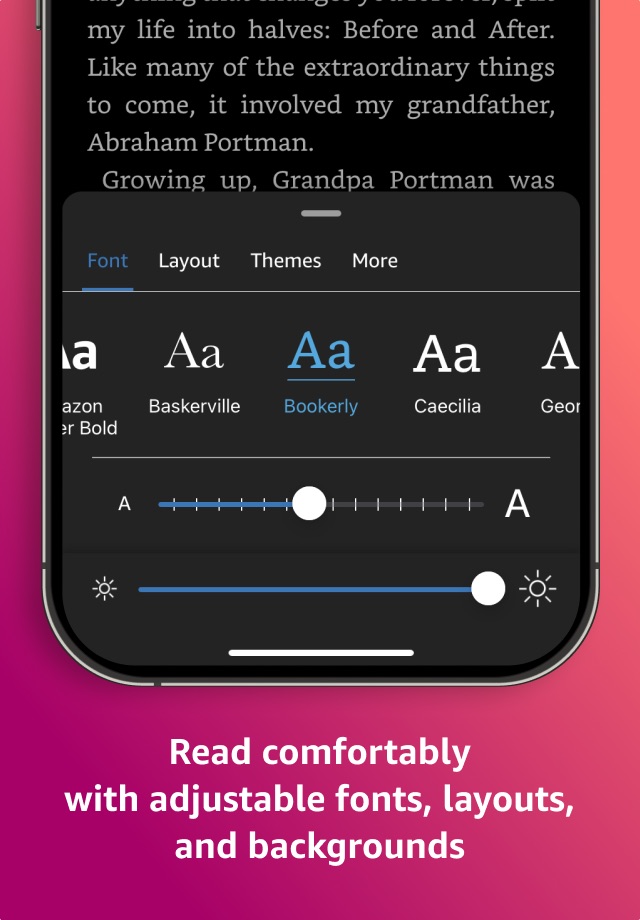
• Read your way. Customize your text size, font type, margins, text alignment, and orientation (portrait or landscape)—and choose whether to turn pages from left to right or continuously scroll. Read comfortably day and night with adjustable brightness and background colors. Go to the Aa menu in your book to get started.
• Look up words, people, and places while you read. Breeze through words you don’t know and characters you can’t remember with the built-in dictionary, X-Ray, Wikipedia lookup, instant translations, and search within your book. Simply tap and hold a word to view its definition, or use the Google and Wikipedia links to get more information.
• Track your reading progress. See what percent of the book you’ve read, real page numbers (for most top titles), and how much time you have left in the chapter or book based on your actual reading speed.
• Bookmark places you want to revisit, and make highlights and take notes throughout your book. Open My Notebook to see all your notes in the same place.
• Hop, skim, and jump with Page Flip. Flip between pages or get a bird’s-eye view of your book with Page Flip—don’t worry, we’ll save your place.
• Zoom in on high-definition color images in Kindle books, magazines, comics, and manga.
• Sync your books across devices. When you’re reading a book, the Kindle app will automatically sync where you left off—along with any bookmarks, highlights, or notes—so you can start reading on one device and pick up where you left off on another.
• When you can’t read, listen. Switch seamlessly from reading your Kindle book to listening to the Audible book, all within the Kindle app.
• Get notified when authors you love have new releases.
By using this app, you agree to Amazon’s Conditions of Use (www.amazon.com/conditionsofuse) and Privacy Notice (www.amazon.com/privacy).
Accessibility
developerUrlipadiphonemacrealityDevicetvoswatch
Version history 25 versions
Build 887603334v7.622026-06-30 07:22:06
Search for images inside your book. Type a keyword like "map," "dragon," or "diagram" and instantly see matching images as thumbnails. Tap any result to jump directly to that page.
Build 886889389v7.612026-06-16 03:09:35
Several Bug fixes and improvements.
Build 886291209v7.602026-06-03 03:17:41
Several Bug fixes and improvements.
Build 885862919v7.592026-05-20 09:55:09
Several Bug fixes and improvements.
Build 885130974v7.582026-05-05 04:25:47
Several Bug fixes and improvements.
Build 884629307v7.572026-04-21 03:17:34
Several Bug fixes and improvements.
Build 884090190v7.562026-04-06 05:36:30
Several Bug fixes and improvements.
Build 883553659v7.552026-03-23 05:11:32
Several Bug fixes and improvements.
Build 883065198v7.542026-03-11 03:18:49
Several Bug fixes and improvements.
Build 882713207v7.53.12026-03-02 02:56:57
Several Bug fixes and improvements.
Build 882123897v7.522026-02-18 03:06:08
Several Bug fixes and improvements.
Build 881977683v7.51.12026-02-02 03:20:07
Several Bug fixes and improvements.
Build 881747629v7.512026-01-23 06:01:06
Several Bug fixes and improvements.
Build 881528902v7.50.12026-01-19 04:34:52
Several Bug fixes and improvements.
Build 881359005v7.502026-01-14 03:45:53
Several Bug fixes and improvements.
Build 881103753v7.48.12026-01-06 03:21:22
Several Bug fixes and improvements.
Build 880751435v7.482025-12-26 05:18:27
Several Bug fixes and improvements.
Build 880350049v7.472025-12-05 02:41:21
Several Bug fixes and improvements.
Build 879518468v7.462025-11-26 02:49:56
Several Bug fixes and improvements.
Build 879195885v7.452025-11-04 03:00:34
Several Bug fixes and improvements.
Build 878790901v7.43.52025-10-22 04:07:41
Several Bug fixes and improvements
Build 878709591v7.432025-10-08 02:39:34
Several Bug fixes and improvements
Build 878466387v7.42.22025-09-29 03:00:40
Several Bug fixes and improvements
Build 878328441v7.42.12025-09-25 03:23:45
Several Bug fixes and improvements
Build 877951033v7.412025-09-10 02:56:25
Several experience improvements and bug fixes.
No pricing data captured yet — comparisons appear once the app has paid storefronts or in-app purchases.
Availability 69 of 89 storefronts
| Region | Language | Price | Ratings | Avg | Version |
|---|---|---|---|---|---|
| US | en-US | Free | 5.7M | 4.9 | 7.62 |
| BR | pt-BR | Free | 448.1k | 4.9 | 7.62 |
| MX | es-MX | Free | 121.5k | 4.9 | 7.62 |
| CO | es-MX | Free | 27.0k | 4.9 | 7.62 |
| CL | es-MX | Free | 24.6k | 4.9 | 7.62 |
| HK | zh-Hant-HK | Free | 21.6k | 4.7 | 7.62 |
| AR | es-MX | Free | 16.5k | 4.9 | 7.62 |
| KR | ko | Free | 14.6k | 4.8 | 7.62 |
| TW | zh-Hant-TW | Free | 11.3k | 4.8 | 7.62 |
| PE | es-MX | Free | 10.6k | 4.9 | 7.62 |
| CR | es-MX | Free | 8.1k | 4.9 | 7.62 |
| DO | es-MX | Free | 7.9k | 4.9 | 7.62 |
| RO | en-GB | Free | 7.3k | 4.9 | 7.62 |
| EC | es-MX | Free | 7.3k | 4.9 | 7.62 |
| GT | es-MX | Free | 5.7k | 4.9 | 7.62 |
| PA | es-MX | Free | 5.2k | 4.9 | 7.62 |
| HU | en-GB | Free | 5.1k | 4.9 | 7.62 |
| KE | en-GB | Free | 4.6k | 4.9 | 7.62 |
| UY | en-GB | Free | 3.9k | 4.9 | 7.62 |
| TT | en-GB | Free | 3.6k | 4.7 | 7.62 |
| JM | en-GB | Free | 3.4k | 4.8 | 7.62 |
| GH | en-GB | Free | 2.7k | 4.7 | 7.62 |
| SV | es-MX | Free | 2.6k | 4.9 | 7.62 |
| HN | es-MX | Free | 2.4k | 4.9 | 7.62 |
| PY | es-MX | Free | 2.0k | 4.9 | 7.62 |
| BS | en-GB | Free | 1.5k | 4.8 | 7.62 |
| VE | es-MX | Free | 1.4k | 4.9 | 7.62 |
| BO | es-MX | Free | 1.2k | 4.9 | 7.62 |
| BB | en-GB | Free | 1.2k | 4.8 | 7.62 |
| UG | en-GB | Free | 1.2k | 4.7 | 7.62 |
| TZ | en-GB | Free | 1.1k | 4.8 | 7.62 |
| NA | en-GB | Free | 1.1k | 4.8 | 7.62 |
| NI | es-MX | Free | 989 | 4.8 | 7.62 |
| MU | en-GB | Free | 847 | 4.8 | 7.62 |
| MN | en-GB | Free | 757 | 4.9 | 7.62 |
| ZW | en-GB | Free | 713 | 4.8 | 7.62 |
| BW | en-GB | Free | 709 | 4.7 | 7.62 |
| MO | zh-Hant-HK | Free | 650 | 4.8 | 7.62 |
| MZ | en-GB | Free | 565 | 4.7 | 7.62 |
| AO | en-GB | Free | 540 | 4.6 | 7.62 |
| KY | en-GB | Free | 537 | 4.8 | 7.62 |
| GY | en-GB | Free | 411 | 4.7 | 7.62 |
| LC | en-GB | Free | 353 | 4.8 | 7.62 |
| BZ | en-GB | Free | 347 | 4.8 | 7.62 |
| AG | en-GB | Free | 288 | 4.8 | 7.62 |
| DZ | en-GB | Free | 260 | 4.7 | 7.62 |
| KN | en-GB | Free | 259 | 4.8 | 7.62 |
| FJ | en-GB | Free | 255 | 4.7 | 7.62 |
| TC | en-GB | Free | 213 | 4.8 | 7.62 |
| VC | en-GB | Free | 203 | 4.7 | 7.62 |
| GD | en-GB | Free | 190 | 4.8 | 7.62 |
| MW | en-GB | Free | 177 | 4.8 | 7.62 |
| CG | en-GB | Free | 149 | 4.5 | 7.62 |
| VG | en-GB | Free | 143 | 4.8 | 7.62 |
| TN | en-GB | Free | 133 | 4.7 | 7.62 |
| DM | en-GB | Free | 125 | 4.8 | 7.62 |
| BJ | en-GB | Free | 121 | 4.6 | 7.62 |
| SC | en-GB | Free | 115 | 4.7 | 7.62 |
| MG | en-GB | Free | 113 | 4.9 | 7.62 |
| LR | en-GB | Free | 95 | 4.7 | 7.62 |
| CV | en-GB | Free | 85 | 4.7 | 7.62 |
| SR | en-GB | Free | 85 | 4.7 | 7.62 |
| SZ | en-GB | Free | 85 | 4.8 | 7.62 |
| AI | en-GB | Free | 50 | 4.8 | 7.62 |
| FM | en-GB | Free | 19 | 4.8 | 7.62 |
| SB | en-GB | Free | 17 | 4.9 | 7.62 |
| MS | en-GB | Free | 14 | 4.8 | 7.62 |
| GW | en-GB | Free | 12 | 4.4 | 7.62 |
| ST | en-GB | Free | 4 | 5.0 | 7.62 |
Not available in: BF, CD, CI, CM, GA, GM, KG, KZ, LY, MA, ME, ML, MV, NE, NG, RW, SL, SN, TD, ZM
Reviews 30 reviews · US
★★★★★
Well Worth a Read
I bought this book because we have a 13 year-old labrador. I wanted to gain some insight into what things we should be doing in her golden years such as any adjustments to diet, mobility, concerns, etc. this book has really opened my eyes to a few things that I hadn’t even noticed have been happening with our dog, such as mild cognitive impairment, hearing loss, and most likely some level of sarcopenia.
I love the way she shares stories of her own dogs, journey through older age, or illness, and also some of the stories of client pets. She uses a nice balance of clearly explaining a lot of o
KimLaFever2026-05-19
★★★★★
Unconventional Heroine
I like this series. At first I was like, geez, there’s 12 books, and now I’m reading book eight. I liked that the heroine is a middle aged woman who not only finds love later in life but also starts a family. And the concerns around both are real. But I realize that over the series the main characters are developed and thankfully they’re not annoying. One nit-picky thing, when listening to the audiobook and the narrator does the voices of two characters from the east coast, as a native New Yorker, I’m appalled lol. I liked the duel cases that were being investigated and that we knew who the pe
a&e obsessed2026-04-26
★★★★★
Incredible for accessibility but lacking some potentially cool customization features
I absolutely love this app. I love the ability to have the Page turn animation because it makes it feel a little bit more like I'm reading a real book. I enjoy reading in bed, but since I'm quadriplegic I can't actually hold a book and read it while lying down so this app makes it very easy for me to read while using voice control on my iPad to turn pages without the need of help from somebody else.
I would love to see some more options for customizing your library. I think it would be awesome if there was an option to display your books with a spine view like a normal library that you would
QUAD_RNDL2026-03-07
★★★★★
New update ruined our experience
I love kindle. My whole book club uses it, but the most recent updates have really tarnished a lot of what we loved about it. A lot of books don’t have an audiobook, so some of us use the Siri reader feature to play portions of or even whole books while we work or run errands or work out, or just deal with life etc. the kindle app used to let you play the Siri reader and close the app. Meaning you could 1, not drain your battery keeping the kindle app open, and 2, do anything else you need to do while listening to the Siri audio reader. It was amazing! I check for updates all the time in the h
Kat-sites2026-01-25
★★★★★
Nice but could be better
I’ve been using a kindle reader for several years, I’m now on my 3rd or 4th one. I have a pocket sized reader on my bedside table which I take with me when spending hours waiting my turn at doctor’s offices. At age 80 I do that a lot more than I like. I also have the larger Kindle Scribe in the living room for when I’m just kicking back in my recliner “chilling out”. I have it mounted on an adjustable stand with remote page turner. Yah, I know I’m lazy. All that aside, the one most important thing I see as a needed improvement is the way the library is set up. I have over 700 books and
Sam358062026-01-18
★★★★★
Getting worse not better
I use to be able to use it often now I open the app and it takes forever to load if it even does load. I can no longer get back to my kindle unlimited books I want to read because all I can find is books to buy or start to read not the ones I already wanted to read for free. My option to read aloud has been removed for a long time and now I can’t get the accessibility speak screen to work anymore and if it does it’s a short snippet and not the body f the book. It doesn’t keep going. I paid for the subscription for both kindle unlimited and Audible so I could listen to my books while I am drivi
drag-n-fly's wife2026-01-12
★★★★★
Library Functions and AI
I greatly appreciate being able to read anytime anywhere. And love my kindle (although I’d use their term “Colorsoft” with a strong emphasize on the soft…there’s no real color). The Kindle app improved my deployments immeasurably. But in 2026, you’re putting AI that that from I can tell, no one asked for in the kindle app, yet functionality and user interface remain in 2010. I have many hundreds of books between kindle, audible, Libby and my personal library, so a way to organize this app would be very welcome. If I’m reading books on Kindle unlimited and then return the book, there is zero wa
Travel7142026-01-11
★★★★★
One of the truly greatest APPS ever!
Kindle has revolutionized my reading and having it on my iPhone makes it even better the print is so clear, especially because of the ability to change the font size of the print. At my age, the ability to have great books in a compact size like I can hold in my hand, has saved my life in terms of reading. Also, since I have my iPhone with me anywhere, I can read whenever I have a moment, I could be on a line at a supermarket and take out the Kindle and read it or Iwill be waiting for a deposit at the bank and take out my phone and read it. Truly great. The way I can highlight my notes is just
Mikalmmd2026-01-07
★★★★★
Game Changer for Healing
I’m 67 years old and approximately 10 years ago, I was attacked by an incurable disease called NMO a.k.a. Neuromyelitis optical that left me with chronic pain and Bedridden 24/7. This disease deformed my hands in which I have limited use so I had to purchase the book on Kindle. The book was absolutely amazing, but it never led me to the prayer of freedom because it was the Kindle version. But I’m unable to turn pages on a book so I didn’t order the paper back version where the workbook is. I wish he would put a digital form of the workbook at least so that people like me can pray the prayer of
Jonesoopsie2025-12-16
★★★★★
Can’t live without it!
The Kindle app is a fantastic way to keep a whole library in your pocket. The syncing across devices works smoothly, so I can pick up where I left off whether I’m on my phone, tablet, or desktop. The customizable reading options—like font size, background color, and brightness—make it easy to tailor the experience to my preferences, and highlights/notes are simple to manage.
That said, there are a few areas where it could improve. The interface sometimes feels a little cluttered, and navigating between collections or finding specific books isn’t always as intuitive as it could be. I’d also lo
glitter girl772025-11-23
★★★★★
Wonderful appendage to the written word!
Kindle is wonderful with a few glitches, some books are written in the kings English and it hard to know which is which, so I sometimes have to buy multiple books and authors particularly when they are old classic rewrites and or language translations. Then there is the frustration with my favorite aspect the ability to read, along with audible, unless you match the exact edition, author and publication the audible option doesn’t work and the hunt is on and so is the expense. If kindle could make clear which books offer the listen while you read feature and provide an exact book and link to l
Nivek d'Doow2025-10-23
★★★★★
Poor usability design
Edit: The fixed the massive popups on every highlighting attempt. Now, however, there’s an unnecessary double hop to highlight. Underline a passage -> get popup to select highlighting -> Then there’s another level deeper to select the color. Every single time. Why? There is more than enough room to have all colors available on this tiny palette. There is no need to hide the options on the first level, and it takes focus away from the content and puts it on managing computer menu decisions. I have taught usability courses, and this is what I would term “wouldn’t it be cool if…” Inexperienced d
hkremer2025-09-20
★★★★★
ATTENTION UX DESIGN TEAM
It should not require 3 clicks to apply yellow highlighting, and It should be possible to set a default highlighting color. This design decision leads me to seek alternatives to Kindle, including purchasing more physical books. Design team: if you’re reading this, please see the other similar existing reviews and address this issue before your product receives more 1-2 star reviews. Recommendation: when the user taps to highlight, have the previously used highlight color come up directly under the mouse such that the user can just double click. Currently it’s set to the back arrow. If I’ve jus
Digital Nomad 12025-09-11
★★★★★
Love it
Little back info, I used to read all the time so many books and then after I had children and I stopped reading for the most part. I would just get too busy and too distracted with daily life. I would occasionally read, but never could actually get through a book. I purchased kindle unlimited a year ago in August and I have read every day for an entire year it’s really cool because it keeps me excited because there are goals and you can set your own personal goals not to mention just seeing the numbers go up every day that you read is so much fun. even if I just read 15 minutes a day, sometim
Red_blueberry022025-09-02
★★★★★
Buggy with poor tools for the job
You’d think a piece of software designed to let you find and read books would do a good job at both. I have no real complaints about the ability to read books. Except for the problems I keep having trying to get the menu to come up. The only time I seem to have any luck is at the beginning of any chapter. Other than that, reading is fine. My real complaint is finding books. I tend to read a series of books and for some reason this software doesn’t really seem to care much about series’s. I should be able to easily find all of the books in that series, in order. Admittedly when I finish a book
NedMaxwell2025-08-22
★★★★★
The highlighting tool is now excruciatingly painful.
Sometime recently they have decided to throw several speed bumps in the readers way when we try to highlight something. Once you select the text the program seems to freeze instead of allowing you to select the color like it used to. Now the dictionary pops up and locks the screen. You have to then tap off in the blank space to get the dictionary to disappear so you can continue with highlighting. I can’t find any way to disable the dictionary. Then once the dictionary has disappeared you have to click the color dot to go into the color options to pick the color you want. I can understand the
tanner772025-08-14
★★★★★
Don’t like the new translation interface
I read books in Spanish with the Kindle app on my iPad. A few weeks back, there must have been an update because the translation interface is a lot different. I used to be able to highlight a word or a phrase or even an entire paragraph and the translation would pop up immediately. Now I have to touch a word, touch again to dismiss that translation, touch again to drag the highlight to cover the desired passage, and touch yet again to choose “look up”. Also, it takes a couple of touches to dismiss the translation pop-up. And another point is that, when you highlight a word or a phrase and
JPHanuman2025-07-07
★★★★★
New features remove what made Kindle better
Edit: another user did find a way to make it easier to highlight—yay! Unfortunately, I also discovered that they added several extra steps to DELETE highlights, so my review remains the same. In addition, the once fantastic light periwinkle blue is now a darker color that makes it harder to read what I’ve highlighted. Developers, please lighten it again! Make it a true highlight, otherwise what are we doing here?
I’m floored. For months, I’ve been trying to move to other apps to avoid using Amazon’s products, but have remained with previously bought books because of the absolute ease of use, p
AJ Hostet2025-07-07
★★★★★
Terrible update!!
Yet another annoying update. Out the highlighting menu back the way it was! It’s now ugly, clunky, and annoying. The truth is, some apps just don’t need to be messed with. What you call “updating” is just changing to make annoying. I can’t remember the last time an update had a positive feature upgrade. Just stop.
—-
Update: With several clicks, I found “view classic reading insights” buried at the bottom of the farthest tab over. The “classic reading insights” are what motivate me to read and what I want to see. The “challenges” are boring and meaningless. Please let us choose, when the app
J6102025-06-28
★★★★★
TERRIBLE New Highlighting System
I was just forced to reinstall my iPad Kindle app for the third time this year because it keeps becoming buggy after a while: crashing, not opening books, or becoming incredibly slow to open a book (several minutes!) or highlight text. This new version inexplicably encumbers the previously-streamlined highlighting system for no apparent advantage. It now takes 2-3 times more "clicks" to highlight anything. First, the lookup box now pops up in a VERY large tab only from the bottom rather than discretely above or below the text you just highlighted. What that means is you now have a 50-50 chance
HiveSeeker2025-06-22
★★★★★
Bad interface update
I used to really like this app but they just did an update completely changing the interface design. As a result, there’s more clicks to do the things that used to be much easier. Looking something up now gives you a scroll down option but as such, each window (dictionary, translate, etc) is now shortened and since already you have to scroll to find these windows, you can’t easily review these anymore without clicking it, causing the window to get larger and making this take up your whole page.
Most annoying is the highlight option. Before it was easy to select different colors which I use al
real_mauian2025-06-08
★★★★★
Don’t like latest version
Edit: it is extremely difficult to highlight any passage. I have to hold down the start of the passage for a long time and then most of the time the page turns by itself and I have to go back and try again and again.
The Apple Books app is far more responsive and user friendly.
This used to be my favorite app. Since this newest update, it is has diminished in my opinion.
1) the notes section is harder to use. In order to delete a bookmark, I have to first go to that page and manually remove it.
2) in X-ray mode, the notes are more difficult to read. The previous version made it possible
Avne452025-05-23
★★★★★
5 stars but I need to vent some in hopes you guys will make some changes
I love kindle and I’ve used it for over a decade (like most modern bookaholics)but I’ve waited so long for some of the implementations I’m about to list and nothing has changed.
First, why in the world can’t we block authors we don’t want to read or get suggestions from anymore? I 1 star an author and I get MORE recs from them just because I read one of their books. (Not to mention the blatant AI taking over I want to block)
Secondly, why can’t we choose individual books to disappear from our pages? Maybe I like the author but I really hate this one book they did. Instead of long pressing
Pastel Daydreams2025-05-14
★★★★★
From a GenZ Student’s perspective
I am a graduate student and as we move more and more to online books, I am frustrated that I cannot find PDF’s of important books and manuals that I know I will use for the rest of my graduate studies (and hopefully doctoral life). For this reason, I appreciate that Kindle at least has these books available, however they are abysmally prepped for crucial note-taking features that my Notability app has. So my main concern and reason for rating it so low is that I would appreciate if Kindle had more connections with note-taking apps such as Notability. It would make it so much easier to have all
Crowngirl222025-05-13
★★★★★
Love app except…
I’m on a 236 week straight reading record that I continue to add weeks too. Since Dec 4, 2020, I’ve read every day. The only downside to this is because the app doesn’t go by the time zone I’m in, which is eastern, but instead goes by pacific, there have been days where the app didn’t think I read. So I was on a 490 streak when this first time happened. It’s happened maybe 10 to 15 days since then and now I’m currently on a 395 day reading streak that is still active. So, as you can see I love to read and own close to 5k ebooks, with many of them also have the audiobook if it was available.
W
Kristena&Keith2025-04-24
★★★★★
Very good book on autism by Dr. Rajesh
This book is based on real life experiences and thorough research. While we often read books out of interest or recommendation, sometimes a book resonates deeply because it meets a genuine need. This is one such book. It compels you to read each line attentively, and relate it to a real life situations. Though concise, it is well, structured insightful, and encourages continuous reading from one chapter to the next. It offers a comprehensive understanding of autism,its symptoms and practical way to provide care and support. More importantly it emphasizes the need for empathy not just towards c
sanjay kumar Gupta2025-04-20
★★★★★
Used to love Kindle, now an inoperational nightmare; PLEASE FIX ASAP!
This app has been a life-saver for me as a graduate student with disability needs. Unfortunately, neither of the main features that I desperately need access to works anymore with the new "updated" version. I've troubleshooted everything from uninstalling the old app and re-installing this new app, multiple times now. There is no Tool menu now? Huge oversight. How does anyone access text-to-speech? Did you get rid of this crucial feature? I cannot find it anywhere despite poring over help columns. I'm even getting a strange technical error trying to use the sound control bar to playback my Kin
SAN42142025-03-27
★★★★★
All the things wrong with the new Kindle app
There are so many things bad about the new iteration of the app that I had to make a list:
1. The previously available ability to adjust side margins is gone, which makes for a terrible reading experience when viewing books full-width (i.e., distraction free) on a MacBook or desktop screen. Doing a search for a word is particularly horrible because you can't format the results in columns, which means sentences running unbroken for sixteen inches across or more!
2. Now every time something is highlighted several very annoying popups appear and cloud the page, including a dictionary, translate,
John Soane2025-02-13
★★★★★
This is a revue of my kindle unlimited service. I have subscribed to this service for several years
I love my kindle. I travel a lot. I read a lot. I never have to worry about not having a choice of good reads while I’m traveling because I load my kindle up with good reading before I leave home. However it bums me out that after using kindle unlimited for so many years, I’ve have never gotten a discount or sale price. That is one complaint. My biggest complaint is that it seems there is less fine quality books in the kindle unlimited free books than there used to be! It seems I am having to really search hard to find free books that interest me. Also it is often hard to finish reading a ser
Sylviama2025-01-16
★★★★★
Latest update is trash
I’ve used the kindle unlimited app for years. It’s always been a convenient option for when my kindle wasn’t on hand. I’ve never felt the need to leave a review until now. The new update is just a frustrating mess honestly. I feel like the recommendations have been off lately. My biggest complaint is the new reading challenges page. What used to be a simple design is now an unappealing over complicated mess. It isn’t in dark mode like the rest of my app is set to. The reading calendar is another click away. If you want to view it the old way you can click on classic reading insights, but you h
ElizaBug0072025-01-06
Change log 29 changes · US
✎
releaseNotes updated
Search for images inside your book. Type a keyword like "map," "dragon," or "diagram" and instantly see matching images as thumbnails. Tap any result to jump di
✎
description updated
READ ANYTIME, ANYWHERE
On the bus, on your break, in your bed—never be without a book. Kindle books you have purchased on Amazon will automatically appear in yo
✎
subtitle updated
Read books. Millions of ebooks
✎
name updated
Amazon Kindle: Reading App
◆
Version 7.62 released
Search for images inside your book. Type a keyword like "map," "dragon," or "diagram" and instantly see matching images as thumbnails. Tap any result to jump directly to that page.
◆
Version 7.61 released
Several Bug fixes and improvements.
◆
Version 7.60 released
Several Bug fixes and improvements.
◆
Version 7.59 released
Several Bug fixes and improvements.
◆
Version 7.58 released
Several Bug fixes and improvements.
◆
Version 7.57 released
Several Bug fixes and improvements.
◆
Version 7.56 released
Several Bug fixes and improvements.
◆
Version 7.55 released
Several Bug fixes and improvements.
◆
Version 7.54 released
Several Bug fixes and improvements.
◆
Version 7.53.1 released
Several Bug fixes and improvements.
◆
Version 7.52 released
Several Bug fixes and improvements.
◆
Version 7.51.1 released
Several Bug fixes and improvements.
◆
Version 7.51 released
Several Bug fixes and improvements.
◆
Version 7.50.1 released
Several Bug fixes and improvements.
◆
Version 7.50 released
Several Bug fixes and improvements.
◆
Version 7.48.1 released
Several Bug fixes and improvements.
◆
Version 7.48 released
Several Bug fixes and improvements.
◆
Version 7.47 released
Several Bug fixes and improvements.
◆
Version 7.46 released
Several Bug fixes and improvements.
◆
Version 7.45 released
Several Bug fixes and improvements.
◆
Version 7.43.5 released
Several Bug fixes and improvements
◆
Version 7.43 released
Several Bug fixes and improvements
◆
Version 7.42.2 released
Several Bug fixes and improvements
◆
Version 7.42.1 released
Several Bug fixes and improvements
◆
Version 7.41 released
Several experience improvements and bug fixes.