Home › Lifestyle

 CD
CD
 USen-US
 KRko
KRko BRpt-BR
 MXes-MX
 CAen-CA
 INen-GB
 VNen-GB
 TWzh-Hant-TW
 DEde-DE
 PHen-GB
 AUen-AU
 ITit
ITit THen-GB
 FRfr-FR
 RUru
RUru COes-MX
 GBen-GB
 ESes-ES
 SAen-GB
 PTpt-PT
 NLnl
NLnl PLen-GB
 CZen-GB
 MYen-GB
 CLes-MX
 TRen-GB
 EGen-GB
 ROen-GB
 HUen-GB
 HKzh-Hant-HK
 GRen-GB
 PEes-MX
 UAen-GB
 ZAen-GB
 SKen-GB
 BEen-GB
 ARes-MX
 KZen-GB
 SGen-GB
 ECes-MX
 CNzh-Hans-CN
 SEsv
SEsv ATde-DE
 NOen-GB
 ILen-GB
 BYen-GB
 IDen-GB
 AEen-GB
 GTes-MX
 DKen-GB
 NZen-AU
 BGen-GB
 DZen-GB
 UZen-GB
 MAen-GB
 PAes-MX
 KEen-GB
 IQen-GB
 LKen-GB
 DOes-MX
 LVen-GB
 JPja
JPja HNes-MX
 CRes-MX
 FIen-GB
 NPen-GB
 KHen-GB
 CHde-CH
 AZen-GB
 LTen-GB
 HRen-GB
 EEen-GB
 MNen-GB
 JOen-GB
 MDen-GB
 CYen-GB
 LBen-GB
 IEen-GB
 AMen-GB
 NGen-GB
 SVes-MX
 UYen-GB
 PYes-MX
 BOes-MX
 RSen-GB
 QAen-GB
 VEes-MX
 OMen-GB
 GEen-GB
 ALen-GB
 KGen-GB
 MUen-GB
 LUen-GB
 GHen-GB
 PKen-GB
 NIes-MX
 BHen-GB
 KWen-GB
 MKen-GB
 MOzh-Hant-HK
 SIen-GB
 BAen-GB
 TNen-GB
 TZen-GB
 MTen-GB
 ISen-GB
 JMen-GB
 TTen-GB
 UGen-GB
 SNen-GB
 XKen-GB
 LYen-GB
 ZWen-GB
 YEen-GB
 MEen-GB
 AOen-GB
 CIfr-FRCDen-GB
 TJen-GB
 MLen-GB
 BFen-GB
 MZen-GB
 BNen-GB
 GYen-GB
 BBen-GB
 CMfr-FR
 ZMen-GB
 CGen-GB
 BWen-GB
 CVen-GB
 BZen-GB
 MVen-GB
 BJen-GB
 MMen-GB
 BSen-GB
 LAen-GB
 KYen-GB
 FJen-GB
 NAen-GB
 PWen-GB
 SCen-GB
 SLen-GB
 GMen-GB
 KNen-GB
 LCen-GB
 MGen-GB
 AFen-GB
 GAfr-FR
 RWen-GB
 SRen-GB
 AIen-GB
 BMen-GB
 GDen-GB
 TMen-GB
 AGen-GB
 MRen-GB
 MWen-GB
 NEen-GB
 DMen-GB
 TCen-GB
 VCen-GB
 BTen-GB
 GWen-GB
 PGen-GB
 TDen-GB
 VGen-GB
 MSen-GB
 SBen-GB
 LRen-GB
 NRen-GB
 SZen-GB
 TOen-GB
 FMen-GB
 STen-GB
 VUen-GB
175 of 175 storefronts
Content in en-US
Content in en-US
Information
Apple ID993504342
Bundle IDcom.lgeha.nuts
SellerSeller
Min iOS16.0
Device familieswatch, iphone, ipad
Released2016-07-18
Copyright© LG Electronics
Privacy policyLink ↗
Preview 3 platforms
iPhone 9 images





iPad 8 images


Apple Watch 2 images


What’s New Version 5.1.33310
Register ThinQ ON in the ThinQ app and control your appliances with simple, natural speech.
Description
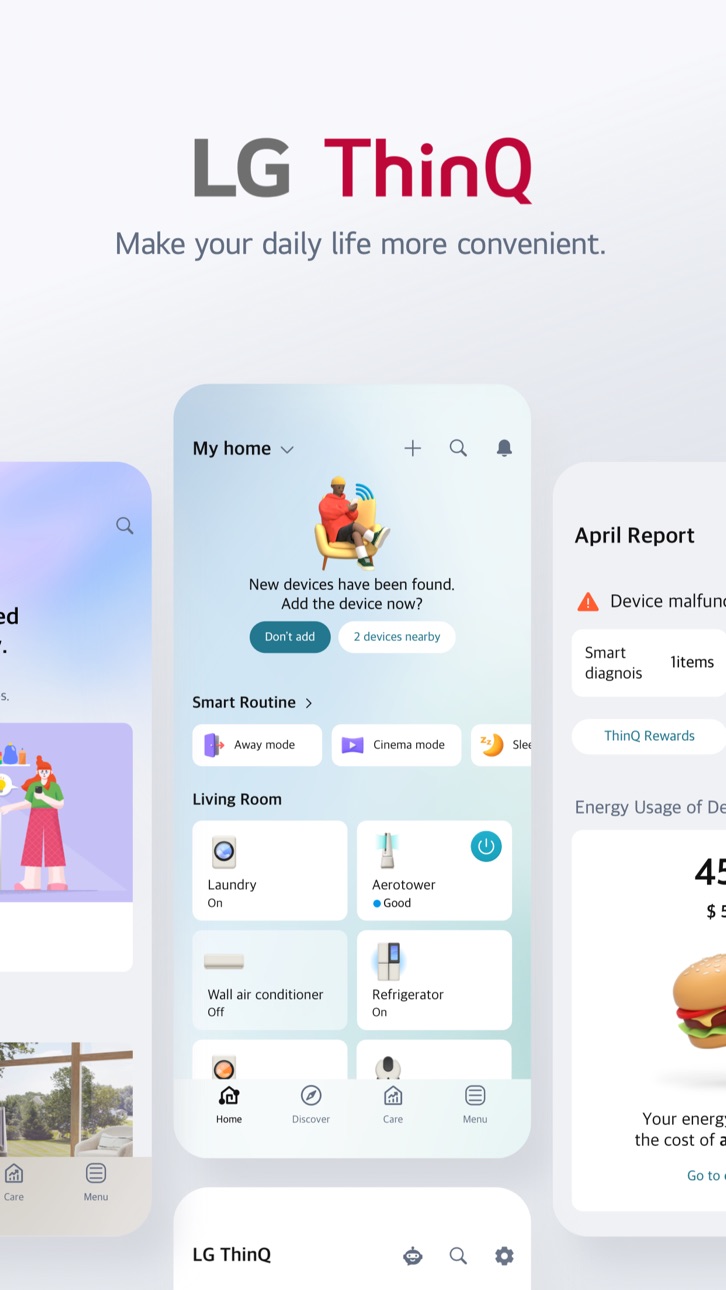
Connect your IoT home appliances to the LG ThinQ app.
Enjoy effortless product control, smart care, and convenient automation in one simple solution.
■ Discover the convenience of smart home appliances through the Home tab.
- Control your IoT home appliances from anywhere with our app.
- Get personalized recommendations for managing appliances based on usage history.
- Find out ways to better make use of the app's features from ""Explore""
■ Upgrade your products and your living spaces from ThinQ Play.
- Download a variety of apps available for use from LG ThinQ On(AI Home Hub)
- Use your products more efficiently and with greater ease by introducing new features to products you are currently using.
- Upgrade your products based on your lifestyle and personal preferences.
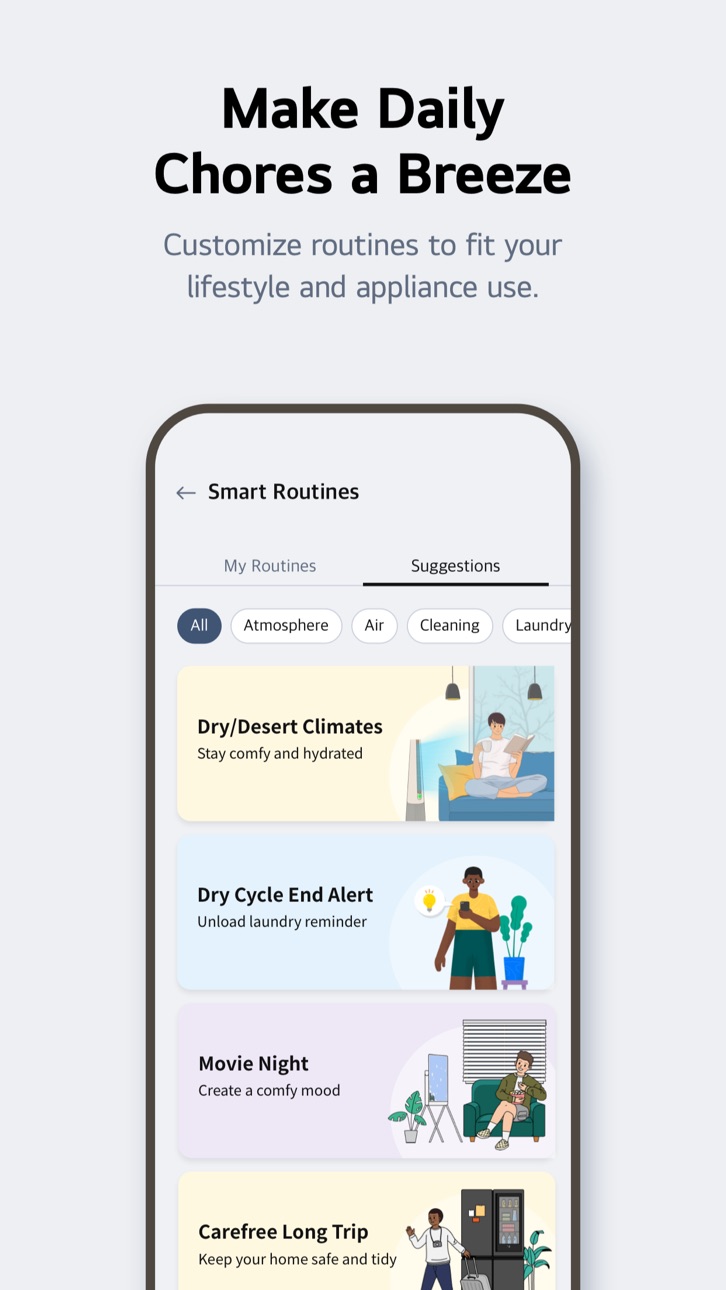
■ Create smart routines to match your needs.
- Automatically turn on the lights and air purifier when it’s time to wake up.
- When you’re on vacation, automatically turn off products to save energy.
■ Monitor your energy consumption data quickly.
- Use Energy Monitoring to compare your power usage with your neighbors’.
- Set energy saving goals and get usage status notifications to help save energy more efficiently.
- Receive care services for your products all in one place.
■ Handle everything from troubleshooting to service requests directly from the app.
- Use the Smart Diagnosis function to check your product’s status.
- Book a service visit from a professional engineer for an accurate diagnosis and inspection.
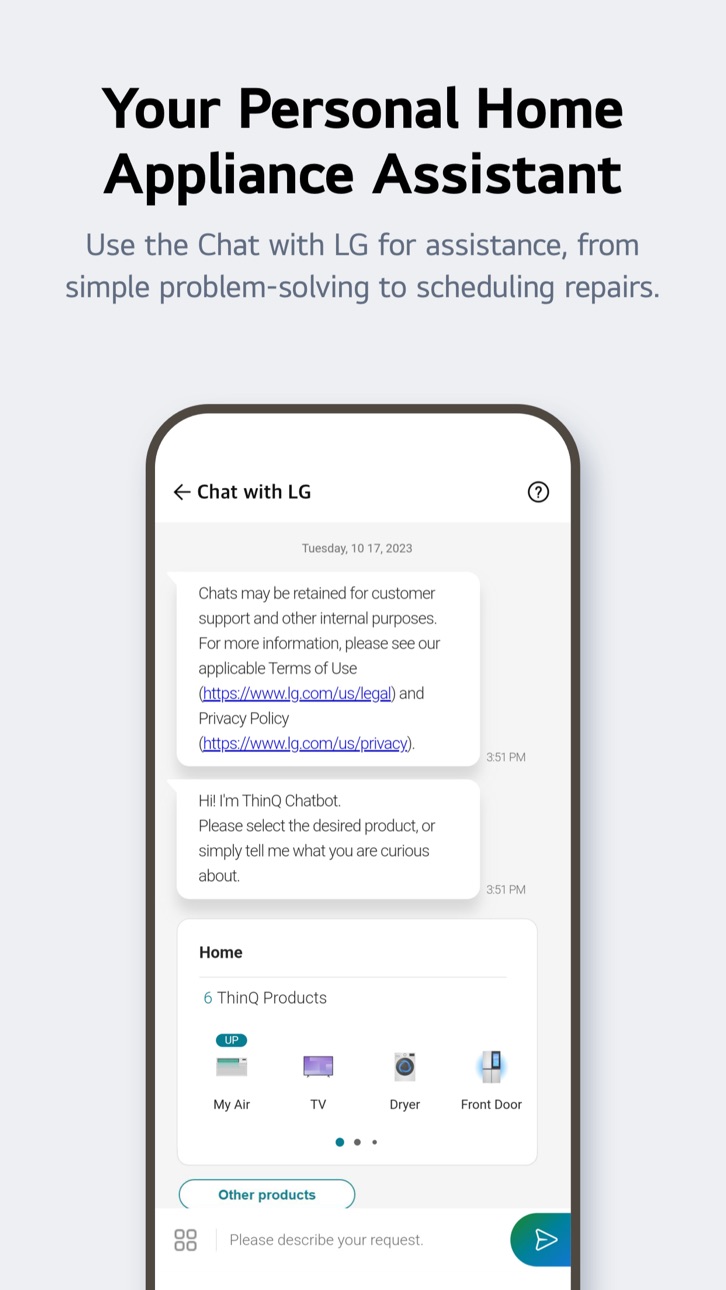
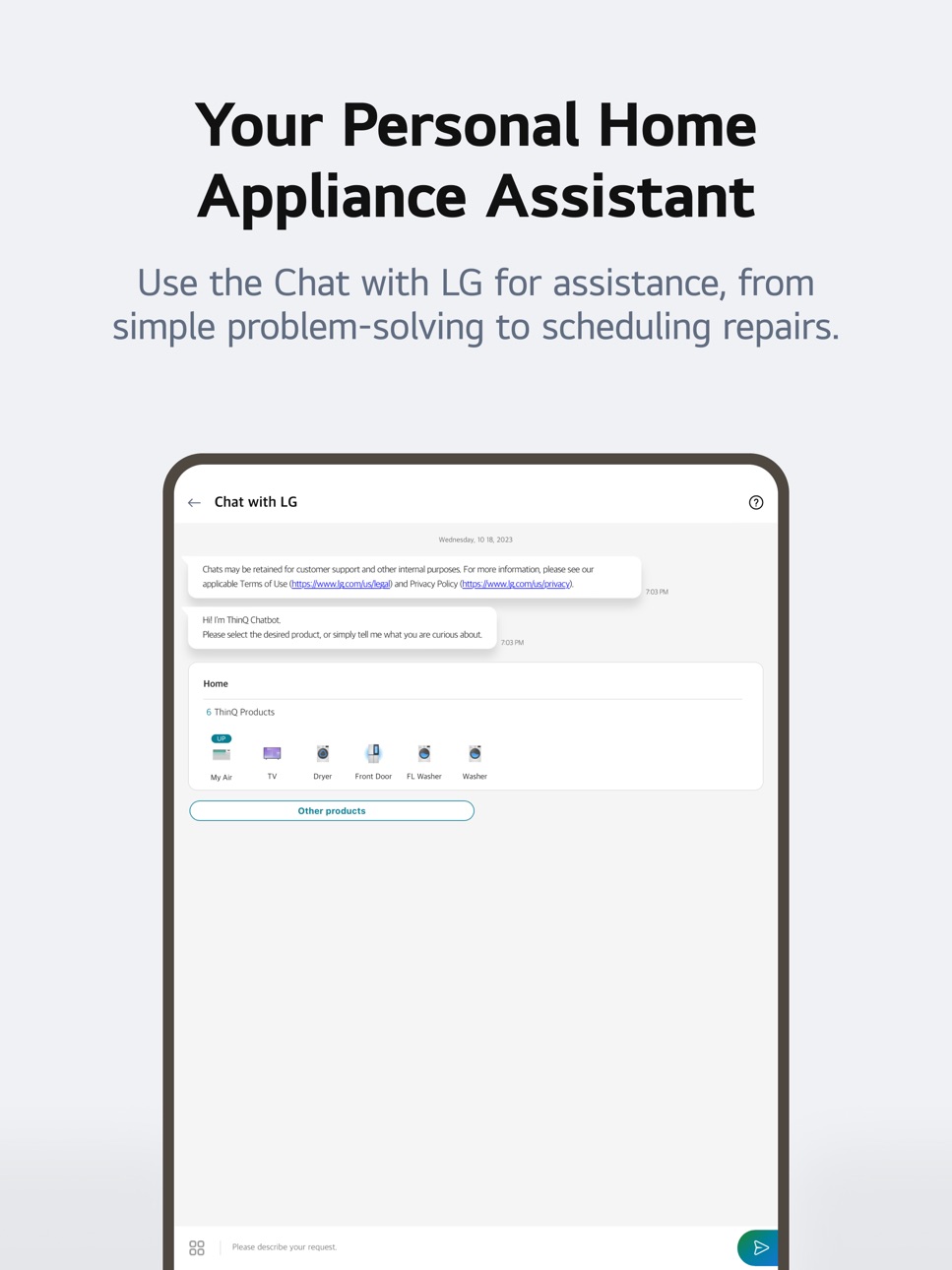
■ Ask our AI-powered 'Chat with LG' about ThinQ home appliances.
- Our 'Chat with LG' provides answers tailored to your product’s situation and condition.
※ Services and features may vary depending on your product model and your country or region of residence.
The following access permissions are necessary for the ThinQ app.
All the access permissions requested are optional access permission, so even if you do not allow them, you can still use the app except for the related services. (Including OS Request Permissions such as ""Siri & Search"", ""Notification"", ""Background App Refresh"", and ""Cellular Data"")
[Optional Access Permissions]
• Location
- To find and connect to nearby Wi-Fi when registering the product.
- To set and save the home location in Manage Home
- To search for and use information about current locations, such as weather.
- To check your current location in the ""Smart Routines"" function.
• Camera
- To take a profile picture
- To share a home or account scanned from a QR code.
- To take and attach photos in ""1:1 Inquiry.""
- To record and store purchase receipts when registering additional information about the product..(미국 Only)
- To use the AI oven Cooking Record feature.
- To use in “Chat with LG” when entering the product and serial number information
• Photo, Media, File
- To use the smartphone's storage when downloading the information of the product to be connected
- To take and attach photos in ""1:1 Inquiry.""
- To record and store purchase receipts when registering additional information about the product.
- To view photo/video on your smartphone on the TV.
- To use in “Chat with LG” to save photos/videos of product symptoms or proof of purchase
- To use in “Chat with LG” when entering the product and serial number information
• Media and Apple Music
- To view photo/video on your smartphone on the TV.
• Microphone
- To check product status via Smart Diagnosis
- To use in “Chat with LG” when inputting through the microphone in the input window and using STT.
• Local Network
- To obtain the device connecting Wi-Fi info when adding devices
• Bluetooth
- To find and connect to nearby Bluetooth devices when adding a product to the app.
• HomeKit
- To add IoT-based products
• Notifications
- Notifications are essential for receiving updates on product status, important notices, benefits, and information.
Accessibility
ipadiphonemacrealityDevicetvoswatch
Version history 25 versions
Build 885057458v5.1.333102026-06-01 06:57:39
Register ThinQ ON in the ThinQ app and control your appliances with simple, natural speech.
Build 884538683v5.1.313212026-04-27 06:55:38
Register ThinQ ON in the ThinQ app and control your appliances with simple, natural speech.
Dive into richer "Explore" content. Experience a smarter and easier LG ThinQ app today.
LG ThinQ now supports Latin American Spanish. Update your language in Settings > Region & Language.
Build 883652644v5.1.313202026-04-14 04:37:21
Register ThinQ ON in the ThinQ app and control your appliances with simple, natural speech.
Dive into richer "Explore" content. Experience a smarter and easier LG ThinQ app today.
LG ThinQ now supports Latin American Spanish. Update your language in Settings > Region & Language.
Build 883486347v5.1.292112026-03-19 05:54:34
Dive into richer "Explore" content. Experience a smarter and easier LG ThinQ app today.
LG ThinQ now supports Latin American Spanish. Update your language in Settings > Region & Language.
Build 882763790v5.1.292102026-03-16 23:21:32
Dive into richer "Explore" content. Experience a smarter and easier LG ThinQ app today.
LG ThinQ now supports Latin American Spanish. Update your language in Settings > Region & Language.
Build 881557599v5.1.275102026-02-11 02:17:02
Dive into richer "Explore" content. Experience a smarter and easier LG ThinQ app today.
LG ThinQ now supports Latin American Spanish. Update your language in Settings > Region & Language.
Build 881232398v5.1.253202026-01-14 02:09:34
Dive into richer "Explore" content. Experience a smarter and easier LG ThinQ app today.
LG ThinQ now supports Latin American Spanish. Update your language in Settings > Region & Language.
Build 880258275v5.1.232402025-12-09 07:01:28
Dive into richer "Explore" content. Experience a smarter and easier LG ThinQ app today.
LG ThinQ now supports Latin American Spanish. Update your language in Settings > Region & Language.
Build 879699827v5.1.213312025-11-20 06:39:26
Dive into richer "Explore" content. Experience a smarter and easier LG ThinQ app today.
LG ThinQ now supports Latin American Spanish. Update your language in Settings > Region & Language.
Build 879068925v5.1.213302025-11-11 00:01:16
Dive into richer "Explore" content. Experience a smarter and easier LG ThinQ app today.
LG ThinQ now supports Latin American Spanish. Update your language in Settings > Region & Language.
Build 878144850v5.1.192402025-10-12 23:53:48
• The "Home tab" now provides more helpful information to help you use the app more effectively.
For detailed management of your appliances, go to the "Device tab."
• With the "Smart Diagnosis" feature, you can check the status of your device and receive guidance when maintenance is needed.
Build 877732997v5.1.173202025-09-08 00:00:21
• You can find the most frequently used products and services in the new systematically updated “Home” tab. Discover ways to better manage all your products through the “Device” tab.
• You can register LG smart appliances, those even without Wi-Fi function, on LG ThinQ through QR Code scanning.
• Enjoy the benefits of ThinQ PLAY services on LG ThinQ. The product software update function available to ThinQ UP has been integrated into ThinQ PLAY.
Build 877329075v5.1.153102025-08-20 02:00:52
• You can find the most frequently used products and services in the new systematically updated “Home” tab. Discover ways to better manage all your products through the “Device” tab.
• You can register LG smart appliances, those even without Wi-Fi function, on LG ThinQ through QR Code scanning.
• Enjoy the benefits of ThinQ PLAY services on LG ThinQ. The product software update function available to ThinQ UP has been integrated into ThinQ PLAY.
Build 876470066v5.1.152402025-08-12 04:46:16
• You can find the most frequently used products and services in the new systematically updated “Home” tab. Discover ways to better manage all your products through the “Device” tab.
• You can register LG smart appliances, those even without Wi-Fi function, on LG ThinQ through QR Code scanning.
• Enjoy the benefits of ThinQ PLAY services on LG ThinQ. The product software update function available to ThinQ UP has been integrated into ThinQ PLAY.
Build 876399283v5.1.132312025-07-16 09:16:28
The app makes it easier for you to operate your devices.
Build 875866469v5.1.132302025-07-10 00:00:44
The app makes it easier for you to operate your devices.
Build 875309242v5.1.114002025-06-18 00:00:12
Discover a multitude of diverse and convenient features in the latest version of the app.
Build 875196523v5.1.112202025-06-04 07:30:19
Discover a multitude of diverse and convenient features in the latest version of the app.
Build 874655079v5.0.436302025-05-15 20:13:15
You can easily enter device information by taking a picture of the device's model name and serial number.
(Menu → Product Information & Warranty)
Build 874575352v5.0.419312025-05-08 09:51:42
You can easily enter device information by taking a picture of the device's model name and serial number.
(Menu → Product Information & Warranty)
Build 874298401v5.0.419302025-05-07 00:24:17
You can easily enter device information by taking a picture of the device's model name and serial number.
(Menu → Product Information & Warranty)
Build 873777617v5.0.418402025-04-09 04:30:49
You can easily enter device information by taking a picture of the device's model name and serial number.
(Menu → Product Information & Warranty)
Build 873315973v5.0.414312025-03-28 00:00:06
You can easily enter device information by taking a picture of the device's model name and serial number.
(Menu → Product Information & Warranty)
Build 873235317v5.0.414302025-03-18 01:50:42
You can easily enter device information by taking a picture of the device's model name and serial number.
(Menu → Product Information & Warranty)
Build 872874736v5.0.397412025-03-05 02:00:08
Addressed several bugs to provide you with a more comfortable experience.
No pricing data captured yet — comparisons appear once the app has paid storefronts or in-app purchases.
Availability 175 of 175 storefronts
| Region | Language | Price | Ratings | Avg | Version |
|---|---|---|---|---|---|
| US | en-US | Free | 221.9k | 4.6 | 5.1.33310 |
| KR | ko | Free | 80.1k | 4.7 | 5.1.33310 |
| BR | pt-BR | Free | 52.2k | 4.6 | 5.1.33310 |
| MX | es-MX | Free | 28.1k | 4.7 | 5.1.33310 |
| CA | en-CA | Free | 25.2k | 4.5 | 5.1.33310 |
| IN | en-GB | Free | 24.8k | 4.7 | 5.1.33310 |
| VN | en-GB | Free | 24.4k | 4.8 | 5.1.33310 |
| TW | zh-Hant-TW | Free | 24.0k | 4.7 | 5.1.33310 |
| DE | de-DE | Free | 23.5k | 4.4 | 5.1.33310 |
| PH | en-GB | Free | 19.5k | 4.9 | 5.1.33310 |
| AU | en-AU | Free | 18.4k | 4.6 | 5.1.33310 |
| IT | it | Free | 16.2k | 4.5 | 5.1.33310 |
| TH | en-GB | Free | 15.9k | 4.8 | 5.1.33310 |
| FR | fr-FR | Free | 15.3k | 4.5 | 5.1.33310 |
| RU | ru | Free | 14.8k | 4.2 | 5.1.33310 |
| CO | es-MX | Free | 12.2k | 4.8 | 5.1.33310 |
| GB | en-GB | Free | 12.2k | 4.4 | 5.1.33310 |
| ES | es-ES | Free | 10.7k | 4.5 | 5.1.33310 |
| SA | en-GB | Free | 10.6k | 4.6 | 5.1.33310 |
| PT | pt-PT | Free | 9.1k | 4.7 | 5.1.33310 |
| NL | nl | Free | 9.0k | 4.2 | 5.1.33310 |
| PL | en-GB | Free | 8.5k | 4.5 | 5.1.33310 |
| CZ | en-GB | Free | 8.3k | 4.5 | 5.1.33310 |
| MY | en-GB | Free | 7.4k | 4.8 | 5.1.33310 |
| CL | es-MX | Free | 6.9k | 4.7 | 5.1.33310 |
| TR | en-GB | Free | 6.4k | 4.3 | 5.1.33310 |
| EG | en-GB | Free | 6.3k | 4.7 | 5.1.33310 |
| RO | en-GB | Free | 5.9k | 4.7 | 5.1.33310 |
| HU | en-GB | Free | 5.7k | 4.6 | 5.1.33310 |
| HK | zh-Hant-HK | Free | 5.1k | 4.7 | 5.1.33310 |
| GR | en-GB | Free | 4.6k | 4.6 | 5.1.33310 |
| PE | es-MX | Free | 4.0k | 4.8 | 5.1.33310 |
| UA | en-GB | Free | 3.9k | 4.6 | 5.1.33310 |
| ZA | en-GB | Free | 3.7k | 4.7 | 5.1.33310 |
| SK | en-GB | Free | 3.1k | 4.6 | 5.1.33310 |
| BE | en-GB | Free | 2.8k | 4.3 | 5.1.33310 |
| AR | es-MX | Free | 2.7k | 4.7 | 5.1.33310 |
| KZ | en-GB | Free | 2.7k | 4.8 | 5.1.33310 |
| SG | en-GB | Free | 2.7k | 4.6 | 5.1.33310 |
| EC | es-MX | Free | 2.5k | 4.8 | 5.1.33310 |
| CN | zh-Hans-CN | Free | 2.5k | 4.2 | 5.1.33310 |
| SE | sv | Free | 2.5k | 4.2 | 5.1.33310 |
| AT | de-DE | Free | 2.5k | 4.3 | 5.1.33310 |
| NO | en-GB | Free | 2.2k | 4.3 | 5.1.33310 |
| IL | en-GB | Free | 2.1k | 4.5 | 5.1.33310 |
| BY | en-GB | Free | 2.1k | 4.8 | 5.1.33310 |
| ID | en-GB | Free | 1.9k | 4.7 | 5.1.33310 |
| AE | en-GB | Free | 1.9k | 4.7 | 5.1.33310 |
| GT | es-MX | Free | 1.8k | 4.7 | 5.1.33310 |
| DK | en-GB | Free | 1.7k | 3.9 | 5.1.33310 |
| NZ | en-AU | Free | 1.7k | 4.5 | 5.1.33310 |
| BG | en-GB | Free | 1.7k | 4.7 | 5.1.33310 |
| DZ | en-GB | Free | 1.6k | 4.7 | 5.1.33310 |
| UZ | en-GB | Free | 1.5k | 4.9 | 5.1.33310 |
| MA | en-GB | Free | 1.5k | 4.8 | 5.1.33310 |
| PA | es-MX | Free | 1.3k | 4.8 | 5.1.33310 |
| KE | en-GB | Free | 1.2k | 4.9 | 5.1.33310 |
| IQ | en-GB | Free | 1.2k | 4.6 | 5.1.33310 |
| LK | en-GB | Free | 1.2k | 4.8 | 5.1.33310 |
| DO | es-MX | Free | 1.1k | 4.8 | 5.1.33310 |
| LV | en-GB | Free | 1.0k | 4.6 | 5.1.33310 |
| JP | ja | Free | 1.0k | 4.0 | 5.1.33310 |
| HN | es-MX | Free | 1.0k | 4.8 | 5.1.33310 |
| CR | es-MX | Free | 993 | 4.7 | 5.1.33310 |
| FI | en-GB | Free | 986 | 3.9 | 5.1.33310 |
| NP | en-GB | Free | 975 | 4.6 | 5.1.33310 |
| KH | en-GB | Free | 968 | 4.7 | 5.1.33310 |
| CH | de-CH | Free | 944 | 4.3 | 5.1.33310 |
| AZ | en-GB | Free | 936 | 4.8 | 5.1.33310 |
| LT | en-GB | Free | 915 | 4.6 | 5.1.33310 |
| HR | en-GB | Free | 905 | 4.6 | 5.1.33310 |
| EE | en-GB | Free | 898 | 4.6 | 5.1.33310 |
| MN | en-GB | Free | 874 | 4.8 | 5.1.33310 |
| JO | en-GB | Free | 843 | 4.7 | 5.1.33310 |
| MD | en-GB | Free | 699 | 4.8 | 5.1.33310 |
| CY | en-GB | Free | 620 | 4.7 | 5.1.33310 |
| LB | en-GB | Free | 617 | 4.8 | 5.1.33310 |
| IE | en-GB | Free | 611 | 4.4 | 5.1.33310 |
| AM | en-GB | Free | 568 | 4.9 | 5.1.33310 |
| NG | en-GB | Free | 559 | 4.7 | 5.1.33310 |
| SV | es-MX | Free | 559 | 4.8 | 5.1.33310 |
| UY | en-GB | Free | 557 | 4.7 | 5.1.33310 |
| PY | es-MX | Free | 525 | 4.8 | 5.1.33310 |
| BO | es-MX | Free | 519 | 4.8 | 5.1.33310 |
| RS | en-GB | Free | 484 | 4.7 | 5.1.33310 |
| QA | en-GB | Free | 456 | 4.7 | 5.1.33310 |
| VE | es-MX | Free | 437 | 4.8 | 5.1.33310 |
| OM | en-GB | Free | 368 | 4.5 | 5.1.33310 |
| GE | en-GB | Free | 357 | 4.8 | 5.1.33310 |
| AL | en-GB | Free | 331 | 4.9 | 5.1.33310 |
| KG | en-GB | Free | 310 | 4.8 | 5.1.33310 |
| MU | en-GB | Free | 308 | 4.6 | 5.1.33310 |
| LU | en-GB | Free | 292 | 4.2 | 5.1.33310 |
| GH | en-GB | Free | 286 | 4.7 | 5.1.33310 |
| PK | en-GB | Free | 281 | 4.6 | 5.1.33310 |
| NI | es-MX | Free | 274 | 4.7 | 5.1.33310 |
| BH | en-GB | Free | 252 | 4.5 | 5.1.33310 |
| KW | en-GB | Free | 244 | 4.7 | 5.1.33310 |
| MK | en-GB | Free | 213 | 4.7 | 5.1.33310 |
| MO | zh-Hant-HK | Free | 198 | 4.7 | 5.1.33310 |
| SI | en-GB | Free | 194 | 4.6 | 5.1.33310 |
| BA | en-GB | Free | 189 | 4.8 | 5.1.33310 |
| TN | en-GB | Free | 185 | 4.6 | 5.1.33310 |
| TZ | en-GB | Free | 176 | 4.8 | 5.1.33310 |
| MT | en-GB | Free | 165 | 4.7 | 5.1.33310 |
| IS | en-GB | Free | 159 | 4.5 | 5.1.33310 |
| JM | en-GB | Free | 138 | 4.5 | 5.1.33310 |
| TT | en-GB | Free | 132 | 4.7 | 5.1.33310 |
| UG | en-GB | Free | 128 | 4.7 | 5.1.33310 |
| SN | en-GB | Free | 120 | 4.7 | 5.1.33310 |
| XK | en-GB | Free | 116 | 4.8 | 5.1.33310 |
| LY | en-GB | Free | 97 | 4.6 | 5.1.33310 |
| ZW | en-GB | Free | 70 | 4.7 | 5.1.33310 |
| YE | en-GB | Free | 66 | 4.5 | 5.1.33310 |
| ME | en-GB | Free | 61 | 4.8 | 5.1.33310 |
| AO | en-GB | Free | 52 | 4.8 | 5.1.33310 |
| CI | fr-FR | Free | 52 | 4.8 | 5.1.33310 |
| CD | en-GB | Free | 46 | 4.5 | 5.1.33310 |
| TJ | en-GB | Free | 46 | 4.6 | 5.1.33310 |
| ML | en-GB | Free | 44 | 4.3 | 5.1.33310 |
| BF | en-GB | Free | 40 | 4.4 | 5.1.33310 |
| MZ | en-GB | Free | 40 | 4.8 | 5.1.33310 |
| BN | en-GB | Free | 33 | 4.6 | 5.1.33310 |
| GY | en-GB | Free | 32 | 4.7 | 5.1.33310 |
| BB | en-GB | Free | 31 | 4.7 | 5.1.33310 |
| CM | fr-FR | Free | 29 | 4.4 | 5.1.33310 |
| ZM | en-GB | Free | 28 | 4.7 | 5.1.33310 |
| CG | en-GB | Free | 23 | 4.4 | 5.1.33310 |
| BW | en-GB | Free | 22 | 4.3 | 5.1.33310 |
| CV | en-GB | Free | 21 | 4.8 | 5.1.33310 |
| BZ | en-GB | Free | 20 | 4.7 | 5.1.33310 |
| MV | en-GB | Free | 18 | 4.9 | 5.1.33310 |
| BJ | en-GB | Free | 17 | 4.4 | 5.1.33310 |
| MM | en-GB | Free | 16 | 4.9 | 5.1.33310 |
| BS | en-GB | Free | 14 | 4.6 | 5.1.33310 |
| LA | en-GB | Free | 14 | 4.8 | 5.1.33310 |
| KY | en-GB | Free | 13 | 4.5 | 5.1.33310 |
| FJ | en-GB | Free | 12 | 4.3 | 5.1.33310 |
| NA | en-GB | Free | 12 | 4.3 | 5.1.33310 |
| PW | en-GB | Free | 12 | 4.8 | 5.1.33310 |
| SC | en-GB | Free | 12 | 5.0 | 5.1.33310 |
| SL | en-GB | Free | 11 | 4.6 | 5.1.33310 |
| GM | en-GB | Free | 10 | 4.7 | 5.1.33310 |
| KN | en-GB | Free | 10 | 5.0 | 5.1.33310 |
| LC | en-GB | Free | 10 | 4.5 | 5.1.33310 |
| MG | en-GB | Free | 10 | 4.7 | 5.1.33310 |
| AF | en-GB | Free | 9 | 4.7 | 5.1.33310 |
| GA | fr-FR | Free | 8 | 5.0 | 5.1.33310 |
| RW | en-GB | Free | 8 | 5.0 | 5.1.33310 |
| SR | en-GB | Free | 7 | 4.6 | 5.1.33310 |
| AI | en-GB | Free | 6 | 5.0 | 5.1.33310 |
| BM | en-GB | Free | 6 | 3.7 | 5.1.33310 |
| GD | en-GB | Free | 6 | 4.5 | 5.1.33310 |
| TM | en-GB | Free | 6 | 5.0 | 5.1.33310 |
| AG | en-GB | Free | 5 | 5.0 | 5.1.33310 |
| MR | en-GB | Free | 5 | 5.0 | 5.1.33310 |
| MW | en-GB | Free | 5 | 4.0 | 5.1.33310 |
| NE | en-GB | Free | 5 | 4.2 | 5.1.33310 |
| DM | en-GB | Free | 4 | 2.8 | 5.1.33310 |
| TC | en-GB | Free | 4 | 5.0 | 5.1.33310 |
| VC | en-GB | Free | 4 | 3.8 | 5.1.33310 |
| BT | en-GB | Free | 3 | 5.0 | 5.1.33310 |
| GW | en-GB | Free | 3 | 4.0 | 5.1.33310 |
| PG | en-GB | Free | 3 | 4.7 | 5.1.33310 |
| TD | en-GB | Free | 3 | 5.0 | 5.1.33310 |
| VG | en-GB | Free | 3 | 5.0 | 5.1.33310 |
| MS | en-GB | Free | 2 | 4.5 | 5.1.33310 |
| SB | en-GB | Free | 2 | 5.0 | 5.1.33310 |
| LR | en-GB | Free | 1 | 5.0 | 5.1.33310 |
| NR | en-GB | Free | 1 | 3.0 | 5.1.33310 |
| SZ | en-GB | Free | 1 | 5.0 | 5.1.33310 |
| TO | en-GB | Free | 1 | 5.0 | 5.1.33310 |
| FM | en-GB | Free | 0 | — | 5.1.33310 |
| ST | en-GB | Free | 0 | — | 5.1.33310 |
| VU | en-GB | Free | 0 | — | 5.1.33310 |
Change log 28 changes · CD
✎
releaseNotes updated
Register ThinQ ON in the ThinQ app and control your appliances with simple, natural speech.
✎
description updated
Connect your IoT home appliances to the LG ThinQ app.
Enjoy effortless product control, smart care, and convenient automation in one simple solution.
■ Discove
✎
name updated
LG ThinQ
◆
Version 5.1.33310 released
Register ThinQ ON in the ThinQ app and control your appliances with simple, natural speech.
◆
Version 5.1.31321 released
Register ThinQ ON in the ThinQ app and control your appliances with simple, natural speech.
Dive into richer "Explore" content. Experience a smarter and easier LG ThinQ app today.
LG ThinQ now supports Latin American Spanish. Update your
◆
Version 5.1.31320 released
Register ThinQ ON in the ThinQ app and control your appliances with simple, natural speech.
Dive into richer "Explore" content. Experience a smarter and easier LG ThinQ app today.
LG ThinQ now supports Latin American Spanish. Update your
◆
Version 5.1.29211 released
Dive into richer "Explore" content. Experience a smarter and easier LG ThinQ app today.
LG ThinQ now supports Latin American Spanish. Update your language in Settings > Region & Language.
◆
Version 5.1.29210 released
Dive into richer "Explore" content. Experience a smarter and easier LG ThinQ app today.
LG ThinQ now supports Latin American Spanish. Update your language in Settings > Region & Language.
◆
Version 5.1.27510 released
Dive into richer "Explore" content. Experience a smarter and easier LG ThinQ app today.
LG ThinQ now supports Latin American Spanish. Update your language in Settings > Region & Language.
◆
Version 5.1.25320 released
Dive into richer "Explore" content. Experience a smarter and easier LG ThinQ app today.
LG ThinQ now supports Latin American Spanish. Update your language in Settings > Region & Language.
◆
Version 5.1.23240 released
Dive into richer "Explore" content. Experience a smarter and easier LG ThinQ app today.
LG ThinQ now supports Latin American Spanish. Update your language in Settings > Region & Language.
◆
Version 5.1.21331 released
Dive into richer "Explore" content. Experience a smarter and easier LG ThinQ app today.
LG ThinQ now supports Latin American Spanish. Update your language in Settings > Region & Language.
◆
Version 5.1.21330 released
Dive into richer "Explore" content. Experience a smarter and easier LG ThinQ app today.
LG ThinQ now supports Latin American Spanish. Update your language in Settings > Region & Language.
◆
Version 5.1.19240 released
• The "Home tab" now provides more helpful information to help you use the app more effectively.
For detailed management of your appliances, go to the "Device tab."
• With the "Smart Diagnosis" feature, you can check the status of your
◆
Version 5.1.17320 released
• You can find the most frequently used products and services in the new systematically updated “Home” tab. Discover ways to better manage all your products through the “Device” tab.
• You can register LG smart appliances, those even withou
◆
Version 5.1.15310 released
• You can find the most frequently used products and services in the new systematically updated “Home” tab. Discover ways to better manage all your products through the “Device” tab.
• You can register LG smart appliances, those even witho
◆
Version 5.1.15240 released
• You can find the most frequently used products and services in the new systematically updated “Home” tab. Discover ways to better manage all your products through the “Device” tab.
• You can register LG smart appliances, those even withou
◆
Version 5.1.13231 released
The app makes it easier for you to operate your devices.
◆
Version 5.1.13230 released
The app makes it easier for you to operate your devices.
◆
Version 5.1.11400 released
Discover a multitude of diverse and convenient features in the latest version of the app.
◆
Version 5.1.11220 released
Discover a multitude of diverse and convenient features in the latest version of the app.
◆
Version 5.0.43630 released
You can easily enter device information by taking a picture of the device's model name and serial number.
(Menu → Product Information & Warranty)
◆
Version 5.0.41931 released
You can easily enter device information by taking a picture of the device's model name and serial number.
(Menu → Product Information & Warranty)
◆
Version 5.0.41930 released
You can easily enter device information by taking a picture of the device's model name and serial number.
(Menu → Product Information & Warranty)
◆
Version 5.0.41840 released
You can easily enter device information by taking a picture of the device's model name and serial number.
(Menu → Product Information & Warranty)
◆
Version 5.0.41431 released
You can easily enter device information by taking a picture of the device's model name and serial number.
(Menu → Product Information & Warranty)
◆
Version 5.0.41430 released
You can easily enter device information by taking a picture of the device's model name and serial number.
(Menu → Product Information & Warranty)
◆
Version 5.0.39741 released
Addressed several bugs to provide you with a more comfortable experience.