Home › Music

 US
US
USen-US DEde-DE
 GBen-GB
 CAen-CA
 CHde-CH
 NLnl
NLnl AUen-AU
 DKen-GB
 SEsv
SEsv FRfr-FR
 NOen-GB
 BEen-GB
 ATde-DE
 GRen-GB
 MXes-MX
 MYen-GB
 CNzh-Hans-CN
 ESes-ES
 IEen-GB
 ILen-GB
 ITit
ITit PLen-GB
 CZen-GB
 HKzh-Hant-HK
 HRen-GB
 PHen-GB
 SAen-GB
 AEen-GB
 AFen-GB
 AGen-GB
 AIen-GB
 ALen-GB
 AMen-GB
 AOen-GB
 ARes-MX
 AZen-GB
 BAen-GB
 BBen-GB
 BFen-GB
 BGen-GB
 BHen-GB
 BJen-GB
 BMen-GB
 BNen-GB
 BOes-MX
 BRpt-BR
 BSen-GB
 BTen-GB
 BWen-GB
 BZen-GB
 CDen-GB
 CGen-GB
 CIfr-FR
 CLes-MX
 CMfr-FR
 COes-MX
 CRes-MX
 CVen-GB
 CYen-GB
 DMen-GB
 DOes-MX
 DZen-GB
 ECes-MX
 EEen-GB
 EGen-GB
 FIen-GB
 FJen-GB
 FMen-GB
 GAfr-FR
 GDen-GB
 GEen-GB
 GHen-GB
 GMen-GB
 GTes-MX
 GWen-GB
 GYen-GB
 HNes-MX
 HUen-GB
 IDen-GB
 INen-GB
 IQen-GB
 ISen-GB
 JMen-GB
 JOen-GB
 JPja
JPja KEen-GB
 KGen-GB
 KHen-GB
 KNen-GB
 KRko
KRko KWen-GB
 KYen-GB
 KZen-GB
 LAen-GB
 LBen-GB
 LCen-GB
 LKen-GB
 LRen-GB
 LTen-GB
 LUen-GB
 LVen-GB
 LYen-GB
 MAen-GB
 MDen-GB
 MEen-GB
 MGen-GB
 MKen-GB
 MLen-GB
 MMen-GB
 MNen-GB
 MOzh-Hant-HK
 MRen-GB
 MSen-GB
 MTen-GB
 MUen-GB
 MVen-GB
 MWen-GB
 MZen-GB
 NAen-GB
 NEen-GB
 NGen-GB
 NIes-MX
 NPen-GB
 NRen-GB
 NZen-AU
 OMen-GB
 PAes-MX
 PEes-MX
 PGen-GB
 PKen-GB
 PTpt-PT
 PWen-GB
 PYes-MX
 QAen-GB
 ROen-GB
 RSen-GB
 RWen-GB
 SBen-GB
 SCen-GB
 SGen-GB
 SIen-GB
 SKen-GB
 SLen-GB
 SNen-GB
 SRen-GB
 STen-GB
 SVes-MX
 SZen-GB
 TCen-GB
 TDen-GB
 THen-GB
 TJen-GB
 TMen-GB
 TNen-GB
 TOen-GB
 TRen-GB
 TTen-GB
 TWzh-Hant-TW
 TZen-GB
 UAen-GB
 UGen-GB
 UYen-GB
 UZen-GB
 VCen-GB
 VEes-MX
 VGen-GB
 VNen-GB
 VUen-GB
 XKen-GB
 YEen-GB
 ZAen-GB
 ZMen-GB
 ZWen-GB
 BYNot Available
 RUNot Available
173 of 175 storefronts
Content in en-US
Content in en-US
Information
Apple ID967043604
Bundle IDde.celltekk.sonosequencer
SellerSeller
Min iOS12.0
Min macOS11.0
Device familieswatch, iphone, ipad, ipod
Released2015-04-15
Copyright© 2026 Marcus Pleintinger
Privacy policyLink ↗
Preview 3 platforms
iPhone 5 images


iPad 5 images


Apple Watch 4 images


What’s New Version 9.6.6
- Bugfix for stereo pair command.
For questions, feature requests, or support, please visit the Settings page to access online help, open a support ticket, or join r/sonosequencr on Reddit.
Description
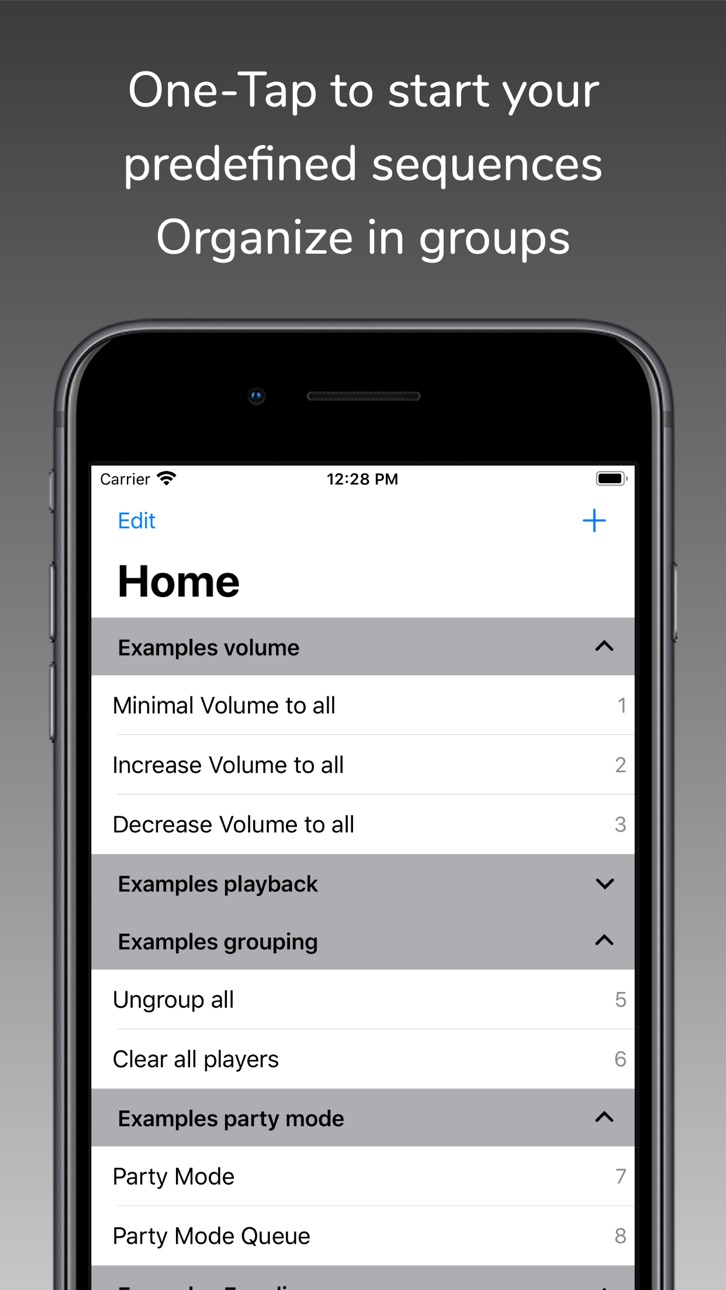
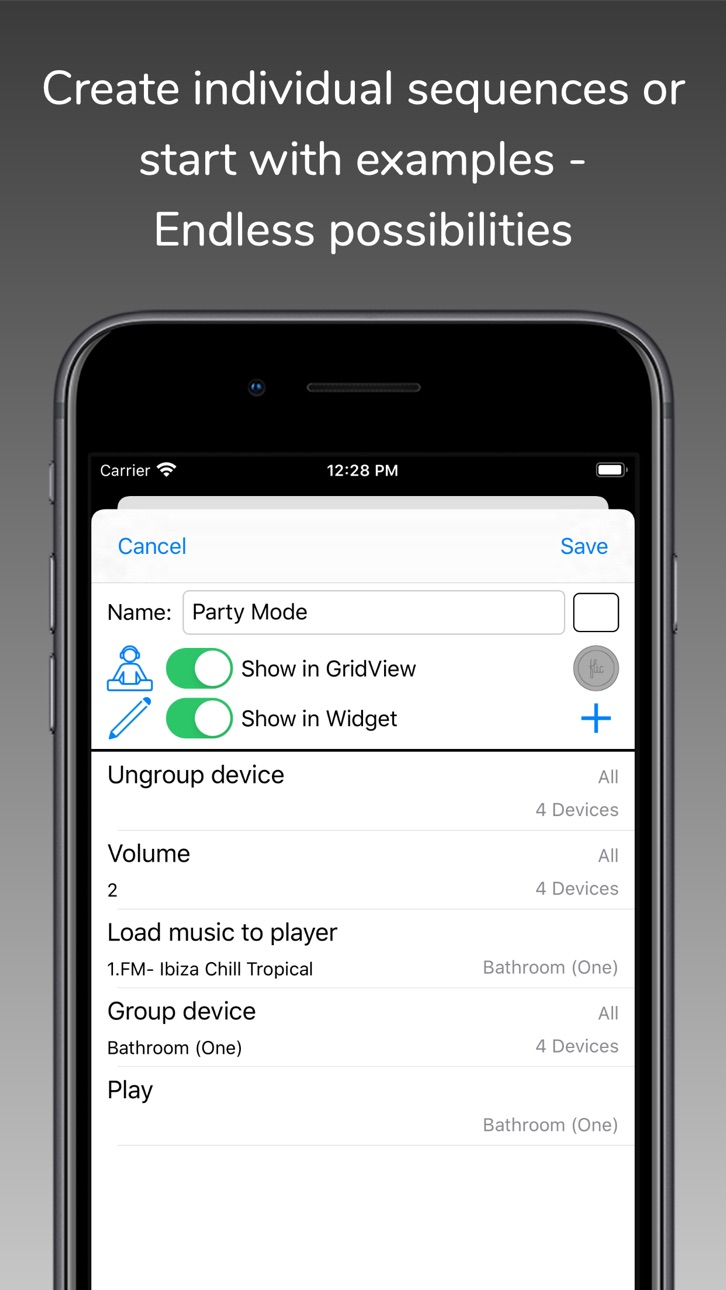
With SonoSequencr you can create individual sequences to perform recurring tasks with just one click.
If you have multiple Sonos devices and want to play a radio station on all of them, it takes some time to set this up. With SonoSequencr, all you have to do is open the app and tap your previously created sequence.
You can lock your iOS device or use another app while your sequence is running in the background.
Of course, you can also start it from the widget (The Today widget is only available up to and including iOS 17), Apple Watch or using Flic Buttons.
Here are some examples:
- Group kitchen and dining room, set volume to 5, start a radio station and set a sleep timer to 2 hours
- Switch your Playbar in the living room to the TV input, set the volume to 40, add dining room and set the equalizer settings for both devices to neutral
- Disable the subwoofer and enable voice enhancement + night mode on the Playbar in the living room
- Set the equalizer settings for all your devices to specific values
- Disable touch on speaker and enable status light for all your devices
- Set the volume of the kitchen and living room to the same value as in the dining room
- Make an announcement with your individual text in the children's room
- etc...
Each of these examples, created once, requires only one tap in the widget or on your Apple Watch.
SonoSequencr also includes a restricted mode. This allows you to restrict control to specific devices, among other things.
Using an optional in-app purchase, you can also start sequences at specific times or via external triggers like IFTTT. Of course, this requires that the iOS device is on the same network as your Sonos devices at the time. For intensive use of external triggers, it is recommended to run SonoSequencr in 'server mode'. In this mode, SonoSequencr is always running in the foreground on a dedicated iOS device. SonoSequencr still supports iOS12.
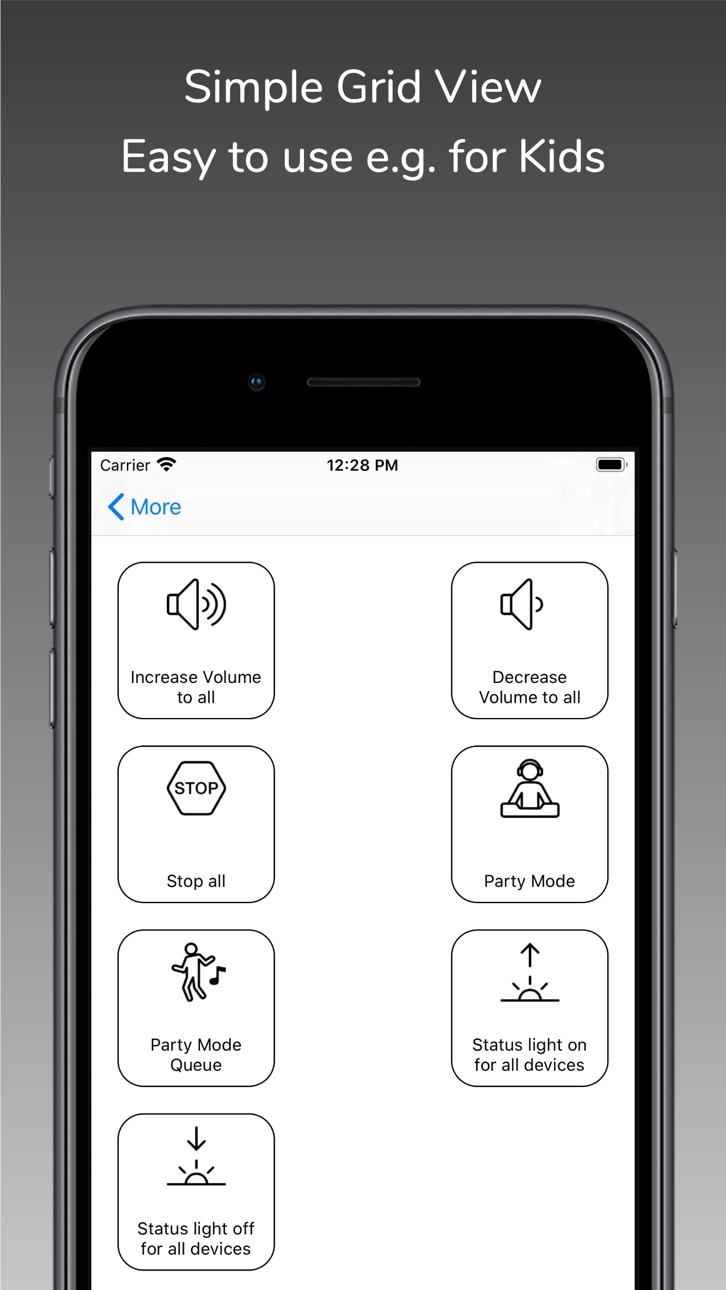
There are many more features like grid view, create dynamic alarms, HTTP requests, launch other apps, automatic battery charging in server mode, transfer sequences between devices, etc....
You can only use music (radio streams/tracks/albums) for your sequences that are stored in your Sonos Favorites (My Sonos) or in your TuneIn radio stations. You can't search your entire music library in this app. Just add your most used music to my Sonos then it can be used in your sequences.
The Timed Sequences feature is only available with an optional in-app purchase 'Premium'. With this automatically renewing subscription, up to 20 sequences can be run at freely configurable times. The function is only active as long as a valid subscription exists. The costs are billed via the iTunes account. The subscription will be renewed automatically within 24 hours before expiration (same time and costs), unless it is cancelled before in 'Settings' -> 'Manage Subscriptions' or in the iTunes settings.
To use this app you must have a working Sonos system. SonoSequencr supports Sonos software 1 and 2.
For terms and conditions and privacy policy see:
https://celltekk.de/sonosequencr/help/privacy
This is not an official Sonos app.
In-App Purchases US pricing
Remote sequences Subscription
Premium 1 month · Monthly$0.49
Premium 6 months · 6 months$2.49
Premium 12 months · Yearly$4.49
One-Time Purchases
Small donation$2.99
Mid donation$5.99
Big donation$9.99
Capabilities
In-App Purchases
Accessibility
ipadiphonemacrealityDevicetvoswatch
Version history 25 versions
Build 883864001v9.6.62026-04-04 21:15:25
- Bugfix for stereo pair command.
For questions, feature requests, or support, please visit the Settings page to access online help, open a support ticket, or join r/sonosequencr on Reddit.
Build 883606758v9.6.52026-03-27 20:35:04
This update from Apple will improve the functionality of this app. No new features are included.
- Added support for new Era 100 SL and Sonos Play.
- Fixed issues with stereo-pair commands.
- Many small bug fixes and performance improvements.
For questions, feature requests, or support, please visit the Settings page to access online help, open a support ticket, or join r/sonosequencr on Reddit.
Build 882886093v9.6.42026-03-17 22:29:13
- Fixed issues with adding/removing Subs as well as Text-to-Speech and Audio-In commands.
- Improved setup screen when connecting to new or unknown Wi-Fi networks.
- Many small bug fixes and performance improvements.
For questions, feature requests, or support, please visit the Settings page to access online help, open a support ticket, or join r/sonosequencr on Reddit.
Build 882247607v9.6.32026-02-23 21:12:27
- Many small bug fixes and performance improvements.
For questions, feature requests, or support, please visit the Settings page to access online help, open a support ticket, or join r/sonosequencr on Reddit.
Build 882067367v9.6.22026-02-06 21:51:00
- Only show Trueplay status (Enabled yes/no) in the configuration screen context menu.
- New context menu in zone edit screen for easier device identification.
- Various other bug fixes and performance improvements.
For questions, feature requests, or support, please visit the Settings page to access online help, open a support ticket, or join r/sonosequencr on Reddit.
Build 881453452v9.6.12026-02-01 22:27:41
- New interface to create and edit Zones. Combine multiple speakers into a single Zone for simplified control and configuration.
- All volume sliders can now be tapped left or right of the current position to adjust the volume incrementally (Thanks Don for suggesting this).
- You can now set an individual step size for all incremental volume changes in Settings (range: 1–10, default: 2).
- Fixed an issue with the Trueplay on/off switch on the configuration screen.
- The current Trueplay status (tuning available, activated) is now shown in the configuration screen context menu.
- Various other bug fixes and performance improvements.
For questions, feature requests, or support, please visit the Settings page to access online help, open a support ticket, or join r/sonosequencr on Reddit.
Build 878374930v9.6.02026-01-13 00:08:50
- New iOS26 Liquid Glass design.
- Added support for new Flic Duo button including swipe gestures.
- In Server-Mode you can now show a slideshow (local and iCloud shared albums) as screensaver. Switch between regular dark screen and slideshow based on time and/or presence.
- Added a shortcut to switch Trueplay on/off in config screen.
- UI Bug fixes in device config for smaller screens.
- Many other smaller bug fixes and improvements.
For questions, feature requests or problems, please go to the settings page and use the online help, open a support ticket or visit "r/sonosequencr" on Reddit.
Build 878009476v9.5.52025-09-22 22:26:03
- Bug fixes and improvements.
For questions, feature requests or problems, please go to the settings page and use the online help, open a support ticket or visit "r/sonosequencr" on Reddit.
Build 877998118v9.5.42025-09-10 14:09:28
- New localization for Chinese (Simplified).
- Query the current battery level and device temperature for mobile devices from your watch.
- Removed 'Presentation-Mode'. Only difference to 'Server-Mode' was the wait time without interaction until the screen saver comes up (which is now configurable in settings).
- Bug fixes and improvements.
For questions, feature requests or problems, please go to the settings page and use the online help, open a support ticket or visit "r/sonosequencr" on Reddit.
Build 876612681v9.5.32025-09-09 14:26:52
- New localization for Chinese (Simplified).
- Removed 'Presentation-Mode'. Only difference to 'Server-Mode' was the wait time without interaction until the screen saver comes up (which is now configurable in settings).
- Bug fixes and improvements.
For questions, feature requests or problems, please go to the settings page and use the online help, open a support ticket or visit "r/sonosequencr" on Reddit.
Build 876359323v9.5.22025-07-16 08:25:45
- New setup screen for required app permissions (only displayed on first start after installation).
- Additional confirmation is now required for mass changes.
- All sequences containing the selected device are displayed in the mass change -> remove device area.
- All IFTTT fields (to start a specific sequence via external services) can now be transferred to another device (e.g. Macbook) with a 'Share' button.
- Additional bug fixes and improvements.
For questions, feature requests or problems, please go to the settings page and use the online help, open a support ticket or visit "r/sonosequencr" on Reddit.
Build 874378959v9.5.12025-06-09 14:00:20
- New rules for mobile devices (charging starts/stops, charge level above/below, temperature above/below).
- Change environments via the Watch app now with a long press on any sequence or device.
- In 'Now playing' the exact sample and bit rate is displayed if available.
- In 'Now playing, the volume of the devices to be added is reduced by a factor of 5 when grouping if the coordinator is a mobile device.
- Additional bug fixes and improvements.
For questions, feature requests or problems, please go to the settings page and use the online help, open a support ticket or visit "r/sonosequencr" on Reddit.
Build 873064728v9.5.02025-04-28 17:33:19
- Show charging state and battery level in 'Now Playing' screen for mobile devices.
- Add option to change name of your skill connection and choose if you prefer short answers from the skill (Will have effect with new skill version coming soon).
- Fix for almost overlapping 'Config' button which could lead to activate 'Next' button instead of 'Config'.
- Additional bug fixes and improvements.
For questions, feature requests or problems, please go to the settings page and use the online help, open a support ticket or visit "r/sonosequencr" on Reddit.
Build 872479002v9.4.02025-02-23 08:56:42
- Fix a long-existing issue where two or more devices share the same backend entry.
- Add a new search function in the list of commands.
- Fix for wrongly showing a inconsistent configuration in config screen when using 2nd sub.
- Fix for not showing configured fronts and surrounds in config screen.
- Additional minor bug fixes and improvements.
For questions, feature requests or problems, please go to the settings page and use the online help, open a support ticket or visit "r/sonosequencr" on Reddit.
Build 871542532v9.3.22025-02-13 10:57:22
- Added support for new devices.
- Minor bug fixes and improvements.
For questions, feature requests or problems, please go to the settings page and use the online help, open a support ticket or visit "r/sonosequencr" on Reddit.
Build 870531830v9.3.02025-01-04 07:52:29
- New function for automatic battery charging: Optionally enter an email address where you will be notified if automatic battery charging cannot be started or stopped.
- New command 'EQ Height Channels' (only for Dolby Atmos Audio).
- Reworked the 'Config' screen to remove/add surround/front/sub speakers.
- Minor bug fixes and improvements.
For questions, feature requests or problems, please go to the settings page and use the online help, open a support ticket or visit "r/sonosequencr" on Reddit.
Build 871528896v9.3.12025-01-04 09:58:16
- New function for automatic battery charging: Optionally enter an email address where you will be notified if automatic battery charging cannot be started or stopped.
- New command 'EQ Height Channels' (only for Dolby Atmos Audio).
- Reworked the 'Config' screen to remove/add surround/front/sub speakers.
- Minor bug fixes and improvements.
For questions, feature requests or problems, please go to the settings page and use the online help, open a support ticket or visit "r/sonosequencr" on Reddit.
Build 870056851v9.2.12024-10-29 18:35:21
- Support for new devices: Era 100 Pro, Arc Ultra and Sub Gen4
Previous version:
- New rule 'Volume changes (Follow)': This allows you to define one or more devices which should automatically follow volume changes from another device. Example: You have a group of three devices A, B and C. Whenever you change the volume (or mute) of device A the volume (or mute) of device B and C are also changing. This is mostly useful if you change volume by using the physical buttons on device A or device A has a IR Remote configured. You can also setup a multiplier for volume e.g. 0.5, then devices B and C would always have half the volume level of device A
Note to rules in general: Rules only work while Server-/Presentationmode is active, so you need to have a dedicated device running SonoSequencr in foreground all the time (e.g. a older iPhone or a iPad in a wall mount)
- New command: Pause/Resume rules: While rules are active you can now pause or resume a set or all rules (e.g. pause a 'Volume changes (Follow)' rule when you do not need it)
- Show connection (Wireless Mode) in Devices tab (may require updating the device list by pulling down the table)
- New dark app logo
- Bugfixes and improvements
For questions, feature requests or problems, please go to the settings page and use the online help, open a support ticket or visit "r/sonosequencr" on Reddit.
Build 869838294v9.2.02024-10-27 14:07:56
- New rule 'Volume changes (Follow)': This allows you to define one or more devices which should automatically follow volume changes from another device. Example: You have a group of three devices A, B and C. Whenever you change the volume (or mute) of device A the volume (or mute) of device B and C are also changing. This is mostly useful if you change volume by using the physical buttons on device A or device A has a IR Remote configured. You can also setup a multiplier for volume e.g. 0.5, then devices B and C would always have half the volume level of device A
Note to rules in general: Rules only work while Server-/Presentationmode is active, so you need to have a dedicated device running SonoSequencr in foreground all the time (e.g. a older iPhone or a iPad in a wall mount)
- New command: Pause/Resume rules: While rules are active you can now pause or resume a set or all rules (e.g. pause a 'Volume changes (Follow)' rule when you do not need it)
- Show connection (Wireless Mode) in Devices tab (may require updating the device list by pulling down the table)
- New dark app logo
- Bugfixes and improvements
For questions, feature requests or problems, please go to the settings page and use the online help, open a support ticket or visit "r/sonosequencr" on Reddit.
Build 866358275v9.1.12024-07-20 18:31:56
- Small correction for Amazon Music playlists: Some lists are missing in SonoSequencr, even if they are included in the Sonos favorites.
- Changes in the web interface:
- Display of model number and wireless mode (SonosNet, WiFi, etc.) for the main device and also for connected stereo, surround and sub devices
- Display overview of connected Flic buttons including assigned sequences
- New functions for Flic buttons:
- Display Bluetooth ID, connection status, number of presses and firmware version (FW version only for Gen.2 buttons)
- Query RSSI (signal strength) for Flic Gen.1 buttons
- Display/remove all assigned sequences
- Improved output on the Flic button share sheet
For questions, feature requests or problems, please go to the settings page and use the online help, open a support ticket or visit "r/sonosequencr" on Reddit.
Build 864477336v9.1.02024-05-29 16:06:11
- Support for new Roam Gen.2
- A device definition for FHEM (type HTTPMOD) can now be created via the web interface. This allows sequences and device actions to be started via FHEM in SonoSequencr ( if server/presentation mode is active).
- Bug fix for transferring sequences between two devices
- Other minor bug fixes and improvements
For questions, feature requests or if you have any problems please go to the settings page and use the Online Help, open a support ticket or visit "r/sonosequencr" on Reddit.
Build 859797702v9.0.12024-03-15 12:33:38
- Min required iOS version is now iOS 12
- New condition 'User input (yes/no)' for command 'Start other sequence by condition':
This causes a freely definable question to be displayed at sequence runtime, which can be answered with Yes or No.
Depending on the answer, the 'IF' or 'ELSE' sequence is then started.
If no entry is made, the 'ELSE' sequence is started after 5 seconds.
- With the 'Set volume to previously read value' command, an optional multiplier can be specified to decrease or increase the value (multiplier in the range 0.2 to 5.0)
This means, for example, that the volume can be read from device A and reduced to half the value using the multiplier 0.5. This can then be set on another device B.
This means that device B has half the volume value of device A after each execution of the sequence.
- New option for user with premium subscription to enable account linking with SonoSequencr´s Alexa Skill:
This Skill is currently only available in German language and German Alexa Store. English version and availability in other countries will follow.
Please also note that for proper use with Alexa Skill it is strongly recommended to use SonoSequencr in Server-/Presentation-Mode.
- Functions of the web interface can now be called up directly using the keyboard:
Use the cursor up/down keys to change the focus for the individual sequences, press Enter to start the sequence with the current focus
Entering letters and numbers (without first placing the cursor in the search field) now starts the search immediately
The ESC key clears and ends the search and all sequences are displayed again
- In server/presentation mode:
The number of clients that currently have the web interface open is displayed
The battery status display is always updated in the web interface when changes are made
- When transferring all sequences between two iOS devices, a query appears asking whether the time-triggered sequences should also be transferred (only if they exist).
If this is answered with Yes, any existing IFTTT token is also transferred from the source device to the target device. Any existing token on the target device is overwritten with the token of the source device.
- App settings that affect the web interface lead to an automatic reload on all clients on which the web interface is currently displayed (e.g. hide page settings or show devices collapsed by default)
- Bug fixes in the web interface, whereby a non-valid URL was displayed to start the respective sequences (also in CSV view)
- Bug fixes for text-to-speech
- Bugs that could cause the app to crash have been fixed
- Bug fixes for translations
For questions, feature requests or if you have any problems please go to the settings page and use the Online Help, open a support ticket or visit "r/sonosequencr" on Reddit.
Build 859527704v8.3.02023-09-02 15:49:53
- New command 'Exit sequence', which ends the execution of the current sequence at this point. Useful e.g. to stop sending commands in case of several IF/ELSE branches at a defined position.
- New option 'Current playback state is playing' for the command 'Start other sequence by condition'. This allows IF/ELSE branches to be implemented based on the playback status of a device.
- Other minor bug fixes
For questions, feature requests or if you have any problems please go to the settings page and use the Online Help, open a support ticket or visit "r/sonosequencr" on Reddit.
Build 858832149v8.2.02023-07-30 14:40:24
- New rules for external input (source changes from/to external input)
- Other minor bug fixes
For questions, feature requests or if you have any problems please go to the settings page and use the Online Help, open a support ticket or visit "r/sonosequencr" on Reddit.
Build 857538669v8.1.02023-07-20 09:12:28
- New command to switch to a specific tab
- Fixed bug when copying/pasting commands
- Fixed a bug in the configuration of subs
- Other minor bug fixes
For questions, feature requests or if you have any problems please go to the settings page and use the Online Help, open a support ticket or visit "r/sonosequencr" on Reddit.
Price history by region
Currency
Show
Columns
Search
Availability 173 of 175 storefronts
| Region | Language | Price | Ratings | Avg | Version |
|---|---|---|---|---|---|
| US | en-US | USD 2.99 | 114 | 4.7 | 9.6.6 |
| DE | de-DE | EUR 2.99 | 87 | 4.7 | 9.6.6 |
| GB | en-GB | GBP 2.99 | 43 | 4.4 | 9.6.6 |
| CA | en-CA | CAD 3.99 | 17 | 4.5 | 9.6.6 |
| CH | de-CH | CHF 3 | 15 | 4.9 | 9.6.6 |
| NL | nl | EUR 2.99 | 14 | 4.4 | 9.6.6 |
| AU | en-AU | AUD 4.99 | 12 | 4.7 | 9.6.6 |
| DK | en-GB | DKK 29 | 8 | 4.5 | 9.6.6 |
| SE | sv | SEK 39 | 7 | 4.9 | 9.6.6 |
| FR | fr-FR | EUR 2.99 | 5 | 5.0 | 9.6.6 |
| NO | en-GB | NOK 39 | 5 | 5.0 | 9.6.6 |
| BE | en-GB | EUR 2.99 | 4 | 5.0 | 9.6.6 |
| AT | de-DE | EUR 2.99 | 3 | 5.0 | 9.6.6 |
| GR | en-GB | EUR 2.99 | 3 | 5.0 | 9.6.6 |
| MX | es-MX | MXN 69 | 3 | 5.0 | 9.6.6 |
| MY | en-GB | MYR 14.9 | 3 | 5.0 | 9.6.6 |
| CN | zh-Hans-CN | CNY 22 | 2 | 5.0 | 9.6.6 |
| ES | es-ES | EUR 2.99 | 2 | 4.5 | 9.6.6 |
| IE | en-GB | EUR 2.99 | 2 | 5.0 | 9.6.6 |
| IL | en-GB | ILS 9.9 | 2 | 4.5 | 9.6.6 |
| IT | it | EUR 2.99 | 2 | 5.0 | 9.6.6 |
| PL | en-GB | PLN 14.99 | 2 | 5.0 | 9.6.6 |
| CZ | en-GB | CZK 79 | 1 | 5.0 | 9.6.6 |
| HK | zh-Hant-HK | HKD 22 | 1 | 5.0 | 9.6.6 |
| HR | en-GB | EUR 2.99 | 1 | 5.0 | 9.6.6 |
| PH | en-GB | PHP 199 | 1 | 5.0 | 9.6.6 |
| SA | en-GB | SAR 12.99 | 1 | 5.0 | 9.6.6 |
| AE | en-GB | AED 12.99 | 0 | — | 9.6.6 |
| AF | en-GB | USD 2.99 | 0 | — | 9.6.6 |
| AG | en-GB | USD 2.99 | 0 | — | 9.6.6 |
| AI | en-GB | USD 2.99 | 0 | — | 9.6.6 |
| AL | en-GB | USD 3.99 | 0 | — | 9.6.6 |
| AM | en-GB | USD 3.99 | 0 | — | 9.6.6 |
| AO | en-GB | USD 2.99 | 0 | — | 9.6.6 |
| AR | es-MX | USD 2.99 | 0 | — | 9.6.6 |
| AZ | en-GB | USD 3.99 | 0 | — | 9.6.6 |
| BA | en-GB | EUR 2.99 | 0 | — | 9.6.6 |
| BB | en-GB | USD 3.99 | 0 | — | 9.6.6 |
| BF | en-GB | USD 2.99 | 0 | — | 9.6.6 |
| BG | en-GB | EUR 2.99 | 0 | — | 9.6.6 |
| BH | en-GB | USD 2.99 | 0 | — | 9.6.6 |
| BJ | en-GB | USD 3.99 | 0 | — | 9.6.6 |
| BM | en-GB | USD 2.99 | 0 | — | 9.6.6 |
| BN | en-GB | USD 2.99 | 0 | — | 9.6.6 |
| BO | es-MX | USD 2.99 | 0 | — | 9.6.6 |
| BR | pt-BR | BRL 19.9 | 0 | — | 9.6.6 |
| BS | en-GB | USD 2.99 | 0 | — | 9.6.6 |
| BT | en-GB | USD 2.99 | 0 | — | 9.6.6 |
| BW | en-GB | USD 2.99 | 0 | — | 9.6.6 |
| BZ | en-GB | USD 2.99 | 0 | — | 9.6.6 |
| CD | en-GB | USD 2.99 | 0 | — | 9.6.6 |
| CG | en-GB | USD 2.99 | 0 | — | 9.6.6 |
| CI | fr-FR | USD 3.99 | 0 | — | 9.6.6 |
| CL | es-MX | CLP 2990 | 0 | — | 9.6.6 |
| CM | fr-FR | USD 3.99 | 0 | — | 9.6.6 |
| CO | es-MX | COP 14900 | 0 | — | 9.6.6 |
| CR | es-MX | USD 2.99 | 0 | — | 9.6.6 |
| CV | en-GB | USD 2.99 | 0 | — | 9.6.6 |
| CY | en-GB | EUR 2.99 | 0 | — | 9.6.6 |
| DM | en-GB | USD 2.99 | 0 | — | 9.6.6 |
| DO | es-MX | USD 2.99 | 0 | — | 9.6.6 |
| DZ | en-GB | USD 2.99 | 0 | — | 9.6.6 |
| EC | es-MX | USD 2.99 | 0 | — | 9.6.6 |
| EE | en-GB | EUR 2.99 | 0 | — | 9.6.6 |
| EG | en-GB | EGP 149.99 | 0 | — | 9.6.6 |
| FI | en-GB | EUR 2.99 | 0 | — | 9.6.6 |
| FJ | en-GB | USD 2.99 | 0 | — | 9.6.6 |
| FM | en-GB | USD 2.99 | 0 | — | 9.6.6 |
| GA | fr-FR | USD 2.99 | 0 | — | 9.6.6 |
| GD | en-GB | USD 2.99 | 0 | — | 9.6.6 |
| GE | en-GB | USD 3.99 | 0 | — | 9.6.6 |
| GH | en-GB | USD 3.99 | 0 | — | 9.6.6 |
| GM | en-GB | USD 2.99 | 0 | — | 9.6.6 |
| GT | es-MX | USD 2.99 | 0 | — | 9.6.6 |
| GW | en-GB | USD 2.99 | 0 | — | 9.6.6 |
| GY | en-GB | USD 2.99 | 0 | — | 9.6.6 |
| HN | es-MX | USD 2.99 | 0 | — | 9.6.6 |
| HU | en-GB | HUF 1490 | 0 | — | 9.6.6 |
| ID | en-GB | IDR 49000 | 0 | — | 9.6.6 |
| IN | en-GB | INR 299 | 0 | — | 9.6.6 |
| IQ | en-GB | USD 2.99 | 0 | — | 9.6.6 |
| IS | en-GB | USD 3.99 | 0 | — | 9.6.6 |
| JM | en-GB | USD 2.99 | 0 | — | 9.6.6 |
| JO | en-GB | USD 2.99 | 0 | — | 9.6.6 |
| JP | ja | JPY 500 | 0 | — | 9.6.6 |
| KE | en-GB | USD 3.99 | 0 | — | 9.6.6 |
| KG | en-GB | USD 2.99 | 0 | — | 9.6.6 |
| KH | en-GB | USD 2.99 | 0 | — | 9.6.6 |
| KN | en-GB | USD 2.99 | 0 | — | 9.6.6 |
| KR | ko | KRW 4400 | 0 | — | 9.6.6 |
| KW | en-GB | USD 2.99 | 0 | — | 9.6.6 |
| KY | en-GB | USD 2.99 | 0 | — | 9.6.6 |
| KZ | en-GB | KZT 1790 | 0 | — | 9.6.6 |
| LA | en-GB | USD 2.99 | 0 | — | 9.6.6 |
| LB | en-GB | USD 2.99 | 0 | — | 9.6.6 |
| LC | en-GB | USD 2.99 | 0 | — | 9.6.6 |
| LK | en-GB | USD 2.99 | 0 | — | 9.6.6 |
| LR | en-GB | USD 2.99 | 0 | — | 9.6.6 |
| LT | en-GB | EUR 2.99 | 0 | — | 9.6.6 |
| LU | en-GB | EUR 2.99 | 0 | — | 9.6.6 |
| LV | en-GB | EUR 2.99 | 0 | — | 9.6.6 |
| LY | en-GB | USD 2.99 | 0 | — | 9.6.6 |
| MA | en-GB | USD 2.99 | 0 | — | 9.6.6 |
| MD | en-GB | USD 3.99 | 0 | — | 9.6.6 |
| ME | en-GB | EUR 1.99 | 0 | — | 9.6.6 |
| MG | en-GB | USD 2.99 | 0 | — | 9.6.6 |
| MK | en-GB | USD 2.99 | 0 | — | 9.6.6 |
| ML | en-GB | USD 2.99 | 0 | — | 9.6.6 |
| MM | en-GB | USD 2.99 | 0 | — | 9.6.6 |
| MN | en-GB | USD 2.99 | 0 | — | 9.6.6 |
| MO | zh-Hant-HK | USD 2.99 | 0 | — | 9.6.6 |
| MR | en-GB | USD 2.99 | 0 | — | 9.6.6 |
| MS | en-GB | USD 2.99 | 0 | — | 9.6.6 |
| MT | en-GB | EUR 2.99 | 0 | — | 9.6.6 |
| MU | en-GB | USD 3.99 | 0 | — | 9.6.6 |
| MV | en-GB | USD 2.99 | 0 | — | 9.6.6 |
| MW | en-GB | USD 2.99 | 0 | — | 9.6.6 |
| MZ | en-GB | USD 2.99 | 0 | — | 9.6.6 |
| NA | en-GB | USD 2.99 | 0 | — | 9.6.6 |
| NE | en-GB | USD 2.99 | 0 | — | 9.6.6 |
| NG | en-GB | NGN 4900 | 0 | — | 9.6.6 |
| NI | es-MX | USD 2.99 | 0 | — | 9.6.6 |
| NP | en-GB | USD 3.99 | 0 | — | 9.6.6 |
| NR | en-GB | USD 2.99 | 0 | — | 9.6.6 |
| NZ | en-AU | NZD 4.99 | 0 | — | 9.6.6 |
| OM | en-GB | USD 2.99 | 0 | — | 9.6.6 |
| PA | es-MX | USD 2.99 | 0 | — | 9.6.6 |
| PE | es-MX | PEN 12.9 | 0 | — | 9.6.6 |
| PG | en-GB | USD 2.99 | 0 | — | 9.6.6 |
| PK | en-GB | PKR 900 | 0 | — | 9.6.6 |
| PT | pt-PT | EUR 2.99 | 0 | — | 9.6.6 |
| PW | en-GB | USD 2.99 | 0 | — | 9.6.6 |
| PY | es-MX | USD 2.99 | 0 | — | 9.6.6 |
| QA | en-GB | QAR 9.99 | 0 | — | 9.6.6 |
| RO | en-GB | RON 14.99 | 0 | — | 9.6.6 |
| RS | en-GB | EUR 2.99 | 0 | — | 9.6.6 |
| RW | en-GB | USD 2.99 | 0 | — | 9.6.6 |
| SB | en-GB | USD 2.99 | 0 | — | 9.6.6 |
| SC | en-GB | USD 2.99 | 0 | — | 9.6.6 |
| SG | en-GB | SGD 3.98 | 0 | — | 9.6.6 |
| SI | en-GB | EUR 2.99 | 0 | — | 9.6.6 |
| SK | en-GB | EUR 2.99 | 0 | — | 9.6.6 |
| SL | en-GB | USD 2.99 | 0 | — | 9.6.6 |
| SN | en-GB | USD 3.99 | 0 | — | 9.6.6 |
| SR | en-GB | USD 2.99 | 0 | — | 9.6.6 |
| ST | en-GB | USD 2.99 | 0 | — | 9.6.6 |
| SV | es-MX | USD 2.99 | 0 | — | 9.6.6 |
| SZ | en-GB | USD 2.99 | 0 | — | 9.6.6 |
| TC | en-GB | USD 2.99 | 0 | — | 9.6.6 |
| TD | en-GB | USD 2.99 | 0 | — | 9.6.6 |
| TH | en-GB | THB 99 | 0 | — | 9.6.6 |
| TJ | en-GB | USD 2.99 | 0 | — | 9.6.6 |
| TM | en-GB | USD 2.99 | 0 | — | 9.6.6 |
| TN | en-GB | USD 2.99 | 0 | — | 9.6.6 |
| TO | en-GB | USD 2.99 | 0 | — | 9.6.6 |
| TR | en-GB | TRY 149.99 | 0 | — | 9.6.6 |
| TT | en-GB | USD 2.99 | 0 | — | 9.6.6 |
| TW | zh-Hant-TW | TWD 90 | 0 | — | 9.6.6 |
| TZ | en-GB | TZS 9900 | 0 | — | 9.6.6 |
| UA | en-GB | USD 3.99 | 0 | — | 9.6.6 |
| UG | en-GB | USD 3.99 | 0 | — | 9.6.6 |
| UY | en-GB | USD 2.99 | 0 | — | 9.6.6 |
| UZ | en-GB | USD 2.99 | 0 | — | 9.6.6 |
| VC | en-GB | USD 2.99 | 0 | — | 9.6.6 |
| VE | es-MX | USD 2.99 | 0 | — | 9.6.6 |
| VG | en-GB | USD 2.99 | 0 | — | 9.6.6 |
| VN | en-GB | VND 99000 | 0 | — | 9.6.6 |
| VU | en-GB | USD 2.99 | 0 | — | 9.6.6 |
| XK | en-GB | EUR 2.99 | 0 | — | 9.6.6 |
| YE | en-GB | USD 2.99 | 0 | — | 9.6.6 |
| ZA | en-GB | ZAR 59.99 | 0 | — | 9.6.6 |
| ZM | en-GB | USD 3.99 | 0 | — | 9.6.6 |
| ZW | en-GB | USD 3.99 | 0 | — | 9.6.6 |
Not available in: BY, RU
Reviews 30 reviews · US
★★★★★
Fantastic app
The real question is why does Sonos officially support these features? Instead they purposefully refuses to acknowledge that many of these configurations are even possible. 😡
MiamiC702026-05-26
★★★★★
Impressive App!
I have dozens and dozens of apps, and this is the first review I’ve ever written. Like all of you, I’m solicited to write reviews, sometimes multiple times a day.
I just wanted to pay props to the developer for not only creating this incredible app, making it straightforward to adding two front speakers and adding a second Gen 1/2 sub, staying engaged with his community, and more. I’ve only scratched the surface of all the features his app provides, but the two aforementioned additions (which the official Sonos app does not allow) has made my TV/movie/music experience significantly richer.
T
FEnzo22026-02-15
★★★★★
Such a great tool for multi room Sonos environments!
I heard about this app on the Sonos Reddit page. I have created complexed sequences that allow me to single tap a button and have all of those steps done for me. Love it!
Gphotography2026-02-08
★★★★★
Incredible app & Sonos Expansion
I saw discussion of SonoSequencr on forums talking about using the app to add dedicated front right/left speakers to a Sonos soundbar and decided to give it a try. WOW! I’m blown away by the results. Setup wasn’t difficult with the app and a few searches on the forum for tips, and I’m blown away by the results. Incredible sound now from my Sonos home theater system. Why this isn’t supported on the official app is beyond me. The developer provides feedback and is constantly improving the app - which easily justifies to me that this is a paid app. Keep improving and engaging with users and I’ll
jhinsonx722026-02-08
★★★★★
Fantastic Application!
Take your time, read instructions or ask for help. This app is truly amazing once you get the hang of it!
Thaywoody2026-02-07
★★★★★
Insane
I wasn’t quite sure what to expect, but I added two of my Era 100s as fronts to my Arc. Wow…
Before messing around with anything, please just look up a quick guide.
Kudos to the developer!
Adado2026-02-07
★★★★★
Does what it says and more
Love that is adds capabilities we didn’t have on the stock app. Is it perfect, nothing ever is, but to say it doesn’t do what it was intended for would be harsh. Thanks for the great app and support!
caseman11082026-02-07
★★★★★
Thank you for your hard work
Couldn’t have expanded the soundstage so wide without your amazing work. And don’t stop integrating new experimental features even if some dolts give 2 stars bc they don’t understand the word experimental.
Computergiant2026-02-07
★★★★★
No Frills Amazingness
Listen, we are all used to drag/drop with fancy interfaces, blah blah blah. And if you’re looking for that, then this is NOT the app for you.
But if you want someone who has opened up an entirely new reality for your SONOS home theater, this is for you.
1. There are many people who’ve written tutorials on how to use this app. And, when followed exactly, there are no problems.
2. The developer is EXTREMELY involved in the discussions online and participates regularly. That isn’t rare to see in today’s world.
If you’re up to the task of following instructions on a “behind the scenes” dev
Montana Medic2026-02-06
★★★★★
A true deal breaker
An excellent app that improves Sonos sound by 1000%. I’m so glad I found this app.
GMot0072026-02-06
★★★★★
Worth every bit for Sonos owners!
This app breathed new life to my Connect:Amps, allowing them to be paired with my Beam soundbar for a larger sound stage.
Chimuel2026-02-06
★★★★★
Recommended to everyone with Sonos home theater
Is what Sonos should be doing. I’m thankful for this app and I would be upset if I lost this functionality. Set it and forget it!
Jon2theGram2026-02-06
★★★★★
Outstanding Tool for the Sonos Community
I own a lot of Sonos gear and love the ecosystem. SonoSequencer is a game changer for getting the most listening pleasure out of my Sonos investment. Just the capability to add discrete front left and right speakers alone has been the greatest single improvement I’ve been able to make with our three home theater systems. If you have not tried SonoSequencer you really should! If you have a question, you can ask via the app or on the SonoSequencer Reddit Sub….the developer is very gracious about helping the tech-challenged like me!
Longjumping_West94852026-02-06
★★★★★
Great Tool for the Savvy Sonos User
Has been useful for me. Used it to quickly change my speaker configurations (pair and unpair two Moves) and tinker with left over beta functionality Sonos left in their API. Recognize that experimental features offer no guarantee of function or success, your mileage will vary, but the only reason you are able to try is because of helpful tools like this. 5 stars.
ProductK2026-02-06
★★★★★
Thank you for this wonderful option
People leaving negative reviews should not be trusted. Works like a charm to deliver a wonderful surround sound experience and other sensible features. If you don’t like experimental/beta feeling products, maybe this app isn’t for you and you should wait for Sonos to (hopefully) officially support this functionality in the future. Developer is very supportive and actively engaging on Reddit. We appreciate you and all your work on this!
Phishnet2026-02-06
★★★★★
Transformed my Sonos system
My Sonos system felt like it was always missing something. Adding fronts completely transformed my system from good to incredible
asko nyc2026-02-06
★★★★★
Sounds amazing adding fronts
Yes it’s a bit fiddly to setup but once done, it sounds really really good. The idiots writing one star reviews are usually people who haven’t set it up properly and haven’t realised this is an experimental feature on this app.
gmjh2026-02-06
★★★★★
Must have app for Sonos owners!
The app allows you to add front speakers to your soundbar and it’s a game changer for the soundstage. I also appreciate the developer’s effort around getting TruePlay working.
r.Board2026-02-06
★★★★★
Creates (4) phantom Sonos speakers, after adding (2) Era 300s
I love the idea of the app and purchased it add (2) front Era 300s to extend the front sound stage of my Sonos Arc home theater setup, which include (2) Era 300s as surrounds and (2) Subs. When I add the (2) fronts, your app creates (4) extra phantom speakers in the Sonos app and they can’t be removed from the Sonos app. The also prevents you from being able to run Tuneplay to optimize the sound. I’d love this to work. Do you have any suggestions?
Rick Hartley2026-01-31
★★★★★
S1 and Playbar Working!
Got it to work after pressing the wrong ‘button’ for 'Config'. I was pressing the button above the word 'Config' when you need to press the word 'Config'.
After connecting and testing the Play:1's, getting the sub connected took multiple tries, trying both in the native Sonos app and Sequencr. It finally took adding it in Sequencr. The Play:1's connected first time.
S1 app, Playbar, Sub and 2 Play:1's.
Sounds fantastic compared to just the Playbar and sub.
Dark Timez2025-10-07
★★★★★
Great app to customize your Sonos experience!
I wanted to set up volume scenes. At first I couldn’t figure it out but after sending an email to the developer he responded right away and told me exactly what I needed to do to achieve the results I wanted. It’s a great app and it’s exactly what I was looking to complement a very poorly developed app that Sonos has developed. Thank you!
Update- this app gets even better the more I learn and use it. The PERFECT app if you want to totally customize your Sonos experience
Beauuuui2024-09-26
★★★★★
Pretty tough to work out.
So many great reviews on this app that I had to get it, but so difficult to work out. There just doesn’t seem to be any guide in how to get it all working? Almost needs to be a setup wizard because after three days of messing with it, I’m pretty lost.
Dj D.BBY2022-10-14
★★★★★
Bring back sub feature
Used to be able to trick the Sonos app that a speaker was a sub but now that’s gone.
Updated rating
Longboardsteez2022-07-28
★★★★★
Performs better then the Sonos app-essential
I consider this app essential when you own multiple sonos devices.
For me what it does better than anything is perform common actions that I do with my music in a much quicker way than the official app. Example: my morning routine is a single tap: group my downstairs speakers, load up my morning internet radio station, set the volumes as I want them, and then start the stream.
If I do this via the sonos app, not only is it many actions, but just loading the app and having it discover the environment again takes 5-10 seconds on my phone (iPhone 11 pro). This is because the sonos app appe
JeffDBoston2022-05-02
★★★★★
An app that actually works - nice!
I had a Symphonisk & SonosOne SL as a mismatched pair I wanted to use as rear surrounds (to match up with my Playbase). The normal Sonos app will not allow this. But Sono Sequencer allowed me to accomplish this - awesome- thanks SonoSequencer! That being said, it’s not very intuitive & hard to understand the concept of “sequences”. I was lucky to find some documentation of my needs on the SonoSequencer Reddit page.
Huzee662021-10-10
★★★★★
Fantastic App - one small request
This is a great app for those with a lot of Sonos Zones/Rooms/Devices. I use this to group my outdoor zones together when we are by the pool, and my kitchen and family room zones together. I also use it to toggle the surrounds attached to my Beam. The only thing missing in my opinion is a add/remove surrounds sequence. I hope they add this as I occasionally grab one of my Play1s that I use for surrounds and take it into the garage, or into a bathroom. Great app!!
ComeOnYouSpurs632020-12-05
★★★★★
Fills in the gaps
Provides the basic functions that neither apple nor Sonos can seem to get their act together to do. All I want is to be able to create shortcuts to do things like play podcasts on more than one of my Sonos speakers at a time, and through SonoSequencr, I can set up a function to allow that action and then (through the url function in shortcuts) add that function to shortcuts.
very-simple2020-12-05
★★★★★
If you Sonos, download this!
If you have a Sonos setup, this app needs to be downloaded. It adds so much more than the stock Sonos app. So many useful features!
Chancho892020-09-20
★★★★★
Great for volume presets
I like setting the volume to a specific level when I get ready in the morning, and this is perfect for doing that.
TripHopHiker2020-06-13
★★★★★
Great App. A MUST HAVE!
I can’t imagine using my Sonos system without this app. Turns multi click adjustments in the Sonos app into a one click operation. Great, timely tech support from author. Really fantastic communication. Can’t recommend enough!!
Lawrenmel2020-04-28
Change log 29 changes · US
✎
releaseNotes updated
- Bugfix for stereo pair command.
For questions, feature requests, or support, please visit the Settings page to access online help, open a support ticket, or
✎
description updated
With SonoSequencr you can create individual sequences to perform recurring tasks with just one click.
If you have multiple Sonos devices and want to play a rad
✎
subtitle updated
Sonos Automation & Scenes
✎
name updated
SonoSequencr
◆
Version 9.6.6 released
- Bugfix for stereo pair command.
For questions, feature requests, or support, please visit the Settings page to access online help, open a support ticket, or join r/sonosequencr on Reddit.
◆
Version 9.6.5 released
This update from Apple will improve the functionality of this app. No new features are included.
- Added support for new Era 100 SL and Sonos Play.
- Fixed issues with stereo-pair commands.
- Many small bug fixes and performance improvem
◆
Version 9.6.4 released
- Fixed issues with adding/removing Subs as well as Text-to-Speech and Audio-In commands.
- Improved setup screen when connecting to new or unknown Wi-Fi networks.
- Many small bug fixes and performance improvements.
For questions, featu
◆
Version 9.6.3 released
- Many small bug fixes and performance improvements.
For questions, feature requests, or support, please visit the Settings page to access online help, open a support ticket, or join r/sonosequencr on Reddit.
◆
Version 9.6.2 released
- Only show Trueplay status (Enabled yes/no) in the configuration screen context menu.
- New context menu in zone edit screen for easier device identification.
- Various other bug fixes and performance improvements.
For questions, featur
◆
Version 9.6.1 released
- New interface to create and edit Zones. Combine multiple speakers into a single Zone for simplified control and configuration.
- All volume sliders can now be tapped left or right of the current position to adjust the volume incrementall
◆
Version 9.6.0 released
- New iOS26 Liquid Glass design.
- Added support for new Flic Duo button including swipe gestures.
- In Server-Mode you can now show a slideshow (local and iCloud shared albums) as screensaver. Switch between regular dark screen and slide
◆
Version 9.5.5 released
- Bug fixes and improvements.
For questions, feature requests or problems, please go to the settings page and use the online help, open a support ticket or visit "r/sonosequencr" on Reddit.
◆
Version 9.5.4 released
- New localization for Chinese (Simplified).
- Query the current battery level and device temperature for mobile devices from your watch.
- Removed 'Presentation-Mode'. Only difference to 'Server-Mode' was the wait time without interactio
◆
Version 9.5.3 released
- New localization for Chinese (Simplified).
- Removed 'Presentation-Mode'. Only difference to 'Server-Mode' was the wait time without interaction until the screen saver comes up (which is now configurable in settings).
- Bug fixes and im
◆
Version 9.5.2 released
- New setup screen for required app permissions (only displayed on first start after installation).
- Additional confirmation is now required for mass changes.
- All sequences containing the selected device are displayed in the mass chang
◆
Version 9.5.1 released
- New rules for mobile devices (charging starts/stops, charge level above/below, temperature above/below).
- Change environments via the Watch app now with a long press on any sequence or device.
- In 'Now playing' the exact sample and bi
◆
Version 9.5.0 released
- Show charging state and battery level in 'Now Playing' screen for mobile devices.
- Add option to change name of your skill connection and choose if you prefer short answers from the skill (Will have effect with new skill version coming
◆
Version 9.4.0 released
- Fix a long-existing issue where two or more devices share the same backend entry.
- Add a new search function in the list of commands.
- Fix for wrongly showing a inconsistent configuration in config screen when using 2nd sub.
- Fix fo
◆
Version 9.3.2 released
- Added support for new devices.
- Minor bug fixes and improvements.
For questions, feature requests or problems, please go to the settings page and use the online help, open a support ticket or visit "r/sonosequencr" on Reddit.
◆
Version 9.3.1 released
- New function for automatic battery charging: Optionally enter an email address where you will be notified if automatic battery charging cannot be started or stopped.
- New command 'EQ Height Channels' (only for Dolby Atmos Audio).
- Rew
◆
Version 9.3.0 released
- New function for automatic battery charging: Optionally enter an email address where you will be notified if automatic battery charging cannot be started or stopped.
- New command 'EQ Height Channels' (only for Dolby Atmos Audio).
- Rew
◆
Version 9.2.1 released
- Support for new devices: Era 100 Pro, Arc Ultra and Sub Gen4
Previous version:
- New rule 'Volume changes (Follow)': This allows you to define one or more devices which should automatically follow volume changes from another device. Exa
◆
Version 9.2.0 released
- New rule 'Volume changes (Follow)': This allows you to define one or more devices which should automatically follow volume changes from another device. Example: You have a group of three devices A, B and C. Whenever you change the volume
◆
Version 9.1.1 released
- Small correction for Amazon Music playlists: Some lists are missing in SonoSequencr, even if they are included in the Sonos favorites.
- Changes in the web interface:
- Display of model number and wireless mode (SonosNet, WiFi, etc.)
◆
Version 9.1.0 released
- Support for new Roam Gen.2
- A device definition for FHEM (type HTTPMOD) can now be created via the web interface. This allows sequences and device actions to be started via FHEM in SonoSequencr ( if server/presentation mode is active).
◆
Version 9.0.1 released
- Min required iOS version is now iOS 12
- New condition 'User input (yes/no)' for command 'Start other sequence by condition':
This causes a freely definable question to be displayed at sequence runtime, which can be answered with Yes or
◆
Version 8.3.0 released
- New command 'Exit sequence', which ends the execution of the current sequence at this point. Useful e.g. to stop sending commands in case of several IF/ELSE branches at a defined position.
- New option 'Current playback state is playing'
◆
Version 8.2.0 released
- New rules for external input (source changes from/to external input)
- Other minor bug fixes
For questions, feature requests or if you have any problems please go to the settings page and use the Online Help, open a support ticket or vi
◆
Version 8.1.0 released
- New command to switch to a specific tab
- Fixed bug when copying/pasting commands
- Fixed a bug in the configuration of subs
- Other minor bug fixes
For questions, feature requests or if you have any problems please go to the settings