Home › Business

 NL
NL
 DEde-DE
 ESes-ES
 USen-US
 FRfr-FR
 ITit
ITit CHde-CH
 RUruNLnl
 PLen-GB
 ATde-DE
 BEen-GB
 GBen-GB
 UAen-GB
 SEsv
SEsv CAen-CA
 CZen-GB
 PTpt-PT
 BRpt-BR
 AUen-AU
 FIen-GB
 ILen-GB
 BYen-GB
 LVen-GB
 EEen-GB
 IEen-GB
 NOen-GB
 ARes-MX
 DKen-GB
 MXes-MX
 SKen-GB
 KRko
KRko JPja
JPja NZen-AU
 HUen-GB
 COes-MX
 KZen-GB
 SIen-GB
 LUen-GB
 ZAen-GB
 CNzh-Hans-CN
 MDen-GB
 LTen-GB
 ROen-GB
 CLes-MX
 ECes-MX
 UYen-GB
 TRen-GB
 BGen-GB
 INen-GB
 CRes-MX
 MTen-GB
 DOes-MX
 HRen-GB
 MYen-GB
 ALen-GB
 AMen-GB
 PEes-MX
 SGen-GB
 VNen-GB
 PYes-MX
 VEes-MX
 EGen-GB
 KGen-GB
 UZen-GB
 GRen-GB
 PHen-GB
 GEen-GB
 HNes-MX
 ISen-GB
 THen-GB
 HKzh-Hant-HK
 MKen-GB
 SNen-GB
 AOen-GB
 LKen-GB
 CYen-GB
 JOen-GB
 PAes-MX
 RSen-GB
 TWzh-Hant-TW
 AEen-GB
 BZen-GB
 DZen-GB
 MNen-GB
 NAen-GB
 NIes-MX
 SAen-GB
 SVes-MX
 TJen-GB
 AZen-GB
 IDen-GB
 NPen-GB
 AFen-GB
 GTes-MX
 KEen-GB
 KWen-GB
 KYen-GB
 MAen-GB
 ZWen-GB
 AGen-GB
 AIen-GB
 BBen-GB
 BMen-GB
 BNen-GB
 BOes-MX
 BWen-GB
 DMen-GB
 GDen-GB
 GMen-GB
 JMen-GB
 KNen-GB
 LBen-GB
 LYen-GB
 MEen-GB
 MUen-GB
 MWen-GB
 NEen-GB
 NGen-GB
 PKen-GB
 QAen-GB
 TMen-GB
 TTen-GB
 XKen-GB
 BAen-GB
 BFen-GB
 BHen-GB
 BJen-GB
 BSen-GB
 BTen-GB
 CDen-GB
 CGen-GB
 CIfr-FR
 CMfr-FR
 CVen-GB
 FJen-GB
 FMen-GB
 GAfr-FR
 GHen-GB
 GWen-GB
 GYen-GB
 IQen-GB
 KHen-GB
 LAen-GB
 LCen-GB
 LRen-GB
 MGen-GB
 MLen-GB
 MMen-GB
 MOzh-Hant-HK
 MRen-GB
 MSen-GB
 MVen-GB
 MZen-GB
 NRen-GB
 OMen-GB
 PGen-GB
 PWen-GB
 RWen-GB
 SBen-GB
 SCen-GB
 SLen-GB
 SRen-GB
 STen-GB
 SZen-GB
 TCen-GB
 TDen-GB
 TNen-GB
 TOen-GB
 TZen-GB
 UGen-GB
 VCen-GB
 VGen-GB
 VUen-GB
 YEen-GB
 ZMen-GB
175 of 175 storefronts
Content in nl
Content in nl
Information
Preview 2 platforms
iPhone 10 images

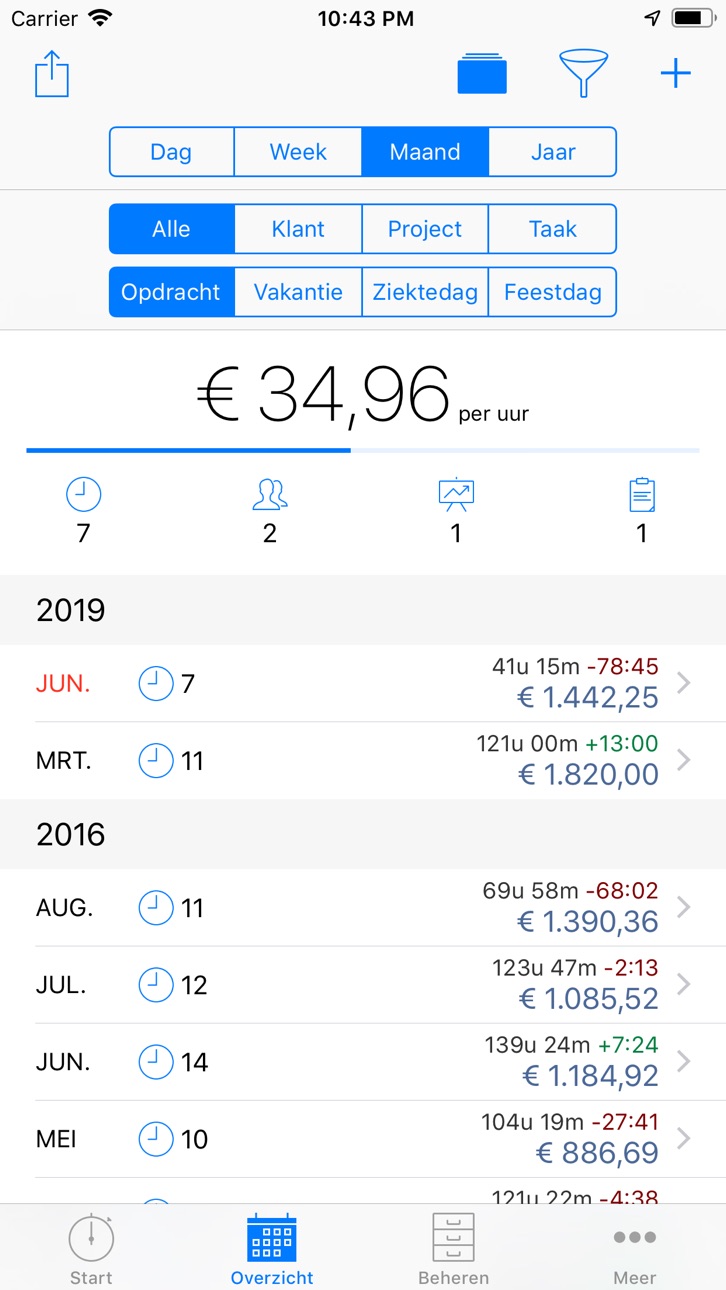


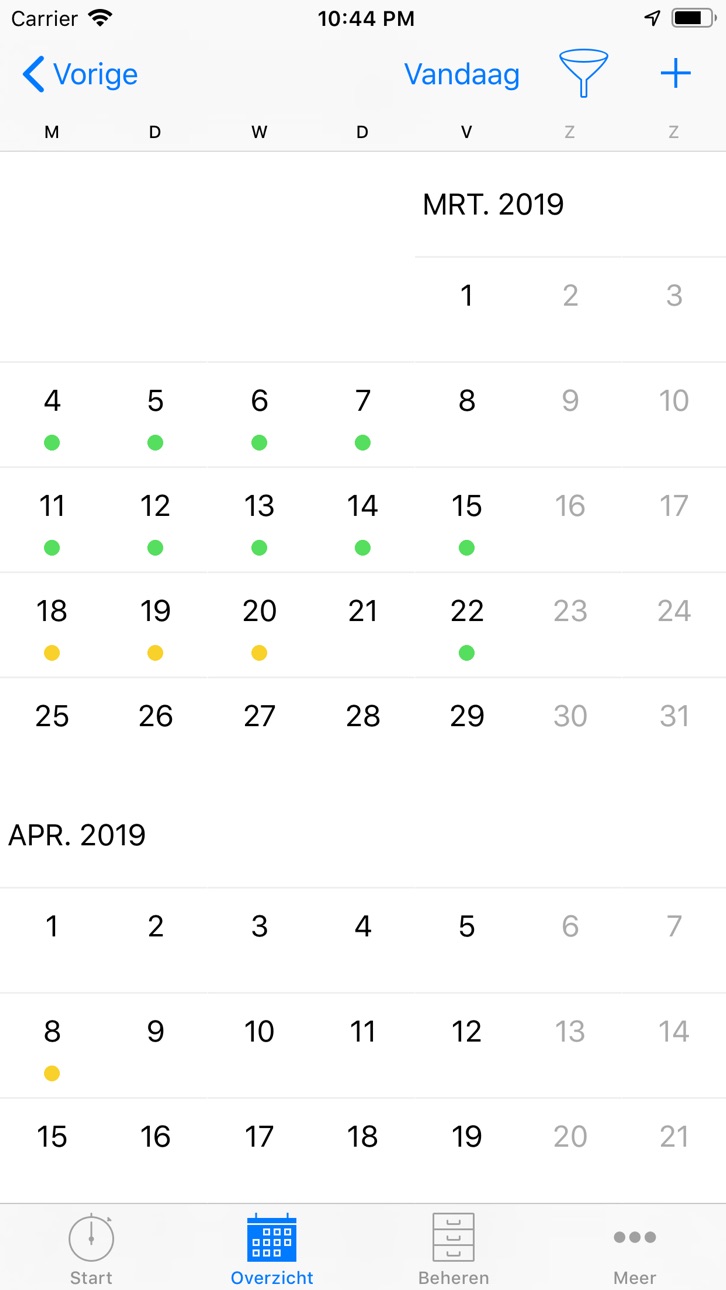


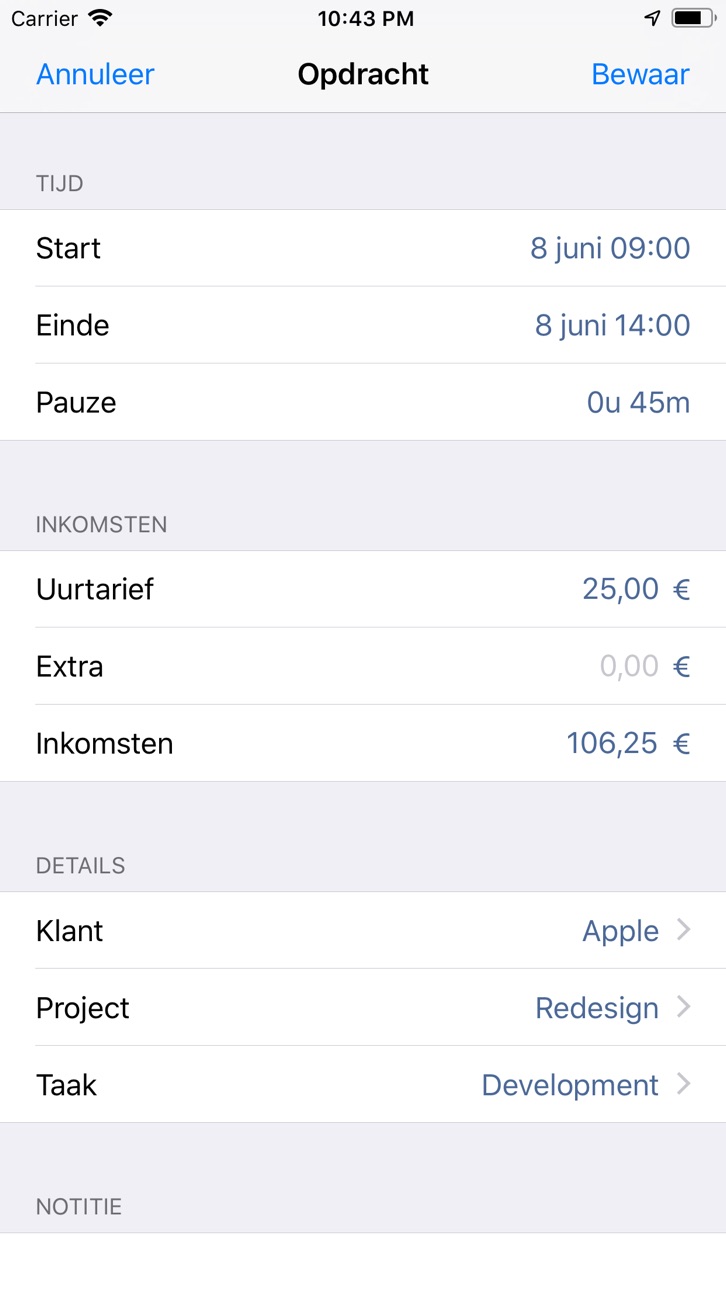


Apple Watch 5 images


What’s New Version 3.2.1
• Weekdagen kunnen nu worden weergegeven in de gegevensexport voor registraties en speciale dagen.
• De helpsectie is uitgebreid met meer details en extra uitleg.
• Ondersteuning voor het Liquid Glass-design in iOS 26.
Hallo, onze nieuwe update bevat optimalisaties en bug fixes voor een nog betere ervaring. Als uw productiviteit met behulp van onze app is gestegen, zouden we het enorm waarderen als u even de tijd neemt om atWork te beoordelen in de App Store. Dank u.
Description
Houd je werktijden, overuren en inkomsten eenvoudig bij met atWork, de app voor tijdregistratie en urenregistratie voor freelancers, zzp’ers en werknemers. Zie waar je tijd naartoe gaat, hoeveel salaris en inkomen je hebt verdiend en beheer opdrachten, diensten, werkroosters en klanten op één plek. Maak eigen urenstaten met alle details die jij nodig hebt en krijg grip op je productiviteit en inkomen.
EENVOUDIGE TIJDREGISTRATIE
• Klok in en uit met een paar tikken, of vraag het Siri. atWork is je persoonlijke prikklok voor werk of andere activiteiten.
• Timer vergeten te starten? Voeg uren achteraf toe of pas ze aan. Geen verloren tijd meer.
• Exporteer urenstaten (CSV, Excel of PDF) voor klanten, loonadministratie, facturatie of boekhouding, inclusief details over salaris en overuren.
• Houd meerdere banen of opdrachten bij en organiseer je werk desgewenst per klant, project of taak voor een duidelijk overzicht.
• Met automatische, locatiegebaseerde tijdregistratie stel je werkplekken in die je in- of uitklokken zodra je arriveert of vertrekt, inclusief meldingen.
• Koppel met Apple Watch om timers te starten of te stoppen of notities in te spreken terwijl je onderweg bent.
• Registreer vakantiedagen, ziektedagen en feestdagen zodat je urenstaat volledig en kloppend blijft.
FLEXIBEL EN AANPASBAAR
• Voeg notities van elke lengte toe en stel automatische pauzes en reguliere werktijden in om je overuren en inkomen te tonen.
• Pas je registraties aan met eigen velden – van onkosten zoals reis- of kilometerkosten tot betaalstatus (betaald of openstaand).
• Stel dag-, week- of maanddoelen in voor je inkomen en volg je voortgang.
• Kies automatische afrondingsregels voor begin- en eindtijden om rapportages te vereenvoudigen en registraties consistent te houden.
• Bewaar je gegevens veilig met automatische back-up naar iCloud of handmatig via e-mail.
VOOR FREELANCERS, ZZP EN PERSONEEL
• Ideaal voor freelancers en zzp die zelf hun werktijden, overuren en facturatie willen bijhouden.
• Werkt net zo goed voor personeel in kleine teams, winkels, horeca of andere dienstverleners.
• Ondersteunt vaste en flexibele werkroosters.
BETROUWBARE ONDERSTEUNING
• We zijn een klein, toegewijd team dat ondersteuning biedt wanneer je ons nodig hebt. Je bereikt ons via support@atworkapp.com.
• We lezen elke review en blijven atWork verbeteren op basis van jouw feedback.
Met atWork is uren- en loonregistratie nog nooit zo eenvoudig geweest: nauwkeurig, flexibel en afgestemd op hoe jij werkt.
Sluit je aan bij duizenden professionals die dagelijks op atWork vertrouwen:
“Geweldige app om uren bij te houden: Geweldige app om uren bij te houden. Eenvoudig klanten, projecten en taken (met tarief) aanmaken. Plannen van vakantie- en feestdagen als niet beschikbare tijd. Eenvoudig uren vastleggen met totalen (uren/geld) voor vandaag, week, maand en jaar. Mooie rapportages en filter mogelijkheden.” - Bert_B
“Zo blij mee als freelancer: Ik gebruik deze app voor mijn urenadministratie als zzp-er. Ik heb ongeveer 5-10 klanten. Deze app is heel makkelijk om mijn uren aan het eind van de dag(en) snel vast te leggen ter verantwoording eind van het jaar. Voor een paar euro heb ik de uitbreiding gekocht om meer projecten en een maandelijkse rapportage uit te draaien gekocht. Geld meer dan waard! Top app voor mijn doelen.” - Ray-all-da-day
“Top app: Beste app voor het bijhouden van mijn gewerkte uren in de horeca” - megildur
“Handig: Super fijne app om al mijn inkomsten bij te houden. Zeer gebruikersvriendelijk en motiverend om te blijven gebruiken. Als ik mijn uren wil controleren is dit met een paar klikken duidelijk!” - Ljontje
Download atWork vandaag nog en begin je tijd te managen als een pro. Nooit meer afvragen: “Waar is mijn tijd gebleven?” atWork geeft je grip op elk uur, elk werkrooster en elke euro salaris die je verdient.
In-App Purchases NL pricing
One-Time Purchases
Unlimited Entries—
Data Export—
atWork Plus (no subscription)—
Work Schedule—
Special Days—
Workplaces—
Espresso—
Latte macchiato—
Cappuccino—
Hot chocolate & croissant—
Capabilities
In-App Purchases
Accessibility
ipadiphonemacrealityDevicetvoswatch
Version history 25 versions
Build 880876899v3.2.12025-12-27 01:06:06
• Weekdays can now be shown in data exports for entries and special days.
• Support for the Liquid Glass design on iOS 26.
Do you like atWork? Leave us a quick review and recommend us to others — thank you!
Got questions? Email us at support@atworkapp.com or reach out directly through the app.
Our tip: Enable automatic iCloud backup under More > Backup to keep your data safe.
Best regards,
Sergej and Mikhail
atWork Team
Build 876167790v3.22025-12-18 04:40:10
• Support for the Liquid Glass design on iOS 26.
Do you like atWork? Leave us a quick review and recommend us to others — thank you!
Got questions? Email us at support@atworkapp.com or reach out directly through the app.
Our tip: Enable automatic iCloud backup under More > Backup to keep your data safe.
Best regards,
Sergej and Mikhail
atWork Team
Build 873962602v3.1.22025-06-30 08:07:23
TIME ZONE SUPPORT
• Starting with this version, entries will remain in the time zone in which they were created.
• If the current time zone differs from the original time zone of an entry, the original time zone will be shown in the entry, overview, and export file.
• Example: An entry created in New York from 8:00 to 12:00 will later appear in Germany as 8:00-12:00 (GMT-4).
Do you like atWork? Leave us a quick review and recommend us to others — thank you!
Got questions? Email us at support@atworkapp.com or reach out directly through the app.
Our tip: Enable automatic iCloud backup under More > Backup to keep your data safe.
Best regards,
Sergej and Mikhail
atWork Team
Build 873897722v3.1.12025-04-09 18:03:12
TIME ZONE SUPPORT
• Starting with this version, entries will remain in the time zone in which they were created.
• If the current time zone differs from the original time zone of an entry, the original time zone will be shown in the entry, overview, and export file.
• Example: An entry created in New York from 8:00 to 12:00 will later appear in Germany as 8:00-12:00 (GMT-4).
Do you like atWork? Leave us a quick review and recommend us to others — thank you!
Got questions? Email us at support@atworkapp.com or reach out directly through the app.
Our tip: Enable automatic iCloud backup under More > Backup to keep your data safe.
Best regards,
Sergej and Mikhail
atWork Team
Build 872241565v3.12025-04-08 22:44:21
TIME ZONE SUPPORT
• Starting with this version, entries will remain in the time zone in which they were created.
• If the current time zone differs from the original time zone of an entry, the original time zone will be shown in the entry, overview, and export file.
• Example: An entry created in New York from 8:00 to 12:00 will later appear in Germany as 8:00-12:00 (GMT-4).
Do you like atWork? Leave us a quick review and recommend us to others — thank you!
Got questions? Email us at support@atworkapp.com or reach out directly through the app.
Our tip: Enable automatic iCloud backup under More > Backup to keep your data safe.
Best regards,
Sergej and Mikhail
atWork Team
Build 872177416v3.0.102025-02-03 19:48:35
To celebrate our 10th anniversary, we proudly present the all-new Version 3! We’ve completely rebuilt the app to ensure that atWork remains as smooth and flawless as ever for the next 10(0) years. Plus, we’ve set the stage for exciting new features to come soon.
What’s new:
ENTRY
• Add special days directly in an entry via the “Type” field.
OVERVIEW
• The revised “View” option (square icon) combines entries and special days to show total earnings.
• Colored dots in the weekly view help identify entries and special days.
• Average hourly earnings are hidden if no earnings are recorded.
• No automatic scrolling to the top when returning to the main view.
START
• Earnings from special days are now included.
• Automatic breaks are counted for running entries under “Current Entries”.
AND MORE
• Special days are now saved as individual days to simplify editing over multiple weeks.
• Data Export: Sums for custom attributes of type “Money” and “Duration”.
• Visual improvements for the Apple Watch.
• atWork is now available in Norwegian.
If you encounter any issues or have questions about the new version, email us at support@atworkapp.com, and we’ll be happy to assist you.
Our recommendation: Enable automatic iCloud backup under More > Backup to keep your data safe.
Best regards,
Sergej and Mikhail
atWork Team
Build 872116101v3.0.92025-01-31 21:06:16
To celebrate our 10th anniversary, we proudly present the all-new Version 3! We’ve completely rebuilt the app to ensure that atWork remains as smooth and flawless as ever for the next 10(0) years. Plus, we’ve set the stage for exciting new features to come soon.
What’s new:
ENTRY
• Add special days directly in an entry via the “Type” field.
OVERVIEW
• The revised “View” option (square icon) combines entries and special days to show total earnings.
• Colored dots in the weekly view help identify entries and special days.
• Average hourly earnings are hidden if no earnings are recorded.
• No automatic scrolling to the top when returning to the main view.
START
• Earnings from special days are now included.
• Automatic breaks are counted for running entries under “Current Entries”.
AND MORE
• Special days are now saved as individual days to simplify editing over multiple weeks.
• Data Export: Sums for custom attributes of type “Money” and “Duration”.
• Visual improvements for the Apple Watch.
• atWork is now available in Norwegian.
If you encounter any issues or have questions about the new version, email us at support@atworkapp.com, and we’ll be happy to assist you.
Our recommendation: Enable automatic iCloud backup under More > Backup to keep your data safe.
Best regards,
Sergej and Mikhail
atWork Team
Build 872020124v3.0.82025-01-27 16:03:36
To celebrate our 10th anniversary, we proudly present the all-new Version 3! We’ve completely rebuilt the app to ensure that atWork remains as smooth and flawless as ever for the next 10(0) years. Plus, we’ve set the stage for exciting new features to come soon.
What’s new:
ENTRY
• Add special days directly in an entry via the “Type” field.
OVERVIEW
• The revised “View” option (square icon) combines entries and special days to show total earnings.
• Colored dots in the weekly view help identify entries and special days.
• Average hourly earnings are hidden if no earnings are recorded.
• No automatic scrolling to the top when returning to the main view.
START
• Earnings from special days are now included.
• Automatic breaks are counted for running entries under “Current Entries”.
AND MORE
• Special days are now saved as individual days to simplify editing over multiple weeks.
• Data Export: Sums for custom attributes of type “Money” and “Duration”.
• Visual improvements for the Apple Watch.
• atWork is now available in Norwegian.
If you encounter any issues or have questions about the new version, email us at support@atworkapp.com, and we’ll be happy to assist you.
Our recommendation: Enable automatic iCloud backup under More > Backup to keep your data safe.
Best regards,
Sergej and Mikhail
atWork Team
Build 871822629v3.0.72025-01-20 09:14:57
To celebrate our 10th anniversary, we proudly present the all-new Version 3! We’ve completely rebuilt the app to ensure that atWork remains as smooth and flawless as ever for the next 10(0) years. Plus, we’ve set the stage for exciting new features to come soon.
What’s new:
ENTRY
• Add special days directly in an entry via the “Type” field.
OVERVIEW
• The revised “View” option (square icon) combines entries and special days to show total earnings.
• Colored dots in the weekly view help identify entries and special days.
• Average hourly earnings are hidden if no earnings are recorded.
• No automatic scrolling to the top when returning to the main view.
START
• Earnings from special days are now included.
• Automatic breaks are counted for running entries under “Current Entries”.
AND MORE
• Special days are now saved as individual days to simplify editing over multiple weeks.
• Data Export: Sums for custom attributes of type “Money” and “Duration”.
• Visual improvements for the Apple Watch.
• atWork is now available in Norwegian.
If you encounter any issues or have questions about the new version, email us at support@atworkapp.com, and we’ll be happy to assist you.
Our recommendation: Enable automatic iCloud backup under More > Backup to keep your data safe.
Best regards,
Sergej and Mikhail
atWork Team
Build 871793279v3.0.62025-01-16 14:28:50
To celebrate our 10th anniversary, we proudly present the all-new Version 3! We’ve completely rebuilt the app to ensure that atWork remains as smooth and flawless as ever for the next 10(0) years. Plus, we’ve set the stage for exciting new features to come soon.
What’s new:
ENTRY
• Add special days directly in an entry via the “Type” field.
OVERVIEW
• The revised “View” option (square icon) combines entries and special days to show total earnings.
• Colored dots in the weekly view help identify entries and special days.
• The total row with working hours, earnings, and overtime is always visible at the bottom.
• Average hourly earnings are hidden if no earnings are recorded.
• No automatic scrolling to the top when returning to the main view.
START
• Earnings from special days are now included.
• Automatic breaks are counted for running entries under “Current Entries”.
AND MORE
• Special days are now saved as individual days to simplify editing over multiple weeks.
• Data Export: Sums for custom attributes of type “Money” and “Duration”.
• Visual improvements for the Apple Watch.
• atWork is now available in Norwegian.
If you encounter any issues or have questions about the new version, email us at support@atworkapp.com, and we’ll be happy to assist you.
Our recommendation: Enable automatic iCloud backup under More > Backup to keep your data safe.
Best regards,
Sergej and Mikhail
atWork Team
Build 871748794v3.0.32025-01-15 09:18:37
To celebrate our 10th anniversary, we proudly present the all-new Version 3! We’ve completely rebuilt the app to ensure that atWork remains as smooth and flawless as ever for the next 10(0) years. Plus, we’ve set the stage for exciting new features to come soon.
What’s new:
ENTRY
• Add special days directly in an entry via the “Type” field.
OVERVIEW
• The revised “View” option (square icon) combines entries and special days to show total earnings.
• Colored dots in the weekly view help identify entries and special days.
• The total row with working hours, earnings, and overtime is always visible at the bottom.
• Average hourly earnings are hidden if no earnings are recorded.
• No automatic scrolling to the top when returning to the main view.
START
• Earnings from special days are now included.
• Automatic breaks are counted for running entries under “Current Entries”.
AND MORE
• Special days are now saved as individual days to simplify editing over multiple weeks.
• Data Export: Sums for custom attributes of type “Money” and “Duration”.
• Visual improvements for the Apple Watch.
• atWork is now available in Norwegian.
If you encounter any issues or have questions about the new version, email us at support@atworkapp.com, and we’ll be happy to assist you.
Our recommendation: Enable automatic iCloud backup under More > Backup to keep your data safe.
Best regards,
Sergej and Mikhail
atWork Team
Build 871769333v3.0.42025-01-15 18:07:45
To celebrate our 10th anniversary, we proudly present the all-new Version 3! We’ve completely rebuilt the app to ensure that atWork remains as smooth and flawless as ever for the next 10(0) years. Plus, we’ve set the stage for exciting new features to come soon.
What’s new:
ENTRY
• Add special days directly in an entry via the “Type” field.
OVERVIEW
• The revised “View” option (square icon) combines entries and special days to show total earnings.
• Colored dots in the weekly view help identify entries and special days.
• The total row with working hours, earnings, and overtime is always visible at the bottom.
• Average hourly earnings are hidden if no earnings are recorded.
• No automatic scrolling to the top when returning to the main view.
START
• Earnings from special days are now included.
• Automatic breaks are counted for running entries under “Current Entries”.
AND MORE
• Special days are now saved as individual days to simplify editing over multiple weeks.
• Data Export: Sums for custom attributes of type “Money” and “Duration”.
• Visual improvements for the Apple Watch.
• atWork is now available in Norwegian.
If you encounter any issues or have questions about the new version, email us at support@atworkapp.com, and we’ll be happy to assist you.
Our recommendation: Enable automatic iCloud backup under More > Backup to keep your data safe.
Best regards,
Sergej and Mikhail
atWork Team
Build 871783083v3.0.52025-01-15 22:10:25
To celebrate our 10th anniversary, we proudly present the all-new Version 3! We’ve completely rebuilt the app to ensure that atWork remains as smooth and flawless as ever for the next 10(0) years. Plus, we’ve set the stage for exciting new features to come soon.
What’s new:
ENTRY
• Add special days directly in an entry via the “Type” field.
OVERVIEW
• The revised “View” option (square icon) combines entries and special days to show total earnings.
• Colored dots in the weekly view help identify entries and special days.
• The total row with working hours, earnings, and overtime is always visible at the bottom.
• Average hourly earnings are hidden if no earnings are recorded.
• No automatic scrolling to the top when returning to the main view.
START
• Earnings from special days are now included.
• Automatic breaks are counted for running entries under “Current Entries”.
AND MORE
• Special days are now saved as individual days to simplify editing over multiple weeks.
• Data Export: Sums for custom attributes of type “Money” and “Duration”.
• Visual improvements for the Apple Watch.
• atWork is now available in Norwegian.
If you encounter any issues or have questions about the new version, email us at support@atworkapp.com, and we’ll be happy to assist you.
Our recommendation: Enable automatic iCloud backup under More > Backup to keep your data safe.
Best regards,
Sergej and Mikhail
atWork Team
Build 871717282v3.0.22025-01-14 11:24:08
To celebrate our 10th anniversary, we proudly present the all-new Version 3! We’ve completely rebuilt the app to ensure that atWork remains as smooth and flawless as ever for the next 10(0) years. Plus, we’ve set the stage for exciting new features to come soon.
What’s new:
ENTRY
• Add special days directly in an entry via the “Type” field.
OVERVIEW
• The revised “View” option (square icon) combines entries and special days to show total earnings.
• Colored dots in the weekly view help identify entries and special days.
• The total row with working hours, earnings, and overtime is always visible at the bottom.
• Average hourly earnings are hidden if no earnings are recorded.
• No automatic scrolling to the top when returning to the main view.
START
• Earnings from special days are now included.
• Automatic breaks are counted for running entries under “Current Entries”.
AND MORE
• Special days are now saved as individual days to simplify editing over multiple weeks.
• Data Export: Sums for custom attributes of type “Money” and “Duration”.
• Visual improvements for the Apple Watch.
• atWork is now available in Norwegian.
If you encounter any issues or have questions about the new version, email us at support@atworkapp.com, and we’ll be happy to assist you.
Our recommendation: Enable automatic iCloud backup under More > Backup to keep your data safe.
Best regards,
Sergej and Mikhail
atWork Team
Build 869276805v3.02025-01-13 10:23:37
To celebrate our 10th anniversary, we proudly present the all-new Version 3! We’ve completely rebuilt the app to ensure that atWork remains as smooth and flawless as ever for the next 10(0) years. Plus, we’ve set the stage for exciting new features to come soon.
What’s new:
ENTRY
• Add special days directly in an entry via the “Type” field.
OVERVIEW
• The revised “View” option (square icon) combines entries and special days to show total earnings.
• Colored dots in the weekly view help identify entries and special days.
• The total row with working hours, earnings, and overtime is always visible at the bottom.
• Average hourly earnings are hidden if no earnings are recorded.
• No automatic scrolling to the top when returning to the main view.
START
• Earnings from special days are now included.
• Automatic breaks are counted for running entries under “Current Entries”.
AND MORE
• Special days are now saved as individual days to simplify editing over multiple weeks.
• Data Export: Sums for custom attributes of type “Money” and “Duration”.
• Visual improvements for the Apple Watch.
• atWork is now available in Norwegian.
If you encounter any issues or have questions about the new version, email us at support@atworkapp.com, and we’ll be happy to assist you.
Our recommendation: Enable automatic iCloud backup under More > Backup to keep your data safe.
Best regards,
Sergej and Mikhail
atWork Team
Build 862729154v2.262024-09-24 08:11:55
• iOS 18: App icon for Dark Mode
• Danish and Slovak translations
We're hard at work on Version 3 with many new features — it won't be long now ;-)
Do you like atWork? —> Leave us a quick review and recommend us to others. Thank you!
Got questions? —> Email us at support@atworkapp.com (you can also reach us directly through the app).
Our tip: Enable automatic iCloud backup under "More > Backup" to keep your data safe.
Best regards,
Sergej and Mikhail
atWork Team
Build 862450722v2.252024-01-02 23:15:40
• Fixed an issue with importing holidays from Apple Calendar.
We are working hard on version 3 with the most requested feature so far. Stay tuned!
If you like atWork —> a quick review and tell others about us. Thank you!
For questions —> email to support@atworkapp.com (you can also do in right in the app)
Last but not least: Please enable the automatic iCloud backup to keep your data safe. Go to More > Backup.
Lots of love,
Sergej and Mikhail
atWork Team
Build 862025026v2.242023-12-18 01:46:28
• Help section update with tailored setup tips and detailed insights to improve your onboarding and day-to-day experience.
We are working hard on version 3 with the most requested feature so far. Stay tuned!
If you like atWork —> a quick review and tell others about us. Thank you!
For questions —> email to support@atworkapp.com (you can also do in right in the app)
Last but not least: Please enable the automatic iCloud backup to keep your data safe. Go to More > Backup.
Lots of love,
Sergej and Mikhail
atWork Team
Build 857913483v2.232023-12-03 19:06:08
• iOS 17, WatchOS 10: Visual improvements and bug fixes.
We are working hard on version 3 with the most requested feature so far. Stay tuned!
If you like atWork —> a quick review and tell others about us. Thank you!
For questions —> email to support@atworkapp.com (you can also do in right in the app)
Last but not least: Please enable the automatic iCloud backup to keep your data safe. Go to More > Backup.
Lots of love,
Sergej and Mikhail
atWork Team
Build 852600658v2.222023-04-25 20:36:29
• Entry template supports entries passing midnight: Instead of the end time, there is now duration as an attribute.
• Fixed an issue with location-based time tracking where sometimes this feature was not active after the iOS update to 16.4 and later.
If you like atWork —> write a quick review and tell others about us. Thank you!
For questions and ideas —> email to support@atworkapp.com (you can also do in right in the app)
Last but not least: Please enable the automatic iCloud backup to keep your data safe. Go to More > Backup.
Lots of love,
Sergej and Mikhail
atWork Team
Build 852137611v2.21.12022-09-12 10:02:37
ENTRY TEMPLATE
• Create entries in bulk.
• You will find this option in the „More“ section.
Bug fixes: Overtime balance value in the export file.
SUPPORT US
• You can support our work by buying us a coffee. You will find this option in the More section. Thank you!
If you like atWork —> write a quick review and tell others about us. Thank you!
For questions and ideas —> email to support@atworkapp.com (you can also do in right in the app)
Last but not least: Please enable the automatic iCloud backup to keep your data safe. Go to More > Backup.
Lots of love,
Sergej and Mikhail
atWork Team
Build 850287387v2.212022-09-11 01:58:15
ENTRY TEMPLATE
• Create entries in bulk.
• You will find this option in the „More“ section.
Bug fixes: Overtime balance value in the export file.
SUPPORT US
• You can support our work by buying us a coffee. You will find this option in the More section. Thank you!
If you like atWork —> write a quick review and tell others about us. Thank you!
For questions and ideas —> email to support@atworkapp.com (you can also do in right in the app)
Last but not least: Please enable the automatic iCloud backup to keep your data safe. Go to More > Backup.
Lots of love,
Sergej and Mikhail
atWork Team
Build 849893164v2.202022-06-13 20:49:05
DATA EXPORT
• Totals for individual categories (duration, earnings).
• Totals for categories and special days (duration, earnings).
• Export preview is displayed before purchasing the extension.
SUPPORT US
• You can support our work by buying us a coffee. You will find this option in the "More" section. Thank you!
As always, some bug fixes, including Apple Watch Sync improvements.
Stay tuned for many new features.
If you like atWork —> a quick review and tell others about us. Thank you!
For questions —> email to support@atworkapp.com (you can also do in right in the app)
Last but not least: Please enable the automatic iCloud backup to keep your data safe. Go to More > Backup.
Lots of love,
Sergej and Mikhail
atWork Team
Build 847611247v2.192022-06-07 14:41:17
DATA EXPORT
• Totals for individual categories (duration, earnings).
• Totals for categories and special days (duration, earnings).
• Export preview is displayed before purchasing the extension.
As always, some bug fixes, including Apple Watch Sync improvements.
Stay tuned for many new features.
If you like atWork —> a quick review and tell others about us. Thank you!
For questions —> email to support@atworkapp.com (you can also do in right in the app)
Last but not least: Please enable the automatic iCloud backup to keep your data safe. Go to More > Backup.
Lots of love,
Sergej and Mikhail
atWork Team
Build 847071682v2.182022-02-16 23:19:06
DATA EXPORT
• Define a header.
• Negative hours are displayed now correctly in Excel.
OVERVIEW
• Filter: Year is displayed again when selecting a date.
• Long category names are displayed with three dots.
• Bugfix: Special days were saved one day earlier in some cases. Please open relevant special days and save them again.
Stay tuned for many new features.
If you like atWork —> a quick review and tell others about us. Thank you!
For questions —> email to support@atworkapp.com (you can also do in right in the app)
Last but not least: Please enable the automatic iCloud backup to keep your data safe. Go to More > Backup.
Lots of love,
Sergej and Mikhail
atWork Team
Price history by region
Currency
Show
Columns
Search
Availability 175 of 175 storefronts
| Region | Language | Price | Ratings | Avg | Version |
|---|---|---|---|---|---|
| DE | de-DE | Free | 32.7k | 4.6 | 3.2.1 |
| ES | es-ES | Free | 4.9k | 4.7 | 3.2.1 |
| US | en-US | Free | 3.8k | 4.7 | 3.2.1 |
| FR | fr-FR | Free | 3.8k | 4.7 | 3.2.1 |
| IT | it | Free | 3.1k | 4.7 | 3.2.1 |
| CH | de-CH | Free | 2.9k | 4.6 | 3.2.1 |
| RU | ru | Free | 2.9k | 4.8 | 3.2.1 |
| NL | nl | Free | 2.6k | 4.7 | 3.2.1 |
| PL | en-GB | Free | 2.6k | 4.8 | 3.2.1 |
| AT | de-DE | Free | 1.9k | 4.7 | 3.2.1 |
| BE | en-GB | Free | 1.5k | 4.7 | 3.2.1 |
| GB | en-GB | Free | 1.0k | 4.7 | 3.2.1 |
| UA | en-GB | Free | 738 | 4.8 | 3.2.1 |
| SE | sv | Free | 721 | 4.6 | 3.2.1 |
| CA | en-CA | Free | 694 | 4.7 | 3.2.1 |
| CZ | en-GB | Free | 563 | 4.8 | 3.2.1 |
| PT | pt-PT | Free | 455 | 4.7 | 3.2.1 |
| BR | pt-BR | Free | 420 | 4.8 | 3.2.1 |
| AU | en-AU | Free | 388 | 4.7 | 3.2.1 |
| FI | en-GB | Free | 289 | 4.4 | 3.2.1 |
| IL | en-GB | Free | 250 | 4.8 | 3.2.1 |
| BY | en-GB | Free | 141 | 4.9 | 3.2.1 |
| LV | en-GB | Free | 134 | 4.9 | 3.2.1 |
| EE | en-GB | Free | 125 | 4.9 | 3.2.1 |
| IE | en-GB | Free | 100 | 4.9 | 3.2.1 |
| NO | en-GB | Free | 99 | 4.8 | 3.2.1 |
| AR | es-MX | Free | 97 | 4.8 | 3.2.1 |
| DK | en-GB | Free | 93 | 4.5 | 3.2.1 |
| MX | es-MX | Free | 93 | 4.8 | 3.2.1 |
| SK | en-GB | Free | 90 | 4.9 | 3.2.1 |
| KR | ko | Free | 85 | 4.7 | 3.2.1 |
| JP | ja | Free | 78 | 4.5 | 3.2.1 |
| NZ | en-AU | Free | 74 | 4.7 | 3.2.1 |
| HU | en-GB | Free | 70 | 4.8 | 3.2.1 |
| CO | es-MX | Free | 69 | 4.7 | 3.2.1 |
| KZ | en-GB | Free | 69 | 5.0 | 3.2.1 |
| SI | en-GB | Free | 68 | 4.8 | 3.2.1 |
| LU | en-GB | Free | 63 | 4.7 | 3.2.1 |
| ZA | en-GB | Free | 60 | 4.7 | 3.2.1 |
| CN | zh-Hans-CN | Free | 56 | 4.9 | 3.2.1 |
| MD | en-GB | Free | 52 | 4.9 | 3.2.1 |
| LT | en-GB | Free | 45 | 4.7 | 3.2.1 |
| RO | en-GB | Free | 38 | 4.7 | 3.2.1 |
| CL | es-MX | Free | 36 | 4.8 | 3.2.1 |
| EC | es-MX | Free | 33 | 4.8 | 3.2.1 |
| UY | en-GB | Free | 33 | 4.8 | 3.2.1 |
| TR | en-GB | Free | 32 | 4.8 | 3.2.1 |
| BG | en-GB | Free | 24 | 5.0 | 3.2.1 |
| IN | en-GB | Free | 24 | 4.7 | 3.2.1 |
| CR | es-MX | Free | 20 | 4.8 | 3.2.1 |
| MT | en-GB | Free | 20 | 4.8 | 3.2.1 |
| DO | es-MX | Free | 19 | 4.8 | 3.2.1 |
| HR | en-GB | Free | 16 | 4.5 | 3.2.1 |
| MY | en-GB | Free | 15 | 4.8 | 3.2.1 |
| AL | en-GB | Free | 14 | 4.9 | 3.2.1 |
| AM | en-GB | Free | 14 | 5.0 | 3.2.1 |
| PE | es-MX | Free | 14 | 4.8 | 3.2.1 |
| SG | en-GB | Free | 14 | 4.6 | 3.2.1 |
| VN | en-GB | Free | 14 | 5.0 | 3.2.1 |
| PY | es-MX | Free | 13 | 4.9 | 3.2.1 |
| VE | es-MX | Free | 13 | 4.5 | 3.2.1 |
| EG | en-GB | Free | 11 | 4.9 | 3.2.1 |
| KG | en-GB | Free | 11 | 4.9 | 3.2.1 |
| UZ | en-GB | Free | 11 | 4.6 | 3.2.1 |
| GR | en-GB | Free | 10 | 5.0 | 3.2.1 |
| PH | en-GB | Free | 10 | 4.8 | 3.2.1 |
| GE | en-GB | Free | 9 | 4.8 | 3.2.1 |
| HN | es-MX | Free | 8 | 4.8 | 3.2.1 |
| IS | en-GB | Free | 8 | 4.9 | 3.2.1 |
| TH | en-GB | Free | 8 | 4.9 | 3.2.1 |
| HK | zh-Hant-HK | Free | 7 | 4.7 | 3.2.1 |
| MK | en-GB | Free | 7 | 4.4 | 3.2.1 |
| SN | en-GB | Free | 7 | 4.0 | 3.2.1 |
| AO | en-GB | Free | 6 | 5.0 | 3.2.1 |
| LK | en-GB | Free | 6 | 4.7 | 3.2.1 |
| CY | en-GB | Free | 5 | 4.2 | 3.2.1 |
| JO | en-GB | Free | 5 | 4.8 | 3.2.1 |
| PA | es-MX | Free | 5 | 4.6 | 3.2.1 |
| RS | en-GB | Free | 5 | 4.8 | 3.2.1 |
| TW | zh-Hant-TW | Free | 5 | 5.0 | 3.2.1 |
| AE | en-GB | Free | 4 | 3.8 | 3.2.1 |
| BZ | en-GB | Free | 4 | 4.5 | 3.2.1 |
| DZ | en-GB | Free | 4 | 4.8 | 3.2.1 |
| MN | en-GB | Free | 4 | 5.0 | 3.2.1 |
| NA | en-GB | Free | 4 | 4.8 | 3.2.1 |
| NI | es-MX | Free | 4 | 4.8 | 3.2.1 |
| SA | en-GB | Free | 4 | 5.0 | 3.2.1 |
| SV | es-MX | Free | 4 | 4.5 | 3.2.1 |
| TJ | en-GB | Free | 4 | 5.0 | 3.2.1 |
| AZ | en-GB | Free | 3 | 4.7 | 3.2.1 |
| ID | en-GB | Free | 3 | 5.0 | 3.2.1 |
| NP | en-GB | Free | 3 | 5.0 | 3.2.1 |
| AF | en-GB | Free | 2 | 5.0 | 3.2.1 |
| GT | es-MX | Free | 2 | 4.5 | 3.2.1 |
| KE | en-GB | Free | 2 | 5.0 | 3.2.1 |
| KW | en-GB | Free | 2 | 5.0 | 3.2.1 |
| KY | en-GB | Free | 2 | 5.0 | 3.2.1 |
| MA | en-GB | Free | 2 | 5.0 | 3.2.1 |
| ZW | en-GB | Free | 2 | 4.0 | 3.2.1 |
| AG | en-GB | Free | 1 | 4.0 | 3.2.1 |
| AI | en-GB | Free | 1 | 2.0 | 3.2.1 |
| BB | en-GB | Free | 1 | 5.0 | 3.2.1 |
| BM | en-GB | Free | 1 | 5.0 | 3.2.1 |
| BN | en-GB | Free | 1 | 5.0 | 3.2.1 |
| BO | es-MX | Free | 1 | 5.0 | 3.2.1 |
| BW | en-GB | Free | 1 | 5.0 | 3.2.1 |
| DM | en-GB | Free | 1 | 1.0 | 3.2.1 |
| GD | en-GB | Free | 1 | 5.0 | 3.2.1 |
| GM | en-GB | Free | 1 | 5.0 | 3.2.1 |
| JM | en-GB | Free | 1 | 5.0 | 3.2.1 |
| KN | en-GB | Free | 1 | 5.0 | 3.2.1 |
| LB | en-GB | Free | 1 | 5.0 | 3.2.1 |
| LY | en-GB | Free | 1 | 5.0 | 3.2.1 |
| ME | en-GB | Free | 1 | 5.0 | 3.2.1 |
| MU | en-GB | Free | 1 | 4.0 | 3.2.1 |
| MW | en-GB | Free | 1 | 5.0 | 3.2.1 |
| NE | en-GB | Free | 1 | 5.0 | 3.2.1 |
| NG | en-GB | Free | 1 | 5.0 | 3.2.1 |
| PK | en-GB | Free | 1 | 5.0 | 3.2.1 |
| QA | en-GB | Free | 1 | 3.0 | 3.2.1 |
| TM | en-GB | Free | 1 | 5.0 | 3.2.1 |
| TT | en-GB | Free | 1 | 4.0 | 3.2.1 |
| XK | en-GB | Free | 1 | 5.0 | 3.2.1 |
| BA | en-GB | Free | 0 | — | 3.2.1 |
| BF | en-GB | Free | 0 | — | 3.2.1 |
| BH | en-GB | Free | 0 | — | 3.2.1 |
| BJ | en-GB | Free | 0 | — | 3.2.1 |
| BS | en-GB | Free | 0 | — | 3.2.1 |
| BT | en-GB | Free | 0 | — | 3.2.1 |
| CD | en-GB | Free | 0 | — | 3.2.1 |
| CG | en-GB | Free | 0 | — | 3.2.1 |
| CI | fr-FR | Free | 0 | — | 3.2.1 |
| CM | fr-FR | Free | 0 | — | 3.2.1 |
| CV | en-GB | Free | 0 | — | 3.2.1 |
| FJ | en-GB | Free | 0 | — | 3.2.1 |
| FM | en-GB | Free | 0 | — | 3.2.1 |
| GA | fr-FR | Free | 0 | — | 3.2.1 |
| GH | en-GB | Free | 0 | — | 3.2.1 |
| GW | en-GB | Free | 0 | — | 3.2.1 |
| GY | en-GB | Free | 0 | — | 3.2.1 |
| IQ | en-GB | Free | 0 | — | 3.2.1 |
| KH | en-GB | Free | 0 | — | 3.2.1 |
| LA | en-GB | Free | 0 | — | 3.2.1 |
| LC | en-GB | Free | 0 | — | 3.2.1 |
| LR | en-GB | Free | 0 | — | 3.2.1 |
| MG | en-GB | Free | 0 | — | 3.2.1 |
| ML | en-GB | Free | 0 | — | 3.2.1 |
| MM | en-GB | Free | 0 | — | 3.2.1 |
| MO | zh-Hant-HK | Free | 0 | — | 3.2.1 |
| MR | en-GB | Free | 0 | — | 3.2.1 |
| MS | en-GB | Free | 0 | — | 3.2.1 |
| MV | en-GB | Free | 0 | — | 3.2.1 |
| MZ | en-GB | Free | 0 | — | 3.2.1 |
| NR | en-GB | Free | 0 | — | 3.2.1 |
| OM | en-GB | Free | 0 | — | 3.2.1 |
| PG | en-GB | Free | 0 | — | 3.2.1 |
| PW | en-GB | Free | 0 | — | 3.2.1 |
| RW | en-GB | Free | 0 | — | 3.2.1 |
| SB | en-GB | Free | 0 | — | 3.2.1 |
| SC | en-GB | Free | 0 | — | 3.2.1 |
| SL | en-GB | Free | 0 | — | 3.2.1 |
| SR | en-GB | Free | 0 | — | 3.2.1 |
| ST | en-GB | Free | 0 | — | 3.2.1 |
| SZ | en-GB | Free | 0 | — | 3.2.1 |
| TC | en-GB | Free | 0 | — | 3.2.1 |
| TD | en-GB | Free | 0 | — | 3.2.1 |
| TN | en-GB | Free | 0 | — | 3.2.1 |
| TO | en-GB | Free | 0 | — | 3.2.1 |
| TZ | en-GB | Free | 0 | — | 3.2.1 |
| UG | en-GB | Free | 0 | — | 3.2.1 |
| VC | en-GB | Free | 0 | — | 3.2.1 |
| VG | en-GB | Free | 0 | — | 3.2.1 |
| VU | en-GB | Free | 0 | — | 3.2.1 |
| YE | en-GB | Free | 0 | — | 3.2.1 |
| ZM | en-GB | Free | 0 | — | 3.2.1 |
Change log 29 changes · NL
✎
releaseNotes updated
• Weekdays can now be shown in data exports for entries and special days.
• Support for the Liquid Glass design on iOS 26.
Do you like atWork? Leave us a quick
✎
description updated
Easily track your work hours, overtime, and earnings with atWork — the simple time tracker and timesheet app for freelancers, contractors, and hourly employees.
✎
subtitle updated
Time Clock & Timesheet Log
✎
name updated
atWork Hours & Pay Tracker
◆
Version 3.2.1 released
• Weekdays can now be shown in data exports for entries and special days.
• Support for the Liquid Glass design on iOS 26.
Do you like atWork? Leave us a quick review and recommend us to others — thank you!
Got questions? Email us at suppo
◆
Version 3.2 released
• Support for the Liquid Glass design on iOS 26.
Do you like atWork? Leave us a quick review and recommend us to others — thank you!
Got questions? Email us at support@atworkapp.com or reach out directly through the app.
Our tip: Enable a
◆
Version 3.1.2 released
TIME ZONE SUPPORT
• Starting with this version, entries will remain in the time zone in which they were created.
• If the current time zone differs from the original time zone of an entry, the original time zone will be shown in the entry,
◆
Version 3.1.1 released
TIME ZONE SUPPORT
• Starting with this version, entries will remain in the time zone in which they were created.
• If the current time zone differs from the original time zone of an entry, the original time zone will be shown in the entry,
◆
Version 3.1 released
TIME ZONE SUPPORT
• Starting with this version, entries will remain in the time zone in which they were created.
• If the current time zone differs from the original time zone of an entry, the original time zone will be shown in the entry,
◆
Version 3.0.10 released
To celebrate our 10th anniversary, we proudly present the all-new Version 3! We’ve completely rebuilt the app to ensure that atWork remains as smooth and flawless as ever for the next 10(0) years. Plus, we’ve set the stage for exciting new
◆
Version 3.0.9 released
To celebrate our 10th anniversary, we proudly present the all-new Version 3! We’ve completely rebuilt the app to ensure that atWork remains as smooth and flawless as ever for the next 10(0) years. Plus, we’ve set the stage for exciting new
◆
Version 3.0.8 released
To celebrate our 10th anniversary, we proudly present the all-new Version 3! We’ve completely rebuilt the app to ensure that atWork remains as smooth and flawless as ever for the next 10(0) years. Plus, we’ve set the stage for exciting new
◆
Version 3.0.7 released
To celebrate our 10th anniversary, we proudly present the all-new Version 3! We’ve completely rebuilt the app to ensure that atWork remains as smooth and flawless as ever for the next 10(0) years. Plus, we’ve set the stage for exciting new
◆
Version 3.0.6 released
To celebrate our 10th anniversary, we proudly present the all-new Version 3! We’ve completely rebuilt the app to ensure that atWork remains as smooth and flawless as ever for the next 10(0) years. Plus, we’ve set the stage for exciting new
◆
Version 3.0.5 released
To celebrate our 10th anniversary, we proudly present the all-new Version 3! We’ve completely rebuilt the app to ensure that atWork remains as smooth and flawless as ever for the next 10(0) years. Plus, we’ve set the stage for exciting new
◆
Version 3.0.4 released
To celebrate our 10th anniversary, we proudly present the all-new Version 3! We’ve completely rebuilt the app to ensure that atWork remains as smooth and flawless as ever for the next 10(0) years. Plus, we’ve set the stage for exciting new
◆
Version 3.0.3 released
To celebrate our 10th anniversary, we proudly present the all-new Version 3! We’ve completely rebuilt the app to ensure that atWork remains as smooth and flawless as ever for the next 10(0) years. Plus, we’ve set the stage for exciting new
◆
Version 3.0.2 released
To celebrate our 10th anniversary, we proudly present the all-new Version 3! We’ve completely rebuilt the app to ensure that atWork remains as smooth and flawless as ever for the next 10(0) years. Plus, we’ve set the stage for exciting new
◆
Version 3.0 released
To celebrate our 10th anniversary, we proudly present the all-new Version 3! We’ve completely rebuilt the app to ensure that atWork remains as smooth and flawless as ever for the next 10(0) years. Plus, we’ve set the stage for exciting new
◆
Version 2.26 released
• iOS 18: App icon for Dark Mode
• Danish and Slovak translations
We're hard at work on Version 3 with many new features — it won't be long now ;-)
Do you like atWork? —> Leave us a quick review and recommend us to others. Thank you!
◆
Version 2.25 released
• Fixed an issue with importing holidays from Apple Calendar.
We are working hard on version 3 with the most requested feature so far. Stay tuned!
If you like atWork —> a quick review and tell others about us. Thank you!
For questions —>
◆
Version 2.24 released
• Help section update with tailored setup tips and detailed insights to improve your onboarding and day-to-day experience.
We are working hard on version 3 with the most requested feature so far. Stay tuned!
If you like atWork —> a quick
◆
Version 2.23 released
• iOS 17, WatchOS 10: Visual improvements and bug fixes.
We are working hard on version 3 with the most requested feature so far. Stay tuned!
If you like atWork —> a quick review and tell others about us. Thank you!
For questions —> email
◆
Version 2.22 released
• Entry template supports entries passing midnight: Instead of the end time, there is now duration as an attribute.
• Fixed an issue with location-based time tracking where sometimes this feature was not active after the iOS update to 16.4
◆
Version 2.21.1 released
ENTRY TEMPLATE
• Create entries in bulk.
• You will find this option in the „More“ section.
Bug fixes: Overtime balance value in the export file.
SUPPORT US
• You can support our work by buying us a coffee. You will find this option in th
◆
Version 2.21 released
ENTRY TEMPLATE
• Create entries in bulk.
• You will find this option in the „More“ section.
Bug fixes: Overtime balance value in the export file.
SUPPORT US
• You can support our work by buying us a coffee. You will find this option in th
◆
Version 2.20 released
DATA EXPORT
• Totals for individual categories (duration, earnings).
• Totals for categories and special days (duration, earnings).
• Export preview is displayed before purchasing the extension.
SUPPORT US
• You can support our work by buy
◆
Version 2.19 released
DATA EXPORT
• Totals for individual categories (duration, earnings).
• Totals for categories and special days (duration, earnings).
• Export preview is displayed before purchasing the extension.
As always, some bug fixes, including Apple W
◆
Version 2.18 released
DATA EXPORT
• Define a header.
• Negative hours are displayed now correctly in Excel.
OVERVIEW
• Filter: Year is displayed again when selecting a date.
• Long category names are displayed with three dots.
• Bugfix: Special days were saved