Home › Productivity

 US
US
USen-US JPja
JPja DEde-DE
 CNzh-Hans-CN
 AUen-AU
 GBen-GB
 CAen-CA
 THen-GB
 ESes-ES
 INen-GB
 BRpt-BR
 MXes-MX
 ITit
ITit KRko
KRko TWzh-Hant-TW
 FRfr-FR
 CHde-CH
 NLnl
NLnl HKzh-Hant-HK
 TRen-GB
 IDen-GB
 RUru
RUru COes-MX
 SGen-GB
 CLes-MX
 ATde-DE
 PHen-GB
 NZen-AU
 SEsv
SEsv BEen-GB
 MYen-GB
 PTpt-PT
 ZAen-GB
 ARes-MX
 SAen-GB
 NOen-GB
 AEen-GB
 PLen-GB
 PEes-MX
 DKen-GB
 GRen-GB
 CZen-GB
 VNen-GB
 FIen-GB
 ILen-GB
 ECes-MX
 IEen-GB
 ROen-GB
 UAen-GB
 EGen-GB
 HUen-GB
 HRen-GB
 LUen-GB
 KWen-GB
 KEen-GB
 PKen-GB
 SKen-GB
 LKen-GB
 BGen-GB
 SVes-MX
 SIen-GB
 CRes-MX
 GTes-MX
 QAen-GB
 PAes-MX
 NGen-GB
 KZen-GB
 LVen-GB
 OMen-GB
 ISen-GB
 JOen-GB
 MOzh-Hant-HK
 DOes-MX
 KHen-GB
 CYen-GB
 BYen-GB
 LBen-GB
 LTen-GB
 HNes-MX
 UYen-GB
 BHen-GB
 MTen-GB
 BOes-MX
 MUen-GB
 EEen-GB
 PYes-MX
 GHen-GB
 TZen-GB
 AZen-GB
 BWen-GB
 JMen-GB
 NAen-GB
 MDen-GB
 NIes-MX
 TNen-GB
 AMen-GB
 BNen-GB
 AGen-GB
 AOen-GB
 FJen-GB
 GYen-GB
 KGen-GB
 MZen-GB
 SCen-GB
 UZen-GB
 VEes-MX
 BFen-GB
 BMen-GB
 BSen-GB
 DZen-GB
 KNen-GB
 MAen-GB
 NPen-GB
 SNen-GB
 ZWen-GB
 ALen-GB
 BBen-GB
 BJen-GB
 BZen-GB
 GEen-GB
 GMen-GB
 IQen-GB
 MGen-GB
 MKen-GB
 MSen-GB
 RSen-GB
 TJen-GB
 TTen-GB
 UGen-GB
 XKen-GB
 YEen-GB
 AFen-GB
 AIen-GB
 BAen-GB
 BTen-GB
 CDen-GB
 CGen-GB
 CIfr-FR
 CMfr-FR
 CVen-GB
 DMen-GB
 FMen-GB
 GAfr-FR
 GDen-GB
 GWen-GB
 KYen-GB
 LAen-GB
 LCen-GB
 LRen-GB
 LYen-GB
 MEen-GB
 MLen-GB
 MMen-GB
 MNen-GB
 MRen-GB
 MVen-GB
 MWen-GB
 NEen-GB
 NRen-GB
 PGen-GB
 PWen-GB
 RWen-GB
 SBen-GB
 SLen-GB
 SRen-GB
 STen-GB
 SZen-GB
 TCen-GB
 TDen-GB
 TMen-GB
 TOen-GB
 VCen-GB
 VGen-GB
 VUen-GB
 ZMen-GB
175 of 175 storefronts
Content in en-US
Content in en-US
Information
Preview 2 platforms


iPhone 3 images


iPad 3 images


What’s New Version 5.19.1220
• New way of adding OneDrive shares.
• Fixed a Widgets bug.
Description
First released in 2009, GoodReader® is truly a veteran of the App Store.
In the modern app business, it's not easy to stay relevant that long. We're proud to say that after 13 years and counting, we've been delivering wonderful updates with extraordinary new features. And we're going to keep doing that!
GoodReader is a perfect combination of document-reading and file-managing capabilities. It's your one-stop shop for all your document needs on your iOS device.
Use the app once, and you'll be hooked. Soon you'll be wondering how you ever managed to work without it.
-= File Reading =-
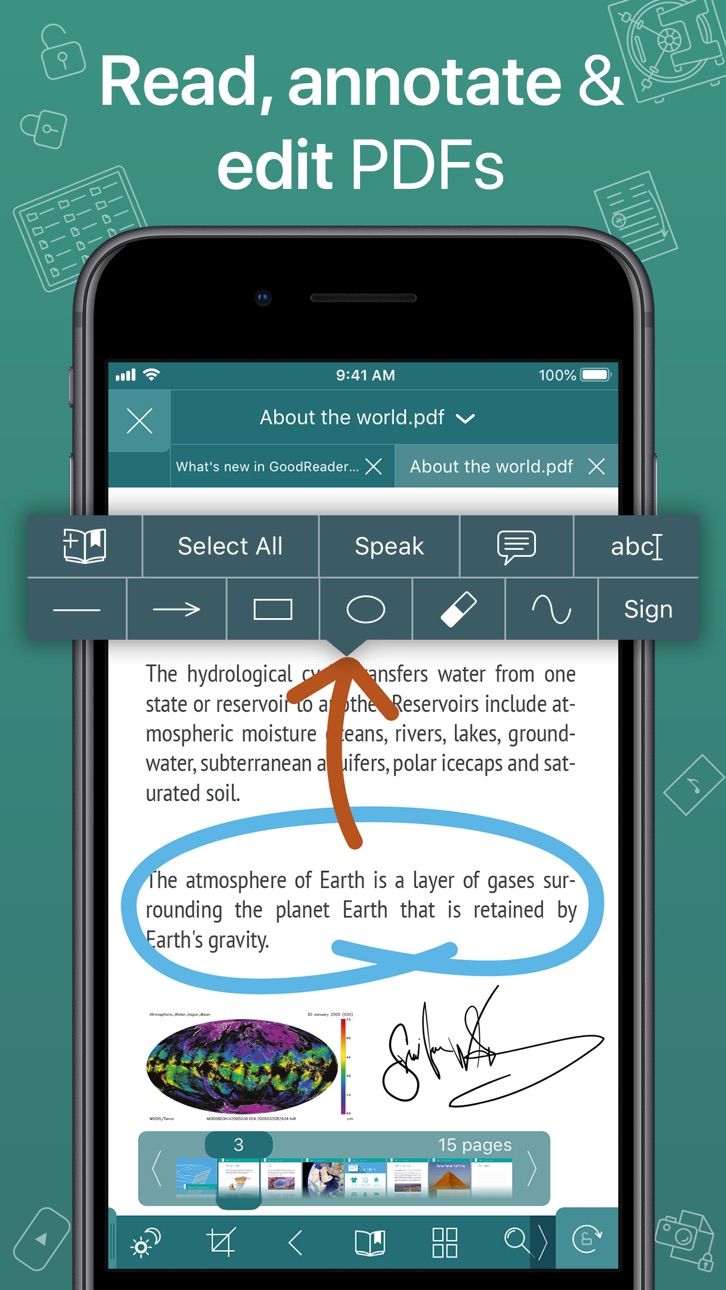
PDF, TXT, MS Office, iWork, HTML, pictures, music & audio-books, videos. This is what you can view in GoodReader, plus you can also annotate PDF files and edit TXT files.
-= PDF Reading and Annotating =-
PDF files is where GoodReader truly shines. Reading experience is so superior, it's hard to describe. To rephrase one of our customers' review, "try it, and you'll see." While you're at it, give our PDF Reflow feature a try. You'll be surprised how much better PDF reading goes when you don't have to scroll left/right all the time, for every single line of text.
Annotating PDFs is another star feature of our app. Adding notes and drawings, highlighting text, and then sharing your annotated files or annotation summaries will be your main productivity and collaboration asset.
-= File Management =-
While reading files is a big part of GoodReader, it's not all it can do. It can also serve as a central hub for all your files, even those that can't be opened by GoodReader itself. It's like bringing your personal computer experience to your mobile device — easily managing huge collections of files and folders will make you forget you don't have your laptop around.
-= Connecting =-
Dropbox, OneDrive, Google Drive, Box.com, WebDAV, SMB, AFP, FTP, SFTP — these are all accessible from inside GoodReader. Download, upload, and sync (*) individual files or huge folder collections.
-= Security =-
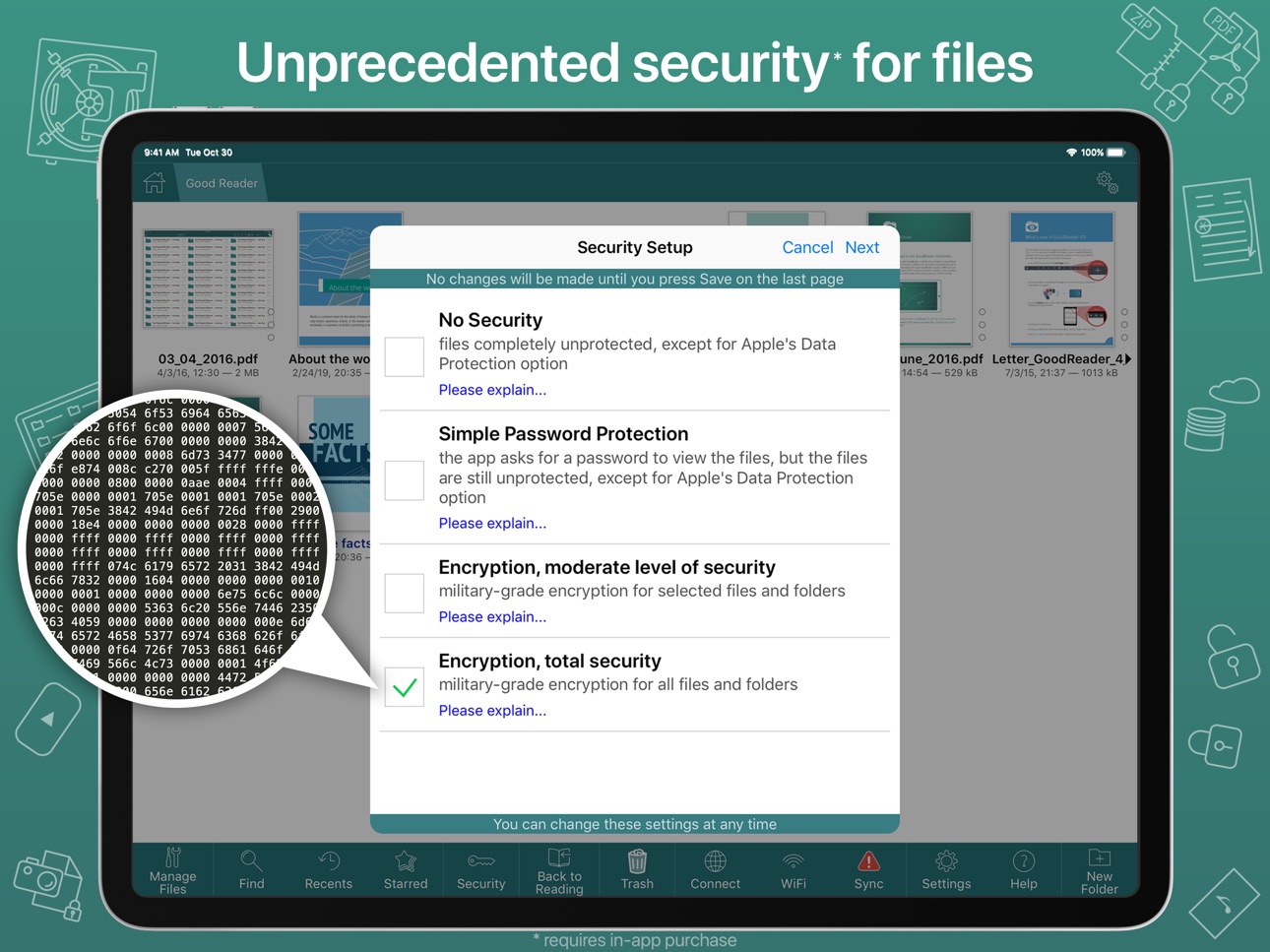
With GoodReader, your data security steps up to the level previously only dreamt of. With Pro Pack® (*), our new set of professional-level super-features, you'll get AES-256, a military-grade encryption, for all your data, at a price of a cup of coffee! And it's completely independent from the built-in Apple's Data Protection, so even if a hacker steals and unlocks your device, your data will still be protected by another strong layer of security, our own.
-= Split-Screen =-
This wonderful feature allows you to split (*) an iPad screen in half, to read two files side-by-side. And even two different parts of the same file!
(*): This feature requires a subscription to Pro Pack®, sold separately from inside the app as an in-app purchase.
In-App Purchases US pricing
Pro Pack Subscription Subscription
Pro Pack (monthly) · Monthly 7-day free trial$2.99
Pro Pack (annual) · Yearly 7-day free trial$17.99
One-Time Purchases
Auto Sync$9.99
Pro Pack$79.99
Capabilities
In-App Purchases
Accessibility
ipadiphonemacrealityDevicetvoswatch
Version history 25 versions
Build 880159999v5.19.12202025-11-29 05:44:37
• New way of adding OneDrive shares.
• Fixed a Widgets bug.
Build 880114890v5.19.12152025-11-26 21:30:27
• New way of adding OneDrive shares.
• Fixed a Widgets bug.
Build 876333107v5.19.12112025-07-12 23:39:43
• Fixed a OneDrive upload bug.
Build 870408569v5.19.12042024-11-14 01:33:29
• minor improvements and bug fixes
Build 865816778v5.19.12022024-05-10 03:56:03
• Updated Dropbox Team Space support.
Build 865782741v5.19.12012024-05-08 22:52:30
• Updated Dropbox Team Space support.
Build 865694479v5.19.11992024-05-05 15:27:36
• Updated Dropbox Team Space support.
Build 860323713v5.18.11952023-10-01 19:45:55
• Video Player: multiple taps at the screen's edge are now recognized as Skip Forward or Rewind.
Build 860305214v5.17.11922023-09-30 00:02:08
• Support for Bates Numbering in PDF.
Build 860077164v5.16.11902023-09-21 02:42:29
• Disable navigational tap zones for PDF & TXT in settings.
• Support for Shortcuts app (iOS 16 or later).
• Support for Home Screen Quick Actions.
Build 859924620v5.15.11862023-09-14 18:39:32
- iOS/iPadOS 17 compatibility fix.
- Fixed the bug that was causing false "File Modified On Another Device" alerts for iCloud files.
Build 859927376v5.15.11882023-09-14 21:06:57
- iOS/iPadOS 17 compatibility fix.
- Fixed the bug that was causing false "File Modified On Another Device" alerts for iCloud files.
Build 854068408v5.14.11842022-12-24 23:59:20
- support for Dropbox Team Space (Dropbox Business)*
(*): this feature requires Pro Pack, a paid add-on, sold separately from inside the app, as an in-app purchase.
Build 853988882v5.13.11822022-12-20 03:08:50
By popular request, the "Flash Page Number" switch is back in PDF Settings.
Build 849629138v5.13.11772022-06-01 22:30:58
- custom OneDrive / SharePoint repositories*
(*): this feature requires Pro Pack, a paid add-on, sold separately from inside the app, as an in-app purchase.
Build 849129470v5.12.11712022-05-18 04:41:44
- fixed the issue when Dropbox users couldn't authenticate with Google credentials.
Build 848620317v5.12.11682022-04-27 20:06:20
- support for new photo formats: RAW, RW2, ORF, DXO.
Build 848587390v5.12.11662022-04-26 00:05:06
- support for new photo formats: RAW, RW2, ORF, DXO.
Build 847358374v5.11.11652022-02-24 15:10:24
- minor bug fixes
Build 845526757v5.11.11622021-11-24 19:30:53
Bug Fixes:
- SMB message signing conflict for Guest connections.
- Multiple SMB downloads bug.
- SMB packet length bug.
Previously:
- SMB 2 & 3 support.
- SMB 3 Encryption* support, including the latest AES-256 encryption introduced in Windows 11.
(*): this feature requires Pro Pack, a paid add-on, sold separately from inside the app, as an in-app purchase.
Build 845268741v5.11.11602021-11-11 19:46:31
New Features:
- SMB 2 & 3 support.
- SMB 3 Encryption* support, including the latest AES-256 encryption introduced in Windows 11.
Bug Fixes:
- fixed the SFTP connectivity issue with new macOS 12
- fixed the annoying crash that was sometimes occuring when using the PDF Annotation Side Panel.
(*): this feature requires Pro Pack, a paid add-on, sold separately from inside the app, as an in-app purchase.
Build 845124014v5.11.11532021-11-04 13:16:46
New Features:
- SMB 2 & 3 support.
- SMB 3 Encryption* support, including the latest AES-256 encryption introduced in Windows 11.
Bug Fixes:
- fixed the SFTP connectivity issue with new macOS 12
- fixed the annoying crash that was sometimes occuring when using the PDF Annotation Side Panel.
(*): this feature requires Pro Pack, a paid add-on, sold separately from inside the app, as an in-app purchase.
Build 844189479v5.10.11502021-09-19 04:00:40
- fixed the bug that was affecting many of our iOS 12 users
Build 843986170v5.10.11482021-09-12 12:51:45
With this update, we'll be asking you to agree to a new EULA, and it's a good thing! We're now asking for much fewer permissions from you to collect analytics data. We've modified Section 2 of the EULA by removing references to third parties collecting data. For quite a while, we were using a certain big-name 3rd-party analytics software. But being privacy advocates we are, we never liked the idea of having some software that we have no control of linked to our code. So we've finally written our own super-lightweight and non-intrusive analytics package that only collects the absolute minimum of the information we need - which buttons you pressed, and which you didn't - stuff like that. And now we can guarantee it. Because we wrote every single line of that code ourselves! So please kindly press Accept EULA after installing this update and rest assured that your privacy will always be our priority!
Build 843611618v5.9.11452021-08-15 16:49:48
- improved compatibility with newer versions of iOS and iPadOS
Price history by region
Currency
Show
Columns
Search
App performance US
Availability 175 of 175 storefronts
| Region | Language | Price | Ratings | Avg | Version |
|---|---|---|---|---|---|
| US | en-US | USD 5.99 | 13.8k | 4.7 | 5.19.1220 |
| JP | ja | JPY 1000 | 5.0k | 4.5 | 5.19.1220 |
| DE | de-DE | EUR 6.99 | 3.7k | 4.4 | 5.19.1220 |
| CN | zh-Hans-CN | CNY 38 | 3.1k | 4.6 | 5.19.1220 |
| AU | en-AU | AUD 9.99 | 2.0k | 4.6 | 5.19.1220 |
| GB | en-GB | GBP 5.99 | 1.9k | 4.6 | 5.19.1220 |
| CA | en-CA | CAD 7.99 | 1.9k | 4.6 | 5.19.1220 |
| TH | en-GB | THB 199 | 1.7k | 4.7 | 5.19.1220 |
| ES | es-ES | EUR 6.99 | 1.6k | 4.5 | 5.19.1220 |
| IN | en-GB | INR 599 | 1.5k | 4.5 | 5.19.1220 |
| BR | pt-BR | BRL 39.9 | 1.3k | 4.7 | 5.19.1220 |
| MX | es-MX | MXN 129 | 1.3k | 4.8 | 5.19.1220 |
| IT | it | EUR 6.99 | 1.2k | 4.6 | 5.19.1220 |
| KR | ko | KRW 9900 | 1.2k | 4.5 | 5.19.1220 |
| TW | zh-Hant-TW | TWD 190 | 1.2k | 4.7 | 5.19.1220 |
| FR | fr-FR | EUR 6.99 | 1.2k | 4.6 | 5.19.1220 |
| CH | de-CH | CHF 5 | 1.1k | 4.5 | 5.19.1220 |
| NL | nl | EUR 6.99 | 1.0k | 4.5 | 5.19.1220 |
| HK | zh-Hant-HK | HKD 48 | 971 | 4.6 | 5.19.1220 |
| TR | en-GB | TRY 299.99 | 951 | 4.2 | 5.19.1220 |
| ID | en-GB | IDR 99000 | 784 | 4.8 | 5.19.1220 |
| RU | ru | RUB 499 | 774 | 4.4 | 5.19.1220 |
| CO | es-MX | COP 29900 | 603 | 4.8 | 5.19.1220 |
| SG | en-GB | SGD 8.98 | 523 | 4.7 | 5.19.1220 |
| CL | es-MX | CLP 6990 | 464 | 4.8 | 5.19.1220 |
| AT | de-DE | EUR 6.99 | 406 | 4.6 | 5.19.1220 |
| PH | en-GB | PHP 399 | 384 | 4.6 | 5.19.1220 |
| NZ | en-AU | NZD 9.99 | 379 | 4.6 | 5.19.1220 |
| SE | sv | SEK 79 | 362 | 4.5 | 5.19.1220 |
| BE | en-GB | EUR 6.99 | 359 | 4.7 | 5.19.1220 |
| MY | en-GB | MYR 29.9 | 359 | 4.6 | 5.19.1220 |
| PT | pt-PT | EUR 6.99 | 295 | 4.6 | 5.19.1220 |
| ZA | en-GB | ZAR 119.99 | 293 | 4.7 | 5.19.1220 |
| AR | es-MX | USD 5.99 | 281 | 4.7 | 5.19.1220 |
| SA | en-GB | SAR 24.99 | 278 | 4.6 | 5.19.1220 |
| NO | en-GB | NOK 79 | 259 | 4.5 | 5.19.1220 |
| AE | en-GB | AED 22.99 | 242 | 4.8 | 5.19.1220 |
| PL | en-GB | PLN 29.99 | 206 | 4.6 | 5.19.1220 |
| PE | es-MX | PEN 24.9 | 197 | 4.8 | 5.19.1220 |
| DK | en-GB | DKK 49 | 188 | 4.6 | 5.19.1220 |
| GR | en-GB | EUR 6.99 | 174 | 4.7 | 5.19.1220 |
| CZ | en-GB | CZK 149 | 155 | 4.7 | 5.19.1220 |
| VN | en-GB | VND 199000 | 151 | 4.8 | 5.19.1220 |
| FI | en-GB | EUR 6.99 | 110 | 4.6 | 5.19.1220 |
| IL | en-GB | ILS 19.9 | 95 | 4.7 | 5.19.1220 |
| EC | es-MX | USD 5.99 | 82 | 4.8 | 5.19.1220 |
| IE | en-GB | EUR 6.99 | 77 | 4.7 | 5.19.1220 |
| RO | en-GB | RON 29.99 | 71 | 4.9 | 5.19.1220 |
| UA | en-GB | USD 6.99 | 66 | 4.5 | 5.19.1220 |
| EG | en-GB | EGP 299.99 | 63 | 4.9 | 5.19.1220 |
| HU | en-GB | HUF 2490 | 59 | 4.7 | 5.19.1220 |
| HR | en-GB | EUR 6.99 | 58 | 4.9 | 5.19.1220 |
| LU | en-GB | EUR 6.99 | 57 | 4.6 | 5.19.1220 |
| KW | en-GB | USD 5.99 | 54 | 4.8 | 5.19.1220 |
| KE | en-GB | USD 6.99 | 53 | 4.7 | 5.19.1220 |
| PK | en-GB | PKR 1700 | 52 | 4.5 | 5.19.1220 |
| SK | en-GB | EUR 6.99 | 47 | 4.5 | 5.19.1220 |
| LK | en-GB | USD 5.99 | 43 | 4.8 | 5.19.1220 |
| BG | en-GB | EUR 6.99 | 41 | 4.9 | 5.19.1220 |
| SV | es-MX | USD 5.99 | 38 | 4.6 | 5.19.1220 |
| SI | en-GB | EUR 6.99 | 36 | 4.7 | 5.19.1220 |
| CR | es-MX | USD 5.99 | 34 | 4.9 | 5.19.1220 |
| GT | es-MX | USD 5.99 | 33 | 4.8 | 5.19.1220 |
| QA | en-GB | QAR 19.99 | 32 | 4.7 | 5.19.1220 |
| PA | es-MX | USD 5.99 | 30 | 4.9 | 5.19.1220 |
| NG | en-GB | NGN 9900 | 28 | 4.8 | 5.19.1220 |
| KZ | en-GB | KZT 3490 | 27 | 4.7 | 5.19.1220 |
| LV | en-GB | EUR 6.99 | 27 | 4.8 | 5.19.1220 |
| OM | en-GB | USD 5.99 | 27 | 4.6 | 5.19.1220 |
| IS | en-GB | USD 6.99 | 22 | 4.7 | 5.19.1220 |
| JO | en-GB | USD 5.99 | 21 | 4.3 | 5.19.1220 |
| MO | zh-Hant-HK | USD 5.99 | 21 | 4.9 | 5.19.1220 |
| DO | es-MX | USD 5.99 | 20 | 4.8 | 5.19.1220 |
| KH | en-GB | USD 6.99 | 18 | 4.8 | 5.19.1220 |
| CY | en-GB | EUR 6.99 | 17 | 4.8 | 5.19.1220 |
| BY | en-GB | USD 6.99 | 15 | 4.7 | 5.19.1220 |
| LB | en-GB | USD 5.99 | 15 | 4.9 | 5.19.1220 |
| LT | en-GB | EUR 6.99 | 15 | 5.0 | 5.19.1220 |
| HN | es-MX | USD 5.99 | 13 | 4.7 | 5.19.1220 |
| UY | en-GB | USD 5.99 | 12 | 4.6 | 5.19.1220 |
| BH | en-GB | USD 6.99 | 11 | 4.5 | 5.19.1220 |
| MT | en-GB | EUR 6.99 | 11 | 4.5 | 5.19.1220 |
| BO | es-MX | USD 5.99 | 10 | 4.2 | 5.19.1220 |
| MU | en-GB | USD 6.99 | 10 | 4.7 | 5.19.1220 |
| EE | en-GB | EUR 6.99 | 9 | 4.4 | 5.19.1220 |
| PY | es-MX | USD 5.99 | 9 | 4.9 | 5.19.1220 |
| GH | en-GB | USD 6.99 | 8 | 4.6 | 5.19.1220 |
| TZ | en-GB | TZS 17900 | 8 | 5.0 | 5.19.1220 |
| AZ | en-GB | USD 6.99 | 7 | 4.0 | 5.19.1220 |
| BW | en-GB | USD 5.99 | 6 | 4.7 | 5.19.1220 |
| JM | en-GB | USD 5.99 | 6 | 4.7 | 5.19.1220 |
| NA | en-GB | USD 5.99 | 6 | 4.7 | 5.19.1220 |
| MD | en-GB | USD 6.99 | 5 | 4.8 | 5.19.1220 |
| NI | es-MX | USD 5.99 | 5 | 4.0 | 5.19.1220 |
| TN | en-GB | USD 5.99 | 5 | 3.4 | 5.19.1220 |
| AM | en-GB | USD 6.99 | 4 | 5.0 | 5.19.1220 |
| BN | en-GB | USD 5.99 | 4 | 4.8 | 5.19.1220 |
| AG | en-GB | USD 5.99 | 3 | 5.0 | 5.19.1220 |
| AO | en-GB | USD 5.99 | 3 | 5.0 | 5.19.1220 |
| FJ | en-GB | USD 5.99 | 3 | 5.0 | 5.19.1220 |
| GY | en-GB | USD 5.99 | 3 | 4.7 | 5.19.1220 |
| KG | en-GB | USD 6.99 | 3 | 5.0 | 5.19.1220 |
| MZ | en-GB | USD 5.99 | 3 | 5.0 | 5.19.1220 |
| SC | en-GB | USD 5.99 | 3 | 4.7 | 5.19.1220 |
| UZ | en-GB | USD 6.99 | 3 | 2.7 | 5.19.1220 |
| VE | es-MX | USD 5.99 | 3 | 5.0 | 5.19.1220 |
| BF | en-GB | USD 5.99 | 2 | 5.0 | 5.19.1220 |
| BM | en-GB | USD 5.99 | 2 | 5.0 | 5.19.1220 |
| BS | en-GB | USD 6.99 | 2 | 4.5 | 5.19.1220 |
| DZ | en-GB | USD 5.99 | 2 | 5.0 | 5.19.1220 |
| KN | en-GB | USD 5.99 | 2 | 4.5 | 5.19.1220 |
| MA | en-GB | USD 5.99 | 2 | 3.0 | 5.19.1220 |
| NP | en-GB | USD 6.99 | 2 | 4.5 | 5.19.1220 |
| SN | en-GB | USD 6.99 | 2 | 4.5 | 5.19.1220 |
| ZW | en-GB | USD 6.99 | 2 | 4.5 | 5.19.1220 |
| AL | en-GB | USD 6.99 | 1 | 5.0 | 5.19.1220 |
| BB | en-GB | USD 6.99 | 1 | 4.0 | 5.19.1220 |
| BJ | en-GB | USD 6.99 | 1 | 5.0 | 5.19.1220 |
| BZ | en-GB | USD 5.99 | 1 | 5.0 | 5.19.1220 |
| GE | en-GB | USD 6.99 | 1 | 5.0 | 5.19.1220 |
| GM | en-GB | USD 5.99 | 1 | 1.0 | 5.19.1220 |
| IQ | en-GB | USD 5.99 | 1 | 5.0 | 5.19.1220 |
| MG | en-GB | USD 5.99 | 1 | 5.0 | 5.19.1220 |
| MK | en-GB | USD 5.99 | 1 | 4.0 | 5.19.1220 |
| MS | en-GB | USD 5.99 | 1 | 5.0 | 5.19.1220 |
| RS | en-GB | EUR 6.99 | 1 | 5.0 | 5.19.1220 |
| TJ | en-GB | USD 6.99 | 1 | 5.0 | 5.19.1220 |
| TT | en-GB | USD 5.99 | 1 | 5.0 | 5.19.1220 |
| UG | en-GB | USD 6.99 | 1 | 5.0 | 5.19.1220 |
| XK | en-GB | EUR 6.99 | 1 | 5.0 | 5.19.1220 |
| YE | en-GB | USD 5.99 | 1 | 5.0 | 5.19.1220 |
| AF | en-GB | USD 5.99 | 0 | — | 5.19.1220 |
| AI | en-GB | USD 5.99 | 0 | — | 5.19.1220 |
| BA | en-GB | EUR 6.99 | 0 | — | 5.19.1220 |
| BT | en-GB | USD 5.99 | 0 | — | 5.19.1220 |
| CD | en-GB | USD 5.99 | 0 | — | 5.19.1220 |
| CG | en-GB | USD 5.99 | 0 | — | 5.19.1220 |
| CI | fr-FR | USD 6.99 | 0 | — | 5.19.1220 |
| CM | fr-FR | USD 6.99 | 0 | — | 5.19.1220 |
| CV | en-GB | USD 5.99 | 0 | — | 5.19.1220 |
| DM | en-GB | USD 5.99 | 0 | — | 5.19.1220 |
| FM | en-GB | USD 5.99 | 0 | — | 5.19.1220 |
| GA | fr-FR | USD 5.99 | 0 | — | 5.19.1220 |
| GD | en-GB | USD 5.99 | 0 | — | 5.19.1220 |
| GW | en-GB | USD 5.99 | 0 | — | 5.19.1220 |
| KY | en-GB | USD 5.99 | 0 | — | 5.19.1220 |
| LA | en-GB | USD 6.99 | 0 | — | 5.19.1220 |
| LC | en-GB | USD 5.99 | 0 | — | 5.19.1220 |
| LR | en-GB | USD 5.99 | 0 | — | 5.19.1220 |
| LY | en-GB | USD 5.99 | 0 | — | 5.19.1220 |
| ME | en-GB | EUR 5.99 | 0 | — | 5.19.1220 |
| ML | en-GB | USD 5.99 | 0 | — | 5.19.1220 |
| MM | en-GB | USD 5.99 | 0 | — | 5.19.1220 |
| MN | en-GB | USD 5.99 | 0 | — | 5.19.1220 |
| MR | en-GB | USD 5.99 | 0 | — | 5.19.1220 |
| MV | en-GB | USD 5.99 | 0 | — | 5.19.1220 |
| MW | en-GB | USD 5.99 | 0 | — | 5.19.1220 |
| NE | en-GB | USD 5.99 | 0 | — | 5.19.1220 |
| NR | en-GB | USD 5.99 | 0 | — | 5.19.1220 |
| PG | en-GB | USD 5.99 | 0 | — | 5.19.1220 |
| PW | en-GB | USD 5.99 | 0 | — | 5.19.1220 |
| RW | en-GB | USD 5.99 | 0 | — | 5.19.1220 |
| SB | en-GB | USD 5.99 | 0 | — | 5.19.1220 |
| SL | en-GB | USD 5.99 | 0 | — | 5.19.1220 |
| SR | en-GB | USD 6.99 | 0 | — | 5.19.1220 |
| ST | en-GB | USD 5.99 | 0 | — | 5.19.1220 |
| SZ | en-GB | USD 5.99 | 0 | — | 5.19.1220 |
| TC | en-GB | USD 5.99 | 0 | — | 5.19.1220 |
| TD | en-GB | USD 5.99 | 0 | — | 5.19.1220 |
| TM | en-GB | USD 5.99 | 0 | — | 5.19.1220 |
| TO | en-GB | USD 5.99 | 0 | — | 5.19.1220 |
| VC | en-GB | USD 5.99 | 0 | — | 5.19.1220 |
| VG | en-GB | USD 5.99 | 0 | — | 5.19.1220 |
| VU | en-GB | USD 5.99 | 0 | — | 5.19.1220 |
| ZM | en-GB | USD 6.99 | 0 | — | 5.19.1220 |
Reviews 30 reviews · US
★★★★★
Great App. I use it daily
I bought the first version when it came out. I was glad to buy the update. The file system provides functionality that I need. I keep pdfs, jpgs, and even docx documents in it. I keep forms I regularly use. I keep a lot of graphics on my iPads and GoodReader is the best tool for organizing them. The ability to annotate pdfs is crucial since I can keep the original and the annotated version. I can see things I could do with it but just haven't put them in my work flow yet. So far it works the way I want it to work on my iPad Pro including using the Apple Pencil. I purchased the Pro version and
In the rocks2025-08-22
★★★★★
Best app I ever bought
This is the very first app I ever bought when I got my first iPhone in 2009. Goodreader is also one of the most useful apps I have ever tried and I use it on a daily basis to do more things I can remember. In a lot of ways it’s like the swiss army knife of apps because it can do many different things. But unlike a swiss army knife, everything it does, it does extremely well and Goodreader never feels like a workaround tool to use when I don’t have the proper tool for the job. Even though I use it for many different things, there is a lot more it can do than my needs call for. But the interface
jodafishlips2025-07-07
★★★★★
Annual fixes or subscription
I believe I’ve used this app for nearly 15 years or more, ever since I moved from Blackberry to iPhone. GoodReader once set the standard for file management (far beyond what iOS Files offers, even today) and still better than the top selling app. I don’t have much skin in the game…I purchased the app once and bought an in-app for something. Reviews complaining of greed or having paid etc are misplaced…all the best apps today are subscription, and that makes them sustainable. That said, I would support this developer if he offered a subscription that provided more than 1x/year updates…bu
LAX205312025-05-24
★★★★★
Years of Horse Racing and Tiny Print
I love horse racing and I love GoodReader. The two are a match made in heaven. I don’t know why they don’t team up. I can mark up my racing form smoothly and read from my iPad or iPhone. I can create my own color coordinated marks and see at a glance the information I need. The racing papers tend to have the tiniest print. Not a problem. I can zoom quickly and easily. Thank you for over a decade of racing fun…and winnings.
c hoffman2025-05-17
★★★★★
The app is splendid
Top marks. Dont go changing to try to squeeze me. You know I paid for vice leertotal ben ca sa dee ah. oooo ooo oooooo yeah dude. Yo products fire. So Now I trumin your praises with my own good words- hey hey hey wait a second those aont yojr words, Mr. Joel, we talked about this, if the tune is in the minds of the reader, no notes, and the words are changed- yeah yeah but now your referencing my name and such making me have to....dang, now Im obliged to review The ppman. Is the lisimoicando.
Right. no idea what the above was about ...I mean I can follow it, but the New Forked
Verbose(2thereΔ)4Maritime2025-04-28
★★★★★
Unless you have directly relevant experience, or can slog through endless trial and error, avoid it.
This app likely is quite good if you know all about the .pdf apps that are out there. If you start from little to no such knowledge, as I do, the instructions with this app are not much use at all. They do cute little things to illustrate individual icons—which is to say they describe individual trees—but they do next to nothing, in my opinion, to show you the forest. In other words, there’s no useful overview. You just have to try every imaginable icon and hope to somehow guess how they all interact in useful ways.
OneView22025-01-01
★★★★★
14 years
I’ve been using this program since I got the original iPad. I’m a musician, and it was great for reading music back then. Way back then I suggested they allow page turn devices to work with their app. Eventually they added the button to allow that, but it still hasn’t worked with the Pageflip Firefly, which is the top selling device for musicians. So I continue to use this program for conducting my ensembles, but use their competitor when I actually perform and need to have my foot pedal page turn device. I check every year just in case. I’ll check again next year.
J in SC2024-12-09
★★★★★
Best PDF Tool Out There
As the title states, this is the best PDF tool available. It’s better than any PC/Mac PDF editors and it’s by far the best mobile PDF editor. I’ve been using GoodReader for many years and I cannot think of a single feature it’s missing. It’s super easy to edit PDFs, transfer files to the cloud or other devices, and do whatever else you need to do with them. The built-in web server is extremely useful for quick transfers to or from my phone or iPad without having to access iCloud, Dropbox, OneDrive, or any other cloud storage service. When editing a PDF for the first time the app will alert you
23 Martinis2024-11-03
★★★★★
Paywalls PDF merging and doesn’t tell you
The description of this app notes a pro pack subscription that gives access to certain features of the app. Namely, the description notes only that security features, file syncing, and iPad split screen are locked behind a subscription (17$ a year). It does not note that in order to merge pdf files, you must purchase this subscription. I scrolled this far down the list of search results for ‘pdf editor’ and spent 6$ on *this* godforsaken app because I did not want to pay a subscription fee to edit PDFs — I wanted to spend my money once and then edit PDFs. Know that this app is not an exception
Don Gatley2024-09-19
★★★★★
Finally could afford it
2017- Not gonna lie, back when I was poor and Jailbroken, I downloaded this app. It was my MUST have. There is no better reader app. It does everything. I finally was able to afford it today and instantly bought it. Thank you Goodreader staff for the only app I've wanted to buy in years.
2019- bought pro!
9/24 - *Bug* when clicking define and the little window comes up, the X on the window does not close it. It has press animation, but no action. Only clicking outside of the window closes it.
Aazzssfkcdksk2024-09-14
★★★★★
AreU deleting Neg reviews? {F- User Manual}
Where is the negative review titled:
“read the neg reviews”?
Did you remove it?
I originally bought GR for $9.95 like 15yrs ago. I received helpful support for a very short time and then it became worthless tech-supp. I have liked the simple filing aspects. But I’ve been reading the neg reviews and they support what I’ve thought was just the company’s unwillingness to help just me.. like I offended them by my repeated attempts to get answers and help. Your user manual seems to have been designed by a cross-eyed dyslexic… no congruity; no alphabetized table of contents; no viewable categ
Tightlinesinc2024-07-12
★★★★★
Been using GoodReader for years and love it.
I work with a lot of manuals for my job. I find GoodReader very useful for annotating my pdf file with notes to reference back to. I also use it on electrical drawings were I can color the line to follow different circuits. I also share annotated drawings through email with Co workers. The notes can be seen in Adobe if they don’t have GoodReader. Worth the money.
Samwithauri2023-12-06
★★★★★
Do you really use your own app to read
The side tap and flip feature is super annoying?! Other readers may flip if you touch about 1/5 region of the screen, this app would flip if you touch only 1/3 of the screen side and it cannot be disabled. If you lock your screen, then you cannot flip to the next page unless you touch the top arrow which is super close to the lock button which will return from the lock mode. Why cannot you separate the arrow from the center lock button?! Very breaking reading experience with all the annoying features. The developor selves definitely don’t use their own app to read.
LLLA Rev2023-08-15
★★★★★
User since 2010. Current version has been broken for a long time…
I hate writing this review. GoodReader has been part of my workflow on the iPad since 2010 - almost 14 years - and I have edited, annotated, and read thousands of documents on it. I’ve tried many, many other PDF editors, but GoodReader has consistently been the best.
Lately - like, the past two years - numerous bugs have shown up, especially when it comes to opening and editing documents from within the iPad OS Files system/app. Constant crashes and error messages.
But even worse is the lack of responsiveness. I have sent numerous tech support queries about this, and have rarely gotten a re
soulbarn2023-06-09
★★★★★
Even Developer Replies are Snarky...
I’ve owned this app since the first year, when I got my iPad 2, and I gotta say I’m wary about upgrading — more *because of* the developer’s responses than the criticisms being made. *Almost every* such review and response I’ve read (don’t want to be “called out” over understood hyperbole about a potential couple/few that aren’t, among so many... ) about a complaint is defensive, deflecting, and/or even degrading — and certainly NOT the kind of customer support and functionality (some of which seems to have been put behind a paywall, even though I PURCHASED the app long ago, when they were bui
Mechamania Boy2023-04-12
★★★★★
By med student
Being medical student, I use pdf reading app a lot. I always like to highlight text with different color which is not available here neither writing option with different color options for apple pencil. Why to import file every time ? Just get full access to my ipad FILE MANAGER. It would be very easy to work. Why do I need to have same pdf on files and again on the app separately ? Scrolling page with one click has never been of any use to me, that thing just disturbs reading flow if accidentally ipad screen is touched while annotating. Getting the option to customize the side bars would be v
Rowsan11++2023-04-08
★★★★★
My go to pdf reader!
I’ve been using GoodReader for 10+ years and it has been my go to app for PDF reading. I love that I can organize everything and I can annotate with fantastic tools very easily. I’m a teacher and I’ve got a ton of texts that I use in the planning of my classes. I have them all on my iPad thanks to Goodreader! I can put in all of my class plans as well and make changes easily. Having it all here on the iPad means I can connect to the board or the projector and share them easily with my classes. I can also send them via the app. I know there’s a lot more I can do when I have this app. I save all
picfxr2023-02-20
★★★★★
Flat Out Amazing!
As someone with a vast collection of ebooks and pdfs, including white papers, I can say that GoodReader is simply flat out amazing. This app has made it easier for me to manage and access my entire library with just a few taps on my device.
One of the standout features of GoodReader is its ability to handle a wide range of file formats, including pdf, ePub, and even Microsoft Office documents. This makes it an ideal choice for someone like me who has a diverse collection of materials.
The app's interface is well-designed and intuitive, making it easy for me to navigate my library and find wh
Aristotle Blaque2023-02-12
★★★★★
PDF to speech has become unreliable
GoodReader used to be a fantastic way to listen to PDF files. While there are better sounding alternatives, they use custom voices that really drain phone batteries quickly. GoodReader uses the built in phone voice which is much more power efficient at a still acceptable level of quality. Sadly, it will now only read one page at a time. After each page the speech stops and the remaining pages of the PDF document all appear blank. The only way I know to recover is to close and reopen the document. One can then restart speech on any page but it will stop again at the end of that page. GoodReader
Positive Porpoise2023-02-01
★★★★★
Great, but one major flaw
This is a fabulous product, have been using it for >10 years and now the pro pack. However, one major flaw: you can’t sync bookmarks! That is, if you’re reading a file in GR on two different devices and add a bookmark in one, it never shows up elsewhere. And if the file gets updated on one device, the bookmarks disappear on the other. I’ve sent support request years ago, and yet no improvement. I regularly use files that are 100s of pages long. Bookmarks are essential.
Put them lights out!2022-12-11
★★★★★
Great app but could use some improvements
I downloaded the app today and have been reading my PDFs for several hours now. I don't usually write reviews, but I felt compelled to do so here for two reasons:
This app is much better than most other PDF readers in the Appstore. The features are great and well thought out, and the UI is intuitive and easy to use (although it can initially be a bit overwhelming for some new users). I spent several days looking for good PDF readers (for my new iPad), and I finally found the one that has everything I needed.
It could use some improvements: The lack of ability to read PDFs in dark mode is pre
dev.spaudel2022-10-29
★★★★★
GoodReader App is a lifesaver
I was using another app to house my music PDFs. It was a nightmare. I hesitated transferring my 4,000 plus sheets of music to something unknown but it was a smart decision. As the Song Leader of our church dependability of an app is crucial for it to be available all the time. I have recommended this App to several others. Thank you for providing us end users with a quality product.
Abbyonekanobe2022-07-19
★★★★★
Great pdf app for 2010
Good
1. It recognizes pencil writing quickly even if it is misspelt about 30 percent of the time.
2. It handles larger pdf files
3. It can split large pdf files even if confusingly
Bad
1. When I delete a page, I expect it to be deleted, not just hidden in the background hogging up precious ram memory. Why do I have to pay for a subscription for this basic function when I have already paid for the app.
2. Poor pencil writing utility
When I write A&B, it changed to A&b. Now I have to open up the keyboard to delete it, and type it in. It is completely pointless using the pencil.
3. Can’t i
Flyboy Instructor2022-06-24
★★★★★
Hard to Use
I’ve been using this app and previous versions for many years now and have had a wonderful experience until recently. I’m currently using this app to highlight and annotate documents. In the past, this feature worked very easily. Now I find it very glitchy and hard to use. When I try to highlight a sentence the app cancels my highlight, moves, doesn’t highlight, highlights the wrong thing, highlights too much…etc.
I don’t know if this is a problem with the app itself or its interaction with the latest version of iPad. I do know that it is incredibly frustrating and makes me want to change PDF
BookWyrm672022-02-10
★★★★★
Great app using it for 5 yrs
Great all around, feature-rich. 4-stars b/c the download and upload to iCloud is very slow; the larger the file the worse it gets. Even a 200kb file takes 20-30 sec. It’s not so much the download but the “thinking” that apparently is taking place before the download begins.. seems to always have a delayed start to download. Once download begins, it is not nearly as fast, at all, as my other downloads in other apps or just simple video streaming. It’s been a real problem when you’re lecturing and you want a file in a pinch. It can take up to a minute for a small file to download — kinda twi
Doxakypie2022-02-08
★★★★★ · edited
An unacceptable user experience
I think I’ve had every version of this app since it was first released. I’m an academic and reading/annotating PDFs fills much of my day. What’s unacceptable about GoodReader? (1) The user-interface is atrocious, requires constant, cumbersome interactions to do anything, and is non-customizable in any meaningful way. (For God’s sake, let me pick what the Apple Pencil does when I use it. Don’t make me constantly hit save after every interaction. Let me pick which widgets I want displayed on the screen.) GoodReader could be used in a CS or HCI class as an example of how not to design a GUI. It
iPhonerarooni2021-11-29
★★★★★
Awesome features, bad execution.
While the app is outstanding for the astounding amount of features it offers (on a mobile device even), it is difficult to use, crashes often, and it does no handle basic features well. The interface works poorly on a small screen device. While on the background, the APP is suspended often (or simply crashes), yet the APP often fails to restore to its last reading position, which means the users have to start turning pages from the beginning again. This means that although the APP is great at processing PDF files, it is not good at reading a long PDF book.
Eddiefur2021-10-27
★★★★★
I Don’t Buy Subscriptionware
Years ago, I paid for Goodreader on my then iPhones 3 and 5. I liked the app very much for what it would do that I paid for it to do: allow me to copy onto my device, locally, content of web pages for later reference and for offline reading in remote locations common to my locale.
I suffered through waves of “feature”-filled updates because the app still did what I needed.
Now, though, the app comes with so many bells and whistles, its primary functionality is obscured. Beyond this, in order for me to prepare PDFs of documents I download, I am required to upgrade to “Pro,” a subscription ser
eattheeggs2021-10-12
★★★★★
Quick for browsing jump reading
I like GoodReader very much. There are a lot of pdf readers in the app store. They’re good in different aspects. GoodReader is very good for reading very long pdf books, in the case you need to jump back and force. The preview bar on the lower part of the screen will helps to scroll to the any page you want with thumbnails It’s not only previous page or next page, but also it will give you the sense that where the page is, you get the feedback. it’s like reading a real book. You can quickly browse the book from a very high level very quickly and also get visual thumbnails.
And yo
yzcj1052021-09-04
★★★★★
Untrustworthy upgrades
What feels like decades ago, I purchased the pro version of GoodReader. Shortly thereafter, the “pro” details changed and my “pro” disappeared. I’d love to give this app 5 stars as it works as intended quite well. However, the upgrades and features available from one update to the next seem dubious. I spend several hundred dollars a year on apps, some are annual subscriptions. The ones I pay for have clearly defined levels of service and for the annual subscriptions, provide automatically updating references to vast amounts of information. e.g. ForeFlight.
Autorowt82021-08-29
Change log 29 changes · US
✎
releaseNotes updated
• New way of adding OneDrive shares.
• Fixed a Widgets bug.
✎
description updated
First released in 2009, GoodReader® is truly a veteran of the App Store.
In the modern app business, it's not easy to stay relevant that long. We're proud to s
✎
subtitle updated
PDF Annotator, File Manager
✎
name updated
GoodReader PDF Editor & Viewer
◆
Version 5.19.1220 released
• New way of adding OneDrive shares.
• Fixed a Widgets bug.
◆
Version 5.19.1215 released
• New way of adding OneDrive shares.
• Fixed a Widgets bug.
◆
Version 5.19.1211 released
• Fixed a OneDrive upload bug.
◆
Version 5.19.1204 released
• minor improvements and bug fixes
◆
Version 5.19.1202 released
• Updated Dropbox Team Space support.
◆
Version 5.19.1201 released
• Updated Dropbox Team Space support.
◆
Version 5.19.1199 released
• Updated Dropbox Team Space support.
◆
Version 5.18.1195 released
• Video Player: multiple taps at the screen's edge are now recognized as Skip Forward or Rewind.
◆
Version 5.17.1192 released
• Support for Bates Numbering in PDF.
◆
Version 5.16.1190 released
• Disable navigational tap zones for PDF & TXT in settings.
• Support for Shortcuts app (iOS 16 or later).
• Support for Home Screen Quick Actions.
◆
Version 5.15.1188 released
- iOS/iPadOS 17 compatibility fix.
- Fixed the bug that was causing false "File Modified On Another Device" alerts for iCloud files.
◆
Version 5.15.1186 released
- iOS/iPadOS 17 compatibility fix.
- Fixed the bug that was causing false "File Modified On Another Device" alerts for iCloud files.
◆
Version 5.14.1184 released
- support for Dropbox Team Space (Dropbox Business)*
(*): this feature requires Pro Pack, a paid add-on, sold separately from inside the app, as an in-app purchase.
◆
Version 5.13.1182 released
By popular request, the "Flash Page Number" switch is back in PDF Settings.
◆
Version 5.13.1177 released
- custom OneDrive / SharePoint repositories*
(*): this feature requires Pro Pack, a paid add-on, sold separately from inside the app, as an in-app purchase.
◆
Version 5.12.1171 released
- fixed the issue when Dropbox users couldn't authenticate with Google credentials.
◆
Version 5.12.1168 released
- support for new photo formats: RAW, RW2, ORF, DXO.
◆
Version 5.12.1166 released
- support for new photo formats: RAW, RW2, ORF, DXO.
◆
Version 5.11.1165 released
- minor bug fixes
◆
Version 5.11.1162 released
Bug Fixes:
- SMB message signing conflict for Guest connections.
- Multiple SMB downloads bug.
- SMB packet length bug.
Previously:
- SMB 2 & 3 support.
- SMB 3 Encryption* support, including the latest AES-256 encryption introduced in Win
◆
Version 5.11.1160 released
New Features:
- SMB 2 & 3 support.
- SMB 3 Encryption* support, including the latest AES-256 encryption introduced in Windows 11.
Bug Fixes:
- fixed the SFTP connectivity issue with new macOS 12
- fixed the annoying crash that was sometime
◆
Version 5.11.1153 released
New Features:
- SMB 2 & 3 support.
- SMB 3 Encryption* support, including the latest AES-256 encryption introduced in Windows 11.
Bug Fixes:
- fixed the SFTP connectivity issue with new macOS 12
- fixed the annoying crash that was sometime
◆
Version 5.10.1150 released
- fixed the bug that was affecting many of our iOS 12 users
◆
Version 5.10.1148 released
With this update, we'll be asking you to agree to a new EULA, and it's a good thing! We're now asking for much fewer permissions from you to collect analytics data. We've modified Section 2 of the EULA by removing references to third partie
◆
Version 5.9.1145 released
- improved compatibility with newer versions of iOS and iPadOS