Fruitful Registry
Home › Productivity
Quicken Classic icon

Quicken Classic

Companion App
CA flag CA
USen-USCAen-CAAENot AvailableAFNot AvailableAGNot AvailableAINot AvailableALNot AvailableAMNot AvailableAONot AvailableARNot AvailableATNot AvailableAUNot AvailableAZNot AvailableBANot AvailableBBNot AvailableBENot AvailableBFNot AvailableBGNot AvailableBHNot AvailableBJNot AvailableBMNot AvailableBONot AvailableBRNot AvailableBSNot AvailableBTNot AvailableBWNot AvailableBYNot AvailableBZNot AvailableCDNot AvailableCGNot AvailableCHNot AvailableCINot AvailableCLNot AvailableCMNot AvailableCNNot AvailableCONot AvailableCRNot AvailableCVNot AvailableCYNot AvailableCZNot AvailableDENot AvailableDKNot AvailableDMNot AvailableDONot AvailableDZNot AvailableECNot AvailableEENot AvailableESNot AvailableFMNot AvailableFRNot AvailableGANot AvailableGBNot AvailableGDNot AvailableGENot AvailableGHNot AvailableGMNot AvailableGRNot AvailableGTNot AvailableGWNot AvailableGYNot AvailableHKNot AvailableHNNot AvailableHRNot AvailableHUNot AvailableIDNot AvailableIENot AvailableILNot AvailableINNot AvailableISNot AvailableITNot AvailableJMNot AvailableJONot AvailableJPNot AvailableKENot AvailableKGNot AvailableKHNot AvailableKNNot AvailableKRNot AvailableKWNot AvailableKYNot AvailableKZNot AvailableLCNot AvailableLKNot AvailableLRNot AvailableLTNot AvailableLUNot AvailableLVNot AvailableLYNot AvailableMANot AvailableMDNot AvailableMENot AvailableMGNot AvailableMKNot AvailableMLNot AvailableMNNot AvailableMONot AvailableMRNot AvailableMSNot AvailableMTNot AvailableMUNot AvailableMVNot AvailableMWNot AvailableMXNot AvailableMYNot AvailableMZNot AvailableNANot AvailableNENot AvailableNGNot AvailableNINot AvailableNLNot AvailableNONot AvailableNPNot AvailableNRNot AvailableNZNot AvailableOMNot AvailablePANot AvailablePENot AvailablePGNot AvailablePHNot AvailablePKNot AvailablePLNot AvailablePTNot AvailablePWNot AvailablePYNot AvailableQANot AvailableRONot AvailableRSNot AvailableRWNot AvailableSANot AvailableSBNot AvailableSCNot AvailableSENot AvailableSGNot AvailableSINot AvailableSKNot AvailableSLNot AvailableSNNot AvailableSRNot AvailableSTNot AvailableSVNot AvailableSZNot AvailableTCNot AvailableTDNot AvailableTHNot AvailableTNNot AvailableTONot AvailableTRNot AvailableTTNot AvailableTWNot AvailableTZNot AvailableUANot AvailableUGNot AvailableUYNot AvailableUZNot AvailableVCNot AvailableVENot AvailableVGNot AvailableVNNot AvailableVUNot AvailableXKNot AvailableYENot AvailableZANot AvailableZMNot AvailableZWNot Available
2 of 164 storefronts
Content in en-US
761 Ratings
4.6
★★★★★
Age Rating
4+
Years
Developer
Language
EN
+1 More
Size
56.0
MB

Information

Apple ID701067522
Bundle IDcom.intuit.quickencompanion.ios
SellerSeller
Min iOS15.1
Min macOS12.0
Device familiesiphone, ipad, ipod
Released2013-10-01
Copyright© 2026 Quicken Inc.
WebsiteLink ↗
Privacy policyLink ↗

Preview 2 platforms

banner

iPhone 8 images

iPhone screenshot
iPhone screenshot
iPhone screenshot
iPhone screenshot
iPhone screenshot
iPhone screenshot
iPhone screenshot
iPhone screenshot

iPad 7 images

iPad screenshot
iPad screenshot
iPad screenshot
iPad screenshot
iPad screenshot
iPad screenshot
iPad screenshot

What’s New Version 8.3.0

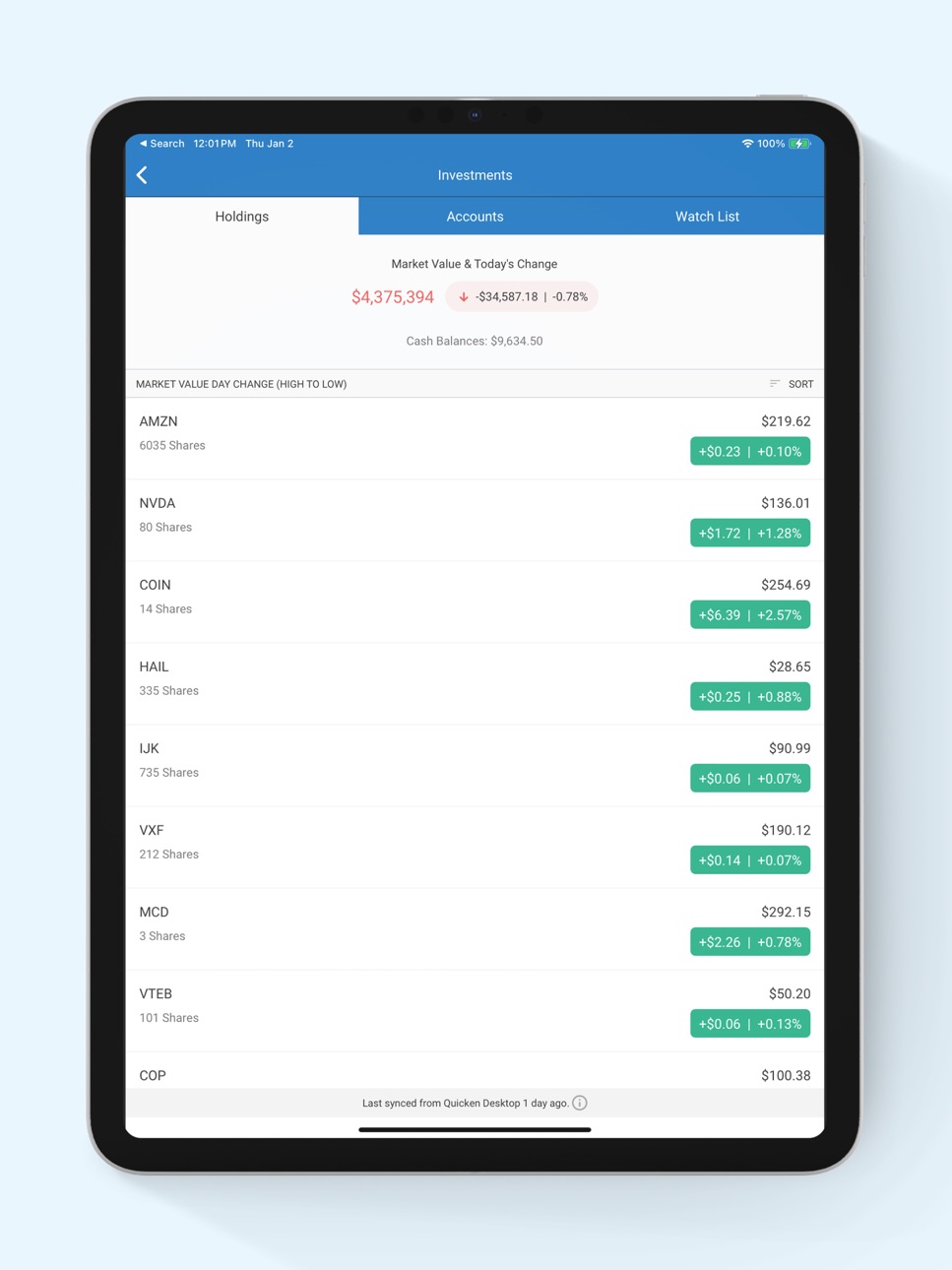
• New: Dark mode is now available. • New: A What's New screen now appears when you update the app. • New: Itemized Payee Report is now available. • Fixed: Investment holdings disappeared when the device went offline. • Fixed: Extra reminder created when using the "To Pay Estimated Taxes" frequency. • Fixed: Manage Accounts screen became unresponsive after renaming an account. • Fixed: Running balance option was hidden on iPhone SE in the Reminders sheet.

Description

App Features: • Automatically syncs your desktop and mobile data • View your balances, accounts, and transactions • See spending trends and check your budget • Enter transactions as you spend even when you are not connected to the internet • Search transaction history • Split transactions for an accurate view of spending • Snap and store a picture of your receipt Technical Requirements: currently supports iOS and iPadOS devices running iOS 11 or higher. Data Security and Information Privacy: • Passcode-protected and backed by 256-bit encryption • Data access guarantee: Always have full access to and ownership of your data

Accessibility

ipadiphonemacrealityDevicetvoswatch

Version history 25 versions

Build 887283472v8.3.02026-06-23 00:31:16
• New: Dark mode is now available. • New: A What's New screen now appears when you update the app. • New: Itemized Payee Report is now available. • Fixed: Investment holdings disappeared when the device went offline. • Fixed: Extra reminder created when using the "To Pay Estimated Taxes" frequency. • Fixed: Manage Accounts screen became unresponsive after renaming an account. • Fixed: Running balance option was hidden on iPhone SE in the Reminders sheet.
Build 884748995v8.2.02026-04-22 17:09:02
FIXED: Manual securities sort and display issue. IMPROVED: Added a Payee breakdown option to the Income vs. Expense report. Added the Itemized Transactions report. Added None and Yearly interval options to the Income vs. Expense report. Added a "Don't ask again" option to the new cloud account alert.
Build 882952016v8.1.12026-03-04 15:14:07
Bug fixes and improvements.
Build 882809634v8.1.02026-02-28 02:16:48
Bug fixes and improvements.
Build 882449034v8.0.12026-02-17 15:51:01
Bug fixes and improvements.
Build 881974094v8.0.02026-02-01 10:51:01
Bug fixes and improvements.
Build 878387451v7.8.02025-09-25 07:49:45
NEW: Added Income vs. Expense report by category in Quicken Mobile. Added last sync timestamp from desktop to Quicken mobile. FIXED: Pending transactions no longer affect the account balance. Multi-editing transactions no longer create duplicate payees. Filtering by “Uncategorized” in advanced search now correct. Linked transfer amount now updates correctly when a split is removed. Manual match now uses the latest reminder instead of an overdue one.
Build 876514406v7.7.32025-07-22 08:06:49
Fixed: Improvement and Bug Fixes.
Build 876032716v7.7.22025-07-02 06:56:35
Fixed: Manual and reviewed transactions from Quicken Classic for Windows could be incorrectly marked as unreviewed or reviewed. Balance mismatches when Compare to Register was turned on in Quicken Classic for Windows. Running balances now stay hidden for cloud-sync transactions until accepted when Compare to Register is on.
Build 875535279v7.7.12025-06-12 13:08:18
Fixed: Improvement and Bug Fixes
Build 875253565v7.7.02025-06-03 08:35:17
Improved: Support for rules by amount/account. Category shown in QuickFill payee list. Investment quote timestamps with market update time. Alert when new cloud account is available. Fixed: Matching/un-matching issues. Unresponsive Continue button. Issues with splits.
Build 875000340v7.6.12025-05-23 19:29:10
Fixed: Improvement and Bug Fixes.
Build 871503650v7.6.02025-02-06 18:34:07
Improved: Improved dataset sharing and access management. Fixed the field label in the mobile companion app, changing "Notes" to "Memo" for consistency with desktop versions. Fixed: Fixed an issue where accounts were duplicated on mobile after disabling and re-enabling sync on Mac. Fixed an issue where transaction search by tag was not working.
Build 871184819v7.5.22024-12-19 10:03:04
Improvement and Bug Fixes.
Build 870509395v7.5.12024-12-02 07:06:32
Fixed: Incorrect category selection after payee changes. Missing bill counts, default sort options, and transaction data on Dashboard cards. Offline icon, Dashboard months, and recent transactions now update correctly. Category names no longer change to numeric digits. Balance calculation errors in memorized payee splits fixed. Duplicate images cannot be added in the same session. Back button on 'Customize Dashboard' navigates to 'Settings.' Fixed: Incorrect category selection after payee changes. Missing bill counts, default sort options, and transaction data on Dashboard cards. Offline icon, Dashboard months, and recent transactions now update correctly. Category names no longer change to numeric digits. Balance calculation errors in memorized payee splits fixed. Duplicate images cannot be added in the same session. Back button on 'Customize Dashboard' navigates to 'Settings.' Bugs that caused internal tracking errors in specific workflows.
Build 869461653v7.4.12024-10-03 18:31:14
Fixed: Customer-reported issue for better app stability.
Build 869094778v7.4.02024-09-19 00:13:22
What’s Fixed: • Time zone inaccuracies. • Unable to swipe right to mark a transaction as reviewed. • Issues with multi-edit selection, cancellation, and navigating back to register • Amount field obscured by number pad under memorized payees. • Issues filtering payee names. • Issues updating split transactions. • Offline message display. • The data file selection screen was available when there were no data files. • Issue with swipe gesture display changes.
Build 867908007v7.3.12024-08-01 20:02:02
Improved: Added ability to select the date range for data to be included so smaller date ranges can be worked with to improve speed.
Build 867850246v7.3.02024-07-30 20:09:36
Improved: Added ability to select the date range for data to be included so smaller date ranges can be worked with to improve speed.
Build 866245750v7.2.02024-05-28 00:33:09
What’s Improved: Migrated chat to a new system. What’s Fixed: Resolved multiple user interface issues.
Build 865719139v7.1.12024-05-22 14:44:19
Improved: Minor code improvement.
Build 865214344v7.1.02024-04-16 00:48:51
Fixed: Several calendar display issues. Refreshing caused stock holding values to double or triple. Some investment holdings were visible on the web but not in the app. Date label appeared twice when using the "Payee name" filter with Running Balance enabled. Pending transaction status display issues. Swipe option was displayed for future dated gross paycheck reminder instances. An undefined screen title appeared when switching between datasets.
Build 864693655v7.0.32024-03-26 12:36:59
Addressed internal issue.
Build 864145091v7.0.22024-03-02 14:39:58
Re-introduced a Mixpanel event that includes the user dataset's platform information.
Build 863809682v7.0.12024-02-16 20:22:30
Improved the architecture of the app to bring you an enhanced version for a better experience.

No pricing data captured yet — comparisons appear once the app has paid storefronts or in-app purchases.

Availability 2 of 164 storefronts

RegionLanguagePriceRatingsAvgVersion
US en-USFree14.8k4.68.3.0
CA en-CAFree7614.68.3.0

Not available in: AE, AF, AG, AI, AL, AM, AO, AR, AT, AU, AZ, BA, BB, BE, BF, BG, BH, BJ, BM, BO, BR, BS, BT, BW, BY, BZ, CD, CG, CH, CI, CL, CM, CN, CO, CR, CV, CY, CZ, DE, DK, DM, DO, DZ, EC, EE, ES, FM, FR, GA, GB, GD, GE, GH, GM, GR, GT, GW, GY, HK, HN, HR, HU, ID, IE, IL, IN, IS, IT, JM, JO, JP, KE, KG, KH, KN, KR, KW, KY, KZ, LC, LK, LR, LT, LU, LV, LY, MA, MD, ME, MG, MK, ML, MN, MO, MR, MS, MT, MU, MV, MW, MX, MY, MZ, NA, NE, NG, NI, NL, NO, NP, NR, NZ, OM, PA, PE, PG, PH, PK, PL, PT, PW, PY, QA, RO, RS, RW, SA, SB, SC, SE, SG, SI, SK, SL, SN, SR, ST, SV, SZ, TC, TD, TH, TN, TO, TR, TT, TW, TZ, UA, UG, UY, UZ, VC, VE, VG, VN, VU, XK, YE, ZA, ZM, ZW

Change log 29 changes · CA

releaseNotes updated
• New: Dark mode is now available. • New: A What's New screen now appears when you update the app. • New: Itemized Payee Report is now available. • Fixed: Inves
description updated
App Features: • Automatically syncs your desktop and mobile data • View your balances, accounts, and transactions • See spending trends and check your budget •
subtitle updated
Companion App
name updated
Quicken Classic
Version 8.3.0 released
• New: Dark mode is now available. • New: A What's New screen now appears when you update the app. • New: Itemized Payee Report is now available. • Fixed: Investment holdings disappeared when the device went offline. • Fixed: Extra reminder
Version 8.2.0 released
FIXED: Manual securities sort and display issue. IMPROVED: Added a Payee breakdown option to the Income vs. Expense report. Added the Itemized Transactions report. Added None and Yearly interval options to the Income vs. Expense report. Ad
Version 8.1.1 released
Bug fixes and improvements.
Version 8.1.0 released
Bug fixes and improvements.
Version 8.0.1 released
Bug fixes and improvements.
Version 8.0.0 released
Bug fixes and improvements.
Version 7.8.0 released
NEW: Added Income vs. Expense report by category in Quicken Mobile. Added last sync timestamp from desktop to Quicken mobile. FIXED: Pending transactions no longer affect the account balance. Multi-editing transactions no longer create dup
Version 7.7.3 released
Fixed: Improvement and Bug Fixes.
Version 7.7.2 released
Fixed: Manual and reviewed transactions from Quicken Classic for Windows could be incorrectly marked as unreviewed or reviewed. Balance mismatches when Compare to Register was turned on in Quicken Classic for Windows. Running balances now s
Version 7.7.1 released
Fixed: Improvement and Bug Fixes
Version 7.7.0 released
Improved: Support for rules by amount/account. Category shown in QuickFill payee list. Investment quote timestamps with market update time. Alert when new cloud account is available. Fixed: Matching/un-matching issues. Unresponsive Continu
Version 7.6.1 released
Fixed: Improvement and Bug Fixes.
Version 7.6.0 released
Improved: Improved dataset sharing and access management. Fixed the field label in the mobile companion app, changing "Notes" to "Memo" for consistency with desktop versions. Fixed: Fixed an issue where accounts were duplicated on mobile a
Version 7.5.2 released
Improvement and Bug Fixes.
Version 7.5.1 released
Fixed: Incorrect category selection after payee changes. Missing bill counts, default sort options, and transaction data on Dashboard cards. Offline icon, Dashboard months, and recent transactions now update correctly. Category names no
Version 7.4.1 released
Fixed: Customer-reported issue for better app stability.
Version 7.4.0 released
What’s Fixed: • Time zone inaccuracies. • Unable to swipe right to mark a transaction as reviewed. • Issues with multi-edit selection, cancellation, and navigating back to register • Amount field obscured by number pad under memorized paye
Version 7.3.1 released
Improved: Added ability to select the date range for data to be included so smaller date ranges can be worked with to improve speed.
Version 7.3.0 released
Improved: Added ability to select the date range for data to be included so smaller date ranges can be worked with to improve speed.
Version 7.2.0 released
What’s Improved: Migrated chat to a new system. What’s Fixed: Resolved multiple user interface issues.
Version 7.1.1 released
Improved: Minor code improvement.
Version 7.1.0 released
Fixed: Several calendar display issues. Refreshing caused stock holding values to double or triple. Some investment holdings were visible on the web but not in the app. Date label appeared twice when using the "Payee name" filter with Runni
Version 7.0.3 released
Addressed internal issue.
Version 7.0.2 released
Re-introduced a Mixpanel event that includes the user dataset's platform information.
Version 7.0.1 released
Improved the architecture of the app to bring you an enhanced version for a better experience.
expanded screenshot