Home › Productivity

 PH
PH
 USen-US
 BRpt-BR
 JPja
JPja GBen-GB
 DEde-DE
 MXes-MX
 CAen-CA
 FRfr-FR
 CNzh-Hans-CN
 ESes-ES
 AUen-AU
 THen-GB
 ITit
ITit NLnl
NLnl INen-GB
 VNen-GB
 CHde-CH
 COes-MX
 TWzh-Hant-TW
 KRko
KRko SAen-GB
 TRen-GB
 BEen-GB
 SEsv
SEsv CLes-MX
 RUru
RUru HKzh-Hant-HK
 ARes-MX
 PTpt-PT
 DKen-GB
 ATde-DE
 ZAen-GB
 MYen-GB
 NOen-GB
 PEes-MX
 PLen-GB
 IDen-GB
 SGen-GB
 AEen-GB
 ECes-MXPHen-GB
 CZen-GB
 NZen-AU
 HUen-GB
 CRes-MX
 UAen-GB
 IEen-GB
 GRen-GB
 FIen-GB
 ROen-GB
 PKen-GB
 ILen-GB
 EGen-GB
 DOes-MX
 GTes-MX
 PAes-MX
 KWen-GB
 UYen-GB
 SKen-GB
 HRen-GB
 QAen-GB
 BGen-GB
 LUen-GB
 SVes-MX
 NGen-GB
 KHen-GB
 JOen-GB
 LKen-GB
 HNes-MX
 PYes-MX
 GHen-GB
 KZen-GB
 VEes-MX
 KEen-GB
 BHen-GB
 OMen-GB
 BOes-MX
 ALen-GB
 LBen-GB
 LTen-GB
 LVen-GB
 EEen-GB
 SIen-GB
 BYen-GB
 CYen-GB
 SNen-GB
 AOen-GB
 TTen-GB
 AZen-GB
 NIes-MX
 MTen-GB
 TZen-GB
 MNen-GB
 RSen-GB
 MOzh-Hant-HK
 NPen-GB
 MAen-GB
 DZen-GB
 ISen-GB
 MKen-GB
 JMen-GB
 AMen-GB
 UGen-GB
 MDen-GB
 TNen-GB
 ZWen-GB
 MZen-GB
 MUen-GB
 NAen-GB
 CIfr-FR
 IQen-GB
 UZen-GB
 BWen-GB
 MLen-GB
 GEen-GB
 BAen-GB
 BSen-GB
 CGen-GB
 BBen-GB
 LAen-GB
 KGen-GB
 ZMen-GB
 BFen-GB
 MMen-GB
 BNen-GB
 XKen-GB
 CDen-GB
 BJen-GB
 GYen-GB
 YEen-GB
 FJen-GB
 SLen-GB
 MVen-GB
 SRen-GB
 BZen-GB
 MRen-GB
 MWen-GB
 CVen-GB
 GMen-GB
 CMfr-FR
 MEen-GB
 MGen-GB
 KYen-GB
 LYen-GB
 LCen-GB
 LRen-GB
 RWen-GB
 BMen-GB
 AGen-GB
 KNen-GB
 AFen-GB
 VCen-GB
 PGen-GB
 SZen-GB
 TDen-GB
 BTen-GB
 GAfr-FR
 TCen-GB
 AIen-GB
 GDen-GB
 DMen-GB
 TJen-GB
 NEen-GB
 GWen-GB
 VGen-GB
 SCen-GB
 PWen-GB
 STen-GB
 TOen-GB
 FMen-GB
 MSen-GB
 SBen-GB
 TMen-GB
 NRen-GB
 VUen-GB
175 of 175 storefronts
Content in en-GB
Content in en-GB
Information
Apple ID477537958
Bundle IDcom.microsoft.skydrive
SellerSeller
Min iOS18.0
Min macOS15.0
Device familiesiphone, ipad
Released2011-12-13
Copyright© 2025 Microsoft Corporation. All rights reserved.
Privacy policyLink ↗
Preview 2 platforms

iPhone 8 images



iPad 4 images



What’s New Version 18.5.4
This update contains bug fixes and stability improvements.
Description
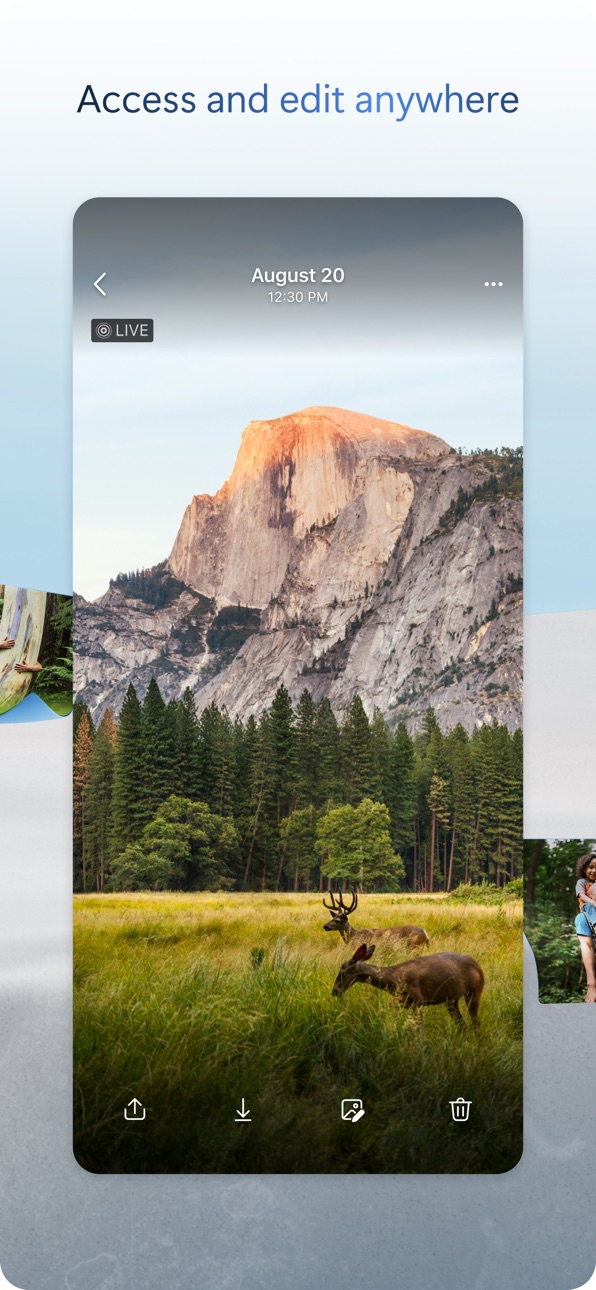
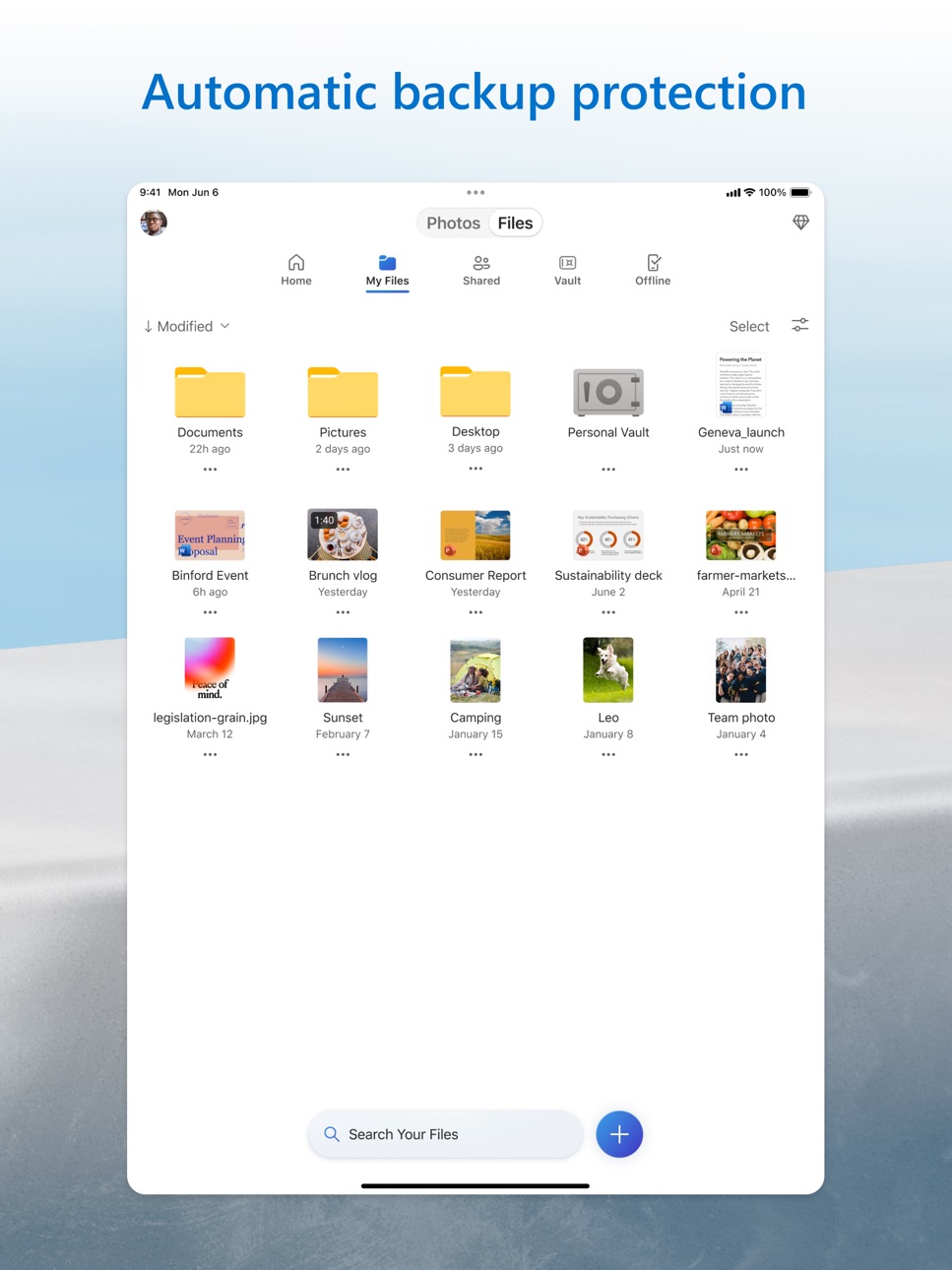
Microsoft OneDrive keeps your photos and files backed up, protected, synced, and accessible on all your devices. The OneDrive app lets you view and share OneDrive files, documents, photos, and videos with friends and family. You can use the app to automatically back up your phone's photos and videos. Start with 5 GB of free cloud storage or upgrade to a Microsoft 365 subscription to get up to 1 TB of storage.
Microsoft OneDrive offers the following features:
Back-up photos and videos
• Automatic photo and video back-up when you turn on Camera Upload
• View photos on your phone, computer, and online
File sharing and management
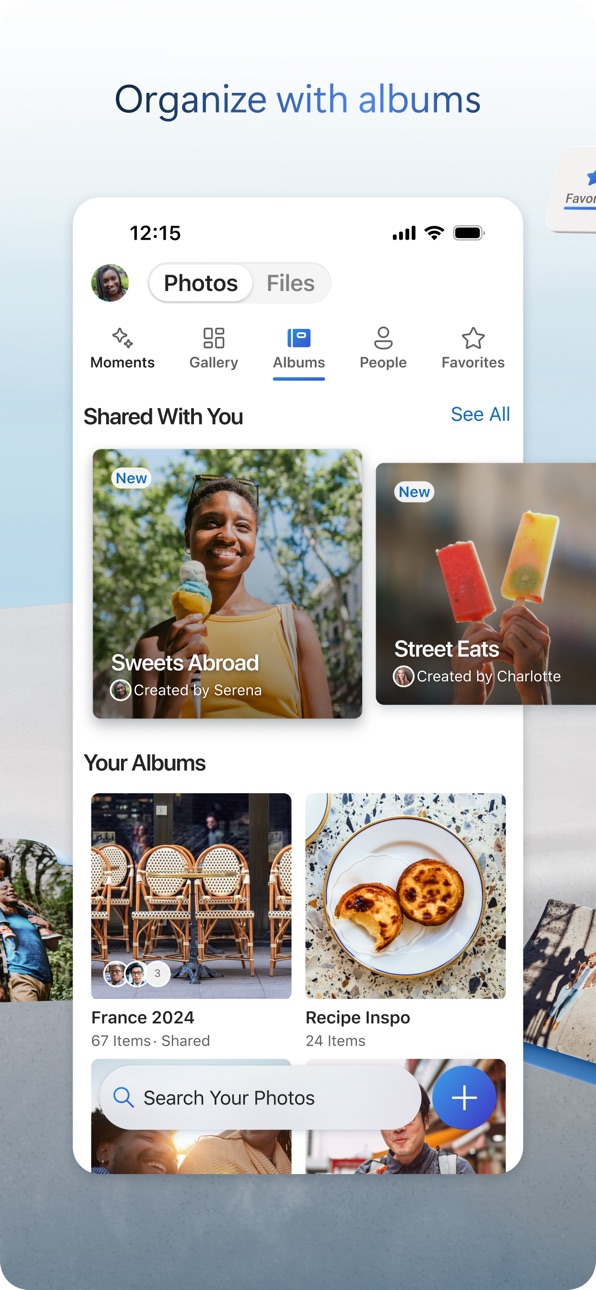
• Share docs, photos, videos, and albums with friends and family
• Get notifications when a shared document is edited
• Set password-protected or expiring sharing links*
• Access entire folders on the app without being online*
Scan
• Scan documents, business cards, receipts, whiteboards, and more
• Mark up, sign, and send docs right from the OneDrive mobile app
Search
• Search docs by name or content
Security
• Personal Vault lets you protect your important files with identity verification
• Restore documents with version history on all files
• Ransomware detection and recovery*
Works with Microsoft Word, Excel, PowerPoint, OneNote, Outlook
• Back up, view, and save your Office documents.
• Use Microsoft Office apps to edit and collaborate in real time on Word, Excel, PowerPoint, and OneNote files stored in OneDrive.
Upgrade to a Microsoft 365 subscription
With a Microsoft 365 Personal subscription you get 1 TB of storage (1 TB of storage per person for up to 6 people with the Family subscription), OneDrive premium features, and access to all features in Word, Excel, PowerPoint, Outlook, and OneNote on iPad, iPhone, and iPod touch, and you can install Word, Excel, PowerPoint, and Outlook on PCs or Macs.
To make an in-app purchase of a Microsoft 365 Basic, Microsoft 365 Personal, Microsoft 365 Family subscription: open the app, tap the Me tab, then tap Get More Storage or the Go Premium diamond icon.
Subscriptions begin at $6.99 a month in the US, and can vary by region. Microsoft 365 subscriptions purchased from the app will be charged to your iTunes account and will automatically renew within 24 hours prior to the end of the current subscription period, unless auto-renewal is disabled beforehand.
To manage your subscriptions or to disable auto-renewal, after purchase, go to your iTunes account settings. A subscription cannot be cancelled or refunded during the active subscription period.
Using this OneDrive app for work or school
For you to sign into your work or school account on OneDrive, your organisation needs to have a qualifying OneDrive, SharePoint Online or Microsoft 365 business subscription plan.
Privacy
This app is provided by Microsoft. Data provided through the use of this store and this app may be accessible to Microsoft and transferred to, stored, and processed in the United States or any other country where Microsoft or its affiliates maintain facilities.
Privacy Policy: https://go.microsoft.com/fwlink/?LinkID=507539.
Terms of Use: https://go.microsoft.com/fwlink/p/?LinkID=246338.
*Requires Microsoft 365 Personal or Family subscription
In-App Purchases PH pricing
OneDrive + 100 Subscription
Subscription₱ 1,790.00
Microsoft 365 Basic Subscription
Monthly₱ 119.00
Microsoft 365 Family Subscription
Monthly 1-month free trial₱ 489.00
Yearly₱ 6,090.00
Microsoft 365 Personal Subscription
Monthly 1-month free trial₱ 299.00
Monthly 1-month free trial₱ 349.00
Monthly 1-month free trial₱ 489.00
Monthly 1-month free trial₱ 849.00
Yearly₱ 4,890.00
Microsoft 365 Storage 50 GB Subscription
Monthly₱ 59.00
Capabilities
In-App PurchasesiMessage
Accessibility
ipadiphonemacrealityDevicetvoswatch
Version history 25 versions
Build 887503068v18.5.32026-07-06 17:04:45
This update contains bug fixes and stability improvements.
Build 886853385v18.4.22026-06-22 18:10:34
This update contains bug fixes and stability improvements.
Build 886303768v18.3.32026-06-08 20:49:30
This version of OneDrive no longer supports SharePoint Server on-premises accounts. SharePoint Server 2016 and 2019 reach end of support on July 14, 2026. Personal Microsoft accounts and Microsoft 365 work or school accounts are unaffected.
Build 886267688v18.2.42026-05-29 14:09:10
This update contains bug fixes and stability improvements.
Build 885683600v18.2.32026-05-25 16:21:20
This update contains bug fixes and stability improvements.
Build 885169826v18.1.42026-05-11 19:01:54
We've been busy behind the scenes making OneDrive even better. Here's what's new and improved:
New
- GIF playback for everyone: Animated GIFs now play automatically in the photo viewer.
- Photo type badges: Spot Live, RAW, and GIF photos at a glance, with a new setting to turn the badges on or off.
- Smarter Memories: Save a Memory as an album in one tap and friendlier AI titles.
- Sensitivity labels for business photos and videos: Spot the Microsoft Sensitivity Label directly in the viewer.
- Camera Backup on iOS 26.1+: Detects new photos while app is in the background.
- Select All: Tap Select All when picking multiple items in photo and file lists across the app.
Improvements & Fixes
- Accessibility: VoiceOver and keyboard improvements across the app.
- Office previewer: Dark mode, updates Recent Files, refreshes the title after rename, and respects the "Preview Office Documents" setting.
- Photos: New colored folder icons; smart-cropped covers in widgets so faces aren't clipped; offline state shown on photos in offline folders.
- Camera Backup starts instantly: Your latest photos begin uploading right away, without waiting for an initial sync.
- Vault: See your file count and jump to Suggested Files from the overflow menu.
- Sharing: Share photos and videos to LINE Messenger; the share menu now uses the correct dark mode for enterprise accounts.
- Selection sheet: Smooth slide-up on iPad, sized to its contents, and no longer blocks taps when first appearing.
- Video: Buffering spinner during network stalls, no more timeline flicker when scrubbing, and fixed full-screen playback for offline videos.
- Albums: Faster create, edit, and create-from-folder, with a 255-character name limit and live counter.
- Refreshed Send Feedback experience, with thumbs up/down on search results.
- General performance and bug fixes.
Thanks for using OneDrive! We're always working to improve your experience. If you run into any issues, just shake your device and tap "Send Feedback."
Build 884652950v18.0.22026-04-27 23:02:08
This version of OneDrive supports iOS/iPadOS versions 18 or newer
iCloud optimized photo backup is now available to all OneDrive consumer users, including free tier. Previously limited to Microsoft 365 premium subscribers, users can now back up iCloud-optimized photos and Live Photos via Camera Backup to access them across devices and Microsoft 365 apps. Turn on Camera Backup today to get started!
Build 884646575v16.37.42026-04-17 21:08:57
This is the last version of the OneDrive iOS and iPadOS apps that can be installed on devices with iOS 17 or iPadOS 17. The next one will only support iOS 18 and 26 and iPadOS 18 and 26.
Build 884093301v16.37.32026-04-13 22:05:34
This is the last version of the OneDrive iOS and iPadOS apps that can be installed on devices with iOS 17 or iPadOS 17. The next one will only support iOS 18 and 26 and iPadOS 18 and 26.
Build 884040779v16.36.52026-04-02 16:52:29
We would like to let our users know that we are planning on dropping support for the OneDrive app on iOS 17 and iPadOS 17 versions soon. Please ensure you're on one of the later versions of iOS/iPadOS (18 or 26) to make sure you're still able to access the latest version of the OneDrive app.
Build 883603301v16.36.42026-03-31 16:37:03
We would like to let our users know that we are planning on dropping support for the OneDrive app on iOS 17 and iPadOS 17 versions soon. Please ensure you're on one of the later versions of iOS/iPadOS (18 or 26) to make sure you're still able to access the latest version of the OneDrive app.
Build 883118694v16.35.22026-03-17 16:32:07
We've been busy behind the scenes making OneDrive even better. Here's what's new and improved:
New
- Blended gallery: Personal OneDrive users can now view photos shared by others directly in their Photos gallery alongside their own. A guided setup and sharer selection let you choose whose photos appear.
- AI-powered Memories titles: Your Memories now feature AI-generated titles for a more personal touch (English only).
- Photo stacks: Similar photos are now grouped into stacks by default, making your gallery easier to browse.
Improvements & Fixes
- RAW and Live photo badges: Spot your RAW and Live Photos at a glance with new badge indicators in the gallery and photo viewer.
- Breadcrumb navigation for albums: Albums now show a breadcrumb trail so you always know where you are. Shared items also display "Shared" as the top-level breadcrumb when browsing from My Files, Shared, and Offline.
- Open in Loop: Open Loop documents directly in the Microsoft Loop app, or get a prompt to download it if it's not installed.
- GIF playback: GIF images now play automatically when you open them in the photo viewer.
- Sharer's name in shared folders: When you browse into a folder someone shared with you, their name now appears in the header so you always know whose content you're viewing.
- File type icons in grid view: Non-photo files now display their file type icon in the grid layout, making it easier to find what you're looking for.
- Sharing controls for albums: Managing access to your shared albums now features a refreshed experience.
- Notifications for shared photos and albums: When someone shares a photo or album with you, the push notification now shows a thumbnail preview.
- In-app purchases: Clearer error messages for common purchase issues.
- General performance and bug fixes.
Thanks for using OneDrive! We're always working to improve your experience. If you run into any issues, just shake your device and tap "Send Feedback."
Build 882616647v16.34.32026-03-02 15:56:28
This update contains bug fixes and stability improvements.
Build 882214090v16.33.22026-02-17 04:09:02
This update contains bug fixes and stability improvements.
Build 881873171v16.32.42026-02-02 22:33:27
This update contains bug fixes and stability improvements.
Build 881330513v16.31.12026-01-19 18:51:10
This update contains bug fixes and stability improvements.
Build 880920969v16.30.62026-01-07 19:02:35
This update contains bug fixes and stability improvements.
Build 880392101v16.29.22025-12-16 18:08:00
This update contains bug fixes and stability improvements.
Build 879755898v16.28.22025-12-01 18:40:21
We’ve been busy behind the scenes making OneDrive even better. Here’s what’s new and improved:
New
- Update album covers: Personalize your photo albums by choosing the perfect cover image.
- Sync status in settings: Quickly check your sync status right from account settings — no more guessing.
Fixed & Improved
We’ve made a number of behind-the-scenes improvements to keep things running smoothly:
- Drag and drop and sort by date: Enhanced drag-and-drop experience and made sort by date consistent across all environments.
- Gallery and albums: Updated empty state when filtering to the Pictures folder and fixed various album UI bugs.
- Live photos: Resolved playback issues and download errors for a smoother experience.
- Folder picker: Improved default selection, fixed crashes, and enhanced folder creation flows.
- Error handling: Clearer alerts when moving files with duplicate names or to read-only folders.
- Uploads and sync: Fixed manual photo upload failures, refreshed service endpoints, and enabled Vroom multiformat uploader for OneDrive Business.
- Shared with me and vault: Fixed vault sync root issues.
- General performance and stability improvements across the app.
Thanks for using OneDrive! We’re always working to improve your experience. If you run into any issues, just shake your device and tap “Send Feedback.“
/** These notes were generated using Copilot
Build 880247741v16.28.32025-12-01 19:54:26
We’ve been busy behind the scenes making OneDrive even better. Here’s what’s new and improved:
New
- Update album covers: Personalize your photo albums by choosing the perfect cover image.
- Sync status in settings: Quickly check your sync status right from account settings — no more guessing.
Fixed & Improved
We’ve made a number of behind-the-scenes improvements to keep things running smoothly:
- Drag and drop and sort by date: Enhanced drag-and-drop experience and made sort by date consistent across all environments.
- Gallery and albums: Updated empty state when filtering to the Pictures folder and fixed various album UI bugs.
- Live photos: Resolved playback issues and download errors for a smoother experience.
- Folder picker: Improved default selection, fixed crashes, and enhanced folder creation flows.
- Error handling: Clearer alerts when moving files with duplicate names or to read-only folders.
- Uploads and sync: Fixed manual photo upload failures, refreshed service endpoints, and enabled Vroom multiformat uploader for OneDrive Business.
- Shared with me and vault: Fixed vault sync root issues.
- General performance and stability improvements across the app.
Thanks for using OneDrive! We’re always working to improve your experience. If you run into any issues, just shake your device and tap “Send Feedback.“
/** These notes were generated using Copilot
Build 879379108v16.27.32025-11-10 17:45:18
This update contains bug fixes and stability improvements.
Build 879003514v16.26.32025-10-27 17:31:40
This update contains bug fixes and stability improvements.
Build 878749567v16.25.52025-10-13 18:08:14
This update contains bug fixes and stability improvements.
Build 878637423v16.24.32025-10-03 17:17:31
We’ve been busy behind the scenes making OneDrive even better. Here’s what’s new and improved:
New
- Audio Overviews for Business: Stay informed with quick audio summaries tailored for your business files — perfect for catching up while on the move.
- Moments Pivot: Introducing the new Moments Pivot — a dedicated space where you can revisit your most memorable and meaningful photo highlights. It’s your personal gallery of joy, curated by OneDrive.
- Photo Stacks: Similar photos are now grouped together, clearing the clutter of your gallery and easier to browse
- Shared Folders in Folder Picker: Access shared folders directly from the folder picker — making collaboration smoother than ever.
Fixed & Improved
We’ve made a number of behind-the-scenes improvements to keep things running smoothly:
- Gallery updates: Deleted items now disappear instantly.
- Folder Picker: Improved folder creation, rename, and scan flows.
- Vault: Enhanced settings and empty vault view experience.
- Capture: Scan flows are now more responsive.
- General performance and stability improvements across the app.
Thanks for using OneDrive! We’re always working to improve your experience. If you run into any issues, just shake your device and tap “Send Feedback.”
/** These notes were generated using Copilot
We would like to let our users know that we are planning on dropping support for the OneDrive app on iOS 17 and iPadOS 17 versions soon. Please ensure you're on one of the later versions of iOS/iPadOS (18 or 26) to make sure you're still able to access the latest version of the OneDrive app.
Build 878238456v16.24.22025-09-29 21:24:05
We’ve been busy behind the scenes making OneDrive even better. Here’s what’s new and improved:
New
- Audio Overviews for Business: Stay informed with quick audio summaries tailored for your business files — perfect for catching up while on the move.
- Moments Pivot: Introducing the new Moments Pivot — a dedicated space where you can revisit your most memorable and meaningful photo highlights. It’s your personal gallery of joy, curated by OneDrive.
- Photo Stacks: Similar photos are now grouped together, clearing the clutter of your gallery and easier to browse
- Shared Folders in Folder Picker: Access shared folders directly from the folder picker — making collaboration smoother than ever.
Fixed & Improved
We’ve made a number of behind-the-scenes improvements to keep things running smoothly:
- Gallery updates: Deleted items now disappear instantly.
- Folder Picker: Improved folder creation, rename, and scan flows.
- Vault: Enhanced settings and empty vault view experience.
- Capture: Scan flows are now more responsive.
- General performance and stability improvements across the app.
Thanks for using OneDrive! We’re always working to improve your experience. If you run into any issues, just shake your device and tap “Send Feedback.”
/** These notes were generated using Copilot
We would like to let our users know that we are planning on dropping support for the OneDrive app on iOS 17 and iPadOS 17 versions soon. Please ensure you're on one of the later versions of iOS/iPadOS (18 or 26) to make sure you're still able to access the latest version of the OneDrive app.
Price history by region
Currency
Show
Columns
Search
App performance PH
Availability 175 of 175 storefronts
| Region | Language | Price | Ratings | Avg | Version |
|---|---|---|---|---|---|
| US | en-US | Free | 486.1k | 4.7 | 18.5.3 |
| BR | pt-BR | Free | 149.9k | 4.8 | 18.5.4 |
| JP | ja | Free | 130.6k | 4.4 | 18.5.4 |
| GB | en-GB | Free | 112.4k | 4.6 | 18.5.4 |
| DE | de-DE | Free | 105.5k | 4.6 | 18.5.4 |
| MX | es-MX | Free | 84.9k | 4.8 | 18.5.4 |
| CA | en-CA | Free | 69.1k | 4.6 | 18.5.4 |
| FR | fr-FR | Free | 62.9k | 4.6 | 18.5.4 |
| CN | zh-Hans-CN | Free | 52.8k | 4.7 | 18.5.4 |
| ES | es-ES | Free | 52.8k | 4.6 | 18.5.4 |
| AU | en-AU | Free | 49.9k | 4.6 | 18.5.4 |
| TH | en-GB | Free | 44.7k | 4.8 | 18.5.4 |
| IT | it | Free | 41.0k | 4.6 | 18.5.4 |
| NL | nl | Free | 40.7k | 4.5 | 18.5.4 |
| IN | en-GB | Free | 38.0k | 4.7 | 18.5.4 |
| VN | en-GB | Free | 34.0k | 4.8 | 18.5.4 |
| CH | de-CH | Free | 30.1k | 4.5 | 18.5.4 |
| CO | es-MX | Free | 28.8k | 4.8 | 18.5.3 |
| TW | zh-Hant-TW | Free | 26.6k | 4.7 | 18.5.4 |
| KR | ko | Free | 25.8k | 4.7 | 18.5.4 |
| SA | en-GB | Free | 24.2k | 4.6 | 18.5.4 |
| TR | en-GB | Free | 23.7k | 4.6 | 18.5.4 |
| BE | en-GB | Free | 18.9k | 4.6 | 18.5.4 |
| SE | sv | Free | 17.9k | 4.5 | 18.5.4 |
| CL | es-MX | Free | 17.5k | 4.8 | 18.5.4 |
| RU | ru | Free | 17.4k | 4.7 | 18.5.4 |
| HK | zh-Hant-HK | Free | 15.9k | 4.5 | 18.5.4 |
| AR | es-MX | Free | 15.7k | 4.7 | 18.5.4 |
| PT | pt-PT | Free | 15.7k | 4.7 | 18.5.4 |
| DK | en-GB | Free | 15.3k | 4.5 | 18.5.4 |
| AT | de-DE | Free | 14.1k | 4.6 | 18.5.4 |
| ZA | en-GB | Free | 12.6k | 4.7 | 18.5.4 |
| MY | en-GB | Free | 12.0k | 4.7 | 18.5.4 |
| NO | en-GB | Free | 11.4k | 4.5 | 18.5.4 |
| PE | es-MX | Free | 11.0k | 4.7 | 18.5.4 |
| PL | en-GB | Free | 10.8k | 4.7 | 18.5.4 |
| ID | en-GB | Free | 10.2k | 4.8 | 18.5.4 |
| SG | en-GB | Free | 10.0k | 4.6 | 18.5.4 |
| AE | en-GB | Free | 9.9k | 4.7 | 18.5.4 |
| EC | es-MX | Free | 9.2k | 4.8 | 18.5.3 |
| PH | en-GB | Free | 9.1k | 4.7 | 18.5.4 |
| CZ | en-GB | Free | 8.0k | 4.6 | 18.5.4 |
| NZ | en-AU | Free | 7.4k | 4.6 | 18.5.3 |
| HU | en-GB | Free | 7.3k | 4.7 | 18.5.4 |
| CR | es-MX | Free | 6.5k | 4.8 | 18.5.4 |
| UA | en-GB | Free | 6.3k | 4.8 | 18.5.4 |
| IE | en-GB | Free | 6.1k | 4.6 | 18.5.4 |
| GR | en-GB | Free | 6.1k | 4.7 | 18.5.4 |
| FI | en-GB | Free | 6.0k | 4.3 | 18.5.4 |
| RO | en-GB | Free | 5.6k | 4.8 | 18.5.4 |
| PK | en-GB | Free | 5.2k | 4.7 | 18.5.4 |
| IL | en-GB | Free | 5.1k | 4.6 | 18.5.4 |
| EG | en-GB | Free | 5.0k | 4.7 | 18.5.4 |
| DO | es-MX | Free | 4.6k | 4.8 | 18.5.4 |
| GT | es-MX | Free | 4.4k | 4.8 | 18.5.4 |
| PA | es-MX | Free | 3.1k | 4.8 | 18.5.4 |
| KW | en-GB | Free | 2.9k | 4.7 | 18.5.4 |
| UY | en-GB | Free | 2.6k | 4.7 | 18.5.4 |
| SK | en-GB | Free | 2.6k | 4.7 | 18.5.4 |
| HR | en-GB | Free | 2.5k | 4.7 | 18.5.4 |
| QA | en-GB | Free | 2.5k | 4.7 | 18.5.4 |
| BG | en-GB | Free | 2.2k | 4.8 | 18.5.4 |
| LU | en-GB | Free | 2.1k | 4.6 | 18.5.4 |
| SV | es-MX | Free | 2.0k | 4.8 | 18.5.4 |
| NG | en-GB | Free | 2.0k | 4.7 | 18.5.4 |
| KH | en-GB | Free | 1.9k | 4.7 | 18.5.4 |
| JO | en-GB | Free | 1.9k | 4.7 | 18.5.4 |
| LK | en-GB | Free | 1.9k | 4.8 | 18.5.4 |
| HN | es-MX | Free | 1.7k | 4.8 | 18.5.4 |
| PY | es-MX | Free | 1.7k | 4.8 | 18.5.4 |
| GH | en-GB | Free | 1.6k | 4.6 | 18.5.4 |
| KZ | en-GB | Free | 1.5k | 4.8 | 18.5.4 |
| VE | es-MX | Free | 1.4k | 4.8 | 18.5.3 |
| KE | en-GB | Free | 1.4k | 4.8 | 18.5.4 |
| BH | en-GB | Free | 1.2k | 4.7 | 18.5.4 |
| OM | en-GB | Free | 1.2k | 4.6 | 18.5.4 |
| BO | es-MX | Free | 1.2k | 4.7 | 18.5.4 |
| AL | en-GB | Free | 1.2k | 4.8 | 18.5.4 |
| LB | en-GB | Free | 1.1k | 4.7 | 18.5.4 |
| LT | en-GB | Free | 1.1k | 4.7 | 18.5.4 |
| LV | en-GB | Free | 1.1k | 4.7 | 18.5.3 |
| EE | en-GB | Free | 1.0k | 4.7 | 18.5.3 |
| SI | en-GB | Free | 988 | 4.8 | 18.5.4 |
| BY | en-GB | Free | 969 | 4.7 | 18.5.4 |
| CY | en-GB | Free | 961 | 4.8 | 18.5.4 |
| SN | en-GB | Free | 886 | 4.5 | 18.5.4 |
| AO | en-GB | Free | 828 | 4.5 | 18.5.4 |
| TT | en-GB | Free | 794 | 4.7 | 18.5.4 |
| AZ | en-GB | Free | 738 | 4.8 | 18.5.4 |
| NI | es-MX | Free | 737 | 4.8 | 18.5.4 |
| MT | en-GB | Free | 704 | 4.7 | 18.5.4 |
| TZ | en-GB | Free | 693 | 4.7 | 18.5.3 |
| MN | en-GB | Free | 669 | 4.8 | 18.5.4 |
| RS | en-GB | Free | 665 | 4.8 | 18.5.4 |
| MO | zh-Hant-HK | Free | 648 | 4.7 | 18.5.4 |
| NP | en-GB | Free | 644 | 4.5 | 18.5.4 |
| MA | en-GB | Free | 587 | 4.7 | 18.5.4 |
| DZ | en-GB | Free | 544 | 4.6 | 18.5.4 |
| IS | en-GB | Free | 517 | 4.6 | 18.5.4 |
| MK | en-GB | Free | 473 | 4.8 | 18.5.4 |
| JM | en-GB | Free | 444 | 4.5 | 18.5.4 |
| AM | en-GB | Free | 429 | 4.8 | 18.5.4 |
| UG | en-GB | Free | 395 | 4.7 | 18.5.3 |
| MD | en-GB | Free | 394 | 4.8 | 18.5.4 |
| TN | en-GB | Free | 378 | 4.6 | 18.5.4 |
| ZW | en-GB | Free | 372 | 4.5 | 18.5.4 |
| MZ | en-GB | Free | 369 | 4.7 | 18.5.4 |
| MU | en-GB | Free | 343 | 4.6 | 18.5.4 |
| NA | en-GB | Free | 301 | 4.6 | 18.5.4 |
| CI | fr-FR | Free | 250 | 4.6 | 18.5.4 |
| IQ | en-GB | Free | 246 | 4.6 | 18.5.4 |
| UZ | en-GB | Free | 236 | 4.9 | 18.5.4 |
| BW | en-GB | Free | 229 | 4.7 | 18.5.4 |
| ML | en-GB | Free | 228 | 4.7 | 18.5.4 |
| GE | en-GB | Free | 215 | 4.8 | 18.5.4 |
| BA | en-GB | Free | 193 | 4.7 | 18.5.4 |
| BS | en-GB | Free | 182 | 4.7 | 18.5.4 |
| CG | en-GB | Free | 174 | 4.5 | 18.5.4 |
| BB | en-GB | Free | 172 | 4.6 | 18.5.4 |
| LA | en-GB | Free | 165 | 4.8 | 18.5.4 |
| KG | en-GB | Free | 159 | 4.7 | 18.5.4 |
| ZM | en-GB | Free | 156 | 4.7 | 18.5.4 |
| BF | en-GB | Free | 152 | 4.4 | 18.5.4 |
| MM | en-GB | Free | 152 | 4.7 | 18.5.4 |
| BN | en-GB | Free | 145 | 4.7 | 18.5.4 |
| XK | en-GB | Free | 133 | 4.8 | 18.5.4 |
| CD | en-GB | Free | 128 | 4.5 | 18.5.4 |
| BJ | en-GB | Free | 112 | 4.5 | 18.5.4 |
| GY | en-GB | Free | 104 | 4.7 | 18.5.4 |
| YE | en-GB | Free | 103 | 4.7 | 18.5.4 |
| FJ | en-GB | Free | 100 | 4.6 | 18.5.4 |
| SL | en-GB | Free | 99 | 4.7 | 18.5.3 |
| MV | en-GB | Free | 96 | 4.7 | 18.5.4 |
| SR | en-GB | Free | 93 | 4.4 | 18.5.4 |
| BZ | en-GB | Free | 89 | 4.6 | 18.5.4 |
| MR | en-GB | Free | 84 | 4.5 | 18.5.4 |
| MW | en-GB | Free | 83 | 4.8 | 18.5.3 |
| CV | en-GB | Free | 74 | 4.5 | 18.5.4 |
| GM | en-GB | Free | 72 | 4.6 | 18.5.3 |
| CM | fr-FR | Free | 71 | 4.4 | 18.5.4 |
| ME | en-GB | Free | 68 | 4.8 | 18.5.4 |
| MG | en-GB | Free | 67 | 4.3 | 18.5.4 |
| KY | en-GB | Free | 66 | 4.8 | 18.5.4 |
| LY | en-GB | Free | 63 | 4.6 | 18.5.4 |
| LC | en-GB | Free | 59 | 4.7 | 18.5.4 |
| LR | en-GB | Free | 59 | 4.7 | 18.5.3 |
| RW | en-GB | Free | 59 | 4.6 | 18.5.4 |
| BM | en-GB | Free | 53 | 4.7 | 18.5.4 |
| AG | en-GB | Free | 50 | 4.5 | 18.5.4 |
| KN | en-GB | Free | 45 | 4.6 | 18.5.4 |
| AF | en-GB | Free | 44 | 4.6 | 18.5.4 |
| VC | en-GB | Free | 44 | 4.6 | 18.5.4 |
| PG | en-GB | Free | 43 | 4.6 | 18.5.4 |
| SZ | en-GB | Free | 38 | 4.5 | 18.5.4 |
| TD | en-GB | Free | 37 | 4.8 | 18.5.4 |
| BT | en-GB | Free | 36 | 4.4 | 18.5.4 |
| GA | fr-FR | Free | 34 | 4.4 | 18.5.4 |
| TC | en-GB | Free | 33 | 4.7 | 18.5.4 |
| AI | en-GB | Free | 32 | 4.9 | 18.5.4 |
| GD | en-GB | Free | 32 | 4.5 | 18.5.4 |
| DM | en-GB | Free | 31 | 4.7 | 18.5.4 |
| TJ | en-GB | Free | 31 | 4.9 | 18.5.4 |
| NE | en-GB | Free | 30 | 4.5 | 18.5.4 |
| GW | en-GB | Free | 26 | 4.5 | 18.5.4 |
| VG | en-GB | Free | 24 | 4.8 | 18.5.4 |
| SC | en-GB | Free | 22 | 4.5 | 18.5.4 |
| PW | en-GB | Free | 13 | 4.6 | 18.5.4 |
| ST | en-GB | Free | 9 | 4.1 | 18.5.4 |
| TO | en-GB | Free | 5 | 5.0 | 18.5.4 |
| FM | en-GB | Free | 4 | 4.3 | 18.5.4 |
| MS | en-GB | Free | 3 | 4.7 | 18.5.4 |
| SB | en-GB | Free | 2 | 5.0 | 18.5.4 |
| TM | en-GB | Free | 2 | 5.0 | 18.5.4 |
| NR | en-GB | Free | 1 | 4.0 | 18.5.4 |
| VU | en-GB | Free | 1 | 5.0 | 18.5.4 |
Reviews 30 reviews · PH
★★★★★
What have you done?
What have you done to Microsoft Lens? After you combined everything under OneDrive, I can no longer convert the scanned document to pdf and unable to scan multiple documents into a single file.
Spelunker222026-04-08
★★★★★
I want Microsoft Lens back
U broke my heart bcoz u got rid of Microsoft Lens. It was reliable, powerful tool that made scanning docs effortless. I want it back 😭
Game addict 322026-03-09
★★★★★
Browsing photos is glitchy
Basic functions are working well: uploading, downloading, and syncing files work as intended. However, viewing photos is a nightmare on apple OS. The photo you initially click displays properly, but the app will lag when you try to swipe and view the next ones, often glitching and showing the previous photo, the next photo but with glitchy artifacts, or just some random photo you viewed last, also with the glitchy artifacts.
All while dealing with persistent lag between inputs.
Most of the time, I have to tap on the photo and wait for the lag to catch up before it shows the actual photo I’m
Centaur theship2026-02-27
★★★★★
Huge Gap!
I accidentally did a "Remove Shortcut" on one of my folder. It disappeared and I couldn't reverse what I did. I tried re-navigating using different devices and the web to try to recover but I could no longer find my folder. There's no "Recycle Bin" or anything where I can recover it from. Such a huge design flaw! And now I lost all the contents of that folder!
Jarpot2025-08-21
★★★★★
App works great when backing up, but the UI is laggy and glitchy.
I’m using an iPhone 11 with a pretty stable internet. Backing up is great, specially with the sleep mode feature, but the app itself is glitchy. Whenever I download a specific photo, it automatically goes back to the top which is annoying since the picture I’m trying to find was from years ago, and when scrolling down too fast, it freezes and sometimes even crashes. Please fix the UI, and please add the feature where it can recognize faces. Thank you for the reliable support.
yawnynyn2025-06-26
★★★★★
MICROSOFT PERMANENTLY DELETED ALL MY ONEDRIVE FILES WITHOUT CONSENT!!!
I have thousands of family photos and videos in OneDrive! Pictures of my first born! THOSE ARE NOT JUST PICTURES BUT MEMORIES!!! ALL GONE!!! PERMANENTLY GONE!!! ALL THEY CAN SAY IS “SORRY WE DO NOT HAVE ANY BACKUP FILES FOR RECOVERY!!! WHAT A WASTE!!! UNACCEPTABLE!! NEVER TO USE ONEDRIVE AGAIN!!!
Badqueen032025-06-12
★★★★★
My OneDrive
I love it how one drive makes my life easy by storing my important documents and allowing it to be available any time I need it.
LoveOneDrive2025-05-22
★★★★★
Doesn’t upload to the right folder
April 05, 2025 When I upload photos and/or videos in a specific folder, they always end up in the home page, which is very very, very inconvenient since I have to keep on moving my files. Even after updating the app, it still does the same thing.
shia gabrielle2025-04-04
★★★★★
app super unresponsive
app is super unreponsive with a 1GBPS internet speed, files still won’t load
jjfofx2025-03-28
★★★★★
NO SUBSCRIPTION
Why does my account still have 5 GB free storage even after joining a Family plan???? WAS THERE A BUG OR SMTHING?
xsh00072025-03-28
★★★★★
Deleting photos is a nightmare
Either the app will crash, or the selected photos will remain in the gallery, then the app will freeze, then it will crash again.
pengmalups2025-03-27
★★★★★
IT SysAd
Hi Microsoft OneDrive team, please make your application stable, it is so frustrating to use! most of the time it keeps loading you need to logout/login to refresh this App! Cmon guys.. so sad no image uploading here in IOS review for you to check.
IT SysAd2025-03-05
★★★★★
Bug
I cant open some of my files it says no connection but the other files is good to open. Please fix this. Thank you.
Boom Boom C2025-02-26
★★★★★
Updated Interface is Slow
The new interface loads so slow. It takes so long to see the photos, and it suddenly freezes that I had to quit and relaunch the app!
Raymark B.2025-02-23
★★★★★
EMPTY
Logged in but my storage is empty. The mobile app version has now become unreliable.
Pride Guy2025-02-07
★★★★★
Uploading files
I can’t click the uploading tab and i have to open my phone the whole night so my files would be uploaded
Menatogurl2024-08-29
★★★★★
keeps crashing and won't open
I've downloaded and redownloaded several times, please fix this. The app just crashes, cant even open it.
hulijing7772024-07-22
★★★★★
App doesn’t open
I already tried to re-download the app multiple times and format my iPhone but it still keeps on crashing once opened. I’m on iOS 17.5.1.
14nc3e2024-06-21
★★★★★
open in another app not working
open in another app not working
The Journal Of A City Guy2024-05-27
★★★★★
Payment approved but app still on free subscription
I paid for a 100 gb plan and was charged but it still indicates that i am on a free plan hence I cannot use my outlook not sync my files. what are your tech support doing? i have lodged several tickets but to no avail. i hope you can rectify this soon or refund my payment. otherwise, i will lodge a complaint in my forum jurisdiction.
mvksb2024-05-11
★★★★★
Best cloud storage
Please enable this feature on Messenger showing thumbnail preview. Also, can you make viewing video a bit faster? Still loads slow even on high speed fiber internet.
vhng182024-05-10
★★★★★
Just amazing!
But of course, it is a paid service. But still, a great service!
Riddler20082024-04-21
★★★★★
Feedback
One of the best app ever in my life. It made my work more easy than ever.
EJfa 032024-04-06
Change log 191 changes · PH
◆
Version changed
18.5.3 → 18.5.4
◆
Version changed
18.5.3 → 18.5.4
◆
Version changed
18.5.3 → 18.5.4
◆
Version changed
18.5.3 → 18.5.4
◆
Version changed
18.5.3 → 18.5.4
◆
Version changed
18.5.3 → 18.5.4
◆
Version changed
18.5.3 → 18.5.4
◆
Version changed
18.5.3 → 18.5.4
◆
Version changed
18.5.3 → 18.5.4
◆
Version changed
18.5.3 → 18.5.4
◆
Version changed
18.5.3 → 18.5.4
◆
Version changed
18.5.3 → 18.5.4
◆
Version changed
18.5.3 → 18.5.4
◆
Version changed
18.5.3 → 18.5.4
◆
Version changed
18.5.3 → 18.5.4
◆
Version changed
18.5.3 → 18.5.4
◆
Version changed
18.5.3 → 18.5.4
◆
Version changed
18.5.3 → 18.5.4
◆
Version changed
18.5.3 → 18.5.4
◆
Version changed
18.5.3 → 18.5.4
◆
Version changed
18.5.3 → 18.5.4
◆
Version changed
18.5.3 → 18.5.4
◆
Version changed
18.5.3 → 18.5.4
◆
Version changed
18.5.3 → 18.5.4
◆
Version changed
18.5.3 → 18.5.4
◆
Version changed
18.5.3 → 18.5.4
◆
Version changed
18.5.3 → 18.5.4
◆
Version changed
18.5.3 → 18.5.4
◆
Version changed
18.5.3 → 18.5.4
◆
Version changed
18.5.3 → 18.5.4
◆
Version changed
18.5.3 → 18.5.4
◆
Version changed
18.5.3 → 18.5.4
◆
Version changed
18.5.3 → 18.5.4
◆
Version changed
18.5.3 → 18.5.4
◆
Version changed
18.5.3 → 18.5.4
◆
Version changed
18.5.3 → 18.5.4
◆
Version changed
18.5.3 → 18.5.4
◆
Version changed
18.5.3 → 18.5.4
◆
Version changed
18.5.3 → 18.5.4
◆
Version changed
18.5.3 → 18.5.4
◆
Version changed
18.5.3 → 18.5.4
◆
Version changed
18.5.3 → 18.5.4
◆
Version changed
18.5.3 → 18.5.4
◆
Version changed
18.5.3 → 18.5.4
◆
Version changed
18.5.3 → 18.5.4
◆
Version changed
18.5.3 → 18.5.4
◆
Version changed
18.5.3 → 18.5.4
◆
Version changed
18.5.3 → 18.5.4
◆
Version changed
18.5.3 → 18.5.4
◆
Version changed
18.5.3 → 18.5.4
◆
Version changed
18.5.3 → 18.5.4
◆
Version changed
18.5.3 → 18.5.4
◆
Version changed
18.5.3 → 18.5.4
◆
Version changed
18.5.3 → 18.5.4
◆
Version changed
18.5.3 → 18.5.4
◆
Version changed
18.5.3 → 18.5.4
◆
Version changed
18.5.3 → 18.5.4
◆
Version changed
18.5.3 → 18.5.4
◆
Version changed
18.5.3 → 18.5.4
◆
Version changed
18.5.3 → 18.5.4
◆
Version changed
18.5.3 → 18.5.4
◆
Version changed
18.5.3 → 18.5.4
◆
Version changed
18.5.3 → 18.5.4
◆
Version changed
18.5.3 → 18.5.4
◆
Version changed
18.5.3 → 18.5.4
◆
Version changed
18.5.3 → 18.5.4
◆
Version changed
18.5.3 → 18.5.4
◆
Version changed
18.5.3 → 18.5.4
◆
Version changed
18.5.3 → 18.5.4
◆
Version changed
18.5.3 → 18.5.4
◆
Version changed
18.5.3 → 18.5.4
◆
Version changed
18.5.3 → 18.5.4
◆
Version changed
18.5.3 → 18.5.4
◆
Version changed
18.5.3 → 18.5.4
◆
Version changed
18.5.3 → 18.5.4
◆
Version changed
18.5.3 → 18.5.4
◆
Version changed
18.5.3 → 18.5.4
◆
Version changed
18.5.3 → 18.5.4
◆
Version changed
18.5.3 → 18.5.4
◆
Version changed
18.5.3 → 18.5.4
◆
Version changed
18.5.3 → 18.5.4
◆
Version changed
18.5.3 → 18.5.4
◆
Version changed
18.5.3 → 18.5.4
◆
Version changed
18.5.3 → 18.5.4
◆
Version changed
18.5.3 → 18.5.4
◆
Version changed
18.5.3 → 18.5.4
◆
Version changed
18.5.3 → 18.5.4
◆
Version changed
18.5.3 → 18.5.4
◆
Version changed
18.5.3 → 18.5.4
◆
Version changed
18.5.3 → 18.5.4
◆
Version changed
18.5.3 → 18.5.4
◆
Version changed
18.5.3 → 18.5.4
◆
Version changed
18.5.3 → 18.5.4
◆
Version changed
18.5.3 → 18.5.4
◆
Version changed
18.5.3 → 18.5.4
◆
Version changed
18.5.3 → 18.5.4
◆
Version changed
18.5.3 → 18.5.4
◆
Version changed
18.5.3 → 18.5.4
◆
Version changed
18.5.3 → 18.5.4
◆
Version changed
18.5.3 → 18.5.4
◆
Version changed
18.5.3 → 18.5.4
◆
Version changed
18.5.3 → 18.5.4
◆
Version changed
18.5.3 → 18.5.4
◆
Version changed
18.5.3 → 18.5.4
◆
Version changed
18.5.3 → 18.5.4
◆
Version changed
18.5.3 → 18.5.4
◆
Version changed
18.5.3 → 18.5.4
◆
Version changed
18.5.3 → 18.5.4
◆
Version changed
18.5.3 → 18.5.4
◆
Version changed
18.5.3 → 18.5.4
◆
Version changed
18.5.3 → 18.5.4
◆
Version changed
18.5.3 → 18.5.4
◆
Version changed
18.5.3 → 18.5.4
◆
Version changed
18.5.3 → 18.5.4
◆
Version changed
18.5.3 → 18.5.4
◆
Version changed
18.5.3 → 18.5.4
◆
Version changed
18.5.3 → 18.5.4
◆
Version changed
18.5.3 → 18.5.4
◆
Version changed
18.5.3 → 18.5.4
◆
Version changed
18.5.3 → 18.5.4
◆
Version changed
18.5.3 → 18.5.4
◆
Version changed
18.5.3 → 18.5.4
◆
Version changed
18.5.3 → 18.5.4
◆
Version changed
18.5.3 → 18.5.4
◆
Version changed
18.5.3 → 18.5.4
◆
Version changed
18.5.3 → 18.5.4
◆
Version changed
18.5.3 → 18.5.4
◆
Version changed
18.5.3 → 18.5.4
◆
Version changed
18.5.3 → 18.5.4
◆
Version changed
18.5.3 → 18.5.4
◆
Version changed
18.5.3 → 18.5.4
◆
Version changed
18.5.3 → 18.5.4
◆
Version changed
18.5.3 → 18.5.4
◆
Version changed
18.5.3 → 18.5.4
◆
Version changed
18.5.3 → 18.5.4
◆
Version changed
18.5.3 → 18.5.4
◆
Version changed
18.5.3 → 18.5.4
◆
Version changed
18.5.3 → 18.5.4
◆
Version changed
18.5.3 → 18.5.4
◆
Version changed
18.5.3 → 18.5.4
◆
Version changed
18.5.3 → 18.5.4
◆
Version changed
18.5.3 → 18.5.4
◆
Version changed
18.5.3 → 18.5.4
◆
Version changed
18.5.3 → 18.5.4
◆
Version changed
18.5.3 → 18.5.4
◆
Version changed
18.5.3 → 18.5.4
◆
Version changed
18.5.3 → 18.5.4
◆
Version changed
18.5.3 → 18.5.4
◆
Version changed
18.5.3 → 18.5.4
◆
Version changed
18.5.3 → 18.5.4
◆
Version changed
18.5.3 → 18.5.4
◆
Version changed
18.5.3 → 18.5.4
◆
Version changed
18.5.3 → 18.5.4
◆
Version changed
18.5.3 → 18.5.4
◆
Version changed
18.5.3 → 18.5.4
◆
Version changed
18.5.3 → 18.5.4
◆
Version changed
18.5.3 → 18.5.4
◆
Version changed
18.5.3 → 18.5.4
◆
Version changed
18.5.3 → 18.5.4
◆
Version changed
18.5.3 → 18.5.4
◆
Version changed
18.5.3 → 18.5.4
◆
Version changed
18.5.3 → 18.5.4
✎
releaseNotes updated
This update contains bug fixes and stability improvements.
✎
description updated
Microsoft OneDrive keeps your photos, videos, and files backed up, protected, synced, and accessible on all your devices. The OneDrive app lets you view and sha
✎
subtitle updated
File & photo cloud storage
✎
name updated
Microsoft OneDrive
◆
Version 18.5.3 released
This update contains bug fixes and stability improvements.
◆
Version 18.4.2 released
This update contains bug fixes and stability improvements.
◆
Version 18.3.3 released
This version of OneDrive no longer supports SharePoint Server on-premises accounts. SharePoint Server 2016 and 2019 reach end of support on July 14, 2026. Personal Microsoft accounts and Microsoft 365 work or school accounts are unaffected.
◆
Version 18.2.4 released
This update contains bug fixes and stability improvements.
◆
Version 18.2.3 released
This update contains bug fixes and stability improvements.
◆
Version 18.1.4 released
We've been busy behind the scenes making OneDrive even better. Here's what's new and improved:
New
- GIF playback for everyone: Animated GIFs now play automatically in the photo viewer.
- Photo type badges: Spot Live, RAW, and GIF photos
◆
Version 18.0.2 released
This version of OneDrive supports iOS/iPadOS versions 18 or newer
iCloud optimized photo backup is now available to all OneDrive consumer users, including free tier. Previously limited to Microsoft 365 premium subscribers, users can now b
◆
Version 16.37.4 released
This is the last version of the OneDrive iOS and iPadOS apps that can be installed on devices with iOS 17 or iPadOS 17. The next one will only support iOS 18 and 26 and iPadOS 18 and 26.
◆
Version 16.37.3 released
This is the last version of the OneDrive iOS and iPadOS apps that can be installed on devices with iOS 17 or iPadOS 17. The next one will only support iOS 18 and 26 and iPadOS 18 and 26.
◆
Version 16.36.5 released
We would like to let our users know that we are planning on dropping support for the OneDrive app on iOS 17 and iPadOS 17 versions soon. Please ensure you're on one of the later versions of iOS/iPadOS (18 or 26) to make sure you're still ab
◆
Version 16.36.4 released
We would like to let our users know that we are planning on dropping support for the OneDrive app on iOS 17 and iPadOS 17 versions soon. Please ensure you're on one of the later versions of iOS/iPadOS (18 or 26) to make sure you're still ab
◆
Version 16.35.2 released
We've been busy behind the scenes making OneDrive even better. Here's what's new and improved:
New
- Blended gallery: Personal OneDrive users can now view photos shared by others directly in their Photos gallery alongside their own. A gui
◆
Version 16.34.3 released
This update contains bug fixes and stability improvements.
◆
Version 16.33.2 released
This update contains bug fixes and stability improvements.
◆
Version 16.32.4 released
This update contains bug fixes and stability improvements.
◆
Version 16.31.1 released
This update contains bug fixes and stability improvements.
◆
Version 16.30.6 released
This update contains bug fixes and stability improvements.
◆
Version 16.29.2 released
This update contains bug fixes and stability improvements.
◆
Version 16.28.3 released
We’ve been busy behind the scenes making OneDrive even better. Here’s what’s new and improved:
New
- Update album covers: Personalize your photo albums by choosing the perfect cover image.
- Sync status in settings: Quickly check your syn
◆
Version 16.28.2 released
We’ve been busy behind the scenes making OneDrive even better. Here’s what’s new and improved:
New
- Update album covers: Personalize your photo albums by choosing the perfect cover image.
- Sync status in settings: Quickly check your syn
◆
Version 16.27.3 released
This update contains bug fixes and stability improvements.
◆
Version 16.26.3 released
This update contains bug fixes and stability improvements.
◆
Version 16.25.5 released
This update contains bug fixes and stability improvements.
◆
Version 16.24.3 released
We’ve been busy behind the scenes making OneDrive even better. Here’s what’s new and improved:
New
- Audio Overviews for Business: Stay informed with quick audio summaries tailored for your business files — perfect for catching up while on
◆
Version 16.24.2 released
We’ve been busy behind the scenes making OneDrive even better. Here’s what’s new and improved:
New
- Audio Overviews for Business: Stay informed with quick audio summaries tailored for your business files — perfect for catching up while on