Home › Productivity

 US
US
USen-US GBen-GB
 DEde-DE
 CNzh-Hans-CN
 JPja
JPja CAen-CA
 AUen-AU
 ITit
ITit RUru
RUru ESes-ES
 SEsv
SEsv INen-GB
 FRfr-FR
 NLnl
NLnl MXes-MX
 CHde-CH
 PLen-GB
 BEen-GB
 DKen-GB
 HKzh-Hant-HK
 NOen-GB
 TWzh-Hant-TW
 ILen-GB
 UAen-GB
 SGen-GB
 ATde-DE
 KRko
KRko NZen-AU
 PHen-GB
 PTpt-PT
 IEen-GB
 HUen-GB
 MYen-GB
 TRen-GB
 SAen-GB
 FIen-GB
 GRen-GB
 CZen-GB
 ROen-GB
 THen-GB
 IDen-GB
 SKen-GB
 BGen-GB
 AEen-GB
 HRen-GB
 VNen-GB
 KZen-GB
 LUen-GB
 BYen-GB
 KWen-GB
 LTen-GB
 LKen-GB
 LVen-GB
 OMen-GB
 EEen-GB
 MOzh-Hant-HK
 PKen-GB
 SIen-GB
 AMen-GB
 EGen-GB
 LBen-GB
 QAen-GB
 BHen-GB
 ISen-GB
 JOen-GB
 KEen-GB
 MKen-GB
 NGen-GB
 AFen-GB
 ALen-GB
 AZen-GB
 BAen-GB
 BJen-GB
 BMen-GB
 BOes-MX
 BTen-GB
 BWen-GB
 BZen-GB
 CDen-GB
 CGen-GB
 CYen-GB
 GAfr-FR
 GEen-GB
 GHen-GB
 GMen-GB
 GYen-GB
 IQen-GB
 KGen-GB
 KHen-GB
 LAen-GB
 LCen-GB
 LYen-GB
 MDen-GB
 MEen-GB
 MGen-GB
 MMen-GB
 MRen-GB
 MTen-GB
 NEen-GB
 NPen-GB
 PYes-MX
 RSen-GB
 SBen-GB
 SRen-GB
 TDen-GB
 TJen-GB
 TMen-GB
 TNen-GB
 TTen-GB
 TZen-GB
 UYen-GB
 VCen-GB
 VUen-GB
 XKen-GB
 YEen-GB
 ZMen-GB
116 of 116 storefronts
Content in en-US
Content in en-US
Information
Preview 3 platforms




iPhone 10 images




iPad 8 images




Apple Watch 5 images


What’s New Version 26.4.3
• Automatically cleans up reminders that were accidentally duplicated, with a new tool to repair any that remain.
Description
Due remembers all the things that you need so you don't have to.
Because it repeatedly reminds you of things until you act on them, it‘s impossible to forget anything.
Most importantly, it's lightning-fast to set and postpone reminders, all thanks to a clever time picker and natural date parsing.
KEY FEATURES
1. Persistent & Effective
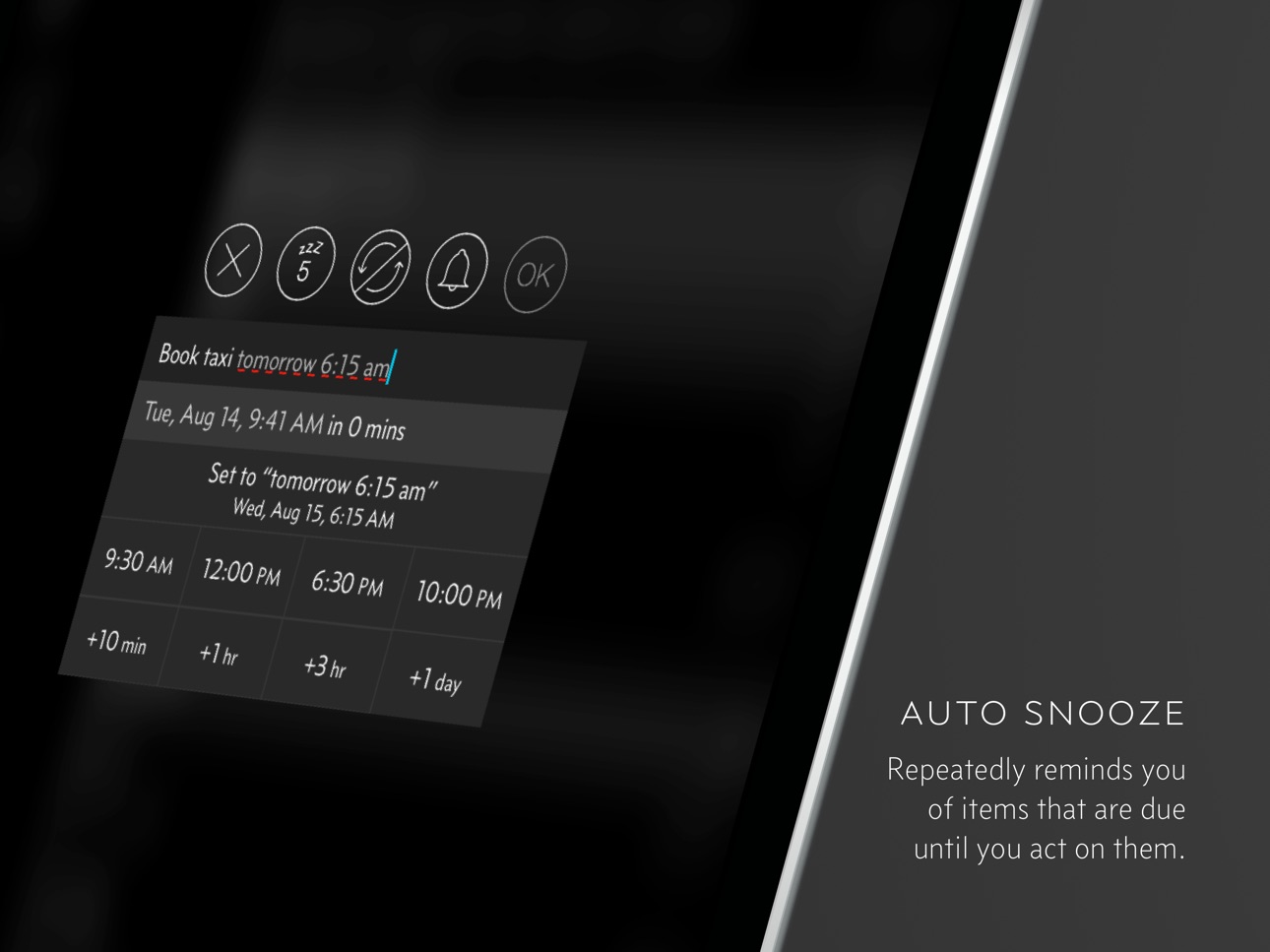
Auto Snooze repeatedly* notifies you of missed reminders until marked done or rescheduled. Choose between intervals of every 1, 5, 10, 15, 30 and 60 minutes.
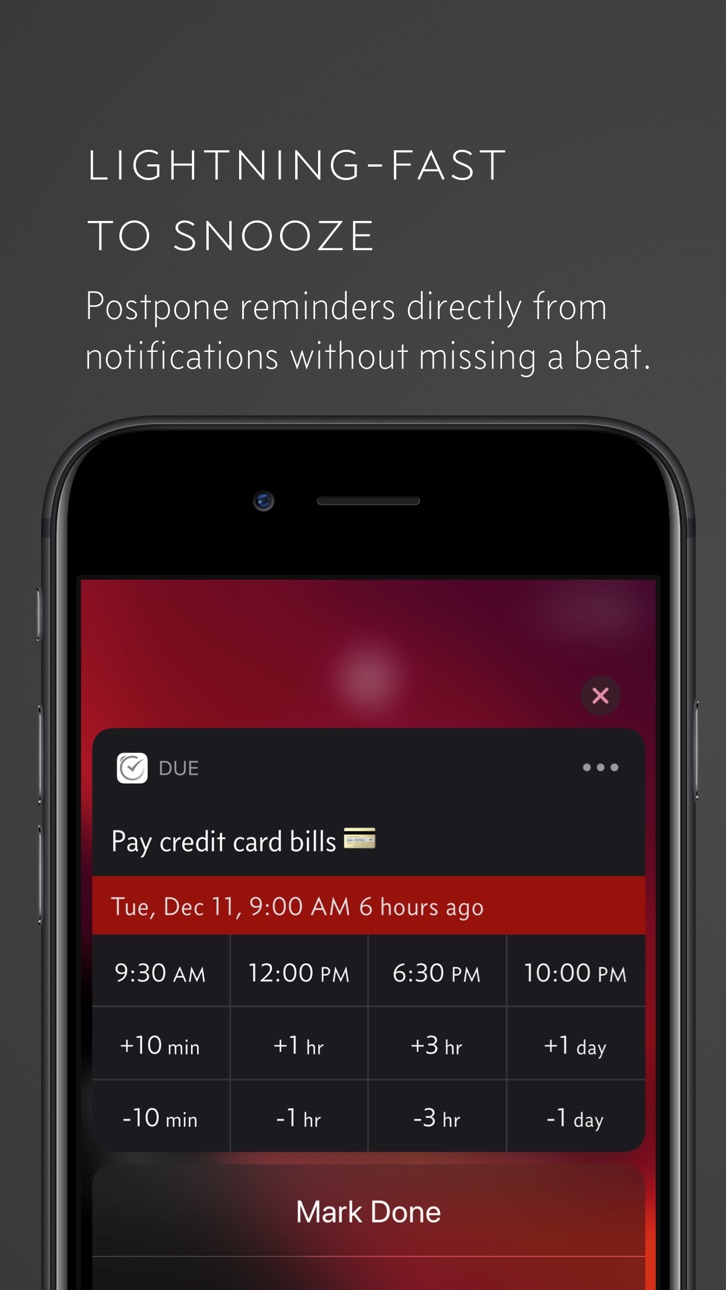
2. Fast to Set, Fast to Postpone
A time picker with 12 preset and fully customizable times lets you set due dates and postpone reminders in record time.
3. Natural Date & Time Parsing
Due can also parse dates and times that you typed or dictate and offer to set the due dates and times for you.
4. Countdown Timers
Precise to the second, perfect for making the perfect soft-boiled eggs, brewing your coffee and more. Set them up once and reuse them forever
5. Powerful Recurring Reminders
From the simple daily and weekly reminders to the complex every-3rd-Wednesday-of-the-month kind of reminders
6. Keep in Sync**
Use iCloud or Dropbox to keep your reminders and timers in sync across your iPhone, iPad and Mac.
7. Works Offline, Completely Private
There is no account to sign up for. We don't store, and we can't access your reminders and timers. And you don't need internet to receive reminders.
8. Accessible to Everyone
Automatically adjusts text size according to your system setting, and offers full VoiceOver support. Due is also localized in 17 languages.
* By default, auto snooze repeats 5 times, and can be configured to repeat up to 10 times. Due can auto snooze any overdue items indefinitely when you launch Due or act on any of its notifications.
** Sync on Mac requires Due for Mac (sold separately)
WHAT'S THAT IN-APP PURCHASE ABOUT?
When you purchase Due today, you will have access to every feature in the app today—no further purchase required.
You will also get access to all new features released one year from your date of purchase.
The optional Due Upgrade Pass subscription allows you to continue getting access to all new features released one year *after* your date of purchase.
And here's the deal: Every feature that you have unlocked will remain available to you, forever—even if you stop subscribing.
Even without a subscription, you'll always receive bug-fix and compatibility updates for free. These updates add support for the latest iPhones, iPads and Apple Watches. They also help ensure that Due continues to function well on the latest versions of iOS, iPadOS and watchOS.
Due has a pretty good track record with that.
To illustrate: If you've purchased Due back in 2010 for your iPhone 3G running iOS 4, that very same app in 2026 is now optimized for iPhone 17 Pro Max running iOS 26. It even works on devices that didn't exist back then, such as the iPad Pro and the Apple Watch.
TERMS & PRIVACY POLICY
Our terms of use and privacy policy is available here: https://www.dueapp.com/terms.html
COMPATIBILITY
Due requires an iPhone, iPod touch or iPad running iOS 16 or later. The Watch app is a companion to the iOS app. It requires watchOS 8 (or later) and the paired iPhone to work correctly.
In-App Purchases US pricing
Upgrade Pass Subscription
Annual Upgrade Pass (Mobile) · Yearly$4.99
Capabilities
In-App PurchasesSiri
Accessibility
ipadiphonemacrealityDevicetvoswatch
Version history 25 versions
Build 887531924v26.4.32026-07-01 16:21:11
• Automatically cleans up reminders that were accidentally duplicated, with a new tool to repair any that remain.
Build 886579652v26.4.22026-06-06 02:09:34
Prominent Alerts for Reminders
You can now set Prominent Alerts for reminders. You can also selectively enable them for the reminders or timers you can’t afford to miss. Prominent Alerts break through Silent and Focus modes and stay on screen until you act on them, much like an alarm from the Clock app.
Other Changes
• Strengthened safeguards to stop a reminder from unexpectedly duplicating itself. (26.4.1, 26.4.2)
• The “Sync and Refresh Notifications” shortcut now reports how many reminders were auto-imported from Reminders alongside the sync summary.
• Reminders and timers using Prominent Alerts now show an indicator glyph in the lists, alongside the existing Critical Alert indicator.
Bug Fixes
• Fixed an issue where notifications were not updated after a background sync until the app was opened.
• Fixed an issue where the “Sync and Refresh Notifications” shortcut did not allow overdue reminders to continue auto-snoozing indefinitely (thanks Mongkii!).
• Fixed an issue where the prompt to update Due could fail to appear when sync data required a newer version of the app.
• Fixed a layout issue with the timer Live Activity in the expanded Dynamic Island.
Build 886298800v26.4.12026-05-30 01:27:28
Prominent Alerts for Reminders
You can now set Prominent Alerts for reminders. You can also selectively enable them for the reminders or timers you can’t afford to miss. Prominent Alerts break through Silent and Focus modes and stay on screen until you act on them, much like an alarm from the Clock app.
Other Changes
• Prevent a reminder from unexpectedly duplicating itself. (26.4.1)
• The “Sync and Refresh Notifications” shortcut now reports how many reminders were auto-imported from Reminders alongside the sync summary.
• Reminders and timers using Prominent Alerts now show an indicator glyph in the lists, alongside the existing Critical Alert indicator.
Bug Fixes
• Fixed an issue where notifications were not updated after a background sync until the app was opened.
• Fixed an issue where the “Sync and Refresh Notifications” shortcut did not allow overdue reminders to continue auto-snoozing indefinitely (thanks Mongkii!).
• Fixed an issue where the prompt to update Due could fail to appear when sync data required a newer version of the app.
• Fixed a layout issue with the timer Live Activity in the expanded Dynamic Island.
Build 884770130v26.42026-05-20 05:51:24
Prominent Alerts for Reminders
You can now set Prominent Alerts for reminders. You can also selectively enable them for the reminders or timers you can’t afford to miss. Prominent Alerts break through Silent and Focus modes and stay on screen until you act on them, much like an alarm from the Clock app.
Other Changes
• The “Sync and Refresh Notifications” shortcut now reports how many reminders were auto-imported from Reminders alongside the sync summary.
• Reminders and timers using Prominent Alerts now show an indicator glyph in the lists, alongside the existing Critical Alert indicator.
Bug Fixes
• Fixed an issue where notifications were not updated after a background sync until the app was opened.
• Fixed an issue where the “Sync and Refresh Notifications” shortcut did not allow overdue reminders to continue auto-snoozing indefinitely (thanks Mongkii!).
• Fixed an issue where the prompt to update Due could fail to appear when sync data required a newer version of the app.
• Fixed a layout issue with the timer Live Activity in the expanded Dynamic Island.
Build 884019713v26.32026-04-02 07:00:54
Sync and Refresh Notifications shortcut action
Use with Shortcuts automations to:
• Keep reminders in sync across devices
• Let overdue reminders auto-snooze indefinitely
Bug Fixes
• Fixed extra spacing before AM/PM in times displayed on iOS 26.4 and later. (thanks Presto!)
Build 883258990v26.22026-03-12 00:01:02
• Fixed issues where editing reminders with emoji could cause visual glitches or prevent changes from saving (thanks Samir K.).
• Fixed an incorrect message shown when using the Checklist-style widget without access.
Build 881263635v26.12026-02-03 15:53:14
• Fixed an issue that could cause missed notifications due to alerts being cleared unexpectedly (thanks Matt R!).
• Fixed Dynamic Island timers getting stuck or appearing twice when snoozing or restarting Prominent Alert timers.
Build 880423139v25.82025-12-09 04:55:11
• Added option to hide “Open Link” buttons from notification actions. Find it in Settings → Notification Snooze.
Bug Fixes
• Fixed an issue where Auto Import could turn off unexpectedly (thanks s…n, Jonathan G., r.v., Lee S.) (25.7)
• Fixed an issue where timers using Prominent Alerts could continue firing notifications after being stopped.
• Fixed a crash that could occur when the app launches.
Build 880303914v25.72025-12-04 04:50:39
• Fixed an issue where Auto Import could turn off unexpectedly (thanks s…, Jonathan G., r.v., Lee S.)
Build 880167829v25.62025-11-29 01:40:36
• New “Sync When Run” option for Shortcut actions.
Ensures changes are uploaded before the action completes, helping other devices stay up to date. Use with “Incremental Sync“ for best results.
Bug Fixes
• Fixed an issue where running Due shortcuts with the device locked incorrectly showed “You’ll need to unlock your device first” on iOS 26+ (thanks Angela R.)
• Fixed a startup crash affecting Vision Pro users (thanks Stefan L.)
• Updated the Repeat and Auto Snooze selection menus in the editor to native iOS menus, fixing occasional height issues (thanks kostas, Neo C.)
Other Changes
• Due now requires iOS 16 or later.
Build 878700442v25.52025-11-16 06:56:31
Prominent Alerts + Live Countdown for Timers
Keep your timers front and center. With Prominent Alerts, timers stay visible and update in real time on your Lock Screen and Dynamic Island.
Other Changes:
• A fresh new app icon.
• Introducing Midnight Glass — a dark mode icon crafted in Liquid Glass style.
• Fixed a crash on launch that could occur after completing reminders from the widget (thanks, Boon Eng!).
Build 878451651v25.42025-09-28 02:30:29
• Fixed crash when attempting to add widget on iOS 26.
Build 876692726v25.32025-09-25 01:08:23
• Improved stability by fixing several crashes.
• Fixed iCloud sync errors on iOS 26 and later.
• Added a new “Create Reminder (watchOS 26+ Workaround)” shortcut action. Use this version instead of the original to avoid a watchOS 26 bug. It also works fine on iOS and macOS.
• Improved performance of “Create Reminder” and “Create Repeating Reminder” shortcut actions.
• Fixed shortcuts created on macOS not running correctly on iOS.
Build 875388264v25.22025-06-07 12:31:26
• Incremental Sync. Sync faster and use less data. Turn it on in Sync Settings > Use Incremental Sync.
• Timers with the same duration are now sorted alphabetically.
• You can now selectively restore individual reminders from a backup.
• Fixed an issue where Auto Import did not respect changes to the default auto snooze setting until the app was relaunched.
Build 871478261v25.12025-02-01 03:17:16
• Open Section shortcut action and control widget. Jump straight to the exact section you need using Shortcuts or Control Center.
• Stop & Pause Timer shortcut actions. Gain more control over your timers with dedicated shortcuts to pause or stop them as needed.
• Improved widget appearance when the Home Screen is tinted.
• Fixed an issue where notification text on Apple Watch could sometimes be clipped.
• Due for Apple Watch now requires watchOS 8 or later.
Build 870889168v24.72024-12-05 01:17:26
• Resolved an issue where Auto Import can sometimes import the same reminder twice (thanks Dan G.)
• Resolved an issue where the 'Find Reminders' shortcut action returned no results when no filter was applied (thanks Dillon K.)
Build 869838299v24.62024-10-20 08:07:03
• The “Find Reminders” shortcut action now supports the conditions: “is today,” “is in the next,” “is in the last,” “is between,” and “is not exactly.”
• Resolves an issue where some users were unable to mark reminders as complete via the widget.
• Resolves an issue where certain shortcut actions fail to run and incorrectly prompt users to purchase the Upgrade Pass even when one is already active.
Build 869506837v24.52024-10-06 12:03:10
Resolved an issue where marking reminders as complete via the widget did not work correctly
Build 869173325v24.42024-09-23 15:02:47
Due 24.4 introduces four new shortcut actions, making it easier to manage your reminders and utilize your timers.
1. Start Timer shortcut action
Create shortcuts for your frequently used timers. Use them to help you stay on top of tasks, or integrate them as part of your bigger workflows.
2. Find Reminders shortcut action
Filter and locate specific reminders that you’d like to work on. Pair this with ‘Edit Reminder’ and ‘Mark Done’ shortcut actions for powerful workflows.
3. Edit Reminder shortcut action
Quickly postpone reminders that you can’t attend to right now, or adjust the auto snooze settings of multiple reminders at one go.
4. Mark Done shortcut action
Stay focused by marking reminders as complete and removing them from your notifications.
Build 867369305v24.32024-07-10 09:52:16
• NEW: Shortcuts: You can now set critical alerts directly within the ‘Create Reminder’ and ‘Create Repeating Reminder’ shortcut actions.
• NEW: Setting: Added an option to prevent suggestions for calling, SMS, or opening links when completing reminders with phone numbers or links.
• Fixes an issue where deleted items continue to show up as Siri suggestions or shortcuts.
• Fixes an issue where adding a new reminder via a Due URL would change the original due date if a date/time string was included in the title. (thanks Jack S.)
• Fixes an incomplete localization issue for the Japanese language.
Build 863907876v24.22024-02-21 15:38:18
• Fixes an issue that prevented keyboard access on iPad.
• New: Setting in ‘Alerts & Badges’ to use title of reminder/timer as title of notification.
Build 862575522v24.12024-01-04 15:54:50
Larger widgets
See more of your reminders on your Home Screen with large and extra large (iPad-only) widgets.
• Resolved the issue of illegible text when the widget appearance is set to Dark (thanks Tan Y.).
• Widgets now dynamically determine the number of items that can fit based on font size and available space.
Build 860451532v23.92023-10-07 01:58:05
• Improved natural date parser to support parsing military time on devices with 24-hour time setting enabled.
• “Always only this occurrence” option that disables the confirmation prompt when making changes to the due date of a recurring reminder.
• Resolved a visual glitch in multistage text input methods such as Japanese Kana or Chinese Pinyin where the temporarily inserted text was not visible until confirmed (thanks 下村さん).
• Resolved a bug where Siri responds with an error message when attempting to add reminders via Siri (thanks Russell D.).
Build 860170714v23.82023-09-25 23:48:40
• Fixed bug in iOS 17 where the 'Create Event' function was not functioning properly. (thanks Barry G.)
• Fixed bug where badges are not updated after marking reminders complete from widgets. (thanks 林)
Build 860099600v23.72023-09-21 16:53:42
Fixed a bug that prevented viewing and automatic importing of system reminders in iOS 17.
---
New Checklist-style Widget
Now, you can mark reminders complete directly from widgets.
Price history by region
Currency
Show
Columns
Search
App performance US
Availability 116 of 116 storefronts
| Region | Language | Price | Ratings | Avg | Version |
|---|---|---|---|---|---|
| US | en-US | USD 7.99 | 2.8k | 4.7 | 26.4.3 |
| GB | en-GB | GBP 7.99 | 406 | 4.6 | 26.4.3 |
| DE | de-DE | EUR 8.99 | 363 | 4.6 | 26.4.3 |
| CN | zh-Hans-CN | CNY 58 | 358 | 4.3 | 26.4.3 |
| JP | ja | JPY 900 | 340 | 4.5 | 26.4.3 |
| CA | en-CA | CAD 9.99 | 292 | 4.5 | 26.4.3 |
| AU | en-AU | AUD 12.99 | 219 | 4.6 | 26.4.3 |
| IT | it | EUR 8.99 | 153 | 4.6 | 26.4.3 |
| RU | ru | RUB 699 | 137 | 4.5 | 26.4.3 |
| ES | es-ES | EUR 8.99 | 91 | 4.5 | 26.4.3 |
| SE | sv | SEK 99 | 90 | 4.5 | 26.4.3 |
| IN | en-GB | INR 699 | 84 | 4.8 | 26.4.3 |
| FR | fr-FR | EUR 8.99 | 78 | 4.2 | 26.4.3 |
| NL | nl | EUR 8.99 | 78 | 4.5 | 26.4.3 |
| MX | es-MX | MXN 179 | 70 | 4.7 | 26.4.3 |
| CH | de-CH | CHF 7 | 58 | 4.4 | 26.4.3 |
| PL | en-GB | PLN 29.99 | 45 | 4.7 | 26.4.3 |
| BE | en-GB | EUR 8.99 | 44 | 4.8 | 26.4.3 |
| DK | en-GB | DKK 69 | 37 | 4.6 | 26.4.3 |
| HK | zh-Hant-HK | HKD 58 | 36 | 4.6 | 26.4.3 |
| NO | en-GB | NOK 99 | 33 | 4.7 | 26.4.3 |
| TW | zh-Hant-TW | TWD 290 | 33 | 4.3 | 26.4.3 |
| IL | en-GB | ILS 29.9 | 32 | 4.6 | 26.4.3 |
| UA | en-GB | USD 9.99 | 31 | 4.8 | 26.4.3 |
| SG | en-GB | SGD 9.98 | 30 | 4.5 | 26.4.3 |
| AT | de-DE | EUR 8.99 | 29 | 4.4 | 26.4.3 |
| KR | ko | KRW 12000 | 29 | 3.8 | 26.4.3 |
| NZ | en-AU | NZD 14.99 | 26 | 4.7 | 26.4.3 |
| PH | en-GB | PHP 499 | 25 | 4.5 | 26.4.3 |
| PT | pt-PT | EUR 8.99 | 24 | 4.8 | 26.4.3 |
| IE | en-GB | EUR 8.99 | 23 | 4.9 | 26.4.3 |
| HU | en-GB | HUF 3490 | 22 | 4.5 | 26.4.3 |
| MY | en-GB | MYR 39.9 | 21 | 4.2 | 26.4.3 |
| TR | en-GB | TRY 399.99 | 21 | 4.7 | 26.4.3 |
| SA | en-GB | SAR 34.99 | 20 | 4.5 | 26.4.3 |
| FI | en-GB | EUR 8.99 | 19 | 4.5 | 26.4.3 |
| GR | en-GB | EUR 8.99 | 18 | 4.9 | 26.4.3 |
| CZ | en-GB | CZK 199 | 16 | 4.2 | 26.4.3 |
| RO | en-GB | RON 39.99 | 15 | 4.8 | 26.4.3 |
| TH | en-GB | THB 299 | 15 | 4.7 | 26.4.3 |
| ID | en-GB | IDR 129000 | 11 | 4.6 | 26.4.3 |
| SK | en-GB | EUR 8.99 | 10 | 4.9 | 26.4.3 |
| BG | en-GB | EUR 8.99 | 9 | 4.6 | 26.4.3 |
| AE | en-GB | AED 29.99 | 8 | 3.6 | 26.4.3 |
| HR | en-GB | EUR 8.99 | 8 | 5.0 | 26.4.3 |
| VN | en-GB | VND 199000 | 8 | 4.6 | 26.4.3 |
| KZ | en-GB | KZT 4990 | 7 | 5.0 | 26.4.3 |
| LU | en-GB | EUR 8.99 | 6 | 3.7 | 26.4.3 |
| BY | en-GB | USD 9.99 | 5 | 5.0 | 26.4.3 |
| KW | en-GB | USD 7.99 | 5 | 4.4 | 26.4.3 |
| LT | en-GB | EUR 8.99 | 5 | 5.0 | 26.4.3 |
| LK | en-GB | USD 7.99 | 4 | 4.5 | 26.4.3 |
| LV | en-GB | EUR 8.99 | 4 | 5.0 | 26.4.3 |
| OM | en-GB | USD 7.99 | 4 | 3.5 | 26.4.3 |
| EE | en-GB | EUR 8.99 | 3 | 4.3 | 26.4.3 |
| MO | zh-Hant-HK | USD 7.99 | 3 | 5.0 | 26.4.3 |
| PK | en-GB | PKR 2200 | 3 | 4.7 | 26.4.3 |
| SI | en-GB | EUR 8.99 | 3 | 5.0 | 26.4.3 |
| AM | en-GB | USD 9.99 | 2 | 5.0 | 26.4.3 |
| EG | en-GB | EGP 399.99 | 2 | 4.5 | 26.4.3 |
| LB | en-GB | USD 7.99 | 2 | 5.0 | 26.4.3 |
| QA | en-GB | QAR 29.99 | 2 | 4.5 | 26.4.3 |
| BH | en-GB | USD 8.99 | 1 | 5.0 | 26.4.3 |
| IS | en-GB | USD 9.99 | 1 | 5.0 | 26.4.3 |
| JO | en-GB | USD 7.99 | 1 | 5.0 | 26.4.3 |
| KE | en-GB | USD 9.99 | 1 | 3.0 | 26.4.3 |
| MK | en-GB | USD 7.99 | 1 | 5.0 | 26.4.3 |
| NG | en-GB | NGN 12900 | 1 | 5.0 | 26.4.3 |
| AF | en-GB | USD 7.99 | 0 | — | 26.4.3 |
| AL | en-GB | USD 9.99 | 0 | — | 26.4.3 |
| AZ | en-GB | USD 9.99 | 0 | — | 26.4.3 |
| BA | en-GB | EUR 8.99 | 0 | — | 26.4.3 |
| BJ | en-GB | USD 9.99 | 0 | — | 26.4.3 |
| BM | en-GB | USD 7.99 | 0 | — | 26.4.3 |
| BO | es-MX | USD 7.99 | 0 | — | 26.4.3 |
| BT | en-GB | USD 7.99 | 0 | — | 26.4.3 |
| BW | en-GB | USD 7.99 | 0 | — | 26.4.3 |
| BZ | en-GB | USD 7.99 | 0 | — | 26.4.3 |
| CD | en-GB | USD 7.99 | 0 | — | 26.4.3 |
| CG | en-GB | USD 7.99 | 0 | — | 26.4.3 |
| CY | en-GB | EUR 8.99 | 0 | — | 26.4.3 |
| GA | fr-FR | USD 7.99 | 0 | — | 26.4.3 |
| GE | en-GB | USD 9.99 | 0 | — | 26.4.3 |
| GH | en-GB | USD 9.99 | 0 | — | 26.4.3 |
| GM | en-GB | USD 7.99 | 0 | — | 26.4.3 |
| GY | en-GB | USD 7.99 | 0 | — | 26.4.3 |
| IQ | en-GB | USD 7.99 | 0 | — | 26.4.3 |
| KG | en-GB | USD 8.99 | 0 | — | 26.4.3 |
| KH | en-GB | USD 8.99 | 0 | — | 26.4.3 |
| LA | en-GB | USD 8.99 | 0 | — | 26.4.3 |
| LC | en-GB | USD 7.99 | 0 | — | 26.4.3 |
| LY | en-GB | USD 7.99 | 0 | — | 26.4.3 |
| MD | en-GB | USD 9.99 | 0 | — | 26.4.3 |
| ME | en-GB | EUR 6.99 | 0 | — | 26.4.3 |
| MG | en-GB | USD 7.99 | 0 | — | 26.4.3 |
| MM | en-GB | USD 7.99 | 0 | — | 26.4.3 |
| MR | en-GB | USD 7.99 | 0 | — | 26.4.3 |
| MT | en-GB | EUR 8.99 | 0 | — | 26.4.3 |
| NE | en-GB | USD 7.99 | 0 | — | 26.4.3 |
| NP | en-GB | USD 9.99 | 0 | — | 26.4.3 |
| PY | es-MX | USD 7.99 | 0 | — | 26.4.3 |
| RS | en-GB | EUR 8.99 | 0 | — | 26.4.3 |
| SB | en-GB | USD 7.99 | 0 | — | 26.4.3 |
| SR | en-GB | USD 8.99 | 0 | — | 26.4.3 |
| TD | en-GB | USD 7.99 | 0 | — | 26.4.3 |
| TJ | en-GB | USD 8.99 | 0 | — | 26.4.3 |
| TM | en-GB | USD 7.99 | 0 | — | 26.4.3 |
| TN | en-GB | USD 7.99 | 0 | — | 26.4.3 |
| TT | en-GB | USD 7.99 | 0 | — | 26.4.3 |
| TZ | en-GB | TZS 22900 | 0 | — | 26.4.3 |
| UY | en-GB | USD 7.99 | 0 | — | 26.4.3 |
| VC | en-GB | USD 7.99 | 0 | — | 26.4.3 |
| VU | en-GB | USD 7.99 | 0 | — | 26.4.3 |
| XK | en-GB | EUR 8.99 | 0 | — | 26.4.3 |
| YE | en-GB | USD 7.99 | 0 | — | 26.4.3 |
| ZM | en-GB | USD 9.99 | 0 | — | 26.4.3 |
Reviews 30 reviews · US
★★★★★
Unusable with Apple Watch
Love the app on the iPhone but incredibly annoying to use with Apple Watch. If you have stacked reminders (say 5 reminders at 9 AM), the expected behavior is for Apple Watch to buzz you once and say “5 notifications on Due.” It doesn’t. It buzzes you, 5 separate times. Even more annoying is that the app waits about 5-10 seconds between each buzz, so 5 notifications mean you get buzzed every 5-10 seconds for nearly a minute at every reminder or snooze period. I’ve contacted Due support who suggested some setting changes to minimize this behavior, but ultimately said, “it’s Apple’s system, we ca
djk04032026-06-08
★★★★★
Lost prominent reminders I already paid for with previous sub
If I get to keep everything I’ve already previously paid for why am I suddenly no longer able to set prominent reminders and it tells me I have to have a subscription? I could understand if you had to remove prominent reminders from everybody for some weird safety reason or something, but obviously the feature still exists. You seem to have modified it in some way that meets your definition of I have to pay to get it. that will not be happening
grant9402026-05-27
★★★★★
If I could give it 10 stars, I would
I’ve had DUE for longer than I can remember, and I’ve always loved it. It’s simple, it’s easy, and—unlike so many other apps—it doesn’t cost a small fortune. It’s an affordable annual purchase (not an endless subscription), and it does exactly what it promises, in the cleanest and most straightforward way possible.
I never write app reviews because the best apps tend to fade into the background—you use them, rely on them, and stop thinking about them. But this app deserves recognition.
Earlier this year, I was diagnosed with ADHD, and everything suddenly clicked. I realized that DUE has always
jmazeing2026-05-07
★★★★★
Simple yet robust reminder app
I’ve written less than five reviews in over 10 years of owning iPhones. I have severe ADHD and I’ve tried most if not all of the available reminder apps. This one addresses everything you’d need in an app, but is still simple and easy to use. I love the ability to snooze a reminder from the lock screen, either from a selection of customizable times (e.g., 9am, 2pm) or a customizable AMOUNT of time (e.g., 3 hrs, 6 hrs). And for the reoccurring reminders, it’s nice to have the option to repeat the reminder from the date due (e.g., Take out trash every Monday) or from the completion date (e.g., W
Sharee Ann2026-03-13
★★★★★
Great but syncing could use work
Love pretty much everything about this app, I've been using it basically since it first came out a million years ago. Recently I got an iPad and I've noticed syncing between the iPhone and iPad is hit or miss. I have incremental sync enabled on all devices. The problem seems to be that Due needs a little time to sync and I have a habit of killing apps when I am done with them. I would think the syncing could be ran as a background process to avoid this issue. Also, if I snooze an alert from the watch or notification I'm not sure how well things sync in that scenario (haven't paid close enough
stoket2026-01-24
★★★★★
I use Due daily!
Due is for todos that I MUST do. It bugs me until I do it, and yet it will snooze when I need it to. It has a good variety of alarm tones including longer ones that are difficult to miss. Reminders are easy to make and you can make them recur however you like. The latest update only makes it better.
majken22026-01-10
★★★★★
Reliable App 💯
App is great for med reminders cuz of the auto snooze. Been using for years just wish dev would make a normal round + button to add items. I reached out to him about this & said he planned to but that was like 2-3 years ago 😞. Wish it had description title under reminder to put more clarity. But overall it’s a great app just really want a better + button to add task maybe a floating one like most todo apps 🙏🏼
Rogers📝2026-01-07
★★★★★
My ADHD GTD Tickler….and “Annoyer” 😂 ***update for 2025***
2025 - the app delivers update after update. Stability and new features. It is so vital for me. Meds/Shave/Haircut/Monthly Nagging Tasks like deep clean X room or under X bathroom sink. Do I become numb to the alerts sure; but also; it’s the most important app for me outside of Native simply for meds & basic hygene
Previous - This app is vital to my productivity workflow. Never forget again. Get nagged when you need to, get reminded in those key moments.
Love this app. Continues to get better and better over time.
Jobtimate2025-12-20
★★★★★
Wonderful tool !
This app has essentially changed and improved my life….I use it not only for reminders but also favorite quotes, sayings, biblical scriptures, as well as birthdays for friends and family…I have not found a better app that does all of these things that I need to keep my daily life on track…Thank you to all that contribute to the constant improvements and enhancements to the app!
Jimmyspud2025-12-12
★★★★★
Fantastic take on the task list
There are obviously hundreds of task list apps in the store and I have tried them all... For those of you that have ADD/Adhd I highly recommend giving this a try. My experience has been that making traditional lists has been a disaster in terms of productivity, even something as simple as clear just causes lists to grow forever (Even better if you have an Apple Watch) the nagging regarding small tasks may sound like a bad idea, but it has been a lifesaver. Those of you that are technically inclined will appreciate the robust URL scheme that easily integrates with launcher pro and the like. I'l
cp6012025-12-01
★★★★★
Excellent app
I’ve had this app for many years now and I think my favorite thing is the developers Never Stop Working to improve it. I use it daily for reminders and lists of things I don’t want to forget. I love the integration of alarms and how they are viewable from the lock screen. I have ADHD and it is a necessary tool to keep my life on track. Plain and simple, I would not be productive without this app. THANK YOU!!
Sweetlilsuzy2025-11-23
★★★★★ · edited
Love this app - and now it’s working perfect on every device, including my Apple Vision Pro!
Edit… since the latest update I feel like the Vision Pro version of the iPad app is not crashing like it used to constantly. I’m really hoping it remains like this. Absolutely love this app. I’ve been paying the subscription for as long as this app has been out and available and it’s the first app I download as I’ve said previously …..
First app I download on every new device. Only app I’ve found that can do the one thing I need, nag me until I relent and respond to the Due notification. It’s easy to temporarily push the notification away to a later time, or accept it and complete the task. It
RandomPerson23042025-10-26
★★★★★
Missing key feature
I bought this app to help me remember to do repetitive daily tasks, the problem is that it doesn’t allow you to repeat a task by minute/hour only by day. So this app is kinda useless to me unless I want to set up a bunch of reminders for every 30 mins a day. Another similar app I have called Galarm has this feature (ability to repeat an alarm every x number of minutes) and I assumed it was standard. I like this app’s UX more so wanted to try it but it isn’t useful so I wasted money buying it.
Jcharm2025-10-13
★★★★★
wonderful app, worth the one-time payment.
I have ADHD, and this is by far the only thing that has worked for me. I have tried everything- Agendas, calendars, ADHD targeted apps- nothing. until now!!
the persistent reminders every five minutes is so helpful- you can toggle them to be different times, but my memory is like that of a worm's. Also, the one-time payment instead of a "subscription plan" is super important. you get the entire app plus any future updates!
TLDR
i love this app and i love the developers. I am so thankful i found it.
FrogableLate2025-09-02
★★★★★
Great app!
I don’t normally write reviews, but this app has been wonderful! My husband forgets literally everything. He was setting reminders in his phone, but if they would remind him at the wrong time he would clear it and forget about it. I love how this app lets you snooze the reminder for a later time. Thought he was just not wanting to do stuff, but he genuinely was just forgetting. I also forget things within like 5 seconds, so this app has made a huge difference for both of us. Highly recommend!
Angie17242025-08-21
★★★★★ · edited
Life saver for over a decade
It’s now 2025 and I’ve been using Due since 2014. It’s been an essential part of keeping me on task ever since. For someone that gets distracted and is often juggling multiple tasks this thing is a life saver. It can be set to automatically import reminders you create w. Siri and it can make recurring reminders at custom intervals. Reminders can also be snoozed for various custom preset times. But the best part is that Due can be setup remind you again, and again, and again just in case you’re forgetful. When used with the Apple Watch, Due is a life changer.
Davos.882025-06-21
★★★★★
I can't gush about this enough....
I'm gonna do the usual stereotypical "I don't usually leave reviews". I don't! Because nobody has time for that! But holy cow I don't have enough time to say all the good things about this app! Especially the developers. They actually listen to their customers about what will make things better. They constantly update the app when there are bugs or suggested changes. I have a family subscription and I have been using this for what feels like years now. My spouse as well as children use this. It is extremely useful for people with "normal brains", but for a neurodivergent family like ours it is
Blacjaguar2025-06-14
★★★★★
Indispensable
This is a great little todo add for my adhd brain. It's nice to be able to schedule a task to show up at a specific future time and forget about it til then, while also getting repeated annoying reminders when the time for the task has in fact come. One feature I would request as a heavy use of this app is some way to mass-postpone tasks as a group. Oftentimes I have 4 different notifications going off but something else has come up and rather than postponing them all one at a time I want to push them all back by an hour. Otherwise, this app is perfect for my needs!
Dan9292922025-04-29
★★★★★
Great app, but lacking some functionality
This app is truly been a game changer for me in the sense that my most important reminders will be put into here so that I cannot forget them. Some of the functionality that would be very useful in my opinion would be the ability to better integrate with your native Reminders app. For me it’s iPhone reminders. The app allows you to do this but more in a way of just cutting what’s in your native Reminders app and pasting it into the Due app. Ideally, I would be able to essentially control Due from the native Reminders app, but receive all the same reminders from Due. The other functionality enh
I want good apps2025-04-01
★★★★★
No more excuses
Love the app. Great constant reminders to get things done.
My only requests would be to have the option to change my snooze frequencies.
Sometimes being reminded every hour isn’t necessary for me. It would be great to have the option to change the auto-snooze feature to every 2-3 hours. It would reduce my alarm fatigue.
IForget3652025-03-27
★★★★★
Perfect balance between a reminder app and an alarm clock
I’ve found Due to be the perfect balance between a reminder app and an alarm clock. By keeping only time-sensitive reminders, it ensures you’re not overloaded with notifications or becoming desensitized to them—something that can happen with other reminder apps. Due keeps you accountable without being overwhelming.
Beyond the app itself, the customer service is exceptional. I reached out three times with specific questions, and each time, I received thoughtful responses—either the same day or the next—along with personalized recommendations on how to make the most of the app. That level of su
Yamil L2025-03-03
★★★★★
Very Tedious and Sounds Quieter than iOS
I was already really offended that I had to pay the high cost upfront with no free trial. I tried it anyway because of the high ratings and the many sounds. The sounds are really quiet when you have iOS sounds at the volume you want. So you either have to turn up the volume so you can hear this app at a distance (I don't carry my iPad and iPhone all the time) and then iOS sounds will be too loud, or have iOS sounds set high enough to hear at a distance, with this app sounding too quiet to hear at a distance.
Also, setting up a reminder is the slowest, most tedious, of any Reminders app I ha
Eleni3332025-03-02
★★★★★
Great but could improve
I think this app is great but I would like to see location based reminders added. For example if you arrive at the store Due reminds you to get eggs so you don’t forget the one thing you really needed. Also would like to see subtasks added. So if you need to be reminded to do something but also to do another small task branched off of that you don’t have to create a new alert but just add it to the existing one. Otherwise the app is great!
AlexPanda.942025-02-23
★★★★★
A life-changing app
I love the Due app. no more dismissing and forgetting important tasks for me !
This app gets constant updates with great new features added all the time. It automatically grabs reminders from Apple reminders. It’s UI is simple, it works with Apple Watch, it has a critical alert function I could go on and on. I think the price of the premium subscription is well worth it. you gotta try it!
Bigshoozeda2025-02-08
★★★★★
Amazing app! DEFINITELY should buy! Only a few bucks.
I use this app probably 5 to 10 times per day, every day. I get so busy as a college student and husband and a father of a two-year-old girl that I can get so distracted by one thing that I completely forget another thing that is also important. This app keeps reminding me until I actually get the task accomplished, so that is the primary way that it is better than simple alarms that my iPhone comes with. I can have it remind me every minute every five minutes every half hour every hour or once a week or once every two months; there are so many options. Buy it. You definitely will not regret i
FotoJoe2025-02-07
★★★★★
Super Helpful for ADHD
I wish I’d known about this app sooner! I set reminders and calendar appointments in the native apps on my phone, and the notifications always disappear into the ether. I see them once, and then with my ADHD, I forget about it within just a few seconds. This app continues to remind me and lets me snooze it if I can’t take care of it right now. It’s such a simple feature that should be part of every app with reminders, but for some reason it just isn’t. I’ve been more productive and less stressed about forgetting things since I started using Due. I can’t recommend it enough.
Whazzat Kangaroo2025-01-23
★★★★★
First To Do app that really works for me
This is exactly what I needed. It’s fast to add a task and set an appropriate time - in an hour, in a day, in a week. But most importantly if the timer goes off and you can’t do it or it isn’t done you can instantly put it back in the queue.
My only very minor quibble is that it should be easier to edit text of a completed task.
SteveS22025-01-07
★★★★★
Finally!!! Actually reminded!
I’ve tried a lot of apps to help manage my chronic illnesses and medications and I’m thankful finally to have the exact solution I’ve been wanting. I tried alarms, multiple calendar apps, multiple reminder and to do list apps. I can’t believe they don’t all actually… remind you of things. This actually does remind you until you do the thing. Set a date, time, name, frequency of recurrence, exact frequency of reminders, settings very customizable. Widget is great too. I have never paid for an app before, but just get this one.
Hayden H152025-01-01
★★★★★
Almost perfect
If you check off or complete a reminder on one device it does not sync with other devices until you open the app on the other device. So if you clear a reminder on your phone it will still ding every 5 minutes on your iPad until you open it on the iPad. It would be great if that could be fixed.
xcelldriver2024-12-22
★★★★★
So functional
This is the only app I’ve ever found that is functional in the way I need it to be. Tick tick has the constant reminder option but when I tried the app it was difficult to navigate and so complicated. I love how simple and easy to use the app is and how reliable it is. I’d love to see more functionality (like routines, habit tracker, etc.) but so often apps sacrifice ease of use for multiple functions. I think my only critique is that it could use a bit of a face lift, but even that isn’t a big deal to me. It works, it’s fast, and it’s easy to use.
Kate92102024-12-21
Change log 29 changes · US
✎
releaseNotes updated
• Automatically cleans up reminders that were accidentally duplicated, with a new tool to repair any that remain.
✎
description updated
Due remembers all the things that you need so you don't have to.
Because it repeatedly reminds you of things until you act on them, it‘s impossible to forget a
✎
subtitle updated
Never Forget Anything Again
✎
name updated
Due - Reminders & Timers
◆
Version 26.4.3 released
• Automatically cleans up reminders that were accidentally duplicated, with a new tool to repair any that remain.
◆
Version 26.4.2 released
Prominent Alerts for Reminders
You can now set Prominent Alerts for reminders. You can also selectively enable them for the reminders or timers you can’t afford to miss. Prominent Alerts break through Silent and Focus modes and stay on scre
◆
Version 26.4.1 released
Prominent Alerts for Reminders
You can now set Prominent Alerts for reminders. You can also selectively enable them for the reminders or timers you can’t afford to miss. Prominent Alerts break through Silent and Focus modes and stay on scre
◆
Version 26.4 released
Prominent Alerts for Reminders
You can now set Prominent Alerts for reminders. You can also selectively enable them for the reminders or timers you can’t afford to miss. Prominent Alerts break through Silent and Focus modes and stay on scre
◆
Version 26.3 released
Sync and Refresh Notifications shortcut action
Use with Shortcuts automations to:
• Keep reminders in sync across devices
• Let overdue reminders auto-snooze indefinitely
Bug Fixes
• Fixed extra spacing before AM/PM in times displayed on i
◆
Version 26.2 released
• Fixed issues where editing reminders with emoji could cause visual glitches or prevent changes from saving (thanks Samir K.).
• Fixed an incorrect message shown when using the Checklist-style widget without access.
◆
Version 26.1 released
• Fixed an issue that could cause missed notifications due to alerts being cleared unexpectedly (thanks Matt R!).
• Fixed Dynamic Island timers getting stuck or appearing twice when snoozing or restarting Prominent Alert timers.
◆
Version 25.8 released
• Added option to hide “Open Link” buttons from notification actions. Find it in Settings → Notification Snooze.
Bug Fixes
• Fixed an issue where Auto Import could turn off unexpectedly (thanks s…n, Jonathan G., r.v., Lee S.) (25.7)
• Fixe
◆
Version 25.7 released
• Fixed an issue where Auto Import could turn off unexpectedly (thanks s…, Jonathan G., r.v., Lee S.)
◆
Version 25.6 released
• New “Sync When Run” option for Shortcut actions.
Ensures changes are uploaded before the action completes, helping other devices stay up to date. Use with “Incremental Sync“ for best results.
Bug Fixes
• Fixed an issue where running Due
◆
Version 25.5 released
Prominent Alerts + Live Countdown for Timers
Keep your timers front and center. With Prominent Alerts, timers stay visible and update in real time on your Lock Screen and Dynamic Island.
Other Changes:
• A fresh new app icon.
• Introducing
◆
Version 25.4 released
• Fixed crash when attempting to add widget on iOS 26.
◆
Version 25.3 released
• Improved stability by fixing several crashes.
• Fixed iCloud sync errors on iOS 26 and later.
• Added a new “Create Reminder (watchOS 26+ Workaround)” shortcut action. Use this version instead of the original to avoid a watchOS 26 bug. It
◆
Version 25.2 released
• Incremental Sync. Sync faster and use less data. Turn it on in Sync Settings > Use Incremental Sync.
• Timers with the same duration are now sorted alphabetically.
• You can now selectively restore individual reminders from a backup.
• Fi
◆
Version 25.1 released
• Open Section shortcut action and control widget. Jump straight to the exact section you need using Shortcuts or Control Center.
• Stop & Pause Timer shortcut actions. Gain more control over your timers with dedicated shortcuts to pause or
◆
Version 24.7 released
• Resolved an issue where Auto Import can sometimes import the same reminder twice (thanks Dan G.)
• Resolved an issue where the 'Find Reminders' shortcut action returned no results when no filter was applied (thanks Dillon K.)
◆
Version 24.6 released
• The “Find Reminders” shortcut action now supports the conditions: “is today,” “is in the next,” “is in the last,” “is between,” and “is not exactly.”
• Resolves an issue where some users were unable to mark reminders as complete via the w
◆
Version 24.5 released
Resolved an issue where marking reminders as complete via the widget did not work correctly
◆
Version 24.4 released
Due 24.4 introduces four new shortcut actions, making it easier to manage your reminders and utilize your timers.
1. Start Timer shortcut action
Create shortcuts for your frequently used timers. Use them to help you stay on top of tasks, o
◆
Version 24.3 released
• NEW: Shortcuts: You can now set critical alerts directly within the ‘Create Reminder’ and ‘Create Repeating Reminder’ shortcut actions.
• NEW: Setting: Added an option to prevent suggestions for calling, SMS, or opening links when complet
◆
Version 24.2 released
• Fixes an issue that prevented keyboard access on iPad.
• New: Setting in ‘Alerts & Badges’ to use title of reminder/timer as title of notification.
◆
Version 24.1 released
Larger widgets
See more of your reminders on your Home Screen with large and extra large (iPad-only) widgets.
• Resolved the issue of illegible text when the widget appearance is set to Dark (thanks Tan Y.).
• Widgets now dynamically deter
◆
Version 23.9 released
• Improved natural date parser to support parsing military time on devices with 24-hour time setting enabled.
• “Always only this occurrence” option that disables the confirmation prompt when making changes to the due date of a recurring re
◆
Version 23.8 released
• Fixed bug in iOS 17 where the 'Create Event' function was not functioning properly. (thanks Barry G.)
• Fixed bug where badges are not updated after marking reminders complete from widgets. (thanks 林)
◆
Version 23.7 released
Fixed a bug that prevented viewing and automatic importing of system reminders in iOS 17.
---
New Checklist-style Widget
Now, you can mark reminders complete directly from widgets.