Home › Productivity

 IT
IT
 USen-US
 GBen-GB
 DEde-DE
 CNzh-Hans-CN
 JPja
JPja CAen-CA
 AUen-AUITit
 RUru
RUru ESes-ES
 SEsv
SEsv INen-GB
 FRfr-FR
 NLnl
NLnl BRpt-BR
 MXes-MX
 CHde-CH
 PLen-GB
 BEen-GB
 DKen-GB
 HKzh-Hant-HK
 NOen-GB
 TWzh-Hant-TW
 ILen-GB
 UAen-GB
 SGen-GB
 ATde-DE
 KRko
KRko NZen-AU
 PHen-GB
 PTpt-PT
 IEen-GB
 HUen-GB
 MYen-GB
 TRen-GB
 SAen-GB
 FIen-GB
 GRen-GB
 ZAen-GB
 CZen-GB
 ARes-MX
 ROen-GB
 THen-GB
 CLes-MX
 IDen-GB
 SKen-GB
 BGen-GB
 AEen-GB
 HRen-GB
 PEes-MX
 VNen-GB
 KZen-GB
 LUen-GB
 BYen-GB
 COes-MX
 KWen-GB
 LTen-GB
 CRes-MX
 LKen-GB
 LVen-GB
 OMen-GB
 DOes-MX
 ECes-MX
 EEen-GB
 MOzh-Hant-HK
 PKen-GB
 SIen-GB
 SVes-MX
 AMen-GB
 EGen-GB
 GTes-MX
 LBen-GB
 NAen-GB
 QAen-GB
 BHen-GB
 BNen-GB
 HNes-MX
 ISen-GB
 JMen-GB
 JOen-GB
 KEen-GB
 MKen-GB
 NGen-GB
 NIes-MX
 PAes-MX
 UZen-GB
 VEes-MX
 AFen-GB
 AIen-GB
 ALen-GB
 AOen-GB
 AZen-GB
 BAen-GB
 BFen-GB
 BJen-GB
 BMen-GB
 BOes-MX
 BSen-GB
 BTen-GB
 BWen-GB
 BZen-GB
 CDen-GB
 CGen-GB
 CIfr-FR
 CMfr-FR
 CVen-GB
 CYen-GB
 DZen-GB
 FJen-GB
 FMen-GB
 GAfr-FR
 GDen-GB
 GEen-GB
 GHen-GB
 GMen-GB
 GWen-GB
 GYen-GB
 IQen-GB
 KGen-GB
 KHen-GB
 KNen-GB
 KYen-GB
 LAen-GB
 LCen-GB
 LRen-GB
 LYen-GB
 MAen-GB
 MDen-GB
 MEen-GB
 MGen-GB
 MLen-GB
 MMen-GB
 MNen-GB
 MRen-GB
 MSen-GB
 MTen-GB
 MUen-GB
 MVen-GB
 MWen-GB
 MZen-GB
 NEen-GB
 NPen-GB
 NRen-GB
 PGen-GB
 PWen-GB
 PYes-MX
 RSen-GB
 RWen-GB
 SBen-GB
 SCen-GB
 SLen-GB
 SNen-GB
 SRen-GB
 STen-GB
 SZen-GB
 TCen-GB
 TDen-GB
 TJen-GB
 TMen-GB
 TNen-GB
 TOen-GB
 TTen-GB
 TZen-GB
 UGen-GB
 UYen-GB
 VCen-GB
 VGen-GB
 VUen-GB
 XKen-GB
 YEen-GB
 ZMen-GB
 ZWen-GB
172 of 172 storefronts
Content in it
Content in it
Information
Preview 3 platforms




iPhone 10 images




iPad 8 images




Apple Watch 5 images


What’s New Version 26.4.3
• Automatically cleans up reminders that were accidentally duplicated, with a new tool to repair any that remain.
Description
Due remembers all the things that you need so you don't have to.
Because it repeatedly reminds you of things until you act on them, it‘s impossible to forget anything.
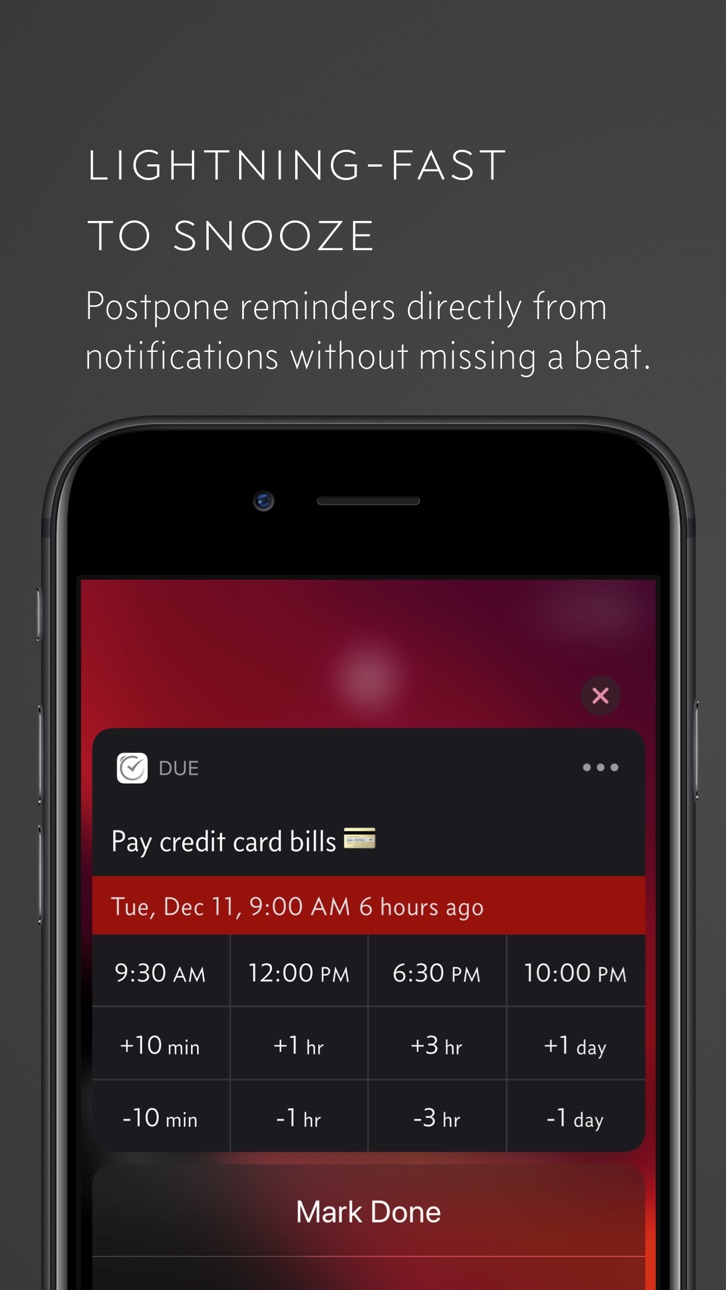
Most importantly, it's lightning-fast to set and postpone reminders, all thanks to a clever time picker and natural date parsing.
KEY FEATURES
1. Persistent & Effective
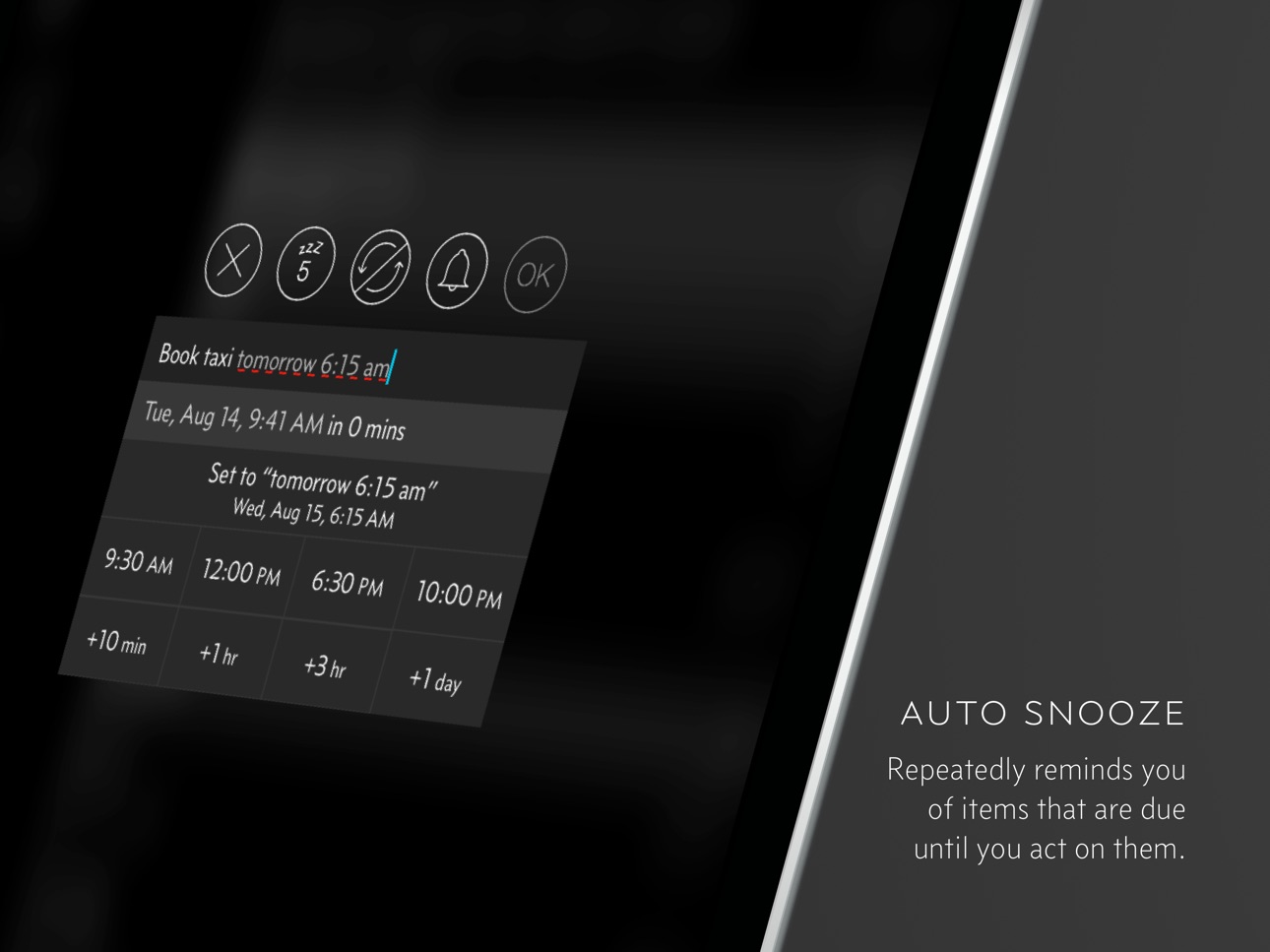
Auto Snooze repeatedly* notifies you of missed reminders until marked done or rescheduled. Choose between intervals of every 1, 5, 10, 15, 30 and 60 minutes.
2. Fast to Set, Fast to Postpone
A time picker with 12 preset and fully customizable times lets you set due dates and postpone reminders in record time.
3. Natural Date & Time Parsing
Due can also parse dates and times that you typed or dictate and offer to set the due dates and times for you.
4. Countdown Timers
Precise to the second, perfect for making the perfect soft-boiled eggs, brewing your coffee and more. Set them up once and reuse them forever
5. Powerful Recurring Reminders
From the simple daily and weekly reminders to the complex every-3rd-Wednesday-of-the-month kind of reminders
6. Keep in Sync**
Use iCloud or Dropbox to keep your reminders and timers in sync across your iPhone, iPad and Mac.
7. Works Offline, Completely Private
There is no account to sign up for. We don't store, and we can't access your reminders and timers. And you don't need internet to receive reminders.
8. Accessible to Everyone
Automatically adjusts text size according to your system setting, and offers full VoiceOver support. Due is also localized in 17 languages.
* By default, auto snooze repeats 5 times, and can be configured to repeat up to 10 times. Due can auto snooze any overdue items indefinitely when you launch Due or act on any of its notifications.
** Sync on Mac requires Due for Mac (sold separately)
WHAT'S THAT IN-APP PURCHASE ABOUT?
When you purchase Due today, you will have access to every feature in the app today—no further purchase required.
You will also get access to all new features released one year from your date of purchase.
The optional Due Upgrade Pass subscription allows you to continue getting access to all new features released one year *after* your date of purchase.
And here's the deal: Every feature that you have unlocked will remain available to you, forever—even if you stop subscribing.
Even without a subscription, you'll always receive bug-fix and compatibility updates for free. These updates add support for the latest iPhones, iPads and Apple Watches. They also help ensure that Due continues to function well on the latest versions of iOS, iPadOS and watchOS.
Due has a pretty good track record with that.
To illustrate: If you've purchased Due back in 2010 for your iPhone 3G running iOS 4, that very same app in 2026 is now optimized for iPhone 17 Pro Max running iOS 26. It even works on devices that didn't exist back then, such as the iPad Pro and the Apple Watch.
TERMS & PRIVACY POLICY
Our terms of use and privacy policy is available here: https://www.dueapp.com/terms.html
COMPATIBILITY
Due requires an iPhone, iPod touch or iPad running iOS 16 or later. The Watch app is a companion to the iOS app. It requires watchOS 8 (or later) and the paired iPhone to work correctly.
In-App Purchases IT pricing
Upgrade Pass Subscription
Annual Upgrade Pass (Mobile) · Yearly4,99 €
Capabilities
In-App PurchasesSiri
Accessibility
ipadiphonemacrealityDevicetvoswatch
Version history 25 versions
Build 887531924v26.4.32026-07-01 16:21:11
• Automatically cleans up reminders that were accidentally duplicated, with a new tool to repair any that remain.
Build 886579652v26.4.22026-06-06 02:09:34
Prominent Alerts for Reminders
You can now set Prominent Alerts for reminders. You can also selectively enable them for the reminders or timers you can’t afford to miss. Prominent Alerts break through Silent and Focus modes and stay on screen until you act on them, much like an alarm from the Clock app.
Other Changes
• Strengthened safeguards to stop a reminder from unexpectedly duplicating itself. (26.4.1, 26.4.2)
• The “Sync and Refresh Notifications” shortcut now reports how many reminders were auto-imported from Reminders alongside the sync summary.
• Reminders and timers using Prominent Alerts now show an indicator glyph in the lists, alongside the existing Critical Alert indicator.
Bug Fixes
• Fixed an issue where notifications were not updated after a background sync until the app was opened.
• Fixed an issue where the “Sync and Refresh Notifications” shortcut did not allow overdue reminders to continue auto-snoozing indefinitely (thanks Mongkii!).
• Fixed an issue where the prompt to update Due could fail to appear when sync data required a newer version of the app.
• Fixed a layout issue with the timer Live Activity in the expanded Dynamic Island.
Build 886298800v26.4.12026-05-30 01:27:28
Prominent Alerts for Reminders
You can now set Prominent Alerts for reminders. You can also selectively enable them for the reminders or timers you can’t afford to miss. Prominent Alerts break through Silent and Focus modes and stay on screen until you act on them, much like an alarm from the Clock app.
Other Changes
• Prevent a reminder from unexpectedly duplicating itself. (26.4.1)
• The “Sync and Refresh Notifications” shortcut now reports how many reminders were auto-imported from Reminders alongside the sync summary.
• Reminders and timers using Prominent Alerts now show an indicator glyph in the lists, alongside the existing Critical Alert indicator.
Bug Fixes
• Fixed an issue where notifications were not updated after a background sync until the app was opened.
• Fixed an issue where the “Sync and Refresh Notifications” shortcut did not allow overdue reminders to continue auto-snoozing indefinitely (thanks Mongkii!).
• Fixed an issue where the prompt to update Due could fail to appear when sync data required a newer version of the app.
• Fixed a layout issue with the timer Live Activity in the expanded Dynamic Island.
Build 884770130v26.42026-05-20 05:51:24
Prominent Alerts for Reminders
You can now set Prominent Alerts for reminders. You can also selectively enable them for the reminders or timers you can’t afford to miss. Prominent Alerts break through Silent and Focus modes and stay on screen until you act on them, much like an alarm from the Clock app.
Other Changes
• The “Sync and Refresh Notifications” shortcut now reports how many reminders were auto-imported from Reminders alongside the sync summary.
• Reminders and timers using Prominent Alerts now show an indicator glyph in the lists, alongside the existing Critical Alert indicator.
Bug Fixes
• Fixed an issue where notifications were not updated after a background sync until the app was opened.
• Fixed an issue where the “Sync and Refresh Notifications” shortcut did not allow overdue reminders to continue auto-snoozing indefinitely (thanks Mongkii!).
• Fixed an issue where the prompt to update Due could fail to appear when sync data required a newer version of the app.
• Fixed a layout issue with the timer Live Activity in the expanded Dynamic Island.
Build 884019713v26.32026-04-02 07:00:54
Sync and Refresh Notifications shortcut action
Use with Shortcuts automations to:
• Keep reminders in sync across devices
• Let overdue reminders auto-snooze indefinitely
Bug Fixes
• Fixed extra spacing before AM/PM in times displayed on iOS 26.4 and later. (thanks Presto!)
Build 883258990v26.22026-03-12 00:01:02
• Fixed issues where editing reminders with emoji could cause visual glitches or prevent changes from saving (thanks Samir K.).
• Fixed an incorrect message shown when using the Checklist-style widget without access.
Build 881263635v26.12026-02-03 15:53:14
• Fixed an issue that could cause missed notifications due to alerts being cleared unexpectedly (thanks Matt R!).
• Fixed Dynamic Island timers getting stuck or appearing twice when snoozing or restarting Prominent Alert timers.
Build 880423139v25.82025-12-09 04:55:11
• Added option to hide “Open Link” buttons from notification actions. Find it in Settings → Notification Snooze.
Bug Fixes
• Fixed an issue where Auto Import could turn off unexpectedly (thanks s…n, Jonathan G., r.v., Lee S.) (25.7)
• Fixed an issue where timers using Prominent Alerts could continue firing notifications after being stopped.
• Fixed a crash that could occur when the app launches.
Build 880303914v25.72025-12-04 04:50:39
• Fixed an issue where Auto Import could turn off unexpectedly (thanks s…, Jonathan G., r.v., Lee S.)
Build 880167829v25.62025-11-29 01:40:36
• New “Sync When Run” option for Shortcut actions.
Ensures changes are uploaded before the action completes, helping other devices stay up to date. Use with “Incremental Sync“ for best results.
Bug Fixes
• Fixed an issue where running Due shortcuts with the device locked incorrectly showed “You’ll need to unlock your device first” on iOS 26+ (thanks Angela R.)
• Fixed a startup crash affecting Vision Pro users (thanks Stefan L.)
• Updated the Repeat and Auto Snooze selection menus in the editor to native iOS menus, fixing occasional height issues (thanks kostas, Neo C.)
Other Changes
• Due now requires iOS 16 or later.
Build 878700442v25.52025-11-16 06:56:31
Prominent Alerts + Live Countdown for Timers
Keep your timers front and center. With Prominent Alerts, timers stay visible and update in real time on your Lock Screen and Dynamic Island.
Other Changes:
• A fresh new app icon.
• Introducing Midnight Glass — a dark mode icon crafted in Liquid Glass style.
• Fixed a crash on launch that could occur after completing reminders from the widget (thanks, Boon Eng!).
Build 878451651v25.42025-09-28 02:30:29
• Fixed crash when attempting to add widget on iOS 26.
Build 876692726v25.32025-09-25 01:08:23
• Improved stability by fixing several crashes.
• Fixed iCloud sync errors on iOS 26 and later.
• Added a new “Create Reminder (watchOS 26+ Workaround)” shortcut action. Use this version instead of the original to avoid a watchOS 26 bug. It also works fine on iOS and macOS.
• Improved performance of “Create Reminder” and “Create Repeating Reminder” shortcut actions.
• Fixed shortcuts created on macOS not running correctly on iOS.
Build 875388264v25.22025-06-07 12:31:26
• Incremental Sync. Sync faster and use less data. Turn it on in Sync Settings > Use Incremental Sync.
• Timers with the same duration are now sorted alphabetically.
• You can now selectively restore individual reminders from a backup.
• Fixed an issue where Auto Import did not respect changes to the default auto snooze setting until the app was relaunched.
Build 871478261v25.12025-02-01 03:17:16
• Open Section shortcut action and control widget. Jump straight to the exact section you need using Shortcuts or Control Center.
• Stop & Pause Timer shortcut actions. Gain more control over your timers with dedicated shortcuts to pause or stop them as needed.
• Improved widget appearance when the Home Screen is tinted.
• Fixed an issue where notification text on Apple Watch could sometimes be clipped.
• Due for Apple Watch now requires watchOS 8 or later.
Build 870889168v24.72024-12-05 01:17:26
• Resolved an issue where Auto Import can sometimes import the same reminder twice (thanks Dan G.)
• Resolved an issue where the 'Find Reminders' shortcut action returned no results when no filter was applied (thanks Dillon K.)
Build 869838299v24.62024-10-20 08:07:03
• The “Find Reminders” shortcut action now supports the conditions: “is today,” “is in the next,” “is in the last,” “is between,” and “is not exactly.”
• Resolves an issue where some users were unable to mark reminders as complete via the widget.
• Resolves an issue where certain shortcut actions fail to run and incorrectly prompt users to purchase the Upgrade Pass even when one is already active.
Build 869506837v24.52024-10-06 12:03:10
Resolved an issue where marking reminders as complete via the widget did not work correctly
Build 869173325v24.42024-09-23 15:02:47
Due 24.4 introduces four new shortcut actions, making it easier to manage your reminders and utilize your timers.
1. Start Timer shortcut action
Create shortcuts for your frequently used timers. Use them to help you stay on top of tasks, or integrate them as part of your bigger workflows.
2. Find Reminders shortcut action
Filter and locate specific reminders that you’d like to work on. Pair this with ‘Edit Reminder’ and ‘Mark Done’ shortcut actions for powerful workflows.
3. Edit Reminder shortcut action
Quickly postpone reminders that you can’t attend to right now, or adjust the auto snooze settings of multiple reminders at one go.
4. Mark Done shortcut action
Stay focused by marking reminders as complete and removing them from your notifications.
Build 867369305v24.32024-07-10 09:52:16
• NEW: Shortcuts: You can now set critical alerts directly within the ‘Create Reminder’ and ‘Create Repeating Reminder’ shortcut actions.
• NEW: Setting: Added an option to prevent suggestions for calling, SMS, or opening links when completing reminders with phone numbers or links.
• Fixes an issue where deleted items continue to show up as Siri suggestions or shortcuts.
• Fixes an issue where adding a new reminder via a Due URL would change the original due date if a date/time string was included in the title. (thanks Jack S.)
• Fixes an incomplete localization issue for the Japanese language.
Build 863907876v24.22024-02-21 15:38:18
• Fixes an issue that prevented keyboard access on iPad.
• New: Setting in ‘Alerts & Badges’ to use title of reminder/timer as title of notification.
Build 862575522v24.12024-01-04 15:54:50
Larger widgets
See more of your reminders on your Home Screen with large and extra large (iPad-only) widgets.
• Resolved the issue of illegible text when the widget appearance is set to Dark (thanks Tan Y.).
• Widgets now dynamically determine the number of items that can fit based on font size and available space.
Build 860451532v23.92023-10-07 01:58:05
• Improved natural date parser to support parsing military time on devices with 24-hour time setting enabled.
• “Always only this occurrence” option that disables the confirmation prompt when making changes to the due date of a recurring reminder.
• Resolved a visual glitch in multistage text input methods such as Japanese Kana or Chinese Pinyin where the temporarily inserted text was not visible until confirmed (thanks 下村さん).
• Resolved a bug where Siri responds with an error message when attempting to add reminders via Siri (thanks Russell D.).
Build 860170714v23.82023-09-25 23:48:40
• Fixed bug in iOS 17 where the 'Create Event' function was not functioning properly. (thanks Barry G.)
• Fixed bug where badges are not updated after marking reminders complete from widgets. (thanks 林)
Build 860099600v23.72023-09-21 16:53:42
Fixed a bug that prevented viewing and automatic importing of system reminders in iOS 17.
---
New Checklist-style Widget
Now, you can mark reminders complete directly from widgets.
Price history by region
Currency
Show
Columns
Search
Availability 172 of 172 storefronts
| Region | Language | Price | Ratings | Avg | Version |
|---|---|---|---|---|---|
| US | en-US | USD 7.99 | 2.8k | 4.7 | 26.4.3 |
| GB | en-GB | GBP 7.99 | 406 | 4.6 | 26.4.3 |
| DE | de-DE | EUR 8.99 | 363 | 4.6 | 26.4.3 |
| CN | zh-Hans-CN | CNY 58 | 358 | 4.3 | 26.4.3 |
| JP | ja | JPY 900 | 340 | 4.5 | 26.4.3 |
| CA | en-CA | CAD 9.99 | 292 | 4.5 | 26.4.3 |
| AU | en-AU | AUD 12.99 | 219 | 4.6 | 26.4.3 |
| IT | it | EUR 8.99 | 153 | 4.6 | 26.4.3 |
| RU | ru | RUB 699 | 137 | 4.5 | 26.4.3 |
| ES | es-ES | EUR 8.99 | 91 | 4.5 | 26.4.3 |
| SE | sv | SEK 99 | 90 | 4.5 | 26.4.3 |
| IN | en-GB | INR 699 | 84 | 4.8 | 26.4.3 |
| FR | fr-FR | EUR 8.99 | 78 | 4.2 | 26.4.3 |
| NL | nl | EUR 8.99 | 78 | 4.5 | 26.4.3 |
| BR | pt-BR | BRL 39.9 | 76 | 4.3 | 26.4.3 |
| MX | es-MX | MXN 179 | 70 | 4.7 | 26.4.3 |
| CH | de-CH | CHF 7 | 58 | 4.4 | 26.4.3 |
| PL | en-GB | PLN 29.99 | 45 | 4.7 | 26.4.3 |
| BE | en-GB | EUR 8.99 | 44 | 4.8 | 26.4.3 |
| DK | en-GB | DKK 69 | 37 | 4.6 | 26.4.3 |
| HK | zh-Hant-HK | HKD 58 | 36 | 4.6 | 26.4.3 |
| NO | en-GB | NOK 99 | 33 | 4.7 | 26.4.3 |
| TW | zh-Hant-TW | TWD 290 | 33 | 4.3 | 26.4.3 |
| IL | en-GB | ILS 29.9 | 32 | 4.6 | 26.4.3 |
| UA | en-GB | USD 9.99 | 31 | 4.8 | 26.4.3 |
| SG | en-GB | SGD 9.98 | 30 | 4.5 | 26.4.3 |
| AT | de-DE | EUR 8.99 | 29 | 4.4 | 26.4.3 |
| KR | ko | KRW 12000 | 29 | 3.8 | 26.4.3 |
| NZ | en-AU | NZD 14.99 | 26 | 4.7 | 26.4.3 |
| PH | en-GB | PHP 499 | 25 | 4.5 | 26.4.3 |
| PT | pt-PT | EUR 8.99 | 24 | 4.8 | 26.4.3 |
| IE | en-GB | EUR 8.99 | 23 | 4.9 | 26.4.3 |
| HU | en-GB | HUF 3490 | 22 | 4.5 | 26.4.3 |
| MY | en-GB | MYR 39.9 | 21 | 4.2 | 26.4.3 |
| TR | en-GB | TRY 399.99 | 21 | 4.7 | 26.4.3 |
| SA | en-GB | SAR 34.99 | 20 | 4.5 | 26.4.3 |
| FI | en-GB | EUR 8.99 | 19 | 4.5 | 26.4.3 |
| GR | en-GB | EUR 8.99 | 18 | 4.9 | 26.4.3 |
| ZA | en-GB | ZAR 149.99 | 17 | 4.6 | 26.4.3 |
| CZ | en-GB | CZK 199 | 16 | 4.2 | 26.4.3 |
| AR | es-MX | USD 7.99 | 15 | 4.5 | 26.4.3 |
| RO | en-GB | RON 39.99 | 15 | 4.8 | 26.4.3 |
| TH | en-GB | THB 299 | 15 | 4.7 | 26.4.3 |
| CL | es-MX | CLP 9990 | 11 | 5.0 | 26.4.3 |
| ID | en-GB | IDR 129000 | 11 | 4.6 | 26.4.3 |
| SK | en-GB | EUR 8.99 | 10 | 4.9 | 26.4.3 |
| BG | en-GB | EUR 8.99 | 9 | 4.6 | 26.4.3 |
| AE | en-GB | AED 29.99 | 8 | 3.6 | 26.4.3 |
| HR | en-GB | EUR 8.99 | 8 | 5.0 | 26.4.3 |
| PE | es-MX | PEN 34.9 | 8 | 4.8 | 26.4.3 |
| VN | en-GB | VND 199000 | 8 | 4.6 | 26.4.3 |
| KZ | en-GB | KZT 4990 | 7 | 5.0 | 26.4.3 |
| LU | en-GB | EUR 8.99 | 6 | 3.7 | 26.4.3 |
| BY | en-GB | USD 9.99 | 5 | 5.0 | 26.4.3 |
| CO | es-MX | COP 39900 | 5 | 4.0 | 26.4.3 |
| KW | en-GB | USD 7.99 | 5 | 4.4 | 26.4.3 |
| LT | en-GB | EUR 8.99 | 5 | 5.0 | 26.4.3 |
| CR | es-MX | USD 7.99 | 4 | 5.0 | 26.4.3 |
| LK | en-GB | USD 7.99 | 4 | 4.5 | 26.4.3 |
| LV | en-GB | EUR 8.99 | 4 | 5.0 | 26.4.3 |
| OM | en-GB | USD 7.99 | 4 | 3.5 | 26.4.3 |
| DO | es-MX | USD 7.99 | 3 | 4.0 | 26.4.3 |
| EC | es-MX | USD 7.99 | 3 | 3.7 | 26.4.3 |
| EE | en-GB | EUR 8.99 | 3 | 4.3 | 26.4.3 |
| MO | zh-Hant-HK | USD 7.99 | 3 | 5.0 | 26.4.3 |
| PK | en-GB | PKR 2200 | 3 | 4.7 | 26.4.3 |
| SI | en-GB | EUR 8.99 | 3 | 5.0 | 26.4.3 |
| SV | es-MX | USD 7.99 | 3 | 5.0 | 26.4.3 |
| AM | en-GB | USD 9.99 | 2 | 5.0 | 26.4.3 |
| EG | en-GB | EGP 399.99 | 2 | 4.5 | 26.4.3 |
| GT | es-MX | USD 7.99 | 2 | 5.0 | 26.4.3 |
| LB | en-GB | USD 7.99 | 2 | 5.0 | 26.4.3 |
| NA | en-GB | USD 7.99 | 2 | 5.0 | 26.4.3 |
| QA | en-GB | QAR 29.99 | 2 | 4.5 | 26.4.3 |
| BH | en-GB | USD 8.99 | 1 | 5.0 | 26.4.3 |
| BN | en-GB | USD 7.99 | 1 | 5.0 | 26.4.3 |
| HN | es-MX | USD 7.99 | 1 | 5.0 | 26.4.3 |
| IS | en-GB | USD 9.99 | 1 | 5.0 | 26.4.3 |
| JM | en-GB | USD 7.99 | 1 | 5.0 | 26.4.3 |
| JO | en-GB | USD 7.99 | 1 | 5.0 | 26.4.3 |
| KE | en-GB | USD 9.99 | 1 | 3.0 | 26.4.3 |
| MK | en-GB | USD 7.99 | 1 | 5.0 | 26.4.3 |
| NG | en-GB | NGN 12900 | 1 | 5.0 | 26.4.3 |
| NI | es-MX | USD 7.99 | 1 | 5.0 | 26.4.3 |
| PA | es-MX | USD 7.99 | 1 | 5.0 | 26.4.3 |
| UZ | en-GB | USD 8.99 | 1 | 1.0 | 26.4.3 |
| VE | es-MX | USD 7.99 | 1 | 3.0 | 26.4.3 |
| AF | en-GB | USD 7.99 | 0 | — | 26.4.3 |
| AI | en-GB | USD 7.99 | 0 | — | 26.4.3 |
| AL | en-GB | USD 9.99 | 0 | — | 26.4.3 |
| AO | en-GB | USD 7.99 | 0 | — | 26.4.3 |
| AZ | en-GB | USD 9.99 | 0 | — | 26.4.3 |
| BA | en-GB | EUR 8.99 | 0 | — | 26.4.3 |
| BF | en-GB | USD 7.99 | 0 | — | 26.4.3 |
| BJ | en-GB | USD 9.99 | 0 | — | 26.4.3 |
| BM | en-GB | USD 7.99 | 0 | — | 26.4.3 |
| BO | es-MX | USD 7.99 | 0 | — | 26.4.3 |
| BS | en-GB | USD 8.99 | 0 | — | 26.4.3 |
| BT | en-GB | USD 7.99 | 0 | — | 26.4.3 |
| BW | en-GB | USD 7.99 | 0 | — | 26.4.3 |
| BZ | en-GB | USD 7.99 | 0 | — | 26.4.3 |
| CD | en-GB | USD 7.99 | 0 | — | 26.4.3 |
| CG | en-GB | USD 7.99 | 0 | — | 26.4.3 |
| CI | fr-FR | USD 9.99 | 0 | — | 26.4.3 |
| CM | fr-FR | USD 9.99 | 0 | — | 26.4.3 |
| CV | en-GB | USD 7.99 | 0 | — | 26.4.3 |
| CY | en-GB | EUR 8.99 | 0 | — | 26.4.3 |
| DZ | en-GB | USD 7.99 | 0 | — | 26.4.3 |
| FJ | en-GB | USD 7.99 | 0 | — | 26.4.3 |
| FM | en-GB | USD 7.99 | 0 | — | 26.4.3 |
| GA | fr-FR | USD 7.99 | 0 | — | 26.4.3 |
| GD | en-GB | USD 7.99 | 0 | — | 26.4.3 |
| GE | en-GB | USD 9.99 | 0 | — | 26.4.3 |
| GH | en-GB | USD 9.99 | 0 | — | 26.4.3 |
| GM | en-GB | USD 7.99 | 0 | — | 26.4.3 |
| GW | en-GB | USD 7.99 | 0 | — | 26.4.3 |
| GY | en-GB | USD 7.99 | 0 | — | 26.4.3 |
| IQ | en-GB | USD 7.99 | 0 | — | 26.4.3 |
| KG | en-GB | USD 8.99 | 0 | — | 26.4.3 |
| KH | en-GB | USD 8.99 | 0 | — | 26.4.3 |
| KN | en-GB | USD 7.99 | 0 | — | 26.4.3 |
| KY | en-GB | USD 7.99 | 0 | — | 26.4.3 |
| LA | en-GB | USD 8.99 | 0 | — | 26.4.3 |
| LC | en-GB | USD 7.99 | 0 | — | 26.4.3 |
| LR | en-GB | USD 7.99 | 0 | — | 26.4.3 |
| LY | en-GB | USD 7.99 | 0 | — | 26.4.3 |
| MA | en-GB | USD 7.99 | 0 | — | 26.4.3 |
| MD | en-GB | USD 9.99 | 0 | — | 26.4.3 |
| ME | en-GB | EUR 6.99 | 0 | — | 26.4.3 |
| MG | en-GB | USD 7.99 | 0 | — | 26.4.3 |
| ML | en-GB | USD 7.99 | 0 | — | 26.4.3 |
| MM | en-GB | USD 7.99 | 0 | — | 26.4.3 |
| MN | en-GB | USD 7.99 | 0 | — | 26.4.3 |
| MR | en-GB | USD 7.99 | 0 | — | 26.4.3 |
| MS | en-GB | USD 7.99 | 0 | — | 26.4.3 |
| MT | en-GB | EUR 8.99 | 0 | — | 26.4.3 |
| MU | en-GB | USD 9.99 | 0 | — | 26.4.3 |
| MV | en-GB | USD 7.99 | 0 | — | 26.4.3 |
| MW | en-GB | USD 7.99 | 0 | — | 26.4.3 |
| MZ | en-GB | USD 7.99 | 0 | — | 26.4.3 |
| NE | en-GB | USD 7.99 | 0 | — | 26.4.3 |
| NP | en-GB | USD 9.99 | 0 | — | 26.4.3 |
| NR | en-GB | USD 7.99 | 0 | — | 26.4.3 |
| PG | en-GB | USD 7.99 | 0 | — | 26.4.3 |
| PW | en-GB | USD 7.99 | 0 | — | 26.4.3 |
| PY | es-MX | USD 7.99 | 0 | — | 26.4.3 |
| RS | en-GB | EUR 8.99 | 0 | — | 26.4.3 |
| RW | en-GB | USD 7.99 | 0 | — | 26.4.3 |
| SB | en-GB | USD 7.99 | 0 | — | 26.4.3 |
| SC | en-GB | USD 7.99 | 0 | — | 26.4.3 |
| SL | en-GB | USD 7.99 | 0 | — | 26.4.3 |
| SN | en-GB | USD 9.99 | 0 | — | 26.4.3 |
| SR | en-GB | USD 8.99 | 0 | — | 26.4.3 |
| ST | en-GB | USD 7.99 | 0 | — | 26.4.3 |
| SZ | en-GB | USD 7.99 | 0 | — | 26.4.3 |
| TC | en-GB | USD 7.99 | 0 | — | 26.4.3 |
| TD | en-GB | USD 7.99 | 0 | — | 26.4.3 |
| TJ | en-GB | USD 8.99 | 0 | — | 26.4.3 |
| TM | en-GB | USD 7.99 | 0 | — | 26.4.3 |
| TN | en-GB | USD 7.99 | 0 | — | 26.4.3 |
| TO | en-GB | USD 7.99 | 0 | — | 26.4.3 |
| TT | en-GB | USD 7.99 | 0 | — | 26.4.3 |
| TZ | en-GB | TZS 22900 | 0 | — | 26.4.3 |
| UG | en-GB | USD 9.99 | 0 | — | 26.4.3 |
| UY | en-GB | USD 7.99 | 0 | — | 26.4.3 |
| VC | en-GB | USD 7.99 | 0 | — | 26.4.3 |
| VG | en-GB | USD 7.99 | 0 | — | 26.4.3 |
| VU | en-GB | USD 7.99 | 0 | — | 26.4.3 |
| XK | en-GB | EUR 8.99 | 0 | — | 26.4.3 |
| YE | en-GB | USD 7.99 | 0 | — | 26.4.3 |
| ZM | en-GB | USD 9.99 | 0 | — | 26.4.3 |
| ZW | en-GB | USD 9.99 | 0 | — | 26.4.3 |
Reviews 30 reviews · IT
★★★★★
A True Companion
An app I use every single day for that quick reminder and alarm.
abragad2026-02-05
★★★★★
Semplice, essenziale, funziona
Sicuramente una delle app di terze parti che uso di più. Fa quello che deve fare, senza fronzoli, in modo da farti sentire sicuro di non dimenticare nulla. Grande app!
Known592024-08-02
★★★★★
Fantastica 😎
Non ho mai recensito le app, ma qui non posso farne a meno! Eccezionale!
Rheicka2024-02-22
★★★★★
Indispensabile
Dopo anni è ancora l’app migliore per reminder e promemoria.
Un vero “must have” fin dalla sua prima versione!
Loy09872023-04-20
★★★★★
Semplicemente perfetta!
Come da titolo, non dimenticherete più nulla ha cambiato la mia vita!
Cynghellino2023-02-23
★★★★★
Ottima
Alcune voci dopo che le trascino per eliminarle dal planing giornaliero, non mi rimangono in memoria. Mentre mi servirebbe averle tutte
nufris2023-01-22
★★★★★
Semplice la migliore app To Do
Semplice, immediata, senza fronzoli. L’essenziale che diventa pratico e utile. Cinque stelle meritate!
VLRDKA2023-01-22
★★★★★
Eccellente !!!
La migliore, bisogna imparare ad usare perché ne ha molteplici funzioni. E funziona veramente bene. Ne ho provate tante più o meno buone, però questo sviluppatore ci tiene a fare un ottimo lavoro, con aggiornamenti puntuali.
The best one, you have to learn how to use it because it has multiple functions. And it works really well. I've tried many more or less good ones, but this developer is keen to do an excellent job, with punctual updates.
Jorge1812023-01-16
★★★★★
Suggerimento
Sempre ottima app, ma la striscia rossa che appare quando si modifica il promemoria (per poter annullare l’operazione appena fatta) e veramente fastidiosa con l’iPhone X infatti spesso per chiudere l’app si tocca la striscia rossa e si annulla l’operazione. Basterebbe spostarla. Unica pecca.
Shailok2023-01-13
★★★★★
iPhone 12 mini
La migliore applicazione del suo genere, pratica ed essenziale! Bravi gli sviluppatori!
Nerokina2022-03-26
★★★★★
La lingua italiana quando la introducete per spiegare le novità?
Ottima applicazione peccato per la mancanza della lingua italiana
Nino19682021-12-23
★★★★★
Aggiornamento
Molto meglio prima ! Con.meno passaggi si riprogrammava l’evento . Non è per niente pratica . meglio prima
andreacolombo742021-11-29
★★★★★
postpone to do
sorry, but the change made to postpone one task is very bed. before with two taps you was able to change the date and time, now very complicate.
andreamastalli2021-11-29
★★★★★
Eccellente
Ne ho provate tante, ma Due le batte tutte come rapidità, versatilità e precisione! Inoltre, sincronizza in modo rapido e può tranquillamente essere adoperata in offline. I dati vengono inseriti in modo rapido con pochi passaggi. Peccato che non ci sia la possibilità di inserire anche l'anno assieme al mese ed al giorno e poi, come sarebbe bello se ci fosse la possibilità di accedervi anche da Windows! Ma come si dice: la speranza è l'ultima a morire! Speriamo bene!
Mgubit2021-11-16
★★★★★
Eccellente app per promemoria e timers
Veloce, curata, molto pratica per creare e gestire promemoria anche ripetuti e timers personalizzati.
liliumdavidii2021-04-11
★★★★★
Utilissima
Usa questa app da anni e non potrei farne a meno! Straconsigliata
elimon762020-12-21
★★★★★
La migliore app, efficace !!
Efficace semplice ed immediata. E' tra le mie app più utilizzate in assoluto, l' unica che ti ricorda con assoluta efficacia le cose da fare.
Ho acquistato 4 remainder oltre questa, ma rimane l' unica ed assolutamente efficace.
Spero gli sviluppatori ne mantengano sempre la caratteristica di immediatezza.
Ps: attendo sempre la possibilità di impostare un tempo di remainder di 10 min, oltre le due possibilità esistenti che sono di 1 min e 1 h.
Michele_esse2020-11-14
★★★★★
Cumbersome UI, syncing is very bad
This app is too complicated and its interface is cumbersome. What is even more important is that the syncing function over iCloud is not reliable as it fails to update and sync reminders across devices properly. After several tries (disconnect from iCloud, reconnect again, deleting created reminders, creating them again, deleting iCloud data) I uninstall it. Instructions, functionalities, user interface, user experience are a big let-down. As a consumer it is in my right to be refunded. Disappointed!
Jérôme Savonarole2020-09-28
★★★★★
Quasi perfetta
Indispensabile per evitare di perdere qualcosa per strada.
Il promemoria rimane lì, rimane in evidenza, continua a suonare (1 minuto è fastidioso, ma 1ora va bene).
Ho chiesto una funzione di ricerca ed un'altra per andare, sempre in ricerca/variazione, ad una c'era data.
Complimenti.
Gianni
Gianni Donadel2020-09-25
★★★★★
Valutazione
Trovo funzionale questa vostra applicazione che uso correntemente con soddisfazione.
Confermo quanto già scritto.
Gabriellone2020-08-27
★★★★★
Deluso
Già il fatto che debba spendere altri soldi dopo che ho già acquistato l’applicazione in passato non mi piace per niente.
Ma il peggio viene quando dopo aver acquistato il pass appositamente per la funzione di importazione automatica, questa mi ha cancellato tutti i promemoria ios.
Potete provvedere a dare scelta in questa funzione? Vorrei importare automaticamente senza cancellare su ios, un po’ come si fa con l’importazione manuale.
Grazie
bertux_972020-05-22
★★★★★
Ottimo per ricordare tutto o pianificare la giornata
È ottima se non perfetta app per pianificare la giornata o semplicemente ricordarsi le cose, purtroppo ho dei problemi di memoria, ma questa app mi salva sempre!
Grazie mille agli sviluppatori!
Glynford C.2020-02-29
★★★★★
Ottima!
Trovo che sia un’app davvero ben fatta, la uso continuamente e l’integrazione con Apple Watch è perfetta, con due semplici tocchi imposti i promemoria. Fin ora non mi ha mai deluso. La cosa che mi piacerebbe avere, sarebbe quella di poter vedere i prossimi tre impegni dalla complicazione estesa dell’orologio. Grazie ragazzi, confido in voi!
Fabcri722019-11-16
★★★★★
Bug
There is a bug parsing Italian complex relative times. For example if I want to say "Cena fra 2 ore e 15 minuti" for a dinner that will be after 2 hours AND 15 minutes from now, the app will set a timer in 15 minutes, ignoring 2 hours. I tried also "Cena fra 2 ore, 15 minuti" or "cena fra 2 ore: 15 minuti", "Cena fra 2 ore + 15 minuti".
There is no difference between Italian words "tra" or "fra", but for Due 3 with "tra" natural parsing is ignored.
There is also a translate error "Oggi + in ritarto" in options about badge icon: in correct Italian the app must say "Oggi + in ritardo" (a D inste
Dgacorp2019-09-04
Change log 29 changes · IT
✎
releaseNotes updated
• Automatically cleans up reminders that were accidentally duplicated, with a new tool to repair any that remain.
✎
description updated
Due remembers all the things that you need so you don't have to.
Because it repeatedly reminds you of things until you act on them, it‘s impossible to forget a
✎
subtitle updated
Never Forget Anything Again
✎
name updated
Due - Reminders & Timers
◆
Version 26.4.3 released
• Automatically cleans up reminders that were accidentally duplicated, with a new tool to repair any that remain.
◆
Version 26.4.2 released
Prominent Alerts for Reminders
You can now set Prominent Alerts for reminders. You can also selectively enable them for the reminders or timers you can’t afford to miss. Prominent Alerts break through Silent and Focus modes and stay on scre
◆
Version 26.4.1 released
Prominent Alerts for Reminders
You can now set Prominent Alerts for reminders. You can also selectively enable them for the reminders or timers you can’t afford to miss. Prominent Alerts break through Silent and Focus modes and stay on scre
◆
Version 26.4 released
Prominent Alerts for Reminders
You can now set Prominent Alerts for reminders. You can also selectively enable them for the reminders or timers you can’t afford to miss. Prominent Alerts break through Silent and Focus modes and stay on scre
◆
Version 26.3 released
Sync and Refresh Notifications shortcut action
Use with Shortcuts automations to:
• Keep reminders in sync across devices
• Let overdue reminders auto-snooze indefinitely
Bug Fixes
• Fixed extra spacing before AM/PM in times displayed on i
◆
Version 26.2 released
• Fixed issues where editing reminders with emoji could cause visual glitches or prevent changes from saving (thanks Samir K.).
• Fixed an incorrect message shown when using the Checklist-style widget without access.
◆
Version 26.1 released
• Fixed an issue that could cause missed notifications due to alerts being cleared unexpectedly (thanks Matt R!).
• Fixed Dynamic Island timers getting stuck or appearing twice when snoozing or restarting Prominent Alert timers.
◆
Version 25.8 released
• Added option to hide “Open Link” buttons from notification actions. Find it in Settings → Notification Snooze.
Bug Fixes
• Fixed an issue where Auto Import could turn off unexpectedly (thanks s…n, Jonathan G., r.v., Lee S.) (25.7)
• Fixe
◆
Version 25.7 released
• Fixed an issue where Auto Import could turn off unexpectedly (thanks s…, Jonathan G., r.v., Lee S.)
◆
Version 25.6 released
• New “Sync When Run” option for Shortcut actions.
Ensures changes are uploaded before the action completes, helping other devices stay up to date. Use with “Incremental Sync“ for best results.
Bug Fixes
• Fixed an issue where running Due
◆
Version 25.5 released
Prominent Alerts + Live Countdown for Timers
Keep your timers front and center. With Prominent Alerts, timers stay visible and update in real time on your Lock Screen and Dynamic Island.
Other Changes:
• A fresh new app icon.
• Introducing
◆
Version 25.4 released
• Fixed crash when attempting to add widget on iOS 26.
◆
Version 25.3 released
• Improved stability by fixing several crashes.
• Fixed iCloud sync errors on iOS 26 and later.
• Added a new “Create Reminder (watchOS 26+ Workaround)” shortcut action. Use this version instead of the original to avoid a watchOS 26 bug. It
◆
Version 25.2 released
• Incremental Sync. Sync faster and use less data. Turn it on in Sync Settings > Use Incremental Sync.
• Timers with the same duration are now sorted alphabetically.
• You can now selectively restore individual reminders from a backup.
• Fi
◆
Version 25.1 released
• Open Section shortcut action and control widget. Jump straight to the exact section you need using Shortcuts or Control Center.
• Stop & Pause Timer shortcut actions. Gain more control over your timers with dedicated shortcuts to pause or
◆
Version 24.7 released
• Resolved an issue where Auto Import can sometimes import the same reminder twice (thanks Dan G.)
• Resolved an issue where the 'Find Reminders' shortcut action returned no results when no filter was applied (thanks Dillon K.)
◆
Version 24.6 released
• The “Find Reminders” shortcut action now supports the conditions: “is today,” “is in the next,” “is in the last,” “is between,” and “is not exactly.”
• Resolves an issue where some users were unable to mark reminders as complete via the w
◆
Version 24.5 released
Resolved an issue where marking reminders as complete via the widget did not work correctly
◆
Version 24.4 released
Due 24.4 introduces four new shortcut actions, making it easier to manage your reminders and utilize your timers.
1. Start Timer shortcut action
Create shortcuts for your frequently used timers. Use them to help you stay on top of tasks, o
◆
Version 24.3 released
• NEW: Shortcuts: You can now set critical alerts directly within the ‘Create Reminder’ and ‘Create Repeating Reminder’ shortcut actions.
• NEW: Setting: Added an option to prevent suggestions for calling, SMS, or opening links when complet
◆
Version 24.2 released
• Fixes an issue that prevented keyboard access on iPad.
• New: Setting in ‘Alerts & Badges’ to use title of reminder/timer as title of notification.
◆
Version 24.1 released
Larger widgets
See more of your reminders on your Home Screen with large and extra large (iPad-only) widgets.
• Resolved the issue of illegible text when the widget appearance is set to Dark (thanks Tan Y.).
• Widgets now dynamically deter
◆
Version 23.9 released
• Improved natural date parser to support parsing military time on devices with 24-hour time setting enabled.
• “Always only this occurrence” option that disables the confirmation prompt when making changes to the due date of a recurring re
◆
Version 23.8 released
• Fixed bug in iOS 17 where the 'Create Event' function was not functioning properly. (thanks Barry G.)
• Fixed bug where badges are not updated after marking reminders complete from widgets. (thanks 林)
◆
Version 23.7 released
Fixed a bug that prevented viewing and automatic importing of system reminders in iOS 17.
---
New Checklist-style Widget
Now, you can mark reminders complete directly from widgets.