Home › Utilities

 US
US
USen-US CAen-CA
 AUen-AU
 MXes-MX
 BRpt-BR
 NZen-AU
 INen-GB
 MYen-GB
 SAen-GB
 AEen-GB
 CLes-MX
 COes-MX
 HKzh-Hant-HK
 ILen-GB
 JPja
JPja THen-GB
 ZAen-GB
 AGen-GB
 BHen-GB
 CRes-MX
 ECes-MX
 GTes-MX
 KWen-GB
 PEes-MX
 PGen-GB
 PHen-GB
 SGen-GB
 TWzh-Hant-TW
 UYen-GB
 AFen-GB
 AIen-GB
 AMen-GB
 AOen-GB
 ARes-MX
 AZen-GB
 BBen-GB
 BFen-GB
 BJen-GB
 BMen-GB
 BNen-GB
 BOes-MX
 BSen-GB
 BTen-GB
 BWen-GB
 BZen-GB
 CDen-GB
 CGen-GB
 CIfr-FR
 CMfr-FR
 CNzh-Hans-CN
 CVen-GB
 DMen-GB
 DOes-MX
 DZen-GB
 EGen-GB
 FJen-GB
 FMen-GB
 GAfr-FR
 GDen-GB
 GEen-GB
 GHen-GB
 GMen-GB
 GWen-GB
 GYen-GB
 HNes-MX
 IDen-GB
 IQen-GB
 JMen-GB
 JOen-GB
 KEen-GB
 KGen-GB
 KHen-GB
 KNen-GB
 KRko
KRko KYen-GB
 KZen-GB
 LAen-GB
 LBen-GB
 LCen-GB
 LKen-GB
 LRen-GB
 LYen-GB
 MAen-GB
 MGen-GB
 MLen-GB
 MMen-GB
 MNen-GB
 MOzh-Hant-HK
 MRen-GB
 MSen-GB
 MUen-GB
 MVen-GB
 MWen-GB
 MZen-GB
 NAen-GB
 NEen-GB
 NGen-GB
 NIes-MX
 NPen-GB
 NRen-GB
 OMen-GB
 PAes-MX
 PKen-GB
 PWen-GB
 PYes-MX
 QAen-GB
 RWen-GB
 SBen-GB
 SCen-GB
 SLen-GB
 SNen-GB
 SRen-GB
 STen-GB
 SVes-MX
 SZen-GB
 TCen-GB
 TDen-GB
 TJen-GB
 TMen-GB
 TNen-GB
 TOen-GB
 TTen-GB
 TZen-GB
 UGen-GB
 UZen-GB
 VCen-GB
 VEes-MX
 VGen-GB
 VNen-GB
 VUen-GB
 YEen-GB
 ZMen-GB
 ZWen-GB
 ALNot Available
 ATNot Available
 BANot Available
 BENot Available
 BGNot Available
 BYNot Available
 CHNot Available
 CYNot Available
 CZNot Available
 DENot Available
 DKNot Available
 EENot Available
 ESNot Available
 FINot Available
 FRNot Available
 GBNot Available
 GRNot Available
 HRNot Available
 HUNot Available
 IENot Available
 ISNot Available
 ITNot Available
 LTNot Available
 LUNot Available
 LVNot Available
 MDNot Available
 MENot Available
 MKNot Available
 MTNot Available
 NLNot Available
 NONot Available
 PLNot Available
 PTNot Available
 RONot Available
 RSNot Available
 RUNot Available
 SENot Available
 SINot Available
 SKNot Available
 TRNot Available
 UANot Available
 XKNot Available
133 of 175 storefronts
Content in en-US
Content in en-US
Information
Preview 3 platforms
iPhone 5 images




iPad 6 images


Apple Watch 3 images

What’s New Version 3.7.0
Updated for iOS 26! Some minor UI updates as well
Description
An iPhone, Apple Watch and iPad app to see Local and Zulu time (GMT) or multiple time zones in a single glance. Includes Widgets for both the iPhone and Apple Watch. Useful for pilots in getting weather briefings and filing flight plans, or Ham radio operators to do timezone conversions. No more worrying about getting the timezone offset correct or Daylight Savings Time conversions. Easily convert from different time zones, including times in the future or past.
On the iPhone:
- Home and Lock Screen widgets
- The Zulu Time page gives a quick view of both Zulu and Local times
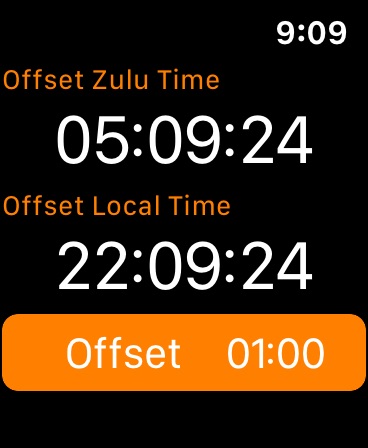
- The Offset Time page allows you to see Zulu and local time either in the future or past by entering an offset via the Offset button. Tapping either Zulu or Local times will allow you to enter a time in the future or past, synchronizing both Local and Zulu times with that offset. The offset only applies to this view (except on the iPad the offset applies to everything on the page)
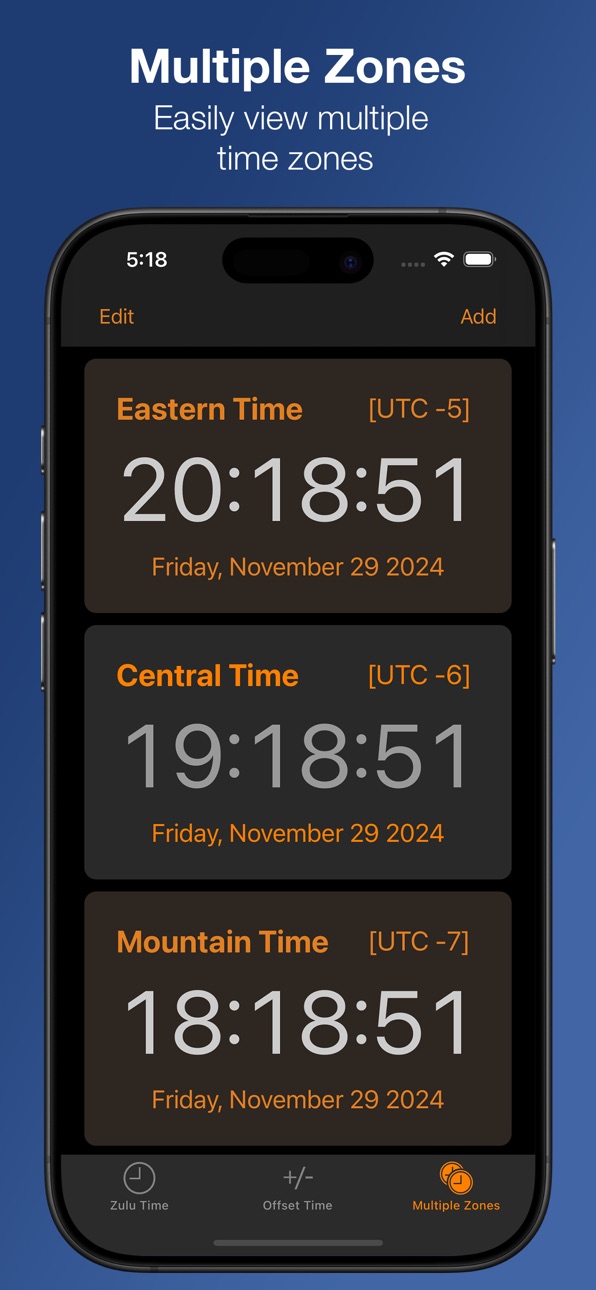
- The Multiple Zones page allows you to add as many time zones as you wish in a scrolling view. Clicking on any Time Zone will allow you to change it.
on iPad:
All information is combined on one screen. You have user customizable time zones on the right hand side. On the left, you have Zulu and Local time and one customizable time zone. The offset to see future or past time can be done via the Offset button or tapping any of either the Zulu, Local or Custom time buttons on the left.
On the Watch:
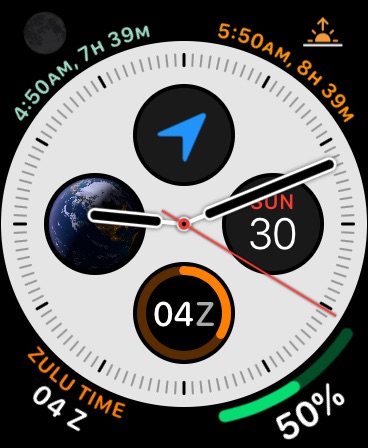
Complications available in all watch faces making for glanceable ZuluTime and access to the app, which gives offset able time computation.
Accessibility
ipadiphonemacrealityDevicetvoswatch
Version history 25 versions
Build 880356585v3.7.02025-12-12 06:41:41
Updated for iOS 26! Some minor UI updates as well
Build 871571008v3.6.22025-01-07 07:18:55
- Fix for blinking "Offset" in iOS app. If an offset was set and the app was put in the background, sometimes it would stop blinking
- Fix for format of Watch app. If the display dimmed, sometimes the seconds wouldn't update. Now the seconds won't display if they can't be updated
Build 871129990v3.6.12024-12-16 22:14:13
Updated for iOS 18, includes Dark and Tinted icons
Build 870033618v3.62024-12-02 12:34:31
- Added Lock Screen Widgets
- Improved and modernized Watch app.
- Added the ability to set the time instead of just the offset on the Watch app
- Cleanup for various form factors on iPhone app to better fit around the notch
Build 848312339v3.5.32022-04-16 22:27:14
Fix for a possibility that not all timezones were available to pick from when chosing a new timezone
Build 845052856v3.5.22021-11-01 15:20:36
- Zulu Time now first entry on Watch App
- Watch complications now support tint
Build 844454316v3.5.12021-10-17 18:21:22
Updates for iOS 15 and WatchOS 8
- Fixed complications being clipped and unreadable
- Updated broken layout of screens for iOS 15 to look more like it did under iOS 14
Build 839211845v3.52020-11-28 02:28:24
- Now include iOS 14 Widgets
- Fixed a possible crash on iPad
- Restored ability to change Time Zones in Multiple Zone view
Build 837386143v3.4.62020-10-07 02:10:53
- Fix for complication freezing
- Fix for an issue whereby complication might crash
Build 835231285v3.4.52020-07-17 14:12:55
- Fixed an issue where complications wouldn't display correctly on 40mm or smaller watches
- Fixed an issue where complication would not update
Build 834998713v3.4.42020-03-06 16:02:19
- Fix for complication not updating
Build 834126970v3.4.32020-01-01 20:40:22
- iOS 13 compatibility including Dark Mode
- Fixed a possible crash using 3D Touch on startup
- Fixed a possible issue where complication would not update on Apple Watch
Build 831952816v3.4.22019-07-10 17:08:56
3.4.2
- Fixed an issue on the watch complication whereby the time might not update correctly, showing the incorrect time.
3.4.1
- Fixed a bug where the app would crash if you tried to set an offset in 12 hour format
3.4
- Now with watch complication! A long time in coming, but finally a watch face complication. It only supports the Zulu hour, but it is available on all faces
- Settings now accessible directly from the app
- Band new icon to celebrate all of the newness
- Correctly supports the iPad Pro, now split screen and slide over works correctly
- Minor UI updates
Build 831851176v3.4.12019-07-05 15:59:52
3.4.1
- Fixed a bug where the app would crash if you tried to set an offset in 12 hour format
3.4
- Now with watch complication! A long time in coming, but finally a watch face complication. It only supports the Zulu hour, but it is available on all faces
- Settings now accessible directly from the app
- Band new icon to celebrate all of the newness
- Correctly supports the iPad Pro, now split screen and slide over works correctly
- Minor UI updates
Build 831651084v3.42019-06-18 15:05:19
- Now with watch complication! A long time in coming, but finally a watch face complication. It only supports the Zulu hour, but it is available on all faces
- Settings now accessible directly from the app
- Band new icon to celebrate all of the newness
- Correctly supports the iPad Pro, now split screen and slide over works correctly
- Minor UI updates
Build 828358626v3.22018-09-06 16:37:39
- Fixed the default Mountain Time zone to not be based in Phoenix so it will respect Daylight Savings Time.
- Fixed a potential crash that could happen if you were upgrading from a very old version of ZuluTime
- Per user request, changed the color of the text in the Today Extension to be more legible
Build 827759052v3.12018-07-30 17:44:30
- Much modernization, all code moved to modern iOS language and conventions (It's all written in Swift now if you are interested in those types of things.) This should make it easier to adopt new features in the future.
- Cleaned up the Time Zone picker. Some cities that had compound names are now shorter (i.e. Indiana/Indianapolis now just read as Indianapolis.)
Build 826695156v3.02018-04-16 23:12:07
- Apple Watch version! After many requests, This includes the ability to view Local Time, Zulu Time and set an offset to wee what those times are up to 24 hours in the future.
- Fixed a bug where some time zones that are less than one hour intervals (like Newfoundland) would display incorrectly.
- Fixed some layout ugliness on iPhone X in the Multiple Time view
Build 824995947v2.5.62017-12-01 22:46:18
- Corrected a bug where the "Done" button would not appear correctly when editing Multiple Time Zones
- Fix to make dialogs more readable on older devices
Build 824259497v2.5.52017-11-03 16:04:42
- Updated for iOS 11 and iPhone X
- Allowed Set Time in Offset page to roll over past or 60 per user request
- Fixed some minor UI alignment issues
- Fixed a potential crash when choosing a new TimeZone
Build 822293393v2.5.42017-05-27 04:06:03
- Fixed crash in Today Extension on versions 8 & 9 of iOS.
From 2.5.3
- Added the ability to change timezones on the Offset page for the iPhone version
- Fixed a bug where setting a date more than 24 hours into the future didn't increment to the next date in the Offset Time tab.
- Fixed a bug where a Time Zone might be greyed out after deleting a different Timezone in the Multi Zone page
- Small UI fixes
- Modernization and swifty-ness
Build 822105678v2.5.32017-05-17 02:06:41
- Added the ability to change timezones on the Offset page for the iPhone version
- Fixed a bug where setting a date more than 24 hours into the future didn't increment to the next date in the Offset Time tab.
- Fixed a bug where a Time Zone might be greyed out after deleting a different Timezone in the Multi Zone page
- Small UI fixes
- Modernization and swifty-ness
Build 819265506v2.5.22016-10-13 00:03:41
Fix for a TodayView Widget crash if you have no time zones set.
Whats new in version 2.5...
- iOS 10 compatibility
- Split screen for iPad (Finally, I know, right?)
- Bug fixes
- Under the hood modernization and various things you probably don't care about but are very cool. Trust me.
Build 819188923v2.5.12016-10-06 20:02:47
Fix for the TodayView Widget in which all times where the same regardless of the Time Zone. There is still a bug where the Today extension will crash if you have no time zones, this has been addressed and will be released early next week.
And, in case you missed it, new in version 2.5...
- iOS 10 compatibility
- Split screen for iPad (Finally, I know, right?)
- Bug fixes
- Under the hood modernization and various things you probably don't care about but are very cool. Trust me.
Build 819136521v2.52016-10-04 16:30:49
NOTE: There is a bug in this release where the TodayView Widget shows the same time for all Time Zones. This has been addressed and the update is uploaded and waiting for approval. Apologies, it should be out in the next day or two.
- iOS 10 compatibility
- Split screen for iPad (Finally, I know, right?)
- Bug fixes
- Under the hood modernization and various things you probably don't care about but are very cool. Trust me.
Price history by region
Currency
Show
Columns
Search
App performance US
Availability 133 of 175 storefronts
| Region | Language | Price | Ratings | Avg | Version |
|---|---|---|---|---|---|
| US | en-US | USD 0.99 | 2.6k | 4.9 | 3.7.0 |
| CA | en-CA | CAD 0.99 | 83 | 4.7 | 3.7.0 |
| AU | en-AU | AUD 1.99 | 78 | 4.8 | 3.7.0 |
| MX | es-MX | MXN 19 | 28 | 4.9 | 3.7.0 |
| BR | pt-BR | BRL 6.9 | 8 | 4.9 | 3.7.0 |
| NZ | en-AU | NZD 1.99 | 5 | 5.0 | 3.7.0 |
| IN | en-GB | INR 99 | 3 | 4.7 | 3.7.0 |
| MY | en-GB | MYR 4.9 | 3 | 5.0 | 3.7.0 |
| SA | en-GB | SAR 4.99 | 3 | 5.0 | 3.7.0 |
| AE | en-GB | AED 2.99 | 2 | 3.0 | 3.7.0 |
| CL | es-MX | CLP 990 | 2 | 4.5 | 3.7.0 |
| CO | es-MX | COP 4900 | 2 | 5.0 | 3.7.0 |
| HK | zh-Hant-HK | HKD 8 | 2 | 4.5 | 3.7.0 |
| IL | en-GB | ILS 2.9 | 2 | 5.0 | 3.7.0 |
| JP | ja | JPY 150 | 2 | 5.0 | 3.7.0 |
| TH | en-GB | THB 29 | 2 | 3.0 | 3.7.0 |
| ZA | en-GB | ZAR 19.99 | 2 | 4.5 | 3.7.0 |
| AG | en-GB | USD 0.99 | 1 | 5.0 | 3.7.0 |
| BH | en-GB | USD 0.99 | 1 | 4.0 | 3.7.0 |
| CR | es-MX | USD 0.99 | 1 | 5.0 | 3.7.0 |
| EC | es-MX | USD 0.99 | 1 | 5.0 | 3.7.0 |
| GT | es-MX | USD 0.99 | 1 | 5.0 | 3.7.0 |
| KW | en-GB | USD 0.99 | 1 | 5.0 | 3.7.0 |
| PE | es-MX | PEN 4.9 | 1 | 5.0 | 3.7.0 |
| PG | en-GB | USD 0.99 | 1 | 5.0 | 3.7.0 |
| PH | en-GB | PHP 49 | 1 | 2.0 | 3.7.0 |
| SG | en-GB | SGD 0.98 | 1 | 5.0 | 3.7.0 |
| TW | zh-Hant-TW | TWD 30 | 1 | 5.0 | 3.7.0 |
| UY | en-GB | USD 0.99 | 1 | 4.0 | 3.7.0 |
| AF | en-GB | USD 0.99 | 0 | — | 3.7.0 |
| AI | en-GB | USD 0.99 | 0 | — | 3.7.0 |
| AM | en-GB | USD 0.99 | 0 | — | 3.7.0 |
| AO | en-GB | USD 0.99 | 0 | — | 3.7.0 |
| AR | es-MX | USD 0.99 | 0 | — | 3.7.0 |
| AZ | en-GB | USD 0.99 | 0 | — | 3.7.0 |
| BB | en-GB | USD 0.99 | 0 | — | 3.7.0 |
| BF | en-GB | USD 0.99 | 0 | — | 3.7.0 |
| BJ | en-GB | USD 0.99 | 0 | — | 3.7.0 |
| BM | en-GB | USD 0.99 | 0 | — | 3.7.0 |
| BN | en-GB | USD 0.99 | 0 | — | 3.7.0 |
| BO | es-MX | USD 0.99 | 0 | — | 3.7.0 |
| BS | en-GB | USD 0.99 | 0 | — | 3.7.0 |
| BT | en-GB | USD 0.99 | 0 | — | 3.7.0 |
| BW | en-GB | USD 0.99 | 0 | — | 3.7.0 |
| BZ | en-GB | USD 0.99 | 0 | — | 3.7.0 |
| CD | en-GB | USD 0.99 | 0 | — | 3.7.0 |
| CG | en-GB | USD 0.99 | 0 | — | 3.7.0 |
| CI | fr-FR | USD 0.99 | 0 | — | 3.7.0 |
| CM | fr-FR | USD 0.99 | 0 | — | 3.7.0 |
| CN | zh-Hans-CN | CNY 8 | 0 | — | 3.7.0 |
| CV | en-GB | USD 0.99 | 0 | — | 3.7.0 |
| DM | en-GB | USD 0.99 | 0 | — | 3.7.0 |
| DO | es-MX | USD 0.99 | 0 | — | 3.7.0 |
| DZ | en-GB | USD 0.99 | 0 | — | 3.7.0 |
| EG | en-GB | EGP 49.99 | 0 | — | 3.7.0 |
| FJ | en-GB | USD 0.99 | 0 | — | 3.7.0 |
| FM | en-GB | USD 0.99 | 0 | — | 3.7.0 |
| GA | fr-FR | USD 0.99 | 0 | — | 3.7.0 |
| GD | en-GB | USD 0.99 | 0 | — | 3.7.0 |
| GE | en-GB | USD 0.99 | 0 | — | 3.7.0 |
| GH | en-GB | USD 0.99 | 0 | — | 3.7.0 |
| GM | en-GB | USD 0.99 | 0 | — | 3.7.0 |
| GW | en-GB | USD 0.99 | 0 | — | 3.7.0 |
| GY | en-GB | USD 0.99 | 0 | — | 3.7.0 |
| HN | es-MX | USD 0.99 | 0 | — | 3.7.0 |
| ID | en-GB | IDR 19000 | 0 | — | 3.7.0 |
| IQ | en-GB | USD 0.99 | 0 | — | 3.7.0 |
| JM | en-GB | USD 0.99 | 0 | — | 3.7.0 |
| JO | en-GB | USD 0.99 | 0 | — | 3.7.0 |
| KE | en-GB | USD 0.99 | 0 | — | 3.7.0 |
| KG | en-GB | USD 0.99 | 0 | — | 3.7.0 |
| KH | en-GB | USD 0.99 | 0 | — | 3.7.0 |
| KN | en-GB | USD 0.99 | 0 | — | 3.7.0 |
| KR | ko | KRW 1100 | 0 | — | 3.7.0 |
| KY | en-GB | USD 0.99 | 0 | — | 3.7.0 |
| KZ | en-GB | KZT 499 | 0 | — | 3.7.0 |
| LA | en-GB | USD 0.99 | 0 | — | 3.7.0 |
| LB | en-GB | USD 0.99 | 0 | — | 3.7.0 |
| LC | en-GB | USD 0.99 | 0 | — | 3.7.0 |
| LK | en-GB | USD 0.99 | 0 | — | 3.7.0 |
| LR | en-GB | USD 0.99 | 0 | — | 3.7.0 |
| LY | en-GB | USD 0.99 | 0 | — | 3.7.0 |
| MA | en-GB | USD 0.99 | 0 | — | 3.7.0 |
| MG | en-GB | USD 0.99 | 0 | — | 3.7.0 |
| ML | en-GB | USD 0.99 | 0 | — | 3.7.0 |
| MM | en-GB | USD 0.99 | 0 | — | 3.7.0 |
| MN | en-GB | USD 0.99 | 0 | — | 3.7.0 |
| MO | zh-Hant-HK | USD 0.99 | 0 | — | 3.7.0 |
| MR | en-GB | USD 0.99 | 0 | — | 3.7.0 |
| MS | en-GB | USD 0.99 | 0 | — | 3.7.0 |
| MU | en-GB | USD 0.99 | 0 | — | 3.7.0 |
| MV | en-GB | USD 0.99 | 0 | — | 3.7.0 |
| MW | en-GB | USD 0.99 | 0 | — | 3.7.0 |
| MZ | en-GB | USD 0.99 | 0 | — | 3.7.0 |
| NA | en-GB | USD 0.99 | 0 | — | 3.7.0 |
| NE | en-GB | USD 0.99 | 0 | — | 3.7.0 |
| NG | en-GB | NGN 1500 | 0 | — | 3.7.0 |
| NI | es-MX | USD 0.99 | 0 | — | 3.7.0 |
| NP | en-GB | USD 0.99 | 0 | — | 3.7.0 |
| NR | en-GB | USD 0.99 | 0 | — | 3.7.0 |
| OM | en-GB | USD 0.99 | 0 | — | 3.7.0 |
| PA | es-MX | USD 0.99 | 0 | — | 3.7.0 |
| PK | en-GB | PKR 300 | 0 | — | 3.7.0 |
| PW | en-GB | USD 0.99 | 0 | — | 3.7.0 |
| PY | es-MX | USD 0.99 | 0 | — | 3.7.0 |
| QA | en-GB | QAR 2.99 | 0 | — | 3.7.0 |
| RW | en-GB | USD 0.99 | 0 | — | 3.7.0 |
| SB | en-GB | USD 0.99 | 0 | — | 3.7.0 |
| SC | en-GB | USD 0.99 | 0 | — | 3.7.0 |
| SL | en-GB | USD 0.99 | 0 | — | 3.7.0 |
| SN | en-GB | USD 0.99 | 0 | — | 3.7.0 |
| SR | en-GB | USD 0.99 | 0 | — | 3.7.0 |
| ST | en-GB | USD 0.99 | 0 | — | 3.7.0 |
| SV | es-MX | USD 0.99 | 0 | — | 3.7.0 |
| SZ | en-GB | USD 0.99 | 0 | — | 3.7.0 |
| TC | en-GB | USD 0.99 | 0 | — | 3.7.0 |
| TD | en-GB | USD 0.99 | 0 | — | 3.7.0 |
| TJ | en-GB | USD 0.99 | 0 | — | 3.7.0 |
| TM | en-GB | USD 0.99 | 0 | — | 3.7.0 |
| TN | en-GB | USD 0.99 | 0 | — | 3.7.0 |
| TO | en-GB | USD 0.99 | 0 | — | 3.7.0 |
| TT | en-GB | USD 0.99 | 0 | — | 3.7.0 |
| TZ | en-GB | TZS 2900 | 0 | — | 3.7.0 |
| UG | en-GB | USD 0.99 | 0 | — | 3.7.0 |
| UZ | en-GB | USD 0.99 | 0 | — | 3.7.0 |
| VC | en-GB | USD 0.99 | 0 | — | 3.7.0 |
| VE | es-MX | USD 0.99 | 0 | — | 3.7.0 |
| VG | en-GB | USD 0.99 | 0 | — | 3.7.0 |
| VN | en-GB | VND 29000 | 0 | — | 3.7.0 |
| VU | en-GB | USD 0.99 | 0 | — | 3.7.0 |
| YE | en-GB | USD 0.99 | 0 | — | 3.7.0 |
| ZM | en-GB | USD 0.99 | 0 | — | 3.7.0 |
| ZW | en-GB | USD 0.99 | 0 | — | 3.7.0 |
Not available in: AL, AT, BA, BE, BG, BY, CH, CY, CZ, DE, DK, EE, ES, FI, FR, GB, GR, HR, HU, IE, IS, IT, LT, LU, LV, MD, ME, MK, MT, NL, NO, PL, PT, RO, RS, RU, SE, SI, SK, TR, UA, XK
Reviews 30 reviews · US
★★★★★
day wrong on widget
when using the full app, no issues, but the widget 'day' does not change when gmt passes 00:00. the full app does. doing in on iphone, ipad etc.
Tim_I2026-06-07
★★★★★
Zulu
A lot of international companies and our own government reference UTC, nice to have local times and UTC on one page
fux the app782026-05-29
★★★★★
Wrong date
The wedge of the app doesn’t show the correct date until you go into the app, and coming back out it still show wrong in the wedge.
TheTruth…2026-03-06
★★★★★
Wrong date in widget.
When checking the zulu and local time in the app the zulu date will be correct, but when you have a widget set up, the Zulu time might show the wrong date. In the widget, the Zulu time will always have the same date as the local time even if the zulu time is a day ahead.
Vic____2026-02-28
★★★★★ · edited
very useful
i can’t give it 5 stars because of a glitch- mountain time is displayed as the same as pacific time. this would only be accurate in arizona which doesn’t keep dst. otherwise a great app.
update: glitch corrected.
can't imagine a better app!!
weedwaqueur2026-01-22
★★★★★
Set my watch
No nagging great to check my watch others want me to sign a contract just t get the exact time.
Watch exact time freak just want the time to the second to see the accuracy I’m getting. And I get that plus where ever I am no haggling or paying a hundred or more dollars a year. I’m still 2 seconds or so after 5 days Im liking this watch and this app. A pleasure to open and use it gives me a real positive feeling.
Michhop2025-07-06
★★★★★
Know your Earth Times
Time zones across the world, whether for friends, relatives, or just curiosity- even for your safety if you suspect a rogue IP address (i.e who would contact me this (their) hour? 🤔
AukDok2025-04-26
★★★★★
One request..
I gave 5 stars because the app is clean, functional, and simple to use. I can do Zulu —> UTC conversions by playing around with the Offset feature in the app, but I really think it needs an actual calculator/conversion feature. Squeeze it in at the bottom between the Zulu Time and Offset Time buttons. This would make the app perfect. Thanks!
dboy.stein2025-02-23
★★★★★
iPhone widget
On the widget, the date does not roll over with ZuluTime midnight when you open the app. The date is correct.
Wow, all names taken2025-01-10
★★★★★
EASY TO USE
Excellent product and helps me keep track of times in different parts of the world
TerTer462024-12-07
★★★★★
Excellent APP, uninstall and reinstall new version!
I love this App, but must say that the complication on the watch was not updating. I read the developer’s response to a user comment about the same. I decided to uninstall the app on my iPhone which uninstalled it form the watch, and then subsequently reinstalled. This fixed the problem. The complication now always show the current Zulu time without having to tap it. Hope this helps someone!
Windsurfer3202024-02-01
★★★★★
Useful clock for radio operators
I am an amateur radio operator and this clock is handy to have in my station.
MatthewEHackman2024-01-27
★★★★★
Widget
I love the app when flying but would love a widget to put on the title screen in order to make position reports and quick references when planning!
SCZ172023-12-26
★★★★★
Does not show the full HHMM time on complication
PLEASE display the full HHMM zulu time on the complication WITHOUT having to tap!! Ughhhh. So useless only showing the hour! Show the minutes!!!
jwdonal2023-11-21
★★★★★ · edited
Watch complication doesn’t update randomly
Same issue as a few years ago. The watch complication isn’t updating randomly(?). Have to tap into it to get it to update. iPhone 15 Pro Max with iOS 17.1.1 & Series 8 Watch with watchOS 10.1.1.
2A_Jeff2023-11-19
★★★★★
Good for aviation
Very useful for aviators. Sometimes the conversion to/from local along with 24 hour time can get confusing with everything else going on. While not fond of the new Apple Watch widgets in general this app would be a good use since all relevant info could be displayed in the widget without accessing the app.
bnyosemite582023-10-04
★★★★★
Disappointed - Beware
In my Apple7 I applied this app only to discover it does not readily display the
actual ZULU time in the display of my watch.
What it shows is “21Z Zulu time”.
Well, that’s not really helpful for me at all.
I have to push the stem in to change the display to the actual ZULU time, in hours and minutes with seconds.
Not a time or “hand use saver” nor “attention saver”. It takes more than simply gazing at the watchface and scanning it in one eye movement to gain the needed information.
Granted, I’m not a pilot. But, as a licensed shortwave operator, There are times multiple calls are in
cw2gtc2023-09-14
★★★★★
Helps pilots
As a trainee student pilot myself I always struggle with reading a clock like the normal ones I’m young guys, but this one takes the work for you and gives it to you effortless. Worth every 99 pennies
shhdhhshdjh2023-07-26
★★★★★
iWatch Complication Still Shows Hours Only
An older review noted that the iWatch complication show only 22Z (for example) instead of full hours and minutes (like 2215Z, for example). The developer response indicated that this was fixed, which is why I purchased the app. I may be doing something wrong, but I can not get the iWatch complication to show more than just hours in Zulu time.
jBetty2023-07-13
★★★★★
Can’t get all three screens to show
I bought this app for my Apple Watch and can’t get the complication to show. Why doesn’t the app let me set the complication as my watch face?
green_fairy2023-04-23
★★★★★
Difficult to set with Daylight Saving Time
Downloaded it, tried to set the offset, put in the -4 hours I needed and app kept defaulting to -5 hours. Probably an excellent app when DST is not in place.
Santa Battaglia2022-12-01
★★★★★
excellent, has a widget too :)
just what i was looking for, a clean and simple app to show both GMT/UTC (zulu) time and local time, thanks!
kentucky_ken2022-10-24
★★★★★
This is a great app
It does what I need to simplify time markers with the added bonus of no data collection! Well worth .99 cents
Nowaythisnameistaken372022-09-20
★★★★★
Valuable tool
I’m an Airline Pilot. All aviation weather and many other related reports are based on Zulu time. Using this app versus trying to convert local to Zulu manually is a great time saver for me.
ripoff smurf app2022-07-20
★★★★★
Zulu Time
If one does celestial navigation with a sextant, one needs accurate time at the Greenwich meridian in order to determine longitude.
SpokaneGarry2022-07-11
Change log 29 changes · US
✎
releaseNotes updated
Updated for iOS 26! Some minor UI updates as well
✎
description updated
An iPhone, Apple Watch and iPad app to see Local and Zulu time (GMT) or multiple time zones in a single glance. Includes Widgets for both the iPhone and Apple W
✎
subtitle updated
UTC time app and complication
✎
name updated
Zulu Time
◆
Version 3.7.0 released
Updated for iOS 26! Some minor UI updates as well
◆
Version 3.6.2 released
- Fix for blinking "Offset" in iOS app. If an offset was set and the app was put in the background, sometimes it would stop blinking
- Fix for format of Watch app. If the display dimmed, sometimes the seconds wouldn't update. Now the second
◆
Version 3.6.1 released
Updated for iOS 18, includes Dark and Tinted icons
◆
Version 3.6 released
- Added Lock Screen Widgets
- Improved and modernized Watch app.
- Added the ability to set the time instead of just the offset on the Watch app
- Cleanup for various form factors on iPhone app to better fit around the notch
◆
Version 3.5.3 released
Fix for a possibility that not all timezones were available to pick from when chosing a new timezone
◆
Version 3.5.2 released
- Zulu Time now first entry on Watch App
- Watch complications now support tint
◆
Version 3.5.1 released
Updates for iOS 15 and WatchOS 8
- Fixed complications being clipped and unreadable
- Updated broken layout of screens for iOS 15 to look more like it did under iOS 14
◆
Version 3.5 released
- Now include iOS 14 Widgets
- Fixed a possible crash on iPad
- Restored ability to change Time Zones in Multiple Zone view
◆
Version 3.4.6 released
- Fix for complication freezing
- Fix for an issue whereby complication might crash
◆
Version 3.4.5 released
- Fixed an issue where complications wouldn't display correctly on 40mm or smaller watches
- Fixed an issue where complication would not update
◆
Version 3.4.4 released
- Fix for complication not updating
◆
Version 3.4.3 released
- iOS 13 compatibility including Dark Mode
- Fixed a possible crash using 3D Touch on startup
- Fixed a possible issue where complication would not update on Apple Watch
◆
Version 3.4.2 released
3.4.2
- Fixed an issue on the watch complication whereby the time might not update correctly, showing the incorrect time.
3.4.1
- Fixed a bug where the app would crash if you tried to set an offset in 12 hour format
3.4
- Now with watch c
◆
Version 3.4.1 released
3.4.1
- Fixed a bug where the app would crash if you tried to set an offset in 12 hour format
3.4
- Now with watch complication! A long time in coming, but finally a watch face complication. It only supports the Zulu hour, but it is avai
◆
Version 3.4 released
- Now with watch complication! A long time in coming, but finally a watch face complication. It only supports the Zulu hour, but it is available on all faces
- Settings now accessible directly from the app
- Band new icon to celebrate all o
◆
Version 3.2 released
- Fixed the default Mountain Time zone to not be based in Phoenix so it will respect Daylight Savings Time.
- Fixed a potential crash that could happen if you were upgrading from a very old version of ZuluTime
- Per user request, changed th
◆
Version 3.1 released
- Much modernization, all code moved to modern iOS language and conventions (It's all written in Swift now if you are interested in those types of things.) This should make it easier to adopt new features in the future.
- Cleaned up the Tim
◆
Version 3.0 released
- Apple Watch version! After many requests, This includes the ability to view Local Time, Zulu Time and set an offset to wee what those times are up to 24 hours in the future.
- Fixed a bug where some time zones that are less than one hour
◆
Version 2.5.6 released
- Corrected a bug where the "Done" button would not appear correctly when editing Multiple Time Zones
- Fix to make dialogs more readable on older devices
◆
Version 2.5.5 released
- Updated for iOS 11 and iPhone X
- Allowed Set Time in Offset page to roll over past or 60 per user request
- Fixed some minor UI alignment issues
- Fixed a potential crash when choosing a new TimeZone
◆
Version 2.5.4 released
- Fixed crash in Today Extension on versions 8 & 9 of iOS.
From 2.5.3
- Added the ability to change timezones on the Offset page for the iPhone version
- Fixed a bug where setting a date more than 24 hours into the future didn't increment
◆
Version 2.5.3 released
- Added the ability to change timezones on the Offset page for the iPhone version
- Fixed a bug where setting a date more than 24 hours into the future didn't increment to the next date in the Offset Time tab.
- Fixed a bug where a Time Zon
◆
Version 2.5.2 released
Fix for a TodayView Widget crash if you have no time zones set.
Whats new in version 2.5...
- iOS 10 compatibility
- Split screen for iPad (Finally, I know, right?)
- Bug fixes
- Under the hood modernization and various things you probabl
◆
Version 2.5.1 released
Fix for the TodayView Widget in which all times where the same regardless of the Time Zone. There is still a bug where the Today extension will crash if you have no time zones, this has been addressed and will be released early next week.
◆
Version 2.5 released
NOTE: There is a bug in this release where the TodayView Widget shows the same time for all Time Zones. This has been addressed and the update is uploaded and waiting for approval. Apologies, it should be out in the next day or two.
- iOS