Home › Utilities

 US
US
 DEde-DEUSen-US
 GBen-GB
 NLnl
NLnl AUen-AU
 CAen-CA
 JPja
JPja CHde-CH
 FRfr-FR
 ATde-DE
 ITit
ITit ESes-ES
 SEsv
SEsv BEen-GB
 CNzh-Hans-CN
 DKen-GB
 BRpt-BR
 TWzh-Hant-TW
 NOen-GB
 HUen-GB
 MXes-MX
 ZAen-GB
 NZen-AU
 CZen-GB
 HKzh-Hant-HK
 INen-GB
 KRko
KRko FIen-GB
 PLen-GB
 SGen-GB
 PTpt-PT
 UAen-GB
 THen-GB
 GRen-GB
 SKen-GB
 BGen-GB
 HRen-GB
 SIen-GB
 IDen-GB
 ROen-GB
 TRen-GB
 LUen-GB
 ARes-MX
 IEen-GB
 AEen-GB
 CLes-MX
 ILen-GB
 PHen-GB
 VNen-GB
 MYen-GB
 LTen-GB
 COes-MX
 KZen-GB
 SAen-GB
 PEes-MX
 ECes-MX
 LBen-GB
 EGen-GB
 LVen-GB
 PAes-MX
 AMen-GB
 CRes-MX
 EEen-GB
 AZen-GB
 BOes-MX
 GTes-MX
 ISen-GB
 MUen-GB
 MKen-GB
 PKen-GB
 CYen-GB
 KWen-GB
 MDen-GB
 MOzh-Hant-HK
 MTen-GB
 OMen-GB
 QAen-GB
 SVes-MX
 TTen-GB
 UZen-GB
 ALen-GB
 BAen-GB
 BSen-GB
 DOes-MX
 JOen-GB
 KEen-GB
 KHen-GB
 LCen-GB
 LKen-GB
 NGen-GB
 VEes-MX
 AOen-GB
 BNen-GB
 BZen-GB
 GEen-GB
 HNes-MX
 JMen-GB
 KGen-GB
 KYen-GB
 MNen-GB
 MVen-GB
 NAen-GB
 SNen-GB
 TMen-GB
 UYen-GB
 ZWen-GB
 AFen-GB
 AGen-GB
 AIen-GB
 BFen-GB
 BHen-GB
 BJen-GB
 BMen-GB
 BTen-GB
 BWen-GB
 CDen-GB
 CGen-GB
 CIfr-FR
 CMfr-FR
 CVen-GB
 DMen-GB
 DZen-GB
 FJen-GB
 FMen-GB
 GAfr-FR
 GDen-GB
 GHen-GB
 GMen-GB
 GWen-GB
 GYen-GB
 KNen-GB
 LAen-GB
 LRen-GB
 LYen-GB
 MAen-GB
 MEen-GB
 MGen-GB
 MLen-GB
 MMen-GB
 MRen-GB
 MSen-GB
 MWen-GB
 MZen-GB
 NEen-GB
 NIes-MX
 NPen-GB
 NRen-GB
 PGen-GB
 PWen-GB
 PYes-MX
 RSen-GB
 RWen-GB
 SBen-GB
 SCen-GB
 SLen-GB
 SRen-GB
 STen-GB
 SZen-GB
 TCen-GB
 TDen-GB
 TJen-GB
 TNen-GB
 TOen-GB
 TZen-GB
 UGen-GB
 VCen-GB
 VGen-GB
 VUen-GB
 XKen-GB
 YEen-GB
 ZMen-GB
 BYNot Available
 RUNot Available
171 of 173 storefronts
Content in en-US
Content in en-US
Information
Preview 2 platforms
iPhone 10 images


iPad 10 images



What’s New Version 26.5
New Features
* Added Properties menu to video viewer.
* New files added externally to On My iPad/iPhone now have the Backup mode applied.
* Image Viewer's property panel now persists across image swipes.
* Added support for more Markdown formatting.
* Sort By Name now uses the same sort mode as Finder.
* Empty folders are now reported as such.
Bug Fixes
* Restored Image thumb tray icon on image viewer info panel.
* Restored the volume slider in the video viewer on iPad.
* Improved renaming of folders with leading dot characters.
* Improved performance of listing large folders.
* Improved unzipping archives containing non ASCII filenames.
* Improved message when removing an image from a Photo Library album.
* Reduced screen-update motion when changing the Use Trash option.
* Fixed loading of large images not completing.
* Fixed glitchy slideshow image transitions.
* Fixed web images closing the viewer when pinching to zoom.
Thank you for helping to make our apps better. If you would like to rate or leave a review on the App Store, we look forward to hearing your feedback.
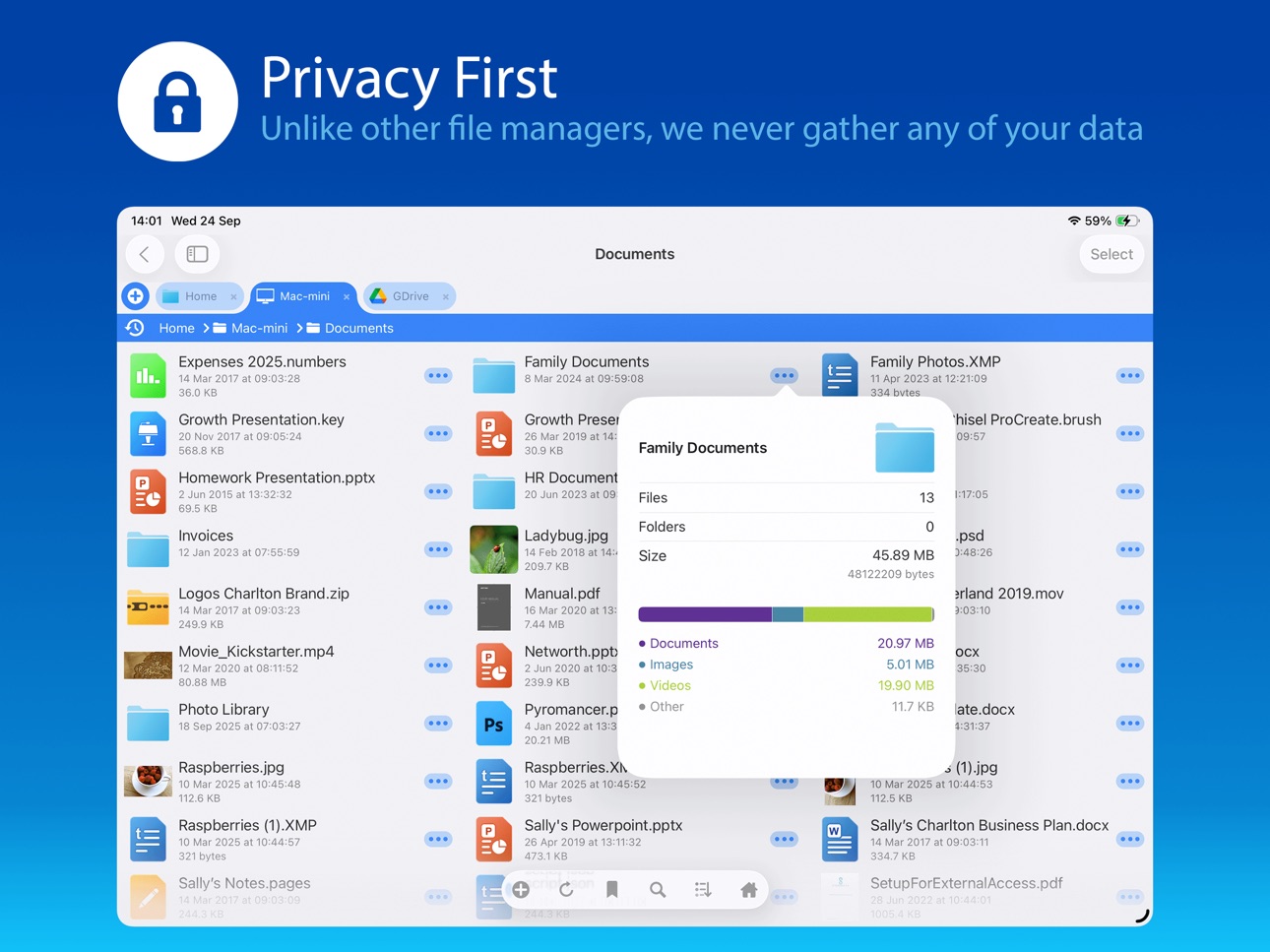
Unlike other file manager apps, we never gather any of your data. We also don't require you to create an account or register an email address with us.
Description
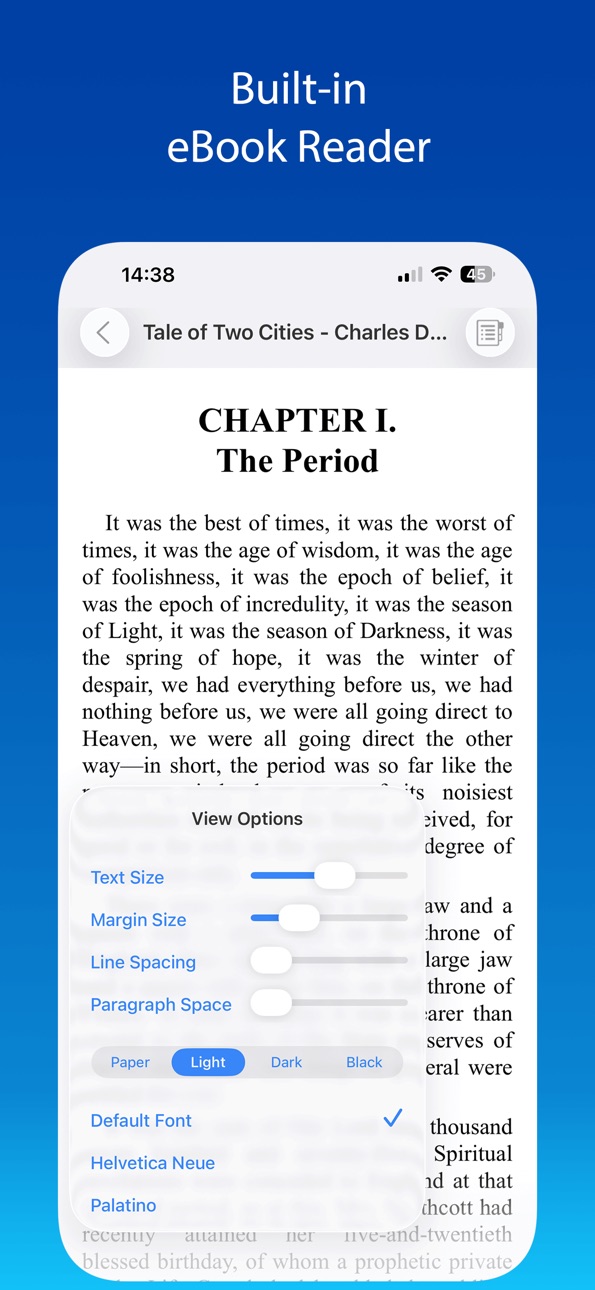
Use your iPad or iPhone to connect to your home computers, network drives and cloud storage. Easily upload/download/copy files and folders from one location to another, and browse your content using a variety of built-in viewers.
*** FileBrowser remains the best option if you're looking for a file manager that supports a variety of external connections and also integrates deeply with iOS - Federico Viticci - MacStories ***
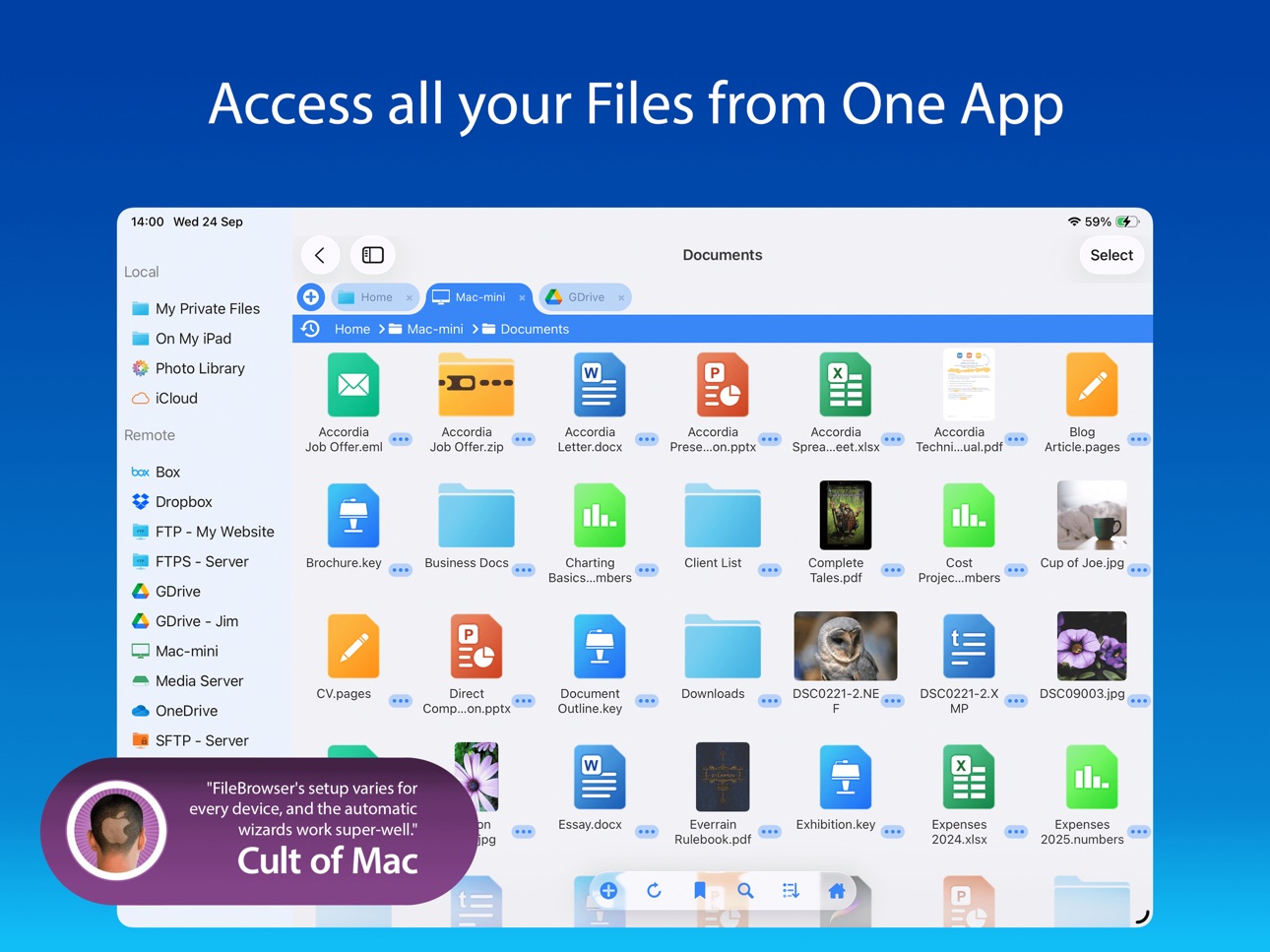
*** FileBrowser's setup varies for every device, and the automatic wizards work super-well.
Charlie Sorrel - Cult of Mac ***
Ultra-fast browsing of your computers. Faster than Windows Explorer or Mac Finder and our users agree!
GET ORGANIZED
FileBrowser gives you everything you need to keep your files effortlessly organized:
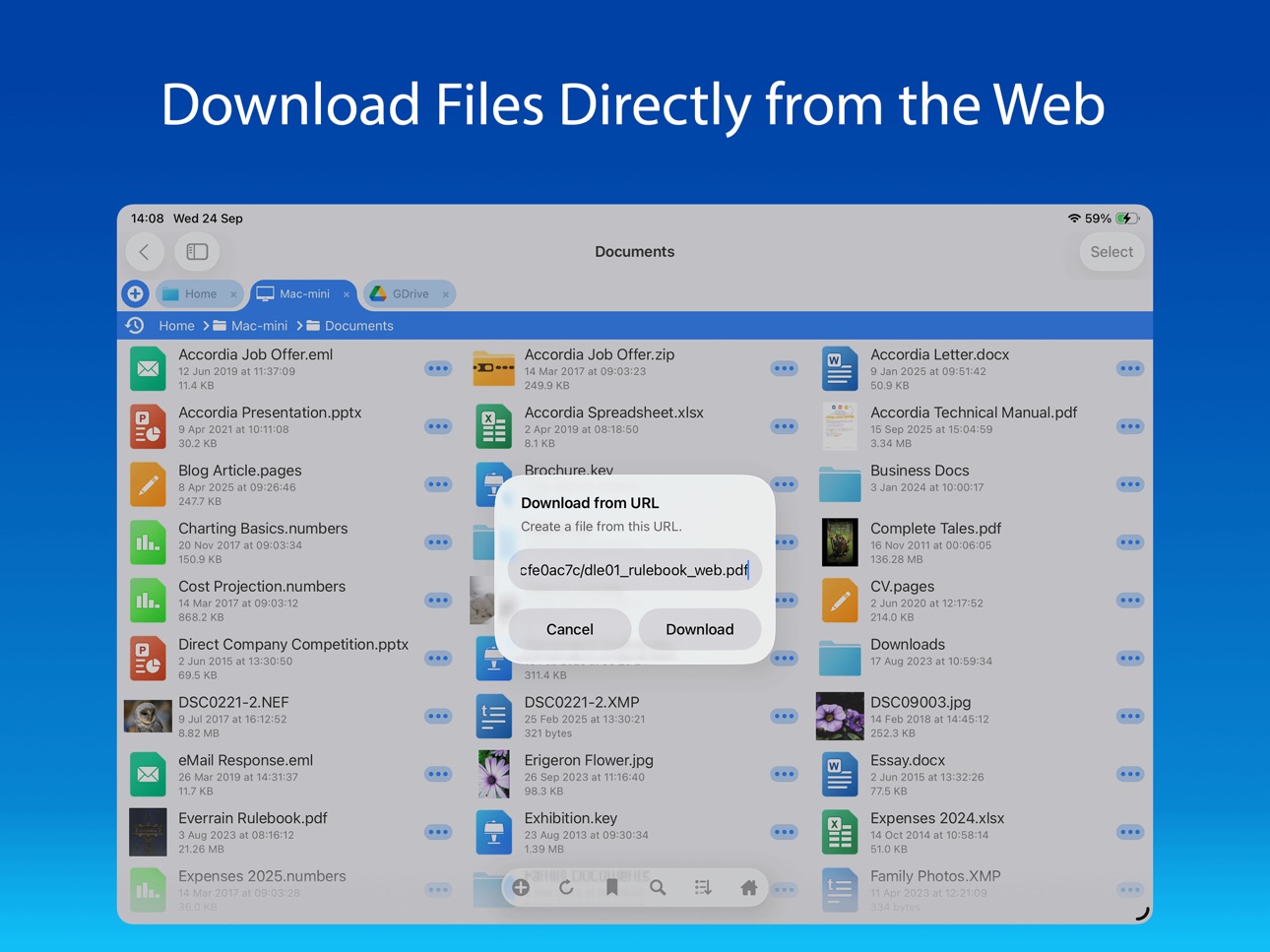
Move, edit, delete, rename, copy, zip and unzip. Download files from the web and paste them wherever you choose.
MULTI-TABBED BROWSING
Our FileBrowser suite of apps are the first file management apps to support multiple tabs. Connect to many of your locations at once and switch between them with ease. Use iPadOS split-screen mode to drag & drop between multiple windows.
CONNECT TO
Windows, Mac, Linux, Time Capsule, NAS drives, portable WiFi drives, SMB, Samba.
Google Drive, Dropbox, Box, OneDrive, WebDAV, FTP and SFTP.
Link to the same cloud storage with multiple accounts, if you have more than one Dropbox account, for example.
EXTEND THE FILES APP
FileBrowser allows you to access all your connections from the iOS Files app and other apps that use this as their document chooser, bringing network access to those apps.
EDIT IN-PLACE
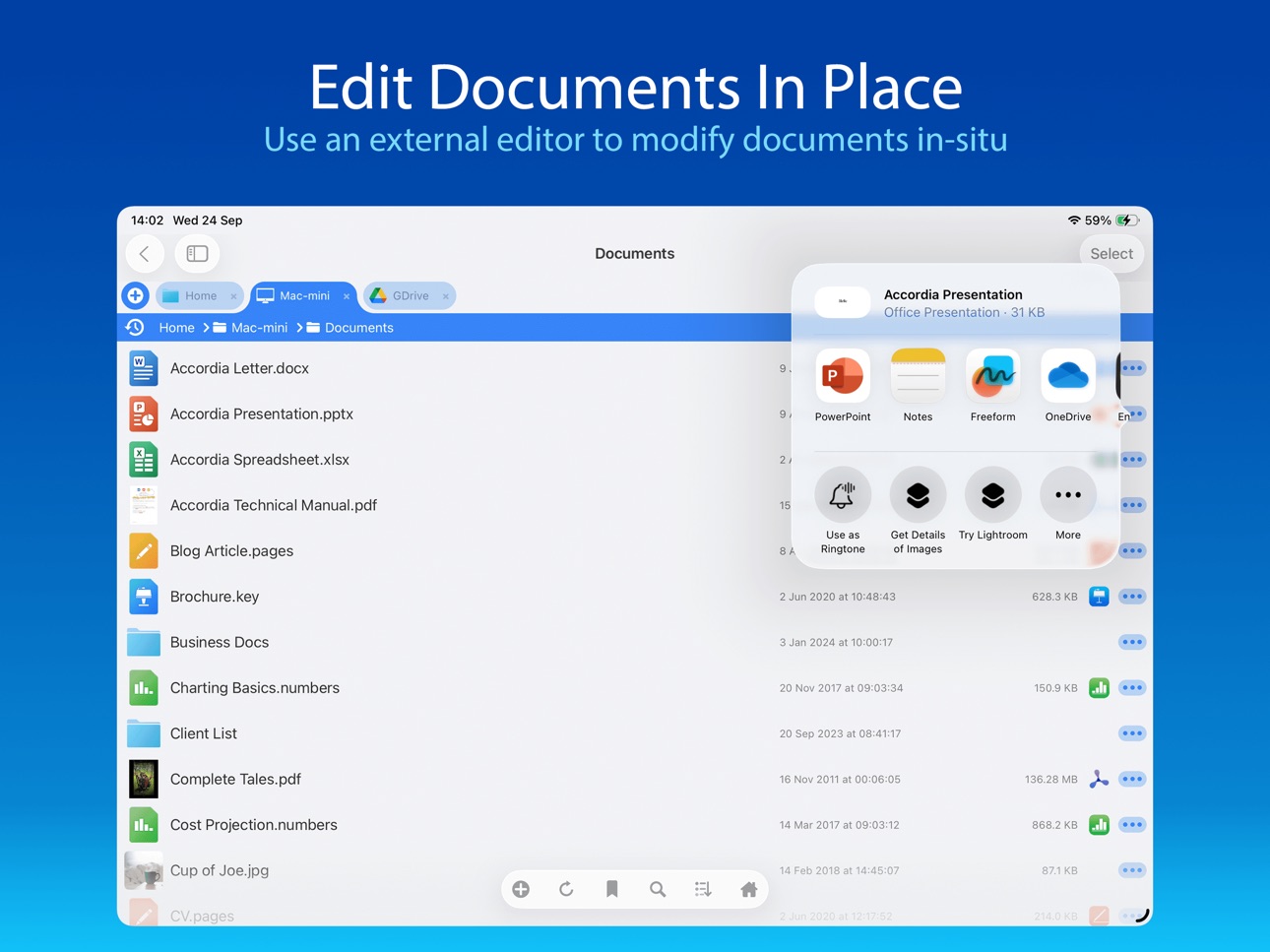
No more copying of documents between apps. Launch an app to edit a network document in-place, such as Word or Pages or any of the Office and Mac suite. Changes are saved to the original document automatically.
BLAZINGLY FAST
Create bookmarks to your favorite locations & folders. Use a single tap to connect and browse to a favorite folder.
PHOTO VIEWER
Browse your photos wherever they are stored and display them on your TV or projector using AirPlay or Chromecast. Easily flick through holiday snaps or use the built-in slideshow feature.
STREAM YOUR MOVIES / MUSIC
Stream movie files or listen to music, both with AirPlay™ and Chromecast support. Use our built-in viewers or stream video to other apps.
DOCUMENT VIEWER
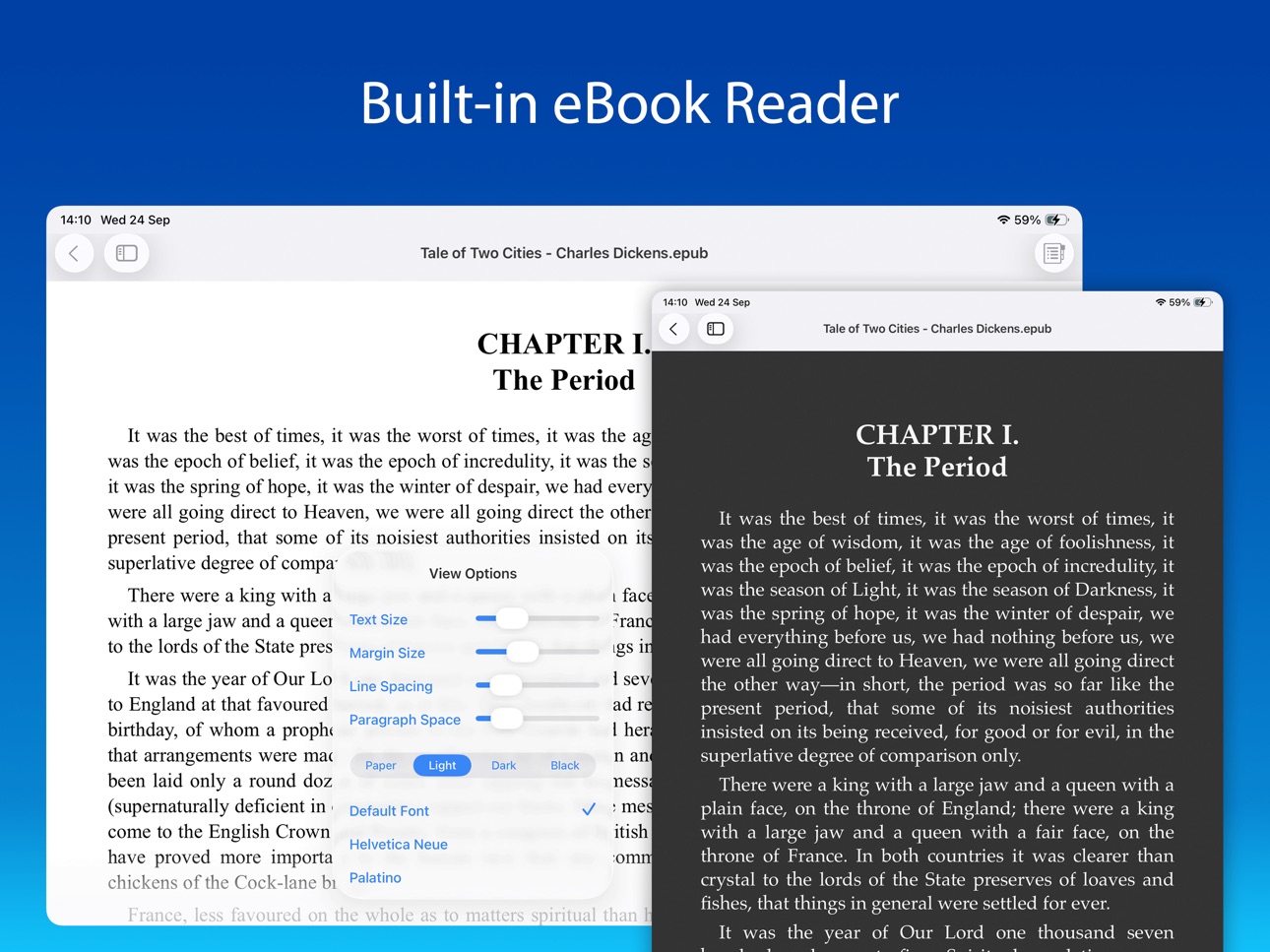
View Microsoft Office, Apple Pages, Numbers, KeyNote, PDF, text files, source code, HTML, and many more using the built-in viewers.
ANNOTATE PDFS AND IMAGES
Use the built-in annotation tools for PDFs and images, or use the iOS annotation tools to add notes, drawings or highlight text.
SECURITY AND ENCRYPTION
FileBrowser securely stores your passwords in the iOS keychain and uses iOS encryption features to protect your local content. Protect local files using a password, TouchID or FaceID.
CONNECT ANYWHERE
Connect to your Mac or PC when away from home. See our website for details: https://www.stratospherix.com/setupvpn
TOO MANY FEATURES TO LIST
FileBrowser has many features that we would like to tell you about. Check out our website. You'll be amazed!
https://www.stratospherix.com/products/filebrowser
FIRST CLASS SUPPORT
User manuals and help are available at stratospherix.com/support with how-to articles and videos. You can also email us for fast, friendly support.
Accessibility
developerUrlipadiphonemacrealityDevicetvoswatch
Version history 25 versions
Build 887392164v26.52026-06-29 21:27:46
New Features
* Added Properties menu to video viewer.
* New files added externally to On My iPad/iPhone now have the Backup mode applied.
* Image Viewer's property panel now persists across image swipes.
* Added support for more Markdown formatting.
* Sort By Name now uses the same sort mode as Finder.
* Empty folders are now reported as such.
Bug Fixes
* Restored Image thumb tray icon on image viewer info panel.
* Restored the volume slider in the video viewer on iPad.
* Improved renaming of folders with leading dot characters.
* Improved performance of listing large folders.
* Improved unzipping archives containing non ASCII filenames.
* Improved message when removing an image from a Photo Library album.
* Reduced screen-update motion when changing the Use Trash option.
* Fixed loading of large images not completing.
* Fixed glitchy slideshow image transitions.
* Fixed web images closing the viewer when pinching to zoom.
Thank you for helping to make our apps better. If you would like to rate or leave a review on the App Store, we look forward to hearing your feedback.
Unlike other file manager apps, we never gather any of your data. We also don't require you to create an account or register an email address with us.
Build 885920301v26.42026-05-21 18:37:26
New Features
* View HDR images at full dynamic range.
* Improved audio player UI.
* Improved image viewer UI.
* Thumbnails are now generated for office documents.
* Improved workflow when editing Markdown documents.
* New tabs are now added to the right of the active tab.
* Updated UI for local files web server.
* Improved long filename display in grid mode.
* Improved the image viewer swipe to dismiss feature.
Bug Fixes
* Fixed FTP listing showing wrong size for files > 2GB.
* Fixed crash when launching a Sync folder Home Screen favourite.
Thank you for helping to make our apps better. If you would like to rate or leave a review on the App Store, we look forward to hearing your feedback.
Unlike other file manager apps, we never gather any of your data. We also don't require you to create an account or register an email address with us.
Build 883539025v26.32026-04-02 21:57:19
New Features
* Swipe to dismiss image viewer is now more responsive.
* Added support for JFIF images.
Bug Fixes
* Fixed grid mode not tappable after de-selecting files.
Thank you for helping to make our apps better. If you would like to rate or leave a review on the App Store, we look forward to hearing your feedback.
Unlike other file manager apps, we never gather any of your data. We also don't require you to create an account or register an email address with us.
Build 883512180v26.22026-03-19 08:33:47
New Features
* Thumbnails are now generated for PSD and PSB files.
* Bulk rename format text now has a history list.
* The current tab can now be duplicated.
* The image viewer can now optionally avoid the dynamic island.
* Improved Bookmarks popup UI.
Bug Fixes
* Fixed the Pending Uploads screen missing the breadcrumb bar.
* Fixed Favorites list sometimes not working in the Files App.
* Fixed handling of trailing spaces when connecting to a Time Capsule.
Thank you for helping to make our apps better. If you would like to rate or leave a review on the App Store, we look forward to hearing your feedback.
Unlike other file manager apps, we never gather any of your data. We also don't require you to create an account or register an email address with us.
Build 882642953v26.12026-02-23 18:10:37
New Features
* Smoother scrolling of images in grid mode.
* Improved wording in config pages.
* Handling of special characters in SMB file/folder names..
* Improved performance when copying files to the local device.
* Added support for OGG file playback.
* Added a Go To Page feature when viewing PDF documents.
Bug Fixes
* Fixed some password-protected RAR files not expanding.
* Fixed long-press not updating the toolbar in Select Mode.
* Fixed FLAC Files not playing from OneDrive.
* File listing action buttons are now automatically dismissed.
Thank you for helping to make our apps better. If you would like to rate or leave a review on the App Store, we look forward to hearing your feedback.
Unlike other file manager apps, we never gather any of your data. We also don't require you to create an account or register an email address with us.
Build 881420365v26.02026-01-18 12:35:55
New Features
* Photos can now be Moved from the All Photos folder.
* Trash Can is now available for iCloud and USB connections.
* Added 3x playback speed for audio and video.
* Improved support for DNG image files.
* Viewing Markdown files now supports view options including dark mode.
* Improved performance when swiping through large photos.
* Improved support for iOS Glass UI rendering.
* Updated connector-specific icons.
* What's New popup now honours Dark Mode.
Bug Fixes
* Fixed handling of slash characters in Google Drive folder names.
* Fixed incompatible character encoding when editing text files.
* Fixed dismiss-keyboard button vanishing when editing a text file.
* Fixed handling of desktop.ini files on Dropbox.
* Fixed Google Drive search options always asking for mode confirmation.
* Fixed stalling of videos when streaming to Googlecast or AirPlay.
Thank you for helping to make our apps better. If you would like to rate or leave a review on the App Store, we look forward to hearing your feedback.
Unlike other file manager apps, we never gather any of your data. We also don't require you to create an account or register an email address with us.
Build 879527181v25.122025-11-06 16:18:15
New Features
* 360 degree viewer for panoramic images.
* Improved performance when swiping between large images.
Bug Fixes
* Fixed misplaced tab bar after viewing an image.
* Fixed toolbar buttons overflowing for some languages.
* Increased the legibility of folder listings in Dark theme.
Thank you for helping to make our apps better. If you would like to rate or leave a review on the App Store, we look forward to hearing your feedback.
Unlike other file manager apps, we never gather any of your data. We also don't require you to create an account or register an email address with us.
Build 879294871v25.112025-10-29 17:58:45
This will be the last update for iOS 12, 13, and 14.
We try to maintain support for older iOS/iPadOS versions as long as possible, but future updates will require iOS 15 or later.
New Features
* Trash or Permanent deletion is now an option.
* Added Empty Trash for On My iPad in the home screen.
* Control over download of thumbnails on cellular links.
* Double-tap zoom level is now configurable.
Bug Fixes
* Fixed crash when starting Edit in Place in a document.
* Fixed auto-switching to Dark/Light mode.
* Fixed extracting MP4 videos from the Photo Library.
* Reverted iOS 26 background processing after user feedback.
Thank you for helping to make our apps better. If you would like to rate or leave a review on the App Store, we look forward to hearing your feedback.
Unlike other file manager apps, we never gather any of your data. We also don't require you to create an account or register an email address with us.
Build 878695866v25.102025-10-12 10:23:05
This will be the last update for iOS 12, 13, and 14.
We try to maintain support for older iOS/iPadOS versions as long as possible, but future updates will require iOS 15 or later.
New Features
* Browse into sub-folders directly from the breadcrumb bar.
* Long-running tasks are now shown in Dynamic Island.
* Import a photo or video using the Photo Library picker.
* Improved image viewer double-tap to zoom feature.
* Improved image viewer toolbar button layout.
* Improved video scrubbing image updates.
* Server connection details can now be duplicated.
* Add support for older Multi-file RAR archives.
* Improved network disconnection message.
* Improved message when pasting into a Search Result window.
Bug Fixes
* Fixed folder listing scrolling to the top unnecessarily.
* Reduced the sensitivity of the image viewer's swipe-down gesture.
* Fixed volume slider being unusable when using Chromecast.
Thank you for helping to make our apps better. If you would like to rate or leave a review on the App Store, we look forward to hearing your feedback.
Unlike other file manager apps, we never gather any of your data. We also don't require you to create an account or register an email address with us.
Build 878199663v25.92025-09-23 07:50:12
New Features
* User interface update.
* Improved the reporting of network disconnection errors.
Bug Fixes
* Fixed photos moving off-screen when switching to the background.
* Fixed double-tap to zoom not zooming to 1:1 pixel.
* Fixed crash when listing large iCloud Photo folders.
Thank you for helping to make our apps better. If you would like to rate or leave a review on the App Store, we look forward to hearing your feedback.
Unlike other file manager apps, we never gather any of your data. We also don't require you to create an account or register an email address with us.
Build 877588767v25.82025-08-27 07:14:09
New Features
* Added support for SFTP Key file+password auth.
* Improved help for SFTP Fingerprint feature.
* Log files now automatically scroll to the end when opened.
* Can now access Photo Library's hidden photos.
* PDF search while typing is now optional.
Bug Fixes
* Fixed crash when displaying large photos.
Thank you for helping to make our apps better. If you would like to rate or leave a review on the App Store, we look forward to hearing your feedback.
Unlike other file manager apps, we never gather any of your data. We also don't require you to create an account or register an email address with us.
Build 875851571v25.72025-07-16 08:32:10
New Features
* Added Single Track repeat audio option.
* Markdown files can now be created in any folder.
* Added SFTP fingerprint validation option.
* Filename text size is now independent of zoom.
* Improved handling of pasting URLs into a folder.
* Improved info message when renaming Photo Library items.
* Video player now shows +/- 1 sec controls.
* Accessibility: Added support for reduced motion.
* Accessibility: Added support for Voice Control.
Bug Fixes
* Fixed new locations clashing with internal ones.
* Fixed audio playing twice when chromecasting videos.
* Fixed Dynamic Island obscuring some views.
Thank you for helping to make our apps better. If you would like to rate or leave a review on the App Store, we look forward to hearing your feedback.
Unlike other file manager apps, we never gather any of your data. We also don't require you to create an account or register an email address with us.
Build 875261469v25.62025-06-03 12:30:43
25.6
* Fix Files App actions.
25.5
New Features
* Drag drop to reorder local and remote home screen locations.
* Link locations to iCloud folders more easily.
* Added support for .icns files.
* Zip file options dialog improvements.
Bug Fixes
* Fixed duplicated ePub index entries.
* Fixed edit in place when using WebDAV for files with accented characters.
* Fixed rename popup not always highlighting filename.
* Fixed search not working when editing html files.
* Fixed file ordering when using sharing dialog.
Thank you for helping to make our apps better. If you would like to rate or leave a review on the App Store, we look forward to hearing your feedback.
Unlike other file manager apps, we never gather any of your data. We also don't require you to create an account or register an email address with us.
Build 874956991v25.52025-05-28 07:25:02
New Features
* Drag drop to reorder local and remote home screen locations.
* Link locations to iCloud folders more easily.
* Added support for .icns files.
* Zip file options dialog improvements.
Bug Fixes
* Fixed duplicated ePub index entries.
* Fixed edit in place when using WebDAV for files with accented characters.
* Fixed rename popup not always highlighting filename.
* Fixed search not working when editing html files.
* Fixed file ordering when using sharing dialog.
Thank you for helping to make our apps better. If you would like to rate or leave a review on the App Store, we look forward to hearing your feedback.
Unlike other file manager apps, we never gather any of your data. We also don't require you to create an account or register an email address with us.
Build 873700364v25.42025-04-02 07:08:20
25.4
* Fixed not being able to connect to some Dell NAS drives
* Fixed Grid mode not being able to de-select items.
25.3
New Features
* GPS info now displayed for Sony A1 camera photos.
* PDF - Improved accuracy of document bookmarks.
* Spacebar now play/pauses videos.
* Select video/image files with keyboard Enter key.
Bug Fixes
* PDF - Improved accuracy of document bookmarks.
* Video info - Fixed unknown size for some files.
* Edit in Place - Fixed a delay that was occurring for some connections.
* Fixed not being able to connect to some Samba servers.
* File Progress translation issue has been fixed.
Thank you for helping to make our apps better. If you would like to rate or leave a review on the App Store, we look forward to hearing your feedback.
Unlike other file manager apps, we never gather any of your data. We also don't require you to create an account or register an email address with us.
Build 873614339v25.32025-03-28 18:50:45
New Features
* GPS info now displayed for Sony A1 camera photos.
* PDF - Improved accuracy of document bookmarks.
* Spacebar now play/pauses videos.
* Select video/image files with keyboard Enter key.
Bug Fixes
* PDF - Improved accuracy of document bookmarks.
* Video info - Fixed unknown size for some files.
* Edit in Place - Fixed a delay that was occurring for some connections.
* Fixed not being able to connect to some Samba servers.
* File Progress translation issue has been fixed.
Thank you for helping to make our apps better. If you would like to rate or leave a review on the App Store, we look forward to hearing your feedback.
Unlike other file manager apps, we never gather any of your data. We also don't require you to create an account or register an email address with us.
Build 872988603v25.22025-03-24 14:46:08
New Features
* Translations for Italian language added.
* ePub - Added line and paragraph spacing options.
* Image Viewer - Added prev/next border tap option.
* DRM-less Audible .AA files are now supported.
* Save Credentials on new connections after connecting.
Bug Fixes
* ePub - Contents Index not showing all items
* ePub - Table of Contents links fixed.
* RAR Files - Crash when expanding particular RAR files fixed.
* Text selection handles in the rename popup fixed.
Thank you for helping to make our apps better. If you would like to rate or leave a review on the App Store, we look forward to hearing your feedback.
Unlike other file manager apps, we never gather any of your data. We also don't require you to create an account or register an email address with us.
Build 872387943v25.12025-02-18 08:51:22
* Improved display of raw image formats
* Improved video playback control layout
* New mute-audio button on video playback
* More video and audio playback speed options
* Improved ZIP and UNZIP for single folders & files
* WebDAV server now permits anonymous logins
Bug Fixes
* Fixed PDF markup save/update problem
* Fixed loading SFTP key files from SMB servers
* Fixed video auto start and Auto Slideshow option
Thank you for helping to make our apps better. If you would like to rate or leave a review on the App Store, we look forward to hearing your feedback.
Unlike other file manager apps, we never gather any of your data. We also don't require you to create an account or register an email address with us.
Build 871616786v25.02025-01-10 09:31:35
* New borderless grid folder view mode
* Show images from file system in markdown file viewer
* Tab menus now have Close Other Tabs/Close Tabs to Right options
* Option to copy only newer files when copying multiple files
* Open in new window option in bookmarks now leaves bookmarks popup open
Bug Fixes
Fixed rare Edit In Place save fail when using DFS folder links
Fixed showing correct image after deleting one in the image viewer
Fixed video slideshow option only showing videos after current video
Fixed adding a bookmark from a file menu
Fixed file view when saving an edited markdown file
Thank you for helping to make our apps better. If you would like to rate or leave a review on the App Store, we look forward to hearing your feedback.
Unlike other file manager apps, we never gather any of your data. We also don't require you to create an account or register an email address with us.
Build 870915493v24.162024-12-05 20:07:03
* Improved error messages when copying to USB drive.
Bug Fixes
* Fix Remote Moves being available when delete access is prohibited.
Thank you for helping to make our apps better. If you would like to rate or leave a review on the App Store, we look forward to hearing your feedback.
Unlike other file manager apps, we never gather any of your data. We also don't require you to create an account or register an email address with us.
Build 870527094v24.152024-11-19 22:47:33
* New menu option to play audio from video files in the background.
* Hide the video repeating message if Show Video Overlays is off.
* Command +/- keyboard shortcuts to zoom in PDF viewer.
* Define a naming template for captured audio/photo/image/pdf files.
* Image metadata viewer now includes file date and size.
Bug Fixes
* Fix Open in New Tab sometimes not opening files.
* Fix drag-drop sometimes not including all selected files.
* Fix PDF file links to documents on local folders.
* Fix auto screen lock when annotating a PDF document.
* Fix rare stall when importing from Photo Library.
* Fix config screen layout when rotating iPhone.
Thank you for helping to make our apps better. If you would like to rate or leave a review on the App Store, we look forward to hearing your feedback.
Unlike other file manager apps, we never gather any of your data. We also don't require you to create an account or register an email address with us.
Build 870027384v24.142024-10-30 15:51:48
24.14
* Fixed selecting items with an external trackpad or mouse.
* Fixed rename on OneDrive not preserving modified date.
* SMB Shares can now be sorted.
24.13
* Added Swipe Actions to file listings.
* Added the last 5 files to the history popup.
* Added Open in new Tab/Window to Bookmark menu.
* Added File size to image viewer info panel.
Bug fixes
* Fixed crash extracting tags from some DNG files.
* Fixed aborted copy leaving a partial file.
* Fixed preserving OneDrive dates when copying.
* Fixed loading bar persisting when viewing a file.
* Fixed video subtitles being on by default.
* Fixed thumbnail icon in file paste conflict popup.
Thank you for helping to make our apps better. If you would like to rate or leave a review on the App Store, we look forward to hearing your feedback.
Unlike other file manager apps, we never gather any of your data. We also don't require you to create an account or register an email address with us.
Build 869973580v24.132024-10-27 08:02:17
* Added Swipe Actions to file listings.
* Added the last 5 files to the history popup.
* Added Open in new Tab/Window to Bookmark menu.
* Added File size to image viewer info panel.
Bug fixes
* Fixed crash extracting tags from some DNG files.
* Fixed aborted copy leaving a partial file.
* Fixed preserving OneDrive dates when copying.
* Fixed loading bar persisting when viewing a file.
* Fixed video subtitles being on by default.
* Fixed thumbnail icon in file paste conflict popup.
Thank you for helping to make our apps better. If you would like to rate or leave a review on the App Store, we look forward to hearing your feedback.
Unlike other file manager apps, we never gather any of your data. We also don't require you to create an account or register an email address with us.
Build 869624424v24.122024-10-17 07:18:16
* Sub-folder searching revamp.
* Column folder view now supports variable number of columns.
* Added support for iOS 18 dark app icon mode.
* UI improvements for key buttons.
Bug fixes
* Fixed crash when deleting locations from the Home Screen.
* Fixed stalling when copying to the built-in WebDAV server.
* Fixed failing to stream video from Dropbox not reporting an error.
* Fixed text edit mode losing the search icon.
* Fixed PDF links not opening other documents.
* Fixed deleting an image switching to a random image.
Thank you for helping to make our apps better. If you would like to rate or leave a review on the App Store, we look forward to hearing your feedback.
Unlike other file manager apps, we never gather any of your data. We also don't require you to create an account or register an email address with us.
Build 868564269v24.102024-08-28 21:31:24
* The text viewer now aligns with the active colour theme.
* Added handling for bad SMB2 packets from QNAP NAS drives.
* Sidebar now conforms to the active colour theme.
Bug fixes
* Fixed white screen flash when viewing a PDF in Dark Mode.
* Fixed volume bubble not reaching the end of the volume slider.
* Fixed bulk rename window not updating example filenames.
Thank you for helping to make our apps better. If you would like to rate or leave a review on the App Store, we look forward to hearing your feedback.
Unlike other file manager apps, we never gather any of your data. We also don't require you to create an account or register an email address with us.
Price history by region
Currency
Show
Columns
Search
App performance US
Availability 171 of 173 storefronts
| Region | Language | Price | Ratings | Avg | Version |
|---|---|---|---|---|---|
| DE | de-DE | EUR 9.99 | 7.6k | 4.7 | 26.5 |
| US | en-US | USD 7.99 | 5.6k | 4.7 | 26.5 |
| GB | en-GB | GBP 7.99 | 1.9k | 4.8 | 26.5 |
| NL | nl | EUR 9.99 | 1.5k | 4.6 | 26.5 |
| AU | en-AU | AUD 12.99 | 1.4k | 4.5 | 26.5 |
| CA | en-CA | CAD 9.99 | 952 | 4.7 | 26.5 |
| JP | ja | JPY 1300 | 919 | 4.6 | 26.5 |
| CH | de-CH | CHF 7 | 888 | 4.7 | 26.5 |
| FR | fr-FR | EUR 9.99 | 685 | 4.7 | 26.5 |
| AT | de-DE | EUR 9.99 | 626 | 4.7 | 26.5 |
| IT | it | EUR 9.99 | 513 | 4.7 | 26.5 |
| ES | es-ES | EUR 9.99 | 355 | 4.7 | 26.5 |
| SE | sv | SEK 99 | 348 | 4.6 | 26.5 |
| BE | en-GB | EUR 9.99 | 299 | 4.7 | 26.5 |
| CN | zh-Hans-CN | CNY 58 | 265 | 4.9 | 26.5 |
| DK | en-GB | DKK 69 | 247 | 4.4 | 26.5 |
| BR | pt-BR | BRL 49.9 | 237 | 4.8 | 26.5 |
| TW | zh-Hant-TW | TWD 290 | 226 | 4.8 | 26.5 |
| NO | en-GB | NOK 99 | 136 | 4.6 | 26.5 |
| HU | en-GB | HUF 3490 | 117 | 4.8 | 26.5 |
| MX | es-MX | MXN 179 | 105 | 4.8 | 26.5 |
| ZA | en-GB | ZAR 149.99 | 98 | 4.6 | 26.5 |
| NZ | en-AU | NZD 14.99 | 97 | 4.7 | 26.5 |
| CZ | en-GB | CZK 199 | 93 | 4.8 | 26.5 |
| HK | zh-Hant-HK | HKD 58 | 88 | 4.7 | 26.5 |
| IN | en-GB | INR 799 | 82 | 4.5 | 26.5 |
| KR | ko | KRW 12000 | 79 | 4.8 | 26.5 |
| FI | en-GB | EUR 9.99 | 73 | 4.6 | 26.5 |
| PL | en-GB | PLN 39.99 | 72 | 4.9 | 26.5 |
| SG | en-GB | SGD 9.98 | 70 | 4.7 | 26.5 |
| PT | pt-PT | EUR 9.99 | 65 | 4.6 | 26.5 |
| UA | en-GB | USD 9.99 | 55 | 4.9 | 26.5 |
| TH | en-GB | THB 299 | 54 | 4.9 | 26.5 |
| GR | en-GB | EUR 9.99 | 51 | 4.8 | 26.5 |
| SK | en-GB | EUR 9.99 | 51 | 4.6 | 26.5 |
| BG | en-GB | EUR 9.99 | 48 | 4.8 | 26.5 |
| HR | en-GB | EUR 9.99 | 47 | 4.7 | 26.5 |
| SI | en-GB | EUR 9.99 | 47 | 4.9 | 26.5 |
| ID | en-GB | IDR 129000 | 40 | 4.8 | 26.5 |
| RO | en-GB | RON 39.99 | 40 | 5.0 | 26.5 |
| TR | en-GB | TRY 399.99 | 38 | 4.8 | 26.5 |
| LU | en-GB | EUR 9.99 | 35 | 4.7 | 26.5 |
| AR | es-MX | USD 7.99 | 34 | 4.9 | 26.5 |
| IE | en-GB | EUR 9.99 | 34 | 4.4 | 26.5 |
| AE | en-GB | AED 29.99 | 29 | 4.9 | 26.5 |
| CL | es-MX | CLP 9990 | 28 | 4.6 | 26.5 |
| IL | en-GB | ILS 29.9 | 28 | 4.7 | 26.5 |
| PH | en-GB | PHP 499 | 27 | 4.5 | 26.5 |
| VN | en-GB | VND 249000 | 27 | 5.0 | 26.5 |
| MY | en-GB | MYR 39.9 | 25 | 4.8 | 26.5 |
| LT | en-GB | EUR 9.99 | 21 | 4.4 | 26.5 |
| CO | es-MX | COP 39900 | 18 | 4.8 | 26.5 |
| KZ | en-GB | KZT 4990 | 17 | 4.8 | 26.5 |
| SA | en-GB | SAR 34.99 | 15 | 4.0 | 26.5 |
| PE | es-MX | PEN 34.9 | 11 | 4.9 | 26.5 |
| EC | es-MX | USD 7.99 | 10 | 4.9 | 26.5 |
| LB | en-GB | USD 7.99 | 10 | 4.9 | 26.5 |
| EG | en-GB | EGP 399.99 | 9 | 4.8 | 26.5 |
| LV | en-GB | EUR 9.99 | 9 | 5.0 | 26.5 |
| PA | es-MX | USD 7.99 | 8 | 4.5 | 26.5 |
| AM | en-GB | USD 9.99 | 7 | 4.9 | 26.5 |
| CR | es-MX | USD 7.99 | 7 | 5.0 | 26.5 |
| EE | en-GB | EUR 9.99 | 6 | 4.3 | 26.5 |
| AZ | en-GB | USD 9.99 | 5 | 5.0 | 26.5 |
| BO | es-MX | USD 7.99 | 5 | 5.0 | 26.5 |
| GT | es-MX | USD 7.99 | 5 | 4.4 | 26.5 |
| IS | en-GB | USD 9.99 | 5 | 5.0 | 26.5 |
| MU | en-GB | USD 9.99 | 5 | 4.6 | 26.5 |
| MK | en-GB | USD 7.99 | 4 | 5.0 | 26.5 |
| PK | en-GB | PKR 2200 | 4 | 4.5 | 26.5 |
| CY | en-GB | EUR 9.99 | 3 | 4.3 | 26.5 |
| KW | en-GB | USD 7.99 | 3 | 5.0 | 26.5 |
| MD | en-GB | USD 9.99 | 3 | 5.0 | 26.5 |
| MO | zh-Hant-HK | USD 7.99 | 3 | 3.7 | 26.5 |
| MT | en-GB | EUR 9.99 | 3 | 4.7 | 26.5 |
| OM | en-GB | USD 7.99 | 3 | 4.7 | 26.5 |
| QA | en-GB | QAR 29.99 | 3 | 5.0 | 26.5 |
| SV | es-MX | USD 7.99 | 3 | 5.0 | 26.5 |
| TT | en-GB | USD 7.99 | 3 | 5.0 | 26.5 |
| UZ | en-GB | USD 8.99 | 3 | 5.0 | 26.5 |
| AL | en-GB | USD 9.99 | 2 | 5.0 | 26.5 |
| BA | en-GB | EUR 9.99 | 2 | 5.0 | 26.5 |
| BS | en-GB | USD 8.99 | 2 | 4.5 | 26.5 |
| DO | es-MX | USD 7.99 | 2 | 4.5 | 26.5 |
| JO | en-GB | USD 7.99 | 2 | 5.0 | 26.5 |
| KE | en-GB | USD 9.99 | 2 | 5.0 | 26.5 |
| KH | en-GB | USD 8.99 | 2 | 4.5 | 26.5 |
| LC | en-GB | USD 7.99 | 2 | 5.0 | 26.5 |
| LK | en-GB | USD 7.99 | 2 | 5.0 | 26.5 |
| NG | en-GB | NGN 12900 | 2 | 4.5 | 26.5 |
| VE | es-MX | USD 7.99 | 2 | 4.5 | 26.5 |
| AO | en-GB | USD 7.99 | 1 | 3.0 | 26.5 |
| BN | en-GB | USD 7.99 | 1 | 5.0 | 26.5 |
| BZ | en-GB | USD 7.99 | 1 | 4.0 | 26.5 |
| GE | en-GB | USD 9.99 | 1 | 5.0 | 26.5 |
| HN | es-MX | USD 7.99 | 1 | 4.0 | 26.5 |
| JM | en-GB | USD 7.99 | 1 | 5.0 | 26.5 |
| KG | en-GB | USD 8.99 | 1 | 5.0 | 26.5 |
| KY | en-GB | USD 7.99 | 1 | 5.0 | 26.5 |
| MN | en-GB | USD 7.99 | 1 | 5.0 | 26.5 |
| MV | en-GB | USD 7.99 | 1 | 5.0 | 26.5 |
| NA | en-GB | USD 7.99 | 1 | 5.0 | 26.5 |
| SN | en-GB | USD 9.99 | 1 | 5.0 | 26.5 |
| TM | en-GB | USD 7.99 | 1 | 5.0 | 26.5 |
| UY | en-GB | USD 7.99 | 1 | 4.0 | 26.5 |
| ZW | en-GB | USD 9.99 | 1 | 5.0 | 26.5 |
| AF | en-GB | USD 7.99 | 0 | — | 26.5 |
| AG | en-GB | USD 7.99 | 0 | — | 26.5 |
| AI | en-GB | USD 7.99 | 0 | — | 26.5 |
| BF | en-GB | USD 7.99 | 0 | — | 26.5 |
| BH | en-GB | USD 8.99 | 0 | — | 26.5 |
| BJ | en-GB | USD 9.99 | 0 | — | 26.5 |
| BM | en-GB | USD 7.99 | 0 | — | 26.5 |
| BT | en-GB | USD 7.99 | 0 | — | 26.5 |
| BW | en-GB | USD 7.99 | 0 | — | 26.5 |
| CD | en-GB | USD 7.99 | 0 | — | 26.5 |
| CG | en-GB | USD 7.99 | 0 | — | 26.5 |
| CI | fr-FR | USD 9.99 | 0 | — | 26.5 |
| CM | fr-FR | USD 9.99 | 0 | — | 26.5 |
| CV | en-GB | USD 7.99 | 0 | — | 26.5 |
| DM | en-GB | USD 7.99 | 0 | — | 26.5 |
| DZ | en-GB | USD 7.99 | 0 | — | 26.5 |
| FJ | en-GB | USD 7.99 | 0 | — | 26.5 |
| FM | en-GB | USD 7.99 | 0 | — | 26.5 |
| GA | fr-FR | USD 7.99 | 0 | — | 26.5 |
| GD | en-GB | USD 7.99 | 0 | — | 26.5 |
| GH | en-GB | USD 9.99 | 0 | — | 26.5 |
| GM | en-GB | USD 7.99 | 0 | — | 26.5 |
| GW | en-GB | USD 7.99 | 0 | — | 26.5 |
| GY | en-GB | USD 7.99 | 0 | — | 26.5 |
| KN | en-GB | USD 7.99 | 0 | — | 26.5 |
| LA | en-GB | USD 8.99 | 0 | — | 26.5 |
| LR | en-GB | USD 7.99 | 0 | — | 26.5 |
| LY | en-GB | USD 7.99 | 0 | — | 26.5 |
| MA | en-GB | USD 7.99 | 0 | — | 26.5 |
| ME | en-GB | EUR 7.99 | 0 | — | 26.5 |
| MG | en-GB | USD 7.99 | 0 | — | 26.5 |
| ML | en-GB | USD 7.99 | 0 | — | 26.5 |
| MM | en-GB | USD 7.99 | 0 | — | 26.5 |
| MR | en-GB | USD 7.99 | 0 | — | 26.5 |
| MS | en-GB | USD 7.99 | 0 | — | 26.5 |
| MW | en-GB | USD 7.99 | 0 | — | 26.5 |
| MZ | en-GB | USD 7.99 | 0 | — | 26.5 |
| NE | en-GB | USD 7.99 | 0 | — | 26.5 |
| NI | es-MX | USD 7.99 | 0 | — | 26.5 |
| NP | en-GB | USD 9.99 | 0 | — | 26.5 |
| NR | en-GB | USD 7.99 | 0 | — | 26.5 |
| PG | en-GB | USD 7.99 | 0 | — | 26.5 |
| PW | en-GB | USD 7.99 | 0 | — | 26.5 |
| PY | es-MX | USD 7.99 | 0 | — | 26.5 |
| RS | en-GB | EUR 9.99 | 0 | — | 26.5 |
| RW | en-GB | USD 7.99 | 0 | — | 26.5 |
| SB | en-GB | USD 7.99 | 0 | — | 26.5 |
| SC | en-GB | USD 7.99 | 0 | — | 26.5 |
| SL | en-GB | USD 7.99 | 0 | — | 26.5 |
| SR | en-GB | USD 8.99 | 0 | — | 26.5 |
| ST | en-GB | USD 7.99 | 0 | — | 26.5 |
| SZ | en-GB | USD 7.99 | 0 | — | 26.5 |
| TC | en-GB | USD 7.99 | 0 | — | 26.5 |
| TD | en-GB | USD 7.99 | 0 | — | 26.5 |
| TJ | en-GB | USD 8.99 | 0 | — | 26.5 |
| TN | en-GB | USD 7.99 | 0 | — | 26.5 |
| TO | en-GB | USD 7.99 | 0 | — | 26.5 |
| TZ | en-GB | TZS 22900 | 0 | — | 26.5 |
| UG | en-GB | USD 9.99 | 0 | — | 26.5 |
| VC | en-GB | USD 7.99 | 0 | — | 26.5 |
| VG | en-GB | USD 7.99 | 0 | — | 26.5 |
| VU | en-GB | USD 7.99 | 0 | — | 26.5 |
| XK | en-GB | EUR 9.99 | 0 | — | 26.5 |
| YE | en-GB | USD 7.99 | 0 | — | 26.5 |
| ZM | en-GB | USD 9.99 | 0 | — | 26.5 |
Not available in: BY, RU
Reviews 30 reviews · US
★★★★★
Music
I use this app to store and listen to music. Is it possible that you could add the option to be Abel to fade out music at end of song
K-Dog_712026-06-08
★★★★★
Just a native file browser shortcut - why would I need this?
You cannot use it as a replacement for the native “Files” browser app in iOS. This is nothing more than an app that launches the native app when you need to browse files ON the iOS device itself. Worthless. Also, MP4 previews are not shown; just a generic “MOVIE” icon. So you see a list of timestamp filenames and no visual previews so dashcam SSD browsing is useless also.
OrsinoD2026-04-15
★★★★★
One of my best iPad purchases
I bought my license over a decade ago for my first iPad. The app has only gotten better in the intervening years. When my current employer issued me an iPad, this is one of the first apps I installed. It gives me access to everything, everywhere, all at once. Being able to easily access cloud and local server storage in one app is *chef’s kiss*.
Dadwud2026-04-03
★★★★★
Essential app
Perfect app for file manipulation. Never fails to get me the paths and files I need to work with. Easy move/copy/view. Couldn’t work on IOS without it.
Zippy2shoez2026-01-04
★★★★★
Best file app
This file app has so many features and works solidly. Their support is also very prompt and helpful.
Gunmetal82025-10-14
★★★★★
Looks dated.
This app just looks dated and bloated. I’m going back to the Files app in iOS. Simple, works well and doesn’t cost.
Maui Kid2025-09-20
★★★★★
Fantastically Useful
I bought this years ago and use it all the time. In a mixed-computer environment (mac, pc, ipad, iphone, webdav, etc) its usefulness cannot be overstated.
Random Scribbler2025-08-27
★★★★★
Looking for another file utility
This is yet another app that used to be very good but which has been ruined by it's GREEDY devooper! It used to do one thing and one thing very well Manage Files but that wasn't good enough for them, it's now a voice recorder a document reader a vidio player and a media player, none of which it does well at all. They will also not let you unzip certain types of zip file! With the plain Jane file browser. This is because they want yupgrading to the pro version never mind I don't need all that. I want a FILE BROWSER full stop if I wanted all that other mess, I'd use other apps! in their franti
brailleman2025-07-05
★★★★★
Fantastic!
I’ve been using this app for years and highly recommend it. I had a problem with an old FlashDrive where all files showed the current date. I contacted the dev, had a reply the same day, and learned that the problem was that old device didn’t store the date info! The customer service was just as great as the app itself.
iPad bliss2025-06-12
★★★★★
Better than iOS Files
Useful for photo exporting, and works great with network storage.
Rodger Daniels2025-04-26
★★★★★
A rare “user-first” app
So many applications seem to design themselves around weird internal mandates or metrics that are at odds with what the user wants. They also seem to start branching out into other things and forget their core purpose. This app does exactly what I need it to and brings me back to the good old days when I can use something that serves and also doesn’t require a login. Also, actual patch notes! Happy to have paid for this.
RonnieMZ2025-03-28
★★★★★
No autoplay next video, slideshow useless, freezes
February 2025 update: Videos autoplay was removed from January update, I asked for return. Slideshow was added in February update, I thought was fix. Does not work at all. And now, videos freeze and controls frozen forcing back out of video. Going downhill, bummer. Loved this app for years.
mar-val2025-02-22
★★★★★
Capable, stable, and easy to use
Capable, stable, and easy to use. Much more reliable than the built-in iOS file browser for connecting to samba shares. I’ve never had any issues with this app. Definitely worth the price
Velocitractor2025-02-09
★★★★★
The files app you’ve been looking for
This is it. What the default iPhone files app should have been.
Jggdfuijvfrssgu2024-10-14
★★★★★
Save place
Love the app. One suggestion, I use it to play audiobooks and when it updates I lose my place. I try to take screenshots to save where I left off, but the ability to continue from where I left off after updating would make this great app even better!
Seattle, Washington2024-08-24
★★★★★
Best
Hands down best files management app. For for progress bar alone worth every $, you can see percentage and progress. Best if you managing files thru multiple cloud providers.
PolyStoly2024-08-13
★★★★★
Updates are awesome
Best file browsing app for iOS bar none, also officially the only app in the entire App Store that is capable of looping videos somehow (please remove that annoying pop up that got added with the new video loop settings save feature)
EljiahR2024-08-12
★★★★★
Stopped streaming video from my NAS
I’ve used FileBrowser for years and really like it. However, it has suddenly stopped allowing me to stream videos (MP4) from my NAS server to my phone/ipad. Was there some change in the latest update that caused this?
JBM012024-07-25
★★★★★
I can’t connect my local devices anymore due to recent update
Please go fix the access between the devices. Usually, I just need sharing local and then tab to connect and already access. Right now, I can’t acsess to sharing file folder from this device to another device “due to no server found”. But it is actually there.
Azshorark2024-06-29
★★★★★
Fantastic!
Been running this for years - still great!
Looking for a replacement for the buggy, abandoned Transmit, I found this. Fantastic! Files integration actually works! Inbuilt PDF and image viewers are great. Music player is decent.
Fast and stable, this is good stuff!
wh0rfin2024-05-01
★★★★★
Recent update ruined copy and paste
The most recent update totally ruined the copy and paste on FileBrowser Pro. I have paid Pro version on iPadOS 17.4.1., when I went to the destination folder after selected and copied several files from original folder, instead of seeing paste the files in here, I kept seeing Select and nothing copied. I had to keep copying and copying. The copy and paste is broken.
Copying multiple files in the FileBrowser is a pain process. You have to manually tap every single file, instead of sliding through and selecting them. This only makes the broken copy and paste more annoying.
Vermontier2024-04-06
★★★★★
Just what I needed, plus more
After a scare at losing data after a pc disc crash, I wanted to secure my family photos on my iPad, where backups are automatic.
I downloaded my photo files, but found that saving/sharing had a glitch: the Apple transfer options scrambled the order of the photo files. Seeing grandma in London, then in Pittsburg just didn’t work for me.
If only I could access the photo files directly, and essentially create an album, they would stay in the original order.
Enter filebrowser. Another user, who had a more sophisticated problem, discovered that he could use filebrowser to fit his issue.
I ch
Ferzenwacker2024-03-20
★★★★★
Typically an amazing app!
Been running into an issue as of late, and perhaps its an AT&T thing, but Ill start to download a file from my FTP server and the transfer will cancel within a few seconds "Error: 500 Dat", and I cant read the rest.
Never had this type of trouble downloading over cellular before. I have unlimited data and pretty snappy service.
That1HoneyBadger2024-02-23
★★★★★
Does a poor job of connecting to Mac OS
Some days it works, and some days it doesn’t. With no change to settings. App frequently crashes when deleting a location. None of the recommended troubleshooting in the app or on the website works when it won’t connect.
prbroste2024-02-22
★★★★★
I just bought the app
But I can’t upload photos from my iPad. It only let me upload from files but not the photos app. It’s kind of useless to me if it can’t upload photos.
🫥Edit: I had to save into files in order to upload it
Talestry2024-02-12
★★★★★
They screwed something up
Not sure when, as I do not often transfer mp4 files. But when I first got this app the transfer and playback were fine. More recently however I have found that video files transferred to the iPad are damaged in some way. It’s as if only a fraction of frames per second are playing, resulting in sloppy playback that is painful to watch (and might induce seizures in some people). Since it didn’t used to behave like this I can only assume that the developers broke something and haven’t fixed it. Do not buy this app if you want to use it to transfer and play home videos. Right now it’s only useful
Psionycx2024-01-28
★★★★★
It’s a private cloud in a app
I now have the peace of mind with my private cloud, and a way to access my data like a professional system admin. Thank you!!!!
Spritz3312024-01-16
★★★★★
The best engineered, most important app I’ve got
No other app comes close to the value FileBrowser gives me in bridging every corner of my digital universe. It allows me to move content across my Windows machines, my network, DropBox and my photos effortlessly and even delivered a solution to archive giant shared iCloud albums every other solution was choking on. If I could have only one app it would be this one.
JSS Reviews2023-11-07
★★★★★
Great App
This app has been one if my best and most rewarding purchases from the App Store, making file management so easy and uncomplicated. Transfering files between my NAS and my phone & tablet is a breeze. Please, don’t sell it to Apple, they may screw it up like they did with DarkSky.
El Pelegrino2023-09-28
★★★★★
Effective when accessing SMB shares
Been using File Browser for years as my “go to” means to access file shares from various devices.
Reliable.
VermithraxPejorative2023-06-20
Change log 29 changes · US
✎
releaseNotes updated
New Features
* Added Properties menu to video viewer.
* New files added externally to On My iPad/iPhone now have the Backup mode applied.
* Image Viewer's prope
✎
description updated
Use your iPad or iPhone to connect to your home computers, network drives and cloud storage. Easily upload/download/copy files and folders from one location to
✎
subtitle updated
File Explorer & Media Player
✎
name updated
FileBrowser: Documents Manager
◆
Version 26.5 released
New Features
* Added Properties menu to video viewer.
* New files added externally to On My iPad/iPhone now have the Backup mode applied.
* Image Viewer's property panel now persists across image swipes.
* Added support for more Markdown fo
◆
Version 26.4 released
New Features
* View HDR images at full dynamic range.
* Improved audio player UI.
* Improved image viewer UI.
* Thumbnails are now generated for office documents.
* Improved workflow when editing Markdown documents.
* New tabs are now added
◆
Version 26.3 released
New Features
* Swipe to dismiss image viewer is now more responsive.
* Added support for JFIF images.
Bug Fixes
* Fixed grid mode not tappable after de-selecting files.
Thank you for helping to make our apps better. If you would like to r
◆
Version 26.2 released
New Features
* Thumbnails are now generated for PSD and PSB files.
* Bulk rename format text now has a history list.
* The current tab can now be duplicated.
* The image viewer can now optionally avoid the dynamic island.
* Improved Bookmar
◆
Version 26.1 released
New Features
* Smoother scrolling of images in grid mode.
* Improved wording in config pages.
* Handling of special characters in SMB file/folder names..
* Improved performance when copying files to the local device.
* Added support for OGG
◆
Version 26.0 released
New Features
* Photos can now be Moved from the All Photos folder.
* Trash Can is now available for iCloud and USB connections.
* Added 3x playback speed for audio and video.
* Improved support for DNG image files.
* Viewing Markdown files
◆
Version 25.12 released
New Features
* 360 degree viewer for panoramic images.
* Improved performance when swiping between large images.
Bug Fixes
* Fixed misplaced tab bar after viewing an image.
* Fixed toolbar buttons overflowing for some languages.
* Increase
◆
Version 25.11 released
This will be the last update for iOS 12, 13, and 14.
We try to maintain support for older iOS/iPadOS versions as long as possible, but future updates will require iOS 15 or later.
New Features
* Trash or Permanent deletion is now an optio
◆
Version 25.10 released
This will be the last update for iOS 12, 13, and 14.
We try to maintain support for older iOS/iPadOS versions as long as possible, but future updates will require iOS 15 or later.
New Features
* Browse into sub-folders directly from the b
◆
Version 25.9 released
New Features
* User interface update.
* Improved the reporting of network disconnection errors.
Bug Fixes
* Fixed photos moving off-screen when switching to the background.
* Fixed double-tap to zoom not zooming to 1:1 pixel.
* Fixed crash
◆
Version 25.8 released
New Features
* Added support for SFTP Key file+password auth.
* Improved help for SFTP Fingerprint feature.
* Log files now automatically scroll to the end when opened.
* Can now access Photo Library's hidden photos.
* PDF search while typi
◆
Version 25.7 released
New Features
* Added Single Track repeat audio option.
* Markdown files can now be created in any folder.
* Added SFTP fingerprint validation option.
* Filename text size is now independent of zoom.
* Improved handling of pasting URLs into
◆
Version 25.6 released
25.6
* Fix Files App actions.
25.5
New Features
* Drag drop to reorder local and remote home screen locations.
* Link locations to iCloud folders more easily.
* Added support for .icns files.
* Zip file options dialog improvements.
Bug Fi
◆
Version 25.5 released
New Features
* Drag drop to reorder local and remote home screen locations.
* Link locations to iCloud folders more easily.
* Added support for .icns files.
* Zip file options dialog improvements.
Bug Fixes
* Fixed duplicated ePub index en
◆
Version 25.4 released
25.4
* Fixed not being able to connect to some Dell NAS drives
* Fixed Grid mode not being able to de-select items.
25.3
New Features
* GPS info now displayed for Sony A1 camera photos.
* PDF - Improved accuracy of document bookmarks.
* Sp
◆
Version 25.3 released
New Features
* GPS info now displayed for Sony A1 camera photos.
* PDF - Improved accuracy of document bookmarks.
* Spacebar now play/pauses videos.
* Select video/image files with keyboard Enter key.
Bug Fixes
* PDF - Improved accuracy of
◆
Version 25.2 released
New Features
* Translations for Italian language added.
* ePub - Added line and paragraph spacing options.
* Image Viewer - Added prev/next border tap option.
* DRM-less Audible .AA files are now supported.
* Save Credentials on new connect
◆
Version 25.1 released
* Improved display of raw image formats
* Improved video playback control layout
* New mute-audio button on video playback
* More video and audio playback speed options
* Improved ZIP and UNZIP for single folders & files
* WebDAV server now
◆
Version 25.0 released
* New borderless grid folder view mode
* Show images from file system in markdown file viewer
* Tab menus now have Close Other Tabs/Close Tabs to Right options
* Option to copy only newer files when copying multiple files
* Open in new wind
◆
Version 24.16 released
* Improved error messages when copying to USB drive.
Bug Fixes
* Fix Remote Moves being available when delete access is prohibited.
Thank you for helping to make our apps better. If you would like to rate or leave a review on the App Stor
◆
Version 24.15 released
* New menu option to play audio from video files in the background.
* Hide the video repeating message if Show Video Overlays is off.
* Command +/- keyboard shortcuts to zoom in PDF viewer.
* Define a naming template for captured audio/phot
◆
Version 24.14 released
24.14
* Fixed selecting items with an external trackpad or mouse.
* Fixed rename on OneDrive not preserving modified date.
* SMB Shares can now be sorted.
24.13
* Added Swipe Actions to file listings.
* Added the last 5 files to the histor
◆
Version 24.13 released
* Added Swipe Actions to file listings.
* Added the last 5 files to the history popup.
* Added Open in new Tab/Window to Bookmark menu.
* Added File size to image viewer info panel.
Bug fixes
* Fixed crash extracting tags from some DNG fil
◆
Version 24.12 released
* Sub-folder searching revamp.
* Column folder view now supports variable number of columns.
* Added support for iOS 18 dark app icon mode.
* UI improvements for key buttons.
Bug fixes
* Fixed crash when deleting locations from the Home Sc
◆
Version 24.10 released
* The text viewer now aligns with the active colour theme.
* Added handling for bad SMB2 packets from QNAP NAS drives.
* Sidebar now conforms to the active colour theme.
Bug fixes
* Fixed white screen flash when viewing a PDF in Dark Mode.