Home › Lifestyle

 ZM
ZM
 USen-US
 RUru
RUru UAen-GB
 GBen-GB
 CAen-CA
 JPja
JPja NZen-AU
 DEde-DE
 AUen-AU
 NOen-GB
 ESes-ES
 HUen-GB
 NLnl
NLnl CNzh-Hans-CN
 PLen-GB
 DKen-GB
 IEen-GB
 LKen-GB
 FIen-GB
 ITit
ITit ATde-DE
 BEen-GB
 CHde-CH
 FRfr-FR
 HKzh-Hant-HK
 ISen-GB
 SKen-GB
 TRen-GB
 BBen-GB
 BRpt-BR
 BYen-GB
 EEen-GB
 GRen-GB
 ILen-GB
 JOen-GB
 KGen-GB
 KZen-GB
 LTen-GB
 MDen-GB
 PTpt-PT
 SEsv
SEsv AEen-GB
 AFen-GB
 AGen-GB
 AIen-GB
 ALen-GB
 AMen-GB
 AOen-GB
 ARes-MX
 AZen-GB
 BAen-GB
 BFen-GB
 BGen-GB
 BHen-GB
 BJen-GB
 BMen-GB
 BNen-GB
 BOes-MX
 BSen-GB
 BTen-GB
 BWen-GB
 BZen-GB
 CDen-GB
 CGen-GB
 CIfr-FR
 CLes-MX
 CMfr-FR
 COes-MX
 CRes-MX
 CVen-GB
 CYen-GB
 CZen-GB
 DMen-GB
 DOes-MX
 DZen-GB
 ECes-MX
 EGen-GB
 FJen-GB
 FMen-GB
 GAfr-FR
 GDen-GB
 GEen-GB
 GHen-GB
 GMen-GB
 GTes-MX
 GWen-GB
 GYen-GB
 HNes-MX
 HRen-GB
 IDen-GB
 INen-GB
 IQen-GB
 JMen-GB
 KEen-GB
 KHen-GB
 KNen-GB
 KRko
KRko KWen-GB
 KYen-GB
 LAen-GB
 LBen-GB
 LCen-GB
 LRen-GB
 LUen-GB
 LVen-GB
 LYen-GB
 MAen-GB
 MEen-GB
 MGen-GB
 MKen-GB
 MLen-GB
 MMen-GB
 MNen-GB
 MOzh-Hant-HK
 MRen-GB
 MSen-GB
 MTen-GB
 MUen-GB
 MVen-GB
 MWen-GB
 MXes-MX
 MYen-GB
 MZen-GB
 NAen-GB
 NEen-GB
 NGen-GB
 NIes-MX
 NPen-GB
 NRen-GB
 OMen-GB
 PAes-MX
 PEes-MX
 PGen-GB
 PHen-GB
 PKen-GB
 PWen-GB
 PYes-MX
 QAen-GB
 ROen-GB
 RSen-GB
 RWen-GB
 SAen-GB
 SBen-GB
 SCen-GB
 SGen-GB
 SIen-GB
 SLen-GB
 SNen-GB
 SRen-GB
 STen-GB
 SVes-MX
 SZen-GB
 TCen-GB
 TDen-GB
 THen-GB
 TJen-GB
 TMen-GB
 TNen-GB
 TOen-GB
 TTen-GB
 TWzh-Hant-TW
 TZen-GB
 UGen-GB
 UYen-GB
 UZen-GB
 VCen-GB
 VEes-MX
 VGen-GB
 VNen-GB
 VUen-GB
 XKen-GB
 YEen-GB
 ZAen-GBZMen-GB
 ZWen-GB
175 of 175 storefronts
Content in en-US
Content in en-US
Information
Apple ID967376861
Bundle IDcom.turbo3.leafspypro
SellerSeller
Min iOS16.0
Min macOS13.0
Device familiesiphone, ipad
Released2015-03-19
Copyright© 2026 J R Pollock
Privacy policyLink ↗
Preview 2 platforms
iPhone 10 images


iPad 10 images




What’s New Version 2.3.0
Updated code that triggers permission requests that are needed to enable WiFi SSID detection.
Description
The Leaf Spy Pro allows anyone with a Nissan Leaf electric vehicle, an iOS 7.1+ device and a supported Bluetooth 4+ LE OBDII adapter (Vgate vLinker FD+ and MC+ OBDII adapters recommended) or a WiFi OBDII adapter, the ability to monitor their battery and other vehicle information normally visible only to the dealer. Support for English, Japanese, German, French, Chinese, Russian and Arabic languages.
Note: The iPhone 4 and early iPads (2nd Gen) do NOT support Bluetooth 4+ LE.
Currently supports 2011 to 2025 Leaf. (2026 Leaf not yet verified).
Information displayed by Leaf Spy Pro:
* Voltage of each of the 96 cell pairs (highlighted if shunt active)
* Minimum, average, maximum cell pair voltages
* Histogram of cell pair voltages
* Battery Temperature readings (4 sensors for 2011/12 models, 3 for 2013 models)
* Battery AHr rating (this will decease with age and is an indication of remaining capacity)
* VIN
* Odometer (miles or km)
* Number of Quick Charge connections
* Number of L1/L2 Charge connections
* EVSE Max available amps
* EVSE voltage
* Battery energy level in GIDs & kWh
* Resetable energy usage meter (Wh resolution)
* Graphic display of SOC, GIDs and DTE (Distance to Empty)
* Remaining distance meter (miles/km) to Event (Low Battery Warning, Very Low Battery Warning or Reserve) based on user selectable energy efficiency
* Graphic display of battery temperature with min, avg, max temperatures
* Tire Pressure of each of the four tires with low pressure warning and delta pressure warning alarm (not yet supported on 2018 Leaf)
* Ambient Temperature
* Displays climate control settings and power used.
* Trip and Charge Log
* Logging function that records most data and optionally GPS location to a csv file that can be easily imported into excel.
* Dropbox support to sync Log files
* Can run in background while connected to Leaf allowing you to use other apps.
LeafSpy Pro also gives you the ability to perform functions normally requiring a visit to the dealer.
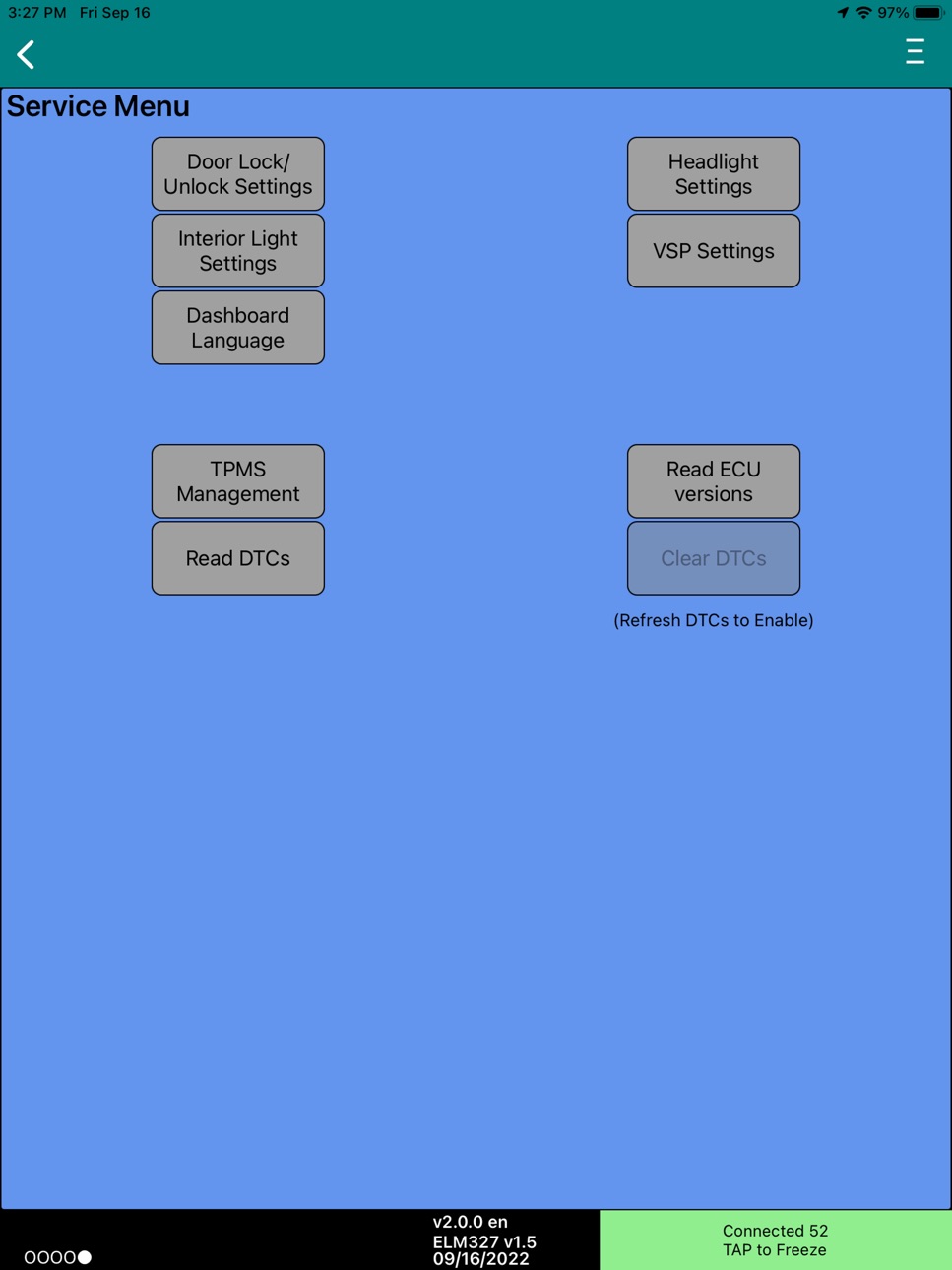
* Change automatic door lock/unlock settings
* Change VSP sound settings on 2013 to 2017 Leaf
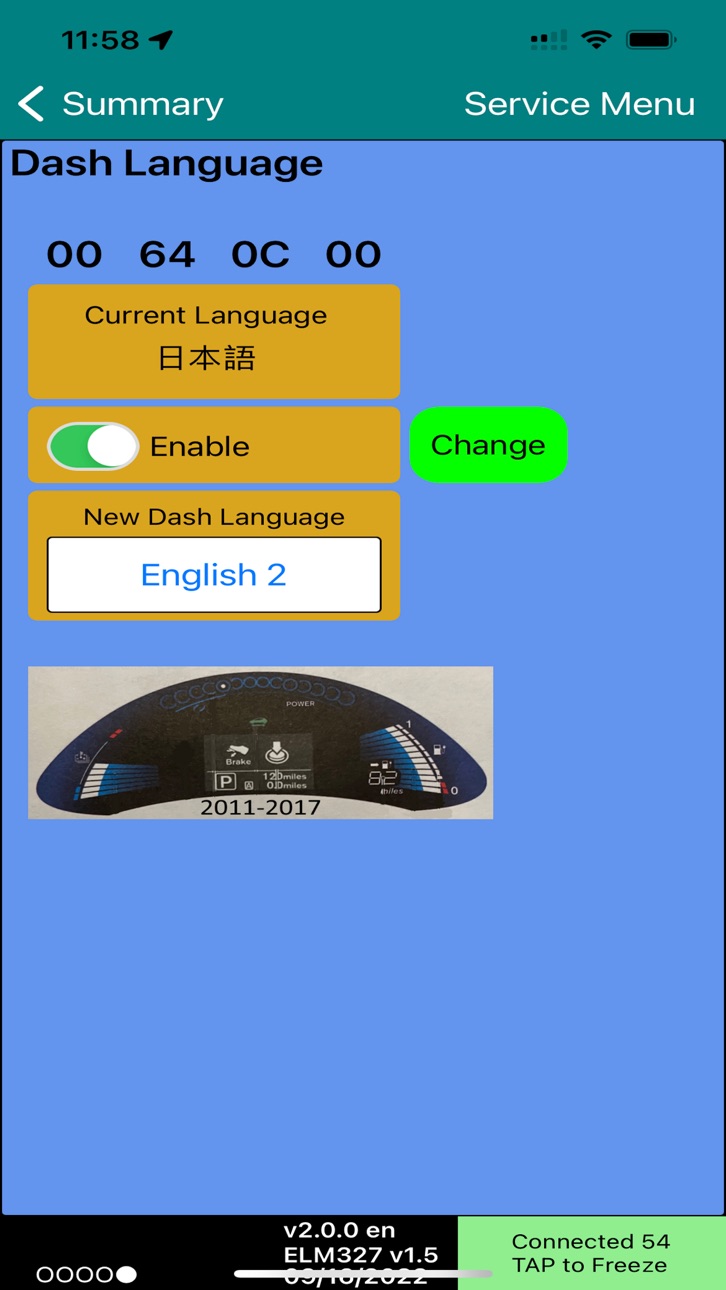
* Change Dash language on 2011 to 2017 Leaf
* Read Diagnostic Trouble Codes (DTC)
* Register Tire Positions (required after tire rotation or seasonal tire changes so your Leaf knows the correct location of each tire on the car)
* Ability to reset DTCs from selected ECUs (including the DTC set when a different battery pack is installed.)
* Special modes when only parts of a Leaf are used in a custom vehicle.
Ability to create custom screens by creating a CSV file. See help file for definition format.
Accessibility
ipadiphonemacrealityDevicetvoswatch
Version history 18 versions
Build 885132768v2.3.02026-04-30 19:56:27
Updated code that triggers permission requests that are needed to enable WiFi SSID detection.
Build 884523106v2.2.02026-04-15 14:34:02
Updated WiFi SSID detection to work with iOS 26.
Build 876338081v2.1.32026-04-11 05:30:30
- Supports the Dropbox refresh token feature. Once Dropbox permission is given the app will automatically request a new token after the current one has expired.
- The Read DTC function now has expanded DTC descriptions for 2011-2025 model year Leafs.
- Added support for the following new OBDII adapters
VEEPEAK (new IC version)
Carista EVO
Vgate vLinker FS (iOS MFi)
- The TPMS function will now auto save the current TPMS IDs before they are cleared when using the Learn function. If the Learn function fails the previous values can now be restored. This also applies if loading new TPMS IDs. The previous ones will be saved in case they need to be restored.
- The Settings/Dropbox panel now displays Dropbox activity in the bottom area.
- The Console screen has a bottom window which displays information about detected OBD2 BLE adapters. This can help in providing information to support future BLE OBD2 adapters.
Build 850324680v2.0.02023-10-31 22:38:25
Supports all current versions of the Leaf and eNV-200
Build 826888156v1.7.382018-05-02 00:14:03
This update from Apple will improve the functionality of this app. No new features are included.
Updated Dropbox Authentication to comply with latest rules.
New 2018 Leaf odometer Setting under Units to specify if CAN odometer is in miles instead of km (US & UK)
Updated Help document to include new Custom Screen drawing and color options.
Build 826400386v1.7.372018-03-22 21:57:36
- Support US odometer in miles for 2018 Leafs. Added new option on Settings/Units panel to disable US odometer for those 2018 Leafs shipped to Canada. Disabling US odometer returns the default internal units to km which is used on all 2011-2017 Leafs.
- For custom screens, added Wh Counter (36), Total Climate Control power (55) which is the sum of A/C and PTC heater, and for 2011,2012 Leafs EVSE Voltage (75) and EVSE Max Amps (76) variables. Gear Position (91) now displays letters (P, R, N, D and B/ECO) instead of the raw number. Also added A/C Set Temperature (95) and Fan Speed (96).
- Fixed code bug that prevented disabling the LELink^2's low power mode when LeafSpy Pro first connects to it. This low power mode causes the adapter to power off on a 2018 Leaf never to turn back on until moved to a vehicle other than a 2018 Leaf.
Build 826338574v1.7.362018-03-17 16:49:21
1.7.36 Fixes bug when using an LELink^2 OBDII adapter with a 2018 Leaf. If your LELink^2 no longer powers on see LeafSpy built-in Change Log for instructions to get it working again.
- Detect UK/European 2018 Leaf
- Disable LELink^2 zero power mode on 2018 Leaf. May need to kill and restart LeafSpy to have this take affect.
- Added GPS usage note to configuration so user will be asked to enable GPS usage at install time
Build 826321665v1.7.352018-03-16 14:01:53
- Detect UK/European 2018 Leaf
- Disable LELink^2 zero power mode on 2018 Leaf. May need to kill and restart LeafSpy to have this take affect.
- Added GPS usage note to configuration so user will be asked to enable GPS usage at install time
Build 825967633v1.7.342018-02-12 00:59:40
Supports new LELink^2 and its zero power mode
Added Custom Screen option to screen 3. You can now define your own screens in csv format to display just the information your are interested in seeing.
Full support for the 2018 Leaf
Added support to enable auto headlight feature if not originally installed but necessary hardware has been added.
Added 1024x1024 icon for higher resolution screens.
Handle bad data from some WiFi adapters without crashing. Bad data is logged to ERRdata.txt
Build 825410842v1.6.282017-12-21 21:21:46
- Dropbox support has been updated to Dropbox's new API 2 interface as API 1 is no longer supported. There is also a new Reset ID button available when Dropbox is disabled that clears the saved login information, if it exists, so a different Dropbox account can be selected. A Long press of the Reset ID button is required to active this function.
- In switching from Dropbox API 1 to API 2 LeafSpy will initially disable Dropbox when started. Go into Settings/Dropbox and re-enable Dropbox and exit Settings. In a few seconds a new Dropbox login page will appear so you can re-authorize LeafSpy's access to Dropbox using the API 2 interface.
- Preliminary support for the 2018 Leaf. At this time the odometer can not be read so features that rely on distance are disabled. Once the 2018 Leaf becomes more available for analysis this restriction should be removed. US and Japanese 2018 model Leafs are automatically detected based on VIN/Chassis number. For 2018 Leafs in other countries please go into Settings and manually select the model year.
- SOH (State of Health of the battery) resolution has been increased by a factor of 100 (86% to 86.34%).
- Improved BMS Only mode where screens not providing BMS data are hidden.
- The server function now uploads Power Switch status (0/1), Temperature units (C/F) and motor RPM.
- Added support for two additional Bluetooth 4.x LE adapters (VEEPEAK and Stalhlcar).
- Changed the default battery shunt order from "4812" to "8421" which seems to be a better mapping. You will need to go into Settings/Battery to manually make this change if you already have LeafSpy installed.
- If your Leaf did not come with the Auto headlight feature but you have added the necessary hardware to support it you can now enable Auto headlights as an option of the Headlight service screen.
- If your Leaf supports reading the 12v battery current it will be displayed to the right of the 12v battery voltage.
- Requested motor torque is now saved to the log file in Nm units.
Build 823314068v1.5.212017-08-16 03:20:46
New Service function to control VSP sounds on 2013 and newer Leafs.
Updated Japanese translations
Support to clear special P0AA1 DTC.
Motor power is again displayed on screen 4 power usage graph.
Only 2011-2012 Leafs will display inverter temperatures, not available on newer Leafs :-(
Ambient temperature now uses correct conversion factor. No manual offset is now required. See change log for more details.
Server password is now encoded when sent to the server which allows any ASCII characters to be used as part of the password.
Additional parameters are now sent to the server.
- Trip Number
- Ambient temperature
- Current battery AHr rating
- Elevation in meters
- Battery Temperature
- Front Wiper Status
See change log for additional changes.
Build 820642492v1.4.192017-01-20 21:33:45
* Updated Help file (version 1.1.0)
* Support for six Bluetooth 4.x LE OBDII adapters.
- LELink
- H380
- Viecar
- Carista
- Kiwi 3 (by PLX)
- Vgate
* Efficiency Graph
* Tire Pressure in kPa units
* Display Motor and Inverter temperatures
* Server support
* Cell difference displayed in large font on Screen 1
* Improved BMS-only logging rate (<1 sec)
* Three new Service funcitons
- Configure Headlight auto on/off
- Configure Interior light auto off
- Display ECU version and extra information
* Three auto efficiency calculation modes
* Debug mode displays Steering Wheel angle
* bug fixes
Build 817959318v1.3.122016-06-30 20:54:04
Support for French and German languages. Support for more Bluetooth 4.x LE OBDII adapters.
See change log for complete list of changes
Build 815598652v1.2.52016-01-08 16:03:03
Restored the missing Help file that was left out of version 1.2.1
Supports LELink Low Energy Bluetooth 4.0 OBDII adapter which requires no pairing and is much easier to use than a WiFi OBDII adapter.
The iPhone 4 and early iPads (2nd Gen) do NOT support Bluetooth 4.0 LE.
Support for the new 30 kWh battery.
Added warning to bottom of description that using the run in background mode can dramatically decrease your battery life.
See change log for other changes and fixes.
Build 814269348v1.2.12015-12-21 18:16:45
Warning: Due to an error in creating version 1.2.1 the built-in Help file was left out. As a result if you attempt to access the Application Help the app will crash. Please do not access the Help file in this version. An updated version will be released shortly to correct this problem.
==============================================================
Supports LELink Low Energy Bluetooth 4.0 OBDII adapter which requires no pairing and is much easier to use than a WiFi OBDII adapter.
The iPhone 4 and early iPads (2nd Gen) do NOT support Bluetooth 4.0 LE.
Support for the new 30 kWh battery.
Added warning to bottom of description that using the run in background mode can dramatically decrease your battery life.
See change log for other changes and fixes.
Build 813862204v1.1.12015-10-17 03:32:14
* Fixed bug that prevented new users from linking to their Dropbox account.
* Re-enable the use of the WiFi SSID to determine if a WiFi OBDII adapter is present. This was previously disabled when running on iOS9.
* Added a user re-settable energy counter.
* Charge graph now auto scales to minutes and hours when needed.
* Fixed bug that prevented charge graphs of more than 3000 points from being read back in for display. Increased maximum graph points from 6000 to 8000.
* Increased ambient temperature offset range to -10 to +10 degrees (previously was -5 to +5)
Build 812049013v1.1.02015-08-31 16:51:44
* Supports Portrait Upside Down orientation for iPhone & iTouch
* Dropbox support
* Can run in background while connected to Leaf
* Local Notification while running in background
* Automatically save Charge Data at end of charge
* Quick Charge graph now includes Battery Pack temperature
* Bug fixes
* Please read the built-in change log for a complete list of all the changes
Build 811795397v1.0.102015-03-19 22:46:42
Price history by region
Currency
Show
Columns
Search
Availability 175 of 175 storefronts
| Region | Language | Price | Ratings | Avg | Version |
|---|---|---|---|---|---|
| US | en-US | USD 19.99 | 113 | 3.5 | 2.3.0 |
| RU | ru | RUB 1790 | 82 | 2.4 | 2.3.0 |
| UA | en-GB | USD 22.99 | 45 | 2.3 | 2.3.0 |
| GB | en-GB | GBP 19.99 | 28 | 3.4 | 2.3.0 |
| CA | en-CA | CAD 24.99 | 26 | 3.8 | 2.3.0 |
| JP | ja | JPY 3000 | 21 | 3.3 | 2.3.0 |
| NZ | en-AU | NZD 39.99 | 18 | 3.0 | 2.3.0 |
| DE | de-DE | EUR 22.99 | 14 | 4.0 | 2.3.0 |
| AU | en-AU | AUD 29.99 | 9 | 3.1 | 2.3.0 |
| NO | en-GB | NOK 249 | 7 | 4.1 | 2.3.0 |
| ES | es-ES | EUR 22.99 | 6 | 3.8 | 2.3.0 |
| HU | en-GB | HUF 8990 | 6 | 3.3 | 2.3.0 |
| NL | nl | EUR 22.99 | 6 | 4.3 | 2.3.0 |
| CN | zh-Hans-CN | CNY 148 | 5 | 5.0 | 2.3.0 |
| PL | en-GB | PLN 99.99 | 5 | 2.6 | 2.3.0 |
| DK | en-GB | DKK 179 | 4 | 3.3 | 2.3.0 |
| IE | en-GB | EUR 22.99 | 4 | 3.8 | 2.3.0 |
| LK | en-GB | USD 19.99 | 4 | 4.8 | 2.3.0 |
| FI | en-GB | EUR 22.99 | 3 | 2.3 | 2.3.0 |
| IT | it | EUR 22.99 | 3 | 4.7 | 2.3.0 |
| AT | de-DE | EUR 22.99 | 2 | 4.0 | 2.3.0 |
| BE | en-GB | EUR 22.99 | 2 | 2.5 | 2.3.0 |
| CH | de-CH | CHF 18 | 2 | 5.0 | 2.3.0 |
| FR | fr-FR | EUR 22.99 | 2 | 5.0 | 2.3.0 |
| HK | zh-Hant-HK | HKD 148 | 2 | 4.0 | 2.3.0 |
| IS | en-GB | USD 22.99 | 2 | 3.0 | 2.3.0 |
| SK | en-GB | EUR 22.99 | 2 | 4.0 | 2.3.0 |
| TR | en-GB | TRY 999.99 | 2 | 5.0 | 2.3.0 |
| BB | en-GB | USD 22.99 | 1 | 3.0 | 2.3.0 |
| BR | pt-BR | BRL 129.9 | 1 | 4.0 | 2.3.0 |
| BY | en-GB | USD 22.99 | 1 | 1.0 | 2.3.0 |
| EE | en-GB | EUR 22.99 | 1 | 5.0 | 2.3.0 |
| GR | en-GB | EUR 22.99 | 1 | 5.0 | 2.3.0 |
| IL | en-GB | ILS 69.9 | 1 | 5.0 | 2.3.0 |
| JO | en-GB | USD 19.99 | 1 | 5.0 | 2.3.0 |
| KG | en-GB | USD 19.99 | 1 | 5.0 | 2.3.0 |
| KZ | en-GB | KZT 11990 | 1 | 5.0 | 2.3.0 |
| LT | en-GB | EUR 22.99 | 1 | 5.0 | 2.3.0 |
| MD | en-GB | USD 22.99 | 1 | 1.0 | 2.3.0 |
| PT | pt-PT | EUR 22.99 | 1 | 5.0 | 2.3.0 |
| SE | sv | SEK 249 | 1 | 5.0 | 2.3.0 |
| AE | en-GB | AED 79.99 | 0 | — | 2.3.0 |
| AF | en-GB | USD 19.99 | 0 | — | 2.3.0 |
| AG | en-GB | USD 19.99 | 0 | — | 2.3.0 |
| AI | en-GB | USD 19.99 | 0 | — | 2.3.0 |
| AL | en-GB | USD 22.99 | 0 | — | 2.3.0 |
| AM | en-GB | USD 22.99 | 0 | — | 2.3.0 |
| AO | en-GB | USD 19.99 | 0 | — | 2.3.0 |
| AR | es-MX | USD 19.99 | 0 | — | 2.3.0 |
| AZ | en-GB | USD 22.99 | 0 | — | 2.3.0 |
| BA | en-GB | EUR 22.99 | 0 | — | 2.3.0 |
| BF | en-GB | USD 19.99 | 0 | — | 2.3.0 |
| BG | en-GB | EUR 22.99 | 0 | — | 2.3.0 |
| BH | en-GB | USD 19.99 | 0 | — | 2.3.0 |
| BJ | en-GB | USD 22.99 | 0 | — | 2.3.0 |
| BM | en-GB | USD 19.99 | 0 | — | 2.3.0 |
| BN | en-GB | USD 19.99 | 0 | — | 2.3.0 |
| BO | es-MX | USD 19.99 | 0 | — | 2.3.0 |
| BS | en-GB | USD 19.99 | 0 | — | 2.3.0 |
| BT | en-GB | USD 19.99 | 0 | — | 2.3.0 |
| BW | en-GB | USD 19.99 | 0 | — | 2.3.0 |
| BZ | en-GB | USD 19.99 | 0 | — | 2.3.0 |
| CD | en-GB | USD 19.99 | 0 | — | 2.3.0 |
| CG | en-GB | USD 19.99 | 0 | — | 2.3.0 |
| CI | fr-FR | USD 22.99 | 0 | — | 2.3.0 |
| CL | es-MX | CLP 22990 | 0 | — | 2.3.0 |
| CM | fr-FR | USD 22.99 | 0 | — | 2.3.0 |
| CO | es-MX | COP 99900 | 0 | — | 2.3.0 |
| CR | es-MX | USD 19.99 | 0 | — | 2.3.0 |
| CV | en-GB | USD 19.99 | 0 | — | 2.3.0 |
| CY | en-GB | EUR 22.99 | 0 | — | 2.3.0 |
| CZ | en-GB | CZK 499 | 0 | — | 2.3.0 |
| DM | en-GB | USD 19.99 | 0 | — | 2.3.0 |
| DO | es-MX | USD 19.99 | 0 | — | 2.3.0 |
| DZ | en-GB | USD 19.99 | 0 | — | 2.3.0 |
| EC | es-MX | USD 19.99 | 0 | — | 2.3.0 |
| EG | en-GB | EGP 999.99 | 0 | — | 2.3.0 |
| FJ | en-GB | USD 19.99 | 0 | — | 2.3.0 |
| FM | en-GB | USD 19.99 | 0 | — | 2.3.0 |
| GA | fr-FR | USD 19.99 | 0 | — | 2.3.0 |
| GD | en-GB | USD 19.99 | 0 | — | 2.3.0 |
| GE | en-GB | USD 22.99 | 0 | — | 2.3.0 |
| GH | en-GB | USD 22.99 | 0 | — | 2.3.0 |
| GM | en-GB | USD 19.99 | 0 | — | 2.3.0 |
| GT | es-MX | USD 19.99 | 0 | — | 2.3.0 |
| GW | en-GB | USD 19.99 | 0 | — | 2.3.0 |
| GY | en-GB | USD 19.99 | 0 | — | 2.3.0 |
| HN | es-MX | USD 19.99 | 0 | — | 2.3.0 |
| HR | en-GB | EUR 22.99 | 0 | — | 2.3.0 |
| ID | en-GB | IDR 349000 | 0 | — | 2.3.0 |
| IN | en-GB | INR 1999 | 0 | — | 2.3.0 |
| IQ | en-GB | USD 19.99 | 0 | — | 2.3.0 |
| JM | en-GB | USD 19.99 | 0 | — | 2.3.0 |
| KE | en-GB | USD 22.99 | 0 | — | 2.3.0 |
| KH | en-GB | USD 19.99 | 0 | — | 2.3.0 |
| KN | en-GB | USD 19.99 | 0 | — | 2.3.0 |
| KR | ko | KRW 33000 | 0 | — | 2.3.0 |
| KW | en-GB | USD 19.99 | 0 | — | 2.3.0 |
| KY | en-GB | USD 19.99 | 0 | — | 2.3.0 |
| LA | en-GB | USD 19.99 | 0 | — | 2.3.0 |
| LB | en-GB | USD 19.99 | 0 | — | 2.3.0 |
| LC | en-GB | USD 19.99 | 0 | — | 2.3.0 |
| LR | en-GB | USD 19.99 | 0 | — | 2.3.0 |
| LU | en-GB | EUR 22.99 | 0 | — | 2.3.0 |
| LV | en-GB | EUR 22.99 | 0 | — | 2.3.0 |
| LY | en-GB | USD 19.99 | 0 | — | 2.3.0 |
| MA | en-GB | USD 19.99 | 0 | — | 2.3.0 |
| ME | en-GB | EUR 19.99 | 0 | — | 2.3.0 |
| MG | en-GB | USD 19.99 | 0 | — | 2.3.0 |
| MK | en-GB | USD 19.99 | 0 | — | 2.3.0 |
| ML | en-GB | USD 19.99 | 0 | — | 2.3.0 |
| MM | en-GB | USD 19.99 | 0 | — | 2.3.0 |
| MN | en-GB | USD 19.99 | 0 | — | 2.3.0 |
| MO | zh-Hant-HK | USD 19.99 | 0 | — | 2.3.0 |
| MR | en-GB | USD 19.99 | 0 | — | 2.3.0 |
| MS | en-GB | USD 19.99 | 0 | — | 2.3.0 |
| MT | en-GB | EUR 22.99 | 0 | — | 2.3.0 |
| MU | en-GB | USD 22.99 | 0 | — | 2.3.0 |
| MV | en-GB | USD 19.99 | 0 | — | 2.3.0 |
| MW | en-GB | USD 19.99 | 0 | — | 2.3.0 |
| MX | es-MX | MXN 399 | 0 | — | 2.3.0 |
| MY | en-GB | MYR 99.9 | 0 | — | 2.3.0 |
| MZ | en-GB | USD 19.99 | 0 | — | 2.3.0 |
| NA | en-GB | USD 19.99 | 0 | — | 2.3.0 |
| NE | en-GB | USD 19.99 | 0 | — | 2.3.0 |
| NG | en-GB | NGN 29900 | 0 | — | 2.3.0 |
| NI | es-MX | USD 19.99 | 0 | — | 2.3.0 |
| NP | en-GB | USD 22.99 | 0 | — | 2.3.0 |
| NR | en-GB | USD 19.99 | 0 | — | 2.3.0 |
| OM | en-GB | USD 19.99 | 0 | — | 2.3.0 |
| PA | es-MX | USD 19.99 | 0 | — | 2.3.0 |
| PE | es-MX | PEN 89.9 | 0 | — | 2.3.0 |
| PG | en-GB | USD 19.99 | 0 | — | 2.3.0 |
| PH | en-GB | PHP 1290 | 0 | — | 2.3.0 |
| PK | en-GB | PKR 4900 | 0 | — | 2.3.0 |
| PW | en-GB | USD 19.99 | 0 | — | 2.3.0 |
| PY | es-MX | USD 19.99 | 0 | — | 2.3.0 |
| QA | en-GB | QAR 69.99 | 0 | — | 2.3.0 |
| RO | en-GB | RON 99.99 | 0 | — | 2.3.0 |
| RS | en-GB | EUR 22.99 | 0 | — | 2.3.0 |
| RW | en-GB | USD 19.99 | 0 | — | 2.3.0 |
| SA | en-GB | SAR 89.99 | 0 | — | 2.3.0 |
| SB | en-GB | USD 19.99 | 0 | — | 2.3.0 |
| SC | en-GB | USD 19.99 | 0 | — | 2.3.0 |
| SG | en-GB | SGD 29.98 | 0 | — | 2.3.0 |
| SI | en-GB | EUR 22.99 | 0 | — | 2.3.0 |
| SL | en-GB | USD 19.99 | 0 | — | 2.3.0 |
| SN | en-GB | USD 22.99 | 0 | — | 2.3.0 |
| SR | en-GB | USD 19.99 | 0 | — | 2.3.0 |
| ST | en-GB | USD 19.99 | 0 | — | 2.3.0 |
| SV | es-MX | USD 19.99 | 0 | — | 2.3.0 |
| SZ | en-GB | USD 19.99 | 0 | — | 2.3.0 |
| TC | en-GB | USD 19.99 | 0 | — | 2.3.0 |
| TD | en-GB | USD 19.99 | 0 | — | 2.3.0 |
| TH | en-GB | THB 699 | 0 | — | 2.3.0 |
| TJ | en-GB | USD 19.99 | 0 | — | 2.3.0 |
| TM | en-GB | USD 19.99 | 0 | — | 2.3.0 |
| TN | en-GB | USD 19.99 | 0 | — | 2.3.0 |
| TO | en-GB | USD 19.99 | 0 | — | 2.3.0 |
| TT | en-GB | USD 19.99 | 0 | — | 2.3.0 |
| TW | zh-Hant-TW | TWD 690 | 0 | — | 2.3.0 |
| TZ | en-GB | TZS 59900 | 0 | — | 2.3.0 |
| UG | en-GB | USD 22.99 | 0 | — | 2.3.0 |
| UY | en-GB | USD 19.99 | 0 | — | 2.3.0 |
| UZ | en-GB | USD 19.99 | 0 | — | 2.3.0 |
| VC | en-GB | USD 19.99 | 0 | — | 2.3.0 |
| VE | es-MX | USD 19.99 | 0 | — | 2.3.0 |
| VG | en-GB | USD 19.99 | 0 | — | 2.3.0 |
| VN | en-GB | VND 599000 | 0 | — | 2.3.0 |
| VU | en-GB | USD 19.99 | 0 | — | 2.3.0 |
| XK | en-GB | EUR 22.99 | 0 | — | 2.3.0 |
| YE | en-GB | USD 19.99 | 0 | — | 2.3.0 |
| ZA | en-GB | ZAR 399.99 | 0 | — | 2.3.0 |
| ZM | en-GB | USD 22.99 | 0 | — | 2.3.0 |
| ZW | en-GB | USD 22.99 | 0 | — | 2.3.0 |
Change log 21 changes · ZM
✎
releaseNotes updated
Updated code that triggers permission requests that are needed to enable WiFi SSID detection.
✎
description updated
The Leaf Spy Pro allows anyone with a Nissan Leaf electric vehicle, an iOS 7.1+ device and a supported Bluetooth 4+ LE OBDII adapter (Vgate vLinker FD+ and MC+
✎
name updated
LeafSpy Pro
◆
Version 2.3.0 released
Updated code that triggers permission requests that are needed to enable WiFi SSID detection.
◆
Version 2.2.0 released
Updated WiFi SSID detection to work with iOS 26.
◆
Version 2.1.3 released
- Supports the Dropbox refresh token feature. Once Dropbox permission is given the app will automatically request a new token after the current one has expired.
- The Read DTC function now has expanded DTC descriptions for 2011-2025 mode
◆
Version 2.0.0 released
Supports all current versions of the Leaf and eNV-200
◆
Version 1.7.38 released
This update from Apple will improve the functionality of this app. No new features are included.
Updated Dropbox Authentication to comply with latest rules.
New 2018 Leaf odometer Setting under Units to specify if CAN odometer is in miles
◆
Version 1.7.37 released
- Support US odometer in miles for 2018 Leafs. Added new option on Settings/Units panel to disable US odometer for those 2018 Leafs shipped to Canada. Disabling US odometer returns the default internal units to km which is used on all 2011-
◆
Version 1.7.36 released
1.7.36 Fixes bug when using an LELink^2 OBDII adapter with a 2018 Leaf. If your LELink^2 no longer powers on see LeafSpy built-in Change Log for instructions to get it working again.
- Detect UK/European 2018 Leaf
- Disable LELink^2 zero po
◆
Version 1.7.35 released
- Detect UK/European 2018 Leaf
- Disable LELink^2 zero power mode on 2018 Leaf. May need to kill and restart LeafSpy to have this take affect.
- Added GPS usage note to configuration so user will be asked to enable GPS usage at install time
◆
Version 1.7.34 released
Supports new LELink^2 and its zero power mode
Added Custom Screen option to screen 3. You can now define your own screens in csv format to display just the information your are interested in seeing.
Full support for the 2018 Leaf
Added supp
◆
Version 1.6.28 released
- Dropbox support has been updated to Dropbox's new API 2 interface as API 1 is no longer supported. There is also a new Reset ID button available when Dropbox is disabled that clears the saved login information, if it exists, so a differen
◆
Version 1.5.21 released
New Service function to control VSP sounds on 2013 and newer Leafs.
Updated Japanese translations
Support to clear special P0AA1 DTC.
Motor power is again displayed on screen 4 power usage graph.
Only 2011-2012 Leafs will display inverter t
◆
Version 1.4.19 released
* Updated Help file (version 1.1.0)
* Support for six Bluetooth 4.x LE OBDII adapters.
- LELink
- H380
- Viecar
- Carista
- Kiwi 3 (by PLX)
- Vgate
* Efficiency Graph
* Tire Pressure in kPa units
* Display Motor and Inverter tem
◆
Version 1.3.12 released
Support for French and German languages. Support for more Bluetooth 4.x LE OBDII adapters.
See change log for complete list of changes
◆
Version 1.2.5 released
Restored the missing Help file that was left out of version 1.2.1
Supports LELink Low Energy Bluetooth 4.0 OBDII adapter which requires no pairing and is much easier to use than a WiFi OBDII adapter.
The iPhone 4 and early iPads (2nd Gen) d
◆
Version 1.2.1 released
Warning: Due to an error in creating version 1.2.1 the built-in Help file was left out. As a result if you attempt to access the Application Help the app will crash. Please do not access the Help file in this version. An updated version wil
◆
Version 1.1.1 released
* Fixed bug that prevented new users from linking to their Dropbox account.
* Re-enable the use of the WiFi SSID to determine if a WiFi OBDII adapter is present. This was previously disabled when running on iOS9.
* Added a user re-settable
◆
Version 1.1.0 released
* Supports Portrait Upside Down orientation for iPhone & iTouch
* Dropbox support
* Can run in background while connected to Leaf
* Local Notification while running in background
* Automatically save Charge Data at end of charge
* Quick Cha
◆
Version 1.0.10 released