Home › Business

FineReader Pro: PDF Scanner
Scanning Documents & Photos
 DO
DO
 DEde-DE
 USen-US
 FRfr-FR
 ESes-ES
 BRpt-BR
 CHde-CH
 ITit
ITit CNzh-Hans-CN
 PLen-GB
 GBen-GB
 MXes-MX
 UAen-GB
 CAen-CA
 KRko
KRko JPja
JPja ATde-DE
 TRen-GB
 NLnl
NLnl AUen-AU
 BEen-GB
 CZen-GB
 GRen-GB
 TWzh-Hant-TW
 HKzh-Hant-HK
 INen-GB
 ILen-GB
 BGen-GB
 ROen-GB
 COes-MX
 THen-GB
 SEsv
SEsv VNen-GB
 HUen-GB
 PTpt-PT
 SKen-GB
 ARes-MX
 KZen-GB
 SGen-GB
 SAen-GB
 DKen-GB
 LVen-GB
 NOen-GB
 IDen-GB
 EEen-GB
 HRen-GB
 ZAen-GB
 MYen-GB
 NZen-AU
 AEen-GB
 LUen-GB
 FIen-GB
 PEes-MX
 PHen-GB
 CLes-MX
 IEen-GB
 LTen-GB
 SIen-GB
 CYen-GB
 ECes-MX
 LBen-GB
 AZen-GB
 GTes-MX
 KGen-GB
 AMen-GB
 BOes-MXDOes-MX
 EGen-GB
 KEen-GB
 MDen-GB
 PKen-GB
 QAen-GB
 CGen-GB
 CRes-MX
 KWen-GB
 MNen-GB
 MOzh-Hant-HK
 MTen-GB
 OMen-GB
 PAes-MX
 UYen-GB
 UZen-GB
 ALen-GB
 BHen-GB
 HNes-MX
 LKen-GB
 NIes-MX
 PYes-MX
 TJen-GB
 AOen-GB
 GAfr-FR
 JOen-GB
 KHen-GB
 MAen-GB
 MKen-GB
 MLen-GB
 MZen-GB
 RSen-GB
 SNen-GB
 TTen-GB
 VEes-MX
 AFen-GB
 AGen-GB
 AIen-GB
 BAen-GB
 BBen-GB
 BFen-GB
 BJen-GB
 BMen-GB
 BNen-GB
 BSen-GB
 BTen-GB
 BWen-GB
 BZen-GB
 CDen-GB
 CIfr-FR
 CMfr-FR
 CVen-GB
 DMen-GB
 DZen-GB
 FJen-GB
 FMen-GB
 GDen-GB
 GEen-GB
 GHen-GB
 GMen-GB
 GWen-GB
 GYen-GB
 IQen-GB
 ISen-GB
 JMen-GB
 KNen-GB
 KYen-GB
 LAen-GB
 LCen-GB
 LRen-GB
 LYen-GB
 MEen-GB
 MGen-GB
 MMen-GB
 MRen-GB
 MSen-GB
 MUen-GB
 MVen-GB
 MWen-GB
 NAen-GB
 NEen-GB
 NGen-GB
 NPen-GB
 NRen-GB
 PGen-GB
 PWen-GB
 RWen-GB
 SBen-GB
 SCen-GB
 SLen-GB
 SRen-GB
 STen-GB
 SVes-MX
 SZen-GB
 TCen-GB
 TDen-GB
 TNen-GB
 TOen-GB
 TZen-GB
 UGen-GB
 VCen-GB
 VGen-GB
 VUen-GB
 XKen-GB
 ZMen-GB
 ZWen-GB
 BYNot Available
 RUNot Available
 TMNot Available
 YENot Available
171 of 175 storefronts
Content in en-US
Content in en-US
Information
Preview 2 platforms
iPhone 7 images


iPad 8 images


What’s New Version 16.0.2
Fixed an issue with our image picker that prevented users from choosing photos that were not in an album
Description
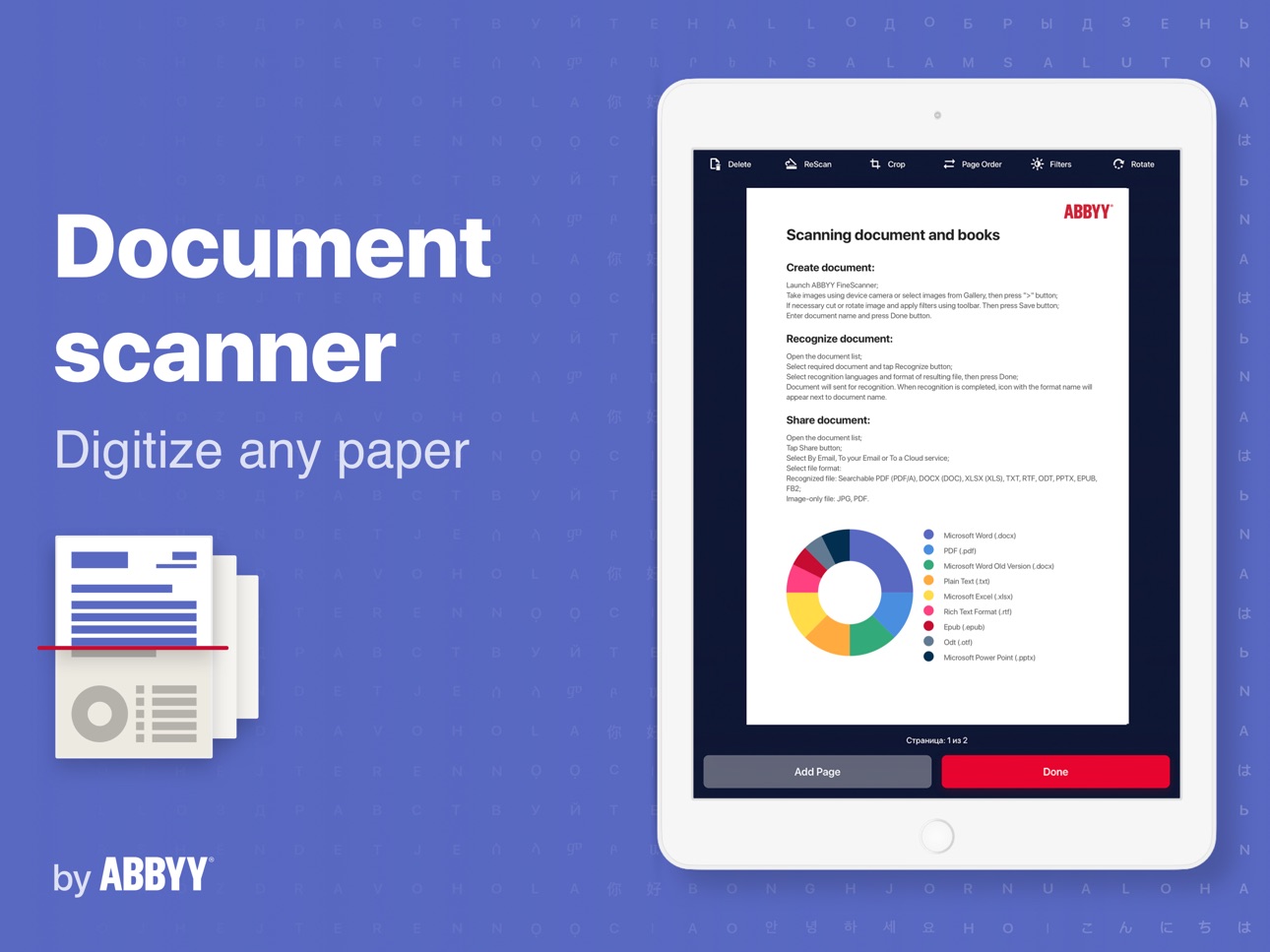
ABBYY FineReader PDF Pro - the first smart AI-powered scanner that turns your mobile device into an all-purpose tool to quickly capture docs and books, create electronic copies in PDF and JPEG, and extract texts from scans for further editing and sharing.
FineReader PDF Pro - the top mobile scanner for iPhone or iPad from ABBYY, a Digital Intelligence company.
*** Ranked #1 Business application in 98 countries ***
*** Winner of SUPERSTAR Award in the "Document Capture" category in the Mobile Star Awards ***
Use FineReader PDF Pro to scan paper documents, books, agreements, receipts, magazine articles, notes, recipes, charts, tables, slides, whiteboards, or even billboards on the street and get perfect digital copies.
KEY FEATURES
• PDF & JPEG. Scan any text and save scans to JPEG images or cross-platform PDF documents.
• OFFLINE OCR. Quickly extract text from scans into TXT format on your device without an internet connection.
• ONLINE OCR. Recognize text (OCR) on scans in 183 languages (including Latin, Cyrillic, Chinese, Japanese, and Korean alphabets) and choose from among 4 output formats.
• SHARE & EXPORT. Send results by email, to FineReader PDF for Windows, save in cloud storages - iCloud Drive, Dropbox, Google Drive, Yandex.Disk, Evernote, OneDrive for Business, and more.
• LIVE TEXT. Make phone calls, send emails, follow the links, and more from scanned docs.
• ABBYY NEURAL NETWORK. The smart gallery will automatically classify documents into 7 types: A4, books, business cards, handwritten, IDs, other docs, and receipts.
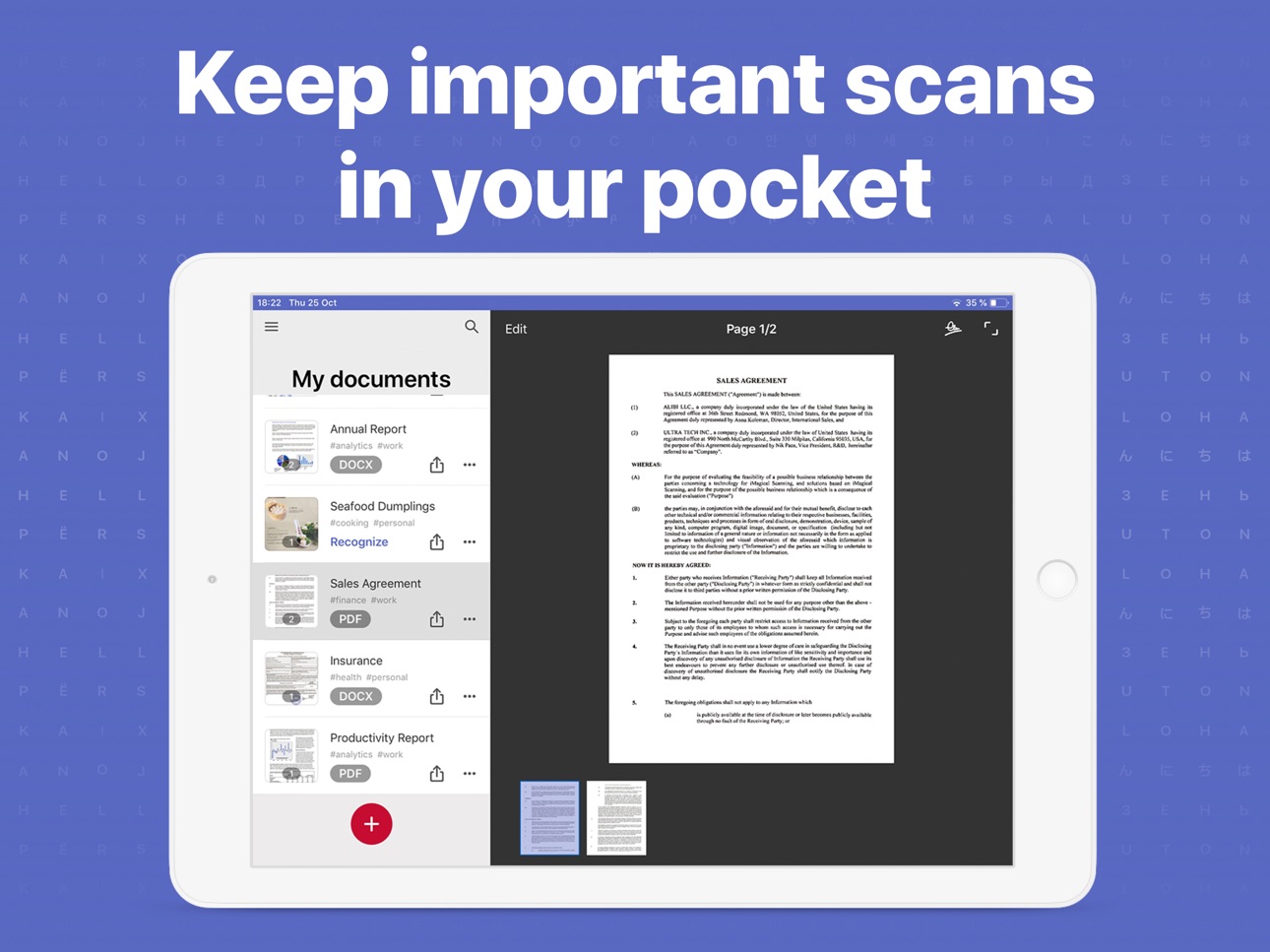
• SEARCH TEXT ON PHOTOS. Type the text from a photo into a Search field in the gallery. FineReader PDF Pro will find photos that have this text.
• AR RULER. Define doc size in AR. It will be useful for non-standard documents and further printing them out in proper proportions.
• SIRI SHORTCUTS. Open scans with Siri and set the flow of actions with scans using Shortcuts app.
• ANNOTATE SCANS. Discover a set of easy-to-use tools to modify your PDFs: add your signature or a text box, use a highlighter, write with a pen, or conceal content with the redaction tool.
• 3D TOUCH & SPOTLIGHT SEARCH SUPPORT.
• PASSWORD ON PDF. Add a password for the image-only PDF files while exporting and sending via email.
• MULTIPAGE DOCS. Create, edit, and enhance separate images or large multi-page documents without any additional selection on the viewfinder.
• AUTO-CAPTURE AND FILTERS. Excellent visual quality with auto-capture of page boundaries and advanced image filters, which process scans in color, greyscale, or black-and-white versions.
• BUILT-IN FILE STORAGE. Save scans inside the app with tags and search capabilities.
• Transfer docs to your Mac or PC using Home Sharing.
• AIRPRINT. Print out scans directly from your iPhone or iPad.
Read us:
abbyy.com/blog/mobile
Facebook.com/ABBYYsoft
Twitter @ABBYY_Software
YouTube.com/ABBYYvideos
Do you like FineReader PDF Pro? Please leave a review!
Capabilities
iMessage
Accessibility
ipadiphonemacrealityDevicetvoswatch
Version history 25 versions
Build 873375975v16.0.22025-03-20 00:49:58
Fixed an issue with our image picker that prevented users from choosing photos that were not in an album
Build 873155858v16.0.12025-03-11 21:55:38
Fixed an issue that prevented users from opening files through the system share sheet
Build 872671161v16.0.02025-03-04 15:09:08
In this release, we've fixed a few bugs, and enhanced stability.
Here are the key highlights from previous releases:
- Updates for the privacy manifests and iOS 17 support.
- Updated the lists of OCR languages and export formats.
- Increased the number of free scans, allowing you to continue using the app with one free scan per day.
- Implemented the storage of original scanned documents for future re-editing.
- Added FineReader PDF to the sharing action menu for enhanced document sharing.
- Introduced Drag and Drop functionality between FineReader PDF and other apps on iPhone.
- Included keyboard shortcuts on iPad for more efficient document management.
- Enabled bulk export to select and share multiple documents at once.
Build 865979105v15.6.62024-05-22 10:12:13
In this release, we've updated the privacy manifests, fixed a few bugs, and enhanced stability.
Here are the key highlights from previous releases:
- Updates for iOS 17 support.
- Updated the lists of OCR languages and export formats.
- Increased the number of free scans, allowing you to continue using the app with one free scan per day.
- Implemented the storage of original scanned documents for future re-editing.
- Added FineReader PDF to the sharing action menu for enhanced document sharing.
- Introduced Drag and Drop functionality between FineReader PDF and other apps on iPhone.
- Included keyboard shortcuts on iPad for more efficient document management.
- Enabled bulk export to select and share multiple documents at once.
Build 864755872v15.6.52024-04-25 17:03:48
In this release, we've made changes to fix a few bugs and enhanced stability.
Here are the key highlights from previous releases:
- Updates for iOS 17 support.
- Updated the lists of OCR languages and export formats.
- Increased the number of free scans, allowing you to continue using the app with one free scan per day.
- Implemented the storage of original scanned documents for future re-editing.
- Added FineReader PDF to the sharing action menu for enhanced document sharing.
- Introduced Drag and Drop functionality between FineReader PDF and other apps on iPhone.
- Included keyboard shortcuts on iPad for more efficient document management.
- Enabled bulk export to select and share multiple documents at once.
Build 862297393v15.6.42023-12-20 09:35:45
In this release, we've made changes to support iOS 17, fixed a few bugs, and enhanced stability.
Here are the key highlights from previous releases:
- Updated the lists of OCR languages and export formats
- Increased the number of free scans, allowing you to continue using the app with one free scan per day.
- Implemented the storage of original scanned documents for future re-editing.
- Added FineReader PDF to the sharing action menu for enhanced document sharing.
- Introduced Drag and Drop functionality between FineReader PDF and other apps on iPhone.
- Included keyboard shortcuts on iPad for more efficient document management.
- Enabled bulk export to select and share multiple documents at once.
Build 862202157v15.6.32023-12-16 20:16:04
In this release, we've made changes to support iOS 17, fixed a few bugs, and enhanced stability.
Here are the key highlights from previous releases:
- Updated the lists of OCR languages and export formats
- Increased the number of free scans, allowing you to continue using the app with one free scan per day.
- Implemented the storage of original scanned documents for future re-editing.
- Added FineReader PDF to the sharing action menu for enhanced document sharing.
- Introduced Drag and Drop functionality between FineReader PDF and other apps on iPhone.
- Included keyboard shortcuts on iPad for more efficient document management.
- Enabled bulk export to select and share multiple documents at once.
Build 859996893v15.6.22023-09-20 14:46:30
In this release, we have updated the lists of OCR languages and export formats. Additionally, we have made some changes to support iOS 17.
Here are the key highlights from previous releases:
- Increased the number of free scans, allowing you to continue using the app with one free scan per day.
- Implemented the storage of original scanned documents for future re-editing.
- Added FineReader PDF to the sharing action menu for enhanced document sharing.
- Introduced Drag and Drop functionality between FineReader PDF and other apps on iPhone.
- Included keyboard shortcuts on iPad for more efficient document management.
- Enabled bulk export to select and share multiple documents at once.
Build 853897444v15.6.12022-12-17 18:39:28
In this release, we fixed a few bugs and improved stability.
The most important in previous releases:
+ Implementing the storage of original scanned documents for re-editing
+ Live Text feature for making phone calls, sending emails, following the links, and more from scanned docs
+ Adaptation of the app for iOS 16
+ FineReader PDF is added to the sharing action menu
+ Drag and Drop between FineReader PDF and other apps on iPhone
+ Keyboard shortcuts on iPad will ease document management
+ Use the bulk export to choose all documents you need and share them at once
Build 853492578v15.62022-11-27 18:08:02
In this release, we have implemented the storage of original scanned documents for re-editing. Just use the "Revert" button on an already edited doc to start editing from scratch.
The most important in previous releases:
+ Live Text feature for making phone calls, sending emails, following the links, and more from scanned docs
+ Adaptation of the app for iOS 16
+ FineReader PDF is added to the sharing action menu
+ Drag and Drop between FineReader PDF and other apps on iPhone
+ Keyboard shortcuts on iPad will ease document management
+ Use the bulk export to choose all documents you need and share them at once
Build 853106673v15.5.22022-11-05 06:02:06
Grab text from images taken in real-time to make phone calls, send emails, follow the links, and more with the new Live Text feature.
Your documents are in action like never before: recognize, copy, and translate text from a camera or from an existing document quickly and easily. Extract only what you need without full image conversion!
Also in this release, we adopted the application for iOS 16 and fixed some bugs.
The most important in previous releases:
+ Editing of documents saved earlier
+ FineReader PDF is added to the sharing action menu.
+ Drag and Drop between FineReader PDF and other apps on iPhone.
+ Keyboard shortcuts on iPad will ease document management.
+ Use the bulk export to choose all documents you need and share them at once.
Build 852453197v15.4.42022-10-03 11:00:21
Mobile & Desktop interaction is now even better with the new FineReader PDF 16 for Windows!
Take photo of your document on Mobile and continue work on desktop. More info about our "big brother" and sending docs from mobile find here https://pdf.abbyy.com/the-new-fr16/
Also, in this release, we fixed a few bugs and improved stability.
The most important in previous releases:
+ Editing previously saved documents
+ FineReader PDF is added in the sharing action menu.
+ Drag and Drop between FineReader PDF and other apps on iPhone.
+ Keyboard shortcuts on iPad will ease document management.
+ Use the bulk export to choose all documents you need and share them at once.
Find out more on abbyy.com/blog/mobile.
Do you like this update, as well as we do? We will be glad to see your feedback on the App Store! If you need help, contact us at support.abbyy.com
Build 852043901v15.4.32022-09-12 14:59:05
In this release, we fixed a few bugs and improved stability.
The most important in previous releases:
+ Editing previously saved documents
+ FineReader PDF is added in the sharing action menu.
+ Drag and Drop between FineReader PDF and other apps on iPhone.
+ Keyboard shortcuts on iPad will ease document management.
+ Use the bulk export to choose all documents you need and share them at once.
Find out more on abbyy.com/blog/mobile.
Do you like this update, as well as we do? We will be glad to see your feedback on the App Store! If you need help, contact us at support.abbyy.com
Build 851653900v15.4.22022-08-20 11:12:48
In this release, we fixed a few bugs and improved stability.
The most important in previous releases:
+ Editing previously saved documents
+ FineReader PDF is added in the sharing action menu.
+ Drag and Drop between FineReader PDF and other apps on iPhone.
+ Keyboard shortcuts on iPad will ease document management.
+ Use the bulk export to choose all documents you need and share them at once.
Find out more on abbyy.com/blog/mobile.
Do you like this update, as well as we do? We will be glad to see your feedback on the App Store! If you need help, contact us at support.abbyy.com
Build 851129211v15.42022-07-27 15:47:07
In this release, we have implemented editing of documents saved earlier. We also fixed a few bugs and improved stability.
The most important in previous releases:
+ Increasing the number of free scans. Continue working with the app by creating one scan per day for free.
+ FineReader PDF is added in the sharing action menu.
+ Drag and Drop between FineReader PDF and other apps on iPhone.
+ Keyboard shortcuts on iPad will ease document management.
+ Use the bulk export to choose all documents you need and share them at once.
Find out more on abbyy.com/blog/mobile.
Do you like this update, as well as we do? We will be glad to see your feedback on the App Store! If you need help, contact us at support.abbyy.com
Build 849127480v15.3.22022-06-07 05:50:52
Dear users, thank you for choosing ABBYY FineReader PDF. In this release, we fixed a few bugs and improved stability.
The most important in previous releases:
+ Now you can find FineReader PDF in the sharing action menu.
+ Seamlessly Drag and Drop between FineReader PDF and other apps on iPhone.
+ Keyboard shortcuts on iPad will ease document management.
+ Use multiple exports to share multiple documents at the same time.
Find out more on abbyy.com/blog/mobile
Do you like this update, as well as we do? We will be glad to see your feedback on the App Store! If you need help, contact us at support.abbyy.com
Build 848994487v15.3.12022-05-11 19:13:46
Dear users, thank you for choosing ABBYY FineReader PDF. In this release, we fixed a few bugs and improved stability.
The most important in previous releases:
+ Now you can find FineReader PDF in the sharing action menu.
+ Seamlessly Drag and Drop between FineReader PDF and other apps on iPhone.
+ Keyboard shortcuts on iPad will ease document management.
+ Use multiple exports to share multiple documents at the same time.
Find out more on abbyy.com/blog/mobile
Do you like this update, as well as we do? We will be glad to see your feedback on the App Store! If you need help, contact us at support.abbyy.com
Build 848573861v15.32022-05-07 10:15:08
Dear users, thank you for choosing ABBYY FineReader PDF. In this release, we fixed a few bugs and improved stability.
The most important in previous releases:
+ Now you can find FineReader PDF in the sharing action menu.
+ Seamlessly Drag and Drop between FineReader PDF and other apps on iPhone.
+ Keyboard shortcuts on iPad will ease document management.
+ Use multiple exports to share multiple documents at the same time.
Find out more on abbyy.com/blog/mobile
Do you like this update, as well as we do? We will be glad to see your feedback on the App Store! If you need help, contact us at support.abbyy.com
Build 847046490v15.2.102022-02-11 08:45:47
Dear users, thank you for choosing ABBYY FineReader PDF. In this release, we fixed a few bugs and improved stability.
The most important in previous releases:
+ Now you can find FineReader PDF in the sharing action menu.
+ Seamlessly Drag and Drop between FineReader PDF and other apps on iPhone.
+ Keyboard shortcuts on iPad will ease document management.
+ Use multiple exports to share multiple documents at the same time.
Find out more on abbyy.com/blog/mobile
Do you like this update, as well as we do? We will be glad to see your feedback on the App Store! If you need help, contact us at support.abbyy.com
Build 846853811v15.2.92022-01-26 20:53:52
Dear users, thank you for choosing ABBYY FineReader PDF. In this release, we fixed a few bugs.
The most important in previous releases:
+ Now you can find FineReader PDF in the sharing action menu.
+ Seamlessly Drag and Drop between FineReader PDF and other apps on iPhone. You can import images and PDFs to FR PDF and export scans and OCRed documents just by dragging them.
+ Keyboard shortcuts for FineReader PDF on iPad will ease document management.
+ Use multiple exports to share multiple documents at the same time - just check all the ones you want.
Find out more on our blog: abbyy.com/blog/mobile
Do you like this update, as well as we do? We will be glad to see your feedback on the App Store! If you need help, contact us at support.abbyy.com
Build 846130232v15.2.82021-12-28 08:54:04
Dear users, thank you for choosing ABBYY FineReader PDF. Wish you Merry Christmas and a Happy New 2022 Year! In this release, we fixed a few bugs.
The most important in previous releases:
+ Now you can find FineReader PDF in the sharing action menu.
+ Seamlessly Drag and Drop between FineReader PDF and other apps on iPhone. You can import images and PDFs to FR PDF and export scans and OCRed documents just by dragging them.
+ Keyboard shortcuts for FineReader PDF on iPad will ease document management.
+ Use multiple exports to share multiple documents at the same time - just check all the ones you want.
Find out more on our blog: abbyy.com/blog/mobile
Do you like this update, as well as we do? We will be glad to see your feedback on the App Store! If you help, contact us at support.abbyy.com
Build 844920159v15.2.72021-12-06 19:42:04
+ Now you can find FineReader PDF in the sharing action menu.
The most important in previous releases:
+ Seamlessly Drag and Drop between FineReader PDF and other apps on iPhone. You can import images and PDFs to FR PDF and export scans and OCRed documents just by dragging them.
+ Keyboard shortcuts for FineReader PDF on iPad will ease the document management.
Find out more on our blog: abbyy.com/blog/mobile
Do you like this update, as well as we do? We will be glad to see your feedback on the App Store! If you need us, you can contact us at support.abbyy.com
Build 844814832v15.2.62021-10-21 16:42:18
FineReader PDF is ready for iOS 15!
+ Seamlessly Drag and Drop between FineReader PDF and other apps on iPhone. You can import images and PDFs to FR PDF and export scans and OCRed documents just by dragging them.
+ Keyboard shortcuts for FineReader PDF on iPad will ease the document management:
- cmd + up/down – navigate on My documents screen.
- cmd + F – search documents by name or by tags.
- cmd + delete – delete documents.
- cmd + P – print a document.
The most important in previous releases:
+ Use the bulk export to choose all documents you need and share them at once.
+ We added a Gallery button to My documents screen.
Find out more on our blog: abbyy.com/blog/mobile
Do you like this update, as well as we do? We will be glad to see your feedback on the App Store! If you need us, you can contact us at support.abbyy.com
Build 844266520v15.2.52021-09-28 16:39:43
FineReader PDF is ready for iOS 15!
+ Seamlessly Drag and Drop between FineReader PDF and other apps on iPhone. You can import images and PDFs to FR PDF and export scans and OCRed documents just by dragging them.
+ Keyboard shortcuts for FineReader PDF on iPad will ease the document management:
- cmd + up/down – navigate on My documents screen.
- cmd + F – search documents by name or by tags.
- cmd + delete – delete documents.
- cmd + P – print a document.
The most important in previous releases:
+ Use the bulk export to choose all documents you need and share them at once.
+ We added a Gallery button to My documents screen.
Find out more on our blog: abbyy.com/blog/mobile
Do you like this update, as well as we do? We will be glad to see your feedback on the App Store! If you need us, you can contact us at support.abbyy.com
Build 843885116v15.22021-09-10 08:30:26
+ Meet the bulk export. Choose all documents you need and share them at once. The long-awaited feature is finally here!
+ We added a Gallery button to My documents screen. Now you're one step closer to creating perfect scans of document photos.
+ Minor bugs fix and stability improvement.
The most important in previous releases:
+ Sort documents by date or in alphabetical order.
+ Create custom name template for new documents. To setup a template, go to Settings and tap Document name template.
+ The minimum supported iOS version is 13.
Find out more on our blog: abbyy.com/blog/mobile
Do you like this update, as well as we do? We will be glad to see your feedback on the App Store! If you need us, you can contact us at support.abbyy.com
Price history by region
Currency
Show
Columns
Search
Availability 171 of 175 storefronts
| Region | Language | Price | Ratings | Avg | Version |
|---|---|---|---|---|---|
| DE | de-DE | EUR 69.99 | 1.4k | 4.6 | 16.0.2 |
| US | en-US | USD 59.99 | 1.3k | 4.7 | 16.0.2 |
| FR | fr-FR | EUR 69.99 | 335 | 4.6 | 16.0.2 |
| ES | es-ES | EUR 69.99 | 291 | 4.6 | 16.0.2 |
| BR | pt-BR | BRL 399.9 | 287 | 4.8 | 16.0.2 |
| CH | de-CH | CHF 50 | 264 | 4.5 | 16.0.2 |
| IT | it | EUR 69.99 | 263 | 4.6 | 16.0.2 |
| CN | zh-Hans-CN | CNY 398 | 236 | 4.7 | 16.0.2 |
| PL | en-GB | PLN 299.99 | 179 | 4.8 | 16.0.2 |
| GB | en-GB | GBP 59.99 | 178 | 4.6 | 16.0.2 |
| MX | es-MX | MXN 1299 | 167 | 4.7 | 16.0.2 |
| UA | en-GB | USD 69.99 | 166 | 4.8 | 16.0.2 |
| CA | en-CA | CAD 79.99 | 150 | 4.4 | 16.0.2 |
| KR | ko | KRW 99000 | 146 | 4.7 | 16.0.2 |
| JP | ja | JPY 10000 | 137 | 4.3 | 16.0.2 |
| AT | de-DE | EUR 69.99 | 123 | 4.5 | 16.0.2 |
| TR | en-GB | TRY 2999.99 | 101 | 4.7 | 16.0.2 |
| NL | nl | EUR 69.99 | 96 | 4.5 | 16.0.2 |
| AU | en-AU | AUD 99.99 | 81 | 4.6 | 16.0.2 |
| BE | en-GB | EUR 69.99 | 77 | 4.6 | 16.0.2 |
| CZ | en-GB | CZK 1490 | 77 | 4.7 | 16.0.2 |
| GR | en-GB | EUR 69.99 | 56 | 4.8 | 16.0.2 |
| TW | zh-Hant-TW | TWD 1990 | 53 | 4.7 | 16.0.2 |
| HK | zh-Hant-HK | HKD 488 | 50 | 4.5 | 16.0.2 |
| IN | en-GB | INR 5900 | 50 | 4.5 | 16.0.2 |
| IL | en-GB | ILS 199.9 | 41 | 4.9 | 16.0.2 |
| BG | en-GB | EUR 69.99 | 39 | 4.9 | 16.0.2 |
| RO | en-GB | RON 299.99 | 39 | 4.7 | 16.0.2 |
| CO | es-MX | COP 299900 | 38 | 4.8 | 16.0.2 |
| TH | en-GB | THB 1990 | 36 | 4.9 | 16.0.2 |
| SE | sv | SEK 799 | 35 | 4.5 | 16.0.2 |
| VN | en-GB | VND 1999000 | 33 | 4.8 | 16.0.2 |
| HU | en-GB | HUF 24990 | 30 | 4.6 | 16.0.2 |
| PT | pt-PT | EUR 69.99 | 30 | 4.7 | 16.0.2 |
| SK | en-GB | EUR 69.99 | 30 | 4.7 | 16.0.2 |
| AR | es-MX | USD 59.99 | 29 | 4.7 | 16.0.2 |
| KZ | en-GB | KZT 34990 | 29 | 5.0 | 16.0.2 |
| SG | en-GB | SGD 89.98 | 27 | 4.7 | 16.0.2 |
| SA | en-GB | SAR 249.99 | 22 | 4.5 | 16.0.2 |
| DK | en-GB | DKK 499 | 21 | 4.1 | 16.0.2 |
| LV | en-GB | EUR 69.99 | 20 | 4.5 | 16.0.2 |
| NO | en-GB | NOK 799 | 20 | 4.4 | 16.0.2 |
| ID | en-GB | IDR 999000 | 18 | 4.5 | 16.0.2 |
| EE | en-GB | EUR 69.99 | 17 | 4.9 | 16.0.2 |
| HR | en-GB | EUR 69.99 | 17 | 4.6 | 16.0.2 |
| ZA | en-GB | ZAR 1199.99 | 17 | 4.6 | 16.0.2 |
| MY | en-GB | MYR 299.9 | 16 | 4.6 | 16.0.2 |
| NZ | en-AU | NZD 99.99 | 16 | 4.9 | 16.0.2 |
| AE | en-GB | AED 229.99 | 15 | 4.7 | 16.0.2 |
| LU | en-GB | EUR 69.99 | 15 | 4.9 | 16.0.2 |
| FI | en-GB | EUR 69.99 | 14 | 4.4 | 16.0.2 |
| PE | es-MX | PEN 249.9 | 14 | 4.9 | 16.0.2 |
| PH | en-GB | PHP 3990 | 14 | 4.4 | 16.0.2 |
| CL | es-MX | CLP 69990 | 13 | 4.8 | 16.0.2 |
| IE | en-GB | EUR 69.99 | 13 | 4.6 | 16.0.2 |
| LT | en-GB | EUR 69.99 | 12 | 4.6 | 16.0.2 |
| SI | en-GB | EUR 69.99 | 11 | 5.0 | 16.0.2 |
| CY | en-GB | EUR 69.99 | 10 | 5.0 | 16.0.2 |
| EC | es-MX | USD 59.99 | 9 | 4.4 | 16.0.2 |
| LB | en-GB | USD 59.99 | 9 | 5.0 | 16.0.2 |
| AZ | en-GB | USD 69.99 | 7 | 4.7 | 16.0.2 |
| GT | es-MX | USD 59.99 | 5 | 5.0 | 16.0.2 |
| KG | en-GB | USD 69.99 | 5 | 4.8 | 16.0.2 |
| AM | en-GB | USD 69.99 | 4 | 5.0 | 16.0.2 |
| BO | es-MX | USD 59.99 | 4 | 5.0 | 16.0.2 |
| DO | es-MX | USD 59.99 | 4 | 4.8 | 16.0.2 |
| EG | en-GB | EGP 2999.99 | 4 | 4.3 | 16.0.2 |
| KE | en-GB | USD 69.99 | 4 | 4.8 | 16.0.2 |
| MD | en-GB | USD 69.99 | 4 | 5.0 | 16.0.2 |
| PK | en-GB | PKR 14900 | 4 | 5.0 | 16.0.2 |
| QA | en-GB | QAR 199.99 | 4 | 5.0 | 16.0.2 |
| CG | en-GB | USD 59.99 | 3 | 4.0 | 16.0.2 |
| CR | es-MX | USD 59.99 | 3 | 3.3 | 16.0.2 |
| KW | en-GB | USD 59.99 | 3 | 5.0 | 16.0.2 |
| MN | en-GB | USD 59.99 | 3 | 4.3 | 16.0.2 |
| MO | zh-Hant-HK | USD 59.99 | 3 | 5.0 | 16.0.2 |
| MT | en-GB | EUR 69.99 | 3 | 5.0 | 16.0.2 |
| OM | en-GB | USD 59.99 | 3 | 4.3 | 16.0.2 |
| PA | es-MX | USD 59.99 | 3 | 5.0 | 16.0.2 |
| UY | en-GB | USD 59.99 | 3 | 4.0 | 16.0.2 |
| UZ | en-GB | USD 69.99 | 3 | 5.0 | 16.0.2 |
| AL | en-GB | USD 69.99 | 2 | 5.0 | 16.0.2 |
| BH | en-GB | USD 69.99 | 2 | 4.5 | 16.0.2 |
| HN | es-MX | USD 59.99 | 2 | 4.0 | 16.0.2 |
| LK | en-GB | USD 59.99 | 2 | 4.0 | 16.0.2 |
| NI | es-MX | USD 59.99 | 2 | 3.5 | 16.0.2 |
| PY | es-MX | USD 59.99 | 2 | 5.0 | 16.0.2 |
| TJ | en-GB | USD 69.99 | 2 | 5.0 | 16.0.2 |
| AO | en-GB | USD 59.99 | 1 | 5.0 | 16.0.2 |
| GA | fr-FR | USD 59.99 | 1 | 5.0 | 16.0.2 |
| JO | en-GB | USD 59.99 | 1 | 3.0 | 16.0.2 |
| KH | en-GB | USD 69.99 | 1 | 5.0 | 16.0.2 |
| MA | en-GB | USD 59.99 | 1 | 5.0 | 16.0.2 |
| MK | en-GB | USD 59.99 | 1 | 5.0 | 16.0.2 |
| ML | en-GB | USD 59.99 | 1 | 5.0 | 16.0.2 |
| MZ | en-GB | USD 59.99 | 1 | 5.0 | 16.0.2 |
| RS | en-GB | EUR 69.99 | 1 | 5.0 | 16.0.2 |
| SN | en-GB | USD 69.99 | 1 | 5.0 | 16.0.2 |
| TT | en-GB | USD 59.99 | 1 | 4.0 | 16.0.2 |
| VE | es-MX | USD 59.99 | 1 | 5.0 | 16.0.2 |
| AF | en-GB | USD 59.99 | 0 | — | 16.0.2 |
| AG | en-GB | USD 59.99 | 0 | — | 16.0.2 |
| AI | en-GB | USD 59.99 | 0 | — | 16.0.2 |
| BA | en-GB | EUR 69.99 | 0 | — | 16.0.2 |
| BB | en-GB | USD 69.99 | 0 | — | 16.0.2 |
| BF | en-GB | USD 59.99 | 0 | — | 16.0.2 |
| BJ | en-GB | USD 69.99 | 0 | — | 16.0.2 |
| BM | en-GB | USD 59.99 | 0 | — | 16.0.2 |
| BN | en-GB | USD 59.99 | 0 | — | 16.0.2 |
| BS | en-GB | USD 69.99 | 0 | — | 16.0.2 |
| BT | en-GB | USD 59.99 | 0 | — | 16.0.2 |
| BW | en-GB | USD 59.99 | 0 | — | 16.0.2 |
| BZ | en-GB | USD 59.99 | 0 | — | 16.0.2 |
| CD | en-GB | USD 59.99 | 0 | — | 16.0.2 |
| CI | fr-FR | USD 69.99 | 0 | — | 16.0.2 |
| CM | fr-FR | USD 69.99 | 0 | — | 16.0.2 |
| CV | en-GB | USD 59.99 | 0 | — | 16.0.2 |
| DM | en-GB | USD 59.99 | 0 | — | 16.0.2 |
| DZ | en-GB | USD 59.99 | 0 | — | 16.0.2 |
| FJ | en-GB | USD 59.99 | 0 | — | 16.0.2 |
| FM | en-GB | USD 59.99 | 0 | — | 16.0.2 |
| GD | en-GB | USD 59.99 | 0 | — | 16.0.2 |
| GE | en-GB | USD 69.99 | 0 | — | 16.0.2 |
| GH | en-GB | USD 69.99 | 0 | — | 16.0.2 |
| GM | en-GB | USD 59.99 | 0 | — | 16.0.2 |
| GW | en-GB | USD 59.99 | 0 | — | 16.0.2 |
| GY | en-GB | USD 59.99 | 0 | — | 16.0.2 |
| IQ | en-GB | USD 59.99 | 0 | — | 16.0.2 |
| IS | en-GB | USD 69.99 | 0 | — | 16.0.2 |
| JM | en-GB | USD 59.99 | 0 | — | 16.0.2 |
| KN | en-GB | USD 59.99 | 0 | — | 16.0.2 |
| KY | en-GB | USD 59.99 | 0 | — | 16.0.2 |
| LA | en-GB | USD 69.99 | 0 | — | 16.0.2 |
| LC | en-GB | USD 59.99 | 0 | — | 16.0.2 |
| LR | en-GB | USD 59.99 | 0 | — | 16.0.2 |
| LY | en-GB | USD 59.99 | 0 | — | 16.0.2 |
| ME | en-GB | EUR 59.99 | 0 | — | 16.0.2 |
| MG | en-GB | USD 59.99 | 0 | — | 16.0.2 |
| MM | en-GB | USD 59.99 | 0 | — | 16.0.2 |
| MR | en-GB | USD 59.99 | 0 | — | 16.0.2 |
| MS | en-GB | USD 59.99 | 0 | — | 16.0.2 |
| MU | en-GB | USD 69.99 | 0 | — | 16.0.2 |
| MV | en-GB | USD 59.99 | 0 | — | 16.0.2 |
| MW | en-GB | USD 59.99 | 0 | — | 16.0.2 |
| NA | en-GB | USD 59.99 | 0 | — | 16.0.2 |
| NE | en-GB | USD 59.99 | 0 | — | 16.0.2 |
| NG | en-GB | NGN 99900 | 0 | — | 16.0.2 |
| NP | en-GB | USD 69.99 | 0 | — | 16.0.2 |
| NR | en-GB | USD 59.99 | 0 | — | 16.0.2 |
| PG | en-GB | USD 59.99 | 0 | — | 16.0.2 |
| PW | en-GB | USD 59.99 | 0 | — | 16.0.2 |
| RW | en-GB | USD 59.99 | 0 | — | 16.0.2 |
| SB | en-GB | USD 59.99 | 0 | — | 16.0.2 |
| SC | en-GB | USD 59.99 | 0 | — | 16.0.2 |
| SL | en-GB | USD 59.99 | 0 | — | 16.0.2 |
| SR | en-GB | USD 69.99 | 0 | — | 16.0.2 |
| ST | en-GB | USD 59.99 | 0 | — | 16.0.2 |
| SV | es-MX | USD 59.99 | 0 | — | 16.0.2 |
| SZ | en-GB | USD 59.99 | 0 | — | 16.0.2 |
| TC | en-GB | USD 59.99 | 0 | — | 16.0.2 |
| TD | en-GB | USD 59.99 | 0 | — | 16.0.2 |
| TN | en-GB | USD 59.99 | 0 | — | 16.0.2 |
| TO | en-GB | USD 59.99 | 0 | — | 16.0.2 |
| TZ | en-GB | TZS 179900 | 0 | — | 16.0.2 |
| UG | en-GB | USD 69.99 | 0 | — | 16.0.2 |
| VC | en-GB | USD 59.99 | 0 | — | 16.0.2 |
| VG | en-GB | USD 59.99 | 0 | — | 16.0.2 |
| VU | en-GB | USD 59.99 | 0 | — | 16.0.2 |
| XK | en-GB | EUR 69.99 | 0 | — | 16.0.2 |
| ZM | en-GB | USD 69.99 | 0 | — | 16.0.2 |
| ZW | en-GB | USD 69.99 | 0 | — | 16.0.2 |
Not available in: BY, RU, TM, YE
Change log 29 changes · DO
✎
releaseNotes updated
Fixed an issue with our image picker that prevented users from choosing photos that were not in an album
✎
description updated
ABBYY FineReader PDF Pro - the first smart AI-powered scanner that turns your mobile device into an all-purpose tool to quickly capture docs and books, create e
✎
subtitle updated
Scanning Documents & Photos
✎
name updated
FineReader Pro: PDF Scanner
◆
Version 16.0.2 released
Fixed an issue with our image picker that prevented users from choosing photos that were not in an album
◆
Version 16.0.1 released
Fixed an issue that prevented users from opening files through the system share sheet
◆
Version 16.0.0 released
In this release, we've fixed a few bugs, and enhanced stability.
Here are the key highlights from previous releases:
- Updates for the privacy manifests and iOS 17 support.
- Updated the lists of OCR languages and export formats.
- Increas
◆
Version 15.6.6 released
In this release, we've updated the privacy manifests, fixed a few bugs, and enhanced stability.
Here are the key highlights from previous releases:
- Updates for iOS 17 support.
- Updated the lists of OCR languages and export formats.
- In
◆
Version 15.6.5 released
In this release, we've made changes to fix a few bugs and enhanced stability.
Here are the key highlights from previous releases:
- Updates for iOS 17 support.
- Updated the lists of OCR languages and export formats.
- Increased the number
◆
Version 15.6.4 released
In this release, we've made changes to support iOS 17, fixed a few bugs, and enhanced stability.
Here are the key highlights from previous releases:
- Updated the lists of OCR languages and export formats
- Increased the number of free sc
◆
Version 15.6.3 released
In this release, we've made changes to support iOS 17, fixed a few bugs, and enhanced stability.
Here are the key highlights from previous releases:
- Updated the lists of OCR languages and export formats
- Increased the number of free sc
◆
Version 15.6.2 released
In this release, we have updated the lists of OCR languages and export formats. Additionally, we have made some changes to support iOS 17.
Here are the key highlights from previous releases:
- Increased the number of free scans, allowing yo
◆
Version 15.6.1 released
In this release, we fixed a few bugs and improved stability.
The most important in previous releases:
+ Implementing the storage of original scanned documents for re-editing
+ Live Text feature for making phone calls, sending emails, follo
◆
Version 15.6 released
In this release, we have implemented the storage of original scanned documents for re-editing. Just use the "Revert" button on an already edited doc to start editing from scratch.
The most important in previous releases:
+ Live Text featu
◆
Version 15.5.2 released
Grab text from images taken in real-time to make phone calls, send emails, follow the links, and more with the new Live Text feature.
Your documents are in action like never before: recognize, copy, and translate text from a camera or from
◆
Version 15.4.4 released
Mobile & Desktop interaction is now even better with the new FineReader PDF 16 for Windows!
Take photo of your document on Mobile and continue work on desktop. More info about our "big brother" and sending docs from mobile find here https:
◆
Version 15.4.3 released
In this release, we fixed a few bugs and improved stability.
The most important in previous releases:
+ Editing previously saved documents
+ FineReader PDF is added in the sharing action menu.
+ Drag and Drop between FineReader PDF and ot
◆
Version 15.4.2 released
In this release, we fixed a few bugs and improved stability.
The most important in previous releases:
+ Editing previously saved documents
+ FineReader PDF is added in the sharing action menu.
+ Drag and Drop between FineReader PDF and ot
◆
Version 15.4 released
In this release, we have implemented editing of documents saved earlier. We also fixed a few bugs and improved stability.
The most important in previous releases:
+ Increasing the number of free scans. Continue working with the app by cre
◆
Version 15.3.2 released
Dear users, thank you for choosing ABBYY FineReader PDF. In this release, we fixed a few bugs and improved stability.
The most important in previous releases:
+ Now you can find FineReader PDF in the sharing action menu.
+ Seamlessly Drag a
◆
Version 15.3.1 released
Dear users, thank you for choosing ABBYY FineReader PDF. In this release, we fixed a few bugs and improved stability.
The most important in previous releases:
+ Now you can find FineReader PDF in the sharing action menu.
+ Seamlessly Drag a
◆
Version 15.3 released
Dear users, thank you for choosing ABBYY FineReader PDF. In this release, we fixed a few bugs and improved stability.
The most important in previous releases:
+ Now you can find FineReader PDF in the sharing action menu.
+ Seamlessly Drag a
◆
Version 15.2.10 released
Dear users, thank you for choosing ABBYY FineReader PDF. In this release, we fixed a few bugs and improved stability.
The most important in previous releases:
+ Now you can find FineReader PDF in the sharing action menu.
+ Seamlessly Drag a
◆
Version 15.2.9 released
Dear users, thank you for choosing ABBYY FineReader PDF. In this release, we fixed a few bugs.
The most important in previous releases:
+ Now you can find FineReader PDF in the sharing action menu.
+ Seamlessly Drag and Drop between FineRe
◆
Version 15.2.8 released
Dear users, thank you for choosing ABBYY FineReader PDF. Wish you Merry Christmas and a Happy New 2022 Year! In this release, we fixed a few bugs.
The most important in previous releases:
+ Now you can find FineReader PDF in the sharing
◆
Version 15.2.7 released
+ Now you can find FineReader PDF in the sharing action menu.
The most important in previous releases:
+ Seamlessly Drag and Drop between FineReader PDF and other apps on iPhone. You can import images and PDFs to FR PDF and export scans a
◆
Version 15.2.6 released
FineReader PDF is ready for iOS 15!
+ Seamlessly Drag and Drop between FineReader PDF and other apps on iPhone. You can import images and PDFs to FR PDF and export scans and OCRed documents just by dragging them.
+ Keyboard shortcuts for
◆
Version 15.2.5 released
FineReader PDF is ready for iOS 15!
+ Seamlessly Drag and Drop between FineReader PDF and other apps on iPhone. You can import images and PDFs to FR PDF and export scans and OCRed documents just by dragging them.
+ Keyboard shortcuts for
◆
Version 15.2 released
+ Meet the bulk export. Choose all documents you need and share them at once. The long-awaited feature is finally here!
+ We added a Gallery button to My documents screen. Now you're one step closer to creating perfect scans of document ph