Home › Productivity

 MO
MO
 USen-US
 DEde-DE
 GBen-GB
 INen-GB
 FRfr-FR
 CNzh-Hans-CN
 VNen-GB
 AUen-AU
 ESes-ES
 ITit
ITit HKzh-Hant-HK
 IDen-GB
 THen-GB
 CAen-CA
 ATde-DE
 MXes-MX
 PHen-GB
 ZAen-GB
 JPja
JPja RUru
RUru ILen-GB
 NLnl
NLnl TRen-GB
 BRpt-BR
 KRko
KRko MYen-GB
 ROen-GB
 AEen-GB
 BEen-GB
 TWzh-Hant-TW
 CHde-CH
 QAen-GB
 SEsv
SEsv SGen-GB
 SIen-GB
 BGen-GB
 IEen-GB
 NGen-GB
 PTpt-PT
 GRen-GB
 HUen-GB
 KWen-GB
 KZen-GB
 NZen-AU
 PLen-GB
 SAen-GB
 CLes-MX
 CRes-MX
 CYen-GB
 CZen-GB
 EGen-GB
 FIen-GB
 HRen-GB
 LTen-GB
 ARes-MX
 COes-MX
 NOen-GB
 PAes-MX
 PEes-MX
 SVes-MX
 UAen-GB
 BHen-GB
 BYen-GB
 CDen-GB
 DOes-MX
 ECes-MX
 GEen-GB
 GHen-GB
 LVen-GB
 MTen-GB
 MUen-GB
 NAen-GB
 OMen-GB
 PKen-GB
 RWen-GB
 SKen-GB
 SNen-GB
 AFen-GB
 AGen-GB
 AIen-GB
 ALen-GB
 AMen-GB
 AOen-GB
 AZen-GB
 BAen-GB
 BBen-GB
 BFen-GB
 BJen-GB
 BMen-GB
 BNen-GB
 BOes-MX
 BSen-GB
 BTen-GB
 BWen-GB
 BZen-GB
 CGen-GB
 CIfr-FR
 CMfr-FR
 CVen-GB
 DKen-GB
 DMen-GB
 DZen-GB
 EEen-GB
 FJen-GB
 FMen-GB
 GAfr-FR
 GDen-GB
 GMen-GB
 GTes-MX
 GWen-GB
 GYen-GB
 HNes-MX
 IQen-GB
 ISen-GB
 JMen-GB
 JOen-GB
 KEen-GB
 KGen-GB
 KHen-GB
 KNen-GB
 KYen-GB
 LAen-GB
 LBen-GB
 LCen-GB
 LKen-GB
 LRen-GB
 LUen-GB
 LYen-GB
 MAen-GB
 MDen-GB
 MEen-GB
 MGen-GB
 MKen-GB
 MLen-GB
 MMen-GB
 MNen-GBMOzh-Hant-HK
 MRen-GB
 MSen-GB
 MVen-GB
 MWen-GB
 MZen-GB
 NEen-GB
 NIes-MX
 NPen-GB
 NRen-GB
 PGen-GB
 PWen-GB
 PYes-MX
 RSen-GB
 SBen-GB
 SCen-GB
 SLen-GB
 SRen-GB
 STen-GB
 SZen-GB
 TCen-GB
 TDen-GB
 TJen-GB
 TMen-GB
 TNen-GB
 TOen-GB
 TTen-GB
 TZen-GB
 UGen-GB
 UYen-GB
 UZen-GB
 VCen-GB
 VEes-MX
 VGen-GB
 VUen-GB
 XKen-GB
 YEen-GB
 ZMen-GB
 ZWen-GB
175 of 175 storefronts
Content in en-US
Content in en-US
Information
Preview 2 platforms
iPhone 9 images


iPad 9 images




What’s New Version 6.0
- Updated user interface to streamline with latest iOS.
- Other minor bug fixes and improvements.
If PDFOptim useful to you, we would appreciate an App Store review. It will help other people find the app and make them delighted.
Thank you all users for your feedback :)
Description
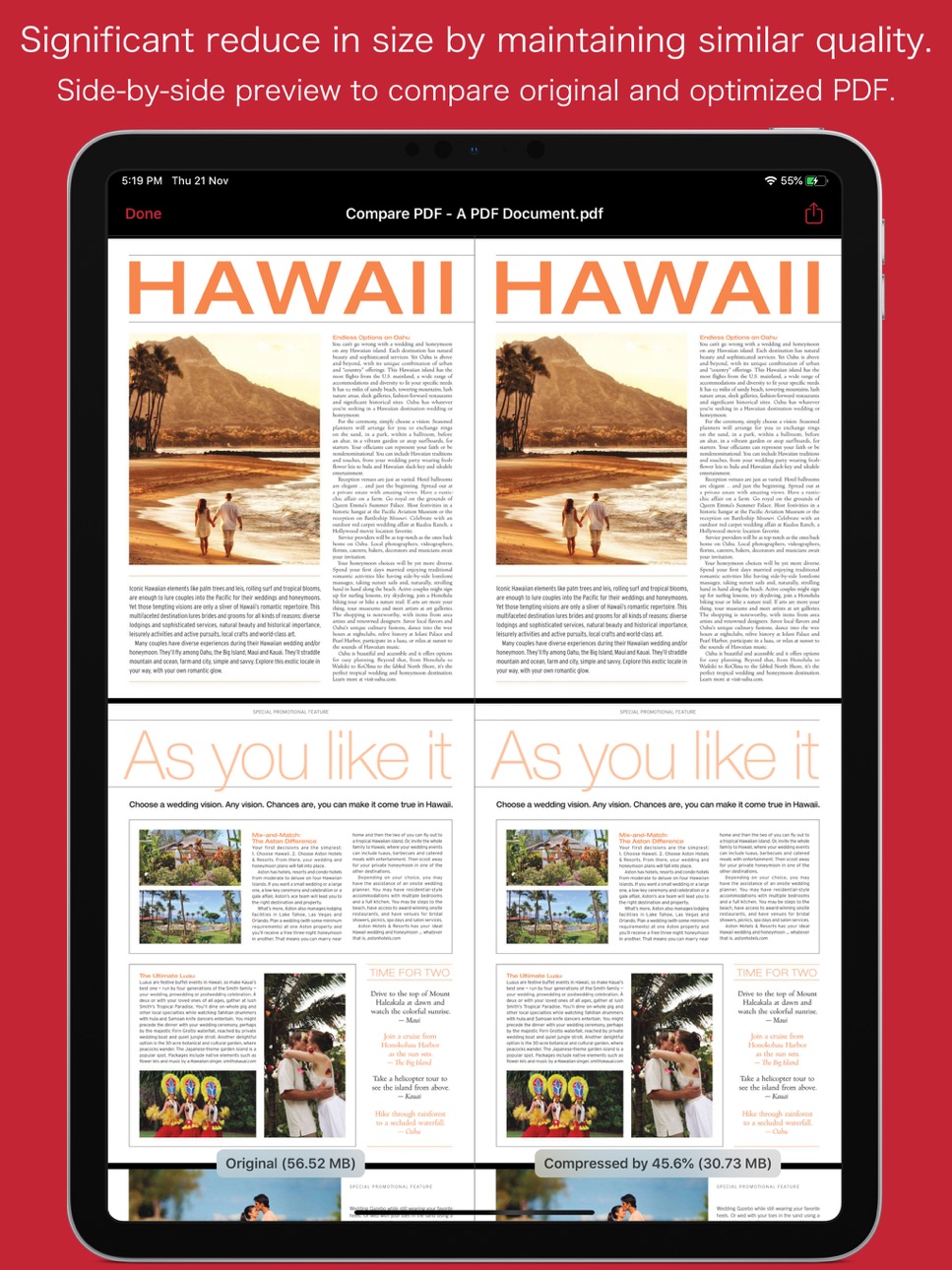
PDFOptim is a simple and intuitive way to compress, optimize and reduce PDF documents on iPhones and iPads. PDFOptim provides easy and effective ways to compress large image and graphics heavy PDF files. Inbuilt side-by-side preview to compare original and compressed PDF.
* * * PDFOptim for Mac is also available on the Mac App Store. * * *
Compressed PDF documents requires less disk space for storage and faster uploads and downloads saves transmission time and cost. PDFOptim rewrites the entire PDF documents using selected compression options as efficiently as possible without compromising the document's integrity.
If your PDF documents are in another app (For Example Mail, DropBox or SkyDrive etc.) that uses the Open In… button, tap the button to open the PDF document in PDFOptim. You can also transfer PDF documents from your desktop computer via iTunes into PDFOptim application on your iPhone or iPad.
KEY FEATURES:
AUTO COMPRESSION MODE
- PDFOptim analyze document’s contents and apply algorithm to generate a smallest possible PDF by maintaining the document’s visual quality. Choose one of the four predefined Auto compression methods and let the app do the hard work for you. No further user interaction required to provide technical compression options.
MANUAL COMPRESSION MODE
- Change compression options manually to generate optimum sized PDF of your need. You can choose compression options to set from Image Color Model, Image Resolution, JPEG Image Quality, Optimise vector graphics level and Advance option.
- Image color model to choose from RGB, Gray and Mono. Selecting Monochrome color model option converts raster PDF contents into black and white which helps reduces PDF file size to greater extent. It is very helpful when compressing scanned books mainly containing text.
- Image resolution ppi (pixels/inch) control to resize raster image contents. Downsampling at lower resolution decrease the file size dramatically.
- Quality control. Set quality from lossless to least for resampling all raster images into PDF. It allows you to control compressed PDF size and viewing quality.
-Advance options to remove PDF content properties like alternate images, page thumbnails, documents structure hierarchy and output intent.
- Optimize vector graphics option removes superfluous information to reduce vector graphics heavy PDF. Increase in optimize vector from 'Level 1' to 'Level 5' reduces output PDF file size less to more respectively.
This option is very useful when PDF content mainly consist of high precision vector graphics, Usually PDF drawing, note-taking and PDF markup apps creates large vector graphics heavy PDF files which can be compressed by this option efficiently.
- Password protected PDF documents supported for compression using correct password.
- Single or multiple compressed PDFs can be shared as single ZIP (*.zip) file.
- Allows Compressed PDFs to Open In… another application, Mail, Message, Print, share PDFs to nearby iOS devices via AirDrop.
- Use Copy to iTunes to save and share compressed PDFs on your desktop computer.
PDF VIEWER:
- Inbuilt PDF viewer with fully selectable and searchable text contents. Select and copy text to clipboard for further use.
- Pinch out and Pinch in to ZoomIn and ZoomOut view and search feature to find a character, word and sentence.
- Scroll through your document by thumbnail view or Go to page feature.
Note: PDFOptim is standalone application running natively to compress PDF documents securely on your iOS device.
You can refer User Manual for any assistance Or Contact Support.
*The free version has limitation to export one compressed PDF per week. Get Premium to remove all restrictions and start exporting an unlimited number of compressed PDFs.
Privacy Policy: http://rootrisetech.com/pdfoptim-privacy-policy
Terms of Use(EULA): https://www.apple.com/legal/internet-services/itunes/dev/stdeula/
In-App Purchases MO pricing
SUBSCRIPTIONS Subscription
Premium : Yearly Access · Yearly—
Premium : Monthly Access · Monthly—
One-Time Purchases
Premium : Lifetime Access—
Capabilities
In-App Purchases
Accessibility
ipadiphonemacrealityDevicetvoswatch
Version history 16 versions
Build 881516058v6.02026-01-19 06:17:42
- Updated user interface to streamline with latest iOS.
- Other minor bug fixes and improvements.
If PDFOptim useful to you, we would appreciate an App Store review. It will help other people find the app and make them delighted.
Thank you all users for your feedback :)
Build 856461144v5.02023-05-02 09:32:46
• Introducing new Auto Compression Mode. PDFOptim analyze document’s contents and apply algorithm to generate a smallest possible PDF by maintaining the document’s visual quality. Choose one of the four predefined Auto compression methods and let the app do the hard work for you. No further user interaction required to provide technical compression options.
• Refined icon.
• New advance options to remove PDF content properties like alternate images, page thumbnails, documents structure hierarchy and output intent.
• Other minor bug fixes and improvements.
If PDFOptim is useful to you, we would appreciate an App Store review. It will help other people find the app and make them delighted.
Build 856813504v5.0.12023-05-02 13:36:03
- [FIXED] App crash due to a framework unavailability on iOS 12.
*** What's New in Version 5.0
• Introducing new Auto Compression Mode. PDFOptim analyze document’s contents and apply algorithm to generate a smallest possible PDF by maintaining the document’s visual quality. Choose one of the four predefined Auto compression methods and let the app do the hard work for you. No further user interaction required to provide technical compression options.
• Refined icon.
• New advance options to remove PDF content properties like alternate images, page thumbnails, documents structure hierarchy and output intent.
• Other minor bug fixes and improvements.
If PDFOptim is useful to you, we would appreciate an App Store review. It will help other people find the app and make them delighted.
Build 852615538v4.22022-10-06 18:19:45
- [FIXED] Original and compressed PDF side-by-side comparison view not working after OS upgrade to new iOS 16.
- [FIXED] JPX encoded images with transparency in PDF get distorted when optimised.
- [FIXED] A file specific issue taking longer time to compress.
- [FIXED] A file specific crash when a PDF contains JPX encoded image with YUV color model.
- UI improvements and fixes to streamline with latest iOS 16. Thank you all users for your feedback :)
Build 843623966v4.1.12021-08-16 12:57:38
- Immediate corrective update for last version app crash issue.
What's New in version 4.1
- Enabled multiple PDF files selection for importing into the app. Choose to select one to more files in Browser and tap Open to import selected files.
- Minor bug fixes and improvements. Thank you all users for your feedback :)
Build 843576316v4.12021-08-14 21:47:26
- Enabled multiple PDF files selection for importing into the app. Choose to select one to more files in Browser and tap Open to import selected files.
- Minor bug fixes and improvements. Thank you all users for your feedback :)
Build 840791327v4.02021-03-08 22:14:43
- Major update with the only solution to optimise PDF vector graphics. Optimize graphics option removes superfluous information to reduce vector graphics heavy PDF. Increase in optimize graphics from 'Level 1' to 'Level 5' reduces output PDF file size less to more respectively. Higher optimise graphics level reduces file size but also reduces PDF visual fidelity at higher zoom scale. Choose appropriate Optimize graphics level to balance file size and visual fidelity. Choose Optimize graphics option 'None' to avoid vector graphics optimization.
This option is very useful when PDF content mainly consist of high precision vector graphics. This option removes such superfluous information, thereby reducing the size of your PDF files. Usually PDF drawing, note-taking and PDF markup apps creates large vector graphics heavy PDF files on iOS and macOS. Now such PDF files will be compressed efficiently using PDFOptim Optimize graphics option.
- [Fixed] File specific issue taking longer time to compress.
- Minor bug fixes and improvements. Thank you all users for your feedback :)
Build 834511559v3.12020-01-28 17:04:34
- Replaced document interaction view with iOS Files browser view for importing PDF files into the app.
- Fixed app crash when compressing file having some non-english characters in filename.
- Addressed file specific crash while creating thumbnail for new file.
- Bug fix related to deleting PDF file.
- Other improvements. Thank you all users for your feedback :)
What's New in This Version v3.0
- Whole new user interface with iOS 13 System Dark appearance compatibility.
- New icon.
- New faster and improved PDF viewer with thumbnail view. Slide finger over thumbnails to navigate through pages.
- Side-by-side comparison of original and optimised PDF is now available in iPhone app too.
- Many improvements in compression processing. Faster and more powerful optimization.
- Other bug fixes.
Build 833854349v3.0.12019-12-04 01:36:59
- Description and screenshots correction.
What's New in This Version v3.0
- Whole new user interface with iOS 13 System Dark appearance compatibility.
- New icon.
- New faster and improved PDF viewer with thumbnail view. Slide finger over thumbnails to navigate through pages.
- Side-by-side comparison of original and optimised PDF is now available in iPhone app too.
- Many improvements in compression processing. Faster and more powerful optimization.
- Other bug fixes.
Build 833721595v3.02019-11-22 21:31:07
- Whole new user interface with iOS 13 System Dark appearance compatibility.
- New icon.
- New faster and improved PDF viewer with thumbnail view. Slide finger over thumbnails to navigate through pages.
- Side-by-side comparison of original and optimised PDF is now available in iPhone app too.
- Many improvements in compression processing. Faster and more powerful optimization.
- Other bug fixes.
Build 828108060v2.02018-08-04 02:32:37
- Added new Monochrome color model compression option. Selecting Monochrome color model compression option converts raster PDF contents into black and white which helps reduces PDF file size to greater extent. It is very helpful when compressing scanned books mainly containing text. Optimizing PDF using Monochrome color model can create 24 times smaller PDF compared to RGB color model compression.
- Addressed user reported file specific crash and other bug fixes.
- Minor UI changes.
- Other improvements.
Build 823994037v1.62017-10-14 19:04:20
- Compatible for iOS 11 and enhanced for iPad Pro.
- Resolved issue for PDF containing 16bit images compressed into black or empty boxes.
- Minor bug fixes.
Build 811945069v1.42015-04-12 00:25:41
- Integration of iCloud for devices running iOS 8 or later. You can now import and export documents in iCloud within application.
- Rename feature.
Build 769082676v1.32014-11-04 23:00:59
- Optimized for iOS 8.
- Optimized for iPhone 6 and iPhone 6 Plus.
- [Fixed] Crash while deleting file from list.
- [Fixed] Optimization issue for PDF having multiple referenced image on a page.
Build 731583010v1.22014-10-18 00:19:14
- Optimized for iOS 8.
- Optimized for iPhone 6 and iPhone 6 Plus.
- [Fixed] Optimization issue for PDF having multiple referenced image on a page.
- Other improvements.
Build 650073764v1.02014-08-18 18:27:16
Price history by region
Currency
Show
Columns
Search
Availability 175 of 175 storefronts
| Region | Language | Price | Ratings | Avg | Version |
|---|---|---|---|---|---|
| US | en-US | Free | 292 | 4.7 | 6.0 |
| DE | de-DE | Free | 181 | 4.7 | 6.0 |
| GB | en-GB | Free | 86 | 4.7 | 6.0 |
| IN | en-GB | Free | 57 | 4.8 | 6.0 |
| FR | fr-FR | Free | 56 | 4.8 | 6.0 |
| CN | zh-Hans-CN | Free | 44 | 5.0 | 6.0 |
| VN | en-GB | Free | 38 | 4.8 | 6.0 |
| AU | en-AU | Free | 35 | 4.8 | 6.0 |
| ES | es-ES | Free | 35 | 4.7 | 6.0 |
| IT | it | Free | 35 | 4.9 | 6.0 |
| HK | zh-Hant-HK | Free | 31 | 4.8 | 6.0 |
| ID | en-GB | Free | 30 | 5.0 | 6.0 |
| TH | en-GB | Free | 30 | 4.8 | 6.0 |
| CA | en-CA | Free | 28 | 4.7 | 6.0 |
| AT | de-DE | Free | 25 | 5.0 | 6.0 |
| MX | es-MX | Free | 19 | 4.8 | 6.0 |
| PH | en-GB | Free | 18 | 4.8 | 6.0 |
| ZA | en-GB | Free | 16 | 5.0 | 6.0 |
| JP | ja | Free | 14 | 4.8 | 6.0 |
| RU | ru | Free | 14 | 4.8 | 6.0 |
| IL | en-GB | Free | 11 | 5.0 | 6.0 |
| NL | nl | Free | 10 | 4.6 | 6.0 |
| TR | en-GB | Free | 10 | 5.0 | 6.0 |
| BR | pt-BR | Free | 9 | 4.9 | 6.0 |
| KR | ko | Free | 9 | 4.8 | 6.0 |
| MY | en-GB | Free | 9 | 4.9 | 6.0 |
| RO | en-GB | Free | 9 | 5.0 | 6.0 |
| AE | en-GB | Free | 8 | 4.5 | 6.0 |
| BE | en-GB | Free | 8 | 4.9 | 6.0 |
| TW | zh-Hant-TW | Free | 7 | 4.9 | 6.0 |
| CH | de-CH | Free | 6 | 4.8 | 6.0 |
| QA | en-GB | Free | 6 | 5.0 | 6.0 |
| SE | sv | Free | 6 | 4.8 | 6.0 |
| SG | en-GB | Free | 6 | 4.8 | 6.0 |
| SI | en-GB | Free | 6 | 4.7 | 6.0 |
| BG | en-GB | Free | 5 | 5.0 | 6.0 |
| IE | en-GB | Free | 5 | 4.8 | 6.0 |
| NG | en-GB | Free | 5 | 5.0 | 6.0 |
| PT | pt-PT | Free | 5 | 4.6 | 6.0 |
| GR | en-GB | Free | 4 | 5.0 | 6.0 |
| HU | en-GB | Free | 4 | 5.0 | 6.0 |
| KW | en-GB | Free | 4 | 5.0 | 6.0 |
| KZ | en-GB | Free | 4 | 5.0 | 6.0 |
| NZ | en-AU | Free | 4 | 5.0 | 6.0 |
| PL | en-GB | Free | 4 | 5.0 | 6.0 |
| SA | en-GB | Free | 4 | 5.0 | 6.0 |
| CL | es-MX | Free | 3 | 5.0 | 6.0 |
| CR | es-MX | Free | 3 | 5.0 | 6.0 |
| CY | en-GB | Free | 3 | 5.0 | 6.0 |
| CZ | en-GB | Free | 3 | 5.0 | 6.0 |
| EG | en-GB | Free | 3 | 4.3 | 6.0 |
| FI | en-GB | Free | 3 | 5.0 | 6.0 |
| HR | en-GB | Free | 3 | 5.0 | 6.0 |
| LT | en-GB | Free | 3 | 5.0 | 6.0 |
| AR | es-MX | Free | 2 | 5.0 | 6.0 |
| CO | es-MX | Free | 2 | 5.0 | 6.0 |
| NO | en-GB | Free | 2 | 4.5 | 6.0 |
| PA | es-MX | Free | 2 | 5.0 | 6.0 |
| PE | es-MX | Free | 2 | 5.0 | 6.0 |
| SV | es-MX | Free | 2 | 5.0 | 6.0 |
| UA | en-GB | Free | 2 | 5.0 | 6.0 |
| BH | en-GB | Free | 1 | 5.0 | 6.0 |
| BY | en-GB | Free | 1 | 5.0 | 6.0 |
| CD | en-GB | Free | 1 | 5.0 | 6.0 |
| DO | es-MX | Free | 1 | 5.0 | 6.0 |
| EC | es-MX | Free | 1 | 5.0 | 6.0 |
| GE | en-GB | Free | 1 | 5.0 | 6.0 |
| GH | en-GB | Free | 1 | 5.0 | 6.0 |
| LV | en-GB | Free | 1 | 5.0 | 6.0 |
| MT | en-GB | Free | 1 | 5.0 | 6.0 |
| MU | en-GB | Free | 1 | 5.0 | 6.0 |
| NA | en-GB | Free | 1 | 4.0 | 6.0 |
| OM | en-GB | Free | 1 | 5.0 | 6.0 |
| PK | en-GB | Free | 1 | 5.0 | 6.0 |
| RW | en-GB | Free | 1 | 5.0 | 6.0 |
| SK | en-GB | Free | 1 | 5.0 | 6.0 |
| SN | en-GB | Free | 1 | 3.0 | 6.0 |
| AF | en-GB | Free | 0 | — | 6.0 |
| AG | en-GB | Free | 0 | — | 6.0 |
| AI | en-GB | Free | 0 | — | 6.0 |
| AL | en-GB | Free | 0 | — | 6.0 |
| AM | en-GB | Free | 0 | — | 6.0 |
| AO | en-GB | Free | 0 | — | 6.0 |
| AZ | en-GB | Free | 0 | — | 6.0 |
| BA | en-GB | Free | 0 | — | 6.0 |
| BB | en-GB | Free | 0 | — | 6.0 |
| BF | en-GB | Free | 0 | — | 6.0 |
| BJ | en-GB | Free | 0 | — | 6.0 |
| BM | en-GB | Free | 0 | — | 6.0 |
| BN | en-GB | Free | 0 | — | 6.0 |
| BO | es-MX | Free | 0 | — | 6.0 |
| BS | en-GB | Free | 0 | — | 6.0 |
| BT | en-GB | Free | 0 | — | 6.0 |
| BW | en-GB | Free | 0 | — | 6.0 |
| BZ | en-GB | Free | 0 | — | 6.0 |
| CG | en-GB | Free | 0 | — | 6.0 |
| CI | fr-FR | Free | 0 | — | 6.0 |
| CM | fr-FR | Free | 0 | — | 6.0 |
| CV | en-GB | Free | 0 | — | 6.0 |
| DK | en-GB | Free | 0 | — | 6.0 |
| DM | en-GB | Free | 0 | — | 6.0 |
| DZ | en-GB | Free | 0 | — | 6.0 |
| EE | en-GB | Free | 0 | — | 6.0 |
| FJ | en-GB | Free | 0 | — | 6.0 |
| FM | en-GB | Free | 0 | — | 6.0 |
| GA | fr-FR | Free | 0 | — | 6.0 |
| GD | en-GB | Free | 0 | — | 6.0 |
| GM | en-GB | Free | 0 | — | 6.0 |
| GT | es-MX | Free | 0 | — | 6.0 |
| GW | en-GB | Free | 0 | — | 6.0 |
| GY | en-GB | Free | 0 | — | 6.0 |
| HN | es-MX | Free | 0 | — | 6.0 |
| IQ | en-GB | Free | 0 | — | 6.0 |
| IS | en-GB | Free | 0 | — | 6.0 |
| JM | en-GB | Free | 0 | — | 6.0 |
| JO | en-GB | Free | 0 | — | 6.0 |
| KE | en-GB | Free | 0 | — | 6.0 |
| KG | en-GB | Free | 0 | — | 6.0 |
| KH | en-GB | Free | 0 | — | 6.0 |
| KN | en-GB | Free | 0 | — | 6.0 |
| KY | en-GB | Free | 0 | — | 6.0 |
| LA | en-GB | Free | 0 | — | 6.0 |
| LB | en-GB | Free | 0 | — | 6.0 |
| LC | en-GB | Free | 0 | — | 6.0 |
| LK | en-GB | Free | 0 | — | 6.0 |
| LR | en-GB | Free | 0 | — | 6.0 |
| LU | en-GB | Free | 0 | — | 6.0 |
| LY | en-GB | Free | 0 | — | 6.0 |
| MA | en-GB | Free | 0 | — | 6.0 |
| MD | en-GB | Free | 0 | — | 6.0 |
| ME | en-GB | Free | 0 | — | 6.0 |
| MG | en-GB | Free | 0 | — | 6.0 |
| MK | en-GB | Free | 0 | — | 6.0 |
| ML | en-GB | Free | 0 | — | 6.0 |
| MM | en-GB | Free | 0 | — | 6.0 |
| MN | en-GB | Free | 0 | — | 6.0 |
| MO | zh-Hant-HK | Free | 0 | — | 6.0 |
| MR | en-GB | Free | 0 | — | 6.0 |
| MS | en-GB | Free | 0 | — | 6.0 |
| MV | en-GB | Free | 0 | — | 6.0 |
| MW | en-GB | Free | 0 | — | 6.0 |
| MZ | en-GB | Free | 0 | — | 6.0 |
| NE | en-GB | Free | 0 | — | 6.0 |
| NI | es-MX | Free | 0 | — | 6.0 |
| NP | en-GB | Free | 0 | — | 6.0 |
| NR | en-GB | Free | 0 | — | 6.0 |
| PG | en-GB | Free | 0 | — | 6.0 |
| PW | en-GB | Free | 0 | — | 6.0 |
| PY | es-MX | Free | 0 | — | 6.0 |
| RS | en-GB | Free | 0 | — | 6.0 |
| SB | en-GB | Free | 0 | — | 6.0 |
| SC | en-GB | Free | 0 | — | 6.0 |
| SL | en-GB | Free | 0 | — | 6.0 |
| SR | en-GB | Free | 0 | — | 6.0 |
| ST | en-GB | Free | 0 | — | 6.0 |
| SZ | en-GB | Free | 0 | — | 6.0 |
| TC | en-GB | Free | 0 | — | 6.0 |
| TD | en-GB | Free | 0 | — | 6.0 |
| TJ | en-GB | Free | 0 | — | 6.0 |
| TM | en-GB | Free | 0 | — | 6.0 |
| TN | en-GB | Free | 0 | — | 6.0 |
| TO | en-GB | Free | 0 | — | 6.0 |
| TT | en-GB | Free | 0 | — | 6.0 |
| TZ | en-GB | Free | 0 | — | 6.0 |
| UG | en-GB | Free | 0 | — | 6.0 |
| UY | en-GB | Free | 0 | — | 6.0 |
| UZ | en-GB | Free | 0 | — | 6.0 |
| VC | en-GB | Free | 0 | — | 6.0 |
| VE | es-MX | Free | 0 | — | 6.0 |
| VG | en-GB | Free | 0 | — | 6.0 |
| VU | en-GB | Free | 0 | — | 6.0 |
| XK | en-GB | Free | 0 | — | 6.0 |
| YE | en-GB | Free | 0 | — | 6.0 |
| ZM | en-GB | Free | 0 | — | 6.0 |
| ZW | en-GB | Free | 0 | — | 6.0 |
Change log 20 changes · MO
✎
releaseNotes updated
- Updated user interface to streamline with latest iOS.
- Other minor bug fixes and improvements.
If PDFOptim useful to you, we would appreciate an App Store
✎
description updated
PDFOptim is a simple and intuitive way to compress, optimize and reduce PDF documents on iPhones and iPads. PDFOptim provides easy and effective ways to compres
✎
subtitle updated
Compress & Optimize PDF files
✎
name updated
PDFOptim
◆
Version 6.0 released
- Updated user interface to streamline with latest iOS.
- Other minor bug fixes and improvements.
If PDFOptim useful to you, we would appreciate an App Store review. It will help other people find the app and make them delighted.
Thank yo
◆
Version 5.0.1 released
- [FIXED] App crash due to a framework unavailability on iOS 12.
*** What's New in Version 5.0
• Introducing new Auto Compression Mode. PDFOptim analyze document’s contents and apply algorithm to generate a smallest possible PDF by mainta
◆
Version 5.0 released
• Introducing new Auto Compression Mode. PDFOptim analyze document’s contents and apply algorithm to generate a smallest possible PDF by maintaining the document’s visual quality. Choose one of the four predefined Auto compression methods a
◆
Version 4.2 released
- [FIXED] Original and compressed PDF side-by-side comparison view not working after OS upgrade to new iOS 16.
- [FIXED] JPX encoded images with transparency in PDF get distorted when optimised.
- [FIXED] A file specific issue taking longer
◆
Version 4.1.1 released
- Immediate corrective update for last version app crash issue.
What's New in version 4.1
- Enabled multiple PDF files selection for importing into the app. Choose to select one to more files in Browser and tap Open to import selected f
◆
Version 4.1 released
- Enabled multiple PDF files selection for importing into the app. Choose to select one to more files in Browser and tap Open to import selected files.
- Minor bug fixes and improvements. Thank you all users for your feedback :)
◆
Version 4.0 released
- Major update with the only solution to optimise PDF vector graphics. Optimize graphics option removes superfluous information to reduce vector graphics heavy PDF. Increase in optimize graphics from 'Level 1' to 'Level 5' reduces output PD
◆
Version 3.1 released
- Replaced document interaction view with iOS Files browser view for importing PDF files into the app.
- Fixed app crash when compressing file having some non-english characters in filename.
- Addressed file specific crash while creating th
◆
Version 3.0.1 released
- Description and screenshots correction.
What's New in This Version v3.0
- Whole new user interface with iOS 13 System Dark appearance compatibility.
- New icon.
- New faster and improved PDF viewer with thumbnail view. Slide finger over
◆
Version 3.0 released
- Whole new user interface with iOS 13 System Dark appearance compatibility.
- New icon.
- New faster and improved PDF viewer with thumbnail view. Slide finger over thumbnails to navigate through pages.
- Side-by-side comparison of original
◆
Version 2.0 released
- Added new Monochrome color model compression option. Selecting Monochrome color model compression option converts raster PDF contents into black and white which helps reduces PDF file size to greater extent. It is very helpful when compre
◆
Version 1.6 released
- Compatible for iOS 11 and enhanced for iPad Pro.
- Resolved issue for PDF containing 16bit images compressed into black or empty boxes.
- Minor bug fixes.
◆
Version 1.4 released
- Integration of iCloud for devices running iOS 8 or later. You can now import and export documents in iCloud within application.
- Rename feature.
◆
Version 1.3 released
- Optimized for iOS 8.
- Optimized for iPhone 6 and iPhone 6 Plus.
- [Fixed] Crash while deleting file from list.
- [Fixed] Optimization issue for PDF having multiple referenced image on a page.
◆
Version 1.2 released
- Optimized for iOS 8.
- Optimized for iPhone 6 and iPhone 6 Plus.
- [Fixed] Optimization issue for PDF having multiple referenced image on a page.
- Other improvements.
◆
Version 1.0 released