Home › Navigation

 SR
SR
 USen-US
 CNzh-Hans-CN
 KRko
KRko COes-MX
 GBen-GB
 HKzh-Hant-HK
 INen-GB
 TWzh-Hant-TW
 AEen-GB
 AFen-GB
 AGen-GB
 AIen-GB
 ALen-GB
 AMen-GB
 AOen-GB
 ARes-MX
 AUen-AU
 AZen-GB
 BAen-GB
 BBen-GB
 BFen-GB
 BHen-GB
 BJen-GB
 BMen-GB
 BNen-GB
 BOes-MX
 BRpt-BR
 BSen-GB
 BTen-GB
 BWen-GB
 BYen-GB
 BZen-GB
 CAen-CA
 CDen-GB
 CGen-GB
 CHde-CH
 CIfr-FR
 CLes-MX
 CMfr-FR
 CRes-MX
 CVen-GB
 DMen-GB
 DOes-MX
 DZen-GB
 ECes-MX
 EGen-GB
 FJen-GB
 FMen-GB
 GAfr-FR
 GDen-GB
 GEen-GB
 GHen-GB
 GMen-GB
 GTes-MX
 GWen-GB
 GYen-GB
 HNes-MX
 IDen-GB
 ILen-GB
 IQen-GB
 ISen-GB
 JMen-GB
 JOen-GB
 JPja
JPja KEen-GB
 KGen-GB
 KHen-GB
 KNen-GB
 KWen-GB
 KYen-GB
 KZen-GB
 LAen-GB
 LBen-GB
 LCen-GB
 LKen-GB
 LRen-GB
 LYen-GB
 MAen-GB
 MDen-GB
 MEen-GB
 MGen-GB
 MKen-GB
 MLen-GB
 MMen-GB
 MNen-GB
 MOzh-Hant-HK
 MRen-GB
 MSen-GB
 MUen-GB
 MVen-GB
 MWen-GB
 MXes-MX
 MYen-GB
 MZen-GB
 NAen-GB
 NEen-GB
 NGen-GB
 NIes-MX
 NOen-GB
 NPen-GB
 NRen-GB
 NZen-AU
 OMen-GB
 PAes-MX
 PEes-MX
 PGen-GB
 PHen-GB
 PKen-GB
 PWen-GB
 PYes-MX
 QAen-GB
 RSen-GB
 RUru
RUru RWen-GB
 SAen-GB
 SBen-GB
 SCen-GB
 SGen-GB
 SLen-GB
 SNen-GBSRen-GB
 STen-GB
 SVes-MX
 SZen-GB
 TCen-GB
 TDen-GB
 THen-GB
 TJen-GB
 TMen-GB
 TNen-GB
 TOen-GB
 TRen-GB
 TTen-GB
 TZen-GB
 UAen-GB
 UGen-GB
 UYen-GB
 UZen-GB
 VCen-GB
 VEes-MX
 VGen-GB
 VNen-GB
 VUen-GB
 XKen-GB
 YEen-GB
 ZAen-GB
 ZMen-GB
 ZWen-GB
 ATNot Available
 BENot Available
 BGNot Available
 CYNot Available
 CZNot Available
 DENot Available
 DKNot Available
 EENot Available
 ESNot Available
 FINot Available
 FRNot Available
 GRNot Available
 HRNot Available
 HUNot Available
 IENot Available
 ITNot Available
 LTNot Available
 LUNot Available
 LVNot Available
 MTNot Available
 NLNot Available
 PLNot Available
 PTNot Available
 RONot Available
 SENot Available
 SINot Available
 SKNot Available
148 of 175 storefronts
Content in en-US
Content in en-US
Information
Icon history 2 versions
Current←
 Previous
Preview 3 platforms
iPhone 5 images


iPad 5 images


Apple Watch 3 images


What’s New Version 4.0.20
- Added support for iOS 18 & watchOS 11
- App icon now adapts to dark/tinted home screen themes
Description
View up-to-date locations and time predictions for Georgia Tech Stinger buses and Tech Trolley.
LIVE MAP
Get up-to-date bus positions showing exactly where each bus is along its route.
PUSH NOTIFICATIONS
Get real-time updates regarding delays, closures, and other important messages.
CAMPUS SEARCH
Search for campus buildings and view their footprints on the map.
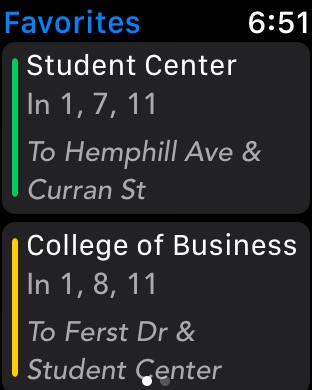
FAVORITE STOPS
Add stops you use often to your Favorites for quick, easy access.
NEARBY STOPS
See stops nearest to your current location, as well as how far they are.
SET REMINDERS
Easily set reminder notifications so you don't forget to catch your bus when it arrives.
NOTIFICATION CENTER WIDGETS
2 Notification Center widgets for easy access to time predictions for nearby stops as well as your favorites.
APPLE WATCH + IPAD
Optimized for iOS 17, iPhone, iPad, and Apple Watch.
If you run into any issues or have any feedback, use the in-app Support button or email support@iminichrispy.com. You can also tweet me @iMinichrispy.
Capabilities
In-App Purchases
Accessibility
ipadiphonemacrealityDevicetvoswatch
Version history 25 versions
Build 868888388v4.0.202024-09-11 16:22:59
- Added support for iOS 18 & watchOS 11
- App icon now adapts to dark/tinted home screen themes
Build 853352488v4.0.192024-02-01 16:46:05
Support for iOS 17 & watchOS 10
Build 852224600v4.0.112022-09-16 01:03:22
Support for iOS 16 & watchOS 9
Build 851866631v4.0.102022-08-28 22:16:11
- Fixed crash caused by malformed predictions response
- Bumped minimum supported OS version to iOS 11
Build 851586928v4.0.92022-08-18 00:11:59
- Fix crash when switching to Routes tab due to data parsing issue
- Improve readability of bus identifiers on dark theme
Build 851573976v4.0.82022-08-15 20:58:54
Switch to new backend service - bus data should now be coming through correctly!
Build 849629902v4.0.72022-05-31 10:20:23
- Fixed issue causing checkbox to sometimes appear squished
- Added another potential fix for map zoom issue
Build 848950217v4.0.62022-05-11 16:43:22
- Support for iOS 15
- Visual refresh of Toggle Routes screen
- New Search and Settings icons
- Switched to lighter primary dark mode color
- Potential fix for issue causing map to zoom unintentionally
- Potential fix for audio pausing on app launch
Build 843083258v4.0.52021-07-16 21:01:54
Minor UI polish
Build 837808974v4.0.42020-09-16 19:59:51
- Added iOS 14 support
- Fixed bug causing route messages to sometimes render incorrectly
- Minor adjustments to dark mode colors
Build 834739443v4.0.32020-02-18 19:27:02
Now with Dark Mode! Toggle your device's display appearance to enjoy light and dark versions of the app.
Also includes other minor changes for iOS 13 support (better late than never, right?).
Build 832672603v4.0.22019-09-07 01:26:18
- Fixed predictions not being retrieved
- Fixed Passio messages not being shown
- Fixed issue where disabled routes are re-added to home map (thanks C. Whyler for pointing this out!)
Build 830245551v4.0.12019-02-19 05:00:19
Now with Grocery shuttle! Get live locations and prediction times for the weekend shuttle to Atlantic Station. Enable by tapping the new Toggle Routes shortcut on the map.
Switched from NextBus to Passio for retrieving bus data. NextBus support for Georgia Tech is being shut down by PTS on Feb 22 so be sure to update your app in order to keep the app functional!
Other changes:
- Fixed issue where route lines occasionally wouldn't show up when selecting stop in Favorites tab
- Fixed Apple Watch launch issue
New in v4.0:
Now with Push Notifications! Get real-time updates regarding delays, closures, and other important messages.
Build 828923785v4.02019-02-05 23:06:06
Now with Push Notifications! Get real-time updates regarding delays, closures, and other important messages.
Additional changes:
- Updated for iOS 12 and new devices
- Improved clustering algorithm for grouping stops together
- Switched to new backend endpoints
- All-new onboarding flow
- Buses now always appear above stops on map
- Other minor bug fixes and improvements
In addition, after nearly 5 years of releasing GT Buses for free and without ads, starting with this version, GT Buses will be ad supported in order to enable features like push notifications and allow me to support development of the app far into the future.
Build 824282365v3.0.72017-11-05 21:01:25
Support for iPhone X and iOS 11
Build 820920345v3.0.62017-02-14 00:05:09
Be sure to download the NEW official Georgia Tech app on the App Store!
- Fixed a few minor issues with buildings search layout
Build 819215001v3.0.42016-10-09 19:53:03
- Fixed issue that prevented messages from being enabled by default
- Fixed a minor memory issue
Build 819023098v3.0.32016-09-25 19:59:53
- iOS 10 support w/ fixes for extension colors (You're welcome, Jonathan)
- Added 3D Touch home screen quick actions
- Dropped iOS 6 support
Build 818954773v3.0.22016-09-21 17:58:54
- Tap a bus to get info about its route, speed, heading, and identifier (Thanks Lia for the suggestion!)
- Fixed crash affecting iOS 7 users (You're welcome, Jack)
Tip: If you want to enable the Tech Square Express route, simply open the app's settings and press the Toggle Routes button
Build 818470443v3.0.12016-08-11 21:07:30
- Fixed crash when selecting building from search results (Thanks Emily!)
- Notification Center extensions no longer make duplicate, unnecessary requests
Build 817228823v3.02016-07-01 00:16:24
BIGGEST UPDATE EVER!!
NEW INTERFACE
Now with 4 screens: Map, Routes, Favorites, Nearby
- Map: Same as before
- Routes: View list of stops for each route + time predictions
- Favorites: list of favorited stops
- Nearby: list of nearby stops & how far away they are
NEW FEATURES
- You can now overlay multiple routes on the map
- Set Reminder - schedule an alert if you want to be reminded when a bus is coming
OTHER IMPROVEMENTS
- New error banners - now more clearly visisble
- Switched to using a custom font throughout the whole app
- Added white border circles to stops on the map to aid clarity
- Optimizations to network requests to reduce the overall number of requests required and to minimize duplicate requests
BUG FIXES
- Fixed a few memory leaks
- Fixed request error codes sometimes being presented as 0 to the user instead of the actual error code
- Honestly, too many to list ;)
Build 815832495v2.3.22016-01-17 03:46:57
- Added button in Settings for requesting Stingerette
- Fix issue where settings was displayed incorrectly in landscape mode on iPads running older versions of iOS
Build 814109816v2.32015-11-24 18:38:23
- Added NextBus messages to stop annotations
- Fixed notification center widget layout issues
This update also includes a number of stability improvements and bug fixes, as well as a completely reworked server request handling system.
Build 813591711v2.2.22015-10-01 02:24:35
Fixed issue where notification center widgets would not load properly.
New in 2.2: iOS 9 support, watchOS 2 support, significant improvements to watch app, as well as additional general stability improvements and bug fixes
Build 813370776v2.2.12015-09-27 22:26:17
- Fixed issue where watch app might not have route data on first launch
- Fixed issue where nearby stops on watch app wouldn't update when your location changed
New in 2.2: iOS 9 support, watchOS 2 support, significant improvements to watch app, as well as additional general stability improvements and bug fixes
No pricing data captured yet — comparisons appear once the app has paid storefronts or in-app purchases.
Availability 148 of 175 storefronts
| Region | Language | Price | Ratings | Avg | Version |
|---|---|---|---|---|---|
| US | en-US | Free | 220 | 4.4 | 4.0.20 |
| CN | zh-Hans-CN | Free | 6 | 5.0 | 4.0.20 |
| KR | ko | Free | 4 | 4.0 | 4.0.20 |
| CO | es-MX | Free | 1 | 5.0 | 4.0.20 |
| GB | en-GB | Free | 1 | 5.0 | 4.0.20 |
| HK | zh-Hant-HK | Free | 1 | 5.0 | 4.0.20 |
| IN | en-GB | Free | 1 | 5.0 | 4.0.20 |
| TW | zh-Hant-TW | Free | 1 | 5.0 | 4.0.20 |
| AE | en-GB | Free | 0 | — | 4.0.20 |
| AF | en-GB | Free | 0 | — | 4.0.20 |
| AG | en-GB | Free | 0 | — | 4.0.20 |
| AI | en-GB | Free | 0 | — | 4.0.20 |
| AL | en-GB | Free | 0 | — | 4.0.20 |
| AM | en-GB | Free | 0 | — | 4.0.20 |
| AO | en-GB | Free | 0 | — | 4.0.20 |
| AR | es-MX | Free | 0 | — | 4.0.20 |
| AU | en-AU | Free | 0 | — | 4.0.20 |
| AZ | en-GB | Free | 0 | — | 4.0.20 |
| BA | en-GB | Free | 0 | — | 4.0.20 |
| BB | en-GB | Free | 0 | — | 4.0.20 |
| BF | en-GB | Free | 0 | — | 4.0.20 |
| BH | en-GB | Free | 0 | — | 4.0.20 |
| BJ | en-GB | Free | 0 | — | 4.0.20 |
| BM | en-GB | Free | 0 | — | 4.0.20 |
| BN | en-GB | Free | 0 | — | 4.0.20 |
| BO | es-MX | Free | 0 | — | 4.0.20 |
| BR | pt-BR | Free | 0 | — | 4.0.20 |
| BS | en-GB | Free | 0 | — | 4.0.20 |
| BT | en-GB | Free | 0 | — | 4.0.20 |
| BW | en-GB | Free | 0 | — | 4.0.20 |
| BY | en-GB | Free | 0 | — | 4.0.20 |
| BZ | en-GB | Free | 0 | — | 4.0.20 |
| CA | en-CA | Free | 0 | — | 4.0.20 |
| CD | en-GB | Free | 0 | — | 4.0.20 |
| CG | en-GB | Free | 0 | — | 4.0.20 |
| CH | de-CH | Free | 0 | — | 4.0.20 |
| CI | fr-FR | Free | 0 | — | 4.0.20 |
| CL | es-MX | Free | 0 | — | 4.0.20 |
| CM | fr-FR | Free | 0 | — | 4.0.20 |
| CR | es-MX | Free | 0 | — | 4.0.20 |
| CV | en-GB | Free | 0 | — | 4.0.20 |
| DM | en-GB | Free | 0 | — | 4.0.20 |
| DO | es-MX | Free | 0 | — | 4.0.20 |
| DZ | en-GB | Free | 0 | — | 4.0.20 |
| EC | es-MX | Free | 0 | — | 4.0.20 |
| EG | en-GB | Free | 0 | — | 4.0.20 |
| FJ | en-GB | Free | 0 | — | 4.0.20 |
| FM | en-GB | Free | 0 | — | 4.0.20 |
| GA | fr-FR | Free | 0 | — | 4.0.20 |
| GD | en-GB | Free | 0 | — | 4.0.20 |
| GE | en-GB | Free | 0 | — | 4.0.20 |
| GH | en-GB | Free | 0 | — | 4.0.20 |
| GM | en-GB | Free | 0 | — | 4.0.20 |
| GT | es-MX | Free | 0 | — | 4.0.20 |
| GW | en-GB | Free | 0 | — | 4.0.20 |
| GY | en-GB | Free | 0 | — | 4.0.20 |
| HN | es-MX | Free | 0 | — | 4.0.20 |
| ID | en-GB | Free | 0 | — | 4.0.20 |
| IL | en-GB | Free | 0 | — | 4.0.20 |
| IQ | en-GB | Free | 0 | — | 4.0.20 |
| IS | en-GB | Free | 0 | — | 4.0.20 |
| JM | en-GB | Free | 0 | — | 4.0.20 |
| JO | en-GB | Free | 0 | — | 4.0.20 |
| JP | ja | Free | 0 | — | 4.0.20 |
| KE | en-GB | Free | 0 | — | 4.0.20 |
| KG | en-GB | Free | 0 | — | 4.0.20 |
| KH | en-GB | Free | 0 | — | 4.0.20 |
| KN | en-GB | Free | 0 | — | 4.0.20 |
| KW | en-GB | Free | 0 | — | 4.0.20 |
| KY | en-GB | Free | 0 | — | 4.0.20 |
| KZ | en-GB | Free | 0 | — | 4.0.20 |
| LA | en-GB | Free | 0 | — | 4.0.20 |
| LB | en-GB | Free | 0 | — | 4.0.20 |
| LC | en-GB | Free | 0 | — | 4.0.20 |
| LK | en-GB | Free | 0 | — | 4.0.20 |
| LR | en-GB | Free | 0 | — | 4.0.20 |
| LY | en-GB | Free | 0 | — | 4.0.20 |
| MA | en-GB | Free | 0 | — | 4.0.20 |
| MD | en-GB | Free | 0 | — | 4.0.20 |
| ME | en-GB | Free | 0 | — | 4.0.20 |
| MG | en-GB | Free | 0 | — | 4.0.20 |
| MK | en-GB | Free | 0 | — | 4.0.20 |
| ML | en-GB | Free | 0 | — | 4.0.20 |
| MM | en-GB | Free | 0 | — | 4.0.20 |
| MN | en-GB | Free | 0 | — | 4.0.20 |
| MO | zh-Hant-HK | Free | 0 | — | 4.0.20 |
| MR | en-GB | Free | 0 | — | 4.0.20 |
| MS | en-GB | Free | 0 | — | 4.0.20 |
| MU | en-GB | Free | 0 | — | 4.0.20 |
| MV | en-GB | Free | 0 | — | 4.0.20 |
| MW | en-GB | Free | 0 | — | 4.0.20 |
| MX | es-MX | Free | 0 | — | 4.0.20 |
| MY | en-GB | Free | 0 | — | 4.0.20 |
| MZ | en-GB | Free | 0 | — | 4.0.20 |
| NA | en-GB | Free | 0 | — | 4.0.20 |
| NE | en-GB | Free | 0 | — | 4.0.20 |
| NG | en-GB | Free | 0 | — | 4.0.20 |
| NI | es-MX | Free | 0 | — | 4.0.20 |
| NO | en-GB | Free | 0 | — | 4.0.20 |
| NP | en-GB | Free | 0 | — | 4.0.20 |
| NR | en-GB | Free | 0 | — | 4.0.20 |
| NZ | en-AU | Free | 0 | — | 4.0.20 |
| OM | en-GB | Free | 0 | — | 4.0.20 |
| PA | es-MX | Free | 0 | — | 4.0.20 |
| PE | es-MX | Free | 0 | — | 4.0.20 |
| PG | en-GB | Free | 0 | — | 4.0.20 |
| PH | en-GB | Free | 0 | — | 4.0.20 |
| PK | en-GB | Free | 0 | — | 4.0.20 |
| PW | en-GB | Free | 0 | — | 4.0.20 |
| PY | es-MX | Free | 0 | — | 4.0.20 |
| QA | en-GB | Free | 0 | — | 4.0.20 |
| RS | en-GB | Free | 0 | — | 4.0.20 |
| RU | ru | Free | 0 | — | 4.0.20 |
| RW | en-GB | Free | 0 | — | 4.0.20 |
| SA | en-GB | Free | 0 | — | 4.0.20 |
| SB | en-GB | Free | 0 | — | 4.0.20 |
| SC | en-GB | Free | 0 | — | 4.0.20 |
| SG | en-GB | Free | 0 | — | 4.0.20 |
| SL | en-GB | Free | 0 | — | 4.0.20 |
| SN | en-GB | Free | 0 | — | 4.0.20 |
| SR | en-GB | Free | 0 | — | 4.0.20 |
| ST | en-GB | Free | 0 | — | 4.0.20 |
| SV | es-MX | Free | 0 | — | 4.0.20 |
| SZ | en-GB | Free | 0 | — | 4.0.20 |
| TC | en-GB | Free | 0 | — | 4.0.20 |
| TD | en-GB | Free | 0 | — | 4.0.20 |
| TH | en-GB | Free | 0 | — | 4.0.20 |
| TJ | en-GB | Free | 0 | — | 4.0.20 |
| TM | en-GB | Free | 0 | — | 4.0.20 |
| TN | en-GB | Free | 0 | — | 4.0.20 |
| TO | en-GB | Free | 0 | — | 4.0.20 |
| TR | en-GB | Free | 0 | — | 4.0.20 |
| TT | en-GB | Free | 0 | — | 4.0.20 |
| TZ | en-GB | Free | 0 | — | 4.0.20 |
| UA | en-GB | Free | 0 | — | 4.0.20 |
| UG | en-GB | Free | 0 | — | 4.0.20 |
| UY | en-GB | Free | 0 | — | 4.0.20 |
| UZ | en-GB | Free | 0 | — | 4.0.20 |
| VC | en-GB | Free | 0 | — | 4.0.20 |
| VE | es-MX | Free | 0 | — | 4.0.20 |
| VG | en-GB | Free | 0 | — | 4.0.20 |
| VN | en-GB | Free | 0 | — | 4.0.20 |
| VU | en-GB | Free | 0 | — | 4.0.20 |
| XK | en-GB | Free | 0 | — | 4.0.20 |
| YE | en-GB | Free | 0 | — | 4.0.20 |
| ZA | en-GB | Free | 0 | — | 4.0.20 |
| ZM | en-GB | Free | 0 | — | 4.0.20 |
| ZW | en-GB | Free | 0 | — | 4.0.20 |
Not available in: AT, BE, BG, CY, CZ, DE, DK, EE, ES, FI, FR, GR, HR, HU, IE, IT, LT, LU, LV, MT, NL, PL, PT, RO, SE, SI, SK
Change log 30 changes · SR
✎
releaseNotes updated
- Added support for iOS 18 & watchOS 11
- App icon now adapts to dark/tinted home screen themes
✎
description updated
View up-to-date locations and time predictions for Georgia Tech Stinger buses and Tech Trolley.
LIVE MAP
Get up-to-date bus positions showing exactly where eac
✎
subtitle updated
Live Map & Bus Times
✎
name updated
GT Buses
▣
App icon changed
◆
Version 4.0.20 released
- Added support for iOS 18 & watchOS 11
- App icon now adapts to dark/tinted home screen themes
◆
Version 4.0.19 released
Support for iOS 17 & watchOS 10
◆
Version 4.0.11 released
Support for iOS 16 & watchOS 9
◆
Version 4.0.10 released
- Fixed crash caused by malformed predictions response
- Bumped minimum supported OS version to iOS 11
◆
Version 4.0.9 released
- Fix crash when switching to Routes tab due to data parsing issue
- Improve readability of bus identifiers on dark theme
◆
Version 4.0.8 released
Switch to new backend service - bus data should now be coming through correctly!
◆
Version 4.0.7 released
- Fixed issue causing checkbox to sometimes appear squished
- Added another potential fix for map zoom issue
◆
Version 4.0.6 released
- Support for iOS 15
- Visual refresh of Toggle Routes screen
- New Search and Settings icons
- Switched to lighter primary dark mode color
- Potential fix for issue causing map to zoom unintentionally
- Potential fix for audio pausing on a
◆
Version 4.0.5 released
Minor UI polish
◆
Version 4.0.4 released
- Added iOS 14 support
- Fixed bug causing route messages to sometimes render incorrectly
- Minor adjustments to dark mode colors
◆
Version 4.0.3 released
Now with Dark Mode! Toggle your device's display appearance to enjoy light and dark versions of the app.
Also includes other minor changes for iOS 13 support (better late than never, right?).
◆
Version 4.0.2 released
- Fixed predictions not being retrieved
- Fixed Passio messages not being shown
- Fixed issue where disabled routes are re-added to home map (thanks C. Whyler for pointing this out!)
◆
Version 4.0.1 released
Now with Grocery shuttle! Get live locations and prediction times for the weekend shuttle to Atlantic Station. Enable by tapping the new Toggle Routes shortcut on the map.
Switched from NextBus to Passio for retrieving bus data. NextBus su
◆
Version 4.0 released
Now with Push Notifications! Get real-time updates regarding delays, closures, and other important messages.
Additional changes:
- Updated for iOS 12 and new devices
- Improved clustering algorithm for grouping stops together
- Switched to
◆
Version 3.0.7 released
Support for iPhone X and iOS 11
◆
Version 3.0.6 released
Be sure to download the NEW official Georgia Tech app on the App Store!
- Fixed a few minor issues with buildings search layout
◆
Version 3.0.4 released
- Fixed issue that prevented messages from being enabled by default
- Fixed a minor memory issue
◆
Version 3.0.3 released
- iOS 10 support w/ fixes for extension colors (You're welcome, Jonathan)
- Added 3D Touch home screen quick actions
- Dropped iOS 6 support
◆
Version 3.0.2 released
- Tap a bus to get info about its route, speed, heading, and identifier (Thanks Lia for the suggestion!)
- Fixed crash affecting iOS 7 users (You're welcome, Jack)
Tip: If you want to enable the Tech Square Express route, simply open the a
◆
Version 3.0.1 released
- Fixed crash when selecting building from search results (Thanks Emily!)
- Notification Center extensions no longer make duplicate, unnecessary requests
◆
Version 3.0 released
BIGGEST UPDATE EVER!!
NEW INTERFACE
Now with 4 screens: Map, Routes, Favorites, Nearby
- Map: Same as before
- Routes: View list of stops for each route + time predictions
- Favorites: list of favorited stops
- Nearby: list of nearby st
◆
Version 2.3.2 released
- Added button in Settings for requesting Stingerette
- Fix issue where settings was displayed incorrectly in landscape mode on iPads running older versions of iOS
◆
Version 2.3 released
- Added NextBus messages to stop annotations
- Fixed notification center widget layout issues
This update also includes a number of stability improvements and bug fixes, as well as a completely reworked server request handling system.
◆
Version 2.2.2 released
Fixed issue where notification center widgets would not load properly.
New in 2.2: iOS 9 support, watchOS 2 support, significant improvements to watch app, as well as additional general stability improvements and bug fixes
◆
Version 2.2.1 released
- Fixed issue where watch app might not have route data on first launch
- Fixed issue where nearby stops on watch app wouldn't update when your location changed
New in 2.2: iOS 9 support, watchOS 2 support, significant improvements to watc