Home › Productivity

 ZM
ZM
 USen-US
 AEen-GB
 AFen-GB
 AGen-GB
 AIen-GB
 ALen-GB
 AMen-GB
 AOen-GB
 ARes-MX
 ATde-DE
 AUen-AU
 AZen-GB
 BAen-GB
 BBen-GB
 BEen-GB
 BFen-GB
 BGen-GB
 BHen-GB
 BJen-GB
 BMen-GB
 BNen-GB
 BOes-MX
 BRpt-BR
 BSen-GB
 BTen-GB
 BWen-GB
 BYen-GB
 BZen-GB
 CAen-CA
 CDen-GB
 CGen-GB
 CHde-CH
 CIfr-FR
 CLes-MX
 CMfr-FR
 CNzh-Hans-CN
 COes-MX
 CRes-MX
 CVen-GB
 CYen-GB
 CZen-GB
 DEde-DE
 DKen-GB
 DMen-GB
 DOes-MX
 DZen-GB
 ECes-MX
 EEen-GB
 EGen-GB
 ESes-ES
 FIen-GB
 FJen-GB
 FMen-GB
 FRfr-FR
 GAfr-FR
 GBen-GB
 GDen-GB
 GEen-GB
 GHen-GB
 GMen-GB
 GRen-GB
 GTes-MX
 GWen-GB
 GYen-GB
 HKzh-Hant-HK
 HNes-MX
 HRen-GB
 HUen-GB
 IDen-GB
 IEen-GB
 ILen-GB
 INen-GB
 IQen-GB
 ISen-GB
 ITit
ITit JMen-GB
 JOen-GB
 JPja
JPja KEen-GB
 KGen-GB
 KHen-GB
 KNen-GB
 KRko
KRko KWen-GB
 KYen-GB
 KZen-GB
 LAen-GB
 LBen-GB
 LCen-GB
 LKen-GB
 LRen-GB
 LTen-GB
 LUen-GB
 LVen-GB
 LYen-GB
 MAen-GB
 MDen-GB
 MEen-GB
 MGen-GB
 MKen-GB
 MLen-GB
 MMen-GB
 MNen-GB
 MOzh-Hant-HK
 MRen-GB
 MSen-GB
 MTen-GB
 MUen-GB
 MVen-GB
 MWen-GB
 MXes-MX
 MYen-GB
 MZen-GB
 NAen-GB
 NEen-GB
 NGen-GB
 NIes-MX
 NLnl
NLnl NOen-GB
 NPen-GB
 NRen-GB
 NZen-AU
 OMen-GB
 PAes-MX
 PEes-MX
 PGen-GB
 PHen-GB
 PKen-GB
 PLen-GB
 PTpt-PT
 PWen-GB
 PYes-MX
 QAen-GB
 ROen-GB
 RSen-GB
 RUru
RUru RWen-GB
 SAen-GB
 SBen-GB
 SCen-GB
 SEsv
SEsv SGen-GB
 SIen-GB
 SKen-GB
 SLen-GB
 SNen-GB
 SRen-GB
 STen-GB
 SVes-MX
 SZen-GB
 TCen-GB
 TDen-GB
 THen-GB
 TJen-GB
 TMen-GB
 TNen-GB
 TOen-GB
 TRen-GB
 TTen-GB
 TWzh-Hant-TW
 TZen-GB
 UAen-GB
 UGen-GB
 UYen-GB
 UZen-GB
 VCen-GB
 VEes-MX
 VGen-GB
 VNen-GB
 VUen-GB
 XKen-GB
 YEen-GB
 ZAen-GBZMen-GB
 ZWen-GB
175 of 175 storefronts
Content in en-US
Content in en-US
Information
Apple ID788803577
Bundle IDBret-H.-Hardman.RIGIDpro
SellerSeller
Min iOS7.0
Min macOS11.0
Device familiesiphone, ipod
Released2014-01-11
Copyright© 2015 Bret H. Hardman
Preview 1 platform
iPhone 5 images



What’s New Version 1.1.3
This update from Apple will improve the functionality of this app. No new features are included.
• Bug Fixes
Description
RIGIDpro is an advanced bending calculator that was specifically made for helping with Mechanical, Electrical, and Hydraulic Benders. A true respectable side kick to any electrician working with conduit of any type and size. Whether you need to swiftly obtain information about the bender you’re using, or a multiplier card without scrounging through your wallet, or a calculator with the capability of working with fractions (x/16”) and decimals simultaneously, or a bender calculator that accounts for gain and shrink. Allowing you to layout multiple bends on a single conduit quickly. RIGIDpro is your answer.
-----
RIGIDpro is broken into 5 different categories.
Select Bender: Create, load, and delete benders of various types. Select from several different types of bender styles whether it’s a Mechanical, Electrical, or Hydraulic Bender. All Benders are programmed with the Centerline Radius and Take-Up of the shoe that are based on their factory settings found within their manuals (accuracy may vary slightly).
Shoe Specs: Edit and view the information about the selected bender. With a simple click and drag you can change the Centerline Radius (this information can usually be found on the bender’s shoe) or the Take-Up of the specific shoe size being used. Quickly discover additional information about the specified bender’s shoe such as the Gain, Setback, Travel and Radius Adjustment.
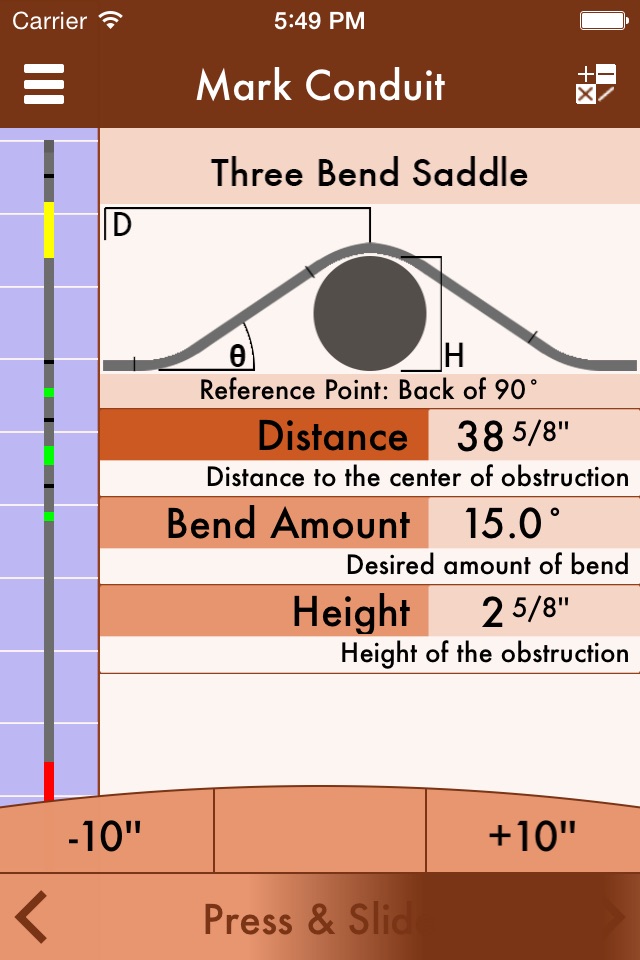
Mark Conduit: Have a complicated bend? Say a 25” stub, a Three Bend Saddle that needs to be centered 35” from the Back of that 90 at a 22.5 degree interval and needs to clear a 4” conduit, with another 90 66 ½” inches away from the back of the previous 90, and it needs to be cut 25” from the back of that 90. Not only that, but you don’t have the luxury of having a pony handy and you only have a table threader. No problem. The advanced bending calculator of RIGIDpro can handle anything you throw at it.
With additional features that allow you to change the conduit size and type; Mark to Center, which deciphers between placing marks at the tip of the hook or the center of the bend; Measure To Center, which will align all bends to the center of conduits, ideal for running raceways with various sizes of conduit. There is the ability to go and edit specific bend measurements; if you wanted the first 25” 90 stub to be 27” without changing the distance afterwards. Also if you have a ground-man and they don’t have the app? RIGIDpro can send them a text with all of the information detailed within the message with a click of the button (make sure it’s okay with them before sending any text messages, all normal rates will apply.).
Bends supported are 90 Bends, Offsets, Three Bend Saddle, Four Bend Saddle, Kick with 90 Bends, Kicks, Segmented 90 (3 – 49 shots), and Cut Conduit. With more bends to soon come these bends may be added into whatever sequence you can cleverly come up with.
All marks and measurements are based on the push-trough method, from first to last and the Centerline Radius.
Multiplier Card: Quickly reference the distance multipliers and shrink constants from 0.5 degree - 90 degrees. Also view the Outside, Inside, and Knock-Out Diameters from ½” – 6” conduit of all types.
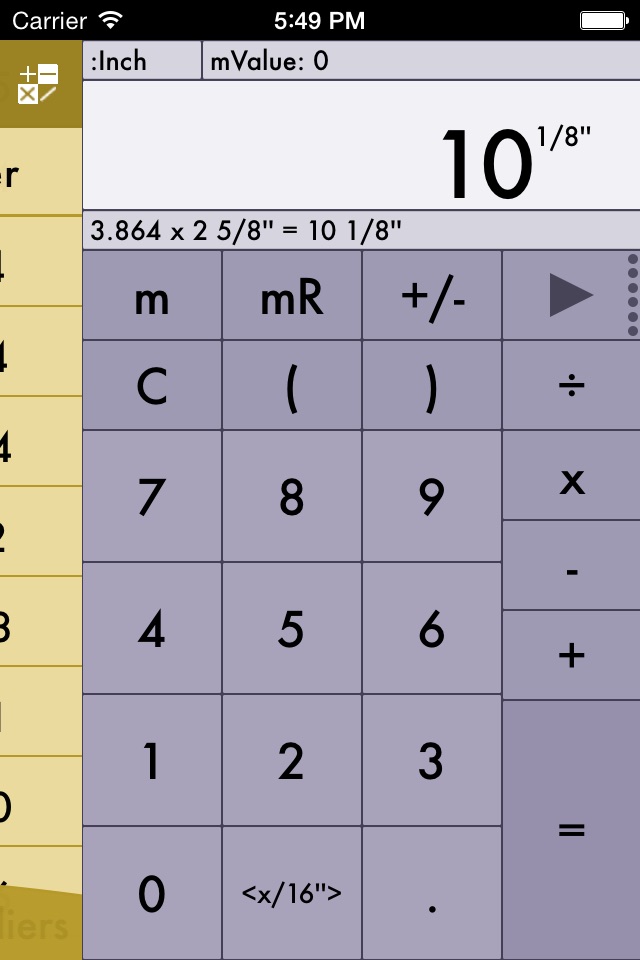
Calculator: Simple, yet sophisticated. It contains functions such as addition, subtraction, multiplication, and division. Also includes the ability to store and recall memory, squaring, and calculating the square root. The calculator gives you the ability to quickly transpose from Fraction:Decimal and Decimal:Fraction. Easily mixing formulas such as 2.61 x 3 ¼”.
-----
If you have any suggestions, or notice any bugs please e-mail me RIGIDpro@outlook.com. I’ll do my best to accommodate to everyone. Hand-Benders are not supported with this app -- only Mechanical, Electrical and Hydraulic. There will be more benders make/models added in the future.
Accessibility
ipadiphonemacrealityDevicetvoswatch
Version history 6 versions
Build 812943251v1.1.32016-05-16 18:36:40
This update from Apple will improve the functionality of this app. No new features are included.
• Bug Fixes
Build 812465189v1.1.22015-05-28 02:27:47
• Bug Fixes
• New color scheme for the 'Shoe Specs'
• More to come as I optimize for all Apple hand-held devices.
Build 812223803v1.1.12015-05-12 21:27:02
v1.1.1
•'Footer Buttons' have been cleaned up
•'Footer Buttons: Scroll Bar' now has "Press & Slide" on it. Making it more recognizable that it can be used to easily adjust values.
•'Footer Buttons: Scroll Bar' has a feature indicating that it's being pressed down.
•Icon has changed.
More updates to come as I optimize RIGIDpro, for all Apple devices. If you have something you'd like to have added feel free to e-mail me, rigidpro@outlook.com
Build 578102634v1.1.02014-05-08 02:15:51
NOTICE: In order to quickly change values just simply hold and slide finger on the slider-bar that appears on the bottom of the screen after selecting a measurement to change. Compounds 90s are supported just add a "segmented 90" and select two shots. Thank you.
•Metric Conversion: Easily switch between Standard Units and Centimeters by going to the Settings apps or Mark Conduit: Settings.
•Greenlee 884/885 automatically displays marks to the center of the shoe.
•Left/Right taps in Mark Conduit: Add Bend directions were switched (that sounds weird, but you know what I mean)
•Adjusted appearance/organization of the Multiplier Card.
•Segmented 90s can now be adjusted to 2 shots.
•Fixed Random Bugs
In memory of Stephan Lieber, IBEW L.U. #429
-Bret H. Hardman
Build 310212832v1.0.12014-01-19 17:50:49
-Start Info, now displays when app first opens up, and stops displaying shortly after creating a Bender.
-Clicking 'Done' in 'Create' Bender with lack of information now pops up an Alert Window informing you what needs to be completed to create a bender.
-Keyboard in 'Create' for 'Bender Name' now closes.
-Text Field in 'Create' section is now more obvious. With a place holder of 'Enter Bender Name Here'.
-Info on terms placed next to items in 'Shoe Specs' (I'll work on making them a little bit more thorough).
-Alert Window pops up when trying to add more bends to a stick after a Cut Mark has been placed informing you that the Cut Mark needs to be deleted before trying to add more bends.
Enjoy
-Bret H. Hardman
Build 271832960v1.0.02014-01-11 00:03:44
Price history by region
Currency
Show
Columns
Search
Availability 175 of 175 storefronts
| Region | Language | Price | Ratings | Avg | Version |
|---|---|---|---|---|---|
| US | en-US | USD 2.99 | 15 | 2.9 | 1.1.3 |
| AE | en-GB | AED 12.99 | 0 | — | 1.1.3 |
| AF | en-GB | USD 2.99 | 0 | — | 1.1.3 |
| AG | en-GB | USD 2.99 | 0 | — | 1.1.3 |
| AI | en-GB | USD 2.99 | 0 | — | 1.1.3 |
| AL | en-GB | USD 3.99 | 0 | — | 1.1.3 |
| AM | en-GB | USD 3.99 | 0 | — | 1.1.3 |
| AO | en-GB | USD 2.99 | 0 | — | 1.1.3 |
| AR | es-MX | USD 2.99 | 0 | — | 1.1.3 |
| AT | de-DE | EUR 2.99 | 0 | — | 1.1.3 |
| AU | en-AU | AUD 4.99 | 0 | — | 1.1.3 |
| AZ | en-GB | USD 3.99 | 0 | — | 1.1.3 |
| BA | en-GB | EUR 2.99 | 0 | — | 1.1.3 |
| BB | en-GB | USD 3.99 | 0 | — | 1.1.3 |
| BE | en-GB | EUR 2.99 | 0 | — | 1.1.3 |
| BF | en-GB | USD 2.99 | 0 | — | 1.1.3 |
| BG | en-GB | EUR 2.99 | 0 | — | 1.1.3 |
| BH | en-GB | USD 2.99 | 0 | — | 1.1.3 |
| BJ | en-GB | USD 3.99 | 0 | — | 1.1.3 |
| BM | en-GB | USD 2.99 | 0 | — | 1.1.3 |
| BN | en-GB | USD 2.99 | 0 | — | 1.1.3 |
| BO | es-MX | USD 2.99 | 0 | — | 1.1.3 |
| BR | pt-BR | BRL 19.9 | 0 | — | 1.1.3 |
| BS | en-GB | USD 2.99 | 0 | — | 1.1.3 |
| BT | en-GB | USD 2.99 | 0 | — | 1.1.3 |
| BW | en-GB | USD 2.99 | 0 | — | 1.1.3 |
| BY | en-GB | USD 3.99 | 0 | — | 1.1.3 |
| BZ | en-GB | USD 2.99 | 0 | — | 1.1.3 |
| CA | en-CA | CAD 3.99 | 0 | — | 1.1.3 |
| CD | en-GB | USD 2.99 | 0 | — | 1.1.3 |
| CG | en-GB | USD 2.99 | 0 | — | 1.1.3 |
| CH | de-CH | CHF 3 | 0 | — | 1.1.3 |
| CI | fr-FR | USD 3.99 | 0 | — | 1.1.3 |
| CL | es-MX | CLP 2990 | 0 | — | 1.1.3 |
| CM | fr-FR | USD 3.99 | 0 | — | 1.1.3 |
| CN | zh-Hans-CN | CNY 22 | 0 | — | 1.1.3 |
| CO | es-MX | COP 14900 | 0 | — | 1.1.3 |
| CR | es-MX | USD 2.99 | 0 | — | 1.1.3 |
| CV | en-GB | USD 2.99 | 0 | — | 1.1.3 |
| CY | en-GB | EUR 2.99 | 0 | — | 1.1.3 |
| CZ | en-GB | CZK 79 | 0 | — | 1.1.3 |
| DE | de-DE | EUR 2.99 | 0 | — | 1.1.3 |
| DK | en-GB | DKK 29 | 0 | — | 1.1.3 |
| DM | en-GB | USD 2.99 | 0 | — | 1.1.3 |
| DO | es-MX | USD 2.99 | 0 | — | 1.1.3 |
| DZ | en-GB | USD 2.99 | 0 | — | 1.1.3 |
| EC | es-MX | USD 2.99 | 0 | — | 1.1.3 |
| EE | en-GB | EUR 2.99 | 0 | — | 1.1.3 |
| EG | en-GB | EGP 149.99 | 0 | — | 1.1.3 |
| ES | es-ES | EUR 2.99 | 0 | — | 1.1.3 |
| FI | en-GB | EUR 2.99 | 0 | — | 1.1.3 |
| FJ | en-GB | USD 2.99 | 0 | — | 1.1.3 |
| FM | en-GB | USD 2.99 | 0 | — | 1.1.3 |
| FR | fr-FR | EUR 2.99 | 0 | — | 1.1.3 |
| GA | fr-FR | USD 2.99 | 0 | — | 1.1.3 |
| GB | en-GB | GBP 2.99 | 0 | — | 1.1.3 |
| GD | en-GB | USD 2.99 | 0 | — | 1.1.3 |
| GE | en-GB | USD 3.99 | 0 | — | 1.1.3 |
| GH | en-GB | USD 3.99 | 0 | — | 1.1.3 |
| GM | en-GB | USD 2.99 | 0 | — | 1.1.3 |
| GR | en-GB | EUR 2.99 | 0 | — | 1.1.3 |
| GT | es-MX | USD 2.99 | 0 | — | 1.1.3 |
| GW | en-GB | USD 2.99 | 0 | — | 1.1.3 |
| GY | en-GB | USD 2.99 | 0 | — | 1.1.3 |
| HK | zh-Hant-HK | HKD 22 | 0 | — | 1.1.3 |
| HN | es-MX | USD 2.99 | 0 | — | 1.1.3 |
| HR | en-GB | EUR 2.99 | 0 | — | 1.1.3 |
| HU | en-GB | HUF 1490 | 0 | — | 1.1.3 |
| ID | en-GB | IDR 49000 | 0 | — | 1.1.3 |
| IE | en-GB | EUR 2.99 | 0 | — | 1.1.3 |
| IL | en-GB | ILS 9.9 | 0 | — | 1.1.3 |
| IN | en-GB | INR 299 | 0 | — | 1.1.3 |
| IQ | en-GB | USD 2.99 | 0 | — | 1.1.3 |
| IS | en-GB | USD 3.99 | 0 | — | 1.1.3 |
| IT | it | EUR 2.99 | 0 | — | 1.1.3 |
| JM | en-GB | USD 2.99 | 0 | — | 1.1.3 |
| JO | en-GB | USD 2.99 | 0 | — | 1.1.3 |
| JP | ja | JPY 500 | 0 | — | 1.1.3 |
| KE | en-GB | USD 3.99 | 0 | — | 1.1.3 |
| KG | en-GB | USD 2.99 | 0 | — | 1.1.3 |
| KH | en-GB | USD 2.99 | 0 | — | 1.1.3 |
| KN | en-GB | USD 2.99 | 0 | — | 1.1.3 |
| KR | ko | KRW 4400 | 0 | — | 1.1.3 |
| KW | en-GB | USD 2.99 | 0 | — | 1.1.3 |
| KY | en-GB | USD 2.99 | 0 | — | 1.1.3 |
| KZ | en-GB | KZT 1790 | 0 | — | 1.1.3 |
| LA | en-GB | USD 2.99 | 0 | — | 1.1.3 |
| LB | en-GB | USD 2.99 | 0 | — | 1.1.3 |
| LC | en-GB | USD 2.99 | 0 | — | 1.1.3 |
| LK | en-GB | USD 2.99 | 0 | — | 1.1.3 |
| LR | en-GB | USD 2.99 | 0 | — | 1.1.3 |
| LT | en-GB | EUR 2.99 | 0 | — | 1.1.3 |
| LU | en-GB | EUR 2.99 | 0 | — | 1.1.3 |
| LV | en-GB | EUR 2.99 | 0 | — | 1.1.3 |
| LY | en-GB | USD 2.99 | 0 | — | 1.1.3 |
| MA | en-GB | USD 2.99 | 0 | — | 1.1.3 |
| MD | en-GB | USD 3.99 | 0 | — | 1.1.3 |
| ME | en-GB | EUR 2.99 | 0 | — | 1.1.3 |
| MG | en-GB | USD 2.99 | 0 | — | 1.1.3 |
| MK | en-GB | USD 2.99 | 0 | — | 1.1.3 |
| ML | en-GB | USD 2.99 | 0 | — | 1.1.3 |
| MM | en-GB | USD 2.99 | 0 | — | 1.1.3 |
| MN | en-GB | USD 2.99 | 0 | — | 1.1.3 |
| MO | zh-Hant-HK | USD 2.99 | 0 | — | 1.1.3 |
| MR | en-GB | USD 2.99 | 0 | — | 1.1.3 |
| MS | en-GB | USD 2.99 | 0 | — | 1.1.3 |
| MT | en-GB | EUR 2.99 | 0 | — | 1.1.3 |
| MU | en-GB | USD 3.99 | 0 | — | 1.1.3 |
| MV | en-GB | USD 2.99 | 0 | — | 1.1.3 |
| MW | en-GB | USD 2.99 | 0 | — | 1.1.3 |
| MX | es-MX | MXN 69 | 0 | — | 1.1.3 |
| MY | en-GB | MYR 14.9 | 0 | — | 1.1.3 |
| MZ | en-GB | USD 2.99 | 0 | — | 1.1.3 |
| NA | en-GB | USD 2.99 | 0 | — | 1.1.3 |
| NE | en-GB | USD 2.99 | 0 | — | 1.1.3 |
| NG | en-GB | NGN 4900 | 0 | — | 1.1.3 |
| NI | es-MX | USD 2.99 | 0 | — | 1.1.3 |
| NL | nl | EUR 2.99 | 0 | — | 1.1.3 |
| NO | en-GB | NOK 39 | 0 | — | 1.1.3 |
| NP | en-GB | USD 3.99 | 0 | — | 1.1.3 |
| NR | en-GB | USD 2.99 | 0 | — | 1.1.3 |
| NZ | en-AU | NZD 4.99 | 0 | — | 1.1.3 |
| OM | en-GB | USD 2.99 | 0 | — | 1.1.3 |
| PA | es-MX | USD 2.99 | 0 | — | 1.1.3 |
| PE | es-MX | PEN 12.9 | 0 | — | 1.1.3 |
| PG | en-GB | USD 2.99 | 0 | — | 1.1.3 |
| PH | en-GB | PHP 199 | 0 | — | 1.1.3 |
| PK | en-GB | PKR 900 | 0 | — | 1.1.3 |
| PL | en-GB | PLN 14.99 | 0 | — | 1.1.3 |
| PT | pt-PT | EUR 2.99 | 0 | — | 1.1.3 |
| PW | en-GB | USD 2.99 | 0 | — | 1.1.3 |
| PY | es-MX | USD 2.99 | 0 | — | 1.1.3 |
| QA | en-GB | QAR 9.99 | 0 | — | 1.1.3 |
| RO | en-GB | RON 14.99 | 0 | — | 1.1.3 |
| RS | en-GB | EUR 2.99 | 0 | — | 1.1.3 |
| RU | ru | RUB 249 | 0 | — | 1.1.3 |
| RW | en-GB | USD 2.99 | 0 | — | 1.1.3 |
| SA | en-GB | SAR 12.99 | 0 | — | 1.1.3 |
| SB | en-GB | USD 2.99 | 0 | — | 1.1.3 |
| SC | en-GB | USD 2.99 | 0 | — | 1.1.3 |
| SE | sv | SEK 39 | 0 | — | 1.1.3 |
| SG | en-GB | SGD 3.98 | 0 | — | 1.1.3 |
| SI | en-GB | EUR 2.99 | 0 | — | 1.1.3 |
| SK | en-GB | EUR 2.99 | 0 | — | 1.1.3 |
| SL | en-GB | USD 2.99 | 0 | — | 1.1.3 |
| SN | en-GB | USD 3.99 | 0 | — | 1.1.3 |
| SR | en-GB | USD 2.99 | 0 | — | 1.1.3 |
| ST | en-GB | USD 2.99 | 0 | — | 1.1.3 |
| SV | es-MX | USD 2.99 | 0 | — | 1.1.3 |
| SZ | en-GB | USD 2.99 | 0 | — | 1.1.3 |
| TC | en-GB | USD 2.99 | 0 | — | 1.1.3 |
| TD | en-GB | USD 2.99 | 0 | — | 1.1.3 |
| TH | en-GB | THB 99 | 0 | — | 1.1.3 |
| TJ | en-GB | USD 2.99 | 0 | — | 1.1.3 |
| TM | en-GB | USD 2.99 | 0 | — | 1.1.3 |
| TN | en-GB | USD 2.99 | 0 | — | 1.1.3 |
| TO | en-GB | USD 2.99 | 0 | — | 1.1.3 |
| TR | en-GB | TRY 149.99 | 0 | — | 1.1.3 |
| TT | en-GB | USD 2.99 | 0 | — | 1.1.3 |
| TW | zh-Hant-TW | TWD 90 | 0 | — | 1.1.3 |
| TZ | en-GB | TZS 9900 | 0 | — | 1.1.3 |
| UA | en-GB | USD 3.99 | 0 | — | 1.1.3 |
| UG | en-GB | USD 3.99 | 0 | — | 1.1.3 |
| UY | en-GB | USD 2.99 | 0 | — | 1.1.3 |
| UZ | en-GB | USD 2.99 | 0 | — | 1.1.3 |
| VC | en-GB | USD 2.99 | 0 | — | 1.1.3 |
| VE | es-MX | USD 2.99 | 0 | — | 1.1.3 |
| VG | en-GB | USD 2.99 | 0 | — | 1.1.3 |
| VN | en-GB | VND 99000 | 0 | — | 1.1.3 |
| VU | en-GB | USD 2.99 | 0 | — | 1.1.3 |
| XK | en-GB | EUR 2.99 | 0 | — | 1.1.3 |
| YE | en-GB | USD 2.99 | 0 | — | 1.1.3 |
| ZA | en-GB | ZAR 59.99 | 0 | — | 1.1.3 |
| ZM | en-GB | USD 3.99 | 0 | — | 1.1.3 |
| ZW | en-GB | USD 3.99 | 0 | — | 1.1.3 |
Change log 9 changes · ZM
✎
releaseNotes updated
This update from Apple will improve the functionality of this app. No new features are included.
• Bug Fixes
✎
description updated
RIGIDpro is an advanced bending calculator that was specifically made for helping with Mechanical, Electrical, and Hydraulic Benders. A true respectable side ki
✎
name updated
RIGID: Conduit Bending Calculator
◆
Version 1.1.3 released
This update from Apple will improve the functionality of this app. No new features are included.
• Bug Fixes
◆
Version 1.1.2 released
• Bug Fixes
• New color scheme for the 'Shoe Specs'
• More to come as I optimize for all Apple hand-held devices.
◆
Version 1.1.1 released
v1.1.1
•'Footer Buttons' have been cleaned up
•'Footer Buttons: Scroll Bar' now has "Press & Slide" on it. Making it more recognizable that it can be used to easily adjust values.
•'Footer Buttons: Scroll Bar' has a feature indicating that
◆
Version 1.1.0 released
NOTICE: In order to quickly change values just simply hold and slide finger on the slider-bar that appears on the bottom of the screen after selecting a measurement to change. Compounds 90s are supported just add a "segmented 90" and select
◆
Version 1.0.1 released
-Start Info, now displays when app first opens up, and stops displaying shortly after creating a Bender.
-Clicking 'Done' in 'Create' Bender with lack of information now pops up an Alert Window informing you what needs to be completed to c
◆
Version 1.0.0 released