Home › Health & Fitness

 MO
MO
 USen-US
 RUru
RUru DEde-DE
 GBen-GB
 CAen-CA
 INen-GB
 ITit
ITit AUen-AU
 FRfr-FR
 CHde-CH
 ESes-ES
 CNzh-Hans-CN
 UAen-GB
 SAen-GB
 ATde-DE
 NLnl
NLnl BEen-GB
 MXes-MX
 KZen-GB
 TRen-GB
 SEsv
SEsv THen-GB
 AEen-GB
 IEen-GB
 JPja
JPja BRpt-BR
 KRko
KRko ROen-GB
 PLen-GB
 DKen-GB
 PHen-GB
 PTpt-PT
 TWzh-Hant-TW
 NZen-AU
 VNen-GB
 ILen-GB
 ARes-MX
 ZAen-GB
 HKzh-Hant-HK
 MYen-GB
 CLes-MX
 KWen-GB
 PKen-GB
 CZen-GB
 SGen-GB
 NOen-GB
 IDen-GB
 HRen-GB
 GRen-GB
 BGen-GB
 LUen-GB
 COes-MX
 BYen-GB
 HUen-GB
 AZen-GB
 SKen-GB
 EGen-GB
 LTen-GB
 ALen-GB
 QAen-GB
 NGen-GB
 KEen-GB
 LVen-GB
 FIen-GB
 GTes-MX
 RSen-GB
 EEen-GB
 SIen-GB
 PEes-MX
 AMen-GB
 CRes-MX
 OMen-GB
 NPen-GB
 MDen-GB
 KHen-GB
 MAen-GB
 JOen-GB
 DZen-GB
 MNen-GB
 GEen-GB
 LKen-GB
 LBen-GB
 GHen-GB
 BHen-GB
 ECes-MX
 MKen-GB
 DOes-MX
 SNen-GB
 UYen-GB
 CYen-GB
 TZen-GB
 BAen-GB
 MTen-GB
 PAes-MX
 SVes-MX
 IQen-GB
 ISen-GB
 HNes-MX
 UGen-GB
 TNen-GBMOzh-Hant-HK
 VEes-MX
 XKen-GB
 ZWen-GB
 BOes-MX
 MEen-GB
 TTen-GB
 CIfr-FR
 PYes-MX
 NIes-MX
 AOen-GB
 MLen-GB
 MUen-GB
 MZen-GB
 BJen-GB
 BWen-GB
 BFen-GB
 MRen-GB
 CGen-GB
 JMen-GB
 AFen-GB
 ZMen-GB
 MGen-GB
 LYen-GB
 NAen-GB
 BTen-GB
 RWen-GB
 PWen-GB
 CDen-GB
 BSen-GB
 LAen-GB
 CMfr-FR
 MWen-GB
 MVen-GB
 MMen-GB
 BBen-GB
 YEen-GB
 SLen-GB
 TDen-GB
 BMen-GB
 KYen-GB
 LCen-GB
 NEen-GB
 BZen-GB
 GMen-GB
 SZen-GB
 AGen-GB
 GYen-GB
 GAfr-FR
 GDen-GB
 SRen-GB
 VGen-GB
 CVen-GB
 KNen-GB
 TCen-GB
 VCen-GB
 AIen-GB
 GWen-GB
 DMen-GB
 FMen-GB
 LRen-GB
 MSen-GB
 SCen-GB
 STen-GB
 VUen-GB
 NRen-GB
 TOen-GB
167 of 167 storefronts
Content in en-US
Content in en-US
Information
Preview 2 platforms



iPhone 9 images




Apple Watch 7 images


What’s New Version 8.0.3
This update fixes a minor layout issue when Dynamic Text is used.
Description
Available on the iPhone and Apple Watch, Pedometer++ is the best way to review your step count, walking distance, active calories, and heart rate data.
Set a custom step count goal and track your progress over time. The built-in graphs make reviewing your data easy and fun. Everyone loves awards, and Pedometer++ includes a range of Badges to motivate and reward your hard work! The app also totals how far you’ve walked each day, and even counts the flights of stairs you encounter each day.
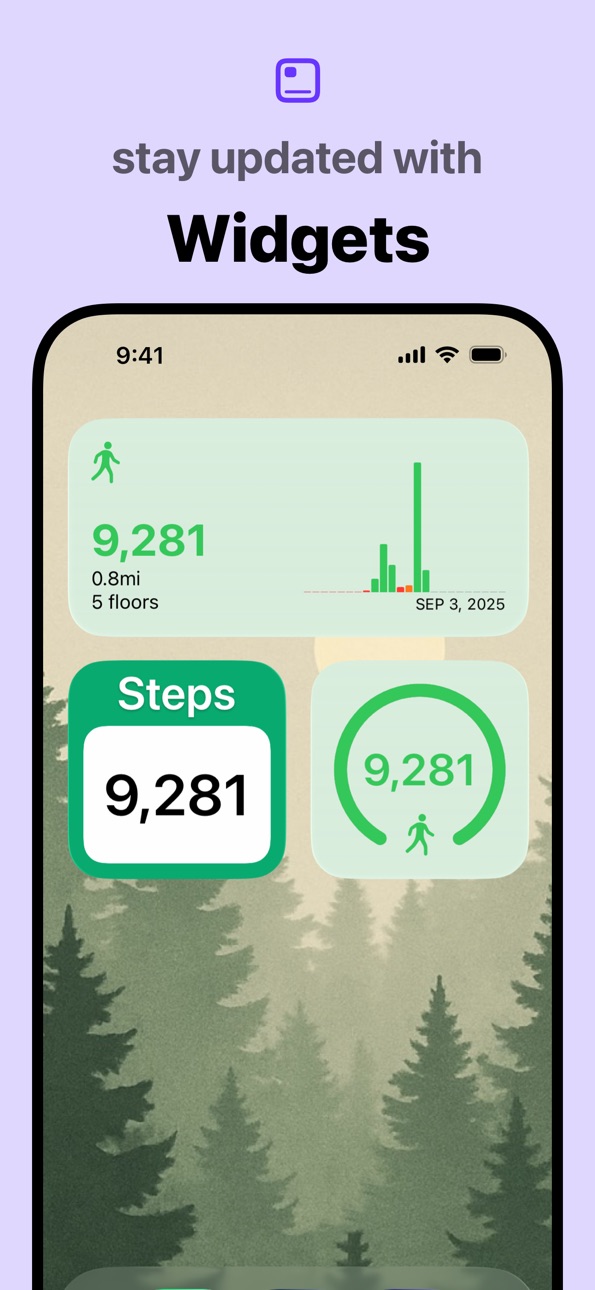
With full-featured widget support, Pedometer++ can display your step count or update you on your daily progress right from your iPhone's lock screen or home screen. You can also share your workouts with others and view trends over time.
The Apple Watch app puts all this data on your wrist. With a wide range of Complications, it’s easy to check your progress with just a glance. Add a single Complication to your daily watch face, or add several to build a comprehensive fitness-focused look!
DETAILS:
For best results, keep your iPhone on you as you move throughout the day, ideally in a pocket close to your hips. If you have an Apple Watch, you can set Pedometer++ to sync step data across your devices for the most accurate data possible.
The Apple Watch app can also start and track indoor and outdoor walking and running workouts and can serve as your guide while hiking.
ROUTES & MAPPING:
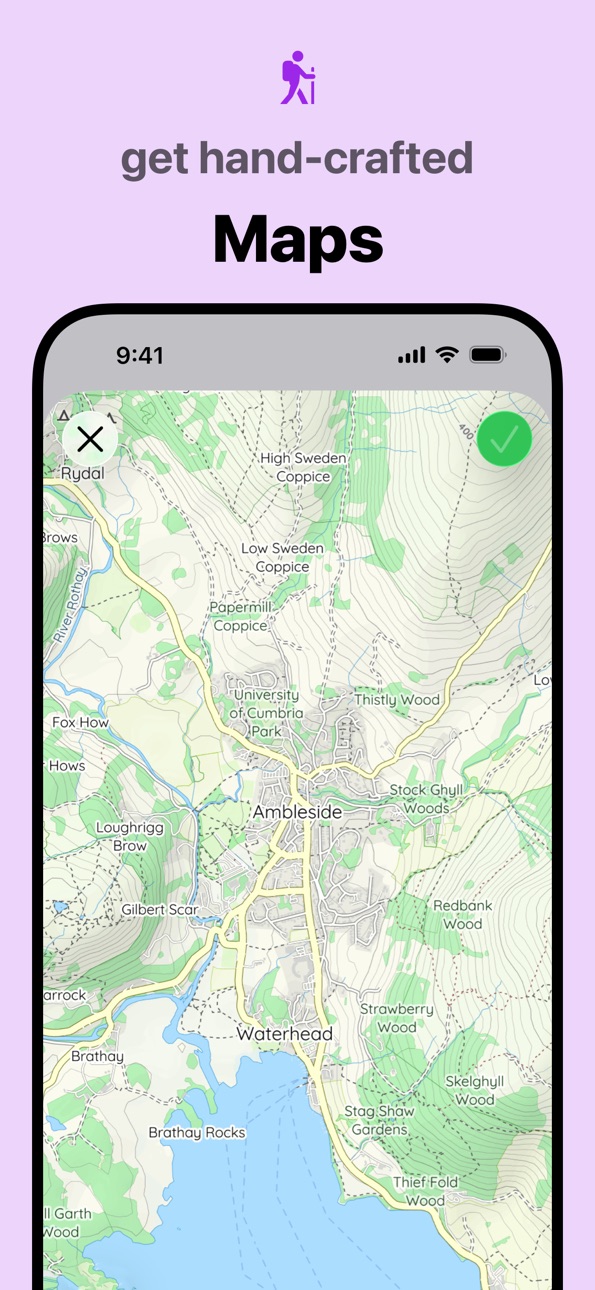
Pedometer++ is your ultimate companion for exploring the great outdoors. It allows you to import GPX files for waypoints and routes set by others.
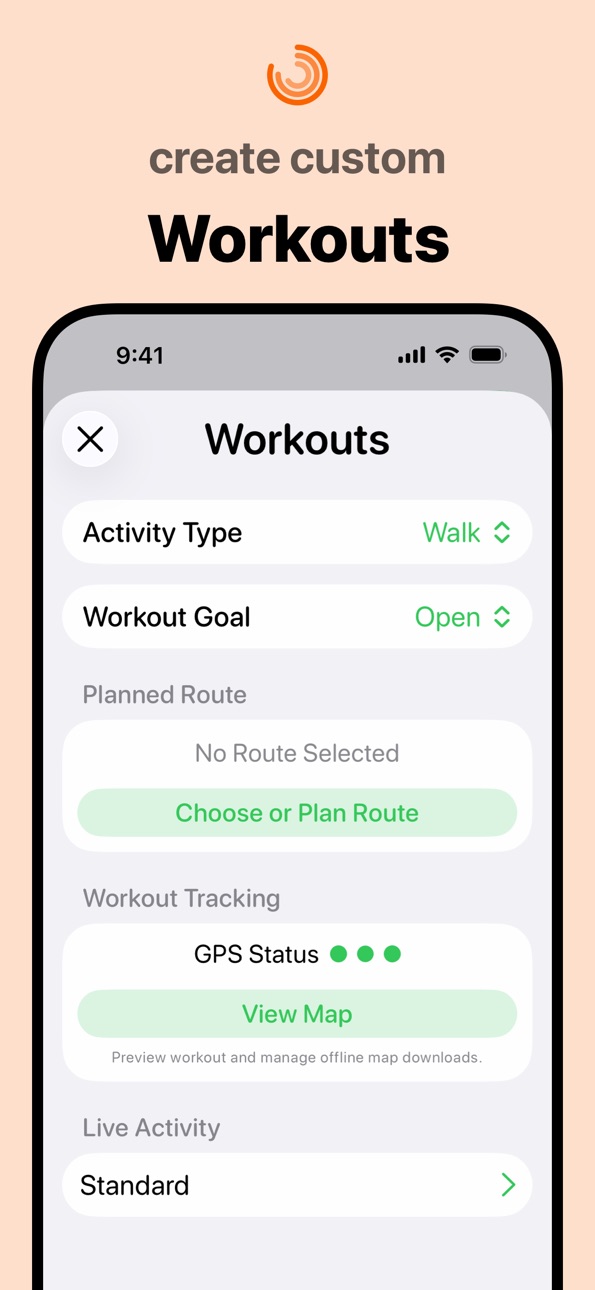
You can also use the app to create your own routes. Simply tap on your desired start and end points, and Pedometer++ will find the shortest route between them. You can then tweak the route based on terrain, trail popularity, or personal preference.
Pedometer++ shows the distance of a route, the elevation changes you will encounter, and the estimated time it will take you to reach your destination. You can also monitor the weather that is expected along your route.
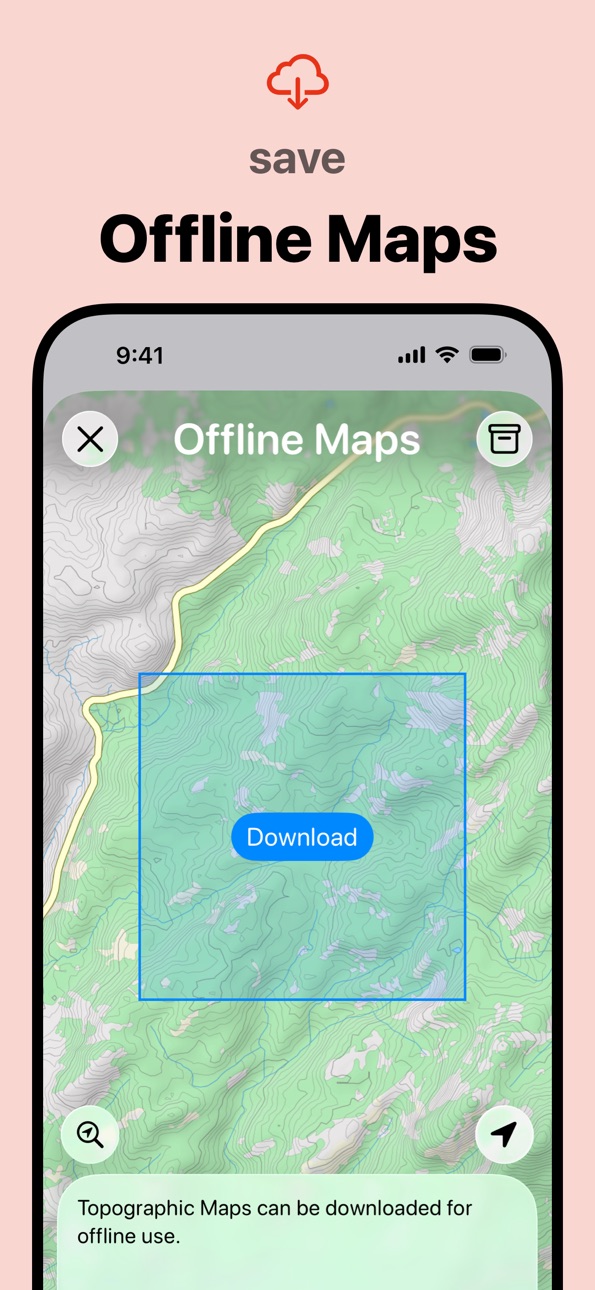
The best part is that custom routing is available on the iPhone and Apple Watch. Of course, being out in nature often means losing cell service, so Pedometer++ allows you to download offline map data for large areas, not just for your specific route. Offline map data is also available on the iPhone and Apple Watch, as long as your Watch is within range of your phone.
NOTES:
Pedometer++ integrates with the Apple Health app to collect and display step data collected by your Apple Watch.
Pedometer++ includes an optional premium subscription. This is offered on a monthly or annual basis. If you choose to purchase a subscription, your payment will be charged to your iTunes account. Subscriptions automatically renew unless canceled within 24 hours before the end of the current period. After purchase, you can turn off auto-renewal anytime by going to your Account Settings on the App Store.
Access to iPhone-based workout tracking is only available to Pedometer++ Premium subscribers.
LEARN MORE:
Privacy Policy: https://pedometer.app/privacy
Terms of Use: https://pedometer.app/terms
In-App Purchases MO pricing
Pedometer++ Premium Subscription
Yearly—
Monthly—
Capabilities
In-App PurchasesSiriiMessage
Accessibility
ipadiphonemacrealityDevicetvoswatch
Version history 25 versions
Build 886111842v8.0.32026-05-28 14:05:05
This update fixes a minor layout issue when Dynamic Text is used.
Build 885079426v8.0.22026-05-18 15:50:34
A new screen in the workout view shows your duration and distance, today's step total (or pushes in Wheelchair Mode), and floors climbed. The background tint reflects your progress toward your daily goal.
Each time you cover a full mile or kilometer during a workout, an overlay pops up showing the distance and split time. You’ll get a tap on your wrist, so you don't have to look at the watch to keep up with your progress.
Build 885037960v8.0.12026-04-29 05:51:58
Pedometer++ 8.0 includes a redesigned Apple Watch app. The bold new look features your key metrics for the day: steps taken, distance traveled, and flights of stairs climbed. The design uses color to reinforce how close you are to your daily step goal.
Scrolling down from the step counter reveals an updated workout picker for starting a new walk, run, or hike.
Premium members can start workouts in Expedition Mode. This new mode can extend your Watch’s battery life by up to 40% during longer hikes, walks, and runs.
A beautiful map with live route information overlaid shows you where you are on your workout. Heart rate and HR zones, speed, and elevation changes are all easier to follow. All of these screens were updated to be more useful when on the move.
Build 884646514v8.02026-04-28 15:46:42
Pedometer++ 8.0 includes a redesigned Apple Watch app. The bold new look features your key metrics for the day: steps taken, distance traveled, and flights of stairs climbed. The design uses color to reinforce how close you are to your daily step goal.
Scrolling down from the step counter reveals an updated workout picker for starting a new walk, run, or hike.
Premium members can start workouts in Expedition Mode. This new mode can extend your Watch’s battery life by up to 40% during longer hikes, walks, and runs.
A beautiful map with live route information overlaid shows you where you are on your workout. Heart rate and HR zones, speed, and elevation changes are. All of these screens were updated to be more useful when on the move.
Build 882794678v7.22026-03-25 14:23:11
You can now build your own Custom Workouts with Pedometer++ by choosing from a range of included segments or ones you create your own. This update also includes enhancements to the weather data shown during a walk, hike, or run. Lastly, you can now earn badges for completed Training Plans!
Build 882204338v7.1.32026-02-06 15:38:55
This update fixes an issue that prevented badges from updating correctly.
Build 881165662v7.1.22026-01-06 13:03:15
This update fixes an issue with the January 2026 Challenge Badge.
Build 880391709v7.12025-12-10 14:58:19
Pedometer++ 7.1 introduces Training Plans, a new way to start and stay moving. Each Plan has a clear and concise goal, such as walking every day for 20 days or preparing for your first 5K. Visit the Workouts tab in the app to choose a plan and start moving!
Build 880524830v7.1.12025-12-10 23:23:19
Pedometer++ 7.1 introduces Training Plans, a new way to start and stay moving. Each Plan has a clear and concise goal, such as walking every day for 20 days or preparing for your first 5K. Visit the Workouts tab in the app to choose a plan and start moving!
Build 878539760v7.0.42025-10-01 13:53:32
Resolves an issue when ending a workout from the Apple Watch.
Pedometer++ 7 is here, with an updated look and feel across the app. Highlights include refreshed maps, an updated workout layout, and a more intuitive design for checking the weather along a route.
Build 878267503v7.0.32025-09-20 07:45:28
Adds support for AirPods Pro 3 Heart Rate monitoring.
Pedometer++ 7 is here, with an updated look and feel across the app. Highlights include refreshed maps, an updated workout layout, and a more intuitive design for checking the weather along a route.
Build 878130150v7.0.12025-09-16 01:59:26
Pedometer++ 7 is here, with an updated look and feel across the app. Highlights include refreshed maps, an updated workout layout, and a more intuitive design for checking the weather along a route.
Build 878169755v7.0.22025-09-16 18:23:22
Fixes a bug where the radar weather map wouldn't load.
Pedometer++ 7 is here, with an updated look and feel across the app. Highlights include refreshed maps, an updated workout layout, and a more intuitive design for checking the weather along a route.
Build 877973081v7.02025-09-15 13:33:17
Pedometer++ 7 is here, with an updated look and feel across the app. Highlights include refreshed maps, an updated workout layout, and a more intuitive design for checking the weather along a route.
Build 876710113v6.2.72025-07-31 13:32:34
This release fixes a couple of minor things, including a typo that was keeping us up at night.
Build 874934536v6.2.62025-05-22 13:44:48
This release contains minor bug fixes.
Build 872860397v6.2.52025-03-04 15:06:12
This version adds support for Powerbeats Pro 2 heart rate data collection to iPhone-based Pedometer++ workouts. Simply wear both earbuds with the "Heart Rate Sensor" option enabled, and your data will appear during your workout.
Build 872511190v6.2.42025-02-15 19:50:26
This version includes minor bug fixes.
Build 872266349v6.2.32025-02-06 18:22:59
This version includes minor bug fixes.
Build 871528711v6.2.22025-01-04 14:53:04
Fix a bug where the January 2025 Badge showed the wrong number of days required.
Build 870955754v6.22024-12-16 15:03:39
This version of Pedometer++ introduces Trends, a new way to view your steps over time. You can see summaries of your activity over weeks, months, and years. Each summary includes step counts, total distances and floors, how many days you surpassed your goal, and more.
Each summary can be exported as an image for posting on social media, sending to family, or sharing with your most competitive friends.
Previously, Pedometer++ would import the last seven days of your step data when the app was first installed. This version also adds the ability to import historical data from Apple Health. To import your complete history, visit the Import from Health section in the app’s Settings.
Build 871183066v6.2.12024-12-16 23:23:09
This version of Pedometer++ introduces Trends, a new way to view your steps over time. You can see summaries of your activity over weeks, months, and years. Each summary includes step counts, total distances and floors, how many days you surpassed your goal, and more.
Each summary can be exported as an image for posting on social media, sending to family, or sharing with your most competitive friends.
Previously, Pedometer++ would import the last seven days of your step data when the app was first installed. This version also adds the ability to import historical data from Apple Health. To import your complete history, visit the Import from Health section in the app’s Settings.
(This update includes fixes for a few rendering issues found in version 6.2)
Build 869982482v6.12024-10-30 07:36:13
You can now easily share details of your daily step count or walks and runs with beautifully designed sharing cards.
Build 869835666v6.0.32024-10-22 07:41:10
This update is just small improvements to the first run experience of starting off with Pedometer++.
Build 869239323v6.0.22024-10-19 08:57:35
Improvements to the onboarding experience.
Price history by region
Currency
Show
Columns
Search
Availability 167 of 167 storefronts
| Region | Language | Price | Ratings | Avg | Version |
|---|---|---|---|---|---|
| US | en-US | Free | 177.8k | 4.8 | 8.0.3 |
| RU | ru | Free | 49.2k | 4.9 | 8.0.3 |
| DE | de-DE | Free | 42.2k | 4.6 | 8.0.3 |
| GB | en-GB | Free | 36.3k | 4.8 | 8.0.3 |
| CA | en-CA | Free | 21.1k | 4.7 | 8.0.3 |
| IN | en-GB | Free | 15.6k | 4.8 | 8.0.3 |
| IT | it | Free | 14.7k | 4.7 | 8.0.3 |
| AU | en-AU | Free | 13.9k | 4.7 | 8.0.3 |
| FR | fr-FR | Free | 11.9k | 4.6 | 8.0.3 |
| CH | de-CH | Free | 11.1k | 4.6 | 8.0.3 |
| ES | es-ES | Free | 8.6k | 4.6 | 8.0.3 |
| CN | zh-Hans-CN | Free | 8.3k | 4.8 | 8.0.3 |
| UA | en-GB | Free | 6.0k | 4.9 | 8.0.3 |
| SA | en-GB | Free | 5.3k | 4.7 | 8.0.3 |
| AT | de-DE | Free | 5.0k | 4.7 | 8.0.3 |
| NL | nl | Free | 4.1k | 4.6 | 8.0.3 |
| BE | en-GB | Free | 3.9k | 4.6 | 8.0.3 |
| MX | es-MX | Free | 3.9k | 4.8 | 8.0.3 |
| KZ | en-GB | Free | 3.4k | 4.9 | 8.0.3 |
| TR | en-GB | Free | 3.4k | 4.8 | 8.0.3 |
| SE | sv | Free | 2.8k | 4.6 | 8.0.3 |
| TH | en-GB | Free | 2.7k | 4.8 | 8.0.3 |
| AE | en-GB | Free | 2.6k | 4.8 | 8.0.3 |
| IE | en-GB | Free | 2.5k | 4.7 | 8.0.3 |
| JP | ja | Free | 2.4k | 4.4 | 8.0.3 |
| BR | pt-BR | Free | 2.3k | 4.9 | 8.0.3 |
| KR | ko | Free | 2.3k | 4.8 | 8.0.3 |
| RO | en-GB | Free | 2.1k | 4.8 | 8.0.3 |
| PL | en-GB | Free | 1.9k | 4.8 | 8.0.3 |
| DK | en-GB | Free | 1.9k | 4.6 | 8.0.3 |
| PH | en-GB | Free | 1.7k | 4.8 | 8.0.3 |
| PT | pt-PT | Free | 1.7k | 4.7 | 8.0.3 |
| TW | zh-Hant-TW | Free | 1.7k | 4.8 | 8.0.3 |
| NZ | en-AU | Free | 1.7k | 4.7 | 8.0.3 |
| VN | en-GB | Free | 1.6k | 4.7 | 8.0.3 |
| IL | en-GB | Free | 1.4k | 4.6 | 8.0.3 |
| AR | es-MX | Free | 1.4k | 4.8 | 8.0.3 |
| ZA | en-GB | Free | 1.3k | 4.8 | 8.0.3 |
| HK | zh-Hant-HK | Free | 1.2k | 4.7 | 8.0.3 |
| MY | en-GB | Free | 1.2k | 4.8 | 8.0.3 |
| CL | es-MX | Free | 1.2k | 4.9 | 8.0.3 |
| KW | en-GB | Free | 1.1k | 4.8 | 8.0.3 |
| PK | en-GB | Free | 1.1k | 4.8 | 8.0.3 |
| CZ | en-GB | Free | 1.1k | 4.8 | 8.0.3 |
| SG | en-GB | Free | 1.1k | 4.7 | 8.0.3 |
| NO | en-GB | Free | 996 | 4.7 | 8.0.3 |
| ID | en-GB | Free | 965 | 4.9 | 8.0.3 |
| HR | en-GB | Free | 886 | 4.8 | 8.0.3 |
| GR | en-GB | Free | 883 | 4.8 | 8.0.3 |
| BG | en-GB | Free | 869 | 4.8 | 8.0.3 |
| LU | en-GB | Free | 868 | 4.6 | 8.0.3 |
| CO | es-MX | Free | 850 | 4.9 | 8.0.3 |
| BY | en-GB | Free | 762 | 4.9 | 8.0.3 |
| HU | en-GB | Free | 715 | 4.8 | 8.0.3 |
| AZ | en-GB | Free | 649 | 4.9 | 8.0.3 |
| SK | en-GB | Free | 597 | 4.7 | 8.0.3 |
| EG | en-GB | Free | 590 | 4.8 | 8.0.3 |
| LT | en-GB | Free | 582 | 4.8 | 8.0.3 |
| AL | en-GB | Free | 535 | 4.8 | 8.0.3 |
| QA | en-GB | Free | 525 | 4.8 | 8.0.3 |
| NG | en-GB | Free | 522 | 4.7 | 8.0.3 |
| KE | en-GB | Free | 517 | 4.8 | 8.0.3 |
| LV | en-GB | Free | 507 | 4.9 | 8.0.3 |
| FI | en-GB | Free | 499 | 4.6 | 8.0.3 |
| GT | es-MX | Free | 441 | 4.9 | 8.0.3 |
| RS | en-GB | Free | 424 | 4.9 | 8.0.3 |
| EE | en-GB | Free | 416 | 4.8 | 8.0.3 |
| SI | en-GB | Free | 407 | 4.8 | 8.0.3 |
| PE | es-MX | Free | 335 | 4.8 | 8.0.3 |
| AM | en-GB | Free | 330 | 4.9 | 8.0.3 |
| CR | es-MX | Free | 315 | 4.9 | 8.0.3 |
| OM | en-GB | Free | 313 | 4.7 | 8.0.3 |
| NP | en-GB | Free | 309 | 4.6 | 8.0.3 |
| MD | en-GB | Free | 290 | 4.9 | 8.0.3 |
| KH | en-GB | Free | 289 | 4.7 | 8.0.3 |
| MA | en-GB | Free | 280 | 4.7 | 8.0.3 |
| JO | en-GB | Free | 269 | 4.8 | 8.0.3 |
| DZ | en-GB | Free | 266 | 4.6 | 8.0.3 |
| MN | en-GB | Free | 238 | 4.7 | 8.0.3 |
| GE | en-GB | Free | 235 | 4.9 | 8.0.3 |
| LK | en-GB | Free | 231 | 4.7 | 8.0.3 |
| LB | en-GB | Free | 230 | 4.7 | 8.0.3 |
| GH | en-GB | Free | 226 | 4.7 | 8.0.3 |
| BH | en-GB | Free | 223 | 4.7 | 8.0.3 |
| EC | es-MX | Free | 217 | 4.8 | 8.0.3 |
| MK | en-GB | Free | 208 | 4.9 | 8.0.3 |
| DO | es-MX | Free | 202 | 4.7 | 8.0.3 |
| SN | en-GB | Free | 168 | 4.5 | 8.0.3 |
| UY | en-GB | Free | 163 | 4.8 | 8.0.3 |
| CY | en-GB | Free | 140 | 4.8 | 8.0.3 |
| TZ | en-GB | Free | 140 | 4.9 | 8.0.3 |
| BA | en-GB | Free | 127 | 4.8 | 8.0.3 |
| MT | en-GB | Free | 118 | 4.9 | 8.0.3 |
| PA | es-MX | Free | 113 | 4.9 | 8.0.3 |
| SV | es-MX | Free | 112 | 4.9 | 8.0.3 |
| IQ | en-GB | Free | 110 | 4.7 | 8.0.3 |
| IS | en-GB | Free | 110 | 4.7 | 8.0.3 |
| HN | es-MX | Free | 109 | 4.8 | 8.0.3 |
| UG | en-GB | Free | 108 | 4.8 | 8.0.3 |
| TN | en-GB | Free | 103 | 4.6 | 8.0.3 |
| MO | zh-Hant-HK | Free | 98 | 4.6 | 8.0.3 |
| VE | es-MX | Free | 95 | 4.8 | 8.0.3 |
| XK | en-GB | Free | 95 | 4.9 | 8.0.3 |
| ZW | en-GB | Free | 78 | 4.7 | 8.0.3 |
| BO | es-MX | Free | 66 | 4.8 | 8.0.3 |
| ME | en-GB | Free | 65 | 4.8 | 8.0.3 |
| TT | en-GB | Free | 60 | 4.8 | 8.0.3 |
| CI | fr-FR | Free | 56 | 4.7 | 8.0.3 |
| PY | es-MX | Free | 54 | 4.9 | 8.0.3 |
| NI | es-MX | Free | 52 | 4.8 | 8.0.3 |
| AO | en-GB | Free | 51 | 4.7 | 8.0.3 |
| ML | en-GB | Free | 49 | 4.4 | 8.0.3 |
| MU | en-GB | Free | 47 | 4.9 | 8.0.3 |
| MZ | en-GB | Free | 46 | 4.8 | 8.0.3 |
| BJ | en-GB | Free | 43 | 4.7 | 8.0.3 |
| BW | en-GB | Free | 42 | 4.8 | 8.0.3 |
| BF | en-GB | Free | 40 | 4.3 | 8.0.3 |
| MR | en-GB | Free | 38 | 4.5 | 8.0.3 |
| CG | en-GB | Free | 33 | 4.6 | 8.0.3 |
| JM | en-GB | Free | 32 | 4.9 | 8.0.3 |
| AF | en-GB | Free | 30 | 4.7 | 8.0.3 |
| ZM | en-GB | Free | 30 | 4.7 | 8.0.3 |
| MG | en-GB | Free | 28 | 4.6 | 8.0.3 |
| LY | en-GB | Free | 26 | 4.7 | 8.0.3 |
| NA | en-GB | Free | 26 | 4.7 | 8.0.3 |
| BT | en-GB | Free | 25 | 4.5 | 8.0.3 |
| RW | en-GB | Free | 25 | 4.6 | 8.0.3 |
| PW | en-GB | Free | 24 | 4.7 | 8.0.3 |
| CD | en-GB | Free | 22 | 4.3 | 8.0.3 |
| BS | en-GB | Free | 21 | 4.6 | 8.0.3 |
| LA | en-GB | Free | 21 | 4.7 | 8.0.3 |
| CM | fr-FR | Free | 20 | 4.4 | 8.0.3 |
| MW | en-GB | Free | 20 | 4.6 | 8.0.3 |
| MV | en-GB | Free | 19 | 4.7 | 8.0.3 |
| MM | en-GB | Free | 17 | 4.8 | 8.0.3 |
| BB | en-GB | Free | 14 | 4.8 | 8.0.3 |
| YE | en-GB | Free | 14 | 3.9 | 8.0.3 |
| SL | en-GB | Free | 12 | 4.4 | 8.0.3 |
| TD | en-GB | Free | 12 | 4.5 | 8.0.3 |
| BM | en-GB | Free | 9 | 4.4 | 8.0.3 |
| KY | en-GB | Free | 9 | 5.0 | 8.0.3 |
| LC | en-GB | Free | 9 | 3.9 | 8.0.3 |
| NE | en-GB | Free | 9 | 4.6 | 8.0.3 |
| BZ | en-GB | Free | 8 | 4.9 | 8.0.3 |
| GM | en-GB | Free | 8 | 4.8 | 8.0.3 |
| SZ | en-GB | Free | 8 | 4.9 | 8.0.3 |
| AG | en-GB | Free | 7 | 4.7 | 8.0.3 |
| GY | en-GB | Free | 6 | 4.7 | 8.0.3 |
| GA | fr-FR | Free | 5 | 5.0 | 8.0.3 |
| GD | en-GB | Free | 5 | 4.8 | 8.0.3 |
| SR | en-GB | Free | 5 | 4.2 | 8.0.3 |
| VG | en-GB | Free | 5 | 4.8 | 8.0.3 |
| CV | en-GB | Free | 4 | 4.8 | 8.0.3 |
| KN | en-GB | Free | 4 | 5.0 | 8.0.3 |
| TC | en-GB | Free | 4 | 5.0 | 8.0.3 |
| VC | en-GB | Free | 4 | 5.0 | 8.0.3 |
| AI | en-GB | Free | 3 | 5.0 | 8.0.3 |
| GW | en-GB | Free | 3 | 3.7 | 8.0.3 |
| DM | en-GB | Free | 2 | 5.0 | 8.0.3 |
| FM | en-GB | Free | 1 | 4.0 | 8.0.3 |
| LR | en-GB | Free | 1 | 4.0 | 8.0.3 |
| MS | en-GB | Free | 1 | 3.0 | 8.0.3 |
| SC | en-GB | Free | 1 | 5.0 | 8.0.3 |
| ST | en-GB | Free | 1 | 5.0 | 8.0.3 |
| VU | en-GB | Free | 1 | 1.0 | 8.0.3 |
| NR | en-GB | Free | 0 | — | 8.0.3 |
| TO | en-GB | Free | 0 | — | 8.0.3 |
Change log 29 changes · MO
✎
releaseNotes updated
This update fixes a minor layout issue when Dynamic Text is used.
✎
description updated
Available on the iPhone and Apple Watch, Pedometer++ is the best way to review your step count, walking distance, active calories, and heart rate data.
Set a
✎
subtitle updated
Count Steps, Track Walks/Runs
✎
name updated
Pedometer++
◆
Version 8.0.3 released
This update fixes a minor layout issue when Dynamic Text is used.
◆
Version 8.0.2 released
A new screen in the workout view shows your duration and distance, today's step total (or pushes in Wheelchair Mode), and floors climbed. The background tint reflects your progress toward your daily goal.
Each time you cover a full mile or
◆
Version 8.0.1 released
Pedometer++ 8.0 includes a redesigned Apple Watch app. The bold new look features your key metrics for the day: steps taken, distance traveled, and flights of stairs climbed. The design uses color to reinforce how close you are to your dail
◆
Version 8.0 released
Pedometer++ 8.0 includes a redesigned Apple Watch app. The bold new look features your key metrics for the day: steps taken, distance traveled, and flights of stairs climbed. The design uses color to reinforce how close you are to your dail
◆
Version 7.2 released
You can now build your own Custom Workouts with Pedometer++ by choosing from a range of included segments or ones you create your own. This update also includes enhancements to the weather data shown during a walk, hike, or run. Lastly, you
◆
Version 7.1.3 released
This update fixes an issue that prevented badges from updating correctly.
◆
Version 7.1.2 released
This update fixes an issue with the January 2026 Challenge Badge.
◆
Version 7.1.1 released
Pedometer++ 7.1 introduces Training Plans, a new way to start and stay moving. Each Plan has a clear and concise goal, such as walking every day for 20 days or preparing for your first 5K. Visit the Workouts tab in the app to choose a plan
◆
Version 7.1 released
Pedometer++ 7.1 introduces Training Plans, a new way to start and stay moving. Each Plan has a clear and concise goal, such as walking every day for 20 days or preparing for your first 5K. Visit the Workouts tab in the app to choose a plan
◆
Version 7.0.4 released
Resolves an issue when ending a workout from the Apple Watch.
Pedometer++ 7 is here, with an updated look and feel across the app. Highlights include refreshed maps, an updated workout layout, and a more intuitive design for checking the w
◆
Version 7.0.3 released
Adds support for AirPods Pro 3 Heart Rate monitoring.
Pedometer++ 7 is here, with an updated look and feel across the app. Highlights include refreshed maps, an updated workout layout, and a more intuitive design for checking the weather a
◆
Version 7.0.2 released
Fixes a bug where the radar weather map wouldn't load.
Pedometer++ 7 is here, with an updated look and feel across the app. Highlights include refreshed maps, an updated workout layout, and a more intuitive design for checking the weather
◆
Version 7.0.1 released
Pedometer++ 7 is here, with an updated look and feel across the app. Highlights include refreshed maps, an updated workout layout, and a more intuitive design for checking the weather along a route.
◆
Version 7.0 released
Pedometer++ 7 is here, with an updated look and feel across the app. Highlights include refreshed maps, an updated workout layout, and a more intuitive design for checking the weather along a route.
◆
Version 6.2.7 released
This release fixes a couple of minor things, including a typo that was keeping us up at night.
◆
Version 6.2.6 released
This release contains minor bug fixes.
◆
Version 6.2.5 released
This version adds support for Powerbeats Pro 2 heart rate data collection to iPhone-based Pedometer++ workouts. Simply wear both earbuds with the "Heart Rate Sensor" option enabled, and your data will appear during your workout.
◆
Version 6.2.4 released
This version includes minor bug fixes.
◆
Version 6.2.3 released
This version includes minor bug fixes.
◆
Version 6.2.2 released
Fix a bug where the January 2025 Badge showed the wrong number of days required.
◆
Version 6.2.1 released
This version of Pedometer++ introduces Trends, a new way to view your steps over time. You can see summaries of your activity over weeks, months, and years. Each summary includes step counts, total distances and floors, how many days you s
◆
Version 6.2 released
This version of Pedometer++ introduces Trends, a new way to view your steps over time. You can see summaries of your activity over weeks, months, and years. Each summary includes step counts, total distances and floors, how many days you su
◆
Version 6.1 released
You can now easily share details of your daily step count or walks and runs with beautifully designed sharing cards.
◆
Version 6.0.3 released
This update is just small improvements to the first run experience of starting off with Pedometer++.
◆
Version 6.0.2 released
Improvements to the onboarding experience.