Home › Productivity

 US
US
1 of 1 storefronts
Content in en-US
Content in en-US
Information
Preview 1 platform
iPhone 5 images



What’s New Version 2.0.1
Enhancements/Miscellaneous
• Better support for user-specified font sizes.
• Now presents requests to rate the application.
Bug Fixes
• Fixed a problem whereby, immediately after app startup, a local sharespace may appear out of storage space for a short while.
• Fixed a bug whereby the External File Receiver (invoked when another app chooses “Open in InterConneX”) might not show the correct connection status.
• Fixed a bug in all the cloud-based file managers whereby a symbolic link could have it’s file type property changed to a ‘regular’ file when applying attributes.
• Fixed a bug in the SFTP storage provider whereby obtaining a list of valid authentication methods would fail for some servers.
• Added logic to prevent an application crash in rare instances whereby a drag preview could not be created when initiating a drag & drop operation.
• Added logic to prevent a rare crash that could occur when disconnecting from sharespaces that never fully connected in the first place.
• Fixed a crash that could occur in the Document Picker Extension if the user suspended the app that was using the extension while navigating a sharespace.
• Added logic to deal with iOS 13 bugs when transferring documents to other applications.
• Fixed a bug whereby a single file Backblaze B2 transfer that took more than 24 hours to complete would timeout.
Description
InterConneX is a file management and sharing application that allows you to store files on your iPhone and exchange them with other apps, iPhones, iPads, computers (using ChronoAgent or SFTP) and even cloud storage services.
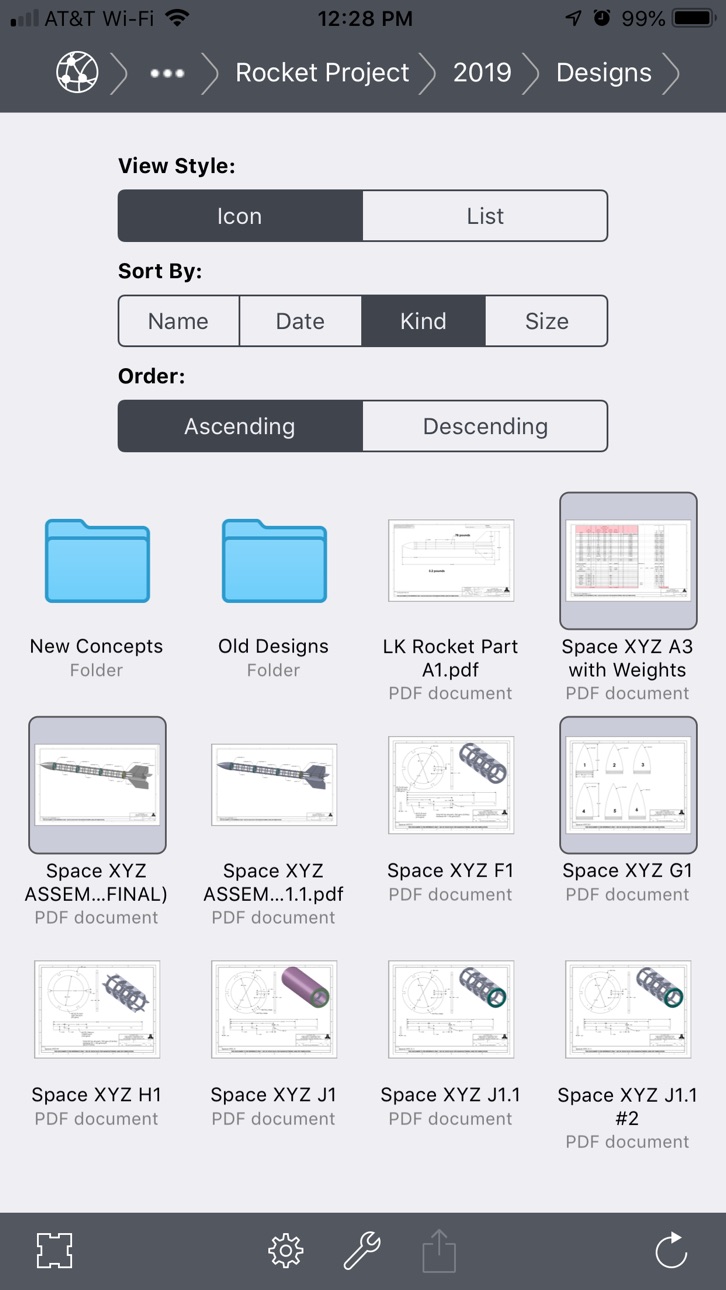
You begin by creating one or more Sharespaces on your device. These are "virtual hard drives" in which you can place as many document files as will fit. You can manage these files just like you would on a desktop computer - copy, move, delete, rename and organize them into a folder hierarchy. Sharespaces can remain private, where only you have access to their contents, or you can make them public, where other users with InterConneX can access them to exchange files back and forth. Document exchange works over WiFi networks or, optionally, Bluetooth for direct device-to-device transfers.
Basic File Management Capabilities:
- Copy
- Duplicate
- Move
- Rename
- Delete
- Folder Creation
- Group Creation
- Blank Document Creation (from Templates)
Additional Built-In Capabilities
- ZIP archive.
- ZIP extraction.
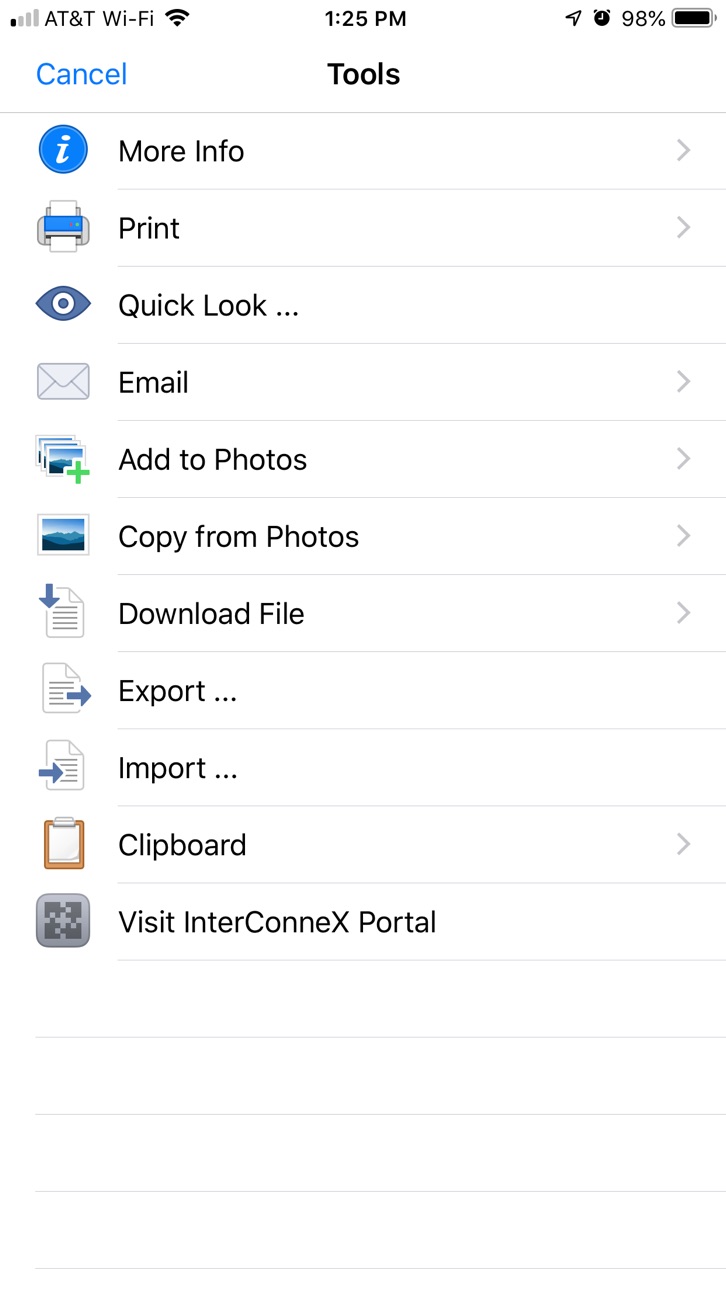
- Document preview via QuickLook.
- Direct printing.
- Email w/attachments (both ZIP'ed and standard).
- Direct download via URL.
Document Exchange Features
- Edit documents in place using other applications.
- Transfer documents to other applications.
- Receive documents from other applications.
- Copy contents of files to the system pasteboard.
- Paste contents of the system pasteboard as files.
- Export media files to your Photos library.
- Import media files from your Photos library.
Connectivity
- Access sharespaces on other iPhones & iPads running InterConneX (via WiFi or Bluetooth).
- Access macOS computers which have ChronoAgent installed (via WiFi/Internet).
- Access macOS, Windows or Linux computers via SFTP (via WiFi/Internet).
- Access the Amazon S3, Backblaze B2 and Google Cloud Storage services (via WiFi/Internet).
- Most file management and document exchange features work with remote connections.
Synchronization
- Compatible with ChronoSync 4.4 (or later) for automated synchronization between sharespaces and macOS computers.
InterConneX is ready to go "out-of-the-box" with two sharespaces automatically created for you - one for local, private files and another for public file sharing. Additional sharespaces, both local and remote, can be created as needed.
Note: Creating more than three sharespaces requires an in-app purchase of the InterConneX Sharespace Extension.
Six tutorial-style documents are included and these will introduce you to the basic concepts and advanced capabilities that InterConneX has to offer. An InterConneX portal web page offers additional resources along with news and information. Lastly, our expert support team lays ready and waiting to assist you with any issues you may have as well as to help you get the most out of InterConneX - either by itself or in conjunction with ChronoAgent and ChronoSync.
Capabilities
In-App Purchases
Accessibility
ipadiphonemacrealityDevicetvoswatch
Version history 8 versions
Build 832455963v2.0.12020-01-27 01:13:40
Enhancements/Miscellaneous
• Better support for user-specified font sizes.
• Now presents requests to rate the application.
Bug Fixes
• Fixed a problem whereby, immediately after app startup, a local sharespace may appear out of storage space for a short while.
• Fixed a bug whereby the External File Receiver (invoked when another app chooses “Open in InterConneX”) might not show the correct connection status.
• Fixed a bug in all the cloud-based file managers whereby a symbolic link could have it’s file type property changed to a ‘regular’ file when applying attributes.
• Fixed a bug in the SFTP storage provider whereby obtaining a list of valid authentication methods would fail for some servers.
• Added logic to prevent an application crash in rare instances whereby a drag preview could not be created when initiating a drag & drop operation.
• Added logic to prevent a rare crash that could occur when disconnecting from sharespaces that never fully connected in the first place.
• Fixed a crash that could occur in the Document Picker Extension if the user suspended the app that was using the extension while navigating a sharespace.
• Added logic to deal with iOS 13 bugs when transferring documents to other applications.
• Fixed a bug whereby a single file Backblaze B2 transfer that took more than 24 hours to complete would timeout.
Build 830841560v2.0.02019-08-08 11:09:33
• Added Amazon S3, Backblaze B2, Google Cloud Storage and SFTP sharespace types.
• Implemented drag & drop to move and copy items within and between sharespaces.
• User configurable document templates via the "New Document" command.
• Added the "Recents" menu and navigation options to the Document Provider extension.
• Icon and List view display larger thumbnails and more details per item.
• Command shortcuts when using an external keyboard.
• New icons for folders and various document types.
• Improved performance.
• Supports all the latest iPhone hardware configurations.
Build 816401276v1.2.12016-03-07 01:23:43
• Compatibility with the latest versions of ChronoSync (4.6.6) and ChronoAgent (1.6.0)
• Minor bug fixes.
Build 813128367v1.2.02015-09-24 22:01:20
• Now a 64-bit app that's compatible with iOS 9.
• Adaptive user interface that sizes itself according to device screen size. Allows it to take advantage of extra screen real-estate on iPhone 6 and iPhone 6 Plus.
• New “Options Drawer” for changing sort options in the sharespace file browser.
• Touch ID is now supported for authenticated access to a sharespace.
• New “Import” tool invokes a Document Picker that allows you to import files directly from other apps that implement Document Provider extensions, including iCloud Drive.
• New “Export” tool invokes a Document Picker that allows you to export files directly to other apps that implement Document Provider extensions, including iCloud Drive.
• Implements a Document Provider extension so that other apps that support Document Pickers can open and manipulate files directly within a sharespace. Any sharespace can be optionally shared with other apps - even ChronoAgent and remote ICX sharespaces!
• Numerous networking bug fixes including better IPv6 compatibility.
• Numerous user interface tweaks, enhancements and bug fixes.
Build 709934171v1.1.12014-09-18 22:13:48
Compatibility fixes for iOS 8
Build 338222643v1.12014-03-27 18:12:47
• iOS 7 savvy user interface.
• Ad hoc sharespace discovery over the local network.
• Optional passcode protection on a per-sharespace basis.
• New folder creation while browsing for Move or Copy destination.
• Folder navigation while receiving documents from other apps.
• Optional disabling of iTunes/iCloud backups per sharespace.
• Bug fixes.
Build 36772678v1.0.12013-09-22 17:22:51
- Fixed cosmetic issues when running under iOS 7.
- Minor bug fixes.
Build 16337637v1.0.02013-09-10 17:45:03
No pricing data captured yet — comparisons appear once the app has paid storefronts or in-app purchases.
Availability 1 of 1 storefronts
| Region | Language | Price | Ratings | Avg | Version |
|---|---|---|---|---|---|
| US | en-US | Free | 10 | 4.5 | 2.0.1 |
Change log 12 changes · US
✎
releaseNotes updated
Enhancements/Miscellaneous
• Better support for user-specified font sizes.
• Now presents requests to rate the application.
Bug Fixes
• Fixed a problem wher
✎
description updated
InterConneX is a file management and sharing application that allows you to store files on your iPhone and exchange them with other apps, iPhones, iPads, comput
✎
subtitle updated
Store, Manage and Share Files
✎
name updated
InterConneX for iPhone
◆
Version 2.0.1 released
Enhancements/Miscellaneous
• Better support for user-specified font sizes.
• Now presents requests to rate the application.
Bug Fixes
• Fixed a problem whereby, immediately after app startup, a local sharespace may appear out of storage
◆
Version 2.0.0 released
• Added Amazon S3, Backblaze B2, Google Cloud Storage and SFTP sharespace types.
• Implemented drag & drop to move and copy items within and between sharespaces.
• User configurable document templates via the "New Document" command.
• Added
◆
Version 1.2.1 released
• Compatibility with the latest versions of ChronoSync (4.6.6) and ChronoAgent (1.6.0)
• Minor bug fixes.
◆
Version 1.2.0 released
• Now a 64-bit app that's compatible with iOS 9.
• Adaptive user interface that sizes itself according to device screen size. Allows it to take advantage of extra screen real-estate on iPhone 6 and iPhone 6 Plus.
• New “Options Drawer” fo
◆
Version 1.1.1 released
Compatibility fixes for iOS 8
◆
Version 1.1 released
• iOS 7 savvy user interface.
• Ad hoc sharespace discovery over the local network.
• Optional passcode protection on a per-sharespace basis.
• New folder creation while browsing for Move or Copy destination.
• Folder navigation while r
◆
Version 1.0.1 released
- Fixed cosmetic issues when running under iOS 7.
- Minor bug fixes.
◆
Version 1.0.0 released