Home › Utilities

 BF
BF
 USen-US
 AGen-GB
 AIen-GB
 AOen-GB
 ARes-MX
 ATde-DE
 AUen-AU
 BAen-GB
 BBen-GB
 BEen-GBBFen-GB
 BGen-GB
 BJen-GB
 BOes-MX
 BRpt-BR
 BSen-GB
 BWen-GB
 BYen-GB
 BZen-GB
 CAen-CA
 CDen-GB
 CGen-GB
 CHde-CH
 CIfr-FR
 CLes-MX
 CMfr-FR
 COes-MX
 CRes-MX
 CVen-GB
 CZen-GB
 DEde-DE
 DKen-GB
 DMen-GB
 DOes-MX
 DZen-GB
 ECes-MX
 ESes-ES
 FIen-GB
 FRfr-FR
 GAfr-FR
 GBen-GB
 GDen-GB
 GHen-GB
 GMen-GB
 GTes-MX
 GWen-GB
 GYen-GB
 HNes-MX
 HRen-GB
 HUen-GB
 IEen-GB
 ISen-GB
 ITit
ITit JMen-GB
 KEen-GB
 KNen-GB
 KYen-GB
 LCen-GB
 LRen-GB
 LTen-GB
 LUen-GB
 LYen-GB
 MAen-GB
 MGen-GB
 MKen-GB
 MLen-GB
 MSen-GB
 MUen-GB
 MWen-GB
 MXes-MX
 MZen-GB
 NAen-GB
 NEen-GB
 NGen-GB
 NIes-MX
 NLnl
NLnl NOen-GB
 NZen-AU
 PAes-MX
 PEes-MX
 PLen-GB
 PTpt-PT
 PYes-MX
 ROen-GB
 RSen-GB
 RUru
RUru RWen-GB
 SCen-GB
 SEsv
SEsv SKen-GB
 SLen-GB
 SNen-GB
 SRen-GB
 STen-GB
 SVes-MX
 SZen-GB
 TCen-GB
 TDen-GB
 TNen-GB
 TTen-GB
 TZen-GB
 UAen-GB
 UGen-GB
 UYen-GB
 VCen-GB
 VEes-MX
 VGen-GB
 ZMen-GB
 ZWen-GB
109 of 109 storefronts
Content in en-US
Content in en-US
Information
Preview 1 platform
iPhone 5 images



What’s New Version 1.6
This update brings two features that make your cockpit feel even more real.
Reactive Windshear Warning
Hear the classic "Windshear, windshear, windshear" callout on takeoff and approach — modeled on the real Airbus A320 reactive windshear system. When a rapid loss of headwind is detected between 50–1300 ft, you'll get the spoken alert, a red WINDSHEAR banner, and a warning haptic. Turn it on under Settings → Safety & feedback. (Infinite Flight)
New TO/GA Button
Set takeoff or go-around thrust in a single gesture. Double-tap the TO/GA button beside the yoke and your engines spool smoothly up to takeoff thrust — perfect for departures and go-arounds. Choose your own custom thrust or use the standard 95%, and single-tap to view live V1 / VR / V2 speeds for your aircraft. (Infinite Flight)
Plus minor improvements and bug fixes.
Thanks for flying with SkyYoke! We'd love your feedback and ideas for what to add next.
Description
Your iPhone is the flight controls.
SkyYoke turns the phone in your hand into a precision yoke, throttle, rudder and full glass cockpit for the Infinite Flight simulator. Run it on your iPad or a second phone, share Wi-Fi, and fly in real time — no cables, no hardware.
TILT TO FLY
Bank and pitch by tilting your iPhone. The Motion Yoke reads gravity relative to a center you set, so any grip works. Prefer touch? Switch to an on-screen self-centering yoke pad. Tune sensitivity, dead-zone, expo and smoothing per axis.
ONE SMART THROTTLE
A single lever does it all: forward thrust, ground reverse, and proportional wheel braking below 40 knots — with airborne-reverse protection. Airbus pilots get a detented thrust gate (TOGA · FLX/MCT · CLIMB · IDLE · REV) with a haptic tick at every notch.
A FULL COCKPIT, IN YOUR POCKET
• Self-centering rudder bar
• Complete autopilot — ALT, V/S, SPD, HDG with swipe-to-scrub, plus VNAV, LNAV, APPR
• Overhead systems — battery, APU, external power, lights, engines, signs, autobrake
• Numbered ATC keypad with a live message log
• Swipe to pan the camera, double-tap to recenter, hold for cockpit view
SPEAK LIKE A PILOT — 100% ON DEVICE
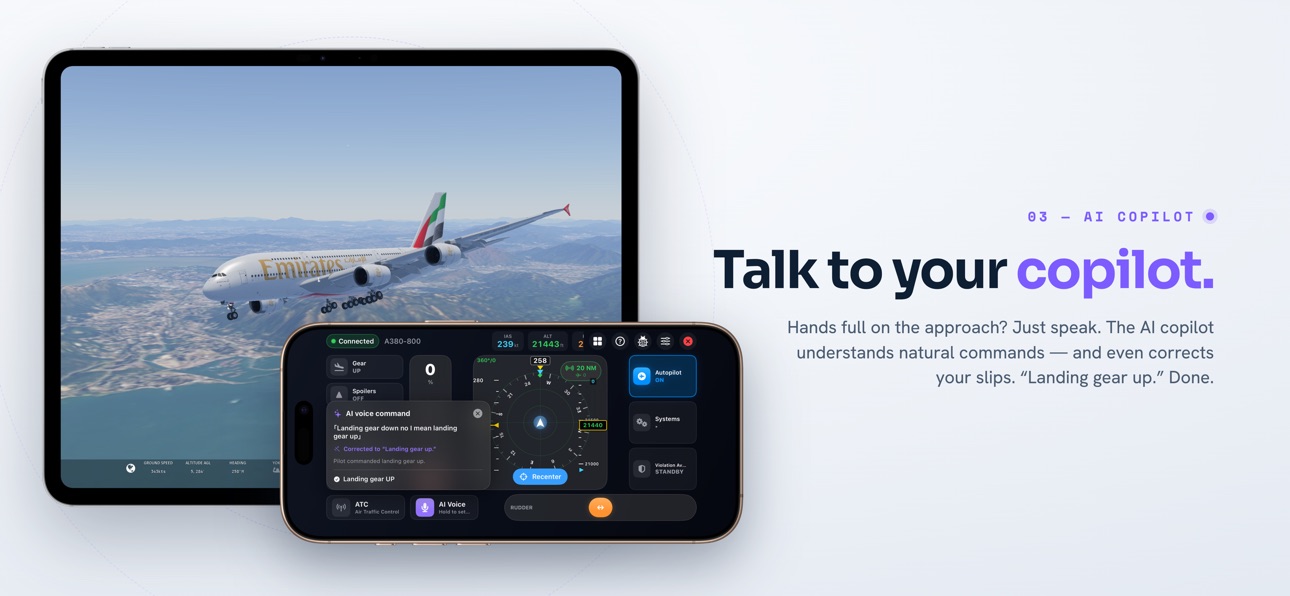
Hold the mic and say "climb and maintain one zero thousand." The AI Voice Copilot, powered by Apple Intelligence, understands your speech and flies the command — altitude, heading, speed, lights, gear, flaps and more. Audio never leaves the device. (Requires an Apple-Intelligence-capable iPhone on iOS 26.)
INSTRUMENTS THAT READ LIKE THE REAL THING
• Airbus-style PFD speed and altitude tapes with trend arrow and selected-value bugs
• Glass-cockpit HUD — airspeed, altitude, heading, vertical speed
• Airbus-ND traffic radar with genuine TCAS II logic and spoken "Traffic, traffic" callouts
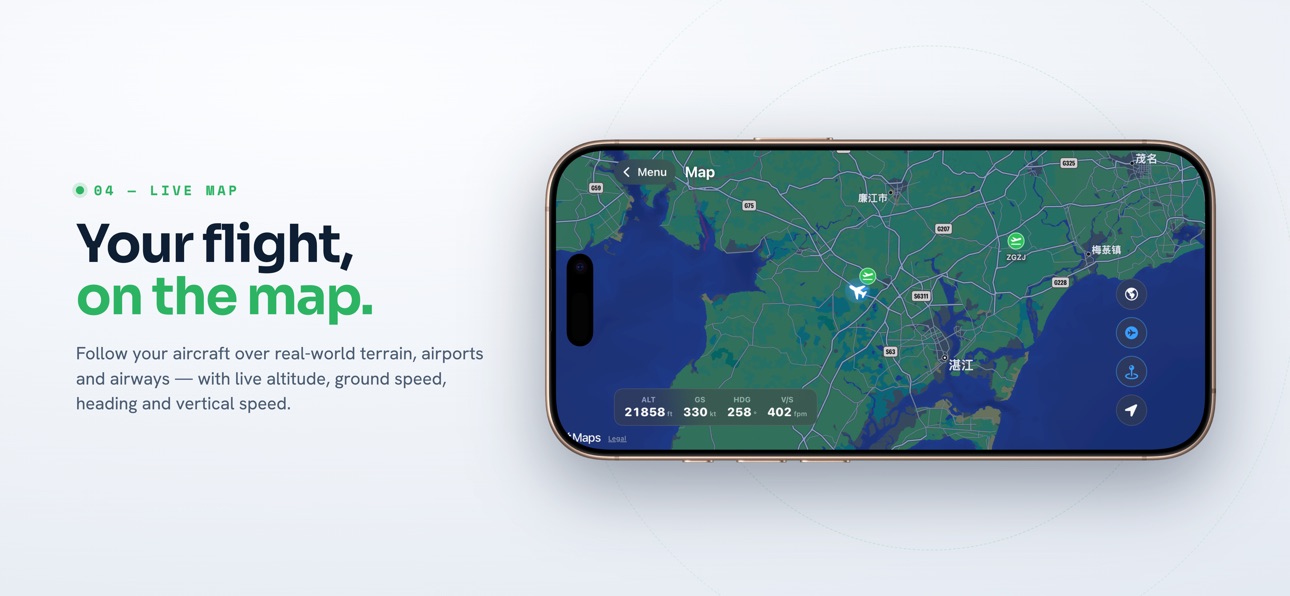
• Live moving map with your track, traffic and airports
FEEL EVERY FOOT
Spoken "V1 · Rotate · V2" callouts. A ground rumble that builds from taxi patter to a hard takeoff roll. A heavy thunk as the gear locks. A reactive windshear warning. It doesn't just look like flying — it feels like it.
PLAN THE FLIGHT
A performance & weight-and-balance planner reads your live aircraft, in-sim weather and runway, and estimates V-speeds from 17 aircraft profiles.
FREE TO TRY
• Motion yoke, throttle and rudder
• Full cockpit controls: gear, flaps, spoilers, autopilot, parking brake, pushback
• Connect over Wi-Fi to a sim on another device
• Fly on the ground and on takeoff (climb limited to 500 ft, thrust to 85%)
GO PRO — FLY WITH NO LIMITS
• Unlimited altitude & 100% thrust — fly gate to gate
• TCAS Collision Avoidance with real-world advisories
• Violation Avoidance System — keeps you at/under 250 kt below 10,000 ft
• Performance Calculation — instant takeoff & landing speeds
• Ground Contact Simulation — feel every wheel roll and touchdown
• Traffic Radar — nearby aircraft on a real-cockpit-style display
• AI Copilot — hands-free voice autopilot
SUBSCRIPTION
Pro is a subscription (weekly / monthly / quarterly / 6-month / yearly) or a one-time Lifetime purchase. Subscriptions auto-renew unless cancelled at least 24 hours before the period ends; manage or cancel anytime in your Apple Account settings.
SkyYoke is an independent, unofficial app on Infinite Flight's public Connect API, not affiliated with or endorsed by Infinite Flight LLC. All figures and callouts are simulator estimates and must never be used for real-world flight.
Privacy Policy: https://ifkits.com/privacy.html
Apple Terms of Use (EULA): https://www.apple.com/legal/internet-services/itunes/dev/stdeula/
Capabilities
In-App Purchases
Accessibility
ipadiphonemacrealityDevicetvoswatch
Version history 2 versions
Build 887930029v1.62026-07-09 01:40:39
This update brings two features that make your cockpit feel even more real.
Reactive Windshear Warning
Hear the classic "Windshear, windshear, windshear" callout on takeoff and approach — modeled on the real Airbus A320 reactive windshear system. When a rapid loss of headwind is detected between 50–1300 ft, you'll get the spoken alert, a red WINDSHEAR banner, and a warning haptic. Turn it on under Settings → Safety & feedback. (Infinite Flight)
New TO/GA Button
Set takeoff or go-around thrust in a single gesture. Double-tap the TO/GA button beside the yoke and your engines spool smoothly up to takeoff thrust — perfect for departures and go-arounds. Choose your own custom thrust or use the standard 95%, and single-tap to view live V1 / VR / V2 speeds for your aircraft. (Infinite Flight)
Plus minor improvements and bug fixes.
Thanks for flying with SkyYoke! We'd love your feedback and ideas for what to add next.
Build 886654999v1.42026-07-02 17:59:18
No pricing data captured yet — comparisons appear once the app has paid storefronts or in-app purchases.
Availability 109 of 109 storefronts
| Region | Language | Price | Ratings | Avg | Version |
|---|---|---|---|---|---|
| US | en-US | Free | 1 | 1.0 | 1.6 |
| AG | en-GB | Free | 0 | — | 1.7 |
| AI | en-GB | Free | 0 | — | 1.7 |
| AO | en-GB | Free | 0 | — | 1.6 |
| AR | es-MX | Free | 0 | — | 1.7 |
| AT | de-DE | Free | 0 | — | 1.7 |
| AU | en-AU | Free | 0 | — | 1.7 |
| BA | en-GB | Free | 0 | — | 1.7 |
| BB | en-GB | Free | 0 | — | 1.7 |
| BE | en-GB | Free | 0 | — | 1.7 |
| BF | en-GB | Free | 0 | — | 1.6 |
| BG | en-GB | Free | 0 | — | 1.7 |
| BJ | en-GB | Free | 0 | — | 1.6 |
| BO | es-MX | Free | 0 | — | 1.7 |
| BR | pt-BR | Free | 0 | — | 1.7 |
| BS | en-GB | Free | 0 | — | 1.7 |
| BW | en-GB | Free | 0 | — | 1.6 |
| BY | en-GB | Free | 0 | — | 1.7 |
| BZ | en-GB | Free | 0 | — | 1.7 |
| CA | en-CA | Free | 0 | — | 1.7 |
| CD | en-GB | Free | 0 | — | 1.6 |
| CG | en-GB | Free | 0 | — | 1.6 |
| CH | de-CH | Free | 0 | — | 1.7 |
| CI | fr-FR | Free | 0 | — | 1.6 |
| CL | es-MX | Free | 0 | — | 1.7 |
| CM | fr-FR | Free | 0 | — | 1.6 |
| CO | es-MX | Free | 0 | — | 1.7 |
| CR | es-MX | Free | 0 | — | 1.7 |
| CV | en-GB | Free | 0 | — | 1.6 |
| CZ | en-GB | Free | 0 | — | 1.7 |
| DE | de-DE | Free | 0 | — | 1.7 |
| DK | en-GB | Free | 0 | — | 1.7 |
| DM | en-GB | Free | 0 | — | 1.7 |
| DO | es-MX | Free | 0 | — | 1.7 |
| DZ | en-GB | Free | 0 | — | 1.6 |
| EC | es-MX | Free | 0 | — | 1.7 |
| ES | es-ES | Free | 0 | — | 1.7 |
| FI | en-GB | Free | 0 | — | 1.7 |
| FR | fr-FR | Free | 0 | — | 1.7 |
| GA | fr-FR | Free | 0 | — | 1.6 |
| GB | en-GB | Free | 0 | — | 1.7 |
| GD | en-GB | Free | 0 | — | 1.7 |
| GH | en-GB | Free | 0 | — | 1.6 |
| GM | en-GB | Free | 0 | — | 1.7 |
| GT | es-MX | Free | 0 | — | 1.7 |
| GW | en-GB | Free | 0 | — | 1.6 |
| GY | en-GB | Free | 0 | — | 1.7 |
| HN | es-MX | Free | 0 | — | 1.7 |
| HR | en-GB | Free | 0 | — | 1.7 |
| HU | en-GB | Free | 0 | — | 1.7 |
| IE | en-GB | Free | 0 | — | 1.7 |
| IS | en-GB | Free | 0 | — | 1.7 |
| IT | it | Free | 0 | — | 1.7 |
| JM | en-GB | Free | 0 | — | 1.7 |
| KE | en-GB | Free | 0 | — | 1.6 |
| KN | en-GB | Free | 0 | — | 1.7 |
| KY | en-GB | Free | 0 | — | 1.7 |
| LC | en-GB | Free | 0 | — | 1.7 |
| LR | en-GB | Free | 0 | — | 1.7 |
| LT | en-GB | Free | 0 | — | 1.7 |
| LU | en-GB | Free | 0 | — | 1.7 |
| LY | en-GB | Free | 0 | — | 1.6 |
| MA | en-GB | Free | 0 | — | 1.6 |
| MG | en-GB | Free | 0 | — | 1.6 |
| MK | en-GB | Free | 0 | — | 1.7 |
| ML | en-GB | Free | 0 | — | 1.6 |
| MS | en-GB | Free | 0 | — | 1.7 |
| MU | en-GB | Free | 0 | — | 1.6 |
| MW | en-GB | Free | 0 | — | 1.7 |
| MX | es-MX | Free | 0 | — | 1.7 |
| MZ | en-GB | Free | 0 | — | 1.6 |
| NA | en-GB | Free | 0 | — | 1.6 |
| NE | en-GB | Free | 0 | — | 1.6 |
| NG | en-GB | Free | 0 | — | 1.6 |
| NI | es-MX | Free | 0 | — | 1.7 |
| NL | nl | Free | 0 | — | 1.7 |
| NO | en-GB | Free | 0 | — | 1.7 |
| NZ | en-AU | Free | 0 | — | 1.7 |
| PA | es-MX | Free | 0 | — | 1.7 |
| PE | es-MX | Free | 0 | — | 1.7 |
| PL | en-GB | Free | 0 | — | 1.7 |
| PT | pt-PT | Free | 0 | — | 1.7 |
| PY | es-MX | Free | 0 | — | 1.7 |
| RO | en-GB | Free | 0 | — | 1.7 |
| RS | en-GB | Free | 0 | — | 1.7 |
| RU | ru | Free | 0 | — | 1.7 |
| RW | en-GB | Free | 0 | — | 1.7 |
| SC | en-GB | Free | 0 | — | 1.6 |
| SE | sv | Free | 0 | — | 1.7 |
| SK | en-GB | Free | 0 | — | 1.7 |
| SL | en-GB | Free | 0 | — | 1.7 |
| SN | en-GB | Free | 0 | — | 1.6 |
| SR | en-GB | Free | 0 | — | 1.7 |
| ST | en-GB | Free | 0 | — | 1.6 |
| SV | es-MX | Free | 0 | — | 1.7 |
| SZ | en-GB | Free | 0 | — | 1.6 |
| TC | en-GB | Free | 0 | — | 1.7 |
| TD | en-GB | Free | 0 | — | 1.6 |
| TN | en-GB | Free | 0 | — | 1.6 |
| TT | en-GB | Free | 0 | — | 1.7 |
| TZ | en-GB | Free | 0 | — | 1.6 |
| UA | en-GB | Free | 0 | — | 1.7 |
| UG | en-GB | Free | 0 | — | 1.6 |
| UY | en-GB | Free | 0 | — | 1.7 |
| VC | en-GB | Free | 0 | — | 1.7 |
| VE | es-MX | Free | 0 | — | 1.7 |
| VG | en-GB | Free | 0 | — | 1.7 |
| ZM | en-GB | Free | 0 | — | 1.6 |
| ZW | en-GB | Free | 0 | — | 1.6 |
Change log 6 changes · BF
✎
releaseNotes updated
This update brings two features that make your cockpit feel even more real.
Reactive Windshear Warning
Hear the classic "Windshear, windshear, windshear" callo
✎
description updated
Your iPhone is the flight controls.
SkyYoke turns the phone in your hand into a precision yoke, throttle, rudder and full glass cockpit for the Infinite Flight
✎
subtitle updated
Yoke for Infinite Flight
✎
name updated
Remote Yoke - SkyYoke
◆
Version 1.6 released
This update brings two features that make your cockpit feel even more real.
Reactive Windshear Warning
Hear the classic "Windshear, windshear, windshear" callout on takeoff and approach — modeled on the real Airbus A320 reactive windshear
◆
Version 1.4 released