Home › Productivity

 IT
IT
 DEde-DE
 AEen-GB
 AFen-GB
 ALen-GB
 ATde-DE
 AUen-AU
 AZen-GB
 BAen-GB
 BEen-GB
 BGen-GB
 BHen-GB
 BMen-GB
 BNen-GB
 BTen-GB
 BYen-GB
 CAen-CA
 CHde-CH
 CNzh-Hans-CN
 CYen-GB
 CZen-GB
 DKen-GB
 EEen-GB
 EGen-GB
 ESes-ES
 FIen-GB
 FJen-GB
 FMen-GB
 FRfr-FR
 GBen-GB
 GRen-GB
 HRen-GB
 HUen-GB
 IDen-GB
 IEen-GB
 ILen-GB
 INen-GB
 IQen-GB
 ISen-GBITit
 JOen-GB
 KGen-GB
 KHen-GB
 KRko
KRko KWen-GB
 KZen-GB
 LAen-GB
 LKen-GB
 LTen-GB
 LUen-GB
 LVen-GB
 MDen-GB
 MEen-GB
 MKen-GB
 MMen-GB
 MNen-GB
 MOzh-Hant-HK
 MRen-GB
 MTen-GB
 MVen-GB
 MYen-GB
 NLnl
NLnl NOen-GB
 NPen-GB
 NRen-GB
 NZen-AU
 OMen-GB
 PGen-GB
 PHen-GB
 PKen-GB
 PLen-GB
 PTpt-PT
 PWen-GB
 QAen-GB
 ROen-GB
 RSen-GB
 RUru
RUru SAen-GB
 SBen-GB
 SEsv
SEsv SGen-GB
 SIen-GB
 SKen-GB
 THen-GB
 TJen-GB
 TMen-GB
 TOen-GB
 TRen-GB
 TWzh-Hant-TW
 UAen-GB
 USen-US
 UZen-GB
 VNen-GB
 VUen-GB
 XKen-GB
 YEen-GB
 ZAen-GB
96 of 96 storefronts
Content in en-US
Content in en-US
Information
Preview 1 platform
iPhone 8 images




What’s New Version 1.3
Your calendar, now built right in — plus a calmer, smarter Complete.
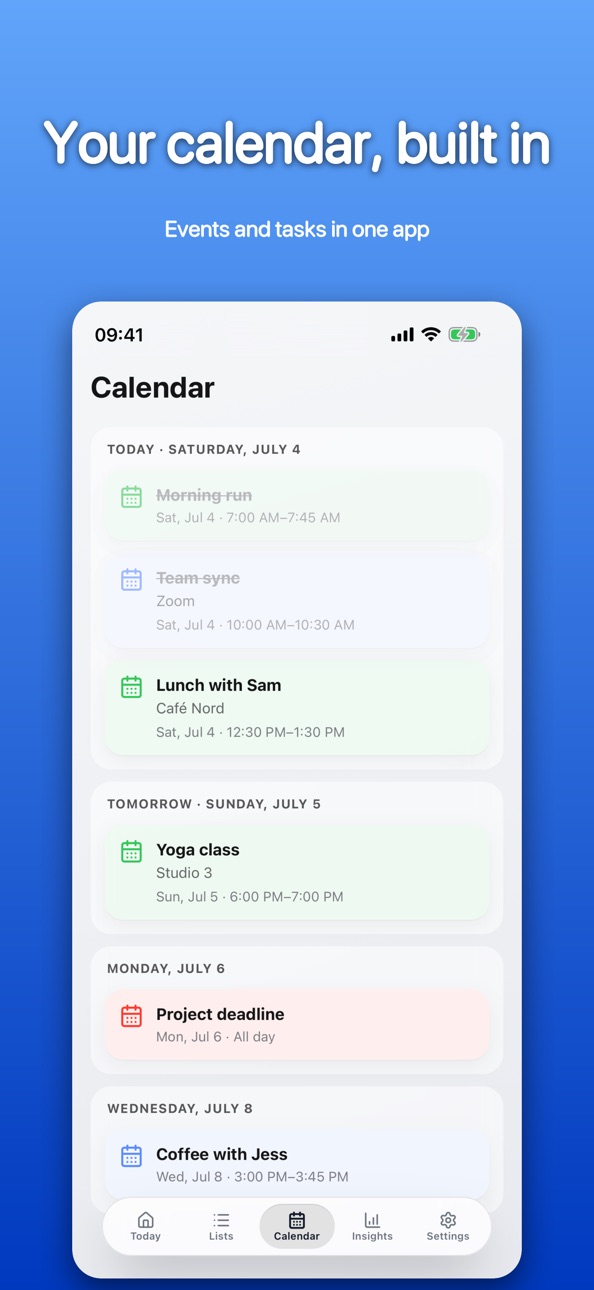
• Calendar tab: a clean, day-by-day agenda of your events, right next to your tasks. Your calendar and your to-dos finally live in one app.
• Task durations: give a reminder a time estimate and see how much your day really holds.
• Your setup syncs: list icons, order, archived lists and preferences now follow you across devices through your own iCloud — switch phones or reinstall, and everything's still there.
• A calmer, unified look: one consistent card design across every list, with quieter details and tappable links in your notes.
• Swipe left or right to move between tabs.
• Various refinements and fixes.
Thanks for using Complete!
Description
Complete turns your Apple Reminders into a calmer, more capable task app — with your calendar built right in, so your tasks and events live in one place.
REPEATS THAT ACTUALLY MAKE SENSE
This is what sets Complete apart. Most reminder apps only repeat on a fixed calendar. Complete also repeats AFTER you complete a task — so "vacuum every week" means a week after you actually did it, not a pile of missed reminders stacking up while you were away.
Perfect for chores, self-care, car maintenance, watering plants, changing filters — anything where the next due date depends on when you last finished. A thoughtful detail you'd normally only find in much pricier, heavier apps.
POWERFUL, FLEXIBLE REPEATS
• Everything Apple Reminders can do — hourly, daily, weekly on chosen days, monthly (by date or "the last weekday"), yearly
• Plus what it can't — repeat after completion, repeat a set number of times, and skip weekends
• End any repeat on a date
TASKS AND CALENDAR, TOGETHER
• Built on your Apple Reminders — syncs through your own iCloud and shows up in Siri, Apple Watch, and widgets
• A calendar of your own — a dedicated Calendar tab lays out your iOS events as a day-by-day agenda, and they appear next to your tasks in Today and Planned (read-only)
• Time estimates — give a task a duration and see how much your day really holds
• Priorities — mark what matters as low, medium, or high, with a smart "Important" list
• Attach anything to a reminder — photos, scans, PDFs, documents, any file — kept in your own iCloud Drive
• Early reminders — get a heads-up before something's due
• Repeat alerts — keep getting nudged after a task is due, until you check it off
• Your setup follows you — list icons, order, archived lists and preferences sync across your devices through your own iCloud
• Recently Deleted — restore a reminder within 30 days
TURN COMPLETE INTO A HABIT TRACKER
The Insights tab quietly turns the things you already finish into a habit tracker — no extra setup, no separate app.
• A calendar heatmap of the days you got things done
• Your current streak, to keep the momentum going
• This-month and all-time totals, with a per-list breakdown
DESIGNED TO BE CALM
• One calm, consistent card design across every list
• Light, dark, or system appearance
• Optional time-of-day photo backgrounds — or pick from a set of calm background themes
• A clean, focused interface with a liquid-glass tab bar — swipe left or right to move between tabs
• Smart lists — Today, Planned, Anytime, Important, All, Done — reorder or hide them to taste
• Reorder undated tasks by hand within a list
• Your own lists with custom colors and 75+ icons
• Archive lists you're done with — hidden from view, kept with all their reminders
• Notifications come only from Complete — no duplicate alerts
TRY IT FREE
Use Complete free for 7 days, then unlock everything with a single one-time purchase — no subscription, no account of ours. Buy once, keep it forever.
Available in English and German.
Capabilities
In-App Purchases
Accessibility
ipadiphonemacrealityDevicetvoswatch
Version history 4 versions
Build 887840430v1.32026-07-05 03:37:36
Your calendar, now built right in — plus a calmer, smarter Complete.
• Calendar tab: a clean, day-by-day agenda of your events, right next to your tasks. Your calendar and your to-dos finally live in one app.
• Task durations: give a reminder a time estimate and see how much your day really holds.
• Your setup syncs: list icons, order, archived lists and preferences now follow you across devices through your own iCloud — switch phones or reinstall, and everything's still there.
• A calmer, unified look: one consistent card design across every list, with quieter details and tappable links in your notes.
• Swipe left or right to move between tabs.
• Various refinements and fixes.
Thanks for using Complete!
Build 887455289v1.22026-06-25 22:48:50
Defer a task until you actually need it — your new superpower.
• Defer dates: give a reminder a start date and it stays out of sight until then, surfacing on its own when the day comes. Find deferred tasks anytime in the new "Deferred" list.
• Repeat alerts: for the things you keep putting off, get nudged again and again after a task is due — until you finally check it off.
• Archive lists: tuck a finished list out of the way without losing anything. It leaves your overview but keeps all its reminders, ready to bring back.
• Attach ANY file — not just photos and PDFs. Documents, scans, spreadsheets, anything — kept in your own iCloud Drive.
• A calmer Today: compact cards, and tap any reminder to open its full details.
• 75+ list icons, aligned with the Apple Reminders set.
• Hide reminder counts for a quieter overview, hide any list you don't need, and rate Complete right from Settings.
• Various refinements and fixes.
Thanks for using Complete!
Build 887206419v1.12026-06-19 23:43:35
A calmer, more polished Complete.
• New background themes — pick from three soft gradients in both light and dark mode
• Smoother drag-and-drop when reordering your lists and tasks
• Tap a calendar event to jump straight to it in the Calendar app
• A clearer first run: each permission is now explained before it's asked
• Various refinements and fixes
Thanks for using Complete!
Build 886450435v1.02026-06-17 18:47:00
No pricing data captured yet — comparisons appear once the app has paid storefronts or in-app purchases.
Availability 96 of 96 storefronts
| Region | Language | Price | Ratings | Avg | Version |
|---|---|---|---|---|---|
| DE | de-DE | Free | 1 | 5.0 | 1.3 |
| AE | en-GB | Free | 0 | — | 1.3 |
| AF | en-GB | Free | 0 | — | 1.3 |
| AL | en-GB | Free | 0 | — | 1.3 |
| AT | de-DE | Free | 0 | — | 1.3 |
| AU | en-AU | Free | 0 | — | 1.3 |
| AZ | en-GB | Free | 0 | — | 1.3 |
| BA | en-GB | Free | 0 | — | 1.3 |
| BE | en-GB | Free | 0 | — | 1.3 |
| BG | en-GB | Free | 0 | — | 1.3 |
| BH | en-GB | Free | 0 | — | 1.3 |
| BM | en-GB | Free | 0 | — | 1.3 |
| BN | en-GB | Free | 0 | — | 1.3 |
| BT | en-GB | Free | 0 | — | 1.3 |
| BY | en-GB | Free | 0 | — | 1.3 |
| CA | en-CA | Free | 0 | — | 1.3 |
| CH | de-CH | Free | 0 | — | 1.3 |
| CN | zh-Hans-CN | Free | 0 | — | 1.3 |
| CY | en-GB | Free | 0 | — | 1.3 |
| CZ | en-GB | Free | 0 | — | 1.3 |
| DK | en-GB | Free | 0 | — | 1.3 |
| EE | en-GB | Free | 0 | — | 1.3 |
| EG | en-GB | Free | 0 | — | 1.3 |
| ES | es-ES | Free | 0 | — | 1.3 |
| FI | en-GB | Free | 0 | — | 1.3 |
| FJ | en-GB | Free | 0 | — | 1.3 |
| FM | en-GB | Free | 0 | — | 1.3 |
| FR | fr-FR | Free | 0 | — | 1.3 |
| GB | en-GB | Free | 0 | — | 1.3 |
| GR | en-GB | Free | 0 | — | 1.3 |
| HR | en-GB | Free | 0 | — | 1.3 |
| HU | en-GB | Free | 0 | — | 1.3 |
| ID | en-GB | Free | 0 | — | 1.3 |
| IE | en-GB | Free | 0 | — | 1.3 |
| IL | en-GB | Free | 0 | — | 1.3 |
| IN | en-GB | Free | 0 | — | 1.3 |
| IQ | en-GB | Free | 0 | — | 1.3 |
| IS | en-GB | Free | 0 | — | 1.3 |
| IT | it | Free | 0 | — | 1.3 |
| JO | en-GB | Free | 0 | — | 1.3 |
| KG | en-GB | Free | 0 | — | 1.3 |
| KH | en-GB | Free | 0 | — | 1.3 |
| KR | ko | Free | 0 | — | 1.3 |
| KW | en-GB | Free | 0 | — | 1.3 |
| KZ | en-GB | Free | 0 | — | 1.3 |
| LA | en-GB | Free | 0 | — | 1.3 |
| LK | en-GB | Free | 0 | — | 1.3 |
| LT | en-GB | Free | 0 | — | 1.3 |
| LU | en-GB | Free | 0 | — | 1.3 |
| LV | en-GB | Free | 0 | — | 1.3 |
| MD | en-GB | Free | 0 | — | 1.3 |
| ME | en-GB | Free | 0 | — | 1.3 |
| MK | en-GB | Free | 0 | — | 1.3 |
| MM | en-GB | Free | 0 | — | 1.3 |
| MN | en-GB | Free | 0 | — | 1.3 |
| MO | zh-Hant-HK | Free | 0 | — | 1.3 |
| MR | en-GB | Free | 0 | — | 1.3 |
| MT | en-GB | Free | 0 | — | 1.3 |
| MV | en-GB | Free | 0 | — | 1.3 |
| MY | en-GB | Free | 0 | — | 1.3 |
| NL | nl | Free | 0 | — | 1.3 |
| NO | en-GB | Free | 0 | — | 1.3 |
| NP | en-GB | Free | 0 | — | 1.3 |
| NR | en-GB | Free | 0 | — | 1.3 |
| NZ | en-AU | Free | 0 | — | 1.3 |
| OM | en-GB | Free | 0 | — | 1.3 |
| PG | en-GB | Free | 0 | — | 1.3 |
| PH | en-GB | Free | 0 | — | 1.3 |
| PK | en-GB | Free | 0 | — | 1.3 |
| PL | en-GB | Free | 0 | — | 1.3 |
| PT | pt-PT | Free | 0 | — | 1.3 |
| PW | en-GB | Free | 0 | — | 1.3 |
| QA | en-GB | Free | 0 | — | 1.3 |
| RO | en-GB | Free | 0 | — | 1.3 |
| RS | en-GB | Free | 0 | — | 1.3 |
| RU | ru | Free | 0 | — | 1.3 |
| SA | en-GB | Free | 0 | — | 1.3 |
| SB | en-GB | Free | 0 | — | 1.3 |
| SE | sv | Free | 0 | — | 1.3 |
| SG | en-GB | Free | 0 | — | 1.3 |
| SI | en-GB | Free | 0 | — | 1.3 |
| SK | en-GB | Free | 0 | — | 1.3 |
| TH | en-GB | Free | 0 | — | 1.3 |
| TJ | en-GB | Free | 0 | — | 1.3 |
| TM | en-GB | Free | 0 | — | 1.3 |
| TO | en-GB | Free | 0 | — | 1.3 |
| TR | en-GB | Free | 0 | — | 1.3 |
| TW | zh-Hant-TW | Free | 0 | — | 1.3 |
| UA | en-GB | Free | 0 | — | 1.3 |
| US | en-US | Free | 0 | — | 1.3 |
| UZ | en-GB | Free | 0 | — | 1.3 |
| VN | en-GB | Free | 0 | — | 1.3 |
| VU | en-GB | Free | 0 | — | 1.3 |
| XK | en-GB | Free | 0 | — | 1.3 |
| YE | en-GB | Free | 0 | — | 1.3 |
| ZA | en-GB | Free | 0 | — | 1.3 |
Change log 8 changes · IT
✎
releaseNotes updated
Your calendar, now built right in — plus a calmer, smarter Complete.
• Calendar tab: a clean, day-by-day agenda of your events, right next to your tasks. Your
✎
description updated
Complete turns your Apple Reminders into a calmer, more capable task app — with your calendar built right in, so your tasks and events live in one place.
REPEA
✎
subtitle updated
Repeats after you finish
✎
name updated
Complete – Reminders
◆
Version 1.3 released
Your calendar, now built right in — plus a calmer, smarter Complete.
• Calendar tab: a clean, day-by-day agenda of your events, right next to your tasks. Your calendar and your to-dos finally live in one app.
• Task durations: give a remin
◆
Version 1.2 released
Defer a task until you actually need it — your new superpower.
• Defer dates: give a reminder a start date and it stays out of sight until then, surfacing on its own when the day comes. Find deferred tasks anytime in the new "Deferred" lis
◆
Version 1.1 released
A calmer, more polished Complete.
• New background themes — pick from three soft gradients in both light and dark mode
• Smoother drag-and-drop when reordering your lists and tasks
• Tap a calendar event to jump straight to it in the Calen
◆
Version 1.0 released