Home › Developer Tools

 MT
MT
 AEen-GB
 AFen-GB
 AGen-GB
 AIen-GB
 ALen-GB
 AMen-GB
 AOen-GB
 ARes-MX
 ATde-DE
 AUen-AU
 AZen-GB
 BAen-GB
 BBen-GB
 BEen-GB
 BFen-GB
 BGen-GB
 BHen-GB
 BJen-GB
 BMen-GB
 BNen-GB
 BOes-MX
 BSen-GB
 BTen-GB
 BWen-GB
 BYen-GB
 BZen-GB
 CAen-CA
 CDen-GB
 CGen-GB
 CHde-CH
 CIfr-FR
 CLes-MX
 CMfr-FR
 CNzh-Hans-CN
 COes-MX
 CRes-MX
 CVen-GB
 CYen-GB
 CZen-GB
 DEde-DE
 DKen-GB
 DMen-GB
 DOes-MX
 DZen-GB
 ECes-MX
 EEen-GB
 EGen-GB
 ESes-ES
 FIen-GB
 FJen-GB
 FMen-GB
 FRfr-FR
 GAfr-FR
 GBen-GB
 GDen-GB
 GEen-GB
 GMen-GB
 GRen-GB
 GTes-MX
 GWen-GB
 GYen-GB
 HKzh-Hant-HK
 HNes-MX
 HRen-GB
 HUen-GB
 IDen-GB
 IEen-GB
 ILen-GB
 INen-GB
 IQen-GB
 ISen-GB
 ITit
ITit JMen-GB
 JOen-GB
 JPja
JPja KGen-GB
 KHen-GB
 KNen-GB
 KRko
KRko KWen-GB
 KYen-GB
 KZen-GB
 LAen-GB
 LBen-GB
 LCen-GB
 LKen-GB
 LRen-GB
 LTen-GB
 LUen-GB
 LVen-GB
 LYen-GB
 MAen-GB
 MDen-GB
 MEen-GB
 MGen-GB
 MKen-GB
 MLen-GB
 MNen-GB
 MOzh-Hant-HK
 MRen-GB
 MSen-GBMTen-GB
 MUen-GB
 MVen-GB
 MWen-GB
 MYen-GB
 MZen-GB
 NAen-GB
 NEen-GB
 NGen-GB
 NIes-MX
 NLnl
NLnl NOen-GB
 NPen-GB
 NRen-GB
 NZen-AU
 OMen-GB
 PAes-MX
 PEes-MX
 PGen-GB
 PHen-GB
 PKen-GB
 PLen-GB
 PTpt-PT
 PWen-GB
 PYes-MX
 QAen-GB
 ROen-GB
 RSen-GB
 RUru
RUru RWen-GB
 SAen-GB
 SBen-GB
 SCen-GB
 SEsv
SEsv SGen-GB
 SIen-GB
 SKen-GB
 SLen-GB
 SNen-GB
 SRen-GB
 STen-GB
 SVes-MX
 SZen-GB
 TCen-GB
 TDen-GB
 THen-GB
 TJen-GB
 TMen-GB
 TNen-GB
 TOen-GB
 TRen-GB
 TTen-GB
 TZen-GB
 UAen-GB
 UGen-GB
 USen-US
 UYen-GB
 UZen-GB
 VCen-GB
 VEes-MX
 VGen-GB
 VNen-GB
 VUen-GB
 XKen-GB
 YEen-GB
 ZAen-GB
 ZMen-GB
 ZWen-GB
169 of 169 storefronts
Content in en-US
Content in en-US
Information
Apple ID6774512379
Bundle IDcom.sofafish.sharktty
SellerSeller
Min iOS17.0
Min macOS14.0
Device familiesiphone, ipad
Released2026-06-10
Copyright© 2026 Safafish Inc
Privacy policyLink ↗
Preview 2 platforms
iPhone 7 images



iPad 7 images



What’s New Version 1.7
Take control of your Mac computer from your pocket — the remote desktop just got a lot more powerful.
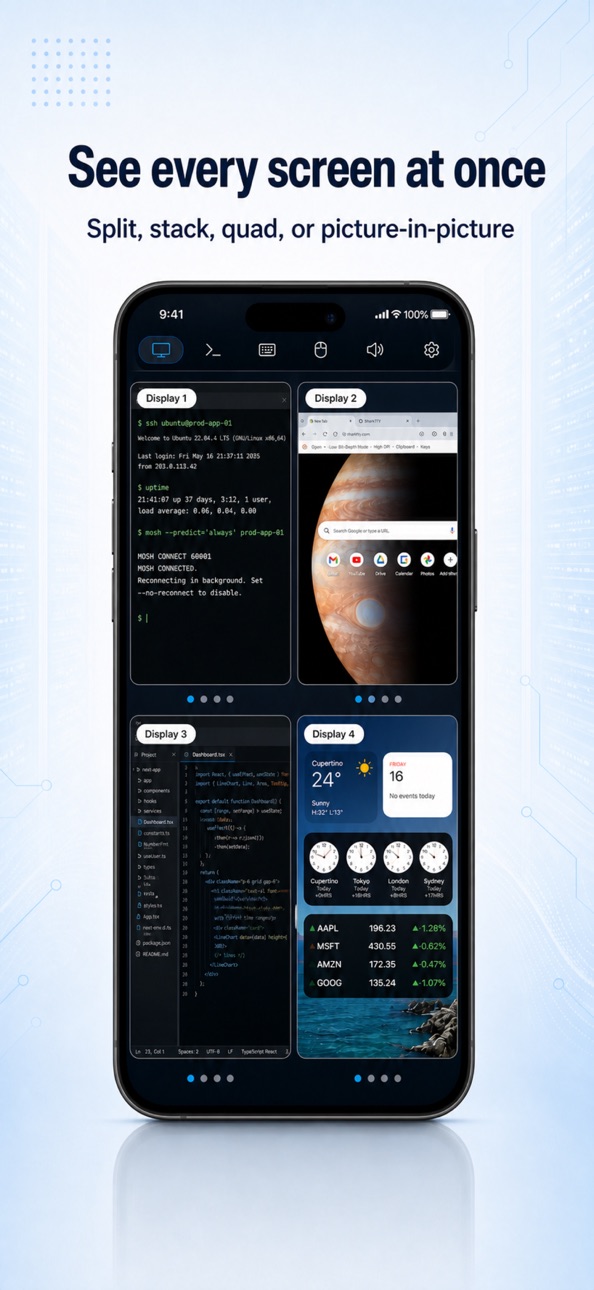
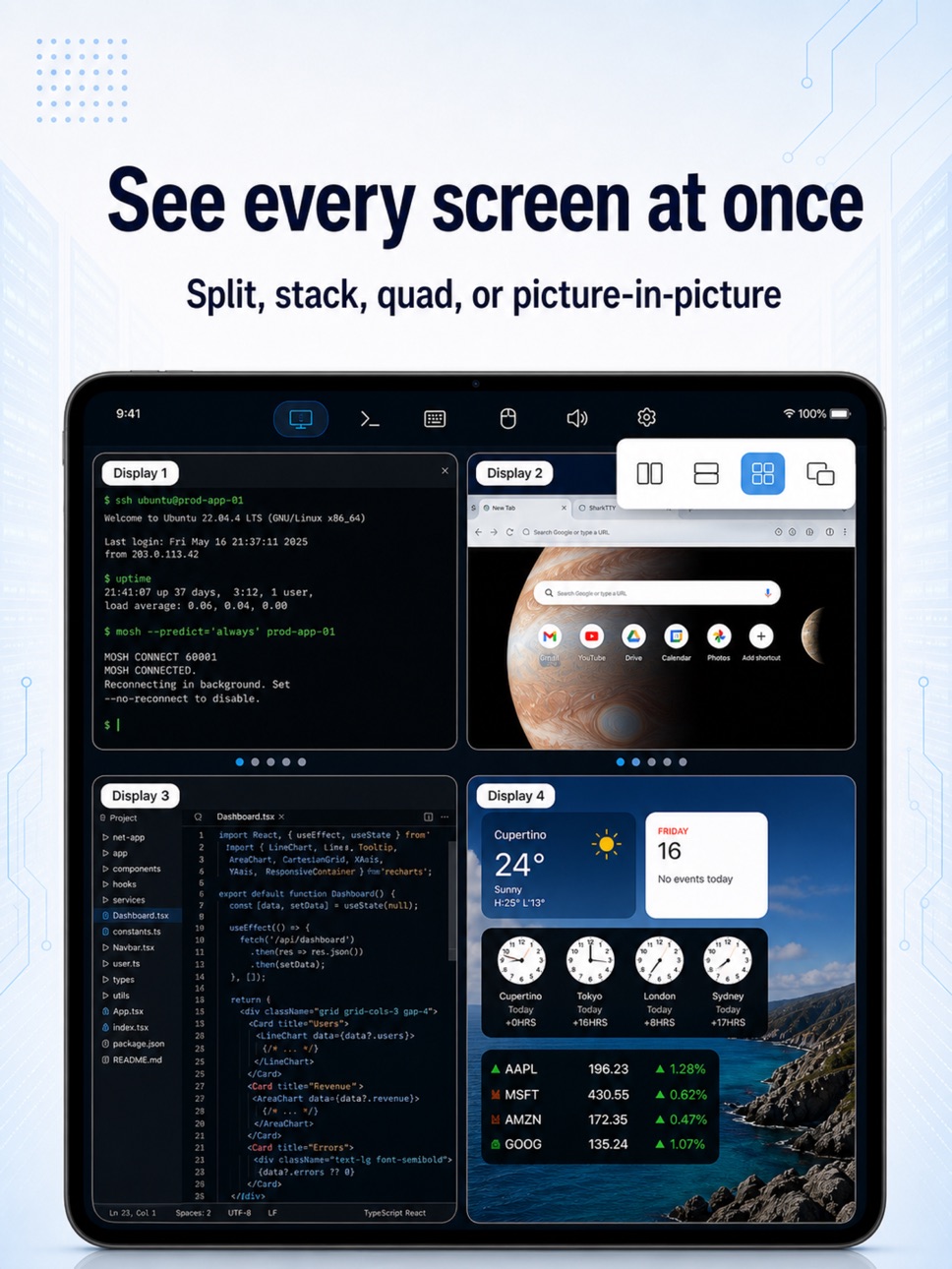
• See every screen at once — side by side, stacked, quad or picture-in-picture, reordered your way
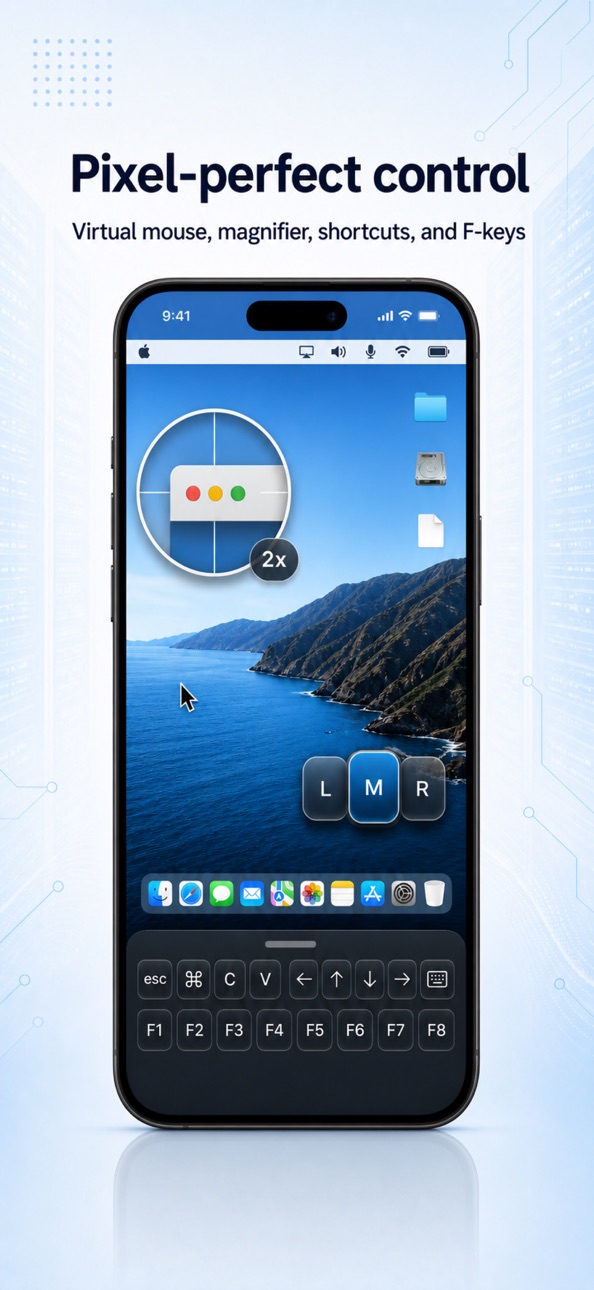
• A virtual mouse with a built-in magnifier for pixel-perfect taps
• A floating on-screen keyboard you can move, resize and dim — full symbols, ⌘⌥⌃ modifiers and F-keys; or switch to the system keyboard + shortcut bar
• Hear your Mac computer's sound live, and turn your device into its microphone
• Choose xHD, HD or SD, easing off on its own when the signal drops
• Two-finger tap to right-click; pinch and drag to frame the picture
Every feature is free — the only in-app purchases are optional tips.
Description
SharkTTY keeps your servers and your desktop within reach — a fast, native SSH & Mosh terminal and a full remote desktop for your Mac computer, in one app. All of it free.
CONTROL YOUR DESKTOP FROM ANYWHERE
Sign in on your iPhone or iPad device and your desktop is right there. Tap to see its screen and take over — on the same Wi-Fi or from the other side of the world. SharkTTY finds the best way to connect, so you don't have to think about it.
• A smooth, low-lag screen with full keyboard and mouse
• See every display at once — side by side, stacked, quad or picture-in-picture, arranged your way
• A virtual mouse with a built-in magnifier for pixel-perfect taps
• A floating on-screen keyboard you can move, resize and dim — full symbols, ⌘⌥⌃ modifiers and F-keys
• Hear your Mac computer's sound live, and turn your device into its microphone
• Copy on one device, paste on the other
• Pick xHD, HD or SD — and let it ease off on its own when the signal drops
• End-to-end encrypted, so your screen stays yours
A TERMINAL THAT KEEPS UP
• Connect to any server over SSH — there's nothing to install on the other end
• Mosh keeps you typing through dropped Wi-Fi, network switches and lag
• Lock your device or jump to another app, come back, and your session is still there
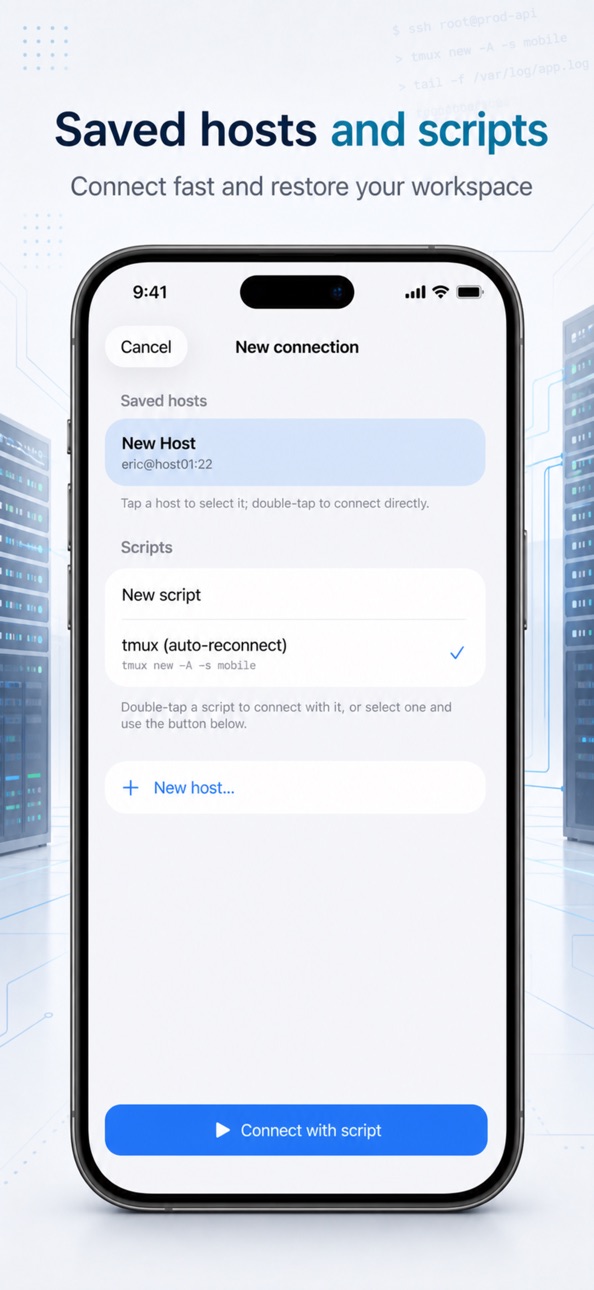
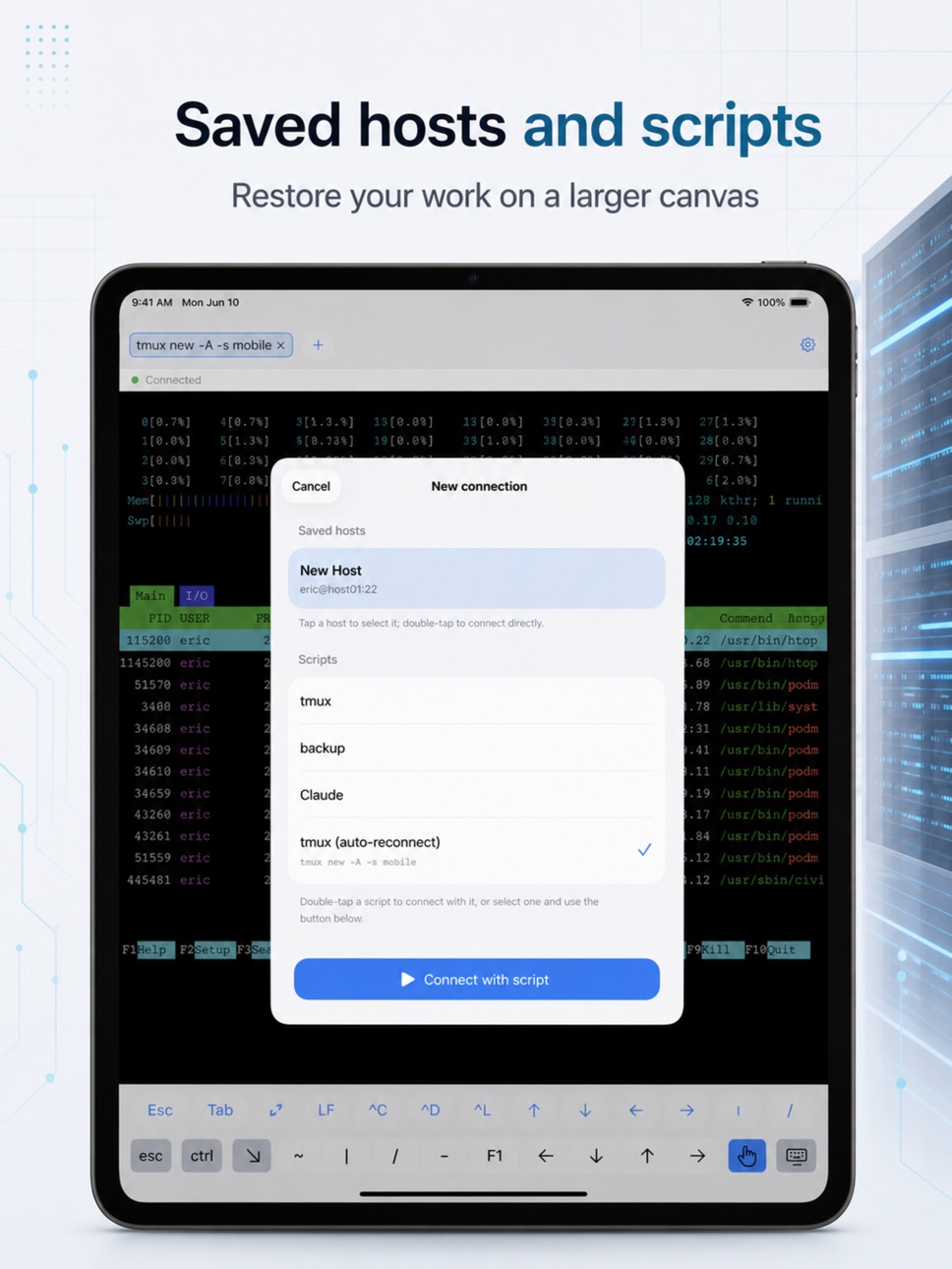
• Drop straight back into your tmux session with a saved startup command
KEYS, FILES, AND PEACE OF MIND
• Create or import SSH keys right on your device — private keys never leave it
• Get a clear heads-up the moment a server's identity changes
• Browse and move files over iCloud Drive, shared folders and WebDAV, without leaving the app
• Developer fonts and themes, a handy shortcut-key row, and full external keyboard and trackpad support on iPad
• Keep your hosts and keys in sync across your devices with iCloud, if you like
You never need an account to reach your own servers.
SharkTTY — your servers and your desktop, always in your pocket.
Every feature is free; the only in-app purchases are optional tips — a one-time or monthly coffee for the developer — that unlock nothing. The monthly tip auto-renews until cancelled in your Apple Account settings.
Terms of Use (EULA): https://safafish.com/sharktty/eula.html · Privacy Policy: https://safafish.com/sharktty/privacy.html
Capabilities
In-App Purchases
Accessibility
ipadiphonemacrealityDevicetvoswatch
Version history 4 versions
Build 887624736v1.72026-07-01 19:26:33
Take control of your Mac computer from your pocket — the remote desktop just got a lot more powerful.
• See every screen at once — side by side, stacked, quad or picture-in-picture, reordered your way
• A virtual mouse with a built-in magnifier for pixel-perfect taps
• A floating on-screen keyboard you can move, resize and dim — full symbols, ⌘⌥⌃ modifiers and F-keys; or switch to the system keyboard + shortcut bar
• Hear your Mac computer's sound live, and turn your device into its microphone
• Choose xHD, HD or SD, easing off on its own when the signal drops
• Two-finger tap to right-click; pinch and drag to frame the picture
Every feature is free — the only in-app purchases are optional tips.
Build 887465579v1.62026-06-27 18:47:03
See your whole Mac at once.
Got more than one display? Now you can watch them all side by side on your iPhone or iPad — and tap or drag any screen to take control of it. One display or every display, it's a tap away.
• View all screens, control any of them by touch
• Steadier connections that reconnect faster after a hiccup
• Edit a saved desktop and grab its share link without leaving the session
Every feature is free — the only in-app purchases are optional tips to buy the developer a coffee.
Build 887025222v1.52026-06-24 11:41:46
Now you can control your Mac, too.
Open SharkTTY on your iPhone or iPad and your desktop is right there — its full screen, keyboard and mouse, whether you're on the same Wi-Fi or far from home. Sign in on both, tap, and you're in.
• Smooth screen with keyboard, mouse and a shared clipboard
• HD / Standard / Smooth — eases off on its own when the signal drops
• End-to-end encrypted
Every feature is free — the only in-app purchases are optional tips to buy the developer a coffee.
Also new: an in-app community to share feedback and ideas, plus smoother, steadier remote sessions.
Build 886275270v1.02026-06-10 16:10:12
No pricing data captured yet — comparisons appear once the app has paid storefronts or in-app purchases.
Availability 169 of 169 storefronts
| Region | Language | Price | Ratings | Avg | Version |
|---|---|---|---|---|---|
| AE | en-GB | Free | 0 | — | 1.7 |
| AF | en-GB | Free | 0 | — | 1.7 |
| AG | en-GB | Free | 0 | — | 1.7 |
| AI | en-GB | Free | 0 | — | 1.7 |
| AL | en-GB | Free | 0 | — | 1.7 |
| AM | en-GB | Free | 0 | — | 1.7 |
| AO | en-GB | Free | 0 | — | 1.7 |
| AR | es-MX | Free | 0 | — | 1.7 |
| AT | de-DE | Free | 0 | — | 1.7 |
| AU | en-AU | Free | 0 | — | 1.7 |
| AZ | en-GB | Free | 0 | — | 1.7 |
| BA | en-GB | Free | 0 | — | 1.7 |
| BB | en-GB | Free | 0 | — | 1.7 |
| BE | en-GB | Free | 0 | — | 1.7 |
| BF | en-GB | Free | 0 | — | 1.7 |
| BG | en-GB | Free | 0 | — | 1.7 |
| BH | en-GB | Free | 0 | — | 1.7 |
| BJ | en-GB | Free | 0 | — | 1.7 |
| BM | en-GB | Free | 0 | — | 1.7 |
| BN | en-GB | Free | 0 | — | 1.7 |
| BO | es-MX | Free | 0 | — | 1.7 |
| BS | en-GB | Free | 0 | — | 1.7 |
| BT | en-GB | Free | 0 | — | 1.7 |
| BW | en-GB | Free | 0 | — | 1.7 |
| BY | en-GB | Free | 0 | — | 1.7 |
| BZ | en-GB | Free | 0 | — | 1.7 |
| CA | en-CA | Free | 0 | — | 1.7 |
| CD | en-GB | Free | 0 | — | 1.7 |
| CG | en-GB | Free | 0 | — | 1.7 |
| CH | de-CH | Free | 0 | — | 1.7 |
| CI | fr-FR | Free | 0 | — | 1.7 |
| CL | es-MX | Free | 0 | — | 1.7 |
| CM | fr-FR | Free | 0 | — | 1.7 |
| CN | zh-Hans-CN | Free | 0 | — | 1.7 |
| CO | es-MX | Free | 0 | — | 1.7 |
| CR | es-MX | Free | 0 | — | 1.7 |
| CV | en-GB | Free | 0 | — | 1.7 |
| CY | en-GB | Free | 0 | — | 1.7 |
| CZ | en-GB | Free | 0 | — | 1.7 |
| DE | de-DE | Free | 0 | — | 1.7 |
| DK | en-GB | Free | 0 | — | 1.7 |
| DM | en-GB | Free | 0 | — | 1.7 |
| DO | es-MX | Free | 0 | — | 1.7 |
| DZ | en-GB | Free | 0 | — | 1.7 |
| EC | es-MX | Free | 0 | — | 1.7 |
| EE | en-GB | Free | 0 | — | 1.7 |
| EG | en-GB | Free | 0 | — | 1.7 |
| ES | es-ES | Free | 0 | — | 1.7 |
| FI | en-GB | Free | 0 | — | 1.7 |
| FJ | en-GB | Free | 0 | — | 1.7 |
| FM | en-GB | Free | 0 | — | 1.7 |
| FR | fr-FR | Free | 0 | — | 1.7 |
| GA | fr-FR | Free | 0 | — | 1.7 |
| GB | en-GB | Free | 0 | — | 1.7 |
| GD | en-GB | Free | 0 | — | 1.7 |
| GE | en-GB | Free | 0 | — | 1.7 |
| GM | en-GB | Free | 0 | — | 1.7 |
| GR | en-GB | Free | 0 | — | 1.7 |
| GT | es-MX | Free | 0 | — | 1.7 |
| GW | en-GB | Free | 0 | — | 1.7 |
| GY | en-GB | Free | 0 | — | 1.7 |
| HK | zh-Hant-HK | Free | 0 | — | 1.7 |
| HN | es-MX | Free | 0 | — | 1.7 |
| HR | en-GB | Free | 0 | — | 1.7 |
| HU | en-GB | Free | 0 | — | 1.7 |
| ID | en-GB | Free | 0 | — | 1.7 |
| IE | en-GB | Free | 0 | — | 1.7 |
| IL | en-GB | Free | 0 | — | 1.7 |
| IN | en-GB | Free | 0 | — | 1.7 |
| IQ | en-GB | Free | 0 | — | 1.7 |
| IS | en-GB | Free | 0 | — | 1.7 |
| IT | it | Free | 0 | — | 1.7 |
| JM | en-GB | Free | 0 | — | 1.7 |
| JO | en-GB | Free | 0 | — | 1.7 |
| JP | ja | Free | 0 | — | 1.7 |
| KG | en-GB | Free | 0 | — | 1.7 |
| KH | en-GB | Free | 0 | — | 1.7 |
| KN | en-GB | Free | 0 | — | 1.7 |
| KR | ko | Free | 0 | — | 1.7 |
| KW | en-GB | Free | 0 | — | 1.7 |
| KY | en-GB | Free | 0 | — | 1.7 |
| KZ | en-GB | Free | 0 | — | 1.7 |
| LA | en-GB | Free | 0 | — | 1.7 |
| LB | en-GB | Free | 0 | — | 1.7 |
| LC | en-GB | Free | 0 | — | 1.7 |
| LK | en-GB | Free | 0 | — | 1.7 |
| LR | en-GB | Free | 0 | — | 1.7 |
| LT | en-GB | Free | 0 | — | 1.7 |
| LU | en-GB | Free | 0 | — | 1.7 |
| LV | en-GB | Free | 0 | — | 1.7 |
| LY | en-GB | Free | 0 | — | 1.7 |
| MA | en-GB | Free | 0 | — | 1.7 |
| MD | en-GB | Free | 0 | — | 1.7 |
| ME | en-GB | Free | 0 | — | 1.7 |
| MG | en-GB | Free | 0 | — | 1.7 |
| MK | en-GB | Free | 0 | — | 1.7 |
| ML | en-GB | Free | 0 | — | 1.7 |
| MN | en-GB | Free | 0 | — | 1.7 |
| MO | zh-Hant-HK | Free | 0 | — | 1.7 |
| MR | en-GB | Free | 0 | — | 1.7 |
| MS | en-GB | Free | 0 | — | 1.7 |
| MT | en-GB | Free | 0 | — | 1.7 |
| MU | en-GB | Free | 0 | — | 1.7 |
| MV | en-GB | Free | 0 | — | 1.7 |
| MW | en-GB | Free | 0 | — | 1.7 |
| MY | en-GB | Free | 0 | — | 1.7 |
| MZ | en-GB | Free | 0 | — | 1.7 |
| NA | en-GB | Free | 0 | — | 1.7 |
| NE | en-GB | Free | 0 | — | 1.7 |
| NG | en-GB | Free | 0 | — | 1.7 |
| NI | es-MX | Free | 0 | — | 1.7 |
| NL | nl | Free | 0 | — | 1.7 |
| NO | en-GB | Free | 0 | — | 1.7 |
| NP | en-GB | Free | 0 | — | 1.7 |
| NR | en-GB | Free | 0 | — | 1.7 |
| NZ | en-AU | Free | 0 | — | 1.7 |
| OM | en-GB | Free | 0 | — | 1.7 |
| PA | es-MX | Free | 0 | — | 1.7 |
| PE | es-MX | Free | 0 | — | 1.7 |
| PG | en-GB | Free | 0 | — | 1.7 |
| PH | en-GB | Free | 0 | — | 1.7 |
| PK | en-GB | Free | 0 | — | 1.7 |
| PL | en-GB | Free | 0 | — | 1.7 |
| PT | pt-PT | Free | 0 | — | 1.7 |
| PW | en-GB | Free | 0 | — | 1.7 |
| PY | es-MX | Free | 0 | — | 1.7 |
| QA | en-GB | Free | 0 | — | 1.7 |
| RO | en-GB | Free | 0 | — | 1.7 |
| RS | en-GB | Free | 0 | — | 1.7 |
| RU | ru | Free | 0 | — | 1.7 |
| RW | en-GB | Free | 0 | — | 1.7 |
| SA | en-GB | Free | 0 | — | 1.7 |
| SB | en-GB | Free | 0 | — | 1.7 |
| SC | en-GB | Free | 0 | — | 1.7 |
| SE | sv | Free | 0 | — | 1.7 |
| SG | en-GB | Free | 0 | — | 1.7 |
| SI | en-GB | Free | 0 | — | 1.7 |
| SK | en-GB | Free | 0 | — | 1.7 |
| SL | en-GB | Free | 0 | — | 1.7 |
| SN | en-GB | Free | 0 | — | 1.7 |
| SR | en-GB | Free | 0 | — | 1.7 |
| ST | en-GB | Free | 0 | — | 1.7 |
| SV | es-MX | Free | 0 | — | 1.7 |
| SZ | en-GB | Free | 0 | — | 1.7 |
| TC | en-GB | Free | 0 | — | 1.7 |
| TD | en-GB | Free | 0 | — | 1.7 |
| TH | en-GB | Free | 0 | — | 1.7 |
| TJ | en-GB | Free | 0 | — | 1.7 |
| TM | en-GB | Free | 0 | — | 1.7 |
| TN | en-GB | Free | 0 | — | 1.7 |
| TO | en-GB | Free | 0 | — | 1.7 |
| TR | en-GB | Free | 0 | — | 1.7 |
| TT | en-GB | Free | 0 | — | 1.7 |
| TZ | en-GB | Free | 0 | — | 1.7 |
| UA | en-GB | Free | 0 | — | 1.7 |
| UG | en-GB | Free | 0 | — | 1.7 |
| US | en-US | Free | 0 | — | 1.7 |
| UY | en-GB | Free | 0 | — | 1.7 |
| UZ | en-GB | Free | 0 | — | 1.7 |
| VC | en-GB | Free | 0 | — | 1.7 |
| VE | es-MX | Free | 0 | — | 1.7 |
| VG | en-GB | Free | 0 | — | 1.7 |
| VN | en-GB | Free | 0 | — | 1.7 |
| VU | en-GB | Free | 0 | — | 1.7 |
| XK | en-GB | Free | 0 | — | 1.7 |
| YE | en-GB | Free | 0 | — | 1.7 |
| ZA | en-GB | Free | 0 | — | 1.7 |
| ZM | en-GB | Free | 0 | — | 1.7 |
| ZW | en-GB | Free | 0 | — | 1.7 |
Change log 8 changes · MT
✎
releaseNotes updated
Take control of your Mac computer from your pocket — the remote desktop just got a lot more powerful.
• See every screen at once — side by side, stacked, quad
✎
description updated
SharkTTY keeps your servers and your desktop within reach — a fast, native SSH & Mosh terminal and a full remote desktop for your Mac computer, in one app. All
✎
subtitle updated
SSH/Mosh + Remote Desktop
✎
name updated
SharkTTY: SSH & Mosh
◆
Version 1.7 released
Take control of your Mac computer from your pocket — the remote desktop just got a lot more powerful.
• See every screen at once — side by side, stacked, quad or picture-in-picture, reordered your way
• A virtual mouse with a built-in magn
◆
Version 1.6 released
See your whole Mac at once.
Got more than one display? Now you can watch them all side by side on your iPhone or iPad — and tap or drag any screen to take control of it. One display or every display, it's a tap away.
• View all screens, c
◆
Version 1.5 released
Now you can control your Mac, too.
Open SharkTTY on your iPhone or iPad and your desktop is right there — its full screen, keyboard and mouse, whether you're on the same Wi-Fi or far from home. Sign in on both, tap, and you're in.
• Smoot
◆
Version 1.0 released