Home › Utilities

 CA
CA
 USen-US
 JPja
JPja DEde-DE
 CNzh-Hans-CN
 ESes-ES
 IEen-GB
 HKzh-Hant-HK
 MYen-GB
 NLnl
NLnl SAen-GB
 SKen-GB
 UAen-GB
 AEen-GB
 ALen-GB
 AMen-GB
 ATde-DE
 AUen-AU
 AZen-GB
 BAen-GB
 BEen-GB
 BGen-GB
 BHen-GB
 BMen-GB
 BNen-GB
 BTen-GB
 BYen-GBCAen-CA
 CHde-CH
 CYen-GB
 CZen-GB
 DKen-GB
 EEen-GB
 EGen-GB
 FIen-GB
 FJen-GB
 FMen-GB
 GEen-GB
 GRen-GB
 HRen-GB
 HUen-GB
 IDen-GB
 ILen-GB
 INen-GB
 IQen-GB
 ISen-GB
 ITit
ITit JOen-GB
 KGen-GB
 KHen-GB
 KRko
KRko KWen-GB
 KZen-GB
 LAen-GB
 LBen-GB
 LKen-GB
 LTen-GB
 LUen-GB
 LVen-GB
 MDen-GB
 MEen-GB
 MKen-GB
 MMen-GB
 MNen-GB
 MOzh-Hant-HK
 MRen-GB
 MTen-GB
 MVen-GB
 NOen-GB
 NPen-GB
 NRen-GB
 OMen-GB
 PGen-GB
 PHen-GB
 PKen-GB
 PLen-GB
 PTpt-PT
 PWen-GB
 QAen-GB
 ROen-GB
 RSen-GB
 RUru
RUru SBen-GB
 SEsv
SEsv SGen-GB
 SIen-GB
 THen-GB
 TJen-GB
 TMen-GB
 TOen-GB
 TRen-GB
 TWzh-Hant-TW
 UZen-GB
 VNen-GB
 VUen-GB
 XKen-GB
 YEen-GB
 ZAen-GB
 AFNot Available
97 of 98 storefronts
Content in en-US
Content in en-US
Information
Preview 1 platform
iPhone 5 images



What’s New Version 1.4
NEW: Reverse censor (whole-screen mode)
Flip the filter around. Instead of blurring just the flagged areas, it blurs the entire screen and lets you see through only the regions it detects. Frame those revealed windows with borders. Your call.
Also in 1.4:
- 10 languages, now including the body-part filter labels, not just the menus.
- Steadier detection.
- Censors glide with whatever is moving instead of jittering.
- Feed reliability fixed. On Instagram and X, censors no longer drop off when you scroll back up.
Everything still runs on-device. No server, no account, no tracking.
Description
PixelBlocker is an on-device AI filter for Safari that censors NSFW images/videos in real-time, before they ever load fully on screen.
Every detection runs locally on your iPhone. No data leaves your device. Ever. There is no server, no account, no tracking.
WHAT IT DOES
• Scans every image and video on every Safari page you open
• Detects 17 distinct content categories with adjustable confidence
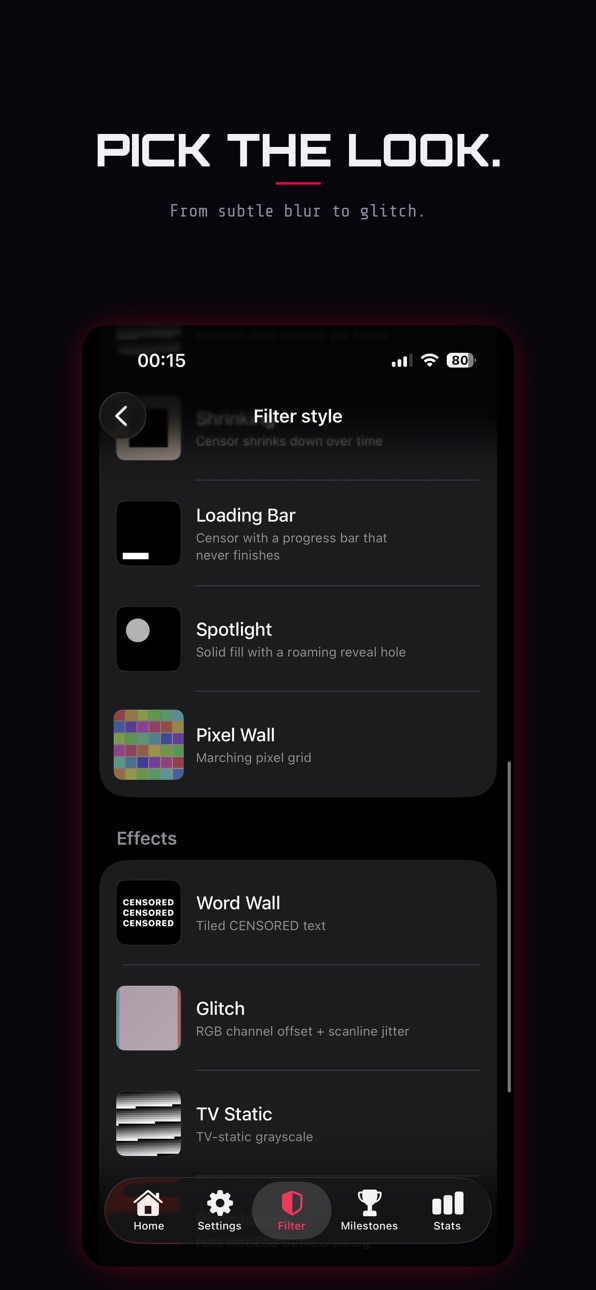
• Renders the censor instantly with your choice of 15 visual styles
• Reverse censor (always shown as blur): blur the whole screen and see through only the regions it detects, with optional borders
• Blocks navigation to NSFW domains entirely (configurable list)
HOW YOU CONFIGURE IT
• Pick which content categories to filter (Lower body, Chest, Buttocks, Anus, Faces, Midriff, Feet, Underarms, exposed or covered variants)
• Choose how it looks: Pixelated, Blur, Solid, Color Fill, Color Invert, Noise, Word Wall, Glitch, TV Static, Shrinking, Loading Bar, Permission, Spotlight, Pixel Wall, Oil
Paint
• Set custom text overlays per target category
• Adjust border style and padding per-bucket
• Save your favourite configurations as named presets
ADVANCED SAFETY FEATURES
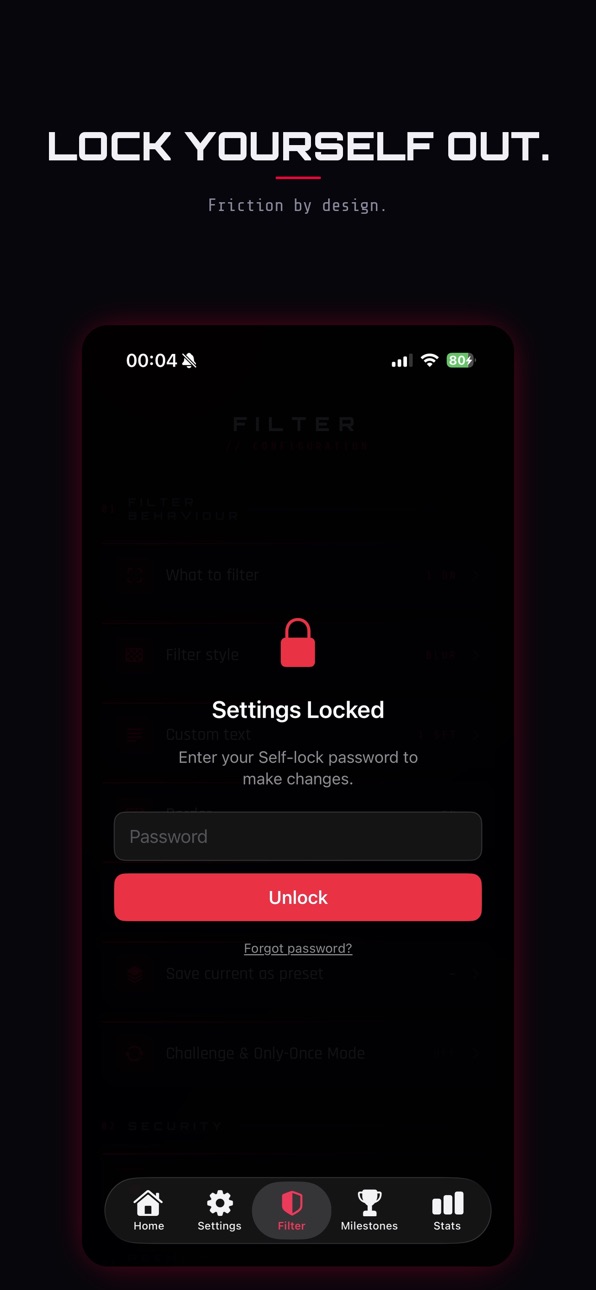
• Self-lock: password-protect Settings so you can't disable the filter on impulse
• Challenge Mode: tap a censored region, answer a trivia question to reveal it briefly, science, computers, games, refreshes daily
• Only-Once Mode: any image you've blocked stays blocked forever, even if the detector misses it next time
• 24-hour reset countdown if you forget the password, no shortcut
LANGUAGES
PixelBlocker is available in 10 languages, including the filter category labels, not just the menus.
SUBSCRIPTIONS
PixelBlocker is free to download. Optional subscriptions unlock more features:
• Basic Monthly — £2.99 / month
• Basic Yearly — £24.99 / year
• Premium Monthly — £4.99 / month
• Premium Yearly — £39.99 / year
Payment is charged to your Apple ID at confirmation of purchase. Subscriptions
renew automatically unless auto-renew is turned off at least 24 hours before the
end of the current period. Your account is charged for renewal within 24 hours
before the period ends. Manage or cancel anytime in your App Store account settings.
Privacy Policy: https://pixelblocker.app/privacy
Terms of Use (EULA): https://www.apple.com/legal/internet-services/itunes/dev/stdeula/
In-App Purchases CA pricing
PixelBlocker Subscription
Premium Monthly · Monthly—
Premium Yearly · Yearly—
Capabilities
In-App PurchasesSafari extension
Accessibility
ipadiphonemacrealityDevicetvoswatch
Version history 4 versions
Build 887162307v1.42026-06-21 16:43:43
NEW: Reverse censor (whole-screen mode)
Flip the filter around. Instead of blurring just the flagged areas, it blurs the entire screen and lets you see through only the regions it detects. Frame those revealed windows with borders. Your call.
Also in 1.4:
- 10 languages, now including the body-part filter labels, not just the menus.
- Steadier detection.
- Censors glide with whatever is moving instead of jittering.
- Feed reliability fixed. On Instagram and X, censors no longer drop off when you scroll back up.
Everything still runs on-device. No server, no account, no tracking.
Build 886812325v1.32026-06-11 09:31:30
This update is all about precision and smoothness:
• Censors now stay locked in place while you scroll — even fast flicks. No more trailing or drifting boxes.
• Smoother video tracking — censors follow movement more precisely and glide instead of stepping, including slow or subtle motion.
• Better detection coverage — improved reliability for harder-to-detect targets such as feet.
• Fixed: censor boxes covering only part of the target on some photo grids.
• More dependable protection in video feeds — coverage now carries over correctly as you swipe between videos.
• Faster and lighter — major memory and performance improvements for long browsing sessions, especially on older devices.
• Diagnostics improved — the status screen now reflects your device's real health, and Reset counters works as expected.
As always, everything runs entirely on your device — nothing you browse ever leaves it.
Build 886459549v1.12026-06-07 22:47:26
• Faster, smoother real-time video filtering in Safari.
• All-new censor border styles: Solid, Neon, Glow, Rainbow, and Gradient — with a slider to set the band thickness.
• Performance and stability improvements throughout.
Build 885931205v1.02026-06-01 16:58:05
Price history by region
Currency
Show
Columns
Search
Availability 97 of 98 storefronts
| Region | Language | Price | Ratings | Avg | Version |
|---|---|---|---|---|---|
| US | en-US | Free | 33 | 4.1 | 1.4 |
| JP | ja | Free | 11 | 3.4 | 1.4 |
| DE | de-DE | Free | 7 | 3.9 | 1.4 |
| CN | zh-Hans-CN | Free | 4 | 5.0 | 1.4 |
| ES | es-ES | Free | 2 | 4.5 | 1.4 |
| IE | en-GB | Free | 2 | 1.0 | 1.4 |
| HK | zh-Hant-HK | Free | 1 | 3.0 | 1.4 |
| MY | en-GB | Free | 1 | 5.0 | 1.4 |
| NL | nl | Free | 1 | 5.0 | 1.4 |
| SA | en-GB | Free | 1 | 5.0 | 1.4 |
| SK | en-GB | Free | 1 | 5.0 | 1.4 |
| UA | en-GB | Free | 1 | 1.0 | 1.4 |
| AE | en-GB | Free | 0 | — | 1.4 |
| AL | en-GB | Free | 0 | — | 1.4 |
| AM | en-GB | Free | 0 | — | 1.4 |
| AT | de-DE | Free | 0 | — | 1.4 |
| AU | en-AU | Free | 0 | — | 1.4 |
| AZ | en-GB | Free | 0 | — | 1.4 |
| BA | en-GB | Free | 0 | — | 1.4 |
| BE | en-GB | Free | 0 | — | 1.4 |
| BG | en-GB | Free | 0 | — | 1.4 |
| BH | en-GB | Free | 0 | — | 1.4 |
| BM | en-GB | Free | 0 | — | 1.4 |
| BN | en-GB | Free | 0 | — | 1.4 |
| BT | en-GB | Free | 0 | — | 1.4 |
| BY | en-GB | Free | 0 | — | 1.4 |
| CA | en-CA | Free | 0 | — | 1.4 |
| CH | de-CH | Free | 0 | — | 1.4 |
| CY | en-GB | Free | 0 | — | 1.4 |
| CZ | en-GB | Free | 0 | — | 1.4 |
| DK | en-GB | Free | 0 | — | 1.4 |
| EE | en-GB | Free | 0 | — | 1.4 |
| EG | en-GB | Free | 0 | — | 1.4 |
| FI | en-GB | Free | 0 | — | 1.4 |
| FJ | en-GB | Free | 0 | — | 1.4 |
| FM | en-GB | Free | 0 | — | 1.4 |
| GE | en-GB | Free | 0 | — | 1.4 |
| GR | en-GB | Free | 0 | — | 1.4 |
| HR | en-GB | Free | 0 | — | 1.4 |
| HU | en-GB | Free | 0 | — | 1.4 |
| ID | en-GB | Free | 0 | — | 1.4 |
| IL | en-GB | Free | 0 | — | 1.4 |
| IN | en-GB | Free | 0 | — | 1.4 |
| IQ | en-GB | Free | 0 | — | 1.4 |
| IS | en-GB | Free | 0 | — | 1.4 |
| IT | it | Free | 0 | — | 1.4 |
| JO | en-GB | Free | 0 | — | 1.4 |
| KG | en-GB | Free | 0 | — | 1.4 |
| KH | en-GB | Free | 0 | — | 1.4 |
| KR | ko | Free | 0 | — | 1.4 |
| KW | en-GB | Free | 0 | — | 1.4 |
| KZ | en-GB | Free | 0 | — | 1.4 |
| LA | en-GB | Free | 0 | — | 1.4 |
| LB | en-GB | Free | 0 | — | 1.4 |
| LK | en-GB | Free | 0 | — | 1.4 |
| LT | en-GB | Free | 0 | — | 1.4 |
| LU | en-GB | Free | 0 | — | 1.4 |
| LV | en-GB | Free | 0 | — | 1.4 |
| MD | en-GB | Free | 0 | — | 1.4 |
| ME | en-GB | Free | 0 | — | 1.4 |
| MK | en-GB | Free | 0 | — | 1.4 |
| MM | en-GB | Free | 0 | — | 1.4 |
| MN | en-GB | Free | 0 | — | 1.4 |
| MO | zh-Hant-HK | Free | 0 | — | 1.4 |
| MR | en-GB | Free | 0 | — | 1.4 |
| MT | en-GB | Free | 0 | — | 1.4 |
| MV | en-GB | Free | 0 | — | 1.4 |
| NO | en-GB | Free | 0 | — | 1.4 |
| NP | en-GB | Free | 0 | — | 1.4 |
| NR | en-GB | Free | 0 | — | 1.4 |
| OM | en-GB | Free | 0 | — | 1.4 |
| PG | en-GB | Free | 0 | — | 1.4 |
| PH | en-GB | Free | 0 | — | 1.4 |
| PK | en-GB | Free | 0 | — | 1.4 |
| PL | en-GB | Free | 0 | — | 1.4 |
| PT | pt-PT | Free | 0 | — | 1.4 |
| PW | en-GB | Free | 0 | — | 1.4 |
| QA | en-GB | Free | 0 | — | 1.4 |
| RO | en-GB | Free | 0 | — | 1.4 |
| RS | en-GB | Free | 0 | — | 1.4 |
| RU | ru | Free | 0 | — | 1.4 |
| SB | en-GB | Free | 0 | — | 1.4 |
| SE | sv | Free | 0 | — | 1.4 |
| SG | en-GB | Free | 0 | — | 1.4 |
| SI | en-GB | Free | 0 | — | 1.4 |
| TH | en-GB | Free | 0 | — | 1.4 |
| TJ | en-GB | Free | 0 | — | 1.4 |
| TM | en-GB | Free | 0 | — | 1.4 |
| TO | en-GB | Free | 0 | — | 1.4 |
| TR | en-GB | Free | 0 | — | 1.4 |
| TW | zh-Hant-TW | Free | 0 | — | 1.4 |
| UZ | en-GB | Free | 0 | — | 1.4 |
| VN | en-GB | Free | 0 | — | 1.4 |
| VU | en-GB | Free | 0 | — | 1.4 |
| XK | en-GB | Free | 0 | — | 1.4 |
| YE | en-GB | Free | 0 | — | 1.4 |
| ZA | en-GB | Free | 0 | — | 1.4 |
Not available in: AF
Change log 8 changes · CA
✎
releaseNotes updated
NEW: Reverse censor (whole-screen mode)
Flip the filter around. Instead of blurring just the flagged areas, it blurs the entire screen and lets you see through
✎
description updated
PixelBlocker is an on-device AI filter for Safari that censors NSFW images/videos in real-time, before they ever load fully on screen.
Every detection runs loca
✎
subtitle updated
On-Device Censoring App
✎
name updated
PixelBlocker
◆
Version 1.4 released
NEW: Reverse censor (whole-screen mode)
Flip the filter around. Instead of blurring just the flagged areas, it blurs the entire screen and lets you see through only the regions it detects. Frame those revealed windows with borders. Your cal
◆
Version 1.3 released
This update is all about precision and smoothness:
• Censors now stay locked in place while you scroll — even fast flicks. No more trailing or drifting boxes.
• Smoother video tracking — censors follow movement more precisely and glide ins
◆
Version 1.1 released
• Faster, smoother real-time video filtering in Safari.
• All-new censor border styles: Solid, Neon, Glow, Rainbow, and Gradient — with a slider to set the band thickness.
• Performance and stability improvements throughout.
◆
Version 1.0 released