Home › Lifestyle

 US
US
1 of 1 storefronts
Content in en-US
Content in en-US
Information
Preview 1 platform
iPhone 5 images


What’s New Version 2.6.1
A few interface refinements for a cleaner experience: clearer screens when your collection is empty, more consistent buttons, and a simpler Wishlist unlock screen.
Description
Wacarda tracks the value of your Pokémon card collection.
Quick add: start typing a card name, pick from the TCGdex list with its price, done.
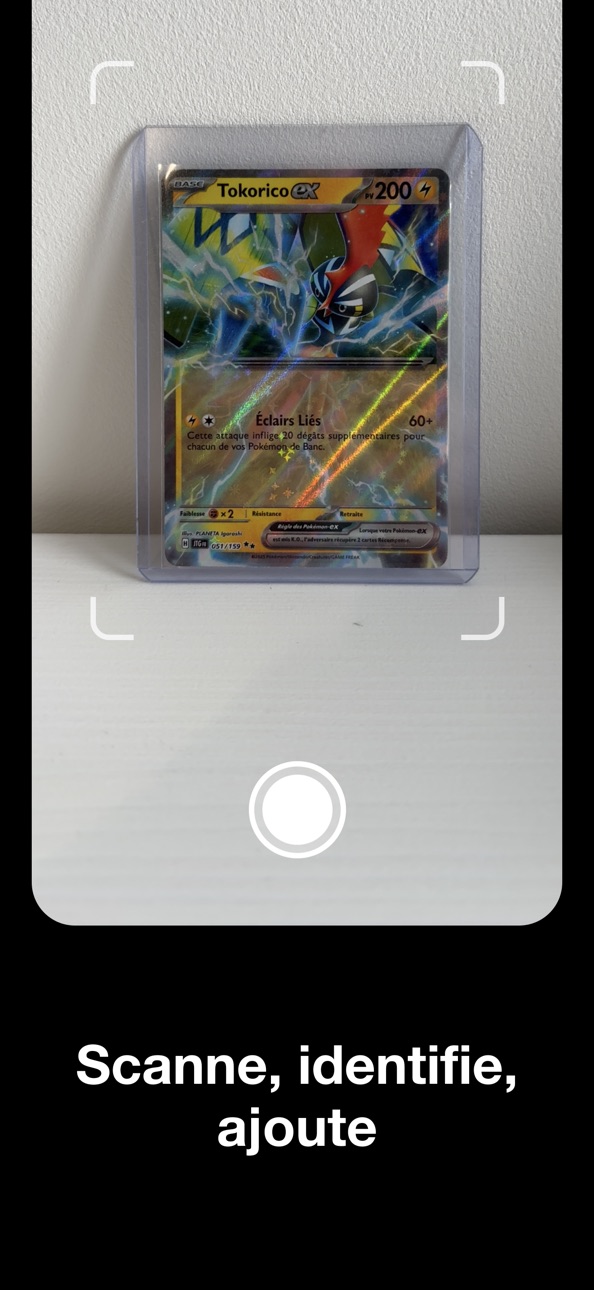
Camera scan: point your camera at a card, the app reads its name and number (Pokémon, Trainer, Energy).
Cardmarket prices: updated daily via TCGdex.
Automatic iCloud sync: no account, your collection stays safe and follows you to a new iPhone.
Stats: total value, evolution chart over 7 days, 1 month, 6 months, 1 year or all time, and weekly top movers.
Set completion: track your progress on each expansion.
Wishlist: follow a whole Pokémon (every printing) or a specific card.
Manual pricing: for cards outside TCGdex (Japanese, unlisted promos…) enter your own price and photo.
Graded cards: record PSA, BGS or CGC grade.
Favorites: bookmark your top pieces.
Pricing data: Cardmarket (via the public TCGdex API, MIT-licensed content).
Wacarda is not affiliated with The Pokémon Company, Nintendo, Cardmarket or TCGdex.
Capabilities
In-App Purchases
Accessibility
ipadiphonemacrealityDevicetvoswatch
Version history 20 versions
Build 887647339v2.6.12026-07-01 04:52:04
A few interface refinements for a cleaner experience: clearer screens when your collection is empty, more consistent buttons, and a simpler Wishlist unlock screen.
Build 887295086v2.6.02026-06-22 22:09:15
New sort by National number: line up your whole collection in order, from the first number to the last.
Improved Wishlist search: to follow a Pokémon, start typing and pick it straight from the list.
Build 887092714v2.5.22026-06-17 19:15:50
On My Cards, filter your collection by type: tap a symbol (Fire, Water, Grass…) to see only those cards.
And from a Pokémon you follow, add a card you're missing straight to your cards, no need to scan it.
Build 887032797v2.5.12026-06-16 19:43:31
Many more cards now show their image, including promos that used to appear blank.
If one is still missing, you can add your own photo to the card.
And on each card, a direct link to its Cardmarket page to dig deeper.
Build 886997533v2.5.02026-06-15 21:51:36
Adding cards is now faster and more precise.
Narrow your search by number to land on the exact version, even among dozens of printings.
After a scan, filter results by number to find your card with no guesswork.
Pick your Normal or Reverse Holo variant by seeing both prices, and jump straight to your card and its value once added.
Build 886827866v2.4.02026-06-11 17:18:18
Explore your cards over time: press and drag along a chart to scrub through prices point by point, with a subtle haptic tick at each step.
Build 886765627v2.3.22026-06-10 18:36:05
Fixed a completion counter that could be inaccurate in the wishlist.
Build 886717054v2.3.12026-06-09 20:08:10
See your sets in full: open a set and instantly spot the cards you own and the ones you're missing — add a missing one to your wishlist with a tap.
More reliable prices, based on the Cardmarket 30-day average.
Plus a search bar in the wishlist.
Build 886666261v2.2.32026-06-08 18:08:08
Your gainers and losers now reflect the last 30 days, so you can spot at a glance which cards are going up or down.
Managing a card you price yourself is simpler and more reliable, and you now pick the price source from a list.
Build 886605370v2.2.22026-06-06 20:24:47
Small comfort improvements.
The gainers and losers sort in My Cards now matches the change shown on each card.
Smoother search when you add a card.
Build 886532649v2.2.02026-06-05 11:42:39
Your collection value chart just got better.
Pick the time range to display (7 days, 1 month, 3 months, 1 year, or all time) and the change updates accordingly.
Plus a few display refinements.
Build 886580890v2.2.12026-06-05 22:39:08
The collection value chart has been redesigned: bigger, clearer, with a gradient and a color that follows the trend (green when up, red when down).
Plus a few refinements.
Build 886497248v2.1.32026-06-03 22:29:24
Improvements to the quick add flow.
Choosing a card's condition and variant now matches the manual entry screen, for a clearer and more consistent experience from one mode to the other.
Plus a few display fixes.
Build 886369613v2.1.22026-06-01 17:58:25
Small comfort and readability tweaks on your card detail screens.
On cards tracked automatically, the "Add a price" button no longer shows up redundantly, and the Cardmarket refresh shortcut now sits right next to the current price, one tap away.
The My Cards filter sheet also closes when you tap outside it, in addition to the OK button and the swipe down gesture.
Build 886333590v2.1.12026-05-31 18:14:44
More visibility on your progress, more control over your cards.
On the Wishlist, every Pokémon you track now shows a progress ring with your owned ratio. The Pokémon detail screen also displays the total value of what you own for that Pokémon.
Tap any card in the Wishlist grid to open its detail view: your full card if you own it, or a simple view with image, set and Cardmarket price if it's still missing.
The iridescent "Holo" badge is now also visible on the detail page of an owned card, on top of the My Cards list. The Details section has been condensed into two columns for better readability.
New filters on My Cards: by variant (Reverse Holo or normal) and by grading (PSA, BGS, CGC or no grading), to quickly isolate your pieces. The toggle between list and grid view is now available directly from the top bar, in a single tap.
Build 886316606v2.0.22026-05-30 21:00:05
Stability and quality of life improvements.
You can now go back from the card scan screen.
In your Wishlist Pokémon detail, your own photos for owned cards now show correctly, and the "Remove" action moved to the menu in the top right.
New iridescent "Holo" badge on your Reverse Holo cards in My Cards so you can tell them apart from the normal version at a glance.
Build 886278160v2.0.12026-05-29 18:49:03
Small stability improvements.
— Refreshing prices now shows a visual loading indicator when you tap the refresh button.
— If the pricing server (TCGdex) is temporarily unavailable, a clear message appears instead of getting stuck on "Updating prices…".
Build 886239647v2.0.02026-05-28 20:40:36
Wacarda has been redesigned.
— New way to add a card: type a few letters, pick from the list with image and price, added in 3 seconds.
— Filters and sort rebuilt on My Cards: one button opens everything (sort, set, favorites, list / grid view).
— Wishlist: follow a whole Pokémon (every printing) or a specific card. Tap a card to see it large.
— Card image viewer: pinch to zoom, swipe down to dismiss.
— Settings, forms and selection menus refreshed.
Thank you for the feedback that shaped this update.
Build 886160759v1.2.02026-05-26 21:49:19
New Set Completion section: track your progress on Pokémon sets (X/Y cards per set, progress bar).
Improved 7-day movers: top 3 biggest gainers and top 3 biggest losers of the week.
Cleaner charts, simplified card view (editable price history only on cards you track manually).
Build 885805851v1.0.12026-05-22 21:20:31
No pricing data captured yet — comparisons appear once the app has paid storefronts or in-app purchases.
Availability 1 of 1 storefronts
| Region | Language | Price | Ratings | Avg | Version |
|---|---|---|---|---|---|
| US | en-US | Free | 0 | — | 2.6.1 |
Change log 24 changes · US
✎
releaseNotes updated
A few interface refinements for a cleaner experience: clearer screens when your collection is empty, more consistent buttons, and a simpler Wishlist unlock scre
✎
description updated
Wacarda tracks the value of your Pokémon card collection.
Quick add: start typing a card name, pick from the TCGdex list with its price, done.
Camera scan: po
✎
subtitle updated
TCG card value tracker
✎
name updated
Wacarda
◆
Version 2.6.1 released
A few interface refinements for a cleaner experience: clearer screens when your collection is empty, more consistent buttons, and a simpler Wishlist unlock screen.
◆
Version 2.6.0 released
New sort by National number: line up your whole collection in order, from the first number to the last.
Improved Wishlist search: to follow a Pokémon, start typing and pick it straight from the list.
◆
Version 2.5.2 released
On My Cards, filter your collection by type: tap a symbol (Fire, Water, Grass…) to see only those cards.
And from a Pokémon you follow, add a card you're missing straight to your cards, no need to scan it.
◆
Version 2.5.1 released
Many more cards now show their image, including promos that used to appear blank.
If one is still missing, you can add your own photo to the card.
And on each card, a direct link to its Cardmarket page to dig deeper.
◆
Version 2.5.0 released
Adding cards is now faster and more precise.
Narrow your search by number to land on the exact version, even among dozens of printings.
After a scan, filter results by number to find your card with no guesswork.
Pick your Normal or Rever
◆
Version 2.4.0 released
Explore your cards over time: press and drag along a chart to scrub through prices point by point, with a subtle haptic tick at each step.
◆
Version 2.3.2 released
Fixed a completion counter that could be inaccurate in the wishlist.
◆
Version 2.3.1 released
See your sets in full: open a set and instantly spot the cards you own and the ones you're missing — add a missing one to your wishlist with a tap.
More reliable prices, based on the Cardmarket 30-day average.
Plus a search bar in the wis
◆
Version 2.2.3 released
Your gainers and losers now reflect the last 30 days, so you can spot at a glance which cards are going up or down.
Managing a card you price yourself is simpler and more reliable, and you now pick the price source from a list.
◆
Version 2.2.2 released
Small comfort improvements.
The gainers and losers sort in My Cards now matches the change shown on each card.
Smoother search when you add a card.
◆
Version 2.2.1 released
The collection value chart has been redesigned: bigger, clearer, with a gradient and a color that follows the trend (green when up, red when down).
Plus a few refinements.
◆
Version 2.2.0 released
Your collection value chart just got better.
Pick the time range to display (7 days, 1 month, 3 months, 1 year, or all time) and the change updates accordingly.
Plus a few display refinements.
◆
Version 2.1.3 released
Improvements to the quick add flow.
Choosing a card's condition and variant now matches the manual entry screen, for a clearer and more consistent experience from one mode to the other.
Plus a few display fixes.
◆
Version 2.1.2 released
Small comfort and readability tweaks on your card detail screens.
On cards tracked automatically, the "Add a price" button no longer shows up redundantly, and the Cardmarket refresh shortcut now sits right next to the current price, one ta
◆
Version 2.1.1 released
More visibility on your progress, more control over your cards.
On the Wishlist, every Pokémon you track now shows a progress ring with your owned ratio. The Pokémon detail screen also displays the total value of what you own for that Poké
◆
Version 2.0.2 released
Stability and quality of life improvements.
You can now go back from the card scan screen.
In your Wishlist Pokémon detail, your own photos for owned cards now show correctly, and the "Remove" action moved to the menu in the top right.
N
◆
Version 2.0.1 released
Small stability improvements.
— Refreshing prices now shows a visual loading indicator when you tap the refresh button.
— If the pricing server (TCGdex) is temporarily unavailable, a clear message appears instead of getting stuck on "Updat
◆
Version 2.0.0 released
Wacarda has been redesigned.
— New way to add a card: type a few letters, pick from the list with image and price, added in 3 seconds.
— Filters and sort rebuilt on My Cards: one button opens everything (sort, set, favorites, list / grid v
◆
Version 1.2.0 released
New Set Completion section: track your progress on Pokémon sets (X/Y cards per set, progress bar).
Improved 7-day movers: top 3 biggest gainers and top 3 biggest losers of the week.
Cleaner charts, simplified card view (editable price his
◆
Version 1.0.1 released