Home › Developer Tools

 BB
BB
 BEen-GB
 DEde-DE
 KRko
KRko USen-US
 AEen-GB
 AFen-GB
 AGen-GB
 AIen-GB
 ALen-GB
 AMen-GB
 AOen-GB
 ARes-MX
 ATde-DE
 AUen-AU
 AZen-GB
 BAen-GBBBen-GB
 BFen-GB
 BGen-GB
 BHen-GB
 BJen-GB
 BMen-GB
 BNen-GB
 BOes-MX
 BRpt-BR
 BSen-GB
 BTen-GB
 BWen-GB
 BYen-GB
 BZen-GB
 CAen-CA
 CDen-GB
 CGen-GB
 CHde-CH
 CIfr-FR
 CLes-MX
 CMfr-FR
 CNzh-Hans-CN
 COes-MX
 CRes-MX
 CVen-GB
 CYen-GB
 CZen-GB
 DKen-GB
 DMen-GB
 DOes-MX
 DZen-GB
 ECes-MX
 EEen-GB
 EGen-GB
 ESes-ES
 FIen-GB
 FJen-GB
 FMen-GB
 FRfr-FR
 GAfr-FR
 GBen-GB
 GDen-GB
 GEen-GB
 GHen-GB
 GMen-GB
 GRen-GB
 GTes-MX
 GWen-GB
 GYen-GB
 HKzh-Hant-HK
 HNes-MX
 HRen-GB
 HUen-GB
 IDen-GB
 IEen-GB
 ILen-GB
 INen-GB
 IQen-GB
 ISen-GB
 ITit
ITit JMen-GB
 JOen-GB
 JPja
JPja KEen-GB
 KGen-GB
 KHen-GB
 KNen-GB
 KWen-GB
 KYen-GB
 KZen-GB
 LAen-GB
 LCen-GB
 LKen-GB
 LRen-GB
 LTen-GB
 LUen-GB
 LVen-GB
 LYen-GB
 MAen-GB
 MDen-GB
 MEen-GB
 MGen-GB
 MKen-GB
 MLen-GB
 MMen-GB
 MNen-GB
 MOzh-Hant-HK
 MRen-GB
 MSen-GB
 MTen-GB
 MUen-GB
 MVen-GB
 MWen-GB
 MXes-MX
 MYen-GB
 MZen-GB
 NAen-GB
 NEen-GB
 NGen-GB
 NIes-MX
 NLnl
NLnl NOen-GB
 NPen-GB
 NRen-GB
 NZen-AU
 OMen-GB
 PAes-MX
 PEes-MX
 PGen-GB
 PHen-GB
 PKen-GB
 PLen-GB
 PTpt-PT
 PWen-GB
 PYes-MX
 QAen-GB
 ROen-GB
 RSen-GB
 RUru
RUru RWen-GB
 SAen-GB
 SBen-GB
 SCen-GB
 SEsv
SEsv SGen-GB
 SIen-GB
 SKen-GB
 SLen-GB
 SNen-GB
 SRen-GB
 STen-GB
 SVes-MX
 SZen-GB
 TCen-GB
 TDen-GB
 THen-GB
 TJen-GB
 TMen-GB
 TNen-GB
 TOen-GB
 TRen-GB
 TTen-GB
 TWzh-Hant-TW
 TZen-GB
 UAen-GB
 UGen-GB
 UYen-GB
 UZen-GB
 VCen-GB
 VEes-MX
 VGen-GB
 VNen-GB
 VUen-GB
 XKen-GB
 YEen-GB
 ZAen-GB
 ZMen-GB
 ZWen-GB
174 of 174 storefronts
Content in en-US
Content in en-US
Information
Preview 1 platform
iPhone 5 images


What’s New Version 1.0.7
Cmux Remote 1.0.7 focuses on quieter notifications, and refreshed App Store copy.
- Adds native Inbox push delivery for cmux events and Claude/Codex-style "needs input" prompts, with APNs-backed routing and regression coverage.
- Adds a Settings control to reduce notification noise — only events that need your input raise an iOS banner, while everything still lands in the Inbox with unread badges.
Description
Cmux Remote is a private remote-control client for the cmux terminal multiplexer running on your own computer. Connect through your Tailscale network so your terminal traffic stays between your own devices and does not pass through any developer-controlled server.
WHAT IT IS
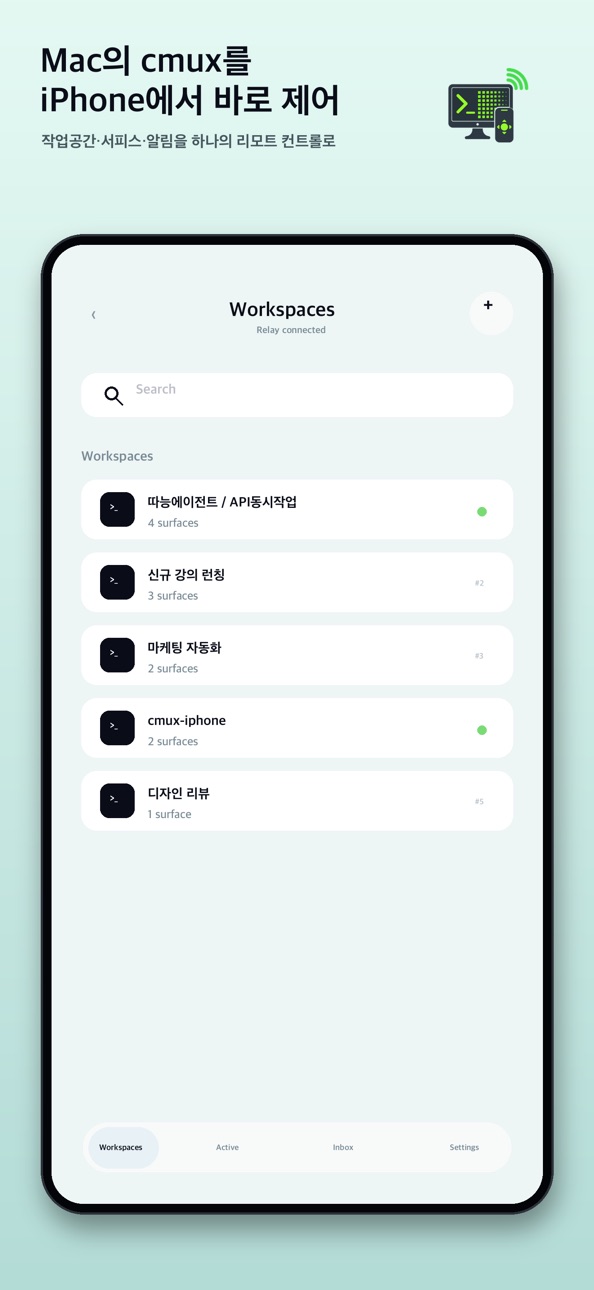
Cmux is a modern terminal multiplexer with workspaces, split surfaces, and integrations for AI coding tools such as Claude Code, Codex, omx, and Cursor. Cmux Remote mirrors the cmux surface you choose, lets you type into it, send keys, switch workspaces, and receive local notifications from a mobile device.
WHO IT IS FOR
This app is for developers who keep long-running coding agents, builds, servers, terminals, or command-line tools active on a personal development machine and want a simple way to check progress or send quick input while away from the desk. It is also useful for people who already use SSH or Tailscale to reach their own computer and want a more focused remote terminal control experience.
HOW IT WORKS
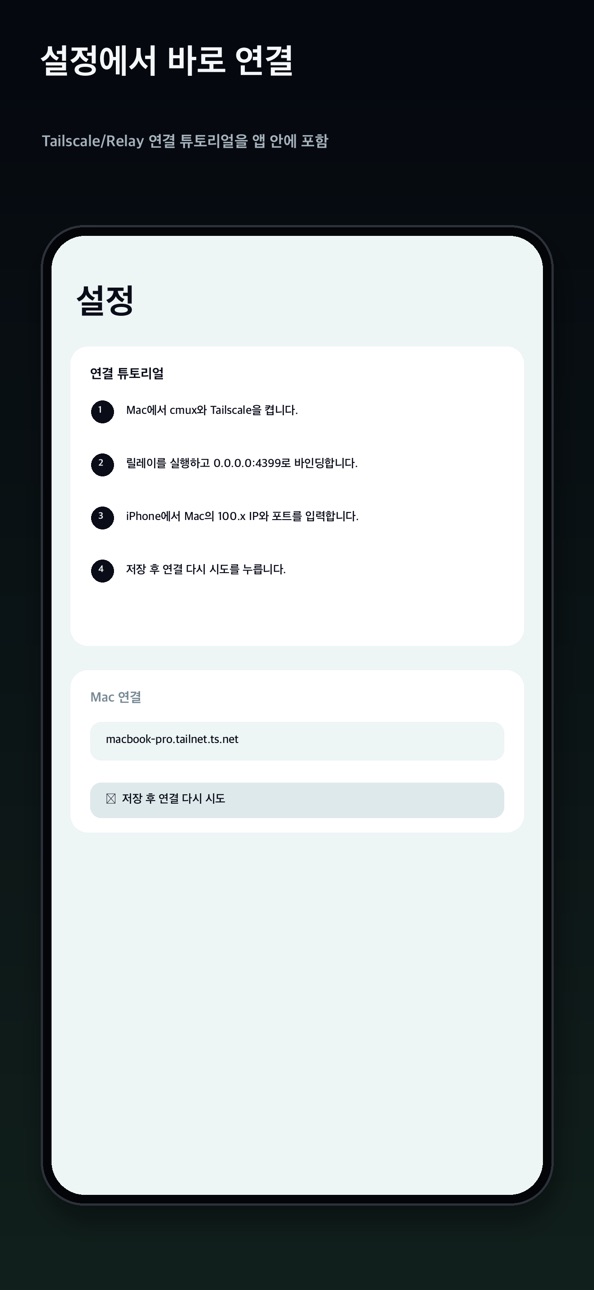
First, install the open-source cmux-relay helper on the computer that runs cmux. Then connect that computer and this device to the same Tailscale tailnet. Open Cmux Remote, enter the computer's Tailscale hostname and relay port, and connect. Your cmux workspaces appear in the app. Choose a surface and start interacting with it.
The relay talks directly to cmux through its local Unix socket. Cmux Remote talks to the relay through a WireGuard-encrypted Tailscale tunnel. There is no hosted backend for terminal data, no analytics pipeline, and no external relay service controlled by the app developer.
FEATURES
Live cmux surface mirroring with ANSI color support.
Korean and CJK character width handling.
Keyboard accessory controls for Esc, Enter, Tab, arrow keys, and Ctrl combinations.
Mouse passthrough support for compatible terminal UIs such as Textual, Bubble Tea, and fzf.
Local notifications for cmux events without an external notification server in version 1.0.
Workspace and surface switching with compact controls.
Pinch-to-zoom terminal font sizing.
Automatic scroll-to-bottom behavior when changing surfaces.
Demo Mode with populated sample data so you can try the interface before setting up a relay.
PRIVACY
Cmux Remote does not include analytics, advertising, or third-party SDK tracking. The bearer token issued by your relay is stored only in secure credential storage on your device. Terminal content and control messages are exchanged only between your device and your own relay over your Tailscale network.
Source code and privacy details are available at:
https://github.com/NewTurn2017/cmux-remote
REQUIREMENTS
A personal computer running cmux 0.64 or later.
The open-source cmux-relay helper installed on that computer.
Both devices connected to the same Tailscale tailnet.
A compatible mobile operating system version for this app.
Cmux Remote is open source under the MIT license. Issues and pull requests are welcome.
Accessibility
ipadiphonemacrealityDevicetvoswatch
Version history 8 versions
Build 887857151v1.0.72026-07-05 20:15:06
Cmux Remote 1.0.7 focuses on quieter notifications, and refreshed App Store copy.
- Adds native Inbox push delivery for cmux events and Claude/Codex-style "needs input" prompts, with APNs-backed routing and regression coverage.
- Adds a Settings control to reduce notification noise — only events that need your input raise an iOS banner, while everything still lands in the Inbox with unread badges.
Build 887328382v1.0.62026-06-24 00:30:48
Cmux Remote 1.0.6 focuses on mobile terminal input polish, keyboard shortcuts, notification delivery, and refreshed App Store copy.
- Adds LIVE input mode for immediate per-character terminal input, so English typing and quick key edits can be sent without
pressing Enter or Submit.
- Protects Korean/Hangul IME input by keeping composed Korean text out of LIVE immediate-send mode, preventing jamo from being
split while typing.
- Adds a dedicated Ctrl-C shortcut to the terminal keyboard bar for interrupting commands while coding.
- Removes the bottom gap under the terminal input panel so the composer sits flush with the bottom edge when the software
keyboard is hidden.
- Adds five terminal rows of extra bottom scroll room, making it possible to pull terminal content above the input panel when
the bottom rows would otherwise be covered.
- Adds native Inbox push delivery for cmux events and Claude/Codex-style “needs input” prompts, with APNs-backed routing and
regression coverage.
- Refreshes all five App Store screenshots to match the latest workspace, terminal, keyboard, Inbox, and settings screens.
Build 886535253v1.0.52026-06-04 22:53:20
Cmux Remote 1.0.5 focuses on mobile terminal input polish and keyboard-safe viewing.
- Adds LIVE input mode for immediate per-character terminal input, so English typing and quick key edits can be sent without pressing Enter or Submit.
- Protects Korean/Hangul IME input by keeping composed Korean text out of LIVE immediate-send mode, preventing jamo from being split while typing.
- Removes the bottom gap under the terminal input panel so the composer sits flush with the bottom edge when the software keyboard is hidden.
- Adds five terminal rows of extra bottom scroll room, making it possible to pull terminal content above the input panel when the bottom rows would otherwise be covered.
- Improves Claude/Codex-style “needs input” Inbox coverage and regression tests for notification visibility.
Build 886274616v1.0.42026-05-29 16:27:35
Cmux Remote 1.0.4 improves terminal responsiveness and prepares the renderer for richer terminal styling.
- Speeds up terminal rendering by caching parsed rows and drawing style runs instead of reprocessing every cell on each frame.
- Keeps a larger bounded terminal history during subscribe and refresh, reducing abrupt 24-line refreshes and unnecessary full-screen reloads.
- Adds 256-color and true-color ANSI rendering support for relay data that includes ANSI styles, while preserving Korean/CJK and emoji column alignment.
- Improves checksum reconciliation so styled rows do not trigger redundant full refreshes.
- Verified on a physical iPhone against a live cmux relay connection.
Build 886227797v1.0.32026-05-28 16:56:44
Cmux Remote 1.0.3 is an urgent reliability fix for real-device Mac connections.
- Fixed an issue where the relay could keep using a stale cmux socket path after cmux restarted or rotated its local Unix socket.
- Prevents the iPhone app from getting stuck on repeated “Connection refused” errors when reconnecting to the Mac.
- Improved relay reinstall behavior so future cmux restarts are discovered automatically.
Build 886062791v1.0.22026-05-24 19:26:18
Cmux Remote 1.0.2 improves everyday remote control from your phone.
- Better keyboard behavior: Enter now dismisses the keyboard after
sending, and the terminal/composer layout stays visible when the
keyboard is open.
- Workspace management: create workspaces with the requested title,
rename existing workspaces, and close unused workspaces from the
workspace list.
- Faster input controls: refreshed shortcut buttons, including /new
and Space for OMX selection flows.
- Image attachments: attach a photo from your phone and send it
through the relay to the connected computer.
- Connected computer status: show battery information when the relay
can provide it.
- Inbox improvements: Claude/Codex-style needs-input events now appear
more reliably in the Inbox.
Build 885997517v1.0.12026-05-22 18:39:17
Improved relay reliability when the local cmux connection is interrupted.
Added per-workspace notification badges so new activity is easier to spot.
Workspace badges now clear consistently when opening a workspace from the list, inbox, or drawer.
Build 885666471v1.02026-05-18 05:05:44
No pricing data captured yet — comparisons appear once the app has paid storefronts or in-app purchases.
Availability 174 of 174 storefronts
| Region | Language | Price | Ratings | Avg | Version |
|---|---|---|---|---|---|
| BE | en-GB | Free | 1 | 5.0 | 1.0.7 |
| DE | de-DE | Free | 1 | 5.0 | 1.0.7 |
| KR | ko | Free | 1 | 5.0 | 1.0.7 |
| US | en-US | Free | 1 | 4.0 | 1.0.7 |
| AE | en-GB | Free | 0 | — | 1.0.7 |
| AF | en-GB | Free | 0 | — | 1.0.7 |
| AG | en-GB | Free | 0 | — | 1.0.7 |
| AI | en-GB | Free | 0 | — | 1.0.7 |
| AL | en-GB | Free | 0 | — | 1.0.7 |
| AM | en-GB | Free | 0 | — | 1.0.7 |
| AO | en-GB | Free | 0 | — | 1.0.7 |
| AR | es-MX | Free | 0 | — | 1.0.7 |
| AT | de-DE | Free | 0 | — | 1.0.7 |
| AU | en-AU | Free | 0 | — | 1.0.7 |
| AZ | en-GB | Free | 0 | — | 1.0.7 |
| BA | en-GB | Free | 0 | — | 1.0.7 |
| BB | en-GB | Free | 0 | — | 1.0.7 |
| BF | en-GB | Free | 0 | — | 1.0.7 |
| BG | en-GB | Free | 0 | — | 1.0.7 |
| BH | en-GB | Free | 0 | — | 1.0.7 |
| BJ | en-GB | Free | 0 | — | 1.0.7 |
| BM | en-GB | Free | 0 | — | 1.0.7 |
| BN | en-GB | Free | 0 | — | 1.0.7 |
| BO | es-MX | Free | 0 | — | 1.0.7 |
| BR | pt-BR | Free | 0 | — | 1.0.7 |
| BS | en-GB | Free | 0 | — | 1.0.7 |
| BT | en-GB | Free | 0 | — | 1.0.7 |
| BW | en-GB | Free | 0 | — | 1.0.7 |
| BY | en-GB | Free | 0 | — | 1.0.7 |
| BZ | en-GB | Free | 0 | — | 1.0.7 |
| CA | en-CA | Free | 0 | — | 1.0.7 |
| CD | en-GB | Free | 0 | — | 1.0.7 |
| CG | en-GB | Free | 0 | — | 1.0.7 |
| CH | de-CH | Free | 0 | — | 1.0.7 |
| CI | fr-FR | Free | 0 | — | 1.0.7 |
| CL | es-MX | Free | 0 | — | 1.0.7 |
| CM | fr-FR | Free | 0 | — | 1.0.7 |
| CN | zh-Hans-CN | Free | 0 | — | 1.0.7 |
| CO | es-MX | Free | 0 | — | 1.0.7 |
| CR | es-MX | Free | 0 | — | 1.0.7 |
| CV | en-GB | Free | 0 | — | 1.0.7 |
| CY | en-GB | Free | 0 | — | 1.0.7 |
| CZ | en-GB | Free | 0 | — | 1.0.7 |
| DK | en-GB | Free | 0 | — | 1.0.7 |
| DM | en-GB | Free | 0 | — | 1.0.7 |
| DO | es-MX | Free | 0 | — | 1.0.7 |
| DZ | en-GB | Free | 0 | — | 1.0.7 |
| EC | es-MX | Free | 0 | — | 1.0.7 |
| EE | en-GB | Free | 0 | — | 1.0.7 |
| EG | en-GB | Free | 0 | — | 1.0.7 |
| ES | es-ES | Free | 0 | — | 1.0.7 |
| FI | en-GB | Free | 0 | — | 1.0.7 |
| FJ | en-GB | Free | 0 | — | 1.0.7 |
| FM | en-GB | Free | 0 | — | 1.0.7 |
| FR | fr-FR | Free | 0 | — | 1.0.7 |
| GA | fr-FR | Free | 0 | — | 1.0.7 |
| GB | en-GB | Free | 0 | — | 1.0.7 |
| GD | en-GB | Free | 0 | — | 1.0.7 |
| GE | en-GB | Free | 0 | — | 1.0.7 |
| GH | en-GB | Free | 0 | — | 1.0.7 |
| GM | en-GB | Free | 0 | — | 1.0.7 |
| GR | en-GB | Free | 0 | — | 1.0.7 |
| GT | es-MX | Free | 0 | — | 1.0.7 |
| GW | en-GB | Free | 0 | — | 1.0.7 |
| GY | en-GB | Free | 0 | — | 1.0.7 |
| HK | zh-Hant-HK | Free | 0 | — | 1.0.7 |
| HN | es-MX | Free | 0 | — | 1.0.7 |
| HR | en-GB | Free | 0 | — | 1.0.7 |
| HU | en-GB | Free | 0 | — | 1.0.7 |
| ID | en-GB | Free | 0 | — | 1.0.7 |
| IE | en-GB | Free | 0 | — | 1.0.7 |
| IL | en-GB | Free | 0 | — | 1.0.7 |
| IN | en-GB | Free | 0 | — | 1.0.7 |
| IQ | en-GB | Free | 0 | — | 1.0.7 |
| IS | en-GB | Free | 0 | — | 1.0.7 |
| IT | it | Free | 0 | — | 1.0.7 |
| JM | en-GB | Free | 0 | — | 1.0.7 |
| JO | en-GB | Free | 0 | — | 1.0.7 |
| JP | ja | Free | 0 | — | 1.0.7 |
| KE | en-GB | Free | 0 | — | 1.0.7 |
| KG | en-GB | Free | 0 | — | 1.0.7 |
| KH | en-GB | Free | 0 | — | 1.0.7 |
| KN | en-GB | Free | 0 | — | 1.0.7 |
| KW | en-GB | Free | 0 | — | 1.0.7 |
| KY | en-GB | Free | 0 | — | 1.0.7 |
| KZ | en-GB | Free | 0 | — | 1.0.7 |
| LA | en-GB | Free | 0 | — | 1.0.7 |
| LC | en-GB | Free | 0 | — | 1.0.7 |
| LK | en-GB | Free | 0 | — | 1.0.7 |
| LR | en-GB | Free | 0 | — | 1.0.7 |
| LT | en-GB | Free | 0 | — | 1.0.7 |
| LU | en-GB | Free | 0 | — | 1.0.7 |
| LV | en-GB | Free | 0 | — | 1.0.7 |
| LY | en-GB | Free | 0 | — | 1.0.7 |
| MA | en-GB | Free | 0 | — | 1.0.7 |
| MD | en-GB | Free | 0 | — | 1.0.7 |
| ME | en-GB | Free | 0 | — | 1.0.7 |
| MG | en-GB | Free | 0 | — | 1.0.7 |
| MK | en-GB | Free | 0 | — | 1.0.7 |
| ML | en-GB | Free | 0 | — | 1.0.7 |
| MM | en-GB | Free | 0 | — | 1.0.7 |
| MN | en-GB | Free | 0 | — | 1.0.7 |
| MO | zh-Hant-HK | Free | 0 | — | 1.0.7 |
| MR | en-GB | Free | 0 | — | 1.0.7 |
| MS | en-GB | Free | 0 | — | 1.0.7 |
| MT | en-GB | Free | 0 | — | 1.0.7 |
| MU | en-GB | Free | 0 | — | 1.0.7 |
| MV | en-GB | Free | 0 | — | 1.0.7 |
| MW | en-GB | Free | 0 | — | 1.0.7 |
| MX | es-MX | Free | 0 | — | 1.0.7 |
| MY | en-GB | Free | 0 | — | 1.0.7 |
| MZ | en-GB | Free | 0 | — | 1.0.7 |
| NA | en-GB | Free | 0 | — | 1.0.7 |
| NE | en-GB | Free | 0 | — | 1.0.7 |
| NG | en-GB | Free | 0 | — | 1.0.7 |
| NI | es-MX | Free | 0 | — | 1.0.7 |
| NL | nl | Free | 0 | — | 1.0.7 |
| NO | en-GB | Free | 0 | — | 1.0.7 |
| NP | en-GB | Free | 0 | — | 1.0.7 |
| NR | en-GB | Free | 0 | — | 1.0.7 |
| NZ | en-AU | Free | 0 | — | 1.0.7 |
| OM | en-GB | Free | 0 | — | 1.0.7 |
| PA | es-MX | Free | 0 | — | 1.0.7 |
| PE | es-MX | Free | 0 | — | 1.0.7 |
| PG | en-GB | Free | 0 | — | 1.0.7 |
| PH | en-GB | Free | 0 | — | 1.0.7 |
| PK | en-GB | Free | 0 | — | 1.0.7 |
| PL | en-GB | Free | 0 | — | 1.0.7 |
| PT | pt-PT | Free | 0 | — | 1.0.7 |
| PW | en-GB | Free | 0 | — | 1.0.7 |
| PY | es-MX | Free | 0 | — | 1.0.7 |
| QA | en-GB | Free | 0 | — | 1.0.7 |
| RO | en-GB | Free | 0 | — | 1.0.7 |
| RS | en-GB | Free | 0 | — | 1.0.7 |
| RU | ru | Free | 0 | — | 1.0.7 |
| RW | en-GB | Free | 0 | — | 1.0.7 |
| SA | en-GB | Free | 0 | — | 1.0.7 |
| SB | en-GB | Free | 0 | — | 1.0.7 |
| SC | en-GB | Free | 0 | — | 1.0.7 |
| SE | sv | Free | 0 | — | 1.0.7 |
| SG | en-GB | Free | 0 | — | 1.0.7 |
| SI | en-GB | Free | 0 | — | 1.0.7 |
| SK | en-GB | Free | 0 | — | 1.0.7 |
| SL | en-GB | Free | 0 | — | 1.0.7 |
| SN | en-GB | Free | 0 | — | 1.0.7 |
| SR | en-GB | Free | 0 | — | 1.0.7 |
| ST | en-GB | Free | 0 | — | 1.0.7 |
| SV | es-MX | Free | 0 | — | 1.0.7 |
| SZ | en-GB | Free | 0 | — | 1.0.7 |
| TC | en-GB | Free | 0 | — | 1.0.7 |
| TD | en-GB | Free | 0 | — | 1.0.7 |
| TH | en-GB | Free | 0 | — | 1.0.7 |
| TJ | en-GB | Free | 0 | — | 1.0.7 |
| TM | en-GB | Free | 0 | — | 1.0.7 |
| TN | en-GB | Free | 0 | — | 1.0.7 |
| TO | en-GB | Free | 0 | — | 1.0.7 |
| TR | en-GB | Free | 0 | — | 1.0.7 |
| TT | en-GB | Free | 0 | — | 1.0.7 |
| TW | zh-Hant-TW | Free | 0 | — | 1.0.7 |
| TZ | en-GB | Free | 0 | — | 1.0.7 |
| UA | en-GB | Free | 0 | — | 1.0.7 |
| UG | en-GB | Free | 0 | — | 1.0.7 |
| UY | en-GB | Free | 0 | — | 1.0.7 |
| UZ | en-GB | Free | 0 | — | 1.0.7 |
| VC | en-GB | Free | 0 | — | 1.0.7 |
| VE | es-MX | Free | 0 | — | 1.0.7 |
| VG | en-GB | Free | 0 | — | 1.0.7 |
| VN | en-GB | Free | 0 | — | 1.0.7 |
| VU | en-GB | Free | 0 | — | 1.0.7 |
| XK | en-GB | Free | 0 | — | 1.0.7 |
| YE | en-GB | Free | 0 | — | 1.0.7 |
| ZA | en-GB | Free | 0 | — | 1.0.7 |
| ZM | en-GB | Free | 0 | — | 1.0.7 |
| ZW | en-GB | Free | 0 | — | 1.0.7 |
Change log 12 changes · BB
✎
releaseNotes updated
Cmux Remote 1.0.7 focuses on quieter notifications, and refreshed App Store copy.
- Adds native Inbox push delivery for cmux events and Claude/Codex-style "nee
✎
description updated
Cmux Remote is a private remote-control client for the cmux terminal multiplexer running on your own computer. Connect through your Tailscale network so your te
✎
subtitle updated
Terminal remote for cmux
✎
name updated
Cmux Remote
◆
Version 1.0.7 released
Cmux Remote 1.0.7 focuses on quieter notifications, and refreshed App Store copy.
- Adds native Inbox push delivery for cmux events and Claude/Codex-style "needs input" prompts, with APNs-backed routing and regression coverage.
- Adds a Se
◆
Version 1.0.6 released
Cmux Remote 1.0.6 focuses on mobile terminal input polish, keyboard shortcuts, notification delivery, and refreshed App Store copy.
- Adds LIVE input mode for immediate per-character terminal input, so English typing and quick key edits
◆
Version 1.0.5 released
Cmux Remote 1.0.5 focuses on mobile terminal input polish and keyboard-safe viewing.
- Adds LIVE input mode for immediate per-character terminal input, so English typing and quick key edits can be sent without pressing Enter or Submit.
- P
◆
Version 1.0.4 released
Cmux Remote 1.0.4 improves terminal responsiveness and prepares the renderer for richer terminal styling.
- Speeds up terminal rendering by caching parsed rows and drawing style runs instead of reprocessing every cell on each frame.
-
◆
Version 1.0.3 released
Cmux Remote 1.0.3 is an urgent reliability fix for real-device Mac connections.
- Fixed an issue where the relay could keep using a stale cmux socket path after cmux restarted or rotated its local Unix socket.
- Prevents the iPhone app
◆
Version 1.0.2 released
Cmux Remote 1.0.2 improves everyday remote control from your phone.
- Better keyboard behavior: Enter now dismisses the keyboard after
sending, and the terminal/composer layout stays visible when the
keyboard is open.
- Workspace managemen
◆
Version 1.0.1 released
Improved relay reliability when the local cmux connection is interrupted.
Added per-workspace notification badges so new activity is easier to spot.
Workspace badges now clear consistently when opening a workspace from the list, inbox, or d
◆
Version 1.0 released