Home › Productivity

ComFlow: Tasks, To-Do, Planner
Task Management, Teams, Roles
 DO
DO
 AEen-GB
 AFen-GB
 AGen-GB
 AIen-GB
 ALen-GB
 AMen-GB
 AOen-GB
 ARes-MX
 ATde-DE
 AUen-AU
 AZen-GB
 BAen-GB
 BBen-GB
 BEen-GB
 BFen-GB
 BGen-GB
 BHen-GB
 BJen-GB
 BMen-GB
 BNen-GB
 BOes-MX
 BRpt-BR
 BSen-GB
 BTen-GB
 BWen-GB
 BYen-GB
 BZen-GB
 CAen-CA
 CDen-GB
 CGen-GB
 CHde-CH
 CIfr-FR
 CLes-MX
 CMfr-FR
 CNzh-Hans-CN
 COes-MX
 CRes-MX
 CVen-GB
 CYen-GB
 CZen-GB
 DEde-DE
 DKen-GB
 DMen-GBDOes-MX
 DZen-GB
 ECes-MX
 EEen-GB
 EGen-GB
 ESes-ES
 FIen-GB
 FJen-GB
 FMen-GB
 FRfr-FR
 GAfr-FR
 GBen-GB
 GDen-GB
 GEen-GB
 GHen-GB
 GMen-GB
 GRen-GB
 GTes-MX
 GWen-GB
 GYen-GB
 HKzh-Hant-HK
 HNes-MX
 HRen-GB
 HUen-GB
 IDen-GB
 IEen-GB
 ILen-GB
 INen-GB
 IQen-GB
 ISen-GB
 ITit
ITit JMen-GB
 JOen-GB
 JPja
JPja KEen-GB
 KGen-GB
 KHen-GB
 KNen-GB
 KRko
KRko KWen-GB
 KYen-GB
 KZen-GB
 LAen-GB
 LBen-GB
 LCen-GB
 LKen-GB
 LRen-GB
 LTen-GB
 LUen-GB
 LVen-GB
 LYen-GB
 MAen-GB
 MDen-GB
 MEen-GB
 MGen-GB
 MKen-GB
 MLen-GB
 MMen-GB
 MNen-GB
 MOzh-Hant-HK
 MRen-GB
 MSen-GB
 MTen-GB
 MUen-GB
 MVen-GB
 MWen-GB
 MXes-MX
 MYen-GB
 MZen-GB
 NAen-GB
 NEen-GB
 NGen-GB
 NIes-MX
 NLnl
NLnl NOen-GB
 NPen-GB
 NRen-GB
 NZen-AU
 OMen-GB
 PAes-MX
 PEes-MX
 PGen-GB
 PHen-GB
 PKen-GB
 PLen-GB
 PTpt-PT
 PWen-GB
 PYes-MX
 QAen-GB
 ROen-GB
 RSen-GB
 RUru
RUru RWen-GB
 SAen-GB
 SBen-GB
 SCen-GB
 SEsv
SEsv SGen-GB
 SIen-GB
 SKen-GB
 SLen-GB
 SNen-GB
 SRen-GB
 STen-GB
 SVes-MX
 SZen-GB
 TCen-GB
 TDen-GB
 THen-GB
 TJen-GB
 TMen-GB
 TNen-GB
 TOen-GB
 TRen-GB
 TTen-GB
 TWzh-Hant-TW
 TZen-GB
 UAen-GB
 UGen-GB
 USen-US
 UYen-GB
 UZen-GB
 VCen-GB
 VEes-MX
 VGen-GB
 VNen-GB
 VUen-GB
 XKen-GB
 YEen-GB
 ZAen-GB
 ZMen-GB
 ZWen-GB
175 of 175 storefronts
Content in en-US
Content in en-US
Information
Preview 2 platforms
iPhone 8 images



iPad 8 images



Description
Manage tasks, teams, roles, and business workflows with ComFlow.
ComFlow is a powerful task, workflow, and company process management app designed to help teams work more clearly, efficiently, and transparently.
Whether you manage a small business, a growing company, a restaurant, a hotel, an agency, or an internal operations team, ComFlow helps you organize daily work, assign responsibilities, track progress, and keep every process under control.
With ComFlow, you can create companies, add team members, assign roles, manage permissions, create tasks, follow workflows, and monitor team performance from one simple platform.
Manage Your Company Structure
ComFlow allows you to create and manage your company workspace with flexible team organization. Add employees, managers, and administrators, then define what each person can access or manage based on their role.
This helps your business stay organized while keeping sensitive information and management tools under control.
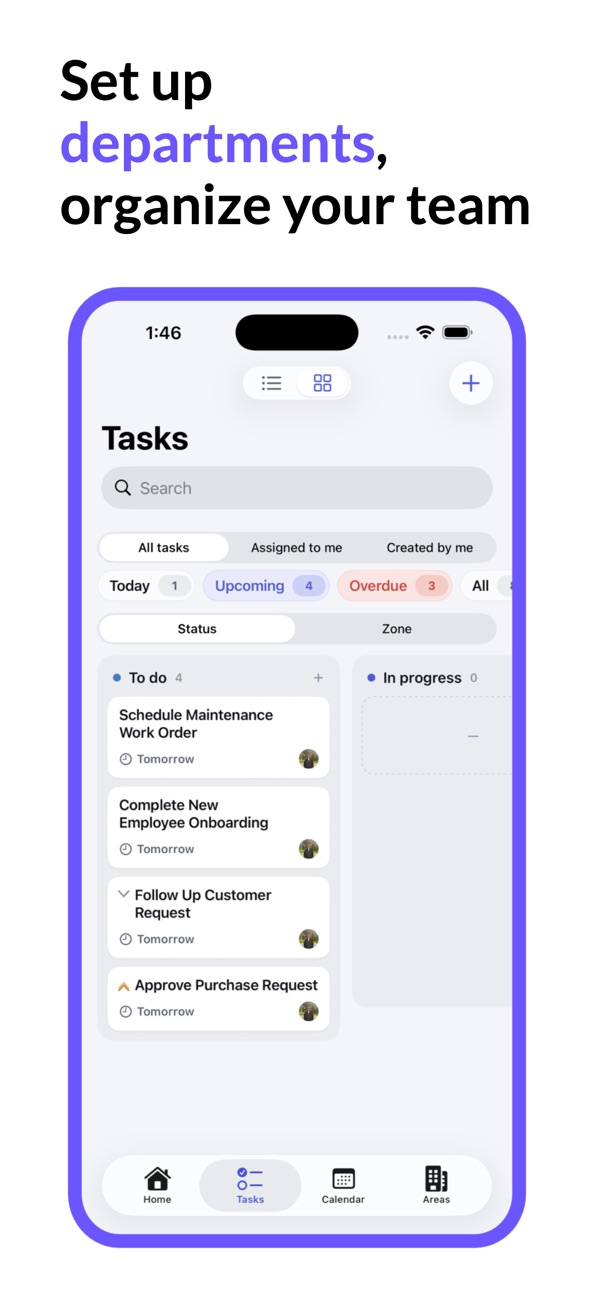
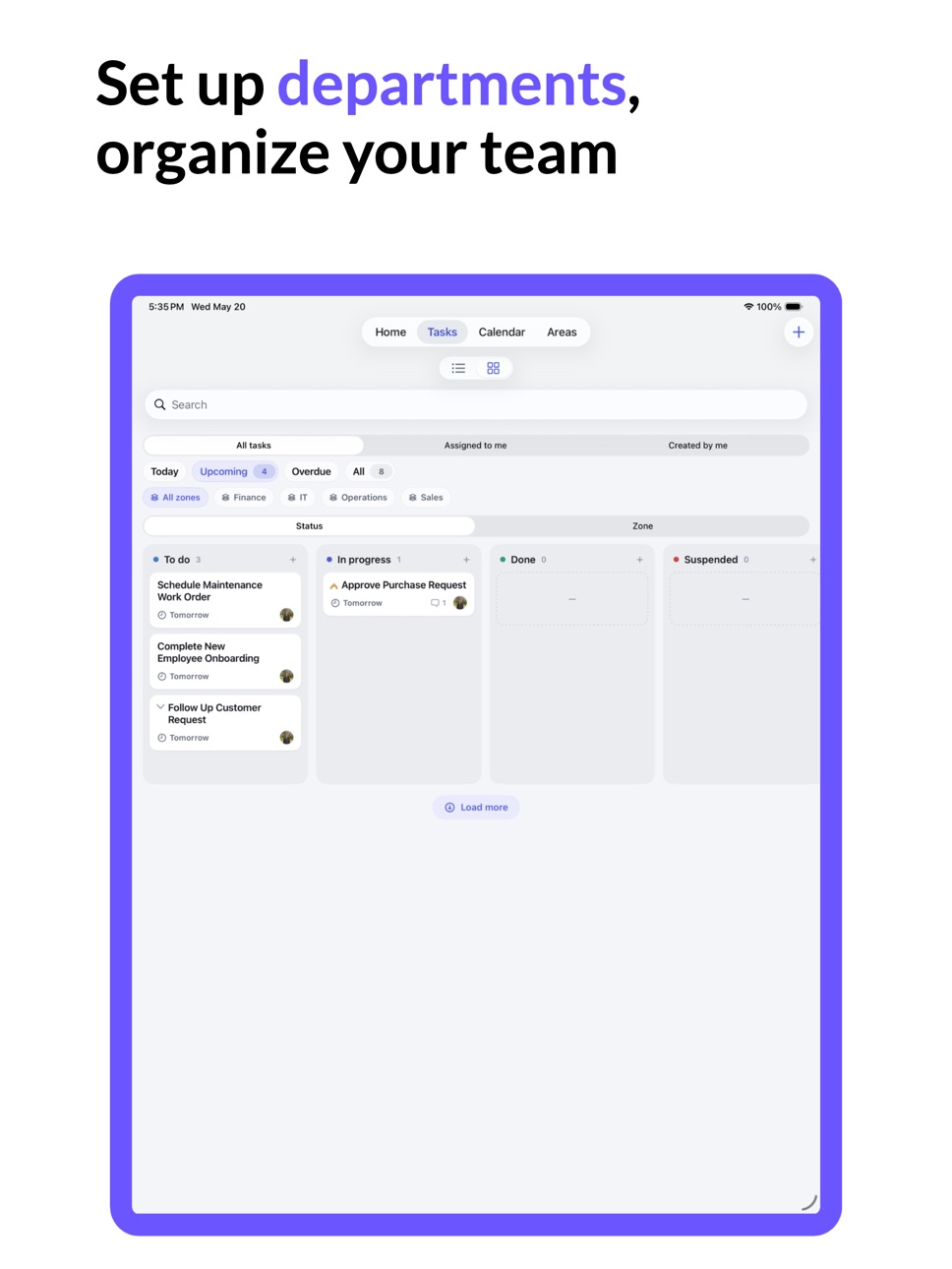
Create and Track Tasks Easily
Create tasks for your team, assign them to the right people, set priorities, and follow their progress from start to finish. ComFlow helps everyone understand what needs to be done, who is responsible, and what stage each task is currently in.
No more scattered notes, unclear responsibilities, or lost follow-ups.
Organize Workflows by Departments or Areas
Every business has different departments, teams, or operational areas. ComFlow helps you organize work around these structures so each team can manage its own tasks and responsibilities more efficiently.
You can use ComFlow for operations, customer support, sales, technical work, internal processes, daily checklists, maintenance tasks, and more.
Role-Based Permissions
Not every team member needs access to everything. ComFlow includes role and permission management so you can control what each user can see, create, edit, or manage.
This makes it easier to build a structured company environment with clear responsibilities and secure access control.
Performance and Progress Reports
Track how your team is performing with useful reports and insights. See completed tasks, pending work, progress status, and team activity more clearly.
ComFlow helps managers make better decisions by giving them visibility over company workflows and operational performance.
Built for Real Business Processes
ComFlow is not just a simple to-do list. It is designed for businesses that need structured task tracking, workflow management, team coordination, and process control.
Use ComFlow to manage:
Daily team tasks
Company workflows
Department operations
Employee responsibilities
Customer-related tasks
Internal requests
Follow-ups and approvals
Performance tracking
Business processes
Team collaboration
Why Use ComFlow?
ComFlow helps your business:
Keep tasks organized
Improve team communication
Assign clear responsibilities
Track work progress
Manage company roles and permissions
Reduce missed tasks and follow-ups
Monitor team performance
Create a more transparent workflow
Centralize company operations in one app
Work Smarter with ComFlow
ComFlow gives your team a clearer way to manage work. From task creation to completion, from employee roles to company performance, every important process can be followed in one place.
If your business needs better organization, clearer responsibilities, and more efficient workflow tracking, ComFlow is built for you.
Accessibility
ipadiphonemacrealityDevicetvoswatch
Version history 1 versions
Build 884604577v1.02026-06-12 14:15:44
No pricing data captured yet — comparisons appear once the app has paid storefronts or in-app purchases.
Availability 175 of 175 storefronts
| Region | Language | Price | Ratings | Avg | Version |
|---|---|---|---|---|---|
| AE | en-GB | Free | 0 | — | 1.0 |
| AF | en-GB | Free | 0 | — | 1.0 |
| AG | en-GB | Free | 0 | — | 1.0 |
| AI | en-GB | Free | 0 | — | 1.0 |
| AL | en-GB | Free | 0 | — | 1.0 |
| AM | en-GB | Free | 0 | — | 1.0 |
| AO | en-GB | Free | 0 | — | 1.0 |
| AR | es-MX | Free | 0 | — | 1.0 |
| AT | de-DE | Free | 0 | — | 1.0 |
| AU | en-AU | Free | 0 | — | 1.0 |
| AZ | en-GB | Free | 0 | — | 1.0 |
| BA | en-GB | Free | 0 | — | 1.0 |
| BB | en-GB | Free | 0 | — | 1.0 |
| BE | en-GB | Free | 0 | — | 1.0 |
| BF | en-GB | Free | 0 | — | 1.0 |
| BG | en-GB | Free | 0 | — | 1.0 |
| BH | en-GB | Free | 0 | — | 1.0 |
| BJ | en-GB | Free | 0 | — | 1.0 |
| BM | en-GB | Free | 0 | — | 1.0 |
| BN | en-GB | Free | 0 | — | 1.0 |
| BO | es-MX | Free | 0 | — | 1.0 |
| BR | pt-BR | Free | 0 | — | 1.0 |
| BS | en-GB | Free | 0 | — | 1.0 |
| BT | en-GB | Free | 0 | — | 1.0 |
| BW | en-GB | Free | 0 | — | 1.0 |
| BY | en-GB | Free | 0 | — | 1.0 |
| BZ | en-GB | Free | 0 | — | 1.0 |
| CA | en-CA | Free | 0 | — | 1.0 |
| CD | en-GB | Free | 0 | — | 1.0 |
| CG | en-GB | Free | 0 | — | 1.0 |
| CH | de-CH | Free | 0 | — | 1.0 |
| CI | fr-FR | Free | 0 | — | 1.0 |
| CL | es-MX | Free | 0 | — | 1.0 |
| CM | fr-FR | Free | 0 | — | 1.0 |
| CN | zh-Hans-CN | Free | 0 | — | 1.0 |
| CO | es-MX | Free | 0 | — | 1.0 |
| CR | es-MX | Free | 0 | — | 1.0 |
| CV | en-GB | Free | 0 | — | 1.0 |
| CY | en-GB | Free | 0 | — | 1.0 |
| CZ | en-GB | Free | 0 | — | 1.0 |
| DE | de-DE | Free | 0 | — | 1.0 |
| DK | en-GB | Free | 0 | — | 1.0 |
| DM | en-GB | Free | 0 | — | 1.0 |
| DO | es-MX | Free | 0 | — | 1.0 |
| DZ | en-GB | Free | 0 | — | 1.0 |
| EC | es-MX | Free | 0 | — | 1.0 |
| EE | en-GB | Free | 0 | — | 1.0 |
| EG | en-GB | Free | 0 | — | 1.0 |
| ES | es-ES | Free | 0 | — | 1.0 |
| FI | en-GB | Free | 0 | — | 1.0 |
| FJ | en-GB | Free | 0 | — | 1.0 |
| FM | en-GB | Free | 0 | — | 1.0 |
| FR | fr-FR | Free | 0 | — | 1.0 |
| GA | fr-FR | Free | 0 | — | 1.0 |
| GB | en-GB | Free | 0 | — | 1.0 |
| GD | en-GB | Free | 0 | — | 1.0 |
| GE | en-GB | Free | 0 | — | 1.0 |
| GH | en-GB | Free | 0 | — | 1.0 |
| GM | en-GB | Free | 0 | — | 1.0 |
| GR | en-GB | Free | 0 | — | 1.0 |
| GT | es-MX | Free | 0 | — | 1.0 |
| GW | en-GB | Free | 0 | — | 1.0 |
| GY | en-GB | Free | 0 | — | 1.0 |
| HK | zh-Hant-HK | Free | 0 | — | 1.0 |
| HN | es-MX | Free | 0 | — | 1.0 |
| HR | en-GB | Free | 0 | — | 1.0 |
| HU | en-GB | Free | 0 | — | 1.0 |
| ID | en-GB | Free | 0 | — | 1.0 |
| IE | en-GB | Free | 0 | — | 1.0 |
| IL | en-GB | Free | 0 | — | 1.0 |
| IN | en-GB | Free | 0 | — | 1.0 |
| IQ | en-GB | Free | 0 | — | 1.0 |
| IS | en-GB | Free | 0 | — | 1.0 |
| IT | it | Free | 0 | — | 1.0 |
| JM | en-GB | Free | 0 | — | 1.0 |
| JO | en-GB | Free | 0 | — | 1.0 |
| JP | ja | Free | 0 | — | 1.0 |
| KE | en-GB | Free | 0 | — | 1.0 |
| KG | en-GB | Free | 0 | — | 1.0 |
| KH | en-GB | Free | 0 | — | 1.0 |
| KN | en-GB | Free | 0 | — | 1.0 |
| KR | ko | Free | 0 | — | 1.0 |
| KW | en-GB | Free | 0 | — | 1.0 |
| KY | en-GB | Free | 0 | — | 1.0 |
| KZ | en-GB | Free | 0 | — | 1.0 |
| LA | en-GB | Free | 0 | — | 1.0 |
| LB | en-GB | Free | 0 | — | 1.0 |
| LC | en-GB | Free | 0 | — | 1.0 |
| LK | en-GB | Free | 0 | — | 1.0 |
| LR | en-GB | Free | 0 | — | 1.0 |
| LT | en-GB | Free | 0 | — | 1.0 |
| LU | en-GB | Free | 0 | — | 1.0 |
| LV | en-GB | Free | 0 | — | 1.0 |
| LY | en-GB | Free | 0 | — | 1.0 |
| MA | en-GB | Free | 0 | — | 1.0 |
| MD | en-GB | Free | 0 | — | 1.0 |
| ME | en-GB | Free | 0 | — | 1.0 |
| MG | en-GB | Free | 0 | — | 1.0 |
| MK | en-GB | Free | 0 | — | 1.0 |
| ML | en-GB | Free | 0 | — | 1.0 |
| MM | en-GB | Free | 0 | — | 1.0 |
| MN | en-GB | Free | 0 | — | 1.0 |
| MO | zh-Hant-HK | Free | 0 | — | 1.0 |
| MR | en-GB | Free | 0 | — | 1.0 |
| MS | en-GB | Free | 0 | — | 1.0 |
| MT | en-GB | Free | 0 | — | 1.0 |
| MU | en-GB | Free | 0 | — | 1.0 |
| MV | en-GB | Free | 0 | — | 1.0 |
| MW | en-GB | Free | 0 | — | 1.0 |
| MX | es-MX | Free | 0 | — | 1.0 |
| MY | en-GB | Free | 0 | — | 1.0 |
| MZ | en-GB | Free | 0 | — | 1.0 |
| NA | en-GB | Free | 0 | — | 1.0 |
| NE | en-GB | Free | 0 | — | 1.0 |
| NG | en-GB | Free | 0 | — | 1.0 |
| NI | es-MX | Free | 0 | — | 1.0 |
| NL | nl | Free | 0 | — | 1.0 |
| NO | en-GB | Free | 0 | — | 1.0 |
| NP | en-GB | Free | 0 | — | 1.0 |
| NR | en-GB | Free | 0 | — | 1.0 |
| NZ | en-AU | Free | 0 | — | 1.0 |
| OM | en-GB | Free | 0 | — | 1.0 |
| PA | es-MX | Free | 0 | — | 1.0 |
| PE | es-MX | Free | 0 | — | 1.0 |
| PG | en-GB | Free | 0 | — | 1.0 |
| PH | en-GB | Free | 0 | — | 1.0 |
| PK | en-GB | Free | 0 | — | 1.0 |
| PL | en-GB | Free | 0 | — | 1.0 |
| PT | pt-PT | Free | 0 | — | 1.0 |
| PW | en-GB | Free | 0 | — | 1.0 |
| PY | es-MX | Free | 0 | — | 1.0 |
| QA | en-GB | Free | 0 | — | 1.0 |
| RO | en-GB | Free | 0 | — | 1.0 |
| RS | en-GB | Free | 0 | — | 1.0 |
| RU | ru | Free | 0 | — | 1.0 |
| RW | en-GB | Free | 0 | — | 1.0 |
| SA | en-GB | Free | 0 | — | 1.0 |
| SB | en-GB | Free | 0 | — | 1.0 |
| SC | en-GB | Free | 0 | — | 1.0 |
| SE | sv | Free | 0 | — | 1.0 |
| SG | en-GB | Free | 0 | — | 1.0 |
| SI | en-GB | Free | 0 | — | 1.0 |
| SK | en-GB | Free | 0 | — | 1.0 |
| SL | en-GB | Free | 0 | — | 1.0 |
| SN | en-GB | Free | 0 | — | 1.0 |
| SR | en-GB | Free | 0 | — | 1.0 |
| ST | en-GB | Free | 0 | — | 1.0 |
| SV | es-MX | Free | 0 | — | 1.0 |
| SZ | en-GB | Free | 0 | — | 1.0 |
| TC | en-GB | Free | 0 | — | 1.0 |
| TD | en-GB | Free | 0 | — | 1.0 |
| TH | en-GB | Free | 0 | — | 1.0 |
| TJ | en-GB | Free | 0 | — | 1.0 |
| TM | en-GB | Free | 0 | — | 1.0 |
| TN | en-GB | Free | 0 | — | 1.0 |
| TO | en-GB | Free | 0 | — | 1.0 |
| TR | en-GB | Free | 0 | — | 1.0 |
| TT | en-GB | Free | 0 | — | 1.0 |
| TW | zh-Hant-TW | Free | 0 | — | 1.0 |
| TZ | en-GB | Free | 0 | — | 1.0 |
| UA | en-GB | Free | 0 | — | 1.0 |
| UG | en-GB | Free | 0 | — | 1.0 |
| US | en-US | Free | 0 | — | 1.0 |
| UY | en-GB | Free | 0 | — | 1.0 |
| UZ | en-GB | Free | 0 | — | 1.0 |
| VC | en-GB | Free | 0 | — | 1.0 |
| VE | es-MX | Free | 0 | — | 1.0 |
| VG | en-GB | Free | 0 | — | 1.0 |
| VN | en-GB | Free | 0 | — | 1.0 |
| VU | en-GB | Free | 0 | — | 1.0 |
| XK | en-GB | Free | 0 | — | 1.0 |
| YE | en-GB | Free | 0 | — | 1.0 |
| ZA | en-GB | Free | 0 | — | 1.0 |
| ZM | en-GB | Free | 0 | — | 1.0 |
| ZW | en-GB | Free | 0 | — | 1.0 |
Change log 4 changes · DO
✎
description updated
Manage tasks, teams, roles, and business workflows with ComFlow.
ComFlow is a powerful task, workflow, and company process management app designed to help team
✎
subtitle updated
Task Management, Teams, Roles
✎
name updated
ComFlow: Tasks, To-Do, Planner
◆
Version 1.0 released