Home › Utilities

 BB
BB
 CNzh-Hans-CN
 AEen-GB
 AFen-GB
 AGen-GB
 AIen-GB
 ALen-GB
 AMen-GB
 AOen-GB
 ARes-MX
 ATde-DE
 AUen-AU
 AZen-GB
 BAen-GBBBen-GB
 BEen-GB
 BFen-GB
 BGen-GB
 BHen-GB
 BJen-GB
 BMen-GB
 BNen-GB
 BOes-MX
 BRpt-BR
 BSen-GB
 BTen-GB
 BWen-GB
 BYen-GB
 BZen-GB
 CAen-CA
 CDen-GB
 CGen-GB
 CHde-CH
 CIfr-FR
 CLes-MX
 CMfr-FR
 COes-MX
 CRes-MX
 CVen-GB
 CYen-GB
 CZen-GB
 DEde-DE
 DKen-GB
 DMen-GB
 DOes-MX
 DZen-GB
 ECes-MX
 EEen-GB
 EGen-GB
 ESes-ES
 FIen-GB
 FJen-GB
 FMen-GB
 FRfr-FR
 GAfr-FR
 GBen-GB
 GDen-GB
 GEen-GB
 GHen-GB
 GMen-GB
 GRen-GB
 GTes-MX
 GWen-GB
 GYen-GB
 HKzh-Hant-HK
 HNes-MX
 HRen-GB
 HUen-GB
 IDen-GB
 IEen-GB
 ILen-GB
 INen-GB
 IQen-GB
 ISen-GB
 ITit
ITit JMen-GB
 JOen-GB
 JPja
JPja KEen-GB
 KGen-GB
 KHen-GB
 KNen-GB
 KRko
KRko KWen-GB
 KYen-GB
 KZen-GB
 LAen-GB
 LBen-GB
 LCen-GB
 LKen-GB
 LRen-GB
 LTen-GB
 LUen-GB
 LVen-GB
 LYen-GB
 MAen-GB
 MDen-GB
 MEen-GB
 MGen-GB
 MKen-GB
 MLen-GB
 MMen-GB
 MNen-GB
 MOzh-Hant-HK
 MRen-GB
 MSen-GB
 MTen-GB
 MUen-GB
 MVen-GB
 MWen-GB
 MXes-MX
 MYen-GB
 MZen-GB
 NAen-GB
 NEen-GB
 NGen-GB
 NIes-MX
 NLnl
NLnl NOen-GB
 NPen-GB
 NRen-GB
 NZen-AU
 OMen-GB
 PAes-MX
 PEes-MX
 PGen-GB
 PHen-GB
 PKen-GB
 PLen-GB
 PTpt-PT
 PWen-GB
 PYes-MX
 QAen-GB
 ROen-GB
 RSen-GB
 RUru
RUru RWen-GB
 SAen-GB
 SBen-GB
 SCen-GB
 SEsv
SEsv SGen-GB
 SIen-GB
 SKen-GB
 SLen-GB
 SNen-GB
 SRen-GB
 STen-GB
 SVes-MX
 SZen-GB
 TCen-GB
 TDen-GB
 THen-GB
 TJen-GB
 TMen-GB
 TNen-GB
 TOen-GB
 TRen-GB
 TTen-GB
 TWzh-Hant-TW
 TZen-GB
 UAen-GB
 UGen-GB
 USen-US
 UYen-GB
 UZen-GB
 VCen-GB
 VEes-MX
 VGen-GB
 VNen-GB
 VUen-GB
 XKen-GB
 YEen-GB
 ZAen-GB
 ZMen-GB
 ZWen-GB
175 of 175 storefronts
Content in en-US
Content in en-US
Information
Apple ID6762325441
Bundle IDcom.YiMingStudio.PureAlarmClock
SellerSeller
Min iOS15.6
Min macOS12.5
Device familiesiphone, ipod
Released2026-04-29
Copyright© 2026 YiMing Studio
Privacy policyLink ↗
Preview 1 platform
iPhone 8 images




What’s New Version 1.1.1
• Repeat Options now includes common templates for quick, one-tap repeat setup
• Fixed several issues to improve stability and reliability
Description
PureAlarm is a focused alarm clock for shift workers, nurses, and anyone on a rotating schedule—no ads, no extra notifications, just reliable on-time reminders.
2-MONTH FREE TRIAL · NO ADS · NO SPAM NOTIFICATIONS
Tired of bloated alarm apps? PureAlarm does one job well: ring when you need it, with repeat rules that match real life—not only Mon–Fri.
LIMITED TIME — US & CANADA ONLY
Unlock all Pro features with a one-time lifetime purchase for $3.99. Offer ends June 30, 2026. After that date, the lifetime buyout option will revert to its original price, prices are subject to the display on the page; subscription plans will always apply. Restore purchases anytime in the app.
ABOUT PUREALARM
• Pure functionality: alarm features only—snooze, early reminders, groups, and rich repeat modes.
• Pure interface: familiar, clean layout inspired by the system Clock app; light and dark mode follow the system.
• Privacy-first: no ad tracking; your alarm data stays on your device.
WHY USERS CHOOSE PUREALARM
• No ads—for free or Pro users.
• Minimal notifications: only your alarm alerts and essential app status—no marketing push.
• Free users can permanently dismiss the subscription banner on the home screen.
• Powerful repeat engine for shift rotations, timed meals, medication, anniversaries, and more.
GENERAL FEATURES
• Vibration and custom ringtones
• Snooze
• Early reminder before the main alarm (custom lead time)
• Alarm groups (e.g., keep anniversary reminders organized)
• Quick on/off on the alarm list
12 REPEAT MODES
Free (7 modes)
• One-time — rings once, then stops after dismiss
• Daily — every day
• Weekly (multi-select) — one or more weekdays, like the system alarm
• Monthly — fixed date each month (e.g., the 31st rings on the last day of shorter months)
• Yearly — same date every year
• Weekends — Saturday and Sunday only
• Workdays — Monday through Friday only
Pro (5 modes) — ideal for shift work
• Custom interval — every N days from a start date you choose
• Specific dates — one or more dates, each with its own time and label
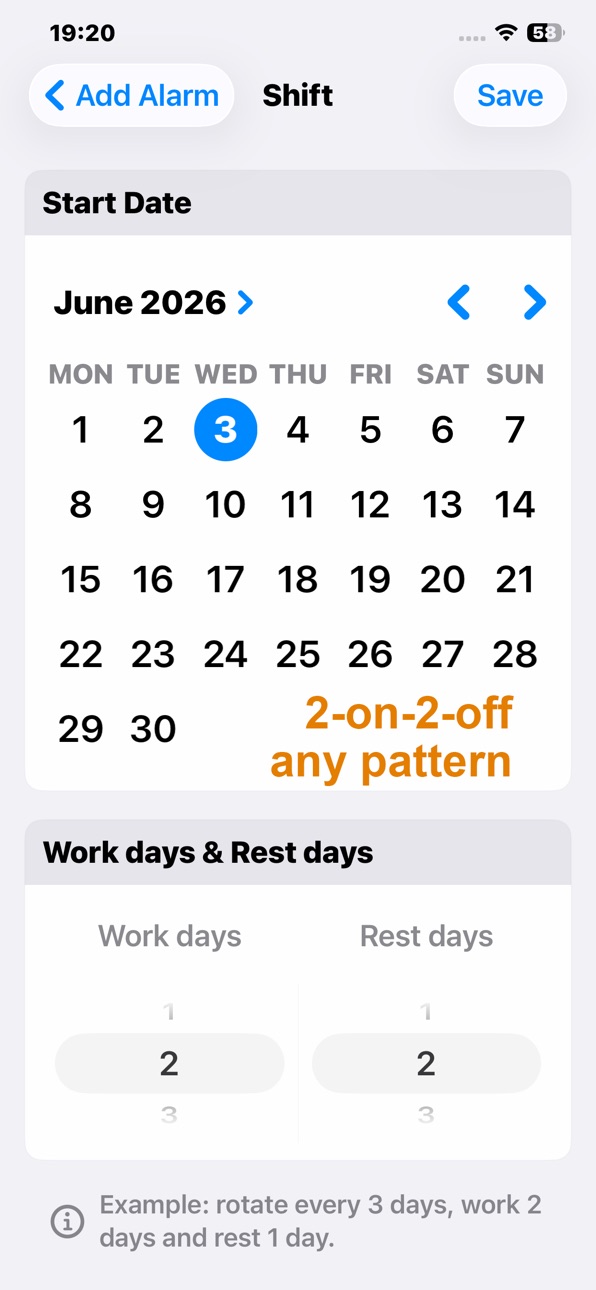
• Basic shift — work/rest cycle (e.g., 2-on / 2-off); rings on workdays only
• Advanced shift — custom shift types and rotation sequence; separate ring times per shift (great for 5-day or 6-day workweek patterns)
• Repeat under 24 hours — up to every 1439 minutes (23h 59m), up to 100 times—handy for meals or medication
PRO OPTIONS
• Monthly, quarterly, or yearly subscription (region-specific pricing shown in app)
• 2-month free trial on all plans
• Lifetime Pro (one-time)—US & Canada storefront only, limited time through June 30, 2026
SUBSCRIPTION & BILLING
Payment is charged to your Apple ID when you confirm purchase. Subscriptions auto-renew unless you cancel at least 24 hours before the end of the current period. Your account may be charged for renewal within 24 hours prior to period end. Manage or cancel anytime: Settings → Apple ID → Subscriptions. Lifetime is a one-time charge with no renewal.
IF YOU CANCEL PRO
We do not delete your alarms. Alarms that use Pro repeat modes may stop ringing until you resubscribe or restore lifetime/ subscription access. Resubscribe or use Restore Purchases to turn them back on.
WHO IT’S FOR
Nurses, factory and warehouse crews, security, EMS, night-shift workers, and anyone whose schedule doesn’t fit a standard calendar.
Support: https://purealarm.top/purealarm/techSupports.html
Privacy Policy: https://purealarm.top/purealarm/PrivacyPolicy.html
Terms of Use: https://www.apple.com/legal/internet-services/itunes/dev/stdeula/
In-App Purchases BB pricing
PureAlarm Subscriptions Subscription
PureAlarm Annual Subscription · Yearly—
Quarterly Subscription · 3 months—
PureAlarm Monthly Subscription · Monthly—
Capabilities
In-App Purchases
Accessibility
ipadiphonemacrealityDevicetvoswatch
Version history 10 versions
Build 887483307v1.1.12026-07-01 04:39:57
• Repeat Options now includes common templates for quick, one-tap repeat setup
• Fixed several issues to improve stability and reliability
Build 887274807v1.1.02026-06-25 18:07:17
Italian language support added
Build 886990542v1.0.92026-06-19 21:54:25
• iCloud sync for alarms and settings across your devices
• Import custom ringtones from files—used by alarms, notifications, and AlarmKit
• 12 repeat modes including shift rotations, custom intervals, and under-24-hour repeats
• Smaller empty-state artwork on the home screen
• Improved reliability for background scheduling and reminder notifications
• UI polish throughout the app
Build 886596443v1.0.62026-06-14 23:23:14
Widgets are here!
• Home Screen: Small and Medium widgets show your next alarm—time, label, and live countdown
• Medium widget: Preview up to 3 more upcoming alarms; turn one off with a tap (iOS 17+)
• Lock Screen: Inline and rectangular widgets for a quick glance at your next alarm
• Tap a widget to jump to that alarm in PureAlarm, or add a new one when none are scheduled
Add widgets from the Home Screen or Lock Screen widget gallery. Your schedule updates as you edit alarms in the app.
Build 886349747v1.0.52026-06-05 17:06:21
US & Canada: limited-time $2.99 lifetime Pro (ends June 30)
Improved App Store listing for shift & rotation schedules
Reliability and UI polish
Quick Alarm function
Build 886072616v1.0.42026-05-28 13:56:40
Features
- Alarms using system ringing mode can play selected ringtones
- New June limited offer: Lifetime unlock for only $2.99
- Bug fix
Build 885603902v1.0.32026-05-15 22:45:43
Features
Supports iOS26+, system alarm ringtone and snooze available
Fixed various known bugs
iOS26+ System Ring Support
Powered by Apple’s new AlarmKit framework, you can enable system alarm mode. It bypasses Silent Mode and Do Not Disturb, plays full-screen ring on lock screen, and ensures you never miss an alarm.
Bug Fixes
Multiple bugs fixed for better stability.
Build 885423457v1.0.22026-05-10 20:24:54
New Features
- One-tap to enable/disable all alarms in a group
- Bug fixes
Group One-Tap Switch
Quickly enable or disable all alarms in a group with one tap, saving your precious time.
Bug Fixes
Fixed minor known bugs and issues.
Build 885083058v1.0.12026-05-07 18:56:00
Custom Holidays
Bug Fixes
Custom Holidays
Set one-time or annual recurring custom holidays in Settings. Enable "Skip Custom Holidays" when adding or editing an alarm to silence it on those dates. One-time dates auto-reset after skipping; annual dates recur yearly (e.g., personal leave).
Bug Fixes
Resolved some issues.
Build 884569416v1.02026-04-29 13:34:25
Price history by region
Currency
Show
Columns
Search
Availability 175 of 175 storefronts
| Region | Language | Price | Ratings | Avg | Version |
|---|---|---|---|---|---|
| CN | zh-Hans-CN | Free | 3 | 5.0 | 1.1.1 |
| AE | en-GB | Free | 0 | — | 1.1.1 |
| AF | en-GB | Free | 0 | — | 1.1.1 |
| AG | en-GB | Free | 0 | — | 1.1.1 |
| AI | en-GB | Free | 0 | — | 1.1.1 |
| AL | en-GB | Free | 0 | — | 1.1.1 |
| AM | en-GB | Free | 0 | — | 1.1.1 |
| AO | en-GB | Free | 0 | — | 1.1.1 |
| AR | es-MX | Free | 0 | — | 1.1.1 |
| AT | de-DE | Free | 0 | — | 1.1.1 |
| AU | en-AU | Free | 0 | — | 1.1.1 |
| AZ | en-GB | Free | 0 | — | 1.1.1 |
| BA | en-GB | Free | 0 | — | 1.1.1 |
| BB | en-GB | Free | 0 | — | 1.1.1 |
| BE | en-GB | Free | 0 | — | 1.1.1 |
| BF | en-GB | Free | 0 | — | 1.1.1 |
| BG | en-GB | Free | 0 | — | 1.1.1 |
| BH | en-GB | Free | 0 | — | 1.1.1 |
| BJ | en-GB | Free | 0 | — | 1.1.1 |
| BM | en-GB | Free | 0 | — | 1.1.1 |
| BN | en-GB | Free | 0 | — | 1.1.1 |
| BO | es-MX | Free | 0 | — | 1.1.1 |
| BR | pt-BR | Free | 0 | — | 1.1.1 |
| BS | en-GB | Free | 0 | — | 1.1.1 |
| BT | en-GB | Free | 0 | — | 1.1.1 |
| BW | en-GB | Free | 0 | — | 1.1.1 |
| BY | en-GB | Free | 0 | — | 1.1.1 |
| BZ | en-GB | Free | 0 | — | 1.1.1 |
| CA | en-CA | Free | 0 | — | 1.1.1 |
| CD | en-GB | Free | 0 | — | 1.1.1 |
| CG | en-GB | Free | 0 | — | 1.1.1 |
| CH | de-CH | Free | 0 | — | 1.1.1 |
| CI | fr-FR | Free | 0 | — | 1.1.1 |
| CL | es-MX | Free | 0 | — | 1.1.1 |
| CM | fr-FR | Free | 0 | — | 1.1.1 |
| CO | es-MX | Free | 0 | — | 1.1.1 |
| CR | es-MX | Free | 0 | — | 1.1.1 |
| CV | en-GB | Free | 0 | — | 1.1.1 |
| CY | en-GB | Free | 0 | — | 1.1.1 |
| CZ | en-GB | Free | 0 | — | 1.1.1 |
| DE | de-DE | Free | 0 | — | 1.1.1 |
| DK | en-GB | Free | 0 | — | 1.1.1 |
| DM | en-GB | Free | 0 | — | 1.1.1 |
| DO | es-MX | Free | 0 | — | 1.1.1 |
| DZ | en-GB | Free | 0 | — | 1.1.1 |
| EC | es-MX | Free | 0 | — | 1.1.1 |
| EE | en-GB | Free | 0 | — | 1.1.1 |
| EG | en-GB | Free | 0 | — | 1.1.1 |
| ES | es-ES | Free | 0 | — | 1.1.1 |
| FI | en-GB | Free | 0 | — | 1.1.1 |
| FJ | en-GB | Free | 0 | — | 1.1.1 |
| FM | en-GB | Free | 0 | — | 1.1.1 |
| FR | fr-FR | Free | 0 | — | 1.1.1 |
| GA | fr-FR | Free | 0 | — | 1.1.1 |
| GB | en-GB | Free | 0 | — | 1.1.1 |
| GD | en-GB | Free | 0 | — | 1.1.1 |
| GE | en-GB | Free | 0 | — | 1.1.1 |
| GH | en-GB | Free | 0 | — | 1.1.1 |
| GM | en-GB | Free | 0 | — | 1.1.1 |
| GR | en-GB | Free | 0 | — | 1.1.1 |
| GT | es-MX | Free | 0 | — | 1.1.1 |
| GW | en-GB | Free | 0 | — | 1.1.1 |
| GY | en-GB | Free | 0 | — | 1.1.1 |
| HK | zh-Hant-HK | Free | 0 | — | 1.1.1 |
| HN | es-MX | Free | 0 | — | 1.1.1 |
| HR | en-GB | Free | 0 | — | 1.1.1 |
| HU | en-GB | Free | 0 | — | 1.1.1 |
| ID | en-GB | Free | 0 | — | 1.1.1 |
| IE | en-GB | Free | 0 | — | 1.1.1 |
| IL | en-GB | Free | 0 | — | 1.1.1 |
| IN | en-GB | Free | 0 | — | 1.1.1 |
| IQ | en-GB | Free | 0 | — | 1.1.1 |
| IS | en-GB | Free | 0 | — | 1.1.1 |
| IT | it | Free | 0 | — | 1.1.1 |
| JM | en-GB | Free | 0 | — | 1.1.1 |
| JO | en-GB | Free | 0 | — | 1.1.1 |
| JP | ja | Free | 0 | — | 1.1.1 |
| KE | en-GB | Free | 0 | — | 1.1.1 |
| KG | en-GB | Free | 0 | — | 1.1.1 |
| KH | en-GB | Free | 0 | — | 1.1.1 |
| KN | en-GB | Free | 0 | — | 1.1.1 |
| KR | ko | Free | 0 | — | 1.1.1 |
| KW | en-GB | Free | 0 | — | 1.1.1 |
| KY | en-GB | Free | 0 | — | 1.1.1 |
| KZ | en-GB | Free | 0 | — | 1.1.1 |
| LA | en-GB | Free | 0 | — | 1.1.1 |
| LB | en-GB | Free | 0 | — | 1.1.1 |
| LC | en-GB | Free | 0 | — | 1.1.1 |
| LK | en-GB | Free | 0 | — | 1.1.1 |
| LR | en-GB | Free | 0 | — | 1.1.1 |
| LT | en-GB | Free | 0 | — | 1.1.1 |
| LU | en-GB | Free | 0 | — | 1.1.1 |
| LV | en-GB | Free | 0 | — | 1.1.1 |
| LY | en-GB | Free | 0 | — | 1.1.1 |
| MA | en-GB | Free | 0 | — | 1.1.1 |
| MD | en-GB | Free | 0 | — | 1.1.1 |
| ME | en-GB | Free | 0 | — | 1.1.1 |
| MG | en-GB | Free | 0 | — | 1.1.1 |
| MK | en-GB | Free | 0 | — | 1.1.1 |
| ML | en-GB | Free | 0 | — | 1.1.1 |
| MM | en-GB | Free | 0 | — | 1.1.1 |
| MN | en-GB | Free | 0 | — | 1.1.1 |
| MO | zh-Hant-HK | Free | 0 | — | 1.1.1 |
| MR | en-GB | Free | 0 | — | 1.1.1 |
| MS | en-GB | Free | 0 | — | 1.1.1 |
| MT | en-GB | Free | 0 | — | 1.1.1 |
| MU | en-GB | Free | 0 | — | 1.1.1 |
| MV | en-GB | Free | 0 | — | 1.1.1 |
| MW | en-GB | Free | 0 | — | 1.1.1 |
| MX | es-MX | Free | 0 | — | 1.1.1 |
| MY | en-GB | Free | 0 | — | 1.1.1 |
| MZ | en-GB | Free | 0 | — | 1.1.1 |
| NA | en-GB | Free | 0 | — | 1.1.1 |
| NE | en-GB | Free | 0 | — | 1.1.1 |
| NG | en-GB | Free | 0 | — | 1.1.1 |
| NI | es-MX | Free | 0 | — | 1.1.1 |
| NL | nl | Free | 0 | — | 1.1.1 |
| NO | en-GB | Free | 0 | — | 1.1.1 |
| NP | en-GB | Free | 0 | — | 1.1.1 |
| NR | en-GB | Free | 0 | — | 1.1.1 |
| NZ | en-AU | Free | 0 | — | 1.1.1 |
| OM | en-GB | Free | 0 | — | 1.1.1 |
| PA | es-MX | Free | 0 | — | 1.1.1 |
| PE | es-MX | Free | 0 | — | 1.1.1 |
| PG | en-GB | Free | 0 | — | 1.1.1 |
| PH | en-GB | Free | 0 | — | 1.1.1 |
| PK | en-GB | Free | 0 | — | 1.1.1 |
| PL | en-GB | Free | 0 | — | 1.1.1 |
| PT | pt-PT | Free | 0 | — | 1.1.1 |
| PW | en-GB | Free | 0 | — | 1.1.1 |
| PY | es-MX | Free | 0 | — | 1.1.1 |
| QA | en-GB | Free | 0 | — | 1.1.1 |
| RO | en-GB | Free | 0 | — | 1.1.1 |
| RS | en-GB | Free | 0 | — | 1.1.1 |
| RU | ru | Free | 0 | — | 1.1.1 |
| RW | en-GB | Free | 0 | — | 1.1.1 |
| SA | en-GB | Free | 0 | — | 1.1.1 |
| SB | en-GB | Free | 0 | — | 1.1.1 |
| SC | en-GB | Free | 0 | — | 1.1.1 |
| SE | sv | Free | 0 | — | 1.1.1 |
| SG | en-GB | Free | 0 | — | 1.1.1 |
| SI | en-GB | Free | 0 | — | 1.1.1 |
| SK | en-GB | Free | 0 | — | 1.1.1 |
| SL | en-GB | Free | 0 | — | 1.1.1 |
| SN | en-GB | Free | 0 | — | 1.1.1 |
| SR | en-GB | Free | 0 | — | 1.1.1 |
| ST | en-GB | Free | 0 | — | 1.1.1 |
| SV | es-MX | Free | 0 | — | 1.1.1 |
| SZ | en-GB | Free | 0 | — | 1.1.1 |
| TC | en-GB | Free | 0 | — | 1.1.1 |
| TD | en-GB | Free | 0 | — | 1.1.1 |
| TH | en-GB | Free | 0 | — | 1.1.1 |
| TJ | en-GB | Free | 0 | — | 1.1.1 |
| TM | en-GB | Free | 0 | — | 1.1.1 |
| TN | en-GB | Free | 0 | — | 1.1.1 |
| TO | en-GB | Free | 0 | — | 1.1.1 |
| TR | en-GB | Free | 0 | — | 1.1.1 |
| TT | en-GB | Free | 0 | — | 1.1.1 |
| TW | zh-Hant-TW | Free | 0 | — | 1.1.1 |
| TZ | en-GB | Free | 0 | — | 1.1.1 |
| UA | en-GB | Free | 0 | — | 1.1.1 |
| UG | en-GB | Free | 0 | — | 1.1.1 |
| US | en-US | Free | 0 | — | 1.1.1 |
| UY | en-GB | Free | 0 | — | 1.1.1 |
| UZ | en-GB | Free | 0 | — | 1.1.1 |
| VC | en-GB | Free | 0 | — | 1.1.1 |
| VE | es-MX | Free | 0 | — | 1.1.1 |
| VG | en-GB | Free | 0 | — | 1.1.1 |
| VN | en-GB | Free | 0 | — | 1.1.1 |
| VU | en-GB | Free | 0 | — | 1.1.1 |
| XK | en-GB | Free | 0 | — | 1.1.1 |
| YE | en-GB | Free | 0 | — | 1.1.1 |
| ZA | en-GB | Free | 0 | — | 1.1.1 |
| ZM | en-GB | Free | 0 | — | 1.1.1 |
| ZW | en-GB | Free | 0 | — | 1.1.1 |
Change log 14 changes · BB
✎
releaseNotes updated
• Repeat Options now includes common templates for quick, one-tap repeat setup
• Fixed several issues to improve stability and reliability
✎
description updated
PureAlarm is a focused alarm clock for shift workers, nurses, and anyone on a rotating schedule—no ads, no extra notifications, just reliable on-time reminders.
✎
subtitle updated
Shift & Rotation Alarms
✎
name updated
PureAlarm
◆
Version 1.1.1 released
• Repeat Options now includes common templates for quick, one-tap repeat setup
• Fixed several issues to improve stability and reliability
◆
Version 1.1.0 released
Italian language support added
◆
Version 1.0.9 released
• iCloud sync for alarms and settings across your devices
• Import custom ringtones from files—used by alarms, notifications, and AlarmKit
• 12 repeat modes including shift rotations, custom intervals, and under-24-hour repeats
• Smaller em
◆
Version 1.0.6 released
Widgets are here!
• Home Screen: Small and Medium widgets show your next alarm—time, label, and live countdown
• Medium widget: Preview up to 3 more upcoming alarms; turn one off with a tap (iOS 17+)
• Lock Screen: Inline and rectangular w
◆
Version 1.0.5 released
US & Canada: limited-time $2.99 lifetime Pro (ends June 30)
Improved App Store listing for shift & rotation schedules
Reliability and UI polish
Quick Alarm function
◆
Version 1.0.4 released
Features
- Alarms using system ringing mode can play selected ringtones
- New June limited offer: Lifetime unlock for only $2.99
- Bug fix
◆
Version 1.0.3 released
Features
Supports iOS26+, system alarm ringtone and snooze available
Fixed various known bugs
iOS26+ System Ring Support
Powered by Apple’s new AlarmKit framework, you can enable system alarm mode. It bypasses Silent Mode and Do Not Dist
◆
Version 1.0.2 released
New Features
- One-tap to enable/disable all alarms in a group
- Bug fixes
Group One-Tap Switch
Quickly enable or disable all alarms in a group with one tap, saving your precious time.
Bug Fixes
Fixed minor known bugs and issues.
◆
Version 1.0.1 released
Custom Holidays
Bug Fixes
Custom Holidays
Set one-time or annual recurring custom holidays in Settings. Enable "Skip Custom Holidays" when adding or editing an alarm to silence it on those dates. One-time dates auto-reset after skipping;
◆
Version 1.0 released