Home › Utilities

 BB
BB
 USen-US
 JPja
JPja AEen-GB
 AFen-GB
 AGen-GB
 AIen-GB
 ALen-GB
 AMen-GB
 AOen-GB
 ARes-MX
 ATde-DE
 AUen-AU
 AZen-GB
 BAen-GBBBen-GB
 BEen-GB
 BFen-GB
 BGen-GB
 BHen-GB
 BJen-GB
 BMen-GB
 BNen-GB
 BOes-MX
 BRpt-BR
 BSen-GB
 BTen-GB
 BWen-GB
 BYen-GB
 BZen-GB
 CAen-CA
 CDen-GB
 CGen-GB
 CHde-CH
 CIfr-FR
 CLes-MX
 CMfr-FR
 CNzh-Hans-CN
 COes-MX
 CRes-MX
 CVen-GB
 CYen-GB
 CZen-GB
 DEde-DE
 DKen-GB
 DMen-GB
 DOes-MX
 DZen-GB
 ECes-MX
 EEen-GB
 EGen-GB
 ESes-ES
 FIen-GB
 FJen-GB
 FMen-GB
 FRfr-FR
 GAfr-FR
 GBen-GB
 GDen-GB
 GEen-GB
 GHen-GB
 GMen-GB
 GRen-GB
 GTes-MX
 GWen-GB
 GYen-GB
 HKzh-Hant-HK
 HNes-MX
 HRen-GB
 HUen-GB
 IDen-GB
 IEen-GB
 ILen-GB
 INen-GB
 IQen-GB
 ISen-GB
 ITit
ITit JMen-GB
 JOen-GB
 KEen-GB
 KGen-GB
 KHen-GB
 KNen-GB
 KRko
KRko KWen-GB
 KYen-GB
 KZen-GB
 LAen-GB
 LBen-GB
 LCen-GB
 LKen-GB
 LRen-GB
 LTen-GB
 LUen-GB
 LVen-GB
 LYen-GB
 MAen-GB
 MDen-GB
 MEen-GB
 MGen-GB
 MKen-GB
 MLen-GB
 MMen-GB
 MNen-GB
 MOzh-Hant-HK
 MRen-GB
 MSen-GB
 MTen-GB
 MUen-GB
 MVen-GB
 MWen-GB
 MXes-MX
 MYen-GB
 MZen-GB
 NAen-GB
 NEen-GB
 NGen-GB
 NIes-MX
 NLnl
NLnl NOen-GB
 NPen-GB
 NRen-GB
 NZen-AU
 OMen-GB
 PAes-MX
 PEes-MX
 PGen-GB
 PHen-GB
 PKen-GB
 PLen-GB
 PTpt-PT
 PWen-GB
 PYes-MX
 QAen-GB
 ROen-GB
 RSen-GB
 RUru
RUru RWen-GB
 SAen-GB
 SBen-GB
 SCen-GB
 SEsv
SEsv SGen-GB
 SIen-GB
 SKen-GB
 SLen-GB
 SNen-GB
 SRen-GB
 STen-GB
 SVes-MX
 SZen-GB
 TCen-GB
 TDen-GB
 THen-GB
 TJen-GB
 TMen-GB
 TNen-GB
 TOen-GB
 TRen-GB
 TTen-GB
 TWzh-Hant-TW
 TZen-GB
 UAen-GB
 UGen-GB
 UYen-GB
 UZen-GB
 VCen-GB
 VEes-MX
 VGen-GB
 VNen-GB
 VUen-GB
 XKen-GB
 YEen-GB
 ZAen-GB
 ZMen-GB
 ZWen-GB
175 of 175 storefronts
Content in en-US
Content in en-US
Information
Preview 2 platforms
iPhone 8 images


iPad 8 images




What’s New Version 2.0.2
• Letter Case setting for Pro users. A new three-way picker under Auto-correct lets you keep the standard mixed case, suppress auto-correct's sentence-start capitalization, or switch to Uncial: the ancient manuscript style where every committed letter is uppercase and all diacritics are stripped.
• Large Diacritics. Breathings, accents, and the other marks on the diacritic row now render at a 1.5× footprint by default, making the small combining glyphs easier to read and tap. Toggle off under Settings → Tonos → Large Diacritics if you prefer the compact size.
Description
No more copying and pasting complicated diacritics from a website! Tonos is a polytonic Greek keyboard for iPhone and iPad.
Designed for students, scholars, and anyone writing polytonic Greek, Tonos supports the full range of classical and historical diacritics across Classical, Koine, Byzantine, Katharevousa, and polytonic Modern Greek.
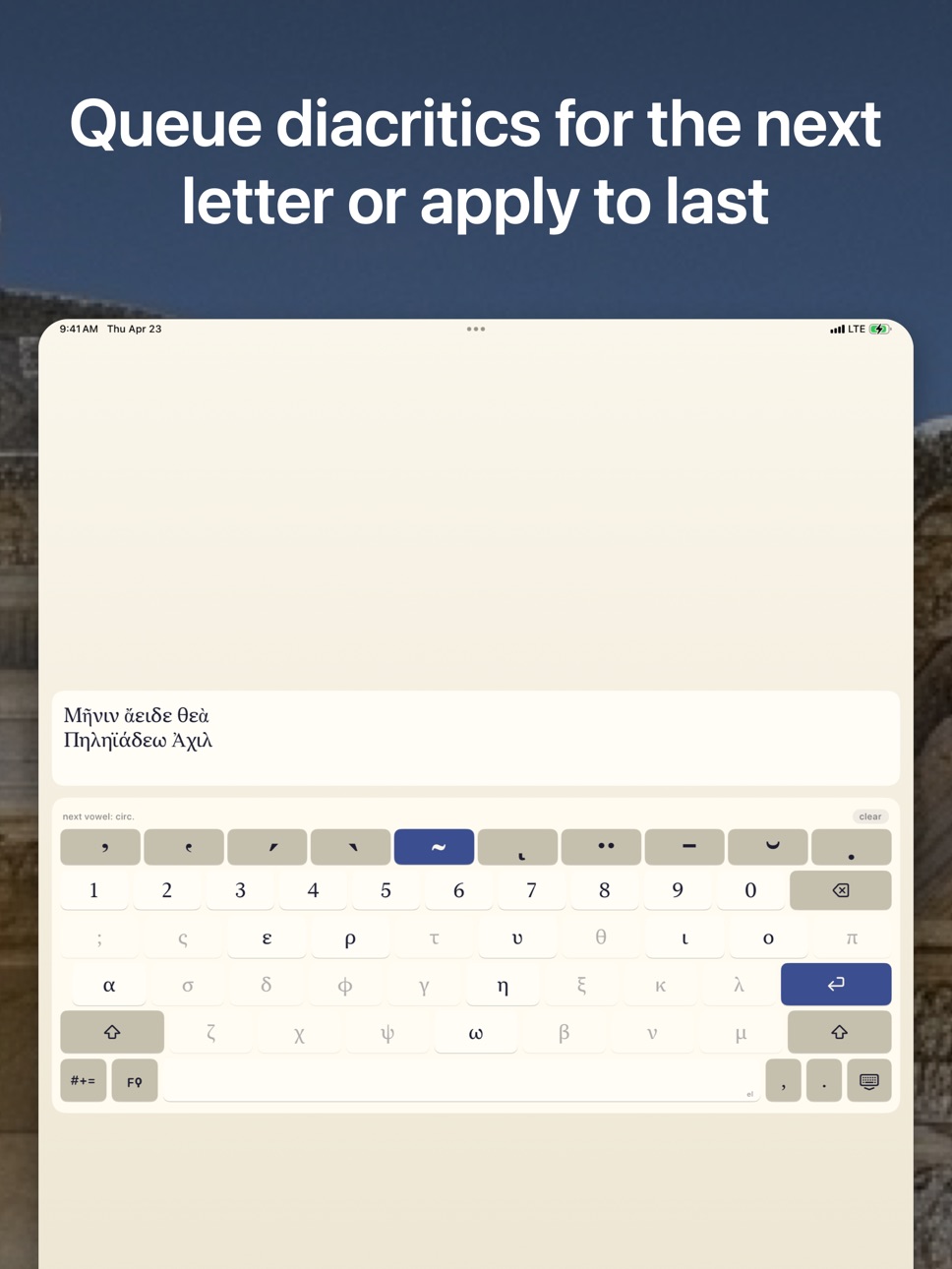
All ten classical marks. Smooth and rough breathings, acute, grave, and circumflex accents, iota subscript, diaeresis, macron, breve, and the philologist's underdot. Combine them freely. Mutually exclusive marks, like acute and grave, or macron and breve, never fight each other.
Two ways to type. Enter a vowel first and decorate it with one tap, or queue up the diacritics you want and apply them all to the next vowel. Whichever mental model you prefer, Tonos follows along.
Spacebar trackpad. Drag across the spacebar to slide the cursor through your text, one character at a time. Fast drags accelerate, so you can cover distance without leaving Tonos to adjust the cursor.
Three layers, one keyboard.
• Letters uses the common Greek keyboard layout.
• Numbers holds digits and punctuation, including ano teleia.
• Archaic holds rare letters from languages that use the Greek alphabet: digamma, stigma, archaic koppa, koppa, sampi, san, heta, yot, sho, the kai ligature, and the Pamphylian digamma. Plus cursive and lunate letterforms for manuscripts and papyrology.
NFC Unicode output. Canonically precomposed where Unicode provides a precomposed form. Letters with stacked breathings, accents, and iota subscript drop cleanly into any app, document, or database. No legacy codepoints, no lookup tables, no surprises for your downstream tools.
Tonos Pro. An optional one-time upgrade adds three on-device polytonic assists. Auto-correct silently fixes missing or wrong diacritics when you hit space, return, or a punctuation key, drawing on a 1.3-million-entry polytonic dictionary merged from Classical, Koine, Byzantine, and Katharevousa corpora. Typeahead adds a suggestion bar with spell-check corrections for misspelled words, mid-word completions, and next-word predictions, powered by a language model trained on ~30 million polytonic tokens. Style Preferences lets you tune the editorial rules: enclitic-aware grave rule, iota subscript vs adscript, movable nu, elision, plus a three-way picker for the elision glyph (Combined, Koronis, or Apostrophe). No network access. The free keyboard is complete on its own, and your Pro unlock is a single non-consumable purchase that restores on any device signed in to your Apple ID.
A quick setup note. Enable Tonos under Settings → General → Keyboard → Keyboards → Add New Keyboard, then tap the globe key on any keyboard to switch to it. Any apps that were already open before you enabled Tonos may need to be closed and reopened before the keyboard becomes available in them. This is an iOS behavior, not specific to Tonos.
In-App Purchases BB pricing
One-Time Purchases
Tonos Pro—
Capabilities
In-App Purchases
Accessibility
ipadiphonemacrealityDevicetvoswatch
Version history 7 versions
Build 884831109v2.0.12026-04-24 02:05:07
• Enclitic-aware grave rule. Auto-correct now handles the full set of enclitic-accent exceptions: oxytones keep their acute before an enclitic, proparoxytones and properispomena gain an acute on the ultima, proclitics take an acute before an enclitic, a disyllabic enclitic retains its acute after a paroxytone, and enclitic chains accent correctly throughout.
• Letter Case setting for Pro users. A new three-way picker under Auto-correct lets you keep the standard mixed case, suppress auto-correct's sentence-start capitalization, or switch to Uncial: the ancient manuscript style where every committed letter is uppercase and all diacritics are stripped.
• Large Diacritics. Breathings, accents, and the other marks on the diacritic row now render at a 1.5× footprint by default, making the small combining glyphs easier to read and tap. Toggle off under Settings → Tonos → Large Diacritics if you prefer the compact size.
Build 884875777v2.0.22026-04-24 06:30:29
• Letter Case setting for Pro users. A new three-way picker under Auto-correct lets you keep the standard mixed case, suppress auto-correct's sentence-start capitalization, or switch to Uncial: the ancient manuscript style where every committed letter is uppercase and all diacritics are stripped.
• Large Diacritics. Breathings, accents, and the other marks on the diacritic row now render at a 1.5× footprint by default, making the small combining glyphs easier to read and tap. Toggle off under Settings → Tonos → Large Diacritics if you prefer the compact size.
Build 884696730v2.0.02026-04-22 00:41:28
• iPad redesign. Persistent digit row, wide inline return, shift on both sides of the last letter row, and dedicated comma, period, and dismiss-keyboard keys on the bottom row. Landscape tightens the rows and widens the side keys.
• Rebuilt numbers layer with three symbol rows (punctuation, math, brackets). The layer-switch label flips from 123 to #+=.
• Preferences sync across your devices via iCloud.
• On iPad with a hardware keyboard, Tab now commits the top Typeahead suggestion and cycles through the rest.
Build 884676370v1.2.12026-04-19 20:33:22
• The " key in the numbers layer now remembers the last mark you picked from its long-press alternates («, », „, ‹, ›, "). Tap to insert your last choice, long-press to pick a different one. Your preference persists across launches.
• Tonos Pro now activates immediately when you return to the app after redeeming an App Store promo code or completing a purchase in the background. No manual Restore tap needed.
Build 884653482v1.2.02026-04-18 10:32:49
• Introducing Tonos Pro, an optional one-time upgrade that adds three polytonic assists, all on-device.
• Auto-correct silently fixes missing or wrong diacritics when you hit space, return, or a punctuation key. Draws on a 1.3-million-entry polytonic dictionary merged from Classical, Koine, Byzantine, and Katharevousa corpora.
• Typeahead adds a suggestion bar above the keyboard with spell-check corrections for misspelled words, mid-word completions, and next-word predictions. Powered by an on-device n-gram language model trained on ~30 million polytonic tokens.
• Style Preferences: four editorial toggles (grave rule, iota subscript vs adscript, movable nu, elision) plus a three-way picker for the elision glyph (Combined, Koronis, or Apostrophe). Defaults match mainstream Ancient Greek editorial conventions.
• Spacebar trackpad: drag horizontally across the spacebar to move the cursor one character at a time. Fast drags accelerate.
• Keyboard polish: a close-keyboard button on the status strip, hold-to-delete backspace that matches the iOS system keyboard's cadence and acceleration, and a rewritten input pipeline that keeps up with rapid typing even on slow host apps.
Build 884561255v1.0.02026-04-16 10:09:44
Build 884603655v1.0.22026-04-16 22:08:23
• Tonos now runs on iOS 18 and later. Previously required iOS 26.
• Long-press the " key in the numbers layer to insert European-style quotation marks: « » „ ‹ ›.
Price history by region
Currency
Show
Columns
Search
Availability 175 of 175 storefronts
| Region | Language | Price | Ratings | Avg | Version |
|---|---|---|---|---|---|
| US | en-US | Free | 3 | 4.7 | 2.0.2 |
| JP | ja | Free | 1 | 4.0 | 2.0.2 |
| AE | en-GB | Free | 0 | — | 2.0.2 |
| AF | en-GB | Free | 0 | — | 2.0.2 |
| AG | en-GB | Free | 0 | — | 2.0.2 |
| AI | en-GB | Free | 0 | — | 2.0.2 |
| AL | en-GB | Free | 0 | — | 2.0.2 |
| AM | en-GB | Free | 0 | — | 2.0.2 |
| AO | en-GB | Free | 0 | — | 2.0.2 |
| AR | es-MX | Free | 0 | — | 2.0.2 |
| AT | de-DE | Free | 0 | — | 2.0.2 |
| AU | en-AU | Free | 0 | — | 2.0.2 |
| AZ | en-GB | Free | 0 | — | 2.0.2 |
| BA | en-GB | Free | 0 | — | 2.0.2 |
| BB | en-GB | Free | 0 | — | 2.0.2 |
| BE | en-GB | Free | 0 | — | 2.0.2 |
| BF | en-GB | Free | 0 | — | 2.0.2 |
| BG | en-GB | Free | 0 | — | 2.0.2 |
| BH | en-GB | Free | 0 | — | 2.0.2 |
| BJ | en-GB | Free | 0 | — | 2.0.2 |
| BM | en-GB | Free | 0 | — | 2.0.2 |
| BN | en-GB | Free | 0 | — | 2.0.2 |
| BO | es-MX | Free | 0 | — | 2.0.2 |
| BR | pt-BR | Free | 0 | — | 2.0.2 |
| BS | en-GB | Free | 0 | — | 2.0.2 |
| BT | en-GB | Free | 0 | — | 2.0.2 |
| BW | en-GB | Free | 0 | — | 2.0.2 |
| BY | en-GB | Free | 0 | — | 2.0.2 |
| BZ | en-GB | Free | 0 | — | 2.0.2 |
| CA | en-CA | Free | 0 | — | 2.0.2 |
| CD | en-GB | Free | 0 | — | 2.0.2 |
| CG | en-GB | Free | 0 | — | 2.0.2 |
| CH | de-CH | Free | 0 | — | 2.0.2 |
| CI | fr-FR | Free | 0 | — | 2.0.2 |
| CL | es-MX | Free | 0 | — | 2.0.2 |
| CM | fr-FR | Free | 0 | — | 2.0.2 |
| CN | zh-Hans-CN | Free | 0 | — | 2.0.2 |
| CO | es-MX | Free | 0 | — | 2.0.2 |
| CR | es-MX | Free | 0 | — | 2.0.2 |
| CV | en-GB | Free | 0 | — | 2.0.2 |
| CY | en-GB | Free | 0 | — | 2.0.2 |
| CZ | en-GB | Free | 0 | — | 2.0.2 |
| DE | de-DE | Free | 0 | — | 2.0.2 |
| DK | en-GB | Free | 0 | — | 2.0.2 |
| DM | en-GB | Free | 0 | — | 2.0.2 |
| DO | es-MX | Free | 0 | — | 2.0.2 |
| DZ | en-GB | Free | 0 | — | 2.0.2 |
| EC | es-MX | Free | 0 | — | 2.0.2 |
| EE | en-GB | Free | 0 | — | 2.0.2 |
| EG | en-GB | Free | 0 | — | 2.0.2 |
| ES | es-ES | Free | 0 | — | 2.0.2 |
| FI | en-GB | Free | 0 | — | 2.0.2 |
| FJ | en-GB | Free | 0 | — | 2.0.2 |
| FM | en-GB | Free | 0 | — | 2.0.2 |
| FR | fr-FR | Free | 0 | — | 2.0.2 |
| GA | fr-FR | Free | 0 | — | 2.0.2 |
| GB | en-GB | Free | 0 | — | 2.0.2 |
| GD | en-GB | Free | 0 | — | 2.0.2 |
| GE | en-GB | Free | 0 | — | 2.0.2 |
| GH | en-GB | Free | 0 | — | 2.0.2 |
| GM | en-GB | Free | 0 | — | 2.0.2 |
| GR | en-GB | Free | 0 | — | 2.0.2 |
| GT | es-MX | Free | 0 | — | 2.0.2 |
| GW | en-GB | Free | 0 | — | 2.0.2 |
| GY | en-GB | Free | 0 | — | 2.0.2 |
| HK | zh-Hant-HK | Free | 0 | — | 2.0.2 |
| HN | es-MX | Free | 0 | — | 2.0.2 |
| HR | en-GB | Free | 0 | — | 2.0.2 |
| HU | en-GB | Free | 0 | — | 2.0.2 |
| ID | en-GB | Free | 0 | — | 2.0.2 |
| IE | en-GB | Free | 0 | — | 2.0.2 |
| IL | en-GB | Free | 0 | — | 2.0.2 |
| IN | en-GB | Free | 0 | — | 2.0.2 |
| IQ | en-GB | Free | 0 | — | 2.0.2 |
| IS | en-GB | Free | 0 | — | 2.0.2 |
| IT | it | Free | 0 | — | 2.0.2 |
| JM | en-GB | Free | 0 | — | 2.0.2 |
| JO | en-GB | Free | 0 | — | 2.0.2 |
| KE | en-GB | Free | 0 | — | 2.0.2 |
| KG | en-GB | Free | 0 | — | 2.0.2 |
| KH | en-GB | Free | 0 | — | 2.0.2 |
| KN | en-GB | Free | 0 | — | 2.0.2 |
| KR | ko | Free | 0 | — | 2.0.2 |
| KW | en-GB | Free | 0 | — | 2.0.2 |
| KY | en-GB | Free | 0 | — | 2.0.2 |
| KZ | en-GB | Free | 0 | — | 2.0.2 |
| LA | en-GB | Free | 0 | — | 2.0.2 |
| LB | en-GB | Free | 0 | — | 2.0.2 |
| LC | en-GB | Free | 0 | — | 2.0.2 |
| LK | en-GB | Free | 0 | — | 2.0.2 |
| LR | en-GB | Free | 0 | — | 2.0.2 |
| LT | en-GB | Free | 0 | — | 2.0.2 |
| LU | en-GB | Free | 0 | — | 2.0.2 |
| LV | en-GB | Free | 0 | — | 2.0.2 |
| LY | en-GB | Free | 0 | — | 2.0.2 |
| MA | en-GB | Free | 0 | — | 2.0.2 |
| MD | en-GB | Free | 0 | — | 2.0.2 |
| ME | en-GB | Free | 0 | — | 2.0.2 |
| MG | en-GB | Free | 0 | — | 2.0.2 |
| MK | en-GB | Free | 0 | — | 2.0.2 |
| ML | en-GB | Free | 0 | — | 2.0.2 |
| MM | en-GB | Free | 0 | — | 2.0.2 |
| MN | en-GB | Free | 0 | — | 2.0.2 |
| MO | zh-Hant-HK | Free | 0 | — | 2.0.2 |
| MR | en-GB | Free | 0 | — | 2.0.2 |
| MS | en-GB | Free | 0 | — | 2.0.2 |
| MT | en-GB | Free | 0 | — | 2.0.2 |
| MU | en-GB | Free | 0 | — | 2.0.2 |
| MV | en-GB | Free | 0 | — | 2.0.2 |
| MW | en-GB | Free | 0 | — | 2.0.2 |
| MX | es-MX | Free | 0 | — | 2.0.2 |
| MY | en-GB | Free | 0 | — | 2.0.2 |
| MZ | en-GB | Free | 0 | — | 2.0.2 |
| NA | en-GB | Free | 0 | — | 2.0.2 |
| NE | en-GB | Free | 0 | — | 2.0.2 |
| NG | en-GB | Free | 0 | — | 2.0.2 |
| NI | es-MX | Free | 0 | — | 2.0.2 |
| NL | nl | Free | 0 | — | 2.0.2 |
| NO | en-GB | Free | 0 | — | 2.0.2 |
| NP | en-GB | Free | 0 | — | 2.0.2 |
| NR | en-GB | Free | 0 | — | 2.0.2 |
| NZ | en-AU | Free | 0 | — | 2.0.2 |
| OM | en-GB | Free | 0 | — | 2.0.2 |
| PA | es-MX | Free | 0 | — | 2.0.2 |
| PE | es-MX | Free | 0 | — | 2.0.2 |
| PG | en-GB | Free | 0 | — | 2.0.2 |
| PH | en-GB | Free | 0 | — | 2.0.2 |
| PK | en-GB | Free | 0 | — | 2.0.2 |
| PL | en-GB | Free | 0 | — | 2.0.2 |
| PT | pt-PT | Free | 0 | — | 2.0.2 |
| PW | en-GB | Free | 0 | — | 2.0.2 |
| PY | es-MX | Free | 0 | — | 2.0.2 |
| QA | en-GB | Free | 0 | — | 2.0.2 |
| RO | en-GB | Free | 0 | — | 2.0.2 |
| RS | en-GB | Free | 0 | — | 2.0.2 |
| RU | ru | Free | 0 | — | 2.0.2 |
| RW | en-GB | Free | 0 | — | 2.0.2 |
| SA | en-GB | Free | 0 | — | 2.0.2 |
| SB | en-GB | Free | 0 | — | 2.0.2 |
| SC | en-GB | Free | 0 | — | 2.0.2 |
| SE | sv | Free | 0 | — | 2.0.2 |
| SG | en-GB | Free | 0 | — | 2.0.2 |
| SI | en-GB | Free | 0 | — | 2.0.2 |
| SK | en-GB | Free | 0 | — | 2.0.2 |
| SL | en-GB | Free | 0 | — | 2.0.2 |
| SN | en-GB | Free | 0 | — | 2.0.2 |
| SR | en-GB | Free | 0 | — | 2.0.2 |
| ST | en-GB | Free | 0 | — | 2.0.2 |
| SV | es-MX | Free | 0 | — | 2.0.2 |
| SZ | en-GB | Free | 0 | — | 2.0.2 |
| TC | en-GB | Free | 0 | — | 2.0.2 |
| TD | en-GB | Free | 0 | — | 2.0.2 |
| TH | en-GB | Free | 0 | — | 2.0.2 |
| TJ | en-GB | Free | 0 | — | 2.0.2 |
| TM | en-GB | Free | 0 | — | 2.0.2 |
| TN | en-GB | Free | 0 | — | 2.0.2 |
| TO | en-GB | Free | 0 | — | 2.0.2 |
| TR | en-GB | Free | 0 | — | 2.0.2 |
| TT | en-GB | Free | 0 | — | 2.0.2 |
| TW | zh-Hant-TW | Free | 0 | — | 2.0.2 |
| TZ | en-GB | Free | 0 | — | 2.0.2 |
| UA | en-GB | Free | 0 | — | 2.0.2 |
| UG | en-GB | Free | 0 | — | 2.0.2 |
| UY | en-GB | Free | 0 | — | 2.0.2 |
| UZ | en-GB | Free | 0 | — | 2.0.2 |
| VC | en-GB | Free | 0 | — | 2.0.2 |
| VE | es-MX | Free | 0 | — | 2.0.2 |
| VG | en-GB | Free | 0 | — | 2.0.2 |
| VN | en-GB | Free | 0 | — | 2.0.2 |
| VU | en-GB | Free | 0 | — | 2.0.2 |
| XK | en-GB | Free | 0 | — | 2.0.2 |
| YE | en-GB | Free | 0 | — | 2.0.2 |
| ZA | en-GB | Free | 0 | — | 2.0.2 |
| ZM | en-GB | Free | 0 | — | 2.0.2 |
| ZW | en-GB | Free | 0 | — | 2.0.2 |
Change log 11 changes · BB
✎
releaseNotes updated
• Letter Case setting for Pro users. A new three-way picker under Auto-correct lets you keep the standard mixed case, suppress auto-correct's sentence-start cap
✎
description updated
No more copying and pasting complicated diacritics from a website! Tonos is a polytonic Greek keyboard for iPhone and iPad.
Designed for students, scholars, an
✎
subtitle updated
Auto-correct & Typeahead
✎
name updated
Tonos Polytonic Greek Keyboard
◆
Version 2.0.2 released
• Letter Case setting for Pro users. A new three-way picker under Auto-correct lets you keep the standard mixed case, suppress auto-correct's sentence-start capitalization, or switch to Uncial: the ancient manuscript style where every commi
◆
Version 2.0.1 released
• Enclitic-aware grave rule. Auto-correct now handles the full set of enclitic-accent exceptions: oxytones keep their acute before an enclitic, proparoxytones and properispomena gain an acute on the ultima, proclitics take an acute before a
◆
Version 2.0.0 released
• iPad redesign. Persistent digit row, wide inline return, shift on both sides of the last letter row, and dedicated comma, period, and dismiss-keyboard keys on the bottom row. Landscape tightens the rows and widens the side keys.
• Rebuilt
◆
Version 1.2.1 released
• The " key in the numbers layer now remembers the last mark you picked from its long-press alternates («, », „, ‹, ›, "). Tap to insert your last choice, long-press to pick a different one. Your preference persists across launches.
• Tonos
◆
Version 1.2.0 released
• Introducing Tonos Pro, an optional one-time upgrade that adds three polytonic assists, all on-device.
• Auto-correct silently fixes missing or wrong diacritics when you hit space, return, or a punctuation key. Draws on a 1.3-million-entry
◆
Version 1.0.2 released
• Tonos now runs on iOS 18 and later. Previously required iOS 26.
• Long-press the " key in the numbers layer to insert European-style quotation marks: « » „ ‹ ›.
◆
Version 1.0.0 released