Home › Health & Fitness

 CH
CH
 USen-US
 PLen-GB
 UAen-GB
 AEen-GB
 ALen-GB
 AMen-GB
 ATde-DE
 AUen-AU
 AZen-GB
 BAen-GB
 BEen-GB
 BHen-GB
 BYen-GB
 CAen-CACHde-CH
 CNzh-Hans-CN
 CYen-GB
 CZen-GB
 DEde-DE
 DKen-GB
 EEen-GB
 EGen-GB
 ESes-ES
 FIen-GB
 FRfr-FR
 GBen-GB
 GEen-GB
 HKzh-Hant-HK
 HRen-GB
 IDen-GB
 IEen-GB
 ILen-GB
 IQen-GB
 ISen-GB
 ITit
ITit JOen-GB
 JPja
JPja KRko
KRko KWen-GB
 LBen-GB
 LTen-GB
 LUen-GB
 LVen-GB
 MDen-GB
 MEen-GB
 MKen-GB
 MOzh-Hant-HK
 MTen-GB
 MYen-GB
 NLnl
NLnl NOen-GB
 NZen-AU
 OMen-GB
 PHen-GB
 PTpt-PT
 QAen-GB
 RSen-GB
 RUru
RUru SAen-GB
 SEsv
SEsv SGen-GB
 SIen-GB
 SKen-GB
 THen-GB
 TRen-GB
 TWzh-Hant-TW
 VNen-GB
 XKen-GB
 YEen-GB
69 of 69 storefronts
Content in en-US
Content in en-US
Information
Preview 2 platforms
iPhone 10 images





iPad 10 images


What’s New Version 1.6.0
Your fast, on the Lock Screen
A live ticking countdown, body-stage label, and progress bar appear the moment you start a fast — no need to open the app to check time remaining.
Dynamic Island support
On iPhone 14 Pro and newer, your fast lives in the Dynamic Island too. Stage icon and timer in the compact pill; full progress bar and a one-tap End Fast button when expanded.
Past your target? Keep counting.
When you reach your goal the Lock Screen timer stays visible and counts up in green so you can track an extended fast. No surprise dismissals.
A smarter Start Fast reminder
The auto-start notification now has a Start Fast action. Tap it — even hours later — and your fast begins at the originally scheduled time, not when you tapped. Late nights stop costing you fasting hours.
Older iPhone? Still covered.
iPhones without a Dynamic Island fall back to the Lock Screen presentation automatically. Every fasting user gets the at-a-glance timer.
Description
Tare is a nutrition tracker that respects your privacy. No account needed, no data collection, no ads - your food logs stay on your device and sync privately through iCloud.
TRACK YOUR NUTRITION
- Log meals by searching the USDA food database or scanning barcodes
- Track calories, protein, carbs, fat, fiber, total sugar, added sugar, and water intake
- Track 25 vitamins and minerals automatically - iron, calcium, vitamin D, zinc, B12, and more
- Create custom foods, build recipes, and save meal templates for one-tap logging
PERSONALIZED SUGGESTIONS
- See which micronutrients are below target and get food suggestions to close the gap
- Suggestions ranked by what you actually eat - your recipes and frequent foods first
- Evidence-based absorption tips from NIH fact sheets (e.g., pair iron with vitamin C)
- Set dietary preferences (vegetarian, vegan, pescatarian) to filter suggestions automatically
KNOW YOUR NUMBERS
- Set calorie and macro goals based on your body stats and fitness goal
- Pick a macro preset (Balanced, Low Carb, Keto) or lock any macro and let the others adjust
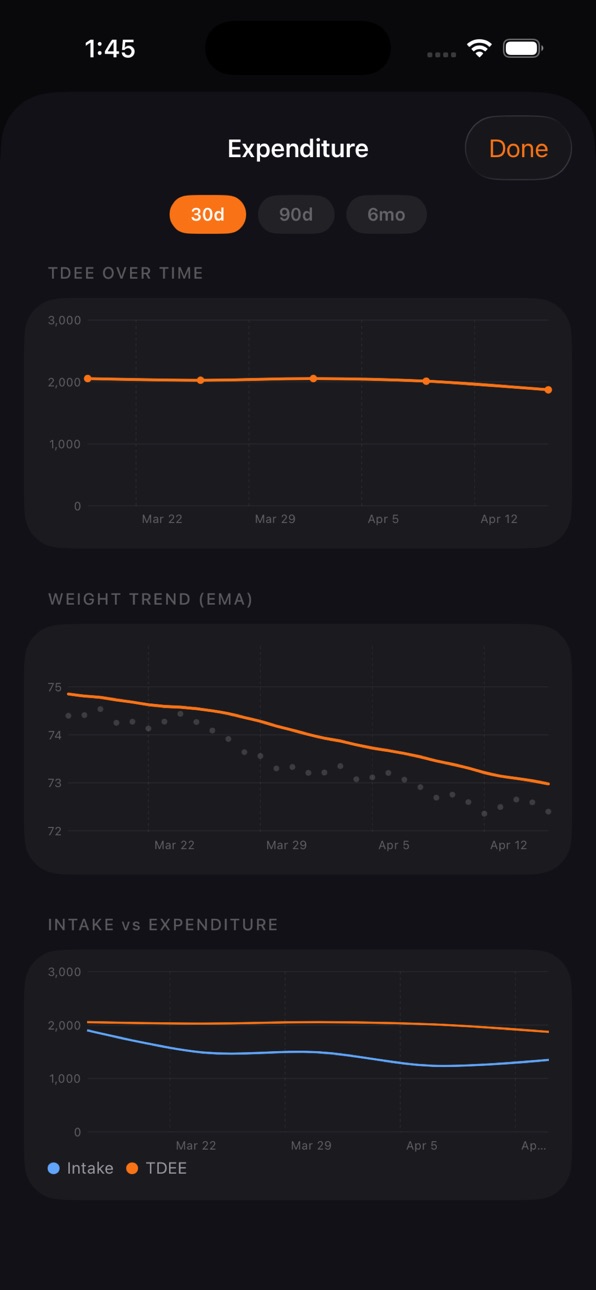
- Adaptive TDEE learns your real metabolism from weight trends over time
- View reports from 7 days to 6 months with calorie charts and micronutrient averages
- Weekly check-ins suggest goal adjustments based on your progress
BUILD RECIPES AND TEMPLATES
- Add ingredients from the food database with full micro and macro data
- Set cooked weight for accurate per-serving nutrition
- Save meal templates to log your go-to meals in one tap
- Duplicate, favorite, and organize with long-press menus
STAY ON TRACK
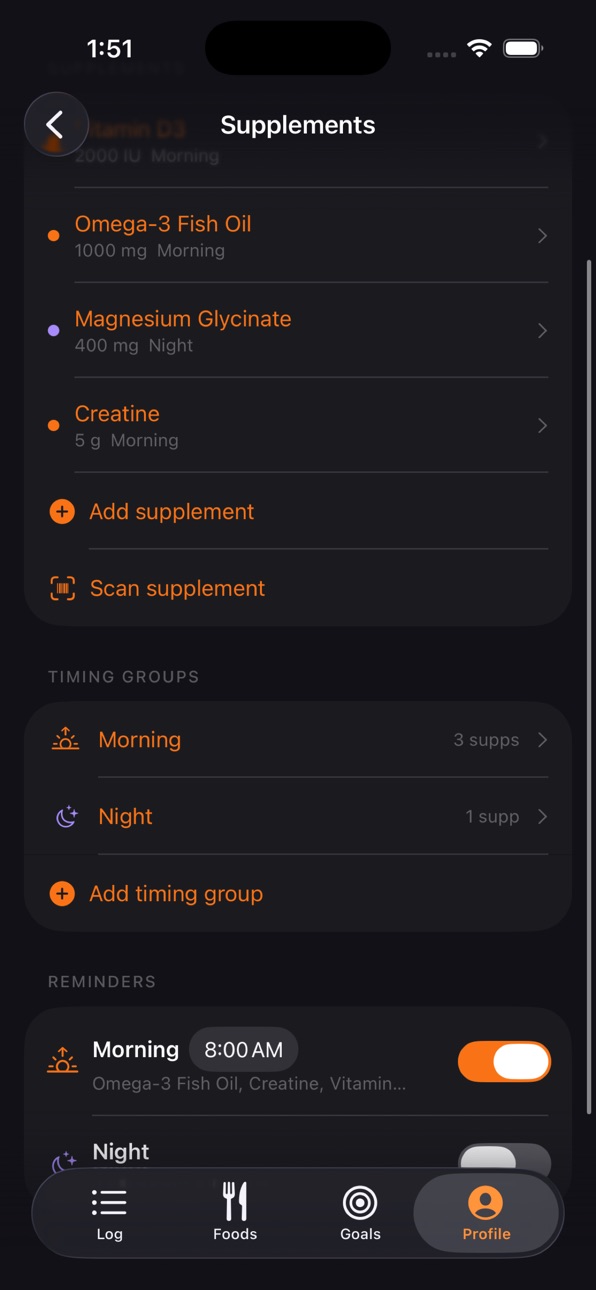
- Track supplements with timing groups and daily reminders
- Intermittent fasting timer with customizable protocols and grace periods
- Live fasting countdown on the Lock Screen and Dynamic Island, with a one-tap End Fast button
- Daily check-ins to track energy, mood, sleep, stress, and digestion
- Log weight daily and see your trend toward your goal
SYNC AND EXPORT
- Home screen widget shows daily calorie and macro progress
- Sync with Apple Health for calories, macros, water, and weight
- Custom meal categories with icons, colors, and time-based auto-selection
- Export all your data anytime as CSV
PRIVACY FIRST
- No account required - ever
- No analytics, no tracking, no third-party SDKs
- All data stored on your device and your iCloud account
- Open source food data from USDA and Open Food Facts
- Wipe all your data on demand - clears every record on every device signed into your iCloud
One-time purchase. No subscriptions. No in-app purchases. Features that other apps lock behind a paywall - micronutrient tracking, adaptive TDEE, fasting, meal templates, personalized suggestions - are all included.
Accessibility
ipadiphonemacrealityDevicetvoswatch
Version history 7 versions
Build 885084556v1.6.02026-04-29 21:12:36
Your fast, on the Lock Screen
A live ticking countdown, body-stage label, and progress bar appear the moment you start a fast — no need to open the app to check time remaining.
Dynamic Island support
On iPhone 14 Pro and newer, your fast lives in the Dynamic Island too. Stage icon and timer in the compact pill; full progress bar and a one-tap End Fast button when expanded.
Past your target? Keep counting.
When you reach your goal the Lock Screen timer stays visible and counts up in green so you can track an extended fast. No surprise dismissals.
A smarter Start Fast reminder
The auto-start notification now has a Start Fast action. Tap it — even hours later — and your fast begins at the originally scheduled time, not when you tapped. Late nights stop costing you fasting hours.
Older iPhone? Still covered.
iPhones without a Dynamic Island fall back to the Lock Screen presentation automatically. Every fasting user gets the at-a-glance timer.
Build 885003155v1.5.02026-04-28 18:37:00
ADDED SUGAR TRACKING
Track added sugar separately from total sugar — the nutrient most dietary guidelines actually target. Daily limit defaults to AHA recommendations (25g for women, 36g for men), editable in Goals.
- Daily calorie card shows fiber and added sugar progress alongside macros
- Per-food added sugar surfaces on the Daily Log when present
- Nutrition label scanner now extracts Total Sugars and Added Sugars
- USDA and Open Food Facts auto-populate; existing cached foods backfilled on first launch
- Recipe and template builders show full nutrition breakdown including added sugar
- 7-day Goal Progress in Reports now includes Total Sugar, Added Sugar, and Fiber
MACRO CUSTOMIZATION
- Pick a protein preset (Lower 1.6 g/kg, Standard 1.8 g/kg, Higher 2.2 g/kg) or any custom value
- Lock a macro split — Balanced, Low Carb, or Keto — and the unlocked macro fills the remainder
- Custom values honored across onboarding, Goals, and weekly check-ins — no more silent reverts
ICLOUD RESTORE ON REINSTALL
- Returning users on a new device skip onboarding entirely — data flows in via iCloud
- "Start fresh" escape hatch if your iCloud data has been purged
DATA MANAGEMENT
- Reset All Data option in Profile → Danger Zone, with typed-RESET confirmation
- Remove a logged weight entry directly from the weight sheet
ADAPTIVE TDEE ACCURACY
- Calibration uses qualifying days (food-log + weigh-in) instead of calendar days alone
- Onboarding and weekly check-in now share one calorie/macro formula — no more phantom 1-3 cal deltas
FIXES
- Fasting no longer backdates auto-start past the grace window
- Meal category deletion no longer crashes from the edit sheet
- Goals form refreshes immediately after accepting weekly check-in targets
- Toggling metric/imperial in Body Goals no longer drifts your weight or macros
- Macro values now round instead of truncate for consistency
Build 884854919v1.4.02026-04-23 21:58:14
MICRONUTRIENT TRACKING
Tare now tracks 25 vitamins and minerals automatically. When you search for or scan a food, micronutrient data is extracted from the USDA and Open Food Facts databases alongside macros - no extra work needed.
Expand the calorie card in your Daily Log to see pinned nutrients (Iron, Calcium, Vitamin D, Vitamin C) with daily progress percentages. Tap "View all micronutrients" for the full breakdown grouped by Vitamins, Minerals, and Fat Breakdown.
Targets default to FDA Daily Values. Customize any target in Goals - tap a nutrient to override it.
Micronutrient data also shows when logging foods, editing entries, building recipes, and logging templates. Custom foods and supplements now support micronutrient input. The nutrition label scanner extracts Vitamin D, Calcium, Iron, and Potassium automatically.
PERSONALIZED NUTRIENT SUGGESTIONS
See a nutrient below target? Tap it. Tare suggests foods to close the gap - ranked by what you actually eat, not generic lists.
Your recipes and templates rank highest, followed by foods you log often, then new discoveries from the USDA database. A lentil soup recipe you make weekly will rank above beef liver you've never cooked - even if liver has more iron per serving.
Each suggestion shows serving size, how much of the gap it closes, and why it was suggested (your recipe, frequently logged, custom food, or new). Tap any suggestion to open the logging flow.
Evidence-based absorption tips appear below the suggestions - verified against NIH Office of Dietary Supplements fact sheets with direct links. For example: vitamin C helps your body absorb plant-based iron, or calcium is absorbed best in amounts under 500mg at a time.
Set a dietary preference (Vegetarian, Vegan, or Pescatarian) in Profile to automatically filter out incompatible foods from suggestions.
MICRONUTRIENTS IN REPORTS
Reports now include a micronutrient section showing your daily average intake vs targets across any time range. Nutrients are sorted by gap severity — worst gaps shown first. On the 7-day view, tap any below-target nutrient to open personalized suggestions.
OTHER IMPROVEMENTS
- Macros shown per meal category in section headers
- Long-press entries to move or copy between meals
- Quick add calories from meal section menu
- Filter bar in Foods tab for searching My Foods, Recipes, and Templates
- Long-press to duplicate recipes or templates
- Terms of Use page with health disclaimer added to Profile
All suggestions and tips are for informational purposes only, not medical advice.
Build 884654250v1.3.32026-04-20 02:00:15
Bug fixes and Recipe and template builder improvements
Build 884604170v1.32026-04-17 23:21:53
Nutrition Label Scanner
-Point your camera at any nutrition label to auto-fill values. No more manual entry for packaged foods — scan, confirm, and save.
Intermittent Fasting — Refined
-Fasting is now smoother and smarter. Fasts auto-start on schedule when your eating window closes. Skip a day without breaking your streak. Improved completion flow, next-day logic, and a clearer "Fasting starts at" setting. Fixed edge cases where fasts could restart unexpectedly after ending.
Pull to Refresh
-Swipe down on the Daily Log to refresh your data — especially useful when iCloud syncs from another device.
Smarter Reports
-Dashboard cards now adapt to your selected date range. Supplement consistency tracks correctly. Charts scale properly across all time ranges. Expenditure view loads faster with optimised data fetches.
Daily Check-In Improvements
-Check-ins now correctly appear for today and past days, but stay hidden for future dates. Disabling the feature properly cancels pending notifications. Weekly glance caps food logging at 7 days.
Better Serving Sizes
-Scanned label values now display per-serving, not per-100g. Recipe builder uses "serving" instead of "portion" for clarity. Unknown units (like "cup" or "egg") are treated as servings multiplied by serving
size.
UI Polish
- Splash screen wordmark properly centered
- Edit log entry layout aligned with the log food screen
- Imperial users now correctly see oz/fl oz for water (was stuck on metric)
- Fasting skip state persists across app launches
- Scan confirmation flow improved with clearer accept/reject actions
Build 884513789v1.12026-04-14 20:35:26
Custom Meal Categories
Create your own meal categories beyond Breakfast, Lunch, Dinner, and Snack. Pick a name, color, and icon. Set time ranges for automatic suggestion when logging. Reorder with drag-and-drop.
Meal Templates
Save meals you eat regularly as templates. Log them in one tap from food search. Adjust individual item amounts or exclude items before logging. Entries appear grouped in your daily log.
Supplement Barcode Scanning
Scan supplement barcodes to look up nutrition and add them to your checklist. Link any food to a supplement so checking it off also logs the calories. Set a custom serving amount per supplement.
Also in this update:
- Torch toggle and manual barcode entry in the scanner
- Recipe and food favourites with star filtering
- Collapsible supplement section with timing group headers
- Time-based meal category auto-selection for supplement logging
- Unified amount stepper sizing across all views
Build 884377401v1.02026-04-12 13:48:17
Price history by region
Currency
Show
Columns
Search
Availability 69 of 69 storefronts
| Region | Language | Price | Ratings | Avg | Version |
|---|---|---|---|---|---|
| US | en-US | USD 6.99 | 3 | 4.7 | 1.6.0 |
| PL | en-GB | PLN 29.99 | 1 | 5.0 | 1.6.0 |
| UA | en-GB | USD 7.99 | 1 | 5.0 | 1.6.0 |
| AE | en-GB | AED 24.99 | 0 | — | 1.6.0 |
| AL | en-GB | USD 7.99 | 0 | — | 1.6.0 |
| AM | en-GB | USD 7.99 | 0 | — | 1.6.0 |
| AT | de-DE | EUR 7.99 | 0 | — | 1.6.0 |
| AU | en-AU | AUD 9.99 | 0 | — | 1.6.0 |
| AZ | en-GB | USD 7.99 | 0 | — | 1.6.0 |
| BA | en-GB | EUR 7.99 | 0 | — | 1.6.0 |
| BE | en-GB | EUR 7.99 | 0 | — | 1.6.0 |
| BH | en-GB | USD 7.99 | 0 | — | 1.6.0 |
| BY | en-GB | USD 7.99 | 0 | — | 1.6.0 |
| CA | en-CA | CAD 9.99 | 0 | — | 1.6.0 |
| CH | de-CH | CHF 6 | 0 | — | 1.6.0 |
| CN | zh-Hans-CN | CNY 48 | 0 | — | 1.6.0 |
| CY | en-GB | EUR 7.99 | 0 | — | 1.6.0 |
| CZ | en-GB | CZK 199 | 0 | — | 1.6.0 |
| DE | de-DE | EUR 7.99 | 0 | — | 1.6.0 |
| DK | en-GB | DKK 59 | 0 | — | 1.6.0 |
| EE | en-GB | EUR 7.99 | 0 | — | 1.6.0 |
| EG | en-GB | EGP 399.99 | 0 | — | 1.6.0 |
| ES | es-ES | EUR 7.99 | 0 | — | 1.6.0 |
| FI | en-GB | EUR 7.99 | 0 | — | 1.6.0 |
| FR | fr-FR | EUR 7.99 | 0 | — | 1.6.0 |
| GB | en-GB | GBP 6.99 | 0 | — | 1.6.0 |
| GE | en-GB | USD 7.99 | 0 | — | 1.6.0 |
| HK | zh-Hant-HK | HKD 58 | 0 | — | 1.6.0 |
| HR | en-GB | EUR 7.99 | 0 | — | 1.6.0 |
| ID | en-GB | IDR 119000 | 0 | — | 1.6.0 |
| IE | en-GB | EUR 7.99 | 0 | — | 1.6.0 |
| IL | en-GB | ILS 24.9 | 0 | — | 1.6.0 |
| IQ | en-GB | USD 6.99 | 0 | — | 1.6.0 |
| IS | en-GB | USD 7.99 | 0 | — | 1.6.0 |
| IT | it | EUR 7.99 | 0 | — | 1.6.0 |
| JO | en-GB | USD 6.99 | 0 | — | 1.6.0 |
| JP | ja | JPY 1100 | 0 | — | 1.6.0 |
| KR | ko | KRW 11000 | 0 | — | 1.6.0 |
| KW | en-GB | USD 6.99 | 0 | — | 1.6.0 |
| LB | en-GB | USD 6.99 | 0 | — | 1.6.0 |
| LT | en-GB | EUR 7.99 | 0 | — | 1.6.0 |
| LU | en-GB | EUR 7.99 | 0 | — | 1.6.0 |
| LV | en-GB | EUR 7.99 | 0 | — | 1.6.0 |
| MD | en-GB | USD 7.99 | 0 | — | 1.6.0 |
| ME | en-GB | EUR 6.99 | 0 | — | 1.6.0 |
| MK | en-GB | USD 6.99 | 0 | — | 1.6.0 |
| MO | zh-Hant-HK | USD 6.99 | 0 | — | 1.6.0 |
| MT | en-GB | EUR 7.99 | 0 | — | 1.6.0 |
| MY | en-GB | MYR 29.9 | 0 | — | 1.6.0 |
| NL | nl | EUR 7.99 | 0 | — | 1.6.0 |
| NO | en-GB | NOK 89 | 0 | — | 1.6.0 |
| NZ | en-AU | NZD 12.99 | 0 | — | 1.6.0 |
| OM | en-GB | USD 6.99 | 0 | — | 1.6.0 |
| PH | en-GB | PHP 449 | 0 | — | 1.6.0 |
| PT | pt-PT | EUR 7.99 | 0 | — | 1.6.0 |
| QA | en-GB | QAR 24.99 | 0 | — | 1.6.0 |
| RS | en-GB | EUR 7.99 | 0 | — | 1.6.0 |
| RU | ru | RUB 599 | 0 | — | 1.6.0 |
| SA | en-GB | SAR 29.99 | 0 | — | 1.6.0 |
| SE | sv | SEK 99 | 0 | — | 1.6.0 |
| SG | en-GB | SGD 9.98 | 0 | — | 1.6.0 |
| SI | en-GB | EUR 7.99 | 0 | — | 1.6.0 |
| SK | en-GB | EUR 7.99 | 0 | — | 1.6.0 |
| TH | en-GB | THB 249 | 0 | — | 1.6.0 |
| TR | en-GB | TRY 399.99 | 0 | — | 1.6.0 |
| TW | zh-Hant-TW | TWD 220 | 0 | — | 1.6.0 |
| VN | en-GB | VND 199000 | 0 | — | 1.6.0 |
| XK | en-GB | EUR 7.99 | 0 | — | 1.6.0 |
| YE | en-GB | USD 6.99 | 0 | — | 1.6.0 |
Change log 11 changes · CH
✎
releaseNotes updated
Your fast, on the Lock Screen
A live ticking countdown, body-stage label, and progress bar appear the moment you start a fast — no need to open the app to check
✎
description updated
Tare is a nutrition tracker that respects your privacy. No account needed, no data collection, no ads - your food logs stay on your device and sync privately th
✎
subtitle updated
Calorie & macro counter
✎
name updated
Tare - Nutrition Tracker
◆
Version 1.6.0 released
Your fast, on the Lock Screen
A live ticking countdown, body-stage label, and progress bar appear the moment you start a fast — no need to open the app to check time remaining.
Dynamic Island support
On iPhone 14 Pro and newer, your fast l
◆
Version 1.5.0 released
ADDED SUGAR TRACKING
Track added sugar separately from total sugar — the nutrient most dietary guidelines actually target. Daily limit defaults to AHA recommendations (25g for women, 36g for men), editable in Goals.
- Daily calorie card s
◆
Version 1.4.0 released
MICRONUTRIENT TRACKING
Tare now tracks 25 vitamins and minerals automatically. When you search for or scan a food, micronutrient data is extracted from the USDA and Open Food Facts databases alongside macros - no extra work needed.
Expand
◆
Version 1.3.3 released
Bug fixes and Recipe and template builder improvements
◆
Version 1.3 released
Nutrition Label Scanner
-Point your camera at any nutrition label to auto-fill values. No more manual entry for packaged foods — scan, confirm, and save.
Intermittent Fasting — Refined
-Fasting is now smoother and smarter. Fasts auto-start
◆
Version 1.1 released
Custom Meal Categories
Create your own meal categories beyond Breakfast, Lunch, Dinner, and Snack. Pick a name, color, and icon. Set time ranges for automatic suggestion when logging. Reorder with drag-and-drop.
Meal Templates
Save meals y
◆
Version 1.0 released