Home › Photo & Video

 MT
MT
 CHde-CH
 AEen-GB
 AFen-GB
 AGen-GB
 AMen-GB
 AOen-GB
 ARes-MX
 ATde-DE
 AUen-AU
 AZen-GB
 BAen-GB
 BBen-GB
 BFen-GB
 BGen-GB
 BHen-GB
 BJen-GB
 BMen-GB
 BNen-GB
 BOes-MX
 BRpt-BR
 BSen-GB
 BTen-GB
 BWen-GB
 BZen-GB
 CAen-CA
 CDen-GB
 CGen-GB
 CIfr-FR
 CLes-MX
 CMfr-FR
 CNzh-Hans-CN
 COes-MX
 CRes-MX
 CVen-GB
 CYen-GB
 CZen-GB
 DKen-GB
 DMen-GB
 DZen-GB
 ECes-MX
 EEen-GB
 EGen-GB
 ESes-ES
 FIen-GB
 FJen-GB
 FMen-GB
 FRfr-FR
 GAfr-FR
 GBen-GB
 GDen-GB
 GEen-GB
 GHen-GB
 GMen-GB
 GRen-GB
 GWen-GB
 GYen-GB
 HKzh-Hant-HK
 HNes-MX
 HRen-GB
 HUen-GB
 IDen-GB
 IEen-GB
 ILen-GB
 INen-GB
 IQen-GB
 ISen-GB
 ITit
ITit JMen-GB
 JOen-GB
 JPja
JPja KEen-GB
 KGen-GB
 KHen-GB
 KNen-GB
 KRko
KRko KWen-GB
 KYen-GB
 KZen-GB
 LAen-GB
 LBen-GB
 LCen-GB
 LKen-GB
 LRen-GB
 LTen-GB
 LUen-GB
 LVen-GB
 LYen-GB
 MAen-GB
 MDen-GB
 MEen-GB
 MGen-GB
 MKen-GB
 MLen-GB
 MMen-GB
 MNen-GB
 MOzh-Hant-HK
 MRen-GB
 MSen-GBMTen-GB
 MUen-GB
 MVen-GB
 MWen-GB
 MXes-MX
 MYen-GB
 MZen-GB
 NAen-GB
 NEen-GB
 NGen-GB
 NIes-MX
 NLnl
NLnl NOen-GB
 NPen-GB
 NRen-GB
 NZen-AU
 OMen-GB
 PEes-MX
 PGen-GB
 PHen-GB
 PKen-GB
 PLen-GB
 PTpt-PT
 PWen-GB
 PYes-MX
 QAen-GB
 ROen-GB
 RWen-GB
 SAen-GB
 SBen-GB
 SCen-GB
 SEsv
SEsv SGen-GB
 SIen-GB
 SKen-GB
 SLen-GB
 SNen-GB
 SRen-GB
 STen-GB
 SZen-GB
 TCen-GB
 TDen-GB
 TJen-GB
 TMen-GB
 TNen-GB
 TOen-GB
 TRen-GB
 TTen-GB
 TWzh-Hant-TW
 TZen-GB
 UGen-GB
 USen-US
 UYen-GB
 UZen-GB
 VCen-GB
 VEes-MX
 VGen-GB
 VNen-GB
 VUen-GB
 XKen-GB
 YEen-GB
 ZAen-GB
 ZMen-GB
 ZWen-GB
162 of 162 storefronts
Content in en-US
Content in en-US
Information
Preview 2 platforms
iPhone 5 images


iPad 5 images


What’s New Version 1.0.16
- Performance fixes and troubleshooting enhancements
Description
Your gallery is full. FlickClean fixes it in minutes — not hours.
Swipe left to delete, right to keep. Free up gigabytes of space with the calmest, fastest photo cleaner on iPhone.
No ads. No waiting. No surprises. Nothing is deleted until you confirm.
Key Features
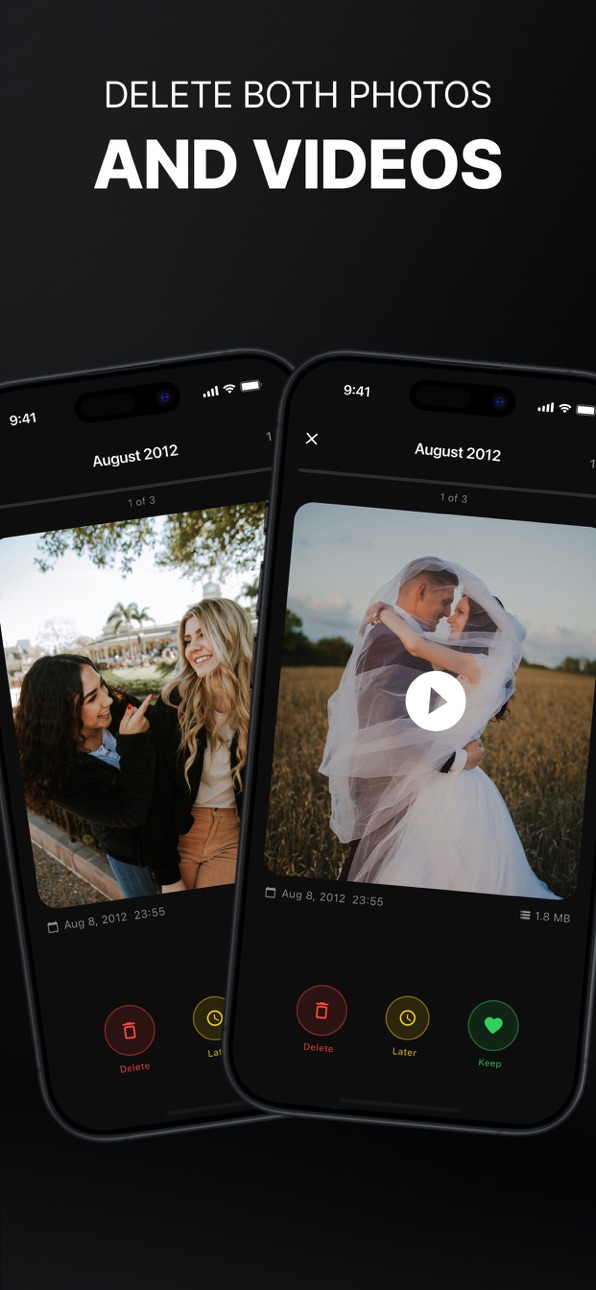
Swipe to Clean
Swipe left to mark for deletion, right to keep, or review items later. Fast, simple, and efficient.
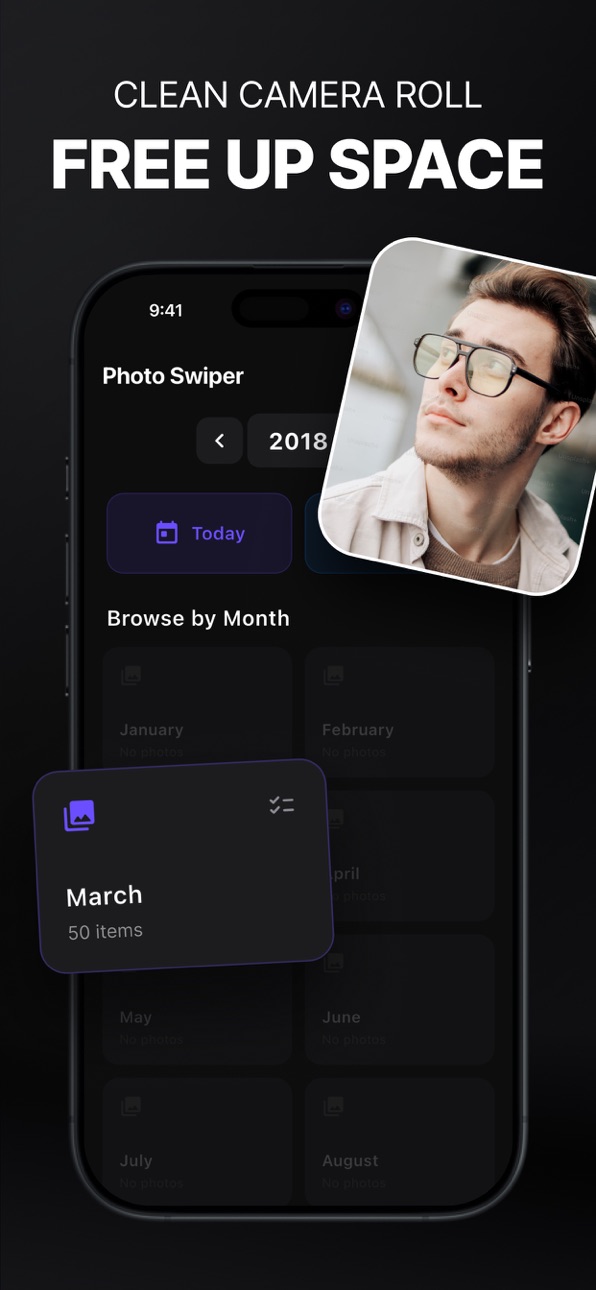
Smart Monthly View
Browse your gallery by month to stay organized and avoid endless scrolling.
Safe Deletion Process
Nothing is deleted instantly. Review all selected items before confirming.
Storage Overview
See how much space you can free up before deleting files.
High Performance
Built to handle large libraries smoothly, even with thousands of photos and videos.
Clean and Focused Design
Minimal interface with no clutter. Designed for speed and clarity.
Why FlickClean
Most gallery apps are slow and overwhelming. FlickClean is built for users who want a fast and simple way to clean their gallery without frustration.
Whether you are organizing memories, cleaning up after a trip, or freeing up storage, FlickClean makes it effortless.
Full Control
No automatic deletions
Review before removing anything
Clear overview of all selected items
You stay in control at all times.
Start cleaning your gallery the smart way. Download FlickClean today and free up space in seconds.
Privacy Policy: https://github.com/BaskLash/SwipeClean-Photo-Cleaner-Privacy/blob/main/privacy-policy.md
Terms of Use (EULA): https://www.apple.com/legal/internet-services/itunes/dev/stdeula/
In-App Purchases MT pricing
FlickClean Per Month Subscription
FlickClean Pro · Yearly—
FlickClean · 7 days—
Capabilities
In-App Purchases
Accessibility
ipadiphonemacrealityDevicetvoswatch
Version history 17 versions
Build 887039551v1.0.162026-06-16 18:00:00
- Performance fixes and troubleshooting enhancements
Build 886802018v1.0.152026-06-11 15:18:53
- enhanced experience with extended usability
Build 886185607v1.0.142026-05-27 16:43:57
- Fix texts inside of onboarding
- Bug fixes
Build 885811837v1.0.132026-05-19 16:13:08
- Added new onboarding process
- More clarity with better usability
Build 885660909v1.0.122026-05-14 18:19:10
What's new in this version:
- Improved app stability and performance
- Smoother gestures and animations
- Behind-the-scenes improvements
Build 885142024v1.0.112026-05-13 10:07:40
Bug fixes and payment connectors have been fully implemented.
Build 885114980v1.0.102026-04-30 18:41:58
Added ways to monetise the app to support future development.
Build 885072105v1.0.92026-04-29 19:55:18
We have added new, clearer and more precise screenshots to show what our app is all about.
Build 884870033v1.0.82026-04-24 18:29:12
Add a swipe direction helper to improve orientation, especially for beginners.
Build 884859423v1.0.72026-04-23 21:56:00
Bug fixes and improved onboarding
Build 884803302v1.0.62026-04-22 21:19:17
You can now zoom in on your pictures while swiping to see more details of the image you are deciding on.
Build 884722519v1.0.52026-04-20 22:26:41
We’ve improved the photo viewing experience to make your swiping more accurate and reliable.
- Fixed an issue where images could appear cropped during swipe review
- Photos now display in their full proportions without cutting off important details
- Improved image scaling to better match the original photo
- Enhanced overall visual clarity and layout balance
These updates ensure that every photo looks exactly as it was taken, giving you a more natural and trustworthy review experience.
Build 884650219v1.0.42026-04-18 15:36:44
Customize your photo management experience with new, fully adjustable swipe directions for both left- and right-handed users. Easily set your preference to swipe left or right to keep or delete photos, improving comfort and reducing friction.
Build 884608436v1.0.32026-04-17 20:19:58
Fixed a bug on the Permission screen to ensure smooth access to your library’s images and videos.
Build 884596267v1.0.22026-04-16 22:11:52
We’ve added a new horizontal gallery to the swipe view. You can now easily jump between images or skip ahead without having to swipe through every single photo individually.
Build 884477288v1.0.12026-04-15 18:59:07
We’ve updated our App Store previews and screenshots to give you a better look at the latest features and the improved user interface.
Build 884271139v1.02026-04-10 10:38:55
Price history by region
Currency
Show
Columns
Search
Availability 162 of 162 storefronts
| Region | Language | Price | Ratings | Avg | Version |
|---|---|---|---|---|---|
| CH | de-CH | Free | 2 | 5.0 | 1.0.16 |
| AE | en-GB | Free | 0 | — | 1.0.16 |
| AF | en-GB | Free | 0 | — | 1.0.16 |
| AG | en-GB | Free | 0 | — | 1.0.16 |
| AM | en-GB | Free | 0 | — | 1.0.16 |
| AO | en-GB | Free | 0 | — | 1.0.16 |
| AR | es-MX | Free | 0 | — | 1.0.16 |
| AT | de-DE | Free | 0 | — | 1.0.16 |
| AU | en-AU | Free | 0 | — | 1.0.16 |
| AZ | en-GB | Free | 0 | — | 1.0.16 |
| BA | en-GB | Free | 0 | — | 1.0.16 |
| BB | en-GB | Free | 0 | — | 1.0.16 |
| BF | en-GB | Free | 0 | — | 1.0.16 |
| BG | en-GB | Free | 0 | — | 1.0.16 |
| BH | en-GB | Free | 0 | — | 1.0.16 |
| BJ | en-GB | Free | 0 | — | 1.0.16 |
| BM | en-GB | Free | 0 | — | 1.0.16 |
| BN | en-GB | Free | 0 | — | 1.0.16 |
| BO | es-MX | Free | 0 | — | 1.0.16 |
| BR | pt-BR | Free | 0 | — | 1.0.16 |
| BS | en-GB | Free | 0 | — | 1.0.16 |
| BT | en-GB | Free | 0 | — | 1.0.16 |
| BW | en-GB | Free | 0 | — | 1.0.16 |
| BZ | en-GB | Free | 0 | — | 1.0.16 |
| CA | en-CA | Free | 0 | — | 1.0.16 |
| CD | en-GB | Free | 0 | — | 1.0.16 |
| CG | en-GB | Free | 0 | — | 1.0.16 |
| CI | fr-FR | Free | 0 | — | 1.0.16 |
| CL | es-MX | Free | 0 | — | 1.0.16 |
| CM | fr-FR | Free | 0 | — | 1.0.16 |
| CN | zh-Hans-CN | Free | 0 | — | 1.0.16 |
| CO | es-MX | Free | 0 | — | 1.0.16 |
| CR | es-MX | Free | 0 | — | 1.0.16 |
| CV | en-GB | Free | 0 | — | 1.0.16 |
| CY | en-GB | Free | 0 | — | 1.0.16 |
| CZ | en-GB | Free | 0 | — | 1.0.16 |
| DK | en-GB | Free | 0 | — | 1.0.16 |
| DM | en-GB | Free | 0 | — | 1.0.16 |
| DZ | en-GB | Free | 0 | — | 1.0.16 |
| EC | es-MX | Free | 0 | — | 1.0.16 |
| EE | en-GB | Free | 0 | — | 1.0.16 |
| EG | en-GB | Free | 0 | — | 1.0.16 |
| ES | es-ES | Free | 0 | — | 1.0.16 |
| FI | en-GB | Free | 0 | — | 1.0.16 |
| FJ | en-GB | Free | 0 | — | 1.0.16 |
| FM | en-GB | Free | 0 | — | 1.0.16 |
| FR | fr-FR | Free | 0 | — | 1.0.16 |
| GA | fr-FR | Free | 0 | — | 1.0.16 |
| GB | en-GB | Free | 0 | — | 1.0.16 |
| GD | en-GB | Free | 0 | — | 1.0.16 |
| GE | en-GB | Free | 0 | — | 1.0.16 |
| GH | en-GB | Free | 0 | — | 1.0.16 |
| GM | en-GB | Free | 0 | — | 1.0.16 |
| GR | en-GB | Free | 0 | — | 1.0.16 |
| GW | en-GB | Free | 0 | — | 1.0.16 |
| GY | en-GB | Free | 0 | — | 1.0.16 |
| HK | zh-Hant-HK | Free | 0 | — | 1.0.16 |
| HN | es-MX | Free | 0 | — | 1.0.16 |
| HR | en-GB | Free | 0 | — | 1.0.16 |
| HU | en-GB | Free | 0 | — | 1.0.16 |
| ID | en-GB | Free | 0 | — | 1.0.16 |
| IE | en-GB | Free | 0 | — | 1.0.16 |
| IL | en-GB | Free | 0 | — | 1.0.16 |
| IN | en-GB | Free | 0 | — | 1.0.16 |
| IQ | en-GB | Free | 0 | — | 1.0.16 |
| IS | en-GB | Free | 0 | — | 1.0.16 |
| IT | it | Free | 0 | — | 1.0.16 |
| JM | en-GB | Free | 0 | — | 1.0.16 |
| JO | en-GB | Free | 0 | — | 1.0.16 |
| JP | ja | Free | 0 | — | 1.0.16 |
| KE | en-GB | Free | 0 | — | 1.0.16 |
| KG | en-GB | Free | 0 | — | 1.0.16 |
| KH | en-GB | Free | 0 | — | 1.0.16 |
| KN | en-GB | Free | 0 | — | 1.0.16 |
| KR | ko | Free | 0 | — | 1.0.16 |
| KW | en-GB | Free | 0 | — | 1.0.16 |
| KY | en-GB | Free | 0 | — | 1.0.16 |
| KZ | en-GB | Free | 0 | — | 1.0.16 |
| LA | en-GB | Free | 0 | — | 1.0.16 |
| LB | en-GB | Free | 0 | — | 1.0.16 |
| LC | en-GB | Free | 0 | — | 1.0.16 |
| LK | en-GB | Free | 0 | — | 1.0.16 |
| LR | en-GB | Free | 0 | — | 1.0.16 |
| LT | en-GB | Free | 0 | — | 1.0.16 |
| LU | en-GB | Free | 0 | — | 1.0.16 |
| LV | en-GB | Free | 0 | — | 1.0.16 |
| LY | en-GB | Free | 0 | — | 1.0.16 |
| MA | en-GB | Free | 0 | — | 1.0.16 |
| MD | en-GB | Free | 0 | — | 1.0.16 |
| ME | en-GB | Free | 0 | — | 1.0.16 |
| MG | en-GB | Free | 0 | — | 1.0.16 |
| MK | en-GB | Free | 0 | — | 1.0.16 |
| ML | en-GB | Free | 0 | — | 1.0.16 |
| MM | en-GB | Free | 0 | — | 1.0.16 |
| MN | en-GB | Free | 0 | — | 1.0.16 |
| MO | zh-Hant-HK | Free | 0 | — | 1.0.16 |
| MR | en-GB | Free | 0 | — | 1.0.16 |
| MS | en-GB | Free | 0 | — | 1.0.16 |
| MT | en-GB | Free | 0 | — | 1.0.16 |
| MU | en-GB | Free | 0 | — | 1.0.16 |
| MV | en-GB | Free | 0 | — | 1.0.16 |
| MW | en-GB | Free | 0 | — | 1.0.16 |
| MX | es-MX | Free | 0 | — | 1.0.16 |
| MY | en-GB | Free | 0 | — | 1.0.16 |
| MZ | en-GB | Free | 0 | — | 1.0.16 |
| NA | en-GB | Free | 0 | — | 1.0.16 |
| NE | en-GB | Free | 0 | — | 1.0.16 |
| NG | en-GB | Free | 0 | — | 1.0.16 |
| NI | es-MX | Free | 0 | — | 1.0.16 |
| NL | nl | Free | 0 | — | 1.0.16 |
| NO | en-GB | Free | 0 | — | 1.0.16 |
| NP | en-GB | Free | 0 | — | 1.0.16 |
| NR | en-GB | Free | 0 | — | 1.0.16 |
| NZ | en-AU | Free | 0 | — | 1.0.16 |
| OM | en-GB | Free | 0 | — | 1.0.16 |
| PE | es-MX | Free | 0 | — | 1.0.16 |
| PG | en-GB | Free | 0 | — | 1.0.16 |
| PH | en-GB | Free | 0 | — | 1.0.16 |
| PK | en-GB | Free | 0 | — | 1.0.16 |
| PL | en-GB | Free | 0 | — | 1.0.16 |
| PT | pt-PT | Free | 0 | — | 1.0.16 |
| PW | en-GB | Free | 0 | — | 1.0.16 |
| PY | es-MX | Free | 0 | — | 1.0.16 |
| QA | en-GB | Free | 0 | — | 1.0.16 |
| RO | en-GB | Free | 0 | — | 1.0.16 |
| RW | en-GB | Free | 0 | — | 1.0.16 |
| SA | en-GB | Free | 0 | — | 1.0.16 |
| SB | en-GB | Free | 0 | — | 1.0.16 |
| SC | en-GB | Free | 0 | — | 1.0.16 |
| SE | sv | Free | 0 | — | 1.0.16 |
| SG | en-GB | Free | 0 | — | 1.0.16 |
| SI | en-GB | Free | 0 | — | 1.0.16 |
| SK | en-GB | Free | 0 | — | 1.0.16 |
| SL | en-GB | Free | 0 | — | 1.0.16 |
| SN | en-GB | Free | 0 | — | 1.0.16 |
| SR | en-GB | Free | 0 | — | 1.0.16 |
| ST | en-GB | Free | 0 | — | 1.0.16 |
| SZ | en-GB | Free | 0 | — | 1.0.16 |
| TC | en-GB | Free | 0 | — | 1.0.16 |
| TD | en-GB | Free | 0 | — | 1.0.16 |
| TJ | en-GB | Free | 0 | — | 1.0.16 |
| TM | en-GB | Free | 0 | — | 1.0.16 |
| TN | en-GB | Free | 0 | — | 1.0.16 |
| TO | en-GB | Free | 0 | — | 1.0.16 |
| TR | en-GB | Free | 0 | — | 1.0.16 |
| TT | en-GB | Free | 0 | — | 1.0.16 |
| TW | zh-Hant-TW | Free | 0 | — | 1.0.16 |
| TZ | en-GB | Free | 0 | — | 1.0.16 |
| UG | en-GB | Free | 0 | — | 1.0.16 |
| US | en-US | Free | 0 | — | 1.0.16 |
| UY | en-GB | Free | 0 | — | 1.0.16 |
| UZ | en-GB | Free | 0 | — | 1.0.16 |
| VC | en-GB | Free | 0 | — | 1.0.16 |
| VE | es-MX | Free | 0 | — | 1.0.16 |
| VG | en-GB | Free | 0 | — | 1.0.16 |
| VN | en-GB | Free | 0 | — | 1.0.16 |
| VU | en-GB | Free | 0 | — | 1.0.16 |
| XK | en-GB | Free | 0 | — | 1.0.16 |
| YE | en-GB | Free | 0 | — | 1.0.16 |
| ZA | en-GB | Free | 0 | — | 1.0.16 |
| ZM | en-GB | Free | 0 | — | 1.0.16 |
| ZW | en-GB | Free | 0 | — | 1.0.16 |
Change log 21 changes · MT
✎
releaseNotes updated
- Performance fixes and troubleshooting enhancements
✎
description updated
Your gallery is full. FlickClean fixes it in minutes — not hours.
Swipe left to delete, right to keep. Free up gigabytes of space with the calmest, fastest phot
✎
subtitle updated
Swipe to Delete & Free Space
✎
name updated
FlickClean: Photo Cleaner
◆
Version 1.0.16 released
- Performance fixes and troubleshooting enhancements
◆
Version 1.0.15 released
- enhanced experience with extended usability
◆
Version 1.0.14 released
- Fix texts inside of onboarding
- Bug fixes
◆
Version 1.0.13 released
- Added new onboarding process
- More clarity with better usability
◆
Version 1.0.12 released
What's new in this version:
- Improved app stability and performance
- Smoother gestures and animations
- Behind-the-scenes improvements
◆
Version 1.0.11 released
Bug fixes and payment connectors have been fully implemented.
◆
Version 1.0.10 released
Added ways to monetise the app to support future development.
◆
Version 1.0.9 released
We have added new, clearer and more precise screenshots to show what our app is all about.
◆
Version 1.0.8 released
Add a swipe direction helper to improve orientation, especially for beginners.
◆
Version 1.0.7 released
Bug fixes and improved onboarding
◆
Version 1.0.6 released
You can now zoom in on your pictures while swiping to see more details of the image you are deciding on.
◆
Version 1.0.5 released
We’ve improved the photo viewing experience to make your swiping more accurate and reliable.
- Fixed an issue where images could appear cropped during swipe review
- Photos now display in their full proportions without cutting off importan
◆
Version 1.0.4 released
Customize your photo management experience with new, fully adjustable swipe directions for both left- and right-handed users. Easily set your preference to swipe left or right to keep or delete photos, improving comfort and reducing frictio
◆
Version 1.0.3 released
Fixed a bug on the Permission screen to ensure smooth access to your library’s images and videos.
◆
Version 1.0.2 released
We’ve added a new horizontal gallery to the swipe view. You can now easily jump between images or skip ahead without having to swipe through every single photo individually.
◆
Version 1.0.1 released
We’ve updated our App Store previews and screenshots to give you a better look at the latest features and the improved user interface.
◆
Version 1.0 released