Home › Entertainment

 DO
DO
 AEen-GB
 AFen-GB
 AGen-GB
 AIen-GB
 ALen-GB
 AMen-GB
 AOen-GB
 ARes-MX
 ATde-DE
 AUen-AU
 AZen-GB
 BAen-GB
 BBen-GB
 BEen-GB
 BFen-GB
 BGen-GB
 BHen-GB
 BJen-GB
 BMen-GB
 BNen-GB
 BOes-MX
 BRpt-BR
 BSen-GB
 BTen-GB
 BWen-GB
 BYen-GB
 BZen-GB
 CAen-CA
 CDen-GB
 CGen-GB
 CHde-CH
 CIfr-FR
 CLes-MX
 CMfr-FR
 CNzh-Hans-CN
 COes-MX
 CRes-MX
 CVen-GB
 CYen-GB
 CZen-GB
 DEde-DE
 DKen-GB
 DMen-GBDOes-MX
 DZen-GB
 ECes-MX
 EEen-GB
 EGen-GB
 ESes-ES
 FIen-GB
 FJen-GB
 FMen-GB
 FRfr-FR
 GAfr-FR
 GBen-GB
 GDen-GB
 GEen-GB
 GHen-GB
 GMen-GB
 GRen-GB
 GTes-MX
 GWen-GB
 GYen-GB
 HKzh-Hant-HK
 HNes-MX
 HRen-GB
 HUen-GB
 IDen-GB
 IEen-GB
 ILen-GB
 INen-GB
 IQen-GB
 ISen-GB
 ITit
ITit JMen-GB
 JOen-GB
 JPja
JPja KEen-GB
 KGen-GB
 KHen-GB
 KNen-GB
 KRko
KRko KWen-GB
 KYen-GB
 KZen-GB
 LAen-GB
 LBen-GB
 LCen-GB
 LKen-GB
 LRen-GB
 LTen-GB
 LUen-GB
 LVen-GB
 LYen-GB
 MAen-GB
 MDen-GB
 MEen-GB
 MGen-GB
 MKen-GB
 MLen-GB
 MMen-GB
 MNen-GB
 MOzh-Hant-HK
 MRen-GB
 MSen-GB
 MTen-GB
 MUen-GB
 MVen-GB
 MWen-GB
 MXes-MX
 MYen-GB
 MZen-GB
 NAen-GB
 NEen-GB
 NGen-GB
 NIes-MX
 NLnl
NLnl NOen-GB
 NPen-GB
 NRen-GB
 NZen-AU
 OMen-GB
 PAes-MX
 PEes-MX
 PGen-GB
 PHen-GB
 PKen-GB
 PLen-GB
 PTpt-PT
 PWen-GB
 PYes-MX
 QAen-GB
 ROen-GB
 RSen-GB
 RUru
RUru RWen-GB
 SAen-GB
 SBen-GB
 SCen-GB
 SEsv
SEsv SGen-GB
 SIen-GB
 SKen-GB
 SLen-GB
 SNen-GB
 SRen-GB
 STen-GB
 SVes-MX
 SZen-GB
 TCen-GB
 TDen-GB
 THen-GB
 TJen-GB
 TMen-GB
 TNen-GB
 TOen-GB
 TRen-GB
 TTen-GB
 TWzh-Hant-TW
 TZen-GB
 UAen-GB
 UGen-GB
 USen-US
 UYen-GB
 UZen-GB
 VCen-GB
 VEes-MX
 VGen-GB
 VNen-GB
 VUen-GB
 XKen-GB
 YEen-GB
 ZAen-GB
 ZMen-GB
 ZWen-GB
175 of 175 storefronts
Content in en-US
Content in en-US
Information
Preview 3 platforms
iPhone 8 images





iPad 7 images


Apple Watch 1 image

What’s New Version 1.7
Fresh Settings screen
Settings has been redesigned to make it easy to find About, Credits, and your sound data, with room to grow.
Louder, clearer sounds
The per-sound volume control now reaches higher, so quiet clips can be boosted to the level you want. The default sits right in the middle, so it's easy to find your way back.
Better board management
Deleting a board now lets you move its sounds to another board instead of losing them.
New Feature for NoiseBox Supporters
Share a whole board with friends and family. They can add your sounds to their own NoiseBox in a tap.
Support NoiseBox to unlock board sharing and six alternate app icons and help keep the app free for everyone.
Plus a number of fixes and polish throughout.
Description
⏺ NoiseBox: Personal Soundboard ⏺
NoiseBox turns your iPhone into a customizable soundboard. Whether you need quick sound effects for content creation, live performances, games, or just for fun. NoiseBox puts your audio clips one tap away.
⏺ Instant Playback
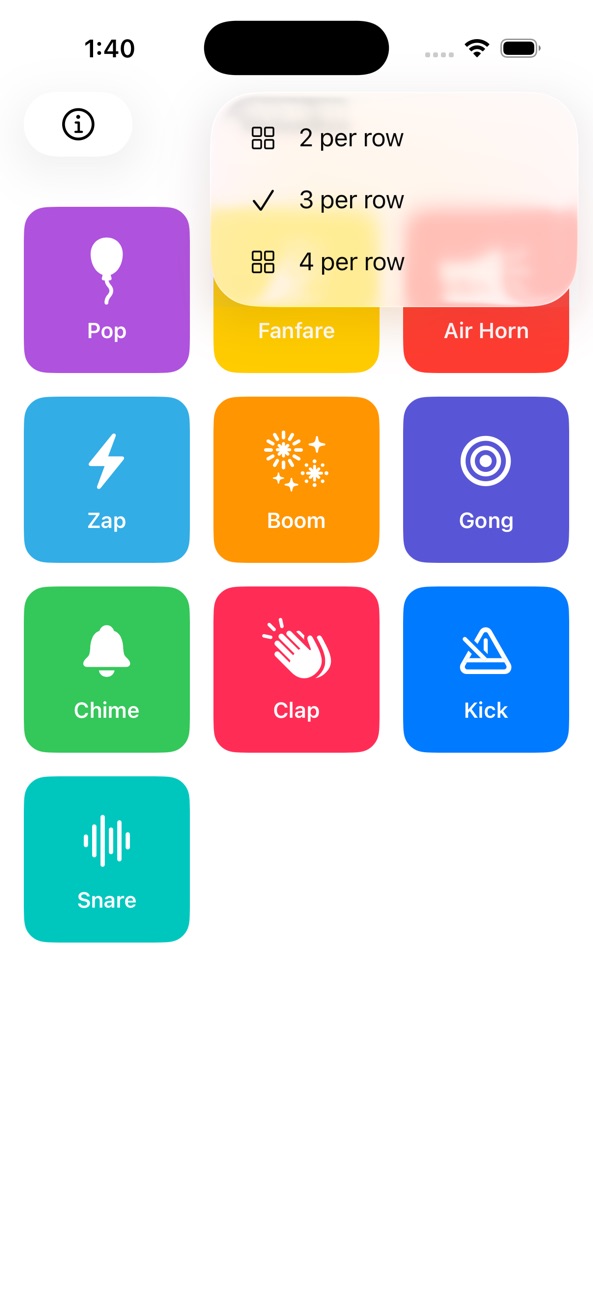
Tap any tile to play its sound immediately. A clean grid layout keeps all your clips organized and easy to reach.
⏺ Fully Customizable Tiles
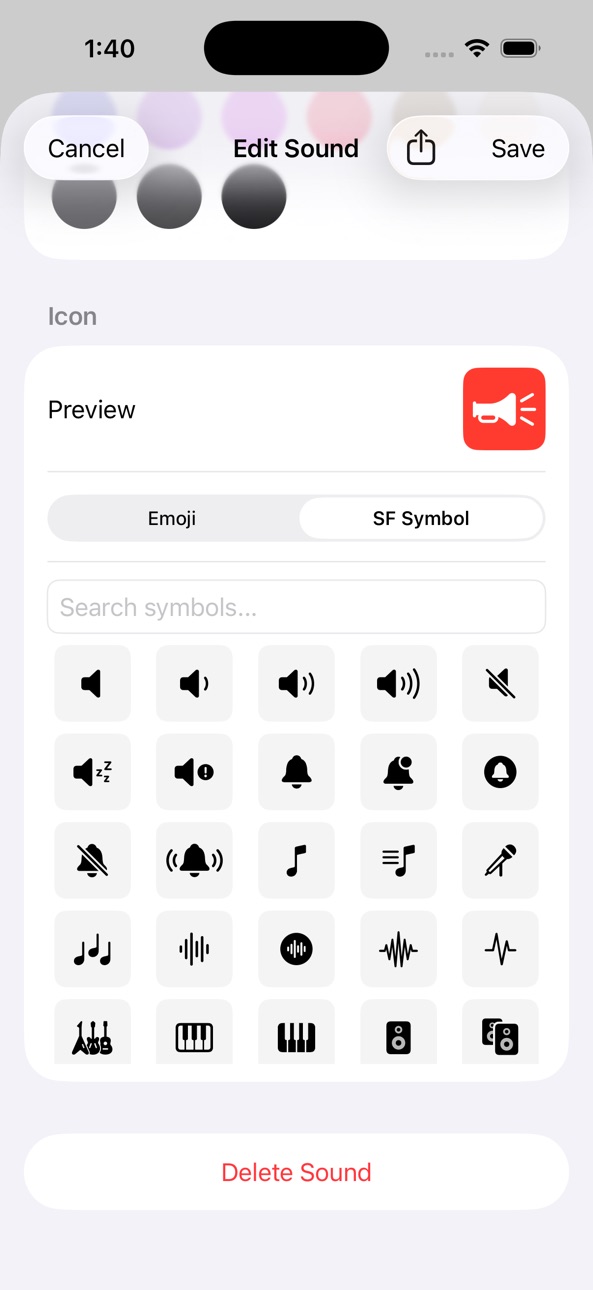
Make each tile your own. Set a name, choose a background color, and assign an icon, either an emoji or any SF Symbol. At a glance, you always know exactly what you're about to trigger.
⏺ Your Audio, Your Way
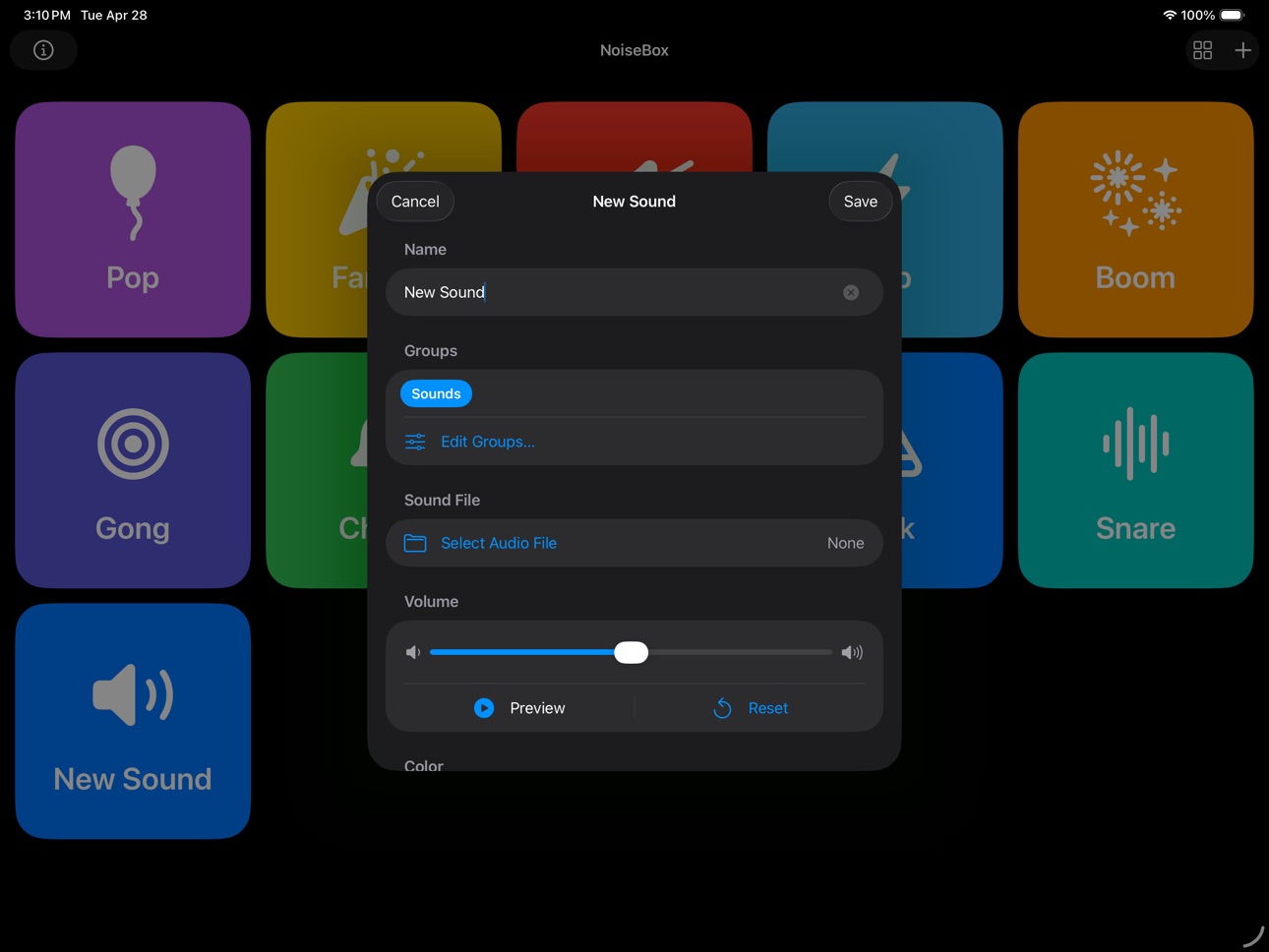
Import any audio file from your device to add it to your board. NoiseBox also includes a set of built-in sample clips to get you started right away.
⏺ Apple Watch Support
Play sounds directly from your wrist. Your soundboard syncs automatically to the NoiseBox Watch app, so your clips are always at hand, even when your phone is in your pocket.
⏺ iCloud Sync
Your tiles, colors, icons, and custom audio sync automatically across all your devices via iCloud. Set it up once and it's everywhere.
⏺ Sound Sharing
Share your favorite sounds with friends and family using the Share button in the Edit Sound screen.
⏺ Groups
Create groups of your sounds for different occasions or events.
⏺ Record your own sounds
You can now record your own sounds in addition to importing sound files.
⏺ Widgets
Use Home Screen widgets to play your favorite sounds right from your Home Screen.
⏺ Import from Video
Import audio from videos in your Photo Library, and trim just the portion you want.
Capabilities
In-App Purchases
Accessibility
ipadiphonemacrealityDevicetvoswatch
Version history 7 versions
Build 887019232v1.72026-06-17 17:51:33
Fresh Settings screen
Settings has been redesigned to make it easy to find About, Credits, and your sound data, with room to grow.
Louder, clearer sounds
The per-sound volume control now reaches higher, so quiet clips can be boosted to the level you want. The default sits right in the middle, so it's easy to find your way back.
Better board management
Deleting a board now lets you move its sounds to another board instead of losing them.
New Feature for NoiseBox Supporters
Share a whole board with friends and family. They can add your sounds to their own NoiseBox in a tap.
Support NoiseBox to unlock board sharing and six alternate app icons and help keep the app free for everyone.
Plus a number of fixes and polish throughout.
Build 885651846v1.62026-05-22 13:32:52
⏺ Record your own sounds
You can now record your own sounds in addition to importing sound files.
⏺ Import from Video
Import audio from videos in your Photo Library, and trim just the portion you want.
⏺ Trim audio
You can now trim sounds to just the portion you want. Trimming is non-destructive, so you can readjust again later if you need to. Sharing a trimmed sound will only share the trimmed portion.
Build 885539542v1.52026-05-13 18:54:38
⏺ New features ⏺
⏺ Widgets! You can now add Home Screen widgets for any of your sound groups and play them directly from your Home Screen!
⏺ You can now swipe between groups
Fixed:
- Fixed a sync bug that could result in duplicate groups. Apologies if some of your sounds are moved back to the default group.
- Other miscellaneous bug fixes
Build 885398091v1.42026-05-10 18:46:17
⏺ Record your own sounds
You can now record your own sounds in addition to importing sound files
⏺ Cleaned up the New Sound/Edit Sound screen
New Sound/Edit Sound screen is now split into Sound and Appearance tabs to make modifying sounds easier.
⏺ New default sound: Rimshot
Added a new default sound: Rimshot. For existing app users, tap the Restore Default Sounds in the About screen to get this new sound tile.
⏺ Bug fixes and performance improvements.
Build 885048592v1.32026-04-30 00:05:51
New feature: Groups!
- You can now create in the Edit Sound screen
- Group tabs will appear at the top of the main screen
- Sounds can be assigned to multiple groups
- Groups can be renamed, including the default “Sounds” group
- Groups can be deleted, but this will not delete the sounds within that group
- Groups can be accessed on the Apple Watch by swiping between pages
Miscellaneous bug fixes
Build 884737305v1.22026-04-21 18:19:12
New feature (1.2):
- Sound sharing! Share your favorite sounds with friends and family via AirDrop, Messages, etc. When editing a sound, simply tap the Share button at the top of the screen.
New feature (1.1):
- Adjust volume for individual sounds.
Added accessibility features:
- VoiceOver labels & hints
- Dynamic Type
- Reduce Motion & Reduce Transparency
- Haptic feedback
Quality of life:
- When adding a new sound, sound Name text is highlighted by default.
- Added X button in sound Name field.
Miscellaneous bug fixes
Build 884259399v1.02026-04-20 03:23:46
No pricing data captured yet — comparisons appear once the app has paid storefronts or in-app purchases.
Availability 175 of 175 storefronts
| Region | Language | Price | Ratings | Avg | Version |
|---|---|---|---|---|---|
| AE | en-GB | Free | 0 | — | 1.7 |
| AF | en-GB | Free | 0 | — | 1.7 |
| AG | en-GB | Free | 0 | — | 1.7 |
| AI | en-GB | Free | 0 | — | 1.7 |
| AL | en-GB | Free | 0 | — | 1.7 |
| AM | en-GB | Free | 0 | — | 1.7 |
| AO | en-GB | Free | 0 | — | 1.7 |
| AR | es-MX | Free | 0 | — | 1.7 |
| AT | de-DE | Free | 0 | — | 1.7 |
| AU | en-AU | Free | 0 | — | 1.7 |
| AZ | en-GB | Free | 0 | — | 1.7 |
| BA | en-GB | Free | 0 | — | 1.7 |
| BB | en-GB | Free | 0 | — | 1.7 |
| BE | en-GB | Free | 0 | — | 1.7 |
| BF | en-GB | Free | 0 | — | 1.7 |
| BG | en-GB | Free | 0 | — | 1.7 |
| BH | en-GB | Free | 0 | — | 1.7 |
| BJ | en-GB | Free | 0 | — | 1.7 |
| BM | en-GB | Free | 0 | — | 1.7 |
| BN | en-GB | Free | 0 | — | 1.7 |
| BO | es-MX | Free | 0 | — | 1.7 |
| BR | pt-BR | Free | 0 | — | 1.7 |
| BS | en-GB | Free | 0 | — | 1.7 |
| BT | en-GB | Free | 0 | — | 1.7 |
| BW | en-GB | Free | 0 | — | 1.7 |
| BY | en-GB | Free | 0 | — | 1.7 |
| BZ | en-GB | Free | 0 | — | 1.7 |
| CA | en-CA | Free | 0 | — | 1.7 |
| CD | en-GB | Free | 0 | — | 1.7 |
| CG | en-GB | Free | 0 | — | 1.7 |
| CH | de-CH | Free | 0 | — | 1.7 |
| CI | fr-FR | Free | 0 | — | 1.7 |
| CL | es-MX | Free | 0 | — | 1.7 |
| CM | fr-FR | Free | 0 | — | 1.7 |
| CN | zh-Hans-CN | Free | 0 | — | 1.7 |
| CO | es-MX | Free | 0 | — | 1.7 |
| CR | es-MX | Free | 0 | — | 1.7 |
| CV | en-GB | Free | 0 | — | 1.7 |
| CY | en-GB | Free | 0 | — | 1.7 |
| CZ | en-GB | Free | 0 | — | 1.7 |
| DE | de-DE | Free | 0 | — | 1.7 |
| DK | en-GB | Free | 0 | — | 1.7 |
| DM | en-GB | Free | 0 | — | 1.7 |
| DO | es-MX | Free | 0 | — | 1.7 |
| DZ | en-GB | Free | 0 | — | 1.7 |
| EC | es-MX | Free | 0 | — | 1.7 |
| EE | en-GB | Free | 0 | — | 1.7 |
| EG | en-GB | Free | 0 | — | 1.7 |
| ES | es-ES | Free | 0 | — | 1.7 |
| FI | en-GB | Free | 0 | — | 1.7 |
| FJ | en-GB | Free | 0 | — | 1.7 |
| FM | en-GB | Free | 0 | — | 1.7 |
| FR | fr-FR | Free | 0 | — | 1.7 |
| GA | fr-FR | Free | 0 | — | 1.7 |
| GB | en-GB | Free | 0 | — | 1.7 |
| GD | en-GB | Free | 0 | — | 1.7 |
| GE | en-GB | Free | 0 | — | 1.7 |
| GH | en-GB | Free | 0 | — | 1.7 |
| GM | en-GB | Free | 0 | — | 1.7 |
| GR | en-GB | Free | 0 | — | 1.7 |
| GT | es-MX | Free | 0 | — | 1.7 |
| GW | en-GB | Free | 0 | — | 1.7 |
| GY | en-GB | Free | 0 | — | 1.7 |
| HK | zh-Hant-HK | Free | 0 | — | 1.7 |
| HN | es-MX | Free | 0 | — | 1.7 |
| HR | en-GB | Free | 0 | — | 1.7 |
| HU | en-GB | Free | 0 | — | 1.7 |
| ID | en-GB | Free | 0 | — | 1.7 |
| IE | en-GB | Free | 0 | — | 1.7 |
| IL | en-GB | Free | 0 | — | 1.7 |
| IN | en-GB | Free | 0 | — | 1.7 |
| IQ | en-GB | Free | 0 | — | 1.7 |
| IS | en-GB | Free | 0 | — | 1.7 |
| IT | it | Free | 0 | — | 1.7 |
| JM | en-GB | Free | 0 | — | 1.7 |
| JO | en-GB | Free | 0 | — | 1.7 |
| JP | ja | Free | 0 | — | 1.7 |
| KE | en-GB | Free | 0 | — | 1.7 |
| KG | en-GB | Free | 0 | — | 1.7 |
| KH | en-GB | Free | 0 | — | 1.7 |
| KN | en-GB | Free | 0 | — | 1.7 |
| KR | ko | Free | 0 | — | 1.7 |
| KW | en-GB | Free | 0 | — | 1.7 |
| KY | en-GB | Free | 0 | — | 1.7 |
| KZ | en-GB | Free | 0 | — | 1.7 |
| LA | en-GB | Free | 0 | — | 1.7 |
| LB | en-GB | Free | 0 | — | 1.7 |
| LC | en-GB | Free | 0 | — | 1.7 |
| LK | en-GB | Free | 0 | — | 1.7 |
| LR | en-GB | Free | 0 | — | 1.7 |
| LT | en-GB | Free | 0 | — | 1.7 |
| LU | en-GB | Free | 0 | — | 1.7 |
| LV | en-GB | Free | 0 | — | 1.7 |
| LY | en-GB | Free | 0 | — | 1.7 |
| MA | en-GB | Free | 0 | — | 1.7 |
| MD | en-GB | Free | 0 | — | 1.7 |
| ME | en-GB | Free | 0 | — | 1.7 |
| MG | en-GB | Free | 0 | — | 1.7 |
| MK | en-GB | Free | 0 | — | 1.7 |
| ML | en-GB | Free | 0 | — | 1.7 |
| MM | en-GB | Free | 0 | — | 1.7 |
| MN | en-GB | Free | 0 | — | 1.7 |
| MO | zh-Hant-HK | Free | 0 | — | 1.7 |
| MR | en-GB | Free | 0 | — | 1.7 |
| MS | en-GB | Free | 0 | — | 1.7 |
| MT | en-GB | Free | 0 | — | 1.7 |
| MU | en-GB | Free | 0 | — | 1.7 |
| MV | en-GB | Free | 0 | — | 1.7 |
| MW | en-GB | Free | 0 | — | 1.7 |
| MX | es-MX | Free | 0 | — | 1.7 |
| MY | en-GB | Free | 0 | — | 1.7 |
| MZ | en-GB | Free | 0 | — | 1.7 |
| NA | en-GB | Free | 0 | — | 1.7 |
| NE | en-GB | Free | 0 | — | 1.7 |
| NG | en-GB | Free | 0 | — | 1.7 |
| NI | es-MX | Free | 0 | — | 1.7 |
| NL | nl | Free | 0 | — | 1.7 |
| NO | en-GB | Free | 0 | — | 1.7 |
| NP | en-GB | Free | 0 | — | 1.7 |
| NR | en-GB | Free | 0 | — | 1.7 |
| NZ | en-AU | Free | 0 | — | 1.7 |
| OM | en-GB | Free | 0 | — | 1.7 |
| PA | es-MX | Free | 0 | — | 1.7 |
| PE | es-MX | Free | 0 | — | 1.7 |
| PG | en-GB | Free | 0 | — | 1.7 |
| PH | en-GB | Free | 0 | — | 1.7 |
| PK | en-GB | Free | 0 | — | 1.7 |
| PL | en-GB | Free | 0 | — | 1.7 |
| PT | pt-PT | Free | 0 | — | 1.7 |
| PW | en-GB | Free | 0 | — | 1.7 |
| PY | es-MX | Free | 0 | — | 1.7 |
| QA | en-GB | Free | 0 | — | 1.7 |
| RO | en-GB | Free | 0 | — | 1.7 |
| RS | en-GB | Free | 0 | — | 1.7 |
| RU | ru | Free | 0 | — | 1.7 |
| RW | en-GB | Free | 0 | — | 1.7 |
| SA | en-GB | Free | 0 | — | 1.7 |
| SB | en-GB | Free | 0 | — | 1.7 |
| SC | en-GB | Free | 0 | — | 1.7 |
| SE | sv | Free | 0 | — | 1.7 |
| SG | en-GB | Free | 0 | — | 1.7 |
| SI | en-GB | Free | 0 | — | 1.7 |
| SK | en-GB | Free | 0 | — | 1.7 |
| SL | en-GB | Free | 0 | — | 1.7 |
| SN | en-GB | Free | 0 | — | 1.7 |
| SR | en-GB | Free | 0 | — | 1.7 |
| ST | en-GB | Free | 0 | — | 1.7 |
| SV | es-MX | Free | 0 | — | 1.7 |
| SZ | en-GB | Free | 0 | — | 1.7 |
| TC | en-GB | Free | 0 | — | 1.7 |
| TD | en-GB | Free | 0 | — | 1.7 |
| TH | en-GB | Free | 0 | — | 1.7 |
| TJ | en-GB | Free | 0 | — | 1.7 |
| TM | en-GB | Free | 0 | — | 1.7 |
| TN | en-GB | Free | 0 | — | 1.7 |
| TO | en-GB | Free | 0 | — | 1.7 |
| TR | en-GB | Free | 0 | — | 1.7 |
| TT | en-GB | Free | 0 | — | 1.7 |
| TW | zh-Hant-TW | Free | 0 | — | 1.7 |
| TZ | en-GB | Free | 0 | — | 1.7 |
| UA | en-GB | Free | 0 | — | 1.7 |
| UG | en-GB | Free | 0 | — | 1.7 |
| US | en-US | Free | 0 | — | 1.7 |
| UY | en-GB | Free | 0 | — | 1.7 |
| UZ | en-GB | Free | 0 | — | 1.7 |
| VC | en-GB | Free | 0 | — | 1.7 |
| VE | es-MX | Free | 0 | — | 1.7 |
| VG | en-GB | Free | 0 | — | 1.7 |
| VN | en-GB | Free | 0 | — | 1.7 |
| VU | en-GB | Free | 0 | — | 1.7 |
| XK | en-GB | Free | 0 | — | 1.7 |
| YE | en-GB | Free | 0 | — | 1.7 |
| ZA | en-GB | Free | 0 | — | 1.7 |
| ZM | en-GB | Free | 0 | — | 1.7 |
| ZW | en-GB | Free | 0 | — | 1.7 |
Change log 11 changes · DO
✎
releaseNotes updated
Fresh Settings screen
Settings has been redesigned to make it easy to find About, Credits, and your sound data, with room to grow.
Louder, clearer sounds
The p
✎
description updated
⏺ NoiseBox: Personal Soundboard ⏺
NoiseBox turns your iPhone into a customizable soundboard. Whether you need quick sound effects for content creation, live pe
✎
subtitle updated
Easy customizable soundboard
✎
name updated
NoiseBox: Simple Soundboard
◆
Version 1.7 released
Fresh Settings screen
Settings has been redesigned to make it easy to find About, Credits, and your sound data, with room to grow.
Louder, clearer sounds
The per-sound volume control now reaches higher, so quiet clips can be boosted to the
◆
Version 1.6 released
⏺ Record your own sounds
You can now record your own sounds in addition to importing sound files.
⏺ Import from Video
Import audio from videos in your Photo Library, and trim just the portion you want.
⏺ Trim audio
You can now trim sounds
◆
Version 1.5 released
⏺ New features ⏺
⏺ Widgets! You can now add Home Screen widgets for any of your sound groups and play them directly from your Home Screen!
⏺ You can now swipe between groups
Fixed:
- Fixed a sync bug that could result in duplicate groups.
◆
Version 1.4 released
⏺ Record your own sounds
You can now record your own sounds in addition to importing sound files
⏺ Cleaned up the New Sound/Edit Sound screen
New Sound/Edit Sound screen is now split into Sound and Appearance tabs to make modifying sounds
◆
Version 1.3 released
New feature: Groups!
- You can now create in the Edit Sound screen
- Group tabs will appear at the top of the main screen
- Sounds can be assigned to multiple groups
- Groups can be renamed, including the default “Sounds” group
- Groups can
◆
Version 1.2 released
New feature (1.2):
- Sound sharing! Share your favorite sounds with friends and family via AirDrop, Messages, etc. When editing a sound, simply tap the Share button at the top of the screen.
New feature (1.1):
- Adjust volume for individua
◆
Version 1.0 released