Home › Reference

 ZM
ZM
 TRen-GB
 AEen-GB
 AFen-GB
 AGen-GB
 AIen-GB
 ALen-GB
 AMen-GB
 AOen-GB
 ARes-MX
 ATde-DE
 AUen-AU
 AZen-GB
 BAen-GB
 BBen-GB
 BEen-GB
 BFen-GB
 BGen-GB
 BHen-GB
 BJen-GB
 BMen-GB
 BOes-MX
 BRpt-BR
 BSen-GB
 BTen-GB
 BWen-GB
 BZen-GB
 CAen-CA
 CDen-GB
 CGen-GB
 CHde-CH
 CIfr-FR
 CLes-MX
 CMfr-FR
 CNzh-Hans-CN
 COes-MX
 CRes-MX
 CVen-GB
 CYen-GB
 CZen-GB
 DEde-DE
 DKen-GB
 DMen-GB
 DOes-MX
 DZen-GB
 ECes-MX
 EEen-GB
 EGen-GB
 ESes-ES
 FIen-GB
 FMen-GB
 FRfr-FR
 GAfr-FR
 GBen-GB
 GDen-GB
 GHen-GB
 GMen-GB
 GRen-GB
 GTes-MX
 GWen-GB
 GYen-GB
 HKzh-Hant-HK
 HNes-MX
 HRen-GB
 IEen-GB
 ILen-GB
 INen-GB
 IQen-GB
 ISen-GB
 ITit
ITit JMen-GB
 JOen-GB
 JPja
JPja KEen-GB
 KHen-GB
 KNen-GB
 KRko
KRko KWen-GB
 KYen-GB
 KZen-GB
 LAen-GB
 LBen-GB
 LCen-GB
 LKen-GB
 LRen-GB
 LTen-GB
 LUen-GB
 LVen-GB
 LYen-GB
 MAen-GB
 MDen-GB
 MEen-GB
 MGen-GB
 MKen-GB
 MLen-GB
 MMen-GB
 MNen-GB
 MOzh-Hant-HK
 MRen-GB
 MSen-GB
 MTen-GB
 MUen-GB
 MWen-GB
 MXes-MX
 MYen-GB
 MZen-GB
 NAen-GB
 NEen-GB
 NGen-GB
 NIes-MX
 NLnl
NLnl NOen-GB
 NPen-GB
 NRen-GB
 NZen-AU
 OMen-GB
 PAes-MX
 PEes-MX
 PGen-GB
 PHen-GB
 PKen-GB
 PLen-GB
 PTpt-PT
 PWen-GB
 PYes-MX
 QAen-GB
 ROen-GB
 RUru
RUru RWen-GB
 SAen-GB
 SBen-GB
 SCen-GB
 SEsv
SEsv SIen-GB
 SKen-GB
 SLen-GB
 SNen-GB
 SRen-GB
 STen-GB
 SVes-MX
 SZen-GB
 TCen-GB
 TDen-GB
 TJen-GB
 TNen-GB
 TTen-GB
 TWzh-Hant-TW
 TZen-GB
 UGen-GB
 USen-US
 UYen-GB
 VCen-GB
 VEes-MX
 VGen-GB
 VNen-GB
 XKen-GB
 YEen-GBZMen-GB
 ZWen-GB
158 of 158 storefronts
Content in en-US
Content in en-US
Information
Apple ID6761789354
Bundle IDcom.guleryuz.AMA-Reference-and-Summary
SellerSeller
Min iOS26.2
Min macOS26.2
Device familiesiphone
Released2026-04-08
Copyright© 2026 Ertugrul Guleryuz
Privacy policyLink ↗
Preview 1 platform
iPhone 9 images


What’s New Version 2.0.1
Bug fixes.
Description
Unlock Instant Access to Aircraft Maintenance References, Troubleshooting, and System Resets
Aircraft Maintenance Assistant (AMA) is a premium, professional-grade technical reference suite designed specifically for aircraft maintenance technicians, licensed engineers, and aviation students. Streamline your line and hangar operations by navigating complex manual structures, troubleshooting paths, and circuit breaker layouts with unprecedented speed.
Comprehensive Fleet Support
Access organized, fleet-specific maintenance references for the world’s most widely used commercial aircraft:
- Airbus A321 (LEAP-1A, CFM56, V2500)
- Airbus A330 (PW4000)
- Boeing 737 MAX (LEAP-1B)
- Boeing 777 (GE90, Trent 800)
Key Features & Technical Tools:
- AMM Summaries & References: Browse chapter-by-chapter maintenance hierarchies (Chapters, Sections, Page Blocks) and view specific task summaries instantly.
- Interactive Connected Navigation: All summaries are fully connected. Tap on Directed Tasks, Circuit Breakers (CB), or Access Panels directly inside a procedure to jump straight to their respective drawings, layouts, and coordinates.
- Tools & Consumable Materials: Instantly view required tools, equipment, part numbers, and references for each task with the built-in materials inspector.
- TSM & FIM Reference Finder: Instantly search troubleshooting tasks by reference number, description, or maintenance messages. Access symptom lists and possible faults to identify the correct maintenance path quickly.
- Circuit Breaker (CB) Finder: Easily locate CBs by name or panel number. View exact panel coordinates (Row/Column) and reference high-contrast, zoomable panel diagrams.
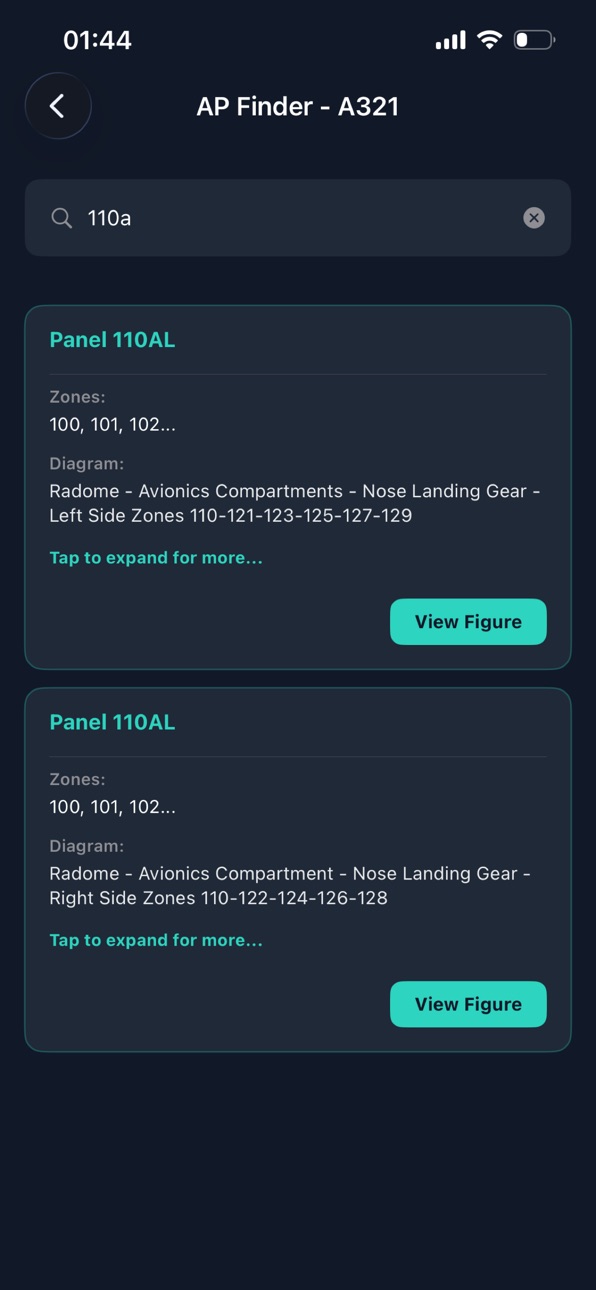
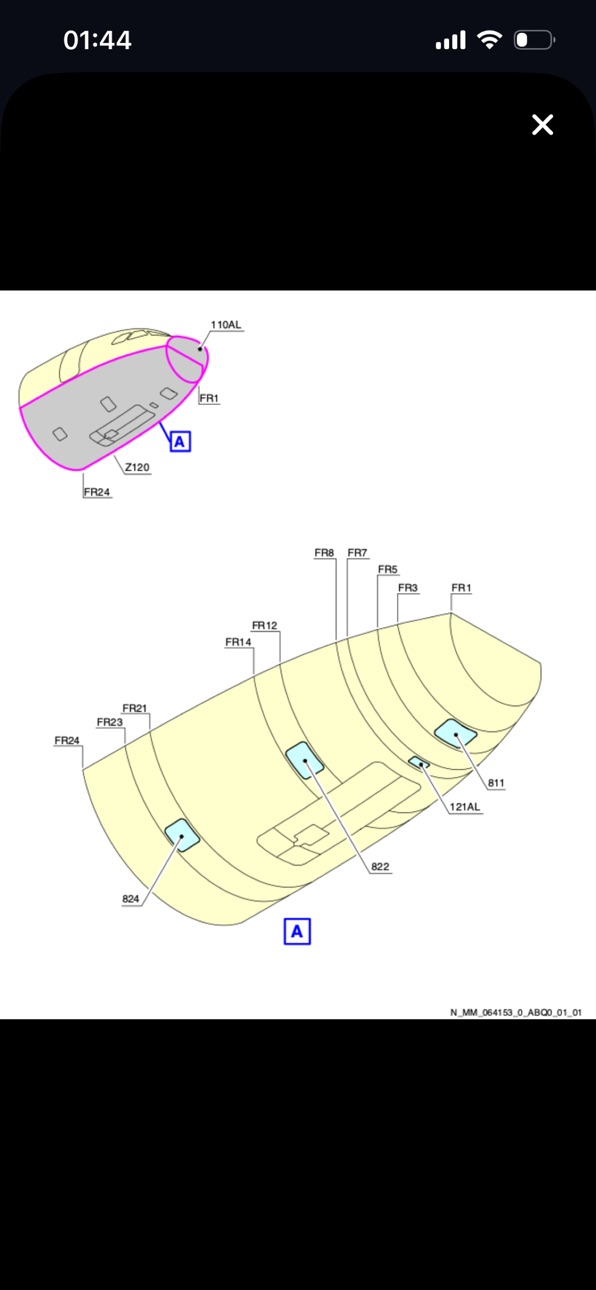
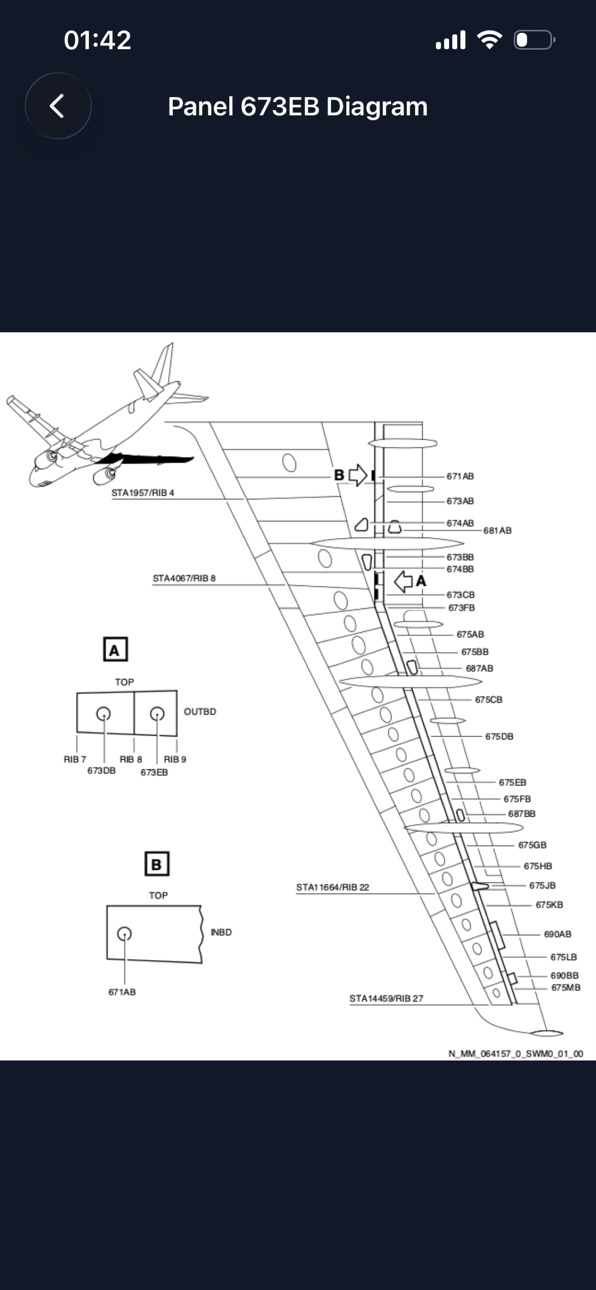
- Access Panel Finder: Locate panels by number, zone, or station index. Access detailed panel placement diagrams directly on your device.
- ECAM Reset Procedures (A321 & A330): Navigate system computer resets, Built-In Test Equipment (BITE) tests, and safety procedures. Features a direct MMEL / MEL Info integration for operational dispatch criteria.
- 100% Offline Architecture: Entire reference suite is stored locally. No internet connection is required in the hangar,or on the line.
- Premium Dark UI: Designed for high-contrast visibility under harsh hangar lighting or night shifts to minimize eye strain.
Designed for the Line & Hangar
AMA provides a lightning-fast, modern roadmap to your daily maintenance tasks.
Disclaimer: This application is intended for training and reference purposes only. It does not replace, supersede, or augment official aircraft manuals, airline standard operating procedures, or operator policies. Always refer to current and effective manufacturer documentation (AMM/FIM/MEL) for operational maintenance tasks.
Accessibility
ipadiphonemacrealityDevicetvoswatch
Version history 4 versions
Build 887845354v2.0.12026-07-05 20:36:16
Bug fixes.
Build 887594704v2.02026-07-03 04:25:15
- Interactive Task Navigation: AMM summaries now feature fully clickable Directed Tasks. Instantly jump from one maintenance reference task to another with a single tap.
- Clickable CBs & Panels: Circuit breakers and access panels listed inside summaries are now fully interactive. Tap on any CB or panel reference to instantly view its exact location details and diagrams.
- Dedicated Tools & Materials Inspector: View all required tools, consumable materials, and standard parts directly inside the task summaries without leaving the page.
- TSM & FIM Reference Finder: Quickly search and locate TSM and FIM troubleshooting tasks. View references, descriptions, possible faults, symptoms, and messages in a compact offline index.
- Circuit Breaker (CB) Finder: Instantly locate circuit breakers with exact panel IDs, coordinates (Row/Col), and high-contrast physical location diagrams.
- Access Panel Finder: Quickly identify access panel locations, station mappings, and zone codes with built-in reference drawings.
- ECAM Reset & MMEL Integration: Added an advanced ECAM Reset catalog for A321 and A330. View step-by-step computer/system reset procedures with direct access to MMEL (Master Minimum Equipment List) constraints.
- Streamlined Fleet Interface: Redesigned home view to focus on your aircraft selection first, routing you to a dedicated hub for all subsystem tools.
- Enhanced Offline Performance: Optimized database decompression engine for even faster startup times and 100% offline operation.
Build 884517908v1.12026-04-15 13:18:36
-Translate option for summaries added.
Build 884253852v1.02026-04-09 01:17:35
Price history by region
Currency
Show
Columns
Search
App performance ZM
Availability 158 of 158 storefronts
| Region | Language | Price | Ratings | Avg | Version |
|---|---|---|---|---|---|
| TR | en-GB | TRY 499.99 | 1 | 5.0 | 2.0.1 |
| AE | en-GB | AED 34.99 | 0 | — | 2.0.1 |
| AF | en-GB | USD 8.99 | 0 | — | 2.0.1 |
| AG | en-GB | USD 8.99 | 0 | — | 2.0.1 |
| AI | en-GB | USD 8.99 | 0 | — | 2.0.1 |
| AL | en-GB | USD 9.99 | 0 | — | 2.0.1 |
| AM | en-GB | USD 9.99 | 0 | — | 2.0.1 |
| AO | en-GB | USD 8.99 | 0 | — | 2.0.1 |
| AR | es-MX | USD 8.99 | 0 | — | 2.0.1 |
| AT | de-DE | EUR 9.99 | 0 | — | 2.0.1 |
| AU | en-AU | AUD 14.99 | 0 | — | 2.0.1 |
| AZ | en-GB | USD 9.99 | 0 | — | 2.0.1 |
| BA | en-GB | EUR 9.99 | 0 | — | 2.0.1 |
| BB | en-GB | USD 9.99 | 0 | — | 2.0.1 |
| BE | en-GB | EUR 9.99 | 0 | — | 2.0.1 |
| BF | en-GB | USD 8.99 | 0 | — | 2.0.1 |
| BG | en-GB | EUR 9.99 | 0 | — | 2.0.1 |
| BH | en-GB | USD 9.99 | 0 | — | 2.0.1 |
| BJ | en-GB | USD 9.99 | 0 | — | 2.0.1 |
| BM | en-GB | USD 8.99 | 0 | — | 2.0.1 |
| BO | es-MX | USD 8.99 | 0 | — | 2.0.1 |
| BR | pt-BR | BRL 59.9 | 0 | — | 2.0.1 |
| BS | en-GB | USD 9.99 | 0 | — | 2.0.1 |
| BT | en-GB | USD 8.99 | 0 | — | 2.0.1 |
| BW | en-GB | USD 8.99 | 0 | — | 2.0.1 |
| BZ | en-GB | USD 8.99 | 0 | — | 2.0.1 |
| CA | en-CA | CAD 11.99 | 0 | — | 2.0.1 |
| CD | en-GB | USD 8.99 | 0 | — | 2.0.1 |
| CG | en-GB | USD 8.99 | 0 | — | 2.0.1 |
| CH | de-CH | CHF 8 | 0 | — | 2.0.1 |
| CI | fr-FR | USD 9.99 | 0 | — | 2.0.1 |
| CL | es-MX | CLP 9990 | 0 | — | 2.0.1 |
| CM | fr-FR | USD 9.99 | 0 | — | 2.0.1 |
| CN | zh-Hans-CN | CNY 58 | 0 | — | 2.0.1 |
| CO | es-MX | COP 39900 | 0 | — | 2.0.1 |
| CR | es-MX | USD 8.99 | 0 | — | 2.0.1 |
| CV | en-GB | USD 8.99 | 0 | — | 2.0.1 |
| CY | en-GB | EUR 9.99 | 0 | — | 2.0.1 |
| CZ | en-GB | CZK 249 | 0 | — | 2.0.1 |
| DE | de-DE | EUR 9.99 | 0 | — | 2.0.1 |
| DK | en-GB | DKK 79 | 0 | — | 2.0.1 |
| DM | en-GB | USD 8.99 | 0 | — | 2.0.1 |
| DO | es-MX | USD 8.99 | 0 | — | 2.0.1 |
| DZ | en-GB | USD 8.99 | 0 | — | 2.0.1 |
| EC | es-MX | USD 8.99 | 0 | — | 2.0.1 |
| EE | en-GB | EUR 9.99 | 0 | — | 2.0.1 |
| EG | en-GB | EGP 499.99 | 0 | — | 2.0.1 |
| ES | es-ES | EUR 9.99 | 0 | — | 2.0.1 |
| FI | en-GB | EUR 9.99 | 0 | — | 2.0.1 |
| FM | en-GB | USD 8.99 | 0 | — | 2.0.1 |
| FR | fr-FR | EUR 9.99 | 0 | — | 2.0.1 |
| GA | fr-FR | USD 8.99 | 0 | — | 2.0.1 |
| GB | en-GB | GBP 8.99 | 0 | — | 2.0.1 |
| GD | en-GB | USD 8.99 | 0 | — | 2.0.1 |
| GH | en-GB | USD 9.99 | 0 | — | 2.0.1 |
| GM | en-GB | USD 8.99 | 0 | — | 2.0.1 |
| GR | en-GB | EUR 9.99 | 0 | — | 2.0.1 |
| GT | es-MX | USD 8.99 | 0 | — | 2.0.1 |
| GW | en-GB | USD 8.99 | 0 | — | 2.0.1 |
| GY | en-GB | USD 8.99 | 0 | — | 2.0.1 |
| HK | zh-Hant-HK | HKD 68 | 0 | — | 2.0.1 |
| HN | es-MX | USD 8.99 | 0 | — | 2.0.1 |
| HR | en-GB | EUR 9.99 | 0 | — | 2.0.1 |
| IE | en-GB | EUR 9.99 | 0 | — | 2.0.1 |
| IL | en-GB | ILS 29.9 | 0 | — | 2.0.1 |
| IN | en-GB | INR 999 | 0 | — | 2.0.1 |
| IQ | en-GB | USD 8.99 | 0 | — | 2.0.1 |
| IS | en-GB | USD 9.99 | 0 | — | 2.0.1 |
| IT | it | EUR 9.99 | 0 | — | 2.0.1 |
| JM | en-GB | USD 8.99 | 0 | — | 2.0.1 |
| JO | en-GB | USD 8.99 | 0 | — | 2.0.1 |
| JP | ja | JPY 1500 | 0 | — | 2.0.1 |
| KE | en-GB | USD 9.99 | 0 | — | 2.0.1 |
| KH | en-GB | USD 9.99 | 0 | — | 2.0.1 |
| KN | en-GB | USD 8.99 | 0 | — | 2.0.1 |
| KR | ko | KRW 15000 | 0 | — | 2.0.1 |
| KW | en-GB | USD 8.99 | 0 | — | 2.0.1 |
| KY | en-GB | USD 8.99 | 0 | — | 2.0.1 |
| KZ | en-GB | KZT 4990 | 0 | — | 2.0.1 |
| LA | en-GB | USD 9.99 | 0 | — | 2.0.1 |
| LB | en-GB | USD 8.99 | 0 | — | 2.0.1 |
| LC | en-GB | USD 8.99 | 0 | — | 2.0.1 |
| LK | en-GB | USD 8.99 | 0 | — | 2.0.1 |
| LR | en-GB | USD 8.99 | 0 | — | 2.0.1 |
| LT | en-GB | EUR 9.99 | 0 | — | 2.0.1 |
| LU | en-GB | EUR 9.99 | 0 | — | 2.0.1 |
| LV | en-GB | EUR 9.99 | 0 | — | 2.0.1 |
| LY | en-GB | USD 8.99 | 0 | — | 2.0.1 |
| MA | en-GB | USD 8.99 | 0 | — | 2.0.1 |
| MD | en-GB | USD 9.99 | 0 | — | 2.0.1 |
| ME | en-GB | EUR 7.99 | 0 | — | 2.0.1 |
| MG | en-GB | USD 8.99 | 0 | — | 2.0.1 |
| MK | en-GB | USD 8.99 | 0 | — | 2.0.1 |
| ML | en-GB | USD 8.99 | 0 | — | 2.0.1 |
| MM | en-GB | USD 8.99 | 0 | — | 2.0.1 |
| MN | en-GB | USD 8.99 | 0 | — | 2.0.1 |
| MO | zh-Hant-HK | USD 8.99 | 0 | — | 2.0.1 |
| MR | en-GB | USD 8.99 | 0 | — | 2.0.1 |
| MS | en-GB | USD 8.99 | 0 | — | 2.0.1 |
| MT | en-GB | EUR 9.99 | 0 | — | 2.0.1 |
| MU | en-GB | USD 9.99 | 0 | — | 2.0.1 |
| MW | en-GB | USD 8.99 | 0 | — | 2.0.1 |
| MX | es-MX | MXN 199 | 0 | — | 2.0.1 |
| MY | en-GB | MYR 39.9 | 0 | — | 2.0.1 |
| MZ | en-GB | USD 8.99 | 0 | — | 2.0.1 |
| NA | en-GB | USD 8.99 | 0 | — | 2.0.1 |
| NE | en-GB | USD 8.99 | 0 | — | 2.0.1 |
| NG | en-GB | NGN 14900 | 0 | — | 2.0.1 |
| NI | es-MX | USD 8.99 | 0 | — | 2.0.1 |
| NL | nl | EUR 9.99 | 0 | — | 2.0.1 |
| NO | en-GB | NOK 99 | 0 | — | 2.0.1 |
| NP | en-GB | USD 9.99 | 0 | — | 2.0.1 |
| NR | en-GB | USD 8.99 | 0 | — | 2.0.1 |
| NZ | en-AU | NZD 14.99 | 0 | — | 2.0.1 |
| OM | en-GB | USD 8.99 | 0 | — | 2.0.1 |
| PA | es-MX | USD 8.99 | 0 | — | 2.0.1 |
| PE | es-MX | PEN 39.9 | 0 | — | 2.0.1 |
| PG | en-GB | USD 8.99 | 0 | — | 2.0.1 |
| PH | en-GB | PHP 599 | 0 | — | 2.0.1 |
| PK | en-GB | PKR 2500 | 0 | — | 2.0.1 |
| PL | en-GB | PLN 39.99 | 0 | — | 2.0.1 |
| PT | pt-PT | EUR 9.99 | 0 | — | 2.0.1 |
| PW | en-GB | USD 8.99 | 0 | — | 2.0.1 |
| PY | es-MX | USD 8.99 | 0 | — | 2.0.1 |
| QA | en-GB | QAR 29.99 | 0 | — | 2.0.1 |
| RO | en-GB | RON 49.99 | 0 | — | 2.0.1 |
| RU | ru | RUB 799 | 0 | — | 2.0.1 |
| RW | en-GB | USD 8.99 | 0 | — | 2.0.1 |
| SA | en-GB | SAR 39.99 | 0 | — | 2.0.1 |
| SB | en-GB | USD 8.99 | 0 | — | 2.0.1 |
| SC | en-GB | USD 8.99 | 0 | — | 2.0.1 |
| SE | sv | SEK 119 | 0 | — | 2.0.1 |
| SI | en-GB | EUR 9.99 | 0 | — | 2.0.1 |
| SK | en-GB | EUR 9.99 | 0 | — | 2.0.1 |
| SL | en-GB | USD 8.99 | 0 | — | 2.0.1 |
| SN | en-GB | USD 9.99 | 0 | — | 2.0.1 |
| SR | en-GB | USD 9.99 | 0 | — | 2.0.1 |
| ST | en-GB | USD 8.99 | 0 | — | 2.0.1 |
| SV | es-MX | USD 8.99 | 0 | — | 2.0.1 |
| SZ | en-GB | USD 8.99 | 0 | — | 2.0.1 |
| TC | en-GB | USD 8.99 | 0 | — | 2.0.1 |
| TD | en-GB | USD 8.99 | 0 | — | 2.0.1 |
| TJ | en-GB | USD 9.99 | 0 | — | 2.0.1 |
| TN | en-GB | USD 8.99 | 0 | — | 2.0.1 |
| TT | en-GB | USD 8.99 | 0 | — | 2.0.1 |
| TW | zh-Hant-TW | TWD 290 | 0 | — | 2.0.1 |
| TZ | en-GB | TZS 24900 | 0 | — | 2.0.1 |
| UG | en-GB | USD 9.99 | 0 | — | 2.0.1 |
| US | en-US | USD 8.99 | 0 | — | 2.0.1 |
| UY | en-GB | USD 8.99 | 0 | — | 2.0.1 |
| VC | en-GB | USD 8.99 | 0 | — | 2.0.1 |
| VE | es-MX | USD 8.99 | 0 | — | 2.0.1 |
| VG | en-GB | USD 8.99 | 0 | — | 2.0.1 |
| VN | en-GB | VND 299000 | 0 | — | 2.0.1 |
| XK | en-GB | EUR 9.99 | 0 | — | 2.0.1 |
| YE | en-GB | USD 8.99 | 0 | — | 2.0.1 |
| ZM | en-GB | USD 9.99 | 0 | — | 2.0.1 |
| ZW | en-GB | USD 9.99 | 0 | — | 2.0.1 |
Change log 8 changes · ZM
✎
releaseNotes updated
Bug fixes.
✎
description updated
Unlock Instant Access to Aircraft Maintenance References, Troubleshooting, and System Resets
Aircraft Maintenance Assistant (AMA) is a premium, professional-gra
✎
subtitle updated
AMM, TBS & ECAM Reset Guide
✎
name updated
Aircraft Maintenance Assistant
◆
Version 2.0.1 released
Bug fixes.
◆
Version 2.0 released
- Interactive Task Navigation: AMM summaries now feature fully clickable Directed Tasks. Instantly jump from one maintenance reference task to another with a single tap.
- Clickable CBs & Panels: Circuit breakers and access panels listed in
◆
Version 1.1 released
-Translate option for summaries added.
◆
Version 1.0 released