Home › Finance

 PG
PG
 AEen-GB
 AFen-GB
 ALen-GB
 AMen-GB
 ATde-DE
 AZen-GB
 BAen-GB
 BEen-GB
 BGen-GB
 BHen-GB
 BMen-GB
 BNen-GB
 BTen-GB
 BYen-GB
 CAen-CA
 CHde-CH
 CNzh-Hans-CN
 CYen-GB
 CZen-GB
 DKen-GB
 EEen-GB
 EGen-GB
 ESes-ES
 FIen-GB
 FJen-GB
 FMen-GB
 GBen-GB
 GEen-GB
 GRen-GB
 HKzh-Hant-HK
 HRen-GB
 HUen-GB
 IDen-GB
 IEen-GB
 ILen-GB
 INen-GB
 IQen-GB
 ISen-GB
 ITit
ITit JOen-GB
 JPja
JPja KGen-GB
 KHen-GB
 KRko
KRko KWen-GB
 KZen-GB
 LAen-GB
 LBen-GB
 LKen-GB
 LTen-GB
 LUen-GB
 LVen-GB
 MDen-GB
 MEen-GB
 MKen-GB
 MMen-GB
 MNen-GB
 MOzh-Hant-HK
 MRen-GB
 MTen-GB
 MVen-GB
 MYen-GB
 NLnl
NLnl NOen-GB
 NPen-GB
 NRen-GB
 NZen-AU
 OMen-GBPGen-GB
 PHen-GB
 PKen-GB
 PLen-GB
 PTpt-PT
 PWen-GB
 QAen-GB
 ROen-GB
 RUru
RUru SAen-GB
 SBen-GB
 SEsv
SEsv SGen-GB
 SIen-GB
 SKen-GB
 THen-GB
 TJen-GB
 TMen-GB
 TOen-GB
 TRen-GB
 TWzh-Hant-TW
 UAen-GB
 USen-US
 UZen-GB
 VNen-GB
 VUen-GB
 XKen-GB
 YEen-GB
 ZAen-GB
97 of 97 storefronts
Content in en-US
Content in en-US
Information
Preview 1 platform
iPhone 10 images


What’s New Version 1.17
• Added search to quickly find any transaction
• New widget styles for your Home and Lock Screen
• Fixed decimal entry for Danish number formats
• Fixed duplicate categories showing in account trends
• Fixed a date mix-up in exported CSV files
Description
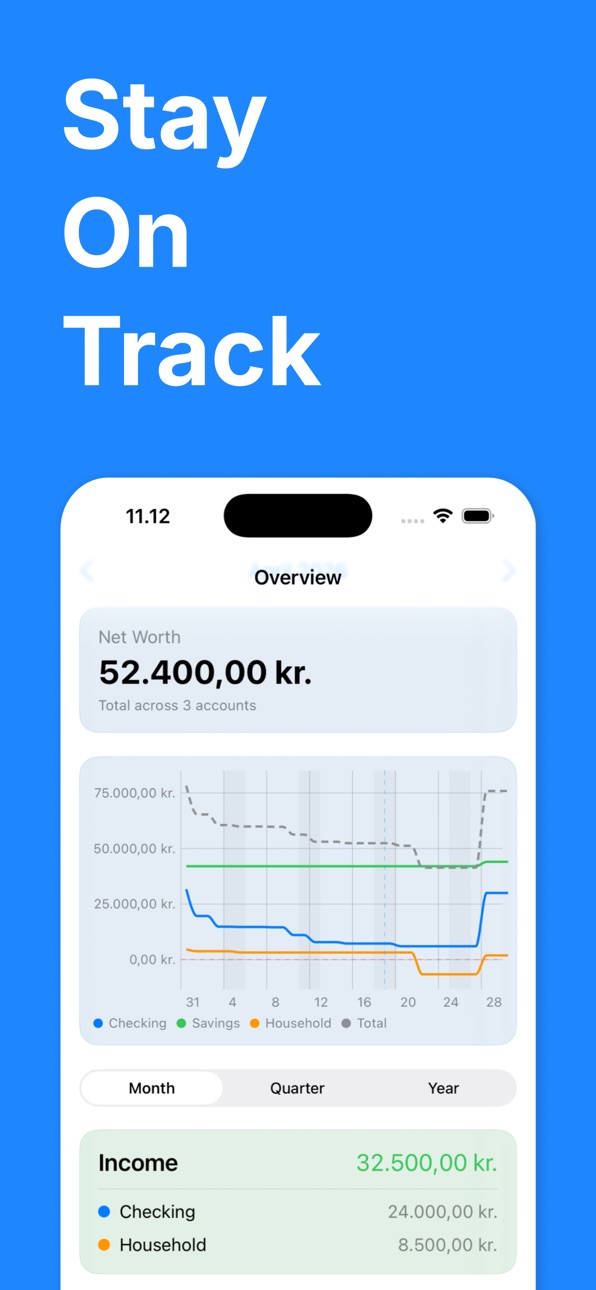
Most budgeting apps tell you what you spent. Monthly Budget tells you what happens next — your exact balance, every single day, for the year ahead.
SEE YOUR BALANCE INTO THE FUTURE
Enter your real account balance once and it becomes the anchor for everything. Monthly Budget projects your balance forward day by day from your income and expenses — and backward too. A clean line chart shows any month, quarter, or year ahead, so you can see a shortfall coming weeks before it lands. A warning banner alerts you the moment your balance is heading toward zero within the next 7 days.
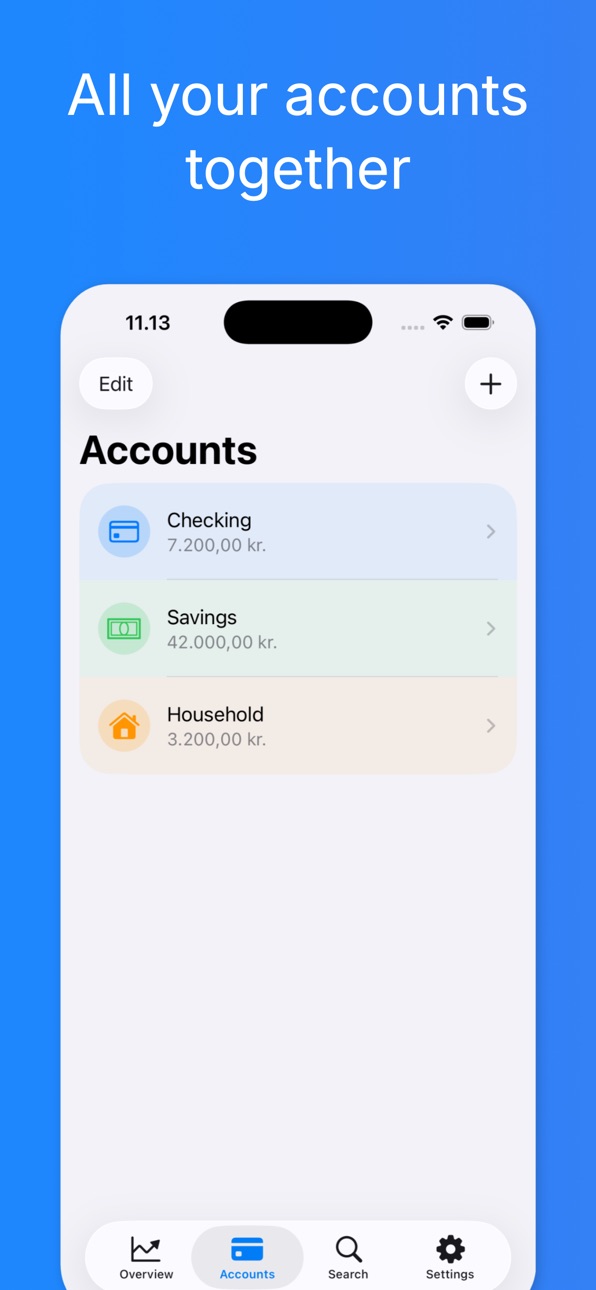
ALL YOUR ACCOUNTS, ONE PICTURE
Track your salary account, savings, credit card, and more — each with its own balance chart and timeline. Move money between accounts with linked transfers that stay in sync on both sides. Set a savings goal or a minimum buffer per account and watch your progress. Drag to reorder.
RECURRING DONE RIGHT
Add one-off or recurring income and expenses with real control: weekly, monthly, quarterly, biannual, annual, or a custom interval. Skip, mute, or pause any occurrence without deleting the entry — ideal for irregular months. Override the amount for a single occurrence or from a date forward. Split one transaction into sub-entries when a purchase spans several categories.
CATEGORIES & BUDGETS
Organise spending with your own categories, each with its own icon and colour. Set a monthly limit per category per account and see at a glance whether you're on track.
INSIGHTS THAT LOOK AHEAD
Monthly Budget surfaces large or infrequent one-off expenses before they arrive, so nothing catches you off guard. The Subscription Audit lists every recurring commitment with its monthly and yearly cost, sorted by annual spend — so you can spot what's quietly draining your budget.
TEST BEFORE YOU COMMIT
Use the What-If sandbox to try a raise, a new subscription, or a big purchase and instantly see how it reshapes your balance — without touching your real data.
FIND ANYTHING FAST
Search across every entry to jump straight to the transaction you're looking for.
CREDIT CARD TRACKING
Record card expiry dates and get an alert before a card expires, with a list of the subscriptions you'll need to update.
WIDGETS & SIRI
Keep your projected balance on your Home Screen and Lock Screen. Add an expense or ask for your balance hands-free with Siri and the Shortcuts app.
IMPORT & BACKUP
Import transactions from your bank's CSV export — choose the delimiter, map the columns to any bank's format, and let Monthly Budget group similar transactions into ready-made recurring entries. Export a complete backup of everything at any time and restore it with a single tap.
CLOUD SYNC
Your data syncs automatically across all your Apple devices via iCloud, with a local fallback so the app always works offline.
PRIVATE BY DESIGN
No account required. No ads. No third-party analytics. Your financial data stays on your device and in your own private iCloud.
APP LOCK
Protect everything with a PIN plus Face ID or Touch ID, and a custom timeout that locks the app after your chosen idle period.
Available in English and Danish.
Download Monthly Budget and always know exactly where you stand — and where you're headed.
Accessibility
ipadiphonemacrealityDevicetvoswatch
Version history 18 versions
Build 887705451v1.172026-07-02 05:46:15
• Added search to quickly find any transaction
• New widget styles for your Home and Lock Screen
• Fixed decimal entry for Danish number formats
• Fixed duplicate categories showing in account trends
• Fixed a date mix-up in exported CSV files
Build 886945939v1.162026-06-14 22:06:06
• Fixed recurring entries appearing in wrong month
• Widget now shows accurate upcoming expenses
• Widget now available in Danish
• Subscription audit organized by category
Build 886931114v1.152026-06-13 22:49:45
• Calendar-aligned periods: navigate months, quarters, and years more intuitively
• Edit first payment date for any recurring entry directly in the form
• Fixed white-screen issue when viewing document previews after updates
• Smarter notifications with clearer labels for income and transfers
• Balance updates now refresh instantly when you edit an account
Build 886072713v1.142026-05-25 00:11:25
* Fixed a chart glitch that could double-plot the current month
* Fixed amount change confirmation now showing for all entry types
* Improved amount history chart — only shown when amounts actually differ
Build 885797796v1.132026-05-18 18:01:00
* Added option to hide accounts from the Overview tab
* Fixed muted entries now correctly updating totals and appearance
Build 885751416v1.122026-05-17 17:54:27
* You can now see earmarked sub-entries within account transfers in both the timeline and the breakdown tab — on both the sending and receiving account.
* The breakdown tab now includes a dedicated "Earmarked" section that shows how incoming transfers are split across categories, plus a "Transfers" summary row so nothing is hidden or double-counted.
* Tapping a category in the breakdown now always shows the right entries — income categories no longer include expense entries, and the Fixed Commitments detail sheet always reflects your actual recurring setup.
* Section totals in the breakdown tab now correctly match the sum of their category rows when transfers with sub-entries are involved.
* Breakdown categories are now sorted alphabetically, with uncategorized items listed last.
* Category sparklines no longer show an infinite loading animation for categories that only appear as sub-entries.
* The Fixed Commitments and Recurring tabs now scale amounts to match the selected time period — switching to quarterly or yearly view shows the correct totals for that period.
Build 885730801v1.112026-05-15 22:50:35
* You can now choose whether to apply an amount change to a single occurrence, from a given month onwards, or all occurrences when editing a recurring transfer between accounts.
* Fixed a bug where editing a recurring transfer's amount sometimes ignored the scope you selected and applied the change to all occurrences instead.
* Fixed the pause badge in the recurring transactions tab to correctly reflect the month you are viewing, not the current month.
* Fixed a missing "Done" button on the keyboard when entering an amount for a sub-item.
Build 885475584v1.102026-05-11 02:58:50
* Sub-entries — Break down what an entry covers with informational line items (e.g. split "Electricity" into standing charge + usage)
* Editable first payment date — Change when a recurring entry starts directly from the recurrence settings
* Sticky month navigator — The month bar stays pinned at the top while scrolling through Overview and Account views
* Scrollable amount history — The amount history chart in the entry editor now scrolls horizontally, with the Y-axis always visible
* Bug fixes for recurring entry amount editing, overrides, and the amount history chart
Build 885217554v1.92026-05-04 00:24:08
* Fixed an issue where documents attached to entries were not synced to other devices via iCloud and could be lost on reinstall
Build 885195067v1.82026-05-03 01:55:51
• Home Screen Widgets — Add a small or medium widget to see your account balance, monthly spend, and upcoming bills at a glance. A lock screen widget is also available.
• Subscription Audit — New screen under Settings → Data listing every recurring expense and income sorted by annual cost, so you can see exactly what you're committed to each year.
• Recurring Entry Pause — Pause a recurring entry for 1, 2, 3, or 6 months without deleting it. Useful for subscriptions on hold, gym pauses, or seasonal costs.
• Annual Cost on Entries — Every recurring entry now shows its yearly equivalent (≈ X/yr) alongside the monthly figure.
• Savings Rate — The Overview now shows your savings rate (% of income saved) in the Difference card.
• Fixed vs. Variable Breakdown — The Breakdown tab now has a toggle between Actual Spend and Fixed Commitments, so you can see what you're contractually paying each month.
• Three New Notifications — Get reminded before bills are due, receive a monthly digest on the 1st, and get alerted when a category budget is exceeded.
• Home Screen Quick Actions — Long-press the app icon for instant shortcuts: Add Expense, View Account, and Subscription Audit.
• Siri Shortcuts — Ask Siri "What's my balance?", "Show my budget status", or "Add an expense" in both English and Danish.
Build 884955337v1.72026-04-27 15:55:31
• Enhanced credit card management with edit, delete, and connected service functionality.
• Improved entry templates with delete capability and payment progress display.
• Broader localization support and added last payment date in entry forms.
• Updated savings goals and minimum buffer in account exports/imports.
• Smoothed charts with peek point mapping and net transfer calculations in balances.
• Corrected Cash payment method icons and added predefined payment methods.
• Simplified payment card display logic; improved filtering in entry search.
• Updated balance display consistency and currency formatting.
Build 884672605v1.62026-04-20 02:03:05
* Credit cards now support linked services, so you can track subscriptions and charges tied to a specific card
* The What-If calculator shows your opening and projected closing balance, giving a clearer picture of any scenario
* Swipe entries in a category to quickly delete or mute them
* The balance chart is smoother — end-of-month spikes are now flattened
* Your selected time range is remembered between sessions
Build 884433659v1.52026-04-13 16:09:12
* Credit card support — You can now add credit card accounts and track your spending and repayments alongside your other accounts.
* Balance calculation fix — Resolved an issue where account balances were calculated incorrectly in some cases.
Build 884354850v1.42026-04-11 22:07:15
Fixed an issue with import of internal transfers
Build 884310523v1.32026-04-10 02:13:26
Fixed issue with import of data
Build 884189053v1.02026-04-08 07:18:04
Build 884277370v1.12026-04-08 18:14:04
- Improved design
- Added new functionalities
- Minor bug fixes
Build 884293327v1.22026-04-08 21:16:10
- Fixed issue with Face ID
No pricing data captured yet — comparisons appear once the app has paid storefronts or in-app purchases.
Availability 97 of 97 storefronts
| Region | Language | Price | Ratings | Avg | Version |
|---|---|---|---|---|---|
| AE | en-GB | Free | 0 | — | 1.17 |
| AF | en-GB | Free | 0 | — | 1.17 |
| AL | en-GB | Free | 0 | — | 1.17 |
| AM | en-GB | Free | 0 | — | 1.17 |
| AT | de-DE | Free | 0 | — | 1.17 |
| AZ | en-GB | Free | 0 | — | 1.17 |
| BA | en-GB | Free | 0 | — | 1.17 |
| BE | en-GB | Free | 0 | — | 1.17 |
| BG | en-GB | Free | 0 | — | 1.17 |
| BH | en-GB | Free | 0 | — | 1.17 |
| BM | en-GB | Free | 0 | — | 1.17 |
| BN | en-GB | Free | 0 | — | 1.17 |
| BT | en-GB | Free | 0 | — | 1.17 |
| BY | en-GB | Free | 0 | — | 1.17 |
| CA | en-CA | Free | 0 | — | 1.17 |
| CH | de-CH | Free | 0 | — | 1.17 |
| CN | zh-Hans-CN | Free | 0 | — | 1.17 |
| CY | en-GB | Free | 0 | — | 1.17 |
| CZ | en-GB | Free | 0 | — | 1.17 |
| DK | en-GB | Free | 0 | — | 1.17 |
| EE | en-GB | Free | 0 | — | 1.17 |
| EG | en-GB | Free | 0 | — | 1.17 |
| ES | es-ES | Free | 0 | — | 1.17 |
| FI | en-GB | Free | 0 | — | 1.17 |
| FJ | en-GB | Free | 0 | — | 1.17 |
| FM | en-GB | Free | 0 | — | 1.17 |
| GB | en-GB | Free | 0 | — | 1.17 |
| GE | en-GB | Free | 0 | — | 1.17 |
| GR | en-GB | Free | 0 | — | 1.17 |
| HK | zh-Hant-HK | Free | 0 | — | 1.17 |
| HR | en-GB | Free | 0 | — | 1.17 |
| HU | en-GB | Free | 0 | — | 1.17 |
| ID | en-GB | Free | 0 | — | 1.17 |
| IE | en-GB | Free | 0 | — | 1.17 |
| IL | en-GB | Free | 0 | — | 1.17 |
| IN | en-GB | Free | 0 | — | 1.17 |
| IQ | en-GB | Free | 0 | — | 1.17 |
| IS | en-GB | Free | 0 | — | 1.17 |
| IT | it | Free | 0 | — | 1.17 |
| JO | en-GB | Free | 0 | — | 1.17 |
| JP | ja | Free | 0 | — | 1.17 |
| KG | en-GB | Free | 0 | — | 1.17 |
| KH | en-GB | Free | 0 | — | 1.17 |
| KR | ko | Free | 0 | — | 1.17 |
| KW | en-GB | Free | 0 | — | 1.17 |
| KZ | en-GB | Free | 0 | — | 1.17 |
| LA | en-GB | Free | 0 | — | 1.17 |
| LB | en-GB | Free | 0 | — | 1.17 |
| LK | en-GB | Free | 0 | — | 1.17 |
| LT | en-GB | Free | 0 | — | 1.17 |
| LU | en-GB | Free | 0 | — | 1.17 |
| LV | en-GB | Free | 0 | — | 1.17 |
| MD | en-GB | Free | 0 | — | 1.17 |
| ME | en-GB | Free | 0 | — | 1.17 |
| MK | en-GB | Free | 0 | — | 1.17 |
| MM | en-GB | Free | 0 | — | 1.17 |
| MN | en-GB | Free | 0 | — | 1.17 |
| MO | zh-Hant-HK | Free | 0 | — | 1.17 |
| MR | en-GB | Free | 0 | — | 1.17 |
| MT | en-GB | Free | 0 | — | 1.17 |
| MV | en-GB | Free | 0 | — | 1.17 |
| MY | en-GB | Free | 0 | — | 1.17 |
| NL | nl | Free | 0 | — | 1.17 |
| NO | en-GB | Free | 0 | — | 1.17 |
| NP | en-GB | Free | 0 | — | 1.17 |
| NR | en-GB | Free | 0 | — | 1.17 |
| NZ | en-AU | Free | 0 | — | 1.17 |
| OM | en-GB | Free | 0 | — | 1.17 |
| PG | en-GB | Free | 0 | — | 1.17 |
| PH | en-GB | Free | 0 | — | 1.17 |
| PK | en-GB | Free | 0 | — | 1.17 |
| PL | en-GB | Free | 0 | — | 1.17 |
| PT | pt-PT | Free | 0 | — | 1.17 |
| PW | en-GB | Free | 0 | — | 1.17 |
| QA | en-GB | Free | 0 | — | 1.17 |
| RO | en-GB | Free | 0 | — | 1.17 |
| RU | ru | Free | 0 | — | 1.17 |
| SA | en-GB | Free | 0 | — | 1.17 |
| SB | en-GB | Free | 0 | — | 1.17 |
| SE | sv | Free | 0 | — | 1.17 |
| SG | en-GB | Free | 0 | — | 1.17 |
| SI | en-GB | Free | 0 | — | 1.17 |
| SK | en-GB | Free | 0 | — | 1.17 |
| TH | en-GB | Free | 0 | — | 1.17 |
| TJ | en-GB | Free | 0 | — | 1.17 |
| TM | en-GB | Free | 0 | — | 1.17 |
| TO | en-GB | Free | 0 | — | 1.17 |
| TR | en-GB | Free | 0 | — | 1.17 |
| TW | zh-Hant-TW | Free | 0 | — | 1.17 |
| UA | en-GB | Free | 0 | — | 1.17 |
| US | en-US | Free | 0 | — | 1.17 |
| UZ | en-GB | Free | 0 | — | 1.17 |
| VN | en-GB | Free | 0 | — | 1.17 |
| VU | en-GB | Free | 0 | — | 1.17 |
| XK | en-GB | Free | 0 | — | 1.17 |
| YE | en-GB | Free | 0 | — | 1.17 |
| ZA | en-GB | Free | 0 | — | 1.17 |
Change log 22 changes · PG
✎
releaseNotes updated
• Added search to quickly find any transaction
• New widget styles for your Home and Lock Screen
• Fixed decimal entry for Danish number formats
• Fixed duplica
✎
description updated
Most budgeting apps tell you what you spent. Monthly Budget tells you what happens next — your exact balance, every single day, for the year ahead.
SEE YOUR BA
✎
subtitle updated
Personal Finance Planner
✎
name updated
My Monthly Budget
◆
Version 1.17 released
• Added search to quickly find any transaction
• New widget styles for your Home and Lock Screen
• Fixed decimal entry for Danish number formats
• Fixed duplicate categories showing in account trends
• Fixed a date mix-up in exported CSV fi
◆
Version 1.16 released
• Fixed recurring entries appearing in wrong month
• Widget now shows accurate upcoming expenses
• Widget now available in Danish
• Subscription audit organized by category
◆
Version 1.15 released
• Calendar-aligned periods: navigate months, quarters, and years more intuitively
• Edit first payment date for any recurring entry directly in the form
• Fixed white-screen issue when viewing document previews after updates
• Smarter notif
◆
Version 1.14 released
* Fixed a chart glitch that could double-plot the current month
* Fixed amount change confirmation now showing for all entry types
* Improved amount history chart — only shown when amounts actually differ
◆
Version 1.13 released
* Added option to hide accounts from the Overview tab
* Fixed muted entries now correctly updating totals and appearance
◆
Version 1.12 released
* You can now see earmarked sub-entries within account transfers in both the timeline and the breakdown tab — on both the sending and receiving account.
* The breakdown tab now includes a dedicated "Earmarked" section that shows how incomin
◆
Version 1.11 released
* You can now choose whether to apply an amount change to a single occurrence, from a given month onwards, or all occurrences when editing a recurring transfer between accounts.
* Fixed a bug where editing a recurring transfer's amount some
◆
Version 1.10 released
* Sub-entries — Break down what an entry covers with informational line items (e.g. split "Electricity" into standing charge + usage)
* Editable first payment date — Change when a recurring entry starts directly from the recurrence settings
◆
Version 1.9 released
* Fixed an issue where documents attached to entries were not synced to other devices via iCloud and could be lost on reinstall
◆
Version 1.8 released
• Home Screen Widgets — Add a small or medium widget to see your account balance, monthly spend, and upcoming bills at a glance. A lock screen widget is also available.
• Subscription Audit — New screen under Settings → Data listing every
◆
Version 1.7 released
• Enhanced credit card management with edit, delete, and connected service functionality.
• Improved entry templates with delete capability and payment progress display.
• Broader localization support and added last payment date in entry
◆
Version 1.6 released
* Credit cards now support linked services, so you can track subscriptions and charges tied to a specific card
* The What-If calculator shows your opening and projected closing balance, giving a clearer picture of any scenario
* Swipe entri
◆
Version 1.5 released
* Credit card support — You can now add credit card accounts and track your spending and repayments alongside your other accounts.
* Balance calculation fix — Resolved an issue where account balances were calculated incorrectly in some case
◆
Version 1.4 released
Fixed an issue with import of internal transfers
◆
Version 1.3 released
Fixed issue with import of data
◆
Version 1.2 released
- Fixed issue with Face ID
◆
Version 1.1 released
- Improved design
- Added new functionalities
- Minor bug fixes
◆
Version 1.0 released