Home › Utilities

 ZM
ZM
 USen-US
 DEde-DE
 GBen-GB
 CAen-CA
 TRen-GB
 FRfr-FR
 NLnl
NLnl DKen-GB
 HUen-GB
 JPja
JPja SEsv
SEsv ATde-DE
 AUen-AU
 BEen-GB
 BGen-GB
 IEen-GB
 MDen-GB
 MXes-MX
 MYen-GB
 PLen-GB
 TWzh-Hant-TW
 AEen-GB
 AFen-GB
 AGen-GB
 AIen-GB
 ALen-GB
 AMen-GB
 AOen-GB
 ARes-MX
 AZen-GB
 BAen-GB
 BBen-GB
 BFen-GB
 BHen-GB
 BJen-GB
 BMen-GB
 BNen-GB
 BOes-MX
 BRpt-BR
 BSen-GB
 BTen-GB
 BWen-GB
 BYen-GB
 BZen-GB
 CDen-GB
 CGen-GB
 CHde-CH
 CIfr-FR
 CLes-MX
 CMfr-FR
 CNzh-Hans-CN
 COes-MX
 CRes-MX
 CVen-GB
 CYen-GB
 CZen-GB
 DMen-GB
 DOes-MX
 DZen-GB
 ECes-MX
 EEen-GB
 EGen-GB
 ESes-ES
 FIen-GB
 FJen-GB
 FMen-GB
 GAfr-FR
 GDen-GB
 GEen-GB
 GHen-GB
 GMen-GB
 GRen-GB
 GTes-MX
 GWen-GB
 GYen-GB
 HKzh-Hant-HK
 HNes-MX
 HRen-GB
 IDen-GB
 ILen-GB
 INen-GB
 IQen-GB
 ISen-GB
 ITit
ITit JMen-GB
 JOen-GB
 KEen-GB
 KGen-GB
 KHen-GB
 KNen-GB
 KRko
KRko KWen-GB
 KYen-GB
 KZen-GB
 LAen-GB
 LBen-GB
 LCen-GB
 LKen-GB
 LRen-GB
 LTen-GB
 LUen-GB
 LVen-GB
 LYen-GB
 MAen-GB
 MEen-GB
 MGen-GB
 MKen-GB
 MLen-GB
 MMen-GB
 MNen-GB
 MOzh-Hant-HK
 MRen-GB
 MSen-GB
 MTen-GB
 MUen-GB
 MVen-GB
 MWen-GB
 MZen-GB
 NAen-GB
 NEen-GB
 NGen-GB
 NIes-MX
 NOen-GB
 NPen-GB
 NRen-GB
 NZen-AU
 OMen-GB
 PAes-MX
 PEes-MX
 PGen-GB
 PHen-GB
 PKen-GB
 PTpt-PT
 PWen-GB
 PYes-MX
 QAen-GB
 ROen-GB
 RSen-GB
 RUru
RUru RWen-GB
 SAen-GB
 SBen-GB
 SCen-GB
 SGen-GB
 SIen-GB
 SKen-GB
 SLen-GB
 SNen-GB
 SRen-GB
 STen-GB
 SVes-MX
 SZen-GB
 TCen-GB
 TDen-GB
 THen-GB
 TJen-GB
 TMen-GB
 TNen-GB
 TOen-GB
 TTen-GB
 TZen-GB
 UAen-GB
 UGen-GB
 UYen-GB
 UZen-GB
 VCen-GB
 VEes-MX
 VGen-GB
 VNen-GB
 VUen-GB
 XKen-GB
 YEen-GB
 ZAen-GBZMen-GB
 ZWen-GB
175 of 175 storefronts
Content in en-US
Content in en-US
Information
Icon history 2 versions
Current←
 Previous
Preview 2 platforms
iPhone 8 images
1 older version


1 older version


1 older version

1 older version


1 older version


1 older version


1 older version


1 older version

iPad 5 images

1 older version


1 older version

1 older version


1 older version


1 older version

What’s New Version 2.1
Version 2.2 — a whole new look with Themes, deeper diagnostics, smarter tire-pressure warnings, faster time to dashboard, and new climate signals
A new look
- The entire app is redesigned with translucent Liquid Glass panels over a soft aurora backdrop — Dashboard, History, Inspect, Settings, and every diagnostic tool
- NEW: Themes picker — choose a palette that recolors the whole app, each with its own Light and Dark variants, or turn the aurora off entirely
Inspect & diagnostics
- NEW: Enhanced DTC Scan sweeps the entire diagnostic bus, names every module that responds, and reads each one's fault codes — reaching body, chassis, and airbag modules a standard OBD-II scan never sees
- NEW: ICCU Information tool reads your charging controller's part numbers, software version, build date, and serial number
- NEW: Connection Report — an in-depth view of the app-to-vehicle link: adapter details, polling stats, per-module coverage, and an events timeline
- Export results to CSV from DTC scans, the Connection Report, and any History session
Tires
- Warning colors now derive from your vehicle's door-placard pressures, with separate front and rear targets — fully customizable in the new Settings → Tires
- NEW: Temperature compensation, so hot tires after a drive no longer trip a false warning
- Pressures update 4x more often, and a sleeping sensor shows its last-known reading instead of a blank value
Climate
- The four vent and floor outlet temperatures now appear on the Dashboard, in CarPlay, and in History charts
- NEW: Driver Position setting mirrors vent layouts for right-hand-drive vehicles
CarPlay
- Climate and Tires chips are now tappable — color-coded vent temperatures, and pressure/temperature pages that remember your choice
- NEW: SoC Range Colors — set your own red/orange/green thresholds for the state-of-charge gauge, in CarPlay and on the Dashboard
- The solid-red Brake Light style is back, and the Precondition chip is renamed "Battery Warmer"
Faster and steadier
- Time to dashboard cut by almost half — your first values appear within about a second of polling start
- "Vehicle On" detection reworked: sessions end promptly after shutoff, and adapter hiccups no longer end a session mid-drive
- Faster polling on OBDLink adapters, and smoother multi-frame handling on vehicles with very fast ECUs
Charging
- NEW: AC Draw panel and chart show wall-side voltage, current, and power while AC charging — the gap to pack power is your charger's conversion loss
- Fixed a phantom "DC Fast" session at AC plug-in; the 12V battery now shows charge/discharge direction by color
Vehicle coverage & languages
- Korea-built IONIQ 9 now identified correctly; Standard Range packs no longer show two phantom 0° modules; cell-voltage grids show every cell on the Kia EV9
- Dozens of translation fixes across all nine languages, including proper battery terminology in seven of them
Description
IONIQ 5 Companion is an independent OBD-II diagnostic tool for the Hyundai IONIQ 5 and other E-GMP vehicles, with full support for the IONIQ 5, IONIQ 5 N, IONIQ 6, IONIQ 9. The Kia EV6 and EV9 are also fully supported.
The app requires the separate purchase of an ELM327-compatible BLE OBD-II adapter in order to read ECU data from your car.
CARPLAY
- Two rows of live chips on the Driving tab — charge, tires, and climate — plus Power (draw and regen on one dial), Compass, AC Draw, and a per-cell Voltage Δ heatmap
- Dynamic Charging and EVSE tabs, with a session timer and the charger's capabilities
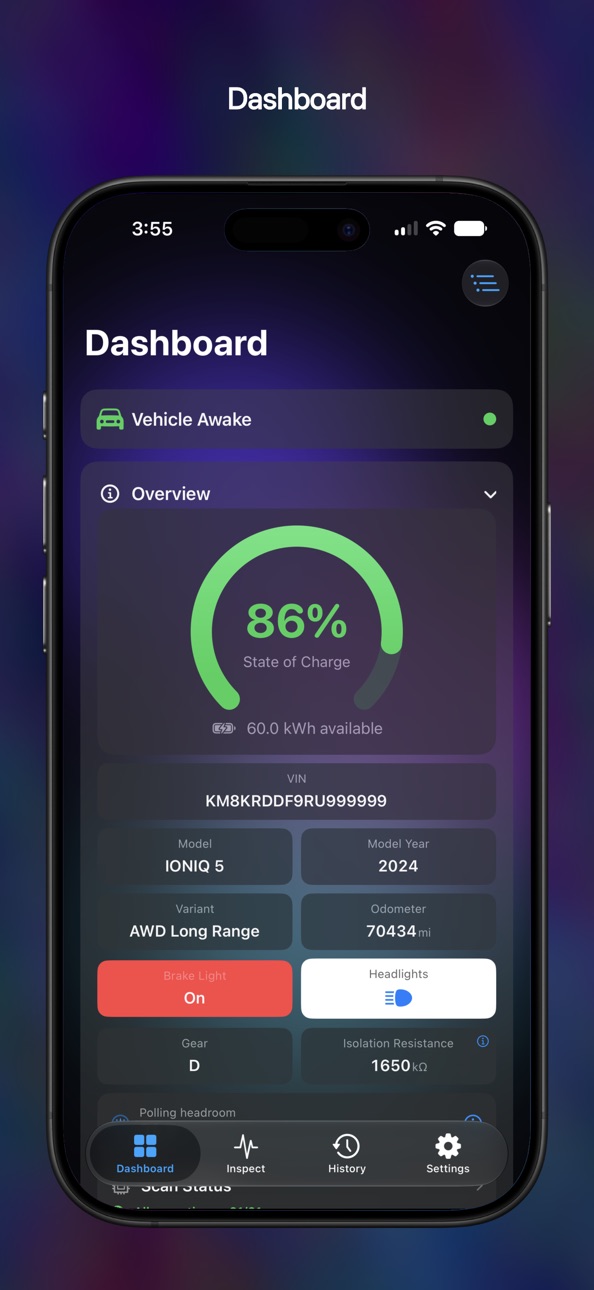
LIVE DASHBOARD
- State of charge, available energy, voltage, current
- Power dial, Regeneration gauge, Gear indicator (P, R, N, D), and Isolation Resistance
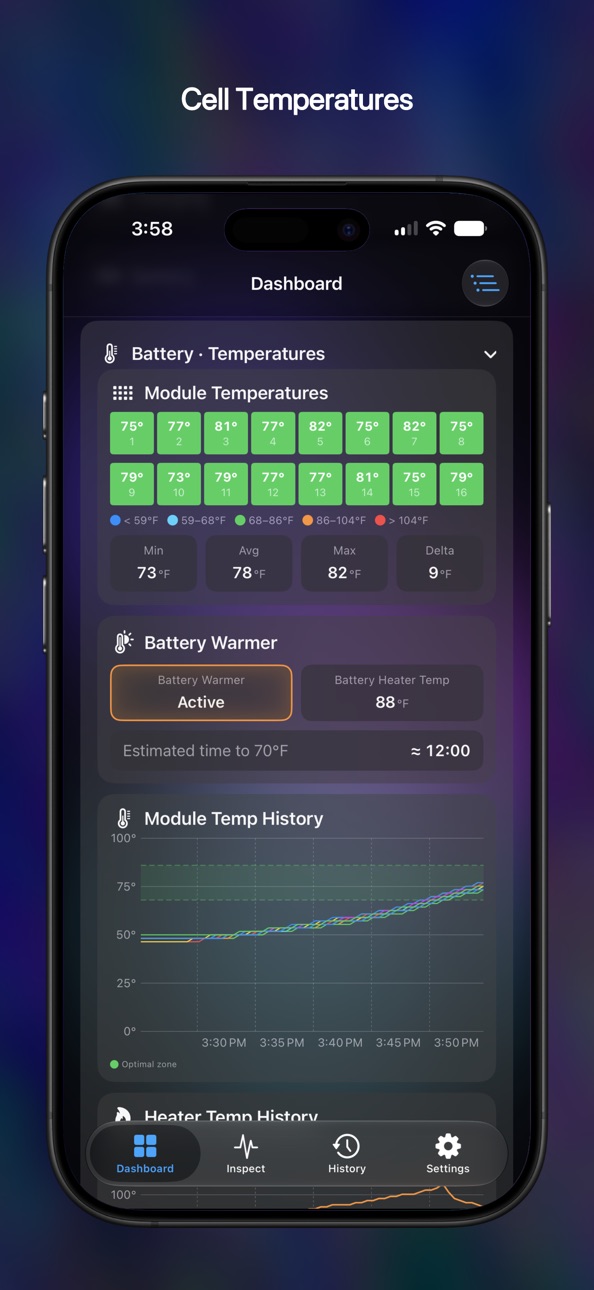
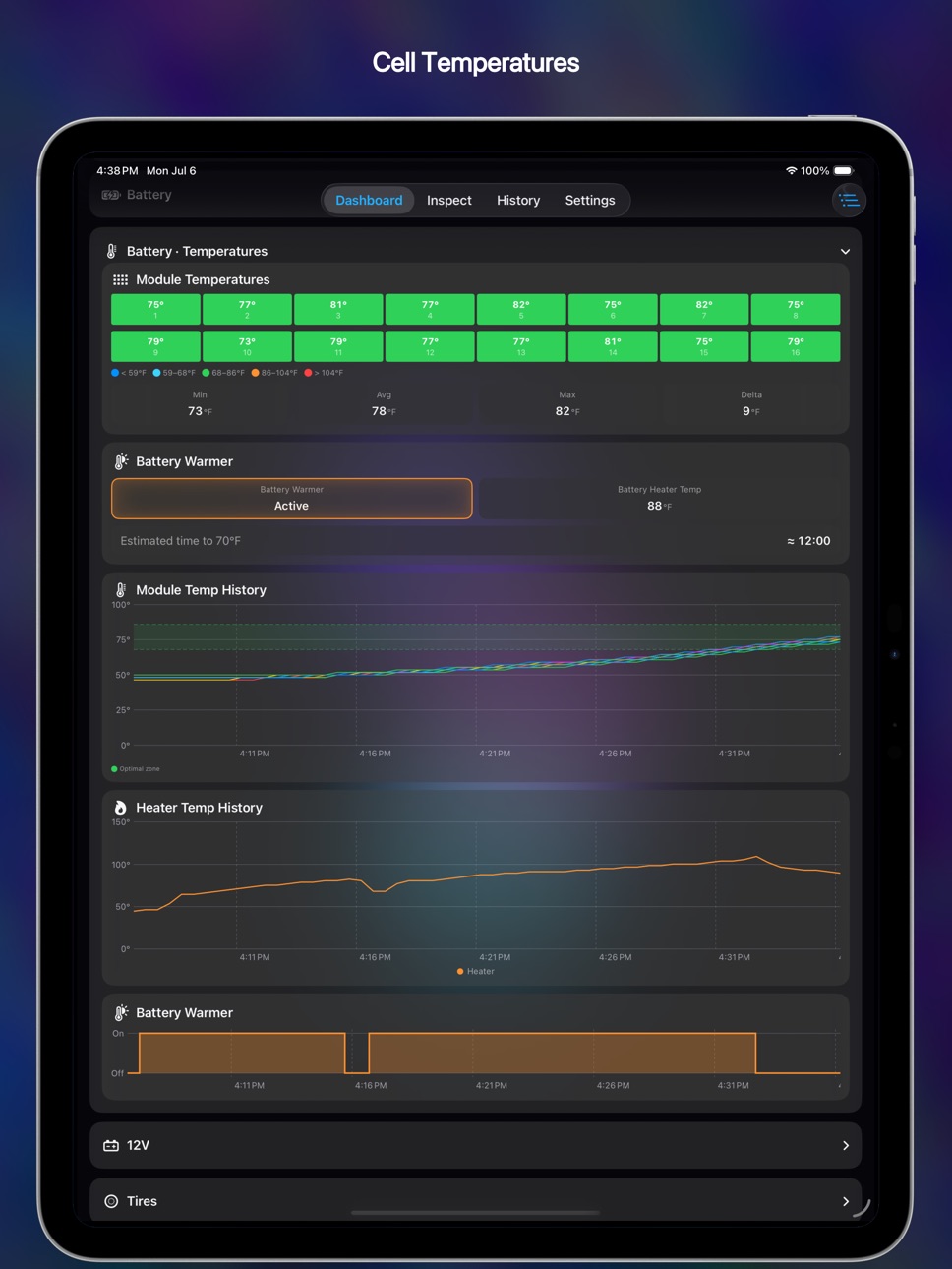
- Cell min/max temperature and per-cell voltages as a color-coded heatmap with an explainer
- Tire pressures and temperatures, with per-axle warnings from your car's door placard — temperature-compensated and fully customizable
- Four vent and floor air temperatures, outside and cabin temperature, humidity, motor RPM, ignition state, battery warmer, headlight and brake-light indicators
- 12V auxiliary battery — charge, voltage, current, temperature, plus DC-DC converter telemetry
CHARGING TELEMETRY
- Live AC and DC charging detection, plus wall-side AC Draw while charging on AC
- Session detail plots Charging Power, Pack Voltage, and battery and ambient temperature, banded by AC, DC, and battery warmer
- DC fast charging: an EVSE Current chart compares requested vs. delivered, plus a supply-equipment card with the station's max power, voltage, and current (J1772 + CCS)
- Live "Time to 70°F / 21°C" battery ETA for DC fast charging
HISTORY & ICLOUD
- Records every drive and charge, with live State-of-Charge charts plus distance, energy, peak-power, and battery-temperature ranges
- 50+ signals on charts you can pinch, pan, and scrub
- Optional iCloud sync keeps your history in step across iPhone, iPad, and Mac
- Attach a photo, share a report card, or export any session to CSV
DIAGNOSTICS
- Enhanced DTC Scan sweeps the whole vehicle bus, names every module that responds, and reads its stored fault codes
- Connection Report, ICCU Information, J1979 Scanner, ECU Finder, and DID Range — all with CSV and image sharing
CONNECTION & SETTINGS
- Auto-Connect and manual connection controls -- to help make co-existence with other OBD-II apps easier
- Themes recolor the whole app in Light and Dark, over a soft aurora backdrop
- Power units (kW, HP, PS) and Efficiency units (mi/kWh, km/kWh, kWh/100km, Wh/km, Wh/mi)
PRIVACY BY DESIGN
The app does not collect, transmit, or sell personal data. No analytics, ads, or accounts. Vehicle data stays on your device and your private iCloud. Logs are exported only when you tap Share. Full privacy policy at https://www.theburl.com/ioniq-app/privacy.html
REQUIREMENTS
ELM327-compatible BLE OBD-II adapter — see https://www.theburl.com/ioniq-app/support.html for tested adapters.
Full support: Hyundai IONIQ 5 and IONIQ 5 N, Kia EV6 and EV9, Hyundai IONIQ 6, and IONIQ 9. Signal coverage varies by model, year, and trim.
NOT AFFILIATED
IONIQ 5 Companion is not affiliated with, endorsed by, or sponsored by Hyundai Motor Company or Kia Corporation. IONIQ is a trademark of Hyundai Motor Company; EV6 and EV9 are trademarks of Kia Corporation. This independent tool reads your own vehicle's data using open OBD-II and UDS standards (ISO 15031, ISO 14229).
Accessibility
ipadiphonemacrealityDevicetvoswatch
Version history 5 versions
Build 887911665v2.22026-07-09 22:16:33
Version 2.2 — a whole new look with Themes, deeper diagnostics, smarter tire-pressure warnings, faster time to dashboard, and new climate signals
A new look
- The entire app is redesigned with translucent Liquid Glass panels over a soft aurora backdrop — Dashboard, History, Inspect, Settings, and every diagnostic tool
- NEW: Themes picker — choose a palette that recolors the whole app, each with its own Light and Dark variants, or turn the aurora off entirely
Inspect & diagnostics
- NEW: Enhanced DTC Scan sweeps the entire diagnostic bus, names every module that responds, and reads each one's fault codes — reaching body, chassis, and airbag modules a standard OBD-II scan never sees
- NEW: ICCU Information tool reads your charging controller's part numbers, software version, build date, and serial number
- NEW: Connection Report — an in-depth view of the app-to-vehicle link: adapter details, polling stats, per-module coverage, and an events timeline
- Export results to CSV from DTC scans, the Connection Report, and any History session
Tires
- Warning colors now derive from your vehicle's door-placard pressures, with separate front and rear targets — fully customizable in the new Settings → Tires
- NEW: Temperature compensation, so hot tires after a drive no longer trip a false warning
- Pressures update 4x more often, and a sleeping sensor shows its last-known reading instead of a blank value
Climate
- The four vent and floor outlet temperatures now appear on the Dashboard, in CarPlay, and in History charts
- NEW: Driver Position setting mirrors vent layouts for right-hand-drive vehicles
CarPlay
- Climate and Tires chips are now tappable — color-coded vent temperatures, and pressure/temperature pages that remember your choice
- NEW: SoC Range Colors — set your own red/orange/green thresholds for the state-of-charge gauge, in CarPlay and on the Dashboard
- The solid-red Brake Light style is back, and the Precondition chip is renamed "Battery Warmer"
Faster and steadier
- Time to dashboard cut by almost half — your first values appear within about a second of polling start
- "Vehicle On" detection reworked: sessions end promptly after shutoff, and adapter hiccups no longer end a session mid-drive
- Faster polling on OBDLink adapters, and smoother multi-frame handling on vehicles with very fast ECUs
Charging
- NEW: AC Draw panel and chart show wall-side voltage, current, and power while AC charging — the gap to pack power is your charger's conversion loss
- Fixed a phantom "DC Fast" session at AC plug-in; the 12V battery now shows charge/discharge direction by color
Vehicle coverage & languages
- Korea-built IONIQ 9 now identified correctly; Standard Range packs no longer show two phantom 0° modules; cell-voltage grids show every cell on the Kia EV9
- Dozens of translation fixes across all nine languages, including proper battery terminology in seven of them
Build 887048627v2.12026-06-19 15:55:28
Version 2.1 — broader vehicle coverage, two new languages, a new Power panel, and a faster connection to your car
Vehicle coverage
- NEW: Full support for the Kia EV9 in all three variants — Standard Range RWD, Long Range RWD, and Long Range AWD
- Better recognition across the lineup: Korea-built EV6 and EV9, the EV6 Standard Range RWD, the 2024 IONIQ 5 N, and the Kia EV6 GT (2022–2024 and 2025+) are now read from the VIN and load the right profile
- IONIQ 5 Standard Range now reads the full battery pack — Cell Voltages and Battery Configuration show all 144 cells, not just 96
Languages
- NEW: Korean and Turkish added. The app is now fully translated in nine languages
- Fixed dozens of labels that used to only show English no matter your language
Faster and steadier
- Improved the Time to Dashboard by over 30% -- see your vehicle status faster than ever before
- State of Charge no longer flashes a red 0% while the battery is still being read at startup
- More reliable "Vehicle On" detection, steadier Bluetooth reconnection when the adapter briefly drops, and stronger protection against background interruptions to History recording
- Several crash fixes from the crash dashboard, and misc. other small bug fixes
Dashboard
- NEW: Power panel with a live output-power dial that fills to your car's peak power capability, in your chosen unit (kW, HP, or PS)
- NEW: live scan-health gauge: see what fraction of recent polls each signal is answering
- NEW: Wh/km efficiency unit, alongside mi/kWh, km/kWh, kWh/100km, and Wh/mi
CarPlay
- The Power chip's dial now scales to your car's live peak-power capability, with a PEAK readout in your chosen unit
- NEW: Headlight Indicator setting (Off, Icons, or Text)
History & charging
- The Signals charts get a big multi-touch overhaul — smarter Prior/Next that skips empty stretches, "sticky" pinch-to-zoom, and a deliberate press-and-hold crosshair
- AC charging sessions now chart AC Input Current and Voltage; charts mark captured points with dots and draw gaps as "unknown" regions
- NEW: Gear chart (P/R/N/D) added to driving sessions
- A one-time cleanup quietly removes old, spurious 0% Lifetime Efficiency readings from your history
Settings
- Settings is reorganized into iOS-style categories — Units, Display, CarPlay, Notifications, History, Diagnostics, Advanced Tools, and About — each on its own screen
Adapter setup
- Adapters that are already connected to your iPhone now appear when scanning and can be selected, after accepting a warning about using more than one OBD-II app at a time
- Automatic detection of Bluetooth state, with easy buttons to turn on Bluetooth, or to grant the app's Bluetooth permission
- NEW: CarPlay "Set Up Your Adapter" screen to guide new users when onboarding for the first time
Build 886438601v2.02026-06-03 20:22:48
Version 2.0 — a full driving and charging History that syncs across your devices, deeper charging insight, and broader vehicle coverage.
History & iCloud
- New History tab records every driving and charging session, with live-updating State-of-Charge charts plus distance, energy, peak power, and battery-temperature ranges.
- 50+ signals recorded over time — battery voltages and temperatures, motor RPM, isolation resistance, charging power, tire pressures, climate, and more — each with a multi-touch chart you can pinch, pan, and scrub.
- Per-cell voltage and per-module temperature snapshots captured throughout the drive.
- Optional iCloud sync keeps your entire history in step across iPhone, iPad, and Mac.
- Attach a photo to any session and share a clean, branded report card with a single tap.
Charging insight
- Charging session detail now plots Charging Power, Pack Voltage, battery min/max temperature, and ambient temperature — with bands marking AC charging, DC charging, and preconditioning.
- DC fast charging: a new EVSE Current chart plots what the car requested against what the charger actually delivered, plus an EV Supply Equipment card showing the station's maximum power, voltage, and current from the CCS handshake.
CarPlay
- New Power chip: a bidirectional gauge showing power draw and regeneration on one dial.
- New Compass chip with a heading-up rose, and the option to show it in place of the odometer on the Driving tab.
- DC fast charging shows three live readings side by side: power Requested, power Supplied at the inlet, and power reaching the Pack.
- AC Draw chip shows live volts, amps, and kW while AC charging.
- Cell Voltage Δ chip: a mini heatmap of every cell, color-coded by how far it sits from the pack average.
- Experimental split-screen layout for the IONIQ 5 head unit.
- New setting to jump straight to the Driving tab when your adapter connects.
Dashboard
- New Regeneration gauge showing how much regen the battery can currently accept and how much is flowing right now.
- New Gear indicator (P, R, N, D).
- New Isolation Resistance chip — battery-to-chassis electrical isolation, with an explainer on what the number means.
- New Cell Voltages info panel explaining the heatmap, the color bands, and what's worth watching.
- New Polling Headroom indicator showing how much spare capacity your adapter has for more signals.
Connection & adapters
- Take manual control: connect and disconnect on demand, and turn Auto-Connect on or off — making it easy to share one OBD-II adapter between apps.
Settings
- New Keep Screen Awake control: choose whether the app keeps the screen alive while it's in the foreground.
- Choose your Power units: kW, HP, or PS.
- Choose your Efficiency units: mi/kWh, km/kWh, kWh/100km, or Wh/mi.
Vehicle coverage
- Full support for the Kia EV6, IONIQ 6, and IONIQ 9.
Languages
- Italian is now available, bringing the app to seven languages.
Build 885302528v1.12026-05-08 18:18:58
Version 1.1 — broader vehicle coverage, deeper 12V insight, and a smoother first launch.
CarPlay
- New Tires chip on the Driving tab: pressure and temperature for all four corners
- 12V chip expanded: state of charge, voltage, and current shown together with the same charging/discharging sign convention as the HV pack.
Auxiliary (12V) battery
- New collapsible 12V panel on the Dashboard: SoC, voltage, current, temperature — plus DC-DC converter temperature, output voltage, output current, and HV pack input voltage.
Headlights — 2025 and 2026 IONIQ 5
- Low-beam and high-beam indicators now light up for the 2025 IONIQ 5 and the 2026 IONIQ 5.
Added vehicle coverage
- IONIQ 5 N — added decoding and registry coverage.
- IONIQ 6 model year 2023 (RWD LR and AWD LR)
Smoother onboarding
- If your iPhone already has an OBD-II adapter connected through another app, the Welcome screen now offers a one-tap shortcut to use it
- A swipe-to-confirm reminder explains that OBD-II adapters can only talk to one app at a time, so adopting an adapter is a deliberate choice
Brake Light Indicator — your choice
- Settings → Dashboard now offers three modes: Off, Red Background (enhanced gradient effect), and Red Text (the new default — only the ON/OFF turns red, or no brake tile at all.
Reassurance on a common Hyundai code
- A J1979 scan on virtually every Hyundai EV reports a permanent code, P0C17, on the drive motor controller. It's a self-test artifact, not a real fault. When the app sees it in the permanent slot after a scan, it now shows a brief explanation of why it's normal, when it would actually warrant attention, and a "Don't show this again" option.
Tools for power users and testers
- Adapter Quiet Check (Settings → Diagnostics) listens silently for 60 seconds for any other app talking to your adapter — a one-tap yes/no when you suspect interference is degrading scans.
- Curated Scan workflow streamlined end-to-end: shareable .iqlist files, an A/B/C capture checklist for hunting new signals, in-app Quick Look preview when you receive a list from another tester, and a single tap to import.
- Complete ECU Scan reliability improved on clone adapters that need a little more settle time after large multi-frame batches.
Polish
- Motor RPM gauges restyled with a thicker arc and the unit moved to the label, so the value sits as the single focal point.
- Auxiliary SoC mini-gauge stays size-stable at larger Dynamic Type settings.
- CarPlay battery row chips visually unified with consistent dividers, fonts, and tile geometry.
- VLink-branded adapters now appear in the scan list without removing the name filter.
- Numerous additional fixes across navigation, sheet presentation, localization of CarPlay chip titles, and Advanced Diagnostics tool naming.
Build 883907263v1.02026-04-30 19:11:20
Price history by region
Currency
Show
Columns
Search
Availability 175 of 175 storefronts
| Region | Language | Price | Ratings | Avg | Version |
|---|---|---|---|---|---|
| US | en-US | USD 12.99 | 47 | 4.7 | 2.2 |
| DE | de-DE | EUR 14.99 | 8 | 4.5 | 2.1 |
| GB | en-GB | GBP 12.99 | 7 | 4.1 | 2.2 |
| CA | en-CA | CAD 17.99 | 6 | 4.8 | 2.2 |
| TR | en-GB | TRY 699.99 | 4 | 5.0 | 2.1 |
| FR | fr-FR | EUR 14.99 | 3 | 5.0 | 2.2 |
| NL | nl | EUR 14.99 | 3 | 4.7 | 2.1 |
| DK | en-GB | DKK 99 | 2 | 5.0 | 2.1 |
| HU | en-GB | HUF 5990 | 2 | 5.0 | 2.1 |
| JP | ja | JPY 2000 | 2 | 5.0 | 2.2 |
| SE | sv | SEK 179 | 2 | 4.5 | 2.1 |
| AT | de-DE | EUR 14.99 | 1 | 5.0 | 2.1 |
| AU | en-AU | AUD 19.99 | 1 | 5.0 | 2.2 |
| BE | en-GB | EUR 14.99 | 1 | 5.0 | 2.1 |
| BG | en-GB | EUR 14.99 | 1 | 5.0 | 2.2 |
| IE | en-GB | EUR 14.99 | 1 | 5.0 | 2.2 |
| MD | en-GB | USD 14.99 | 1 | 5.0 | 2.1 |
| MX | es-MX | MXN 299 | 1 | 5.0 | 2.1 |
| MY | en-GB | MYR 59.9 | 1 | 5.0 | 2.1 |
| PL | en-GB | PLN 59.99 | 1 | 5.0 | 2.1 |
| TW | zh-Hant-TW | TWD 390 | 1 | 5.0 | 2.2 |
| AE | en-GB | AED 49.99 | 0 | — | 2.2 |
| AF | en-GB | USD 12.99 | 0 | — | 2.1 |
| AG | en-GB | USD 12.99 | 0 | — | 2.1 |
| AI | en-GB | USD 12.99 | 0 | — | 2.1 |
| AL | en-GB | USD 14.99 | 0 | — | 2.1 |
| AM | en-GB | USD 14.99 | 0 | — | 2.2 |
| AO | en-GB | USD 12.99 | 0 | — | 2.1 |
| AR | es-MX | USD 12.99 | 0 | — | 2.1 |
| AZ | en-GB | USD 14.99 | 0 | — | 2.1 |
| BA | en-GB | EUR 14.99 | 0 | — | 2.1 |
| BB | en-GB | USD 14.99 | 0 | — | 2.1 |
| BF | en-GB | USD 12.99 | 0 | — | 2.1 |
| BH | en-GB | USD 14.99 | 0 | — | 2.2 |
| BJ | en-GB | USD 14.99 | 0 | — | 2.1 |
| BM | en-GB | USD 12.99 | 0 | — | 2.1 |
| BN | en-GB | USD 12.99 | 0 | — | 2.2 |
| BO | es-MX | USD 12.99 | 0 | — | 2.1 |
| BR | pt-BR | BRL 79.9 | 0 | — | 2.1 |
| BS | en-GB | USD 14.99 | 0 | — | 2.1 |
| BT | en-GB | USD 12.99 | 0 | — | 2.2 |
| BW | en-GB | USD 12.99 | 0 | — | 2.1 |
| BY | en-GB | USD 14.99 | 0 | — | 2.2 |
| BZ | en-GB | USD 12.99 | 0 | — | 2.2 |
| CD | en-GB | USD 12.99 | 0 | — | 2.1 |
| CG | en-GB | USD 12.99 | 0 | — | 2.1 |
| CH | de-CH | CHF 10 | 0 | — | 2.1 |
| CI | fr-FR | USD 14.99 | 0 | — | 2.1 |
| CL | es-MX | CLP 14990 | 0 | — | 2.1 |
| CM | fr-FR | USD 14.99 | 0 | — | 2.1 |
| CN | zh-Hans-CN | CNY 88 | 0 | — | 2.1 |
| CO | es-MX | COP 59900 | 0 | — | 2.1 |
| CR | es-MX | USD 12.99 | 0 | — | 2.1 |
| CV | en-GB | USD 12.99 | 0 | — | 2.1 |
| CY | en-GB | EUR 14.99 | 0 | — | 2.2 |
| CZ | en-GB | CZK 349 | 0 | — | 2.2 |
| DM | en-GB | USD 12.99 | 0 | — | 2.1 |
| DO | es-MX | USD 12.99 | 0 | — | 2.1 |
| DZ | en-GB | USD 12.99 | 0 | — | 2.1 |
| EC | es-MX | USD 12.99 | 0 | — | 2.1 |
| EE | en-GB | EUR 14.99 | 0 | — | 2.1 |
| EG | en-GB | EGP 699.99 | 0 | — | 2.1 |
| ES | es-ES | EUR 14.99 | 0 | — | 2.2 |
| FI | en-GB | EUR 14.99 | 0 | — | 2.1 |
| FJ | en-GB | USD 12.99 | 0 | — | 2.2 |
| FM | en-GB | USD 12.99 | 0 | — | 2.2 |
| GA | fr-FR | USD 12.99 | 0 | — | 2.1 |
| GD | en-GB | USD 12.99 | 0 | — | 2.1 |
| GE | en-GB | USD 14.99 | 0 | — | 2.1 |
| GH | en-GB | USD 14.99 | 0 | — | 2.1 |
| GM | en-GB | USD 12.99 | 0 | — | 2.1 |
| GR | en-GB | EUR 14.99 | 0 | — | 2.1 |
| GT | es-MX | USD 12.99 | 0 | — | 2.1 |
| GW | en-GB | USD 12.99 | 0 | — | 2.1 |
| GY | en-GB | USD 12.99 | 0 | — | 2.1 |
| HK | zh-Hant-HK | HKD 98 | 0 | — | 2.2 |
| HN | es-MX | USD 12.99 | 0 | — | 2.1 |
| HR | en-GB | EUR 14.99 | 0 | — | 2.2 |
| ID | en-GB | IDR 229000 | 0 | — | 2.1 |
| IL | en-GB | ILS 49.9 | 0 | — | 2.1 |
| IN | en-GB | INR 1299 | 0 | — | 2.1 |
| IQ | en-GB | USD 12.99 | 0 | — | 2.1 |
| IS | en-GB | USD 14.99 | 0 | — | 2.1 |
| IT | it | EUR 14.99 | 0 | — | 2.1 |
| JM | en-GB | USD 12.99 | 0 | — | 2.1 |
| JO | en-GB | USD 12.99 | 0 | — | 2.1 |
| KE | en-GB | USD 14.99 | 0 | — | 2.1 |
| KG | en-GB | USD 14.99 | 0 | — | 2.2 |
| KH | en-GB | USD 14.99 | 0 | — | 2.1 |
| KN | en-GB | USD 12.99 | 0 | — | 2.1 |
| KR | ko | KRW 22000 | 0 | — | 2.1 |
| KW | en-GB | USD 12.99 | 0 | — | 2.1 |
| KY | en-GB | USD 12.99 | 0 | — | 2.1 |
| KZ | en-GB | KZT 7990 | 0 | — | 2.2 |
| LA | en-GB | USD 14.99 | 0 | — | 2.1 |
| LB | en-GB | USD 12.99 | 0 | — | 2.1 |
| LC | en-GB | USD 12.99 | 0 | — | 2.1 |
| LK | en-GB | USD 12.99 | 0 | — | 2.2 |
| LR | en-GB | USD 12.99 | 0 | — | 2.1 |
| LT | en-GB | EUR 14.99 | 0 | — | 2.1 |
| LU | en-GB | EUR 14.99 | 0 | — | 2.1 |
| LV | en-GB | EUR 14.99 | 0 | — | 2.1 |
| LY | en-GB | USD 12.99 | 0 | — | 2.1 |
| MA | en-GB | USD 12.99 | 0 | — | 2.1 |
| ME | en-GB | EUR 11.99 | 0 | — | 2.1 |
| MG | en-GB | USD 12.99 | 0 | — | 2.1 |
| MK | en-GB | USD 12.99 | 0 | — | 2.1 |
| ML | en-GB | USD 12.99 | 0 | — | 2.1 |
| MM | en-GB | USD 12.99 | 0 | — | 2.1 |
| MN | en-GB | USD 12.99 | 0 | — | 2.1 |
| MO | zh-Hant-HK | USD 12.99 | 0 | — | 2.1 |
| MR | en-GB | USD 12.99 | 0 | — | 2.1 |
| MS | en-GB | USD 12.99 | 0 | — | 2.1 |
| MT | en-GB | EUR 14.99 | 0 | — | 2.1 |
| MU | en-GB | USD 14.99 | 0 | — | 2.1 |
| MV | en-GB | USD 12.99 | 0 | — | 2.2 |
| MW | en-GB | USD 12.99 | 0 | — | 2.1 |
| MZ | en-GB | USD 12.99 | 0 | — | 2.1 |
| NA | en-GB | USD 12.99 | 0 | — | 2.1 |
| NE | en-GB | USD 12.99 | 0 | — | 2.1 |
| NG | en-GB | NGN 19900 | 0 | — | 2.2 |
| NI | es-MX | USD 12.99 | 0 | — | 2.1 |
| NO | en-GB | NOK 179 | 0 | — | 2.1 |
| NP | en-GB | USD 14.99 | 0 | — | 2.1 |
| NR | en-GB | USD 12.99 | 0 | — | 2.2 |
| NZ | en-AU | NZD 22.99 | 0 | — | 2.1 |
| OM | en-GB | USD 12.99 | 0 | — | 2.1 |
| PA | es-MX | USD 12.99 | 0 | — | 2.1 |
| PE | es-MX | PEN 59.9 | 0 | — | 2.1 |
| PG | en-GB | USD 12.99 | 0 | — | 2.1 |
| PH | en-GB | PHP 799 | 0 | — | 2.1 |
| PK | en-GB | PKR 3500 | 0 | — | 2.2 |
| PT | pt-PT | EUR 14.99 | 0 | — | 2.1 |
| PW | en-GB | USD 12.99 | 0 | — | 2.2 |
| PY | es-MX | USD 12.99 | 0 | — | 2.1 |
| QA | en-GB | QAR 49.99 | 0 | — | 2.2 |
| RO | en-GB | RON 69.99 | 0 | — | 2.1 |
| RS | en-GB | EUR 14.99 | 0 | — | 2.1 |
| RU | ru | RUB 999 | 0 | — | 2.1 |
| RW | en-GB | USD 12.99 | 0 | — | 2.1 |
| SA | en-GB | SAR 59.99 | 0 | — | 2.2 |
| SB | en-GB | USD 12.99 | 0 | — | 2.2 |
| SC | en-GB | USD 12.99 | 0 | — | 2.1 |
| SG | en-GB | SGD 19.98 | 0 | — | 2.1 |
| SI | en-GB | EUR 14.99 | 0 | — | 2.1 |
| SK | en-GB | EUR 14.99 | 0 | — | 2.1 |
| SL | en-GB | USD 12.99 | 0 | — | 2.1 |
| SN | en-GB | USD 14.99 | 0 | — | 2.1 |
| SR | en-GB | USD 14.99 | 0 | — | 2.1 |
| ST | en-GB | USD 12.99 | 0 | — | 2.1 |
| SV | es-MX | USD 12.99 | 0 | — | 2.1 |
| SZ | en-GB | USD 12.99 | 0 | — | 2.1 |
| TC | en-GB | USD 12.99 | 0 | — | 2.1 |
| TD | en-GB | USD 12.99 | 0 | — | 2.1 |
| TH | en-GB | THB 499 | 0 | — | 2.1 |
| TJ | en-GB | USD 14.99 | 0 | — | 2.2 |
| TM | en-GB | USD 12.99 | 0 | — | 2.2 |
| TN | en-GB | USD 12.99 | 0 | — | 2.1 |
| TO | en-GB | USD 12.99 | 0 | — | 2.2 |
| TT | en-GB | USD 12.99 | 0 | — | 2.1 |
| TZ | en-GB | TZS 39900 | 0 | — | 2.1 |
| UA | en-GB | USD 14.99 | 0 | — | 2.1 |
| UG | en-GB | USD 14.99 | 0 | — | 2.1 |
| UY | en-GB | USD 12.99 | 0 | — | 2.1 |
| UZ | en-GB | USD 14.99 | 0 | — | 2.2 |
| VC | en-GB | USD 12.99 | 0 | — | 2.1 |
| VE | es-MX | USD 12.99 | 0 | — | 2.1 |
| VG | en-GB | USD 12.99 | 0 | — | 2.1 |
| VN | en-GB | VND 399000 | 0 | — | 2.2 |
| VU | en-GB | USD 12.99 | 0 | — | 2.2 |
| XK | en-GB | EUR 14.99 | 0 | — | 2.1 |
| YE | en-GB | USD 12.99 | 0 | — | 2.1 |
| ZA | en-GB | ZAR 249.99 | 0 | — | 2.2 |
| ZM | en-GB | USD 14.99 | 0 | — | 2.1 |
| ZW | en-GB | USD 14.99 | 0 | — | 2.1 |
Change log 55 changes · ZM
◆
Version changed
2.1 → 2.2
◆
Version changed
2.1 → 2.2
◆
Version changed
2.1 → 2.2
◆
Version changed
2.1 → 2.2
◆
Version changed
2.1 → 2.2
◆
Version changed
2.1 → 2.2
◆
Version changed
2.1 → 2.2
◆
Version changed
2.1 → 2.2
◆
Version changed
2.1 → 2.2
◆
Version changed
2.1 → 2.2
◆
Version changed
2.1 → 2.2
◆
Version changed
2.1 → 2.2
◆
Version changed
2.1 → 2.2
◆
Version changed
2.1 → 2.2
◆
Version changed
2.1 → 2.2
◆
Version changed
2.1 → 2.2
◆
Version changed
2.1 → 2.2
◆
Version changed
2.1 → 2.2
◆
Version changed
2.1 → 2.2
◆
Version changed
2.1 → 2.2
◆
Version changed
2.1 → 2.2
◆
Version changed
2.1 → 2.2
◆
Version changed
2.1 → 2.2
✎
releaseNotes updated
Version 2.2 — a whole new look with Themes, deeper diagnostics, smarter tire-pressure warnings, faster time to dashboard, and new climate signals
A new look
-
✎
description updated
IONIQ 5 Companion is an independent OBD-II diagnostic tool for the Hyundai IONIQ 5 and other E-GMP vehicles, with full support for the IONIQ 5, IONIQ 5 N, IONIQ
▣
App icon changed
▣
Screenshots updated
◆
Version changed
2.1 → 2.2
✎
Size 13 MB → 14 MB
◆
Version changed
2.1 → 2.2
◆
Version changed
2.1 → 2.2
◆
Version changed
2.1 → 2.2
◆
Version changed
2.1 → 2.2
◆
Version changed
2.1 → 2.2
◆
Version changed
2.1 → 2.2
◆
Version changed
2.1 → 2.2
◆
Version changed
2.1 → 2.2
◆
Version changed
2.1 → 2.2
◆
Version changed
2.1 → 2.2
◆
Version changed
2.1 → 2.2
◆
Version changed
2.1 → 2.2
◆
Version changed
2.1 → 2.2
◆
Version changed
2.1 → 2.2
◆
Version changed
2.1 → 2.2
◆
Version changed
2.1 → 2.2
◆
Version changed
2.1 → 2.2
◆
Version 2.2 released
Version 2.2 — a whole new look with Themes, deeper diagnostics, smarter tire-pressure warnings, faster time to dashboard, and new climate signals
A new look
- The entire app is redesigned with translucent Liquid Glass panels over a soft au
✎
releaseNotes updated
Version 2.1 — broader vehicle coverage, two new languages, a new Power panel, and a faster connection to your car
Vehicle coverage
- NEW: Full support for the
✎
description updated
IONIQ 5 Companion is an independent diagnostic tool for the Hyundai IONIQ 5 and IONIQ 5 N, now with full support for the Kia EV6 and EV9, IONIQ 6, and IONIQ 9.
✎
subtitle updated
Beyond your factory dashboard
✎
name updated
IONIQ 5 Companion
◆
Version 2.1 released
Version 2.1 — broader vehicle coverage, two new languages, a new Power panel, and a faster connection to your car
Vehicle coverage
- NEW: Full support for the Kia EV9 in all three variants — Standard Range RWD, Long Range RWD, and Long Ran
◆
Version 2.0 released
Version 2.0 — a full driving and charging History that syncs across your devices, deeper charging insight, and broader vehicle coverage.
History & iCloud
- New History tab records every driving and charging session, with live-updating Stat
◆
Version 1.1 released
Version 1.1 — broader vehicle coverage, deeper 12V insight, and a smoother first launch.
CarPlay
- New Tires chip on the Driving tab: pressure and temperature for all four corners
- 12V chip expanded: state of charge, voltage, and current
◆
Version 1.0 released