Home › Music

 AE
AE
AEen-GB AFen-GB
 AGen-GB
 AIen-GB
 ALen-GB
 AMen-GB
 AOen-GB
 ARes-MX
 ATde-DE
 AUen-AU
 AZen-GB
 BAen-GB
 BBen-GB
 BEen-GB
 BFen-GB
 BGen-GB
 BHen-GB
 BJen-GB
 BMen-GB
 BNen-GB
 BOes-MX
 BRpt-BR
 BSen-GB
 BTen-GB
 BWen-GB
 BYen-GB
 BZen-GB
 CAen-CA
 CDen-GB
 CGen-GB
 CHde-CH
 CIfr-FR
 CLes-MX
 CMfr-FR
 COes-MX
 CRes-MX
 CVen-GB
 CYen-GB
 CZen-GB
 DEde-DE
 DKen-GB
 DMen-GB
 DOes-MX
 DZen-GB
 ECes-MX
 EEen-GB
 EGen-GB
 ESes-ES
 FIen-GB
 FJen-GB
 FMen-GB
 FRfr-FR
 GAfr-FR
 GBen-GB
 GDen-GB
 GEen-GB
 GHen-GB
 GMen-GB
 GRen-GB
 GTes-MX
 GWen-GB
 GYen-GB
 HKzh-Hant-HK
 HNes-MX
 HRen-GB
 HUen-GB
 IDen-GB
 IEen-GB
 ILen-GB
 INen-GB
 IQen-GB
 ISen-GB
 ITit
ITit JMen-GB
 JOen-GB
 JPja
JPja KEen-GB
 KGen-GB
 KHen-GB
 KNen-GB
 KRko
KRko KWen-GB
 KYen-GB
 KZen-GB
 LAen-GB
 LBen-GB
 LCen-GB
 LKen-GB
 LRen-GB
 LTen-GB
 LUen-GB
 LVen-GB
 LYen-GB
 MAen-GB
 MDen-GB
 MEen-GB
 MGen-GB
 MKen-GB
 MLen-GB
 MMen-GB
 MNen-GB
 MOzh-Hant-HK
 MRen-GB
 MSen-GB
 MTen-GB
 MUen-GB
 MVen-GB
 MWen-GB
 MXes-MX
 MYen-GB
 MZen-GB
 NAen-GB
 NEen-GB
 NGen-GB
 NIes-MX
 NLnl
NLnl NOen-GB
 NPen-GB
 NRen-GB
 NZen-AU
 OMen-GB
 PAes-MX
 PEes-MX
 PGen-GB
 PHen-GB
 PKen-GB
 PLen-GB
 PTpt-PT
 PWen-GB
 PYes-MX
 QAen-GB
 ROen-GB
 RSen-GB
 RUru
RUru RWen-GB
 SAen-GB
 SBen-GB
 SCen-GB
 SEsv
SEsv SGen-GB
 SIen-GB
 SKen-GB
 SLen-GB
 SNen-GB
 SRen-GB
 STen-GB
 SVes-MX
 SZen-GB
 TCen-GB
 TDen-GB
 THen-GB
 TJen-GB
 TMen-GB
 TNen-GB
 TOen-GB
 TRen-GB
 TTen-GB
 TWzh-Hant-TW
 TZen-GB
 UAen-GB
 UGen-GB
 USen-US
 UYen-GB
 UZen-GB
 VCen-GB
 VEes-MX
 VGen-GB
 VNen-GB
 VUen-GB
 XKen-GB
 YEen-GB
 ZAen-GB
 ZMen-GB
 ZWen-GB
 CNNot Available
174 of 175 storefronts
Content in en-US
Content in en-US
Information
Apple ID6761295809
Bundle IDcom.devacoconut.gpt
SellerSeller
Min iOS15.0
Min macOS12.0
Device familiesiphone, ipad, ipod
Released2026-04-11
Copyright© 2026 Thorsten Juettner
Privacy policyLink ↗
Preview 2 platforms
iPhone 5 images


iPad 2 images
What’s New Version 1.4.0
NEW
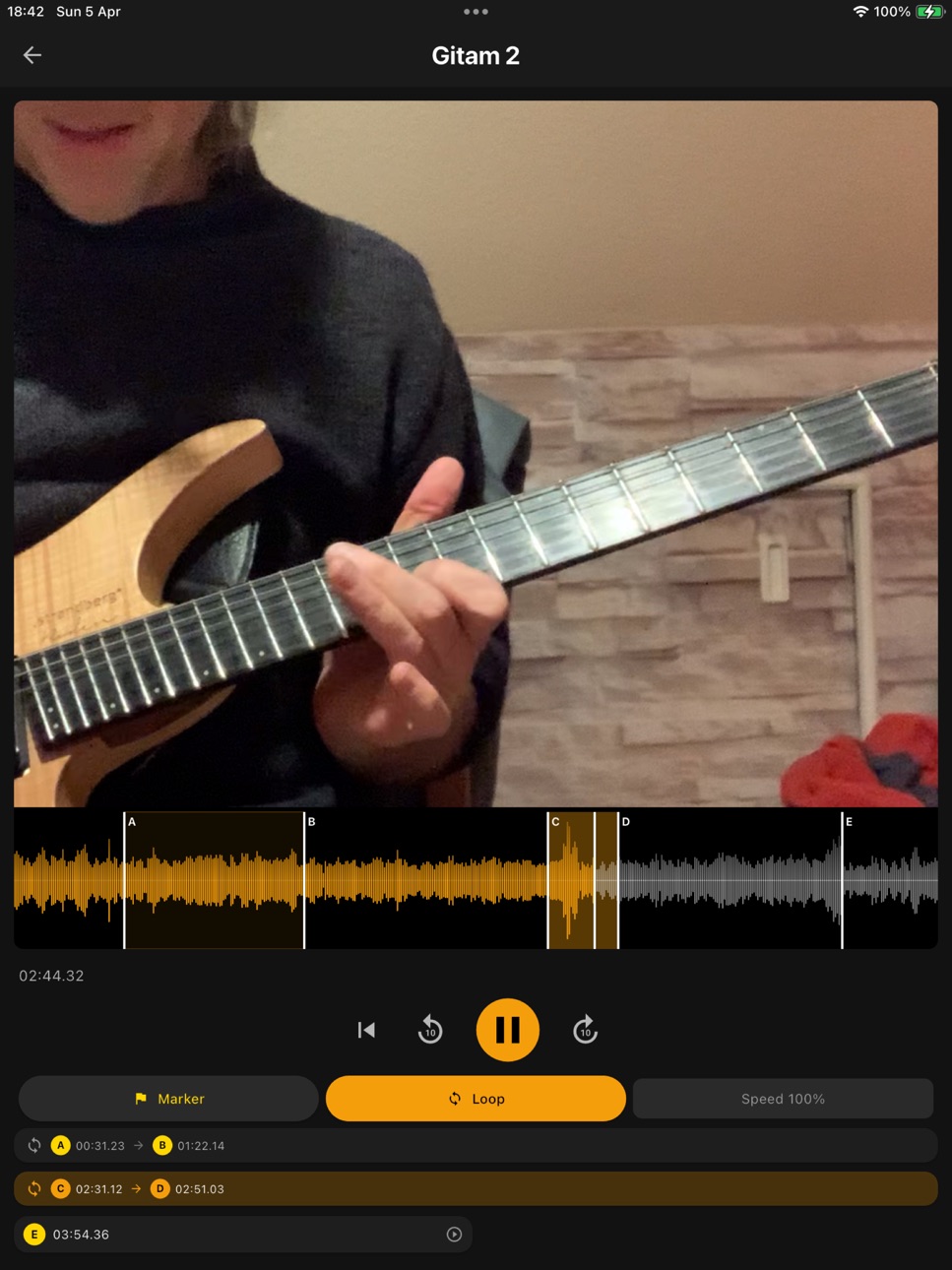
- YouTube, built in: search YouTube right inside the app or paste a link, add the video to your library, and practice it with A/B loop, pitch-preserving slow-down (slow it down without changing the pitch), markers, fullscreen, and a portrait/landscape toggle saved per video. Videos play only through the official YouTube player, embedded via YouTube's IFrame Player API -- nothing is ever downloaded, and no audio or video is copied or stored.
- One search for everything: the library search now finds songs and leadsheets together.
- Move items between projects: send any song or leadsheet to another project folder from its menu. Your manual project order now survives iCloud sync and reinstalls.
- Cleaner analysis tabs: the layer toggle hides Simplified/Theory tabs that have no data.
IMPROVED
- Free re-analysis from your cached cloud stems now keeps the Simplified and Theory layers when the analysis engine is updated -- no extra credit, no re-upload.
FIXED
- The Theory tab now respects your LLM/Theory setting when an analysis is rebuilt from cached stems.
- The recording dialog reliably closes after you name a take.
- Deleting a leadsheet removes its cloud copy immediately, so it no longer reappears on the next sync.
LANGUAGES
- Fully localized in English and German.
Description
Practice your next favorite song at half speed, bar by bar. GuitarPT turns any track into your personal practice room.
Load an MP3, M4A or video file, and GuitarPT automatically detects BPM and chords — entirely on-device, no server, no internet required. Set markers, define loop sections, drop the tempo to 50%, transpose without pitch artifacts. Once the part sits, kick the speed back up. No setup, no fuss.
Need a chord chart? Build a leadsheet in the built-in editor using a gesture-driven circle-of-fifths key picker, a smart chord palette and a clean section layout. Play it back with piano, bass and drums across 8 styles — rock, jazz swing, bossa nova, funk and more. Or snap a photo of a handwritten chart and have it digitised via OCR.
On stage? Performance mode shows large chord displays with live highlighting of the current chord.
Multiple devices? With iCloud sync your songs, markers, leadsheets and setlists are everywhere — iPhone, iPad, all in sync.
PLAYER
• Audio and video player with an interactive waveform
• Time-stretching from 25% to 150% — without pitch artifacts
• Pitch shifting of ±12 semitones, independent of tempo
• One-touch marker grab and drag
• Up to 3 loop sections per song
CHORD ANALYSIS (fully offline)
• Automatic BPM and chord detection with 145 chord types
• Slash chord detection (Am/C, G/B …)
• Confidence indicator per chord
• Enharmonic notation based on key (Ab instead of G#)
• Re-analyze with a single tap
LEADSHEET CREATOR
• Circle-of-fifths key picker with swipe gesture
• Section structure (Intro, Verse, Chorus, Bridge, Solo, Outro)
• Playback with piano, bass and drums across 8 styles
• Performance mode with a large chord display
• Photo import via OCR (OpenAI Vision)
• Export/import as .guitarpt.json or .zip
LIBRARY
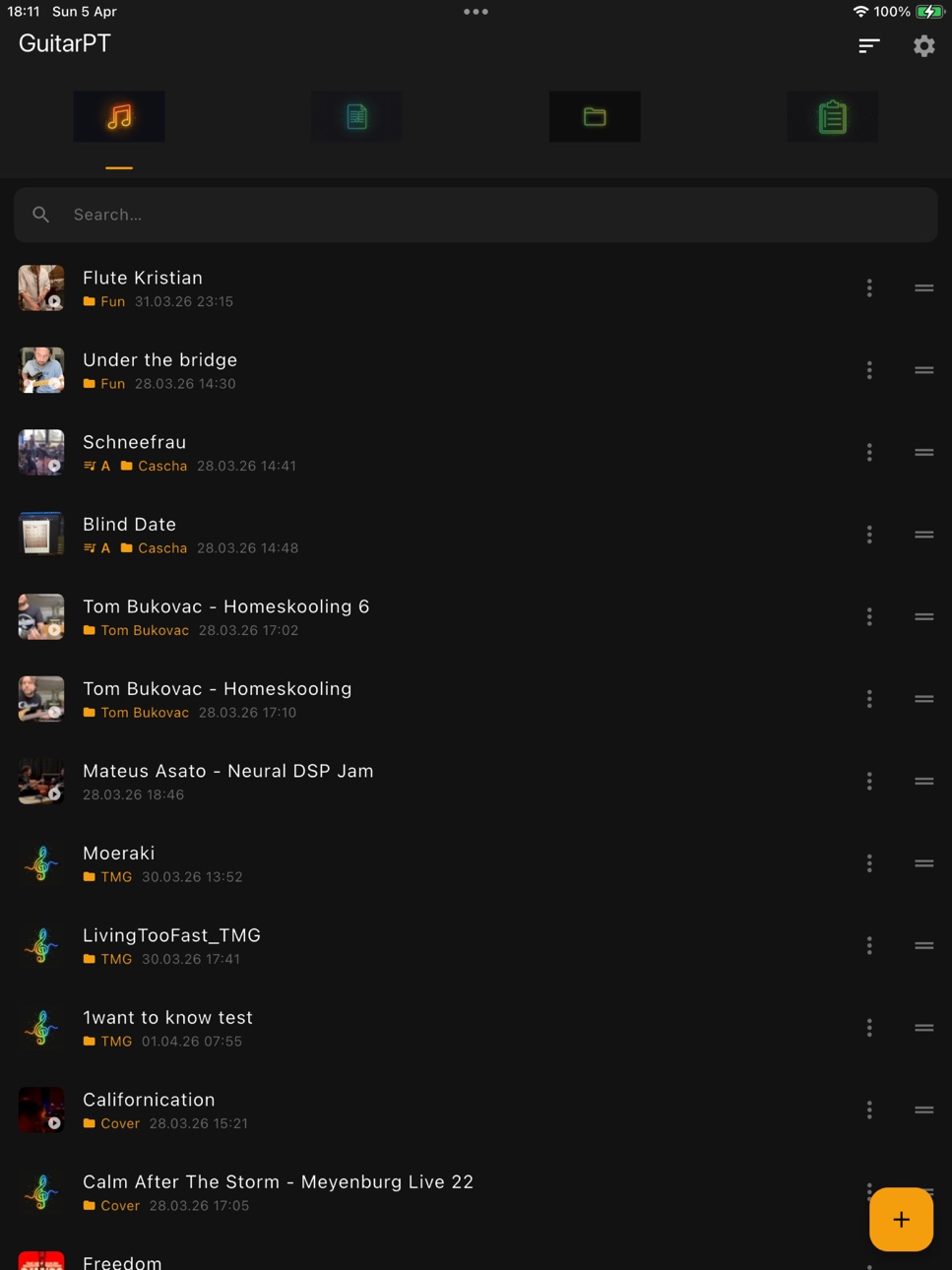
• Songs, leadsheets, projects and setlists
• Song-leadsheet linking
• Recording with live waveform
• Band-folder import from shared iCloud folders
• Search, sorting and drag-to-reorder
iCLOUD SYNC
• Songs, markers, loops, leadsheets, setlists and photos automatically synced
• Audio, video and image files via iCloud Drive
• Download-on-demand
• Sync log and storage overview in Settings
PRIVACY
All audio analysis runs on your device. No account required, no trackers, no data sent anywhere. The OpenAI API key is optional and only used for the photo import.
Available in English and German.
---
Terms of Use (EULA): https://www.apple.com/legal/internet-services/itunes/dev/stdeula/
Privacy Policy: https://guitarpt.app/datenschutz.html
The Pro subscription (6.99 EUR/month) auto-renews at the end of each billing period unless cancelled at least 24 hours before in App Store settings. Manage subscriptions: https://apps.apple.com/account/subscriptions
In-App Purchases AE pricing
GuitarPT Pro Subscription
Monthly—
One-Time Purchases
30 Cloud Analyses—
150 Cloud Analyses—
Capabilities
In-App Purchases
Accessibility
ipadiphonemacrealityDevicetvoswatch
Version history 7 versions
Build 887635468v1.4.02026-07-01 04:27:07
NEW
- YouTube, built in: search YouTube right inside the app or paste a link, add the video to your library, and practice it with A/B loop, pitch-preserving slow-down (slow it down without changing the pitch), markers, fullscreen, and a portrait/landscape toggle saved per video. Videos play only through the official YouTube player, embedded via YouTube's IFrame Player API -- nothing is ever downloaded, and no audio or video is copied or stored.
- One search for everything: the library search now finds songs and leadsheets together.
- Move items between projects: send any song or leadsheet to another project folder from its menu. Your manual project order now survives iCloud sync and reinstalls.
- Cleaner analysis tabs: the layer toggle hides Simplified/Theory tabs that have no data.
IMPROVED
- Free re-analysis from your cached cloud stems now keeps the Simplified and Theory layers when the analysis engine is updated -- no extra credit, no re-upload.
FIXED
- The Theory tab now respects your LLM/Theory setting when an analysis is rebuilt from cached stems.
- The recording dialog reliably closes after you name a take.
- Deleting a leadsheet removes its cloud copy immediately, so it no longer reappears on the next sync.
LANGUAGES
- Fully localized in English and German.
Build 887534470v1.3.02026-06-27 23:41:15
NEW
- Leadsheet transposition: move an entire leadsheet to a new key in one step – every chord, including slash chords and extensions, transposes automatically.
- Key-picker preview: a bubble now shows the selected key right above your finger while you use the circle of fifths, so your fingertip never hides it.
- Open existing leadsheets straight in the Performance View, ready to play.
- Delete the empty default project folders (Band/Solo/Cover/Fun) you don't use.
IMPROVED
- Sharper chord & key detection: bass-aware key recognition, better root/slash decisions, respects your corrected BPM, and adds the 7sus4 quality.
- Chord analyses and stem info now sync across your devices via iCloud.
- Friendlier recovery actions and in-app help in Settings.
FIXED
- More robust iCloud sync: repairs items that never finished syncing, removes duplicate default projects, and cleans up imported file names.
LANGUAGES
- Fully localized in English and German.
Build 886255147v1.2.02026-05-29 14:30:09
New in this version:
• Cloud packs and Pro subscription: buy more cloud analyses with stems, theory layer and hybrid chord recognition right inside the app.
• Friendly heads-up dialog when your free cloud trial (5 songs) is used up — with clear next steps.
• More stable cloud analysis: automatic retries on brief network hiccups during the interpretation phase.
• Cloud packs overview in Settings: current balance, buy packs, restore purchases.
• Various smaller improvements and stability fixes.
Build 885465904v1.12026-05-11 00:03:09
NEW
- Song Roadmap strip on top of Performance View — every section as a colored pill, the active one with a live progress underline. The whole song structure stays visible at a glance while you play.
- Song Flow editor — set the explicit play order with drag-and-drop. A chorus played three times is one section listed three times. No more duplicates.
- 1st and 2nd endings (volta brackets) per section — perfect for tunes with different turnarounds. A 2nd ending without a 1st doubles as a tail or coda.
- Real Book chord notation — full-size root, small accidentals, superscript extensions and subscript bass slashes, with a clean, constant baseline across every bar.
- Dynamic row layout — 8 bars per row on iPad landscape, 4 elsewhere. Long-press a short row and drag it up to merge orphans (4+4+2 becomes 4+6).
- Stable section colors — sections sharing a name automatically share a color, consistent across editor, roadmap and Performance View.
FIXED
- iCloud Sync no longer fails with a "duplicate column" error during database migration. All schema migrations are now idempotent.
LANGUAGES
- All new strings are localized in English and German.
Build 884669452v1.0.52026-04-18 20:55:38
Version 1.0.5 – Big update with iCloud sync and many improvements
NEW
• iCloud sync: Songs, projects, markers, loop sections, leadsheets, setlists and photos are now automatically synced between your devices.
• Audio, video and photo files are uploaded and downloaded via iCloud Drive.
• Photos appear automatically on your other devices after a sync, including thumbnails in the library — no need to tap each photo first.
• Download-on-demand: Missing files are fetched from the cloud the moment you open them.
• Sync log: Scrollable history of every sync run with timestamps and errors.
• Storage overview in Settings: Local / In Cloud / Pending shown separately.
• Cloud reset: Wipe and re-sync the entire cloud zone from Settings.
• Edit titles directly in the player via the new edit button.
• Scrubbing: Swipe horizontally on the waveform to move the playhead.
• Loop zoom: Double-tap the loop button to zoom in or out of the loop range.
IMPROVEMENTS
• Markers can now be grabbed with a single touch — no need to select them first.
• Larger touch area (40 pt) for markers.
• Video waveforms now support the same scrubbing and marker logic as audio.
• Switching to another loop section automatically re-zooms the waveform to fit.
• Cryptic file names from the media library (UUIDs, timestamps) are cleaned up on import.
• More robust sync architecture using a dedicated CloudKit zone and stable IDs.
• Sync spinner no longer spins forever: stuck sync runs are cleanly cancelled after at most 5 minutes and recorded in the log.
• More reliable iCloud Drive downloads with clear timeouts and fast failure detection.
• Better error reporting in the sync log (Settings → iCloud Sync).
FIXED
• Video zoom on Mac: 2-finger pinch on the video is no longer interpreted as waveform scrubbing.
• Play/Pause button now updates instantly when tapped.
• Color scheme button reacts immediately to changes.
• No more unintended jumps when grabbing a marker.
• Layout overflow fixed for long leadsheet subtitles.
• German error message removed from the English UI.
• Songs from the local Photos library are loaded reliably.
• Various sync stability fixes (ping-pong loops, duplicates, leadsheet assignments).
Thanks for playing, practicing and testing!
Build 884406365v1.0.42026-04-11 23:53:18
Bug fixes:
- Recording dialog now closes correctly after saving
- Layout improvements in player
- Minor UI optimizations
Build 883869217v1.02026-04-09 21:32:58
Price history by region
Currency
Show
Columns
Search
Availability 174 of 175 storefronts
| Region | Language | Price | Ratings | Avg | Version |
|---|---|---|---|---|---|
| AE | en-GB | AED 14.99 | 0 | — | 1.4.0 |
| AF | en-GB | USD 3.99 | 0 | — | 1.4.0 |
| AG | en-GB | USD 3.99 | 0 | — | 1.4.0 |
| AI | en-GB | USD 3.99 | 0 | — | 1.4.0 |
| AL | en-GB | USD 4.99 | 0 | — | 1.4.0 |
| AM | en-GB | USD 4.99 | 0 | — | 1.4.0 |
| AO | en-GB | USD 3.99 | 0 | — | 1.4.0 |
| AR | es-MX | USD 3.99 | 0 | — | 1.4.0 |
| AT | de-DE | EUR 3.99 | 0 | — | 1.4.0 |
| AU | en-AU | AUD 5.99 | 0 | — | 1.4.0 |
| AZ | en-GB | USD 4.99 | 0 | — | 1.4.0 |
| BA | en-GB | EUR 3.99 | 0 | — | 1.4.0 |
| BB | en-GB | USD 4.99 | 0 | — | 1.4.0 |
| BE | en-GB | EUR 3.99 | 0 | — | 1.4.0 |
| BF | en-GB | USD 3.99 | 0 | — | 1.4.0 |
| BG | en-GB | EUR 3.99 | 0 | — | 1.4.0 |
| BH | en-GB | USD 3.99 | 0 | — | 1.4.0 |
| BJ | en-GB | USD 4.99 | 0 | — | 1.4.0 |
| BM | en-GB | USD 3.99 | 0 | — | 1.4.0 |
| BN | en-GB | USD 3.99 | 0 | — | 1.4.0 |
| BO | es-MX | USD 3.99 | 0 | — | 1.4.0 |
| BR | pt-BR | BRL 24.9 | 0 | — | 1.4.0 |
| BS | en-GB | USD 3.99 | 0 | — | 1.4.0 |
| BT | en-GB | USD 3.99 | 0 | — | 1.4.0 |
| BW | en-GB | USD 3.99 | 0 | — | 1.4.0 |
| BY | en-GB | USD 4.99 | 0 | — | 1.4.0 |
| BZ | en-GB | USD 3.99 | 0 | — | 1.4.0 |
| CA | en-CA | CAD 4.99 | 0 | — | 1.4.0 |
| CD | en-GB | USD 3.99 | 0 | — | 1.4.0 |
| CG | en-GB | USD 3.99 | 0 | — | 1.4.0 |
| CH | de-CH | CHF 3 | 0 | — | 1.4.0 |
| CI | fr-FR | USD 4.99 | 0 | — | 1.4.0 |
| CL | es-MX | CLP 4990 | 0 | — | 1.4.0 |
| CM | fr-FR | USD 4.99 | 0 | — | 1.4.0 |
| CO | es-MX | COP 19900 | 0 | — | 1.4.0 |
| CR | es-MX | USD 3.99 | 0 | — | 1.4.0 |
| CV | en-GB | USD 3.99 | 0 | — | 1.4.0 |
| CY | en-GB | EUR 3.99 | 0 | — | 1.4.0 |
| CZ | en-GB | CZK 99 | 0 | — | 1.4.0 |
| DE | de-DE | EUR 3.99 | 0 | — | 1.4.0 |
| DK | en-GB | DKK 39 | 0 | — | 1.4.0 |
| DM | en-GB | USD 3.99 | 0 | — | 1.4.0 |
| DO | es-MX | USD 3.99 | 0 | — | 1.4.0 |
| DZ | en-GB | USD 3.99 | 0 | — | 1.4.0 |
| EC | es-MX | USD 3.99 | 0 | — | 1.4.0 |
| EE | en-GB | EUR 3.99 | 0 | — | 1.4.0 |
| EG | en-GB | EGP 199.99 | 0 | — | 1.4.0 |
| ES | es-ES | EUR 3.99 | 0 | — | 1.4.0 |
| FI | en-GB | EUR 3.99 | 0 | — | 1.4.0 |
| FJ | en-GB | USD 3.99 | 0 | — | 1.4.0 |
| FM | en-GB | USD 3.99 | 0 | — | 1.4.0 |
| FR | fr-FR | EUR 3.99 | 0 | — | 1.4.0 |
| GA | fr-FR | USD 3.99 | 0 | — | 1.4.0 |
| GB | en-GB | GBP 3.99 | 0 | — | 1.4.0 |
| GD | en-GB | USD 3.99 | 0 | — | 1.4.0 |
| GE | en-GB | USD 4.99 | 0 | — | 1.4.0 |
| GH | en-GB | USD 4.99 | 0 | — | 1.4.0 |
| GM | en-GB | USD 3.99 | 0 | — | 1.4.0 |
| GR | en-GB | EUR 3.99 | 0 | — | 1.4.0 |
| GT | es-MX | USD 3.99 | 0 | — | 1.4.0 |
| GW | en-GB | USD 3.99 | 0 | — | 1.4.0 |
| GY | en-GB | USD 3.99 | 0 | — | 1.4.0 |
| HK | zh-Hant-HK | HKD 32 | 0 | — | 1.4.0 |
| HN | es-MX | USD 3.99 | 0 | — | 1.4.0 |
| HR | en-GB | EUR 3.99 | 0 | — | 1.4.0 |
| HU | en-GB | HUF 1790 | 0 | — | 1.4.0 |
| ID | en-GB | IDR 69000 | 0 | — | 1.4.0 |
| IE | en-GB | EUR 3.99 | 0 | — | 1.4.0 |
| IL | en-GB | ILS 14.9 | 0 | — | 1.4.0 |
| IN | en-GB | INR 399 | 0 | — | 1.4.0 |
| IQ | en-GB | USD 3.99 | 0 | — | 1.4.0 |
| IS | en-GB | USD 4.99 | 0 | — | 1.4.0 |
| IT | it | EUR 3.99 | 0 | — | 1.4.0 |
| JM | en-GB | USD 3.99 | 0 | — | 1.4.0 |
| JO | en-GB | USD 3.99 | 0 | — | 1.4.0 |
| JP | ja | JPY 600 | 0 | — | 1.4.0 |
| KE | en-GB | USD 4.99 | 0 | — | 1.4.0 |
| KG | en-GB | USD 3.99 | 0 | — | 1.4.0 |
| KH | en-GB | USD 3.99 | 0 | — | 1.4.0 |
| KN | en-GB | USD 3.99 | 0 | — | 1.4.0 |
| KR | ko | KRW 6600 | 0 | — | 1.4.0 |
| KW | en-GB | USD 3.99 | 0 | — | 1.4.0 |
| KY | en-GB | USD 3.99 | 0 | — | 1.4.0 |
| KZ | en-GB | KZT 2490 | 0 | — | 1.4.0 |
| LA | en-GB | USD 3.99 | 0 | — | 1.4.0 |
| LB | en-GB | USD 3.99 | 0 | — | 1.4.0 |
| LC | en-GB | USD 3.99 | 0 | — | 1.4.0 |
| LK | en-GB | USD 3.99 | 0 | — | 1.4.0 |
| LR | en-GB | USD 3.99 | 0 | — | 1.4.0 |
| LT | en-GB | EUR 3.99 | 0 | — | 1.4.0 |
| LU | en-GB | EUR 3.99 | 0 | — | 1.4.0 |
| LV | en-GB | EUR 3.99 | 0 | — | 1.4.0 |
| LY | en-GB | USD 3.99 | 0 | — | 1.4.0 |
| MA | en-GB | USD 3.99 | 0 | — | 1.4.0 |
| MD | en-GB | USD 4.99 | 0 | — | 1.4.0 |
| ME | en-GB | EUR 2.99 | 0 | — | 1.4.0 |
| MG | en-GB | USD 3.99 | 0 | — | 1.4.0 |
| MK | en-GB | USD 3.99 | 0 | — | 1.4.0 |
| ML | en-GB | USD 3.99 | 0 | — | 1.4.0 |
| MM | en-GB | USD 3.99 | 0 | — | 1.4.0 |
| MN | en-GB | USD 3.99 | 0 | — | 1.4.0 |
| MO | zh-Hant-HK | USD 3.99 | 0 | — | 1.4.0 |
| MR | en-GB | USD 3.99 | 0 | — | 1.4.0 |
| MS | en-GB | USD 3.99 | 0 | — | 1.4.0 |
| MT | en-GB | EUR 3.99 | 0 | — | 1.4.0 |
| MU | en-GB | USD 4.99 | 0 | — | 1.4.0 |
| MV | en-GB | USD 3.99 | 0 | — | 1.4.0 |
| MW | en-GB | USD 3.99 | 0 | — | 1.4.0 |
| MX | es-MX | MXN 89 | 0 | — | 1.4.0 |
| MY | en-GB | MYR 19.9 | 0 | — | 1.4.0 |
| MZ | en-GB | USD 3.99 | 0 | — | 1.4.0 |
| NA | en-GB | USD 3.99 | 0 | — | 1.4.0 |
| NE | en-GB | USD 3.99 | 0 | — | 1.4.0 |
| NG | en-GB | NGN 6900 | 0 | — | 1.4.0 |
| NI | es-MX | USD 3.99 | 0 | — | 1.4.0 |
| NL | nl | EUR 3.99 | 0 | — | 1.4.0 |
| NO | en-GB | NOK 49 | 0 | — | 1.4.0 |
| NP | en-GB | USD 4.99 | 0 | — | 1.4.0 |
| NR | en-GB | USD 3.99 | 0 | — | 1.4.0 |
| NZ | en-AU | NZD 6.99 | 0 | — | 1.4.0 |
| OM | en-GB | USD 3.99 | 0 | — | 1.4.0 |
| PA | es-MX | USD 3.99 | 0 | — | 1.4.0 |
| PE | es-MX | PEN 17.9 | 0 | — | 1.4.0 |
| PG | en-GB | USD 3.99 | 0 | — | 1.4.0 |
| PH | en-GB | PHP 249 | 0 | — | 1.4.0 |
| PK | en-GB | PKR 1100 | 0 | — | 1.4.0 |
| PL | en-GB | PLN 19.99 | 0 | — | 1.4.0 |
| PT | pt-PT | EUR 3.99 | 0 | — | 1.4.0 |
| PW | en-GB | USD 3.99 | 0 | — | 1.4.0 |
| PY | es-MX | USD 3.99 | 0 | — | 1.4.0 |
| QA | en-GB | QAR 14.99 | 0 | — | 1.4.0 |
| RO | en-GB | RON 19.99 | 0 | — | 1.4.0 |
| RS | en-GB | EUR 3.99 | 0 | — | 1.4.0 |
| RU | ru | RUB 349 | 0 | — | 1.4.0 |
| RW | en-GB | USD 3.99 | 0 | — | 1.4.0 |
| SA | en-GB | SAR 17.99 | 0 | — | 1.4.0 |
| SB | en-GB | USD 3.99 | 0 | — | 1.4.0 |
| SC | en-GB | USD 3.99 | 0 | — | 1.4.0 |
| SE | sv | SEK 49 | 0 | — | 1.4.0 |
| SG | en-GB | SGD 5.98 | 0 | — | 1.4.0 |
| SI | en-GB | EUR 3.99 | 0 | — | 1.4.0 |
| SK | en-GB | EUR 3.99 | 0 | — | 1.4.0 |
| SL | en-GB | USD 3.99 | 0 | — | 1.4.0 |
| SN | en-GB | USD 4.99 | 0 | — | 1.4.0 |
| SR | en-GB | USD 3.99 | 0 | — | 1.4.0 |
| ST | en-GB | USD 3.99 | 0 | — | 1.4.0 |
| SV | es-MX | USD 3.99 | 0 | — | 1.4.0 |
| SZ | en-GB | USD 3.99 | 0 | — | 1.4.0 |
| TC | en-GB | USD 3.99 | 0 | — | 1.4.0 |
| TD | en-GB | USD 3.99 | 0 | — | 1.4.0 |
| TH | en-GB | THB 149 | 0 | — | 1.4.0 |
| TJ | en-GB | USD 3.99 | 0 | — | 1.4.0 |
| TM | en-GB | USD 3.99 | 0 | — | 1.4.0 |
| TN | en-GB | USD 3.99 | 0 | — | 1.4.0 |
| TO | en-GB | USD 3.99 | 0 | — | 1.4.0 |
| TR | en-GB | TRY 199.99 | 0 | — | 1.4.0 |
| TT | en-GB | USD 3.99 | 0 | — | 1.4.0 |
| TW | zh-Hant-TW | TWD 120 | 0 | — | 1.4.0 |
| TZ | en-GB | TZS 11900 | 0 | — | 1.4.0 |
| UA | en-GB | USD 4.99 | 0 | — | 1.4.0 |
| UG | en-GB | USD 4.99 | 0 | — | 1.4.0 |
| US | en-US | USD 3.99 | 0 | — | 1.4.0 |
| UY | en-GB | USD 3.99 | 0 | — | 1.4.0 |
| UZ | en-GB | USD 3.99 | 0 | — | 1.4.0 |
| VC | en-GB | USD 3.99 | 0 | — | 1.4.0 |
| VE | es-MX | USD 3.99 | 0 | — | 1.4.0 |
| VG | en-GB | USD 3.99 | 0 | — | 1.4.0 |
| VN | en-GB | VND 119000 | 0 | — | 1.4.0 |
| VU | en-GB | USD 3.99 | 0 | — | 1.4.0 |
| XK | en-GB | EUR 3.99 | 0 | — | 1.4.0 |
| YE | en-GB | USD 3.99 | 0 | — | 1.4.0 |
| ZA | en-GB | ZAR 79.99 | 0 | — | 1.4.0 |
| ZM | en-GB | USD 4.99 | 0 | — | 1.4.0 |
| ZW | en-GB | USD 4.99 | 0 | — | 1.4.0 |
Not available in: CN
Change log 10 changes · AE
✎
releaseNotes updated
NEW
- YouTube, built in: search YouTube right inside the app or paste a link, add the video to your library, and practice it with A/B loop, pitch-preserving slo
✎
description updated
Practice your next favorite song at half speed, bar by bar. GuitarPT turns any track into your personal practice room.
Load an MP3, M4A or video file, and Guit
✎
name updated
GuitarPT
◆
Version 1.4.0 released
NEW
- YouTube, built in: search YouTube right inside the app or paste a link, add the video to your library, and practice it with A/B loop, pitch-preserving slow-down (slow it down without changing the pitch), markers, fullscreen, and a por
◆
Version 1.3.0 released
NEW
- Leadsheet transposition: move an entire leadsheet to a new key in one step – every chord, including slash chords and extensions, transposes automatically.
- Key-picker preview: a bubble now shows the selected key right above your fing
◆
Version 1.2.0 released
New in this version:
• Cloud packs and Pro subscription: buy more cloud analyses with stems, theory layer and hybrid chord recognition right inside the app.
• Friendly heads-up dialog when your free cloud trial (5 songs) is used up — with
◆
Version 1.1 released
NEW
- Song Roadmap strip on top of Performance View — every section as a colored pill, the active one with a live progress underline. The whole song structure stays visible at a glance while you play.
- Song Flow editor — set the explicit p
◆
Version 1.0.5 released
Version 1.0.5 – Big update with iCloud sync and many improvements
NEW
• iCloud sync: Songs, projects, markers, loop sections, leadsheets, setlists and photos are now automatically synced between your devices.
• Audio, video and photo files
◆
Version 1.0.4 released
Bug fixes:
- Recording dialog now closes correctly after saving
- Layout improvements in player
- Minor UI optimizations
◆
Version 1.0 released