Home › Utilities

 ZM
ZM
 AEen-GB
 AFen-GB
 AGen-GB
 AIen-GB
 ALen-GB
 AMen-GB
 AOen-GB
 ATde-DE
 AUen-AU
 AZen-GB
 BBen-GB
 BFen-GB
 BGen-GB
 BHen-GB
 BJen-GB
 BMen-GB
 BNen-GB
 BRpt-BR
 BSen-GB
 BTen-GB
 BWen-GB
 BZen-GB
 CAen-CA
 CDen-GB
 CGen-GB
 CHde-CH
 CIfr-FR
 CNzh-Hans-CN
 COes-MX
 CRes-MX
 CVen-GB
 CYen-GB
 CZen-GB
 DEde-DE
 DMen-GB
 DOes-MX
 DZen-GB
 ECes-MX
 EEen-GB
 EGen-GB
 ESes-ES
 FIen-GB
 FJen-GB
 FMen-GB
 FRfr-FR
 GAfr-FR
 GBen-GB
 GDen-GB
 GEen-GB
 GHen-GB
 GMen-GB
 GRen-GB
 GTes-MX
 GWen-GB
 GYen-GB
 HNes-MX
 HRen-GB
 HUen-GB
 IDen-GB
 IEen-GB
 ILen-GB
 IQen-GB
 ISen-GB
 JMen-GB
 JOen-GB
 JPja
JPja KEen-GB
 KGen-GB
 KHen-GB
 KNen-GB
 KWen-GB
 KYen-GB
 KZen-GB
 LAen-GB
 LBen-GB
 LCen-GB
 LKen-GB
 LRen-GB
 LTen-GB
 LUen-GB
 LVen-GB
 LYen-GB
 MAen-GB
 MDen-GB
 MEen-GB
 MGen-GB
 MMen-GB
 MNen-GB
 MOzh-Hant-HK
 MRen-GB
 MSen-GB
 MTen-GB
 MUen-GB
 MVen-GB
 MWen-GB
 MXes-MX
 MYen-GB
 MZen-GB
 NAen-GB
 NEen-GB
 NGen-GB
 NIes-MX
 NOen-GB
 NPen-GB
 NRen-GB
 NZen-AU
 OMen-GB
 PAes-MX
 PEes-MX
 PGen-GB
 PKen-GB
 PLen-GB
 PWen-GB
 PYes-MX
 QAen-GB
 ROen-GB
 RWen-GB
 SAen-GB
 SBen-GB
 SCen-GB
 SIen-GB
 SKen-GB
 SLen-GB
 SRen-GB
 STen-GB
 SVes-MX
 SZen-GB
 TCen-GB
 TDen-GB
 THen-GB
 TJen-GB
 TMen-GB
 TNen-GB
 TOen-GB
 TRen-GB
 TTen-GB
 TWzh-Hant-TW
 TZen-GB
 UAen-GB
 UGen-GB
 USen-US
 UZen-GB
 VCen-GB
 VEes-MX
 VGen-GB
 VUen-GB
 XKen-GB
 YEen-GB
 ZAen-GBZMen-GB
 ZWen-GB
151 of 151 storefronts
Content in en-US
Content in en-US
Information
Apple ID6761039235
Bundle IDcom.sakuma.scaflow
SellerSeller
Min iOS17.0
Min macOS14.0
Device familiesiphone, ipad
Released2026-03-25
Copyright© Satoshi Sakuma
Privacy policyLink ↗
Preview 2 platforms
iPhone 4 images


iPad 4 images


What’s New Version 1.2.3
Added barcode filtering as a Pro feature.
You can now read only barcodes that match your conditions, or exclude barcodes that match your conditions.
Supported conditions include exact match, contains, prefix, suffix, length, and numeric-only rules.
Improved the usability and stability of the settings screen.
Description
Scaflow is an app that lets you use your iPhone as a barcode reader for your PC.
With Scaflow, you can scan barcodes on your iPhone and automatically enter them on your PC. It helps streamline PC input without needing a dedicated handheld scanner.
PC connection uses the desktop app Koyomi-Link. Connect your iPhone and PC to the same Wi-Fi network, then scan the QR code displayed in Koyomi-Link to set up the connection easily.
This update improves image scanning and history features. You can read barcodes and QR codes contained in images selected from your photo library and save them as history. For images that are difficult to read, the app tries multiple correction processes such as brightness and contrast adjustments to improve detection.
The update also adds progress display during image scanning, a view for checking images that failed to scan, and restoration of the last viewed history page.
■ Main Features
・Fast barcode scanning
・Automatically enter scanned content on your PC
・QR code connection with Koyomi-Link
・Scan barcodes and QR codes from images
・Progress display during image scanning
・Save scan history
・Check recent history
・View history details
・Copy, resend, and delete from history
・Check images that failed to scan
・Manage history by page
・Restore the last viewed history page
・Export history as CSV
・Simple and intuitive operation
■ Supported Barcodes
Scaflow supports major barcode formats including JAN / UPC / Code128 / GS1-128 / Code39 / ITF / Codabar / QR Code / Data Matrix / PDF417 / Aztec.
For Codabar / NW-7, you can change how start and stop characters are handled in settings.
■ PC Connection
A desktop app called Koyomi-Link is required for PC connection.
Connect your iPhone and PC to the same Wi-Fi network, then scan the QR code displayed by Koyomi-Link to set up the connection.
For details, please visit the official website.
https://shopkoyomi.com/app/scaflow/
■ Image Scanning
You can select images from your photo library and read barcodes or QR codes contained in them.
For images that are difficult to read, the app tries multiple correction methods such as brightness and contrast adjustments.
If an image does not contain a barcode or scanning fails, it can also be saved as failed history. In the history detail screen, you can check a thumbnail of the image that failed to scan.
■ History Features
Scanned barcodes can be saved as history.
On the scan screen, you can quickly check recent history, and in the history list you can organize records by page.
From history details, you can copy the value or resend it to your PC.
You can also share history as CSV, making it useful for later review and organization.
■ Recommended For
・People who want to improve barcode input work
・People who want to use an iPhone instead of a handheld scanner
・Inventory management and workflow improvement
・Reading barcodes and QR codes from images
・Checking scanned barcodes later
・Saving and sharing history as CSV
・Switching input sequences depending on the task
■ Pro Version
The Pro version provides the following features:
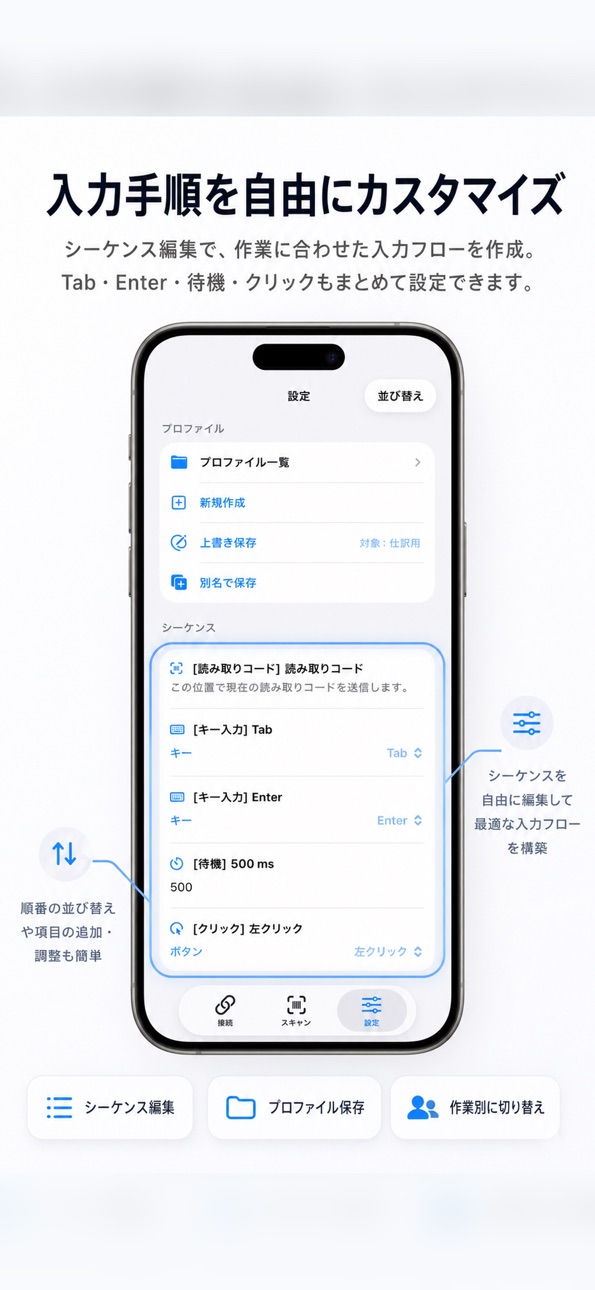
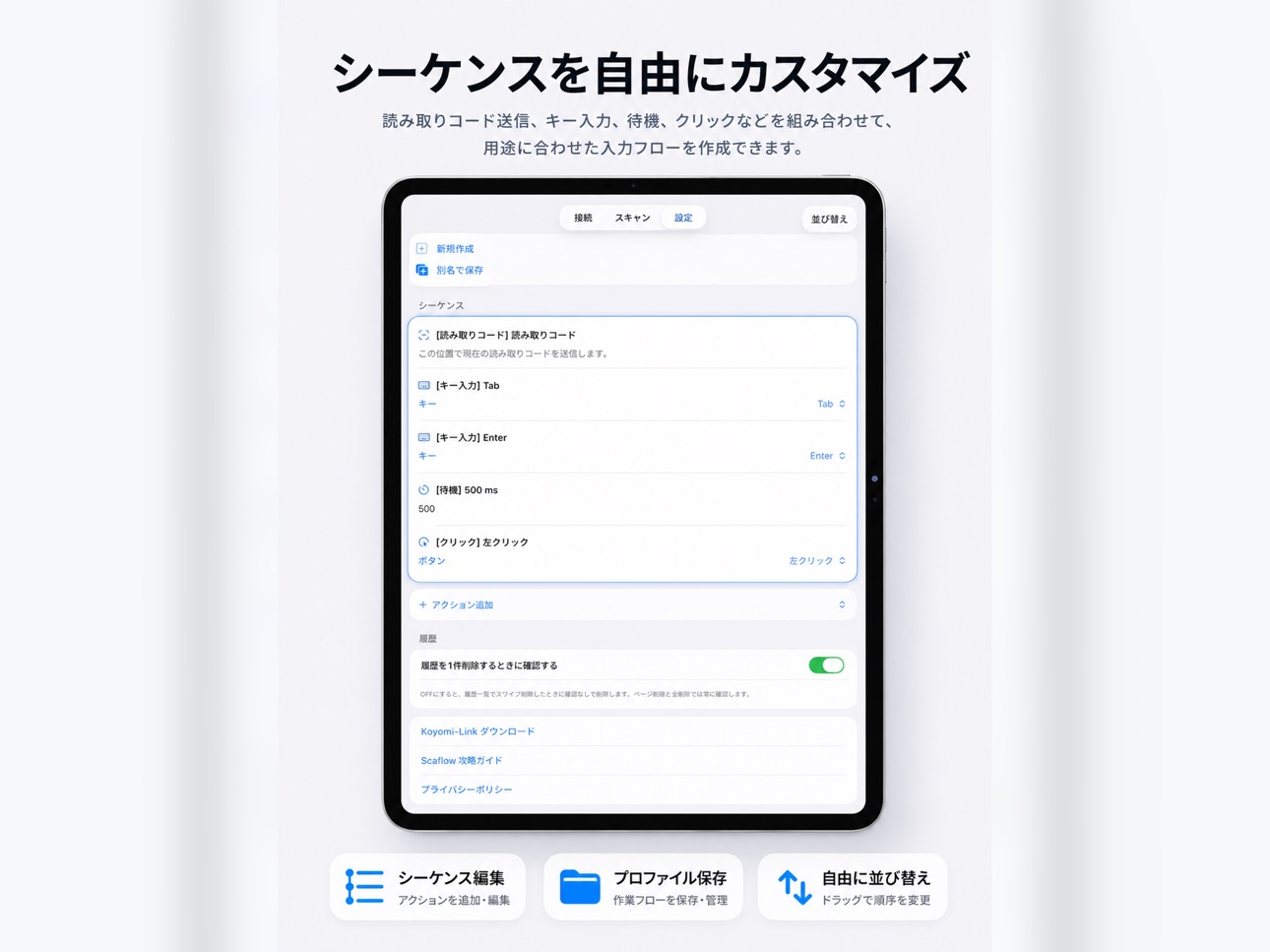
・Freely edit sequences
・Add text input and key operations
・Change input order
・Duplicate, delete, and reorder sequence rows
・Profile features
- Save profiles
- Load profiles
- Duplicate profiles
- Rename profiles
- Reorder profiles
- Overwrite profiles
- Create new profiles
■ Notes
・Your PC and iPhone must be connected to the same Wi-Fi network
・Initial setup is required on the Koyomi-Link side
・Image scanning accuracy depends on image brightness, focus, angle, and barcode condition
In-App Purchases ZM pricing
One-Time Purchases
Scaflow Pro—
Capabilities
In-App Purchases
Accessibility
ipadiphonemacrealityDevicetvoswatch
Version history 6 versions
Build 886063083v1.2.32026-05-24 16:36:57
Added barcode filtering as a Pro feature.
You can now read only barcodes that match your conditions, or exclude barcodes that match your conditions.
Supported conditions include exact match, contains, prefix, suffix, length, and numeric-only rules.
Improved the usability and stability of the settings screen.
Build 885761537v1.2.22026-05-17 17:55:25
Image scanning and history features have been improved.
■ Improved Image Scanning
- Improved reading of barcodes and QR codes from images in your photo library
- Added multiple correction steps, such as lighting adjustment, for hard-to-read images
- QR codes and other non-numeric results can now be saved to history
■ Failed Read History
- Images that cannot be read can now be saved as failed scan records
- The detail screen can show a thumbnail of the image that could not be read
■ Progress Display Added
- A progress bar and percentage are now shown when scanning multiple images
- Processing steps are easier to see even with hard-to-read images
■ History Improvements
- The last selected history page is restored the next time you open the app
- Added a setting for Codabar / NW-7 start and stop characters
- Improved stability around history saving
Build 885577282v1.2.12026-05-12 17:17:52
You can now add notes to history records and sort the history list.
Build 884900538v1.22026-04-25 17:40:36
The history feature has been significantly improved.
- Save scanned results as history
- View recent history on the scan screen
- Browse full history and open detailed records
- Copy, resend, send, and delete history records
- Manage history by pages
- Export history as CSV
- View sent status, last sent time, and send count
- Improved localized UI text
Build 884567830v1.12026-04-16 16:23:51
What’s New in Version 1.1
• Added support for the desktop companion app “Koyomi-Link”
• Improved PC connection setup with QR code support
• Added profile features for Pro users
• Supports saving, loading, duplicating, reordering, overwriting, and creating sequences
• Improved UI and localization across the app
Build 883691193v1.02026-03-25 23:38:25
Price history by region
Currency
Show
Columns
Search
Availability 151 of 151 storefronts
| Region | Language | Price | Ratings | Avg | Version |
|---|---|---|---|---|---|
| AE | en-GB | Free | 0 | — | 1.2.3 |
| AF | en-GB | Free | 0 | — | 1.2.3 |
| AG | en-GB | Free | 0 | — | 1.2.3 |
| AI | en-GB | Free | 0 | — | 1.2.3 |
| AL | en-GB | Free | 0 | — | 1.2.3 |
| AM | en-GB | Free | 0 | — | 1.2.3 |
| AO | en-GB | Free | 0 | — | 1.2.3 |
| AT | de-DE | Free | 0 | — | 1.2.3 |
| AU | en-AU | Free | 0 | — | 1.2.3 |
| AZ | en-GB | Free | 0 | — | 1.2.3 |
| BB | en-GB | Free | 0 | — | 1.2.3 |
| BF | en-GB | Free | 0 | — | 1.2.3 |
| BG | en-GB | Free | 0 | — | 1.2.3 |
| BH | en-GB | Free | 0 | — | 1.2.3 |
| BJ | en-GB | Free | 0 | — | 1.2.3 |
| BM | en-GB | Free | 0 | — | 1.2.3 |
| BN | en-GB | Free | 0 | — | 1.2.3 |
| BR | pt-BR | Free | 0 | — | 1.2.3 |
| BS | en-GB | Free | 0 | — | 1.2.3 |
| BT | en-GB | Free | 0 | — | 1.2.3 |
| BW | en-GB | Free | 0 | — | 1.2.3 |
| BZ | en-GB | Free | 0 | — | 1.2.3 |
| CA | en-CA | Free | 0 | — | 1.2.3 |
| CD | en-GB | Free | 0 | — | 1.2.3 |
| CG | en-GB | Free | 0 | — | 1.2.3 |
| CH | de-CH | Free | 0 | — | 1.2.3 |
| CI | fr-FR | Free | 0 | — | 1.2.3 |
| CN | zh-Hans-CN | Free | 0 | — | 1.2.3 |
| CO | es-MX | Free | 0 | — | 1.2.3 |
| CR | es-MX | Free | 0 | — | 1.2.3 |
| CV | en-GB | Free | 0 | — | 1.2.3 |
| CY | en-GB | Free | 0 | — | 1.2.3 |
| CZ | en-GB | Free | 0 | — | 1.2.3 |
| DE | de-DE | Free | 0 | — | 1.2.3 |
| DM | en-GB | Free | 0 | — | 1.2.3 |
| DO | es-MX | Free | 0 | — | 1.2.3 |
| DZ | en-GB | Free | 0 | — | 1.2.3 |
| EC | es-MX | Free | 0 | — | 1.2.3 |
| EE | en-GB | Free | 0 | — | 1.2.3 |
| EG | en-GB | Free | 0 | — | 1.2.3 |
| ES | es-ES | Free | 0 | — | 1.2.3 |
| FI | en-GB | Free | 0 | — | 1.2.3 |
| FJ | en-GB | Free | 0 | — | 1.2.3 |
| FM | en-GB | Free | 0 | — | 1.2.3 |
| FR | fr-FR | Free | 0 | — | 1.2.3 |
| GA | fr-FR | Free | 0 | — | 1.2.3 |
| GB | en-GB | Free | 0 | — | 1.2.3 |
| GD | en-GB | Free | 0 | — | 1.2.3 |
| GE | en-GB | Free | 0 | — | 1.2.3 |
| GH | en-GB | Free | 0 | — | 1.2.3 |
| GM | en-GB | Free | 0 | — | 1.2.3 |
| GR | en-GB | Free | 0 | — | 1.2.3 |
| GT | es-MX | Free | 0 | — | 1.2.3 |
| GW | en-GB | Free | 0 | — | 1.2.3 |
| GY | en-GB | Free | 0 | — | 1.2.3 |
| HN | es-MX | Free | 0 | — | 1.2.3 |
| HR | en-GB | Free | 0 | — | 1.2.3 |
| HU | en-GB | Free | 0 | — | 1.2.3 |
| ID | en-GB | Free | 0 | — | 1.2.3 |
| IE | en-GB | Free | 0 | — | 1.2.3 |
| IL | en-GB | Free | 0 | — | 1.2.3 |
| IQ | en-GB | Free | 0 | — | 1.2.3 |
| IS | en-GB | Free | 0 | — | 1.2.3 |
| JM | en-GB | Free | 0 | — | 1.2.3 |
| JO | en-GB | Free | 0 | — | 1.2.3 |
| JP | ja | Free | 0 | — | 1.2.3 |
| KE | en-GB | Free | 0 | — | 1.2.3 |
| KG | en-GB | Free | 0 | — | 1.2.3 |
| KH | en-GB | Free | 0 | — | 1.2.3 |
| KN | en-GB | Free | 0 | — | 1.2.3 |
| KW | en-GB | Free | 0 | — | 1.2.3 |
| KY | en-GB | Free | 0 | — | 1.2.3 |
| KZ | en-GB | Free | 0 | — | 1.2.3 |
| LA | en-GB | Free | 0 | — | 1.2.3 |
| LB | en-GB | Free | 0 | — | 1.2.3 |
| LC | en-GB | Free | 0 | — | 1.2.3 |
| LK | en-GB | Free | 0 | — | 1.2.3 |
| LR | en-GB | Free | 0 | — | 1.2.3 |
| LT | en-GB | Free | 0 | — | 1.2.3 |
| LU | en-GB | Free | 0 | — | 1.2.3 |
| LV | en-GB | Free | 0 | — | 1.2.3 |
| LY | en-GB | Free | 0 | — | 1.2.3 |
| MA | en-GB | Free | 0 | — | 1.2.3 |
| MD | en-GB | Free | 0 | — | 1.2.3 |
| ME | en-GB | Free | 0 | — | 1.2.3 |
| MG | en-GB | Free | 0 | — | 1.2.3 |
| MM | en-GB | Free | 0 | — | 1.2.3 |
| MN | en-GB | Free | 0 | — | 1.2.3 |
| MO | zh-Hant-HK | Free | 0 | — | 1.2.3 |
| MR | en-GB | Free | 0 | — | 1.2.3 |
| MS | en-GB | Free | 0 | — | 1.2.3 |
| MT | en-GB | Free | 0 | — | 1.2.3 |
| MU | en-GB | Free | 0 | — | 1.2.3 |
| MV | en-GB | Free | 0 | — | 1.2.3 |
| MW | en-GB | Free | 0 | — | 1.2.3 |
| MX | es-MX | Free | 0 | — | 1.2.3 |
| MY | en-GB | Free | 0 | — | 1.2.3 |
| MZ | en-GB | Free | 0 | — | 1.2.3 |
| NA | en-GB | Free | 0 | — | 1.2.3 |
| NE | en-GB | Free | 0 | — | 1.2.3 |
| NG | en-GB | Free | 0 | — | 1.2.3 |
| NI | es-MX | Free | 0 | — | 1.2.3 |
| NO | en-GB | Free | 0 | — | 1.2.3 |
| NP | en-GB | Free | 0 | — | 1.2.3 |
| NR | en-GB | Free | 0 | — | 1.2.3 |
| NZ | en-AU | Free | 0 | — | 1.2.3 |
| OM | en-GB | Free | 0 | — | 1.2.3 |
| PA | es-MX | Free | 0 | — | 1.2.3 |
| PE | es-MX | Free | 0 | — | 1.2.3 |
| PG | en-GB | Free | 0 | — | 1.2.3 |
| PK | en-GB | Free | 0 | — | 1.2.3 |
| PL | en-GB | Free | 0 | — | 1.2.3 |
| PW | en-GB | Free | 0 | — | 1.2.3 |
| PY | es-MX | Free | 0 | — | 1.2.3 |
| QA | en-GB | Free | 0 | — | 1.2.3 |
| RO | en-GB | Free | 0 | — | 1.2.3 |
| RW | en-GB | Free | 0 | — | 1.2.3 |
| SA | en-GB | Free | 0 | — | 1.2.3 |
| SB | en-GB | Free | 0 | — | 1.2.3 |
| SC | en-GB | Free | 0 | — | 1.2.3 |
| SI | en-GB | Free | 0 | — | 1.2.3 |
| SK | en-GB | Free | 0 | — | 1.2.3 |
| SL | en-GB | Free | 0 | — | 1.2.3 |
| SR | en-GB | Free | 0 | — | 1.2.3 |
| ST | en-GB | Free | 0 | — | 1.2.3 |
| SV | es-MX | Free | 0 | — | 1.2.3 |
| SZ | en-GB | Free | 0 | — | 1.2.3 |
| TC | en-GB | Free | 0 | — | 1.2.3 |
| TD | en-GB | Free | 0 | — | 1.2.3 |
| TH | en-GB | Free | 0 | — | 1.2.3 |
| TJ | en-GB | Free | 0 | — | 1.2.3 |
| TM | en-GB | Free | 0 | — | 1.2.3 |
| TN | en-GB | Free | 0 | — | 1.2.3 |
| TO | en-GB | Free | 0 | — | 1.2.3 |
| TR | en-GB | Free | 0 | — | 1.2.3 |
| TT | en-GB | Free | 0 | — | 1.2.3 |
| TW | zh-Hant-TW | Free | 0 | — | 1.2.3 |
| TZ | en-GB | Free | 0 | — | 1.2.3 |
| UA | en-GB | Free | 0 | — | 1.2.3 |
| UG | en-GB | Free | 0 | — | 1.2.3 |
| US | en-US | Free | 0 | — | 1.2.3 |
| UZ | en-GB | Free | 0 | — | 1.2.3 |
| VC | en-GB | Free | 0 | — | 1.2.3 |
| VE | es-MX | Free | 0 | — | 1.2.3 |
| VG | en-GB | Free | 0 | — | 1.2.3 |
| VU | en-GB | Free | 0 | — | 1.2.3 |
| XK | en-GB | Free | 0 | — | 1.2.3 |
| YE | en-GB | Free | 0 | — | 1.2.3 |
| ZA | en-GB | Free | 0 | — | 1.2.3 |
| ZM | en-GB | Free | 0 | — | 1.2.3 |
| ZW | en-GB | Free | 0 | — | 1.2.3 |
Change log 10 changes · ZM
✎
releaseNotes updated
Added barcode filtering as a Pro feature.
You can now read only barcodes that match your conditions, or exclude barcodes that match your conditions.
Supported c
✎
description updated
Scaflow is an app that lets you use your iPhone as a barcode reader for your PC.
With Scaflow, you can scan barcodes on your iPhone and automatically enter the
✎
subtitle updated
iPhone as a PC barcode scanner
✎
name updated
Scaflow - Barcode for PC
◆
Version 1.2.3 released
Added barcode filtering as a Pro feature.
You can now read only barcodes that match your conditions, or exclude barcodes that match your conditions.
Supported conditions include exact match, contains, prefix, suffix, length, and numeric-onl
◆
Version 1.2.2 released
Image scanning and history features have been improved.
■ Improved Image Scanning
- Improved reading of barcodes and QR codes from images in your photo library
- Added multiple correction steps, such as lighting adjustment, for hard-to-rea
◆
Version 1.2.1 released
You can now add notes to history records and sort the history list.
◆
Version 1.2 released
The history feature has been significantly improved.
- Save scanned results as history
- View recent history on the scan screen
- Browse full history and open detailed records
- Copy, resend, send, and delete history records
- Manage histo
◆
Version 1.1 released
What’s New in Version 1.1
• Added support for the desktop companion app “Koyomi-Link”
• Improved PC connection setup with QR code support
• Added profile features for Pro users
• Supports saving, loading, duplicating, reordering, overwriti
◆
Version 1.0 released