Home › Productivity

 ZM
ZM
 JPja
JPja AEen-GB
 AFen-GB
 AGen-GB
 AIen-GB
 ALen-GB
 AMen-GB
 AOen-GB
 ARes-MX
 ATde-DE
 AUen-AU
 AZen-GB
 BAen-GB
 BBen-GB
 BEen-GB
 BFen-GB
 BGen-GB
 BHen-GB
 BJen-GB
 BMen-GB
 BNen-GB
 BOes-MX
 BRpt-BR
 BSen-GB
 BTen-GB
 BWen-GB
 BYen-GB
 BZen-GB
 CAen-CA
 CDen-GB
 CGen-GB
 CHde-CH
 CIfr-FR
 CLes-MX
 CMfr-FR
 CNzh-Hans-CN
 COes-MX
 CRes-MX
 CVen-GB
 CYen-GB
 CZen-GB
 DEde-DE
 DKen-GB
 DMen-GB
 DOes-MX
 DZen-GB
 ECes-MX
 EEen-GB
 EGen-GB
 ESes-ES
 FIen-GB
 FJen-GB
 FMen-GB
 FRfr-FR
 GAfr-FR
 GBen-GB
 GDen-GB
 GEen-GB
 GHen-GB
 GMen-GB
 GRen-GB
 GTes-MX
 GWen-GB
 GYen-GB
 HKzh-Hant-HK
 HNes-MX
 HRen-GB
 HUen-GB
 IDen-GB
 IEen-GB
 ILen-GB
 INen-GB
 IQen-GB
 ISen-GB
 ITit
ITit JMen-GB
 JOen-GB
 KEen-GB
 KGen-GB
 KHen-GB
 KNen-GB
 KRko
KRko KWen-GB
 KYen-GB
 KZen-GB
 LAen-GB
 LBen-GB
 LCen-GB
 LKen-GB
 LRen-GB
 LTen-GB
 LUen-GB
 LVen-GB
 LYen-GB
 MAen-GB
 MDen-GB
 MEen-GB
 MGen-GB
 MKen-GB
 MLen-GB
 MMen-GB
 MNen-GB
 MOzh-Hant-HK
 MRen-GB
 MSen-GB
 MTen-GB
 MUen-GB
 MVen-GB
 MWen-GB
 MXes-MX
 MYen-GB
 MZen-GB
 NAen-GB
 NEen-GB
 NGen-GB
 NIes-MX
 NLnl
NLnl NOen-GB
 NPen-GB
 NRen-GB
 NZen-AU
 OMen-GB
 PAes-MX
 PEes-MX
 PGen-GB
 PHen-GB
 PKen-GB
 PLen-GB
 PTpt-PT
 PWen-GB
 PYes-MX
 QAen-GB
 ROen-GB
 RSen-GB
 RUru
RUru RWen-GB
 SAen-GB
 SBen-GB
 SCen-GB
 SEsv
SEsv SGen-GB
 SIen-GB
 SKen-GB
 SLen-GB
 SNen-GB
 SRen-GB
 STen-GB
 SVes-MX
 SZen-GB
 TCen-GB
 TDen-GB
 THen-GB
 TJen-GB
 TMen-GB
 TNen-GB
 TOen-GB
 TRen-GB
 TTen-GB
 TWzh-Hant-TW
 TZen-GB
 UAen-GB
 UGen-GB
 USen-US
 UYen-GB
 UZen-GB
 VCen-GB
 VEes-MX
 VGen-GB
 VNen-GB
 VUen-GB
 XKen-GB
 YEen-GB
 ZAen-GBZMen-GB
 ZWen-GB
175 of 175 storefronts
Content in en-US
Content in en-US
Information
Apple ID6761006516
Bundle IDllc.firstpenguin.otapoke
SellerSeller
Min iOS18.0
Min macOS12.0
Device familiesiphone
Released2026-04-02
Copyright© 2026 First Penguin LLC
Privacy policyLink ↗
Preview 1 platform
iPhone 4 images


What’s New Version 2.3.0
Thanks for using Flyer Pocket!
■ Lighter and faster — a smaller app that launches quicker, so you can check a flyer in seconds.
■ A smoother start — new users can scan their first flyer right away, with a shorter, simpler setup.
■ Better stability — a refreshed foundation with plenty of small polish throughout.
Description
School handouts piling up? Missed events, forgotten supplies — when you're a busy parent, you can't read every flyer.
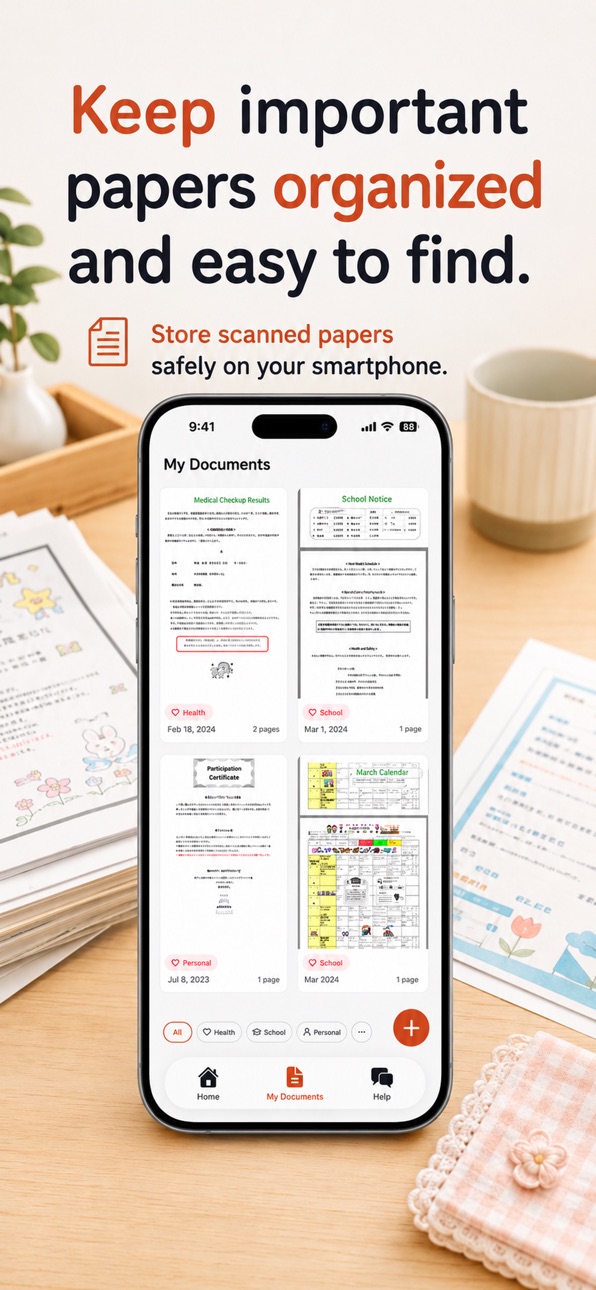
Flyer Pocket reads school notices for you — just snap a photo. Schedules go to your family calendar, supplies to a packing list, everything shared with the people who matter.
No more "I didn't know about that" or "I forgot to bring it."
Free to start. Go Premium when you want more.
■ Snap a Photo, See the Important Bits Faster
Take a photo or pick one from your camera roll. Flyer Pocket reads the school flyer and sorts it into 6 categories: school events, parent meetings, supplies, health, holidays, and outings. Works with daycare, preschool, kindergarten, elementary school, and after-school activities.
■ Never Miss an Event
Events are automatically added to your family calendar with dates, times, and categories at a glance. No more "When was that event again?"
■ Never Forget Supplies
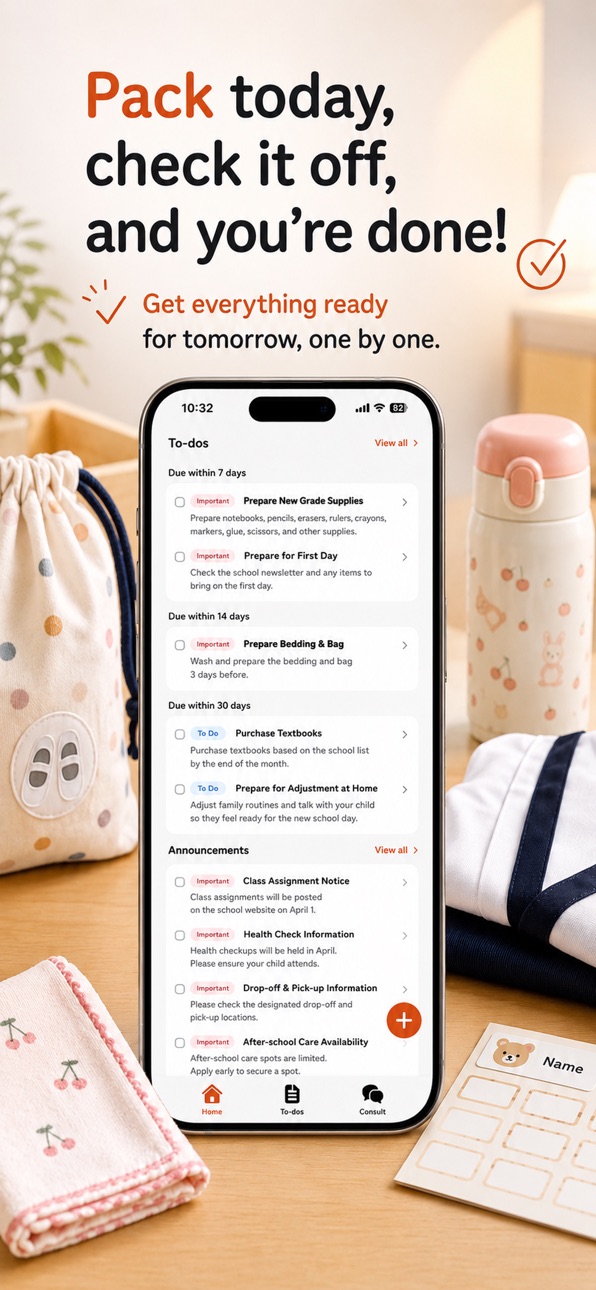
"Bring PE clothes," "Pack a lunch" — items become a packing list, sorted by deadline. Check the night before and relax in the morning.
■ Just Ask, Find What You Need
"What does my child need for tomorrow?" "Any events next week?" Your concierge answers instantly based on the school notices you've snapped. No more digging through paper piles.
■ Everyone Stays in the Loop
Invite family with a code. Schedules, packing lists, and notices shared in real time. Your partner never has to say "Nobody told me."
■ Multiple Kids, No Problem
Switch between children for their notices and schedules. Different schools? Everything stays organized.
■ Sound Familiar?
- School papers piling up on the fridge
- Forgetting event dates and deadlines
- Scrambling to prepare supplies the night before
- Your partner not knowing what's happening at school
- No time to read through every newsletter
- Losing track of permission slips and notices
Flyer Pocket works independently — no setup required from your school. Start using it right away.
■ Pricing
[Free Plan]
1 notice scan per day, share with up to 5 family members, register up to 5 children, all core features included.
[Premium Plan]
Premium subscription available — see the App Store for current pricing in your region. Monthly, yearly, and lifetime options.
- Unlimited notice scanning
- Unlimited chat answers
- Smart search across all your notices
- Unlimited family members
- Ad-free experience
■ Privacy
Because this app handles information about your children, we take privacy seriously. All images and data are securely tied to your account and completely deleted when you delete your account.
■ Contact
Questions, suggestions, or bug reports — reach us at support@otayori-app.com
Terms of Use: https://otayori-app.com/terms
Privacy Policy: https://otayori-app.com/privacy
■ About Flyer Pocket
Flyer Pocket is a mobile app made by First Penguin LLC, a Japan-based developer. It uses OCR and AI to read photos of school notices, flyers, and newsletters, then extracts events, supplies, and to-dos into a family-shared calendar and packing list. Built for parents of children in preschool, daycare, kindergarten, and elementary school. The free plan covers 1 scan per day; Premium unlocks unlimited scans and chat.
In-App Purchases ZM pricing
Premium Subscription
(Monthly) · Monthly—
(Annual) · Yearly—
One-Time Purchases
Premium (Lifetime)—
Capabilities
In-App Purchases
Accessibility
ipadiphonemacrealityDevicetvoswatch
Version history 15 versions
Build 887777987v2.3.02026-07-04 05:08:22
Thanks for using Flyer Pocket!
■ Lighter and faster — a smaller app that launches quicker, so you can check a flyer in seconds.
■ A smoother start — new users can scan their first flyer right away, with a shorter, simpler setup.
■ Better stability — a refreshed foundation with plenty of small polish throughout.
Build 887277531v2.2.12026-06-24 13:51:23
Thanks for using Flyer Pocket!
This update is all about seeing everything at a glance and getting things done faster.
■ A clearer home screen — your notices, events, and to-dos are laid out as cards, so you can see what's next in a single glance.
■ Settings, one tap away — now in the tab bar, reachable from anywhere.
■ An easier start for new users — friendly setup for calendar sync and handy tips.
■ See scans in progress — your home screen now shows when a notice is being read, so the wait feels reassuring.
■ Smoother day-to-day — fixed deleted notices showing in search and chat, filter bar shifting, and taps not working after closing a modal.
Build 887225307v2.2.02026-06-22 05:48:21
Thanks for using Flyer Pocket!
This update is all about seeing everything at a glance and getting things done faster.
■ A clearer home screen — your notices, events, and to-dos are laid out as cards, so you can see what's next in a single glance.
■ Settings, one tap away — now in the tab bar, reachable from anywhere.
■ An easier start for new users — friendly setup for calendar sync and handy tips.
■ See scans in progress — your home screen now shows when a notice is being read, so the wait feels reassuring.
■ Smoother day-to-day — fixed deleted notices showing in search and chat, filter bar shifting, and taps not working after closing a modal.
Build 886778629v2.1.22026-06-11 17:23:10
Thanks for using Flyer Pocket!
This update brings small refinements to keep everything running smoothly and feeling just right.
Build 886612584v2.1.12026-06-06 21:01:56
PDF notices now appear correctly in your list — each one shows its own content, so you can find the one you need at a glance.
We've also made small improvements to keep the app running smoothly.
Build 886419872v2.1.02026-06-02 17:44:54
What's new in this version:
• Your events, on your calendar. Turn on Calendar Sync in Settings and the events from a flyer — sports day, parent meetings, and more — show up in the calendar you already use. No more copying dates by hand.
• Faster to open. We trimmed the startup wait, so the app opens quicker than before.
• Easier to read. Refreshed typography across the app and a cleaner home screen make your daily check faster.
Thanks for using Flyer Pocket. Questions or feedback? Reach us at support@otayori-app.com
Build 885800663v2.0.12026-05-20 09:38:37
Now available in English.
Snap a photo of any school paper, flyer, or newsletter and let Flyer Pocket turn it into a shared family calendar, a packing checklist, and an instant assistant that answers "what does my child need tomorrow?"
Built for busy parents juggling daycare, kindergarten, primary school, and after-school activities.
Questions or feedback? Reach us at support@otayori-app.com
Build 885509436v2.0.02026-05-14 17:10:16
Now available in English.
Snap a photo of any school paper, flyer, or newsletter and let Otayori Pocket turn it into a shared family calendar, a packing checklist, and an instant assistant that answers "what does my child need tomorrow?"
Built for busy parents juggling daycare, kindergarten, primary school, and after-school activities.
Questions or feedback? Reach us at support@otayori-app.com
Build 885383046v1.3.22026-05-09 18:11:03
A fresh Otayori Pocket update is here.
▼ A smoother start
- The launch screen now fills the whole display, so opening the app feels a little nicer every morning.
▼ Easier to read your handouts
- A new "tap to zoom" hint on handout images helps you focus on the part you want to see.
- Fixed a glitch where the main screen could become unresponsive while a modal was open.
- Modals now close with a simple swipe down.
▼ Stay signed in longer
- Your login is now kept for about three months, so you don't need to sign in again as often.
▼ A warmer welcome
- The first-time setup screens now speak in a friendlier, parent-to-parent tone.
Thanks as always for using Otayori Pocket — we hope it makes the daily handout check a little lighter.
Questions or feedback? Reach us at support@otayori-app.com
Build 885142012v1.3.12026-05-01 14:49:11
A new Otayori Pocket update.
▼ Sign in with Google
- Sign in with your Google account in seconds
- Welcoming new and returning families alike
▼ Daily check-in streak now visible
- Your check-in days appear on the home and post-send screens
- "X days in a row" makes daily review a little more delightful
▼ Up to 5 family members and 5 children
- More comfortable for siblings, grandparents, and family living apart
▼ A way to help out friends
- Each referral grants extra letter and chat credits to your whole family
- Tell friends who are also busy parents
▼ Chat is more comfortable
- "Concierge" is now simply called "Chat" — easier for everyday use
- Fixed: keyboard hiding the input field
- In-progress text now stays put
▼ Gentler reach-outs
- A subtle nudge for those who haven't opened the app in a while
- Easier path to re-enable notifications if you'd turned them off
▼ "Support us" all in one place
- Premium, video rewards, and friend referrals are now grouped under Settings → Support us
▼ Fine-tuned details
- Friendlier wording across the app
- Splash screen now displays beautifully
- Fixed an issue where some screens couldn't be opened
Thank you for using Otayori Pocket.
We hope it makes your busy spring days a little lighter.
Send feedback or questions through the in-app Contact menu.
Build 884591931v1.3.02026-04-29 19:51:17
A new Otayori Pocket update.
▼ Sign in with Google
- Sign in with your Google account in seconds
- Welcoming new and returning families alike
▼ Daily check-in streak now visible
- Your check-in days appear on the home and post-send screens
- "X days in a row" makes daily review a little more delightful
▼ Up to 5 family members and 5 children
- More comfortable for siblings, grandparents, and family living apart
▼ A way to help out friends
- Each referral grants extra letter and chat credits to your whole family
- Tell friends who are also busy parents
▼ Chat is more comfortable
- "Concierge" is now simply called "Chat" — easier for everyday use
- Fixed: keyboard hiding the input field
- In-progress text now stays put
▼ Gentler reach-outs
- A subtle nudge for those who haven't opened the app in a while
- Easier path to re-enable notifications if you'd turned them off
▼ "Support us" all in one place
- Premium, video rewards, and friend referrals are now grouped under Settings → Support us
▼ Fine-tuned details
- Friendlier wording across the app
- Splash screen now displays beautifully
- Fixed an issue where some screens couldn't be opened
Thank you for using Otayori Pocket.
We hope it makes your busy spring days a little lighter.
Send feedback or questions through the in-app Contact menu.
Build 884304212v1.2.02026-04-15 18:56:19
Otayori Pocket v1.0.0
- Snap a photo of any school handout to extract schedules, supply lists, and to-dos
- 6-category event management (school events, meetings, supplies, health, holidays, outings)
- Your personal concierge answers questions about your handouts instantly
- Share schedules and to-dos with your whole family
- Manage multiple children separately
Questions or feedback? Reach us at support@otayori-app.com
Build 884301728v1.1.02026-04-09 02:40:48
New app icon and splash screen. Improved app launch stability.
Build 884059542v1.0.12026-04-08 14:43:16
Otayori Pocket v1.0.0
- Snap a photo of any school handout to extract schedules, supply lists, and to-dos
- 6-category event management (school events, meetings, supplies, health, holidays, outings)
- Your personal concierge answers questions about your handouts instantly
- Share schedules and to-dos with your whole family
- Manage multiple children separately
Questions or feedback? Reach us at support@otayori-app.com
Build 883663433v1.02026-04-02 12:14:54
Price history by region
Currency
Show
Columns
Search
Availability 175 of 175 storefronts
| Region | Language | Price | Ratings | Avg | Version |
|---|---|---|---|---|---|
| JP | ja | Free | 6 | 4.8 | 2.3.0 |
| AE | en-GB | Free | 0 | — | 2.3.0 |
| AF | en-GB | Free | 0 | — | 2.3.0 |
| AG | en-GB | Free | 0 | — | 2.3.0 |
| AI | en-GB | Free | 0 | — | 2.3.0 |
| AL | en-GB | Free | 0 | — | 2.3.0 |
| AM | en-GB | Free | 0 | — | 2.3.0 |
| AO | en-GB | Free | 0 | — | 2.3.0 |
| AR | es-MX | Free | 0 | — | 2.3.0 |
| AT | de-DE | Free | 0 | — | 2.3.0 |
| AU | en-AU | Free | 0 | — | 2.3.0 |
| AZ | en-GB | Free | 0 | — | 2.3.0 |
| BA | en-GB | Free | 0 | — | 2.3.0 |
| BB | en-GB | Free | 0 | — | 2.3.0 |
| BE | en-GB | Free | 0 | — | 2.3.0 |
| BF | en-GB | Free | 0 | — | 2.3.0 |
| BG | en-GB | Free | 0 | — | 2.3.0 |
| BH | en-GB | Free | 0 | — | 2.3.0 |
| BJ | en-GB | Free | 0 | — | 2.3.0 |
| BM | en-GB | Free | 0 | — | 2.3.0 |
| BN | en-GB | Free | 0 | — | 2.3.0 |
| BO | es-MX | Free | 0 | — | 2.3.0 |
| BR | pt-BR | Free | 0 | — | 2.3.0 |
| BS | en-GB | Free | 0 | — | 2.3.0 |
| BT | en-GB | Free | 0 | — | 2.3.0 |
| BW | en-GB | Free | 0 | — | 2.3.0 |
| BY | en-GB | Free | 0 | — | 2.3.0 |
| BZ | en-GB | Free | 0 | — | 2.3.0 |
| CA | en-CA | Free | 0 | — | 2.3.0 |
| CD | en-GB | Free | 0 | — | 2.3.0 |
| CG | en-GB | Free | 0 | — | 2.3.0 |
| CH | de-CH | Free | 0 | — | 2.3.0 |
| CI | fr-FR | Free | 0 | — | 2.3.0 |
| CL | es-MX | Free | 0 | — | 2.3.0 |
| CM | fr-FR | Free | 0 | — | 2.3.0 |
| CN | zh-Hans-CN | Free | 0 | — | 2.3.0 |
| CO | es-MX | Free | 0 | — | 2.3.0 |
| CR | es-MX | Free | 0 | — | 2.3.0 |
| CV | en-GB | Free | 0 | — | 2.3.0 |
| CY | en-GB | Free | 0 | — | 2.3.0 |
| CZ | en-GB | Free | 0 | — | 2.3.0 |
| DE | de-DE | Free | 0 | — | 2.3.0 |
| DK | en-GB | Free | 0 | — | 2.3.0 |
| DM | en-GB | Free | 0 | — | 2.3.0 |
| DO | es-MX | Free | 0 | — | 2.3.0 |
| DZ | en-GB | Free | 0 | — | 2.3.0 |
| EC | es-MX | Free | 0 | — | 2.3.0 |
| EE | en-GB | Free | 0 | — | 2.3.0 |
| EG | en-GB | Free | 0 | — | 2.3.0 |
| ES | es-ES | Free | 0 | — | 2.3.0 |
| FI | en-GB | Free | 0 | — | 2.3.0 |
| FJ | en-GB | Free | 0 | — | 2.3.0 |
| FM | en-GB | Free | 0 | — | 2.3.0 |
| FR | fr-FR | Free | 0 | — | 2.3.0 |
| GA | fr-FR | Free | 0 | — | 2.3.0 |
| GB | en-GB | Free | 0 | — | 2.3.0 |
| GD | en-GB | Free | 0 | — | 2.3.0 |
| GE | en-GB | Free | 0 | — | 2.3.0 |
| GH | en-GB | Free | 0 | — | 2.3.0 |
| GM | en-GB | Free | 0 | — | 2.3.0 |
| GR | en-GB | Free | 0 | — | 2.3.0 |
| GT | es-MX | Free | 0 | — | 2.3.0 |
| GW | en-GB | Free | 0 | — | 2.3.0 |
| GY | en-GB | Free | 0 | — | 2.3.0 |
| HK | zh-Hant-HK | Free | 0 | — | 2.3.0 |
| HN | es-MX | Free | 0 | — | 2.3.0 |
| HR | en-GB | Free | 0 | — | 2.3.0 |
| HU | en-GB | Free | 0 | — | 2.3.0 |
| ID | en-GB | Free | 0 | — | 2.3.0 |
| IE | en-GB | Free | 0 | — | 2.3.0 |
| IL | en-GB | Free | 0 | — | 2.3.0 |
| IN | en-GB | Free | 0 | — | 2.3.0 |
| IQ | en-GB | Free | 0 | — | 2.3.0 |
| IS | en-GB | Free | 0 | — | 2.3.0 |
| IT | it | Free | 0 | — | 2.3.0 |
| JM | en-GB | Free | 0 | — | 2.3.0 |
| JO | en-GB | Free | 0 | — | 2.3.0 |
| KE | en-GB | Free | 0 | — | 2.3.0 |
| KG | en-GB | Free | 0 | — | 2.3.0 |
| KH | en-GB | Free | 0 | — | 2.3.0 |
| KN | en-GB | Free | 0 | — | 2.3.0 |
| KR | ko | Free | 0 | — | 2.3.0 |
| KW | en-GB | Free | 0 | — | 2.3.0 |
| KY | en-GB | Free | 0 | — | 2.3.0 |
| KZ | en-GB | Free | 0 | — | 2.3.0 |
| LA | en-GB | Free | 0 | — | 2.3.0 |
| LB | en-GB | Free | 0 | — | 2.3.0 |
| LC | en-GB | Free | 0 | — | 2.3.0 |
| LK | en-GB | Free | 0 | — | 2.3.0 |
| LR | en-GB | Free | 0 | — | 2.3.0 |
| LT | en-GB | Free | 0 | — | 2.3.0 |
| LU | en-GB | Free | 0 | — | 2.3.0 |
| LV | en-GB | Free | 0 | — | 2.3.0 |
| LY | en-GB | Free | 0 | — | 2.3.0 |
| MA | en-GB | Free | 0 | — | 2.3.0 |
| MD | en-GB | Free | 0 | — | 2.3.0 |
| ME | en-GB | Free | 0 | — | 2.3.0 |
| MG | en-GB | Free | 0 | — | 2.3.0 |
| MK | en-GB | Free | 0 | — | 2.3.0 |
| ML | en-GB | Free | 0 | — | 2.3.0 |
| MM | en-GB | Free | 0 | — | 2.3.0 |
| MN | en-GB | Free | 0 | — | 2.3.0 |
| MO | zh-Hant-HK | Free | 0 | — | 2.3.0 |
| MR | en-GB | Free | 0 | — | 2.3.0 |
| MS | en-GB | Free | 0 | — | 2.3.0 |
| MT | en-GB | Free | 0 | — | 2.3.0 |
| MU | en-GB | Free | 0 | — | 2.3.0 |
| MV | en-GB | Free | 0 | — | 2.3.0 |
| MW | en-GB | Free | 0 | — | 2.3.0 |
| MX | es-MX | Free | 0 | — | 2.3.0 |
| MY | en-GB | Free | 0 | — | 2.3.0 |
| MZ | en-GB | Free | 0 | — | 2.3.0 |
| NA | en-GB | Free | 0 | — | 2.3.0 |
| NE | en-GB | Free | 0 | — | 2.3.0 |
| NG | en-GB | Free | 0 | — | 2.3.0 |
| NI | es-MX | Free | 0 | — | 2.3.0 |
| NL | nl | Free | 0 | — | 2.3.0 |
| NO | en-GB | Free | 0 | — | 2.3.0 |
| NP | en-GB | Free | 0 | — | 2.3.0 |
| NR | en-GB | Free | 0 | — | 2.3.0 |
| NZ | en-AU | Free | 0 | — | 2.3.0 |
| OM | en-GB | Free | 0 | — | 2.3.0 |
| PA | es-MX | Free | 0 | — | 2.3.0 |
| PE | es-MX | Free | 0 | — | 2.3.0 |
| PG | en-GB | Free | 0 | — | 2.3.0 |
| PH | en-GB | Free | 0 | — | 2.3.0 |
| PK | en-GB | Free | 0 | — | 2.3.0 |
| PL | en-GB | Free | 0 | — | 2.3.0 |
| PT | pt-PT | Free | 0 | — | 2.3.0 |
| PW | en-GB | Free | 0 | — | 2.3.0 |
| PY | es-MX | Free | 0 | — | 2.3.0 |
| QA | en-GB | Free | 0 | — | 2.3.0 |
| RO | en-GB | Free | 0 | — | 2.3.0 |
| RS | en-GB | Free | 0 | — | 2.3.0 |
| RU | ru | Free | 0 | — | 2.3.0 |
| RW | en-GB | Free | 0 | — | 2.3.0 |
| SA | en-GB | Free | 0 | — | 2.3.0 |
| SB | en-GB | Free | 0 | — | 2.3.0 |
| SC | en-GB | Free | 0 | — | 2.3.0 |
| SE | sv | Free | 0 | — | 2.3.0 |
| SG | en-GB | Free | 0 | — | 2.3.0 |
| SI | en-GB | Free | 0 | — | 2.3.0 |
| SK | en-GB | Free | 0 | — | 2.3.0 |
| SL | en-GB | Free | 0 | — | 2.3.0 |
| SN | en-GB | Free | 0 | — | 2.3.0 |
| SR | en-GB | Free | 0 | — | 2.3.0 |
| ST | en-GB | Free | 0 | — | 2.3.0 |
| SV | es-MX | Free | 0 | — | 2.3.0 |
| SZ | en-GB | Free | 0 | — | 2.3.0 |
| TC | en-GB | Free | 0 | — | 2.3.0 |
| TD | en-GB | Free | 0 | — | 2.3.0 |
| TH | en-GB | Free | 0 | — | 2.3.0 |
| TJ | en-GB | Free | 0 | — | 2.3.0 |
| TM | en-GB | Free | 0 | — | 2.3.0 |
| TN | en-GB | Free | 0 | — | 2.3.0 |
| TO | en-GB | Free | 0 | — | 2.3.0 |
| TR | en-GB | Free | 0 | — | 2.3.0 |
| TT | en-GB | Free | 0 | — | 2.3.0 |
| TW | zh-Hant-TW | Free | 0 | — | 2.3.0 |
| TZ | en-GB | Free | 0 | — | 2.3.0 |
| UA | en-GB | Free | 0 | — | 2.3.0 |
| UG | en-GB | Free | 0 | — | 2.3.0 |
| US | en-US | Free | 0 | — | 2.3.0 |
| UY | en-GB | Free | 0 | — | 2.3.0 |
| UZ | en-GB | Free | 0 | — | 2.3.0 |
| VC | en-GB | Free | 0 | — | 2.3.0 |
| VE | es-MX | Free | 0 | — | 2.3.0 |
| VG | en-GB | Free | 0 | — | 2.3.0 |
| VN | en-GB | Free | 0 | — | 2.3.0 |
| VU | en-GB | Free | 0 | — | 2.3.0 |
| XK | en-GB | Free | 0 | — | 2.3.0 |
| YE | en-GB | Free | 0 | — | 2.3.0 |
| ZA | en-GB | Free | 0 | — | 2.3.0 |
| ZM | en-GB | Free | 0 | — | 2.3.0 |
| ZW | en-GB | Free | 0 | — | 2.3.0 |
Change log 19 changes · ZM
✎
releaseNotes updated
Thanks for using Flyer Pocket!
■ Lighter and faster — a smaller app that launches quicker, so you can check a flyer in seconds.
■ A smoother start — new users
✎
description updated
School handouts piling up? Missed events, forgotten supplies — when you're a busy parent, you can't read every flyer.
Flyer Pocket reads school notices for you
✎
subtitle updated
Snap to your family calendar
✎
name updated
School Flyer Scanner & Planner
◆
Version 2.3.0 released
Thanks for using Flyer Pocket!
■ Lighter and faster — a smaller app that launches quicker, so you can check a flyer in seconds.
■ A smoother start — new users can scan their first flyer right away, with a shorter, simpler setup.
■ Better
◆
Version 2.2.1 released
Thanks for using Flyer Pocket!
This update is all about seeing everything at a glance and getting things done faster.
■ A clearer home screen — your notices, events, and to-dos are laid out as cards, so you can see what's next in a single
◆
Version 2.2.0 released
Thanks for using Flyer Pocket!
This update is all about seeing everything at a glance and getting things done faster.
■ A clearer home screen — your notices, events, and to-dos are laid out as cards, so you can see what's next in a single
◆
Version 2.1.2 released
Thanks for using Flyer Pocket!
This update brings small refinements to keep everything running smoothly and feeling just right.
◆
Version 2.1.1 released
PDF notices now appear correctly in your list — each one shows its own content, so you can find the one you need at a glance.
We've also made small improvements to keep the app running smoothly.
◆
Version 2.1.0 released
What's new in this version:
• Your events, on your calendar. Turn on Calendar Sync in Settings and the events from a flyer — sports day, parent meetings, and more — show up in the calendar you already use. No more copying dates by hand.
•
◆
Version 2.0.1 released
Now available in English.
Snap a photo of any school paper, flyer, or newsletter and let Flyer Pocket turn it into a shared family calendar, a packing checklist, and an instant assistant that answers "what does my child need tomorrow?"
Bu
◆
Version 2.0.0 released
Now available in English.
Snap a photo of any school paper, flyer, or newsletter and let Otayori Pocket turn it into a shared family calendar, a packing checklist, and an instant assistant that answers "what does my child need tomorrow?"
◆
Version 1.3.2 released
A fresh Otayori Pocket update is here.
▼ A smoother start
- The launch screen now fills the whole display, so opening the app feels a little nicer every morning.
▼ Easier to read your handouts
- A new "tap to zoom" hint on handout images
◆
Version 1.3.1 released
A new Otayori Pocket update.
▼ Sign in with Google
- Sign in with your Google account in seconds
- Welcoming new and returning families alike
▼ Daily check-in streak now visible
- Your check-in days appear on the home and post-send screen
◆
Version 1.3.0 released
A new Otayori Pocket update.
▼ Sign in with Google
- Sign in with your Google account in seconds
- Welcoming new and returning families alike
▼ Daily check-in streak now visible
- Your check-in days appear on the home and post-send screen
◆
Version 1.2.0 released
Otayori Pocket v1.0.0
- Snap a photo of any school handout to extract schedules, supply lists, and to-dos
- 6-category event management (school events, meetings, supplies, health, holidays, outings)
- Your personal concierge answers questi
◆
Version 1.1.0 released
New app icon and splash screen. Improved app launch stability.
◆
Version 1.0.1 released
Otayori Pocket v1.0.0
- Snap a photo of any school handout to extract schedules, supply lists, and to-dos
- 6-category event management (school events, meetings, supplies, health, holidays, outings)
- Your personal concierge answers questi
◆
Version 1.0 released