Home › Health & Fitness

 TH
TH
 USen-US
 AEen-GB
 AFen-GB
 ALen-GB
 AMen-GB
 ATde-DE
 AUen-AU
 AZen-GB
 BAen-GB
 BEen-GB
 BGen-GB
 BHen-GB
 BMen-GB
 BNen-GB
 BYen-GB
 CAen-CA
 CHde-CH
 CNzh-Hans-CN
 CYen-GB
 CZen-GB
 DEde-DE
 DKen-GB
 EEen-GB
 EGen-GB
 ESes-ES
 FIen-GB
 FJen-GB
 FMen-GB
 FRfr-FR
 GBen-GB
 GEen-GB
 GRen-GB
 HKzh-Hant-HK
 HRen-GB
 HUen-GB
 IDen-GB
 IEen-GB
 ILen-GB
 INen-GB
 IQen-GB
 ISen-GB
 ITit
ITit JOen-GB
 JPja
JPja KGen-GB
 KHen-GB
 KRko
KRko KWen-GB
 KZen-GB
 LAen-GB
 LBen-GB
 LKen-GB
 LTen-GB
 LUen-GB
 LVen-GB
 MDen-GB
 MEen-GB
 MKen-GB
 MMen-GB
 MNen-GB
 MOzh-Hant-HK
 MRen-GB
 MTen-GB
 MVen-GB
 MYen-GB
 NLnl
NLnl NOen-GB
 NPen-GB
 NRen-GB
 NZen-AU
 OMen-GB
 PGen-GB
 PHen-GB
 PKen-GB
 PLen-GB
 PTpt-PT
 PWen-GB
 QAen-GB
 ROen-GB
 RSen-GB
 RUru
RUru SAen-GB
 SBen-GB
 SEsv
SEsv SGen-GB
 SIen-GB
 SKen-GBTHen-GB
 TJen-GB
 TMen-GB
 TOen-GB
 TRen-GB
 TWzh-Hant-TW
 UAen-GB
 UZen-GB
 VNen-GB
 VUen-GB
 XKen-GB
 YEen-GB
 ZAen-GB
100 of 100 storefronts
Content in en-US
Content in en-US
Information
Preview 2 platforms
iPhone 9 images




Apple Watch 3 images


What’s New Version 5.37
What's New in Version 5.37
• New: Daily Check-In. Log your mood and energy in two taps, and your AI advisor can spot patterns as your routine changes.
• New: reach a 1-year streak and unlock the Flame Picker. Choose any flame to display while your streak keeps counting.
• The Apple Watch app is dramatically faster and smoother.
• Sunset Theme on the Apple Watch has been adjusted for a better visual experience.
• The Watch app icon now matches the new Blue look.
Description
Most supplement apps just remind you to swallow pills. Basic Intake helps you know what your stack is actually doing, and never run out of it. Scan a bottle, see every nutrient you're getting measured against the RDA, ask an AI advisor that reads your real Apple Health data, and get a heads-up before you run low.
No bro science. No 47-pill stacks. A clean daily tracker, plus the context and reminders to make it effortless.
———
SCAN ANY BOTTLE
Point your camera at a barcode to add a supplement instantly: name, brand, and dose auto-filled. Barcode not recognized? Snap the Supplement Facts panel and our AI reads the label directly. Every bottle, every brand.
———
NEVER RUN OUT
Turn on Restock Reminders and Basic Intake tracks how much you have left of each supplement as you check it off. Get a heads-up days before you run dry, then refill in a single tap. Fully optional, off by default, and easy to ignore if your supplements auto-ship.
———
KNOW WHAT YOUR STACK IS ACTUALLY DOING
The Nutrient Totals dashboard shows exactly how much of each vitamin and mineral you're getting across your entire stack. We track against the RDA, flag gaps, and warn when you're approaching upper limits. Tap any nutrient to learn what it does and what your amount really means.
———
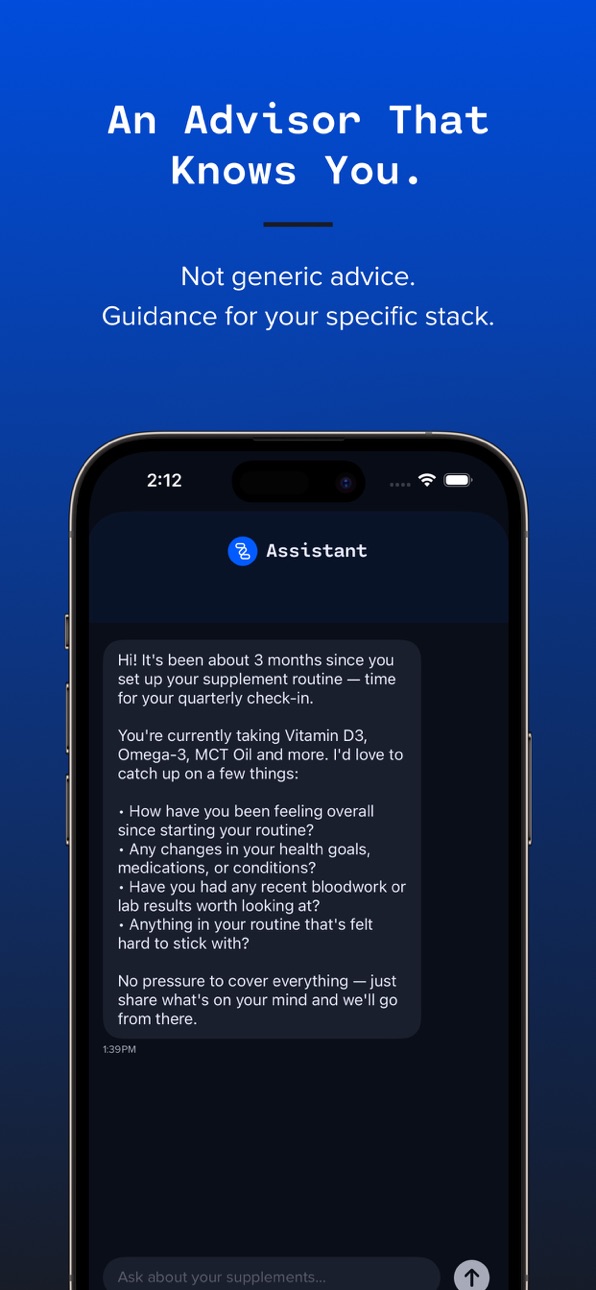
AN AI ADVISOR THAT ACTUALLY KNOWS YOU
Your assistant sees your full stack, your goals, and (if you connect Apple Health) your real sleep, activity, and heart rate data. Ask anything:
• "Should I take magnesium in the morning?"
• "Does my stack cover my vitamin D needs?"
• "What interacts with my medications?"
• "Has my energy improved since starting magnesium?"
Real answers for your body, not generic advice pulled from the internet.
———
ON EVERY DEVICE, ALWAYS IN SYNC
Your stack stays current across iPhone and Apple Watch automatically. Check something off on your watch and it's already updated on your phone. Everything syncs securely over iCloud in the background, so you never lose your place. And your data is yours: export a full backup anytime and restore it in a tap.
———
HOW IT WORKS
Already taking supplements? Scan your bottles or type your stack and we analyze it for timing, interactions, and redundancies, then show you how to get more from what you already take.
Starting from scratch? Answer a few questions about your goals, sleep, energy, or diet, and we recommend a simple starting point tailored to you.
———
WHAT YOU GET
• AI advisor powered by Claude that knows your stack, goals, and health data
• Barcode and label-photo scanning to add supplements instantly
• Restock Reminders with one-tap refill so you never run out
• Daily mood and energy check-in your AI advisor learns from
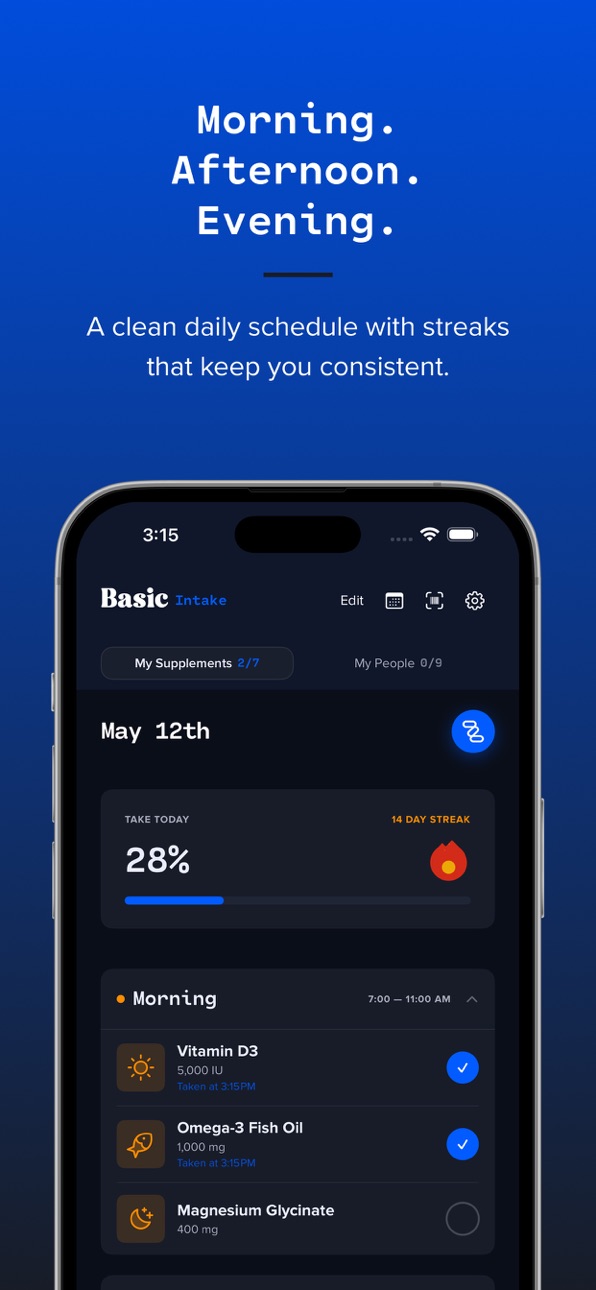
• Morning / afternoon / evening schedule with smart daily reminders
• Nutrient Totals dashboard with RDA tracking and upper-limit awareness
• Streak system with unlockable flame styles to keep you consistent
• Apple Health sync: log intake to Health, pull sleep and activity into AI recommendations
• Real multi-device sync across iPhone and Apple Watch over iCloud
• One-tap Backup and Restore, so your data is always recoverable
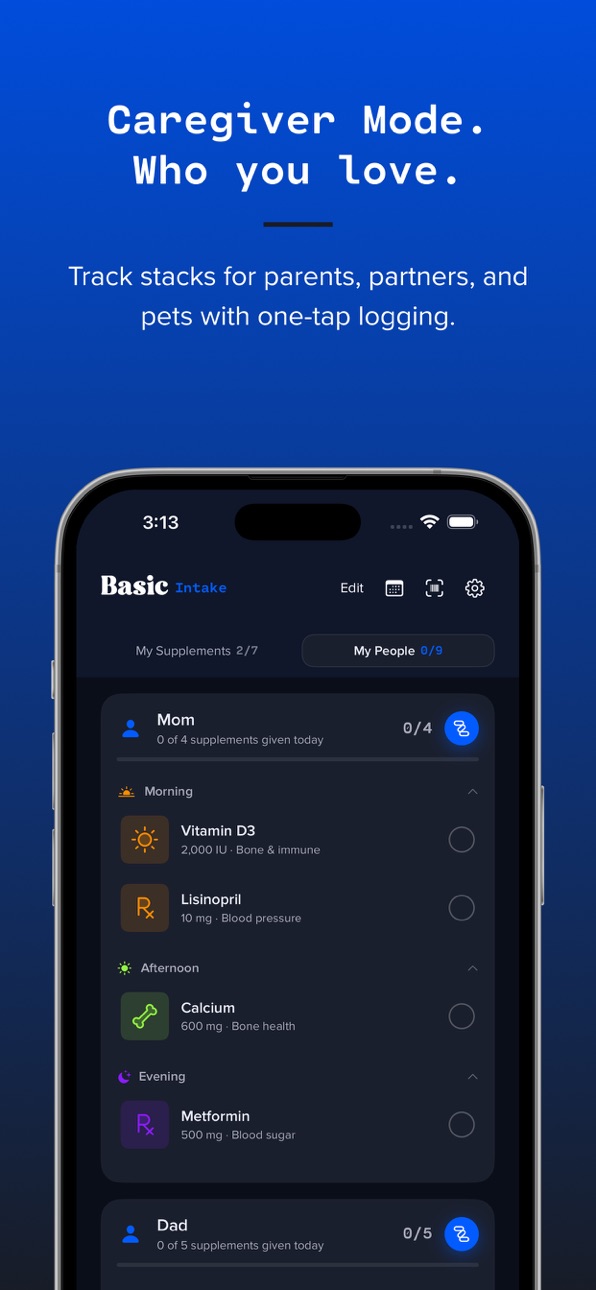
• Track supplements and medications for the people and pets you care for
• Home screen widget showing today's progress
———
THE BASIC INTAKE PHILOSOPHY
Think of it as an opportunity to declutter your wellness. Not more pills, smarter ones, at the right time, for your goals.
Basic Intake is an informational tool. It is not medical advice. Always consult your doctor before starting or changing any supplement regimen.
———
SUBSCRIPTION
Free 7-day trial includes up to 15 AI chat interactions and 15 label photo scans. Barcode scans are always unlimited and free. After the trial, continue with Basic Intake Pro at $4.99/month. Cancel anytime in Settings.
Terms of Use: https://www.apple.com/legal/internet-services/itunes/dev/stdeula/
Privacy Policy: https://basicapps.tech/privacy
Capabilities
In-App Purchases
Accessibility
ipadiphonemacrealityDevicetvoswatch
Version history 25 versions
Build 887849666v5.372026-07-05 20:25:49
What's New in Version 5.37
• New: Daily Check-In. Log your mood and energy in two taps, and your AI advisor can spot patterns as your routine changes.
• New: reach a 1-year streak and unlock the Flame Picker. Choose any flame to display while your streak keeps counting.
• The Apple Watch app is dramatically faster and smoother.
• Sunset Theme on the Apple Watch has been adjusted for a better visual experience.
• The Watch app icon now matches the new Blue look.
Build 887713582v5.362026-07-02 18:44:43
What's New in Version 5.36
• New: Daily Check-In. Log your mood and energy in two taps, and your AI advisor can spot patterns as your routine changes.
• New: reach a 1-year streak and unlock the Flame Picker. Choose any flame to display while your streak keeps counting.
• The Apple Watch app is dramatically faster and smoother.
• The Watch app icon now matches the new Blue look.
Build 887593671v5.352026-06-30 22:49:51
What's New in Version 5.35
• Checking off your supplements is faster and smoother, even with a long history.
• A fresh new default app icon. Prefer a different look? Choose from six icons in Settings.
• More reliable syncing across iPhone and Apple Watch.
Build 887443935v5.342026-06-29 06:25:05
What's New (v5.34)
Restock Reminders
Track how much you have of each supplement and get a heads-up before you run low. Optional, off by default, and easy to ignore if your supplements auto-ship.
One-tap refill
When something runs low, tap its badge to mark it restocked.
• Just tell the assistant "I just got 60 magnesium" and it updates your supply for you.
• Supply tracking now works for the people and pets you care for, too.
• Your Apple Watch and home-screen widget now match your in-app theme and show each supplement's icon.
• Small fixes, big vibes.
Build 887368181v5.332026-06-24 23:20:02
What's New (v5.33)
Restock Reminders
Track how much you have of each supplement and get a heads-up before you run low. Optional, off by default, and easy to ignore if your supplements auto-ship.
One-tap refill
When something runs low, tap its badge to mark it restocked.
• Just tell the assistant "I just got 60 magnesium" and it updates your supply for you.
• Supply tracking now works for the people and pets you care for, too.
• Your Apple Watch and home-screen widget now match your in-app theme and show each supplement's icon.
• Small fixes, big vibes.
Build 887235841v5.312026-06-21 17:11:55
What's New (v5.31)
Restock Reminders
Track how much you have of each supplement and get a heads-up before you run low. Optional, off by default, and easy to ignore if your supplements auto-ship.
One-tap refill
When something runs low, tap its badge to mark it restocked.
• Just tell the assistant "I just got 60 magnesium" and it updates your supply for you.
• Supply tracking now works for the people and pets you care for, too.
• Your Apple Watch and home-screen widget now match your in-app theme and show each supplement's icon.
• Small fixes, big vibes.
Build 887214229v5.302026-06-20 21:07:28
What's New (v5.30)
Restock Reminders
Track how much you have of each supplement and get a heads-up before you run low. Optional, off by default, and easy to ignore if your supplements auto-ship.
One-tap refill
When something runs low, tap its badge to mark it restocked.
• Just tell the assistant "I just got 60 magnesium" and it updates your supply for you.
• Supply tracking now works for the people and pets you care for, too.
• Your Apple Watch and home-screen widget now match your in-app theme and show each supplement's icon.
• Small fixes, big vibes.
Build 886848092v5.232026-06-12 16:55:38
What's New (v5.23)
This release is all about reliability, a top-to-bottom code review with fixes under the hood:
• Streaks are smarter: adding a new supplement no longer resets your streak, and your streak now survives reinstalling the app or switching to a new device.
• Reminders stay on time: notifications no longer drift to the wrong hour after you travel or when the clocks change.
• More accurate sleep: your average sleep no longer double-counts nights that cross midnight.
• Steadier chat counter: your remaining-chats count stays in sync with the server.
• App icon fixes: your chosen icon reliably sticks for subscribers.
• Health data accuracy: supplement doses entered in the wrong unit are no longer logged to Apple Health with the wrong value.
• Plus stability and polish fixes throughout.
Build 886510691v5.222026-06-04 18:01:17
What's New (v5.22)
This release is all about reliability, a top-to-bottom code review with fixes under the hood:
• Streaks are smarter: adding a new supplement no longer resets your streak, and your streak now survives reinstalling the app or switching to a new device.
• Reminders stay on time: notifications no longer drift to the wrong hour after you travel or when the clocks change.
• More accurate sleep: your average sleep no longer double-counts nights that cross midnight.
• Steadier chat counter: your remaining-chats count stays in sync with the server.
• App icon fixes: your chosen icon reliably sticks for subscribers.
• Health data accuracy: supplement doses entered in the wrong unit are no longer logged to Apple Health with the wrong value.
• Plus stability and polish fixes throughout.
Build 886042090v5.212026-05-23 22:44:08
What's New (v5.21)
• Streak peek: once you're within 10 days of unlocking your next flame, a tiny info icon appears next to your streak count. Tap it to see the upcoming flame and a live countdown.
• Make Basic Intake yours: Settings → Appearance now has an App Icon picker. Brand is free; subscribers get Sunset, Blue, Black, Glass, and Severity.
• My People tab: fixed a bug where finished slots would re-expand when switching tabs and coming back.
• Behind the scenes: every streak flame was re-rendered at higher resolution with built-in breathing room, so the tip and base never get cut off at any size.
Build 885917708v5.202026-05-20 19:02:25
Basic Intake now has a fully realized Light Mode.
Settings → Appearance gives you three choices: System, Light, or Dark. Pick what fits your moment.
Light mode is built on the new Sunset design system. A warm paper background with a soft four-orb atmosphere (peach + plum + amber + coral) replaces the navy gradient. Cards are frosted white glass that float over the warmth. Time-of-day slots take on a new warmer palette, saffron mornings, sage afternoons, dusty-rose evenings, so the app feels distinctly different from the night-mode experience while keeping the same color-coded mental model.
Every screen got the same treatment: the calendar, scanner result + label-update sheets, provider report flow, and all the sub-menus.
Onboarding stays dark for new users, Appearance only becomes available once you're in the main tracker, so first impressions are always the brand-defining navy.
Existing users default to Dark mode with no change. Switch when you're ready.
Polished a few rough edges.
Build 885794286v5.162026-05-18 19:09:55
Basic Intake now has a fully realized Light Mode.
Settings → Appearance gives you three choices: System, Light, or Dark. Pick what fits your moment.
Light mode is built on the new Sunset design system. A warm paper background with a soft four-orb atmosphere (peach + plum + amber + coral) replaces the navy gradient. Cards are frosted white glass that float over the warmth. Time-of-day slots take on a new warmer palette, saffron mornings, sage afternoons, dusty-rose evenings, so the app feels distinctly different from the night-mode experience while keeping the same color-coded mental model.
Every screen got the same treatment: the calendar, scanner result + label-update sheets, provider report flow, and all the sub-menus.
Onboarding stays dark for new users, Appearance only becomes available once you're in the main tracker, so first impressions are always the brand-defining navy.
Existing users default to Dark mode with no change. Switch when you're ready.
Build 885601757v5.152026-05-13 18:55:25
What's New in 5.15
Better provider reports: PDF exports now paginate cleanly for longer regimens, so doctors get the full picture even with a lot of supplements or multiple caregivees.
Apple Health on your report: opt in to include a 30-day summary of sleep, heart rate, steps, and workouts. Useful context for any doctor visit.
Polish & fixes: assistant chat rendering tightened up under the hood, plus a smoother onboarding experience.
Build 885507034v5.142026-05-11 21:37:23
Provider Reports: generate a clean, printable PDF of your current supplement regimen to share with your doctor or pharmacist. Pick yourself and any caregivees you want included, and the report covers each person on their own page with name, dose, time of day, when you started, and notes. Export via AirDrop, Mail, Files, or print directly.
Better reordering: drag and drop in My Intake now uses iOS-native gestures with a colored insertion line showing exactly where your supplement will land. Drop targets highlight on hover, and auto-scroll kicks in near the screen edges.
Smarter assistant: when you ask to change a supplement's dose, the assistant now updates it in place instead of removing and re-adding. New manual edit too: in edit mode, tap any supplement to change its name, dose, timing, or notes.
Cleaner Settings: Reminder Times and Time Windows are now tucked behind a single "Schedule" section so the main Settings screen is shorter and easier to scan.
Build 885404027v5.132026-05-08 14:01:49
Performance and quality fixes to make Intake even better!
Build 885043745v5.122026-05-05 01:37:26
What's New in 5.12
Every supplement and caregiver icon now uses a refined two-tone illustrated set, sharper, more distinctive, easier to read at a glance. Vitamin C looks like a vitamin C. Magnesium looks like a moon. Iron actually looks like a shield instead of a generic drop.
The AI Assistant's replies are also cleaner, no more stray symbols or formatting characters cluttering the chat. Just clean, conversational responses.
Build 884998445v5.72026-04-28 00:54:59
Quiet release, housekeeping under the hood.
Build 884940969v5.52026-04-27 01:06:09
What's New in 5.5:
Hit a long streak? Now we've got something to show for it.
Eight brand-new flame designs unlock as your daily streak grows, from 60 days all the way through a full year. Each milestone gets its own animated icon: a yellow flare at 90, a purple mystic flame at 120, a stark white-hot at 150, then deeper sculpted designs every 60 days through the one-year mark with a flame in our signature blue. Keep your streak alive and watch it evolve.
Build 884729987v5.3.22026-04-20 22:24:14
What's New in 5.3.2
Fixed a bug from the last update where the colorful icons on your supplement and caregiver cards looked dimmed and washed out. Your stack is back to its full, vibrant self.
Build 884677472v5.3.12026-04-19 20:33:17
What's New in 5.3.1
Don't love the icon we picked? Now you can choose your own. Tap Edit on your supplement list, then tap any card's icon to open a library of 48 symbols — vitamins, herbs, heart, sleep, digestion, and more. Pick one and it instantly matches your card's color. Tap Reset anytime to go back to the auto-assigned icon.
• New: Remove people or pets from Caregiver mode directly in edit mode — tap the red minus button on any card
• New: Caregivee History — see everyone you've ever cared for, including archived entries, with a one-tap Restore option
• Improved: Morning, Afternoon, and Evening sections redesigned as unified cards with cleaner spacing and better alignment
• Fixed: Drag-to-reorder supplements now tracks your finger properly and drops exactly where you expect
• Fixed: Edit-mode barcode scanning now handles "Product Not Found" correctly with retry options
• Fixed: Timing sections no longer stay collapsed when a new day starts
• Fixed: A few visual glitches with icons and empty states
• Under the hood: unified card backgrounds across the app for a more consistent feel
Build 884656970v5.2.12026-04-18 16:41:08
5.2.1 wraps up a handful of fixes and polish from the 5.0 release.
• New: Remove people or pets from Caregiver mode directly in edit mode — tap the red minus button on any card
• New: Caregivee History — see everyone you've ever cared for, including archived entries, with a one-tap Restore option
• Improved: Morning, Afternoon, and Evening sections redesigned as unified cards with cleaner spacing and better alignment
• Fixed: Drag-to-reorder supplements now tracks your finger properly and drops exactly where you expect
• Fixed: Edit-mode barcode scanning now handles "Product Not Found" correctly with retry options
• Fixed: Timing sections no longer stay collapsed when a new day starts
• Fixed: A few visual glitches with icons and empty states
• Under the hood: unified card backgrounds across the app for a more consistent feel
Build 884670929v5.32026-04-18 22:35:49
What's New in 5.3
Don't love the icon we picked? Now you can choose your own. Tap Edit on your supplement list, then tap any card's icon to open a library of 48 symbols — vitamins, herbs, heart, sleep, digestion, and more. Pick one and it instantly matches your card's color. Tap Reset anytime to go back to the auto-assigned icon.
• New: Remove people or pets from Caregiver mode directly in edit mode — tap the red minus button on any card
• New: Caregivee History — see everyone you've ever cared for, including archived entries, with a one-tap Restore option
• Improved: Morning, Afternoon, and Evening sections redesigned as unified cards with cleaner spacing and better alignment
• Fixed: Drag-to-reorder supplements now tracks your finger properly and drops exactly where you expect
• Fixed: Edit-mode barcode scanning now handles "Product Not Found" correctly with retry options
• Fixed: Timing sections no longer stay collapsed when a new day starts
• Fixed: A few visual glitches with icons and empty states
• Under the hood: unified card backgrounds across the app for a more consistent feel
Build 884606386v5.12026-04-16 23:56:30
5.1 is a polish release focused on making the daily tracker feel better to use.
• Redesigned Morning, Afternoon, and Evening sections — now unified cards with a cleaner, tighter layout
• Fixed the drag-to-reorder interaction in edit mode — the card you're dragging now tracks properly and drops where you see it
• Fixed edit-mode barcode scanning — "Product Not Found" now shows properly with retry options
• Fixed a bug where timing sections stayed collapsed on a new day
• Matched all card backgrounds for a more consistent look
• Various spacing, alignment, and polish improvements throughout
Build 884525681v5.02026-04-15 15:48:22
Basic Intake 5.0 — A big one.
This is our biggest update since launch. Four major features, plus a lot of quiet polish.
Scan Your Supplements
No more typing. Scan a bottle's barcode to instantly add it to your stack — name, brand, and dose auto-filled. We check Open Food Facts for mainstream brands, and if the barcode isn't found, just snap a photo of the Supplement Facts panel. Our AI reads the label and pulls out everything it needs. Works on every bottle.
Apple Health Integration
Connect Apple Health and your AI advisor gets smarter. It can see your recent sleep, activity, resting heart rate, HRV, and workouts — and uses that context when recommending supplements. Logging a supplement as taken also writes the nutrient to Apple Health, so your full picture lives in one place.
Nutrient Totals Dashboard
See exactly how much of each vitamin and mineral you're getting across your entire stack. We track your totals against RDA, flag when you're low, and warn when you're approaching upper limits. Tap any nutrient to learn what it does and what your amount means.
Keep Your Stack in Sync
Already have supplements in the app? Enter edit mode and tap the scan icon on any supplement. Scan the actual bottle and we'll show you a diff — update the nutrient data from the real label with one tap, or cherry-pick which fields to accept.
What else is new:
Onboarding can now use your Apple Health data, so you don't have to answer questions the app already has answers to
New quick-access barcode scanner right in the top nav bar
Interactions & Notes now opens as a clean overlay instead of expanding inline
Redesigned widget — cleaner percentage-focused layout
15 free label photo scans per month, separate from your AI chat allowance (barcode scans are unlimited and free)
Lots of spacing, sizing, and typography fixes throughout
A reminder:
Basic Intake is an informational tool and not a substitute for medical advice. Always check with your doctor before changing a supplement routine.
Build 884406649v4.3.32026-04-12 00:35:18
Version 4.3.3
• Fixed Apple Watch sync: Supplements checked off on Apple Watch now reliably sync to the iPhone, even when the app is in the background
• Fixed day rollover: Supplement status now resets at midnight without needing to restart the app
No pricing data captured yet — comparisons appear once the app has paid storefronts or in-app purchases.
Availability 100 of 100 storefronts
| Region | Language | Price | Ratings | Avg | Version |
|---|---|---|---|---|---|
| US | en-US | Free | 3 | 5.0 | 5.37 |
| AE | en-GB | Free | 0 | — | 5.37 |
| AF | en-GB | Free | 0 | — | 5.37 |
| AL | en-GB | Free | 0 | — | 5.37 |
| AM | en-GB | Free | 0 | — | 5.37 |
| AT | de-DE | Free | 0 | — | 5.37 |
| AU | en-AU | Free | 0 | — | 5.37 |
| AZ | en-GB | Free | 0 | — | 5.37 |
| BA | en-GB | Free | 0 | — | 5.37 |
| BE | en-GB | Free | 0 | — | 5.37 |
| BG | en-GB | Free | 0 | — | 5.37 |
| BH | en-GB | Free | 0 | — | 5.37 |
| BM | en-GB | Free | 0 | — | 5.37 |
| BN | en-GB | Free | 0 | — | 5.37 |
| BY | en-GB | Free | 0 | — | 5.37 |
| CA | en-CA | Free | 0 | — | 5.37 |
| CH | de-CH | Free | 0 | — | 5.37 |
| CN | zh-Hans-CN | Free | 0 | — | 5.37 |
| CY | en-GB | Free | 0 | — | 5.37 |
| CZ | en-GB | Free | 0 | — | 5.37 |
| DE | de-DE | Free | 0 | — | 5.37 |
| DK | en-GB | Free | 0 | — | 5.37 |
| EE | en-GB | Free | 0 | — | 5.37 |
| EG | en-GB | Free | 0 | — | 5.37 |
| ES | es-ES | Free | 0 | — | 5.37 |
| FI | en-GB | Free | 0 | — | 5.37 |
| FJ | en-GB | Free | 0 | — | 5.37 |
| FM | en-GB | Free | 0 | — | 5.37 |
| FR | fr-FR | Free | 0 | — | 5.37 |
| GB | en-GB | Free | 0 | — | 5.37 |
| GE | en-GB | Free | 0 | — | 5.37 |
| GR | en-GB | Free | 0 | — | 5.37 |
| HK | zh-Hant-HK | Free | 0 | — | 5.37 |
| HR | en-GB | Free | 0 | — | 5.37 |
| HU | en-GB | Free | 0 | — | 5.37 |
| ID | en-GB | Free | 0 | — | 5.37 |
| IE | en-GB | Free | 0 | — | 5.37 |
| IL | en-GB | Free | 0 | — | 5.37 |
| IN | en-GB | Free | 0 | — | 5.37 |
| IQ | en-GB | Free | 0 | — | 5.37 |
| IS | en-GB | Free | 0 | — | 5.37 |
| IT | it | Free | 0 | — | 5.37 |
| JO | en-GB | Free | 0 | — | 5.37 |
| JP | ja | Free | 0 | — | 5.37 |
| KG | en-GB | Free | 0 | — | 5.37 |
| KH | en-GB | Free | 0 | — | 5.37 |
| KR | ko | Free | 0 | — | 5.37 |
| KW | en-GB | Free | 0 | — | 5.37 |
| KZ | en-GB | Free | 0 | — | 5.37 |
| LA | en-GB | Free | 0 | — | 5.37 |
| LB | en-GB | Free | 0 | — | 5.37 |
| LK | en-GB | Free | 0 | — | 5.37 |
| LT | en-GB | Free | 0 | — | 5.37 |
| LU | en-GB | Free | 0 | — | 5.37 |
| LV | en-GB | Free | 0 | — | 5.37 |
| MD | en-GB | Free | 0 | — | 5.37 |
| ME | en-GB | Free | 0 | — | 5.37 |
| MK | en-GB | Free | 0 | — | 5.37 |
| MM | en-GB | Free | 0 | — | 5.37 |
| MN | en-GB | Free | 0 | — | 5.37 |
| MO | zh-Hant-HK | Free | 0 | — | 5.37 |
| MR | en-GB | Free | 0 | — | 5.37 |
| MT | en-GB | Free | 0 | — | 5.37 |
| MV | en-GB | Free | 0 | — | 5.37 |
| MY | en-GB | Free | 0 | — | 5.37 |
| NL | nl | Free | 0 | — | 5.37 |
| NO | en-GB | Free | 0 | — | 5.37 |
| NP | en-GB | Free | 0 | — | 5.37 |
| NR | en-GB | Free | 0 | — | 5.37 |
| NZ | en-AU | Free | 0 | — | 5.37 |
| OM | en-GB | Free | 0 | — | 5.37 |
| PG | en-GB | Free | 0 | — | 5.37 |
| PH | en-GB | Free | 0 | — | 5.37 |
| PK | en-GB | Free | 0 | — | 5.37 |
| PL | en-GB | Free | 0 | — | 5.37 |
| PT | pt-PT | Free | 0 | — | 5.37 |
| PW | en-GB | Free | 0 | — | 5.37 |
| QA | en-GB | Free | 0 | — | 5.37 |
| RO | en-GB | Free | 0 | — | 5.37 |
| RS | en-GB | Free | 0 | — | 5.37 |
| RU | ru | Free | 0 | — | 5.37 |
| SA | en-GB | Free | 0 | — | 5.37 |
| SB | en-GB | Free | 0 | — | 5.37 |
| SE | sv | Free | 0 | — | 5.37 |
| SG | en-GB | Free | 0 | — | 5.37 |
| SI | en-GB | Free | 0 | — | 5.37 |
| SK | en-GB | Free | 0 | — | 5.37 |
| TH | en-GB | Free | 0 | — | 5.37 |
| TJ | en-GB | Free | 0 | — | 5.37 |
| TM | en-GB | Free | 0 | — | 5.37 |
| TO | en-GB | Free | 0 | — | 5.37 |
| TR | en-GB | Free | 0 | — | 5.37 |
| TW | zh-Hant-TW | Free | 0 | — | 5.37 |
| UA | en-GB | Free | 0 | — | 5.37 |
| UZ | en-GB | Free | 0 | — | 5.37 |
| VN | en-GB | Free | 0 | — | 5.37 |
| VU | en-GB | Free | 0 | — | 5.37 |
| XK | en-GB | Free | 0 | — | 5.37 |
| YE | en-GB | Free | 0 | — | 5.37 |
| ZA | en-GB | Free | 0 | — | 5.37 |
Change log 29 changes · TH
✎
releaseNotes updated
What's New in Version 5.37
• New: Daily Check-In. Log your mood and energy in two taps, and your AI advisor can spot patterns as your routine changes.
• New: r
✎
description updated
Most supplement apps just remind you to swallow pills. Basic Intake helps you know what your stack is actually doing, and never run out of it. Scan a bottle, se
✎
subtitle updated
AI Supplement & Med Reminder
✎
name updated
Basic Intake: Pill & Vitamin
◆
Version 5.37 released
What's New in Version 5.37
• New: Daily Check-In. Log your mood and energy in two taps, and your AI advisor can spot patterns as your routine changes.
• New: reach a 1-year streak and unlock the Flame Picker. Choose any flame to display wh
◆
Version 5.36 released
What's New in Version 5.36
• New: Daily Check-In. Log your mood and energy in two taps, and your AI advisor can spot patterns as your routine changes.
• New: reach a 1-year streak and unlock the Flame Picker. Choose any flame to display wh
◆
Version 5.35 released
What's New in Version 5.35
• Checking off your supplements is faster and smoother, even with a long history.
• A fresh new default app icon. Prefer a different look? Choose from six icons in Settings.
• More reliable syncing across iPhone
◆
Version 5.34 released
What's New (v5.34)
Restock Reminders
Track how much you have of each supplement and get a heads-up before you run low. Optional, off by default, and easy to ignore if your supplements auto-ship.
One-tap refill
When something runs low, tap
◆
Version 5.33 released
What's New (v5.33)
Restock Reminders
Track how much you have of each supplement and get a heads-up before you run low. Optional, off by default, and easy to ignore if your supplements auto-ship.
One-tap refill
When something runs low, tap
◆
Version 5.31 released
What's New (v5.31)
Restock Reminders
Track how much you have of each supplement and get a heads-up before you run low. Optional, off by default, and easy to ignore if your supplements auto-ship.
One-tap refill
When something runs low, tap
◆
Version 5.30 released
What's New (v5.30)
Restock Reminders
Track how much you have of each supplement and get a heads-up before you run low. Optional, off by default, and easy to ignore if your supplements auto-ship.
One-tap refill
When something runs low, tap
◆
Version 5.23 released
What's New (v5.23)
This release is all about reliability, a top-to-bottom code review with fixes under the hood:
• Streaks are smarter: adding a new supplement no longer resets your streak, and your streak now survives reinstalling the ap
◆
Version 5.22 released
What's New (v5.22)
This release is all about reliability, a top-to-bottom code review with fixes under the hood:
• Streaks are smarter: adding a new supplement no longer resets your streak, and your streak now survives reinstalling the ap
◆
Version 5.21 released
What's New (v5.21)
• Streak peek: once you're within 10 days of unlocking your next flame, a tiny info icon appears next to your streak count. Tap it to see the upcoming flame and a live countdown.
• Make Basic Intake yours: Settings → App
◆
Version 5.20 released
Basic Intake now has a fully realized Light Mode.
Settings → Appearance gives you three choices: System, Light, or Dark. Pick what fits your moment.
Light mode is built on the new Sunset design system. A warm paper background with a soft
◆
Version 5.16 released
Basic Intake now has a fully realized Light Mode.
Settings → Appearance gives you three choices: System, Light, or Dark. Pick what fits your moment.
Light mode is built on the new Sunset design system. A warm paper background with a soft
◆
Version 5.15 released
What's New in 5.15
Better provider reports: PDF exports now paginate cleanly for longer regimens, so doctors get the full picture even with a lot of supplements or multiple caregivees.
Apple Health on your report: opt in to include a 30-da
◆
Version 5.14 released
Provider Reports: generate a clean, printable PDF of your current supplement regimen to share with your doctor or pharmacist. Pick yourself and any caregivees you want included, and the report covers each person on their own page with name,
◆
Version 5.13 released
Performance and quality fixes to make Intake even better!
◆
Version 5.12 released
What's New in 5.12
Every supplement and caregiver icon now uses a refined two-tone illustrated set, sharper, more distinctive, easier to read at a glance. Vitamin C looks like a vitamin C. Magnesium looks like a moon. Iron actually looks l
◆
Version 5.7 released
Quiet release, housekeeping under the hood.
◆
Version 5.5 released
What's New in 5.5:
Hit a long streak? Now we've got something to show for it.
Eight brand-new flame designs unlock as your daily streak grows, from 60 days all the way through a full year. Each milestone gets its own animated icon: a yell
◆
Version 5.3.2 released
What's New in 5.3.2
Fixed a bug from the last update where the colorful icons on your supplement and caregiver cards looked dimmed and washed out. Your stack is back to its full, vibrant self.
◆
Version 5.3.1 released
What's New in 5.3.1
Don't love the icon we picked? Now you can choose your own. Tap Edit on your supplement list, then tap any card's icon to open a library of 48 symbols — vitamins, herbs, heart, sleep, digestion, and more. Pick one and i
◆
Version 5.3 released
What's New in 5.3
Don't love the icon we picked? Now you can choose your own. Tap Edit on your supplement list, then tap any card's icon to open a library of 48 symbols — vitamins, herbs, heart, sleep, digestion, and more. Pick one and it
◆
Version 5.2.1 released
5.2.1 wraps up a handful of fixes and polish from the 5.0 release.
• New: Remove people or pets from Caregiver mode directly in edit mode — tap the red minus button on any card
• New: Caregivee History — see everyone you've ever cared for,
◆
Version 5.1 released
5.1 is a polish release focused on making the daily tracker feel better to use.
• Redesigned Morning, Afternoon, and Evening sections — now unified cards with a cleaner, tighter layout
• Fixed the drag-to-reorder interaction in edit mode —
◆
Version 5.0 released
Basic Intake 5.0 — A big one.
This is our biggest update since launch. Four major features, plus a lot of quiet polish.
Scan Your Supplements
No more typing. Scan a bottle's barcode to instantly add it to your stack — name, brand, and dos
◆
Version 4.3.3 released
Version 4.3.3
• Fixed Apple Watch sync: Supplements checked off on Apple Watch now reliably sync to the iPhone, even when the app is in the background
• Fixed day rollover: Supplement status now resets at midnight without needing to restar