Home › Books

 ZM
ZM
 USen-US
 PAes-MX
 AGen-GB
 AIen-GB
 AOen-GB
 ARes-MX
 BBen-GB
 BFen-GB
 BJen-GB
 BOes-MX
 BRpt-BR
 BSen-GB
 BWen-GB
 BZen-GB
 CDen-GB
 CGen-GB
 CIfr-FR
 CLes-MX
 CMfr-FR
 COes-MX
 CRes-MX
 CVen-GB
 DMen-GB
 DOes-MX
 DZen-GB
 ECes-MX
 GAfr-FR
 GDen-GB
 GHen-GB
 GMen-GB
 GTes-MX
 GWen-GB
 GYen-GB
 HNes-MX
 JMen-GB
 KEen-GB
 KNen-GB
 KYen-GB
 LCen-GB
 LRen-GB
 LYen-GB
 MAen-GB
 MGen-GB
 MLen-GB
 MSen-GB
 MUen-GB
 MWen-GB
 MXes-MX
 MZen-GB
 NAen-GB
 NEen-GB
 NGen-GB
 NIes-MX
 PEes-MX
 PYes-MX
 RWen-GB
 SCen-GB
 SLen-GB
 SNen-GB
 SRen-GB
 STen-GB
 SVes-MX
 SZen-GB
 TCen-GB
 TDen-GB
 TNen-GB
 TTen-GB
 TZen-GB
 UGen-GB
 UYen-GB
 VCen-GB
 VEes-MX
 VGen-GBZMen-GB
 ZWen-GB
75 of 75 storefronts
Content in en-US
Content in en-US
Information
Preview 3 platforms
iPhone 7 images


iPad 7 images


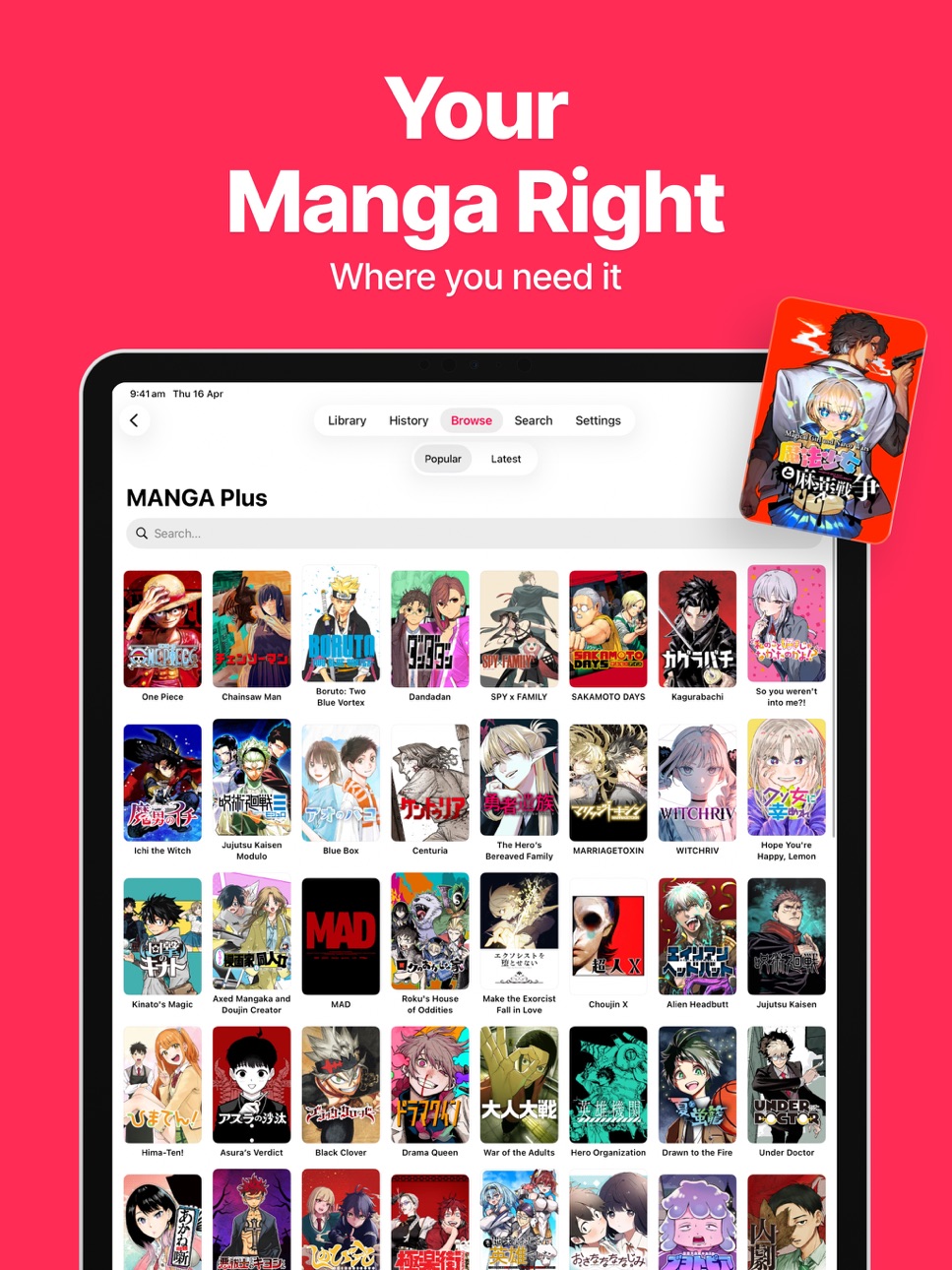


Mac 7 images


What’s New Version 2.2
Introducing Page Curl — turn pages with a smooth, lifelike curl, just like a real book.
• New Page Curl reading mode on iPhone, iPad, and Mac
• Realistic double-page spreads that fold from the center spine, with an optional spine gap
• Seamless page turns across chapter boundaries
• Smoother reader transitions and refined settings
• Localization and stability improvements
Happy reading!
Description
Yomu is the ultimate manga reading app - beautifully designed, blazing fast, and built to keep you immersed in every panel.
Browse and read from dozens of sources in one place. Manage your library, track reading progress, and pick up exactly where you left off across every series. Whether you love shonen battle epics, slice-of-life romance, or webtoons, Yomu has you covered.
AUTO ZOOM — READ PANEL BY PANEL
- Auto Zoom moves through the page one panel at a time
- On-device AI detects every panel automatically, with no setup
- A smooth, cinematic glide from panel to panel and across pages
- Perfect for manga, manhwa, manhua and webtoons
- Auto Zoom is a Premium feature
How to use Auto Zoom (turn it on in the reader's settings menu):
- Double-tap with one finger to start, double-tap again to stop
- Single tap to jump to the next panel
- Double-tap with two fingers for hands-free auto panel scrolling
LIBRARY & READING
- One beautiful library for all your manga
- Right-to-left, left-to-right, and vertical scroll modes
- Single and double-page layouts
- Seamless chapter navigation with progress sync
- Download chapters for offline reading
- Smart updates - know instantly when new chapters drop
SOURCES & DISCOVERY
- Browse and discover manga from multiple sources
- Connect your Komga, Kavita, Jellyfin, or OPDS self-hosted server
- Filter by language and content settings
- Local files support - read PDF, CBZ, CBR, EPUB, 7z, and ZIP from your own collection
- Alternate app icons - match the icon to your chosen accent color
- Swipe between manga in details view for quick browsing
YOMU PREMIUM
Unlock the full experience with a Premium subscription:
Unlimited Library - add as many manga as you want (free users: 3)
Auto-Scroll - hands-free reading that advances pages automatically at your chosen speed
Translation - translate manga pages to 27 languages using AI-powered OCR
Sleep Timer - set a countdown to close the reader, perfect for reading before bed
Trackers - sync your reading progress with AniList, MyAnimeList, Kitsu, and MangaUpdates automatically
Backup & Restore - keep your library safe with one-tap backups, shareable anywhere
iCloud Sync - sync your library, progress, and settings across all your devices
Incognito Mode - read without saving activity to History
Lock App - protect your reading list with Face ID
Komga, Kavita, Jellyfin & OPDS - connect self-hosted servers to your library
Clear History - erase your reading history anytime
All Future Premium Features - included free forever
PRIVACY & SECURITY
- Incognito mode keeps reading sessions out of History
- Lock App with Face ID or passcode
- No account required - your data stays on your device
- iCloud-ready backup files you control
BEAUTIFUL & FAST
- Native SwiftUI - fluid, responsive, and battery efficient
- Light, dark, and system appearance modes
- Crisp covers with smart caching
- Zero ads, zero tracking
Start with 3 manga free. Upgrade to Premium for the complete Yomu experience.
Terms of Use (EULA): https://www.mobilealchemy.co/terms-of-service.html
Privacy Policy: https://www.mobilealchemy.co/privacy-policy.html
In-App Purchases ZM pricing
Subscriptions Subscription
Monthly · Monthly—
Annual · Yearly—
One-Time Purchases
Lifetime—
Capabilities
In-App Purchases
Accessibility
ipadiphonemacrealityDevicetvoswatch
Version history 18 versions
Build 887550709v2.22026-07-02 10:45:16
Introducing Page Curl — turn pages with a smooth, lifelike curl, just like a real book.
• New Page Curl reading mode on iPhone, iPad, and Mac
• Realistic double-page spreads that fold from the center spine, with an optional spine gap
• Seamless page turns across chapter boundaries
• Smoother reader transitions and refined settings
• Localization and stability improvements
Happy reading!
Build 887151172v2.12026-06-23 09:19:58
• Sharper webtoon pages on iPad — long vertical strips now render at full display resolution instead of being downscaled.
• Fixed webtoon chapters sometimes opening on the previous chapter's card instead of the first page.
• Local Files now shows a progress indicator while importing comics and folders.
• Stability and performance improvements.
Build 886454741v2.02026-06-05 13:11:16
Welcome to Yomu 2.0 — our biggest update yet, built around an all-new reader.
• Rebuilt reading engine: smoother page turns and seamless chapter transitions, with no stutter or overstretch — across manga, manhwa, vertical and webtoon.
• Auto Zoom (Premium): read panel by panel. On-device AI finds each panel and glides to the next, then flows into the following page. Tap to advance, or two-finger double-tap to go hands-free.
• Faster image loading and smoother webtoon scrolling.
• More source fixes and stability improvements.
Loving Yomu? A quick rating helps a lot. Happy reading!
Build 886307674v1.4.92026-06-03 00:06:25
Auto Zoom has arrived — the smartest way to read.
• Auto Zoom (Premium): read panel by panel. On-device AI finds each panel and smoothly zooms from one to the next, then flows right into the following page — no pinching or panning. Perfect for manga, manhwa, manhua and webtoons. Turn it on in the reader's settings menu.
• Smoother webtoon scrolling with more accurate page tracking.
• Import from a URL — paste a link to add comics to Local Files.
• Fixed cover art and right-to-left page counts.
• Faster page turns and stability improvements.
Loving Yomu? A quick rating helps a lot. Happy reading!
Build 886194092v1.4.82026-05-29 16:04:04
Expanded Chinese manga support, plus a more personalised reading experience.
• More Chinese manga — browse manga and manhua from over 40 popular Chinese-language sites including Tencent Comics, Kuaikan, Baozi, ManHuaGui, DM5, Mangabz, Happymh, Manhuaren and more.
• Customisable tabs — reorder the bottom tab bar however you like, and show Bookmarks as a standalone tab from Settings > Customize.
• Categories — create, rename and delete categories straight from your library, and assign any manga to multiple categories at once.
• Bug fixes and performance improvements.
Yomu — manga, manhwa, manhua, light novel and webtoon reader for iPhone, iPad and Mac. Offline reading, iCloud sync, AniList / MyAnimeList / Kitsu tracking.
Build 886063425v1.4.72026-05-27 11:30:10
Several user-reported fixes plus much wider self-hosted-server source coverage.
• Kavita 0.8+ compatibility — Kavita servers were returning 0 entries in 1.4.6 because Kavita renamed /api/Series/all to /all-v2 and moved chapter progress to /api/Reader/progress. Reported by a Premium user on iPad whose library is mainly EPUB; same root cause as another user report that the app was "unusable." Fixed.
• Self-hosted read-state sync-back — completing a chapter in the reader now marks it read on the Komga or Kavita server automatically, so your progress is visible in the server web UI and on other devices. Previously the read marker only updated locally despite the docs claiming sync.
• Keiyoushi extension index — pasting the Keiyoushi index URL into Add Repository used to show ~132 sources because the in-app theme detector matched on package-name fragments and missed most of them. Bundled the Kotlin-derived theme map so the same flow now shows around 667 working sources — what the hosted .yomupack already had, but available natively without round-tripping through a URL.
• Translation: fixed silent failure on iOS 26+ when the language pack wasn't downloaded. Was using a session initializer that requires the pack to already be installed and just throws otherwise — the user saw nothing. Now falls through to the path that triggers the system download prompt, and any failures surface as a reader alert with a hint about Settings → Apps → Translate.
• Removed the first-run sample-pack auto-install — it could misfire on TestFlight when the App Store version lookup returned equal-or-failed. Sources are added explicitly via Add Repository now.
Yomu — manga, manhwa, manhua, and webtoon reader for iPhone, iPad, and Mac. Offline reading, iCloud sync, AniList / MyAnimeList / Kitsu tracking, and 19+ sources including MangaDex, MANGA Plus, and self-hosted Komga, Kavita, Jellyfin, and OPDS servers.
Build 885690697v1.4.62026-05-15 09:24:26
Webtoon scroll perf on iPad.
A user reported that scrolling locally-imported manga in webtoon mode on iPad still stuttered after the 1.4.5 PDF fix. Diagnosed on iPad Pro and addressed in three passes:
• Local-file image decode now downsamples to display size at decode time via ImageIO. A 2000×6000 webtoon page used to occupy ~48 MB of decoded bitmap; it now occupies ~5 MB. On a 30-page test chapter, decoded-bitmap memory dropped from 5.5 GB to 289 MB — a 19× reduction.
• Webtoon-mode page-tracking side effects (prefetch, AirPlay mirror updates, Apple Watch state sync) no longer fire on every page-boundary cross during scroll. They were the accumulated main-thread cost behind "feels laggier after several pages."
• Per-page SwiftUI preference-key tracking removed — that path ran an O(N) reduce on every scroll frame at 120 Hz for every visible page. Replaced with event-driven onAppear.
Bonus optimisations that benefit every reader mode (LTR, RTL, vertical, webtoon):
• Prefetch no longer wastes work on local file:// URLs — the file is already on disk, no need to URLSession-fetch it.
• PageImageProcessor has a fast-path bail-out when no reader filters are enabled.
Yomu — manga, manhwa, manhua, and webtoon reader for iPhone, iPad, and Mac. Offline reading, iCloud sync, AniList / MyAnimeList / Kitsu tracking, 19+ sources including MangaDex, MANGA Plus, AsuraScans, and self-hosted Komga, Kavita, Jellyfin, and OPDS servers.
Build 885465134v1.4.52026-05-11 12:19:42
PDF hot-fix on iPad.
1.4.4 made local-import reading much smoother for CBZ, RAR, EPUB, and 7z — but I missed the PDF code path. PDF users were still hitting the same first-open lag and page-turn stutter the previous release was supposed to fix. Sorry about that.
• PDF page rasterization now runs off the main thread and across all CPU cores in parallel. On a 200-page PDF, first-open drops from ~20-30 seconds of frozen UI to roughly 3-5 seconds of responsive background work — the reader appears immediately and pages stream in as they finish rendering.
• Page-turn animations on PDFs are smooth from the first page now that the renderer isn't competing with SwiftUI for the MainActor.
Yomu — manga, manhwa, manhua, and webtoon reader for iPhone, iPad, and Mac. Offline reading, iCloud sync, AniList / MyAnimeList / Kitsu tracking, 19+ sources including MangaDex, MANGA Plus, AsuraScans, and self-hosted Komga, Kavita, Jellyfin, and OPDS servers.
Build 885227419v1.4.32026-05-05 01:57:42
Hot-fix for self-hosted Komga users.
• Komga (LAN): images now load correctly on older self-hosted Komga servers and certain content types that don't support the JPEG-conversion query 1.4.0 introduced. Yomu now retries without the query on failure and remembers your server's preference, so every page in a chapter loads on the first try.
• Browser Bridge (Mac): Settings labels now translate properly across all 39 languages.
Yomu — the manga, manhwa, manhua, and webtoon reader for iPhone, iPad, and Mac. Offline reading, iCloud sync, AniList / MyAnimeList / Kitsu tracking, and 19+ sources including MangaDex, MANGA Plus, AsuraScans, and self-hosted Komga, Kavita, Jellyfin, and OPDS servers.
Build 885287323v1.4.42026-05-05 18:34:33
iPad polish release.
• Page-turn animations no longer stutter when reading locally-imported manga (CBZ, PDF, RAR, EPUB). Image decoding moved off the main thread so SwiftUI's swipe animation gets a clean frame budget.
• First-time CBZ open is significantly faster — ZIP extraction now runs in parallel across all CPU cores instead of one core at a time. Roughly 4-8× speedup on modern iPads with multi-page chapters.
• Reader is now fully immersive on iPad. The home indicator and bottom system overlay strip dim along with the toolbar when controls are hidden, so reading is genuinely full-screen.
Yomu — the manga, manhwa, manhua, and webtoon reader for iPhone, iPad, and Mac. Offline reading, iCloud sync, AniList / MyAnimeList / Kitsu tracking, and 19+ sources including MangaDex, MANGA Plus, AsuraScans, and self-hosted Komga, Kavita, Jellyfin, and OPDS servers.
Build 885133687v1.4.02026-05-01 00:13:13
1.4 — the power-user pack. 22 new features for serious readers.
READING
• Live Text on pages — long-press any panel to select, copy, look up, or translate text. Powered by Apple Vision (iOS 16+).
• Split wide images for double-page spreads — reads cleanly page by page.
• Crop borders — auto-trim black or white margins.
• Animate page transitions toggle.
• Tap zones with optional invert.
• Background colour: black, white, or follow system.
• Page filters: noise reduction + sharpness slider for older scans.
CONVENIENCE
• Hide bars on swipe (now on by default).
• Per-manga orientation lock — portrait, landscape, or follow device.
• Skip duplicate chapter numbers automatically.
• Open random series — perfect for backlogs.
• App lock with Face ID / Touch ID.
• Chapter cards between chapters (Aidoku-style transitions).
SOURCES
• Browse network folders & SMB shares from the Files app.
• Animated GIF / APNG support on covers and pages.
• Wi-Fi transfer improvements.
Plus dozens of fixes — concurrency, caching, library performance.
Yomu — the manga reader for iPhone, iPad, and Mac with offline reading, iCloud sync, and AniList tracking.
Build 885146638v1.4.12026-05-01 09:44:20
NEW: Browser Bridge for Mac
A new Chrome extension lets you send manga from MangaDex, AsuraScans, Mgeko, and MANGA Plus straight into Yomu with one click. Just enable the bridge in Settings → Browser Bridge, install the extension from the Yomu repository, and the toolbar button lights up on every supported page.
Reader fixes:
• Webtoon mode: the next-chapter card no longer jumps to the end of the next chapter — it now starts at the top, like every other reader.
• External plugins (Yomu/Tachiyomi sources) persist across app restarts. No more re-tapping "Get" every launch.
• Smaller stability and performance improvements throughout the reader.
Yomu — the manga, manhwa, manhua and webtoon reader for iPhone, iPad, and Mac. Offline reading, iCloud sync, AniList / MyAnimeList / Kitsu tracking, and 19+ sources including MangaDex, MANGA Plus, AsuraScans, and self-hosted Komga, Kavita, Jellyfin, and OPDS servers.
Build 885158226v1.4.22026-05-01 14:55:53
Reader polish + bulletproof source persistence.
WEBTOON
• Tapping the next-chapter card now correctly lands you on page 1 of the next chapter — no more accidental jumps to the chapter card. Scroll up at any time for the previous-chapter card.
SOURCES
• External plugins (MangaDex, AsuraScans, Mgeko, MANGA Plus, and any custom .yomupack repo you've installed) now persist across app restarts. Three-layered defense — disk-backed meta backup, multi-key file lookup, and an orphan-file scanner — means installed sources don't disappear after restart.
Plus minor stability and performance improvements throughout the reader.
Yomu — the manga, manhwa, manhua, and webtoon reader for iPhone, iPad, and Mac. Offline reading, iCloud sync, AniList / MyAnimeList / Kitsu tracking, and 19+ sources including MangaDex, MANGA Plus, AsuraScans, and self-hosted Komga, Kavita, Jellyfin, and OPDS servers.
Build 884979159v1.3.22026-04-28 12:13:22
What's new in 1.3.2:
• New: Browse folders or network drives directly — read manga from SMB shares, NAS, iCloud Drive, and external drives without copying files. Add via Browse → + → Browse Folder or Network Drive.
• Fixed: Komga 'image failed to load' for libraries with WebP, AVIF, or PNG content
• Fixed: chapters not marked as read when finished via the Next chapter button
• Updated: privacy and support links now point to yomureader.app
• Polish across iPhone, iPad, and Mac
Yomu — the manga reader for iPhone, iPad, and Mac with offline reading, iCloud sync, and AniList tracking.
Build 884424507v1.32026-04-19 11:51:13
Your manga library goes bigger — Yomu is now available on Mac.
iCloud keeps your library, reading progress, and bookmarks in sync across iPhone, iPad, and Mac. Same sources, same themes, same experience.
Plus small fixes and polish across the app.
Build 884023404v1.22026-04-06 15:55:05
• iCloud Sync (Premium) — sync your library, reading progress, and settings across all your devices
• 39 Languages — the app is now available in 39 languages with a searchable language picker
• Improved Chapter Navigation — auto-scroll now correctly advances to the next chapter in sequence
• Bug fixes and performance improvements
Build 883819119v1.12026-04-01 13:28:22
• Wi-Fi Transfer (Premium) — wirelessly import manga files and folders from your browser; drag-and-drop folders are processed just like Local Files
• Eye Blink Navigation (Premium) — blink once to go to the next page, blink twice to go back, hands-free reading using the front camera
• Themes — 9 new color themes: Claude, Sakura, Indigo, Midnight, Mint, Sunset, Amethyst, Gold, and Forest, each with a matching app icon
• Wi-Fi Transfer web UI matches your chosen theme
• Bug fixes and performance improvements
Build 883491889v1.02026-03-26 07:59:01
Price history by region
Currency
Show
Columns
Search
Availability 75 of 75 storefronts
| Region | Language | Price | Ratings | Avg | Version |
|---|---|---|---|---|---|
| US | en-US | Free | 2 | 2.5 | 2.2 |
| PA | es-MX | Free | 1 | 5.0 | 2.2 |
| AG | en-GB | Free | 0 | — | 2.2 |
| AI | en-GB | Free | 0 | — | 2.2 |
| AO | en-GB | Free | 0 | — | 2.2 |
| AR | es-MX | Free | 0 | — | 2.2 |
| BB | en-GB | Free | 0 | — | 2.2 |
| BF | en-GB | Free | 0 | — | 2.2 |
| BJ | en-GB | Free | 0 | — | 2.2 |
| BO | es-MX | Free | 0 | — | 2.2 |
| BR | pt-BR | Free | 0 | — | 2.2 |
| BS | en-GB | Free | 0 | — | 2.2 |
| BW | en-GB | Free | 0 | — | 2.2 |
| BZ | en-GB | Free | 0 | — | 2.2 |
| CD | en-GB | Free | 0 | — | 2.2 |
| CG | en-GB | Free | 0 | — | 2.2 |
| CI | fr-FR | Free | 0 | — | 2.2 |
| CL | es-MX | Free | 0 | — | 2.2 |
| CM | fr-FR | Free | 0 | — | 2.2 |
| CO | es-MX | Free | 0 | — | 2.2 |
| CR | es-MX | Free | 0 | — | 2.2 |
| CV | en-GB | Free | 0 | — | 2.2 |
| DM | en-GB | Free | 0 | — | 2.2 |
| DO | es-MX | Free | 0 | — | 2.2 |
| DZ | en-GB | Free | 0 | — | 2.2 |
| EC | es-MX | Free | 0 | — | 2.2 |
| GA | fr-FR | Free | 0 | — | 2.2 |
| GD | en-GB | Free | 0 | — | 2.2 |
| GH | en-GB | Free | 0 | — | 2.2 |
| GM | en-GB | Free | 0 | — | 2.2 |
| GT | es-MX | Free | 0 | — | 2.2 |
| GW | en-GB | Free | 0 | — | 2.2 |
| GY | en-GB | Free | 0 | — | 2.2 |
| HN | es-MX | Free | 0 | — | 2.2 |
| JM | en-GB | Free | 0 | — | 2.2 |
| KE | en-GB | Free | 0 | — | 2.2 |
| KN | en-GB | Free | 0 | — | 2.2 |
| KY | en-GB | Free | 0 | — | 2.2 |
| LC | en-GB | Free | 0 | — | 2.2 |
| LR | en-GB | Free | 0 | — | 2.2 |
| LY | en-GB | Free | 0 | — | 2.2 |
| MA | en-GB | Free | 0 | — | 2.2 |
| MG | en-GB | Free | 0 | — | 2.2 |
| ML | en-GB | Free | 0 | — | 2.2 |
| MS | en-GB | Free | 0 | — | 2.2 |
| MU | en-GB | Free | 0 | — | 2.2 |
| MW | en-GB | Free | 0 | — | 2.2 |
| MX | es-MX | Free | 0 | — | 2.2 |
| MZ | en-GB | Free | 0 | — | 2.2 |
| NA | en-GB | Free | 0 | — | 2.2 |
| NE | en-GB | Free | 0 | — | 2.2 |
| NG | en-GB | Free | 0 | — | 2.2 |
| NI | es-MX | Free | 0 | — | 2.2 |
| PE | es-MX | Free | 0 | — | 2.2 |
| PY | es-MX | Free | 0 | — | 2.2 |
| RW | en-GB | Free | 0 | — | 2.2 |
| SC | en-GB | Free | 0 | — | 2.2 |
| SL | en-GB | Free | 0 | — | 2.2 |
| SN | en-GB | Free | 0 | — | 2.2 |
| SR | en-GB | Free | 0 | — | 2.2 |
| ST | en-GB | Free | 0 | — | 2.2 |
| SV | es-MX | Free | 0 | — | 2.2 |
| SZ | en-GB | Free | 0 | — | 2.2 |
| TC | en-GB | Free | 0 | — | 2.2 |
| TD | en-GB | Free | 0 | — | 2.2 |
| TN | en-GB | Free | 0 | — | 2.2 |
| TT | en-GB | Free | 0 | — | 2.2 |
| TZ | en-GB | Free | 0 | — | 2.2 |
| UG | en-GB | Free | 0 | — | 2.2 |
| UY | en-GB | Free | 0 | — | 2.2 |
| VC | en-GB | Free | 0 | — | 2.2 |
| VE | es-MX | Free | 0 | — | 2.2 |
| VG | en-GB | Free | 0 | — | 2.2 |
| ZM | en-GB | Free | 0 | — | 2.2 |
| ZW | en-GB | Free | 0 | — | 2.2 |
Change log 22 changes · ZM
✎
releaseNotes updated
Introducing Page Curl — turn pages with a smooth, lifelike curl, just like a real book.
• New Page Curl reading mode on iPhone, iPad, and Mac
• Realistic doubl
✎
description updated
Yomu is the ultimate manga reading app - beautifully designed, blazing fast, and built to keep you immersed in every panel.
Browse and read from dozens of sour
✎
subtitle updated
Comics, Webtoon & Manhwa
✎
name updated
Yomu - Manga Reader
◆
Version 2.2 released
Introducing Page Curl — turn pages with a smooth, lifelike curl, just like a real book.
• New Page Curl reading mode on iPhone, iPad, and Mac
• Realistic double-page spreads that fold from the center spine, with an optional spine gap
• Sea
◆
Version 2.1 released
• Sharper webtoon pages on iPad — long vertical strips now render at full display resolution instead of being downscaled.
• Fixed webtoon chapters sometimes opening on the previous chapter's card instead of the first page.
• Local Files now
◆
Version 2.0 released
Welcome to Yomu 2.0 — our biggest update yet, built around an all-new reader.
• Rebuilt reading engine: smoother page turns and seamless chapter transitions, with no stutter or overstretch — across manga, manhwa, vertical and webtoon.
• Au
◆
Version 1.4.9 released
Auto Zoom has arrived — the smartest way to read.
• Auto Zoom (Premium): read panel by panel. On-device AI finds each panel and smoothly zooms from one to the next, then flows right into the following page — no pinching or panning. Perfect
◆
Version 1.4.8 released
Expanded Chinese manga support, plus a more personalised reading experience.
• More Chinese manga — browse manga and manhua from over 40 popular Chinese-language sites including Tencent Comics, Kuaikan, Baozi, ManHuaGui, DM5, Mangabz, Happ
◆
Version 1.4.7 released
Several user-reported fixes plus much wider self-hosted-server source coverage.
• Kavita 0.8+ compatibility — Kavita servers were returning 0 entries in 1.4.6 because Kavita renamed /api/Series/all to /all-v2 and moved chapter progress to
◆
Version 1.4.6 released
Webtoon scroll perf on iPad.
A user reported that scrolling locally-imported manga in webtoon mode on iPad still stuttered after the 1.4.5 PDF fix. Diagnosed on iPad Pro and addressed in three passes:
• Local-file image decode now downsam
◆
Version 1.4.5 released
PDF hot-fix on iPad.
1.4.4 made local-import reading much smoother for CBZ, RAR, EPUB, and 7z — but I missed the PDF code path. PDF users were still hitting the same first-open lag and page-turn stutter the previous release was supposed to
◆
Version 1.4.4 released
iPad polish release.
• Page-turn animations no longer stutter when reading locally-imported manga (CBZ, PDF, RAR, EPUB). Image decoding moved off the main thread so SwiftUI's swipe animation gets a clean frame budget.
• First-time CBZ open
◆
Version 1.4.3 released
Hot-fix for self-hosted Komga users.
• Komga (LAN): images now load correctly on older self-hosted Komga servers and certain content types that don't support the JPEG-conversion query 1.4.0 introduced. Yomu now retries without the query on
◆
Version 1.4.2 released
Reader polish + bulletproof source persistence.
WEBTOON
• Tapping the next-chapter card now correctly lands you on page 1 of the next chapter — no more accidental jumps to the chapter card. Scroll up at any time for the previous-chapter ca
◆
Version 1.4.1 released
NEW: Browser Bridge for Mac
A new Chrome extension lets you send manga from MangaDex, AsuraScans, Mgeko, and MANGA Plus straight into Yomu with one click. Just enable the bridge in Settings → Browser Bridge, install the extension from the
◆
Version 1.4.0 released
1.4 — the power-user pack. 22 new features for serious readers.
READING
• Live Text on pages — long-press any panel to select, copy, look up, or translate text. Powered by Apple Vision (iOS 16+).
• Split wide images for double-page spreads
◆
Version 1.3.2 released
What's new in 1.3.2:
• New: Browse folders or network drives directly — read manga from SMB shares, NAS, iCloud Drive, and external drives without copying files. Add via Browse → + → Browse Folder or Network Drive.
• Fixed: Komga 'image fa
◆
Version 1.3 released
Your manga library goes bigger — Yomu is now available on Mac.
iCloud keeps your library, reading progress, and bookmarks in sync across iPhone, iPad, and Mac. Same sources, same themes, same experience.
Plus small fixes and polish across
◆
Version 1.2 released
• iCloud Sync (Premium) — sync your library, reading progress, and settings across all your devices
• 39 Languages — the app is now available in 39 languages with a searchable language picker
• Improved Chapter Navigation — auto-scroll now
◆
Version 1.1 released
• Wi-Fi Transfer (Premium) — wirelessly import manga files and folders from your browser; drag-and-drop folders are processed just like Local Files
• Eye Blink Navigation (Premium) — blink once to go to the next page, blink twice to go back
◆
Version 1.0 released