Home › Finance

Boop: Budget & Expense Tracker
Money Manager & Spending Plan
 ZW
ZW
 AGen-GB
 AIen-GB
 AOen-GB
 ARes-MX
 BBen-GB
 BFen-GB
 BJen-GB
 BOes-MX
 BRpt-BR
 BSen-GB
 BWen-GB
 BZen-GB
 CDen-GB
 CGen-GB
 CIfr-FR
 CLes-MX
 CMfr-FR
 COes-MX
 CRes-MX
 CVen-GB
 DMen-GB
 DOes-MX
 DZen-GB
 ECes-MX
 GAfr-FR
 GDen-GB
 GHen-GB
 GMen-GB
 GTes-MX
 GWen-GB
 GYen-GB
 HNes-MX
 JMen-GB
 KEen-GB
 KNen-GB
 KYen-GB
 LCen-GB
 LRen-GB
 LYen-GB
 MAen-GB
 MGen-GB
 MLen-GB
 MSen-GB
 MUen-GB
 MWen-GB
 MXes-MX
 MZen-GB
 NAen-GB
 NEen-GB
 NGen-GB
 NIes-MX
 PAes-MX
 PEes-MX
 PYes-MX
 RWen-GB
 SCen-GB
 SLen-GB
 SNen-GB
 SRen-GB
 STen-GB
 SVes-MX
 SZen-GB
 TCen-GB
 TDen-GB
 TNen-GB
 TTen-GB
 TZen-GB
 UGen-GB
 USen-US
 UYen-GB
 VCen-GB
 VEes-MX
 VGen-GB
 ZMen-GBZWen-GB
75 of 75 storefronts
Content in en-US
Content in en-US
Information
Preview 1 platform
iPhone 6 images



What’s New Version 1.51
Built from your feedback.
NEW
- Savings interest posts automatically - wallets with a rate earn an Interest income entry every period you chose (daily, semi-monthly, monthly, bi-monthly, or yearly)
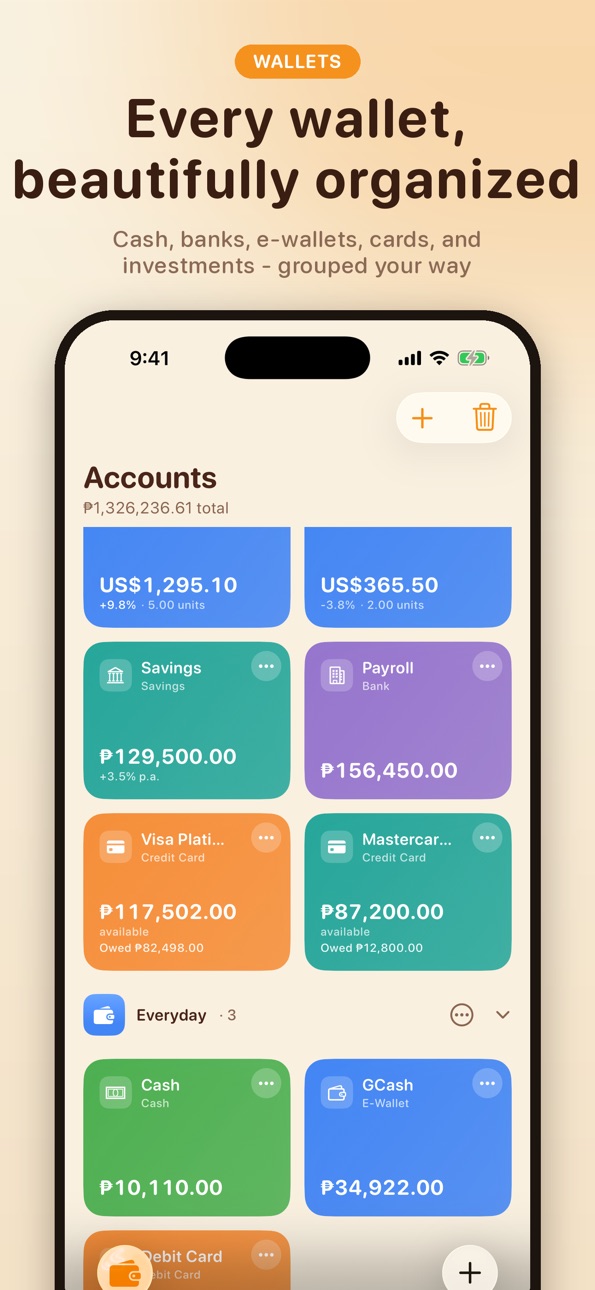
- Rearrange wallet folders - tap the circled dots on any folder and choose Move up or Move down
- Debts, savings goals, budgets, money owed to you, categories, and tags now sort alphabetically - suggested by a Boop user
- Category chips follow the same A-to-Z order when logging expenses or income, with Other staying at the end
IMPROVED
- Credit card screens open and scroll smoothly - Statement Cycles shows the latest cycle, with View all for the full history
- Applying a bank icon auto-matches the wallet color to the brand - BPI turns red, Metrobank blue, UnionBank orange
- Finance's Credit Cards rows show each card's own logo instead of a generic symbol
- Color swatches stay perfectly round when selected
FIXED
- Calendar Income and Spent totals no longer count transfers between wallets, and transfer rows show neutral - moving money isn't earning or spending
- Deleting a transaction from the Insights calendar now removes it immediately
- Custom card payments work even when nothing is due this cycle, so you can correct a card's balance any time
Have a suggestion of your own? Send it from Settings - Boop is built on your feedback.
Description
Take control of your money - completely free. Boop is the smart budget planner and expense tracker that helps you spend smarter, save faster, and never lose track of your finances. No subscriptions. No paywalls. No hidden fees. Works with any currency, in any country.
SMART INSIGHTS - EVERY iPhone
Personalized financial tips and a health score for your spending, savings, budgets, and debts. Runs on-device. Apple Intelligence iPhones get polished wording. Your data never leaves your phone.
TRACK EVERYTHING IN ONE PLACE
- Log expenses and income in seconds with the built-in calculator
- Multiple wallets: cash, bank, e-wallet, savings, debit, credit card
- Custom wallet icons - pick a symbol or use your own photo
- Multi-currency with live exchange rates - USD, EUR, GBP, JPY, and 150+ more
- Scan receipts to auto-fill amounts and categories
- Transaction search, calendar view, and cash flow charts
BUDGETS THAT FIT YOUR LIFE
- Set budgets by category with daily, weekly, semi-monthly, monthly, bi-monthly, or annual cycles
- Subcategories: split a budget into Personal, Travel, Work, or any bucket you like
- Copy budgets month to month in one tap
- Rollover unused budget into the next cycle
- Money Plan: envelope-style budgeting that gives every bit of cash a job
CREDIT CARD MANAGEMENT
- Statement cycles with per-cycle Amount Due - pay what's actually due, not your whole balance
- Installment plans with monthly schedules; set the financed principal and your available credit matches your card issuer to the cent
- Auto-record monthly installments as expenses under any category
- Optional: include credit card debt in your net balance
NEVER MISS A BILL
- Upcoming bills for the next two weeks at a glance
- Bill reminders and due-date alerts
- Subscription tracking with monthly cost at a glance
REPORTS & FORECASTS
- Reports: compare any period with the one before it, with expense and income breakdowns by category
- Category trends: 6 / 12 / 24 month movement, peak months, month-over-month change
- Year Forecast up to 50 years ahead - project income, expense, and net for retirement planning
- Net worth: wallets + investments + money owed, minus cards and debts
INVESTMENT PORTFOLIO
- Track stocks, cryptocurrency, and forex
- Live market prices with real-time profit and loss
REACH YOUR GOALS
- Savings goals with progress tracking and deadlines
- Debt tracker with interest, principal, and projected payoff dates
- Track money owed to you with backdated 'Owed since' dates
TRANSFERS THAT WORK YOUR WAY
- Schedule a transfer for a future date - money stays put until activation
- Recurring transfers fire on each cadence automatically
- Multi-currency transfers with live exchange rates
IMPORT FROM OTHER APPS
- CSV / TSV import recognizes 20+ date formats and infers type from sign
- Built-in help for converting Excel / Numbers / Sheets exports to CSV
SHORTCUTS & SIRI
- Log expenses or income from Shortcuts or Siri, or jump straight to the new-expense screen from Spotlight
- Assign to triple-tap or the Action Button for instant logging
100% FREE - YOUR CHOICE ON ADS
Every feature is free. A single small ad lives in Settings - turn it off any time at no cost. Support the solo developer with a tip or one-time Remove Ads unlock - either way, everything works the same.
PRIVACY BY DESIGN
- On-device intelligence - your data stays on YOUR phone
- iCloud sync across all your devices, no account required
- No bank linking needed, no tracking, no data selling; hide your balance with a tap
Boop works for everyone - any currency, any country, any goal. Always free.
In-App Purchases ZW pricing
One-Time Purchases
Coffee-Sized Tip—
Pizza-Sized Tip—
Taco-Sized Tip—
Remove Ads—
Capabilities
In-App Purchases
Accessibility
ipadiphonemacrealityDevicetvoswatch
Version history 25 versions
Build 887974037v1.512026-07-08 22:48:12
Built from your feedback.
NEW
- Savings interest posts automatically - wallets with a rate earn an Interest income entry every period you chose (daily, semi-monthly, monthly, bi-monthly, or yearly)
- Rearrange wallet folders - tap the circled dots on any folder and choose Move up or Move down
- Debts, savings goals, budgets, money owed to you, categories, and tags now sort alphabetically - suggested by a Boop user
- Category chips follow the same A-to-Z order when logging expenses or income, with Other staying at the end
IMPROVED
- Credit card screens open and scroll smoothly - Statement Cycles shows the latest cycle, with View all for the full history
- Applying a bank icon auto-matches the wallet color to the brand - BPI turns red, Metrobank blue, UnionBank orange
- Finance's Credit Cards rows show each card's own logo instead of a generic symbol
- Color swatches stay perfectly round when selected
FIXED
- Calendar Income and Spent totals no longer count transfers between wallets, and transfer rows show neutral - moving money isn't earning or spending
- Deleting a transaction from the Insights calendar now removes it immediately
- Custom card payments work even when nothing is due this cycle, so you can correct a card's balance any time
Have a suggestion of your own? Send it from Settings - Boop is built on your feedback.
Build 887877084v1.502026-07-07 17:14:23
Smarter credit cards and faster income logging.
FIXED
- Add Income from the menu or a Shortcut now opens the income screen every time - no more landing on Expense by mistake
- Credit cards no longer appear when picking a wallet for income
- Card payments no longer show as green income in your transaction feed - only real earnings glow green now
- Home account cards now match the richer wallet-card style used in Wallets, so your account colors feel consistent across the app
NEW
- Spotlight and Shortcuts can open Boop straight to New Income or New Expense
IMPROVED
- Finance summary cards and Home finance tiles now use the same saturated wallet-card style as Accounts, so the app feels consistent across tabs
- Wallet and investment action buttons (Expense, Income, Transfer, Add Contribution, Withdraw) now match the same bold card style
- Settings and the Tip Jar use the native close button, and the Tip Jar layout no longer clips
- Overdue badges on Finance credit card rows no longer wrap or cut off the amount due
- Calculator keypad redesigned with clearly separated keys, press feedback, and a hide-keypad key beside equals
- After paying a credit card statement, charges in the open cycle show as an upcoming statement - not a red amount due - until the statement actually closes
Build 887833368v1.492026-07-05 03:36:18
Budgets that tell the truth:
FIXED
- Deleting an expense now updates the budget's spent total everywhere immediately. No more "over budget" scares from transactions you already deleted.
NEW
- Refund a budget: fronted a group bill? When friends pay you back, log the income and tag it to that budget - your wallet gains the money and the budget's spent goes back down. Refunds appear inside the budget as green entries.
IMPROVED
- Boop now uses Apple's native Liquid Glass tab bar by default, with true minimize-on-scroll. Prefer the morphing top toolbar? Settings > Preferences.
Build 887688547v1.482026-07-03 20:26:21
Smarter credit cards, richer reports, and one clean design language.
NEW
- Reports on the Finance tab: compare this period with the last, with expense and income breakdowns by category
- Year Forecast and History are now one tap away on the Finance tab
- Installments: set the financed principal so Available Credit matches your card issuer to the cent
- Add Expense from Spotlight jumps straight to the new-expense screen
- Settings now opens as a full screen instead of a sheet
FIXED
- Paying a credit card now defaults to the Amount Due on your statement, not your full outstanding balance
- Custom payment amounts save exactly what you enter
- Paid statements roll forward - cards no longer linger as due on the Finance tab
- Tip Jar spacing, with an easier-to-tap close button
IMPROVED
- One design language: solid, readable cards across Home, Wallets, and Finance
- Smoother navigation with a morphing top toolbar and a tab bar that minimizes as you scroll
Build 887412725v1.462026-06-26 14:30:03
Native Liquid Glass toolbars and smoother navigation.
IMPROVED
- The top-right buttons on Home, Wallets, and Finance now use iOS 26's native Liquid Glass toolbar, so Profiles and Settings stay anchored in the same place as you switch tabs
- Wallets now has a trash button for quick access to Recently Deleted
- Smoother app launch with no layout jump
- Cleaner, more consistent navigation across the app
Build 887399648v1.452026-06-24 19:29:25
Navigation polish and reliability fixes.
FIXED
- Edit Transaction and other detail screens no longer have the floating header blocking Save or native toolbar buttons on iOS 26
- App Tracking Transparency prompt now appears when the app is active, including on iPad
IMPROVED
- iOS 26 Liquid Glass navigation hides the morphing header on pushed screens so wallet detail, Insights, and Edit Transaction use clean native navigation
Build 887104437v1.442026-06-23 18:38:04
A big round of new features and a more polished, consistent app.
NEW
- Create your own budget categories right from the New Budget screen
- Exclude any expense from your category budgets while still tracking it as spending
- Invoices: bill by hours or quantity, set your business as the sender, and export a cleaner PDF
- A dedicated Credit Cards screen where each card shows as a real card with its balance, amount due, and overdue status
- Changelog in Settings so you can see what changed across versions
IMPROVED
- Sharper Budgets with color-coded progress bars and a percent-used readout
- Clearer Savings Goals guidance and larger, easier-to-tap header buttons
Build 887009471v1.422026-06-16 14:34:02
Credit card statements, fixed.
FIXED
- Amount Due now clears once you've paid your statement and rolls to the next due date, instead of lingering on an already-paid balance
- The statement breakdown (purchases, installments, subscriptions) matches the cycle and adds up to Amount Due
NEW
- A separate Outstanding balance shows the total you still owe on the card, distinct from what's due this statement
Build 886961263v1.412026-06-15 21:13:52
MP2 savings done right, smarter card payments, and a currency fix.
NEW
- Pag-IBIG MP2 tracking - set each year's declared dividend rate and Boop compounds them at year-end, showing exactly what you've earned
- Add or withdraw MP2 contributions any time; no more units, prices, or buy/sell that don't apply to a savings program
FIXED
- Credit-card payments now include your linked subscriptions in the amount due, so a full or custom payment settles the whole statement instead of becoming surprise advance credit
- Entering an expense in a foreign currency no longer shows a false 'No rate available' when your wallet currency matches your app default
IMPROVED
- Customize your Home: show or hide the 'Spendable this month' card from Settings > Home screen
Build 886699626v1.402026-06-13 15:25:08
iOS 26 navigation and dependable iCloud sync — your money stays in sync on every device.
NEW
- Liquid Glass navigation on iOS 26 — native tab bar plus a + button for Chat with Boop, scan a receipt, or log income/expense in one tap
- Profile hub — switch profiles, set your preferred name, and import or export from the top-right profile button
- Classic or Glass — choose your navigation style in Settings > Preferences (iOS 26+)
- Live iCloud sync — changes on one device reach your others moments later via push, no relaunch needed
- Sync status in Settings — see when iCloud last imported or exported your data
FIXED
- New device setup — a second iPhone or iPad now waits for your existing iCloud data on first launch instead of starting fresh
- Shared wallets — updates flow reliably to everyone you shared with; edits sync both ways again
- Duplicate Personal profiles and extra starter Cash wallets from multi-device setups merge and clean up automatically
- Active profile selection syncs across devices via iCloud
IMPROVED
- Cleaner headers on Home, Wallets, and Finance; Scan Receipt from the Add menu opens the camera immediately
- Custom icons on wallet folders persist and sync across devices
UNDER THE HOOD
- Major reduction in iCloud sync errors and wasted network traffic
Build 886650184v1.372026-06-08 14:19:47
Bug fixes and improvements:
- Up-to-date exchange rates: converted balances and investment values now use today's rate, refreshed automatically on launch. No more stale conversions (like an old peso-to-dollar rate) sticking around.
- Deleting transactions now sticks: fixed a bug where a deleted transaction could still show inside a wallet or credit card and keep affecting the balance. Deletions apply everywhere instantly now.
- Smoother credit-card payments: paying your card now covers the full amount due, including subscription charges, instead of stopping at purchases or turning the extra into surprise "advance credit."
Build 886453292v1.362026-06-04 18:54:34
A safety net for your data, plus more control:
- Recently Deleted: deleted something by mistake? It now goes to Recently Deleted (Settings > Security & data) instead of vanishing for good. Restore transactions, budgets, goals, debts, money owed, recurring rules, and investments with one tap. Items are kept for 30 days.
- Fund goals from a wallet: adding to a savings goal can now deduct the money from a wallet (logged as an expense), and you can withdraw from a goal back into a wallet (logged as income). Leave the toggle off to just track the goal.
- Safer Demo Mode: it now creates a separate 'Demo' profile and switches to it, so your real data is never touched. Leaving demo mode deletes the demo profile entirely.
- More apps: a new section at the bottom of Settings featuring my other apps - RunSplit (interval running coach), EMOM Timer, and YAT (a GPS alarm for commuters).
- Behind the scenes: the Settings banner now serves correctly, plus reliability fixes.
Build 886366785v1.342026-06-01 17:51:34
Small but handy updates:
- Money Owed can now optionally deduct the loan from a wallet, so your balance drops when you lend cash out (and goes back up when they pay you). Prefer to just track who owes you? Leave the new 'Deduct from a wallet' toggle off - it remembers your choice.
- Fixed: wallet color coding now matches between the Home screen and the Wallets tab - a teal wallet looks teal in both places instead of washing out to grey on Home.
Build 886259602v1.322026-05-29 04:38:25
Quick follow-up to 1.31.
- Fixed the wallet picker on the Pay Installment screen: the whole row is now tappable, not just the icon and name. Tapping anywhere - including the empty space on the right - selects that wallet.
- Bank brand logos now render reliably in that picker too.
Thanks for the detailed bug report - keep it coming.
Build 886287791v1.332026-05-29 22:17:29
Thanks for the continued feedback!
- Local pricing: tips and the one-time Remove Ads unlock are now priced in Philippine pesos (and fairly localized for every other store).
- You can support Boop right from Home and Wallets now - a small, optional banner. Tipping or buying Remove Ads turns it off everywhere, or switch it off anytime in Settings. No payment ever required.
- Fixed: on the Pay Installment screen you can now tap anywhere on a wallet row to pick it, and bank logos show there too.
Build 886118359v1.312026-05-28 20:44:53
More community-requested features on top of the big v1.31 update.
INCOME DISTRIBUTION
- Insights now has an Income distribution donut right beside the Expense one - see exactly where your money comes from, with the same This month / This year / Last 12 months toggle.
- Tap any income source to see its month-by-month trend.
MONEY OWED, GROUPED BY PERSON
- 'Money owed to you' now rolls every split and IOU up under one person by default, so the same friend's separate entries collapse into a single ledger row with the running total. Tap to see every entry, or switch back to 'By transaction' anytime.
FORECAST: SCHEDULED-ONLY BASIS
- Year Forecast has a new Basis toggle. 'Scheduled only' counts just your real actuals and active recurring rules - so income or expenses that don't start until later (say December) stay out of every earlier month instead of being smeared across the year by the rolling average. 'Smart' keeps the original blended projection.
MORE BANK LOGOS
- Added 25+ brands incl. US banks and fintech: Chase, Bank of America, Wells Fargo, Citi, Capital One, Amex, Discover, Ally, Chime, SoFi, Venmo, Cash App, Robinhood, Coinbase, Revolut, Monzo, N26 - alongside the existing PH line-up. 58 brands render their real logo, sourced from each brand's current App Store icon.
ALSO IN 1.31
- Bank logos render edge-to-edge on every wallet card, picker, and finance row, plus a 'Detect bank icons' tool to retro-match existing wallets.
- Category trends: tap any category to see its 6 / 12 / 24 month movement.
- Hide default categories; 100 SF Symbols for custom icons.
- Budgets: per-subcategory breakdown card and correct month-by-month spent totals.
- Year Forecast up to 50 years with combined 1y / 3y / 5y / 10y / All totals.
- Debt: projected payoff date callout.
- Custom split percent (incl. 100%) and a link from each receivable back to its source transaction.
Thanks to the testers and the Facebook group - keep the feedback coming.
Build 885995569v1.302026-05-23 21:31:30
Big batch of features and fixes from the Facebook group reports - thank you all.
NEW
- Tap any category on Insights to see its month-by-month movement. New trend view shows 6 / 12 / 24 month bars, average per active month, peak and lightest months, plus a green / red chip telling you if the category is trending in your favour.
- The Insights category breakdown card now has a Month / Year / 12m toggle, so you can see how spending splits across categories for the period you actually care about, not just the current month.
- Year Forecast now reaches 50 years out, useful for retirement and long-term planning. Recurring rules still respect their end dates so projections stop when they should.
- Bank icon suggestions. Type GCash, BPI, BDO, Metrobank, GoTyme, Maya, Landbank, RCBC and 25+ more PH banks / e-wallets and Boop offers the matching brand icon in one tap.
- 'Owed since' dates on Money Owed. Backdate the day someone borrowed from you - shown on the list, the detail header, and printed on the share-able receipt.
- Clearer tag vs subcategory chips on Add Transaction. Subcategories now wear a hierarchy arrow and inherit the category color; tags lead with a tag glyph in the tag's color.
- Global subcategories. On Settings -> Categories & Tags, tap any category to expand it and add subcategories (Groceries -> Supermarket, Wet Market, Convenience).
FIXED
- Credit card Amount Due now reflects the cycle that just closed, not the lifetime outstanding. Upcoming Bills shows the right bill for each individual due date instead of duplicating the same total across multiple months.
- Upcoming Bills hero total converts each row's native currency to your display currency before summing. A PHP card and an AUD card no longer add as raw numbers.
- CSV import now recognizes 20+ date formats, infers income vs expense from the sign of the amount, accepts TSV and semicolon-delimited files, and reads UTF-16 / Windows-1252 encodings used by some Excel exports.
Thank you for the detailed bug reports - keep them coming.
Build 885939579v1.292026-05-21 22:50:16
New ways to set up budgets, a hide option for the Smart Insights tip, debt due dates that actually move, a Year Forecast that respects end dates, and clearer savings interest.
NEW
- Copy budgets month to month. From the Budgets screen, tap + and choose Copy from last month, or Copy to next month after the current list is set up. Categories that already exist in the destination are skipped so re-tapping is safe. Spent resets to zero each month.
- Hide Smart Insights tip. Settings -> Home screen -> Smart Insights tip lets you remove the one-line tip card above Net Total. The full Smart Insights screen still works for everyone - the heuristic engine runs on every iPhone, no Apple Intelligence required.
FIXED
- Year Forecast now respects start and end dates on recurring rules. A salary that ends Jan 1, 2027 no longer keeps projecting through the rest of 2027.
- Debt due dates now advance. When you mark a scheduled debt payment as paid, the debt card shows the next upcoming installment date instead of the original start date. Past-due rows also show an OVERDUE pill instead of being mislabeled as TODAY.
- Savings interest never changed your balance, but the UI made it look like money was being added (+2.30/day next to your total). Estimates are now labeled clearly and use neutral styling.
- Edit Wallet now edits your current balance (what you see on the card), not just the starting balance. Transaction history stays linked.
- Settings ad slot: consent gating, layout fixes, and Show ads toggle sync.
Thank you for the reports in the Facebook group.
Build 885877805v1.282026-05-20 23:40:21
Power features for moving money around plus a long-overdue widget dark mode fix.
FIXED
- Widget dark mode (really, this time). The home-screen widgets now resolve their light and dark colors from the live system appearance on every redraw, instead of from cached asset entries that iOS quietly stopped re-evaluating. No more cream background with washed-out text.
NEW
- Custom installment payments. Pay any amount on a credit card installment, not just the strict monthly. Toggle 'Custom amount' on the Pay sheet to enter your own number. Useful for buy-now-pay-later cards like TikTok PayLater that accept partial payments - they accumulate cleanly until they cover the next full month.
- Schedule a transfer for the future. Toggle 'Schedule for future date' on the Transfer screen and pick when it should activate. Until then, the transfer shows as Pending - money is earmarked but balances don't move yet. Great for credit card statement payments or rent.
- Recurring transfers. Set up a standing order like 'every 5th of the month move money from Bank to Credit Card' and Boop runs it for you automatically. Find it on the Transfer screen ? Recurring transfers.
- Deep link Note support. Custom Shortcuts using boop:///log-expense or boop:///log-income deep links can now pass a note parameter and the note lands on the logged transaction. For everyone who built advanced Shortcuts and ran into the missing field - thanks for the detailed report.
Thank you to everyone in the Facebook group for the feature requests.
Build 885764777v1.252026-05-18 00:05:47
Reports, smarter debts, and a long-overdue dark mode widget fix.
NEW
- Year Forecast report (Insights tab): a 12-month projection of income, expense, and net. Past months use your real transactions; future months blend your recurring rules with your 6-month average. Share the summary in one tap.
- Debt principal and interest split: add an annual rate to any loan and Boop breaks every payment into principal and interest using the remaining balance.
- Extra principal payments: pay your loan down faster with an optional per-payment amount. The amortization schedule updates instantly.
- Per-payment breakdown on every debt card and the upcoming schedule (principal, interest, extra, remaining balance).
FIXED
- Credit card Amount Due now includes monthly subscriptions linked to the card - so the headline matches the rows below it.
- Upcoming Bills credit card row now shows the cycle amount due, not the entire outstanding balance.
- Home screen widgets finally follow your system appearance - no more invisible text on cream in dark mode.
- Small polish and stability fixes throughout.
Build 885800515v1.272026-05-18 21:40:57
Bug fixes and power features straight from your feedback.
FIXED
- Statement Cycle math now matches your bill. Cycle Spent includes installment monthly payments and subscription billings that hit the card during the cycle - not just direct purchases. A breakdown chip row shows where each ledger came from.
- Subcategory budgets now work end-to-end. Edit amounts inline on the budget, and pick a subcategory chip when adding or editing an expense.
- Categories screen explains the gestures (swipe to delete, tap to edit, subcategories live on budgets).
NEW
- Auto-record credit card installments. Toggle on Auto-record on any installment and pick a category. Each month on the installment date, Boop logs the monthly payment as an expense automatically.
- End date for recurring transactions. Optional toggle when adding or editing - perfect for fixed-term commitments like a 12-month gym membership or a temporary side gig.
- Credit cards in net balance. New Settings -> Preferences toggle. Off by default keeps the historical behaviour. On subtracts every credit card's outstanding balance for a 'what you actually have' net number.
- Note field in Siri & Shortcuts is now front-and-center, so you can capture context (milk tea, grab ride) without opening the app.
Thank you to everyone in the Facebook group for the detailed reports.
Build 885728723v1.232026-05-15 22:58:19
Boop now keeps track of your bills so you don't have to.
NEW
- Upcoming Bills agenda. A new screen in the Finance tab groups every upcoming bill, recurring payment, debt due date, and credit card payment by week with running totals. Tap any row to pay, edit, or mark paid.
- Recurring bill reminders. Set up Meralco, Converge, Spotify, or any recurring expense once - Boop now sends a local notification before each one is due. Long-press the notification to Mark Paid or Snooze 1 day without opening the app.
- Weekly digest. Optional Sunday-evening summary: 'X bills this week, total Y.' One glance to plan the week ahead.
- Budget threshold alerts. When a category budget passes 80% or goes over the limit, Boop fires a notification on next app open - rate-limited to once per day per category.
IMPROVED
- Money Owed to You now shows what's still unpaid on the summary card and Receivables hero. Partial payments update in real time.
- Mark Paid on receivables now asks which wallet to add the collected money to.
- Settings has a new Ad diagnostic panel so you can see why ads do (or don't) show up.
- Internals modernized: every shared state class now uses Swift's Observation framework instead of legacy Combine - faster view updates, less code.
- Wallets section now has a grid/list layout toggle.
- Minor polish and stability improvements.
Build 885627298v1.222026-05-13 20:28:46
Smart Insights now works on every iPhone Boop supports - not just Apple Intelligence ones.
NEW
- Smart Insights on every device. A new deterministic on-device engine analyzes your savings rate, emergency fund, debts, budgets, and goals - and surfaces personalized tips with concrete actions, even on iPhones without Apple Intelligence.
- The Home dashboard's one-line smart tip and the Insights tab's full advisor now both work universally. No more 'Apple Intelligence required' dead-ends.
IMPROVED
- On Apple Intelligence-eligible iPhones, the same on-device engine produces the numbers and Apple Intelligence is used purely to phrase them - so the wording is friendlier without inventing any numbers.
- Wallets section now has a grid/list layout toggle.
- Friendlier copy across Onboarding, Help, and the Insights screen.
- Minor polish and stability improvements.
Build 885575750v1.212026-05-12 16:15:35
Got a bug to report or a feature you'd love to see? There's now a direct link to the Boop community on Facebook right inside the app.
NEW
- Settings -> Connect now has a Bug Reports & Feature Requests row that takes you straight to the Boop Facebook group. Share ideas, report issues, and connect with other users.
IMPROVED
- Minor polish and stability improvements.
Build 885505468v1.202026-05-11 21:31:28
Bi-Monthly and Semi-Monthly cycles are now first-class — match your real pay cadence across budgets, recurring transactions, debt payments, and savings.
NEW
• Bi-Monthly (every 2 months) and Semi-Monthly (twice a month — the 15th + end of month, classic PH payday cycle) join Daily, Weekly, Monthly, and Annual everywhere they make sense.
• Budgets — pick the cycle that matches how you actually get paid or pay bills. Spent totals, "left this period", and the progress meter all honor the cycle you picked.
• Recurring transactions — Semi-Monthly entries automatically alternate between mid-month and end-of-month so split-paychecks land on the right days. Bi-Monthly entries advance every 2 months on the same day.
• Debt payment schedules — set up a Semi-Monthly or Bi-Monthly payoff plan. Upcoming payment dates, the cycle countdown, and the projected end date all use the new cadence correctly.
• Savings interest — accrue on a Semi-Monthly or Bi-Monthly frequency, with the projected interest preview updated to match.
IMPROVED
• Money Plan now normalizes every cycle (Daily, Weekly, Semi-Monthly, Monthly, Bi-Monthly, Annual) to its monthly equivalent so Total Assigned is always apples-to-apples — no more mental math for non-monthly items.
Price history by region
Currency
Show
Columns
Search
Availability 75 of 75 storefronts
| Region | Language | Price | Ratings | Avg | Version |
|---|---|---|---|---|---|
| AG | en-GB | Free | 0 | — | 1.51 |
| AI | en-GB | Free | 0 | — | 1.51 |
| AO | en-GB | Free | 0 | — | 1.51 |
| AR | es-MX | Free | 0 | — | 1.51 |
| BB | en-GB | Free | 0 | — | 1.51 |
| BF | en-GB | Free | 0 | — | 1.51 |
| BJ | en-GB | Free | 0 | — | 1.51 |
| BO | es-MX | Free | 0 | — | 1.51 |
| BR | pt-BR | Free | 0 | — | 1.51 |
| BS | en-GB | Free | 0 | — | 1.51 |
| BW | en-GB | Free | 0 | — | 1.51 |
| BZ | en-GB | Free | 0 | — | 1.51 |
| CD | en-GB | Free | 0 | — | 1.51 |
| CG | en-GB | Free | 0 | — | 1.51 |
| CI | fr-FR | Free | 0 | — | 1.51 |
| CL | es-MX | Free | 0 | — | 1.51 |
| CM | fr-FR | Free | 0 | — | 1.51 |
| CO | es-MX | Free | 0 | — | 1.51 |
| CR | es-MX | Free | 0 | — | 1.51 |
| CV | en-GB | Free | 0 | — | 1.51 |
| DM | en-GB | Free | 0 | — | 1.51 |
| DO | es-MX | Free | 0 | — | 1.51 |
| DZ | en-GB | Free | 0 | — | 1.51 |
| EC | es-MX | Free | 0 | — | 1.51 |
| GA | fr-FR | Free | 0 | — | 1.51 |
| GD | en-GB | Free | 0 | — | 1.51 |
| GH | en-GB | Free | 0 | — | 1.51 |
| GM | en-GB | Free | 0 | — | 1.51 |
| GT | es-MX | Free | 0 | — | 1.51 |
| GW | en-GB | Free | 0 | — | 1.51 |
| GY | en-GB | Free | 0 | — | 1.51 |
| HN | es-MX | Free | 0 | — | 1.51 |
| JM | en-GB | Free | 0 | — | 1.51 |
| KE | en-GB | Free | 0 | — | 1.51 |
| KN | en-GB | Free | 0 | — | 1.51 |
| KY | en-GB | Free | 0 | — | 1.51 |
| LC | en-GB | Free | 0 | — | 1.51 |
| LR | en-GB | Free | 0 | — | 1.51 |
| LY | en-GB | Free | 0 | — | 1.51 |
| MA | en-GB | Free | 0 | — | 1.51 |
| MG | en-GB | Free | 0 | — | 1.51 |
| ML | en-GB | Free | 0 | — | 1.51 |
| MS | en-GB | Free | 0 | — | 1.51 |
| MU | en-GB | Free | 0 | — | 1.51 |
| MW | en-GB | Free | 0 | — | 1.51 |
| MX | es-MX | Free | 0 | — | 1.51 |
| MZ | en-GB | Free | 0 | — | 1.51 |
| NA | en-GB | Free | 0 | — | 1.51 |
| NE | en-GB | Free | 0 | — | 1.51 |
| NG | en-GB | Free | 0 | — | 1.51 |
| NI | es-MX | Free | 0 | — | 1.51 |
| PA | es-MX | Free | 0 | — | 1.51 |
| PE | es-MX | Free | 0 | — | 1.51 |
| PY | es-MX | Free | 0 | — | 1.51 |
| RW | en-GB | Free | 0 | — | 1.51 |
| SC | en-GB | Free | 0 | — | 1.51 |
| SL | en-GB | Free | 0 | — | 1.51 |
| SN | en-GB | Free | 0 | — | 1.51 |
| SR | en-GB | Free | 0 | — | 1.51 |
| ST | en-GB | Free | 0 | — | 1.51 |
| SV | es-MX | Free | 0 | — | 1.51 |
| SZ | en-GB | Free | 0 | — | 1.51 |
| TC | en-GB | Free | 0 | — | 1.51 |
| TD | en-GB | Free | 0 | — | 1.51 |
| TN | en-GB | Free | 0 | — | 1.51 |
| TT | en-GB | Free | 0 | — | 1.51 |
| TZ | en-GB | Free | 0 | — | 1.51 |
| UG | en-GB | Free | 0 | — | 1.51 |
| US | en-US | Free | 0 | — | 1.51 |
| UY | en-GB | Free | 0 | — | 1.51 |
| VC | en-GB | Free | 0 | — | 1.51 |
| VE | es-MX | Free | 0 | — | 1.51 |
| VG | en-GB | Free | 0 | — | 1.51 |
| ZM | en-GB | Free | 0 | — | 1.51 |
| ZW | en-GB | Free | 0 | — | 1.51 |
Change log 29 changes · ZW
✎
releaseNotes updated
Built from your feedback.
NEW
- Savings interest posts automatically - wallets with a rate earn an Interest income entry every period you chose (daily, semi-mo
✎
description updated
Take control of your money - completely free. Boop is the smart budget planner and expense tracker that helps you spend smarter, save faster, and never lose tra
✎
subtitle updated
Money Manager & Spending Plan
✎
name updated
Boop: Budget & Expense Tracker
◆
Version 1.51 released
Built from your feedback.
NEW
- Savings interest posts automatically - wallets with a rate earn an Interest income entry every period you chose (daily, semi-monthly, monthly, bi-monthly, or yearly)
- Rearrange wallet folders - tap the circ
◆
Version 1.50 released
Smarter credit cards and faster income logging.
FIXED
- Add Income from the menu or a Shortcut now opens the income screen every time - no more landing on Expense by mistake
- Credit cards no longer appear when picking a wallet for income
◆
Version 1.49 released
Budgets that tell the truth:
FIXED
- Deleting an expense now updates the budget's spent total everywhere immediately. No more "over budget" scares from transactions you already deleted.
NEW
- Refund a budget: fronted a group bill? When fr
◆
Version 1.48 released
Smarter credit cards, richer reports, and one clean design language.
NEW
- Reports on the Finance tab: compare this period with the last, with expense and income breakdowns by category
- Year Forecast and History are now one tap away on th
◆
Version 1.46 released
Native Liquid Glass toolbars and smoother navigation.
IMPROVED
- The top-right buttons on Home, Wallets, and Finance now use iOS 26's native Liquid Glass toolbar, so Profiles and Settings stay anchored in the same place as you switch tabs
◆
Version 1.45 released
Navigation polish and reliability fixes.
FIXED
- Edit Transaction and other detail screens no longer have the floating header blocking Save or native toolbar buttons on iOS 26
- App Tracking Transparency prompt now appears when the app is
◆
Version 1.44 released
A big round of new features and a more polished, consistent app.
NEW
- Create your own budget categories right from the New Budget screen
- Exclude any expense from your category budgets while still tracking it as spending
- Invoices: bill
◆
Version 1.42 released
Credit card statements, fixed.
FIXED
- Amount Due now clears once you've paid your statement and rolls to the next due date, instead of lingering on an already-paid balance
- The statement breakdown (purchases, installments, subscriptions)
◆
Version 1.41 released
MP2 savings done right, smarter card payments, and a currency fix.
NEW
- Pag-IBIG MP2 tracking - set each year's declared dividend rate and Boop compounds them at year-end, showing exactly what you've earned
- Add or withdraw MP2 contribut
◆
Version 1.40 released
iOS 26 navigation and dependable iCloud sync — your money stays in sync on every device.
NEW
- Liquid Glass navigation on iOS 26 — native tab bar plus a + button for Chat with Boop, scan a receipt, or log income/expense in one tap
- Profil
◆
Version 1.37 released
Bug fixes and improvements:
- Up-to-date exchange rates: converted balances and investment values now use today's rate, refreshed automatically on launch. No more stale conversions (like an old peso-to-dollar rate) sticking around.
- Delet
◆
Version 1.36 released
A safety net for your data, plus more control:
- Recently Deleted: deleted something by mistake? It now goes to Recently Deleted (Settings > Security & data) instead of vanishing for good. Restore transactions, budgets, goals, debts, money
◆
Version 1.34 released
Small but handy updates:
- Money Owed can now optionally deduct the loan from a wallet, so your balance drops when you lend cash out (and goes back up when they pay you). Prefer to just track who owes you? Leave the new 'Deduct from a wall
◆
Version 1.33 released
Thanks for the continued feedback!
- Local pricing: tips and the one-time Remove Ads unlock are now priced in Philippine pesos (and fairly localized for every other store).
- You can support Boop right from Home and Wallets now - a small,
◆
Version 1.32 released
Quick follow-up to 1.31.
- Fixed the wallet picker on the Pay Installment screen: the whole row is now tappable, not just the icon and name. Tapping anywhere - including the empty space on the right - selects that wallet.
- Bank brand logo
◆
Version 1.31 released
More community-requested features on top of the big v1.31 update.
INCOME DISTRIBUTION
- Insights now has an Income distribution donut right beside the Expense one - see exactly where your money comes from, with the same This month / This y
◆
Version 1.30 released
Big batch of features and fixes from the Facebook group reports - thank you all.
NEW
- Tap any category on Insights to see its month-by-month movement. New trend view shows 6 / 12 / 24 month bars, average per active month, peak and lightes
◆
Version 1.29 released
New ways to set up budgets, a hide option for the Smart Insights tip, debt due dates that actually move, a Year Forecast that respects end dates, and clearer savings interest.
NEW
- Copy budgets month to month. From the Budgets screen, tap
◆
Version 1.28 released
Power features for moving money around plus a long-overdue widget dark mode fix.
FIXED
- Widget dark mode (really, this time). The home-screen widgets now resolve their light and dark colors from the live system appearance on every redraw,
◆
Version 1.27 released
Bug fixes and power features straight from your feedback.
FIXED
- Statement Cycle math now matches your bill. Cycle Spent includes installment monthly payments and subscription billings that hit the card during the cycle - not just direct
◆
Version 1.25 released
Reports, smarter debts, and a long-overdue dark mode widget fix.
NEW
- Year Forecast report (Insights tab): a 12-month projection of income, expense, and net. Past months use your real transactions; future months blend your recurring rules
◆
Version 1.23 released
Boop now keeps track of your bills so you don't have to.
NEW
- Upcoming Bills agenda. A new screen in the Finance tab groups every upcoming bill, recurring payment, debt due date, and credit card payment by week with running totals. Tap an
◆
Version 1.22 released
Smart Insights now works on every iPhone Boop supports - not just Apple Intelligence ones.
NEW
- Smart Insights on every device. A new deterministic on-device engine analyzes your savings rate, emergency fund, debts, budgets, and goals - a
◆
Version 1.21 released
Got a bug to report or a feature you'd love to see? There's now a direct link to the Boop community on Facebook right inside the app.
NEW
- Settings -> Connect now has a Bug Reports & Feature Requests row that takes you straight to the Boo
◆
Version 1.20 released
Bi-Monthly and Semi-Monthly cycles are now first-class — match your real pay cadence across budgets, recurring transactions, debt payments, and savings.
NEW
• Bi-Monthly (every 2 months) and Semi-Monthly (twice a month — the 15th + end of