Home › Utilities

 CA
CA
CAen-CA USen-US
 AENot Available
 AFNot Available
 ALNot Available
 AMNot Available
 ATNot Available
 AUNot Available
 AZNot Available
 BANot Available
 BENot Available
 BGNot Available
 BHNot Available
 BMNot Available
 BNNot Available
 BTNot Available
 BYNot Available
 CHNot Available
 CNNot Available
 CYNot Available
 CZNot Available
 DENot Available
 DKNot Available
 EENot Available
 EGNot Available
 ESNot Available
 FINot Available
 FJNot Available
 FRNot Available
 GBNot Available
 GENot Available
 GRNot Available
 HKNot Available
 HRNot Available
 HUNot Available
 IDNot Available
 IENot Available
 ILNot Available
 INNot Available
 IQNot Available
 ISNot Available
 ITNot Available
 JONot Available
 JPNot Available
 KGNot Available
 KHNot Available
 KRNot Available
 KWNot Available
 KZNot Available
 LBNot Available
 LKNot Available
 LTNot Available
 LUNot Available
 LVNot Available
 MDNot Available
 MENot Available
 MKNot Available
 MNNot Available
 MONot Available
 MRNot Available
 MTNot Available
 MYNot Available
 NONot Available
 NPNot Available
 NRNot Available
 NZNot Available
 OMNot Available
 PGNot Available
 PHNot Available
 PKNot Available
 PLNot Available
 PWNot Available
 QANot Available
 RONot Available
 RSNot Available
 RUNot Available
 SANot Available
 SENot Available
 SGNot Available
 SINot Available
 SKNot Available
 THNot Available
 TJNot Available
 TMNot Available
 TRNot Available
 TWNot Available
 UANot Available
 UZNot Available
 VNNot Available
 XKNot Available
 YENot Available
 ZANot Available
2 of 92 storefronts
Content in en-US
Content in en-US
Information
Preview 2 platforms
iPhone 4 images


iPad 4 images


What’s New Version 1.3.0
What's New in 1.3.0
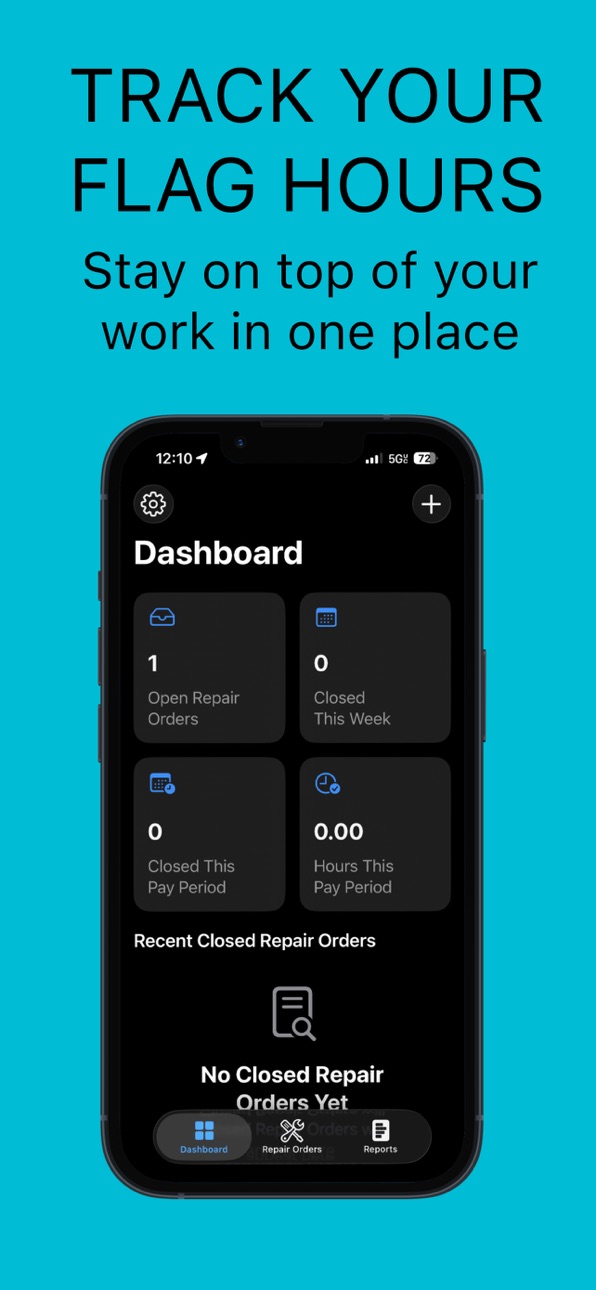
• Redesigned Home Screen — A cleaner, faster interface with your key stats front and center: open repair orders, hours, and earnings for the current pay period.
• Smarter Earnings Tracking — Hours from open Repair Orders now count toward your current pay period. Earnings are calculated once an RO is closed, so your numbers are always accurate.
• Compact Repair Order Cards — Cleaner list view that shows what matters at a glance.
• Performance improvements and UI polish throughout the app.
Description
Flat Rate Tech Log helps automotive technicians track repair orders, log work items, scan VINs, attach photos, and generate professional reports from one place.
Built for real shop workflow, Flat Rate Tech Log makes it easier to organize repair order activity without paper notes or scattered information.
FEATURES
• Track repair orders in one organized log
• Add multiple work items to the same repair order
• Record diagnostic and repair labor entries
• Scan VIN numbers with the camera
• Attach photos to each repair order
• View weekly, monthly, and yearly activity
• Export professional PDF reports for hours flagged.
• Keep closed repair orders in read-only mode for better record keeping
DESIGNED FOR TECHNICIANS
Flat Rate Tech Log is made for service technicians who need a faster and cleaner way to keep track of jobs, labor entries, and repair history.
• “Built for automotive technicians and repair shops”
• “Any technician can track repair orders and flat rate hours”
• “Public productivity app for automotive service professionals”
SUBSCRIPTION OPTIONS
• Weekly Access
• Monthly Access
• Yearly Access
Payment will be charged to your Apple Account at confirmation of purchase. Subscriptions automatically renew unless canceled at least 24 hours before the end of the current period. Your account will be charged for renewal within 24 hours before the end of the current period. You can manage and cancel your subscriptions in your App Store account settings after purchase.
Flat Rate Tech Log is a productivity app for automotive technicians. The app includes auto-renewable subscriptions for Weekly, Monthly, and Yearly access.
Terms of Use (EULA):
https://cesaribarra.net/terms-of-use-end-user-license-agreement/
Privacy Policy:
https://cesaribarra.net/privacy-policy/
In-App Purchases CA pricing
Full Access Subscription
Yearly Access · Yearly—
Monthly Access · Monthly—
Weekly Access · 7 days—
Capabilities
In-App Purchases
Accessibility
ipadiphonemacrealityDevicetvoswatch
Version history 4 versions
Build 886761249v1.3.02026-06-10 21:33:58
What's New in 1.3.0
• Redesigned Home Screen — A cleaner, faster interface with your key stats front and center: open repair orders, hours, and earnings for the current pay period.
• Smarter Earnings Tracking — Hours from open Repair Orders now count toward your current pay period. Earnings are calculated once an RO is closed, so your numbers are always accurate.
• Compact Repair Order Cards — Cleaner list view that shows what matters at a glance.
• Performance improvements and UI polish throughout the app.
Build 886090167v1.2.02026-05-25 18:13:27
What's New in 1.2.0
• Custom Pay Periods — Define your own pay period schedule: Weekly, Biweekly, Semimonthly, or Monthly, with custom start dates to match your shop's payroll.
• Quick Template Search — Search your Job Templates directly from the Load Template screen.
• Create Templates on the fly — Add new Job Templates without leaving the New Work Item form.
• Bug fixes and performance improvements.
Build 885844450v1.1.02026-05-19 16:43:35
What's New in 1.1.0
- Job Templates — Save your most common jobs and load
them instantly on any Repair Order.
- Earnings Calculator — Set your hourly rate in Settings
and see exactly how much you've made per pay period.
- iCloud Sync — Your Repair Orders now sync automatically
across all your iPhone, iPad, and Mac devices.
- Search in Job Templates for quick access.
- UI improvements and performance fixes.
Build 883326557v1.02026-03-24 15:12:09
Price history by region
Currency
Show
Columns
Search
Availability 2 of 92 storefronts
| Region | Language | Price | Ratings | Avg | Version |
|---|---|---|---|---|---|
| CA | en-CA | Free | 0 | — | 1.3.0 |
| US | en-US | Free | 0 | — | 1.3.0 |
Not available in: AE, AF, AL, AM, AT, AU, AZ, BA, BE, BG, BH, BM, BN, BT, BY, CH, CN, CY, CZ, DE, DK, EE, EG, ES, FI, FJ, FR, GB, GE, GR, HK, HR, HU, ID, IE, IL, IN, IQ, IS, IT, JO, JP, KG, KH, KR, KW, KZ, LB, LK, LT, LU, LV, MD, ME, MK, MN, MO, MR, MT, MY, NO, NP, NR, NZ, OM, PG, PH, PK, PL, PW, QA, RO, RS, RU, SA, SE, SG, SI, SK, TH, TJ, TM, TR, TW, UA, UZ, VN, XK, YE, ZA
Change log 8 changes · CA
✎
releaseNotes updated
What's New in 1.3.0
• Redesigned Home Screen — A cleaner, faster interface with your key stats front and center: open repair orders, hours, and earnings for th
✎
description updated
Flat Rate Tech Log helps automotive technicians track repair orders, log work items, scan VINs, attach photos, and generate professional reports from one place.
✎
subtitle updated
Track Flag Hours Fast
✎
name updated
Flat Rate Tech Log
◆
Version 1.3.0 released
What's New in 1.3.0
• Redesigned Home Screen — A cleaner, faster interface with your key stats front and center: open repair orders, hours, and earnings for the current pay period.
• Smarter Earnings Tracking — Hours from open Repair Orde
◆
Version 1.2.0 released
What's New in 1.2.0
• Custom Pay Periods — Define your own pay period schedule: Weekly, Biweekly, Semimonthly, or Monthly, with custom start dates to match your shop's payroll.
• Quick Template Search — Search your Job Templates directly f
◆
Version 1.1.0 released
What's New in 1.1.0
- Job Templates — Save your most common jobs and load
them instantly on any Repair Order.
- Earnings Calculator — Set your hourly rate in Settings
and see exactly how much you've made per pay period.
- iCloud Sync
◆
Version 1.0 released