Home › Lifestyle

 ZM
ZM
 USen-US
 AGen-GB
 AIen-GB
 AOen-GB
 ARes-MX
 BBen-GB
 BFen-GB
 BJen-GB
 BOes-MX
 BRpt-BR
 BSen-GB
 BWen-GB
 BZen-GB
 CDen-GB
 CGen-GB
 CIfr-FR
 CLes-MX
 CMfr-FR
 COes-MX
 CRes-MX
 CVen-GB
 DMen-GB
 DOes-MX
 DZen-GB
 ECes-MX
 GAfr-FR
 GDen-GB
 GHen-GB
 GMen-GB
 GTes-MX
 GWen-GB
 GYen-GB
 HNes-MX
 JMen-GB
 KEen-GB
 KNen-GB
 KYen-GB
 LCen-GB
 LRen-GB
 LYen-GB
 MAen-GB
 MGen-GB
 MLen-GB
 MSen-GB
 MUen-GB
 MWen-GB
 MXes-MX
 MZen-GB
 NAen-GB
 NEen-GB
 NGen-GB
 NIes-MX
 PAes-MX
 PEes-MX
 PYes-MX
 RWen-GB
 SCen-GB
 SLen-GB
 SNen-GB
 SRen-GB
 STen-GB
 SVes-MX
 SZen-GB
 TCen-GB
 TDen-GB
 TNen-GB
 TTen-GB
 TZen-GB
 UGen-GB
 UYen-GB
 VCen-GB
 VEes-MX
 VGen-GBZMen-GB
 ZWen-GB
75 of 75 storefronts
Content in en-US
Content in en-US
Information
Apple ID6760478193
Bundle IDcom.pixbackpack.app
SellerSeller
Min iOS15.1
Min macOS12.0
Device familiesiphone, ipod
Released2026-03-22
Copyright© 2026 AudD, LLC
Privacy policyLink ↗
Preview 1 platform
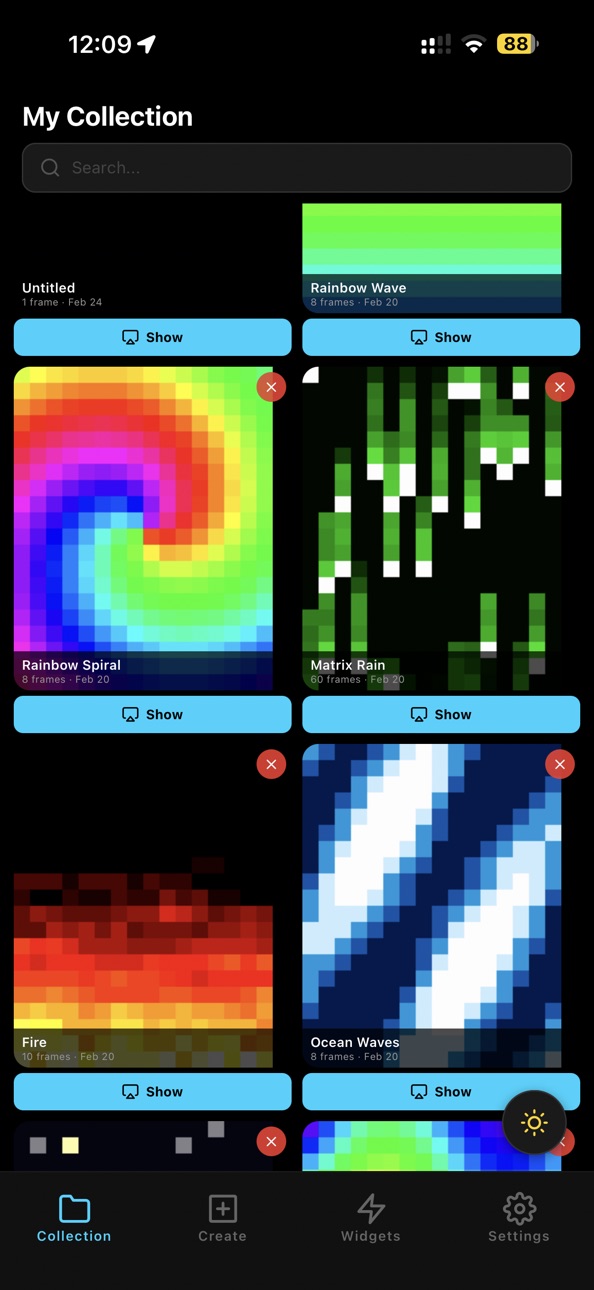
iPhone 7 images


What’s New Version 1.2.0
Editor — Selection & Drag Tools
- Rectangular selection tool (drag to define area)
- Freeform lasso selection tool (draw path, interior auto-filled via ray-casting)
- Drag-to-move selected pixels (vacated pixels become black)
- Across-frames toggle (off by default) to apply moves to all frames
- Auto-commit on tool switch or frame change
Chain Animations
- New screen to compose sequences of saved animations
- Per-animation repetition count, per-still duration control
- Direction expansion (alternate → fwd+bwd frames)
- Real-time frame count (vs 200 limit) and color count (vs 256)
- Drag-to-reorder
- Save as editable chain composition (reopenable from collection)
- Convert to a long animation
- Export, share, and duplicate support for chains
File Association
- .pixpack files associated with the app
Settings & Links
- Extract from Video link
- Animation Library link
Misc
- Removed 15-character name length limit
- Bike mode stop bar slightly taller (100→120px)
- Keyboard dismisses on tap outside search bar
- Other minor changes and fixes
Palette & Video Tool
- Video-to-pixpack tool: k-means refined 256-color palette quantization at export (minimizes squared color distance)
- App uploader: safety-net quantization for >256 color imports
Description
Personalize your backpack!
Features:
- Draw images and animations in real-time: when you change a pixel on the canvas, it immediately changes on the backpack.
- Display scrolling texts.
- Import images.
- Use the backpack in bike mode: signal your intent to turn or to slow down by pressing on the corresponding sections of the screen (press again to reset to the idle biking animation).
- The core of the app runs fully locally: no need to connect to remote servers to use your backpack!
- Save drawings and animations; share them or the entire collection with others.
- Show the currently playing song (music recognition powered by AudD).
- Show the odds of various events happening by selecting Manifold forecasts.
- Display built-in animations.
- Import animations.
- Display the game of life or various other effects.
- Play your backpack's built-in games.
- Throw quantum random dice.
- Use all of the other built-in widgets, such as countdown, stopwatch, or clock.
- Automatically send an animation or open a widget when you connect to your backpack.
Terms of Use: https://www.apple.com/legal/internet-services/itunes/dev/stdeula/
In-App Purchases ZM pricing
Pro subscription Subscription
(monthly) · Monthly—
One-Time Purchases
Lifetime access to Pro—
Capabilities
In-App Purchases
Accessibility
ipadiphonemacrealityDevicetvoswatch
Version history 2 versions
Build 884256012v1.2.02026-04-08 17:11:44
Editor — Selection & Drag Tools
- Rectangular selection tool (drag to define area)
- Freeform lasso selection tool (draw path, interior auto-filled via ray-casting)
- Drag-to-move selected pixels (vacated pixels become black)
- Across-frames toggle (off by default) to apply moves to all frames
- Auto-commit on tool switch or frame change
Chain Animations
- New screen to compose sequences of saved animations
- Per-animation repetition count, per-still duration control
- Direction expansion (alternate → fwd+bwd frames)
- Real-time frame count (vs 200 limit) and color count (vs 256)
- Drag-to-reorder
- Save as editable chain composition (reopenable from collection)
- Convert to a long animation
- Export, share, and duplicate support for chains
File Association
- .pixpack files associated with the app
Settings & Links
- Extract from Video link
- Animation Library link
Misc
- Removed 15-character name length limit
- Bike mode stop bar slightly taller (100→120px)
- Keyboard dismisses on tap outside search bar
- Other minor changes and fixes
Palette & Video Tool
- Video-to-pixpack tool: k-means refined 256-color palette quantization at export (minimizes squared color distance)
- App uploader: safety-net quantization for >256 color imports
Build 883308059v1.1.02026-03-22 16:00:42
Price history by region
Currency
Show
Columns
Search
Availability 75 of 75 storefronts
| Region | Language | Price | Ratings | Avg | Version |
|---|---|---|---|---|---|
| US | en-US | Free | 2 | 5.0 | 1.2.0 |
| AG | en-GB | Free | 0 | — | 1.2.0 |
| AI | en-GB | Free | 0 | — | 1.2.0 |
| AO | en-GB | Free | 0 | — | 1.2.0 |
| AR | es-MX | Free | 0 | — | 1.2.0 |
| BB | en-GB | Free | 0 | — | 1.2.0 |
| BF | en-GB | Free | 0 | — | 1.2.0 |
| BJ | en-GB | Free | 0 | — | 1.2.0 |
| BO | es-MX | Free | 0 | — | 1.2.0 |
| BR | pt-BR | Free | 0 | — | 1.2.0 |
| BS | en-GB | Free | 0 | — | 1.2.0 |
| BW | en-GB | Free | 0 | — | 1.2.0 |
| BZ | en-GB | Free | 0 | — | 1.2.0 |
| CD | en-GB | Free | 0 | — | 1.2.0 |
| CG | en-GB | Free | 0 | — | 1.2.0 |
| CI | fr-FR | Free | 0 | — | 1.2.0 |
| CL | es-MX | Free | 0 | — | 1.2.0 |
| CM | fr-FR | Free | 0 | — | 1.2.0 |
| CO | es-MX | Free | 0 | — | 1.2.0 |
| CR | es-MX | Free | 0 | — | 1.2.0 |
| CV | en-GB | Free | 0 | — | 1.2.0 |
| DM | en-GB | Free | 0 | — | 1.2.0 |
| DO | es-MX | Free | 0 | — | 1.2.0 |
| DZ | en-GB | Free | 0 | — | 1.2.0 |
| EC | es-MX | Free | 0 | — | 1.2.0 |
| GA | fr-FR | Free | 0 | — | 1.2.0 |
| GD | en-GB | Free | 0 | — | 1.2.0 |
| GH | en-GB | Free | 0 | — | 1.2.0 |
| GM | en-GB | Free | 0 | — | 1.2.0 |
| GT | es-MX | Free | 0 | — | 1.2.0 |
| GW | en-GB | Free | 0 | — | 1.2.0 |
| GY | en-GB | Free | 0 | — | 1.2.0 |
| HN | es-MX | Free | 0 | — | 1.2.0 |
| JM | en-GB | Free | 0 | — | 1.2.0 |
| KE | en-GB | Free | 0 | — | 1.2.0 |
| KN | en-GB | Free | 0 | — | 1.2.0 |
| KY | en-GB | Free | 0 | — | 1.2.0 |
| LC | en-GB | Free | 0 | — | 1.2.0 |
| LR | en-GB | Free | 0 | — | 1.2.0 |
| LY | en-GB | Free | 0 | — | 1.2.0 |
| MA | en-GB | Free | 0 | — | 1.2.0 |
| MG | en-GB | Free | 0 | — | 1.2.0 |
| ML | en-GB | Free | 0 | — | 1.2.0 |
| MS | en-GB | Free | 0 | — | 1.2.0 |
| MU | en-GB | Free | 0 | — | 1.2.0 |
| MW | en-GB | Free | 0 | — | 1.2.0 |
| MX | es-MX | Free | 0 | — | 1.2.0 |
| MZ | en-GB | Free | 0 | — | 1.2.0 |
| NA | en-GB | Free | 0 | — | 1.2.0 |
| NE | en-GB | Free | 0 | — | 1.2.0 |
| NG | en-GB | Free | 0 | — | 1.2.0 |
| NI | es-MX | Free | 0 | — | 1.2.0 |
| PA | es-MX | Free | 0 | — | 1.2.0 |
| PE | es-MX | Free | 0 | — | 1.2.0 |
| PY | es-MX | Free | 0 | — | 1.2.0 |
| RW | en-GB | Free | 0 | — | 1.2.0 |
| SC | en-GB | Free | 0 | — | 1.2.0 |
| SL | en-GB | Free | 0 | — | 1.2.0 |
| SN | en-GB | Free | 0 | — | 1.2.0 |
| SR | en-GB | Free | 0 | — | 1.2.0 |
| ST | en-GB | Free | 0 | — | 1.2.0 |
| SV | es-MX | Free | 0 | — | 1.2.0 |
| SZ | en-GB | Free | 0 | — | 1.2.0 |
| TC | en-GB | Free | 0 | — | 1.2.0 |
| TD | en-GB | Free | 0 | — | 1.2.0 |
| TN | en-GB | Free | 0 | — | 1.2.0 |
| TT | en-GB | Free | 0 | — | 1.2.0 |
| TZ | en-GB | Free | 0 | — | 1.2.0 |
| UG | en-GB | Free | 0 | — | 1.2.0 |
| UY | en-GB | Free | 0 | — | 1.2.0 |
| VC | en-GB | Free | 0 | — | 1.2.0 |
| VE | es-MX | Free | 0 | — | 1.2.0 |
| VG | en-GB | Free | 0 | — | 1.2.0 |
| ZM | en-GB | Free | 0 | — | 1.2.0 |
| ZW | en-GB | Free | 0 | — | 1.2.0 |
Change log 6 changes · ZM
✎
releaseNotes updated
Editor — Selection & Drag Tools
- Rectangular selection tool (drag to define area)
- Freeform lasso selection tool (draw path, interior auto-filled via ra
✎
description updated
Personalize your backpack!
Features:
- Draw images and animations in real-time: when you change a pixel on the canvas, it immediately changes on the backpack.
✎
subtitle updated
Pixel art for your backpack
✎
name updated
Unofficial Pix Backpack
◆
Version 1.2.0 released
Editor — Selection & Drag Tools
- Rectangular selection tool (drag to define area)
- Freeform lasso selection tool (draw path, interior auto-filled via ray-casting)
- Drag-to-move selected pixels (vacated pixels become black)
- Ac
◆
Version 1.1.0 released