Home › Music

 BB
BB
 USen-US
 AGen-GB
 AIen-GB
 AOen-GB
 ARes-MXBBen-GB
 BFen-GB
 BJen-GB
 BOes-MX
 BRpt-BR
 BSen-GB
 BWen-GB
 BZen-GB
 CDen-GB
 CGen-GB
 CIfr-FR
 CLes-MX
 CMfr-FR
 COes-MX
 CRes-MX
 CVen-GB
 DMen-GB
 DOes-MX
 DZen-GB
 ECes-MX
 GAfr-FR
 GDen-GB
 GHen-GB
 GMen-GB
 GTes-MX
 GWen-GB
 GYen-GB
 HNes-MX
 JMen-GB
 KEen-GB
 KNen-GB
 KYen-GB
 LCen-GB
 LRen-GB
 LYen-GB
 MAen-GB
 MGen-GB
 MLen-GB
 MSen-GB
 MUen-GB
 MWen-GB
 MXes-MX
 MZen-GB
 NAen-GB
 NEen-GB
 NGen-GB
 NIes-MX
 PAes-MX
 PEes-MX
 PYes-MX
 RWen-GB
 SCen-GB
 SLen-GB
 SNen-GB
 SRen-GB
 STen-GB
 SVes-MX
 SZen-GB
 TCen-GB
 TDen-GB
 TNen-GB
 TTen-GB
 TZen-GB
 UGen-GB
 UYen-GB
 VCen-GB
 VEes-MX
 VGen-GB
 ZMen-GB
 ZWen-GB
75 of 75 storefronts
Content in en-US
Content in en-US
Information
Preview 3 platforms
iPhone 6 images


iPad 6 images


Mac 6 images




What’s New Version 1.1.0
New “Minimum Length” setting discards short recordings instead of saving and auto-playing them—perfect for ignoring short warmups before you practice a piece. The default is 2 seconds, and it can be adjusted from 1–10 seconds.
On iOS, the mic input picker now shows only one “Built-in Microphone” entry rather than multiple to ensure the system picks the best one.
Added support for high-end external audio interfaces on Mac, fixing “Error -66567” that prevented recordings from saving.
As always, keep the feedback coming! You can submit feedback in-app or contact hey@practiceplay.app.
Description
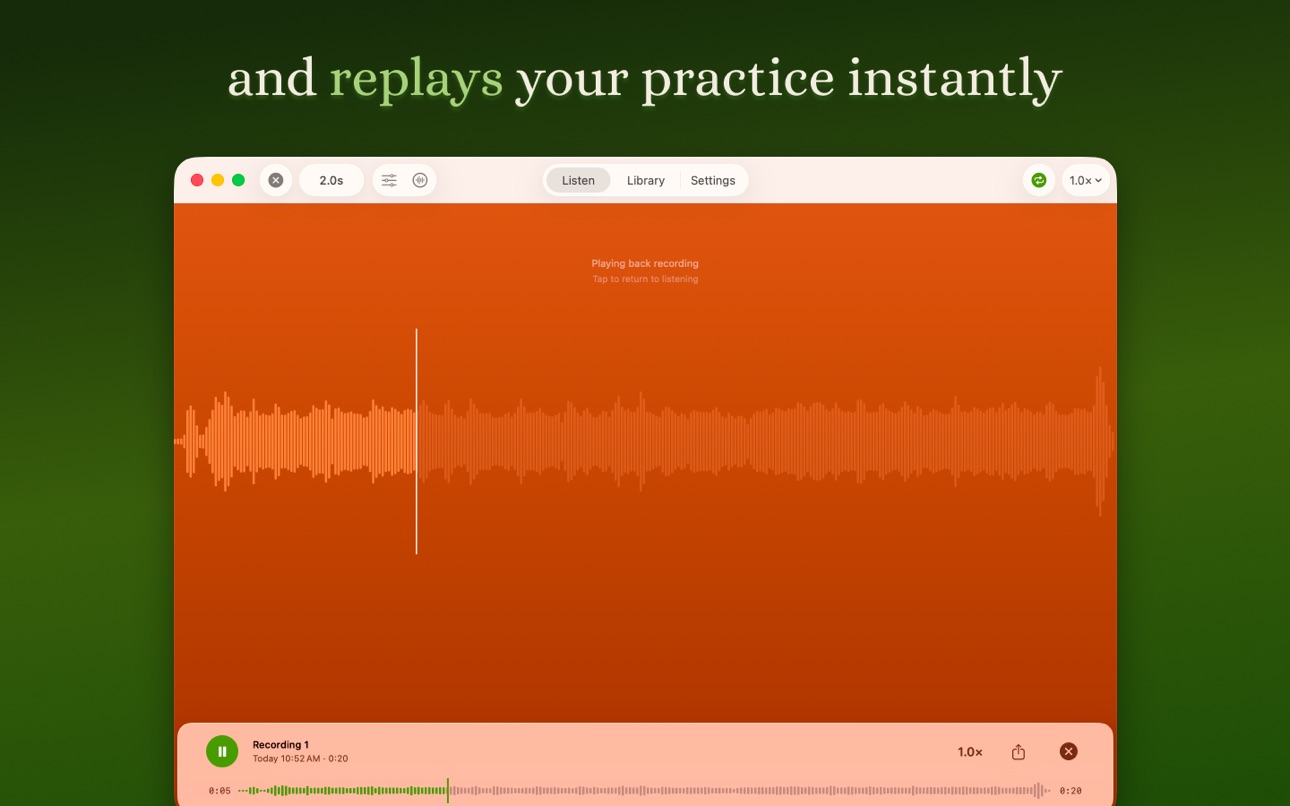
Stop fumbling for the record, stop, and play buttons. PracticePlay automatically listens, records, and plays back your musical practice sessions hands-free so you can focus on actively hearing yourself and and improving your sound, technique, and musicality.
“I can’t think of a more helpful app for both teaching and performing. The ability to truly hear exactly what you sound like is the greatest benefit of all.”
—Ryan Gardner, Professor of Trumpet, University of Colorado Boulder
“PracticePlay is a dream come true: an intuitive tool with hands-free recording and automatic playback for reflective, efficient, and meaningful deep practice.”
—Wiff Rudd, Professor of Trumpet, Baylor University
Practice without thinking about technology. PracticePlay listens for your instrument, records every take you play, and stays out of the way the rest of the time. Whatever the environment, it just works. Conversations, instruction from a teacher, lesson notes spoken aloud, ambient noise from your home—none of it triggers a recording. PracticePlay’s on-device sound model recognizes musical instruments specifically, so the only takes in your library are the ones you actually played.
WHY MUSICIANS USE IT
• Never miss a take. The breakthroughs you didn't expect to record? They're already saved.
• Practice with full attention. No tapping a record button between phrases, no audio editing afterward.
• Compare progress over time. Every session is in your library, organized by date.
• Listen back with intent. Adjust playback speed and pitch for analysis.
FOR SOLO PRACTICE IN THE WOODSHED
The phone sits ten feet away on the music stand. You play. It records. You stop. You hear yourself. You play again. With rest while listening you’ll improve faster without burning yourself out.
FOR CHAMBER MUSIC AND ENSEMBLE REHEARSALS
The app sits in the back of the room and earns its place by knowing when not to act. The whole group hears how they sound together and starts making improvements immediately.
FOR LESSONS AND MASTERCLASSES
PracticePlay sits in like a quiet assistant. It captures every excerpt the moment the student plays, then steps aside while the teacher and student talk it through. The next recording begins on the next note.
FOR AUDITION TAKES
Take back-to-back recordings without walking over to your device. Play, listen back, adjust, play another take. Hear exactly what the panel will hear before they hear it.
FEATURES
• Listens for music—ignores everything else
• Records the moment you start playing
• Replays automatically when you stop
• Saves sessions to your Library
• Waveform scrubbing with speed and pitch controls
• Works with any mic or speaker
• Share recordings straight from the app
• Native apps for iPhone, iPad, and Mac
No record button. Just play. PracticePlay does the rest!
TRY IT FOR FREE
When you’re ready, the full app is yours forever with a one-time $9.99 purchase. No subscriptions. No accounts. No ads. Pay ONCE and use it on EVERY iPhone, iPad, and Mac you own. Family Sharing supported.
(Price shown in this description are in USD. Exact price may vary by region based on current exchange rates. Payment will be charged to your Apple ID Account at confirmation of purchase. Devices using the same Apple ID can share the purchase.)
Questions? Need help? Send us a message at hey@practiceplay.app.
In-App Purchases BB pricing
One-Time Purchases
Unlock Unlimited Recording—
Capabilities
In-App Purchases
Accessibility
ipadiphonemacrealityDevicetvoswatch
Version history 5 versions
Build 887342938v1.1.02026-06-24 00:31:10
New “Minimum Length” setting discards short recordings instead of saving and auto-playing them—perfect for ignoring short warmups before you practice a piece. The default is 2 seconds, and it can be adjusted from 1–10 seconds.
On iOS, the mic input picker now shows only one “Built-in Microphone” entry rather than multiple to ensure the system picks the best one.
Added support for high-end external audio interfaces on Mac, fixing “Error -66567” that prevented recordings from saving.
As always, keep the feedback coming! You can submit feedback in-app or contact hey@practiceplay.app.
Build 886772346v1.0.32026-06-10 18:30:45
Now, when connecting to AirPods or other bluetooth speakers, PracticePlay will continue to use either your device’s built-in mic or another wired mic, drastically improving recording quality.
Added 0.25× playback speed. This is in addition to the existing 0.5×, 1×, 1.5×, and 2× speeds.
Experimental recording features (e.g., Noise Gate) are now disabled by default. If you already set one yourself, your choice is kept. You can continue to change these settings either from Settings or the toolbars from the Listen screen.
If microphone access is not granted, PracticePlay now shows a tappable banner in Settings and on the Listen screen to turn it back on. No change if mic access is already granted.
As always, keep the feedback coming! You can submit feedback in-app or contact hey@practiceplay.app.
Build 886053752v1.0.22026-05-25 22:44:28
Fit and finish: Settings now includes all app settings in a single place, the Auto Replay toggle on the Listen screen has a new icon, and other minor adjustments throughout.
As always, we’d love to hear from you! Reach out to hey@practiceplay.app or use the in-app feedback.
Build 885821045v1.0.12026-05-18 22:24:52
Minor visual alignment fixes. More improvements coming soon!
As always, if you notice anything off, please submit in-app feedback or contact hey@practiceplay.app!
Build 883306368v1.0.02026-05-12 22:00:08
Price history by region
Currency
Show
Columns
Search
Availability 75 of 75 storefronts
| Region | Language | Price | Ratings | Avg | Version |
|---|---|---|---|---|---|
| US | en-US | Free | 18 | 5.0 | 1.1.0 |
| AG | en-GB | Free | 0 | — | 1.1.0 |
| AI | en-GB | Free | 0 | — | 1.1.0 |
| AO | en-GB | Free | 0 | — | 1.1.0 |
| AR | es-MX | Free | 0 | — | 1.1.0 |
| BB | en-GB | Free | 0 | — | 1.1.0 |
| BF | en-GB | Free | 0 | — | 1.1.0 |
| BJ | en-GB | Free | 0 | — | 1.1.0 |
| BO | es-MX | Free | 0 | — | 1.1.0 |
| BR | pt-BR | Free | 0 | — | 1.1.0 |
| BS | en-GB | Free | 0 | — | 1.1.0 |
| BW | en-GB | Free | 0 | — | 1.1.0 |
| BZ | en-GB | Free | 0 | — | 1.1.0 |
| CD | en-GB | Free | 0 | — | 1.1.0 |
| CG | en-GB | Free | 0 | — | 1.1.0 |
| CI | fr-FR | Free | 0 | — | 1.1.0 |
| CL | es-MX | Free | 0 | — | 1.1.0 |
| CM | fr-FR | Free | 0 | — | 1.1.0 |
| CO | es-MX | Free | 0 | — | 1.1.0 |
| CR | es-MX | Free | 0 | — | 1.1.0 |
| CV | en-GB | Free | 0 | — | 1.1.0 |
| DM | en-GB | Free | 0 | — | 1.1.0 |
| DO | es-MX | Free | 0 | — | 1.1.0 |
| DZ | en-GB | Free | 0 | — | 1.1.0 |
| EC | es-MX | Free | 0 | — | 1.1.0 |
| GA | fr-FR | Free | 0 | — | 1.1.0 |
| GD | en-GB | Free | 0 | — | 1.1.0 |
| GH | en-GB | Free | 0 | — | 1.1.0 |
| GM | en-GB | Free | 0 | — | 1.1.0 |
| GT | es-MX | Free | 0 | — | 1.1.0 |
| GW | en-GB | Free | 0 | — | 1.1.0 |
| GY | en-GB | Free | 0 | — | 1.1.0 |
| HN | es-MX | Free | 0 | — | 1.1.0 |
| JM | en-GB | Free | 0 | — | 1.1.0 |
| KE | en-GB | Free | 0 | — | 1.1.0 |
| KN | en-GB | Free | 0 | — | 1.1.0 |
| KY | en-GB | Free | 0 | — | 1.1.0 |
| LC | en-GB | Free | 0 | — | 1.1.0 |
| LR | en-GB | Free | 0 | — | 1.1.0 |
| LY | en-GB | Free | 0 | — | 1.1.0 |
| MA | en-GB | Free | 0 | — | 1.1.0 |
| MG | en-GB | Free | 0 | — | 1.1.0 |
| ML | en-GB | Free | 0 | — | 1.1.0 |
| MS | en-GB | Free | 0 | — | 1.1.0 |
| MU | en-GB | Free | 0 | — | 1.1.0 |
| MW | en-GB | Free | 0 | — | 1.1.0 |
| MX | es-MX | Free | 0 | — | 1.1.0 |
| MZ | en-GB | Free | 0 | — | 1.1.0 |
| NA | en-GB | Free | 0 | — | 1.1.0 |
| NE | en-GB | Free | 0 | — | 1.1.0 |
| NG | en-GB | Free | 0 | — | 1.1.0 |
| NI | es-MX | Free | 0 | — | 1.1.0 |
| PA | es-MX | Free | 0 | — | 1.1.0 |
| PE | es-MX | Free | 0 | — | 1.1.0 |
| PY | es-MX | Free | 0 | — | 1.1.0 |
| RW | en-GB | Free | 0 | — | 1.1.0 |
| SC | en-GB | Free | 0 | — | 1.1.0 |
| SL | en-GB | Free | 0 | — | 1.1.0 |
| SN | en-GB | Free | 0 | — | 1.1.0 |
| SR | en-GB | Free | 0 | — | 1.1.0 |
| ST | en-GB | Free | 0 | — | 1.1.0 |
| SV | es-MX | Free | 0 | — | 1.1.0 |
| SZ | en-GB | Free | 0 | — | 1.1.0 |
| TC | en-GB | Free | 0 | — | 1.1.0 |
| TD | en-GB | Free | 0 | — | 1.1.0 |
| TN | en-GB | Free | 0 | — | 1.1.0 |
| TT | en-GB | Free | 0 | — | 1.1.0 |
| TZ | en-GB | Free | 0 | — | 1.1.0 |
| UG | en-GB | Free | 0 | — | 1.1.0 |
| UY | en-GB | Free | 0 | — | 1.1.0 |
| VC | en-GB | Free | 0 | — | 1.1.0 |
| VE | es-MX | Free | 0 | — | 1.1.0 |
| VG | en-GB | Free | 0 | — | 1.1.0 |
| ZM | en-GB | Free | 0 | — | 1.1.0 |
| ZW | en-GB | Free | 0 | — | 1.1.0 |
Change log 9 changes · BB
✎
releaseNotes updated
New “Minimum Length” setting discards short recordings instead of saving and auto-playing them—perfect for ignoring short warmups before you practice a piece. T
✎
description updated
Stop fumbling for the record, stop, and play buttons. PracticePlay automatically listens, records, and plays back your musical practice sessions hands-free so y
✎
subtitle updated
Hands-free recording & replay
✎
name updated
PracticePlay
◆
Version 1.1.0 released
New “Minimum Length” setting discards short recordings instead of saving and auto-playing them—perfect for ignoring short warmups before you practice a piece. The default is 2 seconds, and it can be adjusted from 1–10 seconds.
On iOS, the
◆
Version 1.0.3 released
Now, when connecting to AirPods or other bluetooth speakers, PracticePlay will continue to use either your device’s built-in mic or another wired mic, drastically improving recording quality.
Added 0.25× playback speed. This is in addition
◆
Version 1.0.2 released
Fit and finish: Settings now includes all app settings in a single place, the Auto Replay toggle on the Listen screen has a new icon, and other minor adjustments throughout.
As always, we’d love to hear from you! Reach out to hey@practicep
◆
Version 1.0.1 released
Minor visual alignment fixes. More improvements coming soon!
As always, if you notice anything off, please submit in-app feedback or contact hey@practiceplay.app!
◆
Version 1.0.0 released