Home › Utilities

Caption AI: Video Subtitles
Add & Translate Subtitles
 XK
XK
 CNzh-Hans-CN
 AEen-GB
 AFen-GB
 AGen-GB
 AIen-GB
 ALen-GB
 AMen-GB
 AOen-GB
 ARes-MX
 ATde-DE
 AUen-AU
 AZen-GB
 BAen-GB
 BBen-GB
 BEen-GB
 BFen-GB
 BGen-GB
 BHen-GB
 BJen-GB
 BMen-GB
 BNen-GB
 BOes-MX
 BRpt-BR
 BSen-GB
 BTen-GB
 BWen-GB
 BYen-GB
 BZen-GB
 CAen-CA
 CDen-GB
 CGen-GB
 CHde-CH
 CIfr-FR
 CLes-MX
 CMfr-FR
 COes-MX
 CRes-MX
 CVen-GB
 CYen-GB
 CZen-GB
 DEde-DE
 DKen-GB
 DMen-GB
 DOes-MX
 DZen-GB
 ECes-MX
 EEen-GB
 EGen-GB
 ESes-ES
 FIen-GB
 FJen-GB
 FMen-GB
 FRfr-FR
 GAfr-FR
 GBen-GB
 GDen-GB
 GEen-GB
 GHen-GB
 GMen-GB
 GRen-GB
 GTes-MX
 GWen-GB
 GYen-GB
 HKzh-Hant-HK
 HNes-MX
 HRen-GB
 HUen-GB
 IDen-GB
 IEen-GB
 ILen-GB
 INen-GB
 IQen-GB
 ISen-GB
 ITit
ITit JMen-GB
 JOen-GB
 JPja
JPja KEen-GB
 KGen-GB
 KHen-GB
 KNen-GB
 KRko
KRko KWen-GB
 KYen-GB
 KZen-GB
 LAen-GB
 LBen-GB
 LCen-GB
 LKen-GB
 LRen-GB
 LTen-GB
 LUen-GB
 LVen-GB
 LYen-GB
 MAen-GB
 MDen-GB
 MEen-GB
 MGen-GB
 MKen-GB
 MLen-GB
 MMen-GB
 MNen-GB
 MOzh-Hant-HK
 MRen-GB
 MSen-GB
 MTen-GB
 MUen-GB
 MVen-GB
 MWen-GB
 MXes-MX
 MYen-GB
 MZen-GB
 NAen-GB
 NEen-GB
 NGen-GB
 NIes-MX
 NLnl
NLnl NOen-GB
 NPen-GB
 NRen-GB
 NZen-AU
 OMen-GB
 PAes-MX
 PEes-MX
 PGen-GB
 PHen-GB
 PKen-GB
 PLen-GB
 PTpt-PT
 PWen-GB
 PYes-MX
 QAen-GB
 ROen-GB
 RSen-GB
 RUru
RUru RWen-GB
 SAen-GB
 SBen-GB
 SCen-GB
 SEsv
SEsv SGen-GB
 SIen-GB
 SKen-GB
 SLen-GB
 SNen-GB
 SRen-GB
 STen-GB
 SVes-MX
 SZen-GB
 TCen-GB
 TDen-GB
 THen-GB
 TJen-GB
 TMen-GB
 TNen-GB
 TOen-GB
 TRen-GB
 TTen-GB
 TWzh-Hant-TW
 TZen-GB
 UAen-GB
 UGen-GB
 USen-US
 UYen-GB
 UZen-GB
 VCen-GB
 VEes-MX
 VGen-GB
 VNen-GB
 VUen-GBXKen-GB
 YEen-GB
 ZAen-GB
 ZMen-GB
 ZWen-GB
175 of 175 storefronts
Content in en-US
Content in en-US
Information
Preview 1 platform
iPhone 9 images

What’s New Version 2.6
Optimize bilingual subtitles and customize the style of each language independently
Description
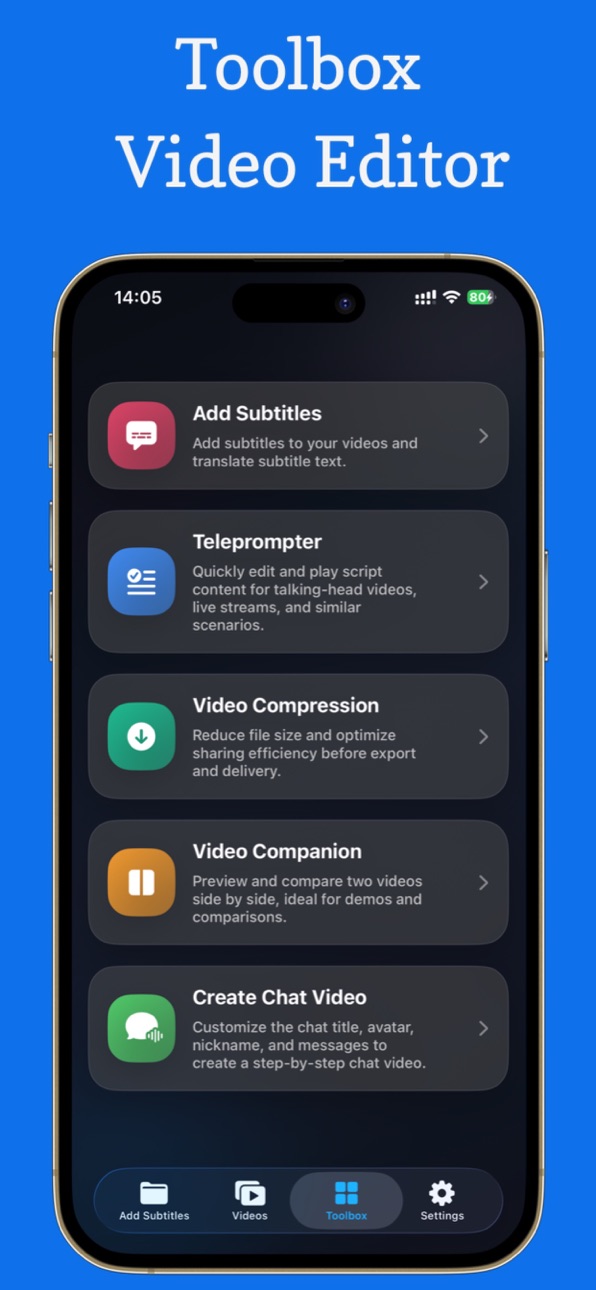
Powerful video creation tools:(1)Add and Translate Subtitles for Your Videos;Mobile Teleprompter.(2)Split-Screen Video.(3)Video Compression.(4)Chat video maker.(5)Video Assets.
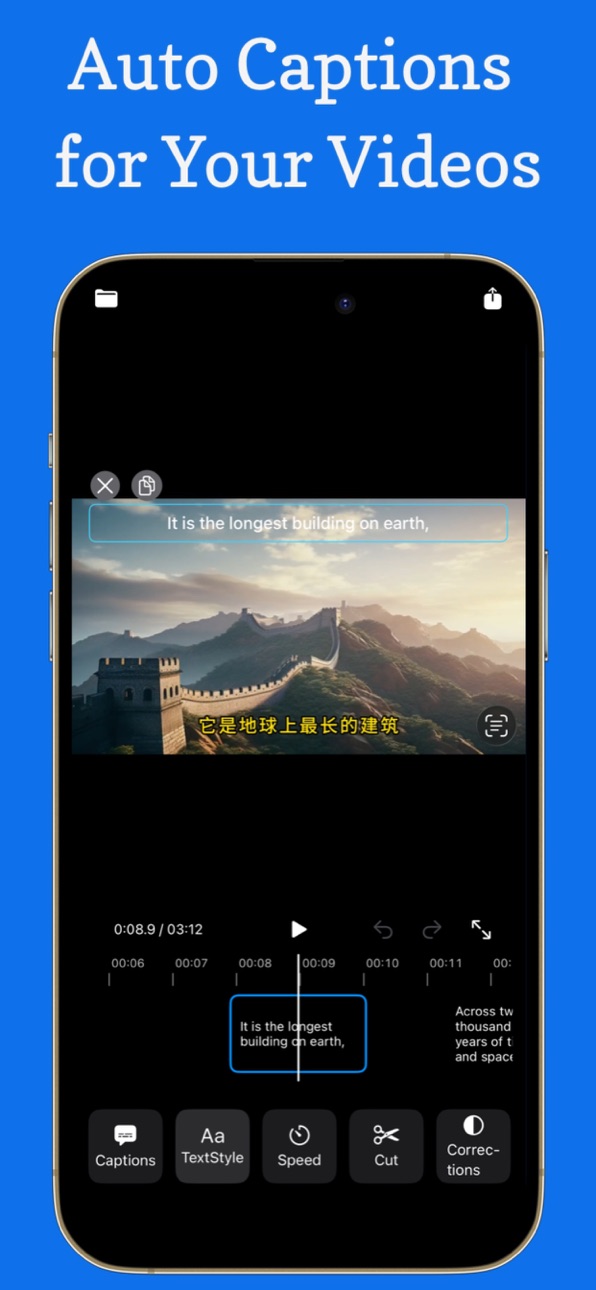
1. Add and Translate Subtitles for Your Videos — Fast, Easy, and Powerful
Create professional-looking subtitle videos in seconds.
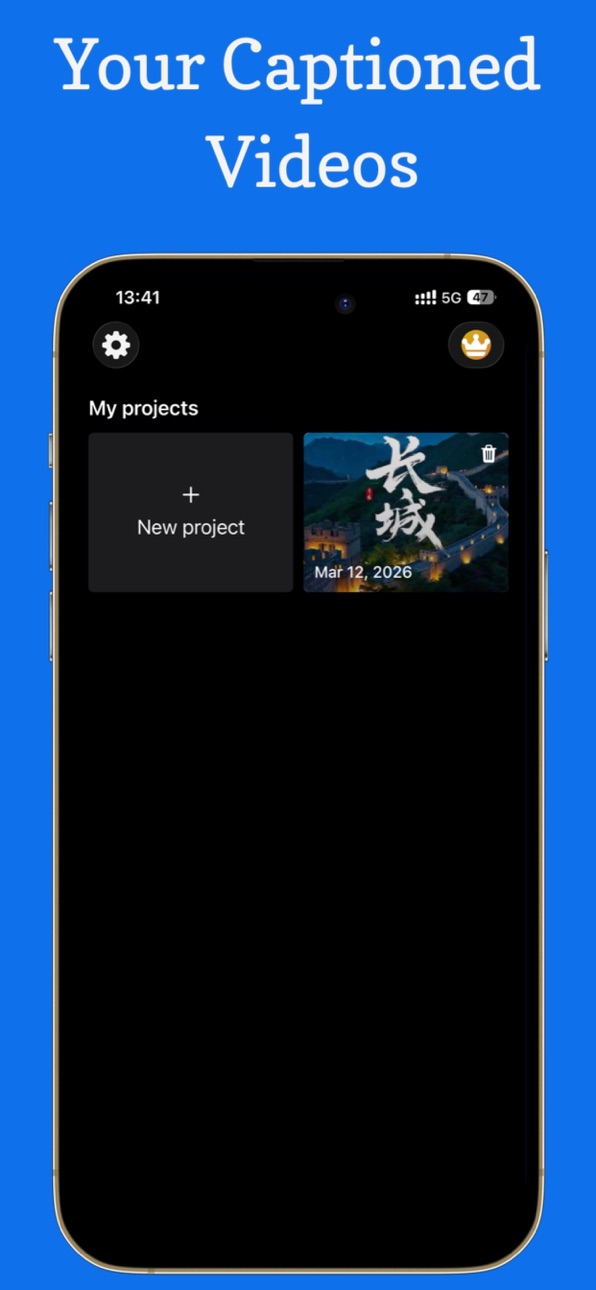
With powerful AI tools and simple controls, you can automatically add subtitles, translate captions, customize subtitle styles, and edit your videos effortlessly.
Whether you’re a content creator, social media user, or someone who wants to make videos more accessible, this app makes subtitle creation incredibly easy.
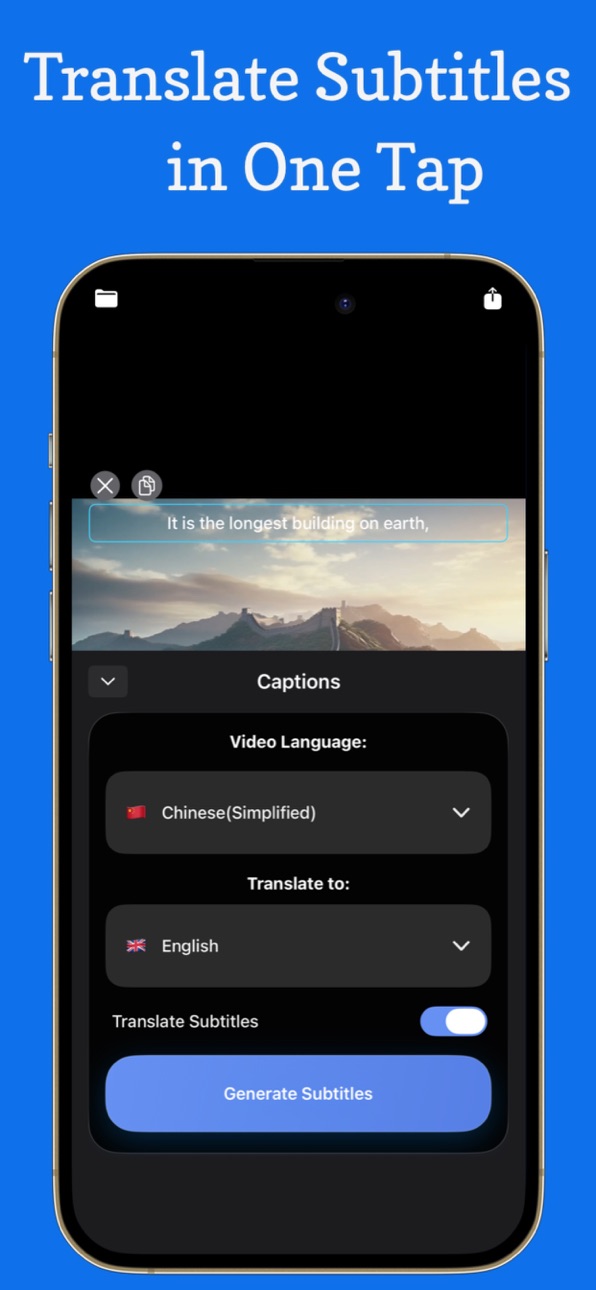
One-Tap Subtitle Translation
Translate your subtitles into multiple languages instantly. Reach a global audience and make your videos accessible worldwide.
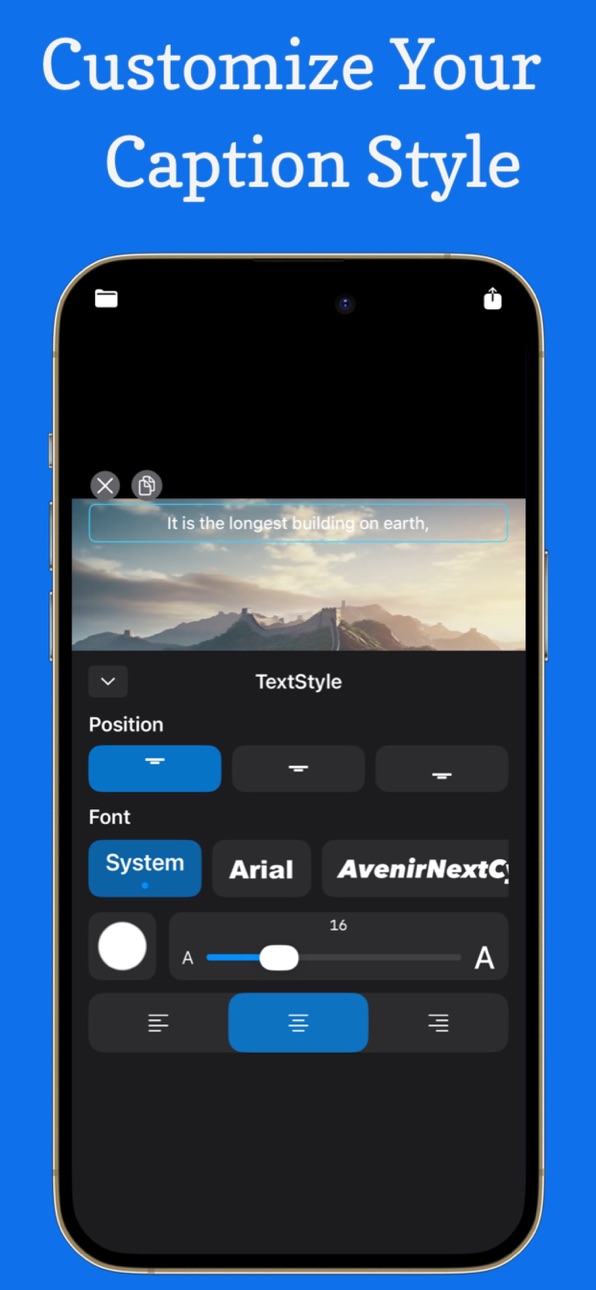
Powerful Subtitle Customization
Design subtitles exactly the way you want:
• Custom fonts
• Adjustable text size
• Text color control
• Flexible layout and alignment
• Stylish subtitle appearance
Create subtitles that match your video style perfectly.
Video Editing Tools
Edit your videos directly inside the app:
• Trim and cut videos easily
• Adjust playback speed
• Brightness adjustment
• Contrast control
• Saturation adjustment
Everything you need to polish your video before sharing.
Simple and Efficient Workflow
Create subtitle videos faster than ever.
2. Mobile Teleprompter
Easily display scrolling text on your phone while recording or presenting. Customize speed, font size, and colors to match your needs, so you can speak naturally without memorizing scripts. Perfect for video creation, speeches, and live streaming.
3. Split-Screen Video
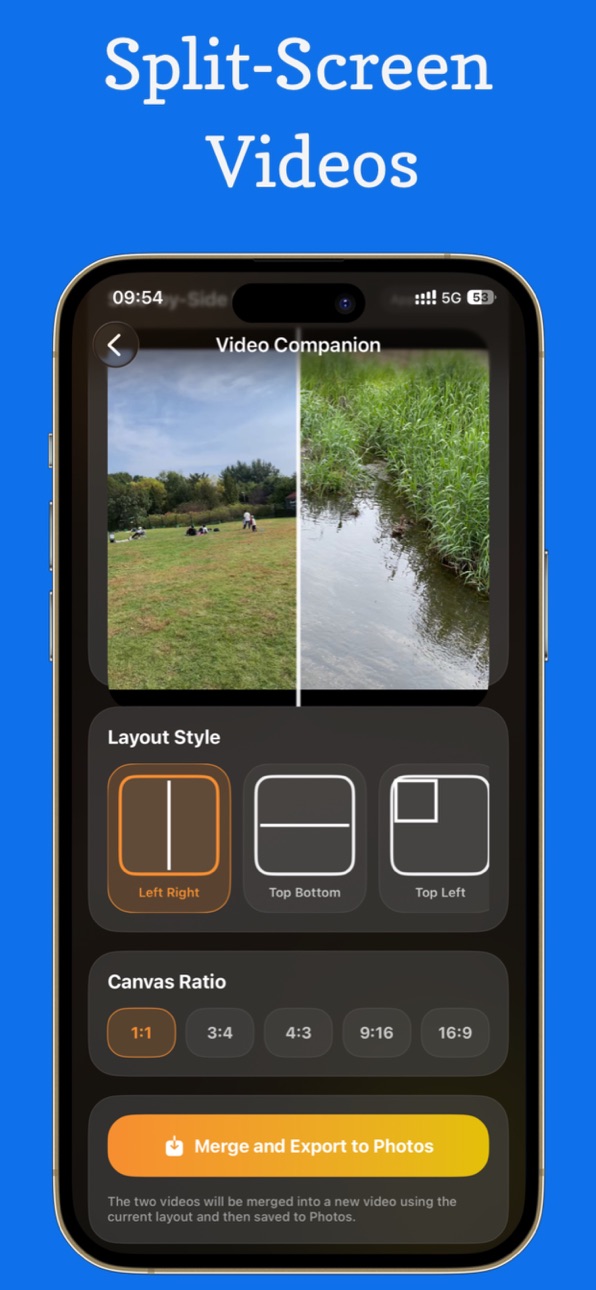
Combine two videos into one split-screen layout with just a few taps. Choose side-by-side or top-and-bottom formats, and adjust positioning and proportions to create reaction videos, comparisons, or duet-style content.
4. Video Compression
Reduce video file size with high, medium, or low quality options. Compress videos quickly while maintaining good visual quality, making it easy to save storage space or share videos across platforms.
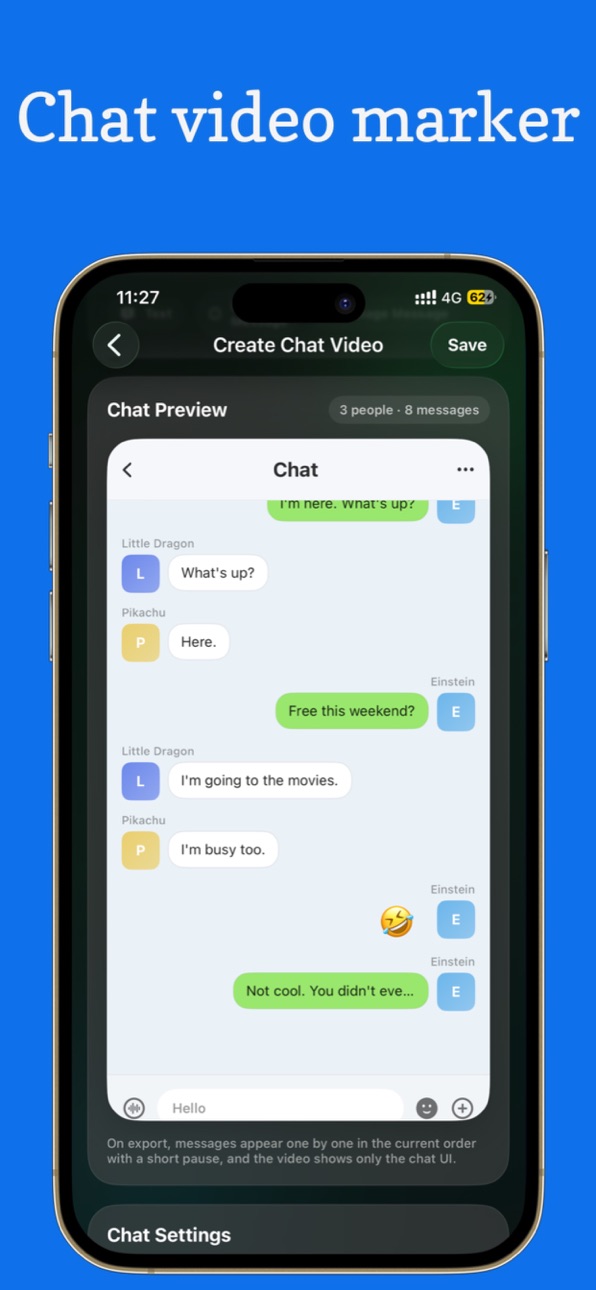
5. Chat video maker:
Simulate real chat interfaces from popular messaging apps, customize one-on-one or group conversations, and easily generate high-quality chat videos for storytelling, content creation, and creative expression.
6. Video Assets:
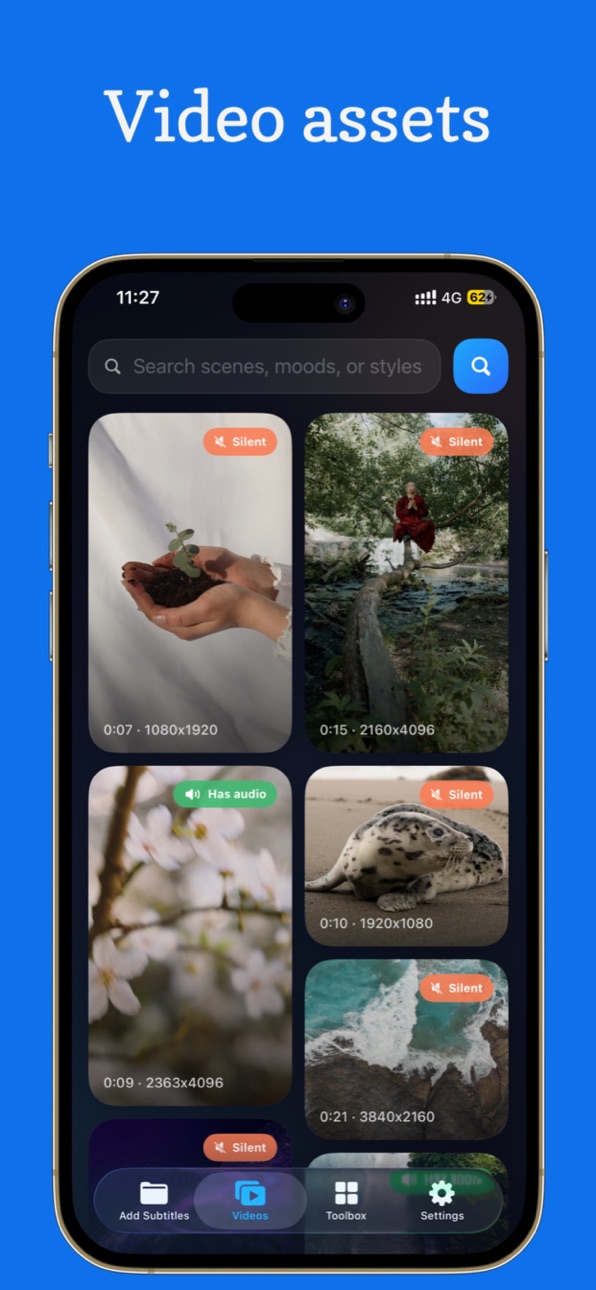
Browse a rich library of video assets, explore and filter a variety of content, and download high-quality clips with one tap to enhance your video creations.
Contact:
nicekeep@126.com
Privacy Policy
https://www.freeprivacypolicy.com/live/39e5616d-405f-4dd4-a783-77fa720f49b2
EULA
https://www.apple.com/legal/internet-services/itunes/dev/stdeula/
Terms & Conditions
https://www.apple.com/legal/internet-services/itunes/dev/stdeula/
----------------------------------------------------------------------
1. VIP Membership
VIP membership includes Weekly, Monthly, Yearly, and Lifetime plans.
With a Premium Membership, you can enjoy the following features:
• Remove all ads
• Automatically recognize speech in videos
• Translate subtitles into multiple languages
• Export videos with subtitles
2. Subscription Plans
The subscription plans provide access to ad-free experience, automatic speech recognition, subtitle translation, and exporting subtitle videos.
This app offers the following subscription options:
• $2.49 per week
• $3.99 per month
• $13.99 per year
• $55.99 Lifetime purchase
3. Subscription Payment and Auto-Renewal
Payment will be charged to your App Store account when you confirm the purchase.
Subscriptions will automatically renew unless auto-renewal is turned off at least 24 hours before the end of the current subscription period.
You can manage or turn off auto-renewal at any time in your App Store account settings after purchase.
Capabilities
In-App Purchases
Accessibility
ipadiphonemacrealityDevicetvoswatch
Version history 3 versions
Build 885288700v2.62026-05-18 08:54:56
Optimize bilingual subtitles and customize the style of each language independently
Build 884507478v2.22026-04-15 19:28:36
Add bilingual subtitles and optimize the code.
Build 883204799v1.02026-04-10 07:28:49
No pricing data captured yet — comparisons appear once the app has paid storefronts or in-app purchases.
Availability 175 of 175 storefronts
| Region | Language | Price | Ratings | Avg | Version |
|---|---|---|---|---|---|
| CN | zh-Hans-CN | Free | 6 | 5.0 | 2.6 |
| AE | en-GB | Free | 0 | — | 2.6 |
| AF | en-GB | Free | 0 | — | 2.6 |
| AG | en-GB | Free | 0 | — | 2.6 |
| AI | en-GB | Free | 0 | — | 2.6 |
| AL | en-GB | Free | 0 | — | 2.6 |
| AM | en-GB | Free | 0 | — | 2.6 |
| AO | en-GB | Free | 0 | — | 2.6 |
| AR | es-MX | Free | 0 | — | 2.6 |
| AT | de-DE | Free | 0 | — | 2.6 |
| AU | en-AU | Free | 0 | — | 2.6 |
| AZ | en-GB | Free | 0 | — | 2.6 |
| BA | en-GB | Free | 0 | — | 2.6 |
| BB | en-GB | Free | 0 | — | 2.6 |
| BE | en-GB | Free | 0 | — | 2.6 |
| BF | en-GB | Free | 0 | — | 2.6 |
| BG | en-GB | Free | 0 | — | 2.6 |
| BH | en-GB | Free | 0 | — | 2.6 |
| BJ | en-GB | Free | 0 | — | 2.6 |
| BM | en-GB | Free | 0 | — | 2.6 |
| BN | en-GB | Free | 0 | — | 2.6 |
| BO | es-MX | Free | 0 | — | 2.6 |
| BR | pt-BR | Free | 0 | — | 2.6 |
| BS | en-GB | Free | 0 | — | 2.6 |
| BT | en-GB | Free | 0 | — | 2.6 |
| BW | en-GB | Free | 0 | — | 2.6 |
| BY | en-GB | Free | 0 | — | 2.6 |
| BZ | en-GB | Free | 0 | — | 2.6 |
| CA | en-CA | Free | 0 | — | 2.6 |
| CD | en-GB | Free | 0 | — | 2.6 |
| CG | en-GB | Free | 0 | — | 2.6 |
| CH | de-CH | Free | 0 | — | 2.6 |
| CI | fr-FR | Free | 0 | — | 2.6 |
| CL | es-MX | Free | 0 | — | 2.6 |
| CM | fr-FR | Free | 0 | — | 2.6 |
| CO | es-MX | Free | 0 | — | 2.6 |
| CR | es-MX | Free | 0 | — | 2.6 |
| CV | en-GB | Free | 0 | — | 2.6 |
| CY | en-GB | Free | 0 | — | 2.6 |
| CZ | en-GB | Free | 0 | — | 2.6 |
| DE | de-DE | Free | 0 | — | 2.6 |
| DK | en-GB | Free | 0 | — | 2.6 |
| DM | en-GB | Free | 0 | — | 2.6 |
| DO | es-MX | Free | 0 | — | 2.6 |
| DZ | en-GB | Free | 0 | — | 2.6 |
| EC | es-MX | Free | 0 | — | 2.6 |
| EE | en-GB | Free | 0 | — | 2.6 |
| EG | en-GB | Free | 0 | — | 2.6 |
| ES | es-ES | Free | 0 | — | 2.6 |
| FI | en-GB | Free | 0 | — | 2.6 |
| FJ | en-GB | Free | 0 | — | 2.6 |
| FM | en-GB | Free | 0 | — | 2.6 |
| FR | fr-FR | Free | 0 | — | 2.6 |
| GA | fr-FR | Free | 0 | — | 2.6 |
| GB | en-GB | Free | 0 | — | 2.6 |
| GD | en-GB | Free | 0 | — | 2.6 |
| GE | en-GB | Free | 0 | — | 2.6 |
| GH | en-GB | Free | 0 | — | 2.6 |
| GM | en-GB | Free | 0 | — | 2.6 |
| GR | en-GB | Free | 0 | — | 2.6 |
| GT | es-MX | Free | 0 | — | 2.6 |
| GW | en-GB | Free | 0 | — | 2.6 |
| GY | en-GB | Free | 0 | — | 2.6 |
| HK | zh-Hant-HK | Free | 0 | — | 2.6 |
| HN | es-MX | Free | 0 | — | 2.6 |
| HR | en-GB | Free | 0 | — | 2.6 |
| HU | en-GB | Free | 0 | — | 2.6 |
| ID | en-GB | Free | 0 | — | 2.6 |
| IE | en-GB | Free | 0 | — | 2.6 |
| IL | en-GB | Free | 0 | — | 2.6 |
| IN | en-GB | Free | 0 | — | 2.6 |
| IQ | en-GB | Free | 0 | — | 2.6 |
| IS | en-GB | Free | 0 | — | 2.6 |
| IT | it | Free | 0 | — | 2.6 |
| JM | en-GB | Free | 0 | — | 2.6 |
| JO | en-GB | Free | 0 | — | 2.6 |
| JP | ja | Free | 0 | — | 2.6 |
| KE | en-GB | Free | 0 | — | 2.6 |
| KG | en-GB | Free | 0 | — | 2.6 |
| KH | en-GB | Free | 0 | — | 2.6 |
| KN | en-GB | Free | 0 | — | 2.6 |
| KR | ko | Free | 0 | — | 2.6 |
| KW | en-GB | Free | 0 | — | 2.6 |
| KY | en-GB | Free | 0 | — | 2.6 |
| KZ | en-GB | Free | 0 | — | 2.6 |
| LA | en-GB | Free | 0 | — | 2.6 |
| LB | en-GB | Free | 0 | — | 2.6 |
| LC | en-GB | Free | 0 | — | 2.6 |
| LK | en-GB | Free | 0 | — | 2.6 |
| LR | en-GB | Free | 0 | — | 2.6 |
| LT | en-GB | Free | 0 | — | 2.6 |
| LU | en-GB | Free | 0 | — | 2.6 |
| LV | en-GB | Free | 0 | — | 2.6 |
| LY | en-GB | Free | 0 | — | 2.6 |
| MA | en-GB | Free | 0 | — | 2.6 |
| MD | en-GB | Free | 0 | — | 2.6 |
| ME | en-GB | Free | 0 | — | 2.6 |
| MG | en-GB | Free | 0 | — | 2.6 |
| MK | en-GB | Free | 0 | — | 2.6 |
| ML | en-GB | Free | 0 | — | 2.6 |
| MM | en-GB | Free | 0 | — | 2.6 |
| MN | en-GB | Free | 0 | — | 2.6 |
| MO | zh-Hant-HK | Free | 0 | — | 2.6 |
| MR | en-GB | Free | 0 | — | 2.6 |
| MS | en-GB | Free | 0 | — | 2.6 |
| MT | en-GB | Free | 0 | — | 2.6 |
| MU | en-GB | Free | 0 | — | 2.6 |
| MV | en-GB | Free | 0 | — | 2.6 |
| MW | en-GB | Free | 0 | — | 2.6 |
| MX | es-MX | Free | 0 | — | 2.6 |
| MY | en-GB | Free | 0 | — | 2.6 |
| MZ | en-GB | Free | 0 | — | 2.6 |
| NA | en-GB | Free | 0 | — | 2.6 |
| NE | en-GB | Free | 0 | — | 2.6 |
| NG | en-GB | Free | 0 | — | 2.6 |
| NI | es-MX | Free | 0 | — | 2.6 |
| NL | nl | Free | 0 | — | 2.6 |
| NO | en-GB | Free | 0 | — | 2.6 |
| NP | en-GB | Free | 0 | — | 2.6 |
| NR | en-GB | Free | 0 | — | 2.6 |
| NZ | en-AU | Free | 0 | — | 2.6 |
| OM | en-GB | Free | 0 | — | 2.6 |
| PA | es-MX | Free | 0 | — | 2.6 |
| PE | es-MX | Free | 0 | — | 2.6 |
| PG | en-GB | Free | 0 | — | 2.6 |
| PH | en-GB | Free | 0 | — | 2.6 |
| PK | en-GB | Free | 0 | — | 2.6 |
| PL | en-GB | Free | 0 | — | 2.6 |
| PT | pt-PT | Free | 0 | — | 2.6 |
| PW | en-GB | Free | 0 | — | 2.6 |
| PY | es-MX | Free | 0 | — | 2.6 |
| QA | en-GB | Free | 0 | — | 2.6 |
| RO | en-GB | Free | 0 | — | 2.6 |
| RS | en-GB | Free | 0 | — | 2.6 |
| RU | ru | Free | 0 | — | 2.6 |
| RW | en-GB | Free | 0 | — | 2.6 |
| SA | en-GB | Free | 0 | — | 2.6 |
| SB | en-GB | Free | 0 | — | 2.6 |
| SC | en-GB | Free | 0 | — | 2.6 |
| SE | sv | Free | 0 | — | 2.6 |
| SG | en-GB | Free | 0 | — | 2.6 |
| SI | en-GB | Free | 0 | — | 2.6 |
| SK | en-GB | Free | 0 | — | 2.6 |
| SL | en-GB | Free | 0 | — | 2.6 |
| SN | en-GB | Free | 0 | — | 2.6 |
| SR | en-GB | Free | 0 | — | 2.6 |
| ST | en-GB | Free | 0 | — | 2.6 |
| SV | es-MX | Free | 0 | — | 2.6 |
| SZ | en-GB | Free | 0 | — | 2.6 |
| TC | en-GB | Free | 0 | — | 2.6 |
| TD | en-GB | Free | 0 | — | 2.6 |
| TH | en-GB | Free | 0 | — | 2.6 |
| TJ | en-GB | Free | 0 | — | 2.6 |
| TM | en-GB | Free | 0 | — | 2.6 |
| TN | en-GB | Free | 0 | — | 2.6 |
| TO | en-GB | Free | 0 | — | 2.6 |
| TR | en-GB | Free | 0 | — | 2.6 |
| TT | en-GB | Free | 0 | — | 2.6 |
| TW | zh-Hant-TW | Free | 0 | — | 2.6 |
| TZ | en-GB | Free | 0 | — | 2.6 |
| UA | en-GB | Free | 0 | — | 2.6 |
| UG | en-GB | Free | 0 | — | 2.6 |
| US | en-US | Free | 0 | — | 2.6 |
| UY | en-GB | Free | 0 | — | 2.6 |
| UZ | en-GB | Free | 0 | — | 2.6 |
| VC | en-GB | Free | 0 | — | 2.6 |
| VE | es-MX | Free | 0 | — | 2.6 |
| VG | en-GB | Free | 0 | — | 2.6 |
| VN | en-GB | Free | 0 | — | 2.6 |
| VU | en-GB | Free | 0 | — | 2.6 |
| XK | en-GB | Free | 0 | — | 2.6 |
| YE | en-GB | Free | 0 | — | 2.6 |
| ZA | en-GB | Free | 0 | — | 2.6 |
| ZM | en-GB | Free | 0 | — | 2.6 |
| ZW | en-GB | Free | 0 | — | 2.6 |
Change log 7 changes · XK
✎
releaseNotes updated
Optimize bilingual subtitles and customize the style of each language independently
✎
description updated
Powerful video creation tools:(1)Add and Translate Subtitles for Your Videos;Mobile Teleprompter.(2)Split-Screen Video.(3)Video Compression.(4)Chat video maker.
✎
subtitle updated
Add & Translate Subtitles
✎
name updated
Caption AI: Video Subtitles
◆
Version 2.6 released
Optimize bilingual subtitles and customize the style of each language independently
◆
Version 2.2 released
Add bilingual subtitles and optimize the code.
◆
Version 1.0 released