Home › Utilities

 PY
PY
 ESes-ES
 USen-US
 CNzh-Hans-CN
 GBen-GB
 ILen-GB
 KRko
KRko AEen-GB
 AFen-GB
 AGen-GB
 AIen-GB
 ALen-GB
 AMen-GB
 AOen-GB
 ARes-MX
 ATde-DE
 AUen-AU
 AZen-GB
 BAen-GB
 BBen-GB
 BEen-GB
 BFen-GB
 BGen-GB
 BHen-GB
 BJen-GB
 BMen-GB
 BNen-GB
 BOes-MX
 BRpt-BR
 BSen-GB
 BTen-GB
 BWen-GB
 BYen-GB
 BZen-GB
 CAen-CA
 CDen-GB
 CGen-GB
 CHde-CH
 CIfr-FR
 CLes-MX
 CMfr-FR
 COes-MX
 CRes-MX
 CVen-GB
 CYen-GB
 CZen-GB
 DEde-DE
 DKen-GB
 DMen-GB
 DOes-MX
 DZen-GB
 ECes-MX
 EEen-GB
 EGen-GB
 FIen-GB
 FJen-GB
 FMen-GB
 FRfr-FR
 GAfr-FR
 GDen-GB
 GEen-GB
 GHen-GB
 GMen-GB
 GRen-GB
 GTes-MX
 GWen-GB
 GYen-GB
 HKzh-Hant-HK
 HNes-MX
 HRen-GB
 HUen-GB
 IDen-GB
 IEen-GB
 INen-GB
 IQen-GB
 ISen-GB
 ITit
ITit JMen-GB
 JOen-GB
 JPja
JPja KEen-GB
 KGen-GB
 KHen-GB
 KNen-GB
 KWen-GB
 KYen-GB
 KZen-GB
 LAen-GB
 LBen-GB
 LCen-GB
 LKen-GB
 LRen-GB
 LTen-GB
 LUen-GB
 LVen-GB
 LYen-GB
 MAen-GB
 MDen-GB
 MEen-GB
 MGen-GB
 MKen-GB
 MLen-GB
 MMen-GB
 MNen-GB
 MOzh-Hant-HK
 MRen-GB
 MSen-GB
 MTen-GB
 MUen-GB
 MVen-GB
 MWen-GB
 MXes-MX
 MYen-GB
 MZen-GB
 NAen-GB
 NEen-GB
 NGen-GB
 NIes-MX
 NLnl
NLnl NOen-GB
 NPen-GB
 NRen-GB
 NZen-AU
 OMen-GB
 PAes-MX
 PEes-MX
 PGen-GB
 PHen-GB
 PKen-GB
 PLen-GB
 PTpt-PT
 PWen-GBPYes-MX
 QAen-GB
 ROen-GB
 RSen-GB
 RUru
RUru RWen-GB
 SAen-GB
 SBen-GB
 SCen-GB
 SEsv
SEsv SGen-GB
 SIen-GB
 SKen-GB
 SLen-GB
 SNen-GB
 SRen-GB
 STen-GB
 SVes-MX
 SZen-GB
 TCen-GB
 TDen-GB
 THen-GB
 TJen-GB
 TMen-GB
 TNen-GB
 TOen-GB
 TRen-GB
 TTen-GB
 TWzh-Hant-TW
 TZen-GB
 UAen-GB
 UGen-GB
 UYen-GB
 UZen-GB
 VCen-GB
 VEes-MX
 VGen-GB
 VNen-GB
 VUen-GB
 XKen-GB
 YEen-GB
 ZAen-GB
 ZMen-GB
 ZWen-GB
175 of 175 storefronts
Content in en-US
Content in en-US
Information
Icon history 2 versions
Current←
 Previous
Preview 3 platforms
iPhone 8 images


iPad 6 images


Mac 6 images



What’s New Version 26.6.1
- New: Welcome tour — six-page intro on first launch covering on-device privacy, supported formats, PDF Tools, and the book-scan flow. Replay any time from Settings → About.
- New: PDF → EPUB — reflowable ebook output sharing the same on-device extraction used by PDF → Word; born-digital PDFs convert without OCR.
- New: DjVu → Word, Markdown, HTML, RTF, plain text — DjVu books now reach every text format Formattery supports, not just PDF and EPUB.
Description
Convert any file — fast, private, and 100% on your device.
Formattery converts images, documents, videos, and audio files instantly without uploading anything to the cloud. Your files never leave your iPhone or iPad.
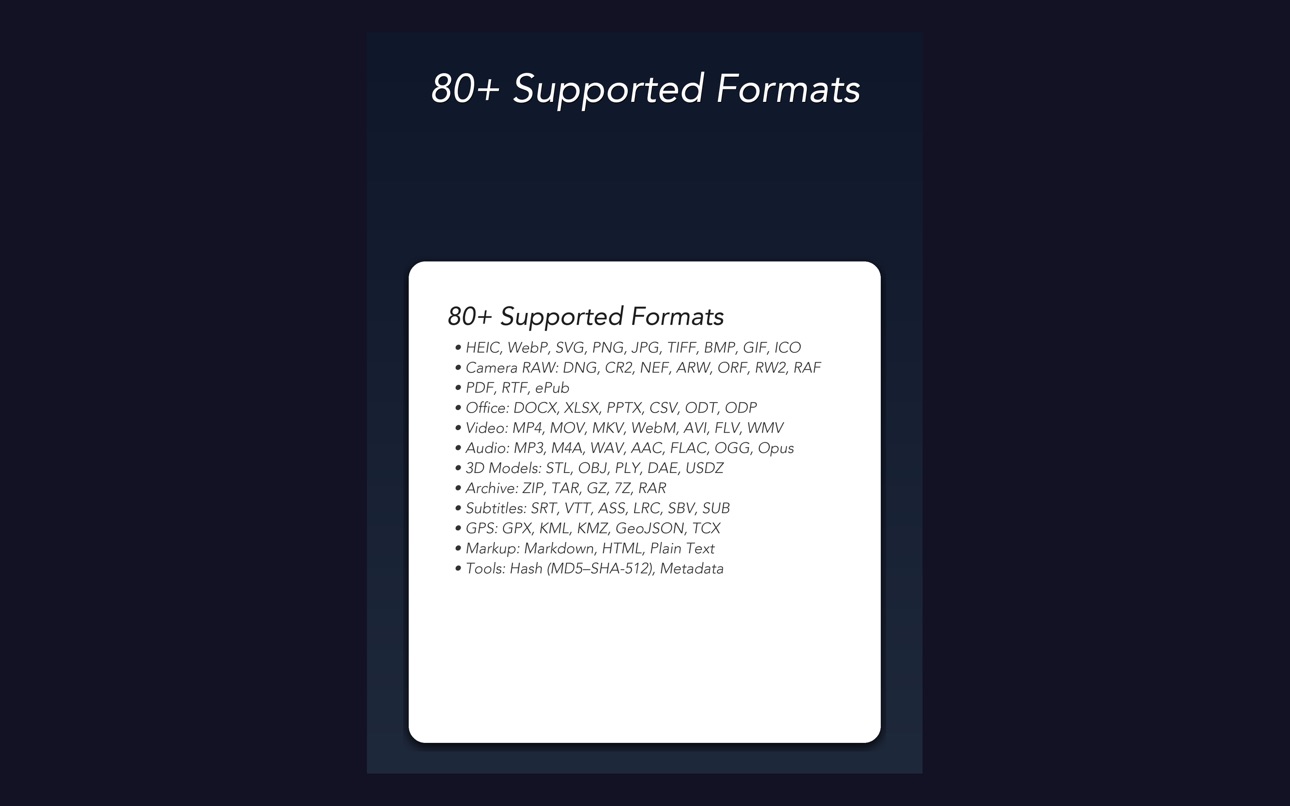
SUPPORTED FORMATS
Images: HEIC/HEIF, WebP, SVG, PNG, JPG/JPEG, TIFF/TIF, BMP, GIF, ICO, PSD
Camera RAW: DNG, CR2, NEF, ARW, ORF, RW2, RAF
Documents: PDF, RTF
Office: DOCX, XLSX, PPTX, CSV, ODT, ODP, XLS, Pages, Keynote (experimental)
Video: MP4, MOV, MKV, WebM, AVI, FLV, WMV, 3GP, OGV
Audio: MP3, M4A, WAV, AAC, AIFF, FLAC, OGG, Opus, WMA, AC3
Ebooks: ePub
Subtitle: SRT, VTT, ASS, LRC, SBV, SUB
GPS: GPX, KML, KMZ, GeoJSON, TCX
3D Models: STL, OBJ, PLY, DAE, USDZ
Markup: Markdown (.md/.markdown), HTML/HTM, Plain Text
Archive: ZIP, TAR, GZ/GZIP, 7Z, RAR, CBR, CBZ
Tools: File Hash (MD5, SHA-1/256/384/512, CRC32), Metadata Viewer
KEY FEATURES
- 100% offline — no internet required, no cloud uploads
- Batch conversion — convert multiple files at once
- Adjustable quality — fine-tune compression and video resolution
- Office documents — convert DOCX, XLSX, PPTX and more (experimental)
- File preview — preview converted files before sharing
- Source file thumbnails — see what you're converting at a glance
- Quick Look preview — tap history to preview any converted file
- Photo library integration — saves to a dedicated Formattery album
- Conversion history — easily find and share past conversions
- 3D model conversion — STL, OBJ, PLY, DAE, USDZ
- ePub ebooks — read and create ePub files
- Archive formats — ZIP, TAR, GZ, 7Z, RAR extraction
- Dark mode — beautiful in any lighting
FREE & PRO
Image conversions are completely free. Upgrade once to unlock PDF, video, and audio conversions — no subscriptions, no ads, ever.
PRIVACY FIRST
Every conversion happens entirely on your device. We never collect data, track usage, or upload your files anywhere. What stays on your device is yours alone.
In-App Purchases PY pricing
One-Time Purchases
Lifetime Pro — All Formats—
Capabilities
In-App Purchases
Accessibility
ipadiphonemacrealityDevicetvoswatch
Version history 12 versions
Build 886418746v26.6.12026-06-11 02:31:22
- New: Welcome tour — six-page intro on first launch covering on-device privacy, supported formats, PDF Tools, and the book-scan flow. Replay any time from Settings → About.
- New: PDF → EPUB — reflowable ebook output sharing the same on-device extraction used by PDF → Word; born-digital PDFs convert without OCR.
- New: DjVu → Word, Markdown, HTML, RTF, plain text — DjVu books now reach every text format Formattery supports, not just PDF and EPUB.
Build 886020144v26.5.22026-05-23 21:31:52
- New: PDF Tools — rotate, compress, password protect or remove a password, sign with finger or Apple Pencil, watermark, add page numbers, reorder or delete pages, auto-crop margins, highlight, and extract embedded images. Chain several tools to run in one pass.
- New: Merge PDFs into one, or split a PDF into one file per page (ZIP).
- New: Book scan — Image → PDF with per-photo page review, drag-to-reorder, and "Convert as scanned" that flattens perspective and auto-rotates each split half via Vision OCR.
- New: AVIF — convert images to and from AVIF (libaom AV1 encoder).
- New: Image resize presets — Email, Instagram, Web, Print.
- New: Video sharing presets — WhatsApp, Email, Instagram Reel, High.
- New: Audio merge — combine multiple audio files into a single M4A.
- New: Media trim — pick start and end seconds for any video or audio output.
- New: Video → image — extract any frame as PNG, JPG, HEIC, or TIFF.
- New: Targa (TGA), OpenEXR, Radiance HDR input + Apple Icon (ICNS) output.
- Improved: 940 missing translations filled in across 24 languages.
Build 885016961v26.5.12026-04-30 21:17:32
- New: PDF → Word — convert PDFs to editable Word documents on-device, with iOS 26 table detection
- New: PDF → Markdown, HTML, RTF, plain text — same on-device extraction, four more output formats
- New: Scanned form rebuilding — emergency contact forms and similar templates convert with underscore fill-in fields, falling back to a faithful page image when reconstruction quality is too low
- New: Siri Shortcuts — convert images, audio, video, and PDFs from the Shortcuts app or via Siri
- New: OCR Quality card — see confidence per page after each OCR conversion, with low-confidence pages flagged
- New: Batch retry — re-run only the files that failed in a batch, with per-file error reasons
- New: Mac menu bar — quick access from the system tray with recent conversions and a hide-from-Dock mode
- Improved: Mac — resize freely, including fullscreen
Build 884753518v26.4.92026-04-24 14:34:53
- New: Audio → SRT/VTT — transcribe any audio file (MP3, M4A, WAV…) straight to subtitles, not just video
- New: Video → GIF trim — pick a start/end time inside the video (not just the first seconds)
- New: HLS/DASH subtitles — an optional transcript is bundled as a VTT sidecar inside the package
- Improved: Transcription accuracy — uses Apple's iOS 26 SpeechAnalyzer for proper multi-sentence, per-word timing
- Improved: Imported photos keep their original filename (e.g. IMG_3208.MOV → IMG_3208.srt)
- Improved: Copyable error messages for easier bug reporting
- Improved: Subtitle previews (SRT/VTT) render as plain text inline
- Improved: Quieter paywall — "conversions remaining" banner only appears near your daily limit
- Fixed: HLS/DASH compatibility with iPhone 16 Pro spatial audio recordings
- Fixed: Multiple transcription crashes on iOS 26
- Fixed: Batch failure screen now lists each file's error individually
Build 884596624v26.4.72026-04-17 12:48:04
- New: OCR text recognition — extract text from photos and images
- New: Image to EPUB — create ebooks from photographed pages with smart title and illustration detection
- New: Text-only PDF — convert images to clean, formatted text documents via OCR
- New: Searchable PDF — add invisible text layer to image-based PDFs
- New: OCR language selection with auto-detect (18+ languages)
- New: Video side-by-side comparison with zoom, bitrate stats, and fullscreen
- Improved: Smart chapter title detection using spatial analysis
- Improved: Running header and page number removal
- Improved: Batch mode defaults to ON for Pro users
- Fixed: Text ordering on rotated HEIC photos
- Fixed: Video conversion audio and sharing compatibility
Build 884396389v26.4.62026-04-13 20:22:44
- New: MOBI and FB2 e-book formats — read Kindle files, create FictionBook
- New: MIDI rendering to WAV/MP3/M4A with built-in instruments
- New: SoundFont (SF2) sample extraction
- New: Apple Numbers → XLSX/CSV/PDF, Pages → DOCX/PPTX, Keynote → PPTX
- New: DOC, PPT, ALAC format support
- New: DOCX↔DOC, XLSX↔XLS, PPTX↔PPT cross-conversion
- New: All text formats interoperable (RTF↔DOCX, MD→DOC, DOCX→EPUB)
- New: Advanced video options — CRF, presets, speed, rotation, volume
- New: Video comparison with zoom, fullscreen, and bitrate stats
- New: Image resize and metadata stripping
- Improved: RTF→Markdown preserves formatting, headings, and tables
- Improved: HEIC photos load correctly from gallery
- Fixed: Video conversion crash, RTF→PDF timeout, batch selection limit
Build 884357043v26.4.52026-04-10 19:40:10
- New: MOBI e-book support — convert Kindle files to ePub, PDF, HTML, and more
- New: FB2 (FictionBook) format — read and create FB2 e-books
- New: RTF to Markdown conversion
- New: ePub to Markdown and RTF conversion
- Improved: Full cross-conversion between all markup and e-book formats
Build 884281646v26.4.42026-04-09 11:32:18
- New: Photoshop (PSD) files — convert to PNG, JPG, and more
- New: Apple Pages and Keynote — convert to PDF
- New: Comic book archives (CBR, CBZ) — extract or stitch into PDF
- New: Format aliases for HEIF, JPEG, TIF, HTM, GZIP, .markdown
- New: Redesigned Home screen and new app icon
- Improved: Privacy-first positioning — 100% on-device, no cloud
- Improved: 39 App Store languages supported
- Fixed: Image orientation preserved during conversion
Build 883714709v26.4.32026-03-26 01:35:40
- New: 3D model conversion — STL, OBJ, PLY, DAE, USDZ
- New: ePub ebook support — read and create ePub files
- New: Archive formats — TAR, GZ, 7Z, RAR
- New: RTF document conversion
- New: KMZ and TCX GPS formats
- New: SHA-384 and SHA-512 hash algorithms
- New: Redesigned Home screen
- Fixed: Image orientation now preserved during conversion
- All formats free within daily limit — no Pro-only formats
Build 883554304v26.4.22026-03-20 22:29:37
- New: Office format conversions — DOCX, XLSX, PPTX, CSV, ODT, ODP (experimental)
- New: Preview converted files directly in the app
- New: Source file thumbnails in the format picker
- New: What's New screen in Settings
- Improved DOCX and PPTX to PDF conversion with better formatting fidelity
- Loading indicator now shows for all file types
Build 883273140v26.3.32026-03-16 21:53:40
- Fixed in-app purchases not unlocking Pro features
- Added 19 new formats: MKV, WebM, AVI, FLV, WMV, 3GP, OGV, FLAC, OGG, Opus, WMA, AC3, and more
- New Share Extension: convert files directly from the system share sheet
- Improved file sharing to Telegram, WhatsApp, and other apps
- New app name and icon: welcome to Formattery!
Build 882971647v26.3.22026-03-09 22:52:53
Price history by region
Currency
Show
Columns
Search
Availability 175 of 175 storefronts
| Region | Language | Price | Ratings | Avg | Version |
|---|---|---|---|---|---|
| ES | es-ES | Free | 7 | 5.0 | 26.6.1 |
| US | en-US | Free | 4 | 4.5 | 26.6.1 |
| CN | zh-Hans-CN | Free | 1 | 5.0 | 26.6.1 |
| GB | en-GB | Free | 1 | 5.0 | 26.6.1 |
| IL | en-GB | Free | 1 | 5.0 | 26.6.1 |
| KR | ko | Free | 1 | 5.0 | 26.6.1 |
| AE | en-GB | Free | 0 | — | 26.6.1 |
| AF | en-GB | Free | 0 | — | 26.6.1 |
| AG | en-GB | Free | 0 | — | 26.6.1 |
| AI | en-GB | Free | 0 | — | 26.6.1 |
| AL | en-GB | Free | 0 | — | 26.6.1 |
| AM | en-GB | Free | 0 | — | 26.6.1 |
| AO | en-GB | Free | 0 | — | 26.6.1 |
| AR | es-MX | Free | 0 | — | 26.6.1 |
| AT | de-DE | Free | 0 | — | 26.6.1 |
| AU | en-AU | Free | 0 | — | 26.6.1 |
| AZ | en-GB | Free | 0 | — | 26.6.1 |
| BA | en-GB | Free | 0 | — | 26.6.1 |
| BB | en-GB | Free | 0 | — | 26.6.1 |
| BE | en-GB | Free | 0 | — | 26.6.1 |
| BF | en-GB | Free | 0 | — | 26.6.1 |
| BG | en-GB | Free | 0 | — | 26.6.1 |
| BH | en-GB | Free | 0 | — | 26.6.1 |
| BJ | en-GB | Free | 0 | — | 26.6.1 |
| BM | en-GB | Free | 0 | — | 26.6.1 |
| BN | en-GB | Free | 0 | — | 26.6.1 |
| BO | es-MX | Free | 0 | — | 26.6.1 |
| BR | pt-BR | Free | 0 | — | 26.6.1 |
| BS | en-GB | Free | 0 | — | 26.6.1 |
| BT | en-GB | Free | 0 | — | 26.6.1 |
| BW | en-GB | Free | 0 | — | 26.6.1 |
| BY | en-GB | Free | 0 | — | 26.6.1 |
| BZ | en-GB | Free | 0 | — | 26.6.1 |
| CA | en-CA | Free | 0 | — | 26.6.1 |
| CD | en-GB | Free | 0 | — | 26.6.1 |
| CG | en-GB | Free | 0 | — | 26.6.1 |
| CH | de-CH | Free | 0 | — | 26.6.1 |
| CI | fr-FR | Free | 0 | — | 26.6.1 |
| CL | es-MX | Free | 0 | — | 26.6.1 |
| CM | fr-FR | Free | 0 | — | 26.6.1 |
| CO | es-MX | Free | 0 | — | 26.6.1 |
| CR | es-MX | Free | 0 | — | 26.6.1 |
| CV | en-GB | Free | 0 | — | 26.6.1 |
| CY | en-GB | Free | 0 | — | 26.6.1 |
| CZ | en-GB | Free | 0 | — | 26.6.1 |
| DE | de-DE | Free | 0 | — | 26.6.1 |
| DK | en-GB | Free | 0 | — | 26.6.1 |
| DM | en-GB | Free | 0 | — | 26.6.1 |
| DO | es-MX | Free | 0 | — | 26.6.1 |
| DZ | en-GB | Free | 0 | — | 26.6.1 |
| EC | es-MX | Free | 0 | — | 26.6.1 |
| EE | en-GB | Free | 0 | — | 26.6.1 |
| EG | en-GB | Free | 0 | — | 26.6.1 |
| FI | en-GB | Free | 0 | — | 26.6.1 |
| FJ | en-GB | Free | 0 | — | 26.6.1 |
| FM | en-GB | Free | 0 | — | 26.6.1 |
| FR | fr-FR | Free | 0 | — | 26.6.1 |
| GA | fr-FR | Free | 0 | — | 26.6.1 |
| GD | en-GB | Free | 0 | — | 26.6.1 |
| GE | en-GB | Free | 0 | — | 26.6.1 |
| GH | en-GB | Free | 0 | — | 26.6.1 |
| GM | en-GB | Free | 0 | — | 26.6.1 |
| GR | en-GB | Free | 0 | — | 26.6.1 |
| GT | es-MX | Free | 0 | — | 26.6.1 |
| GW | en-GB | Free | 0 | — | 26.6.1 |
| GY | en-GB | Free | 0 | — | 26.6.1 |
| HK | zh-Hant-HK | Free | 0 | — | 26.6.1 |
| HN | es-MX | Free | 0 | — | 26.6.1 |
| HR | en-GB | Free | 0 | — | 26.6.1 |
| HU | en-GB | Free | 0 | — | 26.6.1 |
| ID | en-GB | Free | 0 | — | 26.6.1 |
| IE | en-GB | Free | 0 | — | 26.6.1 |
| IN | en-GB | Free | 0 | — | 26.6.1 |
| IQ | en-GB | Free | 0 | — | 26.6.1 |
| IS | en-GB | Free | 0 | — | 26.6.1 |
| IT | it | Free | 0 | — | 26.6.1 |
| JM | en-GB | Free | 0 | — | 26.6.1 |
| JO | en-GB | Free | 0 | — | 26.6.1 |
| JP | ja | Free | 0 | — | 26.6.1 |
| KE | en-GB | Free | 0 | — | 26.6.1 |
| KG | en-GB | Free | 0 | — | 26.6.1 |
| KH | en-GB | Free | 0 | — | 26.6.1 |
| KN | en-GB | Free | 0 | — | 26.6.1 |
| KW | en-GB | Free | 0 | — | 26.6.1 |
| KY | en-GB | Free | 0 | — | 26.6.1 |
| KZ | en-GB | Free | 0 | — | 26.6.1 |
| LA | en-GB | Free | 0 | — | 26.6.1 |
| LB | en-GB | Free | 0 | — | 26.6.1 |
| LC | en-GB | Free | 0 | — | 26.6.1 |
| LK | en-GB | Free | 0 | — | 26.6.1 |
| LR | en-GB | Free | 0 | — | 26.6.1 |
| LT | en-GB | Free | 0 | — | 26.6.1 |
| LU | en-GB | Free | 0 | — | 26.6.1 |
| LV | en-GB | Free | 0 | — | 26.6.1 |
| LY | en-GB | Free | 0 | — | 26.6.1 |
| MA | en-GB | Free | 0 | — | 26.6.1 |
| MD | en-GB | Free | 0 | — | 26.6.1 |
| ME | en-GB | Free | 0 | — | 26.6.1 |
| MG | en-GB | Free | 0 | — | 26.6.1 |
| MK | en-GB | Free | 0 | — | 26.6.1 |
| ML | en-GB | Free | 0 | — | 26.6.1 |
| MM | en-GB | Free | 0 | — | 26.6.1 |
| MN | en-GB | Free | 0 | — | 26.6.1 |
| MO | zh-Hant-HK | Free | 0 | — | 26.6.1 |
| MR | en-GB | Free | 0 | — | 26.6.1 |
| MS | en-GB | Free | 0 | — | 26.6.1 |
| MT | en-GB | Free | 0 | — | 26.6.1 |
| MU | en-GB | Free | 0 | — | 26.6.1 |
| MV | en-GB | Free | 0 | — | 26.6.1 |
| MW | en-GB | Free | 0 | — | 26.6.1 |
| MX | es-MX | Free | 0 | — | 26.6.1 |
| MY | en-GB | Free | 0 | — | 26.6.1 |
| MZ | en-GB | Free | 0 | — | 26.6.1 |
| NA | en-GB | Free | 0 | — | 26.6.1 |
| NE | en-GB | Free | 0 | — | 26.6.1 |
| NG | en-GB | Free | 0 | — | 26.6.1 |
| NI | es-MX | Free | 0 | — | 26.6.1 |
| NL | nl | Free | 0 | — | 26.6.1 |
| NO | en-GB | Free | 0 | — | 26.6.1 |
| NP | en-GB | Free | 0 | — | 26.6.1 |
| NR | en-GB | Free | 0 | — | 26.6.1 |
| NZ | en-AU | Free | 0 | — | 26.6.1 |
| OM | en-GB | Free | 0 | — | 26.6.1 |
| PA | es-MX | Free | 0 | — | 26.6.1 |
| PE | es-MX | Free | 0 | — | 26.6.1 |
| PG | en-GB | Free | 0 | — | 26.6.1 |
| PH | en-GB | Free | 0 | — | 26.6.1 |
| PK | en-GB | Free | 0 | — | 26.6.1 |
| PL | en-GB | Free | 0 | — | 26.6.1 |
| PT | pt-PT | Free | 0 | — | 26.6.1 |
| PW | en-GB | Free | 0 | — | 26.6.1 |
| PY | es-MX | Free | 0 | — | 26.6.1 |
| QA | en-GB | Free | 0 | — | 26.6.1 |
| RO | en-GB | Free | 0 | — | 26.6.1 |
| RS | en-GB | Free | 0 | — | 26.6.1 |
| RU | ru | Free | 0 | — | 26.6.1 |
| RW | en-GB | Free | 0 | — | 26.6.1 |
| SA | en-GB | Free | 0 | — | 26.6.1 |
| SB | en-GB | Free | 0 | — | 26.6.1 |
| SC | en-GB | Free | 0 | — | 26.6.1 |
| SE | sv | Free | 0 | — | 26.6.1 |
| SG | en-GB | Free | 0 | — | 26.6.1 |
| SI | en-GB | Free | 0 | — | 26.6.1 |
| SK | en-GB | Free | 0 | — | 26.6.1 |
| SL | en-GB | Free | 0 | — | 26.6.1 |
| SN | en-GB | Free | 0 | — | 26.6.1 |
| SR | en-GB | Free | 0 | — | 26.6.1 |
| ST | en-GB | Free | 0 | — | 26.6.1 |
| SV | es-MX | Free | 0 | — | 26.6.1 |
| SZ | en-GB | Free | 0 | — | 26.6.1 |
| TC | en-GB | Free | 0 | — | 26.6.1 |
| TD | en-GB | Free | 0 | — | 26.6.1 |
| TH | en-GB | Free | 0 | — | 26.6.1 |
| TJ | en-GB | Free | 0 | — | 26.6.1 |
| TM | en-GB | Free | 0 | — | 26.6.1 |
| TN | en-GB | Free | 0 | — | 26.6.1 |
| TO | en-GB | Free | 0 | — | 26.6.1 |
| TR | en-GB | Free | 0 | — | 26.6.1 |
| TT | en-GB | Free | 0 | — | 26.6.1 |
| TW | zh-Hant-TW | Free | 0 | — | 26.6.1 |
| TZ | en-GB | Free | 0 | — | 26.6.1 |
| UA | en-GB | Free | 0 | — | 26.6.1 |
| UG | en-GB | Free | 0 | — | 26.6.1 |
| UY | en-GB | Free | 0 | — | 26.6.1 |
| UZ | en-GB | Free | 0 | — | 26.6.1 |
| VC | en-GB | Free | 0 | — | 26.6.1 |
| VE | es-MX | Free | 0 | — | 26.6.1 |
| VG | en-GB | Free | 0 | — | 26.6.1 |
| VN | en-GB | Free | 0 | — | 26.6.1 |
| VU | en-GB | Free | 0 | — | 26.6.1 |
| XK | en-GB | Free | 0 | — | 26.6.1 |
| YE | en-GB | Free | 0 | — | 26.6.1 |
| ZA | en-GB | Free | 0 | — | 26.6.1 |
| ZM | en-GB | Free | 0 | — | 26.6.1 |
| ZW | en-GB | Free | 0 | — | 26.6.1 |
Change log 19 changes · PY
✎
releaseNotes updated
- New: Welcome tour — six-page intro on first launch covering on-device privacy, supported formats, PDF Tools, and the book-scan flow. Replay any time from Sett
✎
description updated
Convert any file — fast, private, and 100% on your device.
Formattery converts images, documents, videos, and audio files instantly without uploading anything
✎
subtitle updated
Convert All. 100% On-Device.
✎
name updated
Formattery: File Converter
▣
App icon changed
✎
Privacy labels 0 → 1 categories
✎
Added: In App Purchases
◆
Version 26.6.1 released
- New: Welcome tour — six-page intro on first launch covering on-device privacy, supported formats, PDF Tools, and the book-scan flow. Replay any time from Settings → About.
- New: PDF → EPUB — reflowable ebook output sharing the same on-de
◆
Version 26.5.2 released
- New: PDF Tools — rotate, compress, password protect or remove a password, sign with finger or Apple Pencil, watermark, add page numbers, reorder or delete pages, auto-crop margins, highlight, and extract embedded images. Chain several too
◆
Version 26.5.1 released
- New: PDF → Word — convert PDFs to editable Word documents on-device, with iOS 26 table detection
- New: PDF → Markdown, HTML, RTF, plain text — same on-device extraction, four more output formats
- New: Scanned form rebuilding — emergency
◆
Version 26.4.9 released
- New: Audio → SRT/VTT — transcribe any audio file (MP3, M4A, WAV…) straight to subtitles, not just video
- New: Video → GIF trim — pick a start/end time inside the video (not just the first seconds)
- New: HLS/DASH subtitles — an optional
◆
Version 26.4.7 released
- New: OCR text recognition — extract text from photos and images
- New: Image to EPUB — create ebooks from photographed pages with smart title and illustration detection
- New: Text-only PDF — convert images to clean, formatted text docume
◆
Version 26.4.6 released
- New: MOBI and FB2 e-book formats — read Kindle files, create FictionBook
- New: MIDI rendering to WAV/MP3/M4A with built-in instruments
- New: SoundFont (SF2) sample extraction
- New: Apple Numbers → XLSX/CSV/PDF, Pages → DOCX/PPTX, Keyno
◆
Version 26.4.5 released
- New: MOBI e-book support — convert Kindle files to ePub, PDF, HTML, and more
- New: FB2 (FictionBook) format — read and create FB2 e-books
- New: RTF to Markdown conversion
- New: ePub to Markdown and RTF conversion
- Improved: Full cross
◆
Version 26.4.4 released
- New: Photoshop (PSD) files — convert to PNG, JPG, and more
- New: Apple Pages and Keynote — convert to PDF
- New: Comic book archives (CBR, CBZ) — extract or stitch into PDF
- New: Format aliases for HEIF, JPEG, TIF, HTM, GZIP, .markdown
◆
Version 26.4.3 released
- New: 3D model conversion — STL, OBJ, PLY, DAE, USDZ
- New: ePub ebook support — read and create ePub files
- New: Archive formats — TAR, GZ, 7Z, RAR
- New: RTF document conversion
- New: KMZ and TCX GPS formats
- New: SHA-384 and SHA-512
◆
Version 26.4.2 released
- New: Office format conversions — DOCX, XLSX, PPTX, CSV, ODT, ODP (experimental)
- New: Preview converted files directly in the app
- New: Source file thumbnails in the format picker
- New: What's New screen in Settings
- Improved DOCX and
◆
Version 26.3.3 released
- Fixed in-app purchases not unlocking Pro features
- Added 19 new formats: MKV, WebM, AVI, FLV, WMV, 3GP, OGV, FLAC, OGG, Opus, WMA, AC3, and more
- New Share Extension: convert files directly from the system share sheet
- Improved
◆
Version 26.3.2 released