Home › Utilities

 PY
PY
 USen-US
 DEde-DE
 GBen-GB
 FRfr-FR
 CAen-CA
 ATde-DE
 NLnl
NLnl BEen-GB
 IEen-GB
 ITit
ITit LVen-GB
 MXes-MX
 NZen-AU
 PTpt-PT
 RUru
RUru AEen-GB
 AFen-GB
 AGen-GB
 AIen-GB
 ALen-GB
 AMen-GB
 AOen-GB
 ARes-MX
 AUen-AU
 AZen-GB
 BAen-GB
 BBen-GB
 BFen-GB
 BGen-GB
 BHen-GB
 BJen-GB
 BMen-GB
 BNen-GB
 BOes-MX
 BRpt-BR
 BSen-GB
 BTen-GB
 BWen-GB
 BYen-GB
 BZen-GB
 CDen-GB
 CGen-GB
 CHde-CH
 CIfr-FR
 CLes-MX
 CMfr-FR
 CNzh-Hans-CN
 COes-MX
 CRes-MX
 CVen-GB
 CYen-GB
 CZen-GB
 DKen-GB
 DMen-GB
 DOes-MX
 DZen-GB
 ECes-MX
 EEen-GB
 EGen-GB
 ESes-ES
 FIen-GB
 FJen-GB
 FMen-GB
 GAfr-FR
 GDen-GB
 GEen-GB
 GHen-GB
 GMen-GB
 GRen-GB
 GTes-MX
 GWen-GB
 GYen-GB
 HKzh-Hant-HK
 HNes-MX
 HRen-GB
 HUen-GB
 IDen-GB
 ILen-GB
 INen-GB
 IQen-GB
 ISen-GB
 JMen-GB
 JOen-GB
 JPja
JPja KEen-GB
 KGen-GB
 KHen-GB
 KNen-GB
 KRko
KRko KWen-GB
 KYen-GB
 KZen-GB
 LAen-GB
 LBen-GB
 LCen-GB
 LKen-GB
 LRen-GB
 LTen-GB
 LUen-GB
 LYen-GB
 MAen-GB
 MDen-GB
 MEen-GB
 MGen-GB
 MKen-GB
 MLen-GB
 MMen-GB
 MNen-GB
 MOzh-Hant-HK
 MRen-GB
 MSen-GB
 MTen-GB
 MUen-GB
 MVen-GB
 MWen-GB
 MYen-GB
 MZen-GB
 NAen-GB
 NEen-GB
 NGen-GB
 NIes-MX
 NOen-GB
 NPen-GB
 NRen-GB
 OMen-GB
 PAes-MX
 PEes-MX
 PGen-GB
 PHen-GB
 PKen-GB
 PLen-GB
 PWen-GBPYes-MX
 QAen-GB
 ROen-GB
 RSen-GB
 RWen-GB
 SAen-GB
 SBen-GB
 SCen-GB
 SEsv
SEsv SGen-GB
 SIen-GB
 SKen-GB
 SLen-GB
 SNen-GB
 SRen-GB
 STen-GB
 SVes-MX
 SZen-GB
 TCen-GB
 TDen-GB
 THen-GB
 TJen-GB
 TMen-GB
 TNen-GB
 TOen-GB
 TRen-GB
 TTen-GB
 TWzh-Hant-TW
 TZen-GB
 UAen-GB
 UGen-GB
 UYen-GB
 UZen-GB
 VCen-GB
 VEes-MX
 VGen-GB
 VNen-GB
 VUen-GB
 XKen-GB
 YEen-GB
 ZAen-GB
 ZMen-GB
 ZWen-GB
175 of 175 storefronts
Content in en-US
Content in en-US
Information
Preview 3 platforms
iPhone 5 images



iPad 5 images


Mac 3 images


What’s New Version 1.4.3
- Trakt integration – link your account in settings, then mark movies and episodes as watched or add them to your watchlist from the content details (tap again to undo)
Description
Itsytv is a remote control for Apple TV that shows you what's playing.
Connect to any Apple TV on your network and control it with a familiar touch interface. The circular d-pad supports taps, swipes, and directional input. All the buttons you need are right there – back, home, play/pause, volume, and a keyboard for search fields.
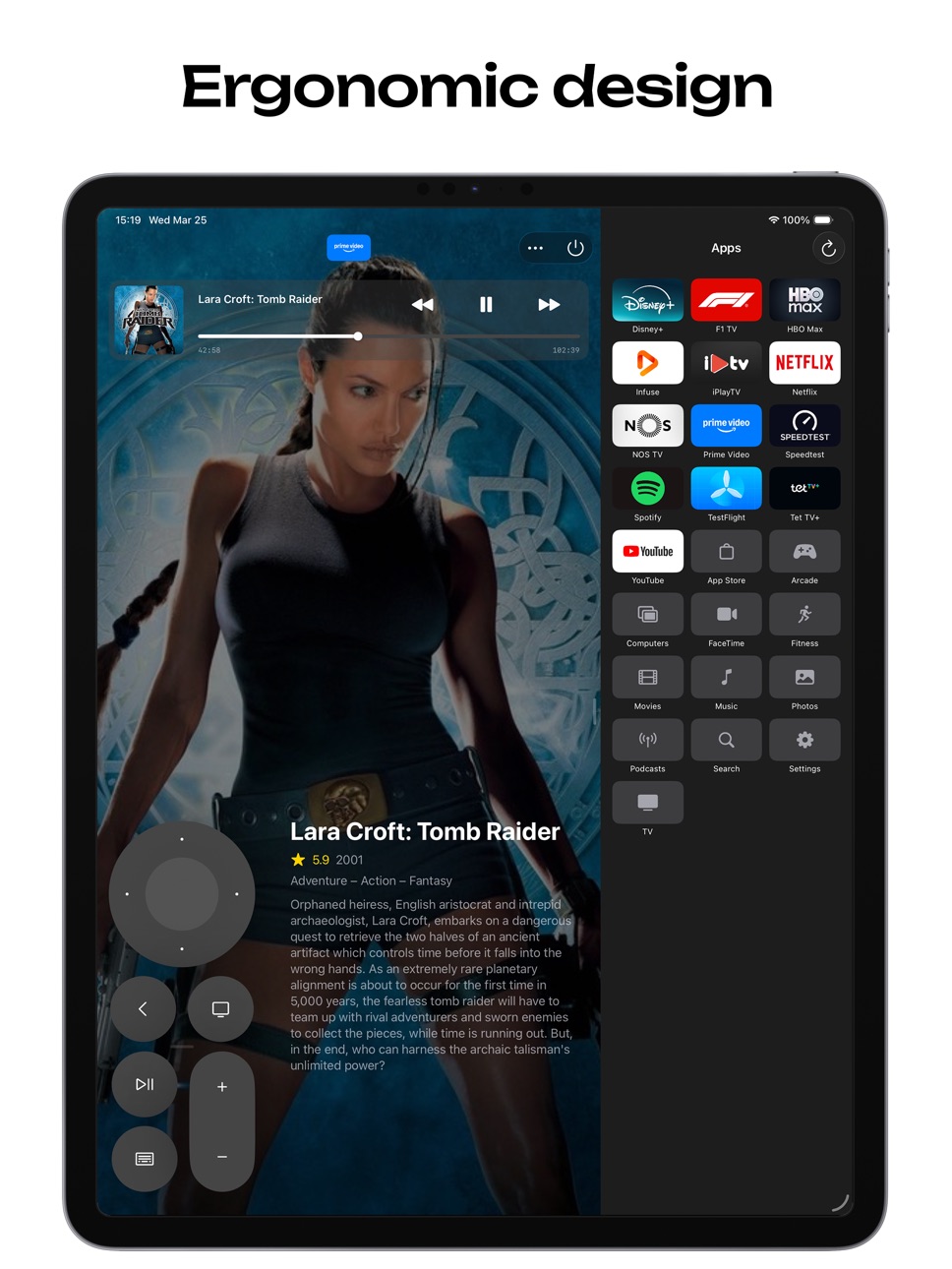
ERGONOMIC DESIGN
Built for both left-handed and right-handed use. Drag the remote to whichever side of the screen feels natural. You can also reposition it vertically to find the most comfortable spot for your grip.
NOW PLAYING WITH SEEK BAR
See what's on at a glance. The now playing bar shows artwork, title, and artist with transport controls for skip, play, and pause. Drag the seek bar to scrub to any point in the content directly from your phone – no need to hold down the d-pad like on the Siri Remote.
WHAT'S PLAYING
When you're watching something, Itsytv looks up the show or movie and displays the backdrop, plot summary, rating, genres, and cast – all without leaving the remote. Tap the info area to see the full detail view with cast photos and credits, then tap again to return to the remote.
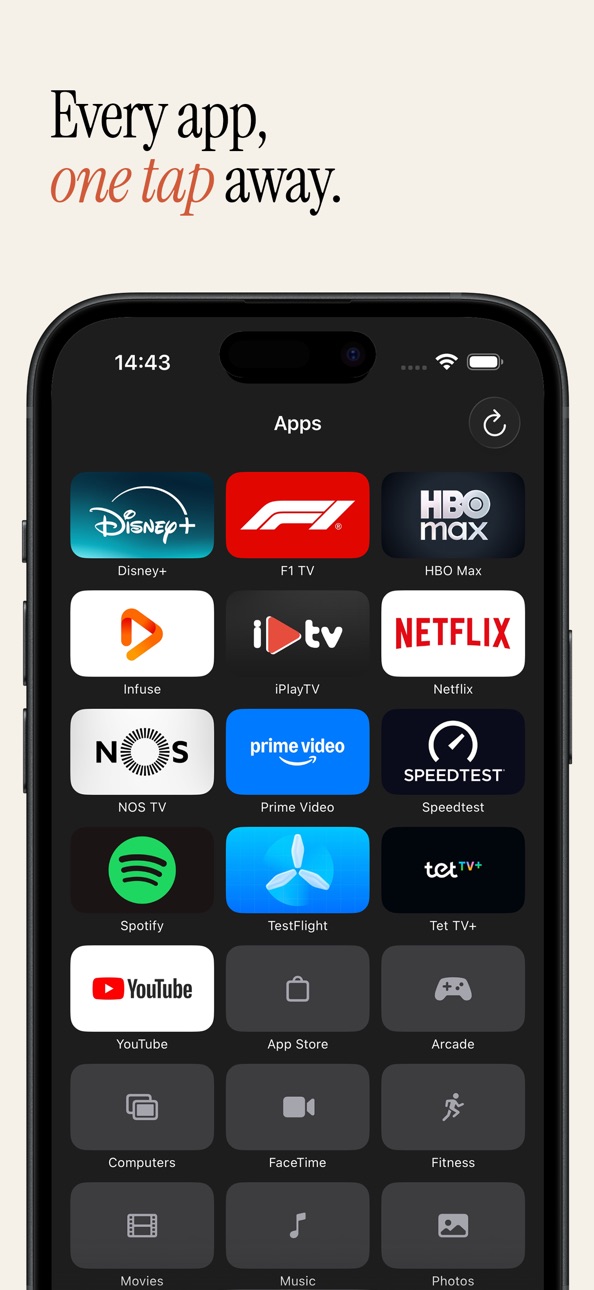
APP LAUNCHER
Browse and launch apps installed on your Apple TV. Drag to rearrange them in your preferred order. After launching an app, Itsytv can automatically switch back to the remote tab so you're ready to navigate.
KEYBOARD INPUT
Type directly into search fields and text inputs on your Apple TV. When a hardware keyboard is connected, use arrow keys, return, escape, space, and volume shortcuts to control your Apple TV without touching the screen.
UNIVERSAL APP
Works on macOS (menu bar app) and iPhone/iPad.
FEATURES
- Ergonomic design for left-handed and right-handed use
- Circular d-pad with tap, swipe, and directional input
- Play/pause, volume, back, home, and power buttons
- Now playing bar with artwork, seek bar, and transport controls
- On-screen keyboard for text input and search
- Hardware keyboard support with arrow keys and shortcuts
- App launcher with drag-to-reorder
- Content info with backdrop, plot, rating, genres, and cast
- Scrollable detail view with full cast and crew
- Automatic reconnection to your last Apple TV
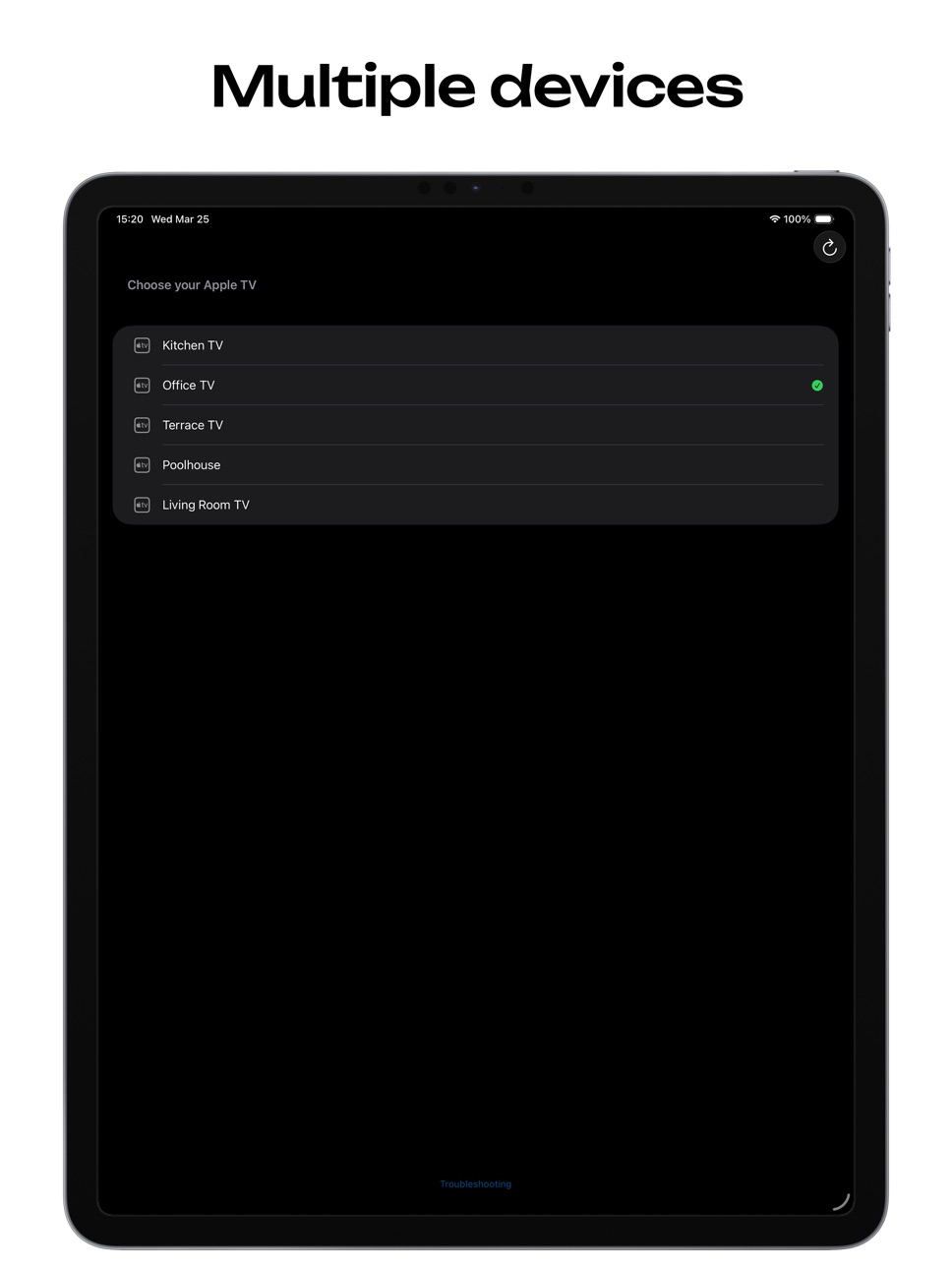
- Multiple Apple TV support with quick switching
- Works on iPhone and iPad
REQUIREMENTS
- Apple TV (4th generation or later)
- iPhone or iPad on the same Wi-Fi network
- One-time pairing with a PIN code shown on your TV
Accessibility
ipadiphonemacrealityDevicetvoswatch
Version history 13 versions
Build 886379276v1.4.32026-06-01 19:03:31
- Trakt integration – link your account in settings, then mark movies and episodes as watched or add them to your watchlist from the content details (tap again to undo)
Build 885966059v1.4.22026-05-21 22:41:44
- Bugfixes
Build 885064018v1.4.12026-04-29 19:56:43
- Apps launcher fix for tvOS 26.5
Build 884723369v1.4.02026-04-27 22:23:20
- App now available in German, French, Spanish, Italian, Dutch, Japanese, and Brazilian Portuguese – follows your iPhone language
- TMDB info language: pick which language posters, plots, and cast appear in (system, English, or any of 30+ languages) – under settings
- Keep screen on – optional toggle to prevent your iPhone or iPad from locking while Itsytv is open
Build 884328774v1.3.42026-04-10 02:25:51
- Fixed skip forward/backward buttons not responding until reconnect
Build 884281862v1.3.32026-04-09 08:46:39
- Show remaining time instead of total duration – toggle in settings, or tap the artwork or title in the now playing bar to switch
Build 884139019v1.3.22026-04-04 22:07:15
- Added "Hardware volume buttons" setting (off by default). Using side buttons to control Apple TV volume will affect device volume.
Build 884025874v1.3.12026-04-02 14:53:36
- Remote position setting (left/right) in settings
- Reorganised settings page
- Info lookup improvements: better matching for ambiguous titles
- Fix hardware volume buttons not responding after app resume
Build 883949439v1.3.02026-04-01 04:39:30
New features:
- Mute button
- Keyboard input moved to navigation bar
- Show/hide now playing widget (useful for smaller screens)
Fixes:
- Physical volume buttons improvements
Build 883900767v1.2.02026-03-30 20:20:08
New features:
- Episode-specific info for TV shows: episode name, overview, still image, and cast
- Arc seek bar around the D-pad (optional, enable in settings)
- Long press on Home button opens Control Center
- Callsheet link option (choose between IMDb, Callsheet, or none in settings)
Fixes:
- Info lookup improvements
- Unpair option on the connecting screen for stuck connections
- Apple TV discoverability improvements
Build 883839155v1.1.02026-03-28 18:35:29
New features:
- App folders – drag one app onto another to create a folder
- Side volume buttons control Apple TV volume
- Control Centre shortcut to launch the app
- Now playing widget for Home screen
- Long-press support for d-pad center and power button
- IMDb link in show info
Fixes:
- App reorder is now persistent after quit
- Swiping improvements
- Info look up improvements
Build 883749387v1.0.02026-03-26 11:37:56
Build 883803710v1.0.12026-03-26 21:37:02
- Fixed app reorder not persisting after quit
Price history by region
Currency
Show
Columns
Search
Availability 175 of 175 storefronts
| Region | Language | Price | Ratings | Avg | Version |
|---|---|---|---|---|---|
| US | en-US | USD 4.99 | 49 | 4.8 | 1.4.3 |
| DE | de-DE | EUR 5.99 | 34 | 4.8 | 1.4.3 |
| GB | en-GB | GBP 4.99 | 7 | 5.0 | 1.4.3 |
| FR | fr-FR | EUR 5.99 | 6 | 5.0 | 1.4.3 |
| CA | en-CA | CAD 6.99 | 5 | 4.8 | 1.4.3 |
| AT | de-DE | EUR 5.99 | 4 | 5.0 | 1.4.3 |
| NL | nl | EUR 5.99 | 3 | 4.7 | 1.4.3 |
| BE | en-GB | EUR 5.99 | 2 | 5.0 | 1.4.3 |
| IE | en-GB | EUR 5.99 | 1 | 5.0 | 1.4.3 |
| IT | it | EUR 5.99 | 1 | 5.0 | 1.4.3 |
| LV | en-GB | EUR 5.99 | 1 | 5.0 | 1.4.3 |
| MX | es-MX | MXN 99 | 1 | 2.0 | 1.4.3 |
| NZ | en-AU | NZD 9.99 | 1 | 5.0 | 1.4.3 |
| PT | pt-PT | EUR 5.99 | 1 | 5.0 | 1.4.3 |
| RU | ru | RUB 449 | 1 | 5.0 | 1.4.3 |
| AE | en-GB | AED 19.99 | 0 | — | 1.4.3 |
| AF | en-GB | USD 4.99 | 0 | — | 1.4.3 |
| AG | en-GB | USD 4.99 | 0 | — | 1.4.3 |
| AI | en-GB | USD 4.99 | 0 | — | 1.4.3 |
| AL | en-GB | USD 5.99 | 0 | — | 1.4.3 |
| AM | en-GB | USD 5.99 | 0 | — | 1.4.3 |
| AO | en-GB | USD 4.99 | 0 | — | 1.4.3 |
| AR | es-MX | USD 4.99 | 0 | — | 1.4.3 |
| AU | en-AU | AUD 7.99 | 0 | — | 1.4.3 |
| AZ | en-GB | USD 5.99 | 0 | — | 1.4.3 |
| BA | en-GB | EUR 5.99 | 0 | — | 1.4.3 |
| BB | en-GB | USD 5.99 | 0 | — | 1.4.3 |
| BF | en-GB | USD 4.99 | 0 | — | 1.4.3 |
| BG | en-GB | EUR 5.99 | 0 | — | 1.4.3 |
| BH | en-GB | USD 4.99 | 0 | — | 1.4.3 |
| BJ | en-GB | USD 5.99 | 0 | — | 1.4.3 |
| BM | en-GB | USD 4.99 | 0 | — | 1.4.3 |
| BN | en-GB | USD 4.99 | 0 | — | 1.4.3 |
| BO | es-MX | USD 4.99 | 0 | — | 1.4.3 |
| BR | pt-BR | BRL 29.9 | 0 | — | 1.4.3 |
| BS | en-GB | USD 4.99 | 0 | — | 1.4.3 |
| BT | en-GB | USD 4.99 | 0 | — | 1.4.3 |
| BW | en-GB | USD 4.99 | 0 | — | 1.4.3 |
| BY | en-GB | USD 5.99 | 0 | — | 1.4.3 |
| BZ | en-GB | USD 4.99 | 0 | — | 1.4.3 |
| CD | en-GB | USD 4.99 | 0 | — | 1.4.3 |
| CG | en-GB | USD 4.99 | 0 | — | 1.4.3 |
| CH | de-CH | CHF 4 | 0 | — | 1.4.3 |
| CI | fr-FR | USD 5.99 | 0 | — | 1.4.3 |
| CL | es-MX | CLP 5990 | 0 | — | 1.4.3 |
| CM | fr-FR | USD 5.99 | 0 | — | 1.4.3 |
| CN | zh-Hans-CN | CNY 38 | 0 | — | 1.4.3 |
| CO | es-MX | COP 24900 | 0 | — | 1.4.3 |
| CR | es-MX | USD 4.99 | 0 | — | 1.4.3 |
| CV | en-GB | USD 4.99 | 0 | — | 1.4.3 |
| CY | en-GB | EUR 5.99 | 0 | — | 1.4.3 |
| CZ | en-GB | CZK 129 | 0 | — | 1.4.3 |
| DK | en-GB | DKK 39 | 0 | — | 1.4.3 |
| DM | en-GB | USD 4.99 | 0 | — | 1.4.3 |
| DO | es-MX | USD 4.99 | 0 | — | 1.4.3 |
| DZ | en-GB | USD 4.99 | 0 | — | 1.4.3 |
| EC | es-MX | USD 4.99 | 0 | — | 1.4.3 |
| EE | en-GB | EUR 5.99 | 0 | — | 1.4.3 |
| EG | en-GB | EGP 249.99 | 0 | — | 1.4.3 |
| ES | es-ES | EUR 5.99 | 0 | — | 1.4.3 |
| FI | en-GB | EUR 5.99 | 0 | — | 1.4.3 |
| FJ | en-GB | USD 4.99 | 0 | — | 1.4.3 |
| FM | en-GB | USD 4.99 | 0 | — | 1.4.3 |
| GA | fr-FR | USD 4.99 | 0 | — | 1.4.3 |
| GD | en-GB | USD 4.99 | 0 | — | 1.4.3 |
| GE | en-GB | USD 5.99 | 0 | — | 1.4.3 |
| GH | en-GB | USD 5.99 | 0 | — | 1.4.3 |
| GM | en-GB | USD 4.99 | 0 | — | 1.4.3 |
| GR | en-GB | EUR 5.99 | 0 | — | 1.4.3 |
| GT | es-MX | USD 4.99 | 0 | — | 1.4.3 |
| GW | en-GB | USD 4.99 | 0 | — | 1.4.3 |
| GY | en-GB | USD 4.99 | 0 | — | 1.4.3 |
| HK | zh-Hant-HK | HKD 38 | 0 | — | 1.4.3 |
| HN | es-MX | USD 4.99 | 0 | — | 1.4.3 |
| HR | en-GB | EUR 5.99 | 0 | — | 1.4.3 |
| HU | en-GB | HUF 1990 | 0 | — | 1.4.3 |
| ID | en-GB | IDR 89000 | 0 | — | 1.4.3 |
| IL | en-GB | ILS 17.9 | 0 | — | 1.4.3 |
| IN | en-GB | INR 499 | 0 | — | 1.4.3 |
| IQ | en-GB | USD 4.99 | 0 | — | 1.4.3 |
| IS | en-GB | USD 5.99 | 0 | — | 1.4.3 |
| JM | en-GB | USD 4.99 | 0 | — | 1.4.3 |
| JO | en-GB | USD 4.99 | 0 | — | 1.4.3 |
| JP | ja | JPY 800 | 0 | — | 1.4.3 |
| KE | en-GB | USD 5.99 | 0 | — | 1.4.3 |
| KG | en-GB | USD 4.99 | 0 | — | 1.4.3 |
| KH | en-GB | USD 4.99 | 0 | — | 1.4.3 |
| KN | en-GB | USD 4.99 | 0 | — | 1.4.3 |
| KR | ko | KRW 7700 | 0 | — | 1.4.3 |
| KW | en-GB | USD 4.99 | 0 | — | 1.4.3 |
| KY | en-GB | USD 4.99 | 0 | — | 1.4.3 |
| KZ | en-GB | KZT 2990 | 0 | — | 1.4.3 |
| LA | en-GB | USD 4.99 | 0 | — | 1.4.3 |
| LB | en-GB | USD 4.99 | 0 | — | 1.4.3 |
| LC | en-GB | USD 4.99 | 0 | — | 1.4.3 |
| LK | en-GB | USD 4.99 | 0 | — | 1.4.3 |
| LR | en-GB | USD 4.99 | 0 | — | 1.4.3 |
| LT | en-GB | EUR 5.99 | 0 | — | 1.4.3 |
| LU | en-GB | EUR 5.99 | 0 | — | 1.4.3 |
| LY | en-GB | USD 4.99 | 0 | — | 1.4.3 |
| MA | en-GB | USD 4.99 | 0 | — | 1.4.3 |
| MD | en-GB | USD 5.99 | 0 | — | 1.4.3 |
| ME | en-GB | EUR 4.99 | 0 | — | 1.4.3 |
| MG | en-GB | USD 4.99 | 0 | — | 1.4.3 |
| MK | en-GB | USD 4.99 | 0 | — | 1.4.3 |
| ML | en-GB | USD 4.99 | 0 | — | 1.4.3 |
| MM | en-GB | USD 4.99 | 0 | — | 1.4.3 |
| MN | en-GB | USD 4.99 | 0 | — | 1.4.3 |
| MO | zh-Hant-HK | USD 4.99 | 0 | — | 1.4.3 |
| MR | en-GB | USD 4.99 | 0 | — | 1.4.3 |
| MS | en-GB | USD 4.99 | 0 | — | 1.4.3 |
| MT | en-GB | EUR 5.99 | 0 | — | 1.4.3 |
| MU | en-GB | USD 5.99 | 0 | — | 1.4.3 |
| MV | en-GB | USD 4.99 | 0 | — | 1.4.3 |
| MW | en-GB | USD 4.99 | 0 | — | 1.4.3 |
| MY | en-GB | MYR 22.9 | 0 | — | 1.4.3 |
| MZ | en-GB | USD 4.99 | 0 | — | 1.4.3 |
| NA | en-GB | USD 4.99 | 0 | — | 1.4.3 |
| NE | en-GB | USD 4.99 | 0 | — | 1.4.3 |
| NG | en-GB | NGN 7900 | 0 | — | 1.4.3 |
| NI | es-MX | USD 4.99 | 0 | — | 1.4.3 |
| NO | en-GB | NOK 59 | 0 | — | 1.4.3 |
| NP | en-GB | USD 5.99 | 0 | — | 1.4.3 |
| NR | en-GB | USD 4.99 | 0 | — | 1.4.3 |
| OM | en-GB | USD 4.99 | 0 | — | 1.4.3 |
| PA | es-MX | USD 4.99 | 0 | — | 1.4.3 |
| PE | es-MX | PEN 22.9 | 0 | — | 1.4.3 |
| PG | en-GB | USD 4.99 | 0 | — | 1.4.3 |
| PH | en-GB | PHP 299 | 0 | — | 1.4.3 |
| PK | en-GB | PKR 1300 | 0 | — | 1.4.3 |
| PL | en-GB | PLN 24.99 | 0 | — | 1.4.3 |
| PW | en-GB | USD 4.99 | 0 | — | 1.4.3 |
| PY | es-MX | USD 4.99 | 0 | — | 1.4.3 |
| QA | en-GB | QAR 19.99 | 0 | — | 1.4.3 |
| RO | en-GB | RON 29.99 | 0 | — | 1.4.3 |
| RS | en-GB | EUR 5.99 | 0 | — | 1.4.3 |
| RW | en-GB | USD 4.99 | 0 | — | 1.4.3 |
| SA | en-GB | SAR 19.99 | 0 | — | 1.4.3 |
| SB | en-GB | USD 4.99 | 0 | — | 1.4.3 |
| SC | en-GB | USD 4.99 | 0 | — | 1.4.3 |
| SE | sv | SEK 69 | 0 | — | 1.4.3 |
| SG | en-GB | SGD 6.98 | 0 | — | 1.4.3 |
| SI | en-GB | EUR 5.99 | 0 | — | 1.4.3 |
| SK | en-GB | EUR 5.99 | 0 | — | 1.4.3 |
| SL | en-GB | USD 4.99 | 0 | — | 1.4.3 |
| SN | en-GB | USD 5.99 | 0 | — | 1.4.3 |
| SR | en-GB | USD 4.99 | 0 | — | 1.4.3 |
| ST | en-GB | USD 4.99 | 0 | — | 1.4.3 |
| SV | es-MX | USD 4.99 | 0 | — | 1.4.3 |
| SZ | en-GB | USD 4.99 | 0 | — | 1.4.3 |
| TC | en-GB | USD 4.99 | 0 | — | 1.4.3 |
| TD | en-GB | USD 4.99 | 0 | — | 1.4.3 |
| TH | en-GB | THB 199 | 0 | — | 1.4.3 |
| TJ | en-GB | USD 4.99 | 0 | — | 1.4.3 |
| TM | en-GB | USD 4.99 | 0 | — | 1.4.3 |
| TN | en-GB | USD 4.99 | 0 | — | 1.4.3 |
| TO | en-GB | USD 4.99 | 0 | — | 1.4.3 |
| TR | en-GB | TRY 249.99 | 0 | — | 1.4.3 |
| TT | en-GB | USD 4.99 | 0 | — | 1.4.3 |
| TW | zh-Hant-TW | TWD 150 | 0 | — | 1.4.3 |
| TZ | en-GB | TZS 14900 | 0 | — | 1.4.3 |
| UA | en-GB | USD 5.99 | 0 | — | 1.4.3 |
| UG | en-GB | USD 5.99 | 0 | — | 1.4.3 |
| UY | en-GB | USD 4.99 | 0 | — | 1.4.3 |
| UZ | en-GB | USD 4.99 | 0 | — | 1.4.3 |
| VC | en-GB | USD 4.99 | 0 | — | 1.4.3 |
| VE | es-MX | USD 4.99 | 0 | — | 1.4.3 |
| VG | en-GB | USD 4.99 | 0 | — | 1.4.3 |
| VN | en-GB | VND 149000 | 0 | — | 1.4.3 |
| VU | en-GB | USD 4.99 | 0 | — | 1.4.3 |
| XK | en-GB | EUR 5.99 | 0 | — | 1.4.3 |
| YE | en-GB | USD 4.99 | 0 | — | 1.4.3 |
| ZA | en-GB | ZAR 99.99 | 0 | — | 1.4.3 |
| ZM | en-GB | USD 5.99 | 0 | — | 1.4.3 |
| ZW | en-GB | USD 5.99 | 0 | — | 1.4.3 |
Change log 17 changes · PY
✎
releaseNotes updated
- Trakt integration – link your account in settings, then mark movies and episodes as watched or add them to your watchlist from the content details (tap again
✎
description updated
Itsytv is a remote control for Apple TV that shows you what's playing.
Connect to any Apple TV on your network and control it with a familiar touch interface.
✎
subtitle updated
Posters, ratings, seek, search
✎
name updated
Itsytv: Apple TV Remote
◆
Version 1.4.3 released
- Trakt integration – link your account in settings, then mark movies and episodes as watched or add them to your watchlist from the content details (tap again to undo)
◆
Version 1.4.2 released
- Bugfixes
◆
Version 1.4.1 released
- Apps launcher fix for tvOS 26.5
◆
Version 1.4.0 released
- App now available in German, French, Spanish, Italian, Dutch, Japanese, and Brazilian Portuguese – follows your iPhone language
- TMDB info language: pick which language posters, plots, and cast appear in (system, English, or any of 30+ l
◆
Version 1.3.4 released
- Fixed skip forward/backward buttons not responding until reconnect
◆
Version 1.3.3 released
- Show remaining time instead of total duration – toggle in settings, or tap the artwork or title in the now playing bar to switch
◆
Version 1.3.2 released
- Added "Hardware volume buttons" setting (off by default). Using side buttons to control Apple TV volume will affect device volume.
◆
Version 1.3.1 released
- Remote position setting (left/right) in settings
- Reorganised settings page
- Info lookup improvements: better matching for ambiguous titles
- Fix hardware volume buttons not responding after app resume
◆
Version 1.3.0 released
New features:
- Mute button
- Keyboard input moved to navigation bar
- Show/hide now playing widget (useful for smaller screens)
Fixes:
- Physical volume buttons improvements
◆
Version 1.2.0 released
New features:
- Episode-specific info for TV shows: episode name, overview, still image, and cast
- Arc seek bar around the D-pad (optional, enable in settings)
- Long press on Home button opens Control Center
- Callsheet link option (choos
◆
Version 1.1.0 released
New features:
- App folders – drag one app onto another to create a folder
- Side volume buttons control Apple TV volume
- Control Centre shortcut to launch the app
- Now playing widget for Home screen
- Long-press support for d-pad center
◆
Version 1.0.1 released
- Fixed app reorder not persisting after quit
◆
Version 1.0.0 released